iOS App Development Guide: How to Build, Launch, and Maintain an iPhone App

iOS app development is competitive, and execution matters: in 2024, Apple reviewed 7.77 million App Store submissions and rejected 1.93 million. This guide is for founders defining a product, marketers trying to understand what engineering is building, and developers choosing a serious first iOS project. It explains how iOS apps get built, tested, submitted, and shipped.

It focuses on practical decisions, not theory: the tools you need, the frameworks worth using, how App Store submission works, and what causes apps to stall in review or fail after launch.

This iOS app development guide covers the full lifecycle: fundamentals, environment setup, path selection, the build process, languages and architecture, testing and release, common mistakes, and cost planning.

Key Takeaways:

  • iOS development requires Apple’s toolchain: Xcode runs on macOS only. Budget for a Mac and a $99/year Apple Developer Program account before anything else.
  • Choose your build path deliberately: Native Swift offers the best performance and full API access. Cross-platform (Flutter, React Native) saves time for both iOS and Android. Web apps are rarely a long-term substitute.
  • SwiftUI is the forward-looking choice: Start new projects in SwiftUI. Keep UIKit knowledge for complex UIs and legacy codebases. Objective-C is maintenance-only in 2025.
  • Scope is your biggest risk variable: Over-scoped V1 apps are a common cause of failure. Define one core problem, solve it cleanly, and ship.
  • App Store review is not a formality: Apple’s review guidelines are detailed and enforced. Read them before you design, not after submission.
  • TestFlight is non-negotiable: Every release should go through at least one TestFlight beta cycle before hitting the App Store. External testers catch issues your team may miss.
  • Post-launch is where the real work starts: Budget 15–20% of your initial development cost annually for maintenance, OS updates, performance monitoring, and feature iterations.
  • Cost scales with complexity: Simple iOS MVPs start at $25,000–$60,000. Mid-complexity apps range $60,000–$150,000, while enterprise builds exceed $150,000, with timelines scaling accordingly.
  • Architecture decisions matter: Choose MVVM or a structured pattern from the start. Modular Swift packages make large apps testable, maintainable, and scalable.
  • AI and search engines reward structure: Well-documented, well-tested apps with clear analytics from day one provide better data for product decisions and create a shared language for your team post-launch.

What Is Ios App Development, And Why Does It Matter For Modern Products?

iOS app development is the process of designing, building, testing, and deploying software applications that run on Apple’s iOS operating system, powering iPhone, and in most cases also iPad. It uses Apple’s native toolchain: the Swift programming language (or Objective-C for legacy systems), the Xcode IDE, and frameworks like SwiftUI and UIKit.

It specifically refers to building apps within Apple’s platform ecosystem. Unlike general mobile app development, which might involve Android, web, or cross-platform stacks, iOS development targets the Apple runtime, follows App Store distribution rules, and requires Apple’s proprietary toolchain.

That specificity is also its strength: iOS developers work within a tightly controlled, high-quality environment with predictable device specs and a notoriously engaged user base.

Ready to Build Your iOS App?

Dive into the fundamentals and learn the tools and frameworks that’ll help you create your first iPhone app.

How Does Iphone App Development Differ From General Mobile App Development?

iOS app development is distinct from general mobile app development due to differences in platform tools, programming languages, and user base.

Here’s a quick comparison:

Dimension iOS App Development General Mobile Development
Primary language Swift (or Objective-C) Varies: Kotlin, Java, Dart, JS
IDE Xcode (macOS only) Android Studio, VS Code, etc.
Distribution App Store (curated review) Play Store, web, sideload
Device fragmentation Low: limited Apple devices High: thousands of Android variants
User monetization Higher average revenue per user Larger global reach
OS update adoption Fast (~80%+ on latest iOS within months) Fragmented across versions

When is iOS Mobile App Development the Right Choice?

IOS app development is ideal in specific scenarios where the platform offers clear advantages:

  • Target Audience: If your audience is predominantly in high-income markets like North America and Western Europe, iOS is the preferred platform due to its concentration of affluent users.
  • Monetization Focus: When revenue, conversions, or transaction value per user are more important than sheer install volume, iOS delivers better results, with its ecosystem generating nearly $1.3 trillion in billings and sales over the last 2 years.
  • Hardware-Software Integration: If your app depends on features like ARKit, Core ML, HealthKit, or Apple Pay, iOS is the better choice due to its seamless hardware–software integration.

Moreover, many product teams opt to launch on iOS first because:

  • Engaged Audience: iOS users tend to be highly engaged, offering a responsive user base for early-stage feedback.
  • Faster Feedback Loops: iOS allows for quicker iterations and faster validation, crucial for refining your product.
  • High-Quality Bar: The quality standards of the App Store ensure that early development is focused on creating robust, polished products.

These factors make iOS an excellent choice for businesses looking to validate products quickly and maximize revenue.

How Do You Get Started With Ios App Development?

What Hardware And Software Do You Need?

Getting started with iOS development requires one non-negotiable: a Mac. Xcode, Apple’s official ID, only runs on macOS. Everything else follows from that.

Setup checklist:

  • Mac running macOS 15 (Sequoia) or later, required for Xcode 16+
  • Xcode 16 or later, download free from the Mac App Store
  • Apple ID, needed to run apps on a simulator; required for device testing and distribution
  • Apple Developer Program account, $99/year; required to publish to the App Store
  • iPhone or iPad for physical testing, simulators cover most cases but not all (camera, Bluetooth, push notifications)
  • Design tools, Figma or Sketch for UI/UX wireframing before build

Why Is Xcode Essential?

Xcode is Apple’s integrated development environment and the only officially supported tool for building, signing, and submitting iOS apps. It includes the Swift compiler, Interface Builder, a device simulator, performance profiler (Instruments), and direct integration with App Store Connect and TestFlight.

There is no workaround for core build and submission tasks.

What does the Apple Developer Program include?

The $99/year Apple Developer Program gives you App Store distribution rights, access to beta OS releases, TestFlight beta testing for up to 10,000 external testers, Xcode Cloud compute minutes (limited allotment), and App Store Connect, the backend for managing your app’s metadata, pricing, analytics, and review submissions.

Can You Do Ios App Development On Windows?

Not natively. Xcode requires macOS, and Apple’s signing and build toolchain is Mac-only. Windows developers have a few limited workarounds, cloud Mac services like MacStadium, or cross-platform frameworks  like Flutter or React Native that allow code authoring on Windows but still require a Mac for the final iOS build and submission.

If your team is Windows-first, budget for either a Mac mini or a cloud Mac environment. Alternatively, you can hire iOS developers who already have access to the necessary hardware and software to streamline your development process.

Need Help Navigating the Development Process

Reach out to expert iOS developers who can guide you through the entire app development lifecycle, from design to launch.


How Do You Choose The Right Path To Create An Iphone App?

The biggest early decision isn’t which features to build, it’s how to build.
There are three main approaches, each with real trade-offs.

Here’s a decision matrix to ease your process:

Approach Best for Performance iOS feature access Cost vs. speed
Native iOS (Swift + SwiftUI/UIKit) Premium apps, hardware-dependent features, complex UIs Best Full Higher cost, best quality
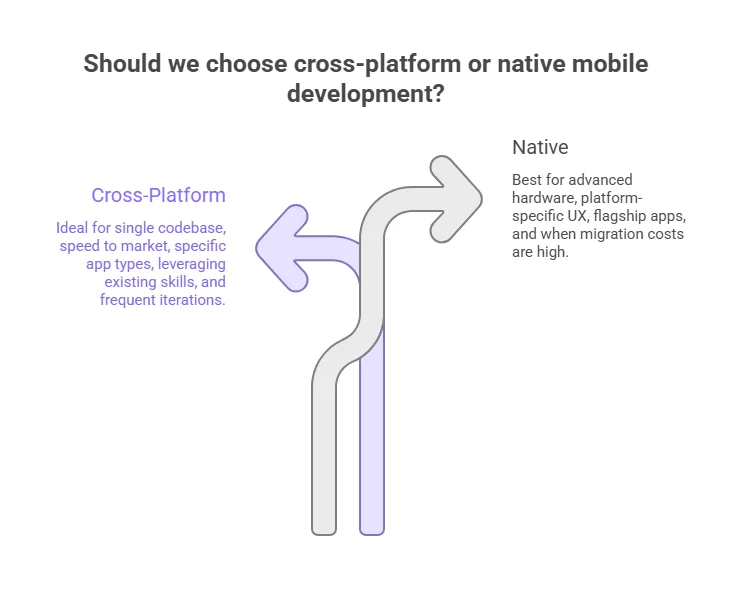
Cross-platform (Flutter, React Native) iOS + Android from one codebase Near-native Partial Faster MVP, some feature gaps
Web app / PWA Content, simple utilities, low-budget Moderate Limited Lowest cost, significant limitations

 When Does iPhone Web App Development Make Sense?

A web app (Progressive Web App or mobile-optimized website) makes sense for simple content delivery, internal tools, or proof-of-concept validation before committing to a native build.

Web apps cannot access most native iOS APIs, no push notifications via APNs, no access to HealthKit, NFC, or ARKit, and no App Store presence. They are viable starting points, not long-term substitutes for a serious product.

How Do You Make An App For Ios And Android Without Duplicating Effort?

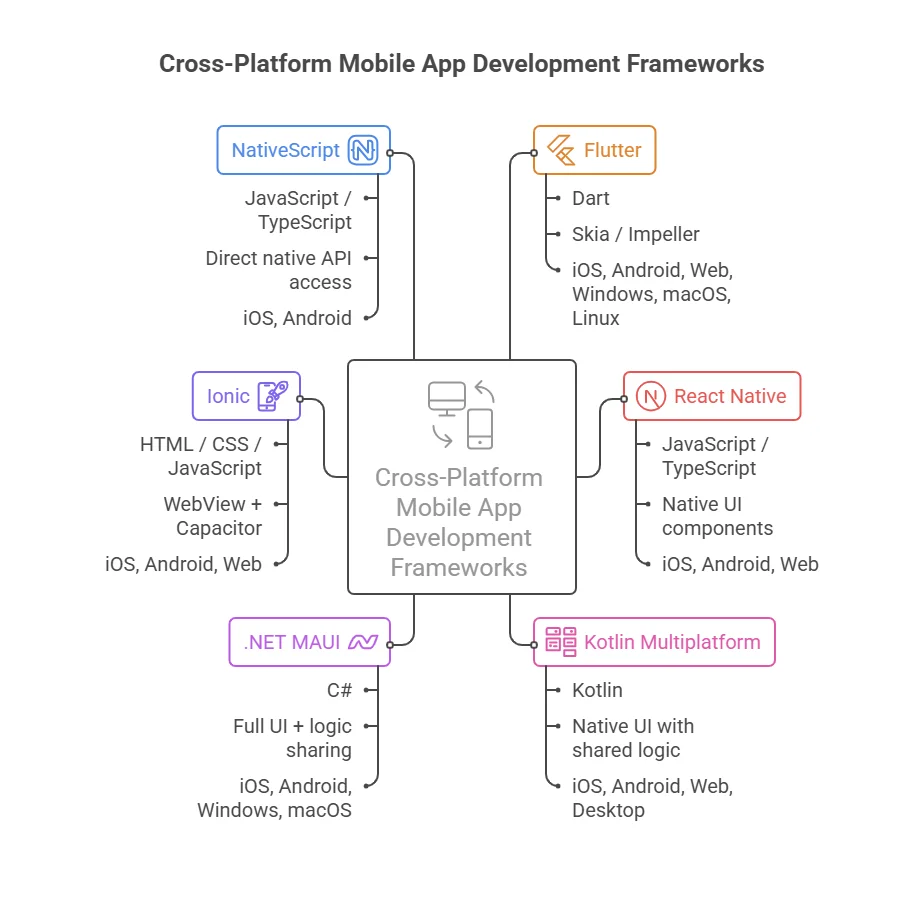
If you need both platforms i.e. ios and android, Flutter (Google) and React Native (Meta) are the two leading cross-platform frameworks. Flutter compiles to native ARM code and renders its own UI layer; React Native bridges to native components.

Both allow a shared codebase with platform-specific customizations. The trade-off is that new iOS-specific features (like iOS 18 widgets or Live Activities) arrive in native Swift first and may take months to reach cross-platform plugins.

For products where iOS experience is a core differentiator, native development remains the strongest choice.

How Do You Make An iPhone App From Idea To App Store Launch?

This is the core of the process. Whether you’re working solo or leading a team, every iOS app follows a broadly similar path from concept to live product.

  1. Define the App’s Goal and Audience

    Before writing a line of code, articulate the problem your app solves and who it solves it for. Validate this with user interviews, competitive research, and a clear success metric (retention, revenue, activation rate). Scope problems are responsible for more failed apps than technical debt.

  2. Plan Features and User Flows

    Map every screen and interaction. Define what belongs in V1 (your MVP) versus a future release. Use tools like Figma to wireframe flows before any design polish. This is where you set the project’s scope, and resist the temptation to add features that do not serve the core use case. Many product teams use an AI Mind Map Generator during this stage to visually map app features, user flows, and MVP scope before development begins.

  3. Design with SwiftUI or UIKit in mind

    Work with Apple’s Human Interface Guidelines from the start. IOS users have strong expectations for navigation patterns, gesture behaviors, and accessibility. Designs that ignore native conventions get rejected, either by users or by App Store reviewers.

  4. Build the Frontend And Backend

    Frontend development uses Swift with SwiftUI or UIKit (more on the framework decision below). Backend systems, APIs, databases, authentication, can be built with any server-side stack or handled via services like Firebase, Supabase, or AWS Amplify. Define your data contracts (API schemas) early so frontend and backend can be developed in parallel.

  5. Integrate APIs And Third-Party Services

    Most production apps integrate external APIs: payment processors (Stripe, Apple Pay), analytics (Mixpanel, Amplitude), push notifications (APNs), social login (Sign in with Apple, required if your app offers third-party sign-in), crash reporting (Sentry, Firebase Crashlytics), and more. Plan these integrations during architecture, not after.

  6. Test and Iterate

    Unit tests, UI tests, and manual QA are all necessary. Use Xcode’s testing framework for automated tests and TestFlight for distributing beta builds to real users before submission. Expect at least two to three beta cycles before your app is submission-ready.

  7. Prepare For App Store Submission

    This step is more involved than most first-timers expect. You’ll need: a finalized app icon and screenshots for every supported device size, a privacy policy URL, App Store metadata (name, subtitle, description, keywords), an age rating, and, critically, compliance with Apple’s App Review Guidelines. As of April 2025, apps must be built with the iOS 18 SDK or later. Review typically takes 24–48 hours for standard submissions.

Build-To-Launch Mini Timeline:

Phase Typical duration (MVP)
Discovery & design 3–5 weeks
Development (frontend + backend) 8–16 weeks
QA + beta testing 2–4 weeks
App Store submission prep 1 week
Review and launch 1–3 days
Total ~4–6 months

How Do You Build An iOS App With The Right Languages, Frameworks, And Architecture?

Should you learn Swift first?

Yes. Swift is Apple’s primary language for iOS development, introduced in 2014 and now the default for all new projects. It is fast, safe (strong type system, no null pointer exceptions by default), and modern. Swift is also open source and increasingly used for server-side development. Starting with Swift means you are learning the language the entire Apple ecosystem has converged on.

SwiftUI vs UIKit: which should you use?

This is the most common framework question for teams building iOS apps today.

Framework Best for Syntax style Cross-platform Maturity
SwiftUI New apps, rapid development, Apple Watch/Mac extensions Declarative Yes (iOS, macOS, watchOS, tvOS) Introduced 2019; rapidly maturing
UIKit Complex or legacy apps, fine-grained UI control Imperative iOS/iPadOS only (primarily) Battle-tested since 2008
Objective-C Maintaining older codebases Verbose, C-based iOS only Legacy; no new projects

Practical guidance for 2026: Start new projects with SwiftUI. Apple has signaled it as the future of UI development across all Apple platforms, and WWDC 2025 demonstrated continued investment (including Liquid Glass design system integration).

Use UIKit for complex list performance, highly custom UI controls, or when integrating with older codebases. The two frameworks are interoperable, you can embed UIKit views inside SwiftUI and vice versa.

When Is Objective-C Still Relevant?

Objective-C remains relevant only when maintaining apps with existing Objective-C codebases or integrating with older C/C++ libraries. No new iOS project should start in Objective-C in 2025.

What Architecture Patterns Help Apps Scale?

Well-structured iOS apps use one of several proven architecture patterns: MVC (Model-View-Controller, Apple’s original pattern, simple but gets messy at scale), MVVM (Model-View-ViewModel, cleaner separation, preferred with SwiftUI), or TCA (The Composable Architecture, powerful for complex state management).

Pair any of these with a modular app structure (separate Swift packages for features), and your app will be far easier to test, maintain, and scale.

How Do You Test, Ship, And Maintain An iOS App Effectively?

Testing ensures your iOS app is stable, functional, and user-friendly.

The most important testing types to focus on include:

  • Unit tests: Test business logic, data models, and utility functions in isolation.
  • UI tests: Simulate user interactions across key flows of your app.
  • Integration tests: Verify that components and APIs work together correctly.
  • Manual QA: Test on physical devices across different iOS versions to spot real-world issues.
  • Accessibility audit: Use Xcode’s Accessibility Inspector to ensure your app is accessible to everyone before each release.
  • Performance profiling: Use Instruments to catch memory leaks, CPU spikes, and other performance bottlenecks.

How Does Testflight Fit Into Release Workflows?

TestFlight is Apple’s official beta distribution platform, integral to every iOS release process. It allows you to:

  • Internal testing: With up to 100 users (no App Store review needed), your team can validate builds on a daily basis.
  • External testing: Up to 10,000 users (requires a brief TestFlight review) can provide valuable real-world feedback before you submit to the App Store.
  • Build the habit: No feature goes to production without a TestFlight cycle.

When Should Teams Use Xcode Cloud?

Xcode Cloud is Apple’s integrated CI/CD service, automating much of the build, testing, and deployment process. It allows you to:

  • Automatically build, test, and archive your app when code is pushed to a branch.
  • Distribute builds to TestFlight and notify the team of build failures.

For smaller teams or solo developers, Xcode Cloud’s included compute minutes are typically enough. Larger teams may supplement it with GitHub Actions or third-party services like Fastlane for more complex pipeline requirements.

Release workflow: Code commit → Xcode Cloud build → Automated tests → TestFlight (internal) → TestFlight (external beta) → App Store Connect submission → Apple review → Live.

 What Happens After Launch?

Post-launch is a new phase, not the finish line. To ensure long-term success, a well-maintained iOS app requires:

  • Monitoring crash rates (target < 0.2%).
  • Responding to App Store reviews to address user concerns.
  • Releasing compatibility updates within weeks of major iOS updates.
  • Tracking user retention and engagement through analytics.
  • Planning future features and updates based on user feedback.
  • Maintenance typically costs 15–20% of the initial development budget annually.

What Common Mistakes Slow Down iOS App Development?

The following mistakes are responsible for the majority of failed launches, App Store rejections, and expensive post-launch rewrites.

Mistake Why it hurts Fix
Choosing the wrong app scope Too many V1 features bloat timelines and budgets Define a strict MVP: one core problem, clearly solved
Ignoring App Store Guidelines Leads to rejection and review delays Read Apple’s Review Guidelines before writing code
Weak project architecture Small apps become unmaintainable quickly Choose MVVM or TCA early; use Swift packages for modularity
Not planning APIs and analytics upfront Retrofitting data contracts is expensive Define API schemas and event tracking during architecture
Underinvesting in testing Bugs reach production; users leave Enforce unit tests and mandatory TestFlight cycles before every release
Skipping accessibility Fails audits, alienates users, risks rejection Use VoiceOver, Dynamic Type, and Xcode’s Accessibility Inspector
Ignoring performance on older devices Crashes and lag on devices outside the test lab Test on the minimum supported OS version, not just latest

What Should You Know About iOS App Development Cost, Timeline, And Team Planning?

iPhone app development costs are driven by four primary variables: feature complexity, UI/UX quality, backend requirements, and team location. A utility app with a simple backend is a fundamentally different project than a social platform or a real-time marketplace.

App tier Estimated cost Timeline
Simple / utility app $25,000–$60,000 2–4 months
Mid-complexity app (MVP) $60,000–$150,000 4–7 months
Complex / enterprise app $150,000–$400,000+ 7–18 months

Note: Rates vary significantly by team location. US-based agencies and developers command the upper end of these ranges.

What Does An MVP Usually Include?

A well-scoped iOS MVP development typically includes: user authentication, one to three core user flows, basic analytics instrumentation, crash reporting, a functional (not perfect) UI, and App Store listing assets. It excludes: social features, complex personalization, advanced offline sync, and admin dashboards. The goal is to answer one question: do users want this, and will they come back?

What Roles Are Typically Involved?

A typical iOS development team includes an iOS engineer (Swift), a backend engineer (API/database), a UI/UX designer, a QA engineer, and a product manager or technical lead. Solo developers and small agencies often compress these roles, but the disciplines remain, and the shortcuts usually show up post-launch.

Curious About Your iOSApp's Development Cost?

Get a free estimate based on your ios app’s complexity, features, and timeline. Start planning your budget today.

Conclusion

iOS app development is a series of connected decisions, each shaping your outcome. This iOS app development guide highlights the importance of choosing the right framework, defining a clear MVP, building testing into your workflow, and understanding App Store requirements.

These steps are essential, not afterthoughts. Successful teams approach the process as a disciplined strategy, not a sprint. With tools like Swift, SwiftUI, and Apple’s toolchain, the technical side is more accessible than ever, but strategic planning is crucial.

Whether you’re building the app yourself, leading a team, or briefing an agency, start with a clear problem, validate before you build, and view the App Store as the start of an ongoing relationship with users. Partnering with AppVerticals can ease the process for you, helping you build an ios app in partnership with expert ios developers.

Looking for a Custom iOS App Solution?

Our team specializes in custom iOS app development, from MVP to full-scale enterprise apps. Let’s create an app that fits your unique vision and business goals.

More Related Guides

  • Enterprise App Development Guide: A comprehensive guide for developing scalable, secure, and efficient mobile applications tailored to meet the complex needs of large organizations.
  • Telemedicine App Development Guide: A specialized resource that covers best practices, regulations, and technical considerations for building secure, HIPAA-compliant telemedicine apps.
  • Build an iOS App With Claude Code: A step-by-step guide on using Claude Code to streamline the process of building high-quality iOS apps, from prototyping to deployment, with AI-powered assistance.
  • Apple vs Android: The article discusses why building the Highlights app for both Apple and Android was a strategic decision that enhanced user reach and operational efficiency.

SaaS Application Development in 2026: Cost, Process, & Timeline

SaaS application development is the process of building cloud-based software that users access through a browser, typically on a subscription model. But in practice, building a successful SaaS product is about how users interact with it over time.

When I launched my first SaaS product, I learned this the hard way. Features I expected to matter were ignored, while small interactions I overlooked became critical to user retention. That’s the reality of SaaS: minor friction points compound quickly.

Today, companies are running over 100 SaaS applications on average, each with its own demands for uptime, integrations, and ongoing improvement. This shows expectations around performance, integrations, and usability are higher than ever. 

Whether you build in-house or partner with a SaaS application development company, early decisions in SaaS application development directly impact scalability, user experience, and long-term success.

SaaS Application Development in 2026 (Quick Takeaways)

  • SaaS products typically cost $25K–$500K+, but costs rise sharply once you add billing, integrations, and role-based access.
  • A focused MVP takes 8–12 weeks, while full platforms extend to 4–9 months depending on scope.
  • Most timelines are delayed by scope creep and late decisions, not engineering complexity.
  • SaaS development is driven by core workflows, not feature lists.
  • Critical features include authentication, multi-tenancy, billing, and onboarding.
  • Tech stack matters less than how well it supports scalability and iteration.
  • Major challenges come from onboarding gaps, poor product-market fit, integrations, and scaling issues.

Why Invest in SaaS App Development?

Invest in SaaS app development because it lets software scale with how people actually use it, without scaling cost, maintenance fuss, or brittle on-premises dependencies.

I once watched a team spend months polishing an internally hosted tool, only to watch users delay adoption because installation was too painful and updates were disruptive. When we flipped to SaaS, everything changed: a browser login became the install, and every improvement landed instantly. 

That shift rewired how I think about building software that people stick with.

Organizations used an average of about 106 SaaS applications to run collaboration, operations, CRM, analytics, and more. 

Approximately 85 % of all business software usage is expected to be SaaS‑based, meaning most enterprise stacks will be cloud‑native rather than on‑premise legacy systems. 

From a business perspective, that matters for a couple of reasons:

  • Cost predictability: SaaS moves spending from unpredictable capital outlays and ops overhead into subscription models tied to actual usage.
  • Rapid iteration: Updates and feature improvements can roll out continuously — not as painful quarterly upgrades.
  • Reduced maintenance burden: You don’t hire armies of ops engineers to push releases or maintain servers.

That’s why saas web development aligns how software is built with how teams actually use software in the real world, which are flexible, iterative, and scalable without dragging teams down.

What Are the Different Types of SaaS Applications?

At the most basic level, SaaS applications fall into two broad categories: vertical and horizontal. Understanding this distinction can shape how you approach saas web application development or saas app development with clarity about your audience and growth model.

Vertical SaaS products are built for a specific industry or niche. These are crafted for workflows, regulations, and problems that only one segment of the market truly cares about. 

For example, a platform tailored for healthcare compliance or restaurant point‑of‑sale systems speaks directly to the unique challenges of those fields, rather than offering broad, one‑size‑fits‑all features.

In contrast, Horizontal SaaS products tackle general business functions that cut across industries. Things like customer relationship management, internal communication, accounting, or project planning are part of it. 

These tools aim to help any business that shares a common operational need.

Then there’s another useful lens: enterprise vs. consumer SaaS

Enterprise SaaS applications are focused on organizational use, such as teams, workflows, compliance, and integrations that matter to businesses. 

Consumer SaaS applications are aimed at individual users or small teams, often prioritizing simplicity and self-serve models. 

Products like enterprise resource planning systems or internal HR platforms are classic enterprise SaaS; apps like personal finance trackers or simple productivity tools often fit more into the consumer SaaS mold.

Type Focus / Audience Key Characteristics Example
Vertical SaaS Specific industry or niche Domain-specific workflows, compliance, higher user stickiness Veeva Systems (Life Sciences CRM), Toast (Restaurant POS)
Horizontal SaaS Broad business functions across industries Generic tools, scalable audience, broader competition Slack (Communication), QuickBooks (Accounting)
Enterprise SaaS Organizations / teams Integration-heavy, workflow-focused, admin controls Salesforce (CRM for large enterprises), Workday (HR & Finance)
Consumer SaaS Individual users / small teams Simpler onboarding, self-serve, focus on ease-of-use Trello (Project Management), Duolingo (Language Learning)

Build Your SaaS the Right Way, From Day One

Most SaaS products fail due to early decisions, not poor execution. Get clarity on architecture, scope, and scalability before you commit months of development.

Validate Your SaaS Approach

How Much Does SaaS Application Development Cost in 2026

SaaS application development typically costs between $25,000 and $500,000+, depending on product complexity, scale, and feature set.

A practical way to estimate cost is by looking at development stages:

Stage Estimated Cost What You’re Building
MVP (Basic SaaS) $20K – $100K Core features, basic UI, limited integrations
Mid-Level SaaS $100K – $300K Scalable backend, APIs, integrations
Enterprise SaaS $300K – $500K+ Advanced workflows, analytics, high scalability, security

In most cases, costs increase quickly once you move beyond a basic MVP. Features like authentication, billing systems, role-based access, and integrations significantly expand scope.

According to Statista SaaS market data, the global SaaS market worldwide is expected to surpass US$512.27bn in 2026. This pushes businesses to invest more in scalable and reliable platforms rather than basic tools.

What actually drives cost comes down to a few factors.

Feature complexity has the biggest impact. A simple product is relatively affordable, but real-time data, analytics, and advanced workflows require more engineering effort.

Infrastructure and scalability also matter. Building for growth requires proper cloud architecture and database design, which adds upfront cost but prevents expensive rework later.

Team structure plays a role as well. In-house teams increase long-term cost, while outsourcing software development or staff augmentation provides more flexibility depending on timelines and expertise.

One mistake teams make is overbuilding too early. Launching with a focused MVP is usually more cost-efficient than building a full product without validated demand.

In practice, SaaS development cost is about building something that can scale without breaking as usage grows.

How Long Does It Take to Build a SaaS Application?

A SaaS application typically takes 3 to 9 months to build, depending on scope, complexity, and team setup. A lean MVP can be launched in 8–12 weeks, while more complex platforms usually require 6–12 months.

In practice, timelines are less about “coding speed” and more about how much functionality you’re trying to include from day one.

Here’s how timelines usually break down in real projects:

Phase Time Range What Actually Happens
Planning & Scoping 2–4 weeks Define MVP, user flows, feature priorities
UI/UX Design 3–5 weeks Wireframes, design system, user journeys
Core Development 8–16 weeks Backend logic, frontend, APIs
Integrations & Features 2–6 weeks Payments, auth, third-party tools
Testing & Stabilization 2–4 weeks Bug fixing, performance tuning
Launch & Deployment 1–2 weeks Production release, monitoring setup

The timeline starts to expand when you move beyond a basic MVP.

Adding features like:

  • subscription billing
  • role-based access
  • real-time updates
  • analytics dashboards

can easily add 4–8+ weeks depending on complexity.

Team setup also impacts delivery speed. A small, experienced team working on a focused scope will move faster than a larger team dealing with unclear requirements or frequent changes.

From what I’ve seen, the biggest delays don’t come from engineering. They come from scope creep and late decisions.
When features keep getting added mid-build, timelines stretch quickly.

That’s why most successful SaaS products follow a simple approach:

launch a focused MVP in 2–3 months, then expand based on real usage.

Avoid Costly Rebuilds Later

Overbuilding early, weak structure, and poor onboarding decisions lead to expensive rework. Start with a focused MVP that scales without breaking.

Get Expert Help

How to Build a SaaS Application (SaaS Development Process In Simple Steps)

SaaS application development typically involves 5–7 stages. It is a series of decisions made under pressure, like timeline pressure, budget pressure, and stakeholder pressure.

From ideation to launch, the process can be broken down into key stages that involve critical decisions to ensure product-market fit, scalability, and user satisfaction. 

Here’s a step-by-step guide to building a successful SaaS application in 2026.

1. Start with a Real Problem and Cut the Fat

Forget building the next all-in-one platform. Your first step is simple: solve a real problem for your target audience. If you’re trying to build all the features under the sun just because you can, you’re wasting your time.

Look, people want SaaS products that get straight to the point. The quicker you solve the problem, the faster you’ll get feedback. 

You need to test your idea without coding first. You don’t need a whole team, you just need a lean MVP to see if people are actually interested.

Pro tip: Use landing pages or no-code platforms to get immediate feedback on your product idea. You can validate your concept before sinking money into code. 

2. Build Your Tech Stack for Today and Tomorrow

You don’t need to get fancy with your tech stack right out the gate. But you do need to build scalability and security into your SaaS app. 

I’m not talking about a fancy monolithic architecture that’ll be impossible to scale in a few months. I’m talking about cloud-native frameworks and modern solutions that grow with you, like AWS, Kubernetes, and Docker.

These tools are reliable, widely adopted, and future-proof. And no, you don’t need to build it all yourself. If you’re just getting started, focus on off-the-shelf services (think: Stripe for payments, Auth0 for authentication). 

The tech today is built to scale as you grow, so don’t overcomplicate it.

3. UX Is Everything. Don’t Underestimate It

Here’s the deal: users hate complexity. If your app isn’t intuitive, they won’t use it. Simple as that. Look at Slack. Their entire product revolves around ease of use and seamless collaboration. In 2026, if you aren’t thinking about user experience (UX), you’re already behind.

Build an onboarding flow that is simple and intuitive, using AI-driven tutorials to guide users through the most critical features. 

Tools like Appcues and WalkMe can be used to create these seamless experiences. Offering a personalized dashboard with AI-driven recommendations can also help businesses improve user engagement.

4. Focus on Building the Foundation First

Building features is easy. Building solid infrastructure? That’s harder.

Start by laying down a solid foundation: authentication, database design, and APIs. In the rush to build flashy features, this gets skipped, and it shows later. The last thing you want is to realize after months of work that your app can’t scale because the foundation wasn’t built right.

Think of it like Dropbox. They spent time ensuring file syncing worked before they even thought about design. You want your backend to be solid and ready for growth. Once that’s locked down, you can build features on top of it.

5. Get Billing Right from Day One

Here’s a mistake I’ve seen startups make way too many times: delaying billing integration until after the product is built. Big mistake.

Your pricing model is integral to your app’s success, so make sure it works from the start. Don’t make users jump through hoops to access premium features, or worse, let them use the app for free indefinitely. 

Stripe didn’t wait to integrate payments. They built their payment system into their app from the start.

If you leave billing till later, you’re just setting yourself up for more work, with billing logic that conflicts with everything else. Get it right from day one.

6. Integrations Will Make or Break You

You’re going to need to connect your app to third-party services. It’s almost inevitable. Whether it’s CRM systems, payment gateways, or email marketing tools, you’ll need these integrations, but don’t let them sidetrack you.

Plan for it, but don’t let it expand your scope unnecessarily. Integrations will always bring unexpected complexity. Build them slowly, and ensure that each one is absolutely necessary.

7. Testing Doesn’t Break the Product. Users Do

Your QA team will test the app in perfect conditions. That’s not how your users will use it. Real-world usage is messy. Two users trying to edit the same record? Expect data conflicts. Not to mention, your app needs to handle edge cases gracefully.

Here’s the rule: Test as your users will. Don’t test just the “happy path”. Simulate real scenarios, like multiple users interacting with the app simultaneously, and load testing to see how your system holds up under stress.

If you don’t test with real-world scenarios in mind, you’re going to encounter nasty surprises once your users start flooding in.

8. Don’t Wait for the Launch. Real Feedback Starts After It

Your MVP launch doesn’t prove your app works. It proves that real users can use it, and that’s just the start. 

Post-launch, you’ll need to gather data, monitor usage, and iterate. Feedback from real users will tell you what works and what doesn’t.

I’ve seen teams spend months building fancy dashboards that no one cares about, while users drop off at the onboarding step because it’s too complicated. You don’t know what your users need until they start using your app in the wild.

What Features Are Required for a Successful SaaS Application in 2026?

SaaS features are not equal. Some determine whether the product works at all. Others determine whether users stay. And some only add surface-level value.

Strong SaaS products are built by prioritizing features that support usage, retention, and scale, not by adding everything at once.

1. Authentication and Access Control

Every SaaS product starts here.

This is not just login and signup. It includes:

  • session handling
  • password flows
  • role-based access
  • permissions at user and account level

In one B2B SaaS build, skipping proper role control early meant rewriting access logic when enterprise clients needed restricted views.

Cost range: $5,000 – $15,000

Why it matters:
This controls who can see and do what. If this is weak, everything else becomes harder to manage.

2. Multi-Tenant Architecture

This defines how your product serves multiple customers.

Most SaaS platforms use shared infrastructure where:

  • each company (tenant) has isolated data
  • users operate within their account

In one project, poor tenant separation caused data visibility issues across accounts — a critical failure for enterprise clients.

Cost range: $10,000 – $30,000

Why it matters:
This is what makes SaaS scalable and cost-efficient.

3. Subscription and Billing System

SaaS products run on recurring revenue.

This includes:

  • pricing tiers
  • subscription lifecycle (trial, active, expired)
  • usage limits
  • payment integration

In one SaaS tool, billing was added late, which forced changes in:

  • permissions
  • feature access
  • user flows

Cost range: $8,000 – $25,000

Why it matters:
Billing defines how users interact with your product over time.

4. Core Workflow Engine

This is the product.

It’s the feature users come back for:

  • managing tasks
  • tracking deals
  • sending invoices
  • processing data

In most SaaS products, 70–80% of usage revolves around this core workflow.

Cost range: $20,000 – $80,000+

Why it matters:
If this is weak, no other feature compensates for it.

5. API and Integration Layer

SaaS products don’t operate in isolation.

They connect with:

  • CRMs
  • payment systems
  • analytics tools
  • third-party platforms

In one CRM SaaS build, adding a single integration delayed release by weeks due to:

  • data mismatch
  • error handling
  • sync issues

Cost range: $5,000 – $20,000 per integration

Why it matters:
Integrations increase product value but also complexity.

6. Analytics and Reporting

Users want visibility into what’s happening.

This includes:

  • dashboards
  • usage metrics
  • performance tracking

In many SaaS tools, reporting becomes critical after adoption — not before.

Cost range: $8,000 – $25,000

Why it matters:
This helps users understand value and drives retention.

7. Notifications and Communication System

This keeps users engaged.

Examples:

  • email alerts
  • in-app notifications
  • activity updates

In one SaaS product, adding simple email notifications increased user return frequency significantly.

Cost range: $3,000 – $10,000

Why it matters:
Without this, users forget to come back.

8. Onboarding and User Setup Flow

This determines whether users stay after signup.

It includes:

  • guided setup
  • default configurations
  • first-use experience

In multiple SaaS products, improving onboarding had more impact than adding new features.

Cost range: $5,000 – $15,000

Why it matters:
Most churn happens early. This reduces it.

9. Security and Compliance Layer

As the product grows, this becomes critical.

This includes:

  • data encryption
  • secure authentication
  • compliance (HIPAA, GDPR, etc.)

In regulated industries, this is not optional.

Cost range: $10,000 – $40,000+

Why it matters:
Security issues break trust immediately.

What This Means in Practice

Not every SaaS product needs all features at once.

A strong build prioritizes:

  • core workflow
  • authentication
  • billing
  • onboarding

Then expands based on real usage.

Adding everything upfront:

  • increases cost
  • delays launch
  • complicates the system

Feature Cost Summary

Feature Estimated Cost Priority Level
Authentication & Access Control $5K – $15K Critical
Multi-Tenant Architecture $10K – $30K Critical
Subscription & Billing $8K – $25K Critical
Core Workflow Engine $20K – $80K+ Core
API & Integrations $5K – $20K / integration High
Analytics & Reporting $8K – $25K Medium
Notifications System $3K – $10K Medium
Onboarding Flow $5K – $15K High
Security & Compliance $10K – $40K+ Critical (scale stage)

In Short

Successful SaaS products are not defined by how many features they have.

They are defined by how well the core system works, how quickly users get value, and how easily the product scales without breaking.

What Is the Best Tech Stack for SaaS Application Development (and What Should You Actually Choose)

There is no single “best” SaaS tech stack.

What matters is choosing a stack that:

  • supports your core workflow
  • scales without rework
  • keeps development predictable

Most SaaS failures don’t come from the wrong tools. They come from overengineering early or choosing complexity the product doesn’t need.

1. Frontend: React-Based Frameworks (Next.js Standard)

Most modern SaaS products use React-based frameworks, with Next.js being the default choice.

Why teams choose it:

  • fast UI development
  • server-side rendering (better performance + SEO)
  • strong ecosystem

In one SaaS dashboard project, switching from a basic SPA to Next.js improved load time and reduced frontend complexity for data-heavy pages.

2. Backend: Node.js or Python (Based on Product Type)

Backend choice depends on what the product does.

Node.js (Express / NestJS):

  • better for real-time systems
  • faster development cycles
  • common in SaaS dashboards, CRMs

Python (Django / FastAPI):

  • better for data-heavy or AI-driven products
  • strong for analytics, automation, ML

In one SaaS analytics platform, Python was chosen to support data processing pipelines that Node would struggle with.

3. Database: PostgreSQL (Default for Most SaaS)

Most SaaS products rely on PostgreSQL.

Why:

  • handles structured data well
  • supports relationships (critical for SaaS)
  • scales reliably

For high-volume or flexible data:

  • add NoSQL (MongoDB, Redis) as needed

In one SaaS build, using only NoSQL early caused reporting limitations that required restructuring later.

4. Cloud Infrastructure: AWS, Azure, or GCP

SaaS products are built on cloud platforms.

Common choices:

  • AWS (most flexible, widely used)
  • Azure (enterprise integration)
  • GCP (data-heavy workloads)

Cloud handles:

  • hosting
  • scaling
  • storage
  • security

In one SaaS product, poor cloud configuration caused scaling issues under traffic spikes, not a code problem, an infrastructure one.

5. Authentication: Managed Services (Don’t Build From Scratch)

Most teams don’t build auth systems anymore.

They use:

  • Auth0
  • Firebase Auth
  • Clerk

Why:

  • faster implementation
  • built-in security
  • less maintenance

In multiple projects, custom auth systems caused delays and security gaps.

6. Payments and Billing: Stripe Standard

Stripe is the default for SaaS billing.

It handles:

  • subscriptions
  • invoices
  • plan changes
  • usage-based billing

In one SaaS product, using a custom billing system delayed launch significantly compared to using Stripe.

7. DevOps and Deployment: CI/CD + Containerization

SaaS products rely on continuous deployment.

Common setup:

  • Docker (containerization)
  • CI/CD pipelines (GitHub Actions, GitLab)

This allows:

  • frequent releases
  • stable deployments
  • rollback capability

In one SaaS build, lack of CI/CD caused manual deployment issues and production bugs.

8. Monitoring and Analytics: Observability Stack

Once live, the system needs visibility.

Tools include:

  • logging (Datadog, CloudWatch)
  • error tracking (Sentry)
  • product analytics (Mixpanel, GA4)

In one SaaS product, lack of monitoring delayed identifying performance issues for weeks.

What This Looks Like in Practice (Typical SaaS Stack)

  • Frontend: Next.js
  • Backend: Node.js or Python
  • Database: PostgreSQL
  • Cloud: AWS / Azure / GCP
  • Auth: Auth0 / Firebase
  • Payments: Stripe
  • DevOps: Docker + CI/CD
  • Monitoring: Sentry + analytics tools

Tech Stack Cost Summary

Layer Recommended Stack Estimated Cost
Frontend Next.js (React) $8K – $30K
Backend Node.js / Python $15K – $60K
Database PostgreSQL $5K – $20K
Cloud Infrastructure AWS / Azure / GCP $500 – $5K/month
Authentication Auth0 / Firebase $0 – $500/month
Billing Stripe Transaction-based
DevOps Docker + CI/CD $2K – $10K
Monitoring Sentry / Datadog $200 – $2K/month

What Strong SaaS Teams Do Differently

Instead of chasing trendy stacks, they:

  • choose tools that match product needs
  • avoid unnecessary complexity early
  • rely on proven services for critical systems
  • optimize for speed and scalability

What Are the Biggest Challenges in SaaS Application Development (and Why They Matter)

SaaS application development rarely fails because teams can’t build features.
It fails because products don’t hold up under real usage, real users, and real expectations.

1. Poor Onboarding and Delayed Value Delivery

Most SaaS products lose users before they even start.

Users sign up, explore briefly, and leave, not because the product is broken, but because they don’t understand how to get value quickly.

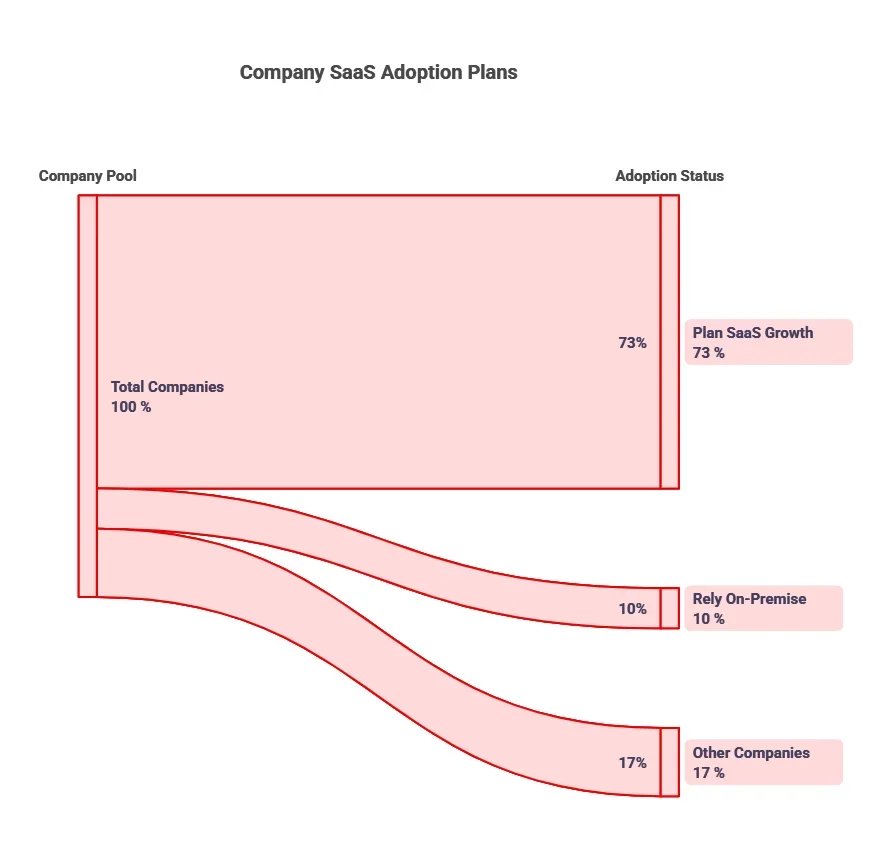
Data consistently shows how critical this stage is:

In real products, this shows up as:

  • users abandoning setup halfway
  • confusion around first actions
  • delayed “aha moment”

2. Weak Product-Market Fit

Many SaaS products are built correctly, but for the wrong problem.

Teams often build:

  • feature-rich systems
  • technically sound platforms

But users don’t adopt them consistently. In real, this looks like:

  • users signing up but not returning
  • features being underutilized
  • constant repositioning of the product

3. High Churn and Retention Pressure

SaaS is not a one-time sale. It’s a continuous relationship.

Even small churn compounds quickly.

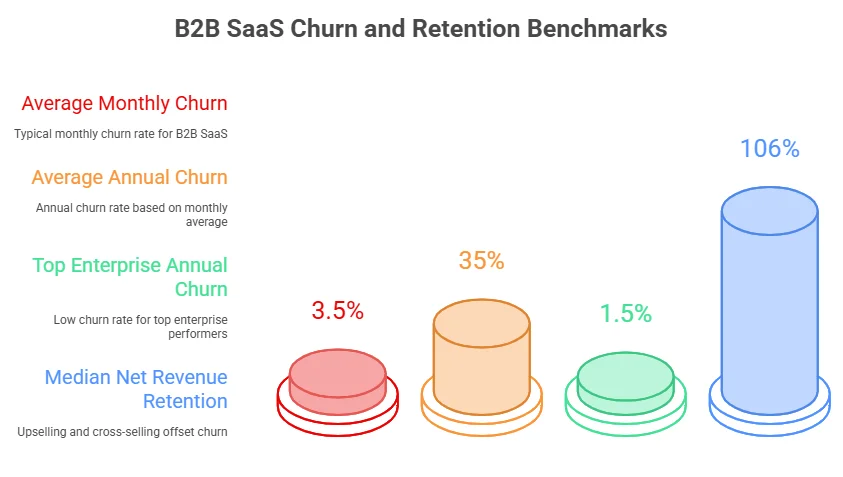
Industry benchmarks show:

In real scenarios:

  • users leave after initial use
  • value is not sustained over time
  • competitors replace your product quickly

4. Overengineering Early in Development

This is one of the most common technical mistakes. Teams try to build:

  • scalable architectures
  • microservices
  • advanced infrastructure

before validating real usage.

In early-stage SaaS, this leads to:

  • slower development
  • higher complexity
  • harder iteration

Meanwhile, simpler products often reach the market faster and improve based on real usage.

5. Integration Complexity and System Dependencies

SaaS products rarely operate alone.

They need to connect with:

  • CRMs
  • payment systems
  • analytics tools
  • third-party APIs

The challenge is managing what comes with it.

Research shows 51% of B2B buyers consider poor integrations a reason to switch SaaS products

In real builds:

  • APIs fail or change
  • data mismatches occur
  • sync issues create inconsistencies

6. Security, Compliance, and Data Risk

As SaaS products scale, security becomes unavoidable.

This includes:

  • data protection
  • access control
  • regulatory compliance (GDPR, HIPAA, etc.)

49% of IT professionals say unmanaged SaaS usage weakens security posture. In practice:

  • poor access control exposes data
  • compliance gaps block enterprise adoption
  • security incidents damage trust instantly

7. Scaling Without Breaking the System

Early-stage SaaS works well with limited users.

Problems appear when:

  • user load increases
  • data volume grows
  • workflows become complex

This is where:

  • slow queries
  • system downtime
  • inconsistent performance

start appearing.

Most of these issues trace back to:

  • early architecture decisions
  • poor data modeling
  • lack of performance planning

8. Misalignment Between Product, Engineering, and Business

Many SaaS delays are not technical.

They come from:

  • unclear product direction
  • changing requirements
  • slow decision-making

In real projects:

  • features are added mid-build
  • priorities shift frequently
  • timelines expand without clear reasons

This leads to:

  • wasted development effort
  • inconsistent product experience
  • delayed releases

Why Businesses Work with AppVerticals for SaaS Application Development

Building a SaaS product is less about writing code and more about making the right decisions early. AppVerticals operates with that mindset. The focus is focusing on structuring products so they can evolve without constant rework. 

That shows up in how projects are handled:

  • MVPs are scoped around real workflows, not feature lists
  • Architecture is designed to support multi-tenant scaling from the start
  • Engineering decisions are aligned with long-term product growth, not short-term delivery

What this means in practice is straightforward, like faster launches, fewer rebuilds, and systems that don’t slow down as usage increases.

For businesses building or scaling SaaS platforms, the value is not just execution. It’s having a team that understands what to build now, what to delay, and how to avoid decisions that become expensive later.

Final Words

SaaS application development succeeds when decisions are made with clarity early, like around workflow, structure, and scalability. The teams that move fastest are not the ones building more, but the ones building what holds under real usage.

A focused MVP, strong architecture, and continuous iteration define products that scale without constant rework.

Launch Faster Without Compromising Scale

Speed matters, but only if what you launch can evolve. Build a SaaS product that reaches the market quickly and improves without slowing down.

Start Building Smarter

Related Guidees

Outsourcing Software Development

Software Development Trends

How Much Does iPhone App Development Cost in 2026? A Complete Guide

In 2026, iPhone app development costs range from $25,000 for a scoped MVP to $400,000+ for enterprise-grade solutions. Most funded startups spend between $80,000 and $200,000 for a native app ready to scale.

To help you navigate this range, this guide is created for decision-makers, CTOs, CFOs, and founders, who need a clear understanding of where their investment will go.

We’ll break down the key factors driving the cost of ios app development, including complexity, compliance, team composition, and post-launch overhead.

Key Takeaways:

iPhone App Development Costs in 2026

  • MVP (Minimal Viable Product): $25,000 – $60,000. Includes basic features, simple UI, and limited backend integration.
  • Mid-Complexity Apps: $80,000 – $180,000. Custom UI, third-party API integrations, and a CMS.
  • Complex/Enterprise Apps: $200,000 – $400,000+. Real-time data, multi-role access, advanced security, and compliance requirements.

Key Factors Influencing Cost

  • App Complexity: The number of features, screens, and integrations directly impacts the budget, with each additional feature adding $8,000–$30,000.
  • Design: Simple, functional designs cost $10,000–$20,000, while bespoke, brand-specific designs can range from $30,000–$60,000.
  • Team Composition & Location: Rates vary based on expertise and location. U.S. developers charge $80–$250/hr, while developers in Eastern Europe or Southeast Asia may charge $35–$120/hr.

Hidden or Ongoing Costs

  • Post-Launch Maintenance: 15–25% of the initial development cost per year. For a $150,000 app, this amounts to $22,500–$37,500 annually.
  • Apple Developer Program: $99/year (required for App Store distribution).
  • Backend Hosting: $500–$10,000+/month depending on traffic, database size, and CDN usage.

Cost Breakdown by Project Stage

  • Discovery & Scoping: 5–10% of total budget ($7,500–$15,000).
  • UI/UX Design: 10–15% of total budget ($15,000–$22,500).
  • Development: 30–40% of total budget ($45,000–$60,000).
  • QA & Testing: 10–15% of total budget ($15,000–$22,500).
  • App Store Submission & Post-Launch: 2–5% of total budget ($3,000–$7,500).

Get Your IOS App Development Cost Breakdown Now

Take control of your app development budget and get clear on your next steps.

What Factors Actually Drive iPhone App Development Costs?

Cost isn’t random; it is a function of specific, measurable inputs. The problem is that most teams don’t scope these inputs sufficiently before requesting quotes, which is why estimates vary so wildly. A simple app to a stakeholder might imply a complex backend to an architect.

If you’re looking to hire iOS developers, it’s essential to ensure they understand these variables upfront to avoid discrepancies in the iPhone app feature costs. To get an accurate number, you must define these five variables.

Cost Driver #1. App Complexity & Feature Scope

The number of screens, user roles, and unique interactions is the single largest cost variable. A 6-screen MVP with a single user role and basic API calls is a different product, and a different budget, than a 30-screen app with real-time sync, multi-role access, and custom business logic.

Every feature added pre-launch adds an average app complexity cost of $8,000–$30,000 to your scope.

Cost Driver #2. UI/UX Design Requirements

There’s a meaningful cost gap between functional design (system components, clean layout) and bespoke design (custom motion, micro-animations, brand-specific design system). The former adds $10,000–$20,000 to a project.

The latter adds $30,000–$60,000. For most early-stage apps, a functional design that reduces friction is worth more than visual sophistication.

Cost Driver #3. Technology Stack & Third-Party Integrations

The APIs and services your app connects to determine complexity. Payment gateways (Stripe, Apple Pay), mapping (MapKit), push notifications (APNs), AI/ML pipelines, real-time databases (Firebase, WebSockets), each integration adds scope.

A single well-documented API adds 20–40 development hours. A custom ML model integration adds 80–200+ hours.

Cost Driver #4. Development Team Composition & Location

A senior iOS architect in San Francisco billing at $180/hr and a mid-level developer in Eastern Europe billing at $65/hr can produce equivalent outputs on well-defined tasks, but they are not interchangeable.

The ratio of senior to junior developers, the presence of a dedicated QA engineer, and whether architecture decisions are being made by someone with iOS-specific depth all affect both cost and outcome quality.

Cost Driver #5. Compliance, Security & App Store Requirements

HIPAA-compliant data handling, PCI DSS for payment processing, GDPR consent flows, and Apple’s App Transport Security requirements are non-optional in regulated industries. These aren’t add-ons, they’re baseline requirements that need to be scoped into your initial build.

Compliance work typically adds $20,000–$80,000 to a healthcare or fintech app and cannot be retrofitted cheaply post-launch.

Is Compliance Driving Up Your Costs?

We can help you manage the complexities of building a compliant iOS app.

How Much Does It Cost to build an iOS App by Complexity Level?

The most common question in any iOS mobile app development budget conversation is: just give me a number. The honest answer is that the number depends on scope, but scope can be tiered. Most applications fall into one of three distinct tiers based on their feature density and technical requirements.

When working with a mobile app development company, understanding these tiers will help you get a more accurate iPhone app development estimate and avoid the frustration of wild price discrepancies. Here are the three tiers most apps fall into, along with the cost formula that underpins every professional estimate.

Here are the three tiers most apps fall into, along with the cost formula that underpins every professional estimate.

Tier Typical Features Estimated Cost Timeline
Simple / MVP 3–6 screens, basic auth, 1–2 integrations $25,000 – $60,000 2–4 months
Mid-Complexity Custom UI, 3rd-party APIs, CMS, analytics $80,000 – $180,000 4–8 months
Complex / Enterprise Real-time sync, AI/ML, multi-role, compliance $200,000 – $400,000+ 8–18 months
Cost Formula: Estimated Cost = (Total Dev Hours × Hourly Rate) + Design + QA + Project Management + Infrastructure

Note: Always add a 15–20% contingency buffer to any fixed estimate to account for discovery unknowns.

Choose the Right Development Strategy for Your App

Whether you need a basic MVP or a full-featured enterprise app, we’ve got you covered.

What Are the Typical iPhone App Development Costs by App Type and Industry?

Generic cost tiers are a starting point, but if you’re building a fintech app, the cost structure looks nothing like a fitness tracker. Compliance requirements, real-time data demands, and integration complexity vary dramatically by vertical.

Here is where the average cost to develop an iPhone app becomes industry-specific.

App Category Core Complexity Drivers Estimated Cost Range
On-Demand (ride, food, delivery) Real-time tracking, dual-sided UX, payments $80,000 – $200,000
eCommerce & Marketplace Catalog, cart, payment, inventory sync $60,000 – $180,000
Fintech & Banking PCI DSS, biometric auth, real-time transactions $150,000 – $400,000+
Healthcare & Fitness HIPAA compliance, EHR integrations, wearables $120,000 – $350,000
SaaS / Enterprise Role-based access, cloud infra, dashboards $100,000 – $300,000
Gaming & AR/VR 3D rendering, physics engine, ARKit $150,000 – $500,000+

 Note on AI Integration: AI/ML feature integration, recommendation engines, NLP, computer vision, adds $20,000–$80,000 to any category above, depending on whether you’re calling a third-party API (cheaper) or training and deploying a custom model (significantly more expensive).

How does iPhone App Development Cost Break down across Each Project Stage?

One of the most common budget mistakes is treating iOS development as a single cost line. In reality, it involves seven distinct workstreams, each with its own resource profile and cost allocation.

Understanding this breakdown gives you the ability to prioritize, phase, and renegotiate if budget constraints emerge mid-project.

Stage Activities % of Total Budget Approx. Cost (on $150K project)
Discovery & Scoping Requirements, architecture, tech stack selection 5–10% $7,500 – $15,000
UI/UX Design Wireframing, prototyping, design system 10–15% $15,000 – $22,500
Frontend Development Swift/SwiftUI coding, screen builds 30–40% $45,000 – $60,000
Backend & API Development Server logic, database, integrations 20–30% $30,000 – $45,000
QA & Testing Functional, performance, regression, device testing 10–15% $15,000 – $22,500
App Store Submission Metadata, compliance review, TestFlight 2–5% $3,000 – $7,500
Post-Launch (Year 1) Bug fixes, OS updates, minor enhancements 15–25% of build cost/yr $22,500 – $37,500

The discovery phase is consistently the most under-budgeted stage. Teams that skip or rush it pay for that decision in scope creep during development, often doubling the cost of a single misunderstood requirement.

What Do iOS Developers Actually Charge, and How Does Location Affect Your Budget?

Location is the most visible cost lever in iOS app development, and the most misunderstood. The assumption that lower rates always mean lower costs overlooks key factors like rework, communication overhead, and time-to-delivery.

The cost of building an app by country varies, with lower rates often coming at the cost of slower delivery or reduced quality. Higher-cost regions may offer better expertise and faster results, ultimately reducing overall costs.

Here are the actual market rates for 2026, followed by what those rates actually buy you.

Location is the most visible cost lever in iOS app development, and the most misunderstood. The assumption that lower rates automatically mean lower costs ignores the real variables: rework rates, communication overhead, architectural decision quality, and time-to-delivery.

Here are the actual market rates for 2026, followed by what those rates actually buy you.

Region Junior Developer Mid-Level Developer Senior Developer
USA / Canada $80 – $120/hr $120 – $180/hr $150 – $250/hr
Western Europe (UK, Germany) $60 – $90/hr $90 – $140/hr $120 – $180/hr
Eastern Europe (Poland, Ukraine) $35 – $55/hr $55 – $80/hr $75 – $110/hr
India / Southeast Asia $20 – $35/hr $35 – $55/hr $50 – $80/hr
Latin America $30 – $50/hr $50 – $75/hr $65 – $95/hr

Rate is not the right filter. A senior iOS architect in Eastern Europe billing at $85/hr who owns the technical architecture, makes sound decisions on data models, and delivers clean Swift code is worth significantly more than a US-based junior at $110/hr who requires daily supervision.

The cost per output, not cost per hour, is what your CFO should be tracking.

What Hidden and Ongoing Iphone App Development Costs Should CTOs and CFOs Budget for Post-Launch?

The development invoice you approve is not your total iPhone app development cost. What most teams discover too late is that the post-launch cost structure is substantial, recurring, and non-negotiable if you intend to keep the app in production.

Here is everything that belongs on your budget sheet after go-live.

  • Apple Developer Program:$99/year (required for App Store distribution, non-negotiable)
  • Annual Maintenance & Updates:15–25% of initial build cost per year, for a $150K app, that’s $22,500–$37,500 annually
  • iOS Version Compatibility: Budget 2–4 developer weeks per major iOS release (Apple releases one per year, typically September)
  • Backend / Cloud Hosting:$500–$10,000+/month depending on traffic, database size, and CDN usage (AWS, GCP, Firebase)
  • Third-Party API & SaaS Costs:Stripe, Twilio, Google Maps, SendGrid, OneSignal, all carry usage-based or subscription pricing that scales with your user base
  • Security & Compliance Audits:$5,000–$25,000 annually for regulated industries (healthcare, fintech)
  • Crash Monitoring & Analytics:Mixpanel, Datadog, and Sentry, $200–$2,000/month depending on event volume
  • User Acquisition / ASO:Not a development cost, but a required launch line item, absence of this budget is the most common reason technically sound apps fail commercially
Maintenance Reality Check: Mobile app maintenance should be budgeted as an ongoing operating expense, not an afterthought. Apple’s App Store Connect lets teams track crash rate, retention, and deletions by app version and OS, and commonly cited industry benchmarks place annual app maintenance at roughly 15–20% of initial development cost, with higher ranges often recommended for more complex apps.

iOS vs. Android: Does Your Platform Choice Materially Change the Development Budget?

If you’re deciding between Apple vs Android app development as your launch platform, the cost delta is real but often overstated. The more important variable is not which platform costs less, it’s which platform your target user actually uses. That said, here is what the cost comparison actually looks like in 2026.

Dimension iOS (iPhone) Android
Language / Toolchain Swift / SwiftUI / Xcode Kotlin / Jetpack Compose / Android Studio
Device Fragmentation Low (Apple-controlled hardware) High (500+ device variants)
QA & Testing Effort Lower—fewer devices to test Higher—broader device matrix
App Store Fees $99/year (Apple Developer Program) $25 one-time (Google Play)
Approval Timeline 1–3 days avg. (stricter review) Hours to 3 days (faster, less strict)
Development Cost Delta Baseline Typically 10–25% higher for native
Maintenance Complexity Lower Higher due to OS version fragmentation

If your target user is a premium consumer or enterprise buyer in Western markets, iOS-first is the rational default. For high-volume consumer apps targeting emerging markets, Android-first or cross-platform frameworks (Flutter, React Native) deserve consideration. However, it’s important to note that while cross-platform development can reduce costs and time-to-market, it often comes with trade-offs in performance and access to native iOS capabilities.

How Can You Reduce iPhone App Development Costs Without Compromising Product Quality?

There is a meaningful difference between reducing cost and reducing scope arbitrarily. The strategies below are about eliminating waste, not value. Each one has been validated across real iOS projects, not theoretical frameworks.

  • Start with a scoped MVP, not a “minimal” one. Define the single core action your app must perform exceptionally. Every feature added pre-launch adds $8,000–$30,000 in scope and extends your timeline. Ship the core experience first.
  • Use Backend-as-a-Service (BaaS) strategically. Firebase, Supabase, and AWS Amplify can replace 4–8 weeks of backend development for apps that don’t require custom server-side business logic. This is not a shortcut—it’s correct architecture for early-stage products.
  • Leverage established SDKs and APIs. Authentication (Auth0, Sign in with Apple), payments (Stripe, Apple Pay), maps (MapKit), notifications (APNs/OneSignal), these are solved problems. Don’t rebuild commodity infrastructure.
  • Build an iOS App with Claude Code. For rapid prototyping or testing your MVP, using Claude Code in Xcode can significantly reduce your initial development costs. This tool allows you to build a functional app prototype faster, without the need for a full development team. With Claude, you can explore core app functionalities, validate your idea, and make informed decisions about your next steps, all at a fraction of the cost of hiring a full team of iOS developers.
  • Build a reusable SwiftUI component library early. A well-structured component library reduces UI development time by 20–35% on mid-to-large apps and dramatically accelerates future feature work. This is an investment with compounding returns.
  • Use Agile with fixed sprint budgets, not open-ended time-and-materials. Sprint-level scope lock is the most effective mechanism for cost control in iOS projects. Open-ended T&M contracts without sprint caps are the leading structural cause of budget overruns.
  • Right-shore your team composition. An iOS architect and tech lead in your time zone, with senior execution in a cost-efficient region, is not generic outsourcing, it’s intentional team design. The goal is eliminating rework and communication latency, not minimizing the hourly rate on a spreadsheet.

How Do You Evaluate and Choose the Right iOS Development Partner for Your Budget?

The wrong development partner is the most expensive mistake you can make, more expensive than overpaying for the right one. Here is a practical framework for evaluating iOS development options across engagement models, followed by the four criteria that should be non-negotiable in any selection process.

Model Best For Cost Range Key Risk
In-House iOS Team Ongoing product with >$1M tech budget Highest (salary + benefits + tools) High fixed cost, slow to scale
Dedicated Agency Funded startups, complex products $80–$200/hr (agency blended rate) Scope overruns if requirements aren’t locked
Offshore Dedicated Team Cost-sensitive builds with clear specs $30–$75/hr (blended) Communication and timezone friction
Freelancer Small feature work or prototypes only $40–$120/hr Single point of failure, no QA layer

 Non-Negotiable Evaluation Criteria:

  • Verifiable iOS portfolio: Live App Store apps with measurable outcomes, not design mockups or prototype demos.
  • Swift/SwiftUI technical depth: Specifically ask about their approach to state management, data persistence, and background task handling. Agencies led by React Native generalists selling “native iOS” are a risk.
  • Post-launch track record: Ask for references from clients whose apps they’ve maintained through at least two major iOS version upgrades.
  • IP ownership and contract clarity: Full source code ownership, no proprietary tooling lock-in, clear handover process documented upfront.

What Is a Realistic iPhone App Development Budget for Your Stage of Business?

The most useful budget number isn’t the industry average, it’s the number that makes sense for your specific business stage, risk tolerance, and product hypothesis.

Here is a practical framework for calibrating your iPhone app development budget to where you actually are.

Business Stage Recommended Starting Budget Rational Approach
Pre-seed / Idea validation $25,000 – $50,000 Clickable prototype + scoped native MVP
Seed / Early-stage startup $60,000 – $120,000 Core-feature native iOS app, BaaS backend
Series A / Scaling product $150,000 – $300,000 Full product, scalable infrastructure, QA automation
Enterprise / Regulated $300,000 – $600,000+ Compliance layer, custom integrations, security audit
 Strategic Insight: The right budget question isn’t “how do I spend less?“, it’s “what is the minimum viable investment to test whether this app can retain users and generate revenue?” Underfunding an iOS build creates compounding technical debt that costs more to fix than it would have cost to build correctly.

Conclusion

In 2026, iPhone app development costs vary widely based on complexity, industry, and post-launch requirements. By understanding the key cost drivers and planning effectively, you can build a solution that meets your goals without breaking your budget.

At AppVerticals, we specialize in delivering budget-friendly, high-quality iOS apps designed for scalability and long-term success. Whether you’re just starting with an MVP or scaling to an enterprise-level solution, our expert team can help bring your vision to life with competitive ios app development pricing strategies and a focus on value.

Ready to Build a Scalable iOS App?

With proven experience in creating apps that grow with your business, we’ll help you bring your idea to life.

More Related Guides

  • Mobile App Development Cost: A comprehensive guide on the factors influencing mobile app development costs across different platforms and industries.
  • Healthcare App Development Cost: Explore the unique challenges and costs involved in building apps for the healthcare industry, from compliance to functionality.
  • Logistics App Development Cost: Learn about the key cost drivers in logistics app development, including real-time tracking and supply chain integration.
  • Education App Development Cost: Understand the costs of developing education-focused apps, from e-learning platforms to interactive tools for students and teachers.
  • Real Estate App Development Cost: Discover the essential cost components of developing real estate apps, including property listings, virtual tours, and client management features.

Cost of Building an App by Country (2026): Global Pricing and a Smarter Budgeting Guide

When I advise CEOs, CFOs, and CTOs on app budgets, I start with one hard truth: app cost is no longer just about development. It’s about geography, talent, infrastructure, and ROI.

And the opportunity is huge. The U.S. alone has 322 million internet users and 411 million mobile connections, while the global iOS App Store ecosystem generated nearly $1.3 trillion in billings and sales in the last 2 years. The GCC is just as promising, with 99% internet penetration in the UAE and Qatar, and tens of millions of connected users across Saudi Arabia.

In 2026, the country you choose can impact your budget, speed, and ROI more than most teams realize.

Key Takeaways | Cost of Building an App by Country (2026)

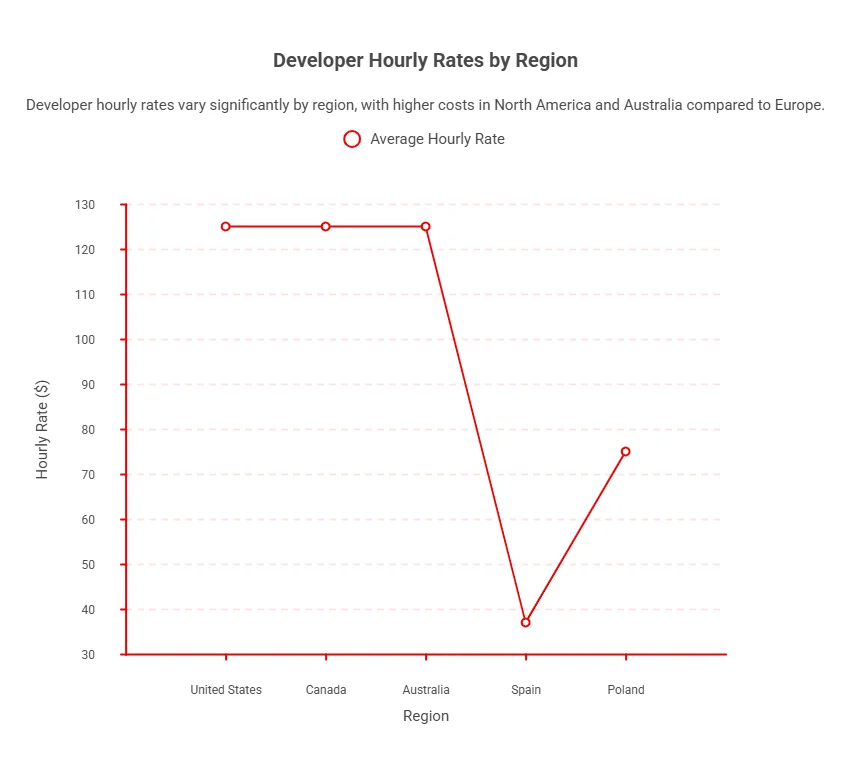
  • Developer rates range from $25–$49/hr (Spain/Ukraine) to $100–$149/hr (U.S./Canada/Australia), creating a 2–3× cost difference based on geography.
  • App builds scale from 380 hours (MVP) to 2,110+ hours (advanced apps), making complexity the biggest cost driver globally.
  • AI tools like OpenAI GPT-4.1 introduce ongoing operational costs, priced at $2 per 1M input tokens and $8 per 1M output tokens.
  • Maintenance typically adds 15–25% of total build cost annually, making post-launch support a mandatory budget component.
  • Outsourcing can reduce development costs by up to 40% (Accelerance), depending on team structure and region.
  • More screens, flows, and testing cycles can increase development effort by 20–40%, especially in enterprise-grade builds.
  • The GCC region shows high ROI potential with 99% internet penetration (UAE/Qatar) and SAR 88.3B e-commerce sales in Saudi Arabia (Q3 2025).
  • The global App Store ecosystem generated ~$1.3 trillion in 2024, proving that ROI depends more on execution than build cost alone.

Estimated App Cost by Country (2026)

A typical mobile app (mid-level complexity) can cost anywhere from ~$40,000 to $120,000+, depending on the country you choose.

Country / Region Estimated App Cost (Mid-Level App) What Drives the Cost
United States $100–$149/hour High developer rates ($100–$149/hr), premium UX expectations
United Kingdom $70,000 – $110,000 Strong enterprise demand, high UX standards
UAE (GCC) $60,000 – $100,000 Regional expertise, bilingual UX, premium execution
Saudi Arabia (GCC) $55,000 – $95,000 Strong market demand, growing digital economy
Qatar (GCC) $60,000 – $100,000 Smaller market, high-value niche builds
Poland $40,000 – $80,000 Balanced cost-quality ratio ($50–$99/hr)
Spain $30,000 – $70,000 Lower rates ($25–$49/hr), solid EU talent
Ukraine $30,000 – $70,000 Cost-efficient, strong engineering talent

How Much Does It Cost to Build a Mobile App in Different Countries in 2026?

I use a three-layer benchmark to price country differences: wage data, agency rates from Clutch, and complexity benchmarks from GoodFirms. This helps explain why the same product can be affordable in one market and expensive in another.

Global Cost Comparison Table

Market Public Talent Benchmark Public Agency-Rate Signal Demand / Commercialization Signal
United States $66.40/hr mean wage / $133,080 median annual wage $100–$149/hr 322M internet users / 411M mobile connections
UAE AED 154.89/hr / AED 322,175/yr 11.1M internet users / 21.9M mobile connections
Saudi Arabia SAR 113.15/hr / SAR 235,351/yr SAR 88.3B Q3 e-commerce sales / 33.9M internet users
Qatar QAR 7,680/mo $6.25B ICT market / 99.0% internet penetration
United Kingdom £30,000 starter / £75,000 experienced / £51,030 average Mature market, strong enterprise fit
Canada C$48.08/hr median $100–$149/hr North American governance and quality
Australia A$109,689/yr / A$110,000–A$150,000 full-stack $100–$149/hr Mature English-speaking market
Spain / Poland / Ukraine Spain $25–$49/hr / Poland $50–$99/hr / Ukraine $25–$49/hr Spain $25–$49/hr / Poland $50–$99/hr / Ukraine $25–$49/hr Europe’s cost-quality comparison set

Sources

What Factors Influence the Cost of Building an App by Country?

The biggest mistake I see is treating “country” as a salary variable only. In reality, geography changes five things at once: labor rates, communication overhead, product expectations, compliance exposure, and post-launch operating cost.
Expert Insight:
“The country matters less than it used to. What actually drives cost is how well you’ve scoped the problem before a single line of code is written. Bad specs in San Francisco are more expensive than good ones in Sofia.”
Ilian Kodzhahristov

Developer Hourly Rates by Region

The average hourly rate for developers varies significantly by region, typically ranging from $25 to $149 per hour.

In higher-cost markets like the United States, Canada, and Australia, rates commonly fall between $100–$149/hour, reflecting higher living costs and mature tech ecosystems. In contrast, countries such as Spain average around $25–$49/hour, while regions like Poland sit in the mid-range at $50–$99/hour.

This wide variation means your choice of region can easily double or even triple your development costs, even before factoring in project scope, complexity, or team size.

Developer Hourly Rates by Region

App Features and AI Integration Costs

App features and AI integration increase both upfront and ongoing costs, with AI introducing measurable recurring expenses.

Advanced features like chat, AR/VR, and MFA raise build costs, while AI tools such as OpenAI GPT-4.1 cost around $2 per 1M input tokens and $8 per 1M output tokens, making AI a continuous operational expense alongside data, compliance, and model retraining.

UI/UX Design and User-Experience Expectations

UI/UX is a major driver of app timelines, especially with more screens, platforms, and testing cycles. In premium markets, higher user expectations demand polished design, making local builds feel justified once the UX workload is clear.

Backend Infrastructure and Cloud Costs

Backend costs rise with integrations, security, and complexity. Beyond MVP, into payments, real-time, or analytics, it becomes a major budget driver, not a side cost.

Backend Infrastructure and Cloud Costs

Maintenance, Updates, and Hidden Costs

App budgets must include post-launch costs. Maintenance typically runs 15%–25% of the build cost annually.

Bottom line: if you only fund the launch, you haven’t funded the app.

How Does App Complexity Affect Development Cost Globally?

App complexity directly drives development cost globally: the more features, integrations, platforms, and advanced tech, the higher the hours, backend effort, and post-launch maintenance, pushing budgets far beyond a basic MVP.

Complexity Hours Benchmark GoodFirms Cost ($70/hr) $100–$149/hr Market Impact
Simple app / MVP 382–910 hours $26,740–$63,700 $38,200–$135,590
Mid/complex app 555.5–1,310 hours $38,885–$91,700 $55,550–$195,190
Advanced / AI-heavy app 915.5–2,110 hours $211,785+ $91,550–$314,390+ (before maintenance, cloud, and AI-ops overhead)


Which Countries Offer the Best Cost vs Quality for App Development?

Developer rates and market conditions vary widely, affecting cost vs. quality balance.

The U.S., Canada, and Australia typically charge $100–$149/hr for high-quality development, while Spain and Ukraine offer lower rates around $25–$49/hr, and Poland sits in the mid-range at $50–$99/hr.

The GCC region combines strong market relevance with high internet penetration, 99% in the UAE, Saudi Arabia, and Qatar, making it attractive for region-specific apps.

How Do the USA, GCC, and Europe Compare in App Development Value?

The choice depends on your priorities:

USA Market Fit

Best for compliance-heavy workflows and stakeholder-driven enterprise apps requiring strict governance.

GCC Market Fit

Ideal for Gulf-focused apps needing bilingual support, local payment integration, and strong regional market alignment.

Europe Market Fit

Balanced option for efficient product engineering, offering strong cost-quality tradeoffs with moderate local dependency.

When to Choose GCC Over Offshore Markets?

I prioritize GCC execution over cheaper offshore delivery when apps must sell, scale, or comply locally.

This is especially evident in regional builds like healthcare app development cost in Dubai, where localization, compliance, and Arabic UX play a major role in pricing.

Saudi Q3 2025 e-commerce sales hit SAR 88.3B, and the UAE targets 19.4% GDP from the digital economy, showing strong market and policy support.

GCC Over Offshore Markets

How Does App Development Cost Compare to ROI: Where Do Businesses Gain the Most?

ROI isn’t about the cheapest build; it comes from markets with the least monetization friction. In 2024, the App Store handled $1.295T in billings, $1.014T of which was physical goods/services, highlighting that app ROI depends more on commerce, retention, operations, and channel control than on app-store revenue.

Should You Hire Local Developers or Outsource Overseas?

I rarely recommend an extreme answer. Local-only is often too expensive. Offshore-only is often too risky. The best model in 2026 is usually a hybrid.

Model Best Use Case Strongest Upside Biggest Downside
Local team Regulated products, close founder involvement, heavy discovery Faster stakeholder feedback; stronger market context Highest cash burn in premium markets
Offshore / nearshore Build acceleration, cost pressure, and repeatable engineering work Up to 40% cost savings and up to 50% faster time-to-market Governance and product-context gaps
Hybrid Most scale-up and enterprise roadmaps Local product control + offshore execution leverage Requires better program management

Preferred structure: keep product ownership, architecture decisions, and compliance leadership close to the business, and leverage AppVerticals’ global delivery expertise to place implementation capacity wherever the economics are strongest.

Build Your App With the Right Team, From Day One

From idea to launch, we design, develop, and scale high-performance mobile apps tailored to your market and users.

How to Estimate and Optimize Your App Development Cost in 2026

The formula I use is:

Total budget = discovery + design + (build hours × country rate) + cloud/infrastructure + AI usage + QA/security + maintenance reserve + growth/iteration buffer

To control costs, I recommend four steps: scope an MVP, separate must-haves from “boardroom wishlist” features, reserve 15–25% of development costs for annual maintenance, and insist on outcome accountability if outsourcing; cheaper hours alone are a false economy.

If you’re evaluating execution partners, working with a reputed app development company can help you balance cost, scalability, and time-to-market with a structured, end-to-end development approach.

Prioritize Development Efforts

What High-ROI Apps Justify in Development Spend?

High-performing apps justify six- and seven-figure development budgets by driving retention, transactions, and platform consolidation at scale.

Starbucks: Retention at scale justifies continuous app investment

With 33.8 million U.S. Rewards 90-day active users (Q4 2024, +4% YoY), Starbucks shows how apps move beyond utility into revenue infrastructure. At this scale, investment in features, UX, and backend systems directly supports repeat purchases, loyalty economics, and customer data ownership, making ongoing development spend commercially rational.

Careem: GCC app value can compound into enterprise value

The UAE Ministry of Economy describes Careem’s acquisition as a $3.1 billion deal and calls it the largest technology sector transaction in the Middle East. That is the cleanest GCC reminder I can give a board: regional apps are not side projects; under the right market conditions, they become strategic assets.

DubaiNow: Platform consolidation reduces cost per service

DubaiNow connects 250–320+ services across 35–50+ entities, showing how apps can replace fragmented systems with a single platform. This reduces long-term operational costs while increasing user adoption—justifying higher upfront investment through efficiency at scale.

Final Insights

If I were making the investment decision today, I would not ask “Where is coding cheapest?” I would ask, “Where do I get the best mix of delivery confidence, market fit, and long-term ROI?

The U.S. gives you a premium market with 322 million internet users and 411 million mobile connections. The GCC gives you extraordinary digital readiness, from the UAE’s 99.0% internet penetration to Saudi Arabia’s SAR 88.3 billion in Q3 2025 e-commerce sales and Qatar’s $6.25 billion ICT market.

And globally, the app economy’s upside is no longer theoretical when the App Store ecosystem alone facilitated nearly $1.295 trillion in 2024. My advice is straightforward: choose your build country the way you choose a capital-allocation strategy, because that is exactly what it is.

More Related Guides:

In-House vs Outsourcing Software Development: What Works Better in 2026

Choosing between in-house and outsourcing software development in 2026 comes down to one thing: building the right product without slowing down growth or overspending. 

From what I’ve seen working with teams scaling digital products, hiring locally is getting harder and more expensive. In the US alone, the average software developer salary has crossed $120,000 per year , while global talent gaps are expected to reach 85 million unfilled tech roles by 2030. 

That’s why many businesses are turning to outsourcing or flexible custom software development services to stay competitive without long hiring cycles. 

The real question is not which model is better, but which one aligns with your product goals, speed requirements, and long-term control.

This guide helps you evaluate both approaches based on cost, control, scalability, and risk so you can make a decision that actually supports your product growth.

In-House vs Outsourcing Software Development at a Glance

  • In-house software development is ideal for core product/IP, long-term roadmap, security-sensitive systems.
  • Average US developer cost: $120k/year + ~31% benefits → ~$157k total/year.
  • Pros: full control, institutional knowledge, stronger internal tech culture.
  • Cons: slow hiring (40–60 days), high fixed costs, difficult to scale quickly.
  • Outsourcing software development is ideal for MVPs, startups with limited budget, specialized tech (AI, blockchain, cloud), short-term projects.
  • Typical cost: $25–$60/hour → ~$50k–$120k/year per developer (variable).
  • Pros: fast start (days, not months), access to global talent, scalable, converts fixed costs into variable.
  • Cons: coordination risks, vendor dependency, IP/security management required.
  • In-house = depth, long-term ownership, control.
  • Outsourcing = speed, flexibility, access to specialized skills.
  • The right choice depends on product stage, speed requirements, and cost constraints.
  • Hybrid models exist, but they complement these approaches rather than replace the decision between in-house and outsourcing.

What Is In-House vs Outsourcing Software Development?

In-house software development means building and managing your product with an internal team of developers, designers, and engineers who work directly within your company. This approach gives you full control over processes, communication, and long-term product direction.

Outsourcing software development involves partnering with an external company or hiring remote teams to build your product. These teams can deliver custom software development services based on your requirements, timelines, and budget without the need to hire internally.

When companies choose each:

  • In-house is preferred when long-term product ownership, data control, and deep internal alignment are critical
  • Outsourcing is chosen when speed, cost-efficiency, and access to specialized expertise are the priority

Should You Outsource Software Development or Build In-House in 2026?

The real decision comes down to where your product is today and what it needs next: speed or control.

If you are trying to validate an idea, launch faster, or scale delivery without slowing down, outsourcing software development gives you immediate execution. 

If your product is tightly tied to your business logic, evolving architecture, or long-term differentiation, building in-house becomes essential. The mistake most teams make is choosing based on comfort instead of timing.

What works in practice is not choosing one model, but aligning the model with the stage of the product.

What Your Decision Should Depend On

  • Budget
    In-house hiring includes salaries, benefits, and infrastructure, while outsourcing offers variable and often lower operational costs
  • Time-to-Market
    Outsourcing allows immediate access to ready teams, reducing delays caused by hiring and onboarding
  • Project Complexity
    Highly complex or IP-sensitive systems often benefit from in-house control, while well-defined projects can be outsourced efficiently
  • Long-Term vs Short-Term Goals
    Long-term product ownership favors in-house, while short-term builds or rapid scaling align better with outsourcing

Quick Decision Snapshot

Scenario Best Approach
Startup / MVP Outsourcing
Enterprise with ongoing roadmap In-house or hybrid
Urgent scaling Outsourcing
Core IP-sensitive product In-house

Remember!

The most effective approach in 2026 is rarely one or the other. Companies that balance in-house control with outsourced execution tend to move faster while maintaining product stability.

What are the Key Differences Between In-House and Outsourcing Software Development

I’ve worked with teams that tried both models, and the difference rarely shows up in theory. It shows up in how fast you ship, how much you spend over time, and how much control you actually need day to day.

Most comparisons oversimplify this. In reality, each factor below directly affects delivery outcomes, not just structure.

Key Differences That Actually Impact Delivery

Factor In-House Outsourcing
Cost High fixed investment Flexible, variable spend
Control Full ownership Structured, shared control
Speed Slowed by hiring cycles Immediate execution
Scalability Hiring-dependent On-demand scaling
Expertise Limited internally Access to global specialists

What I’ve Learned From Real Projects

Cost is where most teams underestimate in-house

When you build in-house, you’re not just paying salaries. Benefits, retention, and overhead push total compensation significantly higher. In the US, benefits alone account for about 31% of total compensation costs. That changes how you think about long-term team size versus flexible external support. 

Speed is where outsourcing consistently wins early-stage

Every time a team delays hiring, the product roadmap shifts. Open roles stay unfilled for weeks, sometimes months, and that delay compounds. Outsourcing removes that waiting time. You’re not starting from zero, you’re plugging into an already functioning team.

Control sounds great until it slows you down

In-house gives you full control, but it also means you own every bottleneck. Decision-making, reviews, and dependencies all sit internally. With outsourcing, control doesn’t disappear, it just shifts into process, contracts, and communication clarity.

Scalability is the breaking point for most in-house teams

Hiring doesn’t scale linearly. One good developer can take weeks to find, and ramp-up takes even longer. Outsourcing lets you increase or reduce team size based on actual workload, which is critical when priorities change mid-cycle.

Expertise is no longer about who you can hire locally

The biggest shift I’ve seen is this: teams don’t build everything in-house anymore. If you need AI, cloud migration, or cross-platform expertise, outsourcing through custom software development services gives you access to specialists without building that capability from scratch.

If I had to simplify it:
In-house gives you depth and long-term ownership. Outsourcing gives you speed and execution leverage. The real advantage comes from knowing when to use each, not choosing one blindly.

Pros and Cons of In-House Development

In-house development works well when the product is deeply tied to your business and requires ongoing ownership. But it also comes with operational pressure that most teams only realize after committing to it. The advantages are real, but they demand time, hiring consistency, and long-term investment to fully pay off.

Pros of In-House Development

In-house teams perform best when speed of decision-making, product understanding, and long-term continuity matter more than short-term flexibility.

Advantages of in-house development

Faster decisions without external dependency

When teams sit internally, decisions move without delays. There’s no dependency on external communication loops or approval cycles. This becomes critical in fast-moving products where priorities shift frequently.

Stronger product understanding over time

Internal teams build context around the product, users, and technical decisions. That reduces miscommunication and prevents repeated mistakes.

According to Science Direct, developers with higher familiarity with their codebase report significantly better efficiency, which is a direct outcome of long-term in-house continuity.

Long-term technical continuity

As systems evolve, complexity increases. Keeping the same team close to the product avoids repeated onboarding and knowledge transfer delays.

Developers spend a significant portion of time understanding systems and fixing technical debt, which becomes easier when continuity is maintained internally.

Cons of In-House Development

While in-house gives control, it also introduces constraints around hiring, scaling, and cost structure that can slow teams down if not planned properly.

Challenges of in-house software development

Hiring rarely keeps up with the roadmap

Even well-funded teams struggle to hire at the pace their roadmap demands. Open roles stay unfilled longer than expected, slowing delivery.

According to Deloitte, software engineering roles are among the hardest to fill globally, which is why hiring delays are common.

Team stability becomes a risk factor

When a key developer leaves, system knowledge leaves with them. Rebuilding that context takes time and affects delivery momentum.

Data from shows consistent turnover across professional roles, reinforcing that retention is an ongoing challenge.

Fixed cost, even when workload fluctuates

In-house teams require consistent investment, even when development needs slow down.

According to , benefits and overhead form a significant portion of total employee compensation, increasing long-term cost commitments.

Specialized skills are hard to maintain internally

Modern applications require niche expertise such as AI, cloud, or security, which may not be needed full-time.

A report by highlights growing demand for specialized roles, making it difficult for a single in-house team to cover all needs efficiently.

Pros and Cons of Outsourcing Software Development

Outsourcing software development has moved far beyond cost savings. In 2026, companies outsource to move faster, access specialized talent, and scale product development without building large internal teams. But outsourcing also introduces communication, security, and dependency risks that teams need to manage properly.

The companies that benefit from outsourcing are not the ones that outsource everything. They are the ones that outsource strategically.

Pros of Outsourcing Software Development

Outsourcing teams perform best when companies need faster execution, flexible scaling, and access to global technical expertise without long hiring cycles.

Lower Development Cost

The biggest advantage I’ve seen with outsourcing is speed. Hiring developers internally can take weeks or months, and onboarding adds additional delays before development actually starts.

According to Glencoyne, the total cost of an in-house developer can be 1.25x to 1.4x their base salary when benefits and overhead are included.

Outsourcing converts these fixed costs into variable costs, meaning companies only pay for development when work is being done.

Faster Time to Market

Speed is where outsourcing usually creates the biggest competitive advantage.

Hiring internally can take 4 to 12 weeks for technical roles, and onboarding can take another 4 to 8 weeks before a developer becomes fully productive. That means a company may lose 2–4 months before development even starts.

Outsourcing removes most of this delay because development teams are already assembled and experienced in working together. Projects can often start within days instead of months.

For companies launching startups, SaaS products, or mobile apps, this speed difference can determine whether they enter the market early or late.

Access to Global Talent

One major reason software development outsourcing continues to grow is the global developer shortage.

Industry reports estimate that the global talent shortage could reach tens of millions of unfilled tech roles by 2030, which means many companies simply cannot hire all the talent they need locally.

Modern software products rarely require just one type of developer. Projects often need cloud engineers, mobile developers, UI/UX designers, DevOps engineers, security specialists, and sometimes AI or data engineers.

Instead of hiring all these specialists in-house, companies can bring them into projects only when needed.

Easy Scaling and Flexibility

Scaling an in-house team is slow because hiring takes time and training takes even longer. Outsourcing teams can usually scale much faster because vendors already have developers available or can allocate additional resources quickly.

This flexibility allows companies to align development cost with actual product workload instead of maintaining a large permanent team.

Focus on Core Business

When companies rely only on in-house hiring, project timelines often depend on how quickly positions are filled. If hiring is delayed, product development is delayed.

Outsourcing reduces this dependency on hiring timelines and allows companies to plan development schedules more predictably. This improves overall business productivity and leadership focus.

Accelerate Your Product Growth with the Right Development Model

Not sure whether to go in-house, outsource, or adopt a hybrid approach? Our experts can help you design a strategy that balances speed, cost, and control.

Get a Free Consultation

Cons of Outsourcing Software Development

While outsourcing provides speed and flexibility, it also introduces coordination and management challenges that companies do not face with fully in-house teams.

Challenges of Outsourcing software development

Communication and coordination challenges

The most common outsourcing challenge is communication. When teams are not working in the same office, communication must be structured through documentation, project management tools, and regular meetings. If requirements are unclear or communication is inconsistent, outsourcing projects can slow down quickly.

Research on hiring and project workflows shows that long hiring and coordination processes often lead to delays and candidate or project drop-offs.

Time zone differences can slow feedback cycles

Working across time zones can sometimes delay feedback, approvals, and requirement clarification. Even small delays in feedback can slow development cycles when they happen repeatedly across sprints.

Vendor dependency risk

Another risk in outsourcing is becoming too dependent on an external development partner. If documentation is poor, knowledge is not transferred, or the vendor controls all infrastructure and code repositories, switching vendors later becomes very difficult.

Security and intellectual property concerns

Security and intellectual property protection are important considerations when outsourcing software development, especially for products involving sensitive data, proprietary algorithms, or enterprise systems.

Companies need clear contracts, non-disclosure agreements, access control policies, and defined ownership of code and infrastructure before starting outsourced development.

Quality control depends heavily on the vendor

Quality problems in outsourcing usually come from choosing vendors based only on cost instead of technical capability and development process.

Poor documentation, lack of testing, and weak architecture decisions can create long-term technical debt that becomes expensive later.

What are the Software Development Outsourcing Models

Choosing the right outsourcing model determines how fast your product ships, how much it costs, and how much control you retain. Each model is a strategic lever for your business.

1. Staff Augmentation: When You Need Skills Fast

Staff augmentation works when your internal team is strong but cannot meet immediate deadlines. You plug in experts temporarily to fill gaps without hiring long-term.

Deloitte reports 50% of companies struggle to hire specialized developers, making this model the fastest way to prevent roadmap delays.

From experience, executives underestimate the management effort required: augmented staff perform best when fully integrated into your internal processes, not siloed.

2. Dedicated Development Team: For Long-Term Continuity

A dedicated team is for multi-year projects where continuity and product knowledge matter.

In my experience, the real benefit is retaining institutional knowledge externally, so decisions don’t bottleneck when internal teams shift priorities.

3. Project-Based Outsourcing: When Scope Is Clear

Project-based outsourcing is ideal when deliverables are well-defined and unlikely to change mid-way. 67% of IT projects fail due to unclear requirements.

I’ve advised multiple C-level clients to use this model only for discrete, time-boxed initiatives, like MVPs or isolated features, anything evolving will introduce hidden costs and risk delays.

4. Offshore Development: For Cost-Efficient Scale

Offshore development accelerates scale while reducing costs.

Statista reports approx 50% of companies offshore to reduce software costs. From a strategic standpoint, offshore works best when process discipline and clear KPIs are in place; without them, distance and time zones amplify risk.

5. Nearshore Development: Agile Without Delay

Nearshore teams deliver faster iteration because they overlap work hours and reduce communication friction. I advise using this model when speed and adaptability outweigh cost savings. It’s particularly effective for rapidly changing product roadmaps.

6. Onshore Development: For High-Risk or Regulated Projects

Onshore outsourcing prioritizes compliance, IP security, and regulatory alignment.

In practice, this model is not about cost-efficiency; it’s about strategic control and legal certainty. Use it selectively for products where errors or breaches carry major financial or reputational risk.

Comparison Table of Software Development Outsourcing Models

Model Best For Control Cost Flexibility
Staff Augmentation Immediate skill gaps High Moderate High
Dedicated Development Team Multi-year complex projects Moderate-High Moderate Moderate
Project-Based Outsourcing Clear, fixed-scope projects Low-Moderate Fixed Low
Offshore Development Large-scale projects, cost optimization Moderate Low High
Nearshore Development Agile, fast iteration Moderate Moderate High
Onshore Development Regulated/high-risk projects High High Moderate

In-House vs Outsourcing Cost Comparison in 2026

When evaluating outsourcing software development, the key question is: Which model delivers the best ROI while meeting your product timelines and quality standards?

1. Salary vs Hourly Outsourcing

An in-house developer in the US costs $120,000 per year on average. Outsourcing developers, depending on region and expertise, typically range $25–$60 per hour.

For a 2,000-hour yearly workload, outsourcing can cost $50,000–$120,000, effectively matching or undercutting in-house costs while providing flexibility.

The strategic insight: outsourcing allows you to scale hours up or down, avoiding idle payroll, whereas in-house teams require fixed salary commitments regardless of workload.

2. Hidden Costs

In-house teams carry hidden costs beyond salary: benefits, payroll taxes, health insurance, and retention programs. In the US, benefits alone add ~31% to total compensation. Recruiting, onboarding, and replacing staff further increase the total investment.

Outsourcing reduces these hidden costs since contracts often include all operational overhead, but you must account for vendor management time and potential quality risk.

3. Infrastructure

An internal team requires office space, collaboration tools, hardware, and software licenses. Annual infrastructure costs per developer can easily reach $10,000–$15,000.

Outsourced teams usually provide their own infrastructure, letting you avoid upfront capital expenditures.

4. Recruitment and Training

Hiring in-house involves posting jobs, screening, interviewing, and onboarding, average US developer recruitment takes 40–60 days.

Training also costs both time and money. Outsourced developers arrive with ready-to-go expertise, often reducing ramp-up time to less than two weeks.

5. Long-Term Cost Comparison

Over three years, a single in-house developer may cost:

  • Base salary: $120k × 3 = $360k
  • Benefits (31%): ~$112k
  • Infrastructure, tools, training: ~$30k
  • Total: ~$502k

Compare with an outsourced developer billed $40/hour for 2,000 hours/year × 3 years = $240k, including infrastructure. Even with occasional management overhead, outsourcing can save 40–50% in total cost, while providing flexibility to scale team size based on project needs.

When Should You Successfully Outsource Software Development?

You should consider outsourcing software development whenever it delivers speed, specialized skills, or cost efficiency without compromising product quality. The key is aligning outsourcing with your product’s stage and strategic goals.

1. Building an MVP

Outsourcing is ideal when launching a Minimum Viable Product. Experienced external teams can turn concepts into functional prototypes 2–3x faster than in-house teams still recruiting and ramping up.

This allows executives to validate the market quickly without committing long-term resources.

2. Startups With Limited Budget

For startups, hiring full-time engineers is often cost-prohibitive. Outsourcing developers at $25–$60/hour lets you build and iterate without carrying fixed payroll or benefits overhead, while still accessing top-tier talent globally.

This approach keeps burn rates lower and runway longer, critical for early-stage companies.

3. Need Specialized Tech (AI, Blockchain, Cloud)

Modern software increasingly requires niche expertise. Outsourcing gives you immediate access to specialists in AI, blockchain, cloud, or cybersecurity without the multi-month hiring cycles.

Attempting to build such expertise in-house often results in skills gaps and delayed timelines.

4. Short-Term Projects

Projects with a defined, limited scope, such as building a new module, integrating third-party services, or testing a new feature, are perfect for outsourcing.

It avoids long-term employment commitments while achieving results with specialized skillsets.

When In-House Development Is the Better Choice

In-house development is the right choice when control, continuity, and long-term strategic ownership outweigh cost or immediate speed. Choosing the wrong model here can lead to IP risk, technical debt, or slowed innovation.

1. Core Product or Intellectual Property

When your product is the central differentiator of your business, keeping development in-house ensures full control over proprietary algorithms, architecture, and sensitive features. According to PwC, more than 50% of executives list IP protection as the top factor in sourcing decisions.

Outsourcing core IP can introduce leakage risk or legal exposure if contracts and processes are not airtight.

2. Long-Term Product Roadmap

If your product evolves continuously over years, an in-house team builds and retains institutional knowledge, reducing repeated onboarding and misalignment.

Research shows developers familiar with the codebase complete tasks up to 20% faster than new hires or external teams.

For C-suite leaders, this translates into predictable delivery and reduced operational friction.

3. Security-Sensitive Systems

For products handling sensitive data, like healthcare, finance, or regulated industries, keeping development internal ensures compliance and minimizes exposure to third-party breaches.

This level of control is hard to replicate with outsourced teams, even with strict contracts.

4. Continuous Product Iteration

Products that require constant updates, experimentation, and iterative improvements benefit from an internal team fully immersed in the business context.

External teams can execute sprints quickly, but in-house developers understand nuanced business logic, customer feedback, and interdependencies, reducing miscommunication and rework.

5. Strong Internal Tech Culture

Companies with a mature engineering culture, like code reviews, knowledge sharing, and DevOps practices, gain more from in-house teams. Culture impacts productivity more than tools or location. Outsourcing can supplement skills but rarely replaces this depth of alignment.

Hybrid Model: The Most Practical Approach in 2026

The hybrid approach combines the strategic control of in-house teams with the flexibility and expertise of outsourcing, making it the preferred model for companies scaling digital products in 2026.

1. In-House Core Team

A small, dedicated internal team focuses on core architecture, product strategy, and proprietary IP. This ensures long-term continuity, deep understanding of business logic, and immediate decision-making without dependency on external vendors.

2. Outsource UI/UX, Testing, Integrations, and Mobile Apps

Non-core functions like UI/UX design, QA testing, third-party integrations, and mobile app development are ideal for outsourcing. This allows organizations to access specialized skills on demand without inflating headcount or infrastructure costs.

3. Scale Team During Peak Development

Hybrid models provide flexibility to ramp up resources during sprints, feature launches, or seasonal spikes. Outsourcing allows temporary expansion without long-term commitments.

4. Reduce Team After Release

Once the intensive development phase concludes, outsourced teams can be scaled down or rotated out, leaving the in-house team to manage maintenance, updates, and future iterations. This optimizes cost efficiency while preserving institutional knowledge internally.

Scenario Recommended Approach Why
Product is core to business In-House Ensures full control over IP, architecture, and strategic decisions
Long-term roadmap In-House Retains institutional knowledge for continuous development and evolution
Security critical In-House Minimizes risk of breaches or compliance issues
You can afford hiring In-House Supports investment in a dedicated internal team for long-term ROI
Continuous development required In-House Maintains momentum and reduces repeated onboarding delays
Need fast launch Outsourcing Provides ready-to-go teams for rapid MVP or feature delivery
Limited budget Outsourcing Reduces fixed payroll, benefits, and infrastructure costs
Need specialized skills Outsourcing Access to AI, blockchain, cloud, or other niche expertise without long hiring cycles
Short-term project Outsourcing Avoids long-term commitments while delivering results efficiently
Need to scale quickly Outsourcing Allows flexible team ramp-up/down during peak workload
Growing product Hybrid Combines internal control with external flexibility for scaling features
Need control + speed Hybrid Core IP handled internally, non-core tasks outsourced for faster delivery
Enterprise scaling Hybrid Balances cost efficiency with consistent governance over large product teams
Ongoing roadmap with changing workload Hybrid Hybrid teams adjust dynamically to development cycles without disrupting internal operations

Why AppVerticals Is the Best Choice for Your Software Development Needs

AppVerticals combines global technical expertise with a proven track record of delivering scalable, high-quality solutions.

Whether you’re building a core enterprise system, a startup MVP, or a complex mobile application, our teams are equipped to handle every stage of development efficiently.

Our dedicated developers, designers, and engineers integrate seamlessly with your internal teams, providing transparency, clear communication, and timely delivery.

With experience across industries and cutting-edge technologies like AI, cloud, and blockchain, AppVerticals ensures your product not only meets functional requirements but also supports long-term growth.

Final Words!

Choosing between in-house and outsourcing in 2026 is about alignment with your product goals, speed, and control. In-house ensures ownership and continuity, outsourcing delivers speed and specialized expertise, and hybrid balances both.

Smart leaders evaluate cost, risk, and scalability to decide which approach fits their current stage and roadmap. Leverage the right model strategically to accelerate development, optimize resources, and maintain long-term product stability.

Related Guides:

Software Development Trends

Outsource web development

Optimize Your Software Development in 2026

Discover how leading companies leverage hybrid and outsourcing models to scale fast without overspending. Learn what works for your roadmap and team.

Schedule Your Strategy Call

How Much Does Sitecore Implementation Cost in 2026?

Sitecore projects typically start in the low six figures for implementation, while mid-market deployments reach $450K–$825K over three years (TCO). Large, multi-site enterprise programs with complex integrations can exceed $1M+, depending on architecture, personalization, and operational scale.

Sitecore implementation costs go far beyond licensing, covering hosting, integrations, and continuous support.

But, organizations often focus only on license fees, overlooking hosting, integrations, and support, which can account for 50%+ of total spend. A comprehensive Sitecore development services approach combining implementation, integrations, and optimization can reduce unexpected costs and accelerate ROI.


TL;DR: Key Highlights for Decision-Makers

  • Complexity Drives Cost: Sitecore implementation cost is influenced more by integrations, architecture, and operational needs than licensing alone.
  • Estimated implementation cost by deployment size:
    • Small/mid-market: $140K–$320K
    • Large enterprise / multi-site: $300K–$1M+
  • Primary Cost Drivers: Architecture setup, custom modules, CRM/ERP integrations, content migration, personalization, and team training significantly impact total cost.
  • Licensing Costs: Typically range from $50K–$200K+ annually, depending on XM Cloud vs XP, traffic scale, and module selection.
  • Hosting & Infrastructure: Cloud hosting costs range from $20K–$100K+/year, influenced by Azure sizing, traffic volume, and DevOps complexity.
  • Maintenance & Support: Ongoing costs of $25K–$120K/year cover updates, SLA monitoring, and platform optimization.
  • Add-ons & Environments: Additional QA, staging environments, and premium modules can add $15K–$60K+ to total spend.
  • Unexpected cost factors: Delayed integrations, unexpected customization, or large content migrations can increase costs by 20–30%.
Disclaimer: The pricing ranges and estimates provided in this guide are based on public market research, partner insights, and illustrative scenarios. AppVerticals does not price Sitecore implementations per license or per user. Every project is scoped and quoted based on factors such as deployment model (XM Cloud, XP), integrations, custom development, content volume, add-ons, and delivery timeline.

Get a Realistic Sitecore Cost Estimate

See exactly how licensing, integrations, and hosting scale with your number of sites, traffic, and user load.

Estimate Costs Now

Sitecore Implementation Cost by Use Case Complexity

Use Case Type Key Needs Core Features Typical Cost (USD) Factors Influencing Cost Cost-Efficient Strategies
Basic / Standard Single site, standard content, minimal integrations Core CMS, hosting, content training $90K–$140K Integrations, basic personalization, content volume Use out-of-the-box modules, limit customization, pre-define templates
Moderate / Multi-Site Multiple sites/brands, moderate integrations Multi-site governance, CRM/ERP integrations, personalization, migration $140K–$320K Sites count, integration complexity, content volume Standardize components, plan integrations early, reuse templates
Complex / Enterprise High traffic, multi-language, multi-brand Advanced personalization, integrations, QA/staging environments $300K–$1M+ Architecture, integrations, compliance, SLA Use accelerators, run discovery, prioritize integrations, modular rollout

Total Sitecore Implementation Cost in 2026 (Complete pricing overview)

In 2026, Sitecore implementations typically start around $150K–$350K for smaller/mid-market deployments and can exceed $1M for large, multi-site enterprise programs when factoring in licensing, implementation, hosting, support, and add-ons.

What is included in Sitecore pricing?

Sitecore’s pricing goes beyond licensing. Decision-makers need to consider five core cost drivers:

What is included in Sitecore pricing

  1. License/Subscription: Costs vary with XM Cloud (SaaS) vs XM/XP (platform-style), number of users, traffic, and modules.
  2. Implementation & Development: Design, integrations, migration, and custom module development.
  3. Hosting & Infrastructure: Azure or cloud PaaS sizing, traffic handling, and DevOps overhead.
  4. Maintenance & Support: SLA levels, updates, monitoring, and software patches.
  5. Add-ons / Non-Production Environments: Extra testing/staging environments and premium modules.

Cost Breakdown by Component

Cost Component Typical Range % Contribution What Impacts It
Licensing $60K–$200K 15–25% XM Cloud vs XP/XM, users, traffic
Implementation $90K–$300K+ 35–50% Integrations, customization, migration
Hosting $12K–$55K 10–20% Azure sizing, traffic, environments
Maintenance / Support $25K–$120K 10–20% SLA level, monitoring, updates
Add-ons / Environments $15K–$110K+ 5–15% Personalization, testing, compliance

Observations from advising executive teams show that these ranges are most valuable as a budgeting framework, helping CFOs approve investments and CTOs anticipate integration and operational needs.

Implementation reality (beyond cost estimates):

While cost ranges are widely discussed, implementation complexity is often underestimated. The leading content management systems, like Sitecore, typically require:

  • Multi-layered architecture setup
  • Integration with existing systems (CRM, ERP, analytics)
  • Custom development for business-specific workflows

Compared to open platforms, implementation effort can be multiple times higher, especially in enterprise environments.

Decision Triggers for Implementation Cost

  • If your project includes 3+ integrations (CRM, ERP, analytics) → expect costs to exceed $300K
  • If you’re migrating from a legacy CMS with large content volume → add 20–30% to baseline estimates
  • If personalization or multi-site is required → implementation will likely move into enterprise range ($300K+)
  • If requirements are not clearly defined upfront → expect budget overruns of 15–25%
COO/CTO insight: Dave Tilbury, Sitecore COO, emphasizes that AI-powered tools like SitecoreAI Pathway can cut migration time by up to 2/3, even from non-Sitecore platforms. For executives managing multi-site deployments, this translates to reduced implementation timelines, lower technical debt, and faster operational rollout.
Partners using accelerators like FastLane report implementation cost reductions of up to 50%, enabling quicker ROI while maintaining platform flexibility, a key concern for COOs overseeing delivery efficiency.

Where Sitecore Implementation Costs Vary Geographically

Sitecore implementation costs are not uniform globally. The same project can vary by 30–60%+ depending on region, partner rates, and delivery model.

Key regional differences:

  • North America (US/Canada)
    • Highest cost due to premium partner rates ($150–$250/hr)
    • Strong focus on enterprise-grade architecture and integrations
    • Typical for large DXP implementations
  • Western Europe (UK, Germany, Nordics)
    • Slightly lower than US but still premium
    • Strong compliance requirements (GDPR-heavy environments)
  • Eastern Europe (Poland, Ukraine)
    • 20–40% lower than Western markets
    • High-quality engineering talent with strong Sitecore expertise
    • Popular for nearshore delivery
  • Asia (India, Pakistan)
    • 40–70% lower implementation costs
    • Ideal for development-heavy builds and long-term support
    • Requires strong project governance for enterprise complexity
  • Hybrid / Distributed Models
    • Increasingly common in 2026
    • Combine onshore strategy + offshore execution
    • Optimize cost without sacrificing quality
What this means for budgeting: Geography alone can shift a $500K implementation to anywhere between $300K and $800K+ depending on delivery structure.

Sitecore implementation cost variation by region

How Compliance and Regulations Impact Sitecore Costs

Compliance is one of the most underestimated cost drivers in Sitecore implementations, especially for enterprise and global deployments.

Why compliance increases cost:

  • Security frameworks (ISO 27001, SOC 2, etc.)
    Sitecore supports major compliance standards, but implementing them requires additional architecture, audits, and controls
  • Data privacy regulations (GDPR, CCPA, regional laws)
    • Data residency requirements
    • Consent management systems
    • Encryption and audit trails
      These add both development and infrastructure complexity
  • Industry-specific compliance (HIPAA, finance, etc.)
    • Secure hosting environments
    • Logging, monitoring, and access controls
    • Additional QA and validation cycles

Typical cost impact:

  • Adds 15–35% to total implementation cost
  • Increases hosting costs (secure environments, regional data centers)
  • Extends project timelines due to audits and validation

How much does a Sitecore license cost?

The Sitecore license cost varies by deployment model:

  • XM Cloud: Pure subscription SaaS; licensing scales with usage and add-ons.
  • XP / XM legacy: Often perpetual licensing; infrastructure and ops overhead are larger.

Public partner estimates for annual licensing costs:

Deployment Type Sitecore License Cost / Year Notes
Small / Mid-size $60K–$80K XM Cloud, limited modules/traffic
Mid-market $100K–$150K Moderate integrations and users
Enterprise $150K–$200K Multiple sites, premium modules, high concurrency
Practitioner insight: SaaS reduces operational overhead but may require third-party analytics or personalization add-ons, impacting total cost. XP licenses provide broader native marketing capabilities but with higher infrastructure requirements.

What factors most influence the cost of a Sitecore implementation?

Several operational and technical factors significantly affect implementation cost. Experience from advising enterprise teams suggests focusing on these seven areas:

Sitecore implementation cost factors

  • Architecture complexity: Multi-site, multi-language, or multi-brand architectures increase workload.
  • Integrations: CRM, ERP, marketing automation, analytics, and payment gateways add significant effort.
  • Content migration volume: High volumes of legacy content or complex content types require more time and QA cycles.
  • Stakeholder decision speed: Slow approvals create rework, increasing cost.
  • Hidden cost: Slower execution cycles create opportunity costs, delayed campaigns, slower experiments, and extended deployments, which can impact revenue.
  • Replatform vs redesign: Full redesign or UX overhaul adds substantial cost compared to lift-and-shift projects.
  • Training and enablement: Tailored training for content authors, editors, and developers impacts time and budget.
  • Quality of requirements: Vague requirements increase estimation uncertainty and potential overages.

Practical Decision Framework

  • If your architecture includes multi-brand or multi-language setups → costs increase significantly
  • If integrations exceed 5 systems → implementation complexity becomes enterprise-level
  • If content migration exceeds 10,000+ assets/pages → allocate additional budget for QA and restructuring

What is the cost of hosting Sitecore on Azure or cloud?

Hosting Sitecore on Azure or cloud typically costs $12K–$55K per year for mid-market deployments, scaling higher for enterprise-grade traffic and multi-site environments.

Hosting Sitecore adds another layer to total cost. Azure PaaS estimates provide illustrative guidance for decision-makers:

Azure Hosting Size Monthly Cost Estimate Notes
XS $1,061 Small traffic, single site
S $1,277 Moderate traffic
M $1,581 Mid-market, multiple sites
L $2,318 High traffic, enterprise-grade
XXXL $4,633 Very large, high concurrency
CFO insight: Cloud hosting is predictable on a subscription basis, but enterprise teams must account for support, monitoring, and storage overhead. Combining license, hosting, and implementation costs early in budgeting avoids unpleasant surprises.

What are Sitecore maintenance and support costs over time?

Maintenance and support costs include SLA commitments, software patches, monitoring, and ongoing operational support. Public estimates provide realistic guidance:

  • Support & maintenance: $25K–$120K/year
  • SaaS/Managed Cloud: Includes automated updates, 24×7 monitoring, and 99.90% uptime SLA
COO insight: SaaS delivery models like XM Cloud reduce internal IT overhead but do not eliminate the need for skilled staff to handle integrations, content operations, and personalization strategy.
CFO insight: Maintenance should be considered as part of recurring operational spend, not an afterthought. Budgeting separately for non-production environments and premium add-ons ensures true cost transparency.

What is the total cost of ownership (TCO) for Sitecore over 3 years?

Across recent 2026 benchmarks and market analyses, Sitecore is consistently positioned as a high-investment enterprise DXP, with 3-year costs typically landing between:

  • $700,000 to $2M+ for mid-to-large implementations
  • $930,000 to $2.6M for mature enterprise deployments
Cost Layer Typical Range What Drives It
Licensing / Subscription $50K – $200K+/year Traffic, modules, environments
Implementation $300K – $1M+ Architecture, integrations, customization
Hosting & Infrastructure $20K – $100K+/year Azure usage, scaling, environments
Maintenance & Support $25K – $120K/year Ongoing development + SLA
Talent Cost $90 – $155/hour Specialized Sitecore developers
Illustrative 3-year TCO: $450K–$825K for mid-market deployments. Large enterprise programs can exceed $1M when scaling across multiple regions and brands.

Budgeting Decision Points

  • If you choose XM Cloud (SaaS) → lower operational overhead but higher reliance on add-ons
  • If you choose XP/XM (platform) → higher infrastructure + maintenance costs
  • If your team lacks in-house Sitecore expertise → plan for higher support and partner costs
  • If your traffic or environments scale rapidly → hosting costs can increase by 2–3x over time
Contrarian insight: In practice, most organizations don’t overspend on Sitecore, they underutilize it. The platform’s cost only becomes justified when personalization, automation, and multi-site governance are actively leveraged. Otherwise, businesses end up paying enterprise-level pricing for mid-market usage.
The main drivers are:
1. Specialized talent requirements – Skilled Sitecore developers are in high demand.
2. Higher implementation complexity – Multi-site, multi-brand, or heavily integrated deployments take more time and resources.
3. Ongoing operational overhead – Continuous maintenance, updates, and support contribute significantly to total cost.

Forecast 3-Year Sitecore Investment for Your Business

Compare mid-market and enterprise deployments to uncover which integrations, personalization modules, and hosting choices drive the most cost.

Analyze TCO

How does Sitecore XM Cloud vs XP pricing compare?

Understanding the differences between XM Cloud and XP is essential for CTOs planning future architecture and operational budgets:

Feature XM Cloud XP (Traditional)
Licensing Model Subscription-based SaaS Platform-based, customer-managed
Infrastructure Footprint Lower operational overhead Larger footprint, xConnect + marketing automation
Upgrade Cycles Managed automatically Requires manual version upgrades
Integration Needs May require third-party analytics/personalization Many marketing tools are native
Typical Cost Implications Lower OpEx upfront; predictable monthly spend Higher OpEx + CapEx; heavier maintenance
Key Takeaway: XM Cloud reduces the need for continuous platform upgrades and maintenance, but integration planning remains key. Teams often add third-party personalization and analytics tools, which can affect total cost. Subscription pricing makes budgeting predictable, whereas traditional XP deployments may have larger upfront capital requirements.

How does Sitecore pricing compare to other enterprise CMS platforms?

When comparing Sitecore, WordPress VIP and to Adobe Experience Manager (AEM, pricing transparency and deployment complexity stand out:

Platform Pricing Model Starting Price Notes
Sitecore Quote-based N/A Licensing, implementation, hosting, and support vary widely
Adobe AEM Quote-based N/A Similar quote-based approach; enterprise focus
WordPress VIP Published starting point $25,000/year Transparent starting price, scaling depends on traffic and features
Strategic Consideration: Decision-makers should evaluate total cost of ownership and operational overhead, not just licensing. Platform choice affects DevOps, integration effort, and long-term agility.

Enterprise CMS Cost Comparison (3-Year TCO) 

Platform 3-Year TCO Decision Snapshot
Sitecore $700K–$2M+ Enterprise-grade: personalization, multi-site, complex workflows
Adobe AEM $750K–$2.2M+ Similar to Sitecore; strong content marketing & analytics
WordPress VIP $75K–$250K Mid-market friendly; simpler deployment; less marketing automation

Is Sitecore worth the cost for your business? 

Vendor-sponsored research and real-world examples suggest that well-executed Sitecore deployments can generate strong ROI:

Executive perspective: Eric Stine, Sitecore CEO, frames XM Cloud adoption as a strategic investment: simplifying workflows, reducing IT overhead, and producing measurable business outcomes. Customer-side insights reinforce this: midmarket organizations in the 2025 Forrester TEI study reported 60% faster page creation and $400k productivity gains, key metrics COOs and CTOs use to sign off on implementations.

LinkedIn post screenshot showing how Uniform saved $77K/year on Azure after Sitecore implementation.

Partners highlight tangible cost efficiencies as well, Uniform’s CTO reported $77k/year savings on Azure compute after a quick post-implementation audit, illustrating real-world TCO reductions.

When Sitecore may not be the right fit:

  • Organizations with limited need for personalization or multi-site governance
  • Teams without the capacity to manage integrations or complex workflows
  • Businesses prioritizing speed and simplicity over deep customization

In these scenarios, the platform’s capabilities may outweigh actual requirements, leading to unnecessary cost.

Strategic takeaway: Sitecore can justify a premium investment if personalization, multi-brand governance, and digital experience impact are priorities. CFOs should align expected revenue uplift with TCO, while CTOs assess architecture alignment with business goals.

What do real developers and businesses say about Sitecore costs?

Real-world insights from communities like Reddit provide practical context:

Screenshot of a Reddit thread where a user with ~10M annual visits shares Sitecore costs

“We spent ~$80K/year on licensing plus ~$75K/year for SQL and VMs. Infrastructure sizing and Azure procurement were the biggest variables.”
— Reddit user with ~10M annual visits

Key lessons from the community:

  • Optimize infrastructure: Oversized VMs and SQL instances inflate costs.
  • Use cost-effective cloud strategies: Reserved instances and partner channels can lower spend.
  • Validate against actual workloads: Quotes often underestimate real usage costs.

What is the typical timeline and budget for a Sitecore implementation?

Implementation timelines are closely tied to scope, integrations, and multi-site complexity:

Implementation Type Typical Timeline Budget Range
Simple XM Cloud 3–6 months $90K–$140K
Mid-market 6–9 months $140K–$320K
Large Enterprise / Upgrade-heavy 9+ months $300K+
Pro Tip: Sprint-based execution and modular deployment allow high-traffic sites to launch incrementally without blocking downstream integrations.

How can you reduce Sitecore implementation costs without compromising performance?

Practical cost-optimization strategies:

  • Run a paid discovery phase if requirements are still ambiguous.
  • Standardize content and components before migration.
  • Reduce custom integrations where feasible.
  • Treat multi-site governance as an architectural issue upfront.
  • Estimate by workstream and sprint, not gut feel.

Result: Clear planning and disciplined execution lower implementation costs while keeping the platform scalable and maintainable.

When should you consider expert Sitecore consulting support?

Complexity triggers for seeking consulting expertise:

  • Multi-site, multi-language, or multi-brand deployments
  • Complex integrations (CRM, ERP, analytics, personalization)
  • High traffic or mission-critical websites
  • Migration from legacy CMS with large content volume
  • Tight timelines with high-quality expectations

Early involvement of a consulting partner, like AppVerticals, ensures cost efficiency, architectural robustness, and project predictability, without turning the blog into a sales pitch.

Final Takeaways for Sitecore Investment

Sitecore projects involve multiple cost layers, including licensing, implementation, hosting, support, and optional modules. Understanding these components and planning for integrations, content migration, and multi-site complexity ensures accurate budgeting and avoids surprises. 

Real-world examples show that disciplined execution, discovery phases, and standardized workflows can reduce costs and accelerate ROI. Businesses should align expected outcomes with investment size to make informed decisions about deploying Sitecore effectively.

Ready for a Smarter, More Predictable Sitecore Implementation?

AppVerticals helps you align costs, architecture, and workflows to maximize ROI.

Talk to Experts

E-commerce App Development Statistics (2026): Market Size, Trends, ROI & Future Insights

E-commerce app development has become the backbone of modern retail. Mobile commerce now drives over 70-78% of all e-commerce transactions worldwide, making apps the dominant revenue channel for digital businesses.

Businesses investing in mobile-first, AI-driven apps are capturing more market share, while web-only brands fall behind. Apps are no longer an extension; they drive revenue, engagement, and retention.

This blog compiles key statistics on market size, user behavior, AI adoption, costs, ROI, and emerging trends, giving a complete view of e-commerce app development in 2026.

Key Takeaways | E-commerce App Development in 2026

  • Mobile-first dominance: Mobile commerce drives 70–78% of global e-commerce transactions, making apps the primary revenue channel.
  • Global market growth: The e-commerce market reached $6.86T in 2025, projected to hit $8T by 2027, with apps alone contributing $3.9T by 2029.
  • Top markets lead adoption: The U.S., U.K., Germany, India, and Canada lead in app-based commerce, offering prime opportunities for mobile-first growth.
  • Revenue impact: AI-powered e-commerce apps generate 20–30% more revenue than mobile websites, with personalized features driving up to 40% uplift.
  • Retention is key: High-performing apps retain 32% of users after 90 days, compared to just 15% for apps with poor UX; seamless checkout and fast performance are critical.
  • AI and social commerce: 77% of e-commerce professionals use AI daily, boosting engagement by 14.6% and revenue by 40%, while social commerce drives discovery and conversions.
  • Cost vs ROI: App development ranges from $10k–$350k+, depending on complexity; ROI can surpass 10× for brands with retention-driven, AI-powered apps.
  • Emerging trends: Voice commerce, AR/VR shopping, blockchain, and sustainability are shaping next-gen app experiences, enhancing engagement and boosting conversion by up to 30%.

What Is The Current Size And Future Growth Of The Global E-commerce Market?

The global e-commerce market reached $6.33 trillion in 2024 and grew to $6.86 trillion in 2025, with an estimated $8 trillion by 2027, reflecting a CAGR of 7.8%.

By 2029, online shoppers are expected to reach 3.9 billion, while the e-commerce app market alone is projected to be $3.9 trillion.

This demonstrates that apps are not merely supplementary; they are driving industry growth. Businesses without apps risk losing market share to mobile-first competitors.

Global E-commerce Market Growth and Projections

Which Countries Lead In E-commerce App Development And Mobile Commerce Growth?

The United States, the United Kingdom, Germany, India, and Canada lead globally, driven by high mobile adoption and strong digital spending. These markets offer the biggest opportunities for scalable, app-first e-commerce growth.

Country Number of E-commerce App Companies Mobile/Revenue Stats
United States ~17,000 Mobile commerce sales in the U.S. reached approximately $564 billion in 2024 (44% of total eCommerce revenue), projected to reach ~$745 billion by 2026
United Kingdom 4,500+ mCommerce accounts for 60% of transactions
Germany 2,900 €122B in online sales
India 2,400+ Smartphone-driven e-commerce: $120B (2025)
Canada 2,100 55% of online sales

Insight: Regional stats highlight where the biggest opportunities lie for app development, especially in mobile-first countries.

What Are The Latest Mobile Commerce (mCommerce) Statistics?

Mobile devices now account for 53% of global e-commerce sales, and smartphones alone drive 72% of transactions. About 30% of smartphone users shop weekly, and U.S. mobile commerce was $432B in 2025.

This confirms that mobile-first strategies are essential for maximizing engagement and revenue.

What Do The Latest User Behavior And Conversion Statistics Reveal For E-commerce Apps?

User behavior stats reveal key revenue levers. 60% of first-time app users are likely to make repeat purchases, averaging 19–22 transactions per year.

However, 53% abandon an app if it takes longer than 3 seconds to load, and global cart abandonment is 69.99%. Push notifications increase conversions by 88%, emphasizing engagement strategies.

Insight: Fast performance, smooth UX, and timely engagement are critical for retention and revenue.

E-commerce App Performance Race

How Do E-commerce Apps Impact ROI And Revenue Growth?

E-commerce apps significantly boost ROI, generating 20–30% more revenue than mobile websites. Features like AI personalization can drive 40% revenue uplift, while push notifications may add $50,000 per 100,000 users. Repeat purchases rise by 60%, and annual revenue typically increases 15–25%, making mobile-first, AI-powered apps a critical driver of growth.

Businesses aiming to maximize ROI can benefit from AppVerticals’ mobile app development services, delivering AI-powered, mobile-first, high-performing e-commerce apps.

What Are The Retention And Churn Trends In E-commerce Apps?

Retention is crucial. 70% of users abandon an app within three months, and 40% of involuntary churn is caused by payment failures. Top-performing apps retain 32% after 90 days, compared to only 15% for apps with poor UX.

High retention requires fast load times, seamless checkout, and engaging features, which directly affect revenue and ROI.

How Is AI Transforming E-commerce App Development?

AI adoption is booming, with 77% of e-commerce professionals using AI daily and reporting positive ROI. AI personalization boosts revenue by 40%, along with engagement and conversions by 14.6%.

AI powers recommendation engines, chatbots, and inventory optimization, and is projected to grow into a $45.72B market by 2032, solidifying its role in modern app development.

Expert Opinion: 
In my experience specifically on the companies I have been involved in AI has not played a role in development of the user-facing applications. However, it’s heavily used in data analysis and Customer Support to assist the agents
Anna Yocum, Web Developer

How Is AI Transforming E-commerce App Development?

What Are The Latest Social Commerce Statistics And Trends For E-commerce Apps?

Social commerce is reshaping product discovery, with 43% of Gen Z users starting searches on TikTok. TikTok Shop had over 200,000 UK sellers in 2024, and U.S. buyers are projected to reach 39.5M by 2026.

Apps that integrate social commerce features, like influencer-driven content and live shopping, see higher engagement and conversion rates.

How Much Does It Cost to Develop an E-Commerce App and How Long Does It Take?

Basic apps cost $10,000+ (2–3 months), standard apps $25,000–$100,000 (3–5 months), and advanced apps exceed $100,000 (5–8 months), especially with AI, global payments, or multi-language support.

Insight: Higher investment often yields better ROI, scalability, and retention.

Expert Opinion:
I think it’s more of the development cost. So every year new technologies change, and that means each developer or mobile app developer has to research and implement the new technologies to make the app better and also be up to date.
If we still follow the old trends, you could get kicked out of using the old technologies, but once you upgrade, you won’t have a problem with that.
Most founders don’t follow these trends, and they think it’s the same concept that was probably 5 years ago that is still ongoing, but nope, things have changed.
Another relatable example is Apple or iOS development. If you are using a MacBook from 10 years ago to develop, you can’t upload your app to App Store, you need 5 years or the latest MacBook to do that, and most founders aren’t aware that the development cost of getting the latest MacBook should also be included.
That’s how I see that development cost is misleading to founders.
Chibundom Ejimuda | iOS and Android App Developer

Which Technologies and Platforms Power Modern E-Commerce Apps?

Modern e-commerce apps rely on composable commerce (76%), microservices (69%), serverless computing (81%), and low-code/no-code platforms (64%) to build scalable architectures.

Cross-platform frameworks like React Native (52%) and Flutter (38% YoY growth), along with e-commerce platforms such as Magento, Shopify, and WooCommerce (61%), are widely used to build scalable, high-performance applications. Cloud platforms like AWS and Google Cloud power 81% of serverless apps, reducing costs and improving performance.

What Are the Latest Cross-Border and Global E-Commerce Shopping Trends?

Cross-border e-commerce is growing rapidly, with 52% of online shoppers buying internationally. Successful apps must include global payment integration, multi-currency support, and logistics optimization.
Latest Cross-Border and Global E-Commerce Shopping Trends

What Are the Emerging Trends in E-Commerce App Development?

  • AI & Machine Learning: Enable smarter personalization, predictive inventory management, and fraud detection, driving up to revenue 40%uplift.
  • Voice Commerce: Conversational interfaces allow users to search and purchase via voice, improving accessibility and engagement. Voice shopping adoption is projected to reach $19.4B in 2026.
  • AR/VR Shopping: Immersive product experiences increase engagement and reduce purchase hesitation, boosting conversion rates by up to 30% in fashion and furniture apps.
  • Sustainability & Ethical Commerce: 55% of Gen Z and Millennials prefer apps showcasing eco-friendly or ethically sourced products.
  • Blockchain Integration: Provides secure, transparent payments and builds trust, particularly for high-value transactions and international e-commerce.

Unlock the Power of App Development Statistics

Turn insights into action! Leverage 2026 app development statistics to launch AI-powered, mobile-first e-commerce apps that boost revenue and retention.

Case Studies

1. Starbucks Mobile App

Starbucks’ app increased customer retention by 30% and mobile orders by 22% through personalized recommendations, gamification, and push notifications. Their seamless mobile experience demonstrates how AI and app design directly impact revenue and engagement.

2. Sephora Beauty App

Sephora leveraged AI-driven product recommendations and virtual try-ons to boost in-app purchases by 25%, while loyalty program integration led to 40% higher repeat purchases. This case highlights the importance of personalization and immersive technology.

3. Amazon Mobile App

Amazon’s app accounts for over 60% of its total online sales, with features like 1-click checkout, personalized recommendations, and voice search. Amazon sets the benchmark for mobile-first e-commerce, proving the ROI of robust app experiences.

Bottom Line

Businesses that invest in fast, AI-powered, mobile-first e-commerce apps are seeing 15–25% higher annual revenue, stronger retention, and significantly higher lifetime value.

Those that don’t are competing at a structural disadvantage in a market where speed, personalization, and experience define success.

Regional adoption, cross-border capabilities, and technology choices further differentiate success. Businesses investing in robust apps, like Starbucks, Sephora, and Amazon, demonstrate the measurable value of strategic app development.

More Related Guides:

Best Cross Platform Mobile App Development Frameworks for 2026

The best cross-platform framework in 2026 depends on your team, product, and long-term strategy. Flutter leads for UI-heavy consumer apps, React Native is ideal for JavaScript teams, Kotlin Multiplatform suits native-first organizations, and .NET MAUI fits Microsoft-centric enterprises. Ionic accelerates web-to-mobile migration, and NativeScript provides deeper native access for JS teams.

The mobile app market itself continues to grow rapidly, projected to reach about $378 billion in 2026 and potentially exceed $1.2 trillion by 2035. With roughly half of new mobile apps now built using cross-platform frameworks, the approach has clearly moved from experimentation to mainstream software delivery.

In this guide, I’ll break down the best cross-platform mobile app development frameworks for 2026, sharing insights on performance, developer experience, architecture, platform coverage, and cost.

Best Cross-Platform App Development Frameworks: TL;DR

Framework Best For Key Strength
Flutter UI-heavy consumer apps Consistent rendering & high performance
React Native JavaScript-based teams Large talent pool & hiring flexibility
Kotlin Multiplatform Native mobile teams Shared business logic with native UI
.NET MAUI Microsoft ecosystem companies Strong enterprise integration
Ionic Web development teams Fastest time-to-market
NativeScript JS teams needing native APIs Direct access to native APIs
What is cross-platform app development?
Cross-platform mobile app development is the practice of building a single application codebase that runs on multiple platforms, usually iOS and Android, and sometimes web or desktop, with native or near-native behavior.

Which Framework Is Best For Cross-Platform App Development In 2026?

There is no single best app development framework for every company. The right answer depends on the shape of your product, your in-house skills, your hiring model, and how much native control you need.

The most credible cross-platform frameworks in 2026 are:

  • Flutter
  • React Native
  • Kotlin Multiplatform
  • .NET MAUI
  • Ionic
  • NativeScript

Evaluation criteria for modern cross-platform mobile frameworks

When evaluating cross-platform mobile frameworks, the decision should focus on operational impact, not just feature lists.

I typically assess frameworks across five dimensions:

  • Runtime performance
    Startup time, rendering model, frame stability, and memory usage.
  • Developer experience
    Hot reload, debugging workflow, build tooling, and testing reliability.
  • Ecosystem maturity
    Package quality, SDK compatibility, and vendor backing.
  • Hiring and maintainability
    How easily teams can recruit developers and sustain long-term development.
  • Platform strategy
    Whether the product needs only iOS and Android, or broader support including web, desktop, and internal tooling.

Selecting the right framework is critical for long-term success, working with experts in mobile app development makes this decision much easier.

6 Best Cross-Platform Mobile App Development Frameworks

The following frameworks represent the most credible cross-platform technologies in production environments today.

Rather than ranking them blindly, I’ll break down where each framework works best, where it struggles, and what type of team it fits.

Best cross platform app development frameworks1. Flutter

Attribute Details
Language Dart
Rendering Engine Custom Skia / Impeller
Code Sharing Model Single UI + logic codebase
Platform Support iOS, Android, Web, Windows, macOS, Linux
Limitations Larger binaries, higher memory usage, and a smaller Dart talent pool

Strengths

Flutter mobile development is my go-to for UI-heavy apps. Rendering its own interface ensures consistent animations and design across platforms. Recent updates to the Impeller engine reduce dropped frames and improve stability. Its ecosystem remains strong and widely adopted.

Flutter was designed to unlock fast iteration while delivering native performance across platforms. — Eric Seidel, Flutter co-creator

Best use cases

Flutter works particularly well for:

  • consumer fintech applications
  • e-commerce apps
  • highly branded consumer products
  • multi-platform product ecosystems

Large organizations, including BMW, Alibaba, and Google Ads, use Flutter in production.

2. React Native

Attribute Details
Language JavaScript / TypeScript
Rendering Engine Native UI components
Code Sharing Model Shared logic with native rendering
Platform Support iOS, Android, Web (via React Native Web)
Limitations Package quality varies; large projects require stricter dependency governance

Strengths

I find React Native one of the most practical cross-platform choices for teams already using JavaScript or TypeScript

Hiring is easier, the developer ecosystem is deep, and the framework benefits from the broader React ecosystem.

Technical credibility has also improved significantly with the React Native new architecture, which introduces:

  • Fabric rendering
  • TurboModules
  • bridgeless architecture
  • Hermes JavaScript engine

These updates reduce historical performance bottlenecks caused by the older bridge model.

Best use cases

React Native works well for:

  • startup products
  • marketplace platforms
  • SaaS companion apps
  • agency-built mobile products

Major companies using React Native include Shopify, Tesla, Discord, and Meta products.

Real-World Insights: Across teams I’ve worked with at AppVerticals, one pattern appears consistently: framework success depends less on the tool itself and more on how well the team can operate it.
Flutter developers often highlight its predictability for UI-heavy apps, while React Native points to a practical advantage; the massive JavaScript talent pool makes hiring and onboarding easier.
Flutter is the best cross-platform mobile framework for most app projects in 2026… it consistently outperforms React Native and reduces costs compared to native development. — Gareth Reese, CTO & Founder, Foresight Mobile

Flutter or React Native — Which One Fits Your Product?

Stop wasting weeks on trial-and-error. Compare real performance, developer experience, and cost for your app type — UI-heavy consumer apps, marketplaces, or SaaS products.

Get My Framework Recommendation

3. Kotlin Multiplatform

Attribute Details
Language Kotlin
Rendering Approach Native UI with shared business logic
Code Sharing Model Shared core logic layer
Platform Support iOS, Android, Web, Desktop
Limitations Steeper learning curve, smaller ecosystem, limited shared UI

Strengths

Kotlin Multiplatform solves a different problem than most cross-platform frameworks. Instead of sharing the entire application, it allows teams to share core business logic while keeping native UI layers.

This architecture appeals strongly to companies with mature iOS and Android teams.

Typical shared components include:

  • networking
  • authentication
  • analytics
  • data models
  • feature flags

The approach removes duplicated code while preserving native user experience standards.

Best use cases

KMP is ideal for:

  • enterprises with existing native teams
  • Android-first organizations
  • regulated industries requiring native UX

Production adoption includes companies such as Forbes, McDonald’s, Cash App, and VMware.

4. .NET MAUI

Attribute Details
Language C#
Code Sharing Full UI + logic sharing
Platform Support iOS, Android, Windows, macOS
Limitations Smaller community, slower updates, weaker ecosystem compared to Flutter and React Native

Strengths

.NET MAUI is the successor to Xamarin and integrates closely with the Microsoft development ecosystem.

Organizations already using:

  • Azure
  • .NET backend services
  • Microsoft 365 infrastructure

often find MAUI to be a natural extension of their stack.

The framework benefits from strong Visual Studio tooling and enterprise governance support.

Best use cases

.NET MAUI works well for:

  • enterprise internal applications
  • healthcare systems
  • financial platforms
  • field-service tools
In practice, MAUI often becomes the practical choice when companies already have strong C# and Azure expertise. 

5. Ionic

Attribute Details
Language HTML / CSS / JavaScript
Runtime Model WebView + Capacitor
Platform Support iOS, Android, Web
Limitations WebView can limit performance for animation-heavy or hardware-intensive applications

Strengths

Ionic works best for web teams moving into mobile. Existing Angular, React, or Vue skills translate directly, reducing retraining. PWAs integration makes it perfect for testing demand before committing to native.

Best use cases

Ionic works best for:

  • internal dashboards
  • content-driven apps
  • lightweight commerce products
  • workflow applications
There are many options to build cross-platform apps. Still, the approach of @Ionicframework using web components, css variables, multi-framework support, and now a straightforward integration with native code using Portals it’s pretty impressive.Abimael Barea (Developer, on X/Twitter)

6. NativeScript

Attribute Details
Language JavaScript / TypeScript
Rendering Model Direct native API access
Platform Support iOS, Android
Limitations Smaller ecosystem, fewer libraries, and limited long-term support

Strengths

NativeScript allows JavaScript developers to access native device APIs directly, without relying on WebView rendering.

This makes it more capable than many traditional hybrid frameworks.

Best use cases

NativeScript is useful for:

  • hardware-integrated apps
  • specialized enterprise applications
  • JavaScript teams needing deep device integration

Performance Snapshot

Metric Flutter React Native Native
Time to First Frame (iOS) 16.67ms 32.96ms 41.37ms
Dropped Frames 0% ~15% 1.61%
Avg FPS 120 100–120 120

Framework Comparison at a Glance

The following comparison summarizes the real trade-offs teams face when selecting a cross-platform framework.

Framework Primary Language Performance Profile Learning Curve Enterprise Readiness
Flutter Dart Near-native rendering with custom engine Medium High
React Native JavaScript / TypeScript Near-native with Fabric architecture Low High
Kotlin Multiplatform Kotlin Native UI with shared logic High High
.NET MAUI C# Strong performance within .NET ecosystem Low (for C# devs) High
Ionic HTML / CSS / JavaScript WebView-based performance Very Low Medium
NativeScript JavaScript / TypeScript Direct native API access Medium Medium

How Much Does Cross-Platform Mobile App Development Cost in 2026?

Cross-platform mobile app development typically costs $20,000–$150,000 for most projects, depending on complexity, features, and team location, while equivalent native builds can range from $50,000–$250,000 or more because separate iOS and Android app development and maintenance is needed.
Framework Avg dev cost Typical team Delivery time
Flutter $35K to $120K 3 to 4 devs 3 to 6 months
React Native $30K to $150K 3 to 5 devs 3 to 7 months
Kotlin Multiplatform $50K to $180K 4 to 6 devs 4 to 8 months
.NET MAUI $40K to $130K 3 to 4 devs 3 to 6 months
Ionic $20K to $80K 2 to 3 devs 2 to 5 months
NativeScript $35K to $110K 3 to 4 devs 3 to 6 months

Regional developer pricing still changes the equation materially. Recent public estimates place senior-market rates around $80 to $150 per hour in the US, UK, and Canada, roughly $40 to $80 in Eastern Europe, and about $20 to $50 in India and Southeast Asia.

Final budgets vary significantly depending on features, integrations, and the mobile app development services provider chosen.

Save More on Your Mobile App Build

Cross-platform development can slash your costs — but only when the framework aligns with your project, team, and goals. Get a tailored recommendation that ensures maximum ROI.

Get My Cost-Saving Recommendation

When Should Companies Choose Cross-Platform vs. Native Mobile Development?

In most modern product scenarios, cross-platform mobile development is the right default choice. It allows teams to ship iOS and Android apps from a single codebase, reducing development time, simplifying maintenance, and accelerating feature releases.

However, native development still makes sense for performance-critical products that rely heavily on platform-specific capabilities or advanced device hardware.

How to choose between cross platform vs native app development

Choose cross-platform when:

  • You need one codebase to cover iOS and Android
  • Speed to market matters more than squeezing out marginal performance gains
  • The product is a commerce app, fintech dashboard, marketplace, media product, SaaS companion, or internal workflow tool
  • Your organization already has JS, TS, Dart, or C# skills you can leverage
  • You expect frequent iteration, A/B testing, or growth-stage feature changes

Choose native when:

  • The app depends heavily on advanced platform hardware, AR, real-time graphics, and low-latency native behavior
  • Platform-specific UX rules are core to the product
  • The app is a flagship differentiator where every millisecond counts
  • You already have fully staffed Swift and Kotlin teams, and the migration cost is higher than the savings
Industry Insights: Industry surveys from Eco-n-Tech and Clarion Tech indicate that about 61% of mobile teams now choose cross-platform mobile development, citing 40% faster launches and ~30% lower costs.
However, native development still dominates performance-critical and regulated sectors like fintech and enterprise security, even as cross-platform adoption continues growing at 22%+ CAGR.

Common Implementation Mistakes in Cross-Platform Mobile Development Projects

Most cross-platform development project failures are not caused by the framework itself, but by weak architecture decisions and poor implementation practices.

Implementation mistakes in cross platform app development

  • Expecting identical behavior across iOS and Android

No serious mobile framework fully eliminates platform differences. Device APIs, OS behaviors, and UI expectations still vary between iOS app development and Android. Teams that assume 100% shared code often end up rewriting platform-specific components later.

  • Ignoring platform-specific UX standards

Users expect iOS and Android apps to behave according to their platform conventions. Even frameworks like Flutter or React Native benefit from small platform-specific adjustments to navigation, gestures, and interaction patterns.

  • Poor dependency governance

Multi-platform development ecosystems rely heavily on community packages. Without clear dependency policies, projects can accumulate unstable libraries that become difficult to maintain.

This risk is most visible in large React Native codebases but can appear in any framework.

  • Underestimating architecture planning

Cross-platform apps benefit significantly from strong architecture patterns such as:

  • modular feature layers
  • centralized state management
  • API abstraction layers

Teams that skip these practices often experience scaling issues as the codebase grows.

  • Treating cross-platform as a shortcut

Cross-platform development frameworks reduce duplicated work, but they do not eliminate the need for a strong engineering discipline. The teams that succeed with these frameworks are usually the ones that apply the same architecture standards they would use in native development.

What Factors Should CTOs Evaluate Before Selecting a Cross-Platform Framework?

I would push CTOs to score each option against these factors before they approve a framework standard:

    1. Team skills

      React Native is easier to staff because JavaScript talent is abundant. Flutter is easier to operate once the team is trained, but the initial hiring pool is smaller. 

    2. Performance profile

      If your app is motion-heavy or design-sensitive, Flutter has a strong edge. If native UI is a requirement, KMP deserves serious attention. 

    3. App complexity

      Lightweight internal tools can justify Ionic or MAUI. Consumer apps with brand-heavy UI often justify Flutter. Mixed native estates often justify KMP.

    4. Platform expansion

      If web and desktop matter alongside mobile, Flutter becomes more attractive. If mobile only is the brief, the answer may shift.

    5. Long-term maintenance risk

      React Native can deliver very well, but package governance matters. Flutter offers more predictable single-codebase maintenance. KMP reduces duplication without forcing UI unification.

    6. Vendor and procurement confidence

      Google, Meta, Microsoft, and JetBrains all back serious options here. That reduces platform risk compared with fringe tools.

What Developers are Saying About Cross-Platform Frameworks in Real Projects?

What developers are saying on reddit about cross platform development

In a recent Reddit discussion about mobile frameworks for 2026, developers debated whether Flutter, React Native, or native development would dominate future projects. The thread was started by an agency lead who had overseen about 40 production apps in 2025, highlighting how rapidly the cross-platform vs native debate is evolving.

Many contributors pointed out that React Native remains attractive because of its JavaScript ecosystem and hiring flexibility, while others emphasized Flutter’s stronger UI consistency and predictable rendering for consumer-facing apps.

The broader takeaway from these discussions is clear: teams tend to choose frameworks based on team skills, hiring realities, and long-term architecture, rather than benchmark performance alone.

How Should Startups and Enterprises Choose the Right Mobile Frameworks?

Framework decisions often differ depending on the company’s stage.

  • For Startups

React Native and Ionic can be the fastest route to MVP development when teams already work in JavaScript. However, Flutter is often the better choice for design-driven consumer applications.

  • For Enterprises

Organizations with strong Microsoft infrastructure often favor .NET MAUI. Companies with established native mobile teams frequently adopt Kotlin Multiplatform to eliminate duplicated business logic.

  • For Performance-Sensitive Consumer Apps

Flutter remains one of the safest multi-platform development options due to its predictable rendering model.

  • For Agencies

React Native and Flutter tend to offer the broadest flexibility across client projects.

When Should Companies Consider Expert Cross-Platform Support?

The need for external help usually appears at one of three points:

  • When framework selection turns into an architecture debate with no internal consensus
  • When the first release is done, but scaling, observability, performance, and CI/CD start to hurt
  • When a company needs to ship across multiple platforms without building parallel platform teams

That is where experienced cross-platform mobile app development support becomes useful. Not because the framework is too hard, but because production-grade delivery requires architecture design, testing strategy, release governance, and long-term maintainability. 

Final Takeaway

The best cross-platform mobile app development framework for 2026 is the one that aligns with your product shape, engineering organization, and long-term maintenance model.

If you want the shortest practical summary:

  • Flutter is the strongest all-around choice for UI-heavy apps
  • React Native is the most practical choice for JS-led teams
  • Kotlin Multiplatform is the smartest choice for native teams, reducing duplication
  • .NET MAUI is the best fit for Microsoft-centric enterprise programs
  • Ionic is the fastest on-ramp for web teams
  • NativeScript is the niche choice when JS teams need deeper native control

That is the decision lens high-level buyers should use. Not which framework wins the loudest argument, but which one makes the product easier to build, easier to staff, and easier to sustain over time.

Plan Your Cross-Platform App the Right Way

Avoid costly rewrites later. Get practical guidance on framework selection, architecture, and scaling mobile apps across platforms.

Schedule a Consultation


How to Hire iOS Developers in 2026: A Complete Guide

Hiring iOS developers may seem simple initially, but the real challenges emerge once you’re faced with app store deadlines, debugging complex systems, and performance issues in iOS app development.

A Stack Overflow survey shows 34% of developers find debugging the toughest part of development. However, the most common hiring mistakes stem from misalignment between a developer’s skills and your project’s needs, not a lack of technical expertise.

The issue isn’t about hiring bad engineers; it’s about matching their capabilities with your project’s scope, process, and maturity stage. From my experience, developers who don’t fit into the right context often fail to meet expectations, no matter how skilled they are.

In this guide, I’ll cover the essential steps to ensure you hire iOS developers the right way: defining roles, assessing production-readiness, choosing the right engagement model, and avoiding remote work pitfalls.


Key Takeaways:

  • Define Requirements Early: Clearly outline your project’s core user flows, integrations, and release cadence before hiring. This helps ensure developers are aligned with your goals from the start.
  • Look for Production-Readiness: 34% of developers cite debugging as one of the toughest parts of development. Hire developers who can confidently ship, monitor, and fix apps without compromising core features.
  • Choose the Right Engagement Model: Whether freelance, in-house, or dedicated, select the model that fits your project needs. Freelance developers work best for prototypes or small features, while dedicated teams are ideal for long-term, complex projects.
  • Account for Hidden Costs: Beyond salaries, hidden costs like onboarding, IP protection, tooling, and QA can impact your budget. Be prepared for extra expenses to ensure high-quality, scalable apps.
  • Prioritize Communication: Ensure remote teams have at least 2+ hours of overlap for core collaboration. Effective communication, through written specs, demos, and clear acceptance criteria, keeps the project on track.
  • Use a Structured Hiring Process: Technical roles take an average of 80 days to fill, compared to 42 days for non-technical roles. A structured process, starting from screening to onboarding, will speed up hiring and help prevent costly mis-hires.

What Does an iOS Developer Actually Do?

When founders ask for a job description, I reframe it: an iOS developer owns the end-to-end experience on Apple devices, performance, reliability, security, and shipping discipline.

An iOS developer builds and maintains a production app that survives real-world usage: unstable networks, OS updates, device constraints, app review rules, analytics, and ongoing iteration without breaking features.

With the Apple App Store expected to see 38 billion downloads this year, reflecting a 15% growth over the previous period, the competition to stand out and maintain a seamless user experience is more critical than ever. Developers need to not only ensure their apps meet Apple’s stringent performance standards but also anticipate how the app will scale and evolve in a rapidly growing market.

Role Breakdown

A strong iOS developer ships predictable increments using CI/CD pipelines, reviews pull requests, and ensures performance at every stage. A weaker developer might struggle with release cadence, pushing major updates all at once, and reacting only after issues arise.

Core Responsibilities by Project Type

Project Type Core Responsibilities Typical Tools/Skills
New App Build Architecture, feature delivery, App Store readiness Swift, UIKit/SwiftUI, Xcode, testing, release
Scaling Existing App Refactors, modularization, performance tuning MVVM/Clean, profiling, CI/CD, analytics
Enterprise/Regulated Security, access control, audit-friendly workflows Keychain, secure storage, logging discipline

 Junior vs Mid vs Senior

Level Best Fit What You Should Expect
Junior Small features in a stable codebase Executes well with guidance
Mid Owns modules (payments, onboarding, etc.) Debugs production issues and proposes fixes
Senior Leads architecture and delivery Prevents “rewrite cycles,” mentors, owns release strategy

Build an iOS App with Claude Code: A Fast, Cost-Effective Alternative

If you’re looking to move quickly without hiring a full team, Claude Code offers an excellent solution. Whether you’re a startup or testing an idea, you can build your iOS app with Claude Code to rapidly prototype your vision. This method is a great way to explore your app concept at a fraction of the cost and time it would take to hire and onboard developers.

Get the Best iOS Developers for Your Project with AppVerticals

Don’t wait for challenges to catch up with you. Hire AppVerticals’ expert iOS developers today and ensure seamless development for your business.


What Technical Skills Should You Look for When You Hire iOS Developers?

When hiring for mobile app development, whether ios or android,  I do not t just check the stack list. I look for developers who can build something maintainable for 18–36 months while the product, team, and roadmap evolve.

Production-Readiness Checklist:

  • Shipped at least one real app (App Store or enterprise)
  • Comfortable with debugging (crash logs, performance profiling)
  • Understands concurrency and async workflows
  • Can explain architecture choices (not just name-drop patterns)
  • Communicates clearly in writing (PRs, specs, tradeoffs)
Production-ready means the developer can ship, monitor, fix, and evolve the app safely, without breaking core flows every sprint.

Red Flags:

  • Only UI-focused demos; no understanding of data flow or failure cases
  • No experience with code review culture or CI
  • “I don’t write tests; QA will catch it”
  • No structured approach to App Store releases

ios developer tech stack

Non-Negotiable Stack: Swift, SwiftUI, UIKit, Combine, Core Data

Compromising on these fundamentals leads to poor hires. Here’s the non-negotiable checklist:

  • Swift: Modern language features, safety
  • SwiftUI + UIKit: Real apps are often hybrid
  • Core Data: Local persistence (or equivalent)
  • Dependency Management: SPM/CocoaPods
  • Debugging Comfort: Instruments, logs, crash analytics

Architecture Patterns That Signal Production-Readiness

Good signs include:

  • MVVM with clear boundaries
  • Modular architecture (features separated)
  • Dependency injection (testability + flexibility)
  • Clean approach to networking, caching, and state

Cloud and Backend Integration Fit

Most iOS and Android app development teams fail on integration, not UI polish. Check comfort with:

  • Auth flows (OAuth/OIDC)
  • GraphQL or REST APIs
  • Push notifications (APNs)
  • Secure storage
  • Offline + sync logic

Portfolio Red Flags: What Signals a Developer Who Can’t Scale

  • Can’t explain tradeoffs (e.g., “Why this architecture?”)
  • No experience diagnosing production issues
  • Portfolio filled with “unfinished” apps with no real users

Define Your Requirements with Confidence

Ensure your project is on the right track by clearly outlining your needs. AppVerticals can help you define and execute the perfect plan with the right developer fit.

Freelance, In-House, or Dedicated iOS Developer: Which Engagement Model Fits Your Project?

Even with great developers, choosing the wrong engagement model can cost months.

The pros and cons of each model can be described as follows:

Model Pros Cons
Freelance Fast start, flexible Quality variance, knowledge loss risk
In-house Strong ownership, long-term velocity Higher fixed cost, slower hiring
Dedicated Developer Scales quickly with continuity Needs good management + clear scope
When Freelance Works:
• You need a prototype or a single feature
• The codebase is already healthy
• Requirements are tightly defined
When Freelance Fails:
• Ongoing roadmap ownership is needed
• The codebase needs architectural leadership
• Requirements evolve weekly

The Dedicated iOS Developer Model: What It Actually Means for Delivery

A dedicated iOS developer should bring continuity: same engineer(s), stable cadence, consistent standards, and the ability to own outcomes, not just tasks. This model accelerates roadmap delivery without losing process discipline.

Engagement Model Comparison: Cost, Risk, Control, Scalability

Model Cost Risk Control Scalability
Freelance Medium Medium-High Medium Low-Medium
In-house Medium Low High High
Dedicated Team Medium-High Low-Medium High High

Hire Dedicated iOS Developers for Long-Term Success

A dedicated iOS developer brings continuity and expertise to your project. With AppVerticals, you can scale quickly with developers who match your business goals.

How Much Does It Cost to Hire iOS Developers in 2026?

Hiring iOS developers involves more than just salaries; it’s about understanding the broader financial landscape, including mobile app development costs and regional differences that impact your hiring strategy.

  • US Salary: $132,960/year
  • Hourly Rates Worldwide: $81–100/hr

Cost by Region

iPhone app development Costs can vary widely depending on where your developers are based. Understanding these differences can help you make informed decisions about where to source talent and manage your budget.

Region Hourly Range (USD) Source
North America $55–$125+ Innov8World
Western Europe $50–$100 Innov8World
Eastern Europe $30–$59 Innov8World
South Asia $25–$50 Innov8World

Understanding the region-based cost differences is essential for making smart financial decisions about your developer team. For instance, if you’re working with a smaller budget, Eastern Europe and South Asia offer substantial talent pools at lower rates, though with trade-offs in terms of time zone and communication challenges.

Cost by Seniority: Junior, Mid, Senior

The cost of hiring iOS developers is also highly dependent on their experience level. Seniority plays a crucial role not only in salary but also in the developer’s ability to contribute to the product at a strategic level. Here’s a rough estimate:

Seniority Local (US/Western Europe) Overseas (Asia/Eastern Europe)
Junior $25–$50/hr $15–$30/hr
Mid $50–$80/hr $30–$50/hr
Senior $100–$150/hr $50–$80/hr

Junior developers are typically well-suited for smaller features and support tasks but will need more mentorship. Mid-level developers can handle more complex features and will be able to debug production issues. Senior developers take charge of architecture and can make significant contributions to scalability, performance, and long-term project success.

Hidden Costs Most Budgets Miss

It’s easy to focus only on the developer’s hourly rate or salary, but many overlooked costs can significantly impact your overall hiring budget. These hidden costs are often underestimated but can make or break a project if not properly planned for.

Key hidden costs include:

key hidden costs in ios development

  • Onboarding Time: The time it takes for a developer to get up to speed with the domain and codebase. This can vary depending on the complexity of the app and the developer’s familiarity with your tech stack.
  • IP Protection + Contract Review: Safeguarding your intellectual property and ensuring legal compliance can be costly but necessary.
  • Tooling Costs: These include essential tools for CI/CD, crash analytics, logging, feature flags, etc. They are non-negotiable for maintaining high-quality code.
  • Code Review Overhead: Someone needs to ensure code standards are upheld. Whether it’s a dedicated code reviewer or the senior developer, this takes time and resources.
  • QA Time: Both automated and manual testing are required for ensuring a bug-free, secure app. QA may seem like a one-time cost, but it’s a continuous process.
  • Release Management: Managing App Store releases and handling hotfixes as needed can be time-consuming and requires a disciplined approach to ensure smooth deployments.

By factoring in these hidden costs, you can set more realistic expectations for the financial and time investment needed to build your iOS app.

How Do You Hire iOS Developers without Wasting 3 Months Getting the Wrong Fit?

Hiring iOS developers can be complex without a clear, repeatable process. Here’s a 6-step loop to minimize mis-hires and avoid wasting time.

how to hire ios app developers

Step 1: Requirements (What Are You Truly Building?)

Before you start hiring, define the core aspects of the project:

  • Core user flows
  • Offline support
  • Security/compliance requirements
  • Release cadence (weekly, biweekly, monthly)
  • Must-have integrations (auth, payments, push, analytics)

This ensures developers are aligned with your needs from the get-go.

Step 2: Screen (Filter Fast, Filter Fairly)

Screen candidates efficiently with specific asks:

  • 1–2 shipped apps with their role explained
  • Example of diagnosing a production issue
  • Preferred approach to architecture

These questions give insight into their real-world experience and problem-solving skills.

Step 3: Interview (Test Thinking, Not Trivia)

Focus on practical problem-solving rather than abstract trivia:

  • “How would you structure this feature?”
  • “What can go wrong in this flow?”
  • “How would you monitor and debug this in production?”

This tests their ability to think critically and solve real-world issues.

Step 4: Audit (Paid Exercise Beats Guesswork)

A paid mini-project is a reliable way to assess:

  • Small feature with networking + caching
  • Add tests where it matters
  • Provide a short README: tradeoffs + next steps

This shows their technical and communication skills in action.

Step 5: Comms (Remote Success Is Communication)

Communication is crucial, especially with remote teams. Ensure:

  • 2+ hours overlap for core collaboration
  • Written specs + clear acceptance criteria
  • Weekly demo with real working builds

Effective communication keeps projects on track, even in different time zones.

Step 6: Onboarding (Sprint 0 Is Non-Negotiable)

Onboarding ensures smooth development from day one. Sprint 0 should include:

  • Code style + PR checklist
  • Release process (branching, CI checks)
  • Architecture decision record
  • Observability plan (crashes, performance, events)

A solid onboarding process minimizes rework and sets the tone for quality.

What Interview Questions Should You Ask When You Hire iOS App Developers?

These questions evaluate production judgment and can also help you determine how to choose a mobile app development company that aligns with your project’s needs.

Technical Depth Questions (Swift, ARC, Concurrency)
• Explain ARC and how retain cycles happen in closures. How do you prevent them?
• When would you use GCD vs async/await vs Combine?
• How do you debug a crash you can’t reproduce locally?
System Design and Architecture Questions
• Design a modular feature (onboarding + paywall + account) that can be iterated safely for a year.
• How do you structure MVVM so view models don’t become massive?
Scenario-Based Questions (Offline Sync, Real-Time, APNs)
• Push notifications: what can go wrong and how do you debug?
• Offline mode: how do you handle conflicts and retries?
• Real-time updates: WebSockets vs polling, what do you choose and why?

What Are the Real Risks of Hiring Remote iOS Developers, and How Do You Manage Them?

Remote hiring increases risk, but it’s manageable with the right approach.

pros and cons of remote ios developers

Time Zone and Communication Failure Patterns

Checklist to prevent “async chaos”:

  • Minimum 2 overlap hours/day for core collaboration
  • Written specs + acceptance criteria
  • Weekly demo with real working builds
  • Clear “definition of done” (tests, metrics, release notes)
  • 7b) IP Protection, NDAs, and Contractual Safeguards

Minimum safeguards:

  • NDA + IP ownership clause
  • Repo access control
  • Device and credential handling policy
  • Clear termination + handover process

Best Regions to find iOS Developer Talent in 2026

A practical shortlist balancing cost and talent depth:

  • Eastern Europe: Strong engineering depth, good overlap with EU ($30–$59/hr)
  • South Asia: Cost efficiency, large talent pool ($25–$50/hr)

Will AI Replace iOS Developers? What You Should Actually Know Before Hiring

AI is changing iOS development but won’t replace engineering roles.

  • AI tools help engineers move faster but don’t replace:
  • Architecture decisions
  • Correctness and security judgment
  • Release discipline
  • Debugging and incident response

The best teams pair AI speed with engineering discipline. If quality is your focus, hire developers who can balance AI assistance with solid engineering practices.

Conclusion

Hiring iOS developers isn’t just about technical expertise, it’s about finding developers who align with your project’s scope and maturity to deliver reliable, scalable solutions. By following a clear, repeatable process, you can avoid costly mis-hires and project delays.

With AppVerticals, you don’t have to worry about anything. Our team of expert iOS developers is ready to build tailored solutions that perfectly match your business needs, ensuring smooth development and rapid delivery of top-quality apps.

Avoid Mis-hires and Start Your iOS Development Journey

Don’t waste time on mis-hires. Let our expert team of iOS developers build custom solutions tailored to your business needs.

More Related Guides

  • iOS App Development Guide: A comprehensive resource that covers the essential steps, tools, and best practices for building high-performance apps for the Apple ecosystem.
  • Mobile App Development Guide: A broad guide that explores the development of apps across both iOS and Android platforms, focusing on optimization and compatibility.
  • Enterprise App Development Guide: A detailed guide for building scalable, secure, and efficient applications tailored to meet the complex needs of large organizations.

SaaS Development & Adoption Statistics for 2026

SaaS adoption is accelerating faster than ever. The global SaaS market reached $315.68 billion in 2025 and is projected to grow rapidly as businesses shift toward cloud-first operations. From enterprise adoption rates to SaaS spending and security challenges, these key SaaS development and adoption statistics reveal how the industry is evolving and what organizations should prepare for next.

In this comprehensive analysis, I will break down the most critical SaaS statistics you need to know to make informed investment decisions, optimize your tech stack, and secure your digital infrastructure.

Key Takeaways | 2026 SaaS Statistics at a Glance

  • Market Explosion: The global SaaS market is projected to reach $1,482.44 billion by 2034, growing at a CAGR of 18.7%.
  • Ubiquitous Adoption: 99% of organizations now use at least one SaaS solution, with the average enterprise managing 275 applications.
  • Financial Waste: About 53% of SaaS licenses go unused, costing companies millions in wasted software spending.
  • AI Integration: Over 80% of companies will deploy AI-enabled applications in their IT environments by 2026.
  • Security Risks: Insider threats are rising, with 77% of organizations reporting insider-related data loss.

How Big Is the SaaS Market and How Fast Is It Growing?

The global SaaS market is forecast to reach approximately $465.03 billion in 2026. This reflects growth from an estimated $315.68 billion in 2025.

What is the global SaaS market size expected to be by 2034?

According to recent authoritative reports, the global SaaS market was valued at $315.68 billion in 2025. Looking ahead, the forecast is even more aggressive.

The market is projected to surge to $1,482.44 billion by 2034, exhibiting a robust CAGR of 18.7%. Other sources, like Vena Solutions, project a similar upward trend, estimating the market will hit $793.10 billion by 2029.

North America & U.S. SaaS Forecasts

North America remains the dominant force in the global landscape, holding approximately 46.9% of the global market share.

The U.S. market alone is home to roughly 17,000 SaaS companies, far outstripping other regions. For executives, this signals that North American standards and compliance regulations will continue to dictate global trends.

Country Estimated Number of SaaS Companies
United States ~17,000+
United Kingdom ~4,500
Germany ~2,900
India ~2,400
Canada ~2,100

Based on the latest 2026 SaaS stats reflecting company counts, revenue, and market presence.

18.7% CAGR

Projected Compound Annual Growth Rate for the Global SaaS Market (2026-2034)

Global SaaS Market Growth Projections

Year Projected Market Size (USD Billion)
2025 $315.68B – $408.21B
2026 $465.03B
2029 $793.10B
2034 $1,482.44B

Businesses aiming to tap into this growth can rely on AppVerticals’ SaaS development expertise to build scalable and high-performing SaaS products.

Scale Smarter with Expert SaaS Development

Leverage AppVerticals’ SaaS development expertise to build high-performing, AI-enabled platforms that simplify operations and drive growth.

What Are the Latest SaaS Adoption & Usage Statistics?

SaaS adoption is now virtually universal. In 2026, about 99% of organizations use at least one SaaS application, making cloud‑delivered software a standard part of business operations.

Percentage of Organizations Using SaaS Apps

Around 73% of companies plan to grow their SaaS portfolios further, while only about 10% still rely primarily on on‑premise systems, highlighting the deep penetration of SaaS across industries.

What is the average number of SaaS apps used per company?

The volume of applications managed by IT teams is staggering. The average organization now manages 275 SaaS applications.

This number varies significantly by company size, with large enterprises (10,000+ employees) juggling an average of 660 applications, while smaller businesses (1-500 employees) manage around 152.

What are the risks of unmanaged SaaS usage in organizations?

With adoption comes the chaos of “Shadow IT,” software purchased without IT oversight. Projections indicate that by 2027, 75% of employees will acquire, modify, or create technology without IT’s visibility.

This decentralized purchasing has led to a situation where 53% of SaaS licenses go unused, representing a massive, unseen drain on resources.

275 Apps

Average Number of SaaS Applications Managed by a Single Organization in 2025

What Are the Latest SaaS Spending, ROI & Financial Trends?

SaaS costs are surging, with software subscriptions among the fastest-growing expenses for organizations. Tracking spend per employee is key to budgeting, forecasting, and maximizing ROI.

How much do companies spend on SaaS per employee on average?

The cost of equipping a modern workforce is rising. In 2025, the average SaaS spend per employee has reached  $4,830, a significant 21.9% year-over-year increase. This surge is driven by vendor price hikes and the premium pricing of new AI-integrated features.

 Average SaaS Spend Per Employee

Is SaaS spending profitable for companies?

Despite the high spend, efficiency is often low. Organizations are wasting an average of  $21 million annually on unused or underutilized SaaS licenses. However, when deployed correctly, the ROI is undeniable.

For instance, companies have seen returns as high as 338% from platforms like Slack, proving that the right tools pay for themselves multiple times over.

Average SaaS Spend per Employee by Industry (2025-2026)

Industry Sector 2025 Average Spend 2026 Projected Range*
Healthcare $10,150 $11,600 – $12,000
IT / Software $10,050 $11,500 – $11,900
Finance $8,750 $10,000 – $10,300
Retail $7,750 $8,900 – $9,200
Global Average $4,830 $5,500 – $5,700

At AppVerticals, we help organizations track SaaS spending, benchmark costs per employee, and optimize software subscriptions to maximize ROI and control expenses.

What Are the Latest SaaS Churn & Retention Statistics?

For SaaS developers and investors, churn is the silent killer. Retention metrics are the truest indicator of product-market fit and long-term viability in a subscription economy.

What are the average churn rate and Net Revenue Retention (NRR) benchmarks for B2B SaaS companies?

The benchmark for B2B SaaS churn is settling. The average monthly churn rate for B2B SaaS companies is approximately 3.5%, translating to an annual churn of roughly 35%.

However, top performers in the enterprise space maintain annual churn rates as low as 1-2%. On the flip side, the median Net Revenue Retention (NRR) sits at a healthy 106%, indicating that upselling and cross-selling to existing customers is effectively offsetting churn.

B2B Churn Rate and NRR

What are the hidden churn signals in SaaS, and why do customers stop using products early?

Retaining customers starts with identifying early warning signs. Data suggests that 70% of new users abandon software products within the first three months if value isn’t realized immediately. Furthermore, operational failures play a huge role; payment failures alone account for 40% of involuntary churn.

About 92% of SaaS startups fail within the first three years, according to recent industry reporting and aggregated failure data. This reflects the brutal reality of high competition, cash‑burn pressures, and product‑market fit challenges in the SaaS space.

How Are AI and Emerging Technologies Shaping the SaaS Industry?

AI and emerging technologies are powering smarter SaaS platforms, driving automation, predictive insights, and personalized experiences that boost efficiency and business value.

How is AI adoption and agentic AI transforming the SaaS industry?

By the end of 2025, 95% of organizations had adopted AI-powered SaaS applications. This isn’t just passive adoption; spending on AI-native apps has surged by 75.2% year-over-year. The market for AI agents is poised for explosive growth, projected to expand 33x from 2024 to 2028.

AI Adoption and Agentic Trends

How much time does SaaS automation save employees?

The efficiency gains are measurable and massive. Agentic AI is expected to automate 15% of work decisions by 2028. Already, sales professionals are saving over 2 hours daily through SaaS automation tools, fundamentally altering workforce productivity dynamics.

75.2%

Year-over-Year Increase in Spending on AI-Native SaaS Applications

What Are the Key Industry-Specific Trends in SaaS?

SaaS adoption varies by industry, with sectors like finance, healthcare, and retail leading in cloud adoption. Tailored solutions help businesses streamline operations, improve compliance, and enhance customer experiences within their specific industry.

How are healthcare and finance industries driving SaaS adoption and what are the key market trends?

The healthcare SaaS market alone is valued at $37.68 billion in 2026 and is forecast to more than double by 2031. Similarly, the IT and telecom sectors report that 84% of executives cite improved security as a primary driver for SaaS adoption.

How profitable is Micro-SaaS and how quickly do Micro-SaaS businesses reach profitability?

On the smaller end of the spectrum, the Micro-SaaS model is thriving. These niche, low-overhead businesses are proving highly resilient.

According to a Freemius survey of micro-SaaS founders, 95% reported reaching profitability within their first year, demonstrating the strong viability of lean SaaS products with focused audiences.

What Are the Latest SaaS Security and Governance Statistics?

Security and governance are top priorities for SaaS users, with over 80% of organizations reporting challenges in shadow IT and compliance. Effective SaaS management helps reduce risk, control costs, and ensure data protection across the enterprise.

What are insider threats in SaaS and how serious are SaaS security and governance risks?

Recent SaaS security surveys reveal that security is a top priority for 86% of organizations. Despite this emphasis, 75% of organizations reported experiencing a SaaS security incident in the past 12 months.

Even more concerning, 77% of organizations have reported data loss related to insider actions, underscoring the urgent need for stronger governance and SaaS Management Platforms (SMPs).

What Are the Key SaaS Trends and Future Forecasts?

Global SaaS revenue is projected to reach $908 billion by 2030. The infrastructure supporting this will be hybrid, with 90% of organizations expected to adopt hybrid cloud strategies by 2027. We will also see a massive wave of consolidation, as companies seek to reduce app sprawl and integrate disparate tools into unified platforms.

Expert Opinion:

The future of SaaS is increasingly moving toward integrated, AI-enabled platforms that simplify operations rather than adding more fragmented tools. Businesses are becoming overwhelmed by managing dozens of disconnected applications for accounting, CRM, inventory, project management, and customer support. As a result, there is a growing shift toward unified ecosystems where multiple business functions operate within a single platform.

Solutions like Odoo illustrate this trend by offering a modular yet integrated approach, allowing companies to scale their digital infrastructure without the complexity of stitching together numerous SaaS products.

In the coming years, successful SaaS platforms will likely be those that combine deep functionality, seamless integration, and intelligent automation to deliver not just software, but a cohesive operational system for businesses.

– Amina Saeed, Business Advisor at Odoo

Real-World Case Studies

1. Zoom’s Pandemic Growth

Zoom remains the definitive case study in scalability. During the onset of the pandemic, their daily meeting participants jumped from 10 million to 300 million in a few months.

This growth was not just an anomaly; it set a new baseline for remote collaboration infrastructure, proving that SaaS platforms must be built to scale elastically overnight.

2. NinjaOne: Rapid Expansion in 2025–2026

While Zoom remains the classic scalability example, NinjaOne’s explosive growth in 2025–2026 shows how modern SaaS platforms are flourishing outside the pandemic context.

In its fiscal 2025, NinjaOne achieved $500 million in annual recurring revenue (ARR) and nearly 70 % year‑over‑year revenue growth, driven by skyrocketing demand for unified IT operations and SaaS consolidation tools.

The company now serves over 35,000 customers across 140+ countries, representing 60 % customer growth over the prior year — a clear signal that next‑gen SaaS tools are scaling rapidly in mid‑market and enterprise segments.

3. Slack and Salesforce

Salesforce’s acquisition of Slack demonstrated the power of platform integration. Post-acquisition analysis has shown that companies integrating Slack deeply into their workflows realized a 338% return on investment, validating the thesis that communication tools are force multipliers for CRM data.

Conclusion

The SaaS statistics for 2026 paint a clear picture: the industry is maturing, expanding, and becoming more expensive to navigate.

With a market heading toward $1.5 trillion and AI reshaping the very definition of software, the cost of inaction is high. For leaders, the focus must shift from mere adoption to rigorous governance, security, and optimization.

The tools you select today, and how you manage them, will define your operational efficiency for the next decade.

More Related Guides: