How to Build a Freight Management App in 2025?

The logistics industry is undergoing a global digital shift. With the logistics and freight industry expected to reach $18.69 trillion by 2026, the need for an automated, scalable and smart freight management app is no more an option, it’s become a business necessity. 

With growing ecommerce industry, supply chain complexity, and real-time delivery expectations, platforms as of CargoWise One have emerged as benchmarks. Though it offers a powerful suite of tools, businesses often seek for more customized, user-centric alternatives. 

If you’re also planning to build a custom freight management app like CargoWise, this article could be your ultimate guide. We’ll explore the essential features, tech stack requirements, potential challenges, and emerging trends that define freight management in 2025 and beyond. 

What Is A Freight Management App? 

A freight management app can be referred to as a smart software solution, built to streamline freight operations and automate routine tasks such as shipment booking, route planning, tracking, rate management and compliance. It can work as the core of your logistics operations, allowing easy coordination between shippers, carriers, freight forwarders, and customers in real-time. 

Unlike the old-school, manual systems, a freight management app is designed to maximize efficiency, scalability and integration. It often includes modules for:
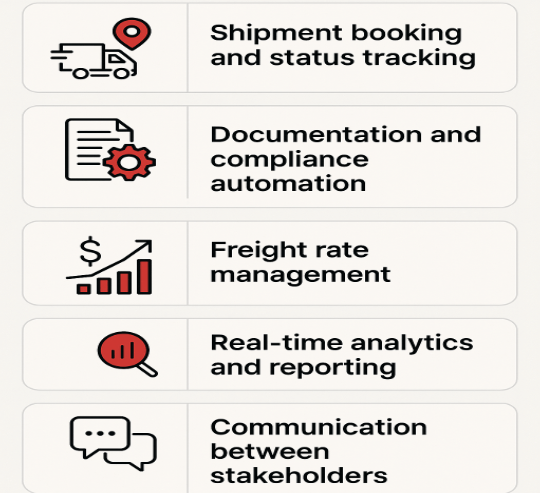
modules of a freight management app

  • Shipment booking and status tracking 
  • Documentation and compliance automation 
  • Freight rate management 
  • Real-time analytics and reporting 
  • Communication between stakeholders 

Although freight management systems and freight forwarding management systems have existed since a long time ago, modern apps are built to maximize convenience by offering easy mobile access, seamless third-party integrations and AI-powered decision-making – the reason why 87% of the logistics companies plan to digitize their freight operations by the end of 2027.

Planning to build your own freight app?

Let’s talk about your project goals and roadmap today.

Schedule Free Consultation

Why Build a Freight Management App in 2025? 

The profitability of the logistics industry heavily relies on time, accuracy, and coordination. Thus, building a custom freight management app like CargoWise can be a game-changing investment for your business. Also, companies that deploy custom logistics software report 23% faster shipment processing and 35% fewer errors. Here’s what makes 2025 the perfect time to invest:

  • Rising Demand for Visibility – today’s shippers are all about transparency and visibility. They demand for transparent pricing, real-time tracking and predictive delivery updates. Building a modern freight management app can allow you to offer shippers with ETA forecasts, shipment insights, and instant push notifications – turning your passive customers into proactive partners. 
  • Increased Competition – with a ton of tech-savvy startups offering digital-first shipment solutions, it has become crucial to stand out with features and technology that no one else can offer. Investing into a custom freight management app will allow you to integrate custom features as per customer needs as well as scale and iterate over time. 
  • Remote-First Logistics Teams – with logistics workforce becoming largely distributed, remote access has become critical for both the field agents and dispatch teams. A modern freight mobile app can make sure the communication and coordination across borders, time zones, and operational silos remain seamless. 
  • Sustainability Pressure – environmental accountability has become a means of gaining competitive edge in the modern world. Digital documentation, smart routing algorithms, and fuel-efficient scheduling are key areas that can help logistics companies meet sustainability targets and a custom freight app integrates all of them. 

In addition to that, building a custom freight management app is important because generic solutions cannot always fit your workflows. A tailored one allows:

  • Deeper integration with your CRM, ERP, or WMS
  • Ownership of data analytics and proprietary features 
  • White-label opportunities for reselling 

Ready to outgrow generic freight software?

Explore how a tailored app can streamline your operations.

Talk to Our Experts

How CargoWise One Sets the Benchmark 

CargoWise is one of the most comprehensive logistics management platforms available today. From freight forwarding and warehousing to transport and customs, it offers end-to-end support for the logistics companies. 

Let’s take a look at what makes CargoWise a benchmark for custom freight management app development:

Strengths of CargoWise One 

  • Extensive global compliance database 
  • Deep multi-modal freight capabilities
  • Scalable cloud infrastructure 
  • Integrated documentation and billing engine

However, the platform is complex and their UI is often found outdated by businesses. Users report lacking mobile experiences and overwhelming onboarding without the due training. 

Opportunities to Improve Upon CargoWise 

  • Include native mobile support for customers, drivers, and agents
  • Build an improved UI/UX for non-technical users 
  • Include AI-driven recommendations for freight rate optimization 
  • Use a modular design for better pricing flexibility 

Despite the fact that CargoWise sets the benchmark, there’s still room for innovation. Especially, if your target audience values usability, speed and real-time communication, building a custom freight management app with enhanced features and usability that aligns with your workflows can be the ideal move. 

Inspired by CargoWise but want something smarter?

Let’s build it better – together.

Request Free Consultation

Core Features of a High-Performing Freight Management App 

If you wish to stand out from competitors, it is essential that your freight management app is rich in functionality and an intuitive design. The features you integrate will decide how well does your app meets user requirements and scales upon growing user demands. 

Here’s are the core features of a modern, high-performing freight management solution:

Shipment Booking & Tracking – It can allow shippers to schedule pickups easily, input shipment details, and track progress in real-time. These operations are the foundation for any shipment management system. 

Rate Management Engine – It can manage pricing based on weight, distance and delivery speed as well as automate rate comparison across different carriers. Integrating a well-built freight rate management system can ensure cost-efficiency. 

Route Optimization – leverages AI algorithms to determine efficient delivery routes, enhance delivery speed and cut-down costs. It is integral for air freight management systems and freight transport management. 

Document Management – this feature can centralize all shipping-related documents such as custom declarations, bills of lading, and PODs. It can majorly help in maintaining compliance with the international laws of trade. 

Real-Time Communications Portal – allows instant updates and notification between customers, drivers, and dispatchers via an in-app chat system. 

Carrier & Vendor Integration – facilitate easy integrations with custom brokers, freight carriers, and third-party logistics providers. It can be of great support for freight forwarding management systems. 

Analytics & Reporting – Dashboards for KPIs such as freight costs, on-time delivery, carbon footprint and carrier performance. These are essential for decision-making within any logistics freight management framework. 

Mobile App Support – field agents and drivers often need access on the go. A responsive cargo management application for freight forwarders makes sure they stay connected. 

Role-Based Access Control – it can help protect sensitive data by assigning different levels for access for admins, clients, and vendors. This helps build compliance and trust in cargo handling management software. 

Cloud Hosting & API Integration – Opt for scalable cloud infrastructure with REST APIs to allow smooth data flow between systems—especially valuable in custom freight systems and enterprise shipping systems.

Check out our detailed blog if you want to learn about the essential features for building a freight management system thoroughly.

Pro Tip: Start lean with the core 4–5 features in your MVP and roll out advanced modules like AI routing and predictive pricing in later stages.

Want help prioritizing your app’s feature set?

Book a strategy call with our product consultants today.

Let’s plan your MVP

Architecture and Tech Stack Required 

To make sure your freight management app is scalable, stable, and future-ready, you’ll have the right technology foundation. Speed, security, and interoperability are paramount in 2025. 

Here’s a breakdown of tech stack and architecture recommended for building a successful freight management app:

1. Frontend

  • Frameworks: React, Vue.js, or Angular
  • Mobile: Flutter or React Native for cross-platform support
  • UI/UX: TailwindCSS, Material UI for responsive interfaces

2. Backend

  • Language: Node.js, Python (Django/FastAPI), or Java (Spring Boot)
  • Architecture: Microservices-based for scalability and modularity
  • API Layer: REST and GraphQL for flexible data consumption

3. Database

  • Relational: PostgreSQL or MySQL for transactional data
  • NoSQL: MongoDB or Redis for real-time tracking, caching
  • Cloud Database: Amazon RDS or Firebase Realtime DB

4. Hosting & DevOps

  • Cloud Providers: AWS, Google Cloud, or Microsoft Azure
  • CI/CD Pipelines: GitHub Actions, GitLab CI, or Jenkins
  • Containerization: Docker + Kubernetes for scalable deployment

5. Security Stack

  • SSL encryption, OAuth 2.0 authentication
  • Role-based access control (RBAC)
  • Compliance with GDPR and ISO standards

6. Integrations & APIs

  • Freight APIs: Freightos, Flexport, Project44
  • ERP/WMS/CRM systems
  • IoT sensors and GPS for real-time data

7. AI & Automation

  • Predictive analytics using TensorFlow or PyTorch
  • AI-powered rate forecasting and delay prediction
  • RPA bots for document handling and customs checks

Expert Tip: Build with an API-first approach so your app can easily scale and connect with third-party logistics ecosystems.

Development Timeline and Cost Estimates 

Building a freight management app is a complex project that requires strategic planning, cross-functional collaboration, and phased execution. Here’s a detailed breakdown of the development timeline and estimated costs for a custom freight management solution in 2025: 

Phase Duration Key Activities
Discovery & Planning 2–3 weeks Requirement gathering, competitor analysis, tech stack selection, workflow mapping
UI/UX Design 3–4 weeks Wireframing, user journey design, UI prototyping
MVP Development 8–12 weeks Frontend/backend setup, core feature development (shipment tracking, rate management, communication portal)
Testing & QA 3–4 weeks Functional testing, API testing, security audits
Integrations & Scalability 2–3 weeks Connecting third-party logistics APIs, database scaling
Deployment & Launch 1–2 weeks Cloud deployment, documentation, post-launch support


Total Timeline: ~20–28 weeks depending on scope, team size, and feature complexity.

Estimated Cost Breakdown

Component Estimated Cost (USD)
Discovery & Planning $5,000 – $10,000
UI/UX Design $8,000 – $15,000
MVP Development $40,000 – $70,000
QA & Testing $8,000 – $12,000
API Integrations & DevOps $10,000 – $18,000
Total Estimated Investment $70,000 – $125,000

Note: Costs may vary based on development region, in-house vs outsourced teams, and specific tech requirements (e.g., AI modules, advanced automation, or blockchain). If you want to know a detailed breakdown, read our post on logistics software development cost

Factors That Influence Cost & Time

  • Number of user roles and permission settings
  • Integration depth with third-party logistics APIs
  • Degree of customization vs. template-based components
  • Level of automation and AI-driven modules
  • Native vs cross-platform mobile support

Pro Tip: To optimize ROI, start with a lean MVP focused on shipment management and tracking. Add complex modules (like freight rate forecasting or customs clearance) in future sprints.

Need help estimating your app’s budget and timeline?

Get a personalized quote today.

Calculate Your App Cost

Compliance, Security & Data Management 

Logistics and freight operations often involve handling sensitive data such as client contracts, cargo data, financial transactions and custom documentation that require airtight security and compliance. Regulatory bodies from across the globe continue to tighten the requirements for freight management systems, especially those operating internationally. 

Here’s how you can approach compliance, security and data governance for your freight management app:

Data Security Essentials

  • End-to-End Encryption: Ensure all data in transit and at rest is encrypted using AES-256 standards or higher.
  • Multi-Factor Authentication (MFA): Require MFA for all user roles, especially admins and vendors handling sensitive information.
  • Role-Based Access Control (RBAC): Limit data access based on user roles (e.g., shipper, customs agent, driver, warehouse manager).
  • Regular Penetration Testing: Perform quarterly vulnerability assessments and threat modeling.
  • Audit Logs: Keep immutable logs of system activity to track access and usage history.

Global Compliance Standards

  • Depending on your operating regions and business model, your app may need to comply with:
  • GDPR (Europe): For data privacy and user consent regulations
  • CCPA (California): For consumer protection rights
  • ISO 27001: For international information security management
  • Customs and Border Protection (CBP): For freight entering/exiting the U.S.
  • BIS, DGFT, and IATA: For trade, export, and air freight regulatory compliance
  • Quick Fact: Companies that comply with ISO 27001 experience 75% fewer data breaches (Source: ISO.org).

Data Storage & Sovereignty

  • Cloud Region Selection: Choose cloud providers with multi-region support and allow users to store data locally (especially in regions like the EU or Australia).
  • Data Retention Policies: Define how long shipment records, invoices, and communications are stored.
  • Backup & Disaster Recovery: Automate backups and ensure failover environments exist to minimize downtime.

Integration with Customs & Compliance Systems

  • Integrate with customs APIs and trade compliance services (e.g., Descartes, MIC Customs).
  • Use AI to validate trade documents, harmonized codes (HS codes), and generate alerts for anomalies.

Expert Insight: Compliance-first development not only helps avoid penalties but also builds trust with enterprise clients and regulatory agencies.

Emerging Trends & Future Outlook

As digital transformation continues to redefine global logistics, the future of freight management apps is being shaped by new technologies, evolving customer expectations, and sustainability goals. Staying ahead of these trends is crucial for long-term competitiveness.

1. AI-Driven Freight Optimization

Machine learning models will increasingly automate decisions around pricing, route optimization, and demand forecasting. Predictive analytics will help reduce delivery delays and fuel consumption, offering a smarter alternative to manual planning.

Stat: AI adoption in supply chain operations is expected to reach 75% by 2027 (Source: Gartner).

2. Blockchain for Transparent Freight Records

Distributed ledger technology is being explored to ensure tamper-proof freight records, real-time tracking of cargo movement, and secure customs documentation. This can reduce fraud and increase trust across the logistics chain.

3. IoT-Enabled Shipment Monitoring

Smart sensors and GPS-based IoT devices will play a greater role in live tracking, condition monitoring (temperature, humidity), and automated Geofencing alerts. This is especially crucial for air freight, pharmaceuticals, and perishable goods.

4. Sustainability Dashboards

Eco-focused features like carbon emission tracking, green routing suggestions, and sustainability scoring will become standard. Freight companies will increasingly need to demonstrate compliance with environmental regulations and ESG benchmarks.

5. Low-Code & API-First Platforms

Businesses will seek agile solutions they can customize without deep technical resources. Low-code platforms and API-first architectures will empower faster deployments and integrations across diverse logistics tools.

6. Decentralized Global Freight Marketplaces

As global logistics grows more decentralized, apps will evolve into digital freight marketplaces, connecting shippers, carriers, and customs agents in real time. Think Uber-like models for global freight operations.

Expert Insight: Logistics companies that adopt emerging tech early see up to 40% faster market adaptation and 20% increase in operational ROI (Source: Deloitte).

Conclusion

With logistics becoming more fast-paced, transparent, and tech-driven, the need for custom-built freight management apps is stronger than ever. Whether you’re a freight forwarder, 3PL provider, or an enterprise logistics firm, a purpose-built solution can help you gain a significant edge in visibility, automation, and efficiency.

From integrating real-time shipment tracking to deploying AI-driven route optimization and staying compliant with global trade standards—there’s never been a more pivotal moment to innovate.

If CargoWise One has shown us anything, it’s that digital platforms can power global logistics at scale. But the next frontier lies in customization, usability, and tech agility tailored to your business’s DNA.

Partnering with AppVerticals, a leading mobile app development company, you can not only build a freight management app that y future-proofs your operations but  can open new revenue streams through scalability, white-labeling, and smarter data insights.

Let’s turn your vision into a world-class freight app.

Book your free strategy session now
Let’s Discuss!

How to Build a Warehouse Management Application

Managing a warehouse is no small feat. From picking and packing orders to keeping track of inventories across locations, your operations quickly become a messy puzzle without the right tools.

Today, efficiency is king — and a warehouse management application p lets you cut through this complexity. It’s a tailored solution designed to match your unique workflows, not a generic, off-the-shelf software that forces you to adjust your operations to fit its rigid structure.

Picture this: Your team instantly knows exactly where each product is in the warehouse. Orders are routed intelligently to minimize travel time. Inventory is updated in real time across all locations. The result? Higher accuracy, faster delivery, lower operational costs, and happier customers.

Studies show companies that implement a warehouse management application can cut their order processing time by up to 25% and reduce picking inaccuracies by nearly 30%.

Whether you’re a growing e-commerce business or a large 3PL provider, designing a custom warehouse operations app lets you stay in control — scaling, optimizing, and adapting — without being held back by legacy systems.

Ready to Take the First Step Toward a Smarter, More Efficient Warehouse?

Let’s Do That Together

Talk to Our WMS Experts

What Is a Warehouse Management Application and Why It Matters

A warehouse management app is a customized software solution designed to help businesses streamline and control their daily warehouse tasks — from inventory control and picking and packing to freight delivery and third-party logistics (3PL).

Instead of manually updating spreadsheets or wrestling with legacy software, you get real-time visibility and automation that lets you respond faster, reduce human error, and maximize productivity — all from a phone, a handheld, or a terminal on your warehouse floor.

Picture this scenario: Your team no longer has to search for products manually or rely on paper lists. The warehouse management application guides them directly to the right shelf, lets them scan a barcode to update stock instantly, and notifies supervisors if inventories are running low.

This kind of control is more than just convenient — it’s a powerful way to cut waste, minimize mistakes, and keep your operations running smoothly under pressure. According to Research and Markets, the global warehouse management systems market is expected to grow from $2.9 billion in 2021 to nearly $9.3 billion by 2030, reflecting a growing need for smarter, more adaptable software.

Why Develop a Custom Warehouse Management Application?

Every warehouse is different — from its physical layout and product range to its team structure and delivery timelines.
So why settle for a one-size-fits-all solution when you can have something tailored precisely to your operations?

Here’s why developing a custom wms app makes perfect business sense:

  1. Aligns with Your Processes
    Your workflows are unique. A custom networked warehouse application lets you match its functionality directly to your operations — whether you need specialized picking strategies, inventory control methods, or freight delivery schedules.
  2. Integrates Seamlessly
    Your warehouse doesn’t operate in a vacuum; it connects to your e-commerce platform, third-party logistics (3PL) providers, ERP, and CRM. A custom solution lets you integrate all these components smoothly, eliminating manual data transfer and reducing the risk of human error.
  3. Scales with Your Business
    As you grow — adding new products, storage locations, or distribution centers — your custom networked warehouse application evolves alongside you. Instead of needing a whole new system, you simply add modules or adjust workflows.
  4. Boosts Efficiency and Accuracy
    Studies show companies can cut processing time by up to 25% and reduce picking inaccuracies by nearly 30% when employing tailored software. This directly translates to faster delivery, lower operational costs, and happier customers.
  5. Competitive Edge
    With a bespoke solution designed for you — not a generic platform — you’re able to innovate faster, respond to market conditions quickly, and outperform your competition. A custom warehouse operations app lets you control your operations in a way off-the-shelf software simply can’t match.

Improve Your Warehouse Operations Today With AppVerticals

Get a Free Consultation with Our Development Experts

Book Your Free Consultation

Market Demand and Trends — Why Now Is the Time to Develop Your Warehouse Management Application

The global warehouse management systems market and e-commerce business is growing at a remarkable pace.
This growth signals a clear industry trend: companies across sectors are investing in smarter, more adaptable technology to keep their operations competitive.

Here’s why the demand is soaring:

E-commerce Boom
Online orders have skyrocketed, putting pressure on companies to fulfill faster and more accurately.
A custom networked warehouse application lets businesses keep up with this growing demand.

Rise in 3PL Services
As more businesses outsourcing their fulfillment, 3PL providers need specialized software to handle multiple clients’ inventories efficiently.

Higher Customer Expectations
Today’s consumers want their orders faster and with greater accuracy. Using a tailored inventory automation tool, you can cut delivery times, minimize mistakes, and boost satisfaction.

Scalable Operations
Businesses are growing quickly, adding new products, locations, and delivery methods. A custom solution lets you scale without swapping platforms or interrupting operations.

Data-Driven Decisions
Modern companies rely on real-time data to stay agile and forward-thinking. A networked warehouse application lets you track stock, orders, and delivery trends — empowering smarter, faster decisions.

The industry is growing, and companies that leverage custom software to optimize their operations will be the ones to stay competitive.

Core Features of a Successful Warehouse Management Application

Designing a custom networked warehouse application means you can select and implement the features that match your operations. Here are the key components you should consider adding to maximize control, efficiency, and visibility:

Barcode Scanning and Real-Time Visibility

Using barcoding and scanning lets you track products instantly as they move through your warehouse.
Your team simply scans a code with a handheld or phone, and the inventory automation tool immediately updates the stock’s location and status in real time.
Benefit: Enables greater accuracy, cuts manual checking, and reduces human error by nearly 30%.

Automated Stock Movement and Order Fulfillment

Your warehouse management application can streamline picking, packing, and delivery workflows under a unified logistics dashboard.
For example, when an order drops in your networked warehouse application, the system can automatically generate a picking path, reducing unnecessary movement and speeding up fulfillment.
Benefit: Saves up to 25% of processing time and lets workers handle more orders in a day.

Cloud-Native and Multi-Channel Support

Designing a cloud-native WMS solution lets you connect multiple locations — and even 3PL providers — through a unified platform.
Your team, wherever they are, can view inventories, track orders, and collaborate in real time.
Benefit: Easier scaling, smoother expansion, and less administrative bottleneck.

Reporting and Analytics

Your custom application should provide real-time reports and actionable data, from inventory turnover to picking accuracy and delivery timelines.
Benefit: Enables you to make smarter decisions — whether it’s restocking, reallocating resources, or addressing bottlenecks — all backed by hard data.

User Roles and Access Control

Different team members need different levels of information and control.
Your custom solution lets you implement role-specific permissions, securing sensitive data and reducing confusion on the warehouse floor.
Benefit: Better oversight and greater accountability across your team.

You can also check out the essential features of a freight management system here.

Design these components to match your operations. Whether you need third-party logistics (3PL) support, freight delivery schedules, or specialized inventory control methods, a custom solution lets you put the power directly into your hands.

Looking for a Custom Warehouse App with All These Features?

Let’s Talk

Talk to Us!

How to Develop a Warehouse Management Application (Step-by-step)

Creating a custom warehouse management application might seem overwhelming at first — but with a clear roadmap, it’s a smooth process. Here’s a simple, step-by-step approach to developing your own:

Step 1 – Identify Your Requirements

Start by mapping your workflows, pain points, and goals.

  • Are you struggling with picking inaccuracies, slow order fulfillment, or inventory control?
  • Do you need third-party logistics (3PL) integration or specialized freight delivery schedules?

This first step guides all subsequent decisions.

Step 2 – Select Your Tech Stack

Your custom networked warehouse application should be scalable, reliable, and flexible.

  • Cloud-native technologies (like AWS or Azure) allow for real-time visibility across locations.
  • The back end might use Node.js, Python, or .NET, while the front end could be a lightweight React or Angular application.
  • Mobile components (for handhelds or smartphones) can be implemented with React Native or Flutter.

Step 3 – Design UI/UX

Your team will use this application daily, so ease of use is key.

  • Provide a clear, simple UI with large touch controls for scanning, counting, and updating.
  • Prioritize efficiency and visibility — for example, color-coding different locations or order statuses.

Step 4 – Integrate with Legacy and 3rd Party Systems

Your custom solution should connect smoothly with your existing inventory control software, freight delivery platforms, or third-party logistics providers (3PL).

  • Develop robust API endpoints and ETLs (Extract, Transform, and Loading) to sync data across platforms.

Step 5 – Develop, Test, and Validate

Your team should perform extensive testing under real-world conditions.

  • Validate barcoding, picking and packing flows, and inventory reconciliation.
  • Perform load testing to be sure your application can handle busy periods.

Step 6 – Deploy and Train

Once testing is complete, deploy the application and train your team to use it effectively.

  • Provide clear instructions, video walkthroughs, and FAQ documents.
  • Monitor usage closely and resolve issues quickly.

Step 7 – Continuous Improvement

Your custom networked warehouse application should evolve alongside your operations.

  • Gather feedback from your team and implement enhancement requests.
  • Monitor processing speeds, picking accuracy, and inventory control to drive ongoing improvement.

Design your application to be adaptable. As your operations grow, you can add modules and scale without needing to rebuild from scratch.

7 Top Tech Stack to Develop Your Custom Warehouse Management Application

Your custom warehouse management app needs a robust, scalable, and flexible stack — the combination of technologies you choose will directly affect its performance, ease of maintenance, and future adaptability.

Here’s a reliable, modern tech stack we often use at AppVerticals to develop scalable warehouse operations apps:

Back-end (API and Database)

  • js or .NET — lightweight, scalable, perfect for developing custom API services quickly.
  • Python (Django or FastAPI) — a solid alternative if you need heavy data processing alongside API endpoints.
  • Postgres or MySQL — relational databases to handle transactions, inventories, and orders with ease.
  • Redis — useful for caching frequently accessed data (like product IDs or locations) to cut latency.

Front-end (Web and Mobile)

  • React or Angular — for a lightweight, responsive web application that supervisors and managers can use on a PC or a phone.
  • React Native or Flutter — for developing cross-platform mobile apps, allowing warehouse workers to use smartphones or handhelds to track stock, scan codes, and manage orders on the go.

Cloud Platform and Tools

  • Amazon Web Services (AWS), Microsoft Azure, or Google Cloud Platform (GCP) — to deploy, scale, and manage your application safely in the cloud.
  • Docker and Kubernetes — for packaging, scaling, and orchestration of services.
  • API Gateway and Load Balancer — to handle growing workloads and distribute requests efficiently.

Additional Tools (optional)

  • GraphQL — if you need more flexible data retrieval across different components.
  • WebSockets or SignalR — for real-time notifications (like when a picker finds an item or when stock drops).
  • OAuth 2.0 / JWT — for securing API endpoints and managing roles and permissions.

Choose a stack that aligns with your team’s expertise and future goals.
A custom solution lets you mix and match components, adding or swapping technologies as your operations grow.

Turn Your Tech Stack Into a Competitive Edge with AppVerticals

Get Started Now

Implementation Timeline — What to Expect

Designing and developing a custom networked warehouse application isn’t an overnight process — it’s a strategic investment that typically evolves over a few months. Here’s a realistic implementation timeline to help you plan:

Week 1–2: Discovery and Requirements

  • Meet stakeholders, gather requirements, and define your goals.
  • Finalize scope of features, workflows, and technology stack.

Week 3–4: UI/UX Design

  • Wireframe key screens (like inventory view, picking, and packing).
  • Develop a high-fidelity UI/UX prototype for approval.

Week 5–10: Development (Back-end and Front-end)

  • Set up cloud architecture, databases, and API endpoints.
  • Develop core modules — inventory control, picking, packing, freight delivery, and reporting.
  • Integrate 3rd-party services and legacy systems.

Week 11–12: Testing and Quality Assurance

  • Perform functional, regression, and load testing.
  • Validate the application against your workflows.
  • Identify and resolve bugs or bottlenecks.

Week 13–14: Deployment and User Training

  • Deploy the application to a production environment.
  • Provide training to your team — supervisors, picker/packers, and delivery handlers — to make sure everyone knows how to use it effectively.
  • Prepare fallback plans and support in case issues arise after launch.

Week 15+: Continuous Improvement

  • Monitor performance and gather feedback from users.
  • Develop and deploy enhancement requests or bug fixes.
  • Begin adding advanced modules — for example, AI-assisted demand forecasting or route optimization — if your operations require it.

The timeline can fluctuate based on project complexity, team resources, and third-party integration requirements. Using an agile approach lets you implement in phases and respond quickly to changing needs.

Best Practices for Successful Implementation

Implementing a custom warehouse management application isn’t just about writing code — it’s about choosing the right approach to maximize benefits and minimize disruptions. Here are a few tried-and-tested best practices we recommend following:

Start Small and Expand

Instead of trying to implement every feature at once, focus first on your core workflows — inventory control, order fulfillment, and delivery.

  • Once these are stable, you can gradually add advanced modules.

Benefit: Allows you to realize value quickly and adapt based on real-world usage.

Design with Your Operations in Mind

Your warehouse is unique.

  • The UI, roles, permissions, and workflows should reflect your team’s responsibilities and physical operations.

Benefit: Boosts productivity and cuts down on training time.

Clean, Reliable Data is Key

Your custom solution will rely on accurate data.

  • Perform a thorough data cleanse and migration from legacy systems.
  • Establish validation checks and periodic audits to keep your data trustworthy.

Benefit: Reliable data lets you make smarter decisions and avoid chaos.

Training and User Support

Your team will be the daily users of this application.

  • Provide hands-on training sessions, video walkthroughs, and clear instructions.
  • Foster a feedback loop, letting workers report issues or suggest improvements directly.

Benefit: Higher user satisfaction, faster onboarding, and greater buy-in across your team.

Scalable, API-First Approach

Design your application to connect smoothly with future platforms — whether you want to integrate AI in logistics for assisted route planning, robot picker technology, or third-party delivery services.
Benefit: Easier expansion and adaptability in a growing, changing business.

Tip: Custom software is an ever-evolving tool, not a finished product.
Your ability to respond quickly to operational needs will determine its long-term success.

Final Thoughts

Managing a warehouse efficiently isn’t just about shelving products and ticking off orders — it’s about having complete control and visibility over your operations in real time. AppVerticals is a leading mobile app development company with specialized experts who can help you build a smart warehouse management application designed to exactly do that.  Instead of trying to squeeze your unique workflows into a generic, off-the-shelf WMS, we can help you design a tool tailored precisely to your business needs.

Why It Matters:

  • Boosts Efficiency: Automate routine tasks, cut manual effort, and streamline workflows.
  • Enhances Accuracy: Barcode scanning, real-time inventories, and role-specific controls minimize human error.
  • Scales Seamlessly: As your operations grow — adding products, locations, or delivery methods — your custom solution evolves with you.
  • Provides Actionable Insights: Detailed reports and data lets you make smarter, faster decisions.

Your warehouse is a key component of your supply chain and customer satisfaction. A custom-built warehouse management application will let you maximize its potential, cut waste, and stay a step ahead of the competition. Instead of fitting your operations into a rigid software mold, you’re shaping a tool that supports — and drives — your future growth.

Don’t Let Inefficiencies Hold Your Warehouse Operations Back

Contact Us Today for a Personalized Solution

How to Launch a Successful App Startup in Los Angeles: A Founder’s Guide

Got an exciting app idea but not sure how to bring that to life and make it a hit in the super-crowded startup landscape of LA.

You’re not alone and probably at the right place.

With over 4000 active tech startups and $8+ billion in annual VC funding flowing into the region, Los Angeles is becoming a center for digital innovations. However, turning an app idea into a successful app startup takes a lot more than just inspiration. You require a fool-proof plan, a scalable product, and of course – the right team supporting you from behind.

Thinking of launching your own app startup in LA?

Let’s turn your idea into a market-ready MVP.

Book a Free 30-Minute Consultation

This blog post simplifies the hassle for you – providing a step-by-step guide for successful startup app development in Los Angeles. From validating your ideas and choosing the right development partner to building a dynamic MVP and scaling for growth – the guide covers everything you’ll need to launch a successful app startup in Los Angeles.

Why Los Angeles is the New Hotspot for Startup App Development

If you’re still thinking Silicon Valley is the only place to launch your tech startup from, you must rethink.

Los Angeles has become the center for some of the cutting-edge app startups in the U.S. Thanks to the great mix of industries operating in the state – media, tech, entertainment, wellness, and fashion – LA manages to offer an edge to the creative ideas that other startups hubs can never match.  In case you’re out of ideas, check out the top 20 mobile app trends startups should watch in 2025. 

Here’s why most tech founders as choosing startup app development in Los Angeles:

Access to Diverse Talent

LA holds a diverse pool of talent. It is not only limited to the great developers and designers but there are content creators, story tellers, growth hackers, and branding pros available under one roof – allowing the transformation of your unique app ideas into vivid realities without compromising any feature or functionality you wish to add. The diversity can help startups create apps that are not just functional but also engaging at an in-depth level and can keep the users hooked forever.

A Growing Investor Network

A major reason why you should opt for startup app development in Los Angeles is the growing investor network of this city. Unlike many, this state offers flowing venture capital. From angel investors to the local VCs and accelerators like Muckerlab and Techstars LA, there are ton of funding opportunities available for the early-stage startups.

Industry-Specific Innovation

Influencer marketing tools, media tech, health apps, Edtech – you name it, LA is innovating that. Startups here are developing solutions that reflect consumer trends and lifestyle of Southern California, and that’s what attract users very quickly.

Collaboration-First Culture

Los angles welcomes collaboration culture more than any other tech city. Founders here are open to connection, sharing knowledge as well as resources with each other and growing. This can be a major support when you’re only starting.

Planning Your App Startup: What Every LA Founder Should Know

Before you start coding or hire a developer to do that on your behalf, it is important to become very clear about what you’re building – and why.

Whether your aim is to gather VC funding or bootstrapping, adequate planning can always set you up for long-term success. Here’s how tech founders in LA can start strong:

Validate Your App Ideas First

Not everything that sounds good to you or looks great on paper can be the users’ choice. The best way to validate your idea is to build a no-code prototype. Test demand with waitlists of landing pages. The core objective is make sure the idea actually interests your target audience before you start spending on development.

Define Your Target Market

LA is a massive and diverse city. It is important for you to define a particular target market before getting started. Think whether you’re building for students, creatives, entrepreneurs, gig workers, fitness lovers, or any other consumer group. Knowing your exact niche sets the foundation for startup app development in Los Angeles. From features to design, language, and monetization – it can guide you for everything.

Choose the Right Business Model

Ad-Supported, Subscription, Freemium? The users in LA are tech-savvy and expect quick value. Thus, it’s important for your choose a model for your startup app development in Los Angeles that can fit both with your audience’s behavior as well as the product.

Think MVP, Not Full Product

It is always the best approach to launch the first version to solve only one clear problem. Do not try going over the board by fitting in all the features in one-go. Instead, focus on building a minimum viable product (MVP) that you can easily scale and learn from.

Work with Startup-Focused Development Partner

While you might know how to code, the best approach is partner with a startup app development company that offers professional services. Pick a team that has worked with startups closely and understand the constraints such as, limited budget, packed timelines, and the continuous need for quicker pivots.

Startup App Development Process: From Idea to App Store

Once your idea is validated and the MVP is defined, it’s finally time to bring it to life. Here’s what startup app development in Los Angeles looks like – especially when working with the right startup app development agency.

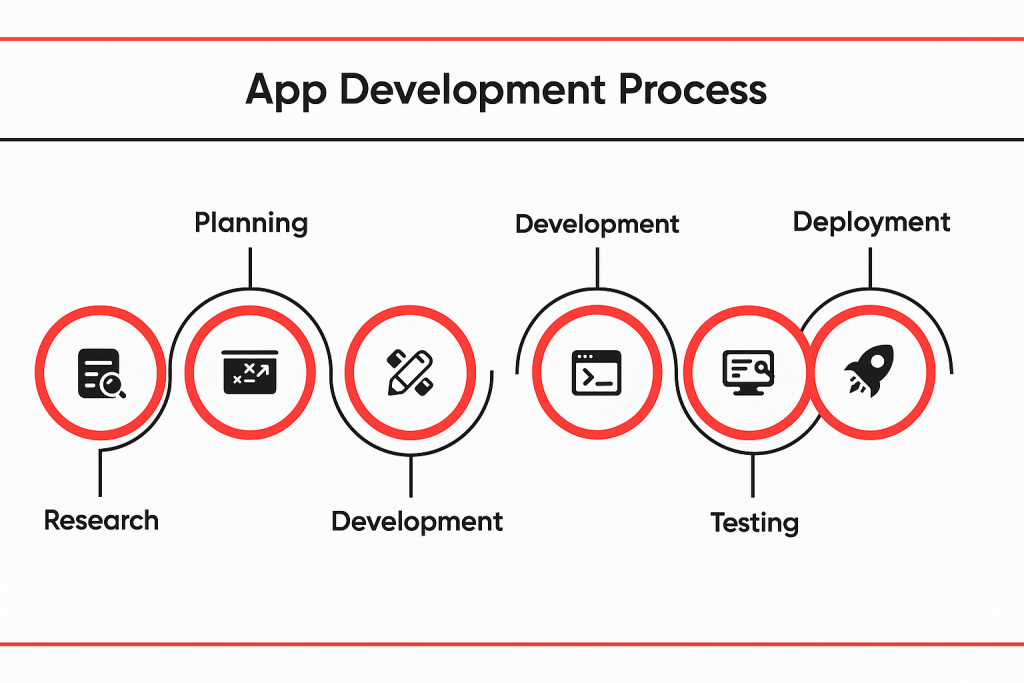
startup app development process

Each stage is equally crucial in transforming your idea into a user-ready, polished product:

Ideation & Feature Planning

This is where strategy meets structure. Based on market research and user feedback, you can work with your development team to:

  • Determine what can solve the core pain points of your target audience
  • Define the main features of your MVP
  • Create a blueprint of user flows and app architecture

Pro Tip: begin with the smallest version of your app that delivers real value. Make it lean and fast so you can easily iterate and scale.

UI/UX for the LA Users

An estimated 75% of the consumers judge a company’s credibility by their design. Especially in a market like Los Angeles where user experience and aesthetics can make or break the adaption, it is crucial for you build a UI/UX design that captures user attention.

A strategically empowered startup web app development company will:

  • Focus on clean visuals and intuitive navigation
  • Make sure the designs align with your brand’s personality
  • Build creative prototypes for early testing

Users of LA expect stylish, smooth and mobile-optimized experiences – make sure your app meets the mark.

Choosing the Right Tech Stack

Should you go with native or cross-platform app development? The question will certainly trigger your mind when planning startup app development in Los Angeles. The answer is simple – look at your app’s complexity, timeline and budget.

  • Native is best for heavy-performance apps but require longer development time and higher costs.
  • Cross-platform is ideal for MVPs given the cost-effectiveness and less development time.

The leading startup app development companies in Los Angeles often recommend cross-platform for early-stage startups unless there are some very technical requirements.

Agile Development & Iterative Releases

Quick development and easy iterations are the core for successful startups. Agile development methods allow:

  • Continuous feedbacks from the users
  • Quicker pivots on the basis of real data
  • Collaborative sprints with your development team

The key here is momentum and not perfection.

Ready to scale your startup?

Our team helps LA-based startups build, launch, and grow smarter—

Get a Custom App Development Roadmap Now

How to Choose the Right App Development Partner in Los Angeles

The team you partner with for startup app development, especially – in the early stages, can either make or break it for you. Partnering with the best yet right startup app development company in Los Angeles is a lot more than just hiring coders or developers. It’s about choosing a team that will dedicatedly work on your idea and bring it to life, help you market and gain desired success.

Here’s how you can do that the right way:

Look for Startup-Specific Experience

Remember you do not need a partner that works with enterprises and giant corporations. Instead, you need a startup app development company that can understand your idea, relate with your business needs, and know:

  • How to build successful MVPs in no time
  • The significance of working within the budget
  • To adapt with the shift in priorities and trends

You can always ask for their case studies or even talk to their past clients yourself for validation.

Evaluate Technical & Strategic Fit

Successful startup app development is not just about choosing the right tech stack. You ideal partner should also:

  • Offer both product and development strategy
  • Be familiar with mobile app development, specifically have working experience with startups
  • Have strong UI/UX chops in alignment with LA’s design-savvy users
  • Give them bonus points if their services comes with a post-launch support and scaling guidance

Ask the Right Questions

When making your choice, it is crucial to ask questions like:

  • Can you walk me through your sprint process?
  • How do you handle product pivots?
  • Have you worked with startups based in LA before?
  • Do you help with app store analytics and deployment?

Prioritize Communication & Transparency

While founders often overlook, communication is critical in successful startup development. You should never be wondering about what is happing with your app when working with a development company. A trustworthy partner will keep in you in the loop, communicate with transparency and always:

  • Set clear expectations and timelines
  • Share progress through updates and demos
  • Be upfront about delays or roadblocks

Don’t Just Buy Code – Buy a Long-Term Partner

The best startup app development companies do not just build codes or the first versions of your app. Instead, they put down foundation for the future leader products. Choose a team that can truly invest in your growth and stay by your side for a longer time, not just the one that can assist you till the launch.

Startup App Development Cost in Los Angeles: A 2025 Breakdown

Knowing the cost is crucial for tech founders planning to invest in startup app development.

The question ‘how much does it cost to build a startup in Los Angeles in 2025’ must have popped in your mind too.

The truth is – it varies based on multiple factors. However, we can still break it down for you to budget smarter as follows:

Average Cost Ranges (MVP Build)

  • Basic MVP: $25,000 – $45,000
  • Mid-complexity startup app: $50,000 – $80,000
  • Feature-rich or niche apps (fintech, healthtech, etc.): $90,000+

These are average rates offered by any top-tier startup app development company in Los Angeles that offers quality with creativity.

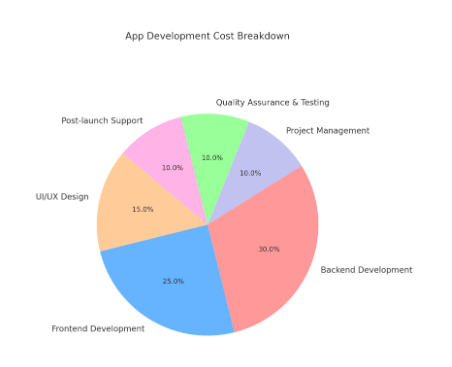
app development cost breakdown

What Influences the Price?

Multiple factors come together to influence your mobile app development cost in Los Angeles:

  • App complexity: more features, screens, and integrations = higher costs
  • Design needs: custom UI/UX design is sure worthy but certainly adds to your overall budget
  • Tech stack: cross-platform apps costs less than those build with native platforms
  • Backend infrastructure: Real-time video, chat, AI, and APIs all add to the total development cost.
  • Who you hire: local agencies in LA might cost you more than offshore ones. However, they can provide adequate cultural alignment and strategic value to your product.

Pro Tip: work with a startup app development agency that offers open pricing models and help with prioritizing features on the basis of your budget.

Cost-Saving Tactics That Don’t Compromise Quality

  • Build core essential features for your MVP
  • Use cross-platform frameworks such as, Flutter and React Native
  • Pick reusable design components
  • Work in sprints and iterate based on user feedback
  • Use pre-built APIs wherever possible (e.g. Firebase, Stripe)

Not sure how much your app might cost?

Use our App Development Cost Calculator to get an instant estimate based on your startup’s needs.


Calculate Your App Cost

How to Monetize and Grow Your App Post Launch

Now that your MVP is live, what’s next?

This is where many startups stall. While you think that’s the end, launching a startup is only half of the game. The next step requires turning your product into a business. Here’s how you can monetize and scale smartly in the ever growing LA market.

Pick a Monetization Model That Suits Your Business

While most of them look appealing, not every monetization model goes well with your audience and is equal. It is crucial to pick the one that truly aligns with your users’ behavior and offers what they expect and value. They include:

  • Freemium – Best for apps that offer ongoing value such as, fitness apps. It lets the users try for free and then upsells for additional features.
  • Subscription- Ideal for apps that require regular engagement such as, education, fitness, and content, etc.
  • In-app purchases – Common for feature upgrades or mobile games.
  • Ads – This model only works with high-engagement, bigger apps.
  • Pay-to-download – A rare option for startup apps unless you’re offering some high-value, niche-specific tools.

Growth Strategies for LA App Startups

With so much competition around, it takes something special to stand out. A solid strategy and smart execution maybe. Here’s how founders in LA get the best traction:

  • Leverage Local Community – use demo-days, networking events, and startup accelerators based in LA to promote your product.
  • Influencer Marketing – micro-influencers in LA can drive massive visibility for early-stage startups.
  • App Store Optimization – optimize your keywords, app title, visuals, and reviews to get found organically.
  • Content + SEO – come up with a landing page strategy or publish a blog targeting niche-specific search terms such as, productivity app for LA freelancers, etc.
  • Referral Programs – turn your users into brand ambassadors and marketers with premium access or rewards.

Track, Learn, and Iterate

You cannot really grow what you don’t measure. It is always ideal to use analytics tools such as Mixpanel, Firebase, or Amplitude to keep track of:

  • Feature usage
  • Drop-off points
  • Retention rates
  • Revenue per user

Successful startup app development in Los Angeles is not a one-time action. Growth requires consistent efforts and iteration based on real-time feedback.

Build the Next Big Startup App in LA with AppVerticals

Launching a successful startup app in Los Angeles is not only about bringing a bold idea to life – it’s about strategy, execution, timing, and the perfect development partner. From validating your idea to building a lean MVP and scaling via smart monetization and growth strategies, the LA tech scene  certainly rewards those who stay flexible, move fast, and think user-first.

Whether you’re a small team, a solo founder, or a funded startup –  partnering with AppVerticals, a leading mobile app development company, can help you build the next big app in LA. With a close understanding of the apps market and command over mobile app development, we can actually take your startup app ideas to life, transforming them into successful digital products that the target consumers love to interact and engage with.

Ready to Turn Your Vision into Reality

Partner with our specialized startup app development team at AppVerticals and turn your idea into a digital success.

Get Free Consultation

Gamification vs Game-Based Learning: Which Works Better?

For years, educators and EdTech teams have pursued a bold idea: make learning more like a game, and students will stay engaged longer and perform better. Yet, in the rush to gamify everything from multiplication drills to enterprise LMS platforms, the lines between two very different approaches have blurred — gamification and game-based learning.

They’re not the same, and understanding that difference matters more than most people realize. Which one works better? Which should your product or platform team invest in? The answer depends on your learning goals, development resources, and the outcomes you want to achieve.

As an edtech software development company, AppVerticals has explored both methods across K–12, higher education, and corporate learning ecosystems. Let’s examine the difference.

Gamification vs Game-Based Learning

Understanding the difference between gamification and game-based learning is essential for choosing the right strategy for your EdTech product. Both leverage game mechanics, but they serve distinct educational and business goals.

Aspect Gamification Game-Based Learning
Definition Applying game elements like points, badges, or leaderboards to motivate learners. Using actual games built around learning objectives to teach skills or concepts.
Purpose Boost motivation and participation within existing content. Facilitate deep understanding through immersive learning experiences.
Content Integration Adds a layer of incentives on top of existing lessons. Embeds learning objectives directly within gameplay.
Complexity Easier and faster to build; lower development cost. Requires greater design depth and development investment.
Learner Focus Targets consistency and engagement. Focuses on cognitive skills and mastery.
Examples Leaderboards in LMS, progress badges, streaks. Simulations, role-playing missions, scenario-based modules.
Measurement Engagement metrics — time on task, points earned. Mastery metrics — problem-solving, knowledge retention.
When to Use For repetitive practice or engagement dips. When teaching higher-order skills or applying knowledge.

Many EdTech teams treat both strategies as interchangeable, which leads to mismatched results. Gamification improves consistency; game-based learning transforms comprehension.

When to Use Gamification

Gamification isn’t about decorating content with rewards — it’s about building momentum that keeps learners active and returning. It’s particularly effective for platforms emphasizing repetition, course completion, or onboarding.

Use Case 1: Driving Engagement in Repetitive Content

Apps like Prodigy and Khan Academy Kids use streaks, XP points, and avatars to make daily math practice more rewarding. According to Khan Academy data, learners using gamified pathways show higher session consistency and completion rates.

If your EdTech product’s value lies in drills, quizzes, or practice-based learning, gamification gives learners a reason to stay active — and businesses a way to improve retention metrics.

Use Case 2: Increasing Course Completion and Attendance

The University of the Philippines Open University integrated badges and leaderboards into MOOCs, raising completion rates to 28.86%, far above typical online averages. Similarly, Duolingo’s streak system and micro goals have become a global benchmark in behavior-driven learning design.

Use Case 3: Making Dry but Important Content Engaging

Compliance training and policy modules often bore learners, but gamification converts them into active experiences. Companies that used gamified onboarding reported 43% higher engagement and 29% lower first-year attrition.

When It Falls Flat

Gamification fails when the reward system replaces genuine learning, or when it’s added superficially without aligning to learner motivation.

Ready to turn your learning platform into something learners love?

Let AppVerticals help you blend gamification and game-based learning, for engagement that sticks and outcomes that matter.

Start Your EdTech Project

When to Use Game-Based Learning (GBL)

Where gamification boosts participation, game-based learning creates transformation. It turns abstract lessons into lived experiences that deepen understanding and decision-making.

Use Case 1: Teaching Complex Systems and Problem Solving

MIT’s “Radix Endeavor” game lets students explore biology and math through real-world challenges. Learners who played it showed stronger systems thinking and applied reasoning than peers using textbook-based approaches.

Use Case 2: Applying Knowledge in Simulated Environments

Harvard Business School Online’s “Negotiation Mastery” course uses interactive simulations that test real negotiation tactics. Learners don’t just learn theory — they apply it dynamically, making and correcting decisions.

Use Case 3: Building Collaboration and Strategy

Quest to Learn, an NYC-based public school, rebuilt its entire curriculum through game-based missions. Assessments are embedded into narratives, leading to measurable improvements in teamwork, critical thinking, and applied creativity.

When It Doesn’t Fit

GBL requires more time, planning, and resources. It’s less suitable for purely factual learning or for teams with tight budgets and short timelines.

Development Differences in Real EdTech Contexts

Dimension Gamification Game-Based Learning
Development Scope Add-on features layered over LMS or course structure. Fully developed interactive environments.
Tools & Tech LMS plug-ins like Classcraft or Kahoot. Game engines like Unity, Unreal, or custom APIs.
Structure Linear — content remains intact. Non-linear — narratives, quests, and decisions shape learning.
Timeframe 2 to 6 weeks for MVP. 3 to 6 months for scalable implementation.
Team Size UX/UI designer and developer. Game designer, developer, instructional strategist.
Analytics Focused on participation and completion. Focused on skill mastery and decision-making patterns.
Cost Range Lower — built on existing infrastructure. Higher — requires custom simulation or gameplay design.
Impact Focus Short-term engagement. Long-term learning and skill transfer.

What Research Says About Impact

The question isn’t which looks more exciting. It’s which creates measurable results.

Engagement vs. Mastery

Studies show that gamification significantly boosts short-term engagement and completion metrics, while game-based learning produces deeper retention and skill transfer. A meta-analysis in the International Journal of STEM Education reported strong learning gains across 33 studies involving nearly 3,900 students using digital game-based tools.

Motivation Styles

Gamification works on extrinsic motivation — rewards, badges, rankings. GBL builds intrinsic motivation — curiosity, challenge, mastery. Based on Deci and Ryan’s Self-Determination Theory, learners persist longer when gameplay stimulates internal motivation instead of just external rewards.

Cognitive Load and Retention

Research in Educational Technology Research and Development revealed that GBL reduces cognitive overload for complex concepts, while poorly executed gamification can cause distraction or surface-level engagement.

Feedback and Learning Loops

Gamified platforms excel at instant feedback. GBL goes further, allowing learners to make decisions, fail safely, and iterate — developing judgment and critical reasoning.

Hybrid Models

The most successful EdTech systems today combine both approaches. Gamification keeps learners active; game-based learning ensures the time they spend leads to real outcomes.

Why Hybrid Works

  • Gamification drives initial motivation.
  • Game-based learning drives sustained mastery.

Together, they create continuous engagement cycles that benefit both learners and platform ROI.

Examples of Hybrid Models

  • Kahoot! – Combines gamified quizzes with adaptive GBL activities, improving test scores in literacy programs.
  • Duolingo – Uses streaks and badges for motivation but integrates GBL through interactive challenges like “Word Match” and “Speaking Quests.”
  • Legends of Learning – Blends game-based simulations with gamified dashboards, improving math scores in multiple U.S. districts.

Building a Hybrid Strategy

Strategy Gamification Layer Game-Based Learning Layer
Habit Formation Streaks, badges Adaptive mini-games
Assessment Timed quizzes Puzzle-based mastery
Progress Avatars, dashboards Story-driven missions
Collaboration Leaderboards Multiplayer co-op learning

This balanced approach is ideal for K–12, language learning, and professional training apps. Teams can achieve higher engagement without losing focus on measurable learning impact.

Why AppVerticals Leads in Gamified and Game-Based Learning Development

AppVerticals helps education providers and learning platforms turn motivation into measurable progress. From school-based apps to enterprise LMS solutions, our engineering teams combine user-centered design with proven pedagogy.

  • Pedagogy-Aligned Engineering: Every feature is mapped to recognized learning theories like Bloom’s Taxonomy and Self-Determination Theory.
  • Custom Gamification Strategy: Our experts develop scalable systems that match learner behavior, age, and goals.
  • Cross-Platform Experiences: From mobile-first learning apps to web simulations, we build consistency across devices.
  • Analytics-Driven Performance: Integrated dashboards measure engagement, completion, and learning effectiveness.

As a trusted edtech or elearning app development company, AppVerticals focuses on measurable learner outcomes — not just engagement metrics.

Final Verdict

If you’re asking whether gamification or game-based learning is better, you might be asking the wrong question. The real question is what problem you’re trying to solve.

Use gamification when your goal is to motivate learners and keep them engaged with structured content. Choose game-based learning when your goal is deep understanding and real-world skill application.

The smartest platforms don’t pick sides. They integrate both purposefully. And with the right development partner, that integration can redefine how learning happens.

Don’t settle for engagement without impact.

Partner with AppVerticals to design learning experiences that motivate, challenge, and truly teach.

Talk to Our EdTech Experts

How a 105-Year-Old Pharmacy Created RxPak to Go Global

Sometimes, the most ambitious ideas don’t start in boardrooms. They start with legacy.

For Francine Haughton Adam, RxPak wasn’t just an app—it was the digital future of a century-old family pharmacy rooted in care, trust, and community. Developed with AppVerticals, RxPak turned from a local Jamaican business into a global, on-demand pharmacy application.

And it all began with a government grant—and a developer who walked away mid-project.


A Legacy Reinvented

Francine comes from a family rooted in pharmacy. Her great-grandfather started the business, followed by her grandfather and father—who has served as a pharmacist for over 60 years. Today, Francine leads the charge into the digital age.

When the Development Bank of Jamaica offered a grant to help small businesses scale, she applied—and won. With funding secured, she set out to build an app that would take the pharmacy global.

She hired a local developer to bring her idea to life. But he quit at the last minute—right in the middle of the project.

That’s when the crisis hit.

Her husband posted an SOS online. Within 24 hours, proposals poured in. One of them was from AppVerticals.


The Partnership That Delivered

Working across time zones, the AppVerticals team brought RxPak to life in under five months. The soft launch happened in January. By February 29th—Leap Day—the Prime Minister of Jamaica officially launched it.

RxPak was live. And more importantly, it worked.

What the App Actually Does

At its core, RxPak makes healthcare more accessible. Users can:

  • Order a 30-day supply of medications
  • Schedule drone deliveries across Mandeville
  • Use a built-in digital wallet (RxPlus) that offers cashback rewards
  • Support family members remotely, even from the UK or US

But the app is more than a feature list. It’s a bridge between generations. Grandchildren are teaching their grandparents to use it. Homebound customers are receiving care without ever stepping outside. And in a country still warming up to mobile money, RxPak is setting a new standard.


Challenges? Of Course.

Aside from the false start with the original developer, Francine had to manage cultural gaps, limited local infrastructure, and the learning curve of tech development. But she credits the AppVerticals team for making things easier.

“They didn’t expect me to know it all,” she said. “I told them what I needed—and they figured out how to build it.”

The project became a case study in clarity and collaboration. Biweekly calls. Shared documents. Clear priorities. And a steady feedback loop that kept things moving—even when the going got hard.


Advice for New App Founders

Francine doesn’t sugarcoat it.

Building an app is hard. It takes time, money, and an unreasonable amount of patience. But if you’re clear on the problem you want to solve—and if you find the right development partner—you can make it work.

Her recommendation? “Do your research. Know your costs. And talk to AppVerticals early.”


What’s Next?

RxPak isn’t stopping here. Francine is exploring a white-label model, where other small businesses in Jamaica can plug into the RxPlus wallet and offer their products through the platform. She’s ramping up marketing efforts—from social media to radio to a full-blown TV campaign.

Because, as she puts it: “We might be small. But we’re global now.”


🎧 Watch the full conversation on YouTube:


Logistics Dashboards in 2025: Unlocking Real-Time Supply Chain Visibility & Profitability

Supply chains in 2025 aren’t judged only on cost or speed, they’re measured by resilience, transparency, and adaptability. Yet, most logistics teams still operate in the dark. Over 60% lack real-time visibility into their networks, leaving businesses exposed to costly delays and inefficiencies.

The solution? Logistics dashboards, smarter, AI-driven platforms that transform raw data into action. From monitoring shipments in real time to forecasting inventory demand and controlling freight spend, dashboards are becoming the decision-making engines of modern supply chains.

For entrepreneurs and businesses, this isn’t just about better reporting. It’s about building supply chains that cut costs, retain customers, and stay disruption-proof. That’s why 2025 is the year to make dashboards a strategic priority.

Ready to make your supply chain smarter and disruption-proof?

Discover how a custom-built logistics dashboard can give your team real-time control and clarity.


Key Takeaways

  • A logistics dashboard is no longer just a reporting tool, it acts as a digital control tower, giving real-time visibility across transportation, warehousing, inventory, and order fulfillment.

  • The real competitive edge in 2025 lies in decision velocity: how fast you interpret data and act. Dashboards help turn data into proactive decisions.

  • Dashboards solve high-impact pain points: hidden delays, costly overstocking or stockouts, freight inefficiencies, and siloed operations.

  • Tracking the right metrics (e.g. on-time delivery, cost per unit, dwell time, perfect order rate) ensures dashboards drive ROI, not just noise.

  • Embedding predictive analytics and AI in logistics elevates dashboards from descriptive to prescriptive—predicting disruptions, optimizing routing, and supporting maintenance.

  • Choosing between off-the-shelf BI tools (like Power BI) and custom dashboards depends on your scale, complexity, and long-term growth ambitions.

  • A dashboard is a strategic investment: it can reduce costs, improve resilience, and build trust with customers, partners, and stakeholders.

Why Fast, Data-Backed Actions Drive Supply Chain Success in 2025

In 2025, supply chain success isn’t defined by who collects the most data, it’s about who acts on it fastest. Legacy systems can generate reports. Spreadsheets can show past trends. But when a shipment is stuck at customs or your warehouse is running low on stock, yesterday’s data doesn’t solve today’s problem.

That’s why industry leaders are shifting their focus from static KPIs to a new performance benchmark: decision velocity, the ability to make fast, data-backed decisions in real time. According to BCG, companies that respond to disruptions quickly outperform slower competitors by up to 20% in recovery speed and customer satisfaction.

A modern logistics dashboard functions as a command center for decision velocity. Instead of waiting for end-of-day reports or juggling multiple systems, managers can:

  • Spot stalled shipments instantly with a transportation KPI dashboard

  • Detect sudden demand spikes through supply planning dashboards

  • Receive automated alerts for carrier delays or route congestion

  • Take corrective action before issues turn into customer complaints

For example, imagine a retailer using a Power BI dashboard connected to its transport and warehouse management systems. If a shipment is delayed due to port congestion, the dashboard can automatically suggest alternate routes, recalculate ETAs, and notify customer service teams—before customers even notice.

This shift from reactive reporting to proactive decision-making is what separates resilient companies from vulnerable ones. In today’s unpredictable market, speed is not optional—it’s your competitive edge.

Logistics Dashboards Explained: Your Digital Control Tower

A logistics dashboard isn’t just a screen filled with charts. Think of it as the control tower of your supply chain—a centralized hub that transforms complex, scattered data into clear, actionable insights in real time.

Instead of manually pulling reports from warehouse systems, transport tools, and carrier portals, a logistics dashboard aggregates everything into one unified view. This means your team can monitor shipments, inventory, costs, and carrier performance from a single interface—cutting hours of manual reporting and enabling faster action.

How It Works

A logistics dashboard pulls live data from systems such as:

  • Warehouse Management Systems (WMS) – to track inventory levels and fulfillment rates

  • Transportation Management Systems (TMS) – for shipments, routes, and delivery status

  • Carrier APIs & IoT Sensors – to monitor delays, dwell times, and fleet performance

  • ERP & CRM Platforms – linking operational data with customer impact

Key Features Decision-Makers Care About

Modern logistics dashboards often include:

  • Inventory monitoring across multiple regions and warehouses

  • Live shipment tracking with real-time delay alerts

  • Carrier performance metrics (on-time delivery, cost-per-mile, SLA compliance)

  • Freight cost analytics tied to route optimization

  • Order fulfillment metrics like fill rates, lead time, and cycle time

These features go beyond visibility—they give your business a direct lever to improve ROI by reducing delays, optimizing costs, and keeping customers informed.

“Out-of-the-box reports display what’s happening. Dashboards show why it’s happening—and how to fix it before it escalates.” — Forbes Agency Council

For businesses investing in logistics technology, this difference is crucial. Dashboards aren’t just about seeing your supply chain—they’re about controlling it with data-driven precision.

5 Costly Supply Chain Challenges Dashboards Solve in Real Time

Today’s logistics leaders are drowning in data but starving for visibility. While systems like WMS, TMS, and ERPs generate plenty of information, very few companies can connect the dots fast enough to act. That’s why 60% of supply chain leaders admit they only see as far as their tier-1 suppliers.

A well-designed logistics dashboard closes these gaps, turning siloed, raw data into real-time insights that solve the challenges costing businesses millions every year.

1. Lack of Real-Time Visibility

Without end-to-end visibility, delays or shortages often go unnoticed until they become customer problems. Dashboards integrate live feeds from transportation systems, warehouses, and IoT sensors to give decision-makers a single source of truth.
Result: Spot disruptions before they escalate, improve transparency, and build customer trust.

2. Inventory Shortages & Overstocking

Stockouts erode customer confidence, while overstocking locks up working capital. Dashboards track inventory levels across regions and apply AI forecasting to predict demand spikes.
Result: Balanced inventory, reduced waste, and more efficient cash flow.

3. Shipment Delays & Missed SLAs

Late deliveries don’t just frustrate customers—they drive up churn by 16% (PwC). A logistics KPI dashboard flags carrier or route patterns tied to delays, enabling managers to renegotiate contracts or reroute shipments.
Result: Higher SLA compliance, lower churn, and better customer satisfaction scores.

4. Rising Freight & Operational Costs

From empty miles to volatile fuel prices, logistics costs can spiral fast. Dashboards track spend by lane, carrier, and shipment type, while optimization algorithms highlight opportunities to consolidate loads or switch modes.
Result: 10–25% savings on freight spend, boosting margins directly.

5. Siloed Data Across Systems

When transportation, warehousing, and customer service teams work from disconnected systems, they spend more time syncing spreadsheets than solving problems. Dashboards centralize everything into one interface.
Result: Faster collaboration, proactive decision-making, and time saved from manual reporting.

Integrating dashboards into your custom logistics software cannot only help display metric, it can turn costly blind spots into opportunities for savings, growth, and resilience.

Wondering how much your logistics dashboard will cost?

Talk to our experts and get a quick estimate based on your needs.


Real-World Scenarios: How Dashboards Turn Visibility into ROI

Dashboards aren’t just nice-to-have reporting tools—they’re built to unlock measurable ROI. By converting raw logistics data into real-time insights, they help companies cut costs, improve efficiency, and strengthen customer loyalty. Here’s how different players in the supply chain are putting them to work:

Scenario 1: A 3PL Reducing Empty Miles

A mid-sized 3PL was losing thousands per month on trucks returning empty after drop-offs. By deploying a logistics dashboard with route optimization and load-matching, they identified backhaul opportunities across clients.

ROI Impact: 18% reduction in empty miles, saving over $500,000 annually on fuel and driver costs.

Scenario 2: Retailer Tackling Stockouts

A U.S. retailer struggled with frequent stockouts of seasonal products. Their dashboard integrated POS sales data, supplier lead times, and demand forecasts. This enabled planners to rebalance inventory in real time.

ROI Impact: Stockouts dropped by 30%, while seasonal sales increased by 12% year-over-year.

Scenario 3: Airline Spare Parts Visibility

An airline maintenance division faced compliance penalties due to delayed access to spare parts. With a real-time parts tracking dashboard, they gained visibility across suppliers and warehouses worldwide.

ROI Impact: Regulatory penalties decreased by 40%, and aircraft downtime was cut by 22%, leading to better on-time performance.

Scenario 4: Freight Forwarder Managing Costs

Volatile fuel prices and carrier surcharges were eroding margins for a freight forwarder. A dashboard consolidated lane-level costs and applied AI-driven fuel forecasts.

ROI Impact: Negotiated new carrier contracts, resulting in 15% freight cost savings within the first quarter.

Whether it’s cutting empty miles, reducing stockouts, or avoiding compliance risks, dashboards pay for themselves by turning visibility into direct financial results.

Essential Metrics Every Logistics Dashboard Should Track

Not all dashboards are created equal. To move beyond vanity metrics and deliver real ROI, a logistics dashboard should focus on the KPIs that directly influence cost, efficiency, and customer satisfaction. Here are the must-track metrics every supply chain leader should demand:

1. On-Time Delivery Rate (OTD)

Measures how many shipments arrive within the promised window.
Why it matters: Even a small dip in OTD can translate into lost customers and SLA penalties.

2. Freight Cost per Unit

Tracks total logistics spend (fuel, carrier fees, surcharges) divided by units shipped.
Why it matters: Helps spot cost inefficiencies by lane, mode, or carrier—critical for margin control.

3. Inventory Turnover Ratio

Shows how often stock is sold and replaced in a set period.
Why it matters: High turnover = better working capital efficiency; low turnover signals overstocking or weak demand planning.

4. Order Accuracy Rate

Calculates the percentage of orders shipped correctly (right product, right quantity, right customer).
Why it matters: Every mis-pick or return adds costs and damages brand trust.

5. Average Dwell Time

Tracks how long shipments sit idle at ports, warehouses, or checkpoints.
Why it matters: Extended dwell time = higher demurrage and detention fees, plus delayed deliveries.

6. Carbon Emissions per Shipment

Monitors environmental impact per ton-mile or shipment.
Why it matters: Sustainability isn’t just good PR, many shippers now require emissions reporting in RFPs.

7. Perfect Order Rate

Combines on-time, complete, damage-free, and accurate orders into one holistic metric.
Why it matters: This is the ultimate customer satisfaction KPI for logistics providers.

The real power of a logistics dashboard lies in tracking these KPIs in real time, not just monthly reports, so leaders can act before problems snowball into costs.

Unlock Smarter Decisions with the Right Metrics

Don’t just track numbers—make them work for your business.

How AI & Predictive Analytics Are Supercharging Dashboards

Traditional dashboards are descriptive—they tell you what happened. But in 2025, businesses can’t afford to only look in the rearview mirror. AI and predictive analytics are transforming logistics dashboards into forward-looking decision engines.

Predicting Disruptions Before They Happen

AI models ingest historical shipment data, weather conditions, port congestion, and geopolitical events to forecast delays.
Example: A predictive dashboard can flag a port closure risk in Asia days before it happens, giving shippers time to reroute cargo.

Smarter Demand Forecasting

Instead of relying on static forecasts, AI-powered dashboards continuously adjust based on POS data, online sales, and market trends.
Example: A U.S. apparel retailer reduced seasonal overstocks by 20% after integrating AI demand forecasting.

Route Optimization in Real Time

Machine learning algorithms analyze fuel costs, traffic, and carrier performance to recommend the cheapest and fastest routes.
Example: A fleet operator achieved 15% lower fuel spend using AI-optimized routing.

Predictive Maintenance

IoT sensors in vehicles and warehouses feed into dashboards, allowing AI to predict equipment failures before they disrupt operations.
Example: Logistics firms cut downtime by 30% by shifting from reactive to predictive maintenance.

Sustainability Tracking

AI models estimate carbon emissions by shipment mode and suggest greener alternatives—critical as shippers demand ESG compliance.
Example: A freight forwarder won new contracts after showing real-time emissions dashboards during RFPs.

The shift is clear: AI turns dashboards from reporting tools into strategic command centers, helping leaders anticipate risks, optimize spend, and meet sustainability goals.

Final Thoughts: Dashboards as a Competitive Advantage

In today’s $18 trillion global logistics market, the companies that win aren’t just the ones with the biggest fleets or warehouse space—they’re the ones with the best visibility and fastest decision-making.

A well-designed logistics dashboard is no longer a “reporting tool.” It’s a strategic advantage that:

  • Cuts freight and operational costs by double digits.

  • Reduces compliance and customer service risks.

  • Improves resilience in the face of disruptions.

  • Builds trust with shippers, retailers, and end customers.

As AI, automation, and real-time data reshape supply chains, dashboards are becoming the nerve center of modern logistics operations. Companies that invest in logistics software development now will not just keep up with the market, they’ll outpace competitors, unlock new growth opportunities, and future-proof their supply chains.

If visibility is power, then a logistics dashboard is the engine that turns visibility into profit.

Transform Your Supply Chain with Real-Time Visibility

Stay ahead of disruptions, cut costs, and future-proof your logistics operations with a custom dashboard built for your business.