5 Top Web Application Development Companies

In 2025, web applications are no longer optional, they’re the core of digital strategy. But most projects fail not due to bad code, but because the team lacked product focus or business alignment. A top web application development company goes beyond code.

It brings domain expertise, UX precision, and the discipline to build what users actually need. The best developers think like partners, not vendors—asking hard questions, validating assumptions, and delivering fast.

Whether you’re building a patient portal or a logistics dashboard, choosing the right team is strategic. And it can make or break your entire roadmap.
Let’s discuss it in detail!

Top Web Application Development Companies 

Here’s a short list, not based on hype, but based on results. These are the web application developers consistently delivering scalable, user-ready products.

1. AppVerticals 

Why they’re here:

⭐ 4.9/5 on Clutch and GoodFirms.                                                          

🚀 MVPs delivered in 6–10 weeks. 

🔐 Deep domain experience in EdTech, healthcare, logistics. 

📈 Post-launch analytics baked into every build.

🧠 Product strategy led by UX-first thinking.

What sets them apart:

In 2025, speed alone isn’t impressive. Speed with strategic accuracy is. AppVerticals is one of the few web application development companies that has learned how to ship faster because they understand the space they’re building for.

Whether it’s HIPAA-compliant patient portals, LMS platforms that respond to actual learner behavior, or logistics dashboards that do more than visualize data—they’re building tools that match how industries actually operate.

And their development process? Their lean, collaborative approach puts user impact at the center—before a single line of code is written.

Build Web Apps That Drive Business Outcomes

Partner with AppVerticals to turn your web application idea into a scalable, secure, and high-performing digital product.

Start Your Project Today

2. Cleveroad 

Why they’re here:                                                                                         

🌐 Specialists in healthcare, eLearning, and logistics.

🔒 Security-first mindset with HIPAA/GDPR baked in.

📦 Full-cycle product support: discovery to post-deployment.

⭐ 4.8/5 average across Clutch, Techreviewer, and GoodFirms.

What sets them apart:

Cleveroad isn’t building apps to impress—they’re building platforms that hold up under pressure. In sectors where uptime isn’t optional and compliance isn’t a bonus—it’s baseline—this team thrives. Their engineers bring vertical fluency into every sprint, which means fewer revisions and more relevance.

Think: patient portals that surface the right alerts, not just the most; LMS dashboards that adjust to learning outcomes, not just user roles; logistics software where real-time isn’t a buzzword—it’s a requirement.

They don’t build generic software. They build working systems—ones that earn usage, not just installs.

3. Simform 

Why they’re here:                                                                                                   

🏗️ Known for scalable web apps in enterprise and mid-market.

🧠 Strategic discovery-to-deployment support.

🏢 Worked with Hilton, Red Bull, Sony Music.

⭐ 4.8/5 on Clutch with 100+ verified reviews.

What sets them apart:

Simform isn’t here to pitch you features. They’re here to join your team—often quite literally. Their “co-creation” approach embeds developers and product strategists directly into your internal stack, shaping the why just as much as the what.

And that’s not just nice-to-have—it’s necessary. In a 2025 where AI can spin code but not context, real differentiation lies in shared understanding. Simform is proof that technical chops only get you halfway—clarity and alignment carry you the rest.

Whether it’s launching a digital customer portal, scaling a SaaS MVP, or reengineering legacy systems, they build with a clear throughline: how will this product actually deliver value after version 1.0?

4. Intellectsoft 

Why they’re here:                                                                                                  

🏢 Decades of experience with Fortune 500 clients.

⚙️ Strong focus on blockchain, IoT, and AI integration.

📈 Proven track record scaling complex enterprise solutions.

⭐ 4.9/5 on Clutch and GoodFirms.

What sets them apart:

Intellectsoft operates where scale meets complexity. Their strength is building web applications that don’t just serve users but reshape industries. From integrating emerging technologies to managing large, distributed teams, they solve the challenges that slow most development shops down. 

They understand digital transformation requires a blend of bold vision and precise execution, making them a go-to partner for companies aiming to future-proof their platforms.

5. Inflexion 

Why they’re here:                                                                                                   

🚀 Specialists in scalable SaaS and B2B web apps.

🔍 Emphasis on measurable ROI and rapid iteration.

🤝 Close collaboration with product and marketing teams.

⭐ 4.8/5 rating across major review platforms.

What sets them apart:

Inflexion treats web application development as a business driver, not just a tech project. Their process is built around understanding market fit, user adoption, and customer lifetime value—all metrics that matter to leadership.

By pairing deep technical skills with strategic consulting, they help clients move beyond MVPs to mature products that grow revenue and reduce churn. Their lean development cycles don’t sacrifice quality but instead create space for continuous learning and improvement.

6. Upsilon

Why they’re here:

🚀 Wide expertise in launching startups.

🔍 MVP time-to-market – 3 months.

🤝  Offer different collaboration models – dedicated teams and staff augmentation.

⭐  4.9/5 on GoodFirms.

What sets them apart:

Upsilon stands out for its proven ability to rapidly transform ideas into high-performing AI products. By combining technical excellence, agile processes, and a deep understanding of generative AI, the team delivers solutions that balance innovation with real-world practicality. Their focus on speed, scalability, and seamless collaboration enables clients to outpace competitors, reduce development risks, and bring cutting-edge AI solutions to market with confidence.

What Great Web App Teams Are Doing Differently 

In 2025, beinggoodat web application development isn’t good enough. The top web app developers are rewriting the rules—not with fanfare, but with focused execution.

Here’s what separates them: 

1. AI is Co-piloting, Not Coding Alone

Smart teams are using AI as an accelerant—not a crutch. They rely on AI tools to auto-generate boilerplate code, catch bugs early, and streamline documentation. But the thinking? Still human. Still strategic. Because the hardest part of web app development isn’t syntax—it’s judgment. 

AI reduces 30% of development time—but only when humans know what to build.

2. Accessibility Is a Starting Point

Accessibility is no longer a bonus—it’s a baseline. The best teams don’t slap it on at the end. They build for all users from day one. That means semantic HTML, keyboard navigation, and screen-reader testing are baked into every sprint—not tacked on in QA.

3. Performance Isn’t Just Load Time

Modern users won’t wait 3 seconds for a page to load—and Google won’t rank apps that lag. But top web application developers in 2025 aren’t just optimizing for speed in ideal conditions. They simulate real-world strain—thousands of users, bad networks, outdated devices—and build to perform anyway.

4. Integration-First Thinking Saves More Than Time

Web applications don’t live in isolation anymore. Great teams prioritize clean APIs, pre-vet third-party services, and architect for interoperability. Because every minute lost wrangling incompatible systems is a minute not spent serving users.

5. They’re Lean

The best dev teams don’t overbuild, but they don’t underthink either. They start with a clear outcome, test assumptions fast, and keep cycles tight without sacrificing strategic context. They ship often, but ship the right things.

This is how top web app developers stay ahead. They don’t just respond to trends. They prepare for what software needs to do next.

Wrapping it Up

In 2025, hiring a web application developer isn’t just about finding someone who can write clean code. It’s about choosing a partner who understands your market, sees around corners, and helps you build for outcomes—not just outputs.

The best teams aren’t just vendors. They ask why before they build what. They challenge assumptions, co-create solutions, and ship products that work in the wild—not just in staging.

So if you’re evaluating web application development companies, don’t start with portfolios. Start with conversations. Ask how they think. Ask what they measure. Ask who stays involved after launch.

Your Web App Deserves More Than Just Good Code

Collaborate with AppVerticals, where UX precision meets product strategy to deliver web apps that perform, scale, and sell.

Book a Free Consultation

Mobile App Development Cost in Los Angeles: What to Expect in 2025

Wondering how much it costs to build an app in Los Angeles in 2025? On average, expect to invest between $60,000 and $250,000, depending on the app’s complexity, features, and technology stack. For more advanced apps using AI, blockchain, or real-time systems, costs can exceed $300,000.

In 2025, as LA businesses race to build smarter, faster, and more scalable mobile solutions, knowing the real cost of app development in Los Angeles is no longer optional—it’s essential. Whether you’re a startup founder aiming to build an app like Uber Freight or a retail brand going mobile, a clear budget upfront prevents overruns and missed timelines.

Modern app development is more than coding—it includes user research, UI/UX design, server infrastructure, integrations, and next-gen tech like AI, AR, or blockchain. Each layer adds to the total mobile app development cost, so understanding what drives pricing is key to building efficiently.

In this comprehensive guide, we break down every element that affects app development costs in LA in 2025—from platform choices and hidden expenses to industry-specific estimates and tech-driven price drivers. You’ll walk away knowing exactly what to expect—and how to plan your app budget like a pro.

Try Our App Development Cost Calculator

Estimate your app budget in minutes with our interactive cost calculator — no guesswork, just clarity.

Calculate Your App Cost Now

What Determines the App Development Cost in Los Angeles?

In Los Angeles, the cost of developing a mobile app can vary significantly depending on several foundational factors. If you’re planning to launch a successful startup in Los Angeles, here’s the list of core components that will have a major influence on your cost:

Discovery and Planning

The discovery phase sets the direction for the entire app. It includes market research, competitor analysis, user persona creation, and defining the app’s core features and user flows. In LA, a well-structured discovery phase typically costs between $5,000 and $15,000, depending on the depth of strategy required.

UI/UX Design

Los Angeles-based users expect polished, intuitive, and high-performance app experiences. Designers in LA are well-versed in modern design languages like Material Design and Apple’s Human Interface Guidelines. Depending on the app’s complexity, UI/UX design can range from $8,000 to $25,000.

Frontend and Backend Development

This is where the bulk of your mobile app development cost comes in. It includes:

  • Frontend: What users interact with.
  • Backend: Server-side logic, APIs, and database management.

A robust app with multiple user roles, real-time features, or third-party integrations will naturally cost more. Expect this stage to cost $20,000 to $80,000+, depending on scope.

QA Testing

Quality Assurance ensures the app is bug-free and performs seamlessly across devices and platforms. QA processes in LA are meticulous and can cost $5,000 to $15,000, covering functional testing, regression testing, and device compatibility.

Launch and Maintenance

Launching an app involves deployment to the App Store/Google Play, setting up CI/CD pipelines, and post-launch monitoring. After launch, most businesses spend 15–20% of the initial development cost annually on maintenance and updates.

Pro Tip: Opting for a structured mobile app development process—like what AppVerticals provides—ensures transparency in each stage, helping businesses in LA better manage their budget.

Key Factors That Influence the Cost of App Development in 2025

As technology continues to evolve and user expectations soar in 2025, the cost of app development is no longer just about how many screens an app has or what platform it runs on. Several technical and business-driven factors now influence pricing—especially for companies in innovation-heavy regions like Los Angeles.

Below is a comprehensive app development cost breakdown that reveals what truly drives pricing in today’s app projects:

App Complexity

  • Basic apps (e.g., calculators, personal to-do lists): $20,000–$40,000
  • Moderately complex apps (e.g., booking systems, chat apps): $40,000–$90,000
  • Advanced apps (e.g., AI-powered marketplaces, logistics systems): $100,000+

The more logic, features, and workflows your app involves, the more time and budget it demands.

Number of Features

Core features like user authentication, geolocation, payment gateways, and messaging add layers of complexity. Adding third-party integrations like Stripe, Firebase, or Twilio may also raise costs due to licensing, testing, and configuration.

Real-Time Functionality

Apps with live chat, location tracking, or push notifications need real-time data sync. Implementing WebSockets, background services, and real-time analytics comes with a price tag—and more QA time.

Data Security and Compliance

If your app collects personal or financial information, expect additional costs for:

  • HIPAA, GDPR, or SOC2 compliance
  • Data encryption and secure cloud infrastructure

This is particularly important for fintech, healthtech, and legal tech apps.

Backend Infrastructure

Cloud-based backends (AWS, Firebase, Azure) offer scalability but vary in cost depending on:

  • Data storage needs
  • Real-time user activity
  • Authentication & security layers

Use of Emerging Technologies

If you’re integrating cutting-edge features like:

  • AI (e.g., chatbots, recommendation engines)
  • AR/VR (e.g., virtual try-ons)
  • Blockchain (e.g., NFT marketplaces or crypto wallets)

…then expect to pay a premium due to the specialized expertise required. While 47% of businesses underestimate feature-related complexity, leading to unexpected budget overruns – it certainly is a key factor influencing the cost.

Micro-interactions and Custom Animations

Users in competitive markets like LA expect fluid and visually impressive apps. However, custom animations, transitions, and gesture-based interactions increase frontend development time—and therefore, the cost.

App Development Cost by Platform: iOS vs. Android vs. Cross-Platform

Choosing the right platform is one of the earliest—and most impactful—decisions in your mobile app development journey. In 2025, businesses in Los Angeles are increasingly platform-strategic due to diverse user demographics, rapid launch demands, and scaling goals. Each platform comes with its own cost implications.

Here’s a breakdown of platform-based app development costs to help you decide wisely:

iOS App Development Cost

Average Cost in LA: $35,000–$100,000+
iOS apps are known for delivering high performance, security, and smooth UI/UX. However, developing for iOS requires compliance with Apple’s strict guidelines, extensive device testing (for iPhones and iPads), and design finesse aligned with the Human Interface Guidelines.

Key Cost Drivers:

  • Advanced animations and transitions
  • App Store deployment and approval cycles
  • Support for latest iOS versions and devices

Ideal for: Premium user experiences, higher-income demographics, or early monetization.

Android App Development Cost

Average Cost in LA: $30,000–$90,000
Android apps usually require more effort in QA due to fragmentation (hundreds of devices, screen sizes, and OS versions). While Android offers flexibility, it can increase testing time and ongoing support.

Key Cost Drivers:

  • Device and OS compatibility testing
  • Support for legacy devices and OS versions
  • Google Play integration and app signing

Ideal for: Apps targeting mass markets or global users.

Flutter App Development Cost (Cross-Platform)

Average Cost in LA: $40,000–$80,000
Flutter, Google’s open-source UI toolkit, allows businesses to build both iOS and Android apps from a single codebase. In 2025, it’s one of the top choices for LA startups and small businesses looking to save time and cost without sacrificing performance.

Key Cost Benefits:

  • Faster time-to-market
  • Unified design across platforms
  • Reduced QA and development effort

Ideal for: MVPs, startups, or cost-conscious enterprises wanting native-like performance on both platforms.

App Development Cost by Type of App & Industry

In Los Angeles, app development is not a one-size-fits-all endeavor. The cost varies significantly based on the type of app you’re building and the industry you’re targeting. Whether it’s a consumer-facing ecommerce platform or an AI-powered enterprise tool, every app requires different levels of complexity, security, and third-party integration.

Here’s a breakdown of industry-specific app development costs in LA for 2025:

Ecommerce Mobile App Development Cost

  • Cost Range: $40,000–$120,000

Los Angeles is home to hundreds of fashion, beauty, and lifestyle brands going mobile. Ecommerce apps require:

  • Product listings and inventory management
  • Payment gateway integration (Stripe, PayPal, Apple Pay)
  • User authentication and analytics
  • Push notifications and real-time order tracking

Expect higher costs for apps with loyalty programs, AI-driven product recommendations, or multi-vendor capabilities.

Logistics App Development Cost

  • Cost Range: $60,000–$150,000

Logistics app development cost can vary because it includes multiple roles such as, (drivers, customers, suppliers, etc.), real-time GPS tracking, and payment integrations. Building a logistics app like in LA involves:

  • Map APIs and delivery ETA logic
  • Dynamic pricing and surge management
  • Reviews, ratings, and customer support chat

AI App Development Cost

  • Cost Range: $80,000–$200,000+

AI is one of the most in-demand technologies in LA’s startup scene, especially in industries like healthtech, fintech, and media. Apps that use machine learning, NLP, computer vision, or predictive analytics require:

  • High-end AI model training and testing
  • Data pipelines and cloud integrations
  • Ongoing optimization and model retraining

Use case examples: AI health diagnostic tools, personalized learning apps, fintech credit scoring models.

Blockchain App Development Cost

  • Cost Range: $90,000–$250,000+

With LA’s strong presence in entertainment and finance, blockchain apps are gaining traction in sectors like digital collectibles, secure payments, and intellectual property rights. These apps typically include:

  • Smart contract development
  • Crypto wallet integration
  • NFT marketplace functionality
  • High-level security features and audit trails

Due to the complexity and security concerns, blockchain development costs tend to be on the higher end.

Web App Development Cost

  • Cost Range: $25,000–$100,000

Many LA businesses prefer to launch a web-based version of their app before going mobile. Web apps are often used for dashboards, admin panels, or PWA (Progressive Web Apps) that mimic native functionality.

They’re ideal for:

  • MVP validation
  • Internal business tools
  • Lower-cost alternatives to native apps

How Long Does It Take to Build an App and What Does It Mean for Cost?

Time is money—especially when it comes to app development in Los Angeles, where speed to market can mean the difference between leading or lagging behind the competition. The development timeline directly impacts how much app development costs, as more hours mean more billable development, design, and QA work.

Here’s a detailed breakdown of time vs. cost expectations in 2025:

Average Development Timelines by Complexity

App Complexity Estimated Time Cost Range in LA
Simple App (MVP) 2–3 months $25,000–$50,000
Medium Complexity 4–6 months $50,000–$100,000
Complex Enterprise App 6–12+ months $100,000–$250,000+

Time estimates include design, frontend/backend development, QA testing, and deployment.

Why Time Impacts App Development Cost

  1. Hourly Billing Model: Most LA agencies charge $100–$200/hour. Longer projects cost more.
  2. Team Size Increases with Scope: Complex apps may require parallel teams for frontend, backend, and DevOps.
  3. Extended QA Cycles: More time is needed for testing on multiple devices, platforms, and user scenarios.
  4. Iteration and Rework: In agile development, multiple iterations and feedback loops can prolong the timeline (and increase costs).

Strategies to Balance Time and Budget

  • Start with an MVP: Prioritize must-have features to launch faster and validate your product idea.
  • Use Cross-Platform Frameworks: Technologies like Flutter can reduce time and cost by enabling single-codebase development.
  • Choose Agile Methodology: Agile sprints help monitor progress, catch scope creep early, and control budget.

Plan Your App Budget With Expert Guidance

Get a customized breakdown of your app development costs based on features, platform, and timeline.

Request a Free Cost Estimate

Hidden Costs Most LA Businesses Don’t Account For

While most companies budget for design, development, and testing, hidden or indirect costs often slip through the cracks—especially for businesses new to mobile app development in Los Angeles. These overlooked expenses can drive up the mobile app development cost by 20–40% if not accounted for from the start.

Here are the top hidden costs LA businesses should prepare for:

App Store Fees

  • Apple App Store: $99/year (Developer Program)
  • Google Play Store: $25 one-time fee

These may seem small, but for companies managing multiple apps or enterprise deployments, they add up over time.

Third-Party APIs and SDKs

Integrating services like:

  • Stripe (payments)
  • Twilio (SMS, voice)
  • Firebase (backend, notifications)
  • Mapbox/Google Maps (location services)

…can involve monthly fees or usage-based pricing. For example, Twilio charges per text/message sent—something that scales rapidly in live apps.

App Maintenance & Updates

Apps are not a one-and-done investment. You’ll need ongoing:

  • OS compatibility updates
  • Bug fixes
  • New feature rollouts
  • Server maintenance

Typical annual maintenance cost: 15–25% of initial development cost.

6.4. Marketing & User Acquisition

You might build the best app in LA, but if no one knows about it, it won’t scale. Costs here include:

  • App Store Optimization (ASO)
  • Paid ads (Google Ads, Meta)
  • Influencer or brand partnerships
  • Press release and launch campaigns

Average launch budget for funded LA startups: $10,000–$50,000+

Security and Compliance Audits

Apps in healthcare, fintech, or education may need:

  • HIPAA/GDPR compliance testing
  • Security audits and penetration testing
  • Legal consulting for terms, policies, and data usage

Expect to spend $5,000–$20,000+ on compliance, especially if your app collects sensitive user data.

Infrastructure and Hosting

Scalable cloud services (like AWS, Azure, or Firebase) come with recurring hosting, database, and bandwidth charges—especially if your app experiences viral growth or heavy media usage (like video streaming or real-time messaging).

Region-Wise Developer Hourly Rates and What LA Businesses Pay in 2025

When calculating the mobile app development cost, one of the biggest variables is where your developers are located. Labor is often the largest expense in app projects, and in 2025, this difference is more pronounced than ever due to the global rise of remote teams and specialized tech hubs.

Here’s a breakdown of average hourly developer rates by region—with a focus on what businesses in Los Angeles typically pay.

Developer Hourly Rates by Region (2025 Averages)

Region Hourly Rate (USD)
North America (U.S./Canada) $100–$200+
Western Europe $80–$150
Eastern Europe $40–$80
Latin America $30–$60
South Asia $20–$50
Southeast Asia $25–$55
Australia $90–$150

What LA Businesses Are Paying in 2025

In Los Angeles, known for its concentration of entertainment tech, fintech, healthtech, and AI startups, the averages app development cost is higher than the national average due to:

  • Top-tier local talent
  • Higher cost of living
  • Demand for custom and scalable solutions

Typical hourly rates in LA

  • Freelance Developers: $80–$120/hr
  • Mid-sized App Agencies: $125–$175/hr
  • Premium App Firms (like AppVerticals): $150–$200+/hr (includes strategy, QA, design, PM, and support)

Should You Outsource or Hire Locally in LA?

Local hiring benefits:

  • Real-time collaboration
  • Local market understanding
  • In-person strategy sessions

Outsourcing benefits:

  • Lower hourly costs
  • Access to specialized global talent
  • Scalable team models (great for MVPs or one-off builds)

App Development Cost Breakdown by Stages

To truly understand the cost of app development, businesses in Los Angeles must look beyond the total estimate and analyze how the budget is distributed across the entire lifecycle of the project. Each phase—from ideation to post-launch—contributes a specific percentage to the overall cost.

Here’s a detailed breakdown of where your money goes when building a mobile app in 2025:

Stage-Wise App Development Cost Distribution

Stage % of Total Cost Details
1. Discovery & Planning 10–15% Market research, competitor analysis, app strategy, requirement gathering
2. UI/UX Design 10–20% Wireframing, prototyping, design systems, user journey mapping
3. Development 40–50% Frontend & backend coding, APIs, integrations, third-party services
4. Testing & QA 10–15% Manual & automated testing, device compatibility, bug fixing
5. Deployment 5% App Store/Google Play submission, provisioning, final checks
6. Post-Launch Support 10–15% Maintenance, updates, server monitoring, user feedback improvements

Phase Details & Cost Ranges (LA-based estimates)

  • Discovery & Planning: $5,000–$15,000
    Often overlooked, this stage helps reduce costly mistakes during development by clearly defining scope, user personas, and feature priorities.
  • UI/UX Design: $8,000–$25,000
    In LA’s competitive markets like ecommerce or entertainment, stunning and intuitive design is critical for user engagement.
  • Development: $20,000–$150,000+
    The bulk of the cost lies here. Factors include: Native vs. cross-platform tech, Backend infrastructure, AI, AR/VR, or blockchain features
  • Testing & QA: $5,000–$20,000
    Includes testing on real devices (not just emulators), crash analytics, and performance testing under load.
  • Deployment: $2,000–$5,000
    Activities like setting up production environments, app store optimization (ASO), and preparing store assets.
  • Post-Launch Support: $10,000–$30,000/year
    Regular updates, crash fixes, analytics reviews, and user feedback handling ensure long-term success.

Why This Breakdown Matters

Understanding this stage-wise breakdown helps LA businesses:

  • Forecast cash flow
  • Communicate effectively with developers
  • Avoid budget overruns and scope creep

Quick Insight:
Clutch.co reports that 42% of app development projects exceed budget due to poor initial planning and underestimating QA and maintenance—two of the most neglected but essential phases.

App Development Cost Calculators & Real-Time Estimators — Are They Reliable?

When businesses first ask “How much does app development cost?” they’re often directed to online app development cost calculators. These tools are designed to provide quick estimates based on project requirements, but the real question is: Can you rely on them for budgeting a full-scale app project in Los Angeles?

Let’s break it down.

What Are App Development Cost Calculators?

App development calculators are online forms or tools that estimate development costs based on user inputs such as:

  • App type (e.g., ecommerce, food delivery, enterprise)
  • Platforms (iOS, Android, Web)
  • Feature selection (e.g., chat, payments, geolocation)
  • User authentication needs
  • Admin dashboard and analytics requirements

Pros of Using Cost Calculators

Quick Ballpark Figures
Good for early-stage founders who need rough numbers to secure funding or kick off planning.

Feature-Cost Awareness
Helps users realize how different features (e.g., push notifications vs. AI-based recommendations) drive up the cost.

Great for MVP Estimation
Works reasonably well for simple apps with limited functionality.

Limitations and Gaps to Be Aware Of

Not LA-Specific
Most calculators don’t factor in regional rate differences—a major drawback for LA-based businesses where hourly rates can be 2x higher than global averages.

No Custom Architecture Consideration
Complex needs like scalability, cloud integration, AI, or blockchain aren’t always reflected in the estimate.

No Post-Launch Costs
Ongoing maintenance, compliance updates, or marketing budgets are rarely included—despite being crucial to long-term success.

One-Size-Fits-All
They often don’t account for niche industry needs (e.g., HIPAA compliance in health apps or PCI-DSS in fintech).

So, Are They Useful? Yes—but with Caution.

Use them as a starting point—not a final budget.
If your calculator says $70,000 for a food delivery app, understand that a full-scale, professionally supported version in Los Angeles could range from $120,000–$200,000+ when design, infrastructure, compliance, and updates are factored in.

How AppVerticals Helps You Manage App Development Costs Efficiently

For businesses looking to build quality apps while staying on budget, partnering with a trusted mobile app development company in Los Angeles like AppVerticals can make all the difference. Here’s how we help you control and optimize your app development cost in Los Angeles without compromising on innovation or quality.

If you’re planning to invest, you also check our founders guide on startup app development for a better idea.

Transparent Cost Estimation & Planning

At AppVerticals, we begin every project with an in-depth discovery and planning phase that clearly outlines your requirements, priorities, and budget constraints.

  • No hidden fees or surprise charges
  • Detailed cost breakdown aligned with project milestones

Customized Solutions Aligned to Your Budget

Whether you need a basic MVP or a complex AI-powered app, we tailor solutions to fit your financial goals:

  • Smart use of cross-platform frameworks like Flutter to reduce time and costs
  • Modular development enabling phased rollout and investment

Agile Development & Iterative Delivery

Our agile approach allows for:

  • Regular feedback cycles that minimize costly rework
  • Prioritizing features to launch faster with critical functionality first
  • Flexible adjustments based on market feedback

Experienced LA-Based Team

With deep expertise across multiple industries and technologies, our Los Angeles-based developers and designers:

  • Understand local market trends and regulatory requirements
  • Deliver premium-quality work that meets the high standards of LA’s competitive environment

Post-Launch Support & Maintenance

We don’t just build your app and walk away. Our ongoing support includes:

  • Regular updates to maintain security and compatibility
  • Performance optimization to keep users engaged
  • Scalable infrastructure to support your growth

Ready to Get Your Custom Cost Estimate?

Contact AppVerticals today to discuss your app idea and receive a transparent, detailed app development cost estimate tailored to your needs.

Get in Touch

Conclusion

Understanding the app development cost in Los Angeles is crucial for any business aiming to build a successful mobile solution in 2025. Costs vary widely based on app complexity, platform choice, industry requirements, and emerging technologies like AI and blockchain. By knowing what factors influence pricing and working with experienced local developers, you can plan your budget more accurately, avoid costly surprises, and accelerate your time to market.


Mobile Learning App Blueprint: Strategy, Features & Pitfalls to Avoid

With over 70% of learners accessing training via smartphones, mobile learning—or m-learningisn’t a luxury. It’s the new default. But here’s the problem: most mobile learning apps miss the mark. Why? Because building a sleek e-learning mobile application isn’t enough. Success requires strategy, design, and measurable outcomes.

If you’re creating a mobile learning platform, you’re not just building software—you’re shaping how people grow, work, and thrive on the move. As an education software development company, we help turn that vision into reality. 

Let’s get started! 

1. Why Is Mobile Learning (m-Learning) Taking Over

Traditional learning management systems (LMS) were built for desktops. Today’s learners want mobile learning platforms—or better yet, mobile-first LMSs—that fit their real lives: fast, flexible, and frictionless. 

The rise of mobile learning apps also brings new dynamics: microlearning, push notifications, and even social learning apps that spark community and collaboration. These aren’t nice-to-haves—they’re the core of how modern learning systems keep learners engaged. 

The advantage of mobile learning lies in its adaptability. Whether it’s compliance training for a remote team or lesson reviews for high school students, mobile elearning is now the expectation—not the exception. 

Mobile learning is not just an access method—it’s a paradigm shift. If your platform isn’t designed for mobile-first delivery, it’s already behind.

Build Smarter Learning, Right in Their Pocket.

Power your next-gen training with a mobile learning app that delivers real outcomes.

Let’s build something that actually works.

2. The Strategic Case for Mobile Learning 

In a world where attention is short and expectations are high, the question isn’twhat is mobile learning?”—it’show fast can we make it work?

a. For Businesses

Mobile learning for corporate training solves critical problems: it scales fast, reaches remote teams, and supports compliance, onboarding, and just-in-time learning. A well-built mobile learning platform can reduce training costs and accelerate time-to-productivity—especially when powered by a mobile learning LMS or mobile learning management system.

b. For Schools and EdTechs

Mobile learning expands access, drives engagement, and ensures continuity—even in unpredictable circumstances. It supports equity and learning autonomy, helping students learn at their own pace and on their own terms.

c. Benefits 

The advantages of mobile learning go beyond flexibility. They include:

  • Higher engagement through bite-sized content and gamification.
  • Improved retention via spaced repetition and push-based nudges.
  • Faster delivery with mobile training software accessible anytime, anywhere.
  • Personalized experiences through adaptive learning paths.

Whether you’re a business leader or school administrator, the message is the same:

If your training isn’t available in your employee’s or student’s pocket, it might as well not exist.

It’s not just about delivering content—it’s about mobile learning strategy. And that strategy starts with understanding how learners actually live and work today.

3. Core Features of High-Impact Mobile Learning Apps

A great mobile learning app isn’t just functional—it’s transformative. It adapts to learners’ behaviors, business goals, and modern mobility.

Let’s break down the must-haves for both impact and adoption:

a. Intuitive UI/UX for Small Screens

Design is strategy. Your mobile learning software must offer effortless navigation, large tap targets, and clutter-free interfaces. Poor UX is why almost half of learning apps are deleted within a week.

b. Offline Access

Connectivity shouldn’t be a barrier. Mobile elearning apps with offline mode allow learning to continue on flights, commutes, or in low-bandwidth regions.

c. Microlearning Modules

Short, focused lessons drive better retention and engagement. Mobile learning platforms that chunk content into 3–5 minute bursts meet learners where they are.

d. Gamification & Social Learning Integration

Points, badges, leaderboards—and even peer chats—boost motivation. A social learning app encourages collaboration, especially in remote or hybrid environments.

e. Push Notifications

These aren’t interruptions—they’re nudges. Timely reminders can increase course completion by up to 30%. Use them to drive habits, not just alerts.

f. Personalized Learning Paths

Adaptive delivery based on learner behavior or roles makes content relevant—and relevance drives ROI.

g. Reporting & Analytics

Whether for compliance or coaching, robust tracking through your mobile learning LMS or mobile training platform gives leaders real-time insight into progress and gaps.

🧠 High-impact mobile learning apps don’t just check boxes—they meet the learner in their moment of need, on their device, in a format that works. 

Your mobile learning app deserves more than features—it needs purpose.

We build mobile learning apps that empower users and deliver results.

Talk To Our Experts.

4. Technical Stack & Design Considerations

Behind every seamless mobile learning experience is a well-considered tech stack. The wrong choices lead to slow apps, clunky UX, and low adoption. The right ones deliver learning that’s fast, scalable, and friction-free.

a. Responsive vs. Native vs. Hybrid

  • Responsive design adapts your web-based LMS to mobile—but lacks deep device integration.

  • Native apps (iOS/Android) offer the best performance and offline capabilities—ideal for serious mobile learning apps.

  • Hybrid apps balance development cost and functionality, but may compromise on speed or UX.

The best choice depends on your audience size, budget, and roadmap—but for long-term impact, native or well-built hybrid solutions often win.

b. Cloud Compatibility & Scalability

Your mobile learning platform must grow with you. Cloud-native apps offer auto-scaling, seamless updates, and integration with modern mobile training software and analytics tools.

c. Security

Protecting learner data is non-negotiable. Ensure encryption, secure login, and GDPR/FERPA compliance—especially for mobile learning solutions in corporate or K–12 settings.

d. Accessibility (ADA / Section 508)

Accessibility isn’t a checkbox. It’s a commitment. Your mobile e-learning solution must support screen readers, captions, and intuitive navigation for all learners.

e. Mobile Learning Design Matters

Performance is just the start. You also need intuitive flows, fast load times, and a mobile-first LMS mindset. Design for how users actually interact—one thumb, one glance, one lesson at a time.

🧠 Smart mobile learning design is not about shrinking desktop content—it’s about rethinking how learning fits into mobile lives.

As an education software development partner, we guide teams through these choices—ensuring your tech stack supports real learning, not just deployment.

Comparison of Mobile Learning App Types (Native vs Hybrid vs Web)

App Type Performance Offline Access Development Cost Maintenance Ideal For
Native App High Yes High Moderate Feature-rich learning apps
Hybrid App Moderate Limited Medium Low Cross-platform, quick launch
Web App (Responsive) Low No Low Low Content-first, limited features

This would help product owners decide the tech stack that fits their mobile learning strategy and budget.

5. Common Pitfalls (And How to Avoid Them)

Building a mobile learning app isn’t just a design exercise—it’s a strategic commitment. But even well-intentioned teams fall into traps that derail impact. Many mobile learning applications often fail to meet the comprehensive needs of both teaching and learning outcomes.

Here’s what to watch out for:

Mistake #1: Copy-Pasting Desktop eLearning to Mobile

Many assume mobile e-learning is just a smaller version of web-based training. That’s a shortcut to poor UX and disengaged learners. Mobile learning needs its own mobile-first LMS strategy—with lessons designed for quick bursts and contextual relevance.

Mistake #2: Ignoring Engagement Features

Without microlearning, gamification, or social elements, users check out. Worse, they uninstall.

49% of corporate mobile training apps are deleted within the first week—mostly due to poor usability.

Mistake #3: Fragmented Learning Journeys

A disjointed experience—where learners jump between platforms with no continuity—kills retention. Integrate your mobile learning system into a seamless flow with unified tracking, content delivery, and assessment.

Mistake #4: Inadequate Testing Across Devices

Your app might look great on one device and glitch on another. Cross-platform testing is critical for consistent delivery across iOS, Android, and tablets.

Mistake #5: No Clear Learning Strategy

Too many apps launch without defining a real mobile learning strategy. Without KPIs, user personas, or mapped learning outcomes, you’re building content—not capability.

Avoiding these mistakes is not about perfection—it’s about progress.
That’s where the right mobile learning solution partner comes in—to help you align design, pedagogy, and technology from day one.

6. How to Build a Winning Mobile Learning App?

A great mobile learning app isn’t built with features—it’s built with focus.

If you want your mobile learning platform to drive real learning—not just activity—you need more than a beautiful interface. You need an intentional, learning-centered approach that connects user needs with business goals, pedagogical insight, and technical excellence. Here’s how top teams do it:

a. Start with Learning Goals—Not Wireframes

Too often, app development starts with design sprints and feature wishlists. But successful education products begin with a question:

What should this app help learners do better, faster, or more confidently?

Are you training employees in critical workflows? Supporting K–12 math retention? Delivering soft skills to frontline managers?

Anchor your mobile learning app around defined learning outcomes and work backward from there. This is how you avoid the trap of flashy features that don’t improve retention or outcomes.

b. Design the Learning Journey, Not Just the Screens

User interface matters. But learning experience design (LxD) matters more.

Winning mobile learning apps blend microlearning, spaced repetition, formative assessment, and social reinforcement—all delivered in the right sequence.

  • Use modular learning paths that allow for personalization.
  • Embed real-time feedback and knowledge checks.
  • Build social learning loops through collaboration, challenges, and peer recognition.
🧠 This isn’t about shrinking e-learning onto a phone. It’s about reimagining how mobile enables learning “at the moment”—at work, in transit, at the point of need.

c. Build with Mobile-First UX Principles

Great learning apps work because they respect attention, time, and motion.

  • Navigation should be thumb-friendly and intuitive—no hunting for buttons.
  • Sessions should be short: aim for 5–7 minutes of focused interaction.
  • Offline mode, progress sync, and adaptive screen rendering are no longer extras—they’re essentials.

These UX decisions either increase engagement—or get your app deleted in 48 hours. 

d. Choose the Right Tech Stack and Architecture

What you build on shapes how well your app performs.

  • Go native if speed, device features, and scalability matter. 
  • Go hybrid or cross-platform if you need to move fast across iOS/Android. 
  • Integrate with your LMS or build a mobile-first LMS if long-term learning analytics matter. 

Security, scalability, and accessibility (WCAG/ADA) must be considered from day one—not after launch.

e. Pilot, Iterate, Improve—With Real Users

The best mobile learning apps evolve. They get better by learning how their learners behave.

Before scaling, run closed pilots with your end users (students, employees, trainers). Collect both quantitative data (completion rates, quiz scores) and qualitative insights (user interviews, open feedback).

Refine the flow. Tighten the content. Shorten the paths. Small changes can unlock big learning gains.

f. Track What Matters—Learning Outcomes, Not Just Clicks

Your app isn’t successful because users log in daily. It’s successful if learners:

  • Complete training faster.
  • Retain knowledge longer.
  • Perform better in real-world scenarios.

Use built-in learning analytics dashboards to track completion, engagement, retention, and knowledge application. Bonus: these metrics help prove ROI to business leaders or funders.

🧠 A winning mobile learning app is a loop—it teaches, listens, adapts, and teaches again.

Cost Breakdown of Mobile Learning App Development

Feature / Component Estimated Cost Range (USD)
UX/UI Design $5,000 – $10,000
Core App Development (iOS/Android) $20,000 – $50,000
LMS Integration or Custom Backend $10,000 – $30,000
Gamification + Social Learning $5,000 – $15,000
QA & Multi-device Testing $3,000 – $8,000
Total (Basic to Advanced App) $45,000 – $100,000+

The best mobile learning apps don’t just teach—they transform.

From concept to launch, we build custom mobile learning apps that scale.

Let’s build it together!

7. Real-World Applications: Mobile Learning for Business & Beyond

The impact of mobile learning isn’t hypothetical—it’s happening. Right now, companies, schools, and training providers are using mobile learning platforms to improve performance, cut costs, and deliver just-in-time knowledge.

a. Mobile Learning for Business

For companies, mobile is no longer optional—it’s essential. Whether it’s onboarding, compliance, sales enablement, or upskilling, mobile learning tools allow training to happen where the work happens.

Use cases include:

  • Field teams accessing mobile training software between client meetings.

  • Retail staff using mobile learning apps for seasonal product refreshers.

  • Health workers completing compliance training via a mobile learning LMS.

Organizations using mobile-first training saw up to a 43% reduction in training time and 55% improvement in engagement.

This isn’t just about convenience—it’s strategic. In many industries, mobile learning for business improves retention, reduces downtime, and drives ROI.

b. Mobile Learning in Education & EdTech

Schools and EdTech companies are leveraging mobile e-learning to increase reach and boost equity. In places where device access is easier than desktop or Wi-Fi access, mobile elearning creates real educational opportunity.

  • Blended classrooms use mobile learning systems to flip instruction.

  • EdTech startups build standalone e-learning mobile applications to serve learners asynchronously.

  • Institutions deploy mobile learning management systems to keep remote learners engaged and assessed.

Whether it’s B2B or B2C, the logic is the same: Mobile is no longer the edge case—it’s the default. If you’re looking for a clear educational software development guide to get started, mobile-first strategies should be at the top of your list.

🧠 Want your organization to move faster, train better, and scale smarter? Then mobile learning solutions aren’t a nice-to-have—they’re a competitive advantage.

8. How to Choose the Right Partner for Mobile Learning App Development

You’re not just building an app—you’re building a mobile learning platform that will shape how people learn, perform, and grow. The right development partner can make or break that effort.

Here’s what to look for:

a. Education + Engineering Expertise

A good vendor can code. A great partner understands learning science. Find a team that merges deep technical skills with education strategy—so your mobile learning app isn’t just functional, but effective.

Ask:

  • “Can they align pedagogy with product?”
  • “Do they design for outcomes, not just screens?” 

b. Full Stack Capabilities

You may need custom LMS integration, cross-platform development, or data analytics. The right partner builds scalable mobile learning solutions—from UI/UX to backend LMS and reporting dashboards.

Check for:

  • Native/hybrid app experience.
  • LMS compatibility (or custom mobile-first LMS builds).
  • Accessibility and compliance expertise.
  • Secure and scalable architecture.

c. Business Alignment

A strong partner will understand your use case—whether it’s mobile learning for business, higher ed, or EdTech. They’ll help define KPIs, prioritize features, and adjust strategy as your needs evolve.

As an education software development company, we’ve helped businesses, EdTech startups, and institutions build mobile learning systems that do more than deliver content—they deliver outcomes.

🧠 Don’t just outsource development. Partner with a team that understands both the tech and the teaching. That’s how you build mobile training platforms that stick.

Wrapping It Up!

Great mobile learning apps aren’t about flashy features or cutting-edge tech alone—they’re about driving real learning outcomes.

To succeed, your mobile learning app solution must:

  • Engage users with intuitive, accessible design.

  • Support measurable progress through data and analytics.

  • Align with long-term business or academic goals, not just immediate launches.

Remember, the best mobile learning platforms start with strategy, not code. When you focus on how people learn on the go, you create systems that scale, adapt, and deliver impact.

AI in Logistics Software: Key Benefits & Trends in 2025

In 2025, logistics is no longer just about moving goods from point A to point B. It’s about real-time decisions, predictive accuracy, seamless coordination, and the ability to adapt instantly to disruptions. With supply chains stretched across the globe and customer expectations at an all-time high, traditional logistics systems are struggling to keep up.

Enter AI in logistics—the game-changer redefining how companies manage, optimize, and scale their operations. From freight management and route optimization to warehouse automation and predictive analytics, artificial intelligence is giving a fresh perspective to legacy systems and enabling next-gen logistics software development.

But with opportunity comes complexity. Many logistics businesses and tech founders still face critical challenges:

  • Existing systems are siloed and inefficient
  • Scaling solutions require high costs and custom architecture
  • Manual operations lead to delays, errors, and dissatisfied clients

If you’re navigating these pain points or planning to build a smart logistics platform, understanding how AI fits into the puzzle is crucial. This blog breaks down how artificial intelligence in logistics and supply chain software is solving real-world problems, what technologies are driving it, and what you need to know to stay ahead in this rapidly growing industry.

Let’s dive in.

The Role of Artificial Intelligence in Logistics Software Development

Logistics software development isn’t just about digitizing operations—it’s about making systems intelligent. That’s where AI becomes unavoidable. Today’s logistics platforms need to do more than just manage orders or schedule shipments. They must anticipate disruptions, optimize performance, and make real-time decisions. And none of that is possible without artificial intelligence at the core of the software architecture.

AI brings the power of automation and intelligence to logistics systems, helping businesses move from reactive problem-solving to proactive, data-driven execution.

Why AI Is Crucial in Logistics Architecture

Modern logistics operations generate heavy volumes of data—from fleet GPS signals and inventory levels to weather conditions and customer orders. Traditional systems often can’t process this data fast enough to make it useful. AI, however, thrives on it.

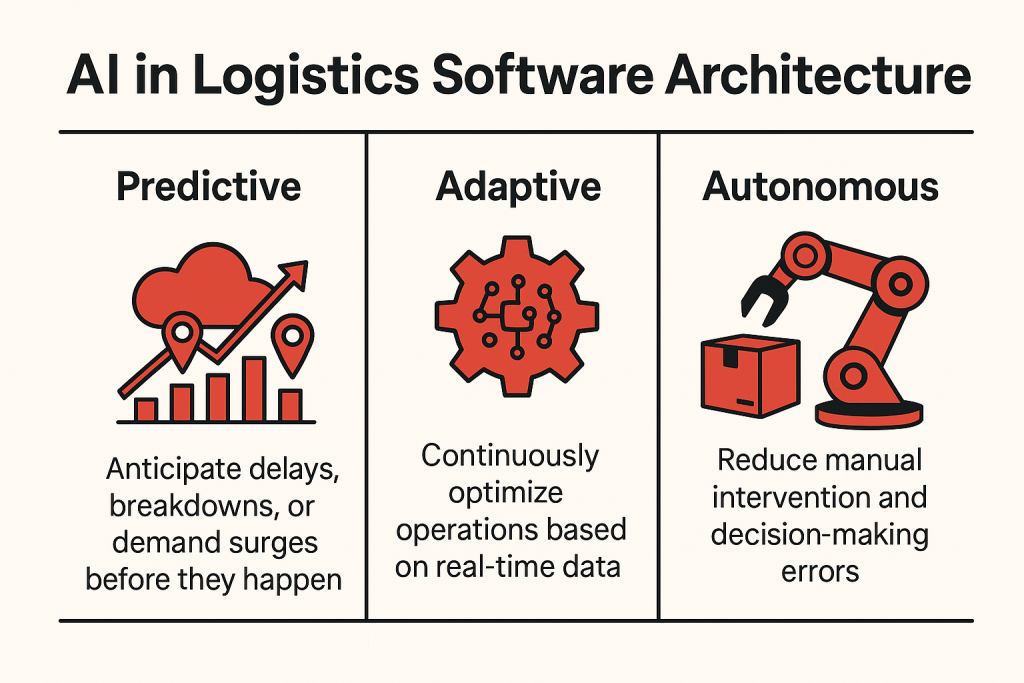
AI in logistics software architecture

Incorporating AI into logistics software architecture allows developers to build systems that are:

  • Predictive: Anticipate delays, breakdowns, or demand surges before they happen
  • Adaptive: Continuously optimize operations based on real-time data
  • Autonomous: Reduce manual intervention and decision-making errors

These capabilities are key for companies looking to scale efficiently, reduce costs, and offer faster, more reliable service.

AI-Based Modules in Custom Logistics Software

When building custom logistics solutions, developers are embedding intelligent modules that enhance every layer of the logistics stack. Some of the most impactful AI-driven components include:

  • Real-Time Tracking & ETA Prediction
    AI processes live GPS data, traffic conditions, and delivery patterns to offer accurate ETAs and real-time location updates—keeping customers and managers in sync at all times.
  • Load Forecasting & Inventory Optimization
    Machine learning models analyze historical data and current demand trends to forecast future loads and inventory needs. This ensures better stock planning, warehouse efficiency, and reduced waste.
  • Dynamic Route Optimization
    AI continuously evaluates multiple data points—like weather, road closures, and delivery urgency—to reroute vehicles in real time for maximum fuel efficiency and faster deliveries.

These modules aren’t optional anymore—they’re fast becoming standard expectations for any logistics platform that wants to stay competitive.

Looking to build an AI-powered logistics app?

We deliver comprehensive mobile app development services that guarantee success.

EXPLORE NOW

AI in Supply Chain and Logistics: Key Use Cases

Artificial intelligence is no longer a buzzword—it’s a toolbox of practical solutions reshaping how logistics and supply chain systems operate. From warehouse floors to cross-country shipping routes, AI is enabling faster decisions, fewer errors, and scalable growth. Let’s break down some of the most impactful use cases in 2025.

AI in Transportation and Logistics

Transportation is where the logistics rubber meets the road—literally. AI technologies are transforming fleet operations by enabling:

  • Automated fleet scheduling that matches loads with available vehicles in real time
  • Driver behavior analytics to reduce fuel consumption and accident risks
  • Autonomous delivery coordination, especially in urban zones, for faster last-mile execution

AI also supports real-time tracking, offering constant visibility into vehicle locations, estimated time of arrival, and rerouting options when delays occur. This kind of precision translates into better delivery outcomes and higher customer satisfaction.

Predictive Analytics for Supply Chain Volatility

Supply chains are vulnerable to everything from market fluctuations and geopolitical events to weather disasters. With predictive analytics, AI can analyze historical data, current market signals, and external events to forecast potential disruptions.

Logistics leaders can use these insights to:

  • Adjust procurement strategies
  • Secure alternative suppliers
  • Reconfigure warehouse locations based on demand forecasts

In 2025, having a reactive supply chain isn’t enough. With AI, logistics companies gain the foresight needed to prevent disruption rather than simply respond to it.

Smart Warehousing, Autonomous Vehicles, and Dynamic Routing

AI is powering smart warehousing through robotics, IoT, and vision-based automation. Intelligent systems can now:

  • Automatically assign picking and packing tasks to robots
  • Monitor inventory levels in real time using computer vision
  • Optimize shelf placement based on product movement trends

At the same time, autonomous vehicles—from drones to self-driving delivery vans—are becoming more mainstream. These vehicles rely on AI for route planning, obstacle detection, and seamless handoffs between warehouse and doorstep.

Finally, dynamic routing algorithms—driven by AI—can instantly adapt to traffic conditions, fuel efficiency goals, and real-time order volumes. This ensures that drivers follow the most efficient routes without constant manual intervention.

Want to build freight management software with these smart features? Check out the Essential Features for a Successful Freight Management System

AI in Logistics Examples: Real-World Applications

Still wondering what is an example of AI in logistics that actually works in the real world? Let’s look at some proven cases where global companies are using artificial intelligence to streamline their logistics operations. These aren’t experimental ideas—they’re practical, deployed, and delivering value today.

Real-World Examples of AI in Logistics

  • DHL: Smarter Warehousing with AI-Powered Robotics
    DHL uses AI to manage warehouse operations more efficiently. With machine learning and robotics, their productivity has increased between 30% and 180%. AI also helps forecast incoming demand, ensuring the right stock is available without overloading storage.
  • FedEx: Delivery Time Optimization
    FedEx uses predictive AI models to optimize delivery windows based on weather, traffic, and historical delays. This enables better route planning and more accurate delivery time estimates for customers—resulting in reduced failed deliveries and improved customer trust.
  • AI Chatbots & NLP: Enhanced Customer Support
    Logistics companies are adopting AI-powered chatbots and natural language processing (NLP) tools to manage customer queries at scale. These virtual assistants handle everything from delivery status to returns, freeing up human agents for more complex tasks. According to IBM, businesses using AI for customer support report up to 30% cost savings while maintaining high satisfaction rates.
  • Amazon: Forecasting with Machine Learning
    Amazon’s supply chain leverages deep learning algorithms to predict order volume down to the SKU level, ensuring optimal placement of goods across its global fulfillment centers. This level of forecasting is key to their next-day and same-day delivery models.

These examples of AI in logistics highlight just how diverse and impactful the technology can be—from internal warehouse automation to external customer engagement.

How AI Is Used in Logistics Software Development (From a Developer’s Perspective)

Behind every intelligent logistics app is a sophisticated architecture powered by AI technologies like machine learning (ML), natural language processing (NLP), and computer vision. But how exactly are these implemented during development—and why should it matter to you?

Let’s break it down from a developer’s point of view.

Machine Learning: Training Your App to Make Smart Decisions

ML is the backbone of most AI-powered logistics platforms. Developers feed historical logistics data—delivery patterns, traffic flow, fuel usage, and inventory cycles—into machine learning models to enable the software to predict and automate decisions. For example:

  • Choosing the most efficient route based on traffic and weather data.
  • Forecasting delivery times based on past performance.
  • Detecting supply chain disruptions before they occur.

ML models aren’t plug-and-play; they require data training, tuning, and continuous improvement cycles. That’s why early in the planning stage, dev teams focus on data collection and labeling to make sure the AI has quality inputs to learn from.

Natural Language Processing (NLP): Making Customer Communication Smarter

NLP enables apps to understand and respond to human language—perfect for chatbots, voice assistants, and automated email responses. Developers integrate NLP models that can:

  • Interpret customer inquiries and match them with relevant information (like package status).
  • Automate scheduling or returns through voice and text interfaces.
  • Translate and localize content for international customers.

NLP doesn’t just make your app sound smart—it also saves human resources and speeds up support workflows.

Computer Vision: Powering Real-World Logistics Interactions

From scanning barcodes to analyzing camera footage in warehouses, computer vision brings real-time visual awareness into logistics apps. Developers use it to:

  • Monitor loading docks or warehouse shelves for misplaced inventory.
  • Track driver behavior and ensure safety compliance.
  • Read handwritten labels and translate them into digital data.

This is where AI meets the physical world, and getting it right requires close testing in real-world environments.

The Full Development Journey

When building AI-powered logistics apps—whether for iOS or Android—the process typically involves:

  1. Planning and Strategy: Identifying which AI technologies make the most impact for the business case.
  2. Data Collection and Model Training: Gathering relevant data and training models to handle logistics-specific tasks.
  3. Backend and Frontend Integration: Embedding AI modules into a seamless, intuitive app experience.
  4. Testing and Iteration: Running real-world simulations to refine accuracy and performance.

Whether you’re building for mobile or web, the goal is to create intelligent software that not only solves logistics problems but evolves with your operations over time.

Curious about what this would cost? Here’s a full breakdown of the Cost of Logistics Software Development in 2025.

Custom Logistics Software vs. Off-the-Shelf: AI as a Differentiator

In 2025, the real competitive edge in logistics doesn’t come from simply having software—it comes from how intelligent that software is.

That’s where custom logistics software steps ahead of the game.

Why Off-the-Shelf Solutions Fall Short

Off-the-shelf platforms are built to serve the masses. They offer general features, rigid modules, and limited adaptability. While they might work for basic dispatch or inventory tasks, they rarely go beyond surface-level functionality.

When it comes to embedding artificial intelligence in logistics and the supply chain, off-the-shelf tools often restrict how deep you can go:

  • You’re limited to pre-trained AI models.
  • You can’t fine-tune features to match your exact operations.
  • Custom integrations with existing infrastructure can be a nightmare.

In short, they aren’t built for you—they’re built for everyone.

Custom Software: AI Built Around Your Business

With custom logistics software, the power of AI becomes truly transformative. You’re not just adding smart features, instead – you can build smart logistics dashboards integrated with the ability to redefine your supply chain operations and visibility.

Here’s what deep AI personalization looks like in a custom-built platform:

  • Tailored forecasting models that use your own shipment, inventory, and demand data.
  • Dynamic routing engines that account for regional traffic patterns, vehicle performance, and delivery constraints.
  • Adaptive load balancing that learns from your fleet history and optimizes vehicle capacity over time.
  • Custom-built chatbots trained on your customer interaction history—so they speak your brand voice.

In custom software, logistics AI is not an add-on; it’s the driver of smarter decisions, better margins, and scalable growth.

Not sure which route to take? Check out our deep dive on Custom Logistics Software vs Off-the-Shelf to see which is right for your operations.

Top 7 Advantages of AI in Logistics: Why Your Business Can’t Afford to Ignore It

The question isn’t if AI will change logistics forever—it’s how quickly you want to benefit. Understanding what the advantages of AI in logistics are is key to making smart investments today that pay off tomorrow.

Here’s a clear look at the benefits of AI in logistics that are driving the industry’s transformation in 2025:

1. Boosted Operational Efficiency

AI automates routine tasks like data entry, inventory updates, and route planning—freeing up your team to focus on higher-impact work. The result? Faster workflows and less room for human error.

2. Cost Reduction across the Board

By optimizing fuel consumption, reducing idle time, and predicting maintenance needs, AI drives down operational expenses significantly. This is one of the most tangible ways how AI is improving logistics bottom lines.

3. Real-Time, Data-Driven Decision Making

Gone are the days of reactive management. AI delivers predictive insights that enable proactive planning—from anticipating supply chain disruptions to adjusting delivery schedules on the fly.

4. Enhanced Customer Experience

AI-powered chatbots and tracking systems provide customers with instant updates and support 24/7, increasing transparency and satisfaction throughout the shipping process.

5. Scalability and Flexibility

AI systems grow with your business, handling increasing data volume and complexity without breaking a sweat. This flexibility is crucial in an industry where demand spikes are common.

6. Improved Supply Chain Visibility

From raw materials to last-mile delivery, AI connects disparate data points into a single, clear view. This holistic visibility supports smarter inventory management and reduces bottlenecks.

7. Driving Logistics Transformation

At its core, AI is the catalyst for a complete logistics transformation—turning static, manual processes into dynamic, intelligent ecosystems that continually learn and optimize themselves.

Embracing AI today isn’t just an upgrade—it’s a strategic move toward future-proofing your logistics operations?

The Future of AI in Logistics: What’s next in 2025 and beyond

As we look ahead, the question on everyone’s mind is: what is the future of AI in logistics? The answer lies in emerging technologies that will reshape every link in the supply chain, making logistics smarter, faster, and more autonomous than ever before.

Edge Computing: Bringing Intelligence Closer to Operations

Edge computing is revolutionizing how data is processed in logistics. Instead of sending all information to centralized servers, AI-powered devices analyze data locally—right where the action happens. This means real-time decision-making with near-zero latency, which is critical for applications like autonomous vehicles and dynamic routing.

AI + IoT: The Perfect Partnership for Smarter Supply Chains

The integration of artificial intelligence in supply chain management with the Internet of Things (IoT) devices creates a connected ecosystem. Sensors track shipment conditions, vehicle status, and inventory levels continuously. AI analyzes this torrent of data to predict delays, optimize routes, and prevent disruptions before they occur.

Generative AI for Next-Level Forecasting

Generative AI models are poised to transform forecasting by creating highly accurate, scenario-based predictions. From anticipating demand surges to simulating supply chain risks, generative AI empowers logistics managers to plan with unprecedented precision.

The Road Ahead: AI in Logistics and Transportation

Looking beyond 2025, we’ll see fully autonomous delivery fleets navigating complex urban environments, hyper-personalized customer experiences powered by AI, and supply chains that self-optimize by continuously learning from vast data streams.

In short, AI in logistics and transportation isn’t just about automation—it’s about building a resilient, intelligent network that adapts and thrives in an ever-changing world.

Curious to stay ahead with these innovations?

Let’s connect and start building the logistics solutions of tomorrow today.

GET FREE CONSULTATION

Ready to Transform Your Logistics with AI?

The future of logistics is intelligent, efficient, and powered by AI — and custom software development is the key to unlocking its full potential. At AppVerticals, we specialize in building custom-made logistics solutions that seamlessly integrate advanced AI capabilities designed to meet your unique business challenges.

Whether you’re looking to enhance your current system or build a new platform from the ground up, our experienced team can guide you through every step — from initial consultation to live demos and full deployment.

Take the first step toward revolutionizing your logistics operations.

Let’s explore how AI can drive your business forward.

SCHEDULE A FREE CONSULTATION

Janitor AI Alternatives – Best AI Chatbots Like Janitor AI

Looking for reliable Janitor AI alternatives? Many users have turned to other platforms after facing issues like server errors and disappearing chats. The good news is that there are several AI chatbots like Janitor AI that offer smooth, engaging, and customizable conversations.

In this guide, we’ve rounded up the best options available. Each chatbot on this list has been carefully reviewed for performance, features, and overall user experience. Whether you want casual conversations, roleplay, or advanced AI interactions, you’ll find a platform that fits your needs.

Skip the trial-and-error and explore our top picks to find a dependable AI chatbot that works seamlessly without the frustrations many users experienced with Janitor AI.

Looking to build an AI chatbot like Janitor AI?

Work with experts who create advanced, scalable conversational platforms.


Why Are People Moving to Janitor AI Alternatives?

At its peak, Janitor AI built a loyal fanbase by offering something most character bots wouldn’t: fewer restrictions. It let users engage in open-ended conversations without the usual content filters or mechanical responses.

But that freedom came at a cost.

Lately, the platform has been plagued with frequent downtime. Users often complain about broken sessions, sluggish response times, and “server not responding” errors that seem to pop up with no warning. Even basic access to the janitor chat interface has become hit-or-miss.

Some fans stuck around—hoping things would improve. Most didn’t.

In their place, a wave of new platforms has emerged. Some are more playful, others more refined. A few are clearly designed to pick up where Janitor left off. And in many cases, they’re doing a better job.


Best Janitor AI Alternatives [Quick Overview]

Here’s a comparison table on the best AI chatbots like Janitor AI:

Platform Best For NSFW Custom Bots Free Plan
Character AI Safe roleplay & storytelling Not Available
Beta Character AI Unfiltered roleplay
SpicyChat AI Mature, unmoderated chats
Tavern AI Self-hosted LLM chat
CrushOn AI Romantic/NSFW interactions
Anima AI Emotional support Not Available
Botify AI Bot sharing & community
Chai AI Fast casual chats
Charstar AI Anime & fantasy fans
NovelAI Writers & creators Not Available Not Available
Replika Emotional companionship Only with Pro Not Available
DreamGen Story scenarios & RP Not Available

The Best Janitor AI Alternatives [In-Depth Overview]

If you’ve been frustrated by Janitor AI’s frequent outages or content limitations, you’re not alone. Below, we break down the top Janitor AI alternatives—each offering more stability, better roleplay depth, or fewer restrictions depending on what you’re after.

1. Character AI

Character AI is one of the most popular platforms in the AI chatbot space, best known for its impressive natural language conversations and vast community of user-created bots. While Janitor AI emphasizes freedom and fewer filters, Character AI takes a more structured approach, offering quality interactions but with stricter moderation.

Key Features

  • Large library of AI personalities, including anime, historical, and fictional characters
  • Custom character creation with memory settings and voice integration
  • Mobile app for iOS and Android
  • Group chats with multiple bots
  • Fine-tuned for deep conversational flow

Why Pick Character AI Over Janitor AI

  • Reliability: While “character ai down” is a common search, it still crashes less often than janitor chat.
  • Quality control: Conversations are cleaner, more coherent, and context-aware.
  • Community-driven: A more active, moderated space to discover bots across genres.
Pros Cons
Polished UI and responsive design No NSFW content
Great for casual conversations and storytelling Limited personalization beyond a certain point
Safe for younger users

Pricing

  • Free to use
  • Character AI+ subscription: $9.99/month (faster response, priority queues, experimental features)

2. Beta Character AI

Beta Character AI is essentially a modified fork of Character AI that offers more relaxed filters and faster interactions. It was built for users who liked the original but felt limited by its content restrictions and performance bottlenecks.

Unlike Janitor AI, which often goes down without warning, Beta Character AI chat stays up more reliably. Plus, it handles longer context windows better, which makes it more appealing for roleplay and continuous chats.

Key Features

  • Lightweight version of Character AI with less moderation
  • Supports multi-turn dialogue with improved memory
  • User-created bots with unique personality settings
  • Better uptime than Janitor AI or Character AI
  • Simple UI focused on speed and access

Why Pick Beta Character AI Over Janitor AI

  • Stability: Fewer crashes and server issues than Janitor’s platform
  • Better flow: Handles longer conversations with more consistency
  • Fewer blocks: Allows more expressive or unrestricted prompts without auto-moderation kicks
Pros Cons
Faster and more responsive than Character AI Still lacks official support or updates
Looser moderation allows freer dialogue Security and data privacy may be questionable
Supports longer memory and context Limited bot discovery compared to Character AI

Pricing

  • Completely free at the moment

3. SpicyChat AI

SpicyChat AI is one of the few platforms openly built for NSFW and unrestricted conversations. Where Janitor AI tried balancing content filters and open dialogue, SpicyChat skips moderation almost entirely. That makes it a go-to for users specifically looking for freedom in adult or emotionally expressive chats.

It doesn’t try to be everything — just bold, direct, and open-ended.

Key Features

  • Built for NSFW and mature content with no auto-filtering
  • Custom AI characters with roleplay-specific traits
  • Clean chat interface optimized for mobile and desktop
  • Regular community updates and bot submissions
  • Real-time interaction with minimal lag

Why Pick SpicyChat AI Over Janitor AI

  • Less downtime: More stable than Janitor’s sometimes-broken chat window
  • True NSFW freedom: Zero moderation interruptions
  • Community-first: Active bot creators and niche character categories
Pros Cons
No content restrictions or keyword blocks Not safe for work or younger audiences
Stable performance and minimal lag Lacks official support or transparency
Built specifically for roleplay and adult content Limited customization compared to competitors

Pricing

  • Free to use
  • Some premium characters may be paywalled in future updates

4. Tavern AI

Tavern AI is an open-source front-end interface designed to work with local or cloud-based large language models (LLMs). Unlike Janitor AI, which relies on a centralized platform (and breaks when it goes down), Tavern gives users more control — especially if you’re tech-savvy and prefer self-hosting.

It’s a favorite among hobbyists and roleplay communities looking for deep story progression, especially when paired with models like Kobold, OpenAI, or Pygmalion.

Key Features

  • Connects to your own LLM via API (e.g. OpenAI, KoboldAI, etc.)
  • Supports detailed character definitions and long memory
  • Fully customizable dialogue formatting and themes
  • Offline use possible with local model setup
  • Saves chat history and character stats for roleplay continuity

Why Pick Tavern AI Over Janitor AI

  • No downtime: You’re not at the mercy of a central server
  • Endless customization: Choose your model, style, and behavior
  • Roleplay flexibility: Better for long-form story arcs and creative expression
Pros Cons
Fully customizable with your own AI model Requires technical setup and knowledge
No server restrictions or sudden downtime No official support or centralized help
Ideal for long-form roleplay and immersive scenarios Not beginner-friendly

Pricing

  • Free and open-source
  • Cost depends on the LLM you connect it to (e.g., OpenAI usage fees)

Turn your chatbot idea into reality with a reliable tech partner.

We design AI-powered platforms with seamless performance and custom features.


5. CrushOn AI

CrushOn AI leans hard into unfiltered, emotionally charged chat experiences — especially those that border on romantic or intimate. Where Janitor AI flirted with these ideas but often crashed or censored responses, CrushOn AI gives users exactly what they came for: bold, NSFW-enabled conversations with emotionally responsive bots.

If you’re looking for deep, often risqué interaction without moderation walls, this is where many former Janitor users end up.

Key Features

  • NSFW chat enabled by default
  • Emotionally expressive characters with mood-driven responses
  • Character creation with bio, persona, and relationship tags
  • Clean interface with smooth conversation threading
  • Active user submissions and trending bots section

Why Pick CrushOn AI Over Janitor AI

  • No interruptions: No filters or “this content is blocked” messages
  • Better intimacy modeling: Characters feel more reactive and “in tune”
  • More consistent uptime: Users report fewer loading or crash issues than Janitor
Pros Cons
NSFW support without censorship Not suitable for all age groups
Emotionally rich AI responses May lack depth for non-romantic chats
Clean UI and minimal lag Free tier limits longer chats

Pricing

  • Free tier available (with message cap)
  • Premium: ~$9.99/month for longer sessions, access to premium characters, and faster replies

6. Anima AI

Anima AI markets itself as a companion-first chatbot — built not for wild roleplay or technical depth, but for emotional support, mood journaling, and soft conversation. Unlike Janitor AI, which is often chaotic and unmoderated, Anima offers a calm, structured experience for users looking for a more emotionally aware AI.

It doesn’t try to compete with NSFW platforms. It’s more like a virtual confidant.

Key Features

  • Personality-based chatbot that adapts to your emotions
  • Guided conversations for mental health, relationships, and daily reflection
  • Gamified chat levels and relationship progression
  • Customizable avatar and personality traits
  • Voice chat and roleplay mode included in premium version

Why Pick Anima AI Over Janitor AI

  • Emotional intelligence: Designed to respond with empathy, not randomness
  • Consistency: No server crashes or disappearing messages
  • Safe space: No NSFW features, making it suitable for younger users or casual chat
Pros Cons
Great for emotional support and mental wellness Limited personality depth in free version
Clean, distraction-free interface Not suitable for NSFW or advanced roleplay
Customizable chatbot personality Repetitive replies in long conversations

Pricing

  • Free basic plan
  • Anima Premium: $9.99/month — includes roleplay mode, voice chat, and personality upgrades

7. Botify AI

Botify AI is a character-based AI platform designed for creativity, open conversations, and community-made personalities. Unlike Janitor AI, which feels like it’s always one glitch away from shutting down, Botify focuses on stability, smooth UX, and social sharing — especially among users who like building and sharing their own bots.

It’s less NSFW-focused than SpicyChat AI, but offers more flexibility than Character AI when it comes to tone and personality.

Key Features

  • Custom bot creation with avatar, personality, and memory
  • Text-to-image support and bot profile art
  • Group chat with multiple characters
  • Active discovery section to explore trending bots
  • Fast response times and clean layout

Why Pick Botify AI Over Janitor AI

  • Stability: Less prone to crashes or broken message threads
  • Creator-friendly: You can build and publish bots that others can use
  • Better UX: Fewer glitches, cleaner UI, and social interaction features
Pros Cons
Allows users to build and share custom bots Not as advanced in long-form memory
Supports group conversations with multiple bots Moderation can sometimes block creative prompts
Fast and responsive interface Some premium bots require payment

Pricing

  • Free plan available
  • Premium characters and early access features may cost extra (typically $5–$10 depending on creator settings)

8. Chai AI

Chai AI is built for non-stop interaction. It pushes for high-frequency chats, real-time responses, and a global leaderboard of user-generated bots. Compared to Janitor AI, Chai is more refined in its delivery, though still open to NSFW and romantic content depending on the bot.

It’s designed to keep users talking — and reward creators whose bots spark the most engagement.

Key Features

  • Thousands of user-created bots across all genres
  • “Swipe to chat” UI for quick discovery
  • Available on web, iOS, and Android
  • Custom bot creation with prompts and tone control
  • Global leaderboard of top-performing bots

Why Pick Chai AI Over Janitor AI

  • Always up: Janitor often crashes mid-chat, while Chai is built for scale
  • Bot discovery: Chai surfaces high-quality bots with real user ratings
  • Mobile-native: The app feels smoother than Janitor’s clunky interface
Pros Cons
Massive bot library with creator rankings Character memory is short-term
Mobile-first interface and quick onboarding Daily chat limits on free version
Supports NSFW bots (optional) Quality varies across user-generated bots

Pricing

  • Free with daily message limit
  • Chai Premium: $13.99/month — unlocks unlimited chats, higher-quality bots, and exclusive features

9. Charstar AI

Charstar AI is a lesser-known gem among AI chat platforms. It blends anime-style avatars with a library of characters spanning horror, sci-fi, and fantasy — all created and curated by its user base. Where Janitor AI aims to be freeform, Charstar focuses on keeping things immersive and visually engaging.

If you’re into character-driven storytelling with strong aesthetics, this one’s worth a look.

Key Features

  • User-generated bots with visual profile art
  • Genres include anime, fantasy, horror, romance, and more
  • Simple web interface, optimized for quick load times
  • Built-in chat memory for smoother roleplay
  • Trending bots section updated in real time

Why Pick Charstar AI Over Janitor AI

  • Visual experience: You get characters with detailed backstories and stylized art
  • More stable: Less prone to crashing mid-session
  • Focused discovery: Filters to find bots by genre, mood, or popularity
Pros Cons
Strong genre variety (anime, fantasy, horror) Limited customization on free accounts
Fast, stable performance with low lag Smaller community compared to Character AI
Visual character cards enhance immersion No mobile app (browser-only)

Pricing

  • Free version with access to most characters
  • Premium tier (~$5/month): unlocks exclusive bots, higher chat limits, and custom art uploads

10. NovelAI

NovelAI is a subscription-based platform designed for AI-assisted storytelling and text-to-image synthesis. It caters to writers and artists seeking to enhance their creative processes with AI-generated content.

Key Features

  • AI-driven story writing with customizable editors
  • Multiple AI models (e.g., Calliope, Sigurd, Euterpe, Krake, Genji) for diverse writing styles
  • Encrypted servers ensuring user privacy
  • Text-to-image generation using a custom version of Stable Diffusion
  • User ownership of generated content

Why Choose NovelAI Over Janitor AI

  • Creative Focus: Tailored for writers and artists, offering tools specifically for storytelling and art generation.
  • Privacy Assurance: Emphasizes user data security with encrypted servers.
  • Content Ownership: Users retain full rights to their generated content
Pros Cons
Advanced AI models for diverse writing styles Requires a subscription; no free tier
Integrated text-to-image generation May have a learning curve for new users
Strong emphasis on user privacy and content ownership Primarily focused on creative writing; less suited for casual chat

Pricing

  • Tablet Tier: $10/month – Unlimited text generation, basic image generation.
  • Scroll Tier: $15/month – Larger context size, enhanced storytelling capabilities.
  • Opus Tier: $25/month – Access to advanced AI models, extensive image generation features.

11. Replika

Replika is an AI chatbot designed to serve as a virtual companion, offering emotional support and engaging conversations. It adapts to users’ communication styles, aiming to provide a personalized and empathetic interaction experience.

Key Features

  • Customizable AI companion with options for friendship, mentorship, or romantic relationships
  • Learns and mimics user’s texting style for personalized conversations
  • Available on iOS, Android, and Oculus Rift
  • Offers voice calls and augmented reality features in premium versions
  • Provides daily reflections and mood tracking

Why Choose Replika Over Janitor AI

  • Emotional Engagement: Designed to build deep, empathetic connections with users.
  • Personalization: Adapts to individual communication styles for more natural interactions.
  • Multi-Platform Availability: Accessible across various devices, including VR platforms
Pros Cons
Highly personalized and adaptive conversations Some features require a premium subscription
Supports voice and video interactions Privacy concerns have been raised in the past
Available on multiple platforms, including VR Limited functionality in the free version

Pricing

  • Free Version: Basic chatbot functionalities.
  • Replika Pro: Approximately $7.99/month – Unlocks advanced features like romantic relationships, voice calls, and more.

12. DreamGen

DreamGen is an AI-powered platform focused on role-play and story generation, allowing users to create immersive scenarios with multiple characters. It caters to hobbyist writers and fan fiction authors seeking to explore creative narratives.

Key Features

  • AI-driven role-play and story generation with customizable scenarios
  • Supports multiple characters and complex plot developments
  • Offers a “Scenario Codex” for managing narrative elements
  • Provides in-line instruction for real-time story adjustments
  • Utilizes custom AI models trained on unique datasets for natural writing styles

Why Choose DreamGen Over Janitor AI

  • Narrative Depth: Designed for intricate storytelling and role-play experiences.
  • Creative Control: Allows users to steer plots and define character interactions.
  • User-Friendly Interface: Chat-like interface simplifies interaction and story development
Pros Cons
Tailored for immersive role-play and storytelling May be overwhelming for users seeking casual chat
Offers extensive customization of scenarios and characters Premium features require a subscription
Provides tools for managing complex narratives Learning curve for maximizing platform capabilities

Pricing

  • Starter Plan: $7.83/month – 4000 token context window, access to writing models, and monthly AI credits.
  • Advanced Plan: $19.35/month – 8000 token context window, additional AI credits.
  • Pro Plan: $48.30/month – 30000 token context window, priority image generation, and discounts on credit packs.

How to Choose the Right Janitor AI Alternative

Start by asking what you value most:

  • Stability vs. Freedom: If constant uptime matters, pick platforms like Beta Character AI or Chai AI. If you want zero filters, SpicyChat AI or CrushOn AI deliver open-ended chats.
  • Content Focus: For deep roleplay and world-building, Tavern AI and NovelAI give you control. For emotional support, Replika and Anima AI adapt to your mood.
  • Customization Level: Want to build your own bots? Botify AI and Character AI offer robust creation tools. If you’d rather plug in and chat, DreamGen or Charstar AI work out of the box.
  • Device & Pricing: Check mobile apps, browser support, and subscription costs. Free tiers vary—some cap messages, others limit features.

Match your priorities to these criteria—and you’ll land on the Janitor AI alternative that fits.


Looking to Create Something Like Janitor AI?

If you’re a founder or team thinking beyond existing platforms — not just using them but building something smarter — we can help.

AppVerticals is a product-first mobile app development company that’s worked with startups, scaleups, and enterprises to build AI-powered apps that actually scale. Whether you’re planning an uncensored chat platform, a niche roleplay engine, or a more secure version of Janitor AI, we’ll help you design, build, and launch it the right way.

Ready to launch your own AI chatbot platform?

Partner with developers who bring innovative, user-focused solutions to life.

Posted in AI

Choosing an Enterprise LMS: Why Custom May (or May Not) Be Worth It!

Every growing company faces the same question:
Is our enterprise learning management system helping people do better work—or just checking boxes?

Whether you’re choosing from the best LMS software for business or considering building a custom enterprise LMS, the real challenge is alignment. Does your system match how your teams learn, grow, and deliver results?

This article breaks down that decision, custom vs. off-the-shelf LMS, with clear insights for EdTech leaders, HR teams, and CIOs who expect more from their enterprise learning systems than just content delivery.


The Business Case for a Modern Enterprise LMS

Too many organizations still treat the enterprise learning management system (LMS) as an HR asset—useful for onboarding and compliance, but disconnected from real business performance.

That mindset is outdated.

One software company recently spent six figures on an off-the-shelf LMS—yet their onboarding time and sales productivity barely improved. The issue wasn’t poor training content; it was poor system fit.

Whether it’s compliance in manufacturing or technical upskilling in SaaS, the way employees learn directly shapes productivity, retention, and time-to-performance.

That’s why the best enterprise LMS platforms in 2025 now function as enterprise training management systems—tools deeply embedded in daily workflows, fully integrated with core systems, and capable of showing leaders exactly where skill gaps slow the business down.

If your LMS doesn’t do that, or if it’s locked behind login walls, isolated from the tools people actually use—it’s not supporting growth. It’s slowing it.


Off-the-Shelf LMS

Choosing an off-the-shelf enterprise LMS is like moving into a pre-furnished office. It’s quick, reliable, and gets you started fast—but it’s not built for your unique operations.

That’s why the market is full of systems like TalentLMS, Docebo, and SAP Litmos. For small or mid-sized businesses, they offer great starting value. But for complex enterprises, limitations surface quickly.

Advantages of Off-the-Shelf LMS Platforms

  • Speed to Launch: Most commercial LMS tools can be deployed within days. Ideal for businesses needing instant rollout.

  • Lower Upfront Cost: Subscription models make it easy to start without heavy capital investment.

  • Broad Feature Coverage: They include essential tools for course delivery, certification, assessments, and analytics.

  • Vendor Support: Most providers offer onboarding help, training materials, and community forums.

Limitations to Expect

  • Rigid Structure: You’ll adjust your training to fit the LMS—not the other way around.

  • Limited Integrations: Connecting the system with HRIS, ERP, or CRM tools often requires workarounds or paid add-ons.

  • Poor Fit for Complex Orgs: Enterprises with multi-department training or compliance-heavy industries hit friction.

  • Lack of Data Ownership: You may get dashboards, but not actionable insights or control over your data.

When Off-the-Shelf Works Best

  • Small to mid-sized businesses handling basic onboarding and compliance.

  • Companies new to eLearning wanting to test digital training quickly.

  • Centralized teams with simple structures and minimal IT involvement.

  • Organizations prioritizing speed over flexibility.

Off-the-shelf LMS tools are great when you need fast deployment. But as soon as learning becomes a strategic differentiator, those systems become restrictive. That’s when custom development begins to make sense.


Custom Enterprise LMS

If an off-the-shelf LMS is a rented office, a custom enterprise LMS is your own headquarters—designed around your teams, your workflows, and your long-term vision.

More businesses are moving toward custom solutions not to chase features, but to gain control, flexibility, and measurable ROI.

Why Custom LMS Development Wins

  • Built Around Your Business: Every feature matches your workflow and training model.

  • Unlimited Flexibility: Add or remove modules based on real usage.

  • Effortless Integrations: Connect directly to HR, payroll, CRM, or ERP tools.

  • Data Ownership: Get full access to analytics, performance metrics, and skill progressions.

Strategic Considerations

  • Higher Initial Cost: Custom LMS development requires upfront investment but eliminates recurring vendor fees.

  • Ongoing Support: Like any core business system, it needs lifecycle maintenance—something AppVerticals offers end-to-end.

  • Collaboration Is Key: Success depends on L&D, IT, and business leaders aligning.

  • Scope Clarity: Agile sprints and documentation ensure development stays transparent and focused.

Best Fit For:

  • Scaling enterprises that outgrew generic LMS tools.

  • Regulated sectors (healthcare, finance, manufacturing) where compliance is critical.

  • Tech-driven teams needing continuous onboarding or product education.

  • Companies demanding long-term control, integration, and analytics.

A custom enterprise learning management system gives you leverage. It transforms training from a compliance exercise into a capability engine.


Empower Your Enterprise Learning with AppVerticals

Build a scalable, data-driven LMS that unifies learning, performance, and growth across your organization.

Enterprise LMS Development: More Than Just Software

Most learning challenges stem from rigid systems—not bad content. When departments run disconnected training, when compliance data is fragmented, or when managers can’t track progress—that’s a systems issue.

Custom LMS development fixes that by reshaping learning infrastructure around how your organization actually operates.

Here’s how a future-ready enterprise LMS should be built:

1. Align With Strategic Business Goals

A great LMS must do more than store courses. It should serve:

  • Business KPIs like speed to productivity or retention.

  • Department-specific workflows.

  • Leadership’s vision for workforce development.

Goal alignment—not feature selection—is step one.

2. Deep Integration With Business Systems

A modern enterprise LMS should connect seamlessly to:

  • HR platforms for role and promotion tracking.

  • CRM/ERP tools for skill-linked performance data.

  • BI systems for real-time learning insights.

Most commercial tools fail here. Custom builds make integration native—not an afterthought.

3. Modular, Scalable Architecture

Enterprises evolve. So should your LMS.
A modular system allows adding AI tutors, AR onboarding, or localized learning without rebuilding from scratch. That’s how enterprises future-proof their learning stack.

4. Governance and Compliance Built In

With hundreds of users across departments and regions, governance can’t be retrofitted.
Custom LMS development embeds:

  • Role-based permissions.

  • Compliance tracking by region.

  • Granular data privacy controls.

5. User-Centric Design

Even the most advanced LMS fails if learners hate using it.
Modern LMS UX should focus on:

  • Personalized dashboards for learners, managers, and admins.

  • Mobile-first design for frontline teams.

  • Data-driven nudges to sustain engagement.

6. Post-Launch Evolution

A launch isn’t the end—it’s the start of the value curve.
Continuous iteration, performance tracking, and feedback loops ensure the LMS stays aligned with shifting business goals.


Cost Comparison: Custom vs. Off-the-Shelf LMS

Cost isn’t just about pricing—it’s about what kind of ownership you want.

Off-the-Shelf LMS

  • Pricing: $3,000–$50,000 per year (subscription or per-user basis).

  • Model: Pay as you grow, but cost scales with users.

  • Limitation: Lack of deep customization and integration flexibility.

Custom LMS

  • Pricing: $60,000–$200,000+ depending on scope and integrations.

  • Model: One-time investment with long-term ownership.

  • Value: Scalable, integrated, and built for ROI—not rental use.

Hidden costs like implementation, training, and integration usually add 10–30% to total expenditure—regardless of platform.
The real question: Are you paying for features or for outcomes?


Why AppVerticals Is the Best Enterprise LMS Development Partner

When it comes to enterprise LMS development, AppVerticals stands apart for one reason—we don’t sell software; we build solutions that grow with your business.

Why Companies Choose AppVerticals

  • Complete Customization: Every LMS we develop is aligned with your workflows, compliance needs, and learning culture.

  • Seamless Integration: We connect your LMS with HRIS, CRM, ERP, and analytics tools for unified visibility.

  • Scalability: From startups to global enterprises, our systems grow as your training footprint expands.

  • Dedicated Partnership: You get a hands-on team for design, development, launch, and ongoing optimization.

Our Competitive Edge

Unlike generic vendors such as Docebo or SAP Litmos, AppVerticals gives you:

  • Ownership: No per-user fees or vendor lock-ins.

  • Flexibility: Add or remove modules anytime.

  • Long-Term ROI: Build once, scale infinitely.


The most effective learning systems are built in partnership with the people who know what outcomes they need.

— Kazim Qazi, CEO, AppVerticals

Case Study: How AppVerticals Helped OASIS Build an LMS Marketplace That Works

OASIS approached AppVerticals needing a complete education management platform—something beyond what off-the-shelf LMS tools could offer.

What We Delivered

  • Unified system for booking, onboarding, and analytics.

  • Tech stack: Node.js, Angular, AWS, Stripe, and Firebase.

  • Smooth UX for both admins and educators.

  • Secure payment flows and scalable architecture.

Result: The new system replaced multiple tools, improved decision-making, and reduced administrative overhead—delivering measurable ROI within months.


Key Takeaways

  • Off-the-shelf LMS = fast launch, limited flexibility.

  • Custom LMS = higher investment, long-term control.

  • The best enterprise LMS is the one that fits your workflow, not the vendor’s template.

  • Integration, UX, and adaptability are non-negotiable in 2025.


Final Thoughts

The question isn’t whether you need an LMS—it’s whether your current system still serves your goals.
If it’s disconnected, hard to adapt, or slowing down learning outcomes, it’s time to think bigger.

Off-the-shelf tools check boxes. Custom enterprise LMS systems build capability.

Turn Enterprise Learning into a Competitive Advantage

Partner with AppVerticals to develop a custom LMS built for engagement, analytics, and enterprise-scale success.

Top 20 Mobile App Trends Los Angeles Startups Should Watch in 2025

Los Angeles has become an epicenter for mobile innovation, with startups budding across silicon beach taking leads in the app-first disruption. With the unstoppable mobile app development growth in this sector, the technology landscape here is witnessing hike in demand for agile product teams and skilled developers. Statista suggests, the global mobile market is projected to reach a major $781.70 billion by the end of 2029.

The future of mobile app development is being shaped by seamless user experiences, smarter technologies, and quicker deployment cycles. For startups operating in LA, staying informed of and adapting to the latest mobile application development trends isn’t just a choice, but part of their strategic planning. If you’re unsure about what it takes to carry-out successful startup development, check out our detailed guide and clear your doubts.

This year, we expect a significant shift in mobile app trends that will most likely redefine how startups can create value. From cross-platform tech to AI, 2025 would be turning point for mobile innovation in Los Angeles.

In this blog post, we highlight and explore top 20 mobile app trends that startups in Los Angeles should watch in 2025.

Want to stay ahead of the app curve in 2025?

Let AppVerticals help you integrate the most impactful trends into your next mobile product

Talk to a Mobile App Expert

1.    Generative AI as a Core App Feature

Generative AI tops the list among latest mobile app trends. It is very quickly becoming an essential and a built-in layer in the new technology apps. From smart replies to content creation, apps are leveraging GenAI to deliver smarter yet seamless user experiences that are backed with hyper-personalization at the same time.

Tools like Canva’s magic write and Notion AI showcase how startups can effortlessly embed GenAI to automate design, writing, and communication. Gartner suggests, 80% of the smartphones will have AI-powered apps by the end of 2026, indicating a 10% hike from 2023. For the startups in LA, adapting to GenAI is more than just staying up-to-date – it’s an opportunity to lead.

2.    Personalized UX with AI and Predictive Analytics

The most impactful mobile app development trends in 2025 is hyper-personalization, backed by predictive analytics and AI. Startups around the world are using machine learning models to deliver tailored user experiences – think of dynamic content feeds, custom onboarding flows, and smart product suggestions.

These hyper-personalization tactics can truly enhance your engagement and retention. Accenture suggests, 91% of consumers are likely to shop from a brand that recognize and remember them. With application development trends continuously evolving, personalized UX is not only a choice you could adopt for bonus points – it’s the core foundation. For LA based startups, integrating predictive UX in the apps can majorly enhance their brand’s loyalty and increase competitive edge.

3.    On-Device Machine Learning

A growing concern in modern app developments, on-device machine learning can help enhance performance and maximize security by processing AI tasks locally on a user’s device without the need for cloud round-trips required. This is crucial for applications that may involve real-time decision-making such as predictive text, image recognition or biometric authentication.

With the continuous rise of mobile app development technologies such as Apple’s Core ML and Tensor Flow Lite, more apps are now capable of delivering intelligent features without any compromise on user data or speed. Google reports that on-device ML can reduce response time by up to 80% and significantly cut data usage, while a Deloitte study found 65% of users prefer apps that prioritize privacy.

For Los Angeles startups, this trend offers a strategic edge: building AI-driven apps that are not only fast but also privacy-conscious—critical in a user-first market.

4.    5G-First App Architecture

As mobile app trends evolve, 5G is becoming foundational—not optional. With ultra-low latency and high bandwidth, 5G enables real-time features like AR navigation, remote drone control, cloud gaming, and 4K streaming to function seamlessly.

For startups building next-gen apps, adopting mobile development technologies optimized for 5G unlocks new levels of performance and responsiveness. Ericsson forecasts that 5G subscriptions will surpass 5.3 billion by 2030, while Qualcomm reports up to 10x decrease in latency compared to 4G, essential for immersive and interactive user experiences.

Los Angeles startups pushing the edge in entertainment, health tech, and mobility must architect their apps with 5G in mind to stay future-ready.

5.    Rise of Super Apps in Western Markets

Inspired by WeChat and Gojek, mobile app trends are shifting towards super apps that bundle multiple services within a single platform. Startups are capitalizing on this by combining features like messaging, payments, e-commerce, and ride-hailing into one app to increase user engagement and retention. If you’re also aiming to launch a successful startup in Los Angeles, investing in a super app can be your ideal move.

This shift is gaining traction in the West, where app industry trends show a growing demand for apps that offer convenience and multi-functionality. For example, Uber has expanded into food delivery, while PayPal continues integrating additional services beyond payments.

According to Statista, the super app market is expected to reach $300 billion by 2026, as more users prefer platforms that provide an all-in-one solution. This evolution offers startups in LA an exciting opportunity to innovate and capture diverse customer needs within a unified experience.

6.    Wearable-Centric Apps

The rise of wearable technology is driving a new mobile app trend where apps are designed specifically to integrate with devices like the Apple Watch, Oura Ring, Meta smart glasses, and medical-grade wearables. These apps focus on health monitoring, fitness tracking, and personalized wellness insights, tapping into the growing demand for apps trends in the health and fitness sectors.

With wearables poised to reach 1.1 billion devices by 2025 (Statista), startups have a unique opportunity to build apps that complement this expanding ecosystem. For example, the Apple Watch supports apps for heart rate monitoring, sleep tracking, and fitness coaching, while medical wearables provide real-time data for doctors and patients.

For LA-based startups, developing wearable-centric apps can mean entering a market poised for significant growth, blending convenience with cutting-edge technology.

7.    Voice Interfaces and Audio-First UX

Voice interfaces are rapidly becoming a dominant app trend, transforming how users interact with mobile apps. Integrating voice-command features is enhancing productivity, eCommerce, and health apps, providing hands-free, intuitive experiences. For example, voice-activated shopping, virtual assistants, and voice-driven health tracking are revolutionizing user engagement.

With mobile application development technologies like Google Assistant, Apple’s Siri, and Alexa, apps are now enabling seamless voice interaction across industries. According to Statista, over 8 billion voice assistants will be in use by 2024, marking a huge opportunity for startups to innovate in this space.

For LA-based startups, embracing voice-first design isn’t just an enhancement; it’s a way to cater to a growing user preference for convenience and accessibility.

8.    AR-Driven Retail and Real Estate

Augmented Reality (AR) is becoming a game-changer in mobile app trends, particularly in retail and real estate. With features like virtual staging, in-store AR try-ons, and immersive product demos, brands are providing customers with interactive, try-before-you-buy experiences. This not only enhances customer engagement but also boosts conversion rates.

In retail, brands like IKEA and Sephora are leading the way with AR-driven apps that allow users to visualize products in their home environments or virtually try on items. In real estate, apps are offering virtual tours and AR staging to help potential buyers visualize properties without stepping foot inside.

According to Statista, the AR market in retail alone is expected to reach $12.6 billion by 2025, highlighting the growing demand for immersive shopping experiences. For LA-based startups, integrating AR into their new app development strategies could offer a significant competitive advantage.

Building your first app or scaling an existing one?

Our team uses future-ready tech stacks like AI, 5G, and Flutter to give your users more—faster.


Schedule a Free Consultation

9.    Low-Code/No-Code Tools for Faster Prototyping

Low-code and no-code platforms are revolutionizing app development trends by empowering non-technical founders to quickly prototype and test minimum viable products (MVPs). These tools enable startups to build functional apps without deep coding knowledge, streamlining the development process and reducing time to market.

Platforms like Bubble and Adalo allow founders to launch MVPs in record time, helping them validate ideas and iterate quickly. As per a report by Forrester, low-code platforms are expected to account for 65% of all app development by 2024, reflecting a major shift towards more accessible development solutions.

For Los Angeles startups, adopting new app features like low-code/no-code tools can drastically lower development costs and accelerate innovation, making it easier to bring ideas to life.

10.Privacy-First App Design

As privacy concerns rise, mobile development trends are shifting toward privacy-first designs that ensure compliance with laws like the California Consumer Privacy Act (CCPA). Apps are now prioritizing encrypted data handling, secure user authentication, and transparent data policies to build trust and protect user privacy.

A study by Cisco found that 84% of consumers care about data privacy, and apps that prioritize security see higher retention rates. For Los Angeles startups, adhering to mobile app trends focused on privacy not only reduces legal risks but also offers a competitive edge in a market increasingly concerned about data protection.

11.Cross-Platform Mobile Development with Flutter, React Native

Mobile app development technologies like Flutter and React Native are transforming how startups approach cross-platform app creation. By enabling developers to build once and deploy across both iOS and Android with near-native performance, these frameworks significantly reduce time and costs.

According to Statista, React Native is used by 42% of developers for cross-platform development, while Flutter is gaining traction due to its speed and flexibility. This allows Los Angeles startups to streamline development processes while maintaining high performance, offering a consistent experience across devices.

For startups looking to scale quickly and efficiently, leveraging app development technologies like Flutter and React Native is a smart strategy for reaching a broader audience without compromising on quality.

12.AI-Powered App Testing and Quality Assurance

AI-powered app testing is rapidly emerging as a key tool in mobile development technologies, offering automated solutions that significantly reduce QA bottlenecks and speed up delivery cycles. By using machine learning models to predict and identify issues, startups can ensure faster, more reliable app launches without sacrificing quality.

According to a report by Gartner, AI-driven test automation can reduce testing time by up to 30%, ensuring continuous delivery cycles for fast-moving startups. As latest mobile app trends evolve, integrating AI in the testing process will become essential for maintaining high app quality while accelerating time to market.

For Los Angeles startups, adopting AI-powered testing tools can streamline their development pipelines, allowing them to iterate faster and keep up with the growing demand for innovative mobile apps.

13.Emotion AI and Sentiment-Responsive Interfaces

Emotion AI is shaping the future of mobile apps by enabling apps to detect user emotions and personalize interactions or content based on real-time sentiment analysis. This cutting-edge technology enhances user engagement by tailoring experiences to an individual’s mood, preferences, or needs.

For example, apps in the wellness or entertainment industries can adjust content based on whether a user is stressed or happy, creating a more dynamic and personalized experience. As the future of app development advances, integrating emotion-detecting features can increase user satisfaction and retention.

With the global Emotion AI market expected to reach $36.5 billion by 2030 (according to Markets and Markets), startups have a significant opportunity to innovate with sentiment-responsive interfaces that go beyond traditional user interactions.

Not sure which trend best fits your app idea?

AppVerticals will guide you from strategy to store launch—smarter, leaner, and faster.


Explore Our Mobile App Services

14. Cloud-Native Mobile Applications

The rise of cloud-native mobile applications is transforming the way apps are built and managed, with startups increasingly moving away from local databases to scalable cloud solutions like AWS Amplify, Firebase, and Azure. This shift allows for more flexible, scalable, and cost-efficient mobile app development.

With cloud solutions, apps can offer real-time data syncing, easier updates, and seamless user experiences across devices. According to a report by Gartner, cloud-native development will become the standard for over 90% of mobile app deployments by 2025.

For Los Angeles startups, embracing mobile app technology such as cloud-native platforms ensures they remain competitive while streamlining operations and improving scalability as user demand grows.

15.Mobile Payments & Crypto Wallet Integrations

The rise of mobile payments and crypto wallet integrations is one of the most significant app trends in 2025, with fintech apps increasingly embedding blockchain-based payment systems. This trend allows users to make secure, fast, and decentralized transactions using cryptocurrencies, offering a new level of financial freedom.

Leading apps are integrating crypto wallets to provide seamless transactions, whether for traditional currencies or digital assets like Bitcoin and Ethereum. According to Statista, the global cryptocurrency market is expected to grow at a CAGR of 11.1% from 2023 to 2028, making crypto integrations essential for fintech apps to remain relevant.

For Los Angeles startups, adopting these app developments ensures they are at the forefront of innovation, catering to users’ increasing interest in blockchain and decentralized finance solutions.

16.Digital Therapeutics and HealthTech Apps

Digital therapeutics (DTx) and HealthTech apps are revolutionizing the healthcare sector, with FDA-approved frameworks validating their effectiveness in treating medical conditions through digital interventions. These apps are becoming a critical part of the treatment landscape, providing users with personalized, evidence-based care at their fingertips.

From mental health support to chronic disease management, DTx apps offer patients the ability to access therapeutic tools directly on their smartphones. According to Grand View Research, the digital therapeutics market is expected to reach $14.1 billion by 2027, showcasing rapid mobile app development growth in this sector.

For startups in Los Angeles, integrating medically validated features into their app offerings can pave the way for high-impact, innovative solutions in the health industry, making these mobile app trends crucial for future growth.

17.Context-Aware Apps using Geofencing & Sensor Fusion

Context-aware apps that leverage geofencing and sensor fusion are transforming industries such as logistics, ride-hailing, hospitality, and retail automation. By using real-time location data and sensor inputs, these apps can offer personalized services based on a user’s environment, movement, and preferences.

For instance, ride-hailing apps use geofencing to notify users when their ride arrives or when they’re near pick-up points. In retail, these apps can trigger special offers when customers enter a store. According to Statista, the global geofencing market is expected to grow from $1.8 billion in 2020 to $4.5 billion by 2025, reflecting the rise of mobile app trends focused on location-based services.

For Los Angeles startups, implementing context-aware apps ensures a highly personalized, efficient user experience, making them a crucial part of  mobile app trends  moving forward.

18.Hyper-Custom Push Notification Strategies

Hyper-custom push notification strategies are becoming a game changer in mobile app marketing. By automating triggers based on time, user behavior, and preferred communication channels, apps can send highly personalized and timely messages, increasing engagement and retention rates.

For instance, eCommerce apps use behavior-based triggers to send promotions to users who have shown interest in certain products. Latest app trends reveal that personalized push notifications can boost conversion rates by 50% (according to CleverTap), making them an essential tool for startups.

For Los Angeles startups, adopting these application development trends can lead to improved customer loyalty and higher app interaction, ensuring their brand stays top of mind in a crowded market.

19.Sustainable Mobile Development (Green UX)

Sustainable mobile development focuses on creating energy-efficient apps that minimize their carbon footprint. By optimizing energy usage and reducing backend server strain, developers can build mobile application development technologies that are both eco-friendly and efficient.


As more consumers and businesses prioritize sustainability, this trend is gaining traction. Studies show that reducing energy consumption in app development can cut costs while also improving performance. According to a McKinsey report, the tech industry could reduce its carbon footprint by 50% by 2030 by adopting green practices, including sustainable mobile app development.

For Los Angeles startups, integrating Green UX will be crucial for staying competitive while aligning with the growing demand for sustainability, making it an essential part of the future of mobile app development.

20.Democratization of Mobile App Development through AI Agents

The democratization of mobile app development is rapidly advancing through the use of AI agents that can generate both frontend and backend code from simple voice or text prompts. This innovation allows non-technical users to create mobile apps without needing deep coding expertise, significantly lowering the barrier to entry.

As AI copilots assist in app development, the demand for traditional coding skills may shift towards more strategic roles, while AI takes on repetitive tasks. According to PwC, 45% of work activities could be automated by AI by 2030, reshaping the tech industry and the demand for mobile app developers. This shift highlights the increasing demand for mobile development solutions that streamline app creation.

For Los Angeles startups, adopting AI-driven development tools can accelerate product launches, reduce development costs, and make mobile app development more accessible to a broader range of creators.

Let’s Recap: Stay Ahead or Fall Behind

The mobile app development landscape is evolving faster than ever—with technologies like generative AI, on-device machine learning, emotion-aware interfaces, and sustainable UX reshaping how apps are built and experienced. For Los Angeles startups thriving in a competitive, innovation-first ecosystem, staying current with these mobile app trends isn’t optional—it’s a strategic imperative.

From 5G-first architecture to cross-platform development and hyper-personalized UX, the future of mobile apps is already unfolding. Businesses that adapt quickly will be the ones that attract users, drive retention, and scale sustainably in 2025 and beyond.

That’s where AppVerticals comes in.

As a trusted mobile app development company, AppVerticals helps startups and enterprises adopt the latest technologies to build smarter, faster, and future-ready apps. Whether you’re launching your MVP or scaling to millions of users, our team ensures your vision is backed by modern, strategic app architecture.

Stay relevant, innovative, and scalable.

Partner with AppVerticals to transform trends into long-term mobile growth.


Let’s Build the Future Together

Custom Logistics Software vs. Off The Shelf Solutions: What’s Right for Your Business?

When logistics companies look for digital solutions, they usually face two choices:

  • Custom logistics software tailored to their operations
  • Off-the-shelf logistics software that’s pre-built and ready to deploy

This decision directly impacts cost, scalability, operational efficiency, and long-term ROI.

57% of organizations consider custom-built software critical for improving operations, especially in complex industries like logistics and supply chain management.

In this guide, we’ll break down both options—custom logistics software development and ready-made logistics platforms—so you can make the right investment for your business.

Not Sure Which Solution Fits Your Logistics Needs?

Get a personalized assessment to determine which platform is right for your business.

Key Takeaways

  • Custom logistics software is ideal for businesses needing scalability, compliance, and proprietary features that give a competitive edge.
  • Off-the-shelf solutions work for companies seeking quick deployment and lower upfront costs, but they often lack flexibility and long-term value.
  • Features, scalability, integrations, and compliance requirements significantly impact both the cost and decision between custom and ready-made solutions.
  • Partnering with an experienced logistics software development company like AppVerticals ensures the right balance of technology expertise, industry insight, and business value.

What Is Custom Logistics Software?

Custom logistics software (also called bespoke or tailor-made logistics solutions) is built from scratch around your business needs.

Key features include:

  • Fully customized workflows
  • Seamless integrations with ERP, WMS, fleet management, or AI-driven analytics
  • Scalability as your logistics operations expand
  • Full ownership of code, data, and IP

For example, platforms like Uber Freight operate on custom logistics apps designed specifically for their business models.

Read more: How to Build an App like Uber Freight

What Is Off-the-Shelf Logistics Software?

Off-the-shelf logistics software is a pre-built solution designed for broad use cases. It’s typically subscription-based, quick to implement, and works best for businesses with basic logistics needs.

Advantages:

  • Fast deployment—ready to use immediately
  • Lower upfront costs compared to custom apps
  • Vendor-provided maintenance and updates

Limitations:

  • Restricted customization
  • Vendor lock-in with ongoing subscription fees
  • May struggle to scale with business growth

Custom Logistics Software vs. Off-the-Shelf Solutions: Key Factors

Choosing between custom logistics software and off-the-shelf logistics platforms comes down to several critical factors:

Factor Custom Logistics Software Off-the-Shelf Logistics Software
Cost Higher upfront investment; no recurring license fees Lower upfront; ongoing subscription costs
Time to Deploy Takes months (depends on features & complexity) Instant setup; ready to use
Scalability Grows with your operations; highly adaptable Limited; upgrades or migrations often required
Customization 100% tailored workflows, features, UI/UX Fixed functionality; minimal flexibility
Integration Built to integrate with ERP, WMS, fleet management, and AI tools Limited; may need third-party connectors
Ownership Full control over code, data, and security Vendor-controlled, license-based model
Support Dedicated support from development partner Standardized vendor support (varies by provider)

1. Cost

  • Custom logistics app development costs more initially but saves money long-term by removing recurring license fees.
  • Off-the-shelf software has lower upfront costs but subscription fees add up as your business grows.

2. Time to Deploy

  • Off-the-shelf solutions: Instant deployment—best for urgent needs.
  • Custom solutions: Development can take weeks to months but delivers a system built to fit your exact workflows.

3. Scalability

  • Custom logistics software: Designed to scale with your growth, whether expanding regions or adding services.
  • Off-the-shelf platforms: Limited flexibility—businesses often outgrow them.

4. Customization

  • Custom apps = no compromises in workflows, features, or design.
  • Pre-built tools = stick to existing functionality.

5. Integration

  • Custom apps: Integrate seamlessly with ERP, CRM, WMS, TMS, or AI-driven analytics.
  • Off-the-shelf: Integration can be patchy or reliant on third-party add-ons.

6. Ownership & Support

  • With custom solutions, you own the IP and have full control.
  • Off-the-shelf = vendor lock-in, limited roadmap influence, and generic helpdesk support.

Pros and Cons of Custom Logistics Software vs. Off-the-Shelf Solutions

Category Custom Logistics Software Off-the-Shelf Logistics Software
Pros
  • Full control over features, workflows, and UX
  • Scalable & future-proof for long-term growth
  • Easier compliance with industry regulations (FDA, DOT, ISO)
  • Competitive edge with proprietary features (AI route optimization, smart freight matching)
  • Full ownership of data & IP for stronger security
  • Fast implementation; ready to deploy immediately
  • Lower upfront costs with subscription-based pricing
  • Market-tested and widely used
  • Vendor handles updates, patches, and maintenance
Cons
  • Higher upfront investment
  • Longer development and deployment time
  • Requires technical expertise or a logistics software development partner
  • Limited customization and flexibility
  • Vendor lock-in with recurring fees and pricing risks
  • Integration challenges with ERP, WMS, or fleet systems
  • Potential compliance and security gaps

While both options have merit, custom logistics software often delivers greater long-term value for businesses with complex operations, strict compliance needs, or growth ambitions. Unlike off-the-shelf tools, which may save money upfront but create integration and scalability bottlenecks later, a custom logistics management system gives you full control, future-proof scalability, and a competitive edge through proprietary features such as AI-driven route optimization or real-time freight visibility.

For companies aiming to streamline operations and cut long-term costs, investing in custom logistics software development is usually the smarter and more sustainable choice.

When and Why to Choose Custom Logistics Software

Custom logistics software isn’t always the fastest or cheapest option, but it delivers long-term value when your business needs go beyond what off-the-shelf tools can handle. Here are the key scenarios where a custom solution is the smarter choice:

1. Complex or Unique Logistics Operations

If your business model involves multi-stop routes, international compliance, temperature-sensitive shipments, or specialized freight handling, custom development ensures your workflows are fully supported without workarounds.

2. Rapid Growth and Scalability Needs

Startups and enterprises expecting high growth should invest in a system that scales with demand. Custom logistics platforms allow you to expand fleets, add warehouses, or integrate predictive analytics without hitting software limitations.

3. Data Security and Compliance Priorities

For industries like healthcare, food distribution, or cross-border freight, compliance is non-negotiable. Custom systems let you embed standards like FDA, DOT, ISO, and GDPR directly into your workflows, ensuring both security and trust.

4. Competitive Differentiation

Custom platforms let you introduce unique features like AI-driven demand forecasting, dynamic pricing models, or blockchain-powered shipment tracking—capabilities that can’t be easily replicated with off-

 5. Integration with Existing Ecosystem

When you rely on ERP, WMS, TMS, or IoT devices, integrations are often limited in off-the-shelf tools. Custom development ensures seamless data flow across your digital supply chain.

Companies that adopt custom-built logistics systems improve operational efficiency by up to 30% compared to businesses relying on generic platforms.

How to Build a Custom Logistics Software: Step-by-Step

Developing a custom logistics solution requires a structured approach. Here’s a clear roadmap businesses can follow:

1. Define Objectives & Requirements

  • Identify what problems the software must solve and set measurable goals.
  • Pinpoint inefficiencies (e.g., manual dispatching, high fuel costs, poor visibility).
  • Decide on must-have features like real-time tracking, fleet management, and automated billing.
  • Outline KPIs such as on-time delivery rate or cost per shipment.

2. Choose the Right Development Partner

Work with an experienced logistics software development company that understands your industry.

  • Check expertise in supply chain, freight, and fleet systems.
  • Ensure they can deliver integrations with ERP, WMS, and IoT devices.
  • Look for a proven track record in scalability and compliance-focused apps.

3. Design the Architecture

Plan the system’s structure to ensure scalability and seamless integration.

  • Define modules: driver app, shipper portal, customer app, admin dashboard.
  • Decide on cloud hosting (AWS, Azure, GCP) for reliability and uptime.
  • Include security frameworks for data protection and compliance (GDPR, ISO, DOT).

4. Build the MVP (Minimum Viable Product)

Start with essential features to validate the concept and reduce risks.

  • Core features: order management, route optimization, and proof of delivery.
  • Roll out quickly to gather real-world user feedback.
  • Optimize workflows before scaling further.

5. Integrate Advanced Features

Enhance functionality with AI, automation, and analytics.

  • AI-powered route planning for faster, fuel-efficient deliveries.
  • Predictive analytics for fleet maintenance and demand forecasting.
  • Automated invoicing and digital payments to speed up cash flow.

6. Test, Launch & Iterate

Ensure quality, compliance, and scalability before a full rollout.

  • Conduct load testing, penetration testing, and usability testing.
  • Run pilot programs to test workflows in live conditions.
  • Continuously improve using performance analytics and user feedback.

Cost of Building Custom Logistics Software

The cost of developing custom logistics software can vary widely depending on scope, features, and integrations. On average, businesses can expect to invest $50,000 – $250,000+ for a full-scale solution. The range depends on complexity, team location, and whether you’re building an MVP or an enterprise-grade platform.

Component Estimated Cost Range Includes
Discovery & Planning $5,000 – $15,000 Requirement analysis, workflows, compliance mapping.
UI/UX Design $8,000 – $20,000 User-friendly interfaces for drivers, shippers, and admins.
Core Development (MVP) $30,000 – $100,000 Includes order management, real-time tracking, fleet dispatch.
Advanced Features $20,000 – $80,000 AI route optimization, predictive analytics, automation, etc.
Integrations $10,000 – $40,000 ERP, WMS, CRM, IoT devices, payment gateways.
Testing & QA $5,000 – $15,000 Load, performance, compliance, and security testing.
Maintenance & Support $2,000 – $10,000/month Ongoing updates, bug fixes, scaling support.

 Features That Impact the Cost of Custom Logistics Software Development

The more advanced and industry-specific the features, the higher the development cost. Key factors include:

  • AI & Automation: Features like route optimization, demand forecasting, and predictive maintenance significantly increase costs due to complex algorithms.
  • Integrations: Connecting with ERP, TMS, WMS, or IoT tracking devices adds technical complexity.
  • Compliance Requirements: Custom security and compliance (FDA, DOT, ISO, GDPR) add specialized development layers.
  • User Roles & Dashboards: Multiple apps (driver, shipper, customer, admin) require separate designs and workflows.
  • Scalability Needs: Building for enterprise-level usage (thousands of shipments per day) requires cloud-native, microservices architecture, which raises costs.
  • UI/UX Sophistication: Intuitive, multi-language, and branded interfaces take more design hours.

Estimate Your Custom Logistics Software Cost

Receive a detailed quote for a solution tailored to your requirements.

Essential Features of Custom Logistics Software

The true value of custom logistics software lies in the features tailored to your business model. While specifics vary by industry, here are the must-have features every custom logistics solution should include:

1. Real-Time Shipment Tracking

  • GPS-enabled visibility for shippers, drivers, and customers.
  • Live map views to monitor routes, delays, and ETAs.
  • Geofencing alerts for pickups and drop-offs.

2. Fleet & Driver Management

  • Assign drivers, monitor performance, and optimize vehicle usage.
  • Vehicle health monitoring with IoT sensors and predictive maintenance.
  • Automated compliance tracking (licenses, certifications, DOT requirements).

3. Route Optimization & Dispatch

  • AI-powered route planning to reduce fuel costs and delivery times.
  • Dynamic re-routing based on traffic, weather, or cargo conditions.
  • Automated driver assignment for balanced workload distribution.

4. Order & Inventory Management

  • Centralized dashboard for order creation, scheduling, and fulfillment.
  • Real-time sync with WMS, ERP, and eCommerce platforms.
  • Barcode/RFID scanning for quick warehouse operations.

5. Proof of Delivery (POD)

  • Digital signatures, photos, and QR codes for delivery confirmation.
  • Instant notifications for customers and back-office staff.
  • Secure cloud storage of POD records for audits.

6. Billing & Payment Automation

  • Integrated invoicing and digital payments.
  • Automated reconciliation with accounting systems.
  • Multi-currency and tax compliance support for global logistics.

7. Analytics & Reporting

  • Custom dashboards to track KPIs (fleet utilization, on-time delivery, cost per shipment).
  • Predictive analytics for demand forecasting and capacity planning.
  • AI-driven insights to identify bottlenecks and reduce costs.

8. Security & Compliance Tools

  • Role-based access control and data encryption.
  • Built-in compliance for GDPR, HIPAA (if healthcare), DOT, and ISO standards.
  • Audit trails and automated reporting for regulators.

You can also learn about the essential features of a freight management system in our detailed guide.

Talk to Our Logistics Tech Consultants

Explore how a custom-built platform can streamline your operations, improve compliance, and scale with your business.

Why Build Custom Logistics Software with AppVerticals

Choosing between off-the-shelf and custom logistics solutions ultimately comes down to how much control, flexibility, and long-term value your business needs. For companies aiming to streamline operations, ensure compliance, and stay ahead with advanced features like AI-powered route optimization, predictive analytics, and real-time freight tracking, custom logistics software is the clear choice.

At AppVerticals, we specialize in building scalable, secure, and future-ready logistics platforms tailored to each client’s operational challenges. Our team brings together deep technical expertise in cloud, AI, and mobile development with hands-on industry experience, ensuring your solution isn’t just functional but also a true competitive advantage. From discovery to deployment, we work as a strategic partner—helping you minimize risks, optimize costs, and accelerate time to value.

If you’re ready to transform logistics into a growth driver rather than just an operational necessity, AppVerticals is the partner to make it happen.

Ready to Build Your Logistics Solution?

Partner with AppVerticals to develop a secure, scalable, and future-ready logistics platform.