Top Real Estate Tech Startups and Platforms in 2026

Global investment in real estate technology surpassed $11.38 billion last year. This shows that investors are betting on tools that streamline property management, improve transaction efficiency, and deliver better returns.

Yet, many agents, landlords, and investors still struggle with slow processes, fragmented data, and inefficient property searches. Here, real estate technology platforms are solving these challenges. With AI-powered analytics, automated workflows, and 3D property models, professionals are now able to reduce errors, save time, and make proper decisions.

From a real estate tech company offering rental management solutions to a real estate software development company enabling fractional property investing, technology is now a necessity.

In this article, we review 12 tech startups, explore the platforms driving innovation, and highlight the best real estate technology tools that real estate needs in 2026.

Want to launch the next big real estate tech startup?

We build scalable, investor-ready platforms for growth and success.


Types of Real Estate Technology Platforms

Each type solves specific pain points and improves efficiency across the property lifecycle.

1. Property Listing Platforms

This type of platforms centralize listings and reduce search friction for both, buyers and renters. With features like 3D virtual tours, AI-based recommendations, and real-time updates users make faster, relevant decisions.
For agents, these platforms increase exposure and reduce time spent manually managing listings.

2. Investment Platforms

They solve a major barrier, which is high upfront real estate costs. Platforms such as Lofty AI and ReAlpha are a good example of it. Investors gain data-driven insights on rental yields, neighborhood growth, and risk assessment. This makes property investment transparent and accessible.

3. Rental Management Software

Managing tenants, collecting rent, and scheduling maintenance is time-consuming. Some tools like Doorstead automate these tasks, reduce vacancies, and even guarantee rental income. In return, Landlords save time, avoid errors, and improve tenant satisfaction.

4. Smart Home & IoT Technology

Homeowners nowadays ask for integrated tech for the security, energy management, and automation. Several companies like HOMMA provide platforms that let homeowners control devices through a single app. This enhances convenience and property value.

5. Transaction Management Platforms

Buying or selling a property requires complex paperwork and coordination. Platforms that digitize contracts, approvals, and payments streamline the process, reduce errors, and speed up closings for agents and buyers.

6. AI-Powered PropTech Tools

AI analytics help investors predict property values, optimize pricing, and identify high-potential locations. This reduces guesswork and maximizes returns. Startups like Lofty AI and Zumper leverage AI to provide actionable insights for smarter decisions.

7. 3D, VR, and AR Solutions

Virtual property walkthroughs, renovation previews, and immersive visualizations save time and reduce physical visits. Hover and other 3D tools make property evaluation faster, more accurate, and engaging for buyers, sellers, and insurers.

Each of these platform types addresses real pain points in real estate: high costs, slow processes, inefficient communication, and lack of visibility. Understanding these categories helps investors, agents, and homeowners choose the right technology to improve outcomes and streamline operations.

Why Real Estate Technology Matters in 2025–2026

The real estate industry is driving much of this change. Investors, agents, and property owners face challenges, such as rising property costs, complex transactions, and increased competition. Real estate technology addresses these issues directly.

Global PropTech Market Will Be Expanding in 2026

The global PropTech market is on track to grow from USD 36.97 billion in 2025 to roughly USD 41.96 billion in 2026. This growth reflects increased adoption across property types, from residential to commercial. This is not enough here. It accelerates the demand for digital tools that simplify property search, investment analysis, management, and transactions.

Majority of Real Estate Tech Platforms Are Software‑First

Over 58.8% of PropTech adoption comes from software solutions in 2025, rather than services or hardware.

That means a growing number of real estate technology companies are building scalable, cloud, or web-based platforms. For users, like agents, landlords, investors, this means easier access, lower entry barriers, and faster deployment.

Commercial Real Estate Leads Adoption

Commercial properties accounted for 55.5% of the PropTech market share in 2025. As offices, retail, and industrial spaces integrate tech, from smart building systems to digital lease management, the ripple effect pushes landlords and property managers toward tech-driven management and leasing platforms.

Why 2026 Is a Critical Moment?

With projected growth continuing, 2026 looks to be a breakout year. The demand for intuitive tools, like AI‑powered analytics, will rise as more firms shift from legacy processes to digital-first operations.

Quick Look: Real Estate Tech Startups of 2026

Startup What They Do
Lofty AI AI-based rental property predictions
ReAlpha Fractional investing for short-term rentals
Pacaso Co-ownership of second homes
Roofstock Buying and selling rental homes online
Bilt Rewards Rent payments that earn reward points
HOMMA Smart, tech-enabled homes
Avenue 8 Agent-first platform for selling homes
Hover 3D property models built from phone photos
Flyhomes Cash-backed buying service
Doorstead Guaranteed rental income for landlords
Zumper Apartment rentals powered by AI
Ark7 Low-barrier rental property investing

1. Lofty AI

  • Founded: 2020
  • Headquarters: Los Angeles, USA

What They Do

Lofty AI helps users invest in rental properties by using machine learning to predict high-return opportunities. The platform scores properties based on real-time data, including rent trends, migration flows, and neighborhood growth.

2. ReAlpha

  • Founded: 2020
  • Headquarters: Dublin, Ohio, USA

What They Do

ReAlpha lets everyday investors buy shares in short-term rental properties. The platform uses AI to identify high-performing homes and handles acquisition, financing, and property management.

3. Pacaso

  • Founded: 2020
  • Headquarters: San Francisco, USA

What They Do

Pacaso allows multiple buyers to co-own luxury second homes. The app manages everything from financing and legal paperwork to scheduling stays and handling property upkeep.

Real estate tech startups are turning big ideas into powerful platforms.

Yours could be next—with the right team beside you.

4. Roofstock

  • Founded: 2015
  • Headquarters: Oakland, USA

What They Do

Roofstock is a marketplace for buying and selling single-family rental homes. Users can browse properties, analyze investment returns, and complete purchases without leaving the platform.

Why Watch in 2026

Roofstock continues to grow its investor base and property listings. It’s a model example for founders exploring the best real estate apps focused on income-generating assets.

5. Bilt Rewards

  • Founded: 2021
  • Headquarters: New York, USA

What They Do

Bilt lets renters earn reward points by paying rent through its platform. These points can be used for travel, fitness, shopping, or even a future down payment on a home.

Why Watch in 2026

With backing from major partners like Mastercard and real estate firms, Bilt is blending fintech and housing in a way that appeals to younger renters and future buyers.

6. HOMMA

  • Founded: 2016
  • Headquarters: Portland, USA

What They Do

HOMMA designs and builds smart homes with integrated technology. Everything from lighting and temperature to security is built into the home and controlled through its app.

7. Avenue 8

  • Founded: 2020
  • Headquarters: San Francisco, USA

What They Do

Avenue 8 is a mobile-first platform for real estate agents. It offers digital tools for listing management, client communication, marketing, and commissions—all in one place.

With the shift toward remote and mobile work, Avenue 8 is building what many agents consider long overdue. It’s also a case study in avoiding common real estate app development mistakes like overcomplicating the user experience.

8. Hover

  • Founded: 2011
  • Headquarters: San Francisco, USA

What They Do

Hover turns smartphone photos into accurate 3D models of homes. These models are used for estimates, planning renovations, or creating detailed listings.

9. Flyhomes

  • Founded: 2016
  • Headquarters: Seattle, USA

What They Do

Flyhomes helps buyers compete in hot markets by turning their offer into cash. The platform also connects users with agents, loans, and closing services.

10. Doorstead

  • Founded: 2019
  • Headquarters: San Francisco, USA

What They Do

Doorstead is a property management platform that guarantees rental income, even if a home is vacant. It uses machine learning to set prices and manage listings. Doorstead is solving a common pain point for landlords: uncertainty. With guaranteed income and automation, it shows how mobile app development services can improve property ownership experiences.

11. Zumper

  • Founded: 2012
  • Headquarters: San Francisco, USA

What They Do

Zumper is a rental platform that uses AI to match renters with available listings. It offers virtual tours, real-time alerts, and credit screening features in-app. Zumper is one of the fastest-growing rental platforms in the US. For anyone planning to work with a real estate app development company, its UX and smart matching system offer plenty of inspiration.

12. Ark7

  • Founded: 2018
  • Headquarters: San Francisco, USA

What They Do

Ark7 lets users invest in rental properties starting at $20. Investors can browse available homes, buy fractional shares, and earn rental income—all through a simple mobile app.

We work with real estate tech startups ready to move fast and build right.

If that’s you, let’s make something worth launching.

How These Startups Fit Into the Real Estate Technology

The 12 real estate tech startups we’ve highlighted addresses specific pain points in the property market. Understand these categories and see how technology is reshaping the industry.

1. Investment Platforms

Startups: Lofty AI, ReAlpha, Ark7
What they are best at: These platforms use AI and fractional ownership models to make investing accessible to smaller investors. Users can predict high-return opportunities, buy shares in rental properties, and track performance through digital dashboards.

2. Co-Ownership & Second Homes

Startups: Pacaso, Flyhomes
What they are best at: Co-owning luxury or secondary properties can be complicated and expensive. These platforms handle legal paperwork, financing, and scheduling, allowing multiple owners to share properties efficiently and enjoy hassle-free management.

3. Rental Management & Guarantee Services

Startups: Doorstead, Zumper, Bilt Rewards
Problem Solved: Managing rental properties and tenants is time-consuming and risky. This sort of platforms automate tenant screening, rent collection, and property management while offering guarantees or rewards. In result, they are helpful in reducing uncertainty for landlords and improving rental experiences for tenants.

4. Agent-Focused Platforms

Startups: Avenue 8
Problem Solved: Real estate agents often juggle multiple tools for listings, client communication, and commissions. Platforms like Avenue 8 centralizes these workflows. In other ways, they providing mobile-first tools that simplify daily operations and improve productivity.

5. Property Visualization & Smart Homes

Startups: Hover, HOMMA, Roofstock
Problem Solved: Buyers and sellers need clear property insights and modern living solutions. Platforms like Hover provides 3D models for accurate listings and renovation planning. On the other hands, places like HOMMA integrates smart home technology, and Roofstock enables streamlined buying and selling of rental homes online.

If you’re planning to categorize your startup, do it that way. Now, it’s clear how real estate technology companies target different market needs, from investment and co-ownership to rental management and smart homes.


Planning to Build the Next Big Real Estate App?

The real estate tech startups gaining momentum in 2026 all began with a clear idea, a focused strategy, and the right development team. If you’re building a real estate platform for listings, investing, renting, or co-ownership, this is a good time to start.

As a leading real estate app development company, we help startups and property businesses build apps that are clean, scalable, and easy to use. From defining features to estimating the real estate app development cost, our team guides you through every stage of the build.

We also offer full-cycle mobile app development services for teams looking to expand across platforms or enter new markets.

The real estate tech startups leading today all started with one decision.

Work with a real estate app development company that builds with speed, clarity, and purpose.

Real Estate App Development Mistakes to Avoid Before Launch

Most real estate apps don’t fail because of bugs.

They fail because of bad decisions made long before the first line of code.

Ideas get overbuilt. Features go unused. Admin tools are an afterthought. And suddenly, you’ve spent thousands building something users forget after one tap.

This isn’t rare. It’s normal.

In this guide, we’ll break down the most common real estate app development mistakes—and how to avoid them if you want your app to actually get used, remembered, and recommended.


🧠 Did You Know?

Nearly 77% of mobile app users churn within 3 days—most because the app didn’t deliver immediate value.
In real estate, where trust and speed are everything, those first minutes are make-or-break.

More features don’t mean more value.

Let’s help you build what actually gets used.

Talk to Real Estate App Experts!


1. Confusing Activity for Strategy

Most real estate apps begin with energy. Long lists of features. Competitive charts. Meetings with too many adjectives.

What they often lack is a clear reason to exist.

Not in the abstract sense — but in the real, product-defining sense. Who are you helping? What friction are you removing? Why will anyone come back a second time?

These kinds of missteps are among the most common app development mistakes — wasting time on noise before defining real product purpose. Questions like these sit at the heart of how to build a real estate app that isn’t just functional, but meaningful—and avoids being just another forgotten download.

“You don’t build a better Zillow by being bigger. You build it by being sharper.”

Before the first line of code is written, the real work is knowing what not to do when building an app — especially one as complex as a real estate platform.


2. Building Features Users Won’t Touch

Nothing bloats a roadmap faster than good intentions.

A 3D tour because it sounds impressive. A chatbot because the competition has one. A dozen filters because… why not?

It’s easy to forget that users don’t come to your app to explore features. They come to solve a problem — fast.

Most real estate features go untouched not because they’re bad, but because they never earned their place. They weren’t tested. They weren’t needed. They just felt like the right thing to build. They weren’t tested. They weren’t needed. They just felt like the right thing to build. That’s how most real estate mobile app problems start — with well-meaning features no one actually uses.

That’s what separates useful tools from real estate app features to avoid — the ones that clutter the experience without ever proving their worth.

“Every feature adds cost. Only some add value.”

This is where most real estate apps drift: they trade clarity for complexity. And complexity repels.


3. Copying Big Players Without Understanding Why They Work

Zillow didn’t win because it had the best logo or the longest list of homes.

It won by doing fewer things better: Faster search. Smarter personalization. A clean, map-first experience that just made sense.

But here’s the mistake many new apps make: they copy the look without replicating the logic. They borrow features without understanding the behavior behind them.

That’s the difference between simply mimicking design and studying what makes the best real estate apps actually work — something many real estate tech startups overlook when rushing to replicate surface-level features.

Miss that nuance, and you start solving for aesthetics instead of utility.

So they add a “Premier Agent” tab. Or build their own estimate calculator. Or stuff the homepage with half-baked filters — without knowing if their users even need them yet.

“Emulating the giants only works if you understand what made them matter.”

If you’re planning to build a real estate MVP that stands out, look beyond features and focus on solving a real problem. Avoiding early real estate MVP mistakes—like overbuilding or copying blindly—is key. That’s what Zillow did early on — and why most clones miss the mark.

Trying to build an app like Zillow without understanding the product thinking behind it is what turns most clones into clutter.


4. Underestimating Admin and Backend Needs

One of the most overlooked mistakes when building a real estate app is thinking that the user experience ends at the frontend. It doesn’t.

Yes, users browse the frontend. But your business runs on the backend.

And yet, admin features are usually an afterthought—if they make the cut at all.

No dashboards for managing listings. No role-based access. No content moderation. No reporting.

Until you have 300 properties, 25 agents, a handful of flagged listings, and a client asking why the numbers don’t add up.

“What feels like overhead in month one becomes mission-critical by month three.”

These aren’t “nice to haves.” These are the real estate app features that keep the operation intact. And ignoring them is one of the more avoidable real estate app development pitfalls—but one you only notice when it’s too late.

Many of the most common backend issues in real estate apps happen because admin tools, moderation, and access control were never prioritized early.

A solid real estate app development process accounts for these backend and admin needs early on—before they become urgent, expensive fixes.


5. Spending Blindly Without Validating Anything

No matter how sleek your app looks or how big your budget is, building without validation is still just guessing.

Many real estate apps go from idea to development without testing demand, user flow, or feature usefulness. And then come the real costs—not just financial, but technical debt and wasted time.

“You don’t just risk building the wrong product. You risk building the right product in the wrong order.”

The cost of real estate app development doesn’t come from writing code. It comes from rewriting it.

One of the costliest mistakes in real estate app development is skipping validation altogether. Founders often rush to showcase features without proving if they support real user behavior.

But understanding actual real estate app benefits—what users value, revisit, and act on—should guide what you build first, not what just looks good in a pitch deck.


6. Bad UX Hidden Behind “Modern” UI

Rounded buttons. Micro-animations. A gradient that fades just right.

Modern design can make an app feel premium. But polish isn’t the same as performance.

One of the most common mobile app development mistakes is assuming users care about visual flair more than functional clarity. They don’t. This is where many real estate app UI mistakes begin — when aesthetics overshadow usability.

They care about finding a listing fast. About not having to hunt for filters. About tapping something and seeing what they expect.

“If users are lost in your app, the design failed—no matter how good it looks.”

Sometimes, the most “impressive” interface is also the one that leaks the most users — a classic case of bad UX in real estate apps. And it’s one of the subtler real estate app development mistakes, easy to miss because it hides behind good design.


7. Forgetting That Media = First Impression

You can have the best property data, the cleanest filters, and the fastest map view.

None of it matters if your media feels like an afterthought.

Blurry images. Stretched photos. Videos that won’t load. Listings without context.

It’s not just about aesthetics. Poor media creates doubt — about the listing, the platform, the experience. And in real estate, doubt kills decisions.

“Real estate is visual. Your app better be, too.”

Media should load fast. Look sharp. And support the one thing every user’s thinking: Can I picture myself here?


8. Skipping Personalization, Notifications, or Habit Loops

You don’t need users to love your app. You need them to remember it.

That’s what habit loops are for.

Saved searches. Smart push notifications. Alerts when prices drop or listings match preferences.

Many of these flows are now powered by AI in real estate, helping apps predict user intent, automate relevance, and improve retention without manual input.

But tech alone doesn’t build loyalty.

These aren’t growth hacks. They’re product memory. And too many real estate apps skip them entirely—either because they feel “marketing-ish” or because they weren’t prioritized at launch.

The most useful real estate mobile app tips aren’t about aesthetics — they’re about building habits users don’t consciously have to think about.

“The best apps don’t just work. They stay in the user’s head.”

Personalization isn’t just a feature. It’s retention disguised as relevance.


9. Designing for Now, Not What Comes Next

Plenty of real estate apps launch with a good front — clean UI, useful filters, smooth onboarding.

But few are built with growth in mind.

They don’t account for multi-region expansion. Or agent onboarding flows. Or listing moderation once there are hundreds, not dozens. Or analytics that actually help improve the product.

“A scalable app doesn’t just add features. It anticipates complexity.”

The most expensive rebuilds don’t happen because the app broke. They happen because it wasn’t built for what came next.


Closing the Loop

Real estate app development isn’t about building fast. It’s about building right.

Most real estate app development mistakes don’t feel like mistakes at the start. They show up later — when features go unused, when the backend buckles, or when users stop opening the app.

If you’re trying to figure out how to fix a failed real estate app, start by stripping it back to what actually gets used — and cut everything else.

You don’t need 100 features. You need five that actually work — and a product that’s ready to grow.


Some mistakes cost time. Others cost users.

Let’s help you avoid both.

Explore Real Estate App Development Services!


eLearning Authoring Tools for Enterprises: Why They Choose Custom Tools!

Most enterprise learning platforms don’t collapse overnight. They slowly stop serving the teams relying on them.

What begins as a smart, tactical solution eventually becomes a bottleneck. Content updates take too long. Integrations break. Branding becomes inconsistent. And personalization? Slim at best.

It’s not a training problem. It’s a system design flaw. Despite significant investment, 90% of L&D professionals feel overwhelmed and under-equipped to achieve their priorities. The truth is: most elearning authoring tools weren’t built for enterprise-level complexity.

That’s why more organizations are turning to an education software development company, not just for elearning tools, but for systems built to scale with their learning strategy.

The real question becomes:

What kind of elearning authoring tools are built to support growth, not just distribution?

What Exactly Are Elearning Authoring Tools? (And Why Their Design Philosophy Matters)

If you think learning is static, you choose templates. If you believe it’s adaptive and interactive, you build differently.

An elearning authoring tool is more than a content authoring tool. It’s the engine behind digital learning experiences: self-paced modules, branching scenarios, and simulations. It shapes learning pathways, supports assessment logic, and connects to systems that measure learner engagement and mastery.

The global eLearning authoring tools software market is projected to grow from USD 5.19 billion in 2024 to USD 6.16 billion in 2025.

Authoring tools fall into three categories:

  • Those that generate SCORM, xAPI, or HTML5 for basic LMS upload.
  • Full-fledged authoring systems with built-in analytics and collaboration.
  • SaaS web authoring platforms tailored for speed, collaboration, and mobile delivery.

What’s the Difference?

A basic content authoring tool lets you produce courses. A strategic authoring system aligns learning to outcomes and scales it across teams and platforms using growth-minded learning and development software.

3 Types of eLearning Authoring Tools and Why They Matter

Not all authoring tools are created equal. And for enterprises, choosing the wrong type doesn’t just slow content delivery—it adds long-term friction.

Here’s a breakdown of the three core types:

1. Standalone Authoring Tools

These are purpose-built platforms like Articulate Storyline, Adobe Captivate, or iSpring Suite. They offer advanced design features and export content in SCORM or xAPI formats for use across LMSs.

Good for:

  • Experienced instructional designers
  • Interactive content creation
  • One-off course development

Limitation:

They don’t scale easily with enterprise workflows or integrate deeply with HR and analytics systems.

2. LMS-Built Authoring Tools

Many learning management systems, like Moodle or TalentLMS, include native content creation tools. These are ideal for fast publishing, quizzes, and simple modules.

Good for:

  • Small teams
  • Compliance training
  • Minimal design needs

Limitation:

You’re locked into the LMS’s capabilities, which usually means less control, flexibility, and branding consistency.

3. Custom Authoring Tools

Custom-built systems are tailored to your organizational needs, from compliance workflows to multi-role authoring to real-time data sync across your LMS, HRIS, and analytics stack.

Good for:

  • Enterprises managing scale, complexity, and speed
  • Teams that require microlearning, mobile-first delivery, or localization
  • Organizations building toward long-term L&D infrastructure

Limitation:

They require upfront investment but deliver long-term ROI in speed, quality, and control.

Off‑the‑Shelf Authoring Tools vs. Custom‑Built Ones

The market is full of platforms claiming to be the best elearning authoring tools, and for many teams, they deliver just enough. But enterprise learning isn’t one-size-fits-all.

Platforms like Articulate or Adobe Captivate, common elearning development tools, are built around templates, fixed interactions, and basic reporting. They work until scale, complexity, or customization demands grow.

Once that happens:

  • Integrations become fragile workarounds.
  • Branding gets stretched or diluted.
  • Learning paths can’t adapt quickly.
  • Teams duplicate content across systems.

In a survey, 50% of L&D professionals say their LMS or authoring tools don’t solve their core learning challenges, not feature gaps, but fit gaps.

A custom-built elearning content authoring tool aligns with how your organization actually builds, delivers, and measures learning across roles, regions, and metrics. 

When Your Tools Can’t Keep Up, Your Teams Slow Down.

Custom authoring aligns with how your teams actually work.

Let’s Build Something That Fits!

Cost Comparison: Off-the-Shelf vs. Custom Elearning Authoring Tools

Criteria Off-the-Shelf Tools Custom-Built Tools
Initial Cost $1,000–$5,000/year per user (licenses, tiered plans) $25,000–$50,000 for MVP
$75,000–$200,000+ for enterprise-grade
Ongoing Costs Annual renewal fees, LMS add-ons, seat expansions Maintenance, updates, new features, cloud/server costs
Customization Limited to templates and predefined features Full control—UX, workflows, branding, logic, permissions
Scalability Restricted by vendor’s architecture and pricing tiers Built to scale with org size, systems, and content needs
Integration with LMS & HR Systems Often requires middleware or third-party plugins Native integrations or APIs developed to match enterprise systems
Support for Microlearning Partial; often added as a feature layer Natively designed for short-form, mobile-first learning
Analytics & Reporting Basic dashboards, pre-defined metrics Custom dashboards, real-time tracking, role-specific insights
Compliance Content Management Manual updates, versioning challenges Dynamic compliance tracking, rule-based content updates
Long-Term ROI Lower upfront, but higher per-user cost over time Higher initial investment, lower cost per learner at scale

What Enterprise L&D Actually Needs from Authoring Tools

Speed used to be enough. Today, enterprise L&D needs tools that integrate, adapt, and engage.

A growing majority of companies now consider microlearning essential to training. Meanwhile, 54% of organizations are actively investing in learning analytics to measure and improve effectiveness.

Here’s what your authoring tool must deliver without compromise:

  • Reusable content blocks: Build once, update everywhere.
  • Built-in feedback loops: Collect insights mid-course, not after.
  • Compatible LMS content creation software: Must sync seamlessly with platforms like Workday, SuccessFactors, or Moodle.
  • Real-time analytics: Track drop-offs, engagement, and outcomes—live.
  • Microlearning authoring tools: Mobile-first, bite-sized content that fits real workdays.
  • Interactive training software: Simulations, branching scenarios, drag‑drop. Real learning mechanics, not fluff.

Why Most Authoring Tools Fail in the Long Run

Most L&D teams don’t struggle due to poor content. They struggle because of the system surrounding it. Traditional elearning development tools are fine until scale or complexity breaks them. Friction doesn’t happen overnight. It builds quietly, day by day.

Here’s where tools falter at scale:

1. Vendor lock-in

Your content is trapped in a third-party ecosystem. Migrating, customizing, or scaling becomes a hassle.

2. Limited control over learning data

Without granular metrics, real-time improvement is impossible.

3. Poor integration with L&D workflows

Content creators juggle incompatible tools, causing delays and duplication.

4. Compliance becomes a risk

Mass updates, version control, and audit trails: tedious, time-consuming, and non-negotiable.

Even the best training tools falter when they aren’t built for enterprise adaptability.

Custom Authoring Tools: Built to Solve for System-Level Friction

Conventional tools often lead to administrative overhead and replicable workflows, not scalable learning. That changes when you build custom elearning authoring tools to support what really matters:

  • Motivation: Through role-specific, contextualized experiences.
  • Mastery: Via adaptable learning flows that respond to progress.
  • Progress: Tracked with real-time, data-rich insights.

Here’s what custom gets you:

Feature / Capability Enterprise Impact Why It Matters
Contextualized Learning Paths Personalized experiences based on role, region, or skills Boosts engagement and relevance across departments
Role-Based Authoring Access SMEs, designers, and compliance teams collaborate seamlessly Reduces versioning errors and approval delays
Scalable Infrastructure Aligns with enterprise-grade security and IT policies Avoids vendor lock-in and meets data governance/compliance standards (e.g., GDPR)
Reusable Content Blocks Create once, deploy everywhere Saves time across departments and reduces duplication
Real-Time Analytics Dashboards Track engagement, drop-off, and outcomes at every step Enables rapid iteration and data-driven L&D decisions
LMS + HRIS Integrations Connects to tools like Workday, SuccessFactors, Moodle Centralizes learning and performance tracking across the ecosystem
Full Branding Control Every module reflects your corporate tone and UI/UX Builds learner trust and reinforces internal brand consistency
Microlearning Module Support Bite-sized, mobile-first training delivery Fits into daily workflows—improving retention and reducing disruption
Custom Compliance Workflows Automate audits, expiries, and version control Reduces legal risk and ensures readiness for external reviews

How Custom Tools Fit Within Broader Learning Ecosystems

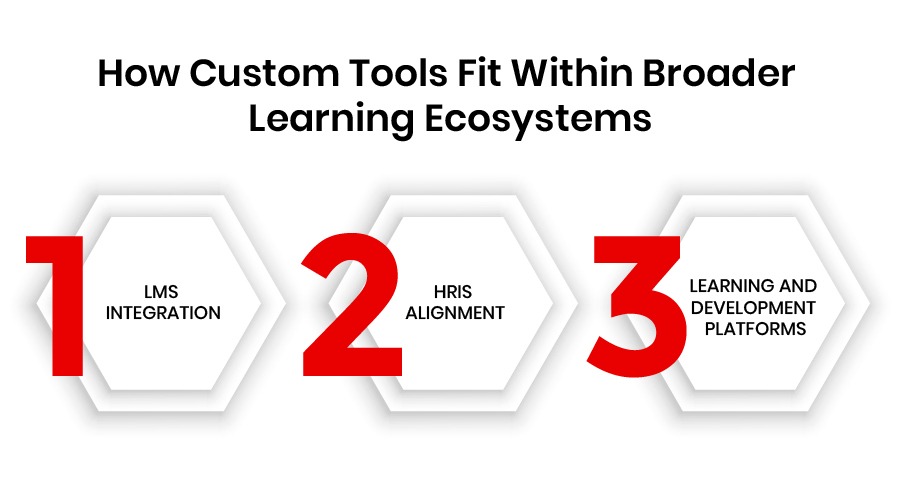
The future of enterprise learning isn’t built on one platform. It’s built on systems that talk to each other. That’s why custom elearning authoring tools are no longer nice-to-have add-ons. They’re connective tissue in a modular learning architecture.

How Custom elearning authoring tools fit in learning systems | AppVerticals

Well-built custom solutions don’t replace your LMS, HRIS, or LXP. They enhance them.

Here’s how that works in practice:

LMS Integration

Your authoring tool becomes an extension of your LMS content creation software, not a separate entity. Whether you use Moodle, TalentLMS, or Cornerstone, content is published with full tracking via SCORM, xAPI, or LTI. Nothing’s lost in the handoff.

HRIS Alignment

Custom tools sync with systems like Workday, SAP SuccessFactors, and BambooHR. Roles, org structure, and learning eligibility update dynamically without manual data pulls. That means learners only see what’s relevant to their role or location.

Learning and Development Platforms

Integration with learning and development platforms like Docebo or Degreed allows content and user data to flow both ways. Personalized journeys, real-time analytics, and automatic recommendations become part of your L&D strategy, not a separate project.

74% of organizations citetech integration challengesas a top barrier to effective learning delivery.

That’s exactly the friction custom tools are designed to eliminate.

When tools integrate instead of compete, your L&D ecosystem becomes more than the sum of its parts.

It becomes adaptive, scalable, and strategically aligned.

And just as importantly: You stay in control. Without losing connectivity.

How to Build a Custom eLearning Authoring Tool

Design for how learning actually happens—not just how it’s delivered.

Off-the-shelf tools often force teams to work around the platform. Custom tools reverse that. They’re designed around the way your organization works, learns, and grows.

How to Build a Custom eLearning Authoring tool


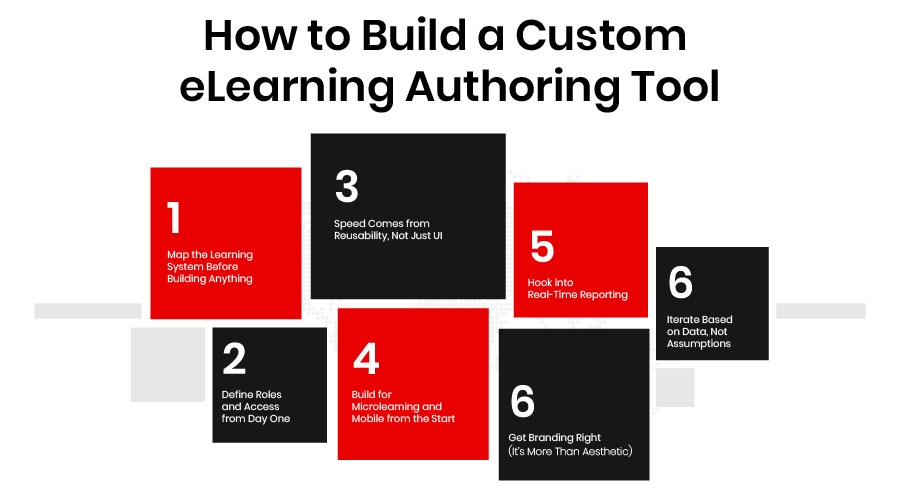
Here’s how leading enterprises actually build them:

1. Map the Learning System Before Building Anything

Don’t start with features. Start with flow.

Where does learning begin? Who approves it? How does it reach the learner? What stalls it?

Mapping the full system, from ideation to analytics, identifies where content gets lost, how long updates take, and where integrations will matter most.

📊 61% of organizations are investing heavily in improving onboarding and training programs, reflecting systemic learning impact.

2. Define Roles and Access from Day One

In most enterprises, learning is a team sport.

Instructional designers draft modules. SMEs tweak the facts. Compliance leads lock the language. If the tool doesn’t reflect this division of labor, you get bottlenecks.

Build role-based access, so the right people can contribute without stepping on each other’s work.

3. Speed Comes from Reusability, Not Just UI

Faster publishing isn’t about slick buttons. It’s about reusable assets.

Reusable content blocks. Shared templates. Bulk editing. These save hundreds of hours over time—and reduce content duplication across departments.

4. Build for Microlearning and Mobile from the Start

Enterprise learners don’t sit through 45-minute courses anymore.

They learn in 3–7 minute bursts between shifts, during commutes, and inside chat apps.

Design your tool to support:

  • Mobile-first UX
  • Offline access
  • Bite-sized content publishing

If it’s not frictionless, it won’t get used.

5. Hook into Real-Time Reporting

Custom authoring tools shouldn’t just push content; they should pull insights. Build integrations with your LMS, HRIS, and analytics platforms to surface:

  • Drop-off rates
  • Completion times
  • Department-level trends
  • Compliance tracking

If your dashboard can’t answerwhat’s working?You’re flying blind.

6. Get Branding Right (It’s More Than Aesthetic)

The learner’s experience reflects your organization. That means your tool should match your voice, look, and standards across every module. Notclose enough.Exact.

For heavily regulated industries, this isn’t just branding—it’s trust-building.

7. Iterate Based on Data, Not Assumptions

After launch, usage patterns should guide what improves next.

Which templates go untouched? Where do authors get stuck? What features drive engagement? Use real-world data to refine, not just annual planning sessions.

🧠 Building a custom eLearning authoring tool isn’t about getting everything. It’s about getting the right things aligned to how your people learn and your systems operate.

How to Choose the Right Elearning Authoring Tool (A Systems Checklist)

Too many teams choose tools by comparing feature tables.

Checkboxes don’t scale. Systems do.

The real question isn’tWhat’s the best elearning authoring tool today?”

It’sWhat’s the best system for how we learn, operate, and grow tomorrow?”

Here’s a checklist to move the conversation from features to workflows:

Is it flexible enough?

Can you build content in multiple formats, such as SCORM, xAPI, and HTML5? Can your team publish fast without being boxed into templates?

Can it integrate where I need it to?

Will it connect with your LMS, HR systems, analytics tools, and feedback platforms? Or will your team be stuck stitching systems together?

Will it grow with our L&D vision?

Does the tool allow you to evolve from compliance-driven training to adaptive, data-informed learning journeys?

Does it support collaboration?

Can instructional designers, SMEs, reviewers, and compliance leads all work inside the same environment without chaos?

Can it truly replace the piecemeal stack?

A tool isn’t valuable if it just adds another layer. The best elearning tools reduce system noise, not amplify it.

For teams also evaluating platforms more broadly, this checklist complements guides on choosing enterprise learning management system tools that align with long-term scalability. 

🧠 When you choose an elearning authoring tool, you’re not picking software. You’re choosing the infrastructure for how your enterprise builds capability.

Why Work with an Education Software Development Company Like AppVerticals?

Choosing a new authoring tool matters. But what matters more is who builds it, and how. Off-the-shelf platforms often fall short because they weren’t built for your workflows, your teams, or your learners.

We build tools that don’t just deliver learning, they enable it at scale.

What We Actually Build

As an education software development company, we help you design systems that solve real problems, like:

  • Custom elearning authoring tools built from scratch—not shoehorned from templates
  • Integrations that work, connecting smoothly to LMSs, HR systems, and other platforms
  • Microlearning capabilities, made for mobile-first, on-the-go learners
  • Role-based authoring interfaces, so designers, SMEs, and compliance teams can work in sync
  • Enterprise-grade performance, with full support for security, access control, and uptime

Industries We’ve Helped

From healthcare and finance to manufacturing and education, AppVerticals has built tools that reflect:

  • Complex compliance workflows.
  • Region-specific training needs.
  • Rapid scaling across teams and markets.

If you’re exploring options, our educational software development guide can help you understand what to build and why.

The Tool Isn’t the Strategy. The System Is – Kazim Qazi, CEO of AppVerticals

Wrapping it Up!

Learning doesn’t stall because of bad content. It stalls when systems can’t keep up. Pre-built tools crack under real-world pressure. Custom authoring tools give you control: faster updates, cleaner workflows, real-time insights, and zero vendor lock-in. They’re not just tools. They’re infrastructure.

Build what your learners and your learning strategy actually need.

Let’s Talk Before You Invest

If your current tools feel like blockers instead of bridges, don’t start with a feature list. Start with a conversation.

Book a Free Consultation!

FAQs – eLearning Authoring Tools 

1. What is an eLearning authoring tool?

An eLearning authoring tool is software that lets you create digital training content like think courses, modules, and assessments without coding. For enterprise L&D teams, the best elearning authoring tools offer speed, version control, and seamless LMS integration.

2. How are eLearning authoring tools different from eLearning tools?

“eLearning tools” is a broad category that includes LMSs, analytics dashboards, microlearning platforms, and more. eLearning authoring tools are specifically for creating the content that feeds into those systems.

3. Why do most off-the-shelf authoring tools plateau at scale?

They’re built for static delivery, not for evolving enterprise workflows. As your org grows, content bottlenecks, broken integrations, and vendor lock-in start slowing things down quietly but consistently.

4. What are the must-have features in enterprise-grade eLearning tools?

Look for reusable content blocks, real-time analytics, LMS content creation software compatibility, microlearning formats, and role-based authoring access; without these, content velocity stalls.

5. Why choose custom elearning authoring tools?

Because they’re built around how your people actually learn, collaborate, and report. Custom systems eliminate inefficiencies, reduce rework, and align directly with enterprise goals, not generic templates.

6. What’s the ROI of building a custom authoring tool?

Teams using custom tools report up to 40–50% faster content production, better compliance tracking, and significantly reduced license bloat across the org. The long-term cost savings and learning impact outweigh the upfront build cost.

7. How does custom authoring integrate with LMS and HRIS platforms?

Custom tools are designed to act as connectors, not silos. Content flows via SCORM, xAPI, or LTI. HR data syncs automatically, enabling contextual, role-specific learning experiences.

8. Where does an education software development company add value?

They don’t just build tools. They build systems that reflect your org’s structure, content lifecycle, compliance needs, and future growth. The result? Learning systems that scale with you.