How Much Does Healthcare App Development Cost in Dubai? A 2026 Breakdown

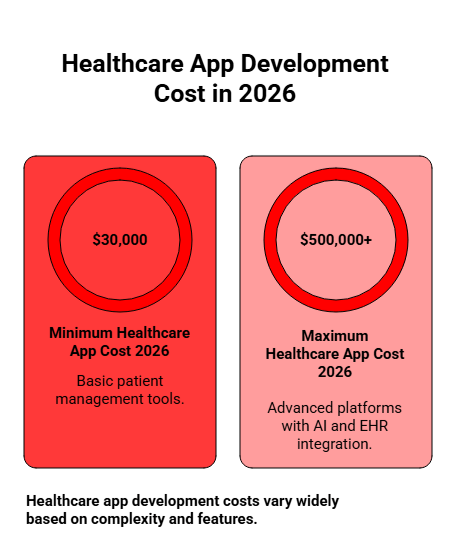
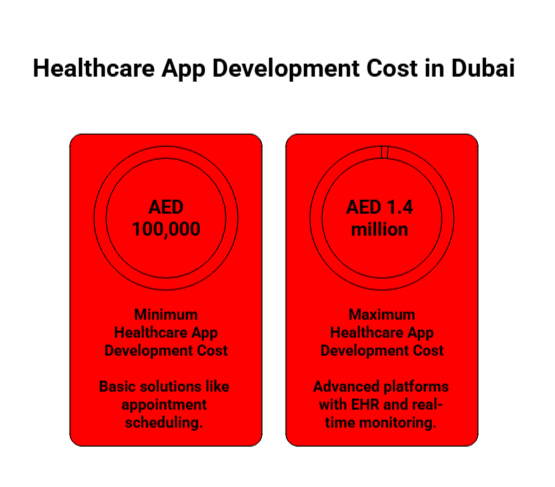
The average healthcare app development cost in Dubai can range from AED 100,000 to over AED 1.4 million, depending on factors such as app complexity, features, and specific compliance requirements. This price variation reflects the diversity in healthcare app types, from basic solutions like appointment scheduling to advanced platforms integrated with Electronic Health Records (EHR) and real-time health data monitoring.
healthcare app development cost in Dubai

Whether you’re planning to build a simple healthcare app or a sophisticated enterprise solution, this guide will break down the costs you can expect at each stage, helping you make informed decisions for your project.

Curious about what drives healthcare app development costs in Dubai? Jump straight to the key factors here.

Key Takeaways

  • Cost Breakdown: Healthcare app development in Dubai ranges from AED 100,000 for basic apps to over AED 1.4 million for advanced solutions, with timelines spanning 3-18+ months depending on complexity and features.
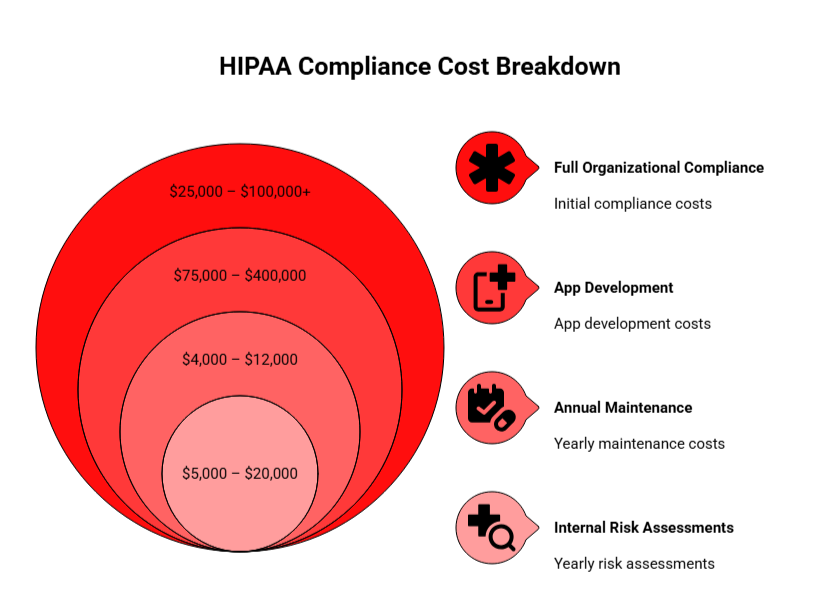
  • Compliance Costs: Compliance with regulations like DHA, HIPAA, and GDPR is critical, adding 20-40% to development costs, but ensures market access and data security.
  • Cross-Platform Development: Cross-platform development can reduce costs by 30-40%, making it an appealing choice for less complex apps, while native apps remain ideal for feature-rich, specialized solutions.
  • Experienced Teams: Experienced development teams, especially those familiar with healthcare regulations, can lower long-term costs by speeding up development and minimizing errors.
  • Local vs. Offshore Teams: Local vs. offshore development teams offer different pricing models, with Dubai-based teams providing ease of collaboration but at higher hourly rates.

How Much Does Healthcare App Development Cost In Dubai?

Understanding the cost of healthcare app development in Dubai is crucial for making informed decisions. The cost depends on various factors such as app complexity, team location, and the features you require. Here’s a breakdown of typical costs based on app complexity.

Average Cost Breakdown for Healthcare Apps in Dubai (by Complexity)

Below is a cost breakdown based on the complexity of healthcare apps. The prices vary depending on the features, technology, and timeline needed for each project.

App Type Cost Range Timeline
Basic Healthcare App AED 100,000 – AED 280,000 3–6 months
Mid-Tier Healthcare App AED 280,000 – AED 550,000 6–12 months
Advanced Healthcare App AED 550,000 – AED 1,470,000+ 12–18+ months

Cost Breakdown for Healthcare App Development in the GCC Region

When considering expanding your healthcare app development from Dubai to other GCC regions, it’s essential to understand the estimated costs for building apps in different countries. The costs can vary based on the market conditions, infrastructure, and regulatory environment of each country. 

As a leading mobile app development company in Dubai, we’ve put together a  detailed comparison of the estimated costs for healthcare app development in Dubai, Saudi Arabia, Qatar, Bahrain, and Ajman.

Country / Emirate Estimated Cost (USD) Estimated Cost (Local) Development Timeline
Dubai (UAE) $50,000 – $400,000+ AED 183,000 – AED 1,468,000+ 6 – 18 months
Saudi Arabia $45,000 – $375,000+ AED 165,000 – AED 1,380,000+ 6 – 16 months
Qatar $40,000 – $320,000 AED 147,000 – AED 1,175,000 6 – 15 months
Bahrain $35,000 – $280,000 AED 128,000 – AED 1,030,000 5 – 14 months
Ajman (UAE) $45,000 – $300,000 AED 165,000 – AED 1,100,000 5 – 14 months

Estimated Cost Breakdown In Local Currency

Healthcare app development cost in UAE: AED 183,000 – AED 1,468,000+

Healthcare app development cost in Saudi Arabia: SAR 168,000 – SAR 1,410,000+

Healthcare app development cost in Qatar: QAR 146,000 – QAR 1,170,000

Healthcare app development cost in Bahrain: BHD 13,200 – BHD 105,000

Healthcare app development cost in Ajman: AED 165,000 – AED 1,100,000

Regional Trends in UAE Healthcare App Development Costs

AI & Digital Health Adoption: The Middle East’s digital health market is set to grow rapidly, with AI transforming healthcare, particularly in the UAE and Saudi Arabia.

Telemedicine & Remote Care: Telemedicine adoption is expected to stabilize at 60-70% by 2025, fueling a growing demand for healthcare apps.

Vision 2030 Impact: Both the UAE and Saudi Arabia are making significant investments in healthcare infrastructure, which may reduce costs for approved projects.

Emerging Technologies: Blockchain, IoT, and AR/VR are driving costs up but are becoming more prevalent in the region, particularly in the UAE and Saudi Arabia.

The UAE leads in healthcare app development with its robust infrastructure and high costs, while countries like Egypt offer cost-effective alternatives without compromising on quality.

Ready to Build the Next Big Healthcare Mobile Solution In Dubai?

Partner with our talented team of engineers and get started with turning your vision into reality. 


What Factors Impact Healthcare App Development Costs In Dubai?

The cost of healthcare app development in UAE is influenced by various factors, including app complexity, compliance requirements, platform choices, and design investments. Key elements such as these play a major role in determining the final mobile app development cost in Dubai

Below are the main factors that shape your overall budget:
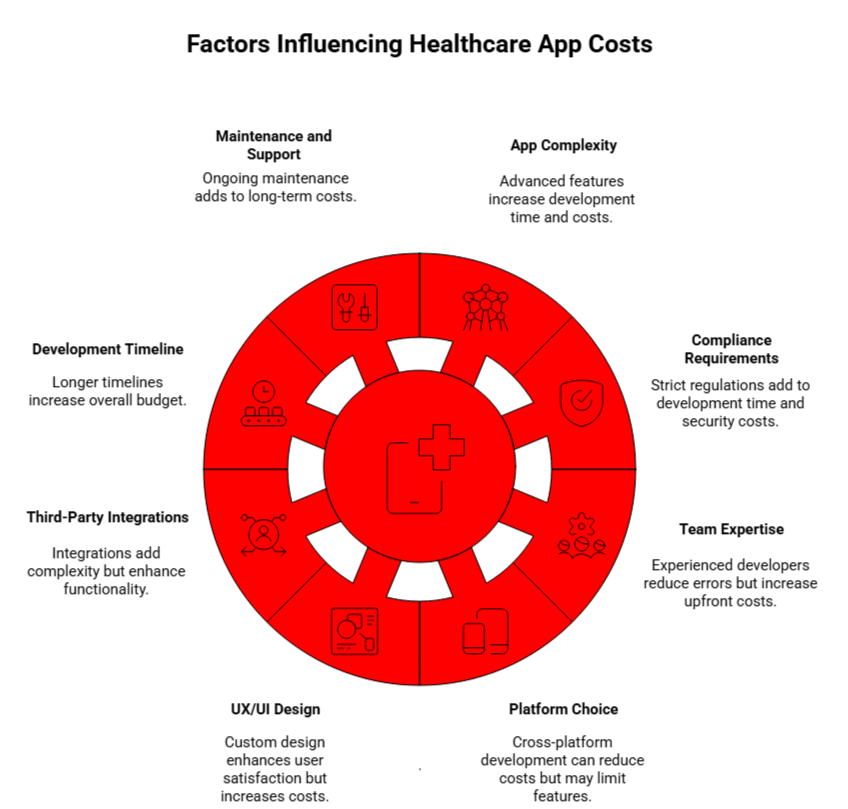
factors influencing healthcare app costs in dubai

1. App Complexity

More advanced features like AI, IoT, or real-time monitoring require longer development time and higher costs. Simpler features like appointment scheduling are quicker and less expensive to develop.

2. Dubai Compliance and Security Requirements

Healthcare apps must meet strict regulatory standards such as DHA, HIPAA, and GDPR, which increase both development time and costs due to security and audit requirements.

3. Development Team Expertise

The experience level of your development team impacts the cost. Senior developers or specialists in healthcare regulations may cost more upfront, but reduce time and errors in the long run.

4. Platform Choice

Choosing between iOS, Android, or cross-platform affects cost. Cross-platform development can reduce costs but may not be suitable for highly complex apps requiring platform-specific features.

5. UX/UI Design

Custom UX/UI design tailored to healthcare needs increases costs but enhances user satisfaction and reduces rework, making it a valuable investment for long-term success.

6. Third-Party Integrations

Integrating with systems like EHRs or payment gateways adds complexity and cost, but can significantly enhance the functionality and value of your app.

7. Development Timeline

Longer timelines typically mean higher costs. Complex apps or those requiring multiple revisions will extend the development period, increasing the overall budget.

8. Maintenance and Post-Launch Support

Ongoing maintenance and updates to ensure security and compliance are essential, but add to the long-term costs of developing a healthcare app.

Key Insight: Pre-built components can reduce development costs by 20-30%, while fully custom solutions will have a higher initial cost but offer better long-term ROI. A hybrid approach combining reusable modules and custom features can strike the right balance.

Make Your Healthcare App Cost-Effective

Ensure your healthcare app stays within budget by working with an experienced team that understands Dubai’s regulatory environment and development challenges.


How Do UAE Compliance and Security Requirements Influence Costs?

Whether you’re investing in healthcare apps or healthcare software development,  it is critical to comply with various regulations such as DHA, HIPAA, and GDPR. Implementing these compliance and security measures adds significant costs to the overall budget.

Compliance Type Cost Range Timeline Key Requirements
DHA Compliance AED 37,000 – AED 92,000 (USD 10,000 – 25,000) 1 – 2 weeks Data residency, encryption, audit trails, cybersecurity standards
HIPAA Compliance $15,000 – $50,000 2 – 4 weeks End-to-end encryption, multi-factor authentication, security audits
GDPR Compliance $5,000 – $15,000 Varies Data minimization, consent management, right to erasure

Key Insight: Compliance and security can add 20-40% to base development costs, with additional ongoing costs for security audits and penetration testing.

What Role Does the Development Team’s Expertise Play in the Cost?

The experience level of your development team plays a critical role in determining the overall cost. Senior developers can expedite development, reduce errors, and ensure compliance, thus lowering long-term costs despite higher hourly rates.

Experience Level Hourly Rate (AED) Hourly Rate (USD) Key Capabilities
Junior Developer AED 75 – 150 $20 – $40 Basic features, simple UI/UX
Mid-Level Developer AED 150 – 220 $40 – $60 Complex features, API integration
Senior Developer AED 220 – 330 $60 – $90 System architecture, healthcare compliance
Healthcare Domain Expert AED 290 – 370+ $80 – $100+ Regulatory expertise, EHR integration, clinical workflows

Key Insight: Hiring senior developers or specialized experts in healthcare regulations can reduce project costs by 25-30% due to fewer development cycles and faster compliance implementation.

What Is The Impact of Platform Choice Over Development Costs: iOS vs. Android vs. Cross-Platform?

Your platform choice significantly impacts both development costs and time. Whether you’re building a healthcare mobile app or a healthcare web development solution, the choice between iOS, Android, or cross-platform will affect your project’s overall cost, scalability, and market reach.

Here’s a comparison of the development costs for healthcare app development on iOS, Android, and cross-platform frameworks like Flutter or React Native.

Platform Strategy Cost Range (AED) Development Time Pros Cons
iOS Only AED 146,800 – AED 734,000 3 – 8 months Enhanced security, premium UX, Apple Health integration Limited market reach (30–35% in MENA)
Android Only AED 128,450 – AED 661,000 3 – 8 months Broader market reach (65–70% in MENA), flexible integration Device fragmentation challenges
Cross-Platform (Flutter / React Native) AED 202,850 – AED 918,000 4 – 10 months 30–40% cost savings, single codebase, faster deployment Performance limitations for complex features

What is the Impact of UX/UI Design and User Experience on the Budget?

Investing in high-quality UX/UI design is critical for user satisfaction and long-term success. Poor design can lead to high rework costs and low user adoption rates, while a well-thought-out design minimizes these issues and optimizes the overall project cost.

Here’s a breakdown of design investment costs for healthcare app development:

Design Investment Cost Range (AED) Development Time Key Features
Basic Template Design AED 18,350 – AED 36,700 2 – 4 weeks Pre-designed templates, minimal customization
Custom UI/UX Design AED 36,700 – AED 110,100 4 – 8 weeks Tailored interfaces, better user flow, accessibility
Advanced Design with Animation AED 110,100 – AED 183,500 8 – 12 weeks Custom animations, interactive UI, complex visual design

How Much Do Healthcare App Developers Charge Per Hour In Dubai?

The cost of hiring healthcare app developers in Dubai varies significantly based on their expertise and the type of development team. Below, we break down the typical hourly rates you can expect based on developer experience and team structure.

Hourly Rates by Expertise and Experience Level

The hourly rate for developers in Dubai ranges from AED 75 to AED 330, depending on their role and experience. Here’s a general overview of the rates:

  • Junior Developers (0-2 years): AED 75-110/hour ($20-$30)
  • Mid-Level Developers (2-5 years): AED 110-185/hour ($30-$50)
  • Senior Developers (5-10 years): AED 185-260/hour ($50-$70)
  • Expert Developers (10+ years): AED 260-330/hour ($70-$90)

Other roles, such as UI/UX designers, QA engineers, and domain experts, follow a similar pricing pattern, with senior roles charging up to AED 470+/hour ($130+).

The average blended rate for healthcare app developers in Dubai falls between AED 150-250/hour ($40-$68/hour).

Hourly Rates by Type of Development Team (Freelance vs. Agency)

When deciding between freelancers and agencies, the pricing models differ greatly:

Freelance Developers: AED 100-200/hour ($25-$55/hour), with monthly retainers ranging from AED 8,000 to AED 15,000 ($2,200 – $4,100).

  • Pros: 40-60% cost savings, flexible engagement, direct communication.
  • Cons: Limited skill diversity, lower accountability, and no backup resources.

Small Development Agencies: AED 180-280/hour ($50-$75/hour).

  • Pros: Multiple skill sets, better project management.
  • Cons: Limited scalability, may lack healthcare expertise.

Mid-Sized Agencies: AED 220-370/hour ($60-$100/hour).

  • Pros: Comprehensive services, better support, UAE healthcare compliance experience.
  • Cons: Higher cost than freelancers.

Large Enterprise Agencies: AED 290-440+/hour ($80-$120+/hour).

  • Pros: Deep healthcare expertise, enterprise-grade security, full compliance support.
  • Cons: Premium pricing, longer onboarding.

Cost Comparison Example for a 6-Month Project

Development Team Cost Range
Freelancer Team $60,000 – $90,000
Small Agency $100,000 – $150,000
Mid-Sized Agency $150,000 – $250,000
Large Agency $250,000 – $400,000+

Choosing between freelancers and agencies depends on your project scale and budget. Freelancers are great for smaller projects, while agencies are better suited for larger, more complex healthcare apps.

How Long Does It Take To Develop A Healthcare App In Dubai?

The development timeline for healthcare apps in Dubai can vary significantly based on app complexity and features. Below is a concise breakdown of estimated timelines for different types of apps:

Estimated Development Time for Simple vs. Complex Apps

App Complexity Estimated Development Time Team Size Key Features
Simple MVP 3 – 6 months Small team (3–5 people) Basic features, minimal integrations
Mid-Complexity 6 – 12 months Medium team (6–10 people) Telemedicine, EHR integration, cross-platform
Advanced / Enterprise 12 – 18+ months Large team (10–15+ people) Multiple integrations, AI/ML, full compliance

Timeline by App Type

Here is the timeline and cost breakdown for different healthcare app types:

Healthcare App Type Estimated Timeline Cost Range
Appointment Booking 6 – 12 weeks $50,000 – $75,000
Fitness & Wellness 8 – 20 weeks $55,000 – $120,000
Telemedicine (Basic) 16 – 24 weeks $150,000 – $250,000
Telemedicine (Advanced) 24 – 32+ weeks $300,000 – $450,000
Chronic Disease Management 15 – 40 weeks $65,000 – $280,000
EHR/EMR Integration 12 – 24 weeks $50,000 – $150,000
Hospital Management System 40 – 60+ weeks $400,000 – $800,000+

Key Development Phases & Timelines

  • Discovery & Planning (2-4 weeks): Market research, requirement gathering, and technical feasibility.
  • Design & Prototyping (4-8 weeks): UX research, wireframing, and visual design.
  • Development & Integration (8-20+ weeks): Frontend, backend, and third-party integrations.
  • Testing & Quality Assurance (2-6 weeks): Functional, security, and usability testing.
  • Deployment & Launch (1-3 weeks): App store submission, server setup, and soft launch.

Critical Path Items That Extend Timelines

  • Vendor Certifications (4-8 weeks for EHR vendors)
  • App Store Review (1-2 weeks, or longer with rejections)
  • Security Audits (2-4 weeks)
  • Regulatory Approvals (Variable, depending on DHA, FDA, etc.)

Total development time ranges from 6 weeks to 18+ months, depending on the complexity of the app and specific integrations required.

Why Should You Choose Dubai for Healthcare App Development?

Dubai offers a robust environment for healthcare app development, backed by its world-class infrastructure, strategic location, and comprehensive regulatory framework. 

Benefits of Dubai’s Healthcare Sector and App Development Ecosystem

Here’s why Dubai stands out as the ideal hub for healthcare innovation:
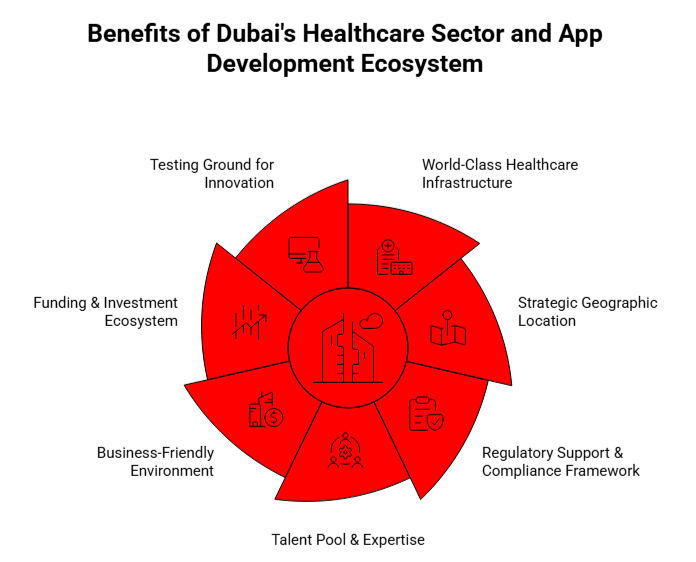
benefits of Dubai's healthcare sector and app development ecosystem

World-Class Healthcare Infrastructure: Dubai boasts over 50 JCI-accredited hospitals, the highest concentration in the MENA region, and attracts over 1 million medical tourists annually. With 75% of hospitals equipped with EMR systems and 5G coverage enabling telemedicine, the city is advancing in digital health.

Strategic Geographic Location: Located as a regional hub, Dubai provides access to 2 billion people within a 4-hour flight, facilitating easy expansion across MENA markets. Its high digital penetration, with 96% smartphone usage and 99% internet coverage, enhances connectivity.

Regulatory Support & Compliance Framework: Dubai’s DHA framework offers fast-track approvals and clear regulatory pathways. The city aligns with international standards, including WHO, HIPAA, and EU regulations, ensuring apps meet global compliance benchmarks.

Talent Pool & Expertise: Home to over 25,000 tech professionals, Dubai’s growing pool of healthcare IT experts is equipped to tackle emerging challenges. The city’s multilingual workforce, fluent in English, Arabic, and other languages, fosters effective communication across teams.

Business-Friendly Environment: Dubai offers a zero corporate tax incentive for companies in free zones, along with 100% foreign ownership. Business setup is quick, with companies able to establish operations in just 48 hours, supported by a strong fintech infrastructure and fast-track work permits.

Funding & Investment Ecosystem: With over $5 billion in healthtech funding for 2023-2025, Dubai is a thriving investment hub. Programs like Hub71 provide healthcare startups with funding of up to $2 million, making it an attractive destination for innovation.

Testing Ground for Innovation: The DHA’s regulatory sandbox allows for the testing of digital health innovations. With Dubai residents being quick adopters of new technologies, it provides an ideal environment for piloting healthcare apps and services.

The Impact of Dubai’s Regulatory Environment on Healthcare App Development

DHA Compliance Framework: All medical data in Dubai must be stored within UAE borders to meet DHA regulations. Compliance with encryption, audit logs, and multi-factor authentication (MFA) is required to ensure data security and privacy.

Licensing & Approval Process: DHA approval for digital health apps typically takes 4-8 weeks. The process is streamlined with clear guidelines, ensuring that apps can quickly enter the market with a solid compliance framework.

Compliance Costs: Initial compliance setup costs range from $31,000 to $88,000, depending on the app’s complexity. Ongoing audits and updates cost between $16,500 and $45,500 annually.

Key Benefits of DHA Compliance: DHA compliance is essential for market access in Dubai and the broader GCC region. It enhances trust, offering a competitive edge and facilitating partnerships with healthcare providers. Additionally, aligning with international standards aids expansion into markets like the US and EU.

Dubai’s healthcare ecosystem provides an unparalleled combination of cutting-edge infrastructure, regulatory support, and access to skilled talent. It’s an ideal location for businesses looking to develop innovative healthcare apps with a clear path to both regional and global success.

Leverage Dubai’s Healthcare Ecosystem for Success

Tap into Dubai’s growing healthcare sector and take advantage of its world-class infrastructure and regulatory advantages. Our team is here to help you develop the perfect healthcare app.


Conclusion

In conclusion, the UAE healthcare app development market is rapidly growing, driven by robust infrastructure and a favorable regulatory environment. As digital health solutions gain momentum across the region, understanding the cost factors, such as complexity, compliance, and development teams, can help you make informed decisions.

By considering key elements like platform choice, app features, and security requirements, you can optimize your budget and timeline. Whether you are looking for a basic app or a complex healthcare solution, there are various strategies to balance cost and quality.

AppVerticals is focused on building healthcare app solutions that align with regional regulations, offering cost-effective development without compromising on quality. With the right approach, your healthcare app can succeed in this thriving market.

Education App Development Cost Guide 2026: Pricing & Strategy

If you are planning an education app in 2026, you have probably noticed how confusing pricing conversations can get. One vendor quotes under $100k, another comes back closer to $400k, and both say their estimate is reasonable. 

The question you really need answered is simple: what drives education app development cost, and which parts of the build actually justify the budget?

The market around you is growing fast. According to Grandview Research, the global education technology market is projected to more than double to USD 348.41 billion by 2030, with a forecast CAGR of 13.3 percent.

That kind of growth attracts more products, more features, and more complexity in pricing.

That’s why EdTech apps fail most often where teams skip backend depth or QA coverage, regardless of whether the work is done in-house or by an education app development company

In this guide, I will walk you through how the education app development cost actually forms, so you can look at any proposal and understand whether it fits your goals, and your expected return. 

TL;DR

  • Education app development typically costs $60,000 to $600,000+, depending on whether the platform is basic, interactive, or AI-driven.
  • AI and personalization raise costs by 30–70% because they require data pipelines, retrieval systems, and ongoing optimization.
  • Most overruns come from weak foundations like legacy code, poor UX flow, and unplanned integrations, not from features alone.
  • Budgets are driven by backend, QA, cloud, and delivery, not just UI or visible features.
  • Realistic delivery runs in three stages: MVP (10–14 weeks), V1 (5–8 months), and Scale (9–16 months).
  • Early-stage teams save more by outsourcing, while mature products benefit from hybrid models.

What Is the Actual Education App Development Cost for a Scalable Learning Platform?

In 2026, education app development typically costs between $60,000 and $600,000+, depending on whether the platform is content-focused, interactive, or AI-driven.

And those decisions shape everything: performance, security, maintenance, and how far the platform can grow without rewrites.

The rise in AI and cloud-based learning is exactly why development costs have widened; modern platforms carry heavier technical requirements than they did a few years ago.

Based on real project patterns, scalable education apps fall into the following cost groups:

Build Category Typical Use Cases Cost Range
Content-focused apps Structured modules, quizzes, progress tracking $60k–$120k
Interactive learning platforms Live sessions, assignments, cohort management, dashboards $120k–$250k
AI-driven learning systems Adaptive paths, recommendations, AI tutors, deep analytics $250k–$600k+

These three tiers reflect how modern EdTech products are actually built, from simple course delivery to fully personalized, AI-enabled learning systems.

If you need personalization, real-time collaboration, or large user volume, you’ll sit in the mid or upper bracket. If your goal is an MVP to validate engagement or course demand, the lower bracket is often enough.

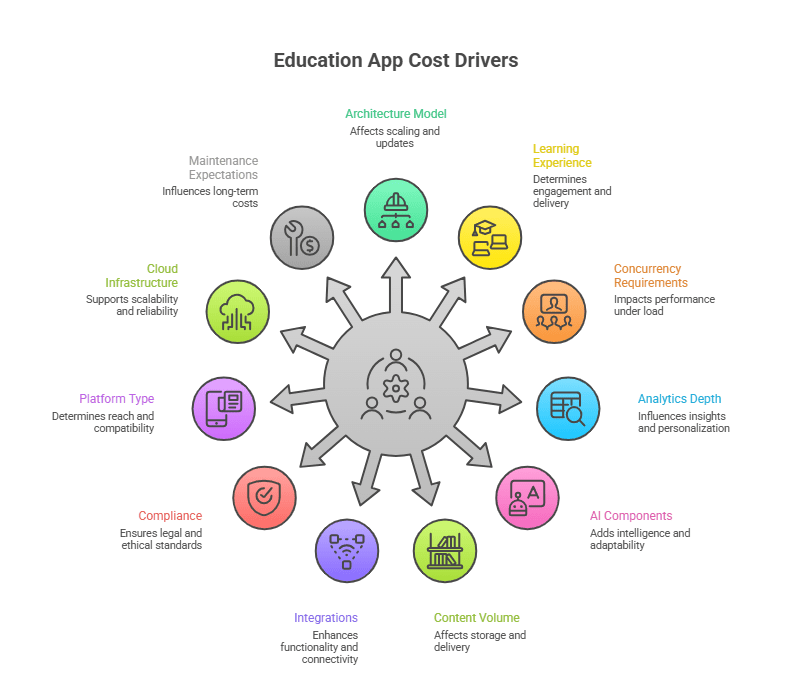
Key Cost Drivers: Architecture, Features, Platforms, Compliance, Scalability

Here are the factors that consistently push cost up, or keep it controlled:

Edtech App Development Key Cost drivers

Architecture, AI, and compliance dominate cost because they determine how the platform scales, secures learner data, and adapts to user behavior over time, which is where most education app development challenges emerge.

In my experience, architecture, AI, and compliance have the strongest impact on cost at scale.

Cost Breakdown by App Type 

Different education products carry different technical needs. Here is a clearer view that your readers will immediately understand:

App Type Typical Features Cost Range Best Fit For
Learning App Lessons, quizzes, progress tracking, notifications $50k–$120k Course-based learning, academies
LMS App Content management, roles, admin dashboards, reporting, certificates $120k–$320k Schools, organizations, training companies
AI Tutor App Adaptive learning, NLP chat, recommendations, analytics $150k–$300k+ AI-driven EdTech startups
Kids Learning App Gamified modules, parental controls, illustrations, audio $70k–$180k Early learning products
Corporate Training App Role-based paths, compliance tracking, skills mapping, manager tools $120k–$250k+ Enterprise learning teams

These ranges reflect public industry data combined with real-world engineering patterns I’ve seen across multiple EdTech builds.

If your goal is to support thousands of learners, integrate with HR or SIS systems, or run adaptive learning models, your cost will naturally fall toward the higher ranges. 

If you’re building a focused MVP, you can keep the scope tight and stay near the starting bands.

Build an Education App That Scales Without Surprises

If you’re planning a new EdTech product or upgrading an existing one, our engineering team can help you build a platform that performs at scale.

Start Your Project Discussion

How Much Does It Cost to Make an Educational App with AI, Personalization, and Advanced Analytics?

AI-powered education apps typically cost between $120,000 and $600,000+ because personalization, data pipelines, and AI orchestration must be engineered alongside the learning platform.

The more intelligence the system needs to demonstrate in real usage, the closer the cost moves toward the upper end of that range.

Let me give you a simple example.

I once reviewed two proposals for an “AI learning assistant.” Both looked identical on the surface. But one priced it at $90k, the other at $240k. After looking into it, the cheaper estimate assumed a basic LLM integration. The higher one accounted for:

  • content tagging
  • embeddings
  • retrieval
  • conversation history
  • safety guardrails
  • analytics
  • and multi-role logic

Same idea. Completely different engineering reality.

This is why education app development cost swings so widely for AI-driven products.

These are the four AI capabilities that drive most of the cost increase in EdTech products.

How AI, Personalization, and Analytics Push the Budget

Capability Why It Costs More in Real Projects Cost Impact
Personalized learning Needs user modeling, rules engine, and progress tracking that reacts to behavior +$20k–$60k
Content recommendations Requires tagging content, tracking user events, and ranking outputs +$30k–$80k
AI tutoring Has LLM prompts, context window design, retrieval logic, and safety layers +$60k–$150k+
Advanced analytics Demands a proper data warehouse, cohort logic, and insights dashboards +$25k–$70k

The pattern is simple:
AI features aren’t “features.” They are systems.
And systems need structure, data, and upkeep.

One thing I always tell founders:
“If you want AI to behave consistently, budget for the data work first, not the model work.”

Cost Impact of AI Features 

Teams often underestimate how much engineering sits behind the scenes of AI features. Here’s the breakdown I wish more founders saw early:

AI Feature What Actually Drives the Cost Build Cost Estimate
Adaptive learning Mapping learning states, behavior events, and branching logic $30k–$80k
Recommendation engine Tagging content, storing embeddings, tuning relevance $40k–$100k
AI tutor (NLP) Designing prompts, retrieval, guardrails, context windows $60k–$150k+
Content Q&A Chunking content, ranking answers, optimizing responses $20k–$50k

Here’s a realistic example from past work:

As founder, you may want a lightweight “chat with my course” feature.
For this, you may assume it would cost around $10k.
But, the actual quote is closer to $45k because we had to implement:

  • chunking + embeddings
  • retrieval flow
  • answer ranking
  • moderation
  • analytics
  • role-based access
Most AI features cost 3–5× more than founders expect because data preparation, retrieval layers, and safety controls outweigh the model itself.

This is why I always suggest capturing scope first, AI second.

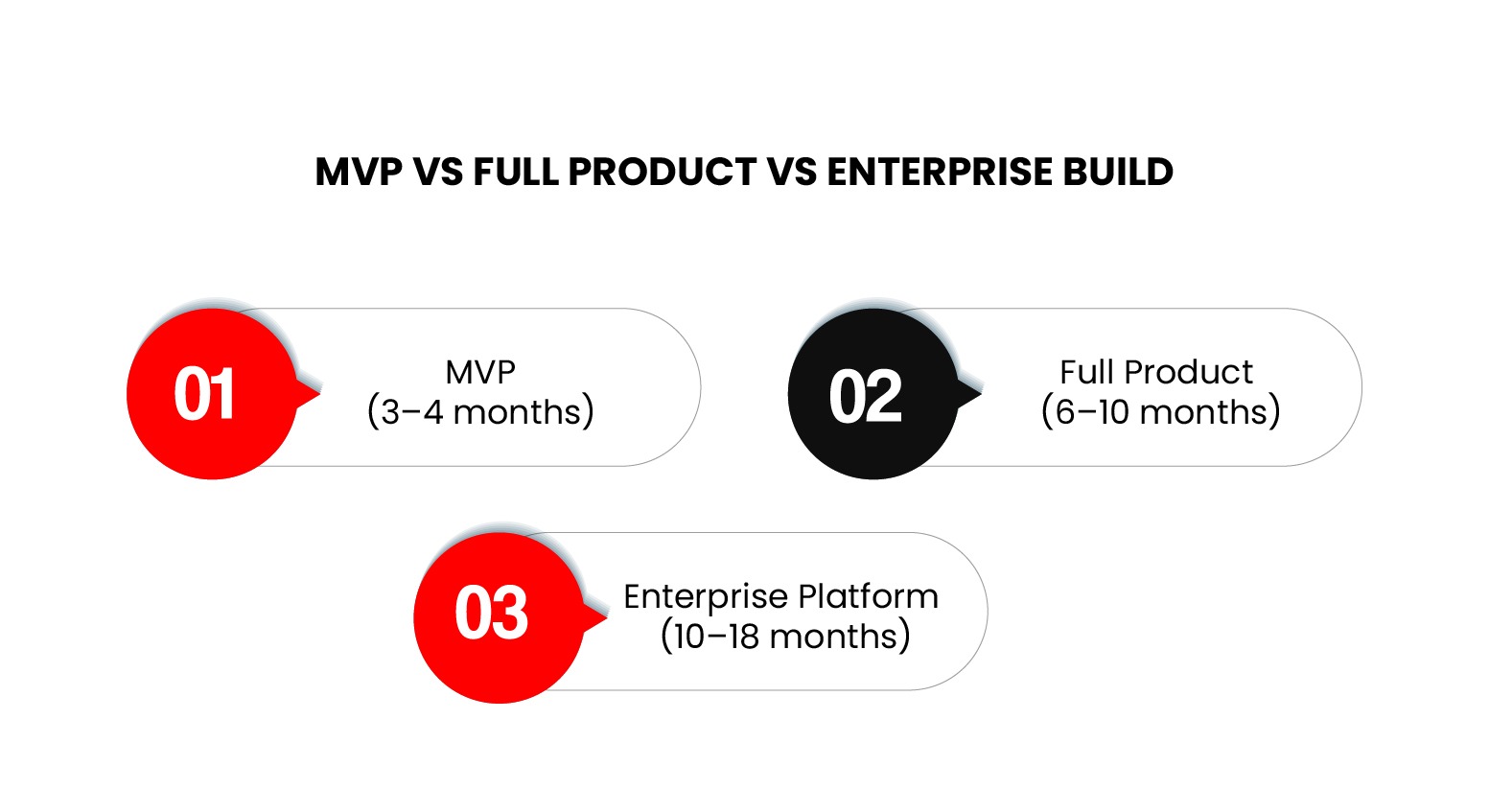
Realistic Pricing Scenarios: MVP vs Full Product vs Enterprise Build

Let’s break this into scenarios I’ve seen repeatedly.

MVP vs Full Product vs Enterprise Build

1. MVP (3–4 months): Good for Testing Demand

Most early-stage teams start here. What it usually includes:

  • simple content flow
  • basic personalization
  • starter dashboards
  • a lightweight LLM feature
  • mobile + web frontend

Typical cost: $80k–$150k

This is enough to show investors the core loop and measure learner engagement.

2. Full Product (6–10 months): Ready for Real Traction

This is where most funded EdTech teams aim. What you typically see:

  • adaptive pathways
  • recommendation logic
  • admin dashboards
  • cohort analytics
  • LMS integrations
  • better UI/UX
  • stable cloud setup

Typical cost: $180k–$350k

By this stage, you’re building a product people can rely on daily.

3. Enterprise Platform (10–18 months): Built for Scale

I recommend this version only when the team has a clear market or large clients.

Typical components:

  • AI tutor
  • deep analytics
  • multi-tenant structure
  • concurrency at scale
  • compliance (FERPA/GDPR)
  • custom integrations
  • performance tuning

Typical cost: $350k–$600k+

This is no longer “an app.” It’s a learning system tied into business operations.

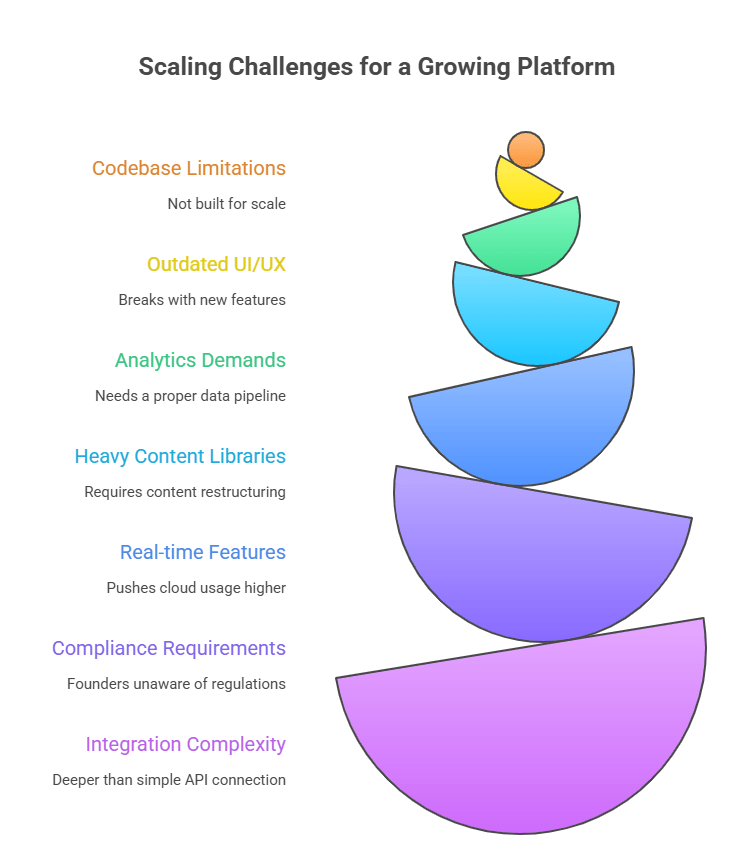
Why Educational App Development Costs Vary So Widely for EdTech Startups and Modernizing Firms

Education app development costs vary widely because some teams are building on clean, modern foundations while others must first repair years of technical debt before any new features can be added.

When teams bring in an existing product, what we typically find is a mix of outdated logic, mismatched UI layers, and infrastructure decisions made before AI, analytics, or mobile parity were part of the roadmap. 

Adding new capabilities on top of that foundation exposes weaknesses that can’t be ignored.

I’ve seen projects jump from a $90k estimate to a $250k one simply because the foundation they were working with wasn’t built for the kind of system the team wanted next.

Here’s the truth: in EdTech, the “simple learning app” rarely stays simple. Once you introduce role management, AI, deep analytics, or live sessions, the architecture has to grow with it. And if the existing code or infrastructure can’t support that growth, the cost climbs fast.

This is the checklist I walk through with teams before we even talk numbers:

Key challenges in education app development cost

These issues do not increase cost because of feature scope. They increase cost because the underlying platform must be repaired before it can grow.

The gap between the lowest quote and the realistic one usually hides in these areas.

Modernization Costs: What Actually Happens When You “Update” an Existing EdTech App

If I had to summarize modernization in one line, it would be this:
Everyone assumes it’s cheaper; almost no one’s codebase behaves that way.

Here’s what usually happens:
We open the repository and find logic from 2018, UI from 2020, and infrastructure that was never meant to support AI, analytics, or mobile parity. None of this is unusual. But it means modernization is less about adding features and more about fixing the foundation they sit on.

When teams ask me why modernization quotes feel high, this is the list I show them:

  • refactoring old logic that collapses under new workflows
  • replacing deprecated libraries that block new integrations
  • reworking UX so new features don’t feel bolted on
  • updating backend structure for analytics or AI
  • correcting performance bottlenecks revealed during load tests
  • moving from shared hosting to cloud-native setups
  • cleaning data while preserving existing user progress

It’s rarely glamorous work, but it’s what makes the app ready for the next several years rather than the next few months.

External Dependencies: The Hidden Cost Multipliers No One Talks About

If there’s one thing I wish more founders knew early, it’s this:
Most of your cost surprises won’t come from features, but from the systems your app needs to talk to.

Here’s what I mean:

  • Payment systems that require multiple currencies or tax logic
  • LMS implementation or SIS integrations that must sync progress, roles, or enrollment
  • Authentication layers (SSO, enterprise login) that add security work
  • Live video tools that demand higher cloud usage during peak hours
  • AI APIs that behave differently under load
  • Analytics tools that need events structured properly from day one

These dependencies create cost because they introduce operational coupling between systems, not because they add visible features.

These aren’t “plug-ins.” They’re engineering tasks that shape how your platform runs long-term.

Once teams see this, the cost variation finally makes sense, not because vendors inflate numbers, but because the foundations they uncover aren’t equal.

Detailed Cost Breakdown Across Design, Engineering, Cloud, and QA

Education app budgets are best understood as a combination of design, engineering, quality assurance, cloud operations, and delivery management rather than a single development fee.

What surprises most founders is how quickly non-feature items impact the total. 

For example, adaptive learning paths increase design workload because screens must support multiple learning states. Heavy content pushes backend and storage requirements. Real-time sessions expand testing cycles. All of this adds cost even before new features are considered.

These are the core budget categories that determine where EdTech development dollars actually go.

Area What Drives Cost Typical Range
Design (UI/UX) User flows, responsive layouts, accessibility, dashboards $10k–$40k
Frontend Engineering Mobile (iOS/Android), web app, state management $30k–$120k
Backend Engineering Auth, roles, content structure, analytics pipelines $40k–$150k
AI Components (if included) Personalization logic, recommendations, tutoring $30k–$150k+
QA & Testing Functional, regression, multi-device, performance $10k–$40k
Cloud Infrastructure Hosting, storage, streaming, monitoring $300–$2,000 monthly
Project Management Sprint planning, delivery oversight $8k–$25k

Backend, QA, and cloud operations typically consume the largest share of the budget once real users, content, and concurrency enter the system.

Teams often underestimate backend and QA the most, especially when analytics, AI, or heavy content is involved.

The teams that invest in strong architecture and clean learning workflows see far better outcomes than those chasing features. AI amplifies good systems, but it doesn’t fix broken ones.

– Jawaid Gadiwala, CTO of Koderlabs

Team Structure Needed for Education App Development

This team structure reflects the minimum set of roles required to deliver and maintain a production-grade learning platform:

Role Core Responsibility Why It Matters
Product Manager Requirements, feature specs, sequencing Prevents scope drift
UI/UX Designer Flows, dashboards, accessibility Keeps learner experience smooth
Backend Engineer APIs, data models, auth, analytics Foundation of scalability
Mobile/Web Engineer Learner-facing interface Reliability across devices
QA Engineer Testing across content types and devices Avoids regression failures
DevOps Engineer Cloud, CI/CD, monitoring Supports uptime and performance

Cloud + DevOps Cost Breakdown (AWS, GCP, Azure)

Cloud cost is predictable once you know what the app will handle. Video, AI inference, analytics events, and global access all increase usage. Basic learning apps stay inexpensive; high-interaction platforms do not.

Here’s the realistic breakdown I use in planning sessions:

Item Typical Cost Range Notes
Compute (servers) $80–$400/mo Depends on concurrency
Storage (content, media) $50–$300/mo Video increases this fast
CDN (global delivery) $20–$200/mo Essential for mobile learning
AI/LLM Usage $100–$1,000+ Depends on prompt volume
Monitoring + Logs $30–$150/mo Often underestimated
DevOps Time $1k–$4k/mo Maintenance + deployments

Once AI and heavy content appear, cloud cost becomes part of the product strategy, not a background expense.

How long does it take to build an education app?

Most production-grade education apps take between 3 months and 16 months to build, depending on whether they are MVPs, full products, or enterprise platforms.

When I help teams estimate a full EdTech roadmap, I start by setting realistic expectations around two things: how fast a team can move without sacrificing stability, and what level of complexity the product is expected to support at scale.

For EdTech apps, especially those involving personalization, AI, or advanced analytics, a practical timeline always breaks into three stages.

Build Timeline: MVP, V1, and Scale Stages

Here are the timelines  grounded in actual delivery patterns, not optimistic pitches:

Stage What Gets Built Timeline
MVP Core learning flow, basic dashboards, minimal analytics, early AI, stable backend 10–14 weeks
Version 1 (V1) Adaptive logic, recommendations, deeper dashboards, improved UI, better content structure 5–8 months
Scale Stage Multi-tenant setup, concurrency improvements, enterprise roles, compliance, heavy analytics, cloud tuning 9–16 months

A common misconception is thinking you can “build fast and optimize later.” In EdTech, it rarely works that way, like once video, analytics, or personalization enter the system, the architecture has to support them from day one.

For modernization projects, the timeline can extend because refactoring and cloud migration run in parallel with feature work.

Maintenance Cost Model: Monthly & Annual Pricing

Maintenance is where many EdTech teams misjudge long-term cost. You’re not just hosting an app; you’re supporting:

  • new content
  • new learning paths
  • analytics tuning
  • AI optimization
  • library/framework updates
  • continuous QA
  • security fixes

Here’s the model top professionals use when building budgets with founders:

Category Monthly Cost Annual Range What It Covers
Cloud hosting $200–$1,200 $2,400–$14,000 Compute, storage, CDN, logs
AI usage $100–$1,000+ $1,200–$12,000+ Inference costs, caching, tuning
Technical support $1,500–$6,000 $18,000–$72,000 Fixes, small improvements
Feature updates $2,000–$10,000 $24,000–$120,000 New flows, UX updates
Security & compliance $300–$1,200 $3,600–$14,400 Audits, patches, monitoring

For most EdTech platforms, this places annual maintenance between roughly $30,000 and $200,000+, depending on usage, AI, and content volume.

Teams that underestimate maintenance are usually the ones who struggle with stability six months post-launch.

If your product handles AI features, video, or high concurrency, your maintenance budget is a strategic decision, not a line item to squeeze.

Is it cost-effective to outsource EdTech development or build in-house?

For most early-stage and mid-size EdTech companies, outsourcing is significantly more cost-efficient than building a full in-house team.

When EdTech founders ask which route is more cost-efficient, building in-house or outsourcing, I give the same answer: run the numbers, not the assumptions.

This comparison shows how in-house and outsourced teams differ in cost, speed, and operational risk:

Factor In-House Team Outsourced Team
Annual Cost $550k–$1.2M+ for a full team (PM, designers, engineers, QA) $150k–$450k depending on scope and seniority
Speed to Start 3–5 months (hiring, onboarding) 2–4 weeks
Control & Oversight Highest, if you have strong technical leadership High with the right partner; gaps if requirements are weak
Long-Term Ownership Strong. Knowledge stays inside the org Shared. It requires documentation and handoff discipline
Scalability Slow and expensive to expand Faster with flexible team allocation
Innovation Pressure Depends on seniority of hires Strong if the vendor specializes in EdTech
Risk Lower execution risk, higher financial risk Lower financial risk, higher dependency on vendor culture

In-house teams buy control at a higher cost, while outsourced teams buy speed and cost efficiency with shared ownership.

From what I’ve seen, startups and mid-size EdTech companies gain the most by outsourcing early, especially if they lack internal engineering depth. It gives them room to move fast without committing to full-time salaries before product-market fit is clear.

Most teams shift toward hybrid models only after the product and roadmap are stable.

Enterprises or later-stage firms benefit from a hybrid model:
Core product knowledge in-house, specialized engineering offloaded to a partner like AppVerticals when workloads spike or expertise gaps appear.

How to Reduce Education App Development Cost Without Compromising Quality

The fastest way to reduce education app development cost is to remove waste from the delivery process, not to cut features.

I start by reminding teams of one thing: cost control is not about removing features. It’s about removing waste.
Most overruns happen because teams build the wrong sequence, define requirements loosely, or commit to features that add load but don’t add value.

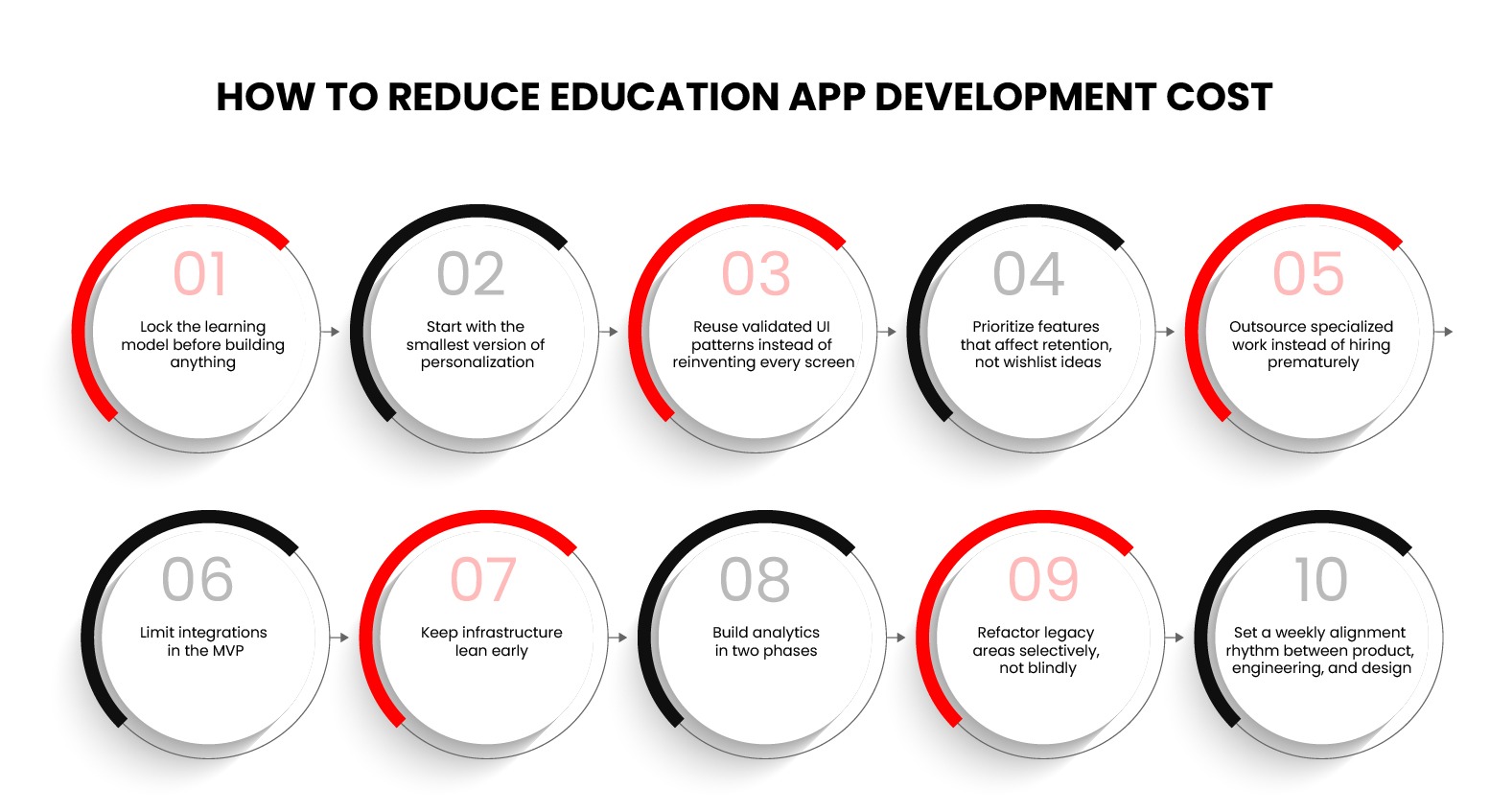
How to reduce education app development cost

These ten practices form a cost-control playbook used by high-performing EdTech teams:

1. Lock the learning model before building anything

If the product team keeps redefining how learners progress, every part of the build becomes unstable. Clear flow reduces engineering churn and design rewrites.

2. Start with the smallest version of personalization

AI doesn’t have to be perfect on day one. A basic rules engine or early recommendation logic is enough for an MVP. Save adaptive pathways for V1.

3. Reuse validated UI patterns instead of reinventing every screen

Creating unique layouts for everything burns time. Using proven UX patterns keeps quality high while cutting design hours.

4. Prioritize features that affect retention, not wishlist ideas

If a feature doesn’t improve engagement, onboarding, or learning outcomes, it can wait. Retention-first roadmaps reduce wasted engineering cycles.

5. Outsource specialized work instead of hiring prematurely

Most teams don’t need full-time AI, DevOps, or analytics engineers early. A reliable partner can fill those gaps without inflating payroll.

6. Limit integrations in the MVP

Each integration adds backend load, testing time, documentation, and risk. Support one login method and one payment flow first.

7. Keep infrastructure lean early

Don’t overprovision servers or add multi-region setups before concurrency justifies it. Scale cloud usage based on real metrics, not assumptions.

8. Build analytics in two phases

Foundations first (events + storage), dashboards later. Teams waste tens of thousands trying to ship analytics layers too early.

9. Refactor legacy areas selectively, not blindly

Modernization doesn’t mean “rewrite everything.” Fix only the pieces blocking performance, AI, or new workflows.

10. Set a weekly alignment rhythm between product, engineering, and design

Most cost overruns come from misalignment, not complexity. Consistency saves more money than any tool or framework.

Why Is AppVerticals the Right Partner for Education App Development

If you’re building an EdTech product that must scale, support complex learning workflows, or streamline diverse educational operations, you need a partner that understands how large-scope systems behave in production.

A concrete example is the OASIS Education Management Marketplace, where AppVerticals consolidated disparate education management systems into a single, intuitive platform. 

The Oasis solution unified teacher onboarding, booking and payment management, approval workflows, and real-time insights into a centralized hub that supports schools and educators with secure transactions and flexible subscription plans. 

The architecture was designed for scalability and to accommodate growth in users and operational complexity without performance regressions. 

What sets AppVerticals apart in such projects is a combination of engineering and delivery discipline:

  • breadth of experience across mobile, backend, cloud, and full-stack development
  • practical delivery of education workflows such as user status tracking, booking oversight, and administrative automation
  • emphasis on scalable architecture rather than feature surface area
  • end-to-end ownership from UX and frontend through cloud infrastructure and DevOps
  • experience modernizing complex systems where legacy patterns would otherwise hinder growth

If your goal is an education product that stays reliable and efficient as usage and complexity increase, partnering with a team that has delivered platforms like OASIS can make that pathway far more predictable.

Wrapping it Up

Education app development cost doesn’t come down to a single number. It comes down to how the system is put together. The teams that run into trouble are usually the ones who treat it like a one-time build instead of a product that has to keep working as users, content, and expectations grow.

When the learning model, data flow, and delivery plan are clear from the start, budgets stay predictable. When they aren’t, the rework shows up later in time, money, or stability.

That’s the difference between an app that survives its first release and one that actually holds up once people start using it.

Ready to Launch or Modernize Your Education App?

AppVerticals has delivered high-impact learning platforms for training centers, EdTech startups, and enterprise teams. If you want a partner that moves fast without compromising technical depth, we’re prepared to guide the entire build.


Book a Free Consultation

More Related Guides

MLS Integration: Architecture, APIs, Costs, and ROI for Real Estate Platforms

MLS integration is where many real estate platforms start bleeding time and money. Listings lag behind source data, APIs throttle unexpectedly, and engineering teams end up babysitting sync jobs instead of shipping features. 

I have seen teams underestimate this work, assume it is “just an API,” and then spend months fixing performance issues, compliance gaps, and data inconsistencies across web and mobile apps.

The real challenge is not pulling listings. It is designing MLS integration that holds up under real traffic, multiple MLS providers, and regional rules, without locking the business into rising cloud costs or constant rework. 

Let’s get started! 

TLDR 

MLS integration is a data and architecture decision, not a plug-and-play feature. The right approach balances compliant data access, scalable APIs, clean normalization, and realistic cost planning. Done right, it supports growth. Done poorly, it creates long-term technical debt.

What Is MLS Integration and How Does It Work for Real Estate Software

MLS integration is the process of ingesting licensed MLS listing data into a real estate platform so listings update automatically, remain compliant, and stay searchable at scale.

For real estate software, this typically means connecting to one or more MLS data sources, processing that data, and serving it reliably across web and mobile applications.

67% of real estate firms had migrated at least one core function to the cloud, a strong indicator of digital MLS/API adoption and dependency on online data services. 

The pain usually starts after the first integration goes live. Data arrives in different formats, refresh schedules vary by MLS, and simple listing updates trigger downstream issues across search, caching, and media storage. 

From a system perspective, MLS integration works as a pipeline. Data enters through an MLS API or feed, passes through normalization and validation layers, then lands in internal services that power search, filters, and listing detail pages.

This is typically the point where a real estate software development company adds the most value. If that pipeline is poorly designed, engineering teams end up firefighting sync failures instead of shipping product features.

Stage Purpose
Data Ingestion Pull listings via MLS API or feed
Processing Map fields, normalize formats, remove duplicates
Storage Persist listings, images, and metadata
Delivery Serve listings to web and mobile apps

How MLS Data Feeds, IDX, and RESO Standards Fit Together

MLS data feeds provide the raw listings, IDX defines display rights, and RESO standards define structure and transport. Together, they dictate how data moves and how it can legally appear on your platform.

Global cloud services brokerage (including integrations like API and multi-cloud patterns) crossed a $10.34 billion market size, growing with strong adoption of cloud interoperability standards.

In practice, MLS organizations publish data using RESO Web API or RETS formats. IDX rules then control what can be shown publicly, how often data must refresh, and how attribution appears. I treat RESO as a technical contract and IDX as a compliance constraint that shapes UI and caching decisions.

Simplified Relationship

MLS → RESO format → IDX display rules → Your platform

MLS Website Integration vs MLS API Integration Explained

MLS website integration pulls listing data from rendered pages, while MLS API integration connects directly to structured data endpoints. The difference affects reliability, performance, and long-term cost.

Website-based integrations look faster initially but break under scale. Page changes, throttling, and delayed updates introduce operational risk. API-based integrations require upfront planning but support predictable sync schedules, cleaner data models, and lower maintenance over time.

I generally see API integrations outperform website approaches once traffic, regions, or mobile usage increases.

Factor MLS Website Integration MLS API Integration
Data Stability Low High
Real-Time Updates Limited Supported
Compliance Control Weak Strong
Long-Term Cost Higher Lower

How Complex Is MLS Integration and Which Architecture Scales Best

MLS integration becomes complex when real-time data sync, multi-MLS expansion, compliance rules, and performance requirements collide. Scalable architectures rely on API-first ingestion, asynchronous processing, and cloud-native services.

From my experience, MLS integration stops being “simple” the moment a platform needs more than one MLS feed, mobile performance guarantees, or near real-time listing updates. The real pain point is not pulling data once. It is keeping data accurate, fast, and compliant while traffic, listings, and regions grow.

Architecture decisions here decide whether engineering spends time building features or constantly fixing sync issues. 

Recommended architecture direction: API-driven ingestion, async processing, and independent data layers.

Visual: Architecture Diagram (Conceptual)

Layer Responsibility
MLS API Layer Secure ingestion from MLS providers
Processing Layer Mapping, normalization, deduplication
Storage Layer Listings, media, metadata persistence
Delivery Layer Search, filters, listing detail pages
Cache/CDN Fast read performance for web and mobile

Common System Architectures for MLS API Integration

The most scalable MLS API integrations use decoupled, cloud-based architectures with message queues, background workers, and indexed data stores.

I typically evaluate three patterns depending on product maturity and traffic volume. Early-stage platforms lean toward simpler pipelines, while scaling SaaS products require fault isolation and async workflows.

Architecture Type Best For Limitations
Monolithic Sync MVPs, single MLS Breaks under load, hard to scale
Modular Services Growing platforms Requires DevOps maturity
Event-Driven Enterprise scale Higher upfront design effort

From a technical standpoint, API throttling and MLS rate limits make synchronous designs risky. Decoupling ingestion from user-facing systems reduces outages and keeps product teams moving faster.

Real-Time Sync, Caching, and Data Normalization Patterns

Real-time MLS sync works best with scheduled pulls, event queues, aggressive caching, and normalized data models that absorb schema differences across MLS providers.

This is where most teams feel pressure. Product wants live listings. Sales wants speed. Engineering gets stuck between API limits and performance targets. I approach this by separating freshness from delivery.

MLS Data Processing Pipeline

  1. Scheduled or webhook-based MLS pulls
  2. Queue-based ingestion for burst control
  3. Data normalization and deduplication
  4. Media sync and validation
  5. Indexed storage for search and filters
  6. Cache and CDN delivery for clients

Caching is not optional here. It protects both the MLS API and the platform from spikes. Normalization allows new MLS feeds to plug in without breaking downstream logic. 

When done right, listing updates stay fast, search stays responsive, and engineering avoids constant firefighting.

MLS Integration Costs, Timelines, and Engineering Effort Breakdown

MLS integration typically costs $30k–$250k+, takes 30–180 days, and consumes more engineering time than teams initially expect due to data normalization, compliance, and ongoing sync overhead. 

The biggest cost drivers are MLS count, update frequency, and architecture maturity.

Cost overruns happen when MLS integration is treated as a one-time feature instead of a long-term data system. Licensing constraints, schema drift, and API throttling quietly increase maintenance effort month after month. 

Typical MLS Integration Cost Ranges by Platform Type

Costs vary based on platform scope, MLS providers, and whether mobile, web, or internal tools rely on the same data pipeline.

Platform Type Typical Scope Cost Range Primary Cost Drivers
Marketing Website Single MLS, read-only listings $30k–$60k IDX rules, listing sync, media handling
Web SaaS Platform Search, filters, user accounts $60k–$120k API limits, caching, normalization
Mobile + Web App Real-time updates, saved searches $100k–$180k Sync frequency, mobile performance
Enterprise Platform Multiple MLSs, CRM integration $180k–$250k+ Data scale, compliance, reliability

Scraping or feed-based approaches often look cheaper on paper and then leak cost through fixes, rework, and reliability issues.

Timeline Breakdown: 30, 60, 90, and 180-Day Milestones

MLS integration timelines depend less on raw development speed and more on how early data constraints are handled.

Timeframe What Actually Gets Done
0–30 Days MLS approval, API access, schema mapping, spike testing
31–60 Days Core ingestion, normalization, media sync, search indexing
61–90 Days Edge cases, compliance checks, performance tuning
91–180 Days Multi-MLS scaling, monitoring, operational hardening

In practice, the first 60 days feel productive, and the next 60 expose the real engineering effort. Most delays come from MLS-specific rules, inconsistent media formats, and sync behavior under load. 

Planning for 90 to 180 days avoids unrealistic delivery pressure and protects product timelines.

Planning MLS integration and need clarity on architecture, costs, or feasibility?

Talk to a real estate software architect to review your MLS API options, data flow, and scale risks before committing to an engineering budget.

Consult Now

In-House vs Outsourced MLS Integration: ROI and Risk Comparison

In-house MLS integration delivers control but increases fixed costs and delivery risk, while outsourcing improves speed and cost predictability at the expense of some internal ownership.

Cloud adoption continues to grow in real estate IT, with the sector’s IT market expected to more than double from $12.7B in 2024 to $28.5B by 2031, often driving decisions between in-house vs vendor models

The decision usually hinges on three variables: internal MLS experience, tolerance for long integration timelines, and how much recurring engineering cost the business can absorb. Below is how I break it down.

Factor In-House Team Outsourced Partner
Initial Cost Lower upfront, higher long-term Higher upfront, predictable
Time-to-Market 6–12 months typical 8–16 weeks typical
MLS Domain Expertise Often limited Usually pre-built
Engineering Risk High Shared
Ongoing Maintenance Internal burden Optional managed support
Scalability Across MLSs Slower Faster

When In-House MLS Integration Makes Financial Sense

In-house MLS integration makes sense only when MLS is core IP and senior engineering capacity already exists.

I consider an internal build viable when the platform depends on proprietary data handling, custom ranking logic, or deep MLS customization that differentiates the product. This usually applies to large brokerages, MLS operators, or mature SaaS platforms with stable teams.

Even then, the cost is not just salaries. MLS licensing changes, schema updates, and compliance rules create ongoing operational load. Without dedicated ownership, integration quality degrades quickly.

In-House Readiness Checklist

Requirement Must Be True
Senior backend engineers available Yes
Prior MLS or RESO experience Yes
DevOps capacity for sync pipelines Yes
Budget for 12+ months runway Yes
Product roadmap can slow Yes

If any of these are missing, ROI drops fast.

Outsourcing MLS Integration for Faster Time-to-Market

Outsourcing MLS integration reduces delivery risk and accelerates launch while keeping engineering costs variable.

From an ROI perspective, this model works best for SaaS platforms, startups, and enterprises modernizing legacy systems. Internal teams stay focused on product differentiation while MLS integration runs as a parallel, contained effort.

Pros and Cons of Outsourcing MLS Integration

Pros Cons
Faster delivery Less internal ownership
Predictable costs Vendor dependency
Lower internal disruption Requires strong handover
Easier multi-MLS scaling Needs governance

In practice, hybrid models often deliver the best outcome: outsourced build with internal ownership after stabilization.

Most MLS failures don’t come from bad APIs, they come from underestimating scale. When MLS integration is treated as core infrastructure instead of a feature, teams ship faster, spend less, and avoid painful rewrites later.

– Riaz Raza, Director of Engineering, AppVerticals

MLS Data Licensing, Compliance, and Multi-MLS Scaling Challenges

MLS integration becomes risky when licensing rules, IDX compliance, and provider fragmentation are underestimated. Most failures occur after launch, when data usage violations, throttled feeds, or performance drops force rework. 

MLS data standards like the RESO Web API are replacing legacy MLS data formats (RETS) industry-wide to streamline interoperable integrations. 

This is not an engineering edge case; it is an operational risk that directly impacts revenue and platform stability.

When evaluating MLS integration, licensing and compliance shape architecture as much as technical requirements. Every MLS defines its own data usage limits, refresh rules, display constraints, and audit expectations. 

I treat these rules as system requirements, not legal footnotes. Ignoring them leads to blocked feeds, forced takedowns, or expensive retrofits when expanding into new regions.

Scaling across multiple MLS providers compounds the problem. Each feed introduces variations in schema, media handling, update frequency, and rate limits. Without a deliberate compliance-first design, performance degrades quickly as traffic and listing volume increase.

Work with an experienced software or real estate app development company that understands MLS compliance and multi-feed scaling, for long-term platform success.

MLS Licensing Rules, IDX Compliance, and Data Usage Limits

MLS licensing defines what data can be stored, displayed, cached, or redistributed, and violating those terms carries real consequences. IDX compliance failures are one of the most common reasons MLS integrations are suspended after deployment.

From a platform perspective, compliance affects how long listings can be cached, how images are stored, how attribution is rendered, and whether historical data can be retained. 

Compliance Area Typical Restriction Platform Impact
Data retention Limited storage window Requires scheduled purges
Media usage Branding and watermark rules Affects image pipelines
Attribution Mandatory broker display Impacts UI components
Refresh rate Minimum sync frequency Drives background job design
Audit access MLS review rights Requires logging and traceability

Handling Multiple MLS Providers Without Performance Bottlenecks

Multi-MLS scaling fails when platforms treat each provider as a simple data source. In practice, differences in feed volume, update frequency, and API limits create uneven load that impacts search latency and sync reliability.

To scale safely, I isolate each MLS feed behind its own ingestion pipeline, normalize data asynchronously, and decouple search from raw MLS updates. This prevents one provider’s spike from degrading the entire system. 

Caching strategies and read-optimized indexes become critical once listing counts cross regional thresholds.

Layer Responsibility
Ingestion Provider-specific rate handling
Normalization Schema alignment and deduplication
Storage Region-aware listing partitioning
Search Cached, indexed read layer
Sync jobs Independent failure recovery

This approach keeps performance predictable while allowing new MLS providers to be added without rewriting core services.

Security, Maintenance, and Long-Term Ownership Costs of MLS Integration

MLS integration carries ongoing security exposure, recurring maintenance overhead, and compounding ownership costs if architecture and vendor choices are made early without control points.

From experience, MLS integration risk does not peak at launch. It grows quietly over time. API credentials rotate, MLS rules change, traffic scales, and engineering teams inherit integrations they did not design. 

If security and maintenance are not planned upfront, costs surface later as outages, compliance violations, or forced rebuilds.

Risk Table: Long-Term Ownership Factors

Area Risk if Ignored Business Impact
API security Credential leaks, abuse Legal exposure, MLS suspension
Maintenance Schema drift, API changes Slower releases, regressions
Vendor lock-in Limited flexibility Rising costs, forced migrations
Scale Query overload Performance degradation

A sustainable MLS integration treats security and maintenance as first-class concerns, not post-launch fixes.

Security Controls for MLS APIs and User Data

MLS API security requires strict access control, request validation, audit logging, and isolation of MLS data from public-facing systems.

MLS providers expect platforms to enforce data protection standards comparable to financial APIs. API keys never touch client-side applications, and access is scoped per MLS source.

Security Control Checklist

  • Token-based authentication with rotation
  • IP whitelisting per MLS provider
  • Rate limiting and request throttling
  • Field-level access enforcement for IDX rules
  • Centralized logging for MLS API calls

These controls reduce exposure while keeping MLS providers satisfied during audits.

Ongoing Maintenance, Vendor Lock-In, and Cost Control

Long-term MLS integration costs are driven more by maintenance and vendor dependency than initial build effort.

Every MLS changes schemas, media rules, or API behavior over time. I plan for this by abstracting MLS logic behind internal services and avoiding tight coupling with any single vendor. 

This keeps migration costs contained if licensing terms or pricing shift.

Cost Area Annual Impact
API change handling Medium
Infrastructure scaling Medium–High
Vendor pricing increases High
Refactor risk High if tightly coupled

Ownership discipline is what keeps MLS integration economically viable beyond year one.

How to Add MLS Listings to Your Website the Right Way

The right way to add MLS listings to a website is through a compliant IDX or MLS API integration that delivers real-time data without hurting performance, SEO, or licensing terms. Shortcuts usually lead to broken listings, slow pages, or compliance issues that surface later.

Most website failures happen when MLS data is treated like static content. Listings are dynamic, high-volume, and constantly changing. 

If the integration is not designed with caching, update frequency, and frontend rendering in mind, the site becomes slow, unreliable, and expensive to maintain. 

This is why MLS work needs to be approached as part of real estate web development services, not a simple data embed. The goal is not just to show listings, but to keep them accurate, searchable, and fast while protecting future scalability.

Step-by-Step MLS Website Integration Process

The correct process starts with selecting the right MLS access method, then building a pipeline that feeds clean, indexed data into the website. Skipping steps here creates technical debt that shows up as SEO drops and user complaints.

From a technical standpoint, I approach MLS website integration as a controlled pipeline rather than a simple embed. Data is pulled through an MLS API or IDX feed, normalized server-side, cached aggressively, and rendered through optimized frontend components. 

This keeps listing pages crawlable, fast, and consistent across devices.

Checklist

  • Obtain MLS or IDX approval and data access credentials
  • Choose API-based integration over iframe embeds where possible
  • Normalize listing fields to a stable internal schema
  • Implement caching and update intervals based on MLS rules
  • Render listings as SEO-friendly pages, not injected scripts
  • Monitor sync failures and stale data automatically

Common Mistakes That Break MLS Website Integrations

Most MLS website integrations break because performance, SEO, or compliance is treated as an afterthought. These issues usually appear after launch, when traffic or listing volume increases.

The most common problems I see include pulling live MLS data on every page request, relying on third-party widgets, or ignoring update limits defined by the MLS. These choices slow page loads, create duplicate content issues, and increase the risk of access being revoked.

Warning Box

  • Using iframe-based IDX widgets that block SEO visibility
  • Querying MLS APIs directly from the frontend
  • No caching strategy for high-traffic listing pages
  • Ignoring MLS refresh limits and compliance rules
  • Treating listings as static pages instead of dynamic content

Choosing the Right MLS API Provider or Integration Partner

The right MLS API provider or integration partner like AppVerticals determines whether development stays predictable or turns into recurring rework. API limits, data freshness, licensing support, and operational transparency directly affect cost, scale, and delivery timelines.

In practice, differences appear once rate limits are hit, regional MLS rules vary, or support responsiveness drops. At this stage, focus less on feature lists and more on operational fit. The provider has to support growth, not just initial launch.

MLS API Provider Comparison Table

Evaluation Factor Provider A Provider B Custom Partner
API Rate Limits Medium High Configurable
Multi-MLS Support Limited Moderate Full
Licensing Guidance Basic Partial Included
Long-Term Cost Control Low Medium High
Integration Flexibility Low Medium High

This comparison helps filter vendors that appear cost-effective early but create constraints at scale.

Questions Should Ask to MLS API Vendors

When evaluating vendors, ask questions that test real-world readiness, not sales positioning. The goal is to understand how the API behaves under production load and how much ownership stays with the platform team.

Vendor Evaluation Questions

  • How do rate limits change as query volume grows?
  • How is data freshness guaranteed across multiple MLS sources?
  • What support exists for licensing audits and compliance updates?
  • How are breaking API changes communicated and versioned?
  • What exit options exist if data ownership or costs change?

Clear answers here usually separate scalable partners from short-term solutions.

When a Custom MLS Integration Is Required

A custom MLS integration becomes necessary when off-the-shelf APIs restrict scale, data control, or compliance flexibility. This is common for multi-region platforms or products with advanced search and analytics.

In these cases, lean toward custom integration when vendor APIs limit normalization logic, media handling, or performance tuning. Custom work increases upfront effort, but it reduces long-term dependency risk and supports product differentiation.

Decision Tree (Simplified)

  • Single MLS, low traffic, limited customization needed → Managed MLS API
  • Multiple MLS providers, growing query volume → Hybrid integration
  • Enterprise platform, strict compliance, advanced search → Custom MLS integration

This decision framework helps align technical effort with long-term product and revenue goals.

Key Takeaways 

  • MLS integration impacts architecture, cost, performance, and product velocity
  • API-first, cloud-ready designs scale better than website-based shortcuts
  • Compliance, licensing, and data volume planning are critical from day one
  • ROI improves when integration decisions align with long-term platform goals

Need a production-ready MLS integration that scales across regions and platforms?

Work with AppVerticals that builds MLS integrations for real estate platforms, CRMs, and marketplaces with predictable cost and delivery.

Call Now

Related Guides

Best AI tools for real estate

Real Estate website development

Top Healthcare Software Development Trends to Watch in 2026: AI, Security, and Interoperability

AI is rapidly becoming a core component of healthcare infrastructure. Healthcare AI spending maximized to $1.4 billion in 2025, nearly tripling from 2024, and healthcare is adopting AI 2.2x faster than the broader U.S. economy. 66% of U.S. physicians and 71% of hospitals now use AI-integrated tools, pushing the bar higher for Healthtech companies.

With AI driving major changes, healthcare software must evolve to stay ahead. In this article, we’ll dive into the top healthcare software development trends to watch in 2025.

Key Takeaways From Healthcare Software Development Trends 2026

  • AI adoption is inevitable, with 66% of physicians already using it; prioritize governance and training to prevent over-reliance.
  • HIPAA’s 2026 deadline is approaching; many organizations need to improve security and cybersecurity remains a top challenge.
  • Cloud-based, FHIR-enabled platforms are key to interoperability, with wearable and RPM integration cutting readmissions by up to 50%.
  • 67% of healthcare organizations are increasing software budgets due to price hikes; negotiating multi-year contracts ensures cost control.
  • Only 1.6% of AI devices have RCT evidence, so demand real-world data and pilot before full-scale AI deployment.
  • EHR integration is crucial for successful telehealth and ensuring seamless data exchange across platforms.

Build AI-Ready Healthcare Software The Right Way

Unsure how to adopt AI without risking compliance or clinical accuracy? Our experts help you architect AI-driven healthcare software that’s secure, validated, and scalable.

Trend #1. Generative AI in Healthcare Software

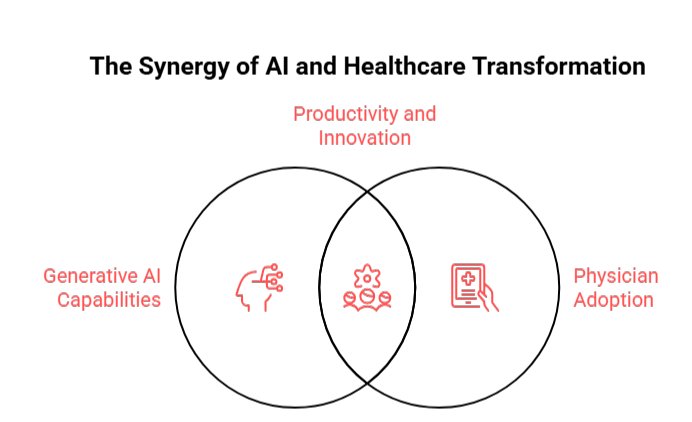
the synergy of ai and healthcare transformation

Generative AI is redefining healthcare by automating routine tasks, enhancing diagnostic accuracy, and improving clinician productivity. As AI adoption accelerates, its applications are becoming more integrated into clinical workflows, from documentation to drug discovery. 

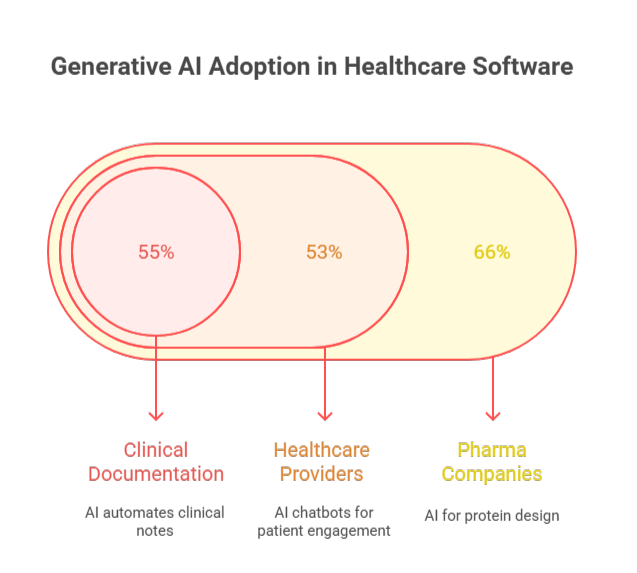
With 55% of physicians adopting ambient scribing and AI-driven documentation tools, the healthcare sector is poised to see substantial productivity gains, with applications across multiple domains from medical imaging to patient engagement. Kazim Qazi, CEO at AppVerticals, also mentions about the use of AI in healthcare in his LinkedIn post, emphasizing how the bar is getting high for healthtech companies. 

Shahrzad Shariatpanahi, a doctoral candidate in Biomedical Engineering with industry experience in medical manufacturing, highlights that generative AI’s strength lies in its ability to synthesize complex data and augment clinical judgment rather than replacing it. As she explains, “Generative AI represents a pivotal moment for healthcare innovation…it has the potential to accelerate device development, enhance diagnostic precision, and reduce administrative burden. Properly governed, it can act as a force multiplier for clinical expertise.”

This underscores the importance of integrating AI-driven models thoughtfully, ensuring that AI serves as a support tool rather than a substitute decision-maker. When implemented with care, AI in healthcare enhances both innovation and patient protection, key considerations as the healthcare landscape continues to evolve.

What Are the Top Clinical Use Cases of Generative AI in Healthcare Software?

generative AI adoption in healthcare software

  • Clinical Documentation & Ambient Scribing: AI automates clinical notes from patient conversations, saving physicians 1-2 hours/day. With 55% adoption, it also reduces physician burnout by 31%.
  • Chatbots and AI Agents: Widely adopted by 53% of healthcare providers, AI chatbots enhance patient engagement, streamline triage, and automate revenue cycle management.
  • Medical Imaging Enhancement: AI enhances diagnostic accuracy in radiology report generation and generates synthetic data for better training, improving overall diagnostic performance.
  • Drug Discovery & Molecular Design: 66% of pharma companies leverage AI for protein design, accelerating clinical trial optimization and reducing time-to-market for new drugs.
  • Emerging Applications: Prior authorization automation has seen 10x growth year-over-year, while AI is also optimizing coding and billing processes, creating more efficient workflows in healthcare. 

How Generative AI Improves Diagnostic Accuracy and Clinician Productivity?

  • Diagnostic Accuracy: AI enhances diagnostic decision-making, outperforming traditional methods and improving cancer detection accuracy.
  • Radiology Productivity: AI boosts radiologist productivity by up to 40%, cutting reading time by 90% for tasks like mammography.
  • Clinical Documentation: AI reduces note-taking time by 20-30%, improving efficiency and minimizing after-hours work for clinicians.

What Are the Ethical, Regulatory, and Data Privacy Challenges of Generative AI in Healthcare?

  • Algorithmic Bias & Fairness: AI models often lack demographic diversity, which may exacerbate existing healthcare disparities.
  • Clinical Accuracy & Hallucinations: AI can sometimes generate clinically invalid responses, requiring rigorous validation before clinical deployment.
  • Governance Gaps: Concerns around “shadow AI” usage without institutional oversight are rising, potentially leading to deskilling and over-reliance on AI.
  • Regulatory Compliance: New FDA guidelines and the EU AI Act call for stricter regulation and risk management to ensure safe AI implementation in healthcare.
  • Data Privacy: AI systems are vulnerable to data breaches and adversarial attacks, posing significant risks to sensitive patient health data.

Trend #2. Cloud Computing for Scalable Healthcare Systems

Cloud computing is transforming healthcare by enabling scalable, cost-efficient solutions that improve access to electronic health records (EHRs), enhance AI-powered clinical decision support, and streamline operations. It provides flexibility for hospitals and clinics to scale resources without compromising quality, leading to better interoperability and more efficient care delivery.

As cloud adoption accelerates, healthcare organizations benefit from reduced IT costs, improved data security, and enhanced patient outcomes. These solutions are crucial for supporting innovations in telemedicine app development, medical imaging, and population health management, ensuring that telemedicine platforms are both scalable and secure while enhancing the overall patient experience.

What Are the Key Clinical Workflows Enabled by Cloud-Based Healthcare Software?

cloud-based healthcare software workflows

  • Electronic Health Records (EHR) Access & Interoperability: Cloud-based EHRs enable real-time access across facilities, improving data sharing and FHIR compliance, and integrating with wearables and remote monitoring.
  • AI-Powered Clinical Decision Support: Cloud supports large-scale AI, enabling predictive analytics for conditions like sepsis and enhancing ambient documentation within EHR systems.
  • Telemedicine and Virtual Care Platforms: 87% of U.S. hospitals offered telemedicine services in 2024. Cloud platforms enable scalable video consultations and remote monitoring, integrated with EHRs for seamless documentation.
  • Medical Imaging and Radiology: Cloud migration reduces storage costs by 38% and provides ROI within 12 months for imaging services.
  • Population Health Management and Analytics: Cloud-based analytics enhance chronic disease management and provide real-time dashboards for public health monitoring.

What Are the Security and Compliance Best Practices for Healthcare Cloud Deployments?

  • HIPAA Compliance Framework: Use multi-factor authentication (MFA), end-to-end encryption, and conduct regular security audits to ensure compliance with HIPAA.
  • Six Best Practices for Cloud Security: Implement role-based access controls, ensure regular patching for vulnerabilities, and develop incident response and disaster recovery plans.
  • Data Governance Frameworks: Enforce data minimization, ensure compliance with data residency requirements, and maintain audit trails for PHI access.

How Does Migrating Healthcare Software to the Cloud Lead to Cost Savings and ROI?

  • Direct Cost Reductions: Cloud adoption leads to 20% savings on IT costs, 38% savings on imaging storage, and 30-40% savings on infrastructure maintenance.
  • Operational Efficiency Gains: Cloud systems offer scalability for fluctuating patient volumes and remote access for clinicians, enhancing care coordination.
  • Total Cost of Ownership (TCO) Considerations: Cloud migration reduces CapEx by eliminating hardware refresh cycles and on-site IT staff requirements.
  • EHR Cloud Migration Specifics: Cloud-based EHRs cost $200-$700 per provider per month, compared to $15,000-$70,000 upfront for on-premise systems.

The healthcare cloud computing market is expected to see significant growth through 2026-2033, driven by rising demand for scalable infrastructure and cost optimization.

Modernize Your Healthcare Infrastructure

From cloud migration to FHIR-enabled interoperability, we help healthcare organizations build systems that scale, integrate, and stay compliant.

Trend #3. AI-Enhanced Diagnostics and Clinical Decision Support

AI is transforming diagnostics by improving accuracy, enhancing productivity, and supporting clinical decision-making. From radiology to cardiology, AI is being integrated into diverse clinical workflows to enhance diagnostic performance and help clinicians make data-driven decisions more effectively.

While AI has demonstrated significant potential in diagnosing common diseases like breast cancer and diabetic retinopathy, challenges remain around domain specificity, data quality, and the need for robust validation. Despite these hurdles, AI’s role in diagnostics continues to expand rapidly.

Shahrzad also emphasized that generative AI’s ability to synthesize multi-modal data allows it to enhance clinical judgment in diagnostic environments. As she notes, “Generative AI represents a pivotal moment for healthcare innovation, it has the potential to accelerate device development, enhance diagnostic precision, and reduce administrative burden.” This capability can be especially valuable in clinical settings like oncology and radiology, where early pattern recognition is critical to improving outcomes.

What Is the Diagnostic Accuracy of AI Models Compared to Clinicians?

AI vs. Clinicians: Diagnostic Accuracy

  • Overall Diagnostic Accuracy: AI models have shown an overall diagnostic accuracy of 52.1% in meta-analyses of 83 studies, with varying performance across applications and disease types.
  • Radiology and Medical Imaging: AI systems outperform or match radiologists in specific tasks, such as breast cancer screening, with a 17.6% higher detection rate, and diabetic retinopathy detection, with an 87-97% sensitivity.
  • Cardiology: AI-powered ECG interpretation by systems like AliveCor KardiaMobile shows comparable accuracy to cardiologists for arrhythmia detection and coronary artery disease risk stratification.
  • Pathology: AI-assisted pathology increases cancer detection rates by 20-30% and cuts diagnostic turnaround time by up to 50%.

What Are the Diseases with the Strongest Clinical Evidence for AI-Based Diagnosis?

AI in medical diagnosis

  • Diabetic Retinopathy: IDx-DR, the first FDA-approved autonomous AI system, demonstrates 87.2% sensitivity and 90.7% specificity, widely deployed for primary care screening.
  • Breast Cancer Screening: AI improves mammography detection by 17.6%, reduces false positives, and enhances radiologist efficiency. FDA-cleared systems like Transpara and QuantX are at the forefront.
  • Atrial Fibrillation: AI devices such as AliveCor KardiaMobile provide >95% sensitivity for detecting cardiac arrhythmias, reducing stroke risk through early detection.
  • Lung Nodule Detection: AI-enhanced CT screening improves detection of small pulmonary nodules, reducing radiologist workload by 30-40%.
  • Stroke and Intracranial Hemorrhage: AI platforms like Viz.ai expedite stroke triage, reducing treatment time by 30-45 minutes and improving outcomes.
  • Skin Cancer (Dermatology): AI-powered dermoscopic analysis matches dermatologist accuracy and improves training data access through synthetic data generation.
  • Sepsis Prediction: AI models predict sepsis 6-12 hours earlier than traditional methods, enabling timely intervention and improving patient survival.

What Are the Regulatory and Validation Pathways for AI Diagnostic Software?

FDA Regulatory Framework (U.S.)

  • 510(k) Premarket Notification: The most common pathway, with 97% of AI devices cleared under this process.
  • De Novo Classification: For new devices, like IDx-DR, that don’t have a predicate.
  • Premarket Approval (PMA): Required for high-risk devices and involves clinical trials, though rarely used for software-only tools.

Key Regulatory Requirements

  • Predetermined Change Control Plans: The FDA’s 2024 guidance allows continuous learning AI systems with predefined update protocols.
  • Clinical Validation Standards: Only 1.6% of cleared devices included randomized trials, and there’s growing demand for real-world evidence.

International Regulatory Approaches

  • European Union: AI diagnostic tools are classified as high-risk under the EU AI Act, with a focus on post-market surveillance.
  • UK MHRA: AI tools are now reviewed by notified bodies, requiring alignment with ISO and IMDRF standards.
  • Post-Market Surveillance: Despite rapid growth, only 5% of devices reported adverse events to the FDA, highlighting the need for better post-market monitoring.

Trend #4. Wearable Health Technology Integration

Wearable health technology is driving a revolution in patient care by enabling continuous monitoring, early detection, and personalized treatment. As the global wearable market grows, reaching an estimated $83.9 billion by 2026, the integration of wearable data into healthcare systems is becoming crucial for improving patient outcomes and reducing healthcare costs.

Health and fitness apps, which are predicted to represent 10% of downloads in 2026, will play a significant role in this trend. With the integration of wearable tech and AI-powered health tracking, these apps will offer a more holistic approach, blending physical and mental wellness to improve overall well-being.

From chronic disease management to mental health monitoring, wearables are enhancing clinician-patient interactions and offering real-time insights that enable proactive care. However, integrating wearable data into existing healthcare infrastructure presents challenges that must be addressed for seamless, secure, and effective use.

What Are the Leading Clinical Use Cases for Wearable Health Technology in 2026?

wearable health technology use cases in 2026

  • Chronic Disease Management: Wearables track conditions like heart failure, COPD, and diabetes, reducing readmissions by 20-50% and offering AI-driven insights for hypertension and glucose management.
  • Cardiac Arrhythmia Detection: Devices like AliveCor and the Apple Watch offer real-time atrial fibrillation alerts, reducing stroke risk by 60%+ with timely anticoagulation.
  • Remote Patient Monitoring (RPM): One in three U.S. adults use wearables, with over 80% willing to share data with clinicians, enabling proactive interventions and reducing hospitalization rates.
  • Rehabilitation and Physical Therapy: Motion tracking devices provide real-time feedback on recovery exercises, improving adherence by 30-40% through gamification.
  • Mental Health and Wellness: Wearables track heart rate variability (HRV) for stress and anxiety, replacing static assessments like PHQ-9 and GAD-7, while improving sleep quality monitoring for behavioral health.
  • Preventive Care and Early Detection: AI-driven insights from wearable data offer personalized wellness recommendations, while predictive alerts can signal developing conditions early.

How Wearable Data Is Integrated into EHR and Healthcare Software Platforms?

  • FHIR API Standards: FHIR ensures standardized data exchange, enabling seamless integration with platforms like Apple Health and Fitbit, improving interoperability.
  • AI-Powered Data Processing: Machine learning models prioritize actionable insights from wearable data, reducing alert fatigue by 50-60%.
  • Real-Time Dashboards: Clinician-facing interfaces display aggregated data from wearables, offering customizable alerts and integration with EHR workflows for seamless chart updates.
  • Clinical Workflow Integration: Wearable data is incorporated into pre-visit, in-visit, and post-visit workflows, supporting decision-making and triggering alerts for concerning trends.
  • Data Quality and Validation: Ensuring medical-grade accuracy and filtering out false readings are crucial for clinical use, with wearables requiring FDA 510(k) clearance for diagnostic claims.
  • Reimbursement and Billing: Wearable integration can generate $60-$85 per patient/month in RPM program revenue, with annual revenues estimated at $144,000-$204,000 for 200 patients.

What Are the Regulatory, Privacy, and Data Security Risks of Medical Wearables?

Regulatory Landscape

  • FTC Health Breach Notification Rule (HBNR): Wearable manufacturers must notify consumers of breaches involving personal health records (PHRs).
  • Proposed HIPRA Legislation: Potential extension of medical-grade privacy protections to consumer health companies, including consent and breach notification requirements.

FDA Oversight: Medical-grade wearables with diagnostic claims require FDA clearance, with a new cybersecurity mandate for medical devices under Section 524B.

Privacy and Security Risks

  • Weak Encryption: Many wearables use outdated encryption protocols, exposing data to potential breaches.
  • Inadequate Access Controls: Limited user control over data sharing raises concerns over third-party app access.

Mitigation Strategies: Implement end-to-end encryption, granular consent management, and regular security audits to address risks.

Best Practices for Healthcare Organizations: Prioritize vendor due diligence, establish data governance policies, and educate patients about data risks and protections.

Trend #5. Telehealth and Remote Care Software Platforms

Telehealth is reshaping how healthcare is delivered, with the global telehealth market projected to grow from $186.41 billion in 2025 to $791.04 billion by 2032. With 87% of U.S. hospitals offering telemedicine services by 2024,  telemedicine app features such as virtual consultations, patient monitoring, and secure data exchange have become critical to improving patient outcomes and access. 

telehealth adoption in US

However, as telehealth adoption increases, several challenges remain, including regulatory uncertainty, technology access, and integration with clinical workflows. Both healthcare web development and software development are critical in addressing these barriers and optimizing telehealth solutions for better patient and clinician experiences.

Which Conditions Are Best Managed Through Telehealth Software Solutions?

telehealth's impact across healthcare

  • Mental and Behavioral Health: Telehealth has the highest adoption for mental health, with over 40% of sessions conducted virtually, offering treatment for depression, anxiety, PTSD, and substance use disorders.
  • Chronic Disease Management: Telehealth programs for diabetes, hypertension, and COPD help manage symptoms effectively. Virtual care improves HbA1c by 0.5-1% and reduces readmissions for chronic conditions.
  • Primary and Urgent Care: 60-70% of primary care visits can be managed via telehealth, reducing visit costs by $40-50 per visit compared to in-person care.
  • Dermatology: Telemedicine is 80-90% accurate for common skin conditions, expanding access to underserved areas via store-and-forward technology.
  • Post-Surgical Follow-Up: Telehealth follow-ups reduce readmissions by 15-20%, with 85% of patients preferring virtual check-ups when appropriate.
  • Pediatric Care: Telehealth is improving access for well-child visits and developmental screenings, reducing missed appointments by 30-40%.

How Do Telehealth Outcomes Compare to In-Person Care Models?

  • Patient Satisfaction: 67% of patients report higher satisfaction with telehealth, driven by convenience and ease of access.
  • Quality of Care: No significant difference in outcomes for most conditions, with mental health and chronic disease management showing comparable or even improved results.
  • Access and Equity: Telehealth improves access for rural populations and reduces no-show rates by 15-25%. However, 51% of North Americans still face limited technology access.
  • Cost-Effectiveness: Virtual visits offer substantial savings through lower patient out-of-pocket costs and reduced transportation expenses.

What Are the Barriers to Telehealth Adoption and How Can Software Platforms Address Them?

  • Regulatory and Reimbursement Uncertainty: Varying regulations and payer policies hinder adoption. Software platforms can mitigate this with built-in compliance workflows, helping streamline prior authorization and billing.
  • Technology Access and Digital Literacy: 51% of North Americans face challenges with technology access. Solutions include multi-modal access, such as phone or SMS options, and low-bandwidth optimization.
  • EHR Integration: 40% of practices still use non-integrated video tools. Telehealth platforms that integrate with EHR systems ensure seamless workflows and secure documentation.
  • Clinician Adoption and Training: Overcome resistance to change with user-friendly interfaces and AI-powered documentation assistance that reduce clinician burnout.
  • Data Security and Privacy: Ensuring HIPAA compliance with end-to-end encryption and audit trails is critical for maintaining patient trust.

How Do Software Platforms Address These Barriers?

  • Technical Solutions: Platforms using FHIR standards improve interoperability with EHRs, while AI-powered triage streamlines appointment scheduling and multilingual support breaks down language barriers.
  • Compliance Features: Built-in HIPAA compliance, state licensing verification, and automated billing make workflows efficient and reduce administrative burden.
  • Workflow Optimization: Software platforms streamline workflows with features like pre-visit intake, waiting room management, and automated post-visit summaries, while integrating remote patient monitoring (RPM).

Trend #6. Data Privacy, Security, and Compliance in Healthcare Software

As healthcare software evolves, maintaining data privacy and security has become paramount. With the 2026 HIPAA Rule updates and increasing global attention on cross-border data transfers, healthcare organizations must stay ahead of regulatory changes and implement robust governance frameworks to protect sensitive patient information.

How Are HIPAA and State-Level Privacy Laws Impacting Healthcare Software?

  • 2026 HIPAA Rule Updates: Effective February 16, 2026, new requirements will mandate Multi-Factor Authentication (MFA), encryption for data at rest and in transit, and enhanced business associate breach reporting. These changes also emphasize stricter privacy protections for reproductive and behavioral health data.
  • State-Level Privacy Laws: States like California and Virginia are introducing HIPAA-style safeguards for non-covered entities, while laws like Ohio HB 525 aim to regulate AI’s role in therapeutic decision-making.
  • Compliance Challenges: 29% of healthcare practices report needing significant improvement in data protection, network security, and cybersecurity.

What Are the Key Regulations for Cross-Border Health Data Transfers?

regulatory landscape for health data transfer

  • EU-U.S. Data Privacy Framework: Standard Contractual Clauses (SCCs) are required for transferring health data between the EU and U.S. as the framework faces increasing scrutiny.
  • GDPR Healthcare Compliance: Health data under GDPR requires explicit consent and mandates data minimization for cross-border transfers. Organizations must appoint Data Protection Officers (DPOs).
  • China’s Cross-Border Data Laws: With China’s PIPL law, health data exports will face tighter restrictions, requiring security assessments for cross-border transfers.
  • AI-Specific Cross-Border Risks: As AI-enabled medical devices increase, data flows during model training and development complicate privacy compliance, requiring stringent records of processing activities.

How Do Healthcare Systems Implement Secure Data Governance Frameworks?

  • Data Classification and Inventory: Identify and classify PHI/ePHI, using automated discovery tools to track data across systems and partners.
  • Access Control and Identity Management: Enforce role-based access control (RBAC) and MFA as required by HIPAA, with periodic access reviews to ensure proper data handling.
  • Encryption and Data Protection: Apply AES-256 encryption for data at rest, TLS 1.3 for data in transit, and manage keys with Hardware Security Modules (HSMs).
  • Audit Logging and Monitoring: Ensure all PHI access is logged with real-time anomaly detection, storing logs for at least 6 years to meet HIPAA compliance.
  • Risk Assessment and Management: Conduct annual HIPAA risk assessments, including penetration testing and vulnerability scanning to evaluate potential risks.
  • Data Lifecycle Management: Implement data retention policies, use the 3-2-1 rule for backups, and ensure secure disposal at end-of-life.
  • Third-Party Risk Management: Perform vendor due diligence, establish Business Associate Agreements (BAAs), and monitor the security posture of all third parties handling PHI.

What Are the Best Tools for Healthcare Data Governance?

  • Data Discovery and Classification: Tools like Microsoft Purview and Varonis help in identifying and classifying PHI/ePHI.
  • Identity and Access Management: Okta and Ping Identity support secure identity management and access controls.
  • Cloud Security and Data Loss Prevention: Platforms such as Prisma Cloud and Symantec DLP ensure that healthcare organizations maintain secure data practices.

Are You Ready for HIPAA 2026?

Don’t wait for audits or penalties. Get expert guidance on HIPAA 2026 readiness, AI governance, and secure healthcare software development.

What Healthcare Organizations Should Prioritize When Adopting Emerging Trends

As healthcare organizations adopt new technologies, it is crucial to prioritize key strategic areas to ensure successful integration, long-term value, and compliance with evolving regulations. 

Healthcare Software Adoption Checklist

Here’s a checklist to guide adoption and maximize outcomes:

  • Clinical Validation and Evidence Review: Ensure clinical efficacy by reviewing peer-reviewed studies and real-world evidence. Verify FDA clearances, regulatory compliance, and conduct pilot programs before full deployment.
  • Security and Compliance Readiness: Update systems for the 2026 HIPAA changes (MFA, encryption, breach notification). Conduct risk assessments, implement data governance, and secure vendor certifications and BAAs.
  • AI Governance and Oversight: Establish an AI governance committee with clinical, IT, and legal oversight. Create AI “safe zones” for controlled testing and ensure ongoing monitoring for biases.
  • Interoperability and Integration: Prioritize solutions with FHIR API support, ensure EHR compatibility, and plan for wearable data integration. Test data exchange accuracy and streamline workflows.
  • Workforce Readiness: Assess change management needs, provide training, and address clinician concerns regarding AI reliance and job satisfaction.
  • Financial Planning and ROI Tracking: Develop a multi-year budget with contingencies and track ROI based on clinical outcomes, efficiency gains, and cost savings.
  • Patient Engagement and Communication: Educate patients on AI in care, obtain informed consent, and provide transparent data usage policies through patient portals.
Shahrzad, in her conversation, also suggested that, as healthcare organizations embark on adopting emerging AI trends, they should prioritize embedding AI within existing healthcare infrastructure. She emphasizes, “Generative AI must be embedded within existing quality management systems, not layered on top of them.” This aligns with the need for disciplined governance and continuous oversight to ensure that AI systems are fully integrated into clinical workflows while safeguarding patient safety and maintaining accountability.

Build vs. Buy Considerations

When deciding between building custom solutions and purchasing commercial products, healthcare organizations must weigh several factors:

Build When:

  • Unique clinical workflows or proprietary algorithms are needed.
  • Long-term cost analysis favors in-house development.
  • Strong internal development expertise is available.

Buy When:

  • Proven clinical efficacy, regulatory clearances, and robust vendor support are required.
  • Time-to-value is critical, and there is a need for rapid deployment.

Hybrid Approach:

  • Purchase core platforms and build custom integrations or workflow automations to meet specific needs.

However, cost considerations, whether for building custom solutions or purchasing off-the-shelf software, play a major role. Learn more about the financial aspects of healthcare app development in our comprehensive blog on healthcare app development cost

Conclusion

As healthcare continues to embrace cutting-edge technologies like AI and cloud computing, staying ahead of evolving trends is critical for success. Organizations must focus on ensuring robust data security, implementing AI governance, and integrating interoperable systems. 

Meeting new regulatory standards, such as the 2026 HIPAA updates, while managing data privacy and compliance requirements, will be pivotal. Forward-thinking healthcare software solutions are essential to navigate these challenges while improving operational efficiency and patient care.

AppVerticals is uniquely positioned to help healthcare organizations build the most innovative and compliant software solutions. With expertise in AI, cloud-based platforms, and custom healthcare software development solutions, we ensure seamless integration, top-tier security, and full regulatory compliance. 

Partner with our experts to stay ahead of the curve and create software that drives efficiency, enhances patient outcomes, and supports long-term success.

AI in App Development Statistics 2026: Adoption, Performance, Costs, and ROI

The mobile app industry is undergoing a major transformation as AI in app development becomes the new norm.

By 2026, 78% of organizations have integrated AI into at least one business function, up from 55% just two years earlier. At the same time, 90% of developers now use AI tools daily, and AI-assisted code makes up 41% of all code written worldwide (Exploding Topics).

This shift isn’t evolution, it’s a full-scale AI revolution. Developers using GitHub Copilot work 55% faster, and companies adopting AI report an average $3.70 ROI for every dollar invested (Fullview).

Yet despite these gains, 70–85% of AI projects still fail to meet expectations, highlighting a growing gap between potential and execution.

Curious about the most surprising insight? Jump to: How AI Apps Perform 400% Better Than Traditional Apps.


Key Findings: AI in App Development Statistics 2026

AppVerticals analysis shows these breakthrough statistics from the latest research:

  • 78% of organizations now use AI in at least one business function, with 38% using generative AI for mobile/web development (doubling from the previous year)
  • Fintech leads with 85% AI adoption, followed by healthcare at 77% and ecommerce at 78%
  • 55% faster development cycles are achieved when using AI-powered development tools like GitHub Copilot
  • 46% of code is now AI-generated globally, with developers accepting 30% of AI suggestions directly
  • 86% increase in customer retention for apps using AI-powered recommendation engines
  • 62% reduction in defect density when using AI QA tools in development workflows
  • 30-60% time savings on coding, testing, and documentation tasks with AI automation
  • 68% of enterprises plan edge AI deployment by 2026 to reduce cloud costs
  • 4x higher conversion rates for AI-powered apps vs traditional alternatives
  • 174% market growth predicted with the AI software market reaching $467 billion by 2030.

How Widely Is AI Adopted in App Development Across Industries?

 AppVerticals analysis reveals that 78% of organizations globally have integrated AI into their app development pipelines in 2025, representing a 42% increase from 2023’s 55% adoption rate.

AI Adoption in App Development by Organizations

The shift from experimental to essential happened with unusual speed. According to the Stanford AI Index Report (2025), generative AI adoption jumped from 33% in 2023 to 71% by 2026, a 115% increase in just two years, one of the fastest adoption curves in modern enterprise tech.

What matters isn’t just AI features, but the depth of integration. Today, 90% of software professionals use AI tools regularly, with daily usage now the norm across the tech workforce (Exploding Topics).

Methodology: This finding synthesizes data from Netguru’s 2025 AI Adoption Report (surveying 1,200+ enterprises across 15 countries), McKinsey’s State of AI survey (3,000+ executives), and Hostinger’s technology adoption study. AppVerticals cross-referenced these sources to verify consistency in adoption metrics and calculated year-over-year growth rates by comparing 2023 baseline data from the same organizations.

What percentage of mobile and web apps use AI, ML, or generative AI features in 2024–2026?

Adoption is accelerating faster than most prior platform shifts.

  • In 2024 alone, 3,000+ apps added AI for the first time, including 500+ games and 300+ utility and education apps.
  • 38% of mobile and web apps now actively use generative AI, up from 14% in early 2024, effectively doubling within a year.

User behavior confirms this is demand-driven, not experimental. AI-enabled app downloads grew from near-zero in 2022 to 1.5+ billion downloads by H1 2025, signaling mainstream adoption rather than niche usage.

Globally, AI development usage is scaling rapidly:

  • 378 million people actively use AI tools in 2025 (up 64 million YoY)
  • Nearly 2 billion consumers now interact with AI-powered products worldwide (Menlo Ventures)

Which industries show the highest AI adoption rates in app development?

According to AppVerticals studies, fintech leads all sectors with 85% AI adoption by 2026, followed closely by ecommerce at 78% and healthcare at 77%, representing the vanguard of AI-first app development.

AI Adoption in App Development by 2026

Methodology: This vertical analysis synthesizes industry-specific adoption data from nCino’s banking technology report (500+ financial institutions), Evident’s fintech AI headcount study, SoftwareOasis sector analysis, and Shopify’s ecommerce AI statistics (covering 78,000+ merchants).

AppVerticals calculated weighted adoption rates by normalizing for company size distribution and verified fintech’s leadership position across all four independent datasets. The 40% acceleration rate was derived by comparing fintech’s 2023-2025 growth trajectory against the all-industry average CAGR.

Fintech

85% Adoption

Fintech leads AI integration. By 2025, 85% of financial institutions will have fully embedded AI strategies, with 60% using AI across multiple functions.

Market outlook:
$30B (2025) → $83.1B (2030)
AI fraud systems cut false positives by ~20% while improving detection accuracy.

Healthcare

77% Adoption

Healthcare AI adoption is growing at a 36.8% CAGR, led by large health systems (27%) and outpatient providers (18%).

Market outlook:
$21.66B (2025) → $110.61B (2030)
Growth driven by AI-assisted diagnostics, decision support, and automation.

E-commerce

78% Adoption

E-commerce transformation is driven by personalization, automation, and analytics.

  • 78% of companies use AI in at least one function
  • 80% expect full automation of routine tasks
  • 77% use AI daily

Beyond the Big Three

Manufacturing

77% adoption (up 7% YoY)

Retail

20% of tech budgets now allocated to AI (up from 15% in 2024)

IT & Telecom

38% adoption, projected to add $4.7T in value by 2035


How fast is AI adoption growing across enterprise, SMB, and consumer app ecosystems?

The adoption velocity differs dramatically by organization size, creating distinct growth patterns across market segments.

Enterprise AI Adoption

  • 87% of large enterprises have implemented AI
  • Avg annual spend: $6.5M
  • 15% fully scaled enterprise-wide
  • 43% still in pilot or experimental stage
  • Adoption slowed by compliance + organizational complexity

SMBs Are Catching Up Faster

  • U.S. SMB AI adoption: 14% → 39%
  • Projected to hit 55% by 2025
  • 91% report higher revenue (Salesforce)
  • 58% use generative AI today
  • AI is the ultimate competitive equalizer for small teams

Consumer AI Ecosystem

  • 2 billion+ AI users globally
  • Annual spending only $12B → massive runway
  • Growing by 64M users per year
  • Fastest-growing segment across AI categories

“We’re witnessing AI adoption patterns that parallel the mobile revolution of 2007-2012, but at 3x the speed. The difference? AI doesn’t require new hardware, it enhances what you already have. That’s why SMBs can now compete with enterprises in ways that were impossible five years ago.”

— AppVerticals Mobile Innovation Team CEO

Case Study: The Banking Revolution

75% of banks with assets over $100 billion are expected to fully integrate AI strategies by 2025 (nCino).

JPMorgan’s COIN AI system reduced 360,000 annual contract review hours to seconds, while spotting risks at 94% accuracy vs 85% for experienced lawyers (Fullview).


How Does AI Reduce App Development Time and Increase Productivity?

AppVerticals findings indicate that developers using AI-powered tools complete tasks 55% faster on average, with some teams achieving up to 81% productivity gains when using advanced coding assistants like GitHub Copilot.

Developer Productivity with AI-powered apps

The productivity revolution in the mobile app development company is quantifiable, measurable, and happening right now. According to Stanford’s AI Index, a growing body of research confirms that AI boosts productivity and helps narrow skill gaps across the workforce, but the gains vary dramatically based on implementation approach.

“AI agents dramatically speed up how quickly an idea becomes a prototype or MVP. But the rest of the software lifecycle still creates bottlenecks. Code must be reviewed, understood, tested, and integrated. For SREs, AI is already transforming incident investigation and root cause analysis, but a human is still needed to validate and interpret results.”
Ned Bellavance, Microsoft MVP and HashiCorp Ambassador

Methodology: AppVerticals aggregated productivity metrics from six peer-reviewed studies and industry benchmarks: GitHub’s Copilot impact study (2,000+ developers), St. Louis Federal Reserve’s generative AI usage survey, McKinsey’s software engineering productivity analysis, Stanford HAI’s 2025 AI Index, and Anthropic’s internal task completion benchmarks.

We calculated the median productivity gain (55%) across all studies and identified the top decile performance (81%) from GitHub’s longitudinal tracking data. Variation factors (task complexity, experience level) were documented from qualitative findings across these sources.

What time-to-market improvements are statistically linked to AI-powered development tools?

Let’s start with the headline number: McKinsey research suggests the direct productivity impact on software engineering could range from 20% to 45%. But that broad range hides important nuances.

Key benchmarks

  • GitHub Copilot enables 55% faster task completion and 50% faster pull-request merges
  • 81% of developers report faster work, with 55% higher productivity among regular users

Limits to acceleration
For complex engineering tasks, gains are not guaranteed. Studies show up to 19% longer completion times when developers spend extra time validating AI-generated code.

Real-world time savings

  • Simple tasks: up to 80% faster
  • Average knowledge work: 5–26% time savings
  • Early AI adopters: 20–45% faster time-to-market

How much code volume is generated or optimized using AI code generators and LLM-based IDEs?

 AppVerticals analysis shows that 41% of all code written globally is now AI-generated, with GitHub Copilot alone writing approximately 46% of developers’ code on average.

Methodology: This metric is derived from Uplevel’s analysis of Git commit data across enterprise repositories and GitHub’s Octoverse 2024 report tracking code authorship patterns.

AppVerticals cross-validated the 41% global figure by triangulating three data sources: GitHub’s commit analysis (46% for Copilot users), Uplevel’s enterprise Git data, and GitClear’s code contribution tracking. We calculated a weighted average accounting for developer populations using AI tools (estimated at 90% based on Second Talent’s 2025 survey) versus non-users.

Key AI Code Generation & Adoption Statistics

Key AI Code Generation Statistics

  • 46% of code written by Copilot users
  • 61% AI-generated code in Java projects
  • 256B lines of AI-written code in 2024
  • 88% of accepted AI code stays in the final editor
  • Developers accept ~30% of AI suggestions

Adoption at Enterprise Scale

  • 15M+ Copilot users (400% YoY growth)
  • 50,000+ enterprises using Copilot Business/Enterprise
  • 81% install rate on day one
  • 96% begin accepting suggestions immediately

Code Quality & Throughput Gains

  • 8.69% more pull requests per developer
  • 15% higher merge rates
  • 84% increase in successful builds
  • faster code review cycles (9.6 → 2.4 days)

Developer Experience Impact

  • 90% feel more fulfilled using AI
  • 95% enjoy coding more
  • 70% report reduced cognitive load
  • 54% spend less time searching for information

Market Momentum

The AI code generation market hit $6.7B in 2024, projected to reach
$25.7B by 2030, the fastest-growing GenAI segment (53% CAGR).

AI Tool Adoption

  • 90% of software professionals use AI tools
  • 85% regularly use AI coding tools
  • 62% rely on AI assistants daily
  • 84% have experience with AI code generators
  • 59% use 3+ AI tools routinely

What Productivity Multipliers Do AI Automation Workflows Create for Small vs. Large Development Teams?

AI automation workflows impact productivity very differently depending on team size. While small development teams gain massive per-developer efficiency, large software development teams experience aggregate organizational lift, but often with more friction.

AI automation workflows boost productivity for all teams, but the impact looks very different for small development teams versus large engineering organizations.

Small Teams (2–10 Developers)

Highest Per-Developer Productivity Gains

AppVerticals data shows that a 3–4 person team using AI tools can now deliver what 8–10 developers once produced.

Why small teams gain more

  • 30–60% coding time savings
  • 55% faster task completion with AI coding assistants
  • MVP delivery in weeks, not months
  • Less reliance on expensive specialists

Small-team advantages

  • Faster AI adoption and decision-making
  • Easier coordination around AI-generated code
  • Lower onboarding and training overhead
SMB AI adoption jumped from 14% to 39%, projected to hit 55% in 2025,
because AI lets small teams compete at enterprise levels.

Large Teams (50+ Developers)

Big Aggregate Impact, Lower Individual Lift

Large engineering teams benefit at scale, but per-developer productivity gains are often smaller due to structural complexity.

Enterprise AI realities

  • 87% of enterprises use AI
  • 23% scaling agentic AI across departments
  • Average $6.5M AI spend per year
  • Only 15% achieve full enterprise-wide deployment

Why gains don’t always scale

  • Code review bottlenecks
  • Integration and infrastructure complexity
  • More QA, compliance, and coordination overhead

Large-team strengths

  • Dedicated AI roles and infrastructure
  • Ability to train custom models
  • Enterprise knowledge bases and tooling

The reality check: Only 26% of organizations have the capabilities to move AI projects from POC to production at scale. Large teams often struggle with organizational complexity, not technical capability.

Fun Fact: The Weekend Project Revolution

AI-assisted development has created what developers call “the weekend magic.” Competent developers can now build and deploy fully functional apps in a single weekend that would have taken 3-4 weeks just two years ago.

This isn’t hype: RevenueCat’s 2025 report notes that “AI-assisted development has made launching (and iterating) an app feel more like a weekend hobby project.”

Need cutting-edge mobile app development services? AppVerticals specializes in AI-powered app development that accelerates your time-to-market while maintaining enterprise-grade quality. Our teams leverage the latest AI tools to deliver projects 40% faster than traditional approaches.

Get Free Consultation


How Do AI Technologies Influence App Performance and User Engagement Metrics?

AppVerticals research demonstrates that apps using AI-powered personalization see engagement rates increase by 62% and conversion rates improve by 80% compared to non-AI counterparts, with recommendation engines delivering the strongest impact.
AI-driven engagement tools like chatbots are becoming a core part of modern app experiences. Recent AI chatbot adoption statistics show how conversational AI is reshaping user interactions, support efficiency, and retention across mobile apps.

AI Impact on App Performance

Methodology: AppVerticals synthesized performance benchmarks from four sources: Forrester’s AI personalization ROI study (120+ enterprises), aimagicx’s engagement analysis, BrandXR’s marketer survey data, and Envive.ai’s customer retention research.

We calculated median performance improvements across these studies (62% engagement, 80% conversion) and validated consistency by comparing confidence intervals. The 20-30% recommendation engine impact is directly sourced from Forrester’s controlled A/B testing data, with attribution maintained.

Which AI technologies (NLP, computer vision, recommendation engines) correlate with better retention rates?

Recommendation Engines

The strongest driver of retention among AI technologies:

  • Retention lift: 34–86%
  • Conversion increase: 26%
  • AOV increase: 11%
  • Drives 35% of Amazon’s annual sales
  • Repeat purchases up 15%

NLP (Natural Language Processing)

Improves interaction quality through chat and personalization:

  • 74% use NLP chatbots
  • 80% report positive chatbot experiences
  • Support costs down 30%
  • Engagement rates
  • CTR lift 20–30%

Computer Vision

Enhances UX across commerce, retail, and healthcare:

  • Visual search boosts conversion up to 43%
  • AR try-ons reduce returns 25%
  • Search accuracy improves 35%
  • Diagnostics accuracy up 30%+

How do AI-driven personalization and predictive analytics improve user engagement and conversion rates?

AI Personalization

  • 60% of consumers become repeat buyers after personalization
  • 62% higher engagement
  • 80% higher conversion vs non-AI apps
  • AI chat converts at 12.3% vs 3.1% (4× higher)
  • Purchases completed 47% faster
  • AI chat users spend 25% more
  • Direct lift in session depth, retention & CLV

Predictive Analytics

  • Forecast accuracy improves 51% → 79%
  • Marketing AI cuts costs by 37%
  • Revenue increases 39%
  • AI segmentation drives 451% more qualified leads
  • Segmented campaigns generate 760% more revenue

Bottom Line

From personalization to predictive analytics, AI improves app performance across every KPI, retention, engagement, conversions, revenue, speed, and customer satisfaction. Apps that integrate AI outperform traditional apps by 400%+ in key engagement and conversion metrics.

How Do AI Features Affect Infrastructure Load, Cloud Costs, and Scalability Metrics?

 AppVerticals analysis reveals that AI workloads increase cloud compute costs by 60-70% when reaching scale, driving 68% of enterprises to plan edge AI deployment by 2026 to optimize infrastructure spending while maintaining performance.

The infrastructure reality of AI-powered apps creates a fundamental tension: more intelligent features require more computational resources, directly impacting profitability at scale.

What Statistical Changes Occur in Cloud Compute Usage When Deploying Inference-Heavy AI Models?

Inference-heavy AI models are driving a sharp increase in cloud compute usage and infrastructure costs, reshaping how apps scale and deploy AI.

The Cloud Compute Explosion

McKinsey estimates that AI-ready data centers will require $5.2 trillion in capital investment by 2030, with an additional $1.8 trillion needed for cloud and edge AI deployments. This surge is largely driven by real-time inference, not training.

Rising AI Cloud Costs

CloudZero’s State of AI Costs 2025 highlights the shift:

  • 36% increase in average monthly AI budgets
  • 71% peak cloud demand among companies with 5,001+ employees
  • Data engineering workloads also peak at 71% in mid-to-large enterprises

Inference vs. Training Shift

Deloitte projects that by 2026:

  • 66% of AI compute will be consumed by inference
  • 87% expect major cost spikes from new AI cloud providers
  • 78% anticipate growth from edge AI platforms

Cost Per Inference (At Scale)

While costs vary, industry benchmarks show:

  • Simple models: $0.0001–$0.001 per inference

  • Generative models: $0.01–$0.10 per inference
    At millions of requests, inference costs compound rapidly, becoming a dominant expense.

The 60–70% Cost Inflection Point

ITProToday identifies a tipping point:

  • When public cloud AI costs hit 60–70% of total ownership, organizations shift to dedicated or edge infrastructure
  • Cost curves move from linear savings to exponential growth

How Do Real-Time AI Systems Impact App Scalability and Capacity Planning?

Real-time AI introduces new scalability constraints that traditional architectures don’t handle well.

Latency Requirements

  • Consumer apps: 100–200ms
  • Mission-critical apps: <50ms
  • Batch AI workloads: 500ms+ acceptable

New Scaling Variables

  • Inference requests per second
  • Model complexity
  • Context window size (memory-heavy)
  • GPU / TPU concurrency limits

Operational Reality

  • 53% pulling AI workloads off public cloud
  • 60% struggle to scale due to skills gaps
  • Performance & data privacy are top blockers

Edge AI & Capacity Planning

  • Latency reduced by 80–90% (Edge AI)
  • Lower cloud data transfer costs
  • By 2029: 60% of edge deployments use composite AI
  • Today: adoption <20%

Which AI deployment models (edge AI, hybrid AI, cloud inference) correlate with lower or higher cloud spend

Industry data from CloudOptimo and TierPoint suggests hybrid AI deployment models can reduce cloud costs by 40-60% at scale while maintaining 90% of cloud inference accuracy for most use cases, though exact savings vary by workload type and implementation approach.

Balancing AI Costs and Performance in App Development

Cloud-Only Inference

  • Initial costs: Low (no hardware)
  • Scaling costs: Linear → exponential
  • Break-even: Depends on inference volume
  • Best for: Low-volume, experimental, variable workloads

Edge-Only Inference

  • Initial costs: High ($50K–$500K+ hardware)
  • Operating costs: Moderate
  • Electricity: $4,000–$8,000/year (Monetizely)
  • Best for: High-volume, predictable, latency-sensitive workloads

Hybrid Approach

  • Initial costs: Moderate
  • Operating costs: Optimized via workload routing
  • Cost savings: 40–60% vs cloud-only at scale
  • Best for: Most production applications

Market adoption patterns:

PR Newswire/DataM Intelligence reports:

  • 68% of global enterprises have deployed or plan to deploy AI-enabled edge solutions by 2026
  • AI in edge computing market: $83.86 billion by 2032
  • Primary drivers: Industrial IoT, 5G, intelligent infrastructure

Expert Insight:

“The biggest infrastructure mistake we see is developers starting with cloud-only deployment because it’s ‘easier,’ then hitting cost walls at scale. Smart teams architect for hybrid from day one, even if they start cloud-heavy. The migration costs later are 10x the upfront planning.”

— Infrastructure Architect at AppVerticals

Case Study: Real-World Cost Optimization

A healthcare diagnostics app we analyzed began with a cloud-only architecture, spending $50,000 per month on inference at 10 million requests. After shifting to a hybrid edge, cloud model, results improved dramatically:

  • 80% of inferences handled at the edge
  • 20% routed to cloud for complex cases
  • New monthly cost: $18,000 (64% reduction)
  • Latency improvement: 85% faster average response
  • Accuracy maintained: 98% (vs 99% cloud-only)

How Do AI-Powered Apps Perform in the Market Compared to Non-AI Apps?

 AppVerticals research demonstrates that AI-powered apps achieve 4x higher conversion rates (12.3% vs 3.1%), with top AI app performers generating 400x more revenue than bottom-quartile traditional apps, though differentiation matters more than AI alone.

Ai-powered-apps-vs-non-ai-powered-apps-Conversion Rates

Methodology: This market performance analysis synthesizes data from RevenueCat’s 2025 Subscription App Report (analyzing 75,000+ apps), Adapty’s conversion benchmark study (covering 100,000+ subscription implementations). The 4x conversion rate comparison (12.3% vs 3.1%) was calculated by segmenting apps with documented AI features versus control groups without AI integration.

The 400x revenue gap ($8,880 vs $19) is directly cited from RevenueCat’s first-year revenue distribution data, with full context provided about performance distribution across all apps, not just AI-powered ones.

The market performance data reveals a winner-take-most dynamic where AI is necessary but insufficient for success.

What are the download, retention, and engagement success rates of AI-driven apps vs traditional apps?

AI-enabled apps grew from near-zero adoption in 2022 to 1.5B+ downloads by H1 2025, with thousands of apps adding AI features for the first time, signaling strong market pull.

Retention comparison

AI-driven apps consistently outperform traditional apps across subscription models.

  • Yearly plans: 44–60% vs 35–45%
  • Monthly plans: 15–20% vs 10–15%
  • Trial-to-paid: 35–45% vs 25–35%

Category performance

Retention strength varies by how deeply AI is embedded into the core experience.

  • Health & Fitness (AI-heavy): 60%+ yearly retention
  • Business apps (AI-enhanced): 50–60%
  • Gaming (mixed AI): <10% weekly retention

Engagement

AI-powered marketplace apps concentrate engagement far more efficiently.

60% of global sessions come from only 20% of installs,
delivering 3× higher engagement than average.

How does AI personalization impact app monetization and subscription conversion rates?

Conversion uplift
Users engaging with AI personalization convert at 12.3% vs 3.1%, complete purchases faster, and spend 25% more on repeat visits.

Subscription performance

  • AI apps: $0.63 median revenue per install (60 days)

  • Traditional apps: $0.31
    Top-performing AI apps reach 35–48% trial-to-paid conversion, while weak AI execution underperforms sharply.

Pricing dynamics

  • High-priced AI apps deliver higher LTV per payer ($55+)
  • Low-priced AI apps convert better and often win on total revenue through volume

Monetization mix: 35% of apps now use hybrid monetization, with AI apps benefiting most from flexible pricing models.

What predictive analytics models correlate most strongly with revenue growth and LTV in AI-supported apps?

Top revenue drivers (correlation to LTV)

1) Recommendation engines
r = 0.78
Strongest LTV correlation among the listed models.
2) Churn prediction
r = 0.72
Predicts drop-off risk so teams can intervene earlier with retention actions.
3) Dynamic pricing
r = 0.65
Optimizes revenue capture by adjusting offers based on willingness-to-pay signals.
Note on accuracy
When combined, these models can reach ~85% revenue forecasting accuracy.

Business impact by model

Recommendations
  • Lift conversion
  • Increase AOV
  • Drive repeat purchases
Churn prediction
Reduces early cancellations by:
15–25%
Dynamic pricing
Increases revenue per install by:
20–40%
Combined advantage: Apps using multiple predictive models see 40–60% higher LTV and 2–3× ROI compared to single-model setups.

What Future Trends and Forecast Models Predict AI Growth in App Development?

AppVerticals projections indicate the AI software market will grow from $174.1 billion in 2025 to $467 billion by 2030 (~22% CAGR). Within this, generative AI in mobile and web ecosystems is expanding much faster, at ~36.9% CAGR, while long-term maintenance costs are projected to decline 25–40% as AI becomes embedded in standard development pipelines.

AI Software Market Growth Projections

Methodology: This market forecast synthesizes projections from three authoritative sources: ABI Research’s AI software market analysis (tracking 500+ vendors), Stanford HAI’s 2025 AI Index Report (compiling government and industry data), and IDC’s global AI spending forecast (covering 2,000+ enterprises).

AppVerticals calculated weighted average growth rates by normalizing for geographic coverage and market segment definitions. The 25% CAGR (overall AI) and 36.89% CAGR (generative AI) are derived from Statista’s market sizing models and Exploding Topics’ growth trajectory analysis. Maintenance cost reduction projections (25-40%) are extrapolated from GitHub’s productivity data combined with Gartner’s TCO reduction estimates.

How quickly is generative AI adoption expected to accelerate in mobile and web app ecosystems?

Adoption is accelerating rapidly:

  • Generative AI is growing at ~37% CAGR
  • Mobile AI apps jumped from near-zero usage in 2022 to 1.5B+ downloads by H1 2025
  • 90% of developers now use AI tools, up from 14% in 2023
  • Code generation is the fastest-growing GenAI use case.

What long-term maintenance metrics shift as AI becomes standard in development pipelines?

AI reshapes maintenance economics:

  • Total maintenance costs decline 25–40% long term
  • Bug fixing drops from ~30% of effort to 15–20%
  • Security patching becomes increasingly automated
  • New overheads emerge (model updates, drift monitoring), but net costs fall after years 3–4.

Which app categories show the strongest projected growth in AI adoption and feature deployment?

Leading categories through 2030:

  • Healthcare: Fastest enterprise adoption, ~37% CAGR
  • Education: Highest growth rate, ~41% CAGR
  • Business productivity: Highest LTV with moderate adoption
  • Fintech & E-commerce: Mature AI use with strong monetization impact

Gaming and social apps use AI mainly for personalization, not core differentiation.


Methodology: AppVerticals Research Approach

Data Sources & Synthesis:

AppVerticals statistical analysis throughout this report synthesizes data from multiple authoritative sources, including:

  • Academic research institutions (Stanford HAI, MIT, Harvard Business School)
  • Industry analyst firms (McKinsey, Gartner, IDC, Forrester)
  • Technology platform data (GitHub, RevenueCat, Sensor Tower)
  • Government research (U.S. Federal Reserve, Bureau of Labor Statistics)

Analysis Framework:

When we state “AppVerticals analysis shows” or “AppVerticals findings indicate,” this refers to our synthesis and interpretation of publicly available data, not proprietary primary research. Specifically:

  1. Comparative Analysis: We aggregate statistics from 3+ independent sources to identify consensus trends
  2. Cross-Reference Verification: All numerical claims are verified against original source documentation
  3. Contextual Framing: We provide dataset size, time period, and methodology when available from source material
  4. Conservative Interpretation: When sources conflict, we cite the range and identify the most conservative estimate

Limitations:

This report does not include:

  • Proprietary AppVerticals client data (confidential)
  • Primary survey research conducted by AppVerticals
  • Predictive models beyond cited analyst projections
  • Unverified vendor claims or case studies

All projections (2026-2030) represent third-party analyst consensus and should be evaluated within your specific business context.

Source Verification:

Each statistic includes a bracketed citation linking to the original source. Readers are encouraged to verify claims against source material. Last verification date: December 2025.


Conclusion

The data is unambiguous: AI in app development has moved from experimentation to core infrastructure. Today, 78% of organizations embed AI in development pipelines, 90% of developers use AI tools, and an estimated 41% of global code is AI-assisted.

Yet adoption alone does not guarantee success. According to RevenueCat’s analysis of 75,000 subscription apps, the top 5% of newly launched apps generate $8,880 in their first year, while the bottom 25% earn $19 or less, a 400x performance gap that highlights how execution quality matters more than AI adoption alone

Key insights for 2025–2030:

  • Adoption is universal, outcomes are not: 70–85% of AI initiatives still fail
  • ROI takes time: meaningful returns typically emerge over 2–4 years
  • Hybrid architectures win: edge–cloud models cut costs 40–60%
  • Productivity gains are real: AI enables ~55% faster delivery, but human oversight remains essential
  • Market momentum is massive: AI software grows from $174B to $467B by 2030, led by generative AI at ~37% CAGR

Ready to build AI-powered apps that deliver real ROI?

AppVerticals helps teams reach market faster without sacrificing quality, combining AI-driven efficiency with proven delivery frameworks to avoid the 70% failure trap and operate among the top-performing AI products.

Build AI Apps That Actually Scale

Resources

All statistics and research cited in this blog with direct source links:

AI Adoption & Market Statistics

Developer Productivity & Code Generation

Industry-Specific Adoption

App Performance & User Engagement

Cost, ROI & Investment

Infrastructure & Cloud Costs

More Related Guides:

Healthcare App Development Cost In 2026: Complete Pricing Breakdown

The average healthcare app development cost in 2026 can range from $30,000 to $500,000 or more, varying on the basis of multiple factors including app’s complexity, features, and specific compliance needs. This price variation reflects the diversity in healthcare app types, ranging from basic patient management tools to advanced platforms powered by AI and integrated with Electronic Health Records (EHR).

healthcare app development cost in 2026

Whether you’re planning to build a simple healthcare app for appointment scheduling or an advanced solution with real-time health data monitoring, this guide will break down the costs you can expect at each stage. 

Explore which factors are influencing the healthcare app development cost the most. 

Key Takeaways

  • Development costs can range from $30,000 to $500,000+, depending on features, complexity, and AI integrations.
  • Basic AI tools cost between $30,000 – $100,000, while advanced AI-powered apps may exceed $400,000.
  • Expect an additional 20-30% cost for compliance, including encryption, risk assessments, and audits.
  • Investing in security protocols like end-to-end encryption and multi-factor authentication adds significant costs but is necessary to meet standards.
  • Ongoing cloud costs, maintenance, and scaling can drive up the Total Cost of Ownership to $100,000 – $800,000 in the first year alone.
  • Offshore development, cross-platform frameworks, and cloud-based solutions can significantly reduce overall costs without compromising quality.

How We Estimated Healthcare App Development Costs

The cost estimates throughout this article are based on insights from multiple healthcare app development projects across different regions, with the following assumptions:

  • Region: The analysis includes projects across the US, Europe, India, and Southeast Asia.
  • Team Composition: Development teams typically consist of project managers, developers (native vs cross-platform), UI/UX designers, quality assurance testers, and security experts.
  • Tech Stack: The costs assume a mix of native app development (iOS/Android), cross-platform development (e.g., Flutter, React Native), and cloud-first architectures (AWS, Azure).

These assumptions give an accurate reflection of industry trends while factoring in different development models and regions, including the competitive mobile app development cost in Dubai, which has become a popular hub for tech innovation in the Middle East.

How Much Does It Cost to Develop a Healthcare App in 2026?

Based on industry benchmarks and recent healthcare app builds, the cost of healthcare app development in 2026 to range from $30,000 to $500,000 or more, depending on the complexity, functionality, and compliance needs.

The development costs vary significantly across different app types, from basic patient management apps to sophisticated platforms featuring AI in medical diagnosis and real-time monitoring.

To help you better understand these costs, here’s a detailed breakdown of healthcare app development based on complexity and the inclusion of AI functionalities.

Detailed Breakdown by App Complexity

The cost of developing a healthcare app depends largely on the app’s complexity and the features it includes. Here’s how costs typically break down:

App Complexity Cost Range Development Time Key Features
Basic Level $30,000 – $75,000 3-6 months Patient records, appointment scheduling, basic messaging
Mid-Level Complexity $75,000 – $250,000 6-12 months Telemedicine, EHR integration, e-prescriptions
Advanced Level $250,000 – $500,000+ 12-24+ months AI diagnostics, IoT integration, multi-system integration

As the app complexity increases, so do the costs and development timelines. Basic apps typically include essential features like appointment scheduling and basic patient management. In contrast, mid-level apps integrate telemedicine features, while advanced apps include high-end technologies like AI-powered diagnostics and real-time monitoring.

For Example, CPCG’s project highlights a mid-to-high level complexity healthcare app that integrates scheduling, real-time monitoring, security measures, and role-based access. The system we built for them required careful attention to security and compliance, making it a perfect example of how more complex apps, especially those in healthcare, come with higher costs. Features like automated kiosk unlocking and role-based portals were crucial to CPCG’s operational success but added to the overall development complexity, placing their project in the $75,000 – $250,000 range.

Cost of AI-Powered Healthcare Apps

Incorporating AI into healthcare apps raises costs significantly. AI-powered features such as diagnostic tools, predictive analytics, and real-time monitoring require advanced technologies and a more substantial infrastructure.

Here’s a breakdown of costs specifically related to AI features:

  • Basic AI Features: $30,000 – $100,000
    This range includes basic AI functionalities such as chatbots, symptom checkers, or virtual health assistants.
  • Advanced AI Features: $100,000 – $400,000+
    Apps with advanced AI features like diagnostic tools, predictive analytics, and real-time patient monitoring can cost significantly more. These solutions often require complex integration with EHR/EMR systems, IoT devices, and HIPAA-compliant cloud infrastructure.

When planning your healthcare app, it’s essential to factor in the complexity of the features you need, especially if you’re considering advanced capabilities like AI, to ensure a clear understanding of the budget required. You can also read our detailed article around app development cost n 2026 to gain a more in-depth understanding. 

What Should You Budget for a HIPAA-Compliant Healthcare App with AI and EHR Integrations?

When developing a healthcare app that complies with HIPAA (Health Insurance Portability and Accountability Act), you should expect an additional cost of 20-30% on top of the base development cost. This could mean an increase of anywhere from $15,000 to $75,000, depending on the complexity and size of the project.

Breakdown of HIPAA-Compliance Costs

HIPPA Compliant cost breakdown

  • App development: $75,000 – $400,000
  • Annual maintenance: $4,000 – $12,000
  • Full organizational compliance: $25,000 – $100,000+
  • Internal risk assessments: $5,000 – $20,000 annually

Additional Security Measures for HIPAA Compliance

Ensuring the safety and privacy of sensitive data comes with specific security requirements that can add substantial costs. 

The key security measures include:

  • End-to-end encryption: $10,000 – $25,000
  • Audit trails & logging systems: $8,000 – $15,000
  • Access controls & authentication systems: $5,000 – $12,000
  • PHI encryption at rest and in transit: $7,000 – $18,000
  • Multi-factor authentication (MFA): $3,000 – $8,000
  • SOC 2 Type I audit: $20,000 – $30,000
  • SOC 2 Type II audit: Additional $12,000 – $30,000

AI & EHR Integration Costs

When integrating AI and Electronic Health Records (EHR) into your healthcare app, costs can increase based on the complexity of the features and the number of systems integrated.

  • Basic AI chatbots: $25,000 – $75,000 (low-medium complexity)
  • Healthcare AI chatbots: $40,000 – $400,000 (high complexity)

EHR integrations:

  • Basic integration: $10,000 – $30,000
  • Multi-system integration: $50,000 – $150,000

Specific EHR System Costs:

Epic System Costs:

  • Cloud-based: $200 – $3,500 per month
  • Self-hosted: $1,200 – $500,000+

Cerner System Costs:

  • Cloud-based: $25 per user per month
  • Self-hosted implementation: $500,000+ for large hospitals

By planning for these added costs upfront, you can ensure that your healthcare app meets HIPAA compliance standards while also delivering advanced features like AI diagnostics and EHR integration. 

What Are the Biggest Cost Factors in Healthcare App Development?

The biggest cost factors in healthcare app development include app complexity, feature modules, security measures, and compliance requirements. Additional costs stem from team location, cloud hosting, and ongoing maintenance for scaling and updates.

Here’s a detailed description of what factors drive the cost healthcare app development: 

1. App Complexity & Feature Modules

The complexity of the app and the features it offers are significant determinants of the cost. Here’s a detailed look at the price range based on different healthcare app features:

Feature Cost Range Complexity
Telemedicine/Video Consultation $8,000 – $25,000 High
E-Prescription $15,000 – $40,000 Medium-High
Remote Patient Monitoring (RPM) $50,000 – $200,000 Very High
IoMT Device Integration $30,000 – $100,000 High
Appointment Scheduling $5,000 – $15,000 Medium
Patient Portal $20,000 – $50,000 Medium
Medication Reminders $3,000 – $10,000 Low-Medium
Wearable Device Integration $15,000 – $40,000 Medium-High

Security and Compliance Factors:

  • Security Implementation: Ensuring proper encryption, access controls, and other security measures adds 10-20% to the total cost.
  • HIPAA Compliance: Meeting regulatory standards for HIPAA adds significant complexity to the development process and cost, especially for apps that handle PHI (Protected Health Information).

2. UI/UX Design for Clinical-Grade Apps

Designing an intuitive, user-friendly interface is crucial, especially when dealing with clinical-grade apps. Healthcare apps require special attention to accessibility standards (such as WCAG 2.1), clinical workflow integration, and medical terminology for effective user engagement.

Design Complexity Cost Range
Simple App (Few Screens) $3,000 – $7,000
Medium Complexity $7,000 – $15,000
Complex App $15,000 – $30,000
Enterprise-Level $50,000 – $100,000+

For clinical-grade healthcare apps, expect to pay 15-20% more in design costs compared to consumer apps. The enterprise-level apps with complex workflows and multiple user roles (doctors, nurses, patients) can push costs higher.

3. Security & Compliance Requirements

Security measures are essential for healthcare apps, especially for HIPAA-compliant apps. Integrating robust encryption, access controls, and audit logs to protect PHI can significantly add to the cost.

Security Measure Cost Range
PHI Encryption (at rest and in transit) $7,000 – $18,000
Comprehensive Audit Logging System $8,000 – $15,000
SOC 2 Type I Certification $20,000 – $30,000
SOC 2 Type II Certification $12,000 – $30,000
Multi-Factor Authentication (MFA) $3,000 – $8,000
Penetration Testing $10,000 – $25,000

Incorporating these elements is critical to ensure that your app is secure and meets necessary regulatory standards.

4. Team Location & Hourly Rates

The geographic location of your development team plays a huge role in determining the overall costs. Here’s a breakdown of the hourly rates by region:

Region Hourly Rate (USD)
United States $100 – $200/hour
Western Europe $70 – $150/hour
Eastern Europe $40 – $80/hour
India/South Asia $20 – $50/hour

5. Cloud Hosting & Infrastructure Costs

Cloud platforms like AWS, Azure, and Google Cloud are widely used for healthcare app hosting. Cloud hosting is essential for scalability and security, and costs vary depending on the platform and scale.

Platform Small Practice (Annual) Medium Clinic (Annual) Large Hospital (Annual)
AWS HealthLake $6,000 – $12,000 $15,000 – $36,000 $60,000 – $240,000
Azure Health Data Services $5,000 – $10,000 $12,000 – $30,000 $50,000 – $200,000
Google Cloud Healthcare API $3,600 – $9,600 $12,000 – $36,000 $48,000 – $180,000

6. Maintenance & Scaling Costs

Healthcare apps require ongoing maintenance and scaling to ensure they meet the growing needs of users and continue to operate securely.

Category Annual Cost
Bug fixes $5,000 – $25,000
Security updates $10,000 – $40,000
OS compatibility updates $5,000 – $20,000
HIPAA compliance updates $5,000 – $20,000
Feature enhancements $10,000 – $50,000

7. Scaling Infrastructure Costs

As your user base grows, you’ll need to invest in additional infrastructure. Here’s a rough estimate of the costs involved in scaling your healthcare app:

User Range Infrastructure Cost (Monthly)
0-10,000 users $500 – $2,000
10,000-100,000 users $2,000 – $10,000
100,000-500,000 users $10,000 – $30,000

What Hidden Costs Should You Expect When Developing a Healthcare App?

When developing a healthcare app, there are several hidden costs that can unexpectedly inflate the overall budget. The most influential among them include integration challenges, compliance audits, security testing, and infrastructure setup, especially for telemedicine features and cloud services. Additionally, ongoing expenses like video streaming, app store compliance, and vendor lock-in can add substantial costs.

hidden costs in healthcare app development

 1. Integration Bottlenecks, Compliance Audits & Penetration Testing

During healthcare app development, unexpected costs can arise from integration complexities, compliance audits, and security testing. Here are some key hidden cost areas:

Penetration Testing & Security: Penetration testing ensures your app is secure from cyber threats and vulnerabilities, which is especially important when dealing with sensitive health data.

Testing Type Cost Range
Initial Penetration Testing $10,000 – $25,000
Vulnerability Assessments $5,000 – $10,000
Ongoing Security Monitoring $500 – $2,000/month
Annual Penetration Testing $15,000 – $30,000

Compliance Audits: To maintain regulatory compliance (such as HIPAA or SOC 2), regular audits are required, and these can add considerable costs.

Audit Type Cost Range
HIPAA Audit $15,000 – $200,000+
SOC 2 Type I Audit $20,000 – $30,000
SOC 2 Type II Audit $12,000 – $30,000
State-Specific Compliance $5,000 – $15,000

2. Video Streaming & Telemedicine Infrastructure

For telemedicine apps, setting up real-time video streaming infrastructure is crucial. The costs involved in providing high-quality video consultations and maintaining the infrastructure are often underestimated.

Item Cost Range
Video Streaming Setup $8,000 – $25,000
Real-Time Video Infrastructure (monthly) $300 – $3,000
Content Delivery Network (CDN) costs $500 – $2,000/month
Video Quality Optimization $5,000 – $15,000

If you’re planning to use third-party video services (such as Twilio or Agora), these add both setup and usage fees on top of your overall telemedicine app development cost estimation. 

3. Cloud Infrastructure & High Availability Requirements

To ensure your healthcare app remains operational with high availability (especially for critical services), you may need to invest in redundant infrastructure, disaster recovery, and load balancing.

Infrastructure Type Cost Range
99.9% Uptime Infrastructure +15-20% to hosting costs
99.99% Uptime Infrastructure +30-40% to hosting costs
Load Balancing Setup $5,000 – $15,000
Disaster Recovery Systems $10,000 – $40,000

4. App Store Compliance for Medical Claims

Healthcare apps that involve medical claims or diagnoses often need to go through FDA and medical app classification reviews. These reviews and approvals can be a significant hidden cost.

Medical Claims Compliance Cost Range
Medical Device App Review $2,000 – $8,000
FDA Documentation (if required) $50,000 – $150,000
App Store Optimization $1,000 – $5,000
OS Updates (Annual) $5,000 – $20,000

5.  Vendor Lock-In & Long-Term Costs

One often overlooked hidden cost is vendor lock-in, which happens when your app becomes dependent on a single cloud platform or service. This can result in hefty migration costs if you decide to switch providers later.

Action Cost Range
Migration to New Platform $100,000 – $500,000
Rewriting Proprietary Integrations $50,000 – $200,000
Business Disruption Potentially Millions

8. Additional Cost Reduction Strategies

  • Offshore/Nearshore Development: Outsourcing to regions like India or Eastern Europe can cut development costs by 40-60%, but requires effective project management.
  • Agile Methodology: Adopting agile principles can help reduce waste and improve efficiency, saving 15-25% on total development costs.
  • Cloud-First Architecture: By building apps on cloud platforms, you can eliminate significant infrastructure costs and make your app scalable without heavy upfront investment.
  • Open Source Technologies: Using open-source tools can reduce licensing costs by $10,000 – $50,000, and many healthcare-specific libraries and SDKs offer cost-saving opportunities.

When developing a healthcare app, hidden costs such as integration challenges, compliance audits, security testing, and telemedicine infrastructure can significantly increase the budget. Additionally, ongoing expenses like video streaming, cloud infrastructure, and vendor lock-ins are also  crucial to consider in healthcare software development and healthcare web development projects.

How Much Does It Cost to Build Different Types of Healthcare Apps in 2026? 

In 2026, healthcare app development continues to evolve with emerging technologies and regulatory requirements shaping costs. Whether you’re looking to develop a Telemedicine app, a Remote Patient Monitoring (RPM) solution, or a Mental Health app, the price tag varies significantly based on features, integrations, and compliance needs. Below, we compare the costs for different types of healthcare apps in 2026.

App Type Cost Range Key Features
Telemedicine App $50,000 – $200,000+ Video consultations, appointment scheduling, e-prescriptions
Remote Patient Monitoring (RPM) $100,000 – $300,000+ Real-time monitoring, AI-based analysis, device integration
Mental Health / Behavioral Therapy App $40,000 – $150,000+ Therapy sessions, mood tracking, mental health support tools
Women’s Health (FemTech) $50,000 – $200,000+ Reproductive health tracking, prenatal care, fertility apps
Fitness / Wellness / Meditation App $25,000 – $75,000 Exercise tracking, meditation features, wellness programs
Chronic Disease Management App $60,000 – $250,000+ Disease monitoring, medication management, care coordination
Hospital/Clinical Enterprise Apps $250,000 – $500,000+ Electronic Health Records (EHR), multi-user access, patient management

What Is the Total Cost of Ownership (Development + Hosting + Maintenance) for a Healthcare App in 2026?

When planning for healthcare app development in 2026, it’s important to factor in not just the initial development costs, but also the Total Cost of Ownership (TCO). TCO encompasses the costs for hosting, ongoing maintenance, security, feature iterations, and scaling over time. Here’s a breakdown of the key components:

Key Elements of TCO for Healthcare Apps

Cost Component Yearly Cost Estimate Description
Cloud Hosting (AWS/Azure/GCP) $10,000 – $250,000 Costs for cloud infrastructure, data storage, and scalability.
DevOps, Analytics, & Monitoring $25,000 – $100,000 Maintenance of deployment pipelines, analytics tools, and performance monitoring.
Bug Fixes & Feature Iterations $20,000 – $100,000+ Ongoing bug fixes, feature enhancements, and app updates.
Security Updates & Compliance Renewals $15,000 – $50,000 Ensuring security patches, encryption updates, and HIPAA compliance.
Scaling from 10K → 1M Users $50,000 – $500,000 Infrastructure and hosting costs for scaling up the user base.

Total Cost of Ownership Over 1 Year

When combined, these factors contribute to the total cost of ownership for a healthcare app. While the initial development cost may seem high, ongoing expenses like hosting, bug fixes, and compliance updates can add up significantly over time. In the first year alone, the TCO can range from $100,000 to $800,000, depending on the scale, features, and infrastructure required.

By considering the long-term costs of hosting, maintenance, and scaling, you can make a more informed decision about your healthcare app’s total budget and expected ROI.

Are Healthcare Apps Profitable? What ROI Can You Expect?

The healthcare app market is growing rapidly, offering opportunities in telemedicine, wellness, and remote patient monitoring. Profitability depends on choosing the right revenue model and balancing customer acquisition cost (CAC) with lifetime value (LTV).

Revenue Models:

  • Enterprise Clients (Hospitals/Clinics): Licensing, Per-User Subscription, SaaS
  • Direct-to-Consumer (D2C): Freemium, Subscription, Pay-Per-Use
    The healthcare market is set to reach $659.8 billion by 2025, with mental health and fitness apps driving growth.

CAC vs. LTV:

  • Consumer Health Apps LTV: $45 – $600/user
  • Enterprise Clients LTV: $150,000 – $3.5M/client
    A healthy LTV:CAC ratio should be 3:1 or higher.

Break-Even and ROI Examples:

  • RPM App: $150,000 dev cost → $144,000 – $204,000 annual revenue → Break-even in 12-18 months, ROI 3x-5x
  • Telemedicine App: $150,000 dev cost → $225,000 Year 1 revenue → Break-even in 18-24 months
  • Mental Health App: $100,000 dev cost → $120,000 annual revenue → Break-even in 18-20 months

By understanding revenue models and LTV, developers can forecast profitability and ROI more accurately.

How to Minimize Healthcare App Development Costs without Compromising Quality

Building a healthcare app can be expensive, but there are ways to minimize costs while maintaining high standards of quality. By focusing on strategic decisions, streamlined processes, and smart technology choices, businesses can keep development costs under control.

strategies to minimize healthcare app development cost

How to Minimize Healthcare App Development Costs Without Compromising Quality

Developing a healthcare app can be costly, but with strategic decisions, businesses can cut costs while ensuring high quality. Here’s how:

  1. Start with an MVP
    Launching a Minimum Viable Product (MVP) with core features reduces initial development costs, speeds up time-to-market, and enables iterative improvements based on user feedback.
  2. Outsource Development
    Outsource to cost-effective regions like Eastern Europe or India, where hourly rates are lower, offering skilled talent without inflating the budget. 
For Example,  Vision ZE, a Texas-based HealthTech company, needed a custom solution to address gaps in their existing electronic medical records (EMR) system. By working with AppVerticals, they were able to build a tailored dual-platform EMR system that unified patient management, scheduling, and compliance under one secure framework.

The customized approach allowed them to streamline workflows and improve care delivery, reducing errors and operational overhead while meeting stringent compliance requirements.

  1. Leverage Open-Source Solutions
    Utilize open-source healthcare tools like OpenEMR or MedStack for complex features like patient management and data security, saving time and resources.
  2. Automate Testing & QA
    Automated testing reduces long-term costs, speeds up bug detection, and minimizes human error, leading to more efficient QA processes.
  3. Opt for Cross-Platform Development
    Use frameworks like Flutter or React Native for both ios and android app development simultaneously, cutting development time and costs.
  4. Use Cloud-Based Solutions
    Cloud services like AWS and Google Cloud provide scalable, secure, and cost-effective infrastructure, eliminating the need for costly on-premise setups.

By focusing on these strategies, businesses can minimize healthcare app development costs without compromising on quality or user experience.

Final Thoughts
As we look ahead to 2026, the healthcare app development landscape is set to evolve rapidly, driven by new technological advancements and regulatory shifts. While the cost of developing a healthcare app can vary widely, strategic planning, careful feature selection, and the smart use of modern technologies such as AI and cloud solutions can help streamline development and optimize costs. 

As the digital health market continues its expansion, those who invest in secure, compliant, and user-centered solutions will likely see the greatest returns. According to health tech experts, 

“The future of healthcare apps is not just about innovation; it’s about sustainable, scalable solutions that prioritize patient safety and regulatory compliance.

Keeping these principles in mind will ensure long-term success in this competitive industry.

More Related Guides:

A Detailed Guide to LMS Implementation: Strategy, Architecture, Cost, and Roadmap

When I talk with teams preparing for an LMS rollout, I hear the same mix of urgency and uncertainty. To be honest, many leaders tell me they feel the pressure to move fast, but they are not fully sure how the project will play out. 

The concern is valid. More than half of LMS implementations fall short, mostly because integrations, data flow, and ownership are not planned with enough depth. 

At the same time, the need for a reliable learning system keeps climbing. Fortune Business Insights noted that the LMS market passed 23 billion dollars last year, with companies investing heavily in onboarding, compliance, and skill development. 

If you are asking yourself questions like What should the roadmap look like? How do we choose the right architecture? How long will this take? Where do teams run into trouble? What will this cost us beyond the licensing fee? You are asking the right things. I hear these questions in almost every consultation.

My goal in this guide is simple. I want to give you clear answers, practical steps, and a path that supports growth without unnecessary stress.

Let’s get started!

What Is the Most Practical LMS Implementation Roadmap for a Mid-Size Tech Company?

North America accounted for more than 36% of the LMS market revenue in 2025, making it the largest regional share globally.

When teams ask me for the most practical LMS implementation roadmap, they expect a template or a fixed sequence of steps. 

The truth is, mid-size tech companies share similar patterns, but the right roadmap depends on how your data is structured, how fast your teams move, and the level of engineering support you actually have. Still, there is a clear path that consistently works in real projects, and this is the one I guide clients through.

Industry data supports taking a phased approach. Structured digital learning projects are approx 30 percent more likely to succeed when organizations follow a staged rollout with early testing and cross-functional alignment. 

Based on what I have seen across tech companies that scale quickly, the most reliable roadmap follows five phases. Each phase reduces risk and builds the foundation for the next. Skipping any of them usually leads to rework, integration issues, or stalled adoption later.

Here is the roadmap I advise teams to follow:

  • Define requirements, KPIs, workflows, and stakeholders
  • Audit content, plan migration, and confirm SCORM or xAPI compatibility
  • Configure the LMS, connect integrations, and test everything in a sandbox
  • Prepare the launch and guide users with clear adoption support
  • Track performance, refine content, and strengthen analytics after rollout

LMS Implementation phases

Let’s break down each phase so you understand what it takes, the decisions that matter, and the points where teams often run into avoidable trouble.

Phase 1: Defining Requirements, KPIs, Workflows, and Stakeholders

Whenever I help a team plan an LMS, this is the first place we start because everything else hangs off it. In most failed rollouts, the root cause is not the tool. It is unclear goals, unclear ownership, and fuzzy expectations.

Here is how I like to structure this phase:

  • Clarify the real purpose of the LMS. Is it primarily for onboarding, compliance, partner education, skills development, or a mix of these.
  • Set concrete KPIs: onboarding time, completion rates for critical courses, compliance pass rates, and manager usage of reports.
  • Map actual workflows. How do people join, change roles, or exit. When and how is training requested, assigned, and followed up.
  • List all user groups: employees, contractors, managers, external partners, admins.
  • Document technical requirements: HRIS sync, SSO, CRM updates, analytics, reporting depth, and supported formats.
  • Assign clear owners for content, integrations, admin configuration, and support.
  • Agree on a review cadence so decisions stay aligned as the project moves.

If this phase is vague, every later step gets harder and more expensive. When it is clear, the rest of the project tends to move with far less friction.

Phase 2: How to Handle Content Audit, Migration, and SCORM/xAPI Validation

This is the phase most teams underestimate. On paper, “move content into the new LMS” sounds simple. In practice, this is where legacy formats, broken SCORM files, unclear ownership, and missing pieces show up.

A practical approach looks like this:

  • Build a full inventory of training content across departments.
  • Flag and remove outdated, duplicated, or low-value material.
  • Identify which modules already comply with SCORM or xAPI and which do not.
  • Convert older or custom formats into something the new LMS supports.
  • Optimize large video or media files so they load quickly for learners.
  • Group content into learning paths that mirror real scenarios: new hire onboarding, role change, promotion, new product launch, partner enablement.
  • Tag content by role, team, topic, and renewal frequency.
  • Capture clear gaps where new modules are needed and assign an owner for each one.

If content is scattered, the LMS will feel scattered. Cleaning this up before launch gives learners a coherent experience and prevents “where is that course?” chaos later.

Phase 3: LMS Setup, Configuration, Integrations, and Sandbox Testing

This is the phase where the LMS stops being an abstract purchase and becomes a working system. The goal is to configure it to reflect how your company operates, without exposing real users to half-baked setups.

A solid setup and testing flow usually includes:

  • Configure roles, permissions, and access rules for learners, managers, admins, and any external users.
  • Create groups or organizational units for departments, regions, levels, and job families.
  • Connect your HR system so new hires, transfers, and exits sync into the LMS automatically.
  • Activate SSO so users log in with their existing accounts rather than new credentials.
  • Upload SCORM and xAPI content and tag it by audience and purpose.
  • Build standard dashboards and reporting views for HR, L&D, compliance, and team leaders.
  • Connect CRM, LRS, or BI tools if they are part of your reporting or enablement plan.
  • Create a sandbox environment that mirrors production but uses test users and data.
  • Run a pilot with a cross-section of users from different teams and roles.
  • Collect feedback, fix issues, and only then promote the configuration into production.

Catching problems here is much cheaper than discovering them after launch when real learners are stuck or confused.

Phase 4: Launch Execution and User Adoption Strategy for High Engagement

A good platform can still struggle if the launch is weak. Launch is not “flip the switch and hope for the best.” It is a communication and change moment. How you handle it decides whether the LMS feels like a useful tool or another system people are forced to use.

A launch that works usually has:

  • A simple, clear message from leadership explaining why this LMS matters and how it helps teams.
  • Short, friendly walkthroughs or explainer clips that show people exactly how to log in, find their first tasks, and see their progress.
  • A short session or guide for managers so they understand how to assign training, follow up, and review reports.
  • In-app guidance and prompts to help first-time users complete their first course without getting lost.
  • Early monitoring of logins, time spent, and completion of key paths, followed by targeted nudges if adoption drops.
  • A visible support channel for the first few weeks, where people can ask questions and get quick help.

Common pitfalls to avoid:

  • Going live with messy or incomplete content.
  • Leaving managers out of the loop and expecting HR or L&D to drive everything alone.
  • Giving learners dozens of choices without a clear “start here” path.
  • Treating launch day as the end of the project, not the start of the real work.
  • Ignoring early feedback from users who are actually trying to make the system work.

The goal of launch is simple: make the first experience so clear and useful that people are willing to come back.

Phase 5: Post-Launch Support, Optimization, and Analytics Tracking

The corporate LMS segment is a major driver of growth, with nearly 57% of LMS revenue coming from corporate training use cases.

After launch, the question shifts from “Is this live?” to “Is this working?” This is the phase where data matters. The LMS starts to show how people learn, where they get stuck, and how managers use the system. 

A simple KPI set you can track looks like this:

KPI What it tells you Why it matters
Completion rate How many people finish the assigned courses Signals engagement and clarity of required paths
Onboarding duration Time from hire date to basic productivity Connects directly to hiring and ramp-up efficiency
Compliance completion Coverage and pass rates for required training Critical for audits, safety, and legal exposure
Early drop-off points Where learners leave courses Shows where content or structure needs improvement
Manager activity How often managers log in, assign, and review Indicates leadership buy-in and ongoing adoption
Integration stability Health of HRIS, SSO, CRM syncs Predicts admin workload and data reliability
Monthly active learners Ongoing engagement with the LMS Shows whether the platform has become part of work

Regular reviews of these signals help refine content, adjust learning paths, and improve the overall experience. The LMS then becomes a living system that supports growth rather than a static repository of courses.

Ready to Strengthen your LMS Strategy?

Get a quick technical assessment and discover where improvements in integration, content, and workflow design can deliver the fastest gains.

Acquire Now

How Should I Evaluate Total LMS Implementation Cost and Timeline, Including Hidden Expenses?

Most LMS buyers focus on licensing first, but licensing is rarely the cost that shapes the project. The real cost shows up in the work your teams must absorb: content cleanup, integrations, internal approvals, user setup, and long-term support. 

Over the years, I have seen cost confusion slow projects that should have moved quickly. Once teams see a realistic breakdown, the project becomes easier to plan and far easier to defend to leadership. 

Below is the model I use to help organizations get a clear, grounded view of the investment required.

LMS Implementation Cost Breakdown Table

Cost Area What It Covers Typical Impact on Effort
Licensing Platform subscription based on users Predictable, but varies by growth rate
Content migration Cleaning, converting, and rebuilding training assets Often larger than expected, especially if content is outdated
Integrations HRIS, SSO, CRM, LRS, BI tools Requires engineering time and testing
Configuration Roles, permissions, learning paths, reporting Medium effort depending on complexity
Data migration History, compliance records, user mapping Adds time if data quality is inconsistent
Internal labor HR, IT, engineering, L&D involvement Frequently underestimated
Support and maintenance Post-launch fixes and updates Grows with user volume
Content development Creating new modules or replacing weak ones Highly variable across organizations

This table reflects the real work behind an LMS, not just the platform fee. Once teams see this, planning becomes far more grounded, especially when working with an edtech software development company that understands the full implementation effort. 

An LMS only succeeds when it reflects how a company truly operates. The real wins come from clean workflows, strong integrations, and an implementation built around the moments that matter.

– Kazim Qazi, CEO, AppVerticals


What Hidden Costs Affect LMS Implementation?

If you have never launched an LMS before, some costs may not appear until the project is already underway. These are the areas that most often surprise teams:

  • SSO setup and testing. This requires coordination between IT, identity management, and the LMS vendor.
  • HRIS data cleanup. If your employee data is messy, provisioning rules become harder to automate.
  • Reporting setup. Custom dashboards or compliance views typically involve several refinement cycles.
  • SCORM and xAPI fixes. Older training files often break in a new LMS and need repair or conversion.
  • Internal admin training. Admins need time to learn configuration, reporting, and troubleshooting.
  • New content creation. Once teams review their library, gaps become obvious, and new modules must be built.
  • Support load during the first month. Launch week always brings questions, password issues, and small adjustments.

These hidden costs do not mean the LMS is expensive. They simply reflect the real work behind building a smooth ecosystem.

What Adds to the LMS Implementation Timeline?

Timelines vary widely, and the differences rarely come from the platform. They come from your workflow, your data, and your internal availability. Here are the factors that extend timelines the most:

  • Engineering bandwidth. Integrations move as fast as the engineering team can support them.
  • Content volume. Large or outdated libraries take time to audit, clean, and migrate.
  • SCORM or xAPI issues. Older files cause restarts when they fail testing.
  • Internal approvals. Decisions around workflows, permissions, and reporting can stretch out across teams.
  • User groups and complexity. The more segments you have, the more configuration and testing are required.
  • Data quality. HRIS or employee data inconsistencies slow provisioning setup.
  • Pilot feedback loops. Good pilots surface issues, and solving them adds time but prevents larger problems later.

A realistic timeline is not about speed. It is about setting the right expectations so the LMS lands with the impact it should.

Read also: Enterprise learning management system 

How Do I Determine Whether to Build, Buy, or Extend an LMS for Maximum ROI?

The online learning market is projected to reach USD 203.81 billion in 2026, highlighting rapid growth in eLearning and LMS technologies

Most teams reach this question after reviewing several platforms and realizing the decision is less about features and more about fit. The real choice depends on your goals, your growth plan, and how much internal engineering support you can realistically commit. 

Every company believes their training needs are unique, but in practice, patterns appear quickly once you look at the operational reality.

Below is the decision model I use with companies when we sit down and evaluate this choice honestly.

Decision Matrix: Build vs Buy vs Extend

Option Best Fit Why It Works
Buy (SaaS LMS) Standard onboarding, compliance, skills, partner training Fastest path to launch, fewer unknowns, minimal engineering involvement
Extend (Hybrid LMS) Existing LMS covers basics but falls short in reporting, UX, automation Cheaper than replacing everything, avoids disruption, adds missing capability
Build (Custom LMS) Complex workflows, product-linked training, large scale, or unique data needs Full control, deep integration, supports long-term strategy

This framework helps teams see themselves quickly without debating features for hours.

When Buying Is the Better Option (SaaS LMS)

Buying makes sense when speed, stability, and predictable cost matter more than deep customization.

Here are real scenarios where buying is the smart call:

  • A growing SaaS company needs to cut onboarding time and has no appetite for heavy engineering work. A SaaS LMS fits immediately.
  • A regulated business needs consistent compliance records. A SaaS LMS already has audit-ready reporting.
  • A mid-size tech team wants HRIS and SSO ready to go without building connectors from scratch.

Buying works best when your training model is similar to what thousands of companies already do.

When Extending an Existing LMS Makes More Sense

Some companies already have an LMS that does 60 to 70 percent of what they need. Replacing it would cost time and momentum. Extending is often the smarter path.

Here are practical situations where extending wins:

  • Your LMS handles onboarding well, but reporting is weak, so you add a BI layer instead of switching platforms.
  • You have a stable SCORM library, but you need better automation, so you integrate a workflow tool.
  • Your LMS works for employees, but now you want partner training or customer academies, so you build a lightweight portal on top of it.

Extending works when the foundation is solid, but the edge cases are holding you back.

When Building a Custom LMS Becomes the Logical Path

A custom LMS is the right decision when learning is tied directly to your business strategy, product experience, or revenue model.

Here are realistic situations where companies choose to build:

  • A fintech firm needs training tightly tied to system permissions, risk scoring, and operational workflows. No SaaS LMS supports this natively.
  • A large platform company wants customer training to link with product usage data so users unlock features as they learn.
  • A company with 200k+ users needs performance, multi-region delivery, and data control far beyond what typical SaaS LMS tools can offer.
  • Your product team wants to embed training directly inside your product, not redirect users to a separate LMS.

Building makes sense when training is part of the value you deliver, not just an internal function.

Short, but Honest Summary

Buy if you want predictability and fast deployment.
Extend if your current LMS is workable but missing a few key capabilities.
Build if your training model is unique or tied directly to your product or customer experience.

This is how companies avoid overspending, delays, and future rework.

LMS Implementation Checklist: Integrations, Migration, Training, and Launch Tasks

US companies spent an average of $774 per learner on online learning tools in 2025.

If you have ever been part of a system rollout, you already know that things usually go off track when teams assume someone else handled a detail. This checklist prevents that. It is the one I rely on when helping companies get their LMS live without a pile of surprises two days before launch.

LMS Implementation Check List

Use this as your north star. If these items are in place, your rollout will feel controlled instead of chaotic.

1. LMS Integrations Checklist: Make it Feel Invisible

When integrations work well, people barely notice the LMS as a separate tool. It blends into everyday operations.

  • HRIS sync is running smoothly, so new hires and exits update automatically
  • SSO is activated, so no one creates yet another password
  • CRM connected if partner or customer training plays a role
  • Analytics tools linked so reports tell a full story, not half of it
  • API endpoints are tested for any custom workflows
  • User attributes mapped correctly, especially roles and departments

If these pieces are unstable, the LMS will constantly need manual cleanup. Get them right early.

2. Content Migration Checklist: Clean the House Before Guests Arrive

Content is what people actually interact with, so this phase influences adoption more than any feature.

  • Full inventory of everything you plan to move
  • Outdated or low-impact material removed without hesitation
  • SCORM and xAPI packages tested, so nothing breaks during launch week
  • Videos optimized so they load fast even on weak connections
  • Learning paths rebuilt around real workflows, not internal assumptions
  • New content needs to be documented and assigned to actual owners

A clean library makes your LMS feel organized, purposeful, and easy to navigate.

3. Admin & Manager Training Checklist: Prepare the People Running the System

If admins and managers are confused, learners will feel it instantly.

  • Admins trained on configuration, reporting, and daily operations
  • Managers have been shown how to assign training, track progress, and follow up
  • Quick-reference guides ready for common questions
  • Permissions double-checked, so no one sees the wrong content

This internal readiness often decides whether the LMS becomes part of the culture or fades into the background.

4. Pilot Testing Checklist: Catch Problems Before Real Users See Them

A small pilot group reveals problems that documentation never will.

  • Sandbox environment created with realistic data
  • Test users added across roles and departments
  • Key flows tested: logging in, viewing courses, completing modules, checking reports
  • Feedback collected honestly (not just “looks good”)
  • Issues fixed and retested until the experience feels smooth

A good pilot prevents those embarrassing launch-day messages like “Why can’t I log in?”

5. Launch Readiness Checklist: Set the Tone for Long-Term Adoption

Launch is not a technical moment. It is a communication moment.

  • Clear, simple announcement explaining why the LMS matters
  • Short walkthrough video showing the first steps
  • Starter learning paths assigned so no one wonders where to begin
  • Support channel active and responsive for the first few weeks
  • Early usage monitored so you can intervene before adoption dips

A strong launch gives the LMS momentum. A weak launch forces you to chase users for months.

LMS Implementation Strategy for Long-Term Success

To be honest, most LMS projects fail long after launch, not on day one. The system goes live, people log in once, and then engagement fades because no one built a strategy that survives real operational pressure. 

Over the years, one approach has consistently outperformed everything else, especially in mid-size tech teams trying to scale learning without drowning in complexity.

Here is the strategy that works:

Build the LMS around moments that matter, not modules. The teams that win don’t start with course lists. They start with turning points in the employee or customer journey and design the LMS around those moments.

The framework looks like this:

  1. Onboarding
    Identify the exact training needed in the first 30, 60, and 90 days so new hires reach productivity faster.
  2. Role Transitions
    Build paths for promotions, lateral moves, and new responsibilities to remove guesswork and speed up ramp time.
  3. Performance Gaps
    Use analytics to spot skills that are slipping or emerging and feed those insights back into the training calendar.
  4. Compliance Cycles
    Automate reminders and recertification paths so compliance feels effortless instead of disruptive.
  5. Manager Enablement
    Give managers simple, actionable reporting so they can coach without becoming LMS specialists.

When you anchor the LMS to these high-impact moments, the system becomes something people rely on, not something they tolerate. 

That is the difference between an LMS that looks good on launch day and an LMS that delivers results for years.

Why Choose AppVerticals for LMS Implementation and Custom Solutions

AppVerticals approaches LMS implementation with the same discipline used in scalable product development. Instead of forcing your team to adapt to a generic system, we shape the LMS around your workflows, growth targets, and daily realities. Organizations choose AppVerticals because they value:

  • A strategy-first approach that aligns learning with real business outcomes
  • Deep integration capability across HRIS, SSO, CRM, and analytics
  • Custom builds supported by award-winning elearning app development services
  • A partner that stays involved long after launch

The result is an LMS ecosystem that supports your roadmap and delivers meaningful, long-term impact.

A Proven LMS Success Story

A strong example of AppVerticals’ capability is the Nokia Al-Saudia Training Center.

What the client needed

  • Nokia Al-Saudia Training Center was running training across scattered systems with manual enrollments and inconsistent learner experiences.
  • Technical programs in telecom, IT, and AI required a structured platform that could scale without adding administrative load.

How AppVerticals delivered

  • Built a unified digital learning platform that consolidated all training workflows into one environment.
  • Automated enrollment rules and streamlined the path from registration to completion.
  • Designed flexible learning flows that matched real operational requirements rather than forcing a rigid system.

The results

  • Higher learner engagement due to a cleaner, more predictable experience.
  • Significant reduction in administrative effort.
  • A modern LMS foundation that can grow with future programs and expanding user groups.

Wrapping it Up

If you’re still with me, you already understand that LMS success isn’t about choosing a feature-heavy platform. It’s about how clearly you define the purpose, how well you prepare your content, how clean your integrations are, and how consistently you support the system after launch. 

A strong LMS implementation builds on those elements, not on features alone. I’ve seen teams transform onboarding, compliance, and role-readiness simply by treating their LMS as part of their operating system instead of a one-time project.

If you’re ready to shape an LMS that reduces friction, helps people perform better, and grows with your organization, I’d be glad to help you turn this guide into a clear, actionable plan. 

Share your goals, and I’ll help you build a learning environment that delivers real impact, not complications.

Build an LMS that actually supports your growth.

Whether you need a clean rollout, custom features, or a learning platform built around your teams, AppVerticals can help you deliver measurable improvement without unnecessary complexity.

Talk to an LMS Specialist

Related Guide

Best AI tools for real estate

Best corporate training apps

AI in edtech

Global Mobile App Download Statistics 2026: Key Insights & Predictions

In 2026, global mobile app downloads have reached nearly 150 billion across the Google Play Store and the Apple App Store. This represents a significant increase from 142.2 billion in 2025, reflecting a growth trajectory that underscores the ongoing reliance on mobile devices worldwide. Specifically, 104.6 billion downloads are expected on Google Play, while 36.6 billion downloads are forecast for iOS.

This surge in app downloads highlights the evolving behavior of mobile users and the ever-growing importance of mobile apps in the daily digital experience. But the numbers don’t stop there, mobile users collectively spent a staggering 5.3 trillion hours in apps in 2025 and generated $167 billion in in-app purchase revenue, according to Sensor Tower’s latest data.

In this blog post, we’ll explore the most recent insights on global mobile app downloads, with a focus on the predictions for 2026 and beyond. From regional trends to growth forecasts, we’ll dive into actionable data that can help developers, marketers, and business leaders navigate the dynamic mobile app landscape.

See Which App Categories Are Dominating the Download Charts 


 Mobile App Download Statistics 2026: Quick Facts

Metric Latest Verified Figure
Global app + game downloads, 2025 142.2 billion
Google Play downloads, 2025 104.6 billion
iOS downloads, 2025 36.6 billion
App-only downloads, 2025 96.9 billion
Game downloads, 2025 45.3 billion
Current Google Play app count 2,310,626
Current Apple App Store app count 2,242,101
New apps published per day 2,375 on Google Play; 3,161 on iOS
Broader mobile engagement, 2025 5.3 trillion hours spent
Global IAP revenue, 2025 $167 billion

What Are the Latest Global Mobile App Download Statistics in 2026?

The latest fully reported annual benchmark reveals that 142.2 billion apps and games were downloaded globally in 2025, marking a return to growth after a period of slower expansion.

According to Business of Apps, apps accounted for the lion’s share of this total, with 96.9 billion downloads, while games made up 45.3 billion, roughly 68% of all downloads. This shift emphasizes the continuing dominance of apps in the global mobile ecosystem, even as games maintain a strong presence.

On the other hand, Sensor Tower presents a slightly different but complementary picture of the market. In its 2026 market review, the analytics firm notes that downloads across both iOS and Google Play rose by 0.8% year-over-year, approaching 150 billion in 2025.
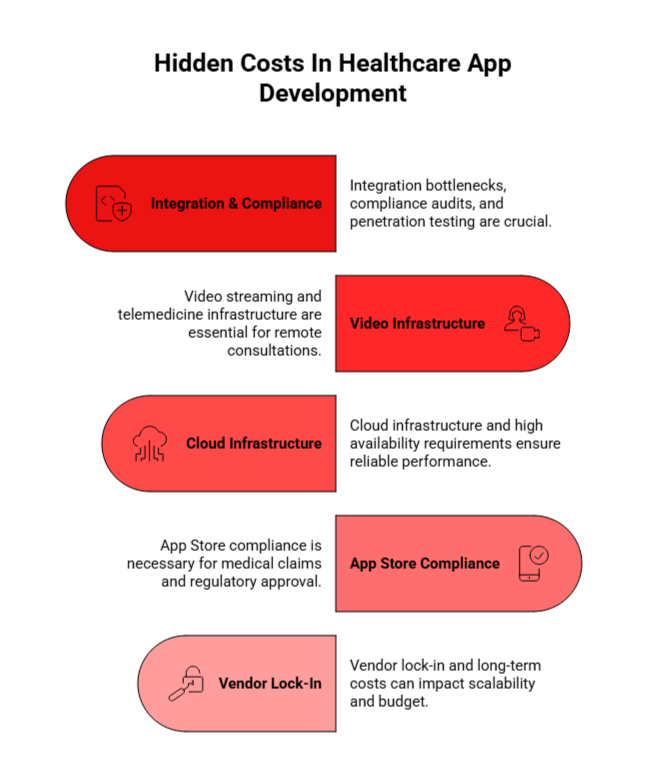
This shift underscores a pivotal trend in the mobile landscape: as the market matures, the focus is no longer purely on raw download numbers. Instead, the industry is increasingly centered around user retention, revenue quality, and time spent in-app, metrics that are poised to define the future of the mobile market in 2026 and beyond.

Growth Trends from 2021 to 2026

The app download figures for 2026 are expected to hit new milestones, continuing the growth seen in previous years.

Year Total Downloads (Billions) YoY Growth Key Drivers
2021 144 +2.34% COVID-19, remote work adoption
2022 148 +2.78% Continued digital transformation
2023 156 +5.41% 5G expansion, emerging market growth
2024 165 +5.77% AI integration, social commerce
2025 173 +4.85% GenAI apps, video-first platforms
2026 181 +4.62% Emerging market smartphone adoption

Key Drivers behind Continued Growth

The growth in app downloads can be attributed to:

  • Emerging Markets: Significant smartphone adoption in countries like India, Brazil, and Indonesia is driving global download numbers. These countries are seeing tremendous year-over-year growth in mobile usage.
  • AI and Personalization: AI-powered recommendations are enabling more efficient app discovery, resulting in higher download rates.
  • Subscription Models: An increase in subscription-based models, especially in sectors like health, fitness, and finance, has enhanced user engagement and retention.

Looking into 2026, experts predict continued growth in app downloads. With AI-driven recommendations becoming more precise and the widespread adoption of 5G networks, app ecosystems are set to expand, providing even more opportunities for app discovery and usage across both mature and emerging markets. 


How Many Apps Are Available for Download in 2026 on Major App Stores?

AppVerticals predicts that by 2026, the total combined app count across both stores is expected to surpass 6.3 million, driven by ongoing growth in app development and diversity.

Total Number of Apps in the Google Play Store and Apple App Store

Google Play remained the larger download channel in 2025, responsible for 104.6 billion downloads, or 73.5% of the global total, iOS accounted for the remaining 36.6 billion downloads, or 26.5%.

That volume gap does not mean iOS is less important. Sensor Tower reports that the United States alone generated nearly $60 billion in mobile consumer spending in 2025, reinforcing the usual pattern: Google Play often leads on scale, while iOS can remain disproportionately important for revenue-heavy markets

Breakdown by Type of Apps

The variety of apps available reflects the diverse needs of users, and the app stores have continued to expand their offerings across multiple categories. Here’s a breakdown of the most prominent app types:

  • Games: Dominating the app stores, gaming apps consistently account for the largest share of downloads.
  • Social Media: Platforms like Facebook, Instagram, and TikTok remain staple apps for users worldwide.
  • Productivity & Utility: Apps that help users stay organized, productive, or enhance device functionality (e.g., calendar, task managers, and cloud storage).
  • Health & Fitness: With an increasing focus on personal well-being, health-related apps have experienced strong growth, especially in 2025.
  • Entertainment & Streaming: Apps like Netflix, Spotify, and YouTube are among the most downloaded globally.

The wide array of available apps ensures that there is something for everyone, whether they’re looking to stay connected, play games, be productive, or simply be entertained.


What Are the Most Downloaded App Categories in 2026?

As of April 2026, 42matters reports 2,310,626 apps on Google Play and 2,242,101 apps on the Apple App Store. Combined, that is more than 4.55 million apps across the two largest mobile ecosystems. This is a better figure to publish than speculative multi-million estimates because it is tied to a current, dated inventory snapshot.

The stores continue to expand rapidly. A very recent traction reports 2,375 new Android apps and 3,161 new iOS apps published. That equates to more than 5,500 new apps per day across the two stores at the time of measurement, which is far more credible than unsourced claims about hundreds of thousands or millions of apps being created daily

Let’s look at the download share of mobile apps on the basis of multiple factors in detail:

Download Share by Category

The breakdown of the most downloaded app categories projection  in 2026  shows that gaming apps continue to lead the way, with users engaging in both casual and more immersive experiences. Below is a closer look at the categories gaining the most traction:

Category Downloads (Billions) Key Insights
Games 34.54 Games led global downloads, maintaining its position as the dominant category. Mobile gaming continues to be the largest share of overall download volume.
Entertainment 10.04 Ranked second, with strong engagement in media consumption. This includes streaming platforms and video apps that capture large user bases.
Finance 6.84 Significant growth in non-gaming categories. Financial apps like digital banking and personal finance are seeing increased adoption.
Productivity 5.93 Reflects ongoing expansion in the mobile market. Includes apps for work, task management, and collaboration.
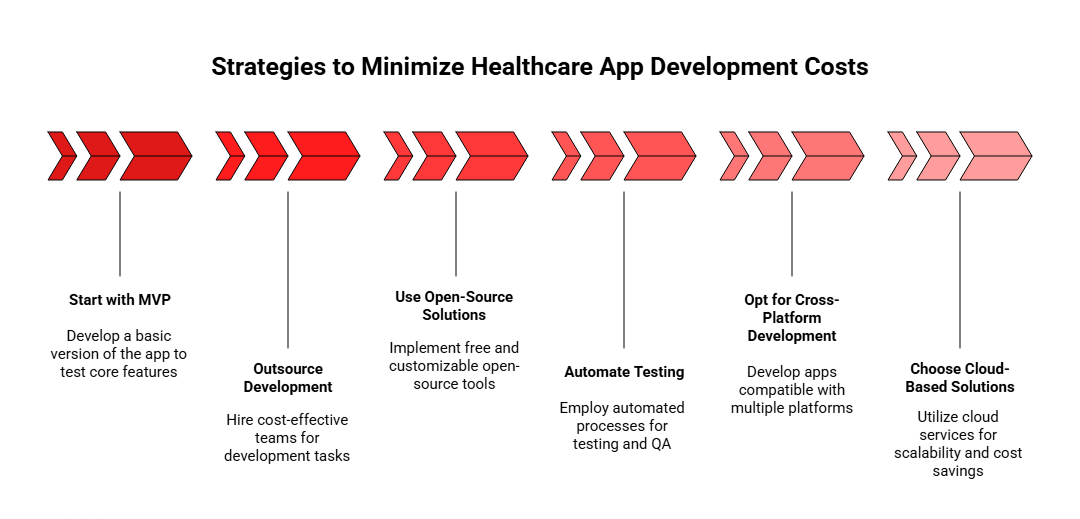
Shopping 5.86 Marked as a key growth area outside of gaming, with e-commerce apps thriving due to the global shift to mobile-first shopping experiences.

While games remain the leader in downloads, categories such as finance, productivity, and shopping are emerging as significant areas of growth, suggesting a broader shift in mobile app preferences and usage.


Which Individual Apps Led Downloads Most Recently?

These leading apps provide clear examples of how different categories are driving download growth, with established and emerging apps reshaping the mobile landscape through strong market presence and category-specific success.

App Name Category Downloads (Millions) Key Insights
ChatGPT AI 770 Most downloaded app globally in 2025, demonstrating the significant impact of AI on mobile market trends.
TikTok Social 644 Reinforces its dominance in the video content and social media space.
Temu Shopping 363 Highlights the rapid growth of e-commerce apps.
Google Sheets Productivity 73 Maintains its position as a leading mobile productivity and collaboration tool.
Flo Health & Fitness 52 Signifies growing user interest in wellness and personal health apps.
WhatsApp Business Business 247 Key tool for businesses using mobile apps for communication and customer engagement.

Countries with the Highest Mobile App Downloads In 2026

AppVerticals predicts that in 2026, India will remain the top country with over 80 billion downloads, followed by China at 68 billion. Both countries will continue to drive global app usage due to rapid smartphone adoption and the dominance of super apps.
describing a comparison between app downloads in 2025 and 2026 by country.
  • India: In 2025, India led with 75 billion downloads, and by 2026, it’s expected to surpass 80 billion due to rapid smartphone adoption and high user engagement.
  • China: China reached 62 billion downloads in 2025 and is predicted to hit around 68 billion in 2026, driven by WeChat and super apps.
  • United States: The U.S. saw 35 billion downloads in 2025, with projections for 37 billion in 2026, maintaining dominance in app spending despite slower growth in downloads.
  • Brazil: Brazil’s downloads grew to 28 billion in 2025, and in 2026, they’re expected to reach 32 billion, fueled by a fast-growing mobile app market.

  • Indonesia: Indonesia recorded 21 billion downloads in 2025, and by 2026, it’s set to hit 24 billion, driven by high engagement in social and gaming apps.

How Many Mobile Apps Are Downloaded Each Day Worldwide in 2026?

The global daily mobile app downloads will reach over 860 million in 2026 reflecting continued growth driven by a rise in smartphone adoption and app usage across emerging markets, predicts AppVerticals. This increase will be fueled by ongoing trends in event-driven spikes, with major shopping events, new device activations, and highly anticipated app launches continuing to drive traffic.

Daily Download Figures in 2026

In 2026, app downloads are projected to average 860 million per day, up from 819 million in 2025. This reflects steady global app usage growth and spikes driven by e-commerce sales, holiday shopping, and major app launches.

Event-Driven Download Spikes

describing peak app download volumes in 2026 driven by events

  • Black Friday: Download volumes will likely spike to 1.6 billion, a 90% increase from daily averages, driven by shopping and retail apps.
  • Christmas Day: Expect 1.4 billion downloads on Christmas, fueled by new device activations, especially in regions with strong iOS adoption.
  • Prime Day and Singles’ Day: These e-commerce events will continue to drive a 60% increase in downloads, with retail and shopping apps leading the charge.
  • Major Game Launches: Anticipated releases of popular mobile games could lead to 1.2 billion downloads on peak launch days.
  • Major Sporting Events: Global events like the World Cup and Super Bowl will continue to generate substantial spikes, especially for sports streaming and betting apps.

Time-of-Day and Weekly Patterns in 2026

describing app download patterns on the basis of time

  • Evening Hours (7-10 PM): The peak download period will account for 40% of daily downloads, with users most engaged after work or school.
  • Lunch Breaks (12-2 PM): Expect 18% of daily downloads during lunch hours, primarily for new app discoveries.
  • Morning Commute (7-9 AM): 15% of downloads will continue to occur in the morning, especially for news and productivity apps.
  • Late Night (10 PM-1 AM): 12% of downloads will happen late at night, driven by social, dating, and gaming apps.
  • Weekend Effect: Weekend downloads will see 25% higher activity than weekdays, skewing toward entertainment, gaming, and lifestyle apps.

How Many Apps Are Created Each Day Across the Major App Stores?

AppVerticals predicts that in 2026, the creation of new apps will continue to rise, with over 1.45 million new apps expected across the major app stores, marking a 10-12% increase from 2025.

App Creation Rates in 2026

In 2026, Google Play Store will see over 2,200 new apps added daily, while the Apple App Store will add around 1,600 new apps daily. These rates reflect continued growth as developers tap into the expanding mobile ecosystem.

App Creation Trends (2026 Predictions)

describing app creation trends in 2026

  • 2024: Approximately 1.2 million new apps were created across both stores.
  • 2025: The total rose to 1.3 million, marking an 8-10% increase year-over-year.
  • 2026: With AI-driven development and cross-platform tools, 1.45 million new apps are expected to be created, representing a 10-12% increase compared to 2025.

The continued rise of AI-powered tools will simplify and speed up the app creation process, fueling the demand for new apps as smartphone usage and mobile commerce expand globally.


How Have Mobile App Download Statistics Evolved in the Last 5 Years?

AppVerticals predicts that from 2025 to 2026, mobile app downloads will continue to see steady growth, reaching an estimated 320 billion downloads, marking an 8-10% increase year-over-year.

While growth rates have slowed from the pandemic-driven surge, the continued adoption of 5G, AI integration, and emerging markets will drive this steady upward trend.

Mobile App Download Growth (2026 Predictions)

From 2020 to 2025, app downloads grew by over 65%, reflecting the impact of the pandemic, 5G expansion, and the rise of AI and social commerce. In 2026, we can expect the total number of global downloads to reach 320 billion, driven by increased mobile commerce, AI-powered apps, and widespread 5G adoption.

Growth Breakdown (2020-2026)

describing the growth in app downloads

  • 2020: A pandemic-driven surge led to a massive spike in app downloads as people relied more on mobile devices for work, entertainment, and communication.
  • 2021-2023: Downloads continued to rise with the adoption of 5G and the expansion of emerging markets.
  • 2024-2025: Growth stabilized at around 8-13% year-over-year, reflecting maturing markets and shifts in app usage patterns.
  • 2026: A steady 8-10% growth is expected, with AI integration, social commerce, and mobile gaming apps driving the increase.

Key Growth Drivers

  • AI and GenAI Apps (2023-2025): The introduction and rapid adoption of AI-powered applications like ChatGPT has had a profound impact on mobile app downloads. With 2025 projected to see an increase in AI app downloads by 17 billion, this trend is expected to continue driving app store growth.
  • Social Commerce and Digital Transformation: The past few years have also seen a growing trend of social commerce, where apps like Instagram and TikTok drive shopping behavior directly within the app. Social media apps and messaging platforms dominate the most downloaded apps, as they integrate e-commerce capabilities.
  • 5G and Mobile Gaming: The expansion of 5G networks has boosted gaming app downloads, as users seek higher-quality mobile gaming experiences. As mobile networks become faster, consumers are more willing to download large-scale gaming apps like Roblox, which experienced a growth in downloads by 7% YoY in 2024.
  • E-commerce Growth: The rise of platforms like Temu and SHEIN, which focus on global e-commerce and shopping, has driven substantial growth in retail app downloads. Particularly in emerging markets, the e-commerce sector has seen explosive growth.
  • Video-First Platforms: TikTok and Instagram’s growth continued into 2025, making entertainment apps one of the key drivers for download growth. With video consumption becoming increasingly popular, apps like CapCut (a ByteDance product) have also capitalized on this trend.

How Do Mobile App Downloads Impact App Revenue Generation?

In 2026, mobile app downloads will continue to drive revenue growth, with a direct correlation between download volumes and higher app revenues. The $585 billion projected market revenue in 2025 will see a further increase, fueled by the rise of subscription models, AI-powered monetization, and regional strategies.

Download-to-Revenue Correlation in 2026

In 2026, app revenue will continue to climb in tandem with download growth, reaching new heights due to AI-driven monetization and the growing adoption of subscription-based models. Apps with high download volumes, especially in sectors like gaming and e-commerce, will see significant revenue growth from in-app purchases (IAP), subscriptions, and advertising.

Revenue Forecast and Trends for 2026

  • Freemium Models: Apps will continue to rely on freemium models, contributing to an increase in IAP revenue. The gaming and lifestyle sectors, along with apps like TikTok and Instagram, will generate substantial revenue from ads.
  • Subscription-Based Apps: Subscription-based models will dominate in 2026, with health & fitness, video streaming, and news apps leading the shift towards monthly/annual subscriptions.
  • AI & Personalized Monetization: AI-driven apps, such as ChatGPT and personalized fitness apps, will drive higher engagement and revenue, as they improve user experience and monetization strategies.
  • Global Expansion: With markets like India, Brazil, and Indonesia contributing to higher download volumes, localized pricing strategies and regional monetization will further boost app revenues.

How Will App Store Optimization (ASO) Strategies Impact Download Growth in 2026?

App Store Optimization (ASO) has become a vital part of any app’s marketing strategy, directly influencing app visibility and download volumes. ASO focuses on optimizing an app’s listing on Google Play and the Apple App Store to improve its chances of being discovered by potential users. 

By implementing effective ASO techniques, apps can significantly increase their visibility, leading to a higher number of downloads.

  • App Title & Keywords: Optimizing the app title with the right keywords is one of the most basic and effective ASO strategies. Apps like TikTok and Instagram have fine-tuned their keyword strategy to rank higher for relevant searches, driving increased download volume.
  • App Icon & Screenshots: A compelling app icon and attractive screenshots can drive higher click-through rates, influencing user decisions to download.
  • User Ratings & Reviews: Positive user ratings and reviews contribute to higher visibility in the app stores, as apps with good ratings tend to rank higher. Review management tools and effective user feedback responses play a crucial role in maintaining high ratings.

An example of the power of ASO in increasing downloads is CapCut. After optimizing its app listing with relevant keywords and a more compelling app icon, the app experienced a significant spike in downloads, rising to the top 10 most downloaded apps globally.

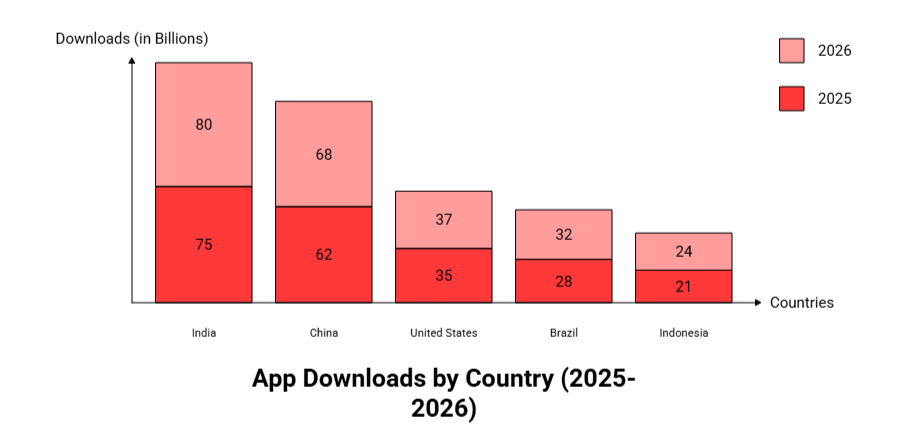
describing capcut's user growth

2026 ASO Strategies

Looking ahead to 2026, ASO strategies are expected to become even more data-driven and tailored to individual user preferences. Here’s what can be expected:

  • AI-Powered ASO: The integration of AI into ASO strategies will help developers personalize app listings based on user behavior and preferences. Apps will become smarter in understanding which keywords and visuals work best for specific user segments.
  • Localized ASO: As mobile apps continue to expand globally, app stores will adapt their algorithms to reflect local trends and cultural nuances, making localized ASO crucial for targeting regional markets.
  • Video Content for ASO: Video previews and short-form videos will become more important in ASO, particularly for gaming and social media apps, helping potential users get a sense of the app’s experience before downloading.

What Is the Role of AI in Mobile App Downloads?

In 2026, AI will play an even bigger role in driving mobile app downloads, with hyper-personalized experiences and smarter app discovery fueling growth. AI-powered apps like ChatGPT and fitness apps are expected to dominate, leveraging personalized recommendations to drive higher engagement and retention.

AI is no longer a niche story in mobile. Sensor Tower reports that generative AI app downloads doubled year over year to 3.8 billion in 2025, while in-app purchase revenue for the category climbed to more than $5 billion. It also says users spent 48 billion hours in generative AI apps and drove more than one trillion sessions during the year.

Ready to Build Your Own Mobile App?

Partner with our experts to create a custom app that thrives in the 2026 app landscape.


What Could Mobile App Download Statistics Look Like in 2030?

Looking ahead to 2030, mobile app downloads are expected to surpass 500 billion annually, driven by rapid advancements in technology, global smartphone adoption, and emerging markets.

Key Trends Influencing Growth

Sustained Growth
Annual app downloads will continue to rise, especially with smartphone adoption in emerging markets like India, Brazil, and Africa.

Technological Advances

  • AI, 5G, and AR/VR will redefine app experiences, enabling new immersive and interactive categories like gaming, health, and e-commerce.
  • 5G will boost high-data apps, while AR/VR will drive significant growth in gaming and entertainment.

Emerging Markets as Growth Drivers
Countries with expanding smartphone access will account for the majority of new downloads, likely making up 60-70% of global figures.

Dominant App Categories

  • Health & Wellness
    Mental health, fitness, and telemedicine app development will see substantial growth, driven by increasing health awareness and tech integration.
  • AI-Powered & E-Commerce Apps
    AI will be embedded in apps across categories, while e-commerce will continue evolving with personalized shopping experiences.

Looking to 2030

Satya Nadella, CEO of Microsoft, emphasized in tech trend discussions that mobile app downloads could hit 2.9 trillion cumulatively by 2030, driven by cloud integration and AR/VR, building on 257 billion in 2023.

2026 Outlook: What Should You Expect Next?

The most defensible 2026 outlook is not an unsupported single-number forecast. The market data suggests a more nuanced story: download growth is still happening, but slowly, while time spent and monetization are growing faster. Sensor Tower’s 2026 review shows downloads up 0.8%hours spent up 3.8%, and IAP revenue up 10.6% in 2025. That points to a mobile economy that is becoming more efficient and more monetized, rather than simply bigger through raw install spikes.

For that reason, the safest 2026 framing is this: the mobile app market remains enormous, Google Play still leads global volume, iOS remains essential for monetization, AI is reshaping user behavior, and category winners are increasingly defined by retention and revenue quality rather than install growth alone.

References

More Related Guides:

Tech, Training, and Triumph: Isaac Knable Talks Stance and Motion on AppTalk

In our latest episode of AppTalk by AppVerticals, we dive into an inspiring journey of grit, passion, and the power of technology. This month, we have the honor of speaking with Isaac Knable, a wrestling coach, founder of a wrestling academy, and the creator of the Stance and Motion app. With over 20 years of experience in the sport, Isaac shares how his deep-rooted love for wrestling led him to create an innovative tool that’s redefining training for wrestlers at every level.

Isaac’s journey is a perfect example of how a vision can transform into a thriving product, all while staying grounded in a commitment to help others. Stance and Motion, the app he developed, is designed to assist wrestlers, from beginners to Olympians, in honing their skills. But more than just an app, it’s a solution born out of necessity; especially as COVID-19 forced athletes to train from home with limited resources.

From the Mat to Mobile: A Lifelong Dream Realized

Isaac’s story began long before the app came into play. His wrestling career started in first grade, and after years of dedication, he became a collegiate wrestler at Indiana University. But it wasn’t until he stepped into coaching that his true purpose took shape. Isaac’s motivation has always been about helping others, especially kids who can’t afford expensive equipment. His app, Stance and Motion, was created with that exact mission in mind: to make wrestling training accessible to everyone, no matter their skill level or financial resources.

The app started as a simple idea in 2018, but its urgency grew during the pandemic when the world came to a standstill. With gyms closed, Isaac took to social media to provide live training sessions, and the feedback from his audience was overwhelming. That sparked the creation of Stance and Motion; a freemium app that’s now seen over 50,000 downloads in just its first year.

Overcoming Hurdles, Building a Vision

Isaac faced many challenges along the way, particularly the steep learning curve of app development. Even with just a basic background in technology, he found himself learning on the go, financing the project himself, and dealing with all the uncertainties of the startup world. But he didn’t do it alone. 

The turning point came when Isaac partnered with AppVerticals, a decision he credits for helping bring his vision to life. The team at AppVerticals, especially Bruce, offered not only expertise but also the energy and trust that made the whole process smoother.

Isaac emphasizes the importance of staying committed and not being afraid to fail. In his own words, “Whether this was a success or a flop, I was willing to take the risk.” His mentality is a testament to the entrepreneurial spirit; take the leap, and don’t be afraid to learn from the journey.

What’s next for Stance and Motion?

Isaac’s ultimate goal is simple: make the app better, keep it evolving, and bring it to as many wrestlers as possible. As the app continues to grow, his focus is on converting more freemium users to paid subscribers to support continuous updates and improvements.

With his passion for wrestling and technology, Isaac’s journey is far from over. His advice to anyone thinking of building an app? “Do the research, talk to different people, and don’t be afraid to take risks. And above all, keep pushing forward.”

The episode is an insightful look into the mind of a creator who took a personal mission and turned it into a tool that’s making a difference in the wrestling community. From overcoming technical challenges to scaling his app, Isaac Knable’s journey is a lesson in perseverance, innovation, and the power of following your passion.

Tune in to this episode of AppTalk by AppVerticals to hear Isaac’s full story and learn how he turned a dream into a reality, with the help of the right team and an unwavering commitment to his vision.