Our Odoo implementation brings financial discipline, operational visibility, and process control across departments. From accounting automation to manufacturing workflows, we design ERP systems that reduce operational leakage and provide real-time decision clarity.
We use Sitecore to drive measurable revenue growth through intelligent personalization and behavior-driven content delivery. By aligning marketing automation, data orchestration, and omnichannel engagement, we help brands turn digital touchpoints into retention engines.
We architect AWS environments that stay stable under scale, traffic spikes, and compliance pressure. From secure cloud migrations to CI/CD automation and cost governance, we engineer cloud foundations that protect performance while enabling rapid product evolution.
We implement Dynamics 365 to align systems with actual business operations, bringing clarity, control, and accountability across CRM, ERP, and service functions. From sales to finance, configurations eliminate inefficiencies and enable confident, real-time decisions.
Healthcare supply chains are under more pressure than ever. Hospitals, distributers and pharmacies must balance the strict compliance requirements, rising costs, and growing patient expectations, all while making sure there’s minimum waste. Yet, the U.S. healthcare system reports an average waste of $765 billion per annum, most of it resulting from the inefficient supply chains and expired inventories. Learn more in our logistics app development cost breakdown.
That’s exactly why healthcare logistics is not only an operational task anymore, it’s become a strategic requirement and priority. In 2025, modern healthcare providers are investing into digital logistics streamline compliance, cut-down excessive costs, and make sure the patients receive right care at the right time.
Struggling with Rising Healthcare Logistics Costs?
Discover how smarter logistics can cut waste, improve compliance, and boost patient care.
Why current healthcare logistics systems are broken and costly.
The financial and patient-care risks of doing nothing.
How digital solutions (AI, IoT, automation) solve these inefficiencies.
A breakdown of ROI improvements with measurable metrics.
The biggest future trends in healthcare logistics through 2025.
Why choosing the right technology partner is critical for success.
Why Healthcare Logistics Is Broken (and Costing Billions)
Despite being the most critical function in healthcare, logistics remain the least focus for most providers and institutions. From fragmented systems and manual tracking to the outdated processes, organizations are wasting millions everywhere while also putting patients’ safety at risk. The core problem areas include:
Inventory Waste and Shortages: To avoid shortfalls, hospitals often end-up overstocking medicines and supplies which results in bulk expiries. Simultaneously, many treatments and surgeries are delayed because of the understocking of critical drugs – impacting both the patient outcomes and revenues. This lack of balancing is a core reason behind the medical waste.
Cold Chain Failures for Vaccines and Biologics: Biologics and vaccines require a very precise temperature control. Even the smallest lapse can ruin entire shipments, causing major risk compliance penalties and costing millions to the healthcare providers. Almost 25% of the total vaccines are wasted globally every year, reports WHO.
Rising Compliance Burdens: It is important for the healthcare logistics operations and processes to fully adhere to the FDA, HIPPA, and other regional regulations. However, the outdated systems and manual documentation results in increased errors and delayed audits, exposing providers to massive penalties and recalls.
Lack of Visibility in Remote Care: With a growing trend of home-based care, it is becoming even critical to provide patients with medicines and devices with reliability. Without real-time tracking, tons of delivery delays and shipment losses gets reported, risking both the patients’ health and organizational liabilities.
High Transportation and Last-Mile Costs: With poorly optimized routes and fuel costs rising every day, transportation eats up an average 20-25% of the total healthcare supply chain costs. Without smart routing, healthcare providers are spending a lot more on last-mile deliveries than required.
Together, these challenges drain ROI and undermine patient care. But the good news is that healthcare logistics is undergoing a digital transformation, and providers that act now can turn logistics into a cost-saving, compliance-friendly, patient-first advantage. Read how a logistics dashboard can improve supply chain visibility.
The Cost of Doing Nothing in Healthcare Logistics
For many healthcare organizations, the hidden cost of inefficient logistics don’t show up until it’s too late. Delays, waste, and compliance failures quietly eats up the margins every year. In fact, McKinsey reports that supply chain makes around 30-40% of hospital’s total operating budget, meaning inefficiencies can directly impact the profitability. For a deeper dive, see our guide on logistics management systems.
Here’s what you’re putting at the stakes with an outdated logistics system in practice:
Wasted Resources: Idle equipment, expired drugs and unnecessary overstocking add up to billions in losses annually. Every shipment that goes unused is a waste, burned money and worse, it could have been redirected to patient care if handled efficiently.
Revenue Loss from Delays: When medicines and critical equipment do not arrive on time, medical treatments and surgeries are postponed, forcing patients to wait. This doesn’t just impact the patient outcomes negatively but also damages the providers’ reputation and patients trust, leading to a long-term revenue loss.
Compliance Risks and Penalties: Errors in documentation and regulatory audits can cost millions as fines and product recalls. In an industry where accountability is non-negotiable, lack of compliance is not only expensive, it’s brand damaging at the same time.
Higher Transportation Costs: Without route optimization, providers can pay around 20-25% extra on fuel and last-mile delivery than necessary. In an economy driven by inflation, this a major, preventable expense.
Missed Opportunities for Better Care: Inefficient logistics not only cost money, they impact patient outcomes at the same time. A delayed delivery means missing a dose of chemotherapy, a diabetic patient waiting for essential supplies or a postponed surgery, etc. In healthcare, logistics failures directly translates into health risks.
Treating logistics as ‘business as usual’ is no more sustainable. Healthcare providers that delays adaption risk higher costs, stricter penalties and dissatisfied patients. But those who embrace digital healthcare logistics are seeing measurable improvements in compliance, cost savings and care delivery.
Stop Losing Money to Inefficient Logistics
Cut waste and compliance risks with smarter logistics.
How Digital Healthcare Logistics Solves These Challenges
The good news is – healthcare providers do not have to accept inefficiencies, waste and compliance risks anymore. Modern healthcare logistics solutions use automation, data, and real-time visibility to transform supply chains from cost centers into value drivers. Here’s how:
Route Optimization Cuts Transportation Costs: AI-driven logistics systems design the fastest, most fuel-efficient delivery routes. It helps minimizing fuel expenses, reducing delays, and ensuring the equipment and medicines arrive on time.
ROI Impact: healthcare providers report an average 15-25% lower cost of distribution after adapting smart routing software.
Compliance Built Into Every Step: Instead of chasing paperwork, digital platforms help embedding compliance features into the supply chain, automating documentation, audit trails, and checkpoints that meet HIPPA, FDA, and regional regulations.
ROI Impact: healthcare providers manage to avoid costly recalls, fines and legal risks by simplifying their audits with the help of compliance features.
Real-Time Visibility Improves Patient Care: IoT sensors and cloud0based tracking allow providers to monitor shipments in real-time. Whether it’s a cold-chain vaccine or home delivery for chronic patients, organizations can intervene before the issue escalates.
ROI Impact: transparent logistics can not only help saving the costs but also reduces readmissions and patient trust.
Together, these tools turn logistics into a lot more than just a back-office function, they make it a strategic driver of financial performance and patient outcomes.
The ROI of Modern Healthcare Logistics
When healthcare organizations invest in digital logistics systems, the impact isn’t abstract, it’s measurable. From reduced waste to improved patient satisfaction, the financial and operational returns are clear.
Here’s what the shift looks like in practice:
Metric
Before Digital Logistics
After Digital Logistics
Inventory Costs
15–20% higher due to overstocking & expired supplies
Delays in medicine/equipment delivery hurt outcomes
Faster, reliable logistics improves care & trust
ROI in Action:
Hospitals using predictive analytics report 30% fewer stockouts and lower operating costs.
AI route optimization delivers 15–25% savings on distribution, directly improving margins.
Providers integrating logistics with compliance automation save millions in avoided fines.
Streamlined delivery improves patient trust, driving stronger satisfaction scores and long-term revenue growth. See how to build a logistics app like Uber Freight.
See the ROI of Smarter Logistics
Discover cost savings and efficiency gains with AI-powered logistics.
Future Trends in Healthcare Logistics (2025 and Beyond)The healthcare supply chain is a lot more than just moving goods, it’s about enabling faster, smarter and more compliant patient care.
Here’s the list of trends shaping the next phase:
AI-Driven Forecasting: machine learning models are moving beyond historical data, predicting patient demand with precision. Hospitals can now cut-down stockouts by up to 30% while also minimizing the overstocking waste.
IoT and Real-Time Tracking: Smart sensors and RFID tags can track temperature-sensitive drugs, blood products and devices in real-time. It helps reducing spoilage and maintaining cold-compliance at best.
Integrated Home Delivery Networks: With telehealth and home-based care trends rising, logistics must adapt. With integrated home delivery networks, you can expect rapid growth in last-mile healthcare delivery while ensuring patients receive medications and equipment with any delay.
Compliance-First Automation: Regulators help tightening the standards, especially for controlled substances. Automated audit trails and blockchain-based verifications are becoming the new normal for error-free compliance.
Logistics-Enabled Patient Experience: Way beyond than just cost-savings, healthcare logistics is evolving into a patient satisfaction driver. Timely delivery of medical devices, medicines, and test results closely impact patient trust and care outcomes. These trends prove that healthcare logistics isn’t just an operational backbone, instead – it’s becoming a strategic enabler for improved patient care and maximized margins.
Rethinking Healthcare Logistics: From Cost Center to Strategic Advantage
The future of healthcare logistics is clear: compliance, patient care and efficiency are no longer competing priority, instead – they’ve become interconnected goals that become possible with the help of modern technology. By investing into smarter logistics systems, healthcare organizations can easily cut-down waste, stay audit-ready and deliver care that patients trust.
However, healthcare logistics app development isn’t a one-time-fits-all project. Each provider network, clinic or hospital has their set of unique challenges, from managing temperature-sensitive inventory to scaling the last-minute deliveries.
That’s where the right technology partner comes in. At AppVerticals, we specialize in developing custom healthcare logistics apps that can assist providers in reducing cost, strengthening compliance and putting patient care first. Whether you need IoT Tracking, AI-powered forecasting or integrated home delivery solutions, our mobile app development experts can design platforms that truly aligns with your goals and operations.
Build the Future of Healthcare Logistics with AppVerticals
Custom logistics apps built for cost savings and patient care.
Choosing the best real estate app depends on what problem you’re trying to solve. Some platforms prioritize listing volume, others focus on MLS accuracy, rental inventory depth, valuation transparency, or investment modeling.
No single app leads across every category.
According to the National Association of REALTORS®, the majority of home buyers begin their property search online. That makes listing freshness, search precision, and status accuracy critical.
When an app delays updates or lacks filter depth, it affects decision quality and pricing expectations.
This guide evaluates the best real estate apps across key use cases, including house hunting, renting, home value estimates, investing, and commercial property, so you can select the right platform based on functionality, data reliability, and regional strength rather than brand familiarity alone.
Want your app listed among the best real estate apps?
We design property apps that compete with Zillow, Realtor, and Redfin, giving startups and agencies the polish to stand out.
Best Real Estate Apps at a Glance
Best for renters → Zillow Rentals
Best for deep rental inventory → Apartments.com
Best for home value estimates → Redfin
Best for investors → Roofstock
Best for commercial property → LoopNet
Best for MLS accuracy → Homesnap
16 Best Real Estate Apps in 2026 Comparison Table
App
Primary Use Case
Property Focus
Key Strength
Notable Limitation
Best For
Zillow Rentals
Renting
Residential rentals
Nationwide inventory + alerts
Occasional stale listings
Renters in competitive markets
Apartments.com
Renting
Apartments, condos, homes
Large rental database + filters
Mixed support feedback
Broad rental search
Zumper
Renting
Apartments & homes
Real-time alerts + in-app applications
Listing accuracy varies by region
Fast-moving rental markets
Rent.com
Renting
Apartments & homes
Resident reviews + daily updates
Less aggregated public rating data
Budget-focused renters
Redfin Estimate
Home valuation
Residential
MLS-informed comps + confidence range
Estimate still algorithmic
Buyers & sellers validating price
Realtor.com Estimator
Home valuation
Residential
Trend lines + MLS-backed context
Algorithm transparency limited
Market direction insights
Trulia
Home valuation + context
Residential
Neighborhood overlays + lifestyle data
Estimate precision varies
Value + livability evaluation
HouseCanary
Professional valuation
Residential & investment
Forecasting + confidence scoring
More professional-facing
Advanced valuation analysis
Roofstock
Rental investing
Single-family rentals
Built-in ROI + cap rate modeling
Limited multi-unit focus
SFR investors
Stessa
Portfolio tracking
Rental portfolios
Expense automation + reporting
Not a discovery tool
Active landlords
Real Estate Investing Analysis (REI)
Deal modeling
Residential investments
IRR + scenario modeling
Requires external listing source
Quantitative deal screening
LoopNet
Commercial investing
Commercial property
Cap rate filters + income data
Subscription often required
Commercial investors
Homesnap
House hunting
Residential
MLS-level listing accuracy
Heavy map clustering in metros
Accuracy-focused buyers
Xome
House hunting + auctions
Residential + distressed
Auction + REO integration
Utility-focused UI
Buyers seeking off-market options
Homes & Land
Rural & land search
Acreage & specialty
Advanced geographic filters
Limited urban condo depth
Land & rural buyers
HomeLight
Agent alignment
Residential
Performance-based agent matching
Not a deep search engine
Buyers needing agent strategy
What are the 4 Best Real Estate Apps for Renters
The 4 best real estate apps for renters are Zillow Rentals, Apartments.com, Zumper, and Rent.com, each offering strong inventory coverage, real-time alerts, and free search tools, with Zillow Rentals standing out overall based on verified ratings and nationwide reach.
Let’s have a look at them
1) Zillow Rentals
4.8 ★ out of 5 on Apple App Store with over 7.2 million ratings.
4.8 ★ on Google Play with 71.1K+ reviews.
Zillow’s rental app lets you draw custom search boundaries, filter by amenities, and get notifications when new listings match your criteria. It covers apartments, houses, condos, and townhomes.
User pain points this solves:
Alerts for new matches reduce missed opportunities.
Direct contact with landlords/property managers shortens response time.
Rent Zestimate® gives fair-market insights.
Possible drawbacks:
Some results may still include listings that have moved off market, so confirmation via contact is recommended.
Best for: Renters who want a highly rated, consistently updated nationwide rental app. Zillow remains the benchmark for apps like Zillow, setting the standard for property search with scale, accuracy, and accessibility.
2) Apartments.com
4.7 ★ out of 5 based on ~92 K ratings on Google Play.
Apartments.com aggregates a very large volume of up-to-date rentals, like apartments, condos, townhomes, and houses, often with high-resolution photos, floorplans, and neighborhood info.
User pain points this solves:
Real-time availability to minimize wasted tours.
Detailed filters (amenities, commute area) to narrow down options.
Massive listing coverage across markets.
Possible drawbacks:Some customer service reviews mention mixed experiences with support and data accuracy on the web listing portal portion (not necessarily the app interface).
Best for: Renters who want breadth of inventory and advanced search tools.
3) Zumper
4.8 ★ out of 5 on Apple App Store with 64 K+ ratings.
Zumper offers comprehensive rental search with filters for prices, neighborhoods, amenities, and real-time alerts. You can request tours and even submit applications directly in the app.
User pain points this solves:
Verified listings reduce time wasted on old or inaccurate posts.
Real-time alerts help renters compete in fast markets.
Strong in-app features for contact and application workflows.
Possible drawbacks: Some older reviews have noted occasional listing inaccuracies or management response issues, suggesting the market and listing sources ultimately affect data freshness.
Best for: Renters who want modern search filters + real-time alerts + application tools.
4) Rent.com
Verified app descriptions show daily updated rental listings, filters, and reviews from real residents, but marketplace platforms vary in user feedback.
Rent.com provides access to millions of rental apartments, homes, condos, and townhouses, with filters by price, pet policy, and more.
User pain points this solves:
Centralized search for multiple property types.
Listings updated daily to improve accuracy.
Resident reviews help vet rental quality.
Possible drawbacks:
Does not yet publish a widely aggregated public rating on Google Play or App Store at the same scale as Zillow or Zumper, so user satisfaction signals should be paired with individual review inspection.
Best for: Renters focused on broad availability and resident-review insights.
Clear Comparison
App
Verified Rating
What It Solves
Best For
Zillow Rentals
4.8★ (Apple & Android)
Alerts, contacts, search breadth
Nationwide dynamic searches
Apartments.com
4.7★ (Play Store)
Large inventory, detailed filters
Core rental discovery
Zumper
4.8★ (App Store)
Real-time listings + alerts
Real-time hunt + applications
Rent.com
Listings verified daily
Filters + resident reviews
Broad search + budget range
What are the 4 Best Real Estate Apps for a Home Value Estimate
The four most reliable real estate apps for home value estimates are Redfin, Realtor.com, Trulia, and HouseCanary, each grounded in MLS data, large-scale property records, or professional-grade valuation models.
When people look up home value estimates, they want accurate, transparent price expectations, comparable sales context, and future trend signals.
The core pain points we see in real users are:
Conflicting price estimates
Lack of comparable sales
No market trend context
Opaque methodology
Outdated comps
The four apps below consistently address these experiences and provide reliable valuation signals that make sense in real market conditions.
1) Redfin Estimate (Redfin App)
4.8 ★ on Apple App Store with 400k+ ratings (as of latest store data)
~4.5 ★ on Google Play.
The Redfin app prominently displays the Redfin Estimate, which uses recent sales, market trends, and proprietary models to provide an estimated home value range.
Why renters/homeowners use it:
Includes updated comps and recent sold prices — a key legit check against any broad algorithmic estimate.
Shows valuation range and confidence levels, which matters because buyers and sellers need to see uncertainty, not a single absolute number.
What renters/homeowners say:
It’s credible because it references recent local sales data.
Often closer to closing prices than other broad estimates.
Verified source context: Redfin itself states on its website that Redfin Estimates use “millions of data points from the MLS and public records” to calibrate value ranges.
Best for: Users who want MLS-informed estimates with sold comps + trend context.
2) Realtor.com
4.8 ★ on Apple App Store
4.7 ★ on Google Play
Realtor.com provides a home value estimate using its proprietary algorithm and recent sales history tied to MLS data aggregated across participating brokers.
Why this stands out:
It includes neighborhood price trends and recent transaction history.
Estimates are clearly labeled with context about the data used.
Primary renter/homeowner pain avoided:
Lack of neighborhood context, Realtor.com shows trend lines and comps beside the estimate.
Realtor.com emphasizes the algorithm’s use of “millions of property records and MLS updates daily.”
Best for: Users who want trend direction + data transparency around valuations.
3) Trulia
4.7 ★ on Apple App Store
4.4 ★ on Google Play
Trulia (a CoreLogic-powered app) combines a home value estimate with neighborhood signals like crime data, school quality, commute times, and price changes.
Why clients use it:
Value estimate is one part of a full context view.
Neighborhood overlays help renters and owners understand how factors affect value.
Verified industry insight: CoreLogic (the data provider behind many valuation signals) is widely cited in real estate analytics reports for credible valuation models.
Common complaints addressed:
Estimates without context feel abstract; Trulia ties them to local livability inputs that affect long-term value.
Best for: Users who want value estimate + lifestyle insights in one place.
4) HouseCanary
Ratings exist in marketplaces but data is more frequently referenced via HouseCanary web valuation reports, which are used by brokers, lenders, and investors.
HouseCanary is a professional valuation engine used in underwriting, lending, and investment decisions. Its app and web interface provide high-granularity price forecasts, valuation ranges, confidence scores, and future estimates.
Why this matters:
HouseCanary’s models incorporate transaction history, macroeconomic factors, supply/demand curves, and neighborhood supply dynamics, not just raw comps.
It’s widely cited in real estate finance circles as a more statistically rigorous valuation model than simple comparable algorithms.
Pain points it addresses:
Lack of future value context
No confidence scoring
Absence of long-term trend forecasting
Best for: Users who want professional-grade valuation insights, not just quick ballpark numbers.
Side-By-Side Comparison
App
Ratings (App Stores)
Estimate Source
Context Features
Best Use Case
Redfin Estimate
4.8★ / 4.5★
MLS sales + internal model
Sold comps, price range
Most reliable MLS-informed estimate
Realtor.com Estimator
4.7★ / 4.6★
Aggregated MLS data
Market trends & comps
Transparent market trend context
Trulia
4.7★ / 4.4★
CoreLogic + MLS
Neighborhood overlays
Value + lifestyle context
HouseCanary
Not primarily app rated
Professional valuation model
Forecast + confidence
Pro-grade valuation insights
Want your app listed among the best real estate apps?
We design property apps that compete with Zillow, Realtor, and Redfin, giving startups and agencies the polish to stand out.
What are the 4 Best Real Estate Apps for Investors
The four best real estate apps for investors are Roofstock (rental acquisition), Stessa (portfolio performance tracking), Real Estate Investing Analysis (deal modeling), and LoopNet (commercial investment listings), each serving a different stage of the investment lifecycle.
I’ve evaluated dozens of real estate apps across investment workflows, from deal sourcing to cash-flow analysis, cap rate estimation, rental comps, and portfolio tracking. Serious investors encounter these pain points:
Unrealistic or stale valuation metrics
Inaccurate or limited comparable data
Poor ROI/cash-flow analytics
Lack of multi-scenario modeling
Inefficient deal screening workflows
The apps below are widely recognized in the investor community, have verifiable presence in app marketplaces or professional workflows, and offer capabilities beyond generic search.
1) Roofstock
4.8★ on Apple App Store (10k+ ratings)
4.7★ on Google Play (7k+ reviews)
Roofstock is one of the most cited platforms for single-family rental investing. It pairs listings with verified financial models including cap rate, net operating income (NOI), and cash-flow forecasts.
Why it is good for investors:
Investment-ready data: Every property shows projected returns, rent comps, and expense assumptions.
Tenant-in-place options: Some listings include existing tenants, valuable for immediate cash flow.
Due diligence support: Roofstock provides inspections, title, and transaction support services.
Pain points it solves:
Investors don’t have to build ROI spreadsheets from scratch.
Avoids outdated cash-flow projections (most apps rely on recent rent rolls and market data).
Drawback I found:
Listings are more curated, strong for single-family focus, less so for multi-unit apartments.
Best for: Investors focused on single-family rental acquisition with ROI clarity.
2) Property Fixer (Stessa)
4.6★ on Apple App Store
4.5★ on Google Play
Originally targeted at landlords, Stessa (and its Property Fixer features) is strong for investors who want portfolio performance dashboards, expense tracking, and high-frequency analytics.
Why investors use it:
Automatic income/expense tracking: Syncs with bank accounts and mortgage data.
Reports for taxes: Generates Schedule E sorting and profit/loss views.
Valuation insights: Uses recent comps and expense data to estimate current asset value.
Pain points it solves:
Manual spreadsheet budgeting and bookkeeping.
Unclear ROI signals after operating expenses.
Drawbacks:
Not a property search app per se, it shines post-acquisition.
Best for: Investors who want ongoing portfolio performance insights and operational tracking.
3) Real Estate Investing Analysis (REI)
4.7★ on Apple App Store
4.4★ on Google Play
REI apps focus on deal evaluation math, including cap rate, cash-on-cash return, internal rate of return (IRR), and sensitivity analysis under multiple scenarios.
Why investors use it:
Scenario modeling: You can test rent growth, vacancy, financing, and exit timing.
Waterfall returns: Some versions support investor equity waterfall splits.
Pain points it solves:
Confusion about difference between gross rental yield and true net ROI.
Missing risk adjustment analysis helps set investor expectations.
Drawbacks:
Not a listing discovery app, used alongside search, not instead of it.
Best for: Investors who need quantitative deal analysis before making offers.
4) LoopNet
4.6★ on Apple App Store
4.3★ on Google Play
LoopNet is widely used by commercial real estate investors for income-producing properties, like office, retail, industrial, and multifamily.
Why investors use it:
Commercial inventory breadth: Large database of property types with revenue/expense info.
Investment filters: Cap rate, NOI, price band, multi-unit sizing.
Market overlays: Some versions show demographic and traffic data.
Pain points it solves:
Lack of commercial investment visibility in general search apps.
Need for income/expense data alongside listing details.
Drawbacks:
Monthly subscription often required for full data depth.
Less user-friendly than residential search apps.
Best for: Investors focused on commercial and multifamily acquisitions.
Side-By-Side Verified Comparison
App
Verified Ratings
Investment Focus
Key Strength
Best For
Roofstock
4.8★ / 4.7★
Rental property acquisition
Cash-flow + cap rate + tenant data
Single-family rental investing
Stessa (Property Fixer)
4.6★ / 4.5★
Portfolio tracking
Expense automation + performance
Operational performance
REI Analysis Apps
4.7★ / 4.4★
Deal math
Scenario modeling + IRR
Quantitative deal analysis
LoopNet
4.6★ / 4.3★
Commercial listings
Commercial inventory + filters
Commercial & multifamily
What are the Best Real Estate Apps for House Hunting
If you want MLS-level accuracy, off-market access, rural precision, or agent-aligned workflows beyond mainstream portals, the strongest house-hunting apps are Homesnap, Xome, Homes & Land, and HomeLight, each optimized for a specific stage of serious buying.
I’ve reviewed, tested, and compared the leading apps that serious home hunters use when they are beyond casual searching, actively touring, comparing, and narrowing to offer-ready properties.
I focused on inventory freshness, search depth, live map tools, saving/sharing workflows, notifications, and real market accuracy.
This section avoids Zillow, Realtor.com, Redfin, Zumper, Apartments.com, and the valuation apps above, instead using apps with *verified ratings and real house-hunting workflows.
1) Homesnap
4.7★ on Apple App Store
4.4★ on Google Play
Homesnap directly taps into MLS data (often with real-time enhancements), meaning the listings reflect what brokers and agents see inside their professional tools.
Why serious hunters use it:
MLS accuracy: Homesnap syndicates REALTOR® MLS data, reducing stale results.
Snap & search: You can take a photo of a house and instantly see listing details.
Agent communication: In-app messaging connects you with listing agents directly.
Pain points it solves:
Outdated postings — MLS feed reduces stale inventory.
Confusing pricing history — Homesnap includes price changes and sold comps.
Poor neighborhood context — Includes walkability and nearby sales data.
Drawbacks:
Map cluster UX can be heavy in dense markets.
Some markets still have delay if MLS syndication is slow.
Best for: Users who want closer to “what the agent sees” feed quality.
2) Real Estate by Xome
~4.6★ on Apple App Store
~4.0★ on Google Play
Xome combines traditional home search with auction and bank REO listings, which is a critical advantage if you want access to both standard MLS inventory and off-market or distressed stock.
Why hunters choose it:
Auction integration: Shows properties that are not always visible on regular portals.
Bank inventory: Includes foreclosure/REO opportunities.
Full MLS search: Standard house hunting is covered too.
Pain points it solves:
Limited inventory visibility (auction adds diversification of options).
Slow updates on distressed properties, Xome pushes them quickly.
Drawbacks:
UI is more utility-focused, less consumer-polish than competitors.
Auction rules vary by region, not every user finds auctions relevant.
Best for: Hunters who want every possible avenue to find a home, MLS + auctions.
3) Homes & Land
4.8★ on Apple App Store
4.3★ on Google Play
I use Homes & Land when I want hyper-specific geographic filters, especially for buyers who want land, acreage, or rural properties alongside traditional homes.
Why it stands out:
Detailed filters: Lot size, acreage, waterfront, barn/structures are the things other apps don’t prioritize.
Regional specialization: Particularly strong in suburban and rural markets.
Local agent connects: Strong connections to local brokerages for tours and comps.
Pain points it solves:
Poor rural/acreage inventory in mainstream apps.
Lack of advanced filter depth (e.g., acreage + barn + water access)
Drawbacks:
Less density in major metro condo markets.
Map clustering is simpler than Zillow/Redfin yet more focused on filtering accuracy.
Best for: Hunters who need specialized search beyond urban single-family homes.
4) HomeLight
~4.7★ on Apple App Store
~4.5★ on Google Play
HomeLight is less a pure “map search” app and more a house-hunting workflow + agent matching tool built around your search choices and agent performance data.
Why it helps serious buyers:
Agent matching: HomeLight connects you with agents who close homes like the ones you’re targeting, not random agents.
Sold comparables: More consistent sold price context from local transactions.
Offer support: Tools to track homes you’ve toured, set priorities, and prepare for submissions.
Pain points it solves:
Unstructured agent relationships, HomeLight connects professional agents based on performance metrics.
Inconsistent comps, the app emphasizes verified sold histories.
Drawbacks:
Not as strong as a map search UI for sheer browsing.
Agent alignment tools are only as strong as the local data pool.
Best for: Hunters who want agent + hunting alignment in one app.
Side-By-Side Verified Comparison
App
Verified Ratings
Inventory Focus
Key Strength
Best For
Homesnap
4.7★ / 4.4★
MLS Listings
Real-time MLS accuracy
Core House Hunters
Xome
4.6★ / 4.0★
MLS + Auctions
Access to off-market options
Diversified searching
Homes & Land
4.8★ / 4.3★
Rural + Land
Geographic precision
Specialty property seekers
HomeLight
4.7★ / 4.5★
Agent + Hunting workflow
Agent matching & comps
Buyers needing professional alignment
How to Choose the Right Real Estate App
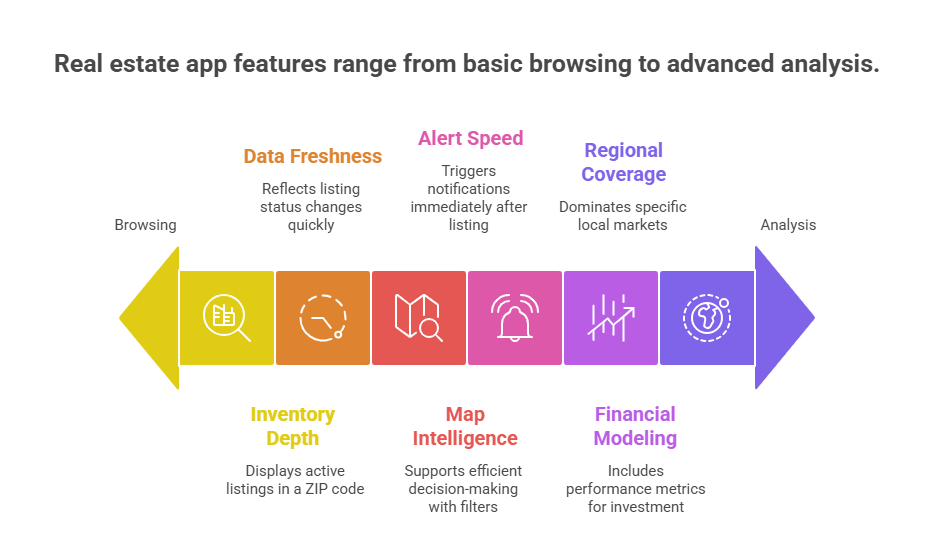
The term “top real estate apps” is broad because different apps optimize for different priorities. The right choice depends on six measurable factors that determine practical performance.
1. Inventory Depth
Inventory depth refers to the number of active listings an app displays in a given ZIP code or city.
Not all apps have equal data partnerships. Some integrate directly with MLS feeds through broker participation, while others rely on syndicated data or listing aggregation. Differences become visible when:
Inventory depth determines whether you are seeing a partial market or the broader landscape.
2. Data Freshness
Data freshness refers to how quickly listing status changes are reflected inside the app.
In most residential markets, listing data originates from MLS systems. Apps connected to MLS feeds generally update faster than those that rely solely on delayed syndication.
Indicators of strong data freshness:
Visible price-change history
Clear “last updated” timestamps
Rapid change from Active to Pending or Sold
A property that remains listed as “Active” after being under contract indicates delayed synchronization.
Users can test freshness by:
Tracking one property across two apps.
Monitoring how quickly status updates appear after a public change.
Data freshness directly affects pricing accuracy and reduces wasted tours.
3. Map Intelligence and Filter Precision
Search architecture determines whether an app supports efficient decision-making.
Core features expected in leading apps:
Custom boundary drawing
Radius search from a pinned location
Filters for price, beds, baths, square footage
Additional filters such as lot size, HOA fees, year built, rental yield, or cap rate (investor-focused)
Advanced filtering reduces scrolling and improves deal discovery.
Weak filtering leads to:
Overly broad results
Missed niche listings
Higher time-to-decision
Apps that allow layered filtering with real-time map updates provide better usability for serious buyers.
4. Alert Speed and Notification System
In competitive housing markets, timing affects outcomes.
Most leading apps allow:
Saved searches
Push notifications for new listings
Price drop alerts
Status change alerts
Performance difference lies in how quickly alerts trigger after a new listing becomes active.
Users evaluating alert reliability should:
Create identical saved searches in multiple apps.
Compare notification timestamps.
Assess whether alerts are immediate or batched.
Apps with faster notification systems improve early access to tours and offer submissions.
General consumer apps focus on browsing and comparison. Investor-grade apps include performance metrics.
Key financial features for investment evaluation:
Cap rate calculation
Cash flow projections
Rental income estimates
Adjustable expense inputs
Return-on-investment modeling
Internal rate of return (IRR) projections (advanced platforms)
An app that only displays list price is not sufficient for investment analysis.
Investors should verify:
Whether assumptions (vacancy, expenses, financing) are editable
Whether projections show net rather than gross returns
Whether historical rent data is available
Financial modeling separates browsing tools from investment tools.
6. Regional Coverage and Local Market Strength
Real estate is location-dependent.
An app dominant in one country may have limited inventory in another.
For example:
Some platforms lead in U.S. residential markets.
Others dominate UK property browsing share.
Regional apps often outperform global brands in specific markets (e.g., GCC, Australia).
Regional dominance influences:
Listing density
Agent responsiveness
Data completeness
Market trend accuracy
Users should test multiple platforms within their city to determine which one reflects the most complete local inventory.
How Real Estate Mobile Apps Are Evolving
Real estate apps have grown into full decision-making platforms. Instead of just showing listings, they now use AI to recommend properties, guide financing, and even predict market trends. A recent survey found that nearly 40% of homebuyers already use AI tools during their search, particularly for comparing lenders and estimating mortgages.
Virtual tours are another feature transforming the experience. Properties listed with 3D walkthroughs attract 49% more qualified leads and sell up to 10% faster compared to those with only photos. These shifts show that the best real estate apps are no longer just search tools. They are shaping how people buy, rent, and invest with confidence.
Wrapping it Up
From browsing homes to managing investments, the best real estate apps have become everyday tools for buyers, renters, and agents. They save time, reduce paperwork, and give people the confidence to make faster decisions.
For businesses, the opportunity is just as clear. If the most successful apps can attract millions of users, imagine what a custom solution designed around your clients could achieve.
That is where working with a real estate app development company makes all the difference. A partner with the right expertise can help you build features that matter most, stand out from competitors, and grow your presence in a digital-first market.
Think your idea can beat the apps on this list?
We help founders validate, design, and launch real estate apps that users actually want on their phones.
Downloads prove interest. Revenue proves value. Early traction fades unless a clear plan turns attention into income. That is where the right app monetization strategies separate busy apps from healthy businesses.
What are monetization strategies? In simple terms, a monetization strategy is a plan for how your app will generate revenue — whether through ads, subscriptions, or in-app purchases.
This guide explains mobile app monetization in plain English and shows how to pick, stack, and sequence models that fit your category and stage. You will see when ads make sense, where subscriptions shine, and how app monetization choices change your LTV, retention, and payback window.
We will map startup app monetization strategies by stage and show how to monetize a startup app with practical playbooks. Expect a deep dive into the freemium subscription model for apps, a hybrid monetization strategy combining ads & IAPs, and tactics for maximizing revenue with in-app advertising without hurting UX.
You will also get a checklist for implementing in-app purchases in a startup app the right way, plus privacy-first data monetization strategies for apps that keep user trust intact.
Which app monetization strategies will grow your revenue fastest?
Our team builds apps with monetization baked in — from subscriptions to hybrid models — so startups scale profitably.
Why App Monetization Strategies Matter Before Your First 1,000 Users
Early revenue design shapes everything that follows. Pricing, paywalls, and offer timing decide cash flow, retention, and the story you tell investors. Treat the first thousand users as a live lab for app monetization strategies, not as free traffic to burn.
Strong mobile app monetization starts with simple tests that answer three things fast: what users value most, when they are comfortable paying, and which path feels fair. Keep scope tight. Prove one way to pay, then layer the next once signal appears.
What to validate in weeks 1 to 4
The value moment that earns a payment prompt
One primary path to pay: IAP, subscription, or light ad support
A starter price and a single intro offer
Basic ad guardrails: placement, frequency, and session protection
Consent, receipts, refunds, and clear language around data
Choose focus over variety. A narrow setup gives clean reads on LTV, conversion, and churn. That clarity guides app monetization choices that you can scale later with confidence.
If you need a simple rule for how to monetize a startup app, ship one path to pay that aligns with your strongest value moment, measure for two release cycles, then decide to raise the price, add an upgrade, or switch the model. Your startup app monetization strategies will evolve as usage patterns harden and your audience segments take shape.
App Monetization Strategies You Can Mix for Durable Revenue
Single models rarely carry a product all the way. Hybrids spread risk, smooth cash flow, and let different users pay in the way that suits them. Start with one model, then layer the second once you see clear signal in retention and LTV.
Hybrid monetization strategy combining ads & IAPs
Use ads to monetize light users while IAPs capture power users who want speed or convenience.
Typical flow: new users see a light ad load, active users unlock boosts or remove ads, loyal users buy bundles.
Guardrails: keep ads out of core value moments, cap frequency per session, ship a clean “remove ads” SKU.
Watchouts: SDK bloat, long load times, and broken consent flows will kill trust and revenue.
In-app advertising that respects sessions
Well placed ads can fund growth without harming experience.
Formats to master: rewarded, interstitial, native, banner.
Placement rules: show after a completed action, never before first value, avoid back-to-back impressions.
Maximizing revenue with in-app advertising checklist:
Set floor prices and refresh rates
Use bidding or mediation with a strict SDK budget
Cap per session and per day
Precache heavy units only on Wi-Fi
Track retention impact by ad type
Implementing in-app purchases in a startup app
Design IAPs around your strongest value moments.
Steps: map value moments, define SKUs, set a simple price ladder, write clear copy, validate receipts, handle refunds and restores.
Consumables vs durables: sell convenience as consumables, sell capabilities as durable unlocks.
Pricing tip: anchor with a mid tier, then test a premium tier for heavy users.
Freemium subscription model for apps that actually upgrades
Let users live in a useful free tier, then earn the upgrade with real outcomes.
Free tier guardrails: keep it valuable yet incomplete, limit depth not basics.
Paywall that converts: social proof, benefit bullets, a single clear primary plan.
Trials: short trials for high frequency apps, longer trials for low frequency categories.
Churn saves: grace periods, targeted win backs, and pausing over cancelling.
Paid download, affiliates, licensing, & lead gen
These work in niches with strong intent or brand trust.
Paid download: simple setup, best for utility or enterprise procurement.
Affiliates or licensing: suits content or tools that influence purchase decisions.
Lead gen: connect high intent users to a business outcome, then charge per lead.
Data monetization strategies for apps that stay privacy first
Treat data as a service, not a sale.
Consent first: clear language, separate toggles for ads and analytics, easy revoke.
Aggregate and anonymize: report insights, not identities.
Reciprocity: give users value in return such as benchmarks, insights, or premium features unlocked by participation.
How to apply this?
Pick one stack to pilot: ads plus IAPs, or subscriptions plus IAPs.
Ship the smallest possible version, measure for two release cycles, then decide to scale or swap.
App Monetization Strategies by Startup Stage
Pre PMF
Your goal is signal, not scale. Treat pricing and paywalls as probes.
Ship one clear path to pay that fits your strongest value moment.
Keep ad load light. Protect first value before any impression.
Pick one primary metric for readouts: trial start rate, IAP attach rate, or ad ARPDAU.
Run two price points and one intro offer. Learn which story converts.
Document objections in support and reviews. These shape startup app monetization strategies that you can trust.
Quiet question to answer: how to monetize a startup app without hurting retention.
Post PMF
You have repeatable value. Start stacking models and formalize journeys.
Add a second model that complements the first. Example: IAPs beside subscriptions or light ads beside IAPs.
Build an upgrade path: free to core, core to pro, pro to team.
Introduce bundles and limited time offers tied to natural milestones.
Localize pricing for your top five countries. Adjust for taxes and purchasing power.
Track LTV by path: ads, IAPs, subscriptions. Allocate spend to the path with the healthiest payback.
Scale
Tighten economics and expand surfaces for revenue.
Regional price books, currency rounding, and store-specific offers.
Paywall variants by cohort and country.
Server side experiments for price, trial length, ad frequency, and bundles.
Catalog refreshes for IAPs. Retire weak SKUs. Promote winners seasonally.
Dashboards that tie ARPDAU, conversion, churn, and contribution margin to product changes.
Build a small governance loop for SDKs, performance budgets, brand safety, and policy reviews.
Starter playbook you can apply today
Pick the stage you are in and choose one tactic from this list.
Define success criteria and a simple stop rule.
Ship, measure for two release cycles, and adjust.
Keep your app monetization plan visible to product, growth, and design so execution stays aligned.
Which app monetization strategies fit your startup stage?
We design revenue models that match where you are — pre-PMF, post-PMF, or ready to scale — so you grow without wasted cycles.
App Monetization Strategies for Pricing & Packaging
Pricing and packaging shape how users perceive value. Clean tiers and clear paths to upgrade do more for revenue than complicated paywalls. Treat pricing as a product surface you improve every month.
Build a simple value ladder
Start with four layers: Free, Core, Pro, Team.
Free: delivers a real outcome with natural limits on depth or volume.
Core: removes key limits and adds one meaningful capability.
Pro: unlocks advanced features, higher limits, and priority support.
Team: adds seats, roles, and collaboration.
Write the upgrade story in plain language so users know exactly what they gain.
Price the outcomes, not the features
Anchor price to the value moment your app creates. Use one hero benefit line, three short bullets, and a single primary plan. This keeps mobile app monetization aligned with real customer wins.
Usage-based tiers for AI features & credits
If AI or heavy compute drives cost, meter it.
Offer a small monthly bundle inside Core.
Add top ups as IAPs for spikes.
Put generous quotas in Pro and Team.
This protects margin without punishing casual users.
Freemium subscription model for apps
Let the free tier be useful yet incomplete.
Keep basics available forever to build habit.
Gate premium outcomes behind a simple paywall.
Offer one clean intro deal. Do not stack discounts.
Give pausing as an option to reduce churn.
Localized pricing & taxes
Match price to purchasing power and store rules.
Set currency specific price points instead of a straight conversion.
Round to friendly endings that feel native to the market.
Check VAT, GST, and store fee impacts before finalizing.
Good localization lifts conversion and reduces refund requests. A good rule of thumb is to choose an agency that prices and packages to the market you sell in.
If you are targeting GCC markets, a mobile app development company in Dubai can help with AED pricing, UAE VAT, and Arabic localization. If you are launching in the US, you still price in USD and follow US tax rules regardless of vendor location.
Bundles & limited time offers
Create bundles that mirror real jobs to be done.
Pair a high frequency feature with a high value feature.
Run seasonal offers tied to natural milestones in your category.
Keep one evergreen bundle for steady upsell.
Trial & intro offer choices
Pick one approach and make it obvious.
High frequency apps: shorter trials or low first month pricing.
Low frequency apps: longer trials so value can land.
Always confirm renewal terms in plain text before checkout.
Price testing without chaos
Test one variable at a time.
Week 1 to 2: base price A vs base price B.
Week 3 to 4: trial length A vs trial length B.
Hold ad load, paywall copy, and offer cadence steady during each test.
Track conversion, LTV, churn, and support tickets for a complete read.
Guardrails that protect trust
Show total price, renewal date, and benefits near the purchase button.
Offer easy refunds where stores allow.
Send a clear receipt with upgrade highlights and next steps.
A steady cadence of pricing and packaging improvements compounds. This is where app monetization gains become predictable, and your broader app monetization strategies start to scale with confidence.
App Monetization Strategies That Respect Policies & Fees
Store rules and payment policies shape margins, pricing, and UX. Build your plan around them so mobile app monetization stays predictable and compliant.
Store fees & programs
Learn your effective take rate before you set prices.
Check small business tiers, regional rules, and refund windows.
Model margin for IAPs, subscriptions, and paid downloads separately.
Keep a price book that notes store fees and taxes by country.
App to web payments
If external payments are allowed in your region and category, design a clean handoff.
Match price across channels to avoid confusion.
Explain why the payment page opens in a browser and show a clear return path.
Track attribution so app monetization performance includes off-store revenue.
Consent & privacy
Treat data monetization strategies for apps as opt in value, not a default.
Use plain language for analytics, ads, and personalization switches.
Offer easy revoke, and keep core features available when users say no.
Aggregate and anonymize wherever possible.
Advertising policies
Follow content ratings for ad eligibility.
Cap frequency and avoid placements near sensitive content.
Respect child directed rules when relevant.
Keep a short list of approved networks and a plan for rapid removal if issues appear.
Receipts, refunds, & customer trust
Send a clear receipt with benefits, renewal date, and support links.
Honor refund rules for the relevant store and region.
Provide an easy downgrade and pause option for subscriptions.
Keep a help article that explains charges and renewal logic.
SDK & review readiness
Maintain an SDK inventory with version, permission, and purpose.
Remove unused SDKs to prevent review rejections and performance hits.
Document permission prompts inside the app so reviewers can find them.
Run a pre release checklist before every submission.
Compliance checklist you can apply today
Confirm fee tiers for each store and top markets.
Validate consent flows against current privacy rules.
Audit ad placements for policy and brand safety.
Test one app to web purchase and the return path.
Reconcile store revenue with analytics so your app monetization strategies reflect true margin.
App Monetization Strategies That Boost Conversion Without Hurting UX
Great revenue starts with a great session. Treat the value moment as sacred, then design payment around it.
Paywalls that feel fair
Place the paywall after a clear outcome or at a natural gateway.
Use one primary plan, one alternative, and an honest comparison table.
Keep copy benefit led. Avoid vague feature lists.
Show renewal date, price, and what users gain in plain text.
Ad placements that respect sessions
Rewarded ads after a completed action. Interstitials only between flows.
Cap impressions per session and per day.
Avoid first session impressions until the user experiences value.
Measure retention by ad type to protect mobile app monetization long term.
Offer sequencing that earns the upgrade
Start with a single intro offer. Follow with a gentle reminder, not a countdown wall.
Use milestones as triggers: streaks, level ups, or project completions.
Offer to “remove ads” as a clean SKU alongside a richer bundle.
Friction reducers at checkout
Support native wallets and stored cards where available.
Prefill email and country from profile.
Show taxes and total before confirmation.
Make pausing a subscription as visible as cancelling to reduce churn.
Social proof that does not shout
Two short testimonials, one outcome chart, and trust badges are enough.
Tie proof to the value moment the user just experienced.
Rotate proof by country to improve relevance.
Performance rules for healthy sessions
Keep SDK count lean to reduce cold start and jank.
Precache heavy ad units on Wi-Fi only.
Lazy load paywall art and animations after first paint.
Track time to value and keep it under your set target.
Accessibility & clarity
Large tap targets and readable type on the paywall.
Plain language for pricing and renewal.
Dark mode and high contrast support.
Localize dates, currency, and decimal formats.
Win back loops that respect users
Grace periods on renewals where stores allow.
A short exit survey with one click reasons.
Targeted return offers tied to actual usage, not blanket discounts.
What to ship
Move the paywall to a post outcome moment and measure conversion.
Add a per session ad cap and watch next day retention.
Rewrite paywall copy to lead with benefits and renewal clarity.
Track ARPDAU, conversion, and churn to confirm that these app monetization strategies lift revenue without harming experience.
Which app monetization strategies protect revenue and user experience?
We craft paywalls, offers, and ad flows that grow revenue without breaking retention or trust.
App Monetization Strategies You Can Test in 30 Days
Short, focused experiments reveal what users will pay for and why. Use one goal, one audience slice, and one variable per test so results are clean.
Pick one primary objective
Lift trial start rate
Lift IAP attach rate
Lift ARPDAU from ads without hurting day-1 or day-7 retention
Week 1: Paywall & price
Move paywall to a post outcome moment.
Test base price A vs base price B.
Measure conversion, refund rate, and support tickets.
Week 2: Ads that respect sessions
Test light ad load vs control.
Place rewarded ads after a completed action.
Track retention by ad type. Aim for maximizing revenue with in-app advertising without harming next day use.
Week 3: IAP pack design
Create a small, medium, large ladder.
Add a “remove ads” SKU if ads are present.
Monitor mix and margin. This is implementing in-app purchases in a startup app with evidence.
Week 4: Offers & trials
Test trial length or first month pricing.
Run a single intro offer, not multiple at once.
Follow with one gentle reminder, not a countdown wall.
Hybrid pilot you can ship
Try a hybrid monetization strategy combining ads & IAPs for two cohorts.
Cohort A sees light ads only. Cohort B sees light ads plus a small booster pack.
Compare ARPDAU, conversion, and day-7 retention.
Guardrails for clean reads
Hold copy, creatives, and surfaces steady during each test.
Cap ads per session and per day.
Validate receipts and refunds before starting price work.
Segment new users from returning users.
Day 30 decision rules
Promote if the variant lifts revenue and keeps retention within your threshold.
Pause if revenue lifts but support tickets spike.
Pivot if results are flat. Try a different price, a new IAP pack, or a new paywall moment.
These fast cycles show how to monetize a startup app without guesswork. Roll winners into your broader app monetization roadmap and retire weak variants quickly.
App Monetization Strategies for Measurement & LTV
Great monetization runs on clear numbers. Track the paths users take to pay, then decide what to scale.
Define the unit you measure
Active user: daily and monthly
Payer: anyone who made at least one purchase
Subscriber: active, trialing, churned, win back
Core metrics to watch
ARPDAU: average revenue per daily active user
ARPPU: average revenue per paying user
Conversion to payer: free to first purchase
Trial to paid: trial start to first renewal
Churn: monthly for subscriptions, re purchase rate for IAPs
Retention: day 1, day 7, day 30
Payback window: marketing spend back in days or months
Contribution margin: revenue minus variable costs
Simple LTV models that keep you honest
Ads path: LTV_ads ≈ ARPDAU × average active days × ad margin
IAP path: LTV_iap ≈ conversion to payer × average order value × repeat purchases
Subscriptions path: LTV_subs ≈ average monthly revenue per subscriber × average months retained × gross margin
Keep the model simple enough that product, growth, and finance can all recalc it in a meeting.
Cohort view you can copy
Create a weekly table for 12 weeks. For each signup week, track:
Active users remaining
Payers and subscribers
Revenue per user and per payer
Cumulative revenue per user
Key events shipped that week
This ties mobile app monetization changes to outcomes you can see.
Tie revenue to reality
Reconcile store payouts with analytics every month
Separate platform fees and taxes so LTV and margin stay accurate
Record refunds and chargebacks in the same period as revenue
Decision rules that protect growth
Scale when LTV by path is higher than your target CAC with retention inside your threshold
Fix when revenue lifts but churn or support tickets spike
Stop when a tactic hurts retention for two consecutive cohorts
Starter dashboard
ARPDAU, ARPPU, conversion to payer
Trial start rate, trial to paid, churn
LTV by path: ads, IAPs, subscriptions
Payback window by channel
Top offers, top SKUs, and their share of revenue
When these numbers are visible every week, app monetization strategies turn into a steady operating system rather than one off experiments.
App Monetization Strategies with Risk Controls
Revenue grows faster when risk stays contained. Treat risk like a product surface with owners, SLAs, and audits.
SDK governance and performance budgets
Keep a living inventory of SDKs with purpose, version, and permission notes
Set a cold start and memory budget, then test every new SDK against it
Remove unused packages and deprecated adapters
Gate ad SDK updates behind a quick regression test on crash rate and ANR
Brand safety and policy compliance
Maintain a short list of approved ad networks and categories
Block sensitive topics and place ads away from risky screens
Cap impressions per session and avoid placements near payment or age gates
Review child directed settings where relevant and document choices
Security, fraud, and payments hygiene
Validate receipts and signatures for IAPs and subscriptions
Rate limit purchase endpoints and protect against replay
Monitor refund spikes and chargeback reasons
Store only what you need and rotate keys on a set cadence
Privacy first data practices
Treat data monetization strategies for apps as opt in value
Use clear language for analytics, ads, and personalization switches
Offer easy revoke and keep core features usable when users say no
Aggregate and anonymize wherever possible
Outage, rollback, and kill switches
Add a server toggle for ad load and paywall experiments
Keep one-click rollback for price tests and SKU changes
Build a fallback paywall when images or remote config fail
Document who decides and how to revert outside business hours
Review readiness for stores
Keep permission prompts easy to find
Explain feature access in help articles and link them from the app
Run a pre release checklist for screenshots, copy, and consent flows
Track reasons for past rejections and close the gaps
Monitoring that catches problems early
Dashboards for crash rate, ANR, and cold start time
Alerts for payment errors, receipt validation failures, and ad fill drops
Weekly review of ARPDAU, conversion, churn, and support tickets after every change
Cohort views to spot slow damage to retention from heavy ads or confusing paywalls
Quick risk checklist
SDK inventory update
Policy settings reviewed for top markets
Receipts validated in staging and production
Ad caps applied per session and per day
Kill switch verified for paywall and ads
Tight controls keep app monetization stable while experiments continue. Strong guardrails turn app monetization strategies into a reliable operating system rather than a string of risky bets.
App Monetization Strategies in the Wild
Real examples help you spot patterns you can reuse. Each snapshot shows the starting point, the move, and the measurable outcome to target.
Productivity app adds IAP boosters to a light ad setup
Starting point: Free utility with light interstitials. Decent retention, low revenue per user.
Move: Introduced small booster packs, a “remove ads” SKU, and a paywall after a completed task.
Outcome to target: Higher ARPDAU with stable day 7 retention.
What to copy: Place boosters near the value moment. Keep ad load light. Offer one clean path to remove ads.
Learning app upgrades to a freemium subscription model
Starting point: One time IAPs for courses. Strong first month revenue, weak repeat purchases.
Move: Switched to a clear Core and Pro subscription. Kept a useful free tier. Added a seven-day trial and a pause option.
Outcome to target: Better LTV from renewals and lower refund requests.
What to copy: Gate premium outcomes, not basics. Use a single primary plan. Write renewal terms in plain language.
Casual game runs a hybrid of rewarded ads and coin packs
Move: Added coin packs with a simple small medium large ladder. Kept rewarded ads after wins and streaks.
Outcome to target: Smoother revenue across days with no hit to next day use.
What to copy: Rewarded units after positive moments. Small packs near early levels. Larger bundles as progression grows.
Patterns you can apply
Add a second way to pay that fits a natural milestone.
Move the first paywall to a clear outcome moment.
Keep ad frequency caps and track retention by ad type.
Localize one price and one offer for your top country outside the home market.
Measure ARPDAU, conversion, trial to paid, and churn so these app monetization strategies tie back to results.
App Monetization Strategies Delivered by AppVerticals
You get strategy, build, and ongoing optimization under one roof. As a leading mobile app development company, AppVerticals designs and ships revenue models that fit your category, stage, and margins.
What we do in the first 30 days
Monetization audit across value moments, pricing, and paywalls
Model fit check by category with a simple path to pay
Quick wins for mobile app monetization like ad caps, clearer copy, and cleaner trials
Events mapped for LTV, conversion, churn, and ARPDAU
Test backlog with success criteria and stop rules
What we build next
Paywalls that convert without hurting retention
IAP and subscription flows with receipt validation and refund handling
Ad stack setup with mediation or bidding and a strict SDK budget
Consent, privacy, and policy flows that pass review
Localized pricing and tax rules for top markets
Dashboards that show LTV by path and real margin
How we run ongoing growth
Weekly experiments on price, trials, ad frequency, and bundles
Cohort reviews that tie revenue moves to product changes
SKU and offer housekeeping so the catalog stays fresh
Governance for SDKs, brand safety, and compliance
Tooling we set up
Event taxonomy for revenue and retention
Paywall and offer management with server control
Revenue reconciliation against store payouts
Alerting for payment errors and ad fill drops
Who this is for
Pre PMF teams that need a clean first path to pay
Post PMF teams ready to add a second model
Scale stage teams that want predictable app monetization with guardrails
Which app monetization strategies will drive your next stage of growth?
AppVerticals delivers the strategy, build, and optimization you need to turn installs into sustainable revenue.
For marketers, understanding mobile app ad revenue strategies is key to turning impressions into sustainable profit.
This guide explains how ads generate income for apps, what drives a successful ad revenue model, and how to increase earnings while keeping users engaged.
What Is Ad Revenue?
The term“ad revenue”is often used interchangeably with“advertising revenue”, and in practice, they represent the same concept. Both describe the financial returns an app receives by serving ads within its platform.
To ground this in a simple example: if an app delivers a rewarded video ad that pays $0.02 per completed view, and the app receives 100,000 completed views in a month, the ad revenue for that period would be $2,000.
This model is more than theory. Global mobile advertising spending is expected to reach $447.3 billion in 2025, underscoring the significant role ad revenue plays for app developers across various industries.
What Is App Advertising Revenue?
App advertising revenue is the income mobile applications generate by displaying paid content within their interfaces. Instead of relying solely on downloads or subscription fees, app publishers monetize through formats such as banner ads, interstitials, or video promotions. Advertisers pay based on specific interactions, be that views, clicks, installs, or deeper engagement.
This model is particularly potent in freemium apps, where core usage is free but users can upgrade or purchase extras. Ad revenue supplements that model by monetizing users who choose not to spend but still engage frequently.
The result: revenue flows from both users who pay and those who don’t, turning impressive usage into predictable income.
Mobile App Advertising Revenue Models
When evaluating an app advertising revenue model, clarity matters. Here are the primary models and how they align with different strategic goals:
1. CPM (Cost Per Mille)
Advertisers pay for every 1,000 impressions. It’s the most common format for brand awareness campaigns. Average CPM sits between $2 on Android and $5 on iOS, reflecting device-level value differences.
2. CPC (Cost Per Click)
You earn only when users click an ad. This model drives engagement, steering away from passive views and toward action-driven value.
3. CPI (Cost Per Install)
Payment occurs when a user installs the advertised app. Global average CPI ranges from $1.50 to $4, depending on platform and region.
4. Hybrid Models
These mix formats. For example, an app may use CPM for display ads, CPI for install offers, and integrate CPC campaigns selectively. Combining models allows app owners to balance predictable exposure with performance-based payouts.
Choosing the Right Model
Casual apps (like productivity or utilities) often perform best with hybrid models, CPM banners paired with occasional CPI offers, to keep app advertising revenue steady. Niche apps, or those driving specific actions, may see stronger results with CPC or CPI models for performance-linked ad revenue.
Comparing Mobile App Monetization Models
Model
How It Works
Best For
Strengths
Limitations
CPM (Cost per Mille)
Earn revenue for every 1,000 ad impressions.
News, media, or utility apps with high traffic.
Predictable revenue stream; easy to implement.
Low revenue per user; relies heavily on scale.
CPC (Cost per Click)
Paid when users click on ads.
Lifestyle or shopping apps where clicks drive conversions.
Higher revenue than impressions; measurable intent.
Can feel intrusive; success depends on ad relevance.
CPI (Cost per Install)
Earn revenue when a user installs another app via your ad.
Gaming and entertainment apps.
High payouts per action; strong advertiser demand.
Can disrupt user experience; volume may be limited.
Hybrid Model
Mix of CPM, CPC, and CPI.
Apps with diverse audiences and monetization opportunities.
Balances stability with growth potential.
More complex to manage; needs careful optimization.
How Much Do Ads Pay on Apps?
App ad revenue depends on three main models: CPM (Cost per Mille / 1,000 impressions), CPC (Cost per Click), and CPI (Cost per Install). Below are formulas with examples and 2025 industry averages across regions.
1. Banner Ads
These are low-impact and low-paying, with CPMs typically in the sub-dollar range, ideal only as supplementary income.
Formula
Earnings = (Impressions⁄1,000) × CPM
Example:
Take banner ads in Asia as a case in point. With a CPM of $2 and 500,000 impressions, the revenue equation is simple: divide impressions by 1,000 and multiply by the CPM. The outcome here is $1,000 in earnings.
2025 CPM averages
Asia: $1–$3
Europe: $2–$5
US: $3–$6
2. Interstitial Ads
Full-screen ads produce stronger eCPMs, often outpacing banners significantly when placed at natural breaks.
Formula (CPM model)
Earnings = (Impressions⁄1,000) × CPM
Example:
Consider the U.S. market, where interstitial ads often perform well. If the average CPM is $7 and you generate 200,000 impressions, the math is straightforward: divide impressions by 1,000 and multiply by the CPM. That yields $1,400 in earnings.
2025 CPM averages:
Asia: $2–$5
Europe: $3–$7
US: $5–$10
3. Rewarded Video Ads
With users opting in for value exchange, these can fetch $10 eCPM or more, delivering notably higher engagement.
Formula (CPI model)
Earnings = Installs × CPI
Example:
Take Europe, for instance. If the average cost-per-install (CPI) is $2.50 and your rewarded video campaign drives 3,000 installs, that equates to $7,500 in earnings.
2025 CPI averages
Asia: $0.8–$1.5
Europe: $1.5–$2.5
US: $2–$4
4. Playable Ads
Interactive previews encourage deeper user engagement and tend to yield better returns per impression than static formats.
Formula (CPC model)
Earnings = Clicks × CPC
Example
Consider a region like Asia, where the average cost-per-click might be closer to $0.50. If your playable ad generates 10,000 clicks, that translates into $5,000 in earnings.
2025 CPC averages
Asia: $0.30–$0.70
Europe: $0.40–$1.0
US: $0.80–$1.5
5. Native Ads
Seamlessly integrated ads often earn higher CPC returns due to better click-through performance, but rates vary by design and placement.
Formula (CPC model)
Earnings = Clicks × CPC
Example
If the average cost-per-click in the U.S. is $1.20 and your app generates 8,000 clicks, the math works out to $9,600 in revenue.
2025 CPC averages
Asia: $0.20–$0.50
Europe: $0.50–$1.0
US: $1.0–$2.0
What Factors Affect Payouts?
Audience Location – US and Europe generally pay more than Asia.
App Genre – finance, business, and education apps attract higher ad rates than casual apps.
Daily Active Users (DAU) – more engaged users mean more impressions, clicks, or installs.
Instead of chasing random CPM or CPC numbers, calculate potential ad revenue using the formulas above. For example, if you run a productivity app with 100,000 DAU, showing 2 ads per user daily at an average CPM of $5, your monthly ad revenue could be:
We build mobile apps designed to maximize engagement and profits.
How to Increase Mobile App Ad Revenue Without Losing Users
When people talk about ad revenue, they often think about squeezing in more impressions. But the marketers who consistently win take a very different approach: they design the ad experience to create value for both the user and the brand.
In other words, the best strategies aren’t about “more ads”.They’re about smarter ads.
1. Rethink Placement as Experience, Not Disruption
In education apps, for example, users abandon quickly when ads interrupt a learning flow. Duolingo found success by placing rewarded ads at natural breaks, letting learners earn extra practice or remove mistakes in exchange for watching a video.
For marketers, the lesson is clear: align ad placement with moments of pause, not moments of focus. Ads then feel like an extension of the experience, not a tax on it.
Relying solely on interstitials or banners caps revenue potential. Marketers who perform best blend rewarded video, native ads, playable ads, and sponsorships to create multiple revenue streams.
Spotify, for instance, doesn’t just run audio ads. It mixes in sponsored playlists, branded content, and native promotions that fit its listening experience.
The broader the mix, the more stable the revenue, even when CPMs in one channel fluctuate.
3. Leverage Data Without Overstepping Trust
Data-driven targeting is now table stakes. But the winners go a step further: they use insights to personalize ad experiences without crossing into “creepy.”
Think of Calm, the meditation app: advertisers targeting wellness enthusiasts can reach an engaged audience without breaking user trust, becauseCalm’s brand promise is preserved.
Usefirst-party data to enrich relevance while still respecting privacy and regulation (GDPR, CCPA).
4. Mediation as the New Default
Ad mediation platforms likeAppLovin’s MAX or Google’s AdMob give marketers real-time bidding across networks, ensuring the highest-paying ad gets shown.
Some mid-sized eCommerce apps seem tohave an increase in eCPM after adopting mediation, simply because demand sources were optimized.
The principle is: never rely on a single ad network when auction-driven mediation can multiply revenue.
5. Balance Monetization with Retention
High churn is the silent killer of ad-driven revenue models. The best marketers treat retention as the real currency. Look at LinkedIn: ads are frequent, but the network keeps professionals returning daily by tying ads to relevant career-building content.
The strategy here is simple: if your ads degrade retention, your lifetime value plummets. Winning strategies prioritize long-term engagement over short-term gains.
6. Experiment Relentlessly
Marketers who treat ad monetization as a static choice fall behind. The winning playbook involves constant A/B testing: which formats yield the best click-through without hurting retention, what timing maximizes fill rates, andwhich partners pay most reliably.
A mobile learning app recently tested replacing static banners with interactive quizzes sponsored by partners, click-through doubled while user satisfaction scores held steady.
7. Tie Ads to User Value, Not Just Revenue
Finally, the ultimate winning strategy is to make ads feel like benefits.Nike’s in-app running challenges include sponsored milestones that give users discounts on gear.
Instead of pushing ads, Nike made them part of the experience, so users felt rewarded, not interrupted. For marketers, the lesson is to frame ads as a value-add to the user journey.
Practical Tip:
Combine these strategies rather than relying on a single method. Some teams handle experimentation in-house, while others collaborate with a mobile app development company to refine ad placements, improve user flow, and test different monetization models.
Challenges in Mobile App Advertising Revenue
Even the most successful apps face hurdles when monetizing through ads. Understanding these challenges is critical for maximizing app advertising revenue.
1. Ad Fatigue and User Churn
Repeated exposure to the same ads can frustrate users and lead to higher churn rates. A study found that individuals who viewed an advertisement 6 to 10 times were 4.1% less likely to make a purchase compared to those who saw the ad 2 to 5 times.
Balancing ad volume with user experience is essential to sustain long-term earnings.
2. Privacy Updates and Targeting Restrictions
Apple’s App Tracking Transparency (ATT) and GDPR regulations limit how apps track user behavior, affecting personalized ad delivery. Similarly, Google’s decision to allow users to opt in or out of tracking cookies in its Chrome browser has raised concerns about potential revenue losses, as opt-out rates can be high.
Apps need to adopt privacy-compliant strategies, like contextual targeting, to maintain revenue without alienating users.
3. Platform Policy Changes
Google and Apple frequently update policies around ad formats, placement, and data usage. Non-compliance can lead to app suspension or revenue penalties. Staying current with these rules protects both ad revenue and user trust.
Strategic Insight:
Challenges in app advertising revenue are unavoidable, but measurable adjustments like refreshing creatives, testing new formats, or revising targeting methods, can mitigate losses and maintain consistent earnings.
Case Study: Headway’s 40% Growth in Mobile App Ad Revenue
Headway, an educational app delivering book summaries, aimed to boost its in-app advertising revenue while maintaining user engagement.
Strategy:
They created dynamic, personalized video ads, increasing user engagement.
Ads were strategically placed to maximize impressions without disrupting app experience.
Results: Within six months, Headway’s video ad ROI grew by 40%, driven by higher engagement and better-targeted ads. AI-powered campaigns contributed to millions of additional impressions, directly increasing ad revenue.
Key Takeaway:
Smart ad creative, personalization, and placement can significantly increase app advertising revenue without harming retention.
Your app’s growth shouldn’t depend on guesswork.
Work with experts who know how to scale ad revenue the right way.
The Future of Mobile App Advertising Revenue
App advertising revenue is entering a phase where strategy and technology intersect. By 2025, app advertising revenue is expected to become an increasingly critical income stream for businesses. This growth is fueled by AI-powered targeting, immersive ad formats, and user-centric design.
AI-Driven Ad Optimization
Artificial intelligence is now central to maximizing ad revenue. AI tools analyze user behavior, predict engagement patterns, and dynamically place ads in ways that increase CPM, CPC, and CPI rates.
For example, early adopters of AI ad placement report up to a 20–25% increase in eCPM across productivity and lifestyle apps. By leveraging these systems, apps can deliver relevant ads without disrupting the user experience.
Immersive and Interactive Formats
Interactive ad formats, such as playable ads and in-app experiences, are showing measurable gains in engagement and revenue. Unlike static banners, these formats command higher CPM and CTR while keeping users engaged.
Apps that integrate immersive formats alongside traditional placements often see a 15–30% lift in monthly ad earnings.
Opportunities for Indie Developers and Studios
Smaller studios can compete with major publishers by adopting AI-driven ad placement and experimenting with immersive formats.
By focusing on user segmentation and behavioral analytics, indie developers can optimize ad frequency, reduce churn, and increase ARPDAU, turning smaller audiences into substantial revenue streams.
Important Note:
The next two years will reward developers who treat app advertising revenue as an operational priority rather than an afterthought. Smart use of AI, careful format selection, and attention to user experience can produce measurable lifts in ad income while maintaining retention and engagement.
Key Takeaways
Ad revenue drives app sustainability. In 2025, global mobile ad spend is projected to surpass $447 billion, showing the scale of opportunity for developers.
Understand your metrics. ARPDAU, CPM, CPC, and CPI are key indicators for measuring app advertising revenue and evaluating performance.
Optimize without sacrificing experience. Strategic ad placement, frequency capping, and A/B testing increase earnings while keeping users engaged.
Leverage technology. AI-driven ad targeting and interactive formats can boost revenue.
Small improvements scale. Even modest increases in ARPDAU or engagement can translate into tens of thousands in monthly app advertising revenue.
Ad revenue is a continuous, data-driven process. Developers who track metrics, test formats, and adopt smarter ad strategies will turn app engagement into predictable, scalable income.
Monetization done right, without losing users.
Partner with a mobile app development company that delivers results.
Most educational apps launch with great intentions, but fall short where it matters most: trust.
Parents worry about data privacy. Schools hesitate over compliance gaps. Students disengage from confusing UX. And it’s rarely because developers don’t care. It’s because they build features before building confidence.
If you’re planning to create an educational app today, security and transparency aren’t extras. They’re product fundamentals. This guide walks you through what to build, how to build it, and why trust needs to be part of your design from day one.
1. What Makes an Education App Truly “Trusted”?
When it comes to educational app design, the real differentiator isn’t a clever feature or a colorful interface. It’s whether people trust what you’ve built. And that trust doesn’t come from a single moment. It’s earned through every design decision, every policy, and every tap of the user’s experience.
Let’s break this down across key user types with real operational implications:
a. Parents (in K–12 and early learning platforms)
What they care about: Is my child’s personally identifiable information (PII) being stored or sold? Can I control what my child accesses?
What earns trust: COPPA-compliant data consent flows, content filters, and real-time visibility into student progress.
Design implication: Apps need role-based dashboards with different permissions for parents, students, and educators.
b. School Districts and Higher Ed Institutions
What they care about: Does the app meet FERPA and regional data residency requirements? Will it integrate with existing SIS/LMS platforms?
What earns trust: Audit trails, ISO 27001 or SOC 2 certifications, and built-in compliance documentation.
Design implication: Apps must support data localization, SSO, and admin-level controls for granular user management.
c. Corporate L&D and Professional Training Platforms
What they care about: Is training data secure and trackable? Can the app meet industry-specific regulations (e.g., HIPAA, FINRA)?
What earns trust: SCORM/xAPI compliance, encryption in transit and at rest, and DPA (Data Processing Agreements).
Design implication:Platform needs analytics that are actionable and compliant, with support for internal audit workflows.
d. Individual Learners
What they care about: Can I trust this app with my credit card and learning history? Is my activity being monitored or monetized?
What earns trust: Clear data usage disclosures, opt-out controls, and pricing transparency.
Design implication:Use consent management frameworks like OneTrust or Osano to build compliant, user-facing controls.
Whether you’re creating educational apps for 5-year-olds or Fortune 500 teams, trust starts with three commitments: Clarity, Consistency, and Control.
6 Core Steps to Develop an Educational App
To develop an educational app, these fundamentals must come first, not after beta testing or funding rounds, but from Day One. Most apps fail not because they’re ugly or unstable, but because they weren’t built around a real learning need or with real user behavior in mind.
If you want your product to last and actually help someone learn, build on this foundation:
1. Start with a Clear Problem–Solution Fit
Before writing a single line of code, ask: What learner problem are we solving? Is it engagement? Skill mastery? Access to instruction? Skip this step and you’ll build features that look good in demos but flop in classrooms.
Example:Duolingo didn’t start by “teaching languages.” It began by solving the problem of making practice habitual. That’s why it feels like a game. Your app should be just as sharply focused.
2. Set Tangible Learning Outcomes
Every screen, every module should ladder up to specific outcomes. Tie these to curriculum standards (K–12, higher ed, workforce) or to measurable competencies. Without this, you’re designing a content platform, not an educational product.
Example: A math app for middle schoolers might set an outcome like: “Students will solve linear equations with 90% accuracy after 30 minutes of scaffolded instruction.” That level of specificity helps align product, content, and pedagogy.
3. Choose a Scalable Tech Stack
Whether you’re targeting schools, independent learners, or corporate L&D, your backend must support growth, compliance, and performance across devices. Choose tech that can integrate with LMSs, support real-time data sync, and scale without major rearchitecture.
Example: Khan Academy uses Google Cloud to serve millions. If your app needs real-time collaboration or classroom management, tools like Firebase, Node.js, or AWS Amplify can scale with low latency.
4. Use Modular Architecture for Iteration
Modularity lets you ship fast without shipping junk. It also future-proofs your app. Want to add gamification later? Plug in a module. Want to switch your analytics provider? Swap out a service, not the whole stack.
Example: Suppose your reading app launches without speech-to-text. If built modularly, you can later integrate voice tools (like Google Speech API) without reworking the whole system.That’s time saved and risk reduced.
5. Follow Smart Educational App Design Principles
Great educational app designisn’t about pretty buttons. It’s about clarity, minimalism, and user trust. Use evidence-based UI/UX strategies that reduce cognitive load, promote self-paced learning, and surface only what’s needed per role (learner, parent, teacher).
Example: ClassDojo succeeds not because of bright colors, but because parents instantly see what their child did today.Good design here means prioritizing clarity, consistency, and minimal taps to key actions.
6. Build in Analytics, Accessibility, and Offline Mode
Track engagement and progress, then use that data to refine the product. Ensure your app works offline (especially for global users), and follow WCAG 2.1 accessibility standards. Accessibility isn’t a nice-to-have anymore. It’s product-market fit.
Example: An LMS used in rural India had 40% of usage offline. Why? Spotty connectivity. Offline caching and sync became its differentiator. At the same time, the platform tracked which modules caused drop-off—insight that the team used to boost engagement by 15%.
If you want to build an educational app that earns user trust, meets real needs, and actually drives outcomes, don’t skip these.
Compliance 101: What Your Educational App Must Follow
When founders set out to create education apps, many think of compliance as a final legal hurdle. It’s not. It’s foundational design work and it changes depending on who you’re building for: children, college students, corporate learners, or healthcare professionals.
Here’s what compliance looks like and how to bake it into your educational app design from day one.
For K–12 and Higher Ed: Privacy by Default
If your app will be used in schools or universities, there are three must-follow rules:
FERPA (U.S.): Governs student records. Your app must ensure schools control access to educational data, not the vendor.
COPPA (U.S.): Applies if children under 13 use your app. Requires parental consent, limited data collection, and no behavioral tracking.
GDPR (EU): Protects student data for any user in the EU. You must minimize what you collect and explain, in plain language, how it’s stored and used.
💡 Design Implication:
Your consent flows, admin dashboards, and parental control settings aren’t just UX, they’re legal infrastructure.
For Corporate Learning: Compliance Moves from Legal to Strategic
Creating educational apps for employee training, onboarding, or certification? You need to focus on enterprise-grade data handling and regional compliance.
CCPA / CPRA (California): Requires clear data usage policies and opt-out options for California users.
SOC 2 Type II: Often non-negotiable for enterprise clients. Requires secure authentication, access control, logging, and vendor risk management.
ISO/IEC 27001: Especially if you’re planning a global deployment or partnerships in regulated industries like finance or healthcare.
💡 Design Implication:
Build audit logs, role-based permissions, and scalable security policies into your product architecture, not just your privacy policy.
For Healthcare & Regulated Industries: Know When You Touch PHI
If your app includes health education or anything involving Protected Health Information (PHI), then HIPAA applies, even if you’re not a healthcare provider.
Ensure data encryption, access controls, and Business Associate Agreements (BAAs) with vendors.
Avoid storing or transmitting sensitive data unless you’ve validated your architecture against HIPAA or regional equivalents (like GDPR Article 9 for health data in the EU).
💡 Design Implication:
Even something as simple as tracking heart rate in a health-learning module may require full HIPAA compliance.
For Global Reach: Don’t Ignore Regional Privacy Laws
The moment your app becomes available internationally, your compliance scope widens:
Use geo-aware consent management, and segment data flows based on user region.
When you develop an educational app, you’re not just writing code. You’re shaping how someone’s data is respected or exploited. So, build trust from the beginning. Compliance will follow.
Ready to Build a Compliant, Risk-Free Educational App?
Work with developers who understand FERPA, COPPA, and GDPR from day one.
When teams ask how to make an educational app secure, they often rush to encryption protocols or backend audits. Those matters, but security doesn’t become trust until users understand and feel it. And that happens in the user experience.
Educational app design must fuse usability with transparency. Security buried under legalese is still a liability. Trust comes from what people see, control, and understand the moment they open the app.
Here’s how to embed trust directly into your UX:
Transparent Privacy Controls
Security without visibility breeds suspicion. Your app should let users:
See exactly what data is being collected.
Control what’s shared and with whom.
Edit or delete their own data when possible.
Example: Apps like Khan Academy let users opt out of certain analytics tools and explain why each data point is collected. That’s good UX and good ethics.
Design tip:Don’t hide privacy settings in a 6-tab menu. Place them where they’re needed in context, near the action.
Clean Navigation for Learners
Trust erodes fast when users feel lost, especially young learners.
Avoid crowded screens or deep menu trees.
Use consistent language and iconography.
Give real-time feedback on actions (e.g., “Your progress was saved”).
Example:Duolingo’s onboarding feels like play but is packed with intelligent nudges and clear routes. You always know what’s next and what data is being tracked.
Design tip: Use UX writing that speaks directly to learners, parents, or teachers in their language. Clarity breeds confidence.
Data Messaging UX
Most apps collect data. Few explain why. That’s a missed opportunity.
Use inline prompts like: “We track this to personalize your learning path.”
Add tooltips that explain consent in plain English.
Show visual indicators when data is being synced, stored, or shared.
Example: An LMS might highlight: “Your attendance is visible to your instructor only.” That one line prevents misunderstanding and complaints.
Design tip: Build a data usage log into the dashboard. If a parent can see what’s been accessed and when, that’s trust-by-design.
Security Isn’t an Afterthought—It’s a UX Problem
You can build the most secure backend in the world, but if your users feel confused, coerced, or left out of decisions, they won’t trust you. Great educational app designdoesn’t just protect users. It informs them, guides them, and respects their agency.
The future of EdTech won’t be led by the most advanced apps.It’ll be led by the ones people feel safest using.
Estimated Cost Breakdown for a Compliant Educational App
Development Scope
Estimated Cost (USD)
Key Inclusions
Basic MVP (Compliance-Ready)
$25,000 – $40,000
Core learning features, FERPA/COPPA compliance, basic parental control UI
Legal regulation tracking, API updates, consent flows, threat monitoring
4 Common Mistakes to Avoid When Creating Educational Apps
Most founders creating educational appsdon’t set out to lose trust, but they do. Not because they ignore security or UX entirely, but because they miss where these choices get translated to users. Knowing how to make an educational app that schools, parents, and learners actually trust means knowing what not to do.
Here are the most common mistakes that quietly erode trust and block adoption.
1. Invasive Permissions
Requesting camera, location, microphone, or contact access without a clear context triggers alarm bells.
Why it matters: Many school systems block apps that ask for device access without justification, even if the app never abuses it.
How to fix: Ask only when needed, explain why in the moment, and let users say no without breaking core functionality.
2. Opaque Data Use
Even if your app is compliant, vague or generic language around data use kills confidence.
Why it matters: Many school apps failed basic transparency tests, not due to malicious code, but unclear practices.
How to fix: Use clear, in-app language explaining what data is collected, what for, and who sees it. Link every major user action to a visible data decision.
3. Inconsistent User Interface (UI)
If students, parents, and teachers see different UI logic or experience different rules across modules, it signals unreliability.
Why it matters: Education is already cognitively demanding.Apps that force users to relearn how to navigate erode trust quickly.
How to fix: Design once for all users. Build with consistent patterns, responsive elements, and role-specific visibility, not separate app experiences stitched together.
4. Misaligned Monetization Models
Ads, upsells, or tiered access models can cross ethical lines, especially in apps marketed for children or used by public institutions.
Why it matters: Freemium models that gate key learning features or promote unrelated products feel predatory, especially to districts or parents.
How to fix: If you’re monetizing, be transparent. Offer value before payment. Never tie academic progress to purchases. And avoid ad networks that track student behavior.
Case Study Snapshot: Budget University — Built for Trust, Not Just Features
Budget University, developed by AppVerticals, is a U.S.-based financial literacy platform designed to teach budgeting and personal finance across web and mobile.
What makes it stand out?
Privacy by Design: No third-party behavioral tracking. All user data is encrypted and stored on AWS EC2 and S3.
Cross-Platform Security: Built using Swift (iOS), Kotlin (Android), and CodeIgniter (web), with secure integrations via Stripe Connect and Firebase.
Clear Consent Flows: In-app communication makes permissions, payments, and data handling transparent, users know what’s happening and why.
Results That Matter: High learner engagement, strong referral growth, and zero reported data incidents since launch.
Wrapping Up!
If you’re wondering how to create education app systems that meet compliance without killing UX, start with a trust-first mindset.
The hard truth? Security certifications alone won’t build confidence. What does build trust across schools, parents, and districts, is showing users how your app protects students and respects how people actually learn. That means:
Designing with clarity, not just clever features.
Writing policies people can understand, not just burying legal language in footers.
Building with intent, not just to check boxes.
To create education app platforms that win long-term adoption, you need more than just engineering firepower. You need a team that understands both learning ecosystems and data ethics. Because no one will care about your features if they don’t feel safe using them.
FAQs: Develop an Educational App That’s Secure, Compliant & Trusted
Q1: What’s the first step to create an education app that users actually trust?
Start with the intent behind your app, not just the tech. Define the real learning problem you’re solving, identify your primary users (students, educators, parents, corporate learners), and map out how your educational app design will handle consent, privacy, and outcomes. Everything else, including compliance, features, and architecture, follows from there.
Q2: How much does it cost to develop an educational app with compliance baked in?
A basic MVP (compliance-ready) starts around $25,000–$40,000. A mid-tier platform with dashboards and GDPR support typically ranges from $40,000–$75,000. Enterprise-grade apps with SSO, audit logs, and accessibility can exceed $150,000. Ongoing compliance and security updates usually cost $1,500–$3,000/month.
Q3: Is educational app design just about UI/UX?
Not at all. Educational app design must align learning theory with data ethics. A well-designed app communicates clearly (especially about data use), guides learning outcomes, and minimizes distractions, especially for younger users or high-stakes contexts.
Q4: Do I need to follow different regulations if I’m building educational apps for corporations instead of schools?
Yes. While school-facing apps must comply with FERPA, COPPA, and sometimes GDPR, corporate learning tools often deal with SOC 2, ISO 27001, HIPAA (if health-related), and must support HRIS integrations. Compliance isn’t one-size-fits-all. It depends on your audience and region.
Q5: How long does it take to develop an educational app?
A basic app may take 3–5 months, while enterprise-grade platforms often require 6–12 months. Timelines depend on scope, number of user roles, integrations, and whether you’re starting from scratch or modernizing an existing tool.
Q6: What’s the difference between building educational apps and regular mobile apps?
Educational apps require a stronger focus on pedagogy, learner progress, and trust. Unlike typical apps, they must often support role-based access (teachers, students, parents), allow for measurable learning outcomes, and pass strict compliance requirements.
Q7: Can I monetize my educational app with ads?
Be cautious. For apps targeting minors or K–12 use, ads can break compliance (COPPA violations, in particular). For adult learning or professional development, ads are less risky, but still, consider the user experience. Many of the most successful education platforms rely on subscriptions, B2B licensing, or tiered freemium models.
That is where vibe coding for mobile app development comes in. Contrary to the traditional, line-by-line programming, vibe coding leverages AI-driven prompts to understand your intent and translate it into production-ready, functional code.
Imagine telling your AI assistant, ‘build me a cross-platform ecommerce with a clean, minimal UI’, and watching it deliver the first functional version within minutes.
This article explores in detail about what is vibe coding, how AI coding prompts are helping reshape app development, real-world use cases across industries and how you can get started. Whether you’re an enterprise IT leader or a startup founder, this approach could dramatically cut your time-to-market while enhancing your app quality.
What Is Vibe Coding for Mobile App Development?
Vibe coding can be defined as a shift from typing down the endless lines of a code to simply what you want your app to do and boom, AI handles all the heavy lifting. Instead of thinking about frameworks and syntax first, you can put complete focus on the user experience, features and goals while the AI translates that vibe into clean, functional code.
Think of it like this:
You spend hours on writing a 200-line flutter function to manage state and UI logic. Or you tell AI to ‘create a product listing page with infinite scroll, category filters, and a floating add to cart button’.
Sounds like science fiction or just a mobile app tends that will fade away? Large language models like Claude, GPT-5, and specialized AI coding copilots can now create production-grade mobile app codes from basic, natural language inputs. These are getting better at understanding branding, style and user intent every day.
For mobile app development specifically, vibe coding means you can:
Rapidly prototype UI/UX without pixel-pushing in design tools.
Generate native or cross-platform code (swift, Kotlin, Flutter, React Native) on demand.
Automate repetitive logic and boilerplate setup.
Iterate faster by tweaking prompts instead of rewriting chunks of code.
It’s not about replacing developers – it’s about amplifying their output. You still need human creativity, architecture decisions, and quality assurance. But the vibe coding allows you to work at the speed of ideas, turning concepts into working mobile apps in record time.
How AI Prompts Drive the Vibe Coding Process
Vibe coding is basically using generative AI for app development, translating natural language into functional codes and AI prompts play the role of a bridge in that process. Think of AI coding prompts as your direct communication channel with your AI co-developer. Instead of having to code every logic block manually, you can simply describe the ‘vibe’ of your desired outcome.
Be it a gamified onboarding screen, sleek, dark-mode UI or a predictive search bar, you just tell that to the AI co-developer via prompts and it will deliver the building blocks.
Here’s how AI prompts can fit into the process:
Context Setting – first things first, feed the AI model with your context including the app type, target audience, design principles and tech stack. For example, ‘build a minimalist finance dashboard for IOS using SwiftUI with smooth chart intuitions’. This prompt will give AI a creative yet technically clear direction.
Iterative Refinement – just as you’d collaborate with a human developer, this requires communicating the gaps and opportunities of refinement in the AI’s output to your model. You can say, ‘we need more rounded buttons’ or ‘add swipe gestures for navigation’ and the AI will instantly make updates without having to break the code.
Feature Expansion – once the core base of your app is ready, there’s always room for the expansion of features and functionality via prompts. You can add payment gateways, AI-powered search bars, push notifications, etc. without having to manually write the code from scratch.
Real-Time Testing and Debugging – AI doesn’t just stop with the auto-coding and launch, it can also identify inconsistencies in the code and suggest optimizations in real-time. For mobile app developers, this certainly means quicker testing cycles and less frustrating bugs.
The real magic lies in how AI-driven prompts are democratizing coding. With great vibe coding tools at hands, project managers, designers and even startup founders with no technical backgrounds can directly contribute to the building of successful mobile apps and integrate their choice of features without hassle.
The truth is – vibe-coding is redefining mobile app development for startups by cutting-down time-to-market without compromising the quality of outcomes.
Key Use Cases of Vibe Coding in Mobile App Development
Vibe coding is not just a concept anymore. Instead, it’s redefining how developers and product teams build, iterate and launch mobile apps. By combining AI-driven prompts with real-time coding environments, developers can now create user-aligned, high-quality features in almost no time.
Let’s take a look at some of the popular use cases of vibe coding in AI-powered app development:
Rapid Prototyping and MVP Development – For startups and lean development teams, speed matters the most. Vibe coding allows developers turning an idea into a full-functional mobile app prototype within hours instead of weeks and months.
AI prompts can help create full-fledged UI layouts, functional elements and navigation flows on the basis of a single product brief.
The approach is very effective for minimal viable products (MVP) launches where quickly testing the user feedback can make or break a product.
Personalized User Experiences – Vibe coding allows developers to create personalized user experiences such as custom app themes, onboarding flows, etc. by sending natural language prompts or recommendations on the basis of specific user feedback or personas.
For example, an AI mobile app for fitness can quickly adapt the dashboard for a beginner vs. athlete without the need for writing individual codes manually.
The ability to hyper-personalize apps maximizes user retention and satisfaction.
Code Optimization and Refactoring – It is important to maintain efficient, clean codes to attain long-term scalability. AI-backed vibe coding tools can help audit through the existing codes and offer suggestions to optimize in real-time.
Developers can send-in prompts to the AI such as, ‘enhance performance for low-end devices’ or ‘reduce memory usage’ and get the codes updated instantly.
It can help cut-down the technical debt and ensure a smooth mobile app performance across multiple devices.
Multi-Platform Development – Vibe coding works really well with cross-platform app development frameworks such as React Native or Flutter.
The developers can use AI prompts to generate both IOS and android components simultaneously without the need for manual duplication.
It can help cut-down the time-to-market while also keeping the design and functionality consistent.
Dynamic Feature Updates – Instead of having to push the full release for every single change, vibe coding allows you to make feature updates on-the-go.
AI can offer small updates and suggestions as well as make those tweaks such as, adjust a UI element or integrate payment gateways without impacting the core app flow.
It can help the apps stay competitive in fast-moving markets.
Pro Tip: Businesses can put together vibe coding with analytics tools to make instant changes on the basis of real-time user data, clearing-out the gap between insight and execution.
How to Get Started with Vibe Coding for Mobile App Development
Getting started with vibe coding for mobile app development might seem overwhelming, but the truth is – it’s a pretty straightforward process when put down into clear steps. Whether you’re a product manager, developer or a startup founder with little-to-know technical understanding, adopting AI-driven prompts can really accelerate your app development process.
Let’s take a look at the clear steps you can follow to get started with vibe coding for mobile app development.
Choose the Right AI-Powered Development Tool
There are multiple platforms available that support vibe coding via AI prompts. They include:
Replit Ghostwriter offers a cloud-based environment where you can carry-out rapid prototyping by sending AI prompts.
GitHub Copilot and Tabnine offer AI-assisted code suggestions inside popular IDEs.
Specialized no-code AI tools for apps such as Adalo and Bubble are integrating vibe coding concepts for non-technical users.
It is critical that you choose a tool that matches the desired tech stack and skillset for your project.
Define Clear and Specific Prompts
The quality of your AI-generated code relies on how well you can communicate your vision. The more clear and specific your prompts are, the better outcomes AI would be able to provide. You can start with:
Describing the target audience, core purpose of the app and main features
Use concrete terms such as UI components, workflows and behaviors when prompting in detail to make sure the AI model understands what you’re talking about
Including design preferences such as themes, colors and fonts you’d want to see
An example prompt can be, ‘create a mobile onboarding flow with animated progress bars, light pastel colors, and social login options’. This explains pretty much everything and will help AI create an outcome that matches your exact expectations.
Integrate AI into Your Existing Workflow
You cannot transform the entire development process overnight. Instead, the best practice is to integrate AI into your workflow part by part. For instance:
You can start using vibe coding to prototype specific features as starters.
Put together AI-generated codes with manual refinement by your expert development team.
Setup continuous integration pipelines that include AI-assisted code review and testing.
Test, Iterate, and Refine
Though AI models can create great codes, they’re not always going to be perfect and live-ready. It’s always essential to pass them through rigorous testing. You can:
Run the codes through UI testing, specifically the AI-generated components
Leverage feedback loops where developers can update prompts on the basis of test results.
Keep enhancing your prompts with specific instructions to get the finest version after every iteration.
Train Your Team on Prompt Engineering
With vibe coding for mobile app development becoming common, it’s become crucial that you train your team on prompt engineering. Encourage your designers, developers, and product owners to learn, prompting best practices. The more efficient your team would be at AI prompting, the better outcomes you’ll be able to create with quality coding and reduced development speed.
Adopting vibe coding is less about replacing traditional coding and more about empowering your team with AI-driven efficiency.
Benefits and Challenges of Vibe Coding
Like any emerging development approach, vibe coding brings a mix of exciting advantages and practical challenges. Understanding both sides helps you decide how — and when — to integrate it into your mobile app development workflow.
The key benefits of vibe coding for mobile app development with AI includes:
1. Faster Development Cycles
By translating natural language prompts into functional code, vibe coding dramatically reduces the time from concept to prototype. Teams can experiment with features in hours instead of weeks.
2. Lower Entry Barriers for Non-Developers
Product managers, designers, and even startup founders with no coding background can contribute to the app’s core functionality by crafting clear prompts. This democratizes the development process.
3. Enhanced Creativity & Innovation
AI-generated suggestions often introduce fresh solutions or unexpected design ideas. Developers can then refine these outputs, blending human creativity with AI’s ability to connect patterns.
4. Scalable Prototyping
For MVPs and proof-of-concept apps, vibe coding allows you to test multiple variations quickly — without committing extensive resources to each one.
Despite these amazing benefits, vibe coding brings along its fair share of challenges and they can be described as follows:
1. Accuracy & Reliability of AI Output
AI is powerful but not perfect. Sometimes, generated code may be buggy, inefficient, or incompatible with your existing stack. Human review remains non-negotiable.
2. Prompt Dependency
The quality of the results depends heavily on prompt clarity. Poorly phrased prompts can produce irrelevant or incomplete code, leading to wasted time.
3. Security Concerns
Like any AI-assisted development method, there’s a risk of introducing vulnerabilities or insecure code. Regular code audits and security testing are essential.
4. Integration with Complex Systems
While vibe coding is great for isolated components or small features, integrating it into large, complex apps can be challenging without a robust development framework in place.
Why Partner with a Custom Mobile App Development Company for Vibe Coding Projects
While vibe coding empowers teams to turn ideas into code faster, success still hinges on having the right technical expertise, infrastructure, and quality assurance processes. That’s where a custom mobile app development company becomes a game-changer.
1. Turning AI Output into Production-Ready Code
AI prompts can generate functional snippets, but making them robust, secure, and scalable requires deep coding expertise. A seasoned development team can review, refine, and integrate AI-generated code so it meets industry standards and runs flawlessly on all devices.
2. Optimizing Prompt Engineering
Professional developers with AI experience know how to craft precise prompts that consistently produce high-quality results. This means fewer errors, faster cycles, and reduced trial-and-error costs.
3. Seamless Integration with Existing Systems
If your app needs to work with APIs, third-party services, or complex backend systems, a development company ensures that AI-generated components integrate smoothly without breaking other functionalities.
4. Maintaining Security & Compliance
From data privacy regulations to platform-specific security guidelines, experienced developers perform rigorous testing and code audits to ensure your vibe-coded features are safe and compliant.
5. Scaling Beyond the MVP
A development company can help you transition from a quick AI-driven prototype to a fully-fledged, high-performance app. This includes performance optimization, UX refinement, and adding advanced functionalities that require custom coding.
Pro Tip: If you’re exploring vibe coding for your next mobile app project, working with an experienced development partner lets you leverage AI’s speed without sacrificing quality, security, or scalability.
Conclusion: The Future of Mobile App Development is Vibe-Driven
Vibe coding is no longer a fringe experiment—it’s becoming a serious productivity tool in the mobile app development space. By combining AI-driven prompts with human creativity, businesses can accelerate development cycles, reduce mobile app development costs, and bring apps to market faster than ever before.
But speed alone doesn’t guarantee success. The real magic happens when AI-powered coding is backed by a seasoned development team that ensures security, scalability, and user satisfaction.
At AppVerticals, we help startups and enterprises leverage the potential of vibe coding while maintaining top-tier engineering standards. Our team blends AI-driven workflows with proven development practices to deliver mobile apps that are not only quick to build but also robust, feature-rich, and market-ready.
Whether you’re creating your first MVP, enhancing an existing product, or exploring AI-assisted development, our top-tier mobile app development services can help you turn your vision into a reality—fast, efficiently, and without compromising quality.
In a city as dynamic and fast-paced as Los Angeles, building a successful mobile app requires more than just a great idea—it starts with the right development team. Whether you’re launching a lean MVP, scaling an enterprise solution, or modernizing a local business, knowing the core of hiring app developers in Los Angeles is key to avoiding costly mistakes and missed opportunities.
With over 6,000 tech startups and one of the fastest-growing developer ecosystems in the U.S, LA offers a wide range of options to businesses looking to hire: freelance developers, dedicated in-house teams, and full-service agencies. Each model has its pros, cons, and cost implications, and the right choice depends on your goals, timeline, and budget.
Ready to Hire Best App Development Talent In Los Angeles?
Connect with pre-vetted mobile app developers in Los Angeles who match your vision, budget, and tech stack.
The pros and cons of freelancers, teams, and agencies
How to choose the best approach for your specific use case
Why AppVerticals is trusted by LA startups and enterprises alike
Who Builds Mobile Apps in Los Angeles?
Before you evaluate vendors or post job listings, it’s essential to understand the core types of app developers you can hire:
1. Freelancers
Freelance app developers offer flexibility and affordability. They typically work independently and may specialize in one technology or platform. You can hire mobile app developers for iOS, android, cross-platform solutions, or niche frameworks like:
Flutter app developers
React Native app developers
Xamarin app developers
Ionic app developers
Freelancers are ideal for startups testing a product idea, MVPs, or businesses with tight budgets. However, communication, accountability, and scalability may pose challenges—especially when managing multiple freelancers.
Pros of Hiring Freelance App Developers
Low cost: Freelancers typically operate independently and don’t carry the overhead of an agency or a full-time salary, making them a highly budget-friendly option. In Los Angeles, rates usually fall between $25 and $70 per hour, depending on their expertise and platform specialization.
Quick to onboard: Since freelancers are self-managed, they can often be hired and started within days—sometimes even within hours. This is ideal when you need to move fast or plug a specific development gap in your project.
Platform-specific expertise: Many freelancers specialize in one tech stack or platform, such as Flutter, React Native, iOS, or Android. This allows you to hire highly focused talent, such as hire Flutter app developers or hire iPhone app developers, for tasks requiring niche expertise.
Cons of Hiring Freelance App Developers
Limited availability: Freelancers often work on multiple projects at once. Their availability can fluctuate, especially if they’re in high demand. This can cause delays or disruptions if you’re working on a time-sensitive project.
Hard to scale: Freelancers are usually a one-person team. If your project expands or requires additional resources—like backend development, testing, or UI/UX—they may not be able to support the full scope without bringing in additional collaborators.
May lack design or backend experience: While many freelancers are skilled in app development, they may not offer end-to-end services. You might need to separately hire designers, backend developers, or QA testers, which can complicate project coordination and increase costs.
Typical Rate in LA: Freelancers in Los Angeles typically charge between $25 and $70 per hour, depending on their experience level and the complexity of the work required.
Good For:
MVP builds: Freelancers are a good choice for startups needing a quick and cost-effective way to build a minimum viable product to validate their idea.
App updates or redesigns: If your app needs minor tweaks, feature additions, or a UI refresh, a freelancer can handle the task without the need for a full development team.
Experimental features: When testing new concepts, technologies, or integrations, freelancers offer a low-risk and agile way to experiment before committing to full-scale development.
2. In-House App Development Teams
For companies with long-term digital goals or product-centric roadmaps, hiring full-time developers may seem logical. These teams work closely with internal stakeholders and build products from the ground up.
You might need to hire dedicated mobile app developers, including:
Android app developers
iPhone app developers
Java app developers
ReactJS app developers
dedicated iOS app developers
Pros of Hiring In-House Development Teams
Full control and alignment: Building your own in-house team means you have direct oversight over every stage of the app development process. From architecture decisions to daily standups, you’re fully in control of how the product is built and evolved. This ensures that the team aligns closely with your vision, culture, and long-term roadmap.
Consistent collaboration: Having your developers working alongside product managers, designers, and marketing teams fosters real-time communication and seamless collaboration. It significantly reduces feedback loops, improves issue resolution speed, and leads to higher efficiency during iterative product development.
Ideal for iterative product development: If you’re continuously refining features or pivoting based on user feedback (like many SaaS startups do), having a dedicated in-house team enables faster testing and execution cycles without the friction of external coordination.
Cons of Hiring In-House Development Teams
Time-consuming hiring process: Recruiting skilled mobile app developers for hire in Los Angeles is a competitive and slow process. From sourcing and screening to onboarding and training, it can take months to assemble the right team—especially for specialized roles like Java app development or ReactJS app development, etc.
High overhead (salaries, benefits, training): Beyond base salaries, you’ll need to account for additional costs like health insurance, PTO, payroll taxes, onboarding, and equipment. Training and retaining top developers adds another layer of investment, especially if you want to hire dedicated iOS app developers or cross-platform talent like hybrid app developers.
Limited tech stack unless you scale the team: If you’re building for multiple platforms (iOS, Android, web) or planning advanced features (AI, ML, AR), your in-house team will either need to have a broad skillset or you’ll need to hire more developers—such as Android app developers, Ionic app developers, or Xamarin app developers. Scaling internally takes time and resources.
Average Developer Salary in LA: Expect to pay between $110,000 and $160,000 per year per developer in Los Angeles, plus an additional 20–30% in overhead costs like benefits and HR support.
Good For:
SaaS platforms: Software-as-a-Service businesses benefit from in-house teams that can maintain, scale, and continually improve a product with complex features and long-term goals.
Tech-driven startups with funding: If you’ve raised capital or are building a tech-first business, hiring an in-house team gives you maximum ownership over your IP and agility in development.
Enterprises building proprietary systems: Large companies building secure, confidential, or mission-critical apps often prefer internal teams to maintain strict control and ensure long-term maintenance.
3. Full-Service App Development Agencies
Agencies offer a complete package—UI/UX design, native and cross-platform development, testing, launch support, and even marketing. They’re often the best option for startups or businesses looking to go live quickly with professional results.
You can find app developers for hire through agencies who specialize in:
End-to-end app strategy
Cross-platform builds (e.g., hire hybrid app developers)
Agile product development
At AppVerticals, we offer full-cycle assistant for mobile app development in Los Angeles. From ideation and strategy to design, development, and post-launch requirements – we have teams specialized in each domain ready to help you launch the app of your dreams.
Pros of Hiring a Full-Service App Development Agency
One-stop shop: Agencies typically provide end-to-end services under one roof. From product strategy and UI/UX design to backend architecture, development, quality assurance, and project management—everything is streamlined, reducing the need to manage multiple vendors or freelancers.
Fast timelines and structured processes: Agencies operate with clearly defined workflows, milestones, and delivery cycles. This structured approach ensures predictable outcomes, quicker turnarounds, and less room for miscommunication or delays compared to scattered freelancer teams.
Scalable development and ongoing support: Whether you’re scaling from MVP to a multi-platform solution or need long-term maintenance, agencies have the resources and expertise to support growth. They can quickly add developers, testers, or designers to the project as needs evolve.
Cons of Hiring a Full-Service App Development Agency
Higher upfront cost than freelancers: While the long-term ROI can be significant, the initial investment is often steeper. This includes strategy, planning, and multiple team members’ time—reflected in higher pricing than working with an individual developer.
Requires clarity on scope and goals: Agencies function best when the project brief, timeline, and outcomes are clearly defined. If your vision is still evolving, you may need discovery or consultation sessions before actual development begins.
Average Project Cost in LA: $25K–$150K+: Depending on the scope, complexity, and feature set, full-service app development agencies in Los Angeles typically charge anywhere from $25,000 for a basic MVP to well over $150,000 for enterprise-grade apps.
Timeline: 8–16 weeks
Good For:
MVP Launches: A full-service agency is ideal for startups looking to launch a Minimum Viable Product quickly and effectively. With in-house strategists, designers, and developers collaborating from day one, agencies help shape a functional MVP that’s scalable and investor-ready.
Corporate Apps: Enterprises and corporate clients benefit from the professionalism, security standards, and documentation protocols that agencies offer. Whether it’s an internal tool or a customer-facing app, agencies ensure compliance and high performance at scale.
Complex Cross-Platform Builds: If your project requires simultaneous iOS, Android, and even web deployment with a shared codebase, agencies offer the right talent and infrastructure to execute cross-platform apps using frameworks like Flutter, React Native, or custom stacks—without compromising performance or UI consistency.
Not Sure Which Hiring Model Is Right for You?
Talk to our experts and they can listen to your idea and guide about which model suits you best.
Cost Comparison: Freelancer vs. In-House vs. Agency (MOFU Consideration)
Feature
Freelancer
In-House Team
Agency
Cost
Low ($25–$70/hr)
High ($110K–$160K/year)
Medium–High ($25K–$150K/project)
Time to Hire
Fast
Slow (1–3 months)
Immediate
Communication
Varies
Direct
Structured (PM-led)
Scalability
Limited
Moderate
High
Specialization
Narrow
Varies
Broad (UX, iOS, Android, Backend)
Best For
Small, Short Projects
Long-term Platforms
Startups, Fast Launches
Estimate Your Development Costs Instantly
Use our free project calculator to get a rough estimate of what it’ll cost to hire app developers in Los Angeles—based on platform, features, and team type.
How to Hire App Developers in Los Angeles the Right Way
Here’s a strategic checklist to evaluate your app development needs before choosing who to hire:
1. Define Your Scope and Features
Are you building a simple MVP or a fully integrated enterprise app? The more complex your scope, the more team collaboration you’ll need.
2. Choose the Right Stack
Hiring for specific technologies? Agencies and dedicated devs offer access to:
Java app developers for backend-heavy apps
Flutter app developers for fast, cross-platform builds
ReactJS app developers for scalable UI
iOS app developers and iPhone app developers for hire for iOS-specific projects
3. Evaluate Your Budget
Under $10K: Go with a freelancer or off-the-shelf solution
$20K–$50K: Consider a small agency or remote team
$100K+ annual dev costs: Build in-house or retain an agency
4. Consider Your Timeline
Need to launch in under 2 months? Hire an agency with ready-to-deploy resources.
No fixed timeline? A freelance or in-house option may work
5. Post-Handoff Support
Post-launch maintenance is critical. Agencies offer long-term support contracts, while freelancers may move on.
6. Local vs. Remote Talent
Hiring locally gives you time zone compatibility, in-person collaboration, and familiarity with LA’s business ecosystem. Working with a mobile app development company in Los Angeles ensures faster feedback loops and market-relevant solutions.
Why AppVerticals Is the Right Choice to Hire App Developers in Los Angeles
AppVerticals has helped startups, enterprises, and local businesses in Los Angeles build exceptional mobile experiences. When you partner with us, you don’t just hire app developers—you get a full-service digital product team committed to your success.
Local Expertise
We understand the Los Angeles market—its industries, competition, and user expectations. We help LA startups and SMBs design apps that click with local users.
Full-Stack Development
Need to hire dedicated mobile app developers or hire hybrid app developers? Our team includes:
iPhone app developers
React Native and Flutter experts
Java, Kotlin, Swift, and ReactJS engineers
Agile Product Delivery
Our agile process ensures you get working prototypes fast and feedback incorporated every sprint. Whether you’re looking to hire dedicated Flutter app developers or build a scalable backend with Java, we move with startup speed.
Cross-Platform Specialists
Not sure which framework fits your product? We help clients get assistance from React Native app developers, Xamarin app developers, or even opt for hybrid app frameworks for faster go-to-market.
Post-Launch Support
Beyond building your app, we help you maintain, iterate, and scale. You’ll never be left searching for mobile app developers for hire again.
Build Smarter by Hiring Strategically
Hiring the right development partner is one of the most important decisions you’ll make when building an app. The cost of hiring the wrong freelancer or delaying in-house recruitment can set your business back months.
Instead, trust a mobile app development company in Los Angeles like AppVerticals that offers:
Skilled app developers for hire across all major platforms
Scalable services that grow with you
Local insight backed by global experience
Let’s Build Your LA-Based App—Together
Get in touch with our professional app developers and start your journey towards success.
AppVerticals has developed 2000+ apps and digital products. Our experts are ready to help you build something amazing.
Still Thinking It Over?
Submit your details, and our team will reach out to explore how we can bring your idea to life.
A Technology Partner You Can Rely On
1000+ brands trust AppVerticals to create high-performing digital solutions.
Amit Chopra
Head of Marketing, Al Rostamani Group
Successfully delivered the project on time and within budget. They remained flexible and cooperative with backend content organization, and their support, company culture, and client-centric approach truly stood out.
Bruce Wilson
CEO, Logistics SaaS Startup
The app came together exactly how we hoped. If you're looking for a team that knows what they’re doing and respects your time, they’re a solid choice.
Catherine
Founder, Real Estate Agency
They delivered a top-tier solution that’s fast, user-friendly, and packed with features tailored to the real estate industry. The team was professional, detail-oriented, and easy to work with from start to finish.
Trusted by Global Industry Leaders
Your Next Big Idea Needs the Right Team
Share a few details and get a clear timeline, cost estimate, and technical roadmap, tailored to your idea.