What ROI Can I Expect from Logistics Software Development Services?

If you’ve been in the logistics business long enough, you know that success depends on precision—getting the right goods to the right place, at the right time, for the right cost. But as global supply chains become more complex and customer demands continue to rise, traditional methods just don’t cut it anymore.

Enter custom logistics software, the solution that promises to streamline operations, reduce costs, and improve customer satisfaction. But here’s the catch: How do you measure whether this investment will truly pay off?

The ROI from logistics software can be significant, driven by improvements in operational efficiency, reduced delivery times, and enhanced customer satisfaction. UPS’s ORION route optimization software helped reduce fuel consumption by 10 million gallons annually, saving the company over $50 million per year.

Companies can expect similar benefits from custom solutions, such as cost reductions from automating manual tasks, greater supply chain visibility, and better decision-making, all contributing to a more profitable business. Understanding these benefits will help you assess how much value this investment will actually bring.

This guide helps you do the same, walking you through the steps to calculate logistics software ROI in a way that’s clear, actionable, and based on real-world results. Let’s dig in to discover:

Ready to Unlock Your Logistics Software ROI?

Partner with us to calculate your ROI using our expert guide, and discover how custom software can transform your logistics operations.

What Is ROI in Logistics Software Development?

Return on Investment (ROI) is a crucial financial metric used to assess the profitability of any investment. It’s simple: how much value are you gaining from the software relative to what you spent on it? For logistics software, calculating ROI is a bit more complex, but it remains one of the most important factors to consider when justifying the investment to stakeholders.

So, what does ROI mean in the context of logistics software?

To be specific, ROI for logistics software is about determining whether the benefits (cost savings, operational efficiency, revenue growth, etc.) will outweigh the costs (development, implementation, maintenance). It’s a means of measuring the impact of the software on both short-term performance and long-term profitability.

Why Is ROI Important for Logistics Software?
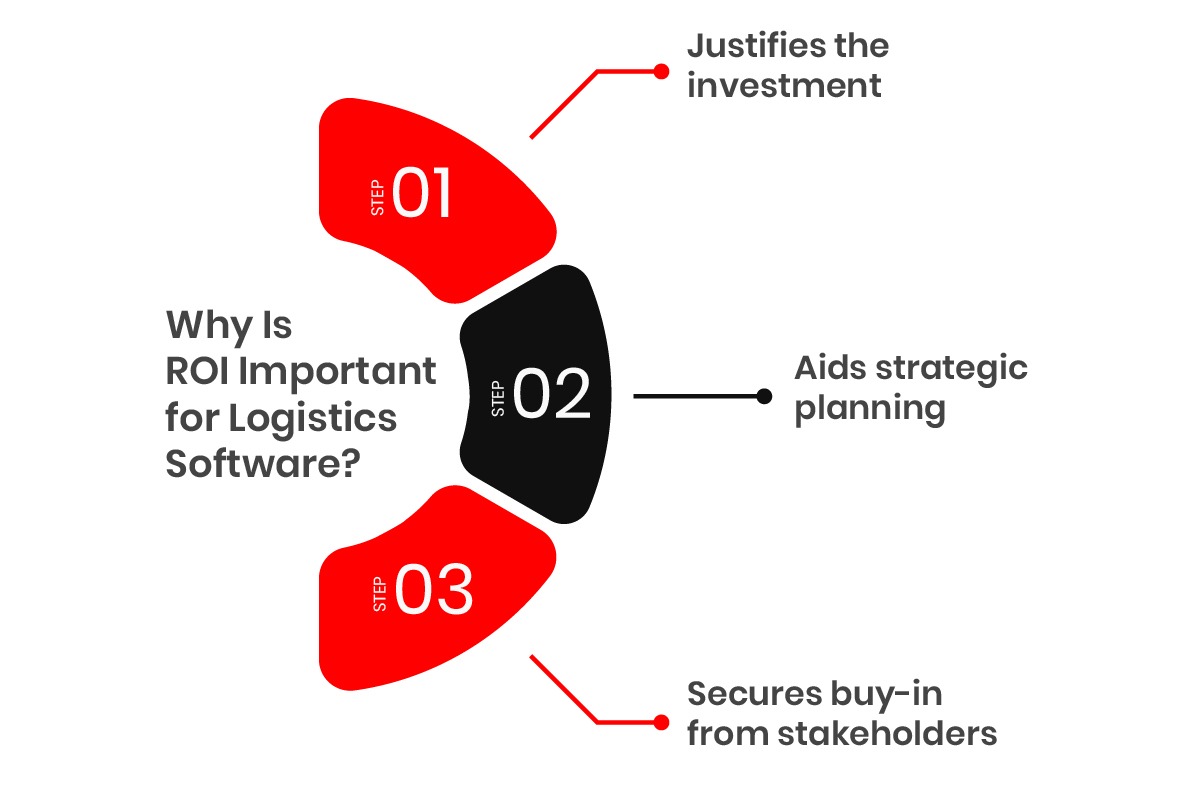
  • Justifies the Investment: Whether you’re a logistics manager, CFO, or CEO, proving ROI helps validate the decision to invest in custom logistics software. It’s about making the case that the technology will pay for itself over time.
  • Aids Strategic Planning: ROI isn’t just a number; it’s a roadmap. By understanding how ROI impacts your business, you can better allocate resources, prioritize investments, and make informed decisions that support long-term goals.
  • Secures Buy-In from Stakeholders: For any large investment, especially one as significant as logistics software, ROI is the language stakeholders understand. A clear ROI calculation gives them confidence that the project will lead to measurable improvements.

Breaking Down the Key Components of ROI in Logistics Software

When calculating ROI, you’re not just looking at the software’s upfront cost. Several factors contribute to ROI in logistics software, and each one plays a role in how it impacts your business. Let’s break it down:

Development Costs

The initial investment includes software development, custom features, design, testing, and project management. This is typically the largest portion of the cost. For example, a custom logistics platform that integrates warehouse management system (WMS), freight management system, transportation management (TMS), and real-time data analytics will require substantial upfront development.

Implementation & Integration Costs

Once the software is built, you need to integrate it with your existing systems (ERP, WMS, TMS, etc.). This includes the cost of integrating data, training employees, and configuring the system to match your operations. For instance, Integration with existing systems like an ERP system can increase your overall project costs by 15–25%, depending on complexity.

Operational Efficiency Gains

This is the real payoff, logistics software can drastically reduce inefficiencies in supply chain processes. Automating manual tasks, optimizing routes, and improving inventory management leads to immediate cost savings. For example, route optimization software alone can reduce fuel consumption by up to 15%—a significant savings for companies managing large fleets.

Ongoing Maintenance & Support

After the software is live, ongoing updates, bug fixes, security patches, and scalability enhancements ensure the system stays up-to-date and continues to deliver value. For example, regular maintenance costs are typically 10–15% of the initial development cost per year, but they’re essential for long-term functionality.

Revenue Growth

Improved efficiency, faster deliveries, and higher customer satisfaction can directly impact your revenue. Logistics software can help you deliver more with fewer resources, thus creating higher profit margins. Example, companies with improved order fulfillment and real-time tracking report 15-20% higher customer retention, which can significantly boost revenue over time.

The initial investment in custom logistics software includes development, custom features, and integration with existing systems. For a more detailed breakdown of these costs and what to expect, check out our full guide on logistics software development cost. 

Why ROI Should Be Your Key Metric for Logistics Software

ROI isn’t just a financial figure, it’s the compass for making smart, data-driven decisions. As businesses grow and logistics operations become more complex, understanding the true impact of technology is essential.

Here’s why ROI should be at the heart of your logistics software investment decision:

  • Guides Future Investments: Understanding your ROI helps you in making better predictions for future tech investments. If your logistics software generates strong ROI, you can confidently reinvest that savings into more innovation.
  • Enhances Operational Transparency: With clear ROI metrics, you gain a full understanding of where your money is going, and where it’s coming back. It helps you spot areas for improvement and fine-tune your logistics processes to achieve the highest returns.
  • Aligns with Business Goals: ROI gives you a way to directly link technology investments with your core business objectives, whether that’s cost reduction, revenue generation, or customer satisfaction.

Why Custom Logistics Software Is the Key to Maximizing ROI
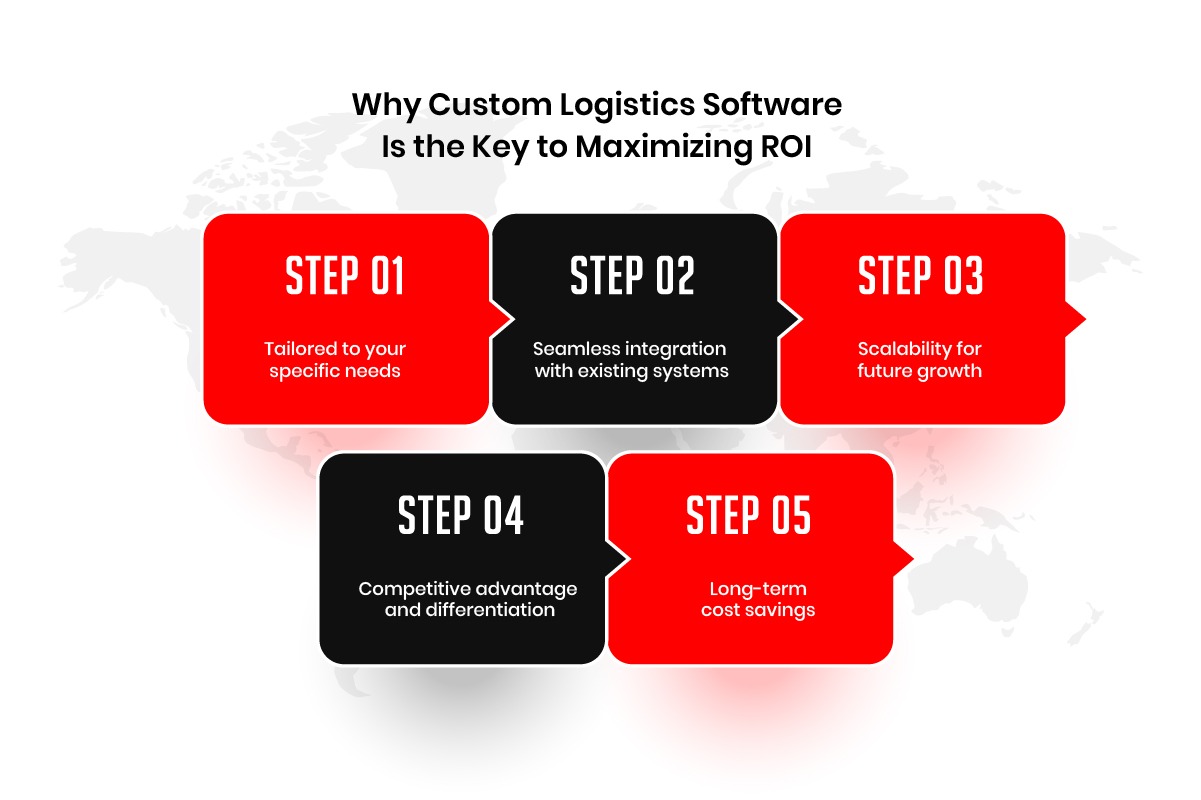
Why Custom Logistics Software Is the Key to Maximizing ROI

In a world where supply chains span continents and customer expectations keep escalating, relying on off-the-shelf logistics software often leads to limitations. While generic solutions may appear cost-effective at first, they fall short when it comes to adapting to your unique business needs.

This is where custom logistics software makes all the difference. Designed specifically to meet your requirements, custom solutions are built to align with your unique workflows, making them more efficient, scalable, and capable of driving greater returns. Here’s why:

Tailored to Your Specific Needs

Off-the-shelf software is designed to serve a broad market, often leading to compromises in functionality. But custom software is built specifically for your operations, allowing you to prioritize the exact features and functionalities that matter most.

Example: If your business relies on multi-modal transportation (air, road, sea), custom software can integrate features that manage the complexities of such a supply chain more efficiently than a generic solution.

Benefit for ROI: Tailored software ensures that you’re not paying for unnecessary features or missing out on key functionalities. You get the exact tools needed to improve efficiency, cut unnecessary costs, and optimize workflows.

Seamless Integration with Existing Systems

Custom software can integrate seamlessly with your existing systems, such as your ERP (Enterprise Resource Planning), WMS (Warehouse Management System), TMS (Transportation Management System), and more. This integration is essential for providing a unified view of your logistics operations, helping you make faster, data-driven decisions.

Example: If you have an existing TMS in place for transportation management, custom logistics software can integrate your shipping schedules, routes, and real-time tracking into one cohesive system without requiring significant workflow changes.

Benefit for ROI: Seamless integration minimizes the risk of operational disruptions and reduces implementation time and costs associated with transitioning to a new software system. It ensures smoother data flows and real-time visibility, ultimately leading to better decision-making and higher productivity.

Scalability for Future Growth

As your business grows, so do the demands on your logistics operations. A custom logistics solution is designed to scale along with your business, ensuring that you can continue meeting customer expectations without needing a complete overhaul of your systems.

Example: If you expand your operations into new regions or add more delivery routes, your software can be upgraded to handle the increased volume and complexity, without sacrificing efficiency.

Benefit for ROI: Scalable software ensures that your investment continues to pay off as your business evolves. You won’t need to re-invest in new systems each time your operations expand. This future-proofs your investment, making sure you get long-term value from the software.

Competitive Advantage and Differentiation

Custom logistics software can give you a distinct competitive edge. By enabling features that directly address your unique operational challenges, you can differentiate yourself in the marketplace. Whether it’s through faster deliveries, improved accuracy, or better customer service, your custom solution can help you stand out.

Example: If you’re a last-mile delivery service, custom software can allow you to optimize delivery windows, track shipments in real-time, and keep customers updated—providing a service that competitors can’t easily replicate.

Benefit for ROI: Having a competitive edge can directly lead to higher revenue by attracting more customers, increasing retention, and even allowing you to charge premium prices for faster, more reliable service.

Long-Term Cost Savings

While the upfront cost of developing custom logistics software can be higher, the long-term benefits often outweigh the initial investment. With improved operational efficiencies, automated tasks, and data-driven insights, you can significantly reduce ongoing costs across your supply chain.

Example: Automation of order fulfillment, route optimization, and inventory management can reduce human error, improve resource utilization, and cut down on overstocking; all of which result in cost savings over time.

Benefit for ROI: Custom logistics software helps you save money in the long run, with gains from reduced labor costs, optimized resources, and improved process efficiency.

Custom logistics software is designed to fit your business like a glove, providing unique features that help you optimize operations, reduce costs, and increase revenue. It is scalable, integrates seamlessly with your existing systems, and provides a competitive advantage; making it one of the smartest investments you can make for long-term business success.

The ROI from a custom solution may take time to realize fully, but the benefits of tailored fit, seamless integration, and ongoing adaptability ensure that your investment will continue to deliver value for years to come.

Maximize Efficiency with Custom Logistics Software

Custom solutions designed for your business needs lead to measurable ROI. Let us help you create the perfect system.

Key Metrics to Track for ROI in Logistics Software

To calculate the ROI of logistics software, tracking the right metrics is essential. Below are the key performance indicators (KPIs) that show the true impact of your investment.

Operational Cost Savings

These metrics reflect how much the software reduces costs by improving operational efficiency.

  • Fuel Savings: Optimized routes reduce fuel consumption by up to 15%. Software that calculates the best routes helps minimize fuel costs, directly impacting your bottom line.
  • Labor Savings: Automation cuts manual tasks, reducing labor hours by 30%. Tasks like inventory checks and data entry can be automated, saving on staff time.
  • Inventory Holding Costs: Real-time tracking and optimized inventory management can cut storage costs by 20-30%. Reducing overstock and improving stock rotation reduces warehousing expenses.
  • Error Reduction: Fewer errors in order processing and returns save on rework costs. Software minimizes human mistakes, leading to fewer costly returns and corrections.

Efficiency & Productivity Gains

Measuring how much more productive your operations become due to streamlined processes and automation.

  • Faster Order Fulfillment: Streamlined processes reduce order processing times. Faster fulfillment means more orders can be processed with fewer resources.
  • Increased Throughput: More goods processed without increasing labor or equipment. Your logistics operation can handle more volume efficiently, boosting revenue.
  • Reduced Administrative Overhead: Automation reduces up to 40% of manual administrative work. Software can handle routine tasks, freeing up your team to focus on high-value activities.
  • Improved Asset Utilization: Better management of vehicles, warehouses, and equipment. Efficient scheduling and space utilization reduce idle times and maximize asset productivity.

Revenue & Customer Satisfaction

These metrics help tracking the effect of the software on customer experience and revenue generation.

  • On-Time Delivery Rates: Improved delivery tracking leads to higher on-time performance, which boosts customer satisfaction and repeat business.
  • Customer Retention: Enhancing delivery times and service quality can improve retention by 5%, which can increase profits by 25-95%.
  • New Revenue Streams: With enhanced capabilities, you can offer premium services (e.g., same-day or real-time tracking) that generate additional income.
  • Customer Acquisition: A reputation for reliability and fast delivery attracts more customers. Satisfied clients are likely to recommend your services, bringing in new business.

Data-Driven Insights

Real-time data and analytics are crucial for optimizing operations and making informed business decisions.

  • Real-Time Tracking: Allows for quick identification of delays and potential issues. Tracking shipments and inventory in real-time helps prevent problems before they escalate.
  • Predictive Analytics: Improves forecasting by predicting demand and optimizing inventory levels. This leads to better resource allocation and fewer stockouts or excess inventory.
  • Strategic Optimization: Continuous process improvements based on data-driven insights. The software helps you identify inefficiencies, allowing for ongoing optimization in routes, staffing, and resource management.

How to Track These Metrics Effectively

  • Use Dashboards: Most logistics software includes built-in analytics and dashboards that provide real-time data. These tools centralize key metrics, making it easy to track performance.
  • Establish Benchmarks: Set baseline metrics before implementing the software to make sure you’re measuring improvements accurately. This allows you to compare pre- and post-implementation performance.
  • Regular Reviews: Periodically review these metrics to identify areas for further improvement. Regular tracking ensures continuous growth and optimization.

By focusing on fuel savings, labor reductions, customer satisfaction, and efficiency gains, you’ll have a clear view of the ROI of your logistics software. Keep these metrics under regular review to ensure the software continues to deliver value as your operations evolve.

Step-by-Step Guide to Calculating Custom Logistics Software ROI

To calculate the ROI of your custom logistics software, follow these key steps:
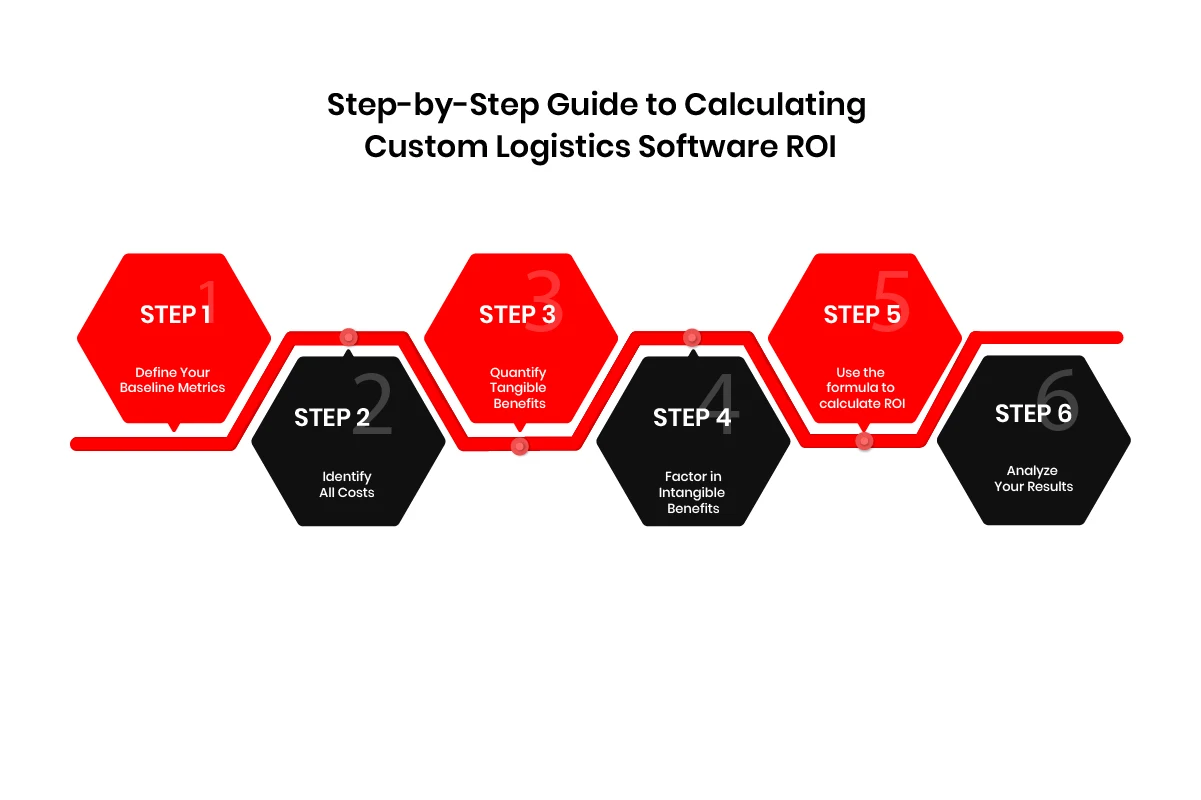
calculating custom logistics software ROI

Step 1: Define Your Baseline Metrics

Start by gathering data on current operational costs (fuel, labor, inventory, etc.) and key performance indicators (KPIs) like order fulfillment time and customer satisfaction. This gives you a clear “before” picture.

Step 2: Identify All Costs

Calculate the total investment, including:

  • Development costs: Developers, designers, and project management.
  • Implementation costs: Integration with existing systems.
  • Training and support costs: Onboarding and ongoing technical support.
  • Maintenance costs: Updates and security.

Step 3: Quantify Tangible Benefits

Measure the direct benefits like:

  • Cost savings: Fuel, labor, inventory holding.
  • Revenue growth: Customer retention, faster deliveries, and new services.

Step 4: Factor in Intangible Benefits

Consider qualitative benefits like:

  • Customer satisfaction: Leads to loyalty and repeat business.
  • Employee productivity: Streamlined processes improve staff efficiency.

Step 5: Apply the ROI Formula

Use the formula to calculate ROI:

ROI= (Total Benefits−Total Costs/Total Cost) ×100

For Example:

If Benefits = $500,000 and Costs = $200,000,

Then ROI = 150%

Step 6: Analyze Your Results

Evaluate your ROI by looking at:

  • Payback period: How long until you recoup your costs?
  • Net Present Value (NPV): For a more accurate long-term view.

By following these steps, you can confidently calculate the ROI of your logistics software and track its ongoing impact on your operations.

Don’t Just Invest, Invest Smartly

Ensure your logistics software delivers long-term value with expert guidance from AppVerticals.

How to Maximize ROI from Your Custom Logistics Software

To ensure your logistics software continues delivering strong ROI, focus on these key strategies:

1. Continuously Optimize Software Use

  • Monitor KPIs regularly to identify opportunities for cost reduction and efficiency improvements.
  • Refine workflows using data insights to make small, impactful adjustments over time.

Why it matters: Continuous optimization keeps the software aligned with evolving business needs.

2. Ensure Full User Adoption

  • Train your team regularly to ensure they’re using all software features.
  • Encourage feedback from users to improve software performance.

Why it matters: Full adoption maximizes software value by ensuring all features are leveraged.

3. Design for Scalability

  • Plan for growth by ensuring the software can easily accommodate new features and larger operations.
  • Use incremental upgrades to expand functionality without major overhauls.

Why it matters: Scalable software adapts to your growing business, saving on future redevelopment costs.

4. Choose the Right Development Partner

  • Work with experienced developers who understand logistics to ensure optimal performance.
  • Ensure ongoing support to keep the software updated and functional.

Why it matters: The right partner provides continuous value through expert support and updates.

5. Phased Rollouts for Faster ROI

  • Implement in phases, starting with critical areas to see early benefits.
  • Make iterative improvements based on real-world data.

Why it matters: Phased rollouts allow for quicker returns and reduce the risk of large-scale failures.

Final Thoughts

Investing in custom logistics software offers significant potential for operational improvements, cost savings, and revenue growth. By accurately calculating ROI, tracking key metrics, and continuously optimizing your software, you can unlock its full value and ensure long-term success.

Maximizing ROI is an ongoing process that requires thoughtful planning, full user adoption, and scalable solutions. With the right development partner and a clear strategy, your logistics software will not only pay off but also provide a strong foundation for future growth.

At AppVerticals, we specialize in custom logistics software development that is tailored to meet the unique needs of your business. Our expert team can help you build a solution that optimizes your logistics operations, maximizes ROI, and scales with your business.

Future-Proof Your Logistics Operations

With scalable, tailored logistics software, your business can grow efficiently. Let’s discuss your custom software needs today.

How Much Does It Cost to Make an App In 2026? A Detailed Guide

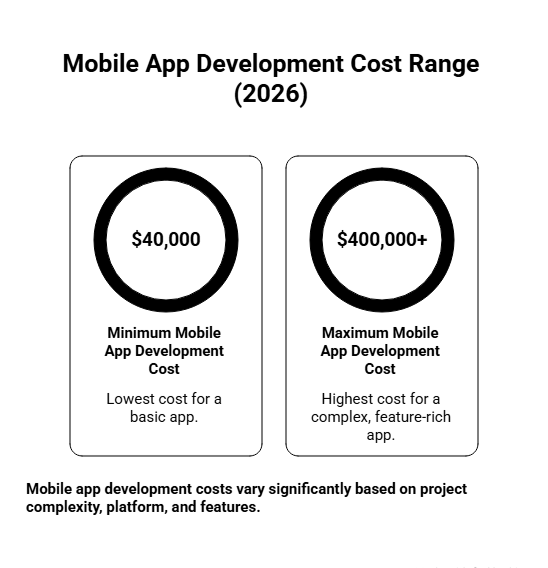
In 2026, the average mobile app development cost ranges from $40,000 to $400,000 or more, depending on complexity, platform, and features.

Mobile app development is no longer just a line item, it’s a strategic investment shaping your bottom line and scalability. The cost structure now includes not only development but also compliance, infrastructure, app store fees, user acquisition, and long-term retention, which can far surpass initial development costs as your app scales.

As expectations for UX, security, AI, and performance rise, so do engineering hours and risks. Gartner predicts a 25% drop in mobile app usage by 2027 due to AI assistants, making it crucial to focus your ROI strategy on retention, differentiation, and efficient unit economics.

In this guide, discover the true cost of mobile app development, including hidden expenses, cost drivers, and strategies to optimize your budget and ROI.

Key Takeaways:

  • Average App Development Cost: Mobile apps development cost in 2026 range from $40K to $400K+ depending on complexity, features, and platform. Simple apps: $5K–$50K, Medium: $50K–$120K, Complex/AI-powered: $120K–$500K+.
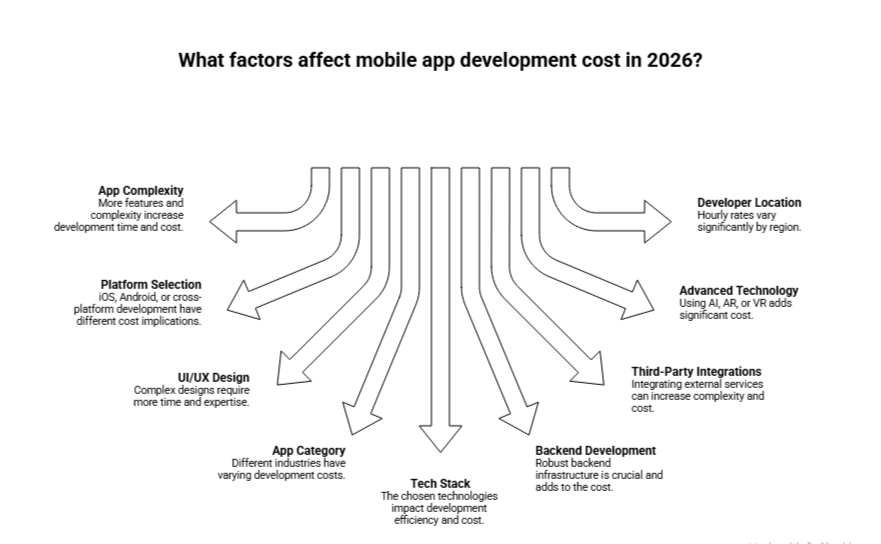
  • Factors Affecting Cost: App complexity, features, platform choice, UI/UX design, industry type, tech stack, backend infrastructure, and developer location are all the key factors driving the cost.
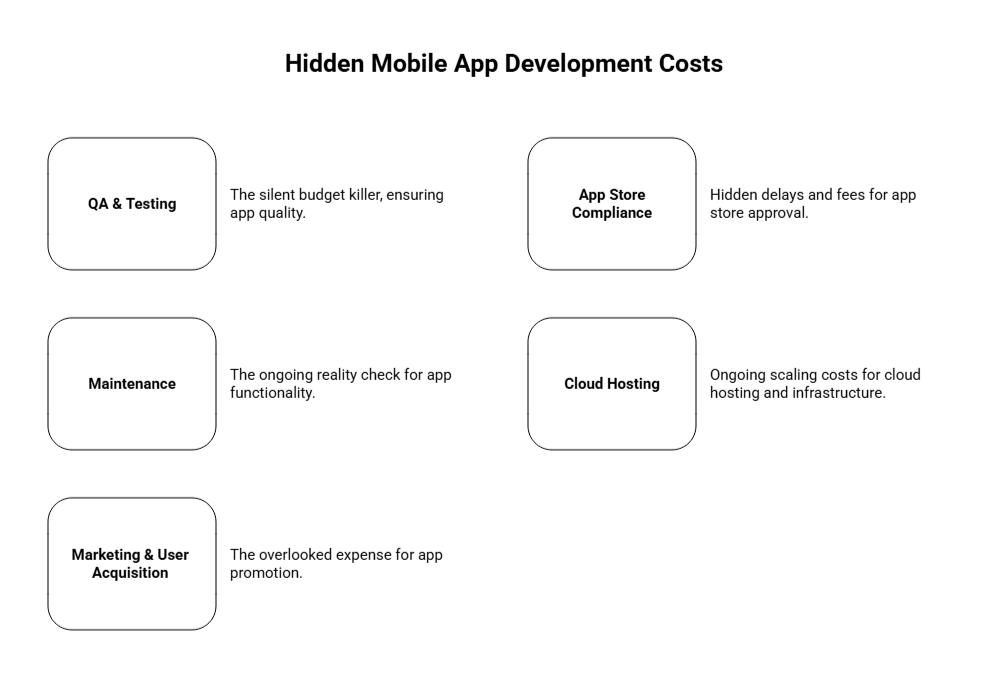
  • Hidden Costs: Post-launch expenses like QA & testing, app store compliance, cloud hosting, maintenance, and marketing/user acquisition can add significantly to budgets.
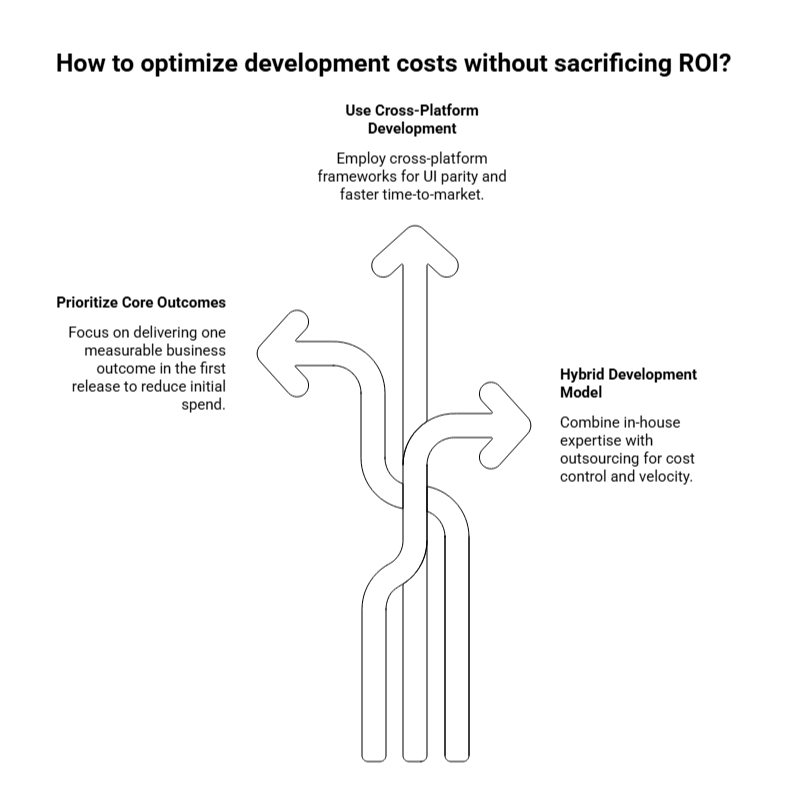
  • Cost Optimization: Focus on core outcomes, MVP discipline, phased development, selective cross-platform builds, and hybrid in-house/outsourced teams to control spending.
  • Monetization Impact: Freemium, subscription, and ad-based models affect engineering scope, analytics needs, retention mechanics, and platform fees, impacting upfront and ongoing costs.

Mobile App Development Cost Breakdown: A Quick Overview

Wondering what causes a significant variation in the cost of mobile app development, ranging from as low as $40,000 to a massive $400,000 or more? The truth is: app development costs are largely driven by app complexity and features you include.

Here’s a quick breakdown to give you a sense of the cost spectrum before we dive into the critical details:

App Type Cost Range Description
Simple Apps $5,000 – $50,000 Basic functionality (e.g., simple MVPs, static apps, prototypes).
Medium Apps $50,000 – $120,000 Moderate complexity (e.g., apps with user logins, APIs, integrations).
Complex Apps $120,000 – $300,000+ High complexity (e.g., real-time features, AI, geolocation, advanced UI).

If you’re building an app like Uber, or one that requires real-time data and advanced functionality (e.g., AI, geolocation), you’re in the “complex” range.

Pro tip for investors is to focus on solving a real customer problem at scale rather than adding unnecessary features. It’ll help you manage cost expectations early on.

How to Estimate the Average App Development Costs?

Now, let’s talk about how to actually estimate costs, because as we both know, this isn’t just about taking a wild guess.

Tools and Frameworks to Use for Cost Estimation

Here’s the deal: I don’t rely on rough estimates. Instead, I use frameworks that help me break down the costs in a way that’s defensible and accurate:

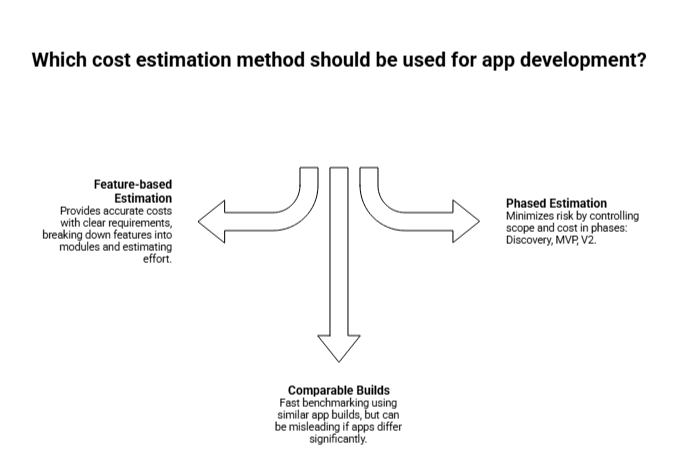
cost estimation methods for app development

Cloud Pricing Calculators: Platforms like AWS and Firebase have calculators to help forecast backend costs early on. These can be game-changers when you’re planning your infrastructure and scaling strategy.

Third-party API Pricing: Using services like Twilio or Stripe? Be aware of their pricing models (Twilio’s SMS pricing can surprise you, especially if your app uses OTPs).

I treat calculators as sanity checks, they’re useful to validate if you’re in the right ballpark. But remember: these tools can’t replace deep business analysis, and the more custom your app, the less useful generic calculators will be.

Estimation Methods I Recommend

  • Feature-based (Scope → Modules → Effort): This is one of the most accurate ways to estimate costs when you have clear requirements upfront. You’ll break down features into modules and estimate the hours needed for each.
  • Comparable Builds (Benchmarking): If you have access to similar app builds, use them to create a baseline. It’s fast, but be cautious, it can mislead you if your app differs significantly.
  • Phased Estimation: I always advise CFOs to think in phases: Discovery → MVP → V2. This approach minimizes risk by controlling scope and cost in each phase.

Get Your App Cost Estimate Today

Know exactly what your app will cost before you start, no surprises, just clarity.

Factors Affecting Mobile App Development Cost in 2026: A Detailed Analysis

In 2026, mobile app development costs span a broad spectrum, with prices ranging from $40,000 for basic apps to over $400,000+ for enterprise-grade solutions. The costs are shaped by a variety of factors, and understanding each one is essential to making informed decisions that align with your business objectives.

Below, we break down these cost drivers, giving you detailed insights to navigate your app development journey effectively.

factors affecting mobile app development cost in 2026

1. App Complexity & Feature Set

App complexity is the most significant cost driver, directly affecting development time, team size, and the technical complexity of the app. The more advanced your app’s features, the higher the development costs.

Here’s a quick breakdown of costs by complexity level:

Complexity Level Features Included Development Time Cost Range (USD)
Simple App Basic UI, 3-5 screens, limited backend, user authentication, simple forms 2-4 months $25,000 – $70,000
Medium-Complexity App User accounts, payment integration, push notifications, social login, API integrations, admin panel 4-9 months $70,000 – $200,000
Complex App Real-time features, advanced integrations, scalable backend, multiple user roles, analytics dashboard, in-app messaging 9-18 months $200,000 – $500,000+
Enterprise/AI-Powered App AI/ML capabilities, IoT integration, blockchain, advanced security, compliance features, multi-tenant architecture 12-24+ months $300,000 – $1,000,000+

Suppose you’re building a ride-hailing app like Uber which requires multiple apps (Rider, Driver, Admin panel) with real-time GPS, payment processing, and matching algorithms. This can cost around $150,000 – $500,000+, with development time ranging from 9-15 months.

2. Platform Selection: iOS, Android, or Cross-Platform

Your platform choice dramatically impacts both initial development costs and long-term maintenance expenses. Here’s a comparison:

Platform Strategy Codebases Cost Range Time to Market Best For
Native iOS Only 1 $30,000 – $150,000 Medium Premium iOS-focused markets
Native Android Only 1 $30,000 – $150,000 Medium Android-dominant regions
Native iOS + Android 2 $120,000 – $300,000+ Slowest Performance-critical apps
Cross-Platform (Flutter/React Native) 1 $50,000 – $250,000 Fast MVPs, SaaS, cost-effective launches

AppVerticals built Spruce using React Native and helped the client save 30-40% of the cost they’d had to spend building separate native apps, while also maintaining 85-95% of native performance.

3. UI/UX Design Complexity

UI/UX design directly impacts user retention and overall app success. In 2026, users expect polished, intuitive interfaces across all industries, which can elevate your app’s user experience and ROI.

Here’s a breakdown of design costs:

Complexity Level Features Included Development Time Cost Range (USD)
Simple App Basic UI, 3-5 screens, limited backend, user authentication, simple forms 2-4 months $25,000 – $70,000
Medium-Complexity App User accounts, payment integration, push notifications, social login, API integrations, admin panel 4-9 months $70,000 – $200,000
Complex App Real-time features, advanced integrations, scalable backend, multiple user roles, analytics dashboard, in-app messaging 9-18 months $200,000 – $500,000+
Enterprise/AI-Powered App AI/ML capabilities, IoT integration, blockchain, advanced security, compliance features, multi-tenant architecture 12-24+ months $300,000 – $1,000,000+

4. App Category and Industry Type

Different industries have specific needs, which directly impact costs. Healthcare apps, for instance, need to adhere to strict compliance rules, such as HIPAA, which increases costs.

AppVerticals built Visionse, which is a HIPAA-compliant app aimed at redefining mental healthcare through technology. The additional requirement of compliance added to the overall costs.

Industry Category Key Features Development Cost (USD) Timeline
E-commerce Apps Product catalogs, payment gateways, inventory management $80,000 – $300,000+ 4-9 months
Healthcare Apps HIPAA compliance, telemedicine, EHR integration $200,000 – $1,000,000+ 9-18 months
Fintech Apps Secure transactions, KYC/AML compliance, banking integrations $200,000 – $1,000,000+ 9-18 months
Social Media Apps Content feeds, real-time messaging, media handling $150,000 – $500,000+ 6-12 months
On-Demand Services Real-time tracking, booking systems, multi-user roles $150,000 – $500,000+ 9-15 months

5. Tech Stack

The choice of technology stack, including backend services, databases, and cloud infrastructure, can significantly affect both initial costs and ongoing expenses.

Tech Stack Component Description Cost Range (USD)
Backend Node.js, Ruby on Rails, Python $20,000 – $60,000
Database SQL, NoSQL, Firebase $5,000 – $50,000+
Cloud Infrastructure AWS, Google Cloud, Azure $200 – $5,000+ monthly
Security SSL certificates, encryption, GDPR compliance $10,000 – $100,000+

6. Backend Development & Infrastructure

Backend complexity scales with user volume, data processing needs, and integration requirements.

Here’s how backend costs break down:

Backend Complexity Components Cost Range
Basic Backend Simple database, user authentication, basic API $5,000 – $20,000
Moderate Backend User management, CMS, third-party integrations $20,000 – $60,000
Advanced Backend Real-time data processing, scalable architecture, AI model deployment $60,000 – $200,000+

Hidden Cost Alert: Cloud infrastructure (AWS, Google Cloud, Azure) can cost $200-$5,000+ monthly, depending on user base and data processing volume.

7. Third-Party Integrations

Integrating third-party services like payment gateways and analytics tools is essential for functionality but adds to both development and operational costs.

Third-Party Service Use Case Cost Range (USD)
Payment Gateways Secure transactions 2.9% + 30¢ per transaction
Analytics Data tracking and insights $1,200 – $24,000 annually
Push Notifications Real-time alerts to users $1,000 – $10,000 annually
Authentication Services User authentication $2,000 – $20,000 annually

 8. Advanced Technology Integration

Cutting-edge technologies like AI, IoT, and Blockchain significantly increase development costs due to their complexity. Here’s a breakdown of these integrations:

Technology Features Included Development Cost Use Cases
AI/ML Integration Recommendation engines, chatbots, NLP $50,000 – $300,000+ Personalization, automation
IoT Integration Hardware connectivity, sensor data processing $80,000 – $500,000+ Smart home, wearables
Blockchain Smart contracts, decentralized storage $100,000 – $500,000+ Fintech, supply chain
AR/VR 3D modeling, virtual environments $100,000 – $400,000+ Gaming, retail

9. Developer Location & Hourly Rates

Geographic location of your development team plays a crucial role in project costs. Here’s a breakdown of global hourly rates:

Region Hourly Rate Range Quality Level Communication
North America $80 – $180+ Premium Excellent
Western Europe $60 – $150 High Excellent
Eastern Europe $35 – $80 High Very Good
Latin America $30 – $70 Medium-High Good
India $20 – $60 Variable Good

Talk to an App Expert

Discuss your project with our specialists and get actionable guidance tailored to your goals.

The Hidden Costs That Can Derail Your Mobile App Development Budget

When advising executives on app development, I often stress that post-launch costs are just as critical, if not more, than the initial development phase. These costs can quickly add up and potentially derail your budget if not carefully accounted for.

While development costs are relatively easier to estimate, the hidden costs that come after launch can catch even seasoned executives by surprise.

Here’s a breakdown of these often-overlooked areas:

hidden mobile app development costs

1. QA & Testing: The Silent Budget Killer

Testing is one of the most underestimated areas when it comes to app development costs. If you think your app is ready to go live after development, think again. Thorough Quality Assurance (QA) is essential to ensuring your app performs well across various devices, operating systems, and user conditions.

Testing Type Cost Range Description
Manual Testing $8,000 – $25,000 Functional testing, usability testing, exploratory testing
Automated Testing $10,000 – $30,000 Regression tests, unit tests, integration tests
Performance Testing $5,000 – $15,000 Load testing, stress testing, scalability tests
Security Testing $8,000 – $30,000 Penetration testing, vulnerability assessments

Testing can easily consume 15-25% of your total development budget. While it may seem like an additional, avoidable cost, poor testing can lead to app crashes, data breaches, and reputation damage, which in turn can be much more expensive to fix in the long run.

Effective testing not only ensures quality but also saves you 10x the cost of fixing bugs after launch, which can be disastrous for your app’s user retention and overall brand reputation.

2. App Store Compliance: The Hidden Delays and Fees

Navigating the App Store submission process can be a minefield. Apple’s App Store and Google Play each have strict guidelines, and ensuring your app complies with all their requirements is crucial for timely approval.

Here are some of the compliance-related costs you might encounter:

Compliance Area Potential Costs Potential Delays
Apple App Store $99/year (Developer Account) Delays in approval due to metadata issues, missing demo accounts, or privacy disclosures
Google Play Store $25 one-time (Developer Account) Review delays (sometimes up to 7 days) for missing or incorrect information
App Store Optimization $5,000 – $15,000 Costs for keyword research, visual assets, and performance tracking post-launch

 Delayed Approvals

Delays during app store review periods can cost you more than just time, there’s a potential for lost revenue, missed launch windows, and even reputational damage. Ensuring your app meets all compliance standards upfront is an investment in smooth, hassle-free launches.

An app I worked on faced a 7-day delay during the Google Play review process because of incomplete metadata. The developer account fees and the time wasted caused unaccounted costs, and the delay reduced potential user acquisition in that window.

3. Maintenance: The Ongoing Reality Check

Once your app is live, the costs don’t stop there. App maintenance is a continuous commitment that ensures your app remains functional, secure, and relevant. On average, businesses spend 15-20% of the initial development cost each year on maintenance, which includes:

Maintenance Tasks Cost Range Frequency
Bug Fixes & Updates $5,000 – $20,000+ annually Quarterly
Security Patches $3,000 – $10,000+ annually As needed
Operating System Updates $2,000 – $10,000+ annually Depends on OS releases
Feature Upgrades $10,000 – $50,000+ annually New features & improvements

 Why Maintenance Costs Add Up?

Maintenance costs rise as you add more features and users. Additionally, frequent OS updates (iOS/Android) and new device launches mean your app needs regular testing and updates to ensure it stays compatible and secure.

4. Cloud Hosting & Infrastructure: Ongoing Scaling Costs

As your app grows, so will your infrastructure costs. While the initial setup of servers, databases, and cloud services might seem manageable, the ongoing cloud hosting costs can skyrocket, especially for apps with large user bases or high data consumption.

Infrastructure Costs Monthly Cost Range Description
Cloud Hosting (AWS/Azure) $200 – $5,000+ Depends on app traffic and data storage
CDN Costs $500 – $3,000+ Content delivery networks for global access
Database Costs $200 – $5,000+ Data storage, backups, and scaling

 Scaling Costs

As more users join your app, data storage, processing, and bandwidth requirements will increase. Services like AWS, Google Cloud, and Azure typically operate on usage-based models, meaning the more data your app handles, the more you’ll pay.

5. Marketing & User Acquisition: The Overlooked Expense

One of the largest hidden costs that often gets overlooked is user acquisition. The reality is, building an app is just part of the equation, and the real challenge comes in attracting and retaining users. The cost per install (CPI) benchmarks can range from $1.5 – $4.00 for Android and $1.5 – $3.5 for iOS, but North America often experiences higher rates.

Marketing Expenses Cost Range Frequency
App Store Optimization (ASO) $5,000 – $15,000+ Pre-launch and ongoing
Paid Advertising $50,000 – $200,000+ annually Ongoing
Content Marketing $30,000 – $100,000+ annually Ongoing

 Cost of Acquiring Users

The initial marketing budget to acquire users can often exceed the cost of development, especially in competitive markets. Platforms like Facebook, Google Ads, and ASO (App Store Optimization) services can help, but they come at a price.

I always remind my clients: Don’t spend $150k building an app only to realize you don’t have enough budget to launch it effectively. Effective marketing and user acquisition strategy are essential for getting your app off the ground.

App Development Process Breakdown: Step-by-Step Cost Analysis (2026)

When executives ask me where the money actually goes during app development, this is the framework I walk them through. App costs don’t hit all at once, they accumulate across distinct phases, each with its own risk profile and budget impact. Skipping or underfunding any phase almost always results in rework, delays, or post-launch failures. Our mobile app development guide walks you through these phases with more detailed explanations to help you manage each stage effectively and optimize costs.

Below is a realistic, phase-by-phase breakdown of the mobile app development process in 2026, including cost ranges and what show up in real projects.

1. Discovery & Research Phase

This phase defines what you’re building and why. It includes market research, competitor analysis, technical feasibility checks, and scope definition. Strong discovery reduces scope creep later, weak discovery guarantees it.

I’ve seen teams save 30–40% in downstream costs simply by validating assumptions early instead of “figuring it out during development.”

Activity What’s Included Cost Range (USD)
Market & Competitor Research Market sizing, feature benchmarking $2,000 – $6,000
Product Requirements User stories, feature prioritization $3,000 – $10,000
Technical Feasibility Architecture planning, risk assessment $2,000 – $7,000
Total Discovery Cost $7,000 – $25,000

2. UI/UX Design Phase

Design translates strategy into user flows, wireframes, and final visuals. In 2026, design is no longer cosmetic, it directly affects retention, conversion, and CAC.

Apps with poor UX don’t fail at launch, they fail at retention. Design fixes post-launch cost significantly more than doing it right up front.

Design Stage Deliverables Cost Range (USD)
UX Architecture User flows, wireframes $4,000 – $15,000
UI Design Visual screens, design system $8,000 – $35,000
Animations & Micro-interactions Transitions, feedback states $3,000 – $25,000
Total Design Cost $15,000 – $60,000

 3. Backend Development

This is the app’s foundation; databases, APIs, authentication, business logic, and integrations. Backend complexity grows with users, data, and real-time features.

Backend shortcuts are the most expensive mistakes I see. Scalability issues don’t show up at 1,000 users, they appear at 50,000.

Backend Level Scope Cost Range (USD)
Basic Backend Auth, database, simple APIs $10,000 – $25,000
Moderate Backend Admin panel, integrations, caching $25,000 – $60,000
Advanced Backend Real-time processing, scalable architecture $60,000 – $200,000+

 4. Frontend / Mobile App Development

This is where users interact with your product; iOS, Android, or cross-platform builds. Cost depends on platform choice, feature depth, and performance requirements.

Performance issues, crashes, or UI inconsistencies directly affect ratings, retention, and app store visibility.

App Type Platform Scope Cost Range (USD)
Simple App Single platform, limited features $20,000 – $50,000
Medium App Cross-platform or dual native $50,000 – $120,000
Complex App Real-time, AI, high performance $120,000 – $300,000+

 5. Third-Party Integrations

Instead of building everything from scratch, most apps rely on external services for payments, notifications, analytics, and authentication.

Integrations reduce development time, but increase long-term operational costs if not planned properly.

Integration Type Examples Cost Impact
Payments Stripe, PayPal $3,000 – $10,000
Messaging & Notifications Firebase, Twilio $2,000 – $8,000
Analytics & Monitoring Mixpanel, GA $1,000 – $5,000
Auth & Security Auth0, OAuth $2,000 – $10,000

 6. Quality Assurance & Testing

Testing ensures the app works across devices, OS versions, and real-world conditions. Apps that skip proper QA don’t save money, they shift costs to user churn, negative reviews, and emergency patches.

7. App Launch & Store Deployment

This includes app store preparation, compliance checks, metadata, and final approvals. Apple and Google rejections cause delays, and delays increase burn rate.

Testing Type Coverage Cost Range (USD)
Manual QA Core flows, usability $8,000 – $25,000
Automated Testing Regression, stability $10,000 – $30,000
Performance & Security Load, stress, vulnerability testing $5,000 – $20,000
QA Total 15–25% of dev cost

8. Post-Launch Maintenance & Scaling

Once live, the app requires updates, security patches, OS compatibility fixes, and performance optimization. This is where many budgets collapse. Maintenance is not optional, it’s recurring.

Maintenance Area Annual Cost
Bug Fixes & Updates 15–20% of initial dev cost
Cloud Hosting $2,400 – $60,000+
Security & Compliance $5,000 – $50,000+
Feature Enhancements Variable

What Do Popular App Types Actually Cost to Build in 2026?

We’ll have been there, estimating the cost of successful apps wondering how much it would cost to build an app like Uber, WhatsApp, etc. The answer is rarely a flat number. App types don’t drive costs on their own, the technical demands behind them do. Below is how I map common app categories to the cost drivers that actually move budgets.

Messaging Apps (WhatsApp-Style)

Messaging apps look simple on the surface, but they’re among the most technically demanding products to scale.

Primary cost drivers

  • Real-time messaging infrastructure (WebSockets, pub/sub systems)
  • Message delivery guarantees & retry logic
  • Media storage and CDN costs
  • End-to-end encryption and security audits
  • Moderation tools and admin dashboards
  • Push notification reliability at scale

Typical cost range

  • $120,000 – $300,000+ for a production-ready MVP
  • Ongoing costs increase with message volume (SMS, OTPs, verification)

Messaging apps rarely fail at build time, they fail when concurrency, reliability, or moderation isn’t engineered early.

E-Commerce Apps (Adidas-Style)

E-commerce apps are operational systems, not just storefronts. Their costs rise with scale, integrations, and performance expectations.

Primary cost drivers

  • Product catalog & search performance
  • Personalization and recommendations
  • Payment processing and refunds
  • Inventory and order management
  • ERP / CRM integrations
  • High-traffic performance during sales events

Typical cost range

  • $80,000 – $250,000+ depending on integrations and scale

Margin reality: Payment processing (e.g., Stripe’s 2.9% + $0.30) directly impacts unit economics, this must be modeled during development, not after launch.

Ride-Hailing Apps (Uber-Style)

Ride-hailing apps are effectively three systems in one—and that’s where costs escalate.

Primary cost drivers

  • Rider app + Driver app + Admin panel
  • Real-time GPS tracking and routing
  • Matching algorithms and surge logic
  • Map usage (Google Maps billing changes matter here)
  • Dispute resolution and support workflows
  • Fraud prevention and rating systems

Typical cost range

  • $150,000 – $500,000+
  • 9–15 months for a stable, scalable release

Reality check: These apps are backend-heavy. Underinvesting in architecture almost guarantees scale problems.

Optimizing Development Costs (Without Killing ROI)

This is where I’m blunt with leadership teams: cost optimization is a strategy problem, not a staffing problem. Cheaper developers rarely fix expensive decisions.

Here’s how you can strategically optimize development costs without compromising on the quality:

optimizing app development costs

1. Prioritize Core Outcomes, Not Feature Lists

Your first release should prove one measurable business outcome:

  • Revenue
  • Retention
  • Operational efficiency
  • Risk reduction
  • Everything else waits.

Teams that enforce MVP discipline often reduce initial spend by 40–60% without sacrificing long-term scalability.

2. Use Cross-Platform Development Selectively

Cross-platform frameworks work well when:

  • UI parity is acceptable
  • Time-to-market matters
  • Hardware-level features are minimal

They are less suitable for:

  • Hardware-intensive apps
  • Advanced animations
  • Platform-specific UX differentiation

Typical savings: 30–40% vs dual native builds—when used correctly.

3. In-House vs Outsourcing: The 2026 Reality

Most mature teams now use a hybrid model:

  • Product ownership, architecture, and roadmap in-house
  • Development execution via nearshore/offshore partners

This balances:

  • Cost control
  • IP ownership
  • Delivery velocity

What’s the Most Cost-Efficient Way to Build an App?

The following process consistently produces the fewest surprises, and the strongest ROI.

  • Market Research & Discovery: Define outcomes, constraints, and success metrics.
  • Design: UX flows, prototyping, UI system, accessibility standards.
  • Development: Frontend + backend + integrations, built in phases.
  • Testing: QA coverage, performance testing, and security checks.
  • Launch: Store compliance, rollout planning, release monitoring.
  • Maintenance & Iteration: Analytics-driven updates, bug fixes, OS compatibility.

App Store and Google Play review timelines are real schedule risks, and that becomes cost risk when teams are idle or reworking submissions.

Schedule Your App ROI Strategy Call

Learn how to optimize development costs and maximize app ROI with our proven framework.

How Monetization Choices Change App Costs

Mobile app monetization isn’t just about revenue, it changes your engineering scope. Here’s the list of some very impactful app monetization strategies:

Freemium Models

It requires:

  • Strong onboarding
  • Retention mechanics
  • Analytics and experimentation frameworks
  • Lifecycle messaging

Cost implication: Higher upfront analytics and UX investment.

Subscription Models

It requires:

  • Billing and entitlement logic
  • Proration and upgrades
  • Account recovery workflows
  • Customer support tooling
  • Platform fees to factor in
  • Apple Small Business Program: 15% up to $1M
  • Google Play: 15% for first $1M, then 30%

Ad-Based Revenue Models

It requires:

  • Privacy-safe attribution
  • Careful UX tradeoffs
  • High DAU to offset CPI costs

ROI risk: Paid acquisition costs often exceed early ad revenue if retention is weak.

How AppVerticals Can Help Build a Cost-Effective Mobile Application?

AppVerticals helps teams control app development costs by turning business goals into a clearly scoped, phased build plan, so budgets are tied to outcomes, not assumptions. We focus on defining the right MVP, selecting fit-for-purpose technologies, and preventing scope creep before it turns into cost overruns.

Our teams design apps for iteration, not rework. That means scalable architecture, realistic timelines, and cost visibility at every stage, from discovery to post-launch optimization, so stakeholders can make informed decisions before costs escalate.

If your goal is to launch faster, spend smarter, and scale with confidence, AppVerticals provides the structure, technical expertise, and financial discipline required to build apps that deliver ROI without unnecessary spend.

Schedule Your App ROI Strategy Call

Learn how to optimize development costs and maximize app ROI with our proven framework.

More Related Guides

Top App Development Companies in Dallas & Their Best Developers (2026): Rankings, Pricing & Expert Comparison

Building a successful mobile app is not only about having a great concept or idea, instead, choosing the right partner is equally important.

When it comes to Dallas, it’s becoming a center for growing startups and entrepreneurs, providing them with unlimited growth opportunities. One of the many factors behind this rapid innovation happening in Dallas is the presence of top-notch app development companies. in 2026, businesses are choosing Dallas not only because of the affordability but for an uninterrupted access to the top engineering talent, technological innovation and agencies that succeed at delivering successful apps quicker than any other market. Whether you’re building a basic MVP, a cross-platform application or a full-fledged enterprise product, the city guarantees some of the finely skilled development teams across the country.

Confused how to choose the best partner? This guide lists down the top 10 app development companies in Dallas, highlighting their best developers, comparing prices, and breaking down the services they offer. Each company has been evaluated on the basis of industry expertise, tech stack, transparency, and real project outcomes; providing you with a clear picture of who can be your best app development partner in 2026.

Key Takeaways

  • Dallas is a fast-growing hub for mobile app development, offering competitive pricing and access to top talent.
  • Top app development companies in Dallas, like AppVerticals, provide a wide range of services including AI apps, SaaS, and cross-platform development.
  • Pricing in Dallas is more affordable compared to Silicon Valley and NYC, with hourly rates ranging from $50 to $200 depending on complexity.
  • Key industries benefiting from Dallas developers include healthcare, FinTech, logistics, and retail.
  • The app development process in Dallas includes discovery, design, development, and post-launch support, ensuring a comprehensive solution.
  • Dallas app developers offer advantages over offshore teams, such as better communication, faster project timelines, and a deep understanding of U.S. market needs.

Why Dallas Is One of the Fastest-Growing Hubs for Mobile App Development

There are several reasons why Dallas is becoming a growing hub for mobile app development, a few top among them includes:

A Booming Tech Ecosystem Backed by Fortune 500 Companies

Dallas is home to many Fortune 500 companies such as Texas Instruments, ExxonMobil, and AT&T, building the foundation of a dynamic business ecosystem. these giants help enhancing the local tech environment, turning Dallas into an integral part of the digital transformation across globe. This tech-driven environment gives boost to the app development companies helping business transform with cutting-edge mobile solutions.

Access to Top Engineering Talent & Multicultural Consumer Markets

There are multiple prestigious universities such as, Southern Methodist University and University of Texas, passing out hundreds of skilled engineers every year. Meaning, there’s easy access to the top talent. The app development companies in Dallas have the best developers hired, building robust solutions for businesses aiming to digitize.

Cost-Effective Development Compared to California & NYC

Major tech cities in the USA such as San Francisco and California are popular for their higher development costs. However, Dallas offer cost-effective solutions without compromising the quality by any means. The low cost of business and living in the city makes it an appealing choice for startups to invest in mobile app development, without having to exceed their budgets.

Rise of AI-Driven Product Innovation in Dallas Startups

Most startups in Dallas are adopting AI and machine learning technologies, helping businesses create robust mobile solutions. The increasing number of AI-powered applications, specifically, in the fields of finance, healthcare, and logistics, highlight the great potential of this city towards leading the future of mobile app development.

Why Businesses Prefer Dallas Agencies vs Offshore Teams

While offshore teams can seem like an attractive option for cost savings, many businesses prefer working with Dallas-based agencies. The advantages of proximity, real-time collaboration, and a deep understanding of the U.S. market make Dallas app development firms more appealing. Companies can expect higher-quality work, faster communication, and smoother project management when working with local teams.

Top Mobile App Development Companies in Dallas (Ranked for 2026)

Take a look at top 10 app development companies in Dallas in 2026, ranked on the basis of expertise, project delivery and prestige and make an informed investment choice:

1. AppVerticals: Best Overall Mobile App Development Company in Dallas

AppVerticals stands out for their quick adoption of latest technologies such as, AI and machine learning, etc. Offering a wide range of mobile app development services, the company helps startups, enterprises and everything in between that aims to build to digitize using modern technologies and outsmart their competitors. let’s explore why ApVerticals can be your #! app development partner in 2026:

Team Size & Technical Expertise

The team comprises of 100+ professionally certified and trained app developers with experience across android, ios, and cross-platform solutions. The engineers in team are well-versed with the latest technologies such as React Native, Flutter, and even the AI-driven development.

Core Services (iOS, Android, Flutter, AI Apps, SaaS, Enterprise Apps)

From basic conceptualization to final deployment and post launch, we provide full-cycle app development support to each client:

  • iOS & Android App Development: Custom apps designed for the most popular mobile platforms.
  • Flutter Development: Cross-platform apps built for both iOS and Android, providing cost-effective solutions.
  • AI & Machine Learning Apps: AI-integrated apps tailored for industries like healthcare, finance, and logistics.
  • SaaS & Software & Solutions: Scalable apps for large enterprises that need robust, secure, and flexible solutions.

Pricing & Engagement Models

AppVerticals offer diverse pricing models including fixed-price projects, dedicated teams and hourly rates. The pricing is mostly competitive, however, it typically lies between $50 to $150, depending on the basis of engagement models, and project’s level of complexity.

Notable Projects & Case Studies

  • Coca-Cola: Built a mobile app for Coca-Cola to manage rewards, local promos, and repeat customer engagement — all in one place.
  • Spruce: launched a service app for residents to book cleaning, laundry, and more — no calls or front desk needed.
  • CPTnS: Reimagined pool construction through AR and AI, giving users real-time customization and visualization at their fingertips.

Industries Served 

As a leading app development company in Dallas, AppVerticals has build solutions for diverse industries, including:

  • Healthcare: apps built to optimize patient management, telemedicine, and health monitoring.  
  • FinTech: Custom apps for banking, investment, and secure financial transactions.
  • Real Estate: Solutions for property management, real estate listings, and virtual tours.
  • On-Demand Services: Apps for ride-sharing, food delivery, and other on-demand services.
  • SaaS: Scalable software-as-a-service applications for businesses across various sectors.

Why We Ranked Them #1 

AppVerticals has earned the top spot due to its outstanding track record in delivering high-quality apps, its commitment to customer satisfaction, and its ability to scale solutions to meet clients’ needs. The company has received numerous accolades, including recognition as a leading app development firm in Dallas by Clutch and GoodFirms.

Contact Details & Website

Website: www.appverticals.com

Phone: (123) 456-7890

Email: contact@appverticals.com

2. TechnBrains

TechnBrains is a cutting-edge app development company that excels in delivering highly scalable and user-centric mobile solutions. Known for its expertise in a variety of industries including healthcare, fintech, and e-commerce, TechnBrains offers robust app development services that meet the ever-evolving digital landscape. Whether you’re looking to create a high-performance app or leverage emerging technologies, TechnBrains ensures every project is optimized for success.

Core Services:

  • iOS & Android App Development

  • Cross-Platform Development (React Native, Flutter)

  • Custom App Solutions (E-commerce, Healthcare, FinTech)

  • AI & Machine Learning Integration

  • Enterprise Solutions

Notable Projects:
TechnBrains has successfully delivered dynamic and scalable apps across industries such as healthcare and finance, enabling businesses to streamline operations and enhance user engagement.

Why Choose Them:
TechnBrains stands out for its comprehensive approach to digital transformation, combining technical prowess with industry-specific insights. The team ensures that apps are both high-performance and future-ready.

Pricing:
Custom pricing based on project scope and requirements.


3. IndiaAppDeveloper

IndiaAppDeveloper is a specialized app development company delivering robust, scalable, and user-centric digital solutions for modern businesses. The company focuses on building high-performance applications using cross-platform technologies, helping startups and enterprises launch faster and grow smarter in the digital ecosystem.

Core Services:

  • Cross-platform app development

  • Ride-sharing app development

  • Dating app development

  • Taxi booking apps

  • Logistics and delivery management applications

  • Custom mobile app solutions

Notable Projects: IndiaAppDeveloper has successfully delivered feature-rich applications across industries such as transportation, logistics, on-demand services, and social networking, enabling businesses to streamline operations and enhance user engagement.

Why Choose Them:
IndiaAppDeveloper stands out for its deep domain expertise in on-demand and marketplace apps. By combining scalable architecture, modern UI/UX, and reliable backend systems, the team ensures secure, efficient, and future-ready applications tailored to real business needs.

Pricing:
Contact for custom pricing based on project scope and requirements.

4. Jumppace

Jumppace is one of the most prestigious app development companies in Dallas, focused upon developing apps that can help businesses transform. They are known for helping startups and entrepreneurs build strong mobile presence in their respective markets. 

Core Services: Mobile app development, digital marketing, UI/UX design, branding, and mobile web development.

Notable Projects: They have worked with companies in sectors like retail, education, and healthcare, delivering apps that are user-centric and innovative.

Why Choose Them: Jumppace emphasizes creating apps that not only function well but also enhance brand identity through well-thought-out design and development strategies.

Pricing: $75–$125 per hour

Contact: jumppace.com

5. Agile Infoways

Agile Infoways is a Dallas-based app development company with a global presence. They pride themselves on their agile methodology and quick turnaround times for complex mobile app projects.

Core Services: iOS & Android development, cross-platform development (React Native, Flutter), UI/UX design, and enterprise solutions.

Notable Projects: Agile Infoways has helped businesses across various industries, including real estate, logistics, and finance, by creating secure, scalable, and high-performance apps.

Why Choose Them: With a strong commitment to agile practices and customer satisfaction, Agile Infoways excels in providing tailored, cost-effective mobile solutions.

Pricing: $50–$100 per hour

Contact: agileinfoways.com

6. 10Clouds

A leading provider of web and mobile app development services, 10Clouds specializes in building innovative, scalable solutions. They focus on delivering high-quality apps and cloud-based solutions.

Core Services: Mobile app development (iOS, Android), web development, and custom software solutions.

Notable Projects: 10Clouds has worked with clients in industries like finance, healthcare, and media, developing high-performance applications.

Why Choose Them: Known for their focus on innovation and agility, 10Clouds provides end-to-end mobile app development, from strategy to design and deployment.

Pricing: $125–$175 per hour

Contact: 10clouds.com

7. Pepper Square

Pepper Square is a digital design and development agency that creates beautiful, high-functioning mobile apps. Their experienced team focuses on designing apps that drive business growth.

Core Services: Mobile app design and development, branding, UX/UI design, and digital strategy.

Notable Projects: They’ve worked with top-tier brands in retail, healthcare, and entertainment, creating custom mobile apps that are both user-friendly and impactful.

Why Choose Them: Pepper Square is known for delivering a blend of creativity and technical excellence, ensuring that every app they build not only looks good but also functions seamlessly.

Pricing: $100–$150 per hour

Contact: peppersquare.com

8. Axencia

Axencia focuses on high-quality, customer-centric mobile app development. Their team offers a full range of services, including strategy, design, and development.

Core Services: iOS & Android app development, cross-platform development, custom software, and digital transformation consulting.

Notable Projects: Axencia has delivered high-quality mobile solutions to industries like healthcare, education, and retail, providing clients with intuitive and reliable apps.

Why Choose Them: They bring a mix of strategy and innovation to the table, helping businesses scale their mobile presence with user-friendly and secure applications.

Pricing: $100–$160 per hour

Contact: axencia.com

9. FuturByte

FuturByte is a leading app development agency that combines cutting-edge technology with design thinking. They have a strong portfolio of successful projects across various sectors.

Core Services: Mobile app development (iOS/Android), digital marketing, and cloud solutions.

Notable Projects: Their work includes apps for retail, finance, and entertainment, offering solutions that enhance customer engagement and streamline business operations.

Why Choose Them: FuturByte focuses on delivering apps that meet both user expectations and business objectives, with an emphasis on quality and scalability.

Pricing: $50–$120 per hour

Contact: futurbyte.com

10. Articon

Articon is a design-focused mobile app development agency with a reputation for building aesthetically-driven, functional mobile solutions. Their team integrates design thinking with technical expertise.

Core Services: Custom mobile apps, web apps, UI/UX design, and cloud solutions.

Notable Projects: They have worked with clients in entertainment, healthcare, and logistics, building apps that provide seamless user experiences and business efficiencies.

Why Choose Them: Articon excels in blending cutting-edge technology with beautiful design, ensuring that the apps they create are both visually appealing and highly functional.

Pricing: $80–$150 per hour

Contact: articon.com

Find Your Perfect App Development Partner

Talk to our experts to get professional advice. 


Comparison Table — Best Dallas App Development Companies at a Glance

Here’s a quick glance at the best app development companies in Dallas and what ranks them on the top: 

Company Name Team Size Hourly Rate Project Minimum Industries Served Best For Rating & Awards
AppVerticals 100+ $50–$150 $5,000 Healthcare, FinTech, Real Estate, SaaS Startups, Enterprises Clutch 5.0, GoodFirms
Squareball Studios 10–50 $100–$150 $10,000 Entertainment, Healthcare, Retail UX/UI Design, Creative 4.8/5, Top 50 Design Agencies
The BHW Group 10–50 $150–$200 $25,000 Healthcare, Real Estate, E-commerce High-End Custom Apps 5/5 on Clutch, Featured on DesignRush
Jumppace 10–25 $75–$125 $5,000 Retail, Education, Healthcare Brand-Centric Apps 4.7/5 on GoodFirms
Agile Infoways 50–100 $50–$100 $8,000 Real Estate, Logistics, Finance Agile Methodology 4.9/5 on Clutch, Upwork Top Rated
10Clouds 100+ $125–$175 $15,000 FinTech, Media, Healthcare Scalable Solutions 5/5 on Clutch, Recognized for Innovation
Pepper Square 20–50 $100–$150 $7,500 Retail, Healthcare, Entertainment Design Focused Apps 4.8/5 on Clutch, Award-Winning Design Team
Axencia 10–50 $100–$160 $10,000 Healthcare, Retail, Education Strategic Consulting 4.6/5 on GoodFirms
FuturByte 20–40 $50–$120 $5,000 Retail, FinTech, Education Scalable Tech 4.7/5 on Clutch, Growing App Development Firm
Articon 10–30 $80–$150 $6,000 Entertainment, Healthcare, Logistics Beautiful Design 4.8/5 on GoodFirms

 How Much Does It Cost to Develop a Mobile App in Dallas?

The cost of app development in Dallas varies, on the basis of multiple factors. From the complexity of features required to the framework platform, and UI/UX design, everything plays a role in determining the real cost. 

Pricing Ranges by Complexity

  • Basic Apps (MVP):$10,000 to $50,000. 
  • Mid-Complexity Apps: $50,000 to $100,000. 
  • High-Complexity Apps: $100,000 to $500,000 or more.

Average Hourly Rates in Dallas vs National Average

  • Dallas Average Hourly Rate: Typically between $75 and $150 per hour, which is relatively affordable compared to other major tech cities.
  • National Average Hourly Rate: Rates in major tech hubs like San Francisco or NYC can range from $100 to $250 per hour, making Dallas a more cost-effective option for businesses.

App Types & Cost Breakdown

Here’s a quick overview of how much different types of mobile apps can cost:

App Type Estimated Development Cost
Simple Apps $10,000–$30,000
E-commerce Apps $50,000–$100,000
Social Media Apps $60,000–$150,000
On-Demand Apps $75,000–$200,000
Enterprise Apps $100,000–$500,000+

Each app type has its own cost factors based on the functionality, design, and integrations required. If you want to know the detailed breakdown, check out our guide on the cost of hiring an app developer

Hidden Costs Most Companies Won’t Tell You

While the initial development cost is clear, there are often hidden expenses:

  • App Maintenance: Ongoing updates and bug fixes cost 15–20% of the initial development cost annually.
  • Marketing & Launch: Expect to spend $5,000–$50,000 on digital marketing, ASO, and PR.
  • Backend Infrastructure: Cloud services and data storage can cost $1,000–$10,000 per month, depending on the app’s scale.

How to Reduce Costs without Reducing Quality

There are several ways to keep costs under control while still delivering a high-quality app:

  • Start with an MVP
  • Use Cross-Platform Development
  • Choose Agile Development

Get a Custom Pricing Quote for Your Project

Get a personalized pricing estimate based on your app’s features and complexity. 


Which Factors Matter the Most When Choosing a Dallas Mobile App Development Company

  • Tech Stack & Engineering Depth: Expertise in modern technologies like React Native, Flutter, AI for scalability and performance.
  • Transparency in Pricing & Timeline: Clear pricing and project timelines with no hidden costs.
  • UI/UX and Product Strategy Capability: Strong UI/UX design and a solid product strategy to ensure user-friendly and business-aligned apps.
  • Agile Methodology & Communication Style: Flexible, iterative development with regular updates and clear communication.
  • Post-Launch Support & Long-Term Partnership Capability: Ongoing support for maintenance and app evolution.
  • Tools and Platforms They Use: Industry-standard tools for efficient development and collaboration.

What Are the Dallas Mobile App Development Services You Can Outsource?

  • Full-Cycle App Development: From concept to deployment, get end-to-end mobile app solutions.
  • MVP Development for Startups: Build and launch a basic version of your app to test market viability.
  • UI/UX and Product Design: Focus on creating engaging and user-friendly interfaces for a better user experience.
  • AI/ML-Powered Applications: Integrate artificial intelligence and machine learning for smarter, personalized apps.
  • SaaS Platform Development: Develop scalable software-as-a-service platforms with secure multi-user access.
  • App Modernization & Maintenance: Update and maintain legacy apps to keep them competitive and functional.

Learn More About Our App Development Process

Understand how we work, from initial strategy to post-launch support, ensuring your app is a success at every stage.

What Makes Dallas App Developers Unique?

  • Proximity to Major Business Hubs: Easy access to national and international markets.
  • Strong Enterprise Expertise: Specialized in building scalable apps for large businesses.
  • Deep Understanding of Multicultural/US Markets: Insight into diverse consumer needs and preferences.
  • Better Communication than Offshore Teams: In-person collaboration and better time zone alignment for consistent updates.

Questions to Ask Before Hiring an App Development Company

Here’s the list of questions you must ask before hiring an app development company, it can hep you make an informed decision. 

  • Do you create prototypes before development?
  • What’s included in your discovery phase?
  • How do you ensure code quality and performance?
  • Will I own the full source code?
  • What tools will we use for progress tracking?
  • How often do you communicate during development?
  • What tech stack do you recommend and why?
  • Do you assist with app store publishing?
  • How do you handle revisions & change requests?
  • Do you offer post-launch maintenance packages?
  • Can you share failed projects and lessons learned?
  • Do you have experience in my industry?
  • What security standards do you follow?
  • How scalable will the app be?
  • Can we start with an MVP instead of full build?

The App Development Process Explained (Step-by-Step)

Step 1. Discovery & Strategy: Define project goals, research target audience, and outline app requirements.

Step 2. Wireframes & UX Prototyping: Create wireframes and prototypes to visualize user flows and design elements.

Step 3. UI Design & Branding: Design the final UI and establish branding elements (colors, fonts, logo).

Step 4. Development (Frontend + Backend): Develop the app’s frontend (user interface) and backend (server-side logic).

Step 5. QA Testing & Bug Fixing: Test for bugs, performance issues, and user experience flaws before release.

Step 6. Launch, Publish, and Deployment: Deploy the app to app stores or distribute it through other channels.

Step 7. Support, Maintenance & Scaling: Post-launch support, bug fixes, updates, and scaling as your user base grows.

Most Innovative App Trends Coming from Dallas Developers

AI-Integrated Mobile Apps: Incorporating artificial intelligence for personalized experiences and automation.

Cross-Platform Development Evolution: Using frameworks like Flutter and React Native for faster, cost-effective app creation.

Cloud-Native & Microservices Apps: Leveraging cloud infrastructure and micro services for scalability and flexibility.

Predictive Analytics & Personalization: Using data-driven insights to offer personalized content and enhance user engagement.

Enterprise Mobility Modernization: Modernizing enterprise apps to enable remote work, improve collaboration, and boost productivity.

How to Get Started With the Right App Development Partner

  • Free Consultation: Start with a no-cost consultation to discuss your idea, goals, and get initial feedback.
  • Project Scoping: Define the project’s scope, features, and technical requirements to ensure alignment with your business objectives.
  • Budget Planning: Establish a clear budget based on project needs, including development, marketing, and maintenance costs.
  • Roadmap Creation: Develop a detailed project timeline, setting milestones for each stage of development.

Conclusion 

Dallas stands out as a key hub for mobile app development, offering a dynamic tech ecosystem and a wealth of skilled developers. Whether you’re a startup testing your idea or an enterprise scaling your digital presence, the city provides the expertise and resources needed to bring your app vision to life.

By partnering with the right development team, you ensure your project is in capable hands, with access to cutting-edge technologies, efficient processes, and competitive pricing. With these advantages, Dallas remains a top destination for businesses ready to innovate and grow through mobile app development.

Start Your App Development Journey Today

Talk to our experts to explore your options and take the first step towards success.

What are the Top Solutions for Integrating Computing Systems in Manufacturing and Automation Sectors?

Curious what are the top solutions for integrating flexible computing systems in manufacturing and automation sectors? The quick answer is –adopting technologies that can make production lines scalable, adaptive, and efficient. Flexible computing allows seamless automation, quick decision-making in real-time and predictive operations; each of them crucial for modern manufacturing.

If you want a thorough understanding of technologies that are transforming this sector, look at our detailed guide on IT solutions for manufacturing industry.

Why Is Flexible Computing Important in Manufacturing and Automation?

Flexible computing systems allow manufacturers to quickly respond to any fluctuating demands in production. Contrary to the rigid IT infrastructures, these systems are scalable, modular, and particularly designed to handle complex automation workflows.

The key benefits of flexible computing systems in manufacturing and automation includes:

  • Allows keeping a track and control over production processes in real-time.
  • Helps reducing downtime and errors in production.
  • Simplifies integration with AI models, IoT devices, and cloud platforms.
  • Offer scalability for the initiatives of automation and digital transformation.

Which Technologies Enable Flexible Computing in Manufacturing?

Here’s the list of technologies that allow flexible computing in manufacturing:

Edge Computing

This allows processing data locally on the factory floor. It helps with:

  • Cutting-down dependence on centralized servers.
  • Adjusting to production parameters in real-time.
  • Sending instant alerts each time a machine malfunctions.

IoT Integration in Manufacturing

IoT connects machines, devices and sensors to help with:

  • Real-time traction of equipment performances.
  • Predictive maintenance to reduce costly downtime.
  • Data-driven workflow optimization for smarter operations.

Cloud and Hybrid Computing Systems

Cloud and hybrid solutions offer scalable computing resources that can help with:

  • Handling large volumes of manufacturing data.
  • Remote monitoring and management of operations.
  • Simplifying flexible scaling alongside the increase in production requirements.

AI and Machine Learning Algorithms

AI and ML helps with predicting, optimizing and automation manufacturing processes. That further assists in:

  • Forecasting inventory and production requirements.
  • Identifying inefficiencies in real-time.
  • Automating high-precision or repetitive tasks for an increased efficiency.

Transform Your Manufacturing with Flexible Computing Technologies

Unlock real-time efficiency, reduce downtime, and scale effortlessly with the right tech.


How Can Manufacturers Implement Flexible Computing Systems Effectively?

Integrating flexible computing systems into manufacturing and automation processes might seem complicated, but following a structured, step-by-step approach can certainly guarantee a seamless adoption with measurable outcomes. Here’s how manufacturers can implement these effectively:

Step 1: Assess Existing Infrastructure and Determine Key Areas

Before you invest into new technology, it is essential to evaluate your existing infrastructure.

  • Look at and determine which production processes or lines can make the most out of flexible computing such as, precision-critical or high-volume operations, etc.
  • Map out machine connectivity, data flow, and automation gaps to determine which edge computing or IoT cloud can be the ideal fit.

Step 2. Start with Hybrid Computing Systems

Hybrid systems are basically a blend of cloud computing with on-premises operations, they allow scalability and flexibility without impacting the existing operations.

  • Deploy hybrid systems into pilot areas in the beginning to track performance and mitigate any uprising challenges.
  • Leverage these systems to centralize data collection, processing and analytics – allowing teams to make data-backed decisions in real-time.

Step 3. Collaborate with Experienced IT Solutions Providers

Partnering with software and IT service provider familiar with manufacturing automation is critical:

  • Look for a leading mobile app development company like AppVerticals who understands industry-specific workflows, automation requirements and compliance standards really well.
  • We can build custom solutions, integrated with IoT and AI with a guarantee of seamless system interoperability.

Step 4. Train Staff for Digital Adoption

No matter how smart of a system you implement, it will fail unless your employees cannot use them effectively.

  • Conduct thorough training sessions around the new tools and processes to provide operators, managers, and engineers with the required information and practical exposure.
  • Implement and encourage a culture of continuous learning and experimentation so that the staff can make effective use of the flexible computing systems.

Step 5. Gradually Incorporate IoT and AI Systems

Once your core, foundational system is in place, you can continue to integrate AI-driven tools and IoT sensors over time to enhance the automation.

  • Connect your equipment and machines with smart sensors that enable real-time monitoring.
  • Implement predictive maintenance and workflow optimization leveraging AI algorithms.
  • Keep a continuous track of your system’s performance and adjust your strategies accordingly to enhance scalability and efficiency.

Simplify Flexible Computing Integration with Expert Guidance

Our step-by-step process ensures smooth implementation and measurable results. Let’s make your transformation seamless.


How Do Flexible Computing Solutions Benefit Manufacturing and Automation?

Flexible computing has a direct impact on the costs and operational efficiency of manufacturing and automation.

  • It allows quicker decision-making without any delays in production.
  • It helps preventing any unannounced downtimes via predictive maintenance.
  • It helps with future expansion and significant changes in infrastructure through scalability.
  • It maximizes accuracy and productivity via automation integration.

Conclusion

To summarize, flexible computing systems are crucial for modern manufacturing and automation sectors. Top solutions include, IoT integration, edge computing, cloud systems, and AI-driven automation.

Implementing these solutions ensure smarter, faster, and more scalable operations; helping businesses stay competitive in 2025.

Take the Next Step towards Smarter Manufacturing

Ready to revolutionize your operations with flexible computing? Let’s implement the right solutions for your business.


Top IT Solutions for the Manufacturing Industry: Increase Efficiency and Reduce Costs

The manufacturing industry is at a crossroad. Manufacturers are under constant pressure of cutting-down costs and improving supply chain resiliency without compromising the quality of products. Adapting technology is no longer optional; it’s become critical, without that – operational inefficiencies and downtime become costly liabilities. 

Manufacturers experience an average 800 hours of downtime every year, breaking down into 15 non-productive hours/week. A research study found these unplanned downtime can add up to $50 billion per annum in lost productivity. 

So, if you’re a startup or an entrepreneur confused whether to invest into an IT solution; it’s the best time you do. From AI-driven automation to cloud-based software, the rightly built technologies can effectively cut-down your downtime, optimize workflows, and drive noticeable cost savings. 

Read our detailed guide about AI in transportation to determine AI-powered solutions are helping redefine transportation and logistics for almost every industry including manufacturing. 

In this guide, we’ll help you explore the top IT solutions for the manufacturing industry and describe how you can implement them to stay on top of competition. 

Take the Next Step towards Smarter Manufacturing

Unlock the potential of IT solutions to streamline your operations and stay ahead of the competition. 


Key Takeaways

  • Manufacturers are under constant pressure to cut costs and improve efficiency. IT solutions are essential for staying competitive by reducing downtime, enhancing workflows, and optimizing operations.
  • Manufacturers face an average of 800 hours of downtime per year, costing up to $50 billion annually in lost productivity. IT solutions can mitigate these losses through automation, predictive maintenance, and real-time monitoring.
  • From AI-driven automation to cloud-based ERP and MES systems, these technologies streamline production processes, improve inventory management, reduce errors, and enhance supply chain visibility.
  • Key trends include smart manufacturing (AI, IoT), cloud computing for scalability and flexibility, and predictive analytics for better decision-making and maintenance scheduling.
  • IT solutions can lead to significant cost savings by reducing labor and material waste, improving energy efficiency, and automating manual tasks, all of which improve profitability.
  • Emerging technologies like 5G, AI, and blockchain are set to transform the manufacturing landscape, offering faster, more reliable communication and enhanced supply chain transparency.

What Are IT Solutions for Manufacturing? 

IT solutions for the manufacturing industry comprises multiple technologies – all designed to reduce costs, maximize efficiency, and improve the overall process of production. These solutions put together software, hardware, and services that can help manufacturers keep track of their operations in real-time, automate processes, and make data-driven decisions. 

From manufacturing software like AI-powered solutions and cloud-based tools to the ERP systems, these technologies work together to address the common challenges of manufacturing industry, including:

  • Inventory management issues 
  • Production inefficiencies
  • Quality control problems
  • Supply chain disruptions

Why IT Solutions Are Critical for Manufacturers in 2025

With the majority of manufacturing companies going digital, the need for rightly built IT solutions is more urgent than ever. An average 61% manufacturers claim that they’re planning to invest in technology this year in order to enhance operational efficiency and increase production agility, reports Deloitte

Key trends that are driving this increasing demand includes:

  • Smart Manufacturing: integration of sensors, AI, and IoT allow real-time monitoring and predictive analytics; cutting-down downtime and enhancing operational efficiency. 
  • Cloud Computing: cloud-based manufacturing software offers scalability, flexibility, and quick access to data; allowing better collaboration and faster decision-making. 
  • Automation and AI: process automation not only maximizes the speed, it also helps with increasing consistency and reducing human-error. AI plays a critical role in optimizing processes like quality control and predictive maintenance. 
  • Data-Driven Decision-Making: real-time data allows manufacturers to optimize production lines, identify bottlenecks, and predict demand with an enhanced accuracy. 

With manufacturers facing a constant pressure of reducing costs, improving product quality and enhancing productivity, IT solutions have become a strategic necessity to stay in competition. 

Challenges Manufacturers Face Without IT Solutions 

Manufacturers face many hurdles impacting their growth without the adequate implementation of adequate technology, a few prominent among them includes:

  • Inefficient Manual Processes: legacy systems depended on manual, paper-based workflows often slow-down production, waste critical time of the workers and increase the potential of errors. 
  • High Operational Costs: lack of automation results in excessive waste, increased labor costs and suboptimal resource allocation. 
  • Limited Visibility: without any access to the real-time data, manufacturers often struggle to determine inefficiencies, manage inventory and predict production needs. 
  • Downtime and Equipment Failure: unpredictable downtime and poor maintenance scheduling can impact production negatively, leading towards costly delays. 

Unlock the Power of IT Solutions for Manufacturing

Take the first step toward transforming your manufacturing processes with advanced IT solutions designed to reduce downtime and enhance productivity.


Key IT Solutions Transforming the Manufacturing Industry 

Let’s take a look at some of the top IT solutions that are helping redefine the manufacturing industry for good: 

Manufacturing Software Solutions

These are designed to help manufacturers manage their operations efficiently. From inventory management to production scheduling and supply chain coordination, these systems cover everything that matters. MES (Manufacturing Execution Systems) and ERP (Enterprise Resource Planning) are the top most critical tools in this category. 

  • ERP Systems for Manufacturing: ERP software is usually integrated with all the core business functions including, inventory, finance, production, and supply chain management, under one cohesive platform. By automating the flow of data and offering real-time insights; manufacturers can enhance forecasting, reduce errors, and ensure smoother operations. 

For example: cloud-based ERP solutions for manufacturing are becoming popular for they can offer scalability, remote access and cost-efficiency, allowing manufacturers to enhance productivity and streamline workflows. 

  • MES for Real-Time Production Monitoring: MES software offers real-time traction of production activities, allowing manufacturers to monitor product quality, equipment performance, and output. This system is crucial for determining any bottlenecks and making sure the production targets are met in a timely manner. 

For Example: an MES system that integrates with IoT sensors can send automatic alerts to the managers every time the machine needs maintenance; reducing downtime and maximizing efficiency. 

Cloud-Based Manufacturing Solutions

The cloud is changing how the manufacturing industry operates: by offering scalable, cost-effective, and flexible solutions. Cloud-based manufacturing software allows manufacturers to access, store and analyze data remotely. This leads to improved data security, better collaboration, and reduced IT infrastructure costs. 

Benefits of Cloud-Based Manufacturing ERP

  • It allows you to access data from anywhere, at any time; using a secure online platform. 
  • It can be easily scaled as your business grows, without any need for expensive infrastructure requirements. 
  • It helps keep all the communication across different locations and departments streamlined, making sure everyone gets access to the latest information. 

Cloud-based ERP allows manufacturing startups to work with utmost flexibility while also having control over procurement, inventory, and customer relations. It’s highly beneficial for businesses that operate from multiple locations or have remote teams. 

AI and Automation in Manufacturing 

AI and automation are becoming the game changers in the manufacturing industry. These solutions help manufacturers maximize efficiency, cut-down costs and enhance product quality by utilizing data and machine learning at best. 

  • AI for Predictive Maintenance: the best use of AI in manufacturing is predictive maintenance. By identifying and analyzing data from machinery sensors, AI systems can easily predict when the equipment might fail and schedule maintenance before that happens. This helps reduce unexpected downtimes, enhance equipment life, and cut-down the cost of repairing. For example, AI-driven predictive maintenance systems can cut-down down time by 30-50% in industries like automotive manufacturing, reports McKinsey. 
  • Robotic Process Automation: Robotic Process Automation (RPA) helps with automating repetitive tasks, such as: quality checks or assembly line operations. With robots performing these repetitive tasks, human workers get enough time to focus on value-adding activities like strategizing to improve overall product quality, etc. 
  • Smart Manufacturing: smart factories integrate AI, IoT, and automation to create a networked, self-optimizing system. These factories are capable of making decisions in real-time on the basis of sensors, machines, and even the data from supply chains – ensuring higher efficiency and seamless production. For example, AI systems can automatically adjust production schedules on the basis of raw material availability, machine availability and real-time demand data in a smart factory, optimizing the process and reducing waste. 

Learn about the best mobile app frameworks for cross-platform development in our thorough post to decide which of them suits your manufacturing solution idea the best. 

Managed IT Services for Manufacturing Companies 

For growing manufacturers and startups, managed IT services can provide technical support required to stay competitive without having to deal with the hassle of managing IT in-house. Managed IT services are often the most cost-effective solution for businesses that require access to cybersecurity, expert technology support, and network management. 

How Managed IT Services Work?

A managed IT service provider (MSP) usually takes care of everything, ranging from the routine system updates and maintenance to advanced services like data backup and cloud infrastructure. For example: an MSP can oversee your IT systems, determine vulnerabilities, and offer timely maintenance, making sure the systems run efficiently without any undue disruptions. 

Benefits of Manufacturing Businesses

  • With 24/7 surveillance and prompt resolution of the issues identified, MSPs majorly decline the risk of system failure and production delays. 
  • Expert Support: manufacturers can get access to the top-level IT expertise and latest technologies without the need for hiring any fulltime IT team in-house. 
  • Cost Savings: manufacturers can save a major cost in terms of training, salaries, and overhead expenses by outsourcing IT management. It can help free up capital so you can invest in something more profitable. 

Partnering with a managed IT service is a great option for small to medium sized manufacturers, aiming to enhance their IT infrastructure while also keeping the costs under control. AppVerticals is a top-tier mobile app development company offering managed IT services that can help transform your manufacturing operations like never before. 

Benefits of IT Solutions for the Manufacturing Industry 

Boosting Productivity and Efficiency

Productivity and efficiency are the core of successful manufacturing. IT solutions significantly improve the process by reducing manual tasks, automating processes, and providing real-time visibility into the production workflows. 

  • Improved process visibility: most manufacturing processes involve multiple suppliers, teams, and departments. IT solutions built for manufacturing industries help keeping track of production activities in real-time, allowing manufacturers to oversee every aspect of workflow from beginning to end. This incredible transparency supports quick decision-making and enables solving issues before they can actually disrupt the process of production. 

For Example: a cloud-based ERP system offers manufacturers with a centralized dashboard that showcases everything from equipment performance to inventory levels and everything, helping prevent any delays in production and ensure seamless operations. 

  • Reduction of Manual Tasks: most manufacturing tasks such as, order processing, inventory management and quality checks are still being carried out manually, which is both time-consuming and prone to errors. Automating these processes with IT solutions can significantly reduce the manual labor, cut-down human errors, speed-up workflows and let resources focus on high-value tasks such as: product research and strategy. 

For example: automated inventory systems use RFID technology and barcodes to keep track of the stocks in real-time, cut-down the need for manual counting and help manufacturers prevent overstocking and stockouts. 

  • Predictive Analytics for Optimization: IT solutions integrated with predictive analytics make use of historical data to predict future trends, allowing manufacturers to optimize resource allocation and production schedules. Predictive maintenance, for example, allows manufacturers to plan and schedule maintenance activities on the basis of data; avoiding any unannounced downtime and maximizing operational efficiency. 

Cost Reduction and Profitability

IT solutions directly contribute to the bottom line by reducing operational costs and optimizing manufacturing processes. From improved resource management to energy savings, manufacturers can cut-down excessive costs that are possibly impacting their profitability. 

  • Energy Consumption Management: manufacturing plants are often energy-intensive and the rising cost of energy can affect your profitability. Smart IT solutions can help keep track of the energy consumption in real-time, determine inefficiencies, and recommend adjustments to better optimize the use of power. 

For Example: an IoT-based energy management system can easily identify areas where energy is being wasted like machines running when not needed, etc. They can also suggest adjustments that can help reduce costs by almost 10-15% every year.  

  • Labor Cost Savings: automation plays a significant role in reducing labor costs by replacing manual processes with software solutions and machines. IT systems like robotic process automation (RPA) and automated assembly lines can get the repetitive tasks done within no time and with less errors than humans. 

For example: RPA tools can handle inventory tracking, allowing employees to focus on tasks that require advanced skill levels, such as customer service or product development. 

  • Material Waste Reduction: efficient management of raw materials is crucial for cost controlling and waste reduction. IT solutions such as: inventory control software, help manufacturers keep track of material usage in real-time, ensuring an optimal production planning and reducing waste. 

For example: lean manufacturing techniques, backed by IT systems, can help reduce excess inventory, optimize production schedules, and minimize scrap, resulting in higher profitability and cost savings. 

  • Enhanced Supply Chains: Supply chain is usually the most cost-heavy and complex aspect of manufacturing. IT solutions for manufacturing industries help enhance communication with suppliers, tracking chains in real-time, preventing any disruptions, and ensuring timely deliveries. By implementing automated supply chain management software, manufacturers can better identify needs and cut-down costs associated with excess inventory and stockouts. 

For example: cloud-based supply chain platforms allow manufacturers to adjust production schedules automatically on the basis of demand fluctuations and inventory levels, ensuring an efficient and cost-effective supply chain. 

Enhanced Data and Reporting Capabilities

Data is often the most critical asset a manufacturer can leverage. IT solutions help capture the data in real-time, making it easier and quicker to analyze operations, monitor performance, and make data-driven decisions that can maximize efficiency. 

  • Real-Time Data for Informed Decision-Making: With real-time data at hands, manufacturers can make decisions quickly on the basis of latest information. The ability to monitor inventory levels, production lines, and equipment status in real-time really help manufacturers in addressing problems before they escalate. 

For example: cloud-based manufacturing software integrates inventory data, production data, and supplier data into a centralized dashboard, offering managers with critical insights they need for making decisions without delay. 

  • Improved Reporting and Forecasting: IT solutions help manufacturers track key performance indicators (KPIs) across production cycles, making it easier to generate reports and forecasts. With better reporting capabilities, businesses can forecast demand, adjust production schedules, and make strategic business decisions based on real-time insights. 

For example: Business intelligence (BI) tools integrated into manufacturing systems offer detailed reporting on inventory, machine uptime, and supply chain performance, empowering manufacturers to predict future needs and adjust strategies accordingly.

  • Cloud-Based Manufacturing Software Benefits: Cloud-based platforms enhance reporting capabilities by offering flexible, scalable, and real-time access to data. This enables manufacturers to generate custom reports, track KPIs across different departments, and identify areas for improvement. 

For example: A manufacturer using a cloud-based ERP system can generate monthly performance reports, track production progress, and monitor quality control metrics without needing to rely on fragmented legacy systems.

Improved Product Quality and Customer Satisfaction

Quality is a critical differentiator in manufacturing, and IT solutions play a central role in ensuring consistent product quality and enhancing customer satisfaction.

  • Automated Quality Control Systems: With automated inspection systems, manufacturers can ensure that products meet quality standards without the need for manual inspections. These systems use sensors and cameras to identify defects or inconsistencies in products as they move through the production line, reducing human error and improving consistency. 

For example: AI-powered visual inspection systems can detect minute defects in products during the production process, helping to maintain high quality while reducing waste.

  • Predictive Quality Management: IT solutions enable predictive quality management by collecting and analyzing data from multiple stages of production. This approach allows manufacturers to predict quality issues before they occur and make adjustments in real time, leading to fewer defects and higher customer satisfaction. 

For example: Machine learning algorithms can analyze data from sensors to predict potential quality issues, triggering automated corrections to the production process before a defect reaches the customer.

  • Smart Manufacturing Tools for Quality Control: Smart manufacturing technologies, including IoT sensors and AI, ensure that each stage of production adheres to the desired quality standards. Real-time monitoring of production lines ensures that products are consistently meeting specifications and that defects are identified and addressed before they reach customers. 

For example: A smart factory can automatically adjust machine parameters based on data gathered from production, ensuring product quality is maintained at every step.

Optimize Your Manufacturing Operations with the Right IT Solutions

Ready to explore how these IT solutions can transform your manufacturing business? Our experts are here to help you integrate the perfect system tailored to your needs.

CTA Button Text: Get Started with a Free Consultation

How to Choose the Right IT Solutions for Your Manufacturing Business 

If you’re seeking the right IT solutions, start with identifying your pain points. Determine whether you’re struggling with delays in production, quality control, or inventory issues. Understanding what areas of your process need improvement can help choose the right technology. Before you move on to pick the best technology, try understanding the areas that needs improvement as follows: 

  • Define Clear Goals: focus on areas that you aim to achieve; whether it’s increasing efficiency, reducing downtime or improving the product quality. 
  • Scalability: Make sure you pick an IT solution that can grow and scale alongside your business. For example, a cloud-based ERP system offers scalability without any need for costly infrastructure changes. 

Read about mobile app development strategy in our detailed guide and get to know the best practices for defining your business goals. 

Key Factors to Consider When Selecting IT Solutions

  • Integration: choose IT solutions that can well integrate with your existing systems to avoid inefficiencies or data silos. For example: a cloud-based ERP system that can seamlessly connect with MES and SCM software and help with improving decision-making and streamlining workflows. 
  • Ease of Use: choosing user-friendly systems is critical for a seamless adoption. Systems such as modern ERP solutions are often designed to minimize the learning curve and be intuitive. 
  • Vendor Support: choose a vendor that has specialized experience in manufacturing and can offer reliable support to ensure a long-term access and smoother implementation. 
  • Customization: always seek solutions that can be easily customized and tailored to your specific business needs. A modular cloud ERP system allows you to pick features that truly aligns with your business needs. 

IT Consulting and Managed Services 

Consulting: IT consultants can help identify your exact needs and suggest solutions that align with your goals, ensuring the perfect fit. For example: manufacturing consultants can help you with drafting a digital strategy that can optimize operations using AI, automation, and cloud tools. 

Managed IT Services: a managed IT service can provide you with ongoing support, including 24/7 monitoring of your system, data backup and cybersecurity, reducing the burden on in-house teams. 

Making the Final Decision

Now that you understand key factors as well as how a managed IT service can be of your help, consider the following aspects before making a final decision: 

  • Test before Committing: meaning you should always ask for a trial or demo to make sure the solution truly aligns with your needs and can be easily integrated with the existing systems. 
  • Cost vs. ROI: make sure you determine the ROI by weighing your initial cost of investment with the long-term benefits like improved productivity, reduced down-time, and noticeable cost savings. 
  • Team Input: keep your existing team in the loop to make sure the technology you’re choosing will easily streamline their workflows. 

Considering the above-mentioned factors, you can certainly make a great choice and pick an IT solution that can maximize efficiency, cut-down costs and position your business for massive growth. 

Real-World Applications of IT Solutions in Manufacturing 

Let’s take a look at some of the real-world applications of IT solutions in manufacturing: 

Automated Inventory Management

Inventory management is often a critical function for manufacturers and even the slightest of inefficiencies here can lead to excess stocks or shortages. IT solutions as of automated inventory systems can help simplify the process by offering real-time tracking and automated stock updates. 

How It Works: automated systems use barcode scanning and RFID technology to keep track of inventory movements in real-time. This can help eliminate the need for manual stocktaking and reduce human errors at the same time. 

Benefits: 

  • Cut-down storage costs
  • Reduce overstocking and stockout issues 
  • Increase order fulfillment rates 

For Example: a manufacturer using cloud-based inventory software can reorder materials each time the stock level reaches the standard threshold automatically, making sure there’s a continuous production flow without any need for manual intervention. 

Predictive Maintenance for Reduced Downtime

Unannounced or unplanned downtimes are a significant source of lost revenue in the manufacturing industry. IT solutions such as predictive maintenance can help prevent any failures in the equipment. They can identify any inefficiency by analyzing data from equipment sensors and predict every time a machinery needs service or repair. 

How It Works: machine learning algorithms and IT sensors can closely analyze the performance of each equipment in real time and predict potential failures or disruptions, allowing to schedule maintenance and repairs before a breakdown actually occurs. 

Benefits:

  • Cut-down unplanned downtime
  • Maximize equipment lifespan
  • Enhance production efficiency

Example: predictive maintenance has reduced the overall downtime by almost 30%, saving millions for the automotive industry – reports McKinsey. 

Cloud-Based ERP for Streamlined Operations

Cloud-based enterprise resource planning (ERP) systems integrate multiple manufacturing operations including inventory, finance, production, and consumer engagement – all into one, centralized platform. 

How It Works: cloud-based ERPs can be easily accessed from anywhere, allowing data synchronization across teams in real-time. This helps improve the decision-making process and ensure all the stakeholders are on the same page. 

Benefits: 

  • offer scalability for growing businesses 
  • enhance collaboration across teams
  • provide real-time insights into operations 

For example: a budding electronics manufacturer can use a cloud-based ERP to keep track of everything from the basic sourcing of components to final assembly, ensuring the production runs smooth and inventory levels remain optimized at all times. 

AI and Automation in Quality Control 

Ensuring product quality is a top priority for manufacturers. IT solutions such as automated quality checks and AI-driven inspection systems can majorly improve defect detection and decline human error. 

How It Works: AI systems leverage computer vision and machine learning to inspect products as they move in the production line and pinpoint defects, making sure only the best quality products reach the market. 

Benefits: 

  • enhance customer satisfaction
  • reduce rework and defects
  • Guarantees consistency across production batches. 

For example: smart manufacturing systems backed with AI can automatically reject products that are defective from the assembly line, majorly reducing the rate of product returns and improving brand reputation. 

Real-Time Data Analytics for Better Decision-Making

Modern manufacturers are heavily relying on real-time data analytics to optimize their operations and make quicker, informed decisions. IT solutions such as IoT-enabled devices or business intelligence (BI) tools offer data-driven, actionable insights into energy usage, production performance and more. 

How It Works: BI tools can collect and analyze data from multiple sources such as, inventory systems, production lines, and supply chains – offering manufacturers with real-time dashboards that clearly highlight areas that need improvement. 

Benefits: 

  • Identifying bottlenecks and inefficiencies
  • Enhanced forecasting and resource allocation 
  • Quicker decision-making 

For Example: a manufacturer that uses real-time analytics can easily adjust production schedules on the basis of live data, preventing any bottlenecks and ensuring the resources are efficiently utilized. 

The Future of IT Solutions in the Manufacturing Industry

1. The Rise of Smart Manufacturing

Smart manufacturing is the next frontier in the industry, driven by the integration of Internet of Things (IoT), AI, and cloud computing. These technologies are enabling self-optimizing systems that make decisions in real time, improving efficiency and reducing human intervention.

What It Means for Manufacturers:
Smart factories use connected devices to monitor machinery, track inventory, and even adjust production schedules based on real-time data. This creates a more flexible and responsive manufacturing environment.

Future Benefits:

  • Increased automation and reduced operational costs
  • Real-time production adjustments for better efficiency
  • More accurate demand forecasting

Example: A smart factory could automatically adjust its production line based on live supply chain data, ensuring that resources are allocated efficiently, reducing waste, and boosting productivity.

2. Artificial Intelligence and Machine Learning in Manufacturing

AI and machine learning (ML) are increasingly being used to optimize production processes, from predictive maintenance to supply chain management and quality control.

What It Means for Manufacturers:
AI-driven solutions can predict equipment failures, optimize production schedules, and detect quality issues on the fly. Machine learning can identify patterns and make decisions based on historical data, continuously improving operations over time.

Future Benefits:

  • Predictive maintenance that prevents downtime before it happens
  • Advanced analytics for smarter production scheduling
  • Improved product quality through automated inspections and adjustments

Example: AI and ML can be used in manufacturing analytics platforms to predict when parts will need maintenance, thus preventing costly breakdowns and improving uptime by up to 25% (Source: IBM).

3. Blockchain in Manufacturing Supply Chains

Blockchain technology, often associated with cryptocurrencies, is gaining traction in the manufacturing industry for improving supply chain transparency, traceability, and security.

What It Means for Manufacturers:
By using distributed ledger technology, blockchain can create an immutable record of every transaction in the supply chain. This ensures end-to-end traceability of raw materials, components, and finished products.

Future Benefits:

  • Enhanced transparency and security in transactions
  • Improved supply chain management with tamper-proof data
  • Reduced counterfeiting and fraud

Example: A pharmaceutical manufacturer could use blockchain to track the entire supply chain of a drug, ensuring that every component is legitimate, reducing the risk of counterfeit products entering the market.

4. 5G Connectivity for Real-Time, High-Speed Data

The advent of 5G technology will revolutionize how manufacturers connect their equipment and devices, enabling instantaneous data exchange across production lines and systems.

What It Means for Manufacturers:
5G will enable faster, more reliable communication between machines, sensors, and IT systems, driving real-time decision-making and enabling fully autonomous factories. The higher bandwidth and reduced latency of 5G will support the growing demands of IoT and other data-intensive applications.

Future Benefits:

  • Faster communication and data transfer across devices
  • Enhanced real-time monitoring and decision-making
  • The ability to support more connected devices within manufacturing operations

Example: With 5G-powered IoT devices, manufacturers could deploy a network of smart sensors throughout their factory that instantly send performance data to a centralized system for analysis, enabling quicker decision-making and reducing machine downtime.

5. Sustainable Manufacturing and Green IT Solutions

The push for sustainability is reshaping manufacturing operations, with businesses increasingly turning to green IT solutions to reduce energy consumption and minimize their carbon footprint.

What It Means for Manufacturers:
Sustainable manufacturing practices integrate energy-efficient technologies and processes, such as cloud computing and energy management software, to reduce waste and lower emissions.

Future Benefits:

  • Reduced energy consumption and operational costs
  • Compliance with environmental regulations
  • Enhanced brand image and corporate responsibility

Example: Cloud-based ERP systems can optimize resource allocation, reduce waste, and provide detailed reporting on energy usage, helping manufacturers meet sustainability goals and reduce their environmental impact.

Conclusion

As the manufacturing industry continues to evolve, embracing the right IT solutions is no longer optional, it’s a strategic necessity. From boosting productivity and reducing costs to improving quality and customer satisfaction, the right technologies can significantly transform how manufacturers operate, making them more agile, efficient, and competitive.

For manufacturers aiming to thrive in an increasingly digital world, IT solutions are the key to unlocking new levels of efficiency, cost-effectiveness, and innovation. The benefits are clear, but the journey doesn’t end with implementation. It’s about continuous improvement, embracing new technologies, and adapting to the ever-changing manufacturing landscape.

At AppVerticals, we specialize in providing customized IT solutions tailored to the unique challenges of the manufacturing sector. If you’re ready to take the next step and explore how technology can transform your operations, contact us today. Our team of experts is here to help you implement cutting-edge solutions that drive long-term success and keep your business ahead of the curve.

Transform Your Manufacturing Business Today

Contact us now to begin your journey with custom IT solutions that will elevate your manufacturing processes.