Best Lab Inventory Management Software (2026): SaaS Solutions & Custom Development

In the lab industry, many startups begin with simple tools like Google Sheets, and they’re not alone. Studies show 70% of manufacturers still rely on spreadsheets for data management. It works, until critical data is lost or an audit trail is missing.

Choosing the right lab inventory management software is about more than just organizing materials; it’s about protecting intellectual property and ensuring efficiency. According to Gartner, poor data quality costs organizations an average of $12.9 million per year, a risk no lab can afford to ignore. 

In this guide, we’ll explore the best lab inventory software in 2026, reveal hidden costs of free tools, and discuss when to build or buy a solution.  Additionally, we’ll dive into when custom healthcare software development makes sense for labs with unique workflows, helping you make an informed decision.

Key Takeaways:

Best Lab Inventory Management Software Solutions:

  • Best Overall for Research & R&D: Benchling – A cloud-based, collaborative platform with inventory and molecular biology tools.

  • Best for Small Labs & Procurement: Quartzy – Combines inventory tracking with supplier ordering workflows.

  • Best for Pharma & Biotech (ELN+LIMS): Labguru – Integrates ELN with inventory management and tracking.

  • Best for Chemical & Sample Tracking: ChemInventory – Specializes in chemical tracking, while FreezerPro focuses on biobanking and sample management.

  • Best for Visual/Customization: Genemod – Offers a highly visual interface for freezer and storage mapping.

  • Best for Diagnostic Labs: CrelioHealth – Improves cost efficiency and visibility in clinical settings.

Key Features to Look For:

  • Barcode/QR Code Scanning: For accurate, rapid inventory checks.

  • Automated Reordering: To avoid critical supply shortages.

  • Compliance & Audit Trails: Essential for GMP/GLP labs (e.g., FreezerPro, Labware).

  • Instrument Tracking: Logs maintenance and usage for lab equipment (e.g., Zendo LIMS).

Which One to Choose?

  • Quartzy: Ideal for easy, collaborative, budget-friendly tracking.

  • Benchling or Labguru: Best for high-throughput, integrated R&D.

  • Genemod: Perfect for an intuitive, modern, visual experience.    

Custom Solution: If off-the-shelf options don’t fully meet your lab’s specific needs, consider a custom system tailored to your unique workflows and processes for long-term scalability.

What Are The Best Lab Inventory Management Software Platforms To Consider In 2026?

Based on market presence, user feedback, and feature sets, these are the platforms you should evaluate. I have categorized them to help you match them to your specific needs.

Software Platform Best For Key Strengths Limitations
Quartzy Small to Mid-sized R&D Labs Combines inventory with a powerful procurement marketplace. Free if you buy supplies through them. Less suitable for complex sample management or strict GMP compliance.
eLabNext (eLabInventory) Life Science Research Highly customizable, excellent mobile app, strong ELN integration. Can get pricey as you add modules; initial setup requires time.
SciNote Academia & Startups Open-source roots, very strong ELN/Project management focus. Inventory module is less robust than standalone specialized tools.
Labguru Biotech & Pharma All-in-one ELN + Inventory + Informatics. Great visual storage mapping. Complex interface; steep learning curve for non-scientists.
FreezerPro Biobanks & Clinical Visual freezer mapping is best-in-class. Alerts and freeze/thaw tracking. It is a niche tool; not designed for chemical or general supply tracking.
ChemInventory Chemistry Labs Cloud-based, zero-setup SDS management, chemical structure search. Limited utility for biological samples or general equipment.
Genemod Collaborative Biotechs Visual-first approach, extremely intuitive UI, built for modern teams. Newer player compared to giants; fewer enterprise legacy integrations.
QBench Service/Testing Labs Highly configurable LIMS that handles inventory alongside test workflows. Overkill if you just need to track bottles; built for throughput.
LabWare Enterprise Pharma Industry standard for stability and scale. Can do anything. Expensive, requires dedicated administrators, rigid UI.
LabCollector Versatile Labs Modular design—pay for what you need (plasmids, animals, reagents). Interface can feel dated compared to modern SaaS tools.

What Is Lab Inventory Management Software?

At its core, laboratory inventory management software is the digital backbone of your physical operations. It connects the physical reality of your lab (what is in the freezer?) with your data (what did we use for this experiment?).

Lab inventory management software is a digital system designed to track the location, quantity, expiration, and usage of laboratory consumables (reagents, chemicals, glassware) and biological samples. Unlike a standard warehouse management system (WMS), it specifically handles scientific metadata, hazardous safety compliance (SDS/GHS), and complex storage hierarchies (e.g., Freezer 1 > Shelf 2 > Rack A > Box 3 > Position A1).

lab inventory management cycle

Without a dedicated system, labs bleed money and time. In my experience working with early-stage biotechs, the decision to implement software usually comes after a pain event. If you are a founder or lab manager, you might recognize these symptoms:

  • Ghost Inventory: The database says you have three bottles of antibodies, but the shelf is empty.
  • Sample Degradation:Valuable samples are lost because a freezer failed, and no one knew exactly what was inside it to prioritize rescue.
  • Audit Panic:An FDA or investors’ audit requires a chain of custody for a specific lot number used two years ago, and you are digging through paper notebooks.
  • Reagent Waste:You are throwing away thousands of dollars in expired chemicals while simultaneously overnight-shipping duplicates of things you already have.

Who Is A Laboratory Inventory Management System For?

Not every lab needs the same tool. The best software depends entirely on who is logging in every day:

  • R&D Startups: Need speed, flexibility, and easy procurement integration (e.g., Quartzy).
  • QC & Diagnostics: Need rigid compliance, lock-step workflows, and audit trails (e.g., LIMS-heavy tools).
  • Biobanks: Need intense sample granularity, lineage tracking, and freezer mapping.
  • Academic Labs: Need low cost and collaboration features.

Which Type Of Lab Inventory System Do You Actually Need?

Before you look at a single vendor, you must categorize your need. In my experience working on custom software development projects for AppVerticals, I often see CTOs comparing tools that aren’t even competitors because they solve fundamentally different problems. You don’t compare a forklift to a scalpel just because they both move things.

Use this decision logic to narrow your search:

lab inventory system types

  • Do you primarily need to buy things? Look at procurement-focused inventory systems.
  • Is your data the product? Look at ELN/LIMS integrated inventory.
  • Is your inventory hazardous? Look at chemical safety systems.
  • Is your inventory biological samples? Look at biobanking software.

General Lab Inventory Systems Vs ELN/LIMS-Integrated Inventory

A General Inventory System (standalone) is great for tracking consumables like pipettes, gloves, and common salts. It functions like a stockroom ledger. It is usually cheaper and easier to set up.

An ELN/LIMS-Integrated System connects the inventory to the science. When a scientist records an experiment in their Electronic Lab Notebook (ELN), they can “deduct” the specific lot of reagent used. This provides traceability for reproducibility. If you are in drug discovery, the integrated route is almost mandatory.

For teams considering SaaS development, choosing the right type of system ensures the platform is scalable, secure, and customizable to your workflows, whether you’re integrating ELN/LIMS functionality or building a standalone solution.

What should you use for freezer/biobank inventory?

Biological samples are not standard inventory; they are unique assets. General tools fail here because they lack visual mapping.

If you manage cell lines or tissues, your software must support:

  • Visual Freezer Mapping: Drag-and-drop interfaces that mirror the physical box.
  • Parent-Child Lineage: Tracking aliquots derived from a master sample.
  • Thaw Cycles: Logging how many times a tube has been retrieved.
  • Chain of Custody: A permanent log of every user who touched the sample.

What should you use for chemical inventory and safety documentation?

Chemicals carry regulatory burdens that pipette tips do not. Specialized chemical inventory systems focus on safety and compliance rather than just counting.

Using special chemical inventory systems can offer:

  • One-Click SDS Access: Safety Data Sheets must be linked to the record.
  • GHS Hazard Identification: The system should flag incompatible storage (e.g., storing oxidizers with flammables).
  • Regulatory Reporting: Automated reports for local fire codes or DHS chemicals of interest.

Where does equipment tracking fit (and when it becomes a separate system)?

Do not confuse inventory (consumables) with assets (equipment). You consume inventory; you maintain assets. While some lab inventory management software includes a basic module for equipment, mature labs often separate this into a Calibration/Maintenance Management System (CMMS). If you just need to know where the centrifuge is, a general tool works. If you need to track its calibration certificates and preventive maintenance schedules, look for a dedicated asset module.

Need Help Choosing the Right Lab Inventory System?

Not sure which system is right for your lab’s unique needs? Book a consultation with our experts to get personalized recommendations tailored to your workflow and inventory type.

What Features Should You Require In Lab Tracking Software Before Shortlisting Tools?

When I evaluate software for clients, I categorize features into “Non-Negotiables” and “Nice-to-Haves.” Marketing pages will sell you on AI and dashboards, but your operations will fail on the basics. Here is the checklist you should use:

lab inventory software features

Non-Negotiables (The Foundation):

  • Location Hierarchy:Must handle Room > Freezer > Shelf > Rack > Box > Well logic.
  • Search & Filtering:Can I find “Lot #123” in under 5 seconds?
  • Import/Export:Can I upload my existing Excel sheet, and can I get my data out easily?
  • User Roles:Can I prevent a junior tech from deleting the master cell bank records?

Nice-to-Haves (The Efficiency Boosters):

  • Mobile App:Scanning items at the freezer rather than walking to a desk.
  • Procurement Integration:Punch-out capability to vendors like Thermo Fisher or VWR.
  • Label Printing:Direct integration with Zebra or Dymo printers.

What does audit-ready inventory tracking look like?

According to compliance experts, “If it isn’t documented, it didn’t happen.” An audit-ready system protects you during due diligence. Look for:

  • Immutable Audit Trails:A time-stamped log of every creation, modification, deletion, and movement.
  • 21 CFR Part 11 Support:Electronic signatures and strict password policies if you are FDA-regulated.
  • Reason for Change:Forcing users to explain why they adjusted a stock level manually.

Which integrations matter most (ELN/LIMS/ERP + APIs)?

For a CTO, the integration reality is often disappointing. Many legacy LIMS claim to have APIs but offer poor documentation. The most critical integration is usually between your Inventory and your ELN. You want scientists to work in one interface. ERP integration (e.g., NetSuite, SAP) usually comes later, once purchasing volume justifies the technical debt of connecting the two systems.

How should barcode/QR (and RFID) fit your workflow?

Barcoding is only as good as the process behind it. A typical effective workflow looks like this:

  • Receive: Item arrives at the dock.
  • Label: Unique QR code generated and applied immediately.
  • Scan to Store: User scans the item and scans the location barcode on the shelf.
  • Scan to Consume: User scans the empty bottle to trigger a “depleted” status.

Note on RFID: While promising, RFID is often overkill for general consumables due to cost and interference issues with liquids and metals. Stick to 2D Data Matrix barcodes for 95% of use cases.

Which Free Lab Inventory Management Software Options Are Worth Trying First ?

If you are bootstrapping, free is a powerful price point. However, in software, if you aren’t paying for the product, you are often the product, or the upsell target.

  • Quartzy is the most popular free option. Their business model relies on you purchasing supplies through their marketplace. It is an excellent deal for startups who need standard supplies.
  • SciNote and eLabNextoffer free tiers, but they are usually limited by storage space or the number of users.
The Trade-off: Free tools rarely offer Single Sign-On (SSO), audit trails, or guaranteed uptime SLAs. Use them to prove the concept, but have a migration plan ready.

When spreadsheets are good enough (and when they’re a liability)

I will defend Excel: it is the most flexible software ever made. For a lab of 1-3 people tracking 100 items, a well-structured spreadsheet is fine.

But you must move off spreadsheets when:

  • Multi-User Conflict: Two people try to edit the Master Stock file at the same time.
  • Data Integrity Loss: Someone accidentally deletes a row or sorts a column incorrectly, scrambling locations.
  • Compliance Requirements: You need to prove who edited a cell three months ago (Excel logs are insufficient for FDA).

Comparing Lab Inventory Tools: Security, Compliance, and ERP Integration

When your lab reaches the scale where the CTO or IT security team gets involved, the conversation shifts from simple functionality to critical concerns like security, compliance, and ERP integration. At this point, the question becomes: Is it secure?

To ensure the right fit, use the following scorecard template to evaluate lab inventory vendors:

Criteria What to Ask
Data Security Do you have SOC 2 Type II certification? Is data encrypted at rest and in transit?
Compliance Does the system support 21 CFR Part 11 / Annex 11 electronic signatures? Can you validate the system (IQ/OQ)?
Scalability Can the database handle 1 million+ records without slowing down search performance?
Exit Strategy If we leave, in what format do we get our data? (SQL dump, CSV, JSON?)

 What Should Healthcare and Regulated Labs Prioritize?

For CLIA/CAP certified labs or those in GMP manufacturing environments, priorities change. Usability becomes secondary to control, accuracy, and compliance. Here’s what to focus on:

  • Validation: Ensure the vendor provides comprehensive validation packages to streamline your IQ/OQ/PQ (Installation Qualification/Operational Qualification/Performance Qualification) process.
  • Access Control: Opt for tools with granular permissions (e.g., “Read-only” for interns, “Edit” for lab managers) to maintain strict control over sensitive data.
  • Lot Traceability: Ensure the system can quickly recall patient results tied to a specific reagent lot, especially if there’s a defect. This is critical for maintaining regulatory compliance and patient safety.

How to Keep Track of Lab Inventory Day-to-Day Without Chaos

While lab inventory management software is crucial, it only accounts for 20% of the solution. The remaining 80% comes down to human behavior. Even the best software won’t work if team members aren’t committed to tracking inventory properly.

Here’s a practical guide to help maintain order and avoid chaos in your lab:

  • Designate a Gatekeeper: In smaller labs, appoint one person to be responsible for receiving new inventory. When multiple people open boxes, confusion and mistakes are inevitable.
  • The “One-Touch” Rule: Inventory must be entered into the system before it’s placed on the shelf. No exceptions, no I’ll do it later. This ensures accurate data from the start.
  • Quarterly Cycle Counts: Instead of attempting to audit the entire lab, focus on one area at a time. For example, audit one freezer or one shelf every Friday. This prevents overwhelm and ensures that everything stays in check.

The PPA Operating Model: People, Process, Automation

A well-balanced approach to inventory management follows the PPA framework, which focuses on People, Process, and Automation. It works like this:

People Process Automation
Train staff on why tracking matters, emphasizing time and cost savings, not just how to use the software. Establish standard naming conventions (e.g., should it be “H2SO4” or “Sulfuric Acid”? Pick one). Automate only when processes are stable. Don’t integrate ERP systems until manual ordering is running smoothly.

By focusing on people, processes, and automation, labs can avoid inventory chaos and improve accuracy over time.

When Should You Choose Custom Lab Inventory Management Software Development Instead of Buying?

The lab inventory management market is projected to reach $4.08 billion by 2031. With so many commercial options available, why consider building custom software?

The decision to buy vs. build is a challenging one. Custom software development is expensive and comes with inherent risks. The Standish Group’s CHAOS 2020 report estimates that 66% of technology projects fail, either partially or entirely. Despite this, for high-growth biotechs, off-the-shelf software often becomes a limitation, or even a straitjacket.

Use the following decision matrix to help you decide:

Factor Buy (SaaS) Build (Custom)
Workflow Standard (Store, Consume, Reorder) Unique (Proprietary assays, complex robotics integration)
Budget OpEx (Monthly subscription) CapEx (High upfront cost: $100k+ for basic MVP)
Time to Value Immediate (Days/Weeks) Slow (3-9 Months)
IP Ownership Vendor owns the code You own the asset and data schema

 Common Reasons Teams Outgrow Off-the-Shelf Tools

For growing teams, several factors can make off-the-shelf software impractical:

  • Data Model Mismatch: Your lab’s workflows or science may involve entities that don’t fit into the Sample or Reagent categories used by vendors.
  • Integration Fatigue: You spend more time attempting to make third-party tools work together, hacking APIs or adjusting for discrepancies, than it would take to build a more seamless, native interface.
  • Cost Scaling: Subscription-based models, especially those with per-user pricing, become prohibitively expensive as your team grows, and making scaling unsustainable.

Get a Free Consultation on Your Lab’s Inventory System Needs

Not sure whether to buy or build? Book a free consultation with our experts to help you make an informed decision.

How to Build a Custom Laboratory Inventory Management System Using the Software Development Lifecycle (SDLC)

If you decide to build custom lab inventory software, treat it like a product, not just a side project. A structured Software Development Lifecycle (SDLC) ensures smooth execution and clear deliverables at every stage.

Phase Goal Deliverable
1. Discovery Understand the user pain points. User Stories & Requirements Document
2. Design Map the data and interface. Wireframes & Database Schema
3. Development Write the code. Alpha Build (Iterative sprints)
4. Testing (QA) Find bugs and validate logic. Test Reports & Validation Documents
5. Deployment Go live. Release to Production

What Should Your MVP Include (And What Should Wait)?

Your Minimum Viable Product (MVP) should focus on the core functionalities and avoid unnecessary features at the start. The goal is to deliver the essential functionality better than Excel or basic spreadsheets.

MVP Features:

  • User login
  • Create, edit, delete inventory items
  • Basic search functionality
  • Location assignment
  • Features to Wait:
  • ERP integration
  • Mobile apps
  • Predictive analytics
  • AI functionalities

By following the SDLC framework and prioritizing MVP development, you ensure your lab inventory system is both practical and scalable.

Conclusion

Choosing the right lab inventory management system is crucial for ensuring efficiency, compliance, and data integrity. While off-the-shelf tools work for some, growing labs with unique workflows often require custom solutions to meet their specific needs. A custom system not only protects critical data but also supports scalability and long-term success.

At AppVerticals, we specialize in crafting custom lab inventory solutions tailored to your unique processes. Our structured approach, from discovery to MVP development, ensures your system is both efficient and scalable, bridging the gap between scientific needs and technical expertise.

Let us help you create a solution that meets your lab’s exact requirements and minimizes the risks of poor data management.

Get Your Custom Lab Inventory Software Built Right

Ready to scale your lab’s operations with custom software? We’ll help you every step of the way.
7 Best Content Management Systems (CMS) in 2026

Content management systems power most of the modern web. According to W3Techs, about 73% of all websites use a CMS, making it the dominant way to build and manage digital content. WordPress alone runs over 43% of all websites worldwide. 

At the same time, the global CMS market is projected to reach more than $123 billion by 2032. 

This is why many organizations work with a CMS development company to build scalable content platforms tailored to their workflows.

I’ve seen that the CMS you choose directly affects SEO, scalability, and publishing speed. In this guide, I break down the best content management systems in 2026 using market data, capabilities, and real-world use cases.

Best Content Management Systems in 2026 at a Glance

Website Type Best CMS Why It Fits
Blogs & Content Websites WordPress Built for publishing workflows, SEO control, and large content libraries
eCommerce Websites Shopify Native commerce tools including payments, inventory, and storefront management
Enterprise Websites Sitecore / Adobe Experience Manager Enterprise-grade personalization, governance, and integration with digital experience platforms
Startup & Marketing Websites Webflow Visual design control with fast deployment for marketing teams
Headless Architecture & Applications Contentful API-first content delivery for apps, SaaS platforms, and multi-channel systems

What Is a Content Management System (CMS)?

A content management system (CMS) is software that lets teams create, manage, and publish website content without manually coding every page.

CMS platforms became the backbone of modern publishing because websites now require constant updates, multiple contributors, and structured content workflows. According to BuiltWith, more than 76 million websites currently run on CMS platforms worldwide.

In practice, a CMS manages four core operations:

  • Create content – write articles, landing pages, or product pages
  • Manage media – organize images, videos, and files in one library
  • Publish pages – push structured content live through templates
  • Control permissions – assign roles for writers, editors, and admins

That’s why most organizations rely on best CMS software today: they allow teams to update and scale websites without touching the underlying codebase.

How I Evaluated the Best Content Management Systems

Not every CMS fits every website. Some are designed for content-heavy blogs. Others focus on enterprise infrastructure or eCommerce. 

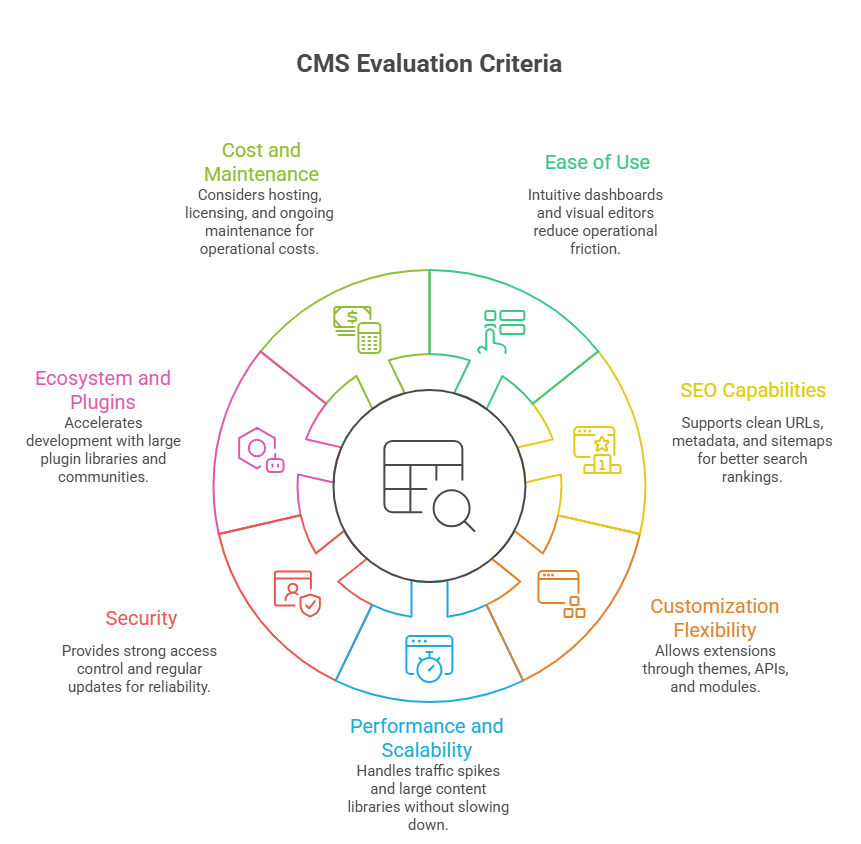
To identify the best content management systems, I evaluated each platform using practical criteria that directly affect how teams build, manage, and scale websites.

Best Content Management Systems Evaluation

Ease of Use

A CMS should allow teams to publish content quickly without relying on developers for every change. Platforms with intuitive dashboards, visual editors, and structured workflows score higher because they reduce operational friction.

SEO Capabilities

SEO features are critical for visibility. I looked at how well each CMS supports clean URLs, metadata control, schema implementation, XML sitemaps, and content structuring, which directly influence search rankings. So, here in this list, you’ll also get an answer of: what is the best CMS for SEO?

Customization Flexibility

Websites rarely stay static. The best CMS platforms allow developers to extend functionality through themes, APIs, integrations, and custom modules without rebuilding the entire system.

Performance and Scalability

A CMS must support growth. I evaluated how well platforms handle traffic spikes, large content libraries, and complex digital experiences without slowing down site performance.

Security

Websites handle sensitive data and user interactions. Platforms with strong access control, regular security updates, and enterprise-grade infrastructure provide better long-term reliability.

Ecosystem and Plugins

A strong ecosystem accelerates development. CMS platforms with large plugin libraries, developer communities, and third-party integrations allow teams to add features faster.

Cost and Long-Term Maintenance

Beyond initial setup, I considered hosting costs, licensing fees, developer requirements, and ongoing maintenance to understand the real operational cost of each CMS.

Using these criteria helps separate popular CMS platforms from the ones that actually perform well in real-world website management and digital growth scenarios.

Best Content Management Systems in 2026 (Top Platforms Compared)

Based on usability, flexibility, ecosystem strength, and real-world adoption, these are the best content management systems businesses are using in 2026.

1. WordPress — Best CMS for Flexibility and Global Adoption

WordPress dominates as the best CMS because of its scale and adaptability. WordPress powers over 43% of all websites and more than 62% of websites that use a CMS, making it the most widely used content management system globally.

Key Strengths

  • Native support for clean URLs, metadata, schema, and structured content architecture
  • The official directory hosts 59,000+ plugins that extend functionality without rebuilding core systems 
  • Supports blogs, enterprise publishing platforms, membership sites, and marketplaces

Limitations

  • Performance can degrade with excessive plugins
  • Security requires active maintenance and updates

Real-World Usage

Large organizations including TechCrunch, Sony Music, and The Walt Disney Company rely on WordPress for high-volume content publishing.

In practice, WordPress works best when a website requires content scalability, strong SEO control, and long-term customization flexibility.

2. Shopify — Best CMS for eCommerce Websites

Shopify has become the leading CMS for online stores because it combines content management with built-in commerce infrastructure. According to BuiltWith, Shopify powers over 4.8 million live websites globally, making it one of the most widely used eCommerce platforms. It is the best content management system for ecommerce. 

Key Strengths

  • Built-in commerce tools, like product management, order processing, discount systems, and storefront themes are native to the platform
  • Shopify Payments supports major payment methods, along with integrations for PayPal, Stripe, and regional gateways
  • Centralized dashboards track products, stock levels, and fulfillment across channels
  • A simplified admin interface allows non-technical teams to launch and manage stores without custom development

Limitations

  • Transaction fees apply when using external payment gateways
  • Deep customization often requires Shopify’s Liquid framework

Real-World Usage

Global brands such as Gymshark, Kylie Cosmetics, and Allbirds use Shopify to run large-scale eCommerce storefronts.

Shopify dominates eCommerce CMS adoption because it combines website management, payments, and inventory into one managed platform.

3. Drupal — Best CMS for Enterprise Security

Drupal is widely trusted for environments where security, governance, and structured content architecture are critical. 

According to W3Techs, Drupal powers around 1.2% of all websites and about 2% of CMS-based websites, with strong adoption in government and enterprise sectors. This is the its best CMS for enterprise. 

Key Strengths

  • Drupal has a dedicated security team and regular vulnerability disclosure processes, making it a preferred choice for high-security environments
  • Powerful taxonomy and content modeling capabilities support complex digital platforms
  • Built to handle large content libraries, heavy traffic, and multi-site infrastructures

Limitations

  • Requires experienced developers to implement and maintain
  • Steeper learning curve compared to simpler CMS platforms

Real-World Usage

If you are looking for CMS for agencies, then Drupal is the convenint option. It is widely used by government agencies, universities, and large organizations. Platforms such as NASA, the Australian Government, and many university websites rely on Drupal for secure content management.

4. Webflow — Best CMS for Designers and Visual Development

Webflow bridges the gap between design and development by allowing teams to design, build, and manage websites visually without relying heavily on code. 

The platform has grown rapidly, with over 3.5 million designers and teams using Webflow to build websites.

Key Strengths

  • Designers can build complex layouts visually while developers can extend functionality with custom code
  • Real-time page editing allows teams to design and publish content without touching the underlying structure
  • Webflow provides built-in hosting on global infrastructure, helping deliver fast loading speeds and simplified deployment

Limitations

  • Advanced custom features may still require development work
  • CMS content structures can be restrictive for very large content platforms

Real-World Usage

Companies such as Dell, Zendesk, and Rakuten use Webflow for marketing websites and landing page ecosystems.

5. Joomla — Best CMS for Structured Content Websites

Joomla sits between beginner-friendly CMS platforms and developer-heavy systems. It offers strong content structuring and built-in features without relying heavily on external plugins. 

Joomla powers around 1.5% of all websites and about 2.6% of CMS-based websites globally.

Key Strengths

  • Websites can manage multiple languages natively without additional extensions
  • Granular access control allows administrators to manage complex editorial workflows
  • Thousands of extensions and templates are maintained by an active global developer community

Limitations

  • Smaller extension ecosystem compared to WordPress
  • Interface can feel complex for beginners

Real-World Usage

Joomla is commonly used by government portals, community platforms, and organizational websites that require structured content management.

6. Adobe Experience Manager — Best Enterprise CMS Platform

Adobe Experience Manager (AEM) is designed for organizations managing large-scale digital experiences across multiple channels. It is part of the Adobe Experience Cloud, which integrates content management with analytics, personalization, and marketing automation. 

According to BuiltWith, thousands of large organizations run websites on Adobe Experience Manager infrastructure.

Key Strengths

  • Digital experience platform: combines CMS capabilities with asset management, workflow automation, and omnichannel publishing
  • Personalization engine: integrates with Adobe Target and Adobe Analytics to deliver personalized content experiences
  • Deep ecosystem integration: connects directly with Adobe tools such as Creative Cloud, Analytics, and Marketing Cloud

Limitations

  • High implementation and licensing costs
  • Requires experienced development teams and enterprise infrastructure

Real-World Usage

Global brands such as Nike, Cisco, and Mastercard use Adobe Experience Manager to manage complex digital ecosystems.

7. Contentful — Best Headless CMS for Modern Applications

Contentful is one of the leading headless CMS platforms, designed for teams building content-driven products across websites, apps, and digital services. Approx. tens of thousands of websites use Contentful, particularly in modern SaaS and application-driven environments.

Key Strengths

  • API-first architecture: content is delivered through APIs, allowing developers to connect websites, mobile apps, and digital products from a single backend
  • Omnichannel content delivery: the same content can power websites, apps, smart devices, and digital platforms
  • Developer-friendly model: structured content and flexible APIs make it easy to integrate with modern frameworks such as React, Next.js, and mobile apps

Limitations

  • Requires development resources to implement front-end systems
  • Content editing workflows can feel technical for non-developers

Real-World Usage

Companies such as Spotify, IKEA, and Atlassian use Contentful to manage structured content across digital platforms.

Build a CMS That Scales With Your Business

Struggling with slow publishing workflows or limited CMS flexibility? Our team helps businesses design scalable CMS platforms built for performance, SEO, and long-term growth.

Talk to a CMS Expert

Traditional CMS vs Headless CMS: What’s the Difference?

A traditional CMS combines the backend (content management) and frontend (website presentation) in a single system. A headless CMS separates content management from the presentation layer.

Platforms like WordPress, Joomla, and Drupal manage content and render webpages together. Systems like Contentful store content in structured formats and deliver it through APIs, allowing developers to display it on websites, mobile apps, or other digital platforms.

According to Grand View Research, the headless CMS market is projected to grow at a CAGR of about 20% from 2023 to 2030, driven by demand for multi-channel content delivery.

Traditional CMS vs Headless CMS

Factor What to Consider Practical Example
Website Type Identify whether the site is content-heavy, commerce-driven, or application-based. Blogs and publishing platforms typically use WordPress, while online stores often choose Shopify.
Technical Resources Consider whether your team has developers available for customization and maintenance. Marketing teams without developers often prefer Webflow or Wix, while engineering teams may choose Drupal or headless CMS platforms.
Scalability Needs Evaluate how much content, traffic, and functionality the website will need over time. Large enterprise ecosystems with multiple sites often use Adobe Experience Manager or Sitecore.
SEO Requirements Ensure the CMS supports structured content, metadata control, and technical SEO capabilities. Content-driven businesses rely on platforms like WordPress because of strong SEO customization.
Budget Compare licensing, hosting, development, and long-term maintenance costs. Startups often select open-source CMS platforms, while large enterprises invest in enterprise digital experience platforms.

Why Headless CMS Adoption Is Growing

Organizations increasingly deliver content across multiple digital touchpoints. Mobile apps, SaaS platforms, smart devices, and APIs all require the same content to be reused in different formats. A headless CMS solves this by allowing teams to create content once and distribute it anywhere through APIs

How to Choose the Best CMS for Your Website

Choosing the CMS depends less on popularity and more on how your website will operate, scale, and be managed over time

Different platforms solve different operational problems, so the decision should align with business needs rather than features alone.

According to Market Reports World, around 72% of U.S. enterprises already use CMS platforms, with millions of employees interacting with CMS systems every month. 

Decision Framework for Choosing a CMS

Factor What to Consider Practical Example
Website Type Identify whether the site is content-heavy, commerce-driven, or application-based. Blogs and publishing platforms typically use WordPress, while online stores often choose Shopify.
Technical Resources Consider whether your team has developers available for customization and maintenance. Marketing teams without developers often prefer Webflow or Wix, while engineering teams may choose Drupal or headless CMS platforms.
Scalability Needs Evaluate how much content, traffic, and functionality the website will need over time. Large enterprise ecosystems with multiple sites often use Adobe Experience Manager or Sitecore.
SEO Requirements Ensure the CMS supports structured content, metadata control, and technical SEO capabilities. Content-driven businesses rely on platforms like WordPress because of strong SEO customization.
Budget Compare licensing, hosting, development, and long-term maintenance costs. Startups often select open-source CMS platforms, while large enterprises invest in enterprise digital experience platforms.

What This Means in Practice

The best CMS is the one that aligns with how your team publishes, manages, and scales content. A startup launching a marketing website may prioritize speed and ease of use, while an enterprise managing multiple digital products will prioritize governance, integrations, and scalability.

What Are the Common CMS Mistakes Businesses Make

Choosing a CMS is often treated as a quick technical decision, but mistakes at this stage can affect SEO performance, scalability, and long-term website. This is why businesses often consult teams offering custom web development services to build CMS architectures that align with long-term digital goals.management. 

Common Mistakes While Choosing the Best CMS

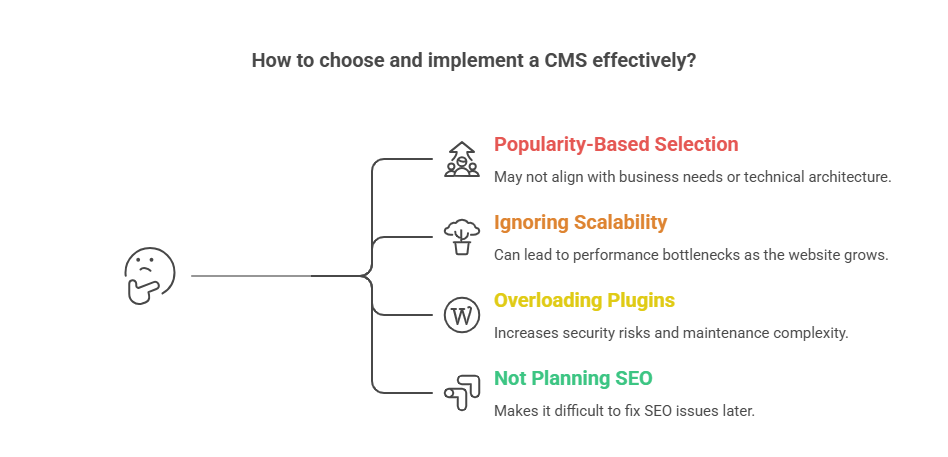
Here are some of the most common CMS mistakes businesses make.

Choosing a CMS Based Only on Popularity

Many companies pick a CMS simply because it’s widely used. Popular platforms work well in many scenarios, but they may not match the technical architecture or business model of the website.

Ignoring Scalability

Websites often start small but grow quickly. A CMS that cannot scale with traffic or content growth becomes a long-term bottleneck.

Overloading Plugins and Extensions

Plugins extend functionality, but excessive reliance on them increases security risks, maintenance complexity, and performance issues. Many performance problems in CMS-based websites come from poorly optimized third-party extensions.

Not Planning SEO Structure Early

SEO architecture should be planned before publishing large volumes of content. URL structure, taxonomy, internal linking, and metadata management are easier to design at the beginning than to fix later.

Businesses that plan CMS architecture properly avoid these issues early. Many companies work with experienced development teams such as AppVerticals to design scalable CMS platforms that support long-term content management and digital growth.

Wrapping it Up

Choosing the best content management system ultimately depends on how your website creates, manages, and scales content. Platforms like WordPress lead for content-driven websites, Shopify dominates eCommerce, and enterprise CMS platforms such as Adobe Experience Manager support large digital ecosystems.

The key is selecting a CMS that aligns with your content strategy, technical resources, and long-term scalability needs. When chosen correctly, a CMS becomes the foundation that supports publishing efficiency, search visibility, and digital growth.

Need the Right CMS for Your Website?

Choosing the wrong CMS can limit your growth. Work with experienced developers to build a content platform that supports scalability, integrations, and seamless content management.

Start Your CMS Project

Related Guides

Outource Web Development

Angular vs React

How to Build a Real Estate Website

Ecommerce Website Development 

Website Design Cost in 2026

Kotlin Multiplatform vs Native Development: When Should You Migrate Your Mobile App?

TL;DR: Kotlin Multiplatform (KMP) allows developers to share core business logic across iOS and Android apps, reducing duplication, speeding up development, and simplifying maintenance. Teams can build high-performance apps efficiently. Migration can be gradual using modular architecture, and modern KMP-compatible libraries now cover most common use cases.

What is Kotlin Multiplatform?

Kotlin Multiplatform is a Kotlin-based framework developed by JetBrains that enables developers to share code across multiple platforms. With KMP, it is possible to write a single codebase for common functionality and run it on different environments.

Although Kotlin Multiplatform supports development for web, desktop, and server-side applications, its most common use today is in mobile development.

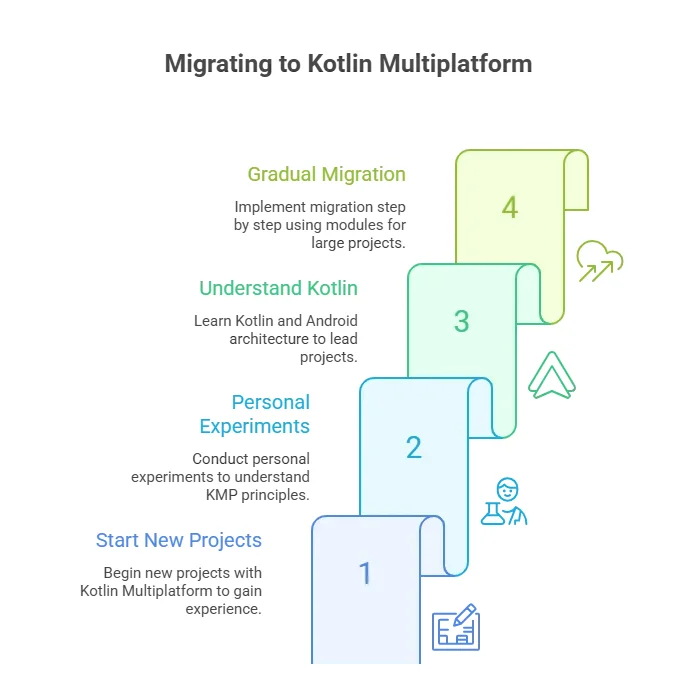
When migrating to Kotlin Multiplatform, start with a native Android developer on your team. Gradual module-by-module migration ensures minimal disruption and preserves app stability while unlocking cross-platform efficiency.
Aleksa, Head of Mobile & Co-Founder, Aetherius

Why Should You Migrate to Kotlin Multiplatform?

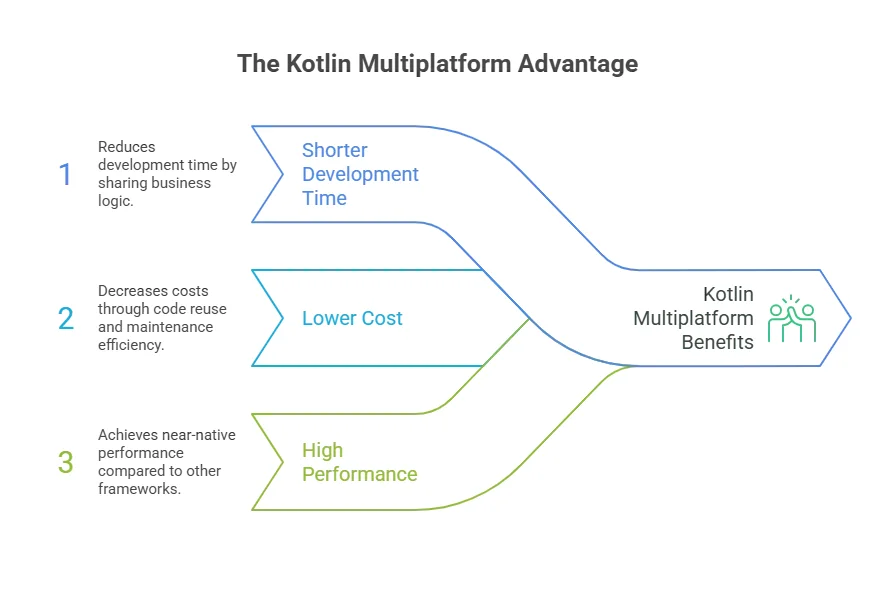
Developing a mobile app using Kotlin Multiplatform can bring you a lot of benefits compared to native development and other cross-platform development solutions, such as allowing the sharing of business logic across iOS and Android, reducing development time, lowering costs, and maintaining near-native performance.

Benefits of Kotlin Multiplatform

1. Shorter Development Time

When developing an iOS mobile app or even Android, you typically need separate developers to build the business logic and UI for each platform. With KMP, you write the shared business logic once in Kotlin.

This can reduce total development time by up to 30%, allowing your team to focus on creating a polished user experience rather than duplicating code.

2. Lower Cost of Development

From a development perspective, fewer duplicated components usually mean fewer development hours. When the core business logic is shared between Android and iOS using Kotlin Multiplatform, developers don’t need to write the same business logic twice.

Development Efficiency Snapshot: A typical cross-platform mobile project for both iOS and Android can cost between $50,000 and $150,000, depending on scope. By sharing core logic with KMP, teams can reduce overall development effort by 20–25%, achieving significant savings both during initial development and ongoing maintenance.
Metric Native Development Kotlin Multiplatform
Development Time Full duplication Shared logic (~30% faster)
Development Cost $50k–$150k ~20–25% lower
Maintenance Separate fixes per platform Single update across platforms
Performance Native speed Near-native

The savings are not limited to the initial development phase. Maintenance also becomes simpler because fixes and updates to the shared business logic only need to be implemented once. This reduces duplicated work across platforms and helps keep both applications consistent over time.

3. High App Performance

Cross-platform development can also be achieved using other frameworks, such as Flutter and React Native. However, they don’t always deliver the same level of performance as fully native applications.

React Native Performance Considerations:

  • Can introduce overhead due to the abstraction layer between JavaScript and the underlying platform.
  • Interactions between JavaScript code and native APIs require data conversion through a C++ layer connecting the JS engine and the OS.
  • JavaScript execution environment is single-threaded, which can become a bottleneck during heavy logic or frequent state updates competing with UI rendering.
  • Application startup can take longer because the JS runtime must be initialized and the bundle loaded before the UI renders fully.
  • JavaScript garbage collection may introduce non-deterministic pauses affecting frame stability in performance-sensitive scenarios.

Flutter Performance Considerations:

  • Relies on a custom rendering engine (Skia or Impeller) and the Dart runtime rather than using native UI frameworks directly.
  • Rendering the interface independently of the OS can add GPU workload and slightly higher startup latency.
  • Communication between Dart code and platform-specific APIs occurs through Platform Channels, which involve message passing and data serialization.
  • Dart’s concurrency model uses isolates (message passing instead of shared memory), improving safety but adding complexity for CPU-intensive or hardware-dependent tasks.

Quick Comparison: KMP vs React Native vs Flutter

Feature / Framework Kotlin Multiplatform React Native Flutter
Shared Business Logic Full Kotlin code JS bridge, some overhead Dart bridge, extra rendering overhead
UI Rendering Native Native via bridge Custom rendering engine (Skia/Impeller)
Performance Near-native Moderate overhead Slight GPU & startup latency
Concurrency Native multithreading Single-threaded JS Isolates, message-passing
Maintenance One codebase Two sets of fixes Two sets of fixes

When Should You Migrate Your Mobile App to Kotlin Multiplatform?

As someone who has been working with Kotlin Multiplatform for three years, I always recommend people start new projects with it.

Honestly, my first KMP projects were personal experiments where I tested how everything worked. This experience later helped me understand Kotlin (which I hadn’t used before), as well as the main principles and architecture of Android.

This is important because, in KMP development, Android developers are often the main players who lead the project.

If I had to start without any previous experience, I believe it wouldn’t have been that easy. That’s why I highly recommend having a native Android developer on your team when you start the migration.

Important consideration: If you have a huge project written natively, migration doesn’t need to happen all at once. It can take place gradually over time, implemented step by step using modules.

Migrating to Kotlin Platforms

Understanding Modules in KMP

A module is a self-contained part of the application that encapsulates a specific feature, piece of business logic, or functionality.

Instead of keeping all code tightly coupled in one large codebase, modularization separates the app into smaller, independent components with clearly defined responsibilities and interfaces.

Benefits of Modularization:

  • A new feature can be developed as a separate module and integrated into the existing app, while older parts of the codebase remain unchanged
  • Over time, additional features and logic can be moved into modules one by one, gradually modernizing the architecture.
  • Besides making migration safer and more manageable, modularization also improves maintainability, testing, and team collaboration, since each module can be developed, updated, and tested independently.
Key Takeaway: Using modules allows your team to migrate large, complex apps step by step. This approach minimizes disruption, preserves app stability, and makes it easier to scale features over time.

Main Concerns About Migration to Kotlin Multiplatform

One of the common concerns about KMP is the maturity of its ecosystem. Compared to Flutter and React Native, KMP is still a relatively new framework, which historically raised questions about library support and compatibility.

  • The Android ecosystem was built almost entirely on Java, and because Kotlin is 100% interoperable, developers often didn’t notice “hidden” Java code in dependencies.
  • For iOS, KMP modules can only include pure Kotlin libraries compatible with Kotlin/Native.
  • Early on, many SDKs were off-limits due to reliance on java.* or javax.* packages, meaning even small amounts of Java code would fail to compile for iOS.

Kotlin Multiplatform: Ready for Production

Today, the KMP ecosystem has reached a turning point:

  • Many industry-standard libraries have been rewritten in pure Kotlin and now fully support multiplatform development:
    • Ktor – Networking
    • SQLDelight – Databases
    • Koin – Dependency Injection
  • Even for specialized use cases, the community is rapidly creating multiplatform alternatives.
Final Note: Kotlin Multiplatform is now mature enough for production-ready apps, with robust library support for both common and advanced development needs. For teams looking to reduce duplication, speed up development, and simplify maintenance, KMP is a viable, forward-looking solution.

Disclaimer: This article is part of AppVerticals’ Industry Expert Insights series, where leaders and practitioners share their perspectives on emerging technologies, software development, and digital transformation.

Worried About Cross-Platform Complexity?

Our experts can guide you through a Kotlin-powered solution that makes iOS and Android apps easier to maintain and scale.

Get Started Today

How to Prepare Your Organisation for AI Adoption in 2026: A CTO’s Practical Roadmap

Your biggest AI bottleneck in 2026 isn’t infrastructure, it’s your workforce. And this blog gives you the roadmap to fix it.

We all agree that AI is advancing fast, and we read that what Microsoft calls ‘Frontier firms’ are already shifting from AI Assistants to increasingly autonomous AI Agents; indeed, some are even testing the potential of human-free business.

However, these hyped headlines don’t reflect what we see on the ground, where the majority of organisations are still trying to embed basic usage of AI tools like MS Copilot across their workforce. The reality is a widening capability gap, not because the technology isn’t ready, but because the people who need to use it aren’t.

‘Skills are the constraint, not tools.’

(Gartner AI Hype Cycle for Artificial Intelligence was published in late 2025.)

Recent data reinforces this urgency: In late 2025, Gartner identified the shortage of skilled talent as a primary barrier preventing organisations from realising value from generative AI investments

For CTOs, this means AI adoption is now a capability race. Technology, HR, and L&D must work as a unified engine; humans will slow AI rollout and limit value creation.

1. Assess Your AI Readiness: Technology, People, and Guardrails

A CTO’s first responsibility is to understand the organisation’s true AI readiness. While technical foundations, including data quality, infrastructure, integration, and security, remain essential, they are no longer the main point of failure. The real friction now lies in workforce readiness.

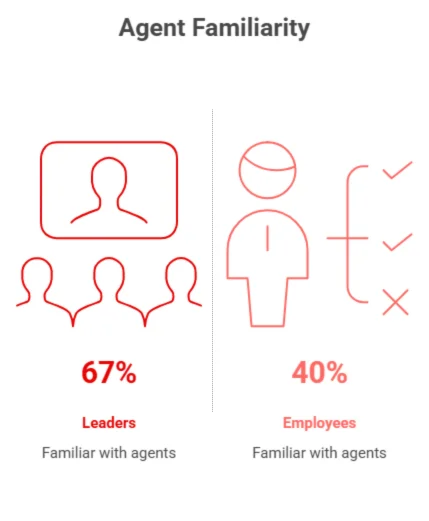
The capability gap highlighted in the latest Microsoft Work Trend Index is stark: leaders feel ready for agents, but employees do not. Only 40% of employees are familiar with agents, versus 67% of leaders, and the expectations around supervising agents diverge just as sharply: 36% of leaders expect it to be part of their role within five years, compared to 21% of employees. (The Microsoft Work Trend Index, published in 2025)

AI Readiness

This mismatch creates the “hollow middle”: a scenario where agent‑level technology is deployed into an organisation that is not psychologically, ethically, or practically ready to work with it.

To prevent this, CTOs must partner closely with HR and L&D to evaluate skills, confidence, and behavioural readiness. At the same time, the tri‑team must define clear ethical guardrails, so employees know exactly what responsible AI use looks like. When people understand the boundaries, adoption moves faster. Without them, uncertainty becomes the primary brake.

2. Build Workforce Confidence So AI Doesn’t Outpace People

This risk is no longer theoretical. Reflecting on large‑scale enterprise deployments, LambHam has warned that “PWC’s $1 billion AI investment would be wasted without effective change management strategies that address the human side of implementation.” (Lambham.com Daily News, Published December 2025)

Even world‑class AI systems fail when employees are unsure how to use them. Building capability and confidence is not “nice to have,” it’s the foundation for scaling AI safely and effectively.

CTOs must champion a capability‑building programme designed jointly with HR and L&D. This should include shared AI language, role‑specific training, practical use of MS Copilot, and clarity on ethical expectations. Psychological safety matters: employees need permission to experiment, question, and refine their understanding.

The payoff is enormous. Confident employees embed organisational expertise into AI‑supported workflows. Hesitant employees disengage or defer blindly to the tool. One accelerates adoption; the other slows it.

3. Prioritise Use Cases That Build Capability as They Deliver Value

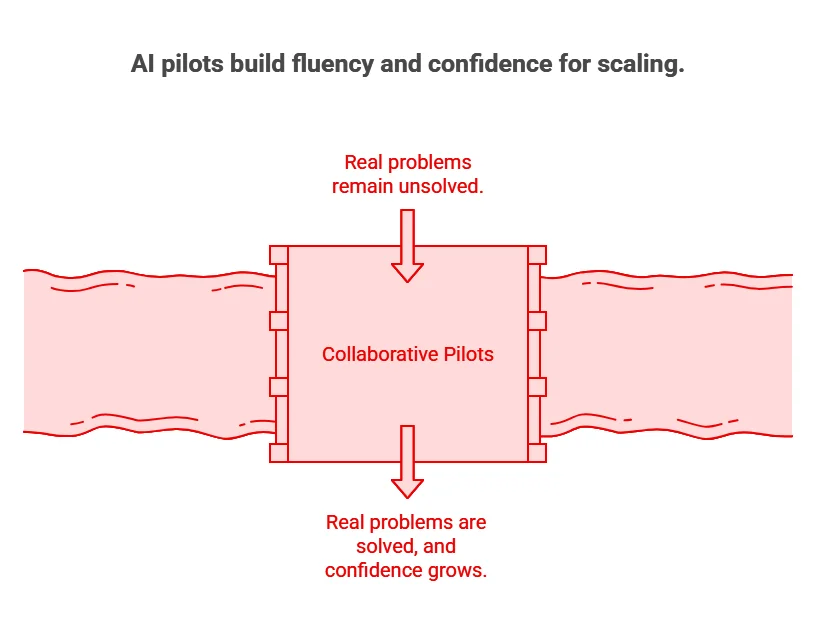
Strong early use cases solve real business problems while simultaneously raising the organisation’s AI fluency. The most effective pilots act as learning engines, i.e., collaborative environments where Tech, HR, L&D, and business teams observe, experiment, and refine together.

Pilots should include human‑in‑the‑loop oversight and guardrail reinforcement, so employees practise making decisions with AI, not simply accepting its output. This builds confidence, judgment, and organisational resilience; all prerequisites for scaling into more advanced agent‑driven workflows.
AI pilots build frequency and confidence for scaling

4. Equip Leaders to Supervise, Challenge, and Guide AI‑Enabled Workflows

AI will not scale without AI‑fluent leadership. Managers must be able to evaluate AI outputs, challenge flawed recommendations, and ensure teams apply ethical and safe practices. L&D should embed these competencies into leadership development so that leaders model responsible use and build confidence across their teams.

When leaders are confident, adoption accelerates. When they are hesitant, adoption freezes regardless of how advanced the AI tools are.

Conclusion: AI Adoption Is a CTO‑Led Capability Strategy

AI Assistants are already widespread, and AI Agents are rapidly entering enterprise systems. Microsoft’s latest research shows that ‘81% of leaders expect to integrate agents into their strategy within 12–18 months.’ Yet employees remain drastically less prepared: ‘only 40% are familiar with agents’, and I would say in the case of the average workforce, the true figure is far smaller.

AI Assistants are already widespread, and AI Agents are rapidly entering enterprise systems. Microsoft’s latest research shows that ‘81% of leaders expect to integrate agents into their strategy within 12–18 months.’ Yet employees remain drastically less prepared: ‘only 40% are familiar with agents’, and I would say in the case of the average workforce, the true figure is far smaller.

This is the challenge. And it is also an opportunity.

A sustainable AI roadmap requires:

Technology Readiness

Robust infrastructure, secure data management, and strong integrations that enable scalable AI systems.

People’s Capability

A workforce that continuously develops its skills and adapts at the same pace as evolving technology.

Ethical Guardrails

Clear, values-aligned governance and policies that ensure responsible AI use and build long-term trust.

For CTOs, the path forward is unmistakable: lead the technical strategy, co‑lead the capability strategy, and anchor everything in transparent, values‑aligned governance.

Because the future of AI isn’t just about deploying agents; it’s about building a workforce that is ready to lead them.

Disclaimer: Disclaimer: This article is part of AppVerticals’ Industry Expert Insights series, where leaders and practitioners share their perspectives on emerging technologies, software development, and digital transformation.

Sitecore vs WordPress: Which CMS Is Best for Enterprise Growth in 2026?

Choosing between Sitecore and WordPress depends on your organization’s scale, complexity, and digital experience goals. Sitecore provides an enterprise-grade Digital Experience Platform (DXP), while WordPress offers a flexible open-source CMS suited for content-driven growth.

Enterprise CMS implementations often struggle with vendor lock-in, scalability limits, and complex integrations. Choosing the wrong platform can quickly lead to costly rework.

For context, WordPress powers about 43% of all websites (W3Techs), while Gartner recognizes Sitecore as a Visionary in the DXP Magic Quadrant. This guide compares Sitecore vs WordPress across architecture, scalability, and personalization with actionable insights for enterprise teams evaluating or planning Sitecore development or WordPress.

Sitecore vs WordPress: TL;DR

Feature / Metric Sitecore WordPress VIP
Platform Type Full Digital Experience Platform (DXP) Open-source CMS
Ideal For Enterprises needing personalization, governance, and omnichannel orchestration Content-driven organizations prioritizing flexibility and lower cost
Industry Fit Regulated sectors (Finance, Healthcare) Broad adoption; fastest in content-heavy industries
Global Usage ~0.1% of websites, but ~0.9% of the top 100,000 enterprise sites Powers ~43% of all websites globally
Implementation Time 9–18 months 3–9 months
Personalization & AI Native CDP, AI-powered personalization, marketing automation Third-party integrations required; Jetpack AI for content generation
Total Cost of Ownership (3 years) $800K–$1.2M+ $200K–$350K

Need a Second Opinion Before Choosing Your CMS?

Our architects help enterprise teams evaluate Sitecore, WordPress, and composable alternatives based on real implementation experience.

Request a platform evaluation

What Is Sitecore?

Sitecore is an enterprise Digital Experience Platform (DXP) designed to manage content, personalization, and customer data across multiple digital channels.

Unlike traditional CMS platforms, Sitecore combines several capabilities within a unified ecosystem, including:

  • Enterprise content management
  • Real-time personalization engine
  • Customer Data Platform (CDP) integration
  • Marketing automation and analytics

This integrated architecture allows organizations to deliver highly personalized experiences across websites, mobile apps, and digital campaigns at scale.

By 2026, 70% of enterprises will adopt composable DXP technologies rather than relying on monolithic suites. — Gartner

What Is WordPress?

WordPress is the world’s most widely used open-source content management system (CMS), powering roughly 43% of all websites globally.

Originally created as a blogging platform, WordPress has evolved into a flexible ecosystem capable of supporting enterprise digital experiences through:

  • Headless CMS architectures
  • Enterprise hosting via WordPress VIP
  • Integrations with modern martech and analytics platforms

Its open-source foundation allows development teams to customize nearly every aspect of the platform, often pairing WordPress with modern frameworks such as:

  • React
  • Next.js

This flexibility makes WordPress attractive to organizations that prioritize modular architecture, faster development cycles, and integration with best-of-breed marketing tools.

How Do Sitecore and WordPress Differ in Architecture?

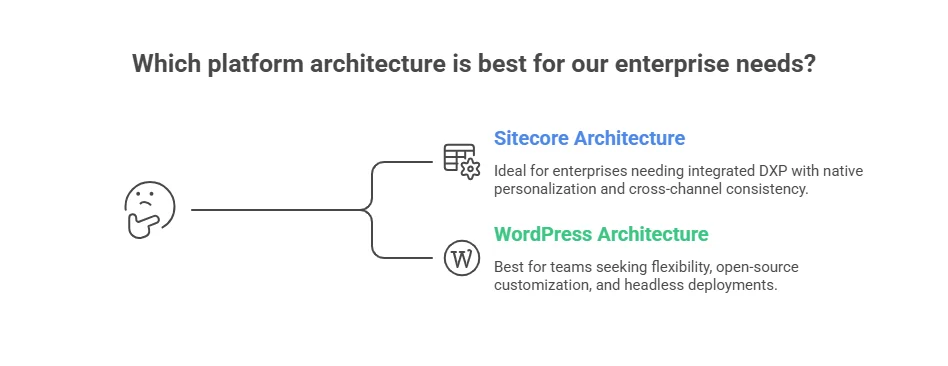
Sitecore is best for enterprises that need a tightly integrated, governed DXP with native personalization and cross-channel consistency. WordPress is ideal for teams seeking flexibility, open-source customization, and headless deployments, though plugin dependencies require careful management at scale.

Many enterprise implementations struggle when platform architecture does not align with business requirements. In these situations, working with an experienced CMS development partner can help evaluate architecture choices, integration complexity, and long-term scalability before implementation begins.

Sitecore Architecture

  • Composable DXP (XM Cloud): SaaS-native, MACH-aligned (Microservices, API-first, Cloud-native, Headless).
  • Integrated ecosystem: Native personalization, CDP, and marketing automation operate within a unified environment.
  • Enterprise governance: Built-in security, compliance controls, and global multi-site management.
  • Integration reality: Enterprise connectors (e.g., Salesforce Marketing Cloud) may require licensed adapters, increasing operational cost.

WordPress Architecture

  • Open-source foundation: LAMP stack (Linux, Apache, MySQL, PHP) with broad developer accessibility.
  • Enterprise support (WordPress VIP): Managed hosting, auto-scaling, REST API and WPGraphQL for headless builds.
  • Modular ecosystem: Flexible integration with modern frameworks like React and Next.js.
  • Operational trade-off: Larger deployments often rely on multiple plugins, increasing maintenance and security oversight requirements.

Sitecore vs WordPress architecture comparison

WordPress succeeds because it’s built on an open ecosystem where developers can extend the platform in almost any direction. — Matt Mullenweg, Co-Founder of WordPress

Architecture Comparison at a Glance:

Feature Sitecore WordPress VIP
Core Architecture Composable DXP, API-first, SaaS-native Open-source, headless-capable
Personalization Native engine + CDP Plugin-based integrations
Flexibility Structured ecosystem Highly modular
Governance & Security Built-in enterprise controls Requires disciplined DevOps management
Scalability Global, multi-site ready Scales via VIP & headless architecture

What Is the Total Cost of Ownership (TCO) for Sitecore vs WordPress?

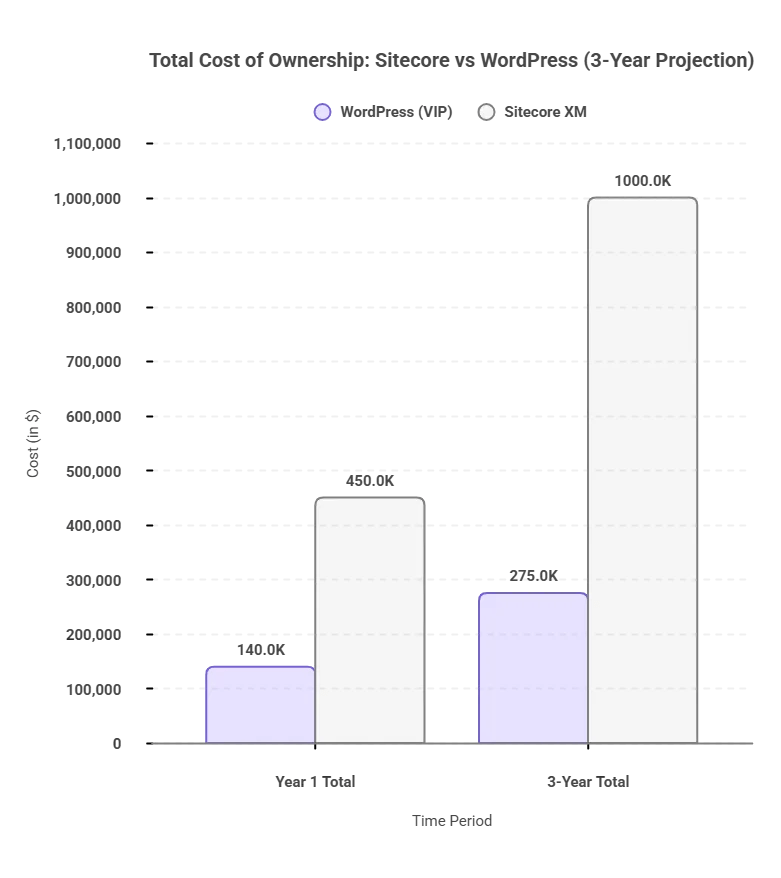
Sitecore typically carries a higher TCO. For enterprise deployments, 3-year Sitecore implementation costs can be 3–4x higher than WordPress VIP. Licensing ranges $100K–$200K/year, while WordPress VIP starts around $25K/year.

Choosing the best bet in Sitecore vs WordPress isn’t about features. It’s about long-term impact on cost, scalability, and operational efficiency.

Cost Component WordPress (VIP) Sitecore XM Cloud Long-Term Cost Impact
License (Annual) $0–$25K $100K–$200K+ Major factor for enterprise TCO
Design & Build $50K–$100K $100K–$200K+ High impact on initial investment
Cloud / Hosting $25K+ (VIP) Included (SaaS) SaaS reduces infrastructure overhead
Add-on Modules $25K+ $60K+ Modules drive expansion costs
Support & Maintenance $12K–$24K $30K–$100K Major factor in operational TCO
Year 1 Total $100K–$180K $300K–$600K Year 1 sets budget baseline
3-Year Total $200K–$350K $800K–$1.2M+ Reflects total TCO over time
sitecore vs wordpress: CTO cost comparison
Developer Costs: Certified Sitecore architects charge $180–$250/hour, while WordPress developers average $100–$150/hour, potentially adding $200K–$400K/year on large, complex projects.

Implementation Considerations: Sitecore vs WordPress

Sitecore implementations typically take 6–18 months due to enterprise integrations and governance requirements, while WordPress deployments often launch within 3–9 months thanks to its flexible ecosystem and larger developer pool.

Implementation timelines vary depending on platform architecture, integration complexity, and regulatory requirements.

Sitecore Implementation

Sitecore deployments usually take 6–18 months, especially in enterprise environments requiring advanced personalization, CDP integration, multi-region governance, and regulatory compliance such as HIPAA or GDPR.

Key considerations

  • Requires experienced .NET developers with Sitecore expertise

  • Higher implementation cost due to complex integrations

  • Custom development and compliance workflows can extend timelines

WordPress Implementation

WordPress implementations generally take 3–9 months, depending on whether the setup includes WordPress VIP hosting, headless architecture, or enterprise-level customization.

Key considerations

  • Large pool of PHP and JavaScript developers

  • Faster go-to-market for content-driven platforms

  • Requires disciplined plugin and integration management for long-term stability

  • Headless builds using React or Next.js require additional architectural planning

How Do Sitecore and WordPress Handle Personalization and AI?

Sitecore provides built-in, real-time personalization and AI automation across web, mobile, and email. 

While WordPress depends on third-party tools for personalization and AI, it offers flexibility but requires extra effort to maintain consistency.

Jetpack AI supports content generation, but it’s less comprehensive than SitecoreAI’s integrated automation and dynamic recommendations.


Capability Sitecore WordPress VIP
Native CDP Built-in Third-party required
Real-time Segmentation Full cross-channel Plugin/integration-dependent
AI Content Generation SitecoreAI Jetpack AI / Third-party
Marketing Automation Sitecore Send + Personalize Best-of-breed (HubSpot, Marketo)
A/B Testing Integrated Plugin/external tool
Personalization Depth Enterprise, cross-channel Configurable, integration-dependent

Case Study: Personalization Impact at Canadian Western Bank

Canadian Western Bank implemented Sitecore’s Customer Data Platform and personalization engine to improve digital lead generation.
According to Sitecore customer reports, the initiative resulted in:

  • 50% increase in conversion rates
  • 70% improvement in marketing productivity
  • Faster launch of targeted campaigns across digital channels.

This illustrates how enterprise platforms like Sitecore enable real-time behavioral targeting, something that often requires multiple integrations in modular CMS ecosystems.

Practitioner Insight: Sitecore accelerates enterprise-scale personalization, reducing operational inefficiencies. WordPress teams gain flexibility and faster initial setup, but often spend 10–20 hours monthly managing plugins and integrations, which impacts time-to-value.

Which CMS Offers Better Scalability And Governance?

Sitecore provides enterprise-grade scalability with multilingual support, role-based workflows, CI/CD pipelines, and built-in audit logging, ideal for regulated industries. Implementing Sitecore workflows can speed multi-stage approvals by 25–35%, streamlining legal and compliance bottlenecks.

WordPress VIP focuses on flexibility and rapid multi-site management through a centralized dashboard, VIP-CLI automation, and headless CMS support via WPGraphQL. However, it relies on manual processes, plugin oversight, and strong DevOps practices.

Comparison at a Glance:

Metric Sitecore WordPress VIP
Primary Goal Compliance & Consistency Agility & Volume
Review Process Automated, native workflows Manual/light via plugins
Maintenance Burden Low High
Audit Readiness Built-in logs Fragmented
Multisite Management Advanced, role-based Centralized dashboard, manual
Key Takeaway: For enterprises managing multiple brands, regions, or regulated content, Sitecore’s structured workflows and governance tools provide reliability, speed, and compliance. WordPress VIP excels in rapid feature deployment and content agility, but demands strong operational management and DevOps support to avoid inefficiencies.

Sitecore vs WordPress: How Do They Both Compare in Security and Compliance?

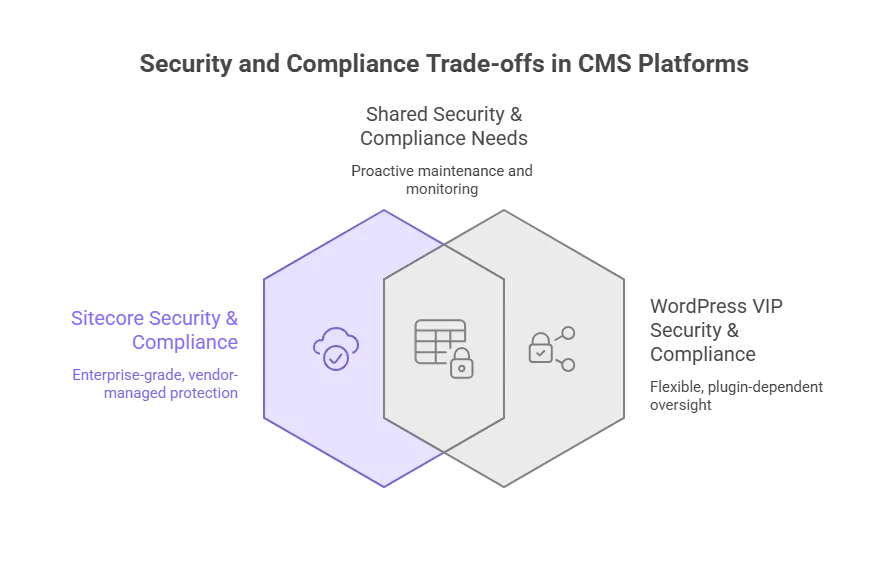
Sitecore offers a controlled, enterprise-grade environment with built-in compliance tools and vendor-managed updates, reducing risk and operational overhead. 

WordPress VIP is flexible but relies on plugin management and proactive governance to maintain security and compliance, making it better suited for organizations with strong DevOps practices.

Sitecore Security & Compliance:

  • Closed-source architecture: Updates and patches are delivered directly by Sitecore, limiting exposure to vulnerabilities.
  • Built-in compliance: Supports GDPR, SOC 2, and HIPAA out-of-the-box.
  • SaaS-managed updates: Automated patching reduces manual effort and risk.
  • Reduced vulnerability surface: Fewer third-party dependencies mean fewer attack vectors.

WordPress Security & Compliance:

  • Open-source platform: Relies heavily on third-party plugins, increasing potential vulnerabilities.
  • Centralized VIP tools: VIP includes plugin vetting and 24/7 monitoring, but client teams must actively manage security and updates.
  • Vulnerability stats: Patchstack reports 7,966 new WordPress vulnerabilities in 2024, 96% from plugins.
  • Compliance requires configuration: HIPAA, SOC 2, or GDPR readiness depends on plugins, third-party tools, and proper operational oversight.

sitecore vs wordpress: security and compliance comparison

Dimension Sitecore WordPress VIP
Vulnerability Surface Controlled, vendor-managed Open, plugin-dependent
Compliance GDPR, HIPAA, SOC2 (built-in) Requires configuration and plugin oversight
Patch Management Automated, continuous Variable, plugin-dependent
Monitoring 24/7 SaaS-managed 24/7 VIP-managed, manual oversight required
Key Security Trends: In 2025, WordPress faced over 11,334 new vulnerabilities, with around 36% exploitable, mainly from third-party plugins. This underscores the need for proactive maintenance and security processes in open-source ecosystems.

How Complex Is Migrating From WordPress to Sitecore?

Migrating from WordPress to Sitecore is a multi-quarter, resource-intensive process involving content restructuring, template re-architecture, and martech re-integration. Proper planning is critical to preserve SEO, maintain operational continuity, and capitalize on Sitecore’s advanced personalization capabilities.

Migration Challenges:

  • Content Structure Redesign: WordPress’s flat post/page taxonomy must be mapped to Sitecore’s hierarchical content tree to maintain SEO equity.
  • Template Rebuild: WordPress templates (PHP/Gutenberg) need re-implementation as ASP.NET or Next.js components. Skilled developers and thorough QA are essential.
  • Martech Re-integration: CRM, CDP, and marketing tools must be reconnected to Sitecore’s ecosystem, extending timelines.
  • SEO Preservation: URL changes and content restructuring can cause ranking drops if not managed carefully.

Typical Migration Phases

Phase Key Activities Duration (Large Enterprise) Risk / Notes
Assessment & Planning Audit content, define content tree, map templates & martech 4–6 weeks Skipping leads to rework and SEO loss
Content Structure Redesign Transform content into Sitecore’s hierarchical tree; map URLs & metadata 6–12 weeks Incorrect mapping risks broken links
Template & Component Rebuild Re-architect PHP/Gutenberg templates into ASP.NET/Next.js 8–14 weeks Requires experienced developers
Martech Re-integration Reconnect CRM, CDP, personalization tools 4–8 weeks Misalignment can disrupt campaigns
Testing & QA Functional testing, SEO validation, cross-device review 4–6 weeks Critical for multi-site/global deployments
Go-Live & Monitoring Deploy, monitor analytics, fix post-launch issues 2–4 weeks Early monitoring reduces errors

Total Duration: Typically 9–18 months, depending on scale and complexity.

WordPress vs Sitecore: Which CMS Is Better Suited For Different Industries?

In most enterprise implementations, CMS selection depends heavily on industry requirements and governance needs. Sitecore works best in compliance-heavy, enterprise-scale environments, whereas WordPress VIP shines in content-driven industries that require fast iteration.

Sitecore: Compliance & Enterprise Governance

Sitecore is widely adopted in industries where security, governance, and personalization are critical.

Typical use cases

  • Healthcare: HIPAA-ready workflows and secure patient journey orchestration
  • Financial Services: Audit trails, GDPR compliance, and behavioral personalization
  • Global Enterprises: Multilingual content management and multi-brand governance
Real-World Impact: A North American financial services organization implementing Sitecore reported up to a 130% increase in quote funnel performance, with 40% of home and auto policies generated digitally, transforming its website into a measurable digital revenue engine.

WordPress: Content-Creation Focused Industries

WordPress is widely used in industries that prioritize rapid publishing, modular architecture, and developer flexibility.

Common industries

  • Media & Publishing: High-volume editorial workflows and real-time publishing
  • Retail & eCommerce: Content-led commerce with WooCommerce integrations
  • SaaS & Technology: Headless architectures and fast product iteration
  • Government: Content-heavy public platforms and digital services

Case Study: WordPress VIP at Global Media Scale

Major publishers such as Al Jazeera, News Corp, TIME, and ADWEEK run their digital platforms on WordPress VIP to support large-scale publishing operations.

Key results include:

  • 60% increase in publishing efficiency at News Corp brands
  • 82% traffic growth andcontent production at ADWEEK
  • Editorial onboarding reduced from weeks to 1–2 hours at Al Jazeera
  • Infrastructure capable of handling thousands of requests per minute during traffic spikes

These deployments show how WordPress excels in high-volume publishing, scalable infrastructure, and flexible content operations for media-driven organizations.

Industry Best Platform Reason
Healthcare Sitecore Strong compliance and patient data security
Financial Services Sitecore Governance, audit trails, and advanced personalization
Media & Publishing WordPress VIP Fast publishing workflows and high-traffic scalability
Retail & eCommerce Both Sitecore for omnichannel experiences; WordPress for content-led commerce
SaaS & Technology WordPress Fast development cycles and headless CMS flexibility
Government Both Depends on regulatory compliance and system complexity

How to Choose Between Sitecore and WordPress for Your Business

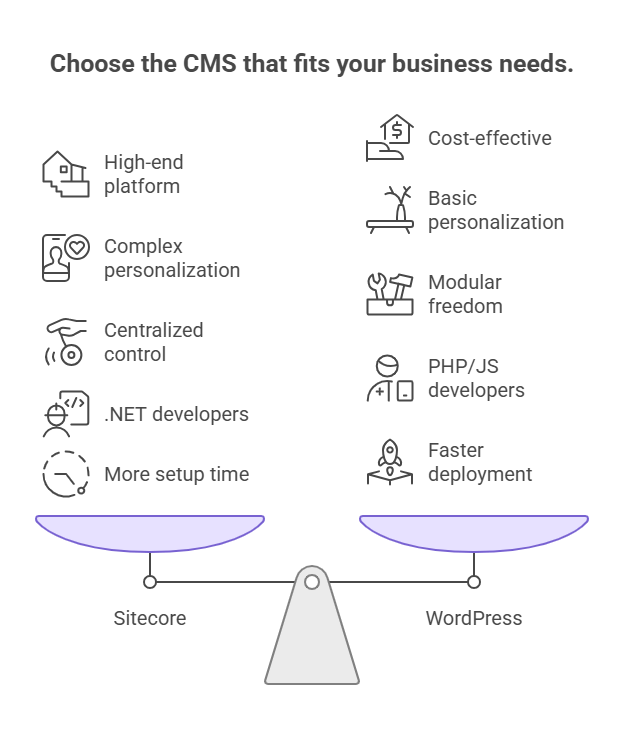
Choosing between Sitecore and WordPress is a strategic architecture decision that should align with your business goals, budget, and digital experience needs.

Sitecore vs WordPress: Choose the best CMS for your business needs

Key Factors to Consider for WordPress vs Sitecore Decision

  • Budget: WordPress offers lower upfront costs; Sitecore requires larger enterprise investment.
  • Personalization Needs: Sitecore supports advanced cross-channel personalization; WordPress relies on integrations.
  • Governance & Compliance: Sitecore provides stronger built-in controls for regulated industries.
  • Technical Resources: Sitecore requires specialized .NET developers, while WordPress benefits from a large PHP and JavaScript ecosystem.

Decision Framework by 3-Year Budget

3-Year CMS Budget Recommendation
<$500K Enterprise WordPress (VIP / managed hosting)
$500K–$1M WordPress VIP with integrated martech stack
$1M–$2M Sitecore XM Cloud
$2M+ Sitecore Full Digital Experience Platform (DXP)

Why Choose Sitecore?

Sitecore is designed for enterprises that require advanced governance, cross-channel personalization, and integrated customer data management.

Organizations with digital experience budgets above $1M typically benefit most from Sitecore’s advanced analytics, AI-driven personalization, and global multi-site capabilities.

Organizations implementing Sitecore reported 371% ROI over three years due to improved personalization and marketing efficiency. — Forrester Total Economic Impact Study

Why Choose WordPress?

WordPress is ideal for organizations prioritizing flexibility, faster deployment, and modular architecture. Its large PHP and JavaScript ecosystem allows teams to integrate best-of-breed marketing tools and modern frameworks like React or Next.js.

Platform Pros Cons
Sitecore • Built-in personalization and CDP
• Strong governance and compliance workflows
• Supports global multi-site deployments
• Higher licensing and implementation costs
• Requires specialized .NET developers
• Longer deployment timelines
WordPress • Flexible open-source architecture
• Faster development cycles
• Large developer ecosystem
• Plugin dependency increases maintenance
• Security requires stronger governance
• Personalization relies on integrations

The Final Verdict: Sitecore vs WordPress for Enterprise CMS

The Sitecore vs WordPress decision ultimately comes down to organizational fit. If your business requires enterprise-grade governance, real-time personalization, and a unified DXP ecosystem, Sitecore is the stronger investment. 

If your priority is speed, flexibility, and cost-efficient content operations, WordPress remains a powerful and scalable choice.

In simple terms, the right CMS is one your team can manage, your budget can support, and your strategy can fully use. At AppVerticals, success comes when the platform fits your digital maturity and growth goals, not just a feature list.

Ready to Build a Scalable, Governance-Ready CMS?

Learn how to align your CMS choice with long-term business goals, multi-site management, and enterprise-grade operational excellence.

Discover Sitecore Capabilities


AI Cloud Cost Statistics 2026: Trends, Insights & Optimization

Artificial Intelligence is no longer a pilot project; it’s a $2.52 trillion industry in 2026, with Big Tech investing $650 billion and enterprise GenAI spending soaring from $11.5B in 2024 to $37B in 2025. Recent AI cloud cost statistics show that 80% of companies exceed AI cost forecasts by 25%+, and training a top-tier LLM can still cost up to $192M.

For CEOs, CFOs, and CTOs, the question isn’t adoption, it’s how to scale AI profitably while navigating unprecedented costs and energy consumption, with AI workloads already using 1.5% of global electricity. Hybrid Cloud, projected at 90% adoption by 2027, is becoming critical for cost-efficient AI infrastructure. For companies ready to implement scalable AI solutions, AppVerticals’ AI development services turn insights into actionable, cost-efficient systems

Key Takeaways | 2026 AI Cloud Stats at a Glance

  • According to Gartner, total worldwide AI spending is forecast to reach $2.52 trillion in 2026.
  • Global AI expenditure is expected to grow 44% year-over-year, totaling $2.52 trillion in 2026.
  • Big Tech companies (Microsoft, Google, Meta, Amazon) are projected to spend over $650 billion in AI-related capital expenditure in 2026.
  • Enterprise GenAI spending surged to $37 billion in 2025, up from $11.5 billion the previous year.
  • 80% of companies miss their AI cost forecasts by more than 25%.
  • Enterprises report gross margin erosion of 6% or more due to AI-related costs.
  • Inference costs per million tokens are projected to drop by 65% from 2024 to 2026.
  • Training a frontier Large Language Model (LLM) on compute alone can cost between $78M and $192M.
  • AI workloads currently consume 1.5% of global electricity through data centers.
  • Hybrid Cloud adoption is projected to reach 90% by 2027, according to reports by Pump.

Global AI Cloud Spending 2026: Insights and Statistics

AI cloud is no longer experimental; it’s becoming a core part of enterprise infrastructure. While total global AI spending is projected at $2.52 trillion in 2026, a substantial portion is directed toward cloud-based compute, storage, and managed AI services.

Big Tech companies are leading the charge, with $635–$665 billion in capital expenditures earmarked for AI data centers. Enterprises alone spent $37 billion on GenAI in 2025, a rapidly growing share of the projected $4.96 trillion global IT budget, signaling a shift from pilot projects to full-scale AI operations.

Cloud adoption is now critical for scaling AI models efficiently, with organizations committing significant operational expenditure (OpEx) to run production workloads and manage compute-intensive tasks.

GlobaL Spending Projections for 2026

AI Model Costs by Cloud Provider: Training, Inference, and Storage

The cost of running AI models varies by provider and workload, with training, inference, fine-tuning, and storage each contributing differently. Below is a breakdown of average expenses across these categories.

Cost Category Range / Metric Primary Driver
LLM Training (Frontier) $78M – $192M+ Compute Duration & Cluster Size
GPU Inference $0.02 – $0.50 per 1M tokens Model Latency & Batch Size
Fine-Tuning $5,000 – $150,000 Dataset Size & Epochs
Storage (High Perf) $0.10 – $0.30 per GB/mo Training Checkpoints & Data Lakes

These costs highlight how different factors, from compute intensity to data size, drive AI spending, helping organizations plan and optimize their cloud budgets. With costs like these, businesses often partner with AppVerticals to build AI workflows that maximize ROI

What Is The Average Cost Of GPU Inference Per 1M Tokens?

Inference costs have improved significantly, dropping 65% for large-scale deployments from 2024 to 2025. Providers like DeepInfra have reduced prices to mere cents per million tokens for optimized open-source models.

However, once monthly inference exceeds ~$50,000, it often becomes more cost-effective to move from managed APIs (like GPT-4) to self-hosted GPU clusters.

Expert Opinion:
The most important, in my view, is to fully understand the cost of LLM inference token generation over different hardware and cloud vendors. Especially important are the split of costs/prices across hardware vendors (e.g., Nvidia), DCs, cloud vendors, and model providers.
Jorge António, Co-founder, CTO

How Much Does It Cost To Train Large Language Models?

Training large language models remains extremely costly, with top-tier frontier models requiring tens to hundreds of millions of dollars in computing and related expenses.

Beyond compute, human data annotation for high-quality RLHF often surpasses compute costs. GPU rental and storage also add significantly to the total spend.

Cost Component Typical Range / Notes Key Drivers
Frontier LLM Training (Compute) $78M – $192M+ Cluster size, training duration
Human Data Annotation (RLHF) Often exceeds compute costs Quality & volume of labeled data
GPU Rental (H100/H200) $2 – $13+ per GPU hour Spot vs. reserved pricing, term commitment
High-Performance Storage $0.10 – $0.30 per GB/month Training checkpoints & datasets

This breakdown highlights why training frontier LLMs is largely limited to organizations with massive budgets, and why infrastructure, human labeling, and storage all play crucial roles in total costs.

Build AI Solutions That Scale Without Waste

Turn high AI cloud costs into efficient products, from AI MVPs to full-scale enterprise apps.

How Much Are Different Industries Spending On AI Cloud?

AI cloud spending varies significantly across industries, with healthcare, finance, and retail emerging as the leading adopters. These sectors are investing heavily in AI infrastructure to improve efficiency, strengthen decision-making, and enhance customer experiences.

The table below shows how key industries are adopting AI cloud technologies.

Industry Key AI Focus Key Stat
Healthcare Administrative automation, diagnostics $1.5B investment (3× YoY growth)
Finance Fraud detection, quantitative analysis 78% AI adoption rate
Retail & E-commerce Personalization, inventory prediction 79% cloud usage

How Is Healthcare Driving AI Cloud Growth?

Healthcare leads with $1.5B invested, tripling prior-year growth. This specific sector is driven by efficiency needs in the $740 billion annual healthcare administration market. The AI in healthcare market is projected to hit $419.56 billion by 2033.

Which Other Sectors Are Top AI Cloud Adopters?

Beyond healthcare, the banking, software, and retail sectors remain the top spenders, collectively investing $190 billion in public cloud services.

How Are Retail And E-commerce Using AI Cloud Effectively?

Retail and e-commerce specifically report a staggering 79% cloud usage rate, primarily leveraging AI for predictive inventory management and hyper-personalized shopping experiences.

Top Sectors by AI Cloud Adoption & Spending

What Factors Are Driving AI Cloud Cost Increases?

AI cloud costs are rising sharply; enterprises are seeing a net increase of roughly 30%, driven by the compute-intensive nature of AI workloads. Unlike traditional applications, AI models require continuous, energy-hungry computation, which significantly increases infrastructure demand.

Expert Opinion:

It’s really a combination of mass AI adoption and underutilized GPUs. A lot of organizations are securing GPU capacity before their workloads and pipelines are mature enough to keep those systems fully utilized.

Judd Lindvall, Chief Cloud Officer

How Is Energy Consumption Affecting AI Cloud Costs?

The physical demand of AI workloads is tangible: data centers now consume around 1.5% of global electricity, a figure that continues to rise.

Gartner reports a 49% increase in spending on AI-optimized servers, as legacy hardware cannot handle the thermal and computational requirements of modern transformer models.

How Is Energy Consumption Affecting AI Cloud Costs?

What Impact Do SaaS AI Models Have On Cloud Budgets?

SaaS AI-native spending is driving hidden costs in enterprises. In 2025, AI-native applications alone reached $37 billion, growing 94% YoY, nearly double traditional software growth.

Product-Led Growth (PLG) adoption, where employees individually sign up for tools, captures 27% of AI app spend, creating “Shadow AI” costs that are hard for CFOs to track.

How Are Generative AI And Large Model Scaling Contributing To Costs?

The global appetite for GenAI is fueling massive cloud spending. In 2025, generative AI spending is projected to reach $644 billion, with the application layer alone growing 5.3x year-over-year to $19 billion.

Coding tools like GitHub Copilot and Cursor illustrate how generative AI can rapidly create new multi-billion-dollar market segments.

Expert Opinion: 
The biggest mistake I see is companies treating AI infrastructure like traditional cloud workloads. With AI, costs aren’t linear; they can explode during the training or fine-tuning phases. Many teams jump straight into high-performance GPU instances without a clear ‘stop-loss’ strategy or automated scaling policies. They end up paying for massive compute power that sits idle between training runs, essentially burning budget on ‘just-in-case’ capacity.– John Enoh, Principal AI & Cloud Architect 

What Strategies Help Control AI Cloud Expenses?

Optimization is no longer optional; it is a survival mechanism. Statistics show that 78% of organizations are making cloud cost optimization their top priority. When done right, the payoff is substantial, with the average cloud ROI hitting $3.86 for every $1 invested.

Optimization Checklist

  • Leverage Reserved Instances: Commit to 1-3 year terms for steady workloads to realize savings up to 72%.
  • Utilize Spot Instances: For fault-tolerant training jobs, Spot instances offer savings up to 90% off on-demand prices.
  • Right-Sizing: continuously monitor GPU utilization to ensure you aren’t paying for idle capacity.

Expert Opinion: 

The biggest mistake teams make with AI cloud costs is optimizing too late. By the time your GPU bill is painful, you’ve already baked inefficiency into your architecture. Start with model selection — not every task needs a 70B parameter model. Right-size your inference instances based on actual latency requirements, not worst-case assumptions. Use spot instances for training workloads (they’re interruptible by design anyway). And implement automated scaling that ties compute to demand, not to what you provisioned six months ago. The goal isn’t spending less — it’s spending intentionally. Performance and cost efficiency aren’t opposites. They’re both symptoms of good engineering discipline.

– Sam Greene, Founding Evangelist @ FinOps Fanatics

How Do Enterprises Sustain Cloud Cost Efficiency Over Time?

FinOps is evolving to meet the AI challenge. Currently, 63% of FinOps practitioners are managing AI spending, a massive jump from just 31% the previous year.

The primary focus for 50% of these teams is workload optimization, ensuring that the code running on expensive GPUs is efficient. According to McKinsey, organizations adopting these practices typically see a payback period of 1-3 years.

How Can Automation And FinOps Reduce Cloud Costs?

Manual cost management is impossible at this scale. While 95% of organizations automate some aspect of CloudOps, only 15% use automation significantly. This gap represents the biggest opportunity for cost reduction.

With 67% of CIOs prioritizing cost optimization and 59% of CTOs using multicloud strategies for security and leverage, automated policy enforcement is the only way to maintain governance.

Case Study: How an AI Healthcare Company Reduced Cloud Costs by 26%

Fairtility, a healthtech company using AI to improve IVF outcomes through its platform CHLOE, saw rising costs as its AI workloads scaled on Google Cloud. With limited visibility into resource usage, infrastructure expenses began increasing quickly, highlighting the need for better cost monitoring and optimization.

To address this, Fairtility implemented a structured FinOps optimization strategy that included:

Migrating some workloads from on-demand compute to Spot/Preemptible instances
Implementing real-time monitoring dashboards to track resource usage
Establishing ongoing cost reporting and financial visibility across the cloud environment

After these changes, the company reduced cloud costs by 26% without impacting AI performance. It also gained better visibility into resource usage, improving forecasting and budget control.

The case shows that AI cost savings often come from smarter infrastructure and financial visibility, not from cutting workloads.

What Is The Future Outlook For AI Cloud Spending?

Looking toward 2030, the trajectory is vertically upward. Cloud revenues are poised to reach $2 trillion by 2030, fueled largely by the AI rollout.

However, this growth comes with an energy price tag; AI processing is expected to account for 20% of all power use by 2028.

Perhaps most strikingly, the AI market itself is projected to hit $1.8 trillion by 2030, potentially surpassing the traditional cloud market size despite starting 15 years later.

Multi-Cloud and Hybrid-Cloud Cost Implications

To mitigate costs and risks, enterprises are diversifying. 89% of organizations now use a multicloud strategy, and 80% utilize multiple public or private clouds.

The trend is clearly moving toward Hybrid Cloud, with adoption expected to reach 90% by 2027.

This strategy allows companies to keep sensitive, steady-state AI workloads on cheaper, private infrastructure while bursting to the public cloud for peak training needs.

AI Cloud Cost Metrics for Enterprise Decision-Making

Effective decision-making requires accurate forecasting, yet this remains a major pain point. A concerning 80% of companies miss their AI forecasts by more than 25%.

The financial impact is real: 84% of enterprises report gross margin erosion of 6% or more due to unexpected AI costs. Currently, only 34% of organizations possess mature cost management capabilities to handle this complexity.

Conclusion

The data for 2026 is clear: AI is fueling a historic expansion in cloud infrastructure, with spending hitting $2.52 trillion amid 44% YoY growth.

Yet, the path to value is fraught with financial peril. With 80% of companies missing their forecasts and a growing trend of 67% of organizations considering repatriation of workloads to hybrid environments, the era of “growth at all costs” is over.

Having worked with hundreds of organizations navigating this transition, my advice to CFOs and CTOs is simple: treat AI compute as a finite, precious resource, not an infinite utility. The winners in 2026 won’t just be the companies with the smartest models; they will be the companies with the smartest FinOps strategies.

More Related Guides:

Posted in AI

What Is the Software Development Life Cycle (SDLC)? A Decision-Maker’s Guide

Late launches, budget overruns, rewrites, security surprises, and months of product churn rarely come from bad engineers. They come from a poorly structured development life cycle; where decisions are made without requirements traceability, quality gates, or release management discipline.

The software development life cycle isn’t a checklist you hand to a project manager; it’s the operating architecture that determines how your organization converts ideas into reliable software, repeatably, with measurable quality.

In this guide, we’ll break down what SDLC is, why it matters to you, and how you can streamline your process for better outcomes.

Key Takeaways From The Software Development Life Cycle Guide 

Key Phases of the SDLC

While models (like Waterfall or Agile) vary, the standard SDLC includes these phases:

  • Planning: Setting scope, resources, and feasibility analysis to define project goals.

  • Requirements Analysis: Gathering and documenting business and technical requirements (e.g., SRS).

  • System Design: Planning the software architecture, tech stack, and user interfaces.

  • Development: Writing code based on design specifications and requirements.

  • Testing: QA testing for bugs, performance, and security vulnerabilities.

  • Deployment: Launching the software into the production environment.

  • Maintenance: Ongoing support, updates, and fixes to keep the system running smoothly.

Importance of SDLC

  • Predictable Outcomes: Provides a structured process for consistent, repeatable results.

  • Quality Assurance: Ensures measurable software quality with clear metrics and testing.

  • Cost & Risk Management: Controls costs and mitigates risks by addressing defects early in the lifecycle.

DevOps & Security Integration

  • DevOps: Accelerates SDLC through continuous integration and deployment (CI/CD), enhancing speed and reliability.

  • DevSecOps: Integrates security into each phase, from planning to release, to minimize risks and retrofitting costs.

Common SDLC Challenges & Solutions

  • Scope Creep: Manage requirements rigorously with documented approvals and change control processes.

  • Cross-Team Misalignment: Ensure consistent communication through sprint reviews and cross-functional meetings.

  • Technical Debt: Allocate regular time for refactoring and ensure technical debt is addressed in every sprint.

  • Security Oversight: Implement DevSecOps practices to catch vulnerabilities early and avoid late-stage retrofitting.

  • Compressed Testing: Integrate continuous testing and regression coverage throughout the development cycle.

What Does SDLC Mean and Why Does It Matter Beyond a Simple Definition?

When people ask, what is SDLC in software engineering? They’re usually looking for a simple definition. But the real question is: how does SDLC impact your business and project success?

In simple terms, SDLC (Software Development Lifecycle) is a structured process that engineering teams follow to plan, build, test, and release software. But it’s more than just a checklist—SDLC is the framework that transforms your product strategy into engineering execution, ensuring that delivery is predictable and quality is measurable. For businesses working with a custom software development company, this process ensures that projects are executed on time, meet stakeholder expectations, and align with long-term goals.

Why Does SDLC Matter?

SDLC matters because it’s not just about writing code; it’s about managing risks, controlling costs, and making sure changes are handled smoothly. A well-structured SDLC helps reduce errors and delays, ultimately saving your organization time and money.

Some of the key benefits of a solid SDLC includes:

  • Predictable Outcomes: Structured processes ensure consistent, repeatable results.
  • Measurable Quality: Enables clear metrics for software quality, making it easier to identify improvements.
  • Risk Management: Reduces the likelihood of security issues or major defects down the line.

Why Structure Matters: The Cost of an Unmanaged SDLC

Without an explicit SDLC process, teams decide by accident: scope changes happen verbally, testing gets compressed to the end, incidents don’t produce meaningful post-mortems, and technical debt amortization never shows up on a roadmap.

The result is predictable: rework rises, regression test coverage stays low, and delivery becomes a series of high-stress launches instead of iterative delivery. The economic reason is simple: the later you discover defects, the more expensive and risky remediation becomes.

A widely cited finding from the IBM Systems Sciences Institute, referenced in industry analyses, shows that the cost to fix a defect later in the lifecycle can be multiple times higher than fixing it earlier, e.g.: defects found during implementation can cost up to 6× more to resolve than those found in design.

This makes SDLC a leadership-level risk and cost-control system, not just a developer preference. Without structure, the long-term financial impact can be significant, amplifying both operational risk and overall software development cost estimation.

The payoff is huge, better morale, faster time‑to‑market, higher quality and lower costs. The message is simple: invest early in a well‑structured SDLC and in the people who follow it; it’s the difference between scaling smoothly and scrambling to fix a mess, highlighted Ian White, Tech Consultant and Fractional CTO at White Internet when discussing why structure matters for a successful SDLC.

What Are the 7 Phases of the Software Development Life Cycle?

The Software Development Life Cycle (SDLC) is made up of 7 key phases: Planning, Requirements Analysis, System Design, Development, Testing, Deployment, and Maintenance. These stages form the backbone of any software project, whether you’re using a sequential model like Waterfall or an iterative model like Agile/DevOps..

Let’s take a quick look at how the 7-stage software development life cycle looks like:

phases of a software development life cycle

Phase Primary Output Executive to Watch
1. Planning Feasibility + scope boundaries Unfunded “nice-to-haves” become commitments
2. Requirements SRS/backlog + acceptance criteria Under-specified requirements drive scope creep
3. System Design Architecture + API/data contracts Bad early decisions lead to expensive rewrites
4. Development Working increments of software Velocity without quality creates downstream drag
5. Testing Verified release candidate Testing late = production defects + churn
6. Deployment Released software + rollout plan Releases are operational events, not just button clicks
7. Maintenance Fixes, upgrades, observability learnings SaaS maintenance never ends—feeds into planning

 Phase 1: Planning

In the Planning phase, key decisions are made about the project’s scope, timeline, and resources. This is where feasibility is assessed, and scope boundaries are defined. What gets decided here will directly affect every downstream cost and potential delays, so it’s critical to get this phase right.

Phase 2: Requirements Analysis

The Requirements Analysis phase is all about clearly defining the software’s features, functions, and performance criteria. This is where you create your Software Requirements Specification (SRS) document, which is crucial for high-stakes projects. A common pitfall here is under-specified requirements, which can lead to scope creep later in the project, fix it now, not in sprint 9.

Phase 3: System Design

During the System Design phase, the architecture decisions are made, think tech stack, database schema, and API contracts. You also need to plan for third-party integrations and any constraints. The decisions made here are often difficult to reverse, so locking them in early is essential to avoid costly rewrites down the road.

Phase 4: Development (Coding)

The Development phase is where the actual software takes shape, usually in sprints or through sequential builds. Agile teams typically cycle between development and testing continuously, so this phase isn’t “one and done.” It’s important to balance velocity with quality to avoid building up technical debt that will drag the project later.

Phase 5: Testing

In the Testing phase, various types of tests are run, unit tests, regression tests, User Acceptance Testing (UAT), and QA automation. By shifting testing left in the lifecycle (i.e., testing earlier), you can catch defects before the release pressure distorts decision-making, reducing post-release issues significantly.

Phase 6: Deployment

The Deployment phase involves releasing the software into production. Tools like CI/CD pipelines and staged rollouts are critical here to ensure smooth deployments. Blue-green deployments can also help reduce risks, allowing you to quickly roll back if something goes wrong.

Phase 7: Maintenance

Once the software is live, the Maintenance phase kicks in. This includes fixing bugs, tuning performance, and adding new features based on user feedback. It’s important to manage technical debt and conduct incident post-mortems regularly to improve future releases. In SaaS  development projects, maintenance is an ongoing process that feeds directly back into planning for the next iteration.

How the 5-Stage vs. 7-Stage SDLC Models Differ

While the 7-stage model is the most common, some frameworks condense Planning + Requirements and Design + Implementation into 5 stages. The phases remain the same; it’s just the labeling that differs depending on the model you’re using.

Get Your Agile SDLC Strategy Today

Ready to streamline your development process? Let us help you implement a tailored Agile SDLC strategy that drives faster, more reliable software delivery.

Which SDLC Model Should Your Team Actually Use?

When it comes to choosing the right SDLC model, the decision is less about ideology and more about your specific project needs. Whether you’re considering Agile, Waterfall, Spiral, Iterative/Incremental, or DevOps, the right model will depend on your team’s risk tolerance, compliance requirements, scope volatility, and release management maturity.

Here’s a quick overview of how you can choose the right SDLC model before we dive into details:

sdlc models

Waterfall (Waterfall Model)

What it is: A linear, phase-gated delivery model, often tracked with Gantt charts.
Best for: Fixed-scope projects in regulated industries like healthcare, finance, or government contracts, where requirements must be locked and thoroughly documented.

Pros:

  • Predictable milestones
  • Strong documentation support
  • Compliance-friendly

Cons:

  • Expensive to make changes late in the process
  • Not well-suited for product-led growth or rapidly evolving products

Agile (Agile Software Development – Scrum-Focused)

What it is: Iterative delivery in short cycles (typically 2–4 week sprints), using practices like standups, sprint reviews, and retrospectives.
Best for: SaaS, evolving products, and anything driven by user feedback.

Pros:

  • Fast feedback loops
  • Flexible scope and continuous prioritization
  • Adaptable to change

Cons:

  • Requires strong product ownership
  • Can drift without disciplined change control

Spiral (Spiral Model)

What it is: Iterations that explicitly include risk analysis each cycle.
Best for: High-risk, complex platforms like aerospace, defense, or intricate fintech systems.

Pros:

  • Strong risk management with every iteration
  • Structured learning with each cycle

Cons:

  • Higher process overhead
  • Requires experienced leadership to manage effectively

Iterative / Incremental (Iterative and Incremental Development)

What it is: Delivery occurs in versions, with each increment improving the software’s capability over time.
Best for: Mid-complexity products where you need both structure and flexibility.

Pros:

  • Manageable, smaller releases
  • Clearer progress than a “big bang” launch

Cons:

  • Needs integration and architecture discipline to avoid fragmentation

DevOps Model

What it is: Extends Agile into continuous delivery, where development and operations teams work as one unified delivery system.
Best for: Cloud-native environments and high-velocity teams where frequent deployments give a competitive advantage.

Key Point: DevOps doesn’t replace the SDLC, it accelerates deployment and maintenance through automation, continuous integration, and observability.

How Does SDLC Scale When Your SaaS Product Grows From MVP to Enterprise?

Scaling SDLC isn’t about introducing unnecessary bureaucracy, it’s about implementing the right governance and processes to reduce risk without stifling the agility that makes your product development successful. As your SaaS product matures, your SDLC needs to evolve to accommodate the growing complexity, but it should still maintain the flexibility that makes it effective.

sdlc evolution for growing saas products

SDLC at the Early Stage (Pre-Seed to Series A)

In the early stages, your SDLC should focus on speed and iterative delivery with minimal overhead. The goal is to get your MVP (Minimum Viable Product) out quickly while laying a solid foundation for scaling later.

  • Lean, iterative delivery: Focus on delivering fast, iterating based on user feedback.
  • Agile/Scrum: Typically, you’ll have 1-2 week sprints to keep momentum.
  • Light documentation: Keep documentation to a minimum but maintain disciplined fundamentals—backlog hygiene, decision logs, and architecture notes in tools like Confluence and Jira.
  • Common Failure: Skipping an architecture review during MVP development can lead to a forced rebuild at later stages (e.g., Series B) when scaling becomes more complex.

SDLC at Scale (Series B to Series D and Beyond)

As your SaaS product scales, SDLC must adapt to handle larger teams, more complex requirements, and stricter compliance standards. At this stage, the focus shifts towards governance, reliability, and change management.

  • Formal QA pipelines and release management discipline: Quality assurance becomes more structured, with formal processes for testing and deployment.
  • Change management and security gates: As the company grows, compliance requirements such as SOC 2 readiness become non-negotiable.
  • Engineering splits: Teams may be split into platform teams and product teams to focus on different aspects of the software.
  • Emphasis on reliability: Establish SLAs, incident response protocols, and measurable regression test coverage to ensure high availability and performance.

What Changes (and What Shouldn’t)

What scales:

  • Governance: Increased oversight to manage complexity.
  • Tooling: More sophisticated tools for collaboration, monitoring, and security.
  • Documentation: More formal documentation and compliance evidence to support growth.

What shouldn’t?

  • Fast feedback loops: Maintaining short sprints and frequent feedback remains crucial.
  • Deployment frequency: Your deployment pipeline should still be frequent and reliable.
  • Ownership culture: Encourage continued ownership and cross-team collaboration, even as the team grows.

Build Scalable Solutions with Agile Experts

Whether you’re in the early stages or scaling up, AppVerticals can help you build a reliable, scalable solution using the best Agile practices.

How Does SDLC Integrate With DevOps, DevSecOps, and Cloud Architecture?

SDLC defines what needs to be built, but DevOps and DevSecOps determine how fast and how safely that work gets done. Meanwhile, Cloud Architecture reshapes the entire design and deployment process, creating new challenges and opportunities for SDLC.

integrating SDLC with modern practices

DevOps and CI/CD: Where SDLC Becomes Continuous

At its core, DevOps focuses on accelerating the software development lifecycle by breaking down silos between development and operations. This is where Continuous Integration/Continuous Deployment (CI/CD) comes into play. CI/CD automates the entire process of building, testing, and deploying software, removing manual friction and enabling frequent, safer releases.

  • CI/CD tools like GitHub Actions, Jenkins, and GitLab CI allow developers to automatically integrate and test code, ensuring that deployments are faster and more reliable.
  • DevOps accelerates deployment and maintenance, but it doesn’t remove the need for careful planning, requirements clarity, or foundational architecture decisions.

DevSecOps: Shifting Security Left in the SDLC

Traditionally, security was seen as a late-stage concern, often handled as a final audit before launch. However, DevSecOps integrates security into every phase of the SDLC, ensuring that security is part of the development process from Day 1.

  • Planning: Begin with threat modeling and define compliance targets (e.g., SOC 2, HIPAA, ISO 27001, GDPR).
  • Build pipeline: Integrate SAST (Static Application Security Testing), DAST (Dynamic Application Security Testing), and dependency scanning early in the process.
  • Testing: Conduct security regression checks to ensure that no vulnerabilities are introduced during development.
  • Release: Implement gated deployments with evidence capture for audits, ensuring compliance and traceability.

Veracode frames the idea of shifting left in security as integrating security early to minimize rework and reduce risk. This can be practically achieved through integrations like SAST/DAST and CI/CD hooks.

Key tools for security in DevSecOps:

  • SAST: SonarQube
  • DAST: OWASP ZAP
  • Delivery gates: CI checks and policy enforcement in tools like GitHub and GitLab.

Cloud-Native SDLC Considerations

As software moves to the cloud, SDLC must evolve to accommodate new infrastructure paradigms. The cloud reshapes the SDLC by turning infrastructure itself into software:

  • Infrastructure-as-Code (IaC): With tools like Terraform and CloudFormation, design is shifted into versioned code that undergoes reviews, making infrastructure a more collaborative and transparent process.
  • Containers (Docker, Kubernetes): Containers change how software is deployed and observed in production. The shift to containerized environments demands a more sophisticated approach to deployment and monitoring.
  • Serverless: While serverless computing simplifies operational complexity, it can complicate debugging and incident response, requiring more robust observability and logging.

The cloud doesn’t simplify SDLC, it reshapes it, especially in terms of design, deployment, and maintenance. It requires new tools, new approaches, and an evolution in how SDLC is executed.

What Is the Realistic Timeline and Cost of a Full Software Development Lifecycle?

When decision-makers ask about the timeline and cost of the Software Development Lifecycle (SDLC), they’re usually trying to determine key aspects like hiring plans, runway, and ROI. The honest answer? It all depends on factors like scope, compliance requirements, integrations, and the cost of change you’re willing to tolerate.

Timeline Benchmarks by Project Type

The following timelines provide a pragmatic range for initial planning. These estimates should be refined after a proper discovery phase, which helps clarify requirements and expectations.

Project Type Typical Timeline Notes / Source
Startup MVP / Prototype 2–4 months According to AgileEngine, most MVPs land in this range.
Startup MVP Cost $24,000–$60,000 (basic) AgileEngine’s range for a basic MVP.
Custom Software (Typical) $100,000–$400,000+ Based on SOLTECH’s experience.

 Cost Drivers Across SDLC Phases

Several factors can significantly impact the overall cost of your software development project. Here’s what to watch out for:

  • Requirements changes after design: Making changes after the design phase can significantly increase rework costs.
  • Security retrofits late in the cycle: Adding security measures late in the process can become costly; integrating security early (via DevSecOps) avoids this.
  • Poor testing coverage: Inadequate testing coverage can lead to expensive regression cycles and late-stage bug fixes.
  • Team ramp time and coordination overhead: Bringing new team members up to speed and ensuring cross-team coordination can add time and costs.
  • Compliance evidence generation: Generating evidence for certifications like SOC 2 or ISO 27001 can increase costs if compliance isn’t integrated into the process from the start.

Build vs. Modernize vs. Buy: A Decision Framework

You don’t always start SDLC from scratch often, you’ll re-enter the lifecycle through modernization or opt for a third-party solution. Here’s a breakdown of when to choose each option and the risks involved.

Option When It Wins SDLC Re-entry Point Risk Notes
Build (Greenfield) Differentiation + long runway Phase 1–3 (planning/design) Highest upfront cost, cleanest architecture
Modernize (Replatform/Refactor) Core logic is valuable, architecture is aging Phase 3–7 loop Watch for technical debt accumulation; manage changes carefully
Buy (SaaS/Vendor) Capability is non-core Phase 1 (requirements/vendor selection) Vendor lock-in and compliance due diligence
Practical Rule: If most of your roadmap requires invasive changes across the legacy codebase, rebuilding might be the better option. However, always validate this decision with an architecture review and dependency mapping before fully committing.

What Are the Most Common SDLC Challenges, and How Do High-Performing Teams Handle Them?

In my years as a CTO, I’ve learned that most “technology” problems are people and process problems in disguise. When a startup’s burn rate sky‑rockets or they’re rebuilding an app from scratch, it’s usually because they ignored discovery, skimped on testing or kept changing the target mid‑flight. High‑performing teams don’t succeed because they are smarter; they succeed because they have discipline, clarity and empathy. They commit to structured processes that keep everyone aligned, they automate mundane work and they foster open communication, added Ian White, when talking about the challenges teams face with SDLC and how the productive ones deal with them.

Every project faces challenges, but high-performing teams are proactive in recognizing and solving common SDLC pain points. Here’s your leadership checklist to tackle these predictable failure modes:

sdlc challanges

1. Requirements Drift and Scope Creep

  • Challenge: As projects progress, it’s easy for requirements to shift or expand without proper oversight, leading to scope creep.
  • Fix: Tie any changes to the SRS (Software Requirements Specification) or backlog, with explicit approval for every adjustment. Introduce a lightweight change control board if needed to keep scope in check. No verbal scope changes allowed, everything should be documented and approved.

2. Cross-Team Misalignment (Dev vs. Product vs. QA)

  • Challenge: Miscommunication between development, product, and QA teams can lead to delays, confusion, and misaligned goals.
  • Fix: Don’t skip sprint reviews or retrospectives. Skipping these rituals creates organizational debt (in addition to technical debt). Regular cross-functional meetings ensure everyone is aligned, and lessons learned from each sprint are incorporated into the next.

3. Technical Debt Accumulation

  • Challenge: As teams focus on speed, technical debt can accumulate, leading to future delays and increased maintenance costs.
  • Fix: Reserve capacity for refactoring during each sprint. Many teams allocate around 20% of engineering bandwidth to ensure technical debt is addressed consistently. This isn’t a luxury, it’s necessary for long-term product stability.

4. Security Treated as an Afterthought

  • Challenge: In traditional SDLCs, security is often only considered late in the process, resulting in costly retrofitting and vulnerabilities.
  • Fix: Adopt DevSecOps shift-left practices, where security is integrated from the very beginning. Use automated security scans and pipeline gates to catch vulnerabilities early in the development cycle. Proactive security measures save time and money in the long run.

5. Testing Compressed at the End of the Cycle

  • Challenge: When testing is squeezed into the final stages, bugs are often missed, and critical defects can make their way into production.
  • Fix: Implement continuous testing through Test-Driven Development (TDD) or Behavior-Driven Development (BDD) where appropriate. Enforce regression test coverage targets to ensure that changes do not break existing functionality, even as new features are added.

Transform Your Development Process

If you’re tired of delays and inefficiency, it’s time to shift to a more agile approach. Discover how AppVerticals can help accelerate your product development.

How Does SDLC Compare to ALM and Systems Development Lifecycle?

Confusion often arises from overlapping terminology, especially when discussing SDLC, ALM, and Systems Development Lifecycle.

Let’s look at a quick breakdown before we go into details:

Framework Scope Primary Focus Typically Used By
SDLC Software only Building quality software efficiently Development teams, CTOs
Systems Development Lifecycle Software + hardware + infrastructure Full system creation IT architects, enterprise operations
ALM Business → retirement Governance, portfolio management, compliance PMOs, enterprise leadership

 SDLC vs. Systems Development Lifecycle

SDLC (Software Development Lifecycle) is software-focused, specifically aimed at the planning, design, development, testing, and deployment of software applications.

Systems Development Lifecycle (SDLC), on the other hand, is broader and encompasses not just software but also hardware, infrastructure, and network systems. In this context, SDLC is often a subset of the broader Systems Development Lifecycle.

Quick Key Difference:

  • SDLC = Focuses solely on software.
  • Systems Development Lifecycle = Includes software, hardware, and infrastructure.

SDLC vs. Application Lifecycle Management (ALM)

Application Lifecycle Management (ALM) extends far beyond the execution of engineering tasks and covers a broader spectrum, including governance, compliance, and portfolio management. ALM manages the entire application lifecycle, from initial planning to retirement, providing a more holistic view of the software’s journey.

  • SDLC is typically a subset of ALM, specifically focusing on the software development portion within the broader application management lifecycle.
  • ALM is common in enterprise PMOs (Project Management Offices) and regulated industries, where long-term governance and compliance tracking are essential.

Quick Key Difference:

  • SDLC = Focuses on development and delivery of the software.
  • ALM = Encompasses the entire lifecycle of an application, including governance, compliance, and retirement.

Conclusion: Your SDLC Is Only as Strong as the Decisions Behind It

The Software Development Lifecycle (SDLC) isn’t about rigid methodology or dogma; it’s about disciplined decision-making. It’s about how you approach key areas like requirements clarity, architecture choices, testing strategy, release management, and, crucially, how you manage and control change throughout the process.

If your organization is facing late shipments or budget overruns, the solution often isn’t “work harder” or “hire more people.” Instead, it’s time to audit the SDLC you’re running, often a hybrid model that evolved over time without clear alignment. Once you identify your real SDLC and align it with your risk profile, compliance needs, speed targets, and the cost of late-stage defects, you’ll find that your SDLC can become a true competitive advantage.

At AppVerticals, we specialize in building software solutions using an Agile SDLC, ensuring that your project stays on track with clear, iterative progress and high-quality outputs. Start by understanding the decisions behind your SDLC, and with the right partner, it will evolve from just another process document into a powerful tool that drives your team’s success.

How to Align Leadership with Technology Change: A Guide for Digital Transformation

Let’s start with an uncomfortable truth. Technology rarely fails. Leadership does.

The system works. The platform integrates. The data migrates. The dashboards glow beautifully in shades of optimism. And yet, adoption limps. Workarounds multiply. Shadow IT is reborn in spreadsheets. People nod in meetings and quietly carry on as before.

Why? Because digital transformation is not a technology problem. It is a leadership alignment problem wearing a technology badge.

Step One: Accept That Buying the Tech Was the Easy Bit

Signing a contract is not transformation. Neither is announcing it at a town hall with the words “game-changing” and “industry-leading” sprinkled liberally across the slides. Alignment begins when leaders understand that:

  • This will change how they work, not just everyone else.
  • Their behaviors will be observed more closely than the new system.
  • “Supportive in principle” is not the same as “actively role modelling”.
If the executive team still uses the old spreadsheets while telling everyone else to embrace the new platform, you do not have transformation. You have theatre.

Step Two: Stop Delegating Change to the Change Team

A common pattern emerges when leadership says, “This is critical to our future,” then hands it to a programme team and disappears until go-live. Digital transformation requires leaders to:

  • Re-articulate the strategy in operational language.
  • Make trade-offs visible.
  • Tolerate short-term discomfort for long-term gain.
  • Hold peers accountable, not just subordinates.
Alignment is not about enthusiasm; it is about consistency. If leaders are not aligned on why the change matters, what good looks like, and what they are personally willing to stop doing, the organization will sense it immediately. Humans are exceptional at detecting hypocrisy.

Step Three: Translate Strategy into Behavior

Most digital programme fail at this point. Leaders talk about:

  • Agility
  • Data-driven decisions
  • Automation
  • AI enablement But they still reward:
  • Firefighting
  • Heroics
  • Manual intervention
  • Control

You cannot install a new operating model if the old behaviors are still being promoted.

Alignment means defining, explicitly:

  • What behaviors stop
  • What behaviors start
  • What leaders will visibly role model
  • What will no longer be tolerated
If that feels uncomfortable, good. That means it is real.

 Step Four: Equip Leaders, Do Not Assume They “Get It”

Here is another awkward truth. Many senior leaders are not digitally confident. They will not say that out loud. They will nod. They will say “yes, absolutely”. They will then avoid using the system in public. Alignment requires:

  • Psychological safety for leaders to admit what they do not understand
  • Practical immersion, not just high-level briefings
  • Real scenarios where they must use the technology
  • Coaching on leading through ambiguity
If leaders are uncomfortable, they default to control. Control suffocates digital change.

Step Five: Make Tension Visible

Technology change creates tension between:

  • Central and local
  • Standardization and autonomy
  • Speed and risk
  • Innovation and compliance
Alignment does not mean removing tension. It means surfacing it and deciding consciously. When leaders avoid these conversations, the organization resolves them informally, usually in favor of how we have always done it. And just like that, your multi-million-pound platform becomes an expensive filing cabinet.

Step Six: Measure Leadership Behavior, Not Just Adoption Metrics

Most dashboards track:

  • Logins
  • Usage rates
  • Completion metrics Very few track:
  • Leader visibility in using the new system
  • Quality of decision-making conversations
  • Reduction in legacy workarounds
  • Consistency of messaging across layers
If you are only measuring technology uptake, you are missing the cultural shift required to sustain it. Transformation is sustained by behavior, not bandwidth. 

The Real Guide to Alignment

If we strip away the buzzwords, aligning leadership with technology change comes down to five brutally simple questions:

  • Do leaders genuinely understand the strategic “why”?
  • Are they personally changing how they work?
  • Are they consistent in message and behaviour?
  • Are they willing to make visible trade-offs?
  • Are they modelling curiosity instead of certainty?
If the answer to any of those is sort of, the transformation risk is already rising.

Final Thoughts

Digital transformation is often sold as a technology journey. In reality, it is a leadership maturity test. You can buy the best system in the market. But if leaders are not aligned, accountable, and visibly evolving, the organization will politely applaud the launch… and quietly resist the reality. And no amount of software updates will fix that. Because in the end, technology changes systems. Leadership changes behavior. And behavior is where transformation either lives… or quietly dies.

Disclaimer: This article is part of AppVerticals’ Industry Expert Insights series, where leaders and practitioners share their perspectives on emerging technologies, software development, and digital transformation.

What Is Sitecore? Complete Guide to Sitecore CMS & DXP

Sitecore is a Digital Experience Platform (DXP) that unifies content management, customer data, marketing automation, and AI-driven personalization into one ecosystem. It enables enterprises to deliver relevant, real-time experiences across channels.

In my experience implementing enterprise platforms, the real challenge isn’t content creation. It’s delivering the right experience at the right moment across fragmented systems. Sitecore addresses this complexity through structured governance, behavioral targeting, and scalable architecture.

Whether implemented in-house or through specialized Sitecore development services, it empowers organizations to streamline omnichannel delivery and drive measurable digital impact.

Key Takeaways

  • Sitecore is a leading DXP combining content management, personalization, customer data, and e-commerce.
  • It provides enterprises with the tools to deliver personalized experiences across multiple channels and languages.
  • Sitecore’s latest evolution, SitecoreAI, integrates AI-powered workflows, automated content creation, and personalized customer journeys.
  • ROI from Sitecore platforms has been proven to be 371% over 3 years.
  • Sitecore’s core offerings include Sitecore CMS (for content management) and Sitecore DXP (for deeper marketing and customer experience orchestration).
  • Sitecore enterprise licensing ranges from $80K–$200K+/year, and including implementation, customization, hosting, and specialized developer support, total three-year costs often exceed $1 million.
  • Implementation requires skilled developers and proper planning to handle integration complexity, security, and scalability.                                                               

Achieve Real Growth from Your Sitecore Platform

Stop struggling with complex workflows and integrations. With expert guidance, turn Sitecore into a platform that delivers measurable ROI, personalized experiences, and scalable growth.

Get Expert Sitecore Help

What is Sitecore CMS?

Sitecore CMS is an enterprise-grade content management system built to support complex, large-scale digital ecosystems. It provides a structured foundation for creating, managing, and delivering personalized content across multiple channels, regions, and languages.

From what I’ve seen in enterprise implementations, what truly differentiates Sitecore isn’t just content editing. It’s the depth of governance controls, multilingual management, behavioral personalization, and the flexibility to integrate with broader enterprise systems, all at scale.

Key Capabilities (In Practice)

  • Structured Content Management: Supports workflows, approvals, and role-based access for large teams.
  • Behavioral Personalization: Adjusts content dynamically based on user behavior and engagement patterns.
  • Multi-Site & Multilingual Control: Centralized management with flexible local execution for global brands.
  • Analytics Integration: Connects content performance to measurable business outcomes.
  • Headless Architecture: Enables front-end teams to use modern frameworks independently of the CMS.
Industry Insight: Sitecore is used by 3,000+ enterprises and surpassed $500M in ARR in FY2024, reinforcing its position as a platform chosen for complex, revenue-critical digital ecosystems, not lightweight website builds.

What is Sitecore Used For: Applied Enterprise Value

Sitecore drives measurable impact when scale, personalization, and integration align across enterprise operations:

  • Distributed enterprise deployment: Coordinate multilingual sites across regions efficiently while maintaining consistent branding.
  • Personalized Experiences: DXP tailor content in real time to user behavior, increasing engagement and conversions.
  • Unified Insights: Connect CRM, ERP, and e-commerce data to gain a complete view of customer journeys and content performance.
  • Governance & Compliance: Role-based workflows ensure centralized control while allowing local content adaptation.
  • AI-Driven Efficiency: Automation and smart tagging reduce manual work, letting teams focus on strategic initiatives.

What Is Sitecore DXP?

DXP extends CMS capabilities by integrating customer data, marketing automation, personalization, and orchestration. Instead of just publishing content, teams can deliver real-time, omnichannel experiences driven by behavioral insights.

Overview of Sitecore DXP capabilities and features

Key Capabilities I’ve Seen Matter Most

  • AI-Driven Personalization – Real-time behavioral targeting and predictive analytics deliver relevant experiences at scale, increasing engagement and conversions without adding manual effort.
  • Omnichannel Delivery – Unifies web, mobile, email, and other channels, ensuring consistent messaging while allowing dynamic content to adapt to each touchpoint.
  • AI-Enhanced Content (Sitecore Stream) – Embedded AI copilots assist in content creation, tagging, and optimization, streamlining workflows and improving discoverability.
  • Integrated Customer Data Platform (CDP) – Consolidates customer data across systems, enabling smarter segmentation, personalization, and cross-channel insights.
  • OrderCloud Commerce – Seamlessly connects content and commerce systems, creating unified, personalized buying experiences across regions and channels.
  • Multisite Governance & Localization – Centralized control with flexible workflows and role-based permissions ensures compliance, while enabling localized content for global audiences.
  • Advanced Analytics & Optimization – Tracks engagement, conversions, and campaign performance in real time, empowering continuous improvement and data-driven decision-making.
  • Composable & Modular Architecture – Select and scale only the modules you need, avoiding unnecessary complexity while supporting future growth.

How Has Sitecore Evolved from XP to XM Cloud and DXP?

I’ve worked with companies still running Sitecore XP, the legacy on-premises model. It was powerful, but infrastructure-heavy and DevOps-intensive.

The shift to XM Cloud and the broader DXP ecosystem reflects what modern enterprises now demand: cloud-native scalability, reduced infrastructure overhead, and faster innovation cycles.

  • XP – On-premises, monolithic architecture
  • XM Cloud – SaaS-native CMS with modern front-end flexibility
  • XC – Commerce-integrated deployment model
  • DXP – A composable ecosystem unifying CMS, CDP, personalization, and commerce

This transition fundamentally changes how digital teams operate, from system maintenance to experience optimization.

Industry Signal: XM Cloud recorded 100% revenue growth in 2024, making it Sitecore’s fastest-growing product. That momentum reflects a clear enterprise shift toward cloud-native, AI-enabled digital experience platforms.

Differences Between Sitecore CMS and Sitecore DXP

While Sitecore CMS is a robust content management platform, Sitecore DXP goes a step further by offering a comprehensive suite of tools to streamline the entire customer experience

The distinction lies in the fact that DXP integrates marketing automation, personalization, customer data management, and e-commerce into the CMS platform, creating a complete digital ecosystem.

Feature Sitecore CMS Sitecore DXP
Core Focus Content management and publishing Comprehensive digital experience management (content + customer data + marketing automation)
Personalization Limited personalization capabilities Advanced AI-driven personalization across all touchpoints
Customer Data Management No integrated CDP Integrated CDP for a 360-degree customer view
Marketing Automation Basic workflows Full-scale marketing automation with omnichannel support
E-commerce No e-commerce features Integrated e-commerce with OrderCloud
Scalability Suitable for mid-size enterprises Designed for large-scale, multinational enterprises

Organizations focused solely on publishing may find CMS sufficient, but businesses aiming for scalable personalization, automation, and revenue optimization benefit significantly from a full DXP approach.

Why Do Enterprises Choose Sitecore?

The thing I can vouch for is that enterprises tend to adopt Sitecore when they need scalable personalization and consistent experiences across multiple regions

In one multi-region implementation we supported at AppVerticals, the real value came from maintaining centralized governance while still enabling localized content delivery, an area where Sitecore proved especially effective.

Key Sitecore benefits I’ve observed for enterprises:

  • Omnichannel personalization:
    Sitecore connects customer behavior with structured content, allowing teams to deliver relevant experiences without repeatedly rebuilding templates, which often translates into stronger engagement and smoother campaign execution.
  • Enterprise integrations:
    It integrates well with platforms like Salesforce, Microsoft Dynamics 365, and SAP, helping align marketing, customer data, and operational systems within a unified ecosystem.
  • Security and governance:
    With role-based permissions and structured workflows, Sitecore makes it easier for regulated organizations to manage localized content while preserving compliance and centralized oversight.
Real-World Example: Avanade, a global tech firm, drove 200% more website sales with Sitecore by using its personalized content delivery capabilities.

What Is SitecoreAI and How Does It Improve Personalization?

Sitecore’s AI capabilities are increasingly central to digital experience delivery. With SitecoreAI, organizations can automatically analyze customer behavior, predict intent, and deliver hyper-personalized content across channels.

Key Features and Benefits:

  • Automated Content Recommendations: AI identifies the most relevant content for each user, boosting engagement and reducing manual campaign work.
  • Personalization at Scale: Predictive analytics tailors experiences across millions of users and multiple regions, going beyond basic rule-based personalization.
  • Smart Content Tagging & SEO Automation: NLP automatically tags content and suggests SEO improvements, streamlining workflows and enhancing search visibility.
  • Data-Driven Insights: Real-time metrics deliver actionable insights for marketing and development teams, enabling continuous optimization and smarter decision-making.

Recent reports indicate that organizations using AI-driven personalization see up to a 20–30% increase in engagement metrics and higher conversion rates.

Practitioner Takeaway: For enterprises already invested in Sitecore, integrating SitecoreAI early in the project lifecycle maximizes ROI and ensures personalization strategies are data-informed, scalable, and adaptive across channels.

How Much Does Sitecore Cost?

Sitecore enterprise licensing typically starts around $80,000–$150,000 per year, with large implementations reaching $360,000+ annually, depending on scale and modules selected. 

When implementation, hosting, customization, and support are included, the total cost of ownership (TCO) can exceed $1 million over three years.

Understanding how Sitecore’s pricing works and the expected ROI can help CTOs, engineers, and decision-makers justify the investment and plan their budgets accordingly.

Sitecore Pricing Overview

Sitecore implementation cost is generally structured based on annual site visits and the number of modules or add-ons needed. While Sitecore does not provide transparent pricing on its website, here’s what you can expect based on industry data:

Plan Tier Annual Visit Capacity Key Modules
Standard Up to 2M visits/year XM/XP/XC base + JSS + Salesforce CRM Connect
Corporate Up to 12M visits/year XM/XP/XC base + JSS + Salesforce CRM Connect
Enterprise Up to 240M visits/year XM/XP/XC + JSS + Salesforce CRM Connect (included)

Additional pricing variables include:

  • Add-on modules (DAM, CDP, Personalize, OrderCloud, etc.)
  • Non-production environments (dev/test/staging require separate licenses)
  • Concurrent content editors (content editing seats for simultaneous access)
  • Implementation partner costs (implementation services from certified Sitecore partners often cost 1-3x the license value in Year 1)
Industry Insight: Based on data from Vendr, the average annual contract value for Sitecore enterprise customers is around $71,888. However, costs can go as high as $360,000/year for larger implementations. Additional infrastructure costs for SQL and virtual machine hosting are typically around $75,000 per year.

ROI from Sitecore DXP

This one thing, which often stands out for me when evaluating Sitecore, is that the ROI conversation is usually backed by measurable outcomes rather than assumptions. 

A Forrester Total Economic Impact™ study commissioned by Sitecore reports that organizations can achieve up to 371% ROI over three years, largely driven by stronger personalization, improved digital conversions, and more efficient marketing operations.

Key outcomes highlighted in the study include:

  • 371% ROI over three years
  • 50% improvement in digital conversions
  • 60% increase in marketing effectiveness
  • 40% reduction in time spent on website operations
  • 30% productivity improvement across teams

Sitecore Implementation & Architecture Considerations

Sitecore has evolved from a monolithic, on-premises architecture (XP) to a composable, SaaS-native model (XM Cloud). This shift reduces infrastructure overhead but increases the importance of front-end architecture, API orchestration, and integration strategy.

In the Sitecore implementations I’ve been involved in, architecture decisions have had more impact than feature selection.

Architecture Shift: From XP (Monolithic) to XM Cloud (Composable SaaS)

When working with legacy Sitecore XP, the architecture was tightly coupled. Rendering logic, personalization rules, content management, and infrastructure were deeply integrated within the same stack. This required:

  • IIS and SQL server management
  • Manual patching and upgrades
  • Environment-heavy DevOps processes
  • Coordinated deployment windows

XP provided significant control and deep personalization capabilities. But scaling it required operational maturity and dedicated infrastructure ownership.

With XM Cloud, the model changes entirely.

XM Cloud is SaaS-native and decoupled. Content is managed centrally but delivered through APIs. Front-end applications are built using frameworks like:

  • Next.js
  • Angular
  • .NET Core

Sitecore now manages infrastructure, platform stability, and security updates. The DevOps burden shifts from server maintenance to:

  • Front-end performance engineering
  • API orchestration
  • CI/CD pipeline management
  • Environment configuration via Sitecore CLI

From my experience, this transition reduces infrastructure friction but increases the importance of architectural clarity. Complexity doesn’t disappear, it moves to integration and front-end layers.

Integration & Talent Risks

Sitecore rarely operates in isolation. In nearly every enterprise deployment I’ve seen, it must integrate with:

  • CRM systems (Salesforce, Microsoft Dynamics)
  • ERP platforms (SAP, Oracle)
  • E-commerce engines
  • Customer Data Platforms (CDP)
  • Marketing automation systems

The integration layer becomes the real technical challenge.

Common risks include:

  • Undefined data contracts between systems
  • Overlapping personalization logic across platforms
  • Content models not aligned with CRM segmentation
  • Performance bottlenecks from poorly structured APIs

Additionally, Sitecore’s architecture demands specific expertise:

  • .NET backend competency
  • Modern JavaScript (especially Next.js in XM Cloud)
  • Headless rendering patterns
  • CI/CD familiarity

Without in-house capability or experienced implementation partners, these risks compound quickly.

From what I’ve observed, talent gaps are one of the most underestimated factors in Sitecore adoption.

How Long Does Sitecore Implementation Take?

Sitecore implementation typically takes 6–12 months for most enterprise deployments, depending on scope, integrations, and team readiness.

Implementing Sitecore, whether CMS or full DXP requires careful planning, skilled teams, and a clear understanding of the platform’s capabilities. 

I’ve seen that Sitecore enables data-driven experience orchestration across distributed digital ecosystems.

Typical Implementation Timeline:

Phase 1: Discovery & Planning (1–2 months) – Assess business needs, define content workflows, select modules, and align stakeholders.

Phase 2: Configuration & Development (3–6 months) – Configure Sitecore, build custom functionality, and integrate with CRM/ERP systems. Experienced developers or certified partners are essential here.

Phase 3: Testing & Deployment (2–3 months) – Test functionality, ensure seamless content migration, and preserve SEO and personalization rules. Phased rollouts help reduce risk.

Phase 4: Post-Launch Support & Optimization (Ongoing) – Continuous refinement of personalization, performance, and operational workflows using Sitecore’s APIs.

Sitecore implementation timeline

What Are the Key Challenges in Sitecore Implementation?

Implementing Sitecore delivers significant value, but enterprises often encounter several hurdles that require careful planning and expertise:

  • High Total Cost of Ownership (TCO):

Annual licensing ranges from $80K–$150K, with large enterprise implementations reaching $360K/year plus infrastructure and development costs. 

Solution: Build a 3-year TCO model including licensing, AI modules, support, and development to plan for full financial scope.

  • Complex Integration:

Connecting Sitecore to CRM, ERP, e-commerce, and CDP platforms, especially legacy systems can be complex. 

Solution: Conduct a discovery phase to map integrations and dependencies; use experienced specialists to ensure seamless module and AI integration.

  • Talent & Skills Gaps:

Headless architecture requires .NET and modern JavaScript expertise. 

Solution: Upskill teams or hire certified developers. AI automates some tasks but technical expertise is still essential for configuration, customization, and long-term optimization.

  • Scalability & Flexibility:

Composable SaaS/XP architectures can be mismanaged, leading to over- or under-composition and added complexity, including AI features. 

Solution: Define requirements, create a modular roadmap, and plan AI integration strategically to scale efficiently and avoid unnecessary modules.

Maximize Your Sitecore Investment with Expert Guidance

Sitecore is powerful, but complex. Hiring certified Sitecore consultants ensures faster deployments, seamless integrations, and AI-driven personalization done right, saving time, avoiding costly mistakes, and boosting ROI from day one.

Get Expert Help

Is Sitecore Good for Developers?

Yes, Sitecore is good for developers. It provides development teams the ability to build highly customized solutions while maintaining full control over architecture. 

With headless options like JSS, cloud-native deployment models, and robust APIs, developers can build scalable, maintainable, and future-proof digital experiences.

Key Developer Advantages:

  • Headless Development with JSS: JavaScript Services (JSS) allow teams to create API-first applications using frameworks like Next.js, Angular, and .NET Core. This separation of front-end from back-end enables faster innovation without being constrained by legacy rendering engines.
  • Seamless CI/CD Integration: Sitecore CLI and DevOps tools integrate the platform into CI/CD pipelines, accelerating deployment cycles and simplifying iterative development.
  • Cloud-Native Deployment Options: XM Cloud and other cloud-native solutions reduce the overhead of maintaining on-premises servers, letting teams focus on scalable development and faster delivery.

These capabilities give developers freedom to optimize front-end performance, integrate diverse tech stacks, and maintain clean, future-proof architecture while supporting complex enterprise requirements.

How Does Sitecore Help Marketing Teams?

Sitecore helps marketing teams deliver personalized, consistent experiences across channels, reducing manual effort while boosting engagement and conversions.

Key Benefits:

  • Personalization at Scale: AI-driven tools tailor content for millions of users across web, mobile, and e-commerce channels.
  • Omnichannel Campaign Management: Centralized workflows ensure consistent messaging across platforms.
  • Marketing Automation: Simplifies lead nurturing, A/B testing, and campaign orchestration.
  • Analytics & Insights: Real-time dashboards guide optimization and strategic decisions.
  • Seamless Integrations: Works with CRMs, CDPs, and e-commerce platforms for a unified view of customer journeys.

These capabilities allow marketing teams to run smarter campaigns, save time, and make data-driven decisions, maximizing ROI across enterprise deployments.

Sitecore vs WordPress vs AEM vs Contentful vs Drupal 

When evaluating Sitecore, many organizations compare it not only to enterprise DXPs like Adobe Experience Manager, but also to platforms like Contentful, Drupal, and WordPress.

Here’s how they differ at a strategic level:

Dimension Sitecore WordPress AEM (Adobe Experience Manager) Contentful Drupal
Platform Type Composable DXP + CMS Open-source CMS Enterprise DXP Headless CMS Open-source CMS
Personalization Advanced (CDP + AI-native) Plugin-based (limited native depth) Strong (Adobe Target) Limited (requires 3rd-party) Basic (modules)
AI Integration Native AI layer (SitecoreAI) Plugin-based Adobe Sensei Minimal native AI Plugin-based
Architecture SaaS-native + composable Primarily monolithic (headless possible) Cloud / Hybrid API-first SaaS Monolithic or headless
Commerce OrderCloud WooCommerce Adobe Commerce External tools Modules
Scalability Enterprise-grade, multi-region Scales, but infrastructure-heavy at enterprise level Enterprise-grade High for digital products Scalable with DevOps
Best Fit Personalization-first enterprises SMB to mid-market content publishing & marketing Adobe ecosystem enterprises Product-led SaaS teams Structured, compliance-heavy projects
Total Cost of Ownership High Low–Moderate (can rise at scale) Very High Moderate Low–Moderate

The decision typically depends on whether personalization depth and data orchestration justify the higher total cost of ownership.

What Are the Best Practices for Sitecore Implementation?

Across multiple deployments, several patterns consistently separate successful implementations from problematic ones:

Best strategies for sitecore implementation

1. Define Business Outcomes Before Module Selection

Avoid over-composition. Choose CDP, Personalize, or XC only when aligned with measurable business goals.

2. Invest in Architecture Design

Clear content modeling and API boundaries reduce long-term technical debt.

3. Align Engineering and Marketing Early

Personalization logic and data flows must be mutually understood.

4. Phase AI Adoption Strategically

SitecoreAI delivers strong value, but integrating AI workflows requires governance and performance monitoring.

5. Treat Sitecore as a Long-Term Platform

This is not a short-term publishing tool. It is a strategic digital infrastructure decision.

When Sitecore Is NOT the Right Choice?

Sitecore delivers strong value in complex, personalization-driven enterprise environments, but it’s not the right fit for every organization.

Here’s when I typically advise decision-makers to pause:

1. You Only Need Basic Content Publishing

If your needs are limited to blogs, landing pages, or straightforward CMS workflows, Sitecore is likely over-engineered. Platforms like WordPress or Contentful can meet those requirements with lower cost and faster setup.

2. Budget Is Constrained

Enterprise licensing often begins in the $80K–$150K annual range and increases with modules like CDP or OrderCloud. Once implementation and hosting are factored in, total cost of ownership rises significantly. If your digital platform budget is limited, lighter solutions may deliver better value.

3. You Lack .NET or Headless Capability

Sitecore aligns closely with .NET architecture and modern headless frameworks such as Next.js. Without in-house expertise or a qualified partner, implementation complexity increases.

4. Speed-to-Market Is the Primary Objective

Sitecore is built for structured, scalable ecosystems, not rapid MVP launches or short-term microsites. Simpler CMS platforms often move faster when deep personalization isn’t required.

5. Personalization Is Not a Strategic Priority

Sitecore’s core strength lies in orchestration, CDP integration, and AI-driven personalization. Without a defined personalization roadmap, much of its potential remains underutilized.

Why Hire Sitecore Consultants and Developers

Sitecore’s capabilities are unmatched, but its complexity makes experienced consultants and custom developers essential for enterprises seeking real impact. From my experience at AppVerticals, having the right expertise ensures faster ROI, smoother deployments, and fewer risks.

  1. Streamlined Implementation

    Multi-region or DXP deployments demand precise configuration, integration, and testing. Expert consultants prevent common pitfalls and align the platform with business objectives.

  2. Full Leverage of AI & Advanced Features

    Sitecore AI, personalization engines, and OrderCloud commerce deliver maximum value only when strategically implemented. Skilled developers turn these features into measurable engagement and efficiency gains.

  3. Seamless Enterprise Integrations

    Integrating CRM, ERP, CDP, and e-commerce systems can be complex. Certified experts maintain data consistency, prevent workflow disruptions, and enable end-to-end operational efficiency.

  4. Closing Skill Gaps & Knowledge Transfer

    Internal teams often lack deep experience in .NET, headless frameworks, or advanced personalization. Consultants bridge that gap while training teams to manage Sitecore independently.

  5. Risk Reduction & Cost Control

    Misaligned module selection or licensing decisions can be costly. Experienced partners scope projects accurately, minimize rework, and ensure investments translate into real business outcomes.

Final Thoughts

I see Sitecore as a strategic infrastructure decision, not just a CMS upgrade. When personalization, governance, and multi-region orchestration are tied to revenue and growth, it delivers measurable enterprise impact.

Its real strength lies in unifying content, data, and experience activation, but results depend on disciplined architecture and a clear roadmap. Implemented strategically, Sitecore becomes a scalable growth engine rather than just a publishing platform.

However, Sitecore development can become a bottleneck without a clear strategy. Enterprises often benefit from partnering with certified Sitecore experts who understand architectural tradeoffs, integration complexities, and strategies for long-term scalability.

Planning a Sitecore Implementation? Start With the Right Architecture.

Sitecore delivers value when architecture, integrations, and personalization are aligned with real business goals. A strategic discussion can help clarify scope, reduce risk, and protect long-term ROI.

Book a Sitecore Strategy Discussion