 ChatGPT
 Perplexity
 Google AI
Enterprise CMS implementations often struggle with vendor lock-in, scalability limits, and complex integrations. Choosing the wrong platform can quickly lead to costly rework.
For context, WordPress powers about 43% of all websites (W3Techs), while Gartner recognizes Sitecore as a Visionary in the DXP Magic Quadrant. This guide compares Sitecore vs WordPress across architecture, scalability, and personalization with actionable insights for enterprise teams evaluating or planning Sitecore development or WordPress.
Sitecore vs WordPress: TL;DR
| Feature / Metric | Sitecore | WordPress VIP |
|---|---|---|
| Platform Type | Full Digital Experience Platform (DXP) | Open-source CMS |
| Ideal For | Enterprises needing personalization, governance, and omnichannel orchestration | Content-driven organizations prioritizing flexibility and lower cost |
| Industry Fit | Regulated sectors (Finance, Healthcare) | Broad adoption; fastest in content-heavy industries |
| Global Usage | ~0.1% of websites, but ~0.9% of the top 100,000 enterprise sites | Powers ~43% of all websites globally |
| Implementation Time | 9–18 months | 3–9 months |
| Personalization & AI | Native CDP, AI-powered personalization, marketing automation | Third-party integrations required; Jetpack AI for content generation |
| Total Cost of Ownership (3 years) | $800K–$1.2M+ | $200K–$350K |
Need a Second Opinion Before Choosing Your CMS?
Our architects help enterprise teams evaluate Sitecore, WordPress, and composable alternatives based on real implementation experience.
Request a platform evaluationWhat Is Sitecore?
Unlike traditional CMS platforms, Sitecore combines several capabilities within a unified ecosystem, including:
- Enterprise content management
- Real-time personalization engine
- Customer Data Platform (CDP) integration
- Marketing automation and analytics
This integrated architecture allows organizations to deliver highly personalized experiences across websites, mobile apps, and digital campaigns at scale.
What Is WordPress?
Originally created as a blogging platform, WordPress has evolved into a flexible ecosystem capable of supporting enterprise digital experiences through:
- Headless CMS architectures
- Enterprise hosting via WordPress VIP
- Integrations with modern martech and analytics platforms
Its open-source foundation allows development teams to customize nearly every aspect of the platform, often pairing WordPress with modern frameworks such as:
- React
- Next.js
This flexibility makes WordPress attractive to organizations that prioritize modular architecture, faster development cycles, and integration with best-of-breed marketing tools.
How Do Sitecore and WordPress Differ in Architecture?
Sitecore is best for enterprises that need a tightly integrated, governed DXP with native personalization and cross-channel consistency. WordPress is ideal for teams seeking flexibility, open-source customization, and headless deployments, though plugin dependencies require careful management at scale.
Many enterprise implementations struggle when platform architecture does not align with business requirements. In these situations, working with an experienced CMS development partner can help evaluate architecture choices, integration complexity, and long-term scalability before implementation begins.
Sitecore Architecture
- Composable DXP (XM Cloud): SaaS-native, MACH-aligned (Microservices, API-first, Cloud-native, Headless).
- Integrated ecosystem: Native personalization, CDP, and marketing automation operate within a unified environment.
- Enterprise governance: Built-in security, compliance controls, and global multi-site management.
- Integration reality: Enterprise connectors (e.g., Salesforce Marketing Cloud) may require licensed adapters, increasing operational cost.
WordPress Architecture
- Open-source foundation: LAMP stack (Linux, Apache, MySQL, PHP) with broad developer accessibility.
- Enterprise support (WordPress VIP): Managed hosting, auto-scaling, REST API and WPGraphQL for headless builds.
- Modular ecosystem: Flexible integration with modern frameworks like React and Next.js.
- Operational trade-off: Larger deployments often rely on multiple plugins, increasing maintenance and security oversight requirements.
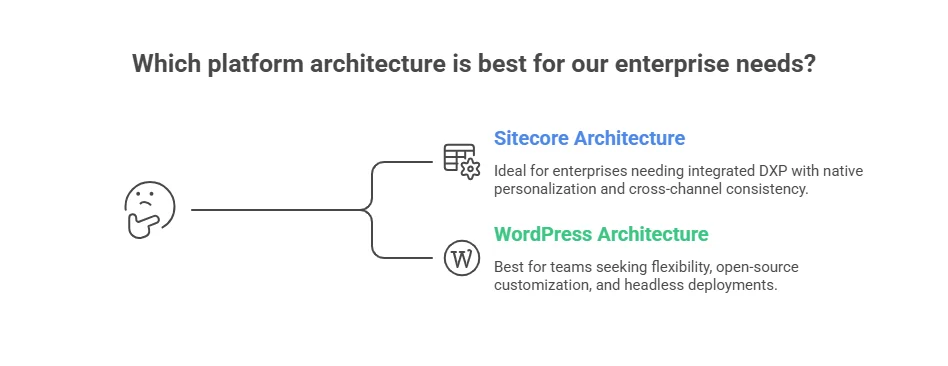
Architecture Comparison at a Glance:
| Feature | Sitecore | WordPress VIP |
|---|---|---|
| Core Architecture | Composable DXP, API-first, SaaS-native | Open-source, headless-capable |
| Personalization | Native engine + CDP | Plugin-based integrations |
| Flexibility | Structured ecosystem | Highly modular |
| Governance & Security | Built-in enterprise controls | Requires disciplined DevOps management |
| Scalability | Global, multi-site ready | Scales via VIP & headless architecture |
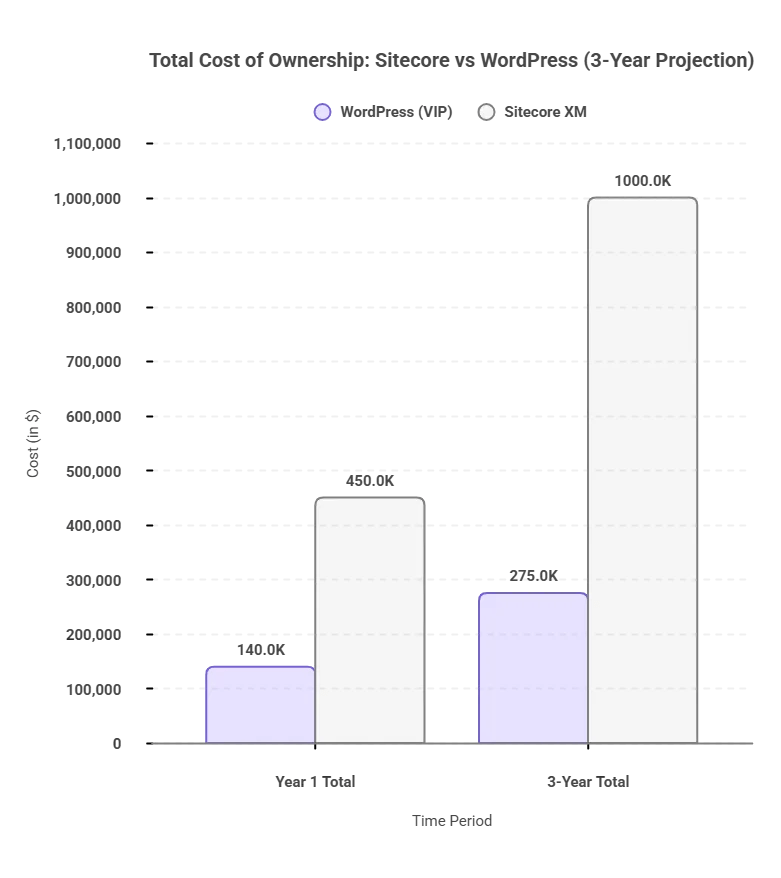
What Is the Total Cost of Ownership (TCO) for Sitecore vs WordPress?
Choosing the best bet in Sitecore vs WordPress isn’t about features. It’s about long-term impact on cost, scalability, and operational efficiency.
| Cost Component | WordPress (VIP) | Sitecore XM Cloud | Long-Term Cost Impact |
|---|---|---|---|
| License (Annual) | $0–$25K | $100K–$200K+ | Major factor for enterprise TCO |
| Design & Build | $50K–$100K | $100K–$200K+ | High impact on initial investment |
| Cloud / Hosting | $25K+ (VIP) | Included (SaaS) | SaaS reduces infrastructure overhead |
| Add-on Modules | $25K+ | $60K+ | Modules drive expansion costs |
| Support & Maintenance | $12K–$24K | $30K–$100K | Major factor in operational TCO |
| Year 1 Total | $100K–$180K | $300K–$600K | Year 1 sets budget baseline |
| 3-Year Total | $200K–$350K | $800K–$1.2M+ | Reflects total TCO over time |
Implementation Considerations: Sitecore vs WordPress
Sitecore implementations typically take 6–18 months due to enterprise integrations and governance requirements, while WordPress deployments often launch within 3–9 months thanks to its flexible ecosystem and larger developer pool.
Implementation timelines vary depending on platform architecture, integration complexity, and regulatory requirements.
Sitecore Implementation
Sitecore deployments usually take 6–18 months, especially in enterprise environments requiring advanced personalization, CDP integration, multi-region governance, and regulatory compliance such as HIPAA or GDPR.
Key considerations
-
Requires experienced .NET developers with Sitecore expertise
-
Higher implementation cost due to complex integrations
-
Custom development and compliance workflows can extend timelines
WordPress Implementation
WordPress implementations generally take 3–9 months, depending on whether the setup includes WordPress VIP hosting, headless architecture, or enterprise-level customization.
Key considerations
-
Large pool of PHP and JavaScript developers
-
Faster go-to-market for content-driven platforms
-
Requires disciplined plugin and integration management for long-term stability
-
Headless builds using React or Next.js require additional architectural planning
How Do Sitecore and WordPress Handle Personalization and AI?
Sitecore provides built-in, real-time personalization and AI automation across web, mobile, and email.
While WordPress depends on third-party tools for personalization and AI, it offers flexibility but requires extra effort to maintain consistency.
Jetpack AI supports content generation, but it’s less comprehensive than SitecoreAI’s integrated automation and dynamic recommendations.
| Capability | Sitecore | WordPress VIP |
|---|---|---|
| Native CDP | Built-in | Third-party required |
| Real-time Segmentation | Full cross-channel | Plugin/integration-dependent |
| AI Content Generation | SitecoreAI | Jetpack AI / Third-party |
| Marketing Automation | Sitecore Send + Personalize | Best-of-breed (HubSpot, Marketo) |
| A/B Testing | Integrated | Plugin/external tool |
| Personalization Depth | Enterprise, cross-channel | Configurable, integration-dependent |
Case Study: Personalization Impact at Canadian Western Bank
Canadian Western Bank implemented Sitecore’s Customer Data Platform and personalization engine to improve digital lead generation.
According to Sitecore customer reports, the initiative resulted in:
- 50% increase in conversion rates
- 70% improvement in marketing productivity
- Faster launch of targeted campaigns across digital channels.
This illustrates how enterprise platforms like Sitecore enable real-time behavioral targeting, something that often requires multiple integrations in modular CMS ecosystems.
Which CMS Offers Better Scalability And Governance?
Sitecore provides enterprise-grade scalability with multilingual support, role-based workflows, CI/CD pipelines, and built-in audit logging, ideal for regulated industries. Implementing Sitecore workflows can speed multi-stage approvals by 25–35%, streamlining legal and compliance bottlenecks.
WordPress VIP focuses on flexibility and rapid multi-site management through a centralized dashboard, VIP-CLI automation, and headless CMS support via WPGraphQL. However, it relies on manual processes, plugin oversight, and strong DevOps practices.
Comparison at a Glance:
| Metric | Sitecore | WordPress VIP |
|---|---|---|
| Primary Goal | Compliance & Consistency | Agility & Volume |
| Review Process | Automated, native workflows | Manual/light via plugins |
| Maintenance Burden | Low | High |
| Audit Readiness | Built-in logs | Fragmented |
| Multisite Management | Advanced, role-based | Centralized dashboard, manual |
Sitecore vs WordPress: How Do They Both Compare in Security and Compliance?
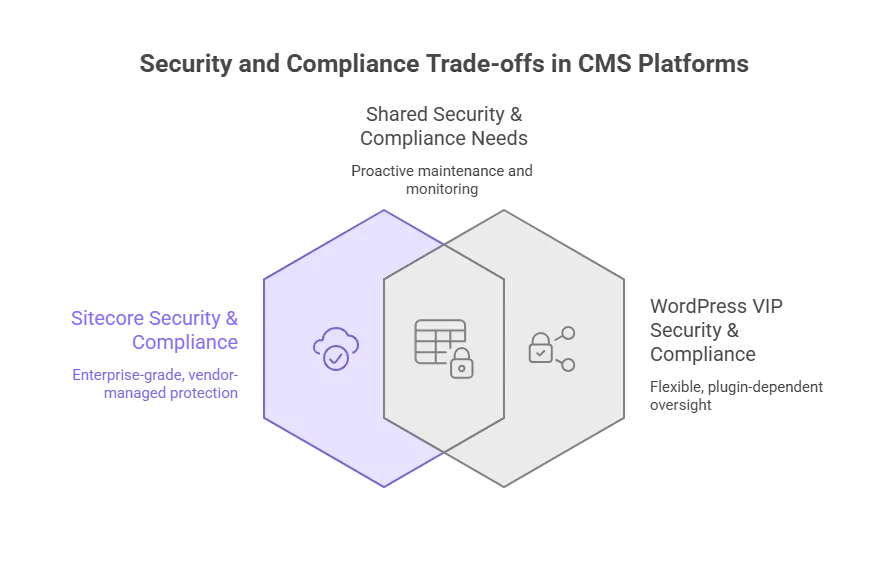
Sitecore offers a controlled, enterprise-grade environment with built-in compliance tools and vendor-managed updates, reducing risk and operational overhead.
WordPress VIP is flexible but relies on plugin management and proactive governance to maintain security and compliance, making it better suited for organizations with strong DevOps practices.
Sitecore Security & Compliance:
- Closed-source architecture: Updates and patches are delivered directly by Sitecore, limiting exposure to vulnerabilities.
- Built-in compliance: Supports GDPR, SOC 2, and HIPAA out-of-the-box.
- SaaS-managed updates: Automated patching reduces manual effort and risk.
- Reduced vulnerability surface: Fewer third-party dependencies mean fewer attack vectors.
WordPress Security & Compliance:
- Open-source platform: Relies heavily on third-party plugins, increasing potential vulnerabilities.
- Centralized VIP tools: VIP includes plugin vetting and 24/7 monitoring, but client teams must actively manage security and updates.
- Vulnerability stats: Patchstack reports 7,966 new WordPress vulnerabilities in 2024, 96% from plugins.
- Compliance requires configuration: HIPAA, SOC 2, or GDPR readiness depends on plugins, third-party tools, and proper operational oversight.
| Dimension | Sitecore | WordPress VIP |
|---|---|---|
| Vulnerability Surface | Controlled, vendor-managed | Open, plugin-dependent |
| Compliance | GDPR, HIPAA, SOC2 (built-in) | Requires configuration and plugin oversight |
| Patch Management | Automated, continuous | Variable, plugin-dependent |
| Monitoring | 24/7 SaaS-managed | 24/7 VIP-managed, manual oversight required |
How Complex Is Migrating From WordPress to Sitecore?
Migrating from WordPress to Sitecore is a multi-quarter, resource-intensive process involving content restructuring, template re-architecture, and martech re-integration. Proper planning is critical to preserve SEO, maintain operational continuity, and capitalize on Sitecore’s advanced personalization capabilities.
Migration Challenges:
- Content Structure Redesign: WordPress’s flat post/page taxonomy must be mapped to Sitecore’s hierarchical content tree to maintain SEO equity.
- Template Rebuild: WordPress templates (PHP/Gutenberg) need re-implementation as ASP.NET or Next.js components. Skilled developers and thorough QA are essential.
- Martech Re-integration: CRM, CDP, and marketing tools must be reconnected to Sitecore’s ecosystem, extending timelines.
- SEO Preservation: URL changes and content restructuring can cause ranking drops if not managed carefully.
Typical Migration Phases
| Phase | Key Activities | Duration (Large Enterprise) | Risk / Notes |
|---|---|---|---|
| Assessment & Planning | Audit content, define content tree, map templates & martech | 4–6 weeks | Skipping leads to rework and SEO loss |
| Content Structure Redesign | Transform content into Sitecore’s hierarchical tree; map URLs & metadata | 6–12 weeks | Incorrect mapping risks broken links |
| Template & Component Rebuild | Re-architect PHP/Gutenberg templates into ASP.NET/Next.js | 8–14 weeks | Requires experienced developers |
| Martech Re-integration | Reconnect CRM, CDP, personalization tools | 4–8 weeks | Misalignment can disrupt campaigns |
| Testing & QA | Functional testing, SEO validation, cross-device review | 4–6 weeks | Critical for multi-site/global deployments |
| Go-Live & Monitoring | Deploy, monitor analytics, fix post-launch issues | 2–4 weeks | Early monitoring reduces errors |
Total Duration: Typically 9–18 months, depending on scale and complexity.
WordPress vs Sitecore: Which CMS Is Better Suited For Different Industries?
Sitecore: Compliance & Enterprise Governance
Sitecore is widely adopted in industries where security, governance, and personalization are critical.
Typical use cases
- Healthcare: HIPAA-ready workflows and secure patient journey orchestration
- Financial Services: Audit trails, GDPR compliance, and behavioral personalization
- Global Enterprises: Multilingual content management and multi-brand governance
WordPress: Content-Creation Focused Industries
WordPress is widely used in industries that prioritize rapid publishing, modular architecture, and developer flexibility.
Common industries
- Media & Publishing: High-volume editorial workflows and real-time publishing
- Retail & eCommerce: Content-led commerce with WooCommerce integrations
- SaaS & Technology: Headless architectures and fast product iteration
- Government: Content-heavy public platforms and digital services
Case Study: WordPress VIP at Global Media Scale
Major publishers such as Al Jazeera, News Corp, TIME, and ADWEEK run their digital platforms on WordPress VIP to support large-scale publishing operations.
Key results include:
- 60% increase in publishing efficiency at News Corp brands
- 82% traffic growth and 3× content production at ADWEEK
- Editorial onboarding reduced from weeks to 1–2 hours at Al Jazeera
- Infrastructure capable of handling thousands of requests per minute during traffic spikes
These deployments show how WordPress excels in high-volume publishing, scalable infrastructure, and flexible content operations for media-driven organizations.
| Industry | Best Platform | Reason |
|---|---|---|
| Healthcare | Sitecore | Strong compliance and patient data security |
| Financial Services | Sitecore | Governance, audit trails, and advanced personalization |
| Media & Publishing | WordPress VIP | Fast publishing workflows and high-traffic scalability |
| Retail & eCommerce | Both | Sitecore for omnichannel experiences; WordPress for content-led commerce |
| SaaS & Technology | WordPress | Fast development cycles and headless CMS flexibility |
| Government | Both | Depends on regulatory compliance and system complexity |
How to Choose Between Sitecore and WordPress for Your Business
Choosing between Sitecore and WordPress is a strategic architecture decision that should align with your business goals, budget, and digital experience needs.
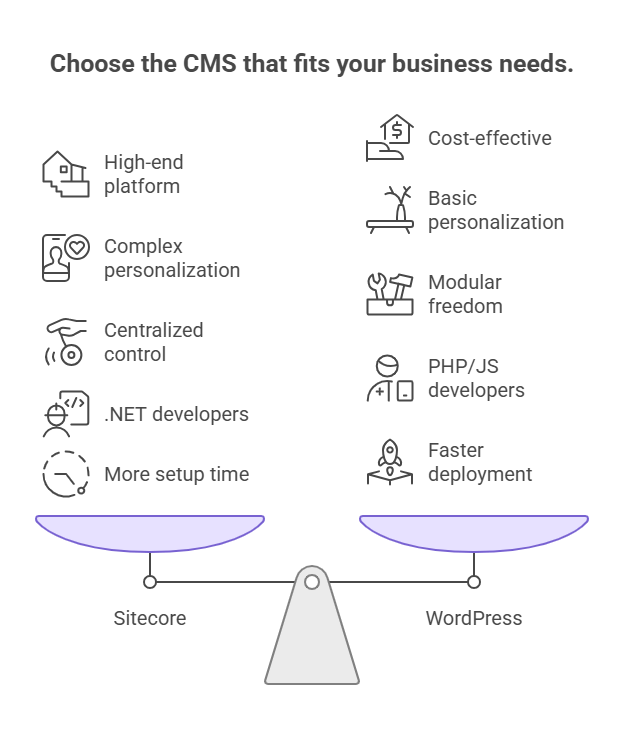
Key Factors to Consider for WordPress vs Sitecore Decision
- Budget: WordPress offers lower upfront costs; Sitecore requires larger enterprise investment.
- Personalization Needs: Sitecore supports advanced cross-channel personalization; WordPress relies on integrations.
- Governance & Compliance: Sitecore provides stronger built-in controls for regulated industries.
- Technical Resources: Sitecore requires specialized .NET developers, while WordPress benefits from a large PHP and JavaScript ecosystem.
Decision Framework by 3-Year Budget
| 3-Year CMS Budget | Recommendation |
|---|---|
| <$500K | Enterprise WordPress (VIP / managed hosting) |
| $500K–$1M | WordPress VIP with integrated martech stack |
| $1M–$2M | Sitecore XM Cloud |
| $2M+ | Sitecore Full Digital Experience Platform (DXP) |
Why Choose Sitecore?
Sitecore is designed for enterprises that require advanced governance, cross-channel personalization, and integrated customer data management.
Organizations with digital experience budgets above $1M typically benefit most from Sitecore’s advanced analytics, AI-driven personalization, and global multi-site capabilities.
Why Choose WordPress?
WordPress is ideal for organizations prioritizing flexibility, faster deployment, and modular architecture. Its large PHP and JavaScript ecosystem allows teams to integrate best-of-breed marketing tools and modern frameworks like React or Next.js.
| Platform | Pros | Cons |
|---|---|---|
| Sitecore | • Built-in personalization and CDP • Strong governance and compliance workflows • Supports global multi-site deployments |
• Higher licensing and implementation costs • Requires specialized .NET developers • Longer deployment timelines |
| WordPress | • Flexible open-source architecture • Faster development cycles • Large developer ecosystem |
• Plugin dependency increases maintenance • Security requires stronger governance • Personalization relies on integrations |
The Final Verdict: Sitecore vs WordPress for Enterprise CMS
The Sitecore vs WordPress decision ultimately comes down to organizational fit. If your business requires enterprise-grade governance, real-time personalization, and a unified DXP ecosystem, Sitecore is the stronger investment.
If your priority is speed, flexibility, and cost-efficient content operations, WordPress remains a powerful and scalable choice.
In simple terms, the right CMS is one your team can manage, your budget can support, and your strategy can fully use. At AppVerticals, success comes when the platform fits your digital maturity and growth goals, not just a feature list.
Ready to Build a Scalable, Governance-Ready CMS?
Learn how to align your CMS choice with long-term business goals, multi-site management, and enterprise-grade operational excellence.
Discover Sitecore Capabilities

![Odoo_Implementation_Cost__Complete_Pricing_Guide_&_TCO_Breakdown[1]](https://appvertical.kodefuse.com/wp-content/uploads/2026/01/Odoo_Implementation_Cost__Complete_Pricing_Guide__TCO_Breakdown1.png)