Google Play Store Statistics 2026: Essential Data for Founders and Growth Teams

The Google Play Store remains the world’s largest app distribution channel, accounting for more than 70% of global app downloads. It generates $49.2 billion annually, delivers 100+ billion downloads per year, hosts 1.6 million apps, and is dominated by freemium models (97% free apps). Gaming drives the majority of revenue ($31B), while Android leads in global reach and install volume, especially in emerging markets.

However, for founders, product teams, and growth leaders, scaling alone is no longer the central concern when it comes to Android app development. The key question is how these numbers can contribute to your launch startegy, pricing, ratings and international growth.

This guide breaks down the Google Play Store statistics that matter most and explains how businesses can use them to make smarter platform and growth decisions.

Google Play Store Stats at a Glance

Statistic Value Source
App Count Varies by source and methodology: 2.26M apps (Q2 2024) Statista
Annual Downloads 81.4B downloads in 2024, marking Google Play as the world’s largest Android app distribution channel Statista
Consumer Spend $11.2B in Q2 2024 gross app revenue worldwide Statista
Gaming Monetization Mobile gaming in-app purchases reached $81B across iOS and Google Play in 2024 Sensor Tower
Non-Gaming Monetization $19.4B in non-game in-app purchases across iOS and Google Play in Q1 2025 Sensor Tower
Free App Share 97.03% of apps on Google Play are free to download 42matters
Paid App Share Only 2.97% of apps on Google Play are paid 42matters
Publishers 686,654 publishers with apps on Google Play 42matters


How Many Apps Are in the Google Play Store?

Based on an analysis by AppVerticals, the Google Play Store currently hosts approximately 1.6 million apps. This figure represents a well-rounded estimate, reflecting a balance between various methodologies used to track app counts.

However, it’s important to note that the exact number of apps can vary depending on several factors, such as the methodology used to track them (e.g., live listings vs. broader app databases), the inclusion of low-quality or outdated apps, and updates in Google’s policy and app removal practices. For example, in 2017, the Play Store peaked at 3.6 million apps before Google purged large volumes of low-quality or obsolete listings.

For founders and investors, understanding the app landscape is key when evaluating the potential for growth and competition in the market. Collaborating with a mobile app development company can help you navigate this crowded space and focus on creating an app that stands out through effective app store optimization (ASO), user acquisition strategies, and ongoing improvements.

While the number of apps may fluctuate, one thing remains clear: the Play Store continues to be one of the largest and most competitive app markets worldwide, offering both challenges and opportunities for those looking to invest in successful app ventures.

Is The Google Play Store Growing Or Shrinking?

The short answer: it is growing again, but under tighter quality control.

AppBrain reports that in July 2025, Google Play added roughly 24,000 new apps and removed about 17,000 apps, resulting in net growth of about 7,000 apps for the month.

What that means

  • The store is not a pure “additive” marketplace anymore.
  • New app creation is still strong.
  • App removals are now a visible part of the ecosystem.
  • Quality, freshness, and policy compliance matter more than they used to.

This shift can be traced back to Google’s efforts to clean up the platform, especially after 2017 when a large number of low-quality or outdated apps were removed.

For founders, this shift alters the risk profile significantly. Weak apps now face a higher risk of being removed or failing to gain traction, while stronger products benefit from a store that is less cluttered and more focused on quality.

How Many Downloads Happen On Google Play?

Google Play remains the global leader in app downloads. Business of Apps reports 100+ billion downloads in 2025, up 2.1% year over year. Of those, 36.2 billion were game downloads and 67.7 billion were app downloads.

Google Play’s scale matters most when a business model depends on broad reach, re-engagement, or ad-supported growth. As Eric Seufert, founder of Mobile Dev Memo, has argued for years that Android’s biggest strength is not just volume, but the kinds of business models that volume supports. His analysis is especially relevant for founders deciding whether Google Play is better suited for ad-supported, re-engagement-heavy, or reach-first strategies. He notes that iOS users have historically been more valuable on a per-user basis, but Android can become especially attractive when developers need broader audience aggregation and more flexible growth tooling.

Android’s biggest advantage is still distribution at scale. That matters most when your strategy depends on:

  • broad international reach
  • lower install friction
  • top-of-funnel user acquisition
  • emerging market growth
  • ad-supported or commerce-based models

If your goal is reach first and monetization second, Google Play remains extremely attractive.

Start Building Your Android App Today

Understand the competition in the Google Play Store? Now it’s time to make your app stand out. Let us help you navigate the crowded marketplace and build a high-quality app that grabs attention.

How Much Revenue Does The Google Play Store Generate?

Play Store net worth is not a precise business metric. A better framing is consumer spending and platform monetization scale.

Business of Apps reports $49.2 billion in consumer spend in 2025, up 13% year over year.

Segment Consumer Spend
Games $31.0B
Apps $19.2B
Total $49.2B

Games still account for the largest share of direct monetization, even though non-gaming apps represent a larger share of total downloads.

How AppVerticals Helped Balotech Capitalize On the Revenue Potential In Gaming Industry

Balotech Game is an innovative AR-powered card scanning platform. By integrating AR technology, our team developed a solution that delivered gameplay in under 5 seconds, accurate card verification, and real-time insights. These improvements led to a 78% reduction in disputes and a 47% increase in game sharing. AppVerticals not only enhanced the user experience but also optimized the monetization strategy, enabling the game to effectively tap into the $31 billion gaming market on Google Play.

If you rely on direct in-app purchases or subscription-heavy behavior, gaming and a handful of high-intent app categories remain the clearest monetization opportunities. AppVerticals’ success with Balotech demonstrates how the right technical strategy and features can significantly boost revenue generation within the gaming segment.

If you monetize through ads, commerce, services, or lead generation, Google Play’s scale can still be a major advantage even when spend per user trails iOS.

Android App Development Costs and Monetization

As you evaluate how to best capitalize on the Play Store’s revenue potential, consider the Android app development cost. Building an app on Android can be more cost-effective than on iOS app development due to the open-source nature of Android and a less stringent approval process for apps. However, even with these cost advantages, you must factor in ongoing optimization and scaling costs as your app grows on the platform.

The cost can vary depending on factors such as:

  • App complexity (e.g., features, integrations, and user interface)
  • Development time (e.g., whether you’re building from scratch or using existing code)
  • Post-launch costs (e.g., maintenance, updates, and marketing)

While Android development may offer lower upfront costs compared to iOS, understanding these costs in relation to the revenue you plan to generate can help guide your overall app strategy and monetization decisions.

Scale Your App with Expert Development

Google Play is booming with revenue. Don’t miss out on this massive opportunity, our team of experts is ready to help you scale your app with a powerful, growth-driven Android development strategy.

What Fees Does Google Play Actually Charge Developers?

Google does not simply take 30% from every developer in every scenario.

According to Google’s official documentation, eligible developers pay 15% on the first $1 million in annual revenue, and 30% above that threshold. Automatically renewing subscriptions are generally charged 15%, and some other eligible transactions may also qualify for 15% or less.

Google also says 97% of developers distribute on Google Play at no charge, and that among developers who do pay service fees, 99% are eligible for 15% or less through applicable programs.

Why this matters for operators

Before modeling margins, ask:

  • Are you selling digital goods?
  • Are you monetizing through subscriptions?
  • Do you qualify for reduced fees?
  • Are you mostly using ads or commerce instead of in-app billing?

What Share Of Google Play Apps Are Free Vs. Paid?

Google Play is overwhelmingly a freemium marketplace: roughly 97.03% of listed apps are free, while only 2.97% are paid.

Why that matters

This tells you a lot about how the store works:

  • Upfront-paid apps are rare.
  • Most teams monetize after install.
  • Retention matters as much as acquisition.
  • Lifecycle monetization beats one-time conversion in most categories.

In other words, the real competition is not just for installs. It is for engagement, reviews, repeat use, and monetizable behavior after install.

How Many Apps Are Highly Rated on Google Play?

Ratings on Google Play are far from evenly distributed. Around 48% of apps have any user rating at all, while the remaining apps remain unrated. By mid-2025, only a small fraction of apps had achieved high ratings, with around 234,000 apps having earned a rating of 4.0 or higher, and a subset of around 109,000 apps reaching 4.5 or more.

AppVerticals helped Obituary App achieve remarkable success on Google Play, with a 5-star rating and over 10,000 downloads. The app provides an innovative and user-friendly solution for memorializing loved ones. AppVerticals played a crucial role in designing and developing a seamless user experience, integrating smooth navigation, and ensuring high app performance, which directly contributed to its exceptional rating and rapid user adoption.

What This Means for Growth Teams

Ratings are not just cosmetic; they serve as important signals:

  • Trust: A high rating builds credibility for users.
  • Conversion: Positive ratings influence download decisions.
  • App Store Optimization (ASO): Ratings impact discoverability in search results.
  • Product Maturity: A higher rating is often seen as a reflection of a well-developed and stable app.

Most apps never achieve the review density needed to appear credible to users. Therefore, generating reviews and ensuring product quality are essential strategies for growth teams, particularly in the post-launch phase.

Claudia Trujillo, Senior Growth Consultant at Phiture, argues that ASO is neither one-size-fits-all nor a one-time task. Her advice is especially relevant to Google Play because she stresses that teams must optimize store assets for both discovery and persuasion, and that review prompts perform better only after users experience clear value, not during early onboarding. In other words, metadata, screenshots, and review timing are not cosmetic decisions; they are core growth levers.

Which Categories Perform Best On The Google Play Store?

Category performance on Google Play depends on what you mean by best. Some categories win on revenue, others on download scale, and others on broad utility and install penetration.

Broad Popularity / Monetization

In terms of broad popularity and monetization potential, Games dominate the Google Play Store. Games consistently hold the top spot in terms of both app downloads and revenue generation.

According to Statista, in 2023, mobile gaming was projected to generate $104.6 billion in revenue, accounting for nearly 50% of all global app revenue.

Additionally, Sensor Tower research has shown that games are consistently the highest-grossing apps in the Play Store, driven by in-app purchases and ads.

Large Non-Game Categories

Beyond games, Education and Business categories also perform well.

Education apps surged in popularity, especially following the COVID-19 pandemic, which significantly boosted demand for remote learning and productivity tools.

According to App Annie (now Data.ai), educational apps saw a 30% year-on-year increase in global downloads in 2021.

Business apps are also thriving, as they offer solutions for everything from project management to communication. In particular, productivity tools and cloud-based collaboration apps have seen a marked rise in the Play Store, with the Google Workspace suite leading the charge.

Strong Download Penetration

When examining apps based on download thresholds, Tools stand out. A September 2024 snapshot from AppBrain revealed that 19,539 apps in the Tools category had surpassed the milestone of 50,000 downloads.

This is significant because it indicates a large number of apps are achieving substantial traction in terms of user acquisition. AppBrain’s research also showed that Utility apps, such as weather, task management, and system cleaners, often perform well due to their wide utility and recurring use.

Which Apps Rank Highest On Google Play?

At the app level, rankings on Google Play reflect significant trends in both user behavior and revenue generation. According to Business of Apps, in 2025, ChatGPT was the most downloaded app on Google Play, with an impressive 553 million downloads.

Google One took the top spot for the highest-grossing app, generating an astounding $2.6 billion in revenue. This illustrates the vast reach and monetization potential of both AI-driven apps and cloud-based services.

Rank App Category Key Highlights
1 ChatGPT AI & Communication Most downloaded app in 2025, with 553 million downloads
2 Google Gemini AI & Communication Google’s AI chatbot, strong competition to ChatGPT
3 TikTok Social Media/Entertainment Leading platform for short-form video content
4 WhatsApp Messaging Dominant messaging app, used by millions for communication
5 Temu E-commerce Fast-growing shopping app with affordable global products

While rankings can vary by region, it’s useful to look at trends from specific markets. As one market snapshot, the U.S. rankings for 2025 offer insight into how apps are performing within this major market:

Google Play Store vs App Store

When it comes to mobile platforms, there’s a clear distinction in performance: Google Play excels in app downloads, while Apple leads in consumer spending.

Here’s a quick snapshot:

Metric Google Play Apple App Store
Downloads 100B+ 36.6B
Consumer Spend $49.2B $117.6B
App Count 1.58M 2.42M
  • Google Play generated 100+ billion downloads in 2025, but $49.2 billion in consumer spend.
  • Apple App Store had 6 billion downloads and a significantly higher $117.6 billion in consumer spend.
  • This difference highlights that while Google Play offers broader distribution and access, Apple attracts users with higher purchasing power, particularly in premium segments.

Strategic Considerations for Founders:

David Barnard, developer advocate at RevenueCat and host of Sub Club, makes a useful distinction that many founders miss: the Android monetization gap is often less about Android users being unwilling to pay and more about there being fewer payers overall. In his discussion of the 2025 State of Subscription Apps data, he notes that people who do pay on Android can have realized LTVs that are relatively similar to iOS payers. His practical advice is that teams often find better results on Android through hybrid monetization, lower price points in certain markets, and more flexible packaging instead of forcing a one-size-fits-all subscription strategy..

Between Apple vs Android, Choose Android-first if you need:

  • Global reach: Android dominates in regions with large mobile user bases.
  • Lower entry friction: Easier access for users with lower-cost devices.
  • Faster scaling in install-heavy categories: Android’s larger market share enables quicker user acquisition.

Choose iOS earlier if you need:

  • Stronger spend per user: iOS users tend to spend more on apps.
  • Premium subscription economics: iOS has a higher concentration of premium users.
  • Higher-value payer concentration: iOS users are more likely to make in-app purchases.

In many cases, a sequenced approach, starting on one platform and expanding to the other, might be the most strategic choice rather than committing exclusively to one.

How These Google Play Statistics Should Shape Business Decisions

Up to this point, the numbers describe the market. The more important question is how teams should act on them. Google Play statistics are most useful when they help teams decide where to launch, how to monetize, and what to prioritize after launch.

The data suggests that Google Play is not just a scale channel, it is a platform where business outcomes depend heavily on localization, pricing strategy, review generation, and listing optimization.

If your growth strategy depends on international reach, localized discovery can materially improve performance. Koo used Google Play custom store listings tailored by country and language and reported a 15% increase in organic installs in non-English markets. The company also reported a 3x increase in DAUs and a 10% reduction in churn, reinforcing the idea that Android scale becomes more valuable when paired with localized messaging and user experience.
If your category is crowded, store listing optimization can directly affect revenue, not just installs. Splendid Apps used Google Play store listing experiments to test icons and screenshots by market and ultimately achieved 20% more store listing visitors, 10% more users, and 9% higher revenue. That is an important lesson for product and growth teams: in a mature Play Store, conversion improvements at the listing level can compound into meaningful business impact.
If your app depends on trust, ratings should be treated as a growth system rather than passive social proof. Babbel implemented Google Play’s In-App Review API and placed prompts after users completed meaningful learning moments. The result was a 64% increase in rating volume and a 0.11-star increase in daily average rating shortly after rollout. For businesses, that supports a practical conclusion: ratings can improve both perception and conversion when review requests are timed around moments of user satisfaction.
If you are selling subscriptions or in-app purchases across multiple countries, pricing should not be treated as universal. PlayKids used localized pricing experiments based on user volume, revenue patterns, and purchasing power, and saw revenue increase 229% in Russia, 137% in Mexico, 91% in Australia, and 56% in Chile. For founders, that is a reminder that the headline Google Play revenue numbers matter less than whether your pricing reflects local market reality.

Taken together, these case studies show that Google play store statistics are most useful when they inform specific strategic choices. A founder deciding whether to prioritize Android should not only ask whether the Play Store is large enough.

They should ask whether their app can win through localization, freemium or hybrid monetization, review generation, and systematic conversion testing. That is where the numbers become decisions.

Optimize Your App for Maximum Impact

It’s clear: the right app strategy can make all the difference. Optimize your app for growth with our cutting-edge development services and boost your Google Play success.

Who Should Prioritize Google Play?

Google Play is typically the stronger first move for teams that need:

  • international reach
  • install volume
  • freemium or ad-supported economics
  • localization-driven growth
  • rapid top-of-funnel acquisition

It is usually less ideal as a first platform for apps that depend heavily on:

  • premium upfront pricing
  • high ARPPU concentration
  • narrow premium audiences

Get a Free Consultation on Your App Idea

Still unsure whether Google Play is the right path for your app? Let’s talk about your vision and explore the best strategy for your business.

Conclusion

Google Play is still the default path to Android scale, but it is no longer a simple volume play. The biggest opportunities now go to teams that match the platform to the right business model: freemium or hybrid monetization, strong localization, disciplined ASO, and consistent product quality.

For founders and growth leaders, the takeaway is simple: Google Play can still be a major growth engine, but only if you treat it as a strategic operating environment, not just a distribution channel.

More Related Guides

  • Global Mobile App Download Statistics: This article explores the latest figures on global mobile app downloads, highlighting key trends, regional insights, and growth projections for the mobile app industry.
  • AI in App Development Statistics: This article delves into the role of artificial intelligence in app development, examining adoption rates, key AI-driven features, and how AI is transforming app design and functionality.
  • AI Chatbot Adoption Statistics: This article covers the rise of AI chatbots across industries, with statistics on adoption rates, use cases, and the impact of AI-driven customer service tools on user engagement and business efficiency.

SaaS vs Custom Software: Ultimate Buyer’s Guide (2026)

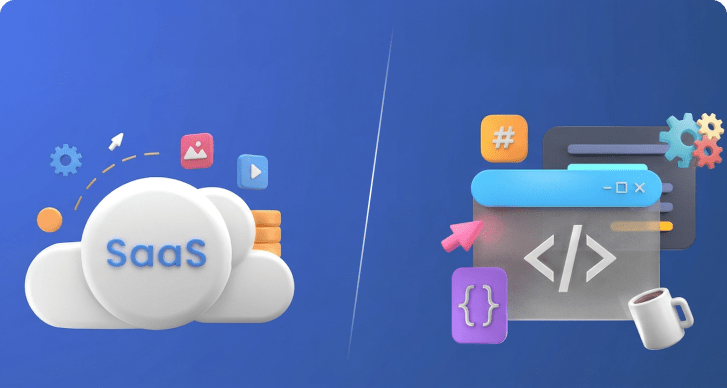
SaaS and custom software solve different business needs. SaaS offers ready-to-use applications with lower upfront cost and fast deployment. 

Custom software, often built with a custom software development company, supports specific workflows, greater control, and long-term scalability. 

The global SaaS market is projected to exceed $1.25 trillion by 2034, reflecting widespread adoption. The right choice depends on your growth stage, operational complexity, and total cost over time. 

This guide explains when to use each approach and how to decide with confidence.

SaaS vs Custom Software At a Glance

  • SaaS is best for fast deployment, low upfront cost, and standard business needs.
  • Custom software is best for complex workflows, scalability, and long-term efficiency.
  • SaaS becomes expensive over time due to subscriptions, user-based pricing, and tool stacking.
  • Custom software costs more upfront but reduces long-term operational expenses.
  • SaaS limits flexibility and control, especially as business complexity increases.
  • Custom software provides full ownership, better integration, and competitive advantage.
  • Most businesses start with SaaS and move to custom software as they scale.

👉 Choose SaaS for speed. Choose custom software for control and growth.

SaaS vs Custom Software: Key Differences

The key difference between SaaS and custom software lies in control, cost structure, and flexibility. SaaS provides ready-to-use solutions with lower upfront investment but limited customization. Custom software requires higher initial investment but offers full control, better integration, and long-term scalability tailored to business needs.

Decision Factor SaaS (What It Means for Your Business) Custom Software (What It Means for Your Business)
Time to Launch Deploy in days. Ideal for quick market entry and MVP validation. Takes weeks to months. Suitable when the long-term system matters more than speed.
Initial Investment Low upfront cost. Subscription-based pricing reduces early financial risk. High upfront cost. Requires capital but builds a long-term asset.
Total Cost Over Time Costs increase as users, features, and integrations grow. Multiple tools add hidden expenses. Higher initial cost but lower long-term cost by eliminating recurring SaaS fees and tool stacking.
Business Fit Works best for common use cases like CRM, accounting, and email marketing. Built around your exact workflows. Eliminates inefficiencies and manual workarounds.
Scalability Scales within vendor limits. Pricing tiers can become restrictive at scale. Scales based on your infrastructure and architecture decisions. No artificial limits.
Flexibility Limited to vendor roadmap. Feature requests may take time or never happen. Full flexibility. Features evolve with your business priorities.
Integration Complexity Requires APIs, third-party tools, or middleware. Can lead to fragmented systems. Designed for deep integration across internal systems, reducing operational friction.
Data Ownership Data stored on vendor servers. Access and control depend on provider policies. Full data ownership and control. Critical for regulated industries and sensitive data.
Security & Compliance Standardized security. May not fully meet industry-specific compliance needs. Security built around your requirements. Supports HIPAA, GDPR, UAE PDPL from day one.
Vendor Dependency High dependency. Switching platforms can be costly and complex. No vendor lock-in. Full control over product lifecycle and roadmap.
Performance Shared infrastructure may affect performance under high load. Optimized for your use case. Better performance for complex operations.
Maintenance Managed by provider. Minimal internal effort required. Managed internally or with a custom software development company. More control, more responsibility.
Competitive Advantage Limited differentiation. Competitors can use the same tools. Strong differentiation. Software becomes a strategic business asset.
Best Fit Scenario Startups, small teams, or businesses with standard processes. Scaling companies, enterprises, or businesses with unique operational needs.

What Are the Pros of SaaS?

SaaS is designed for speed and accessibility. It allows businesses to adopt software quickly without investing in development, which is why it is often the default choice in early stages. It is especially done when supported by custom SaaS development services tailored to specific business needs.

1. Fast Deployment Enables Immediate Execution

SaaS platforms enable deployment within days, sometimes hours. There is no need for architecture planning or development cycles. Teams can start using the system almost immediately, which is critical when speed directly impacts growth or validation.

2. Lower Upfront Cost Reduces Financial Risk

SaaS reduces the need for large initial investment. Instead of committing capital to development, businesses pay gradually through subscriptions. This creates flexibility, especially when requirements are still evolving or uncertain.

3. Minimal Technical Overhead Simplifies Operations

SaaS providers manage infrastructure, updates, and system reliability. This removes the need to build internal technical capabilities, allowing teams to focus on operations instead of maintaining systems.

4. Proven Systems Reduce Uncertainty

SaaS products are built around widely used business processes. They have been tested across large user bases, which reduces the risk of failure and ensures stable performance for common use cases.

What Are the Cons of SaaS?

SaaS delivers speed early but introduces constraints as businesses grow. The limitations become more visible as workflows and requirements become more complex.

1. SaaS Platforms Limit Flexibility as Complexity Increases

SaaS tools are designed for general use, not for how your business specifically operates. As complexity grows, teams begin adjusting processes to fit the software, which reduces efficiency over time.

2. SaaS Costs Increase Significantly at Scale

SaaS pricing expands through user-based models, feature upgrades, and additional tools. What starts as a low monthly cost often grows into a fragmented and expensive stack as the business scales.

3. SaaS Creates Long-Term Vendor Dependency

Businesses rely on vendors for updates, pricing, and product direction. This reduces control and introduces risk when the platform changes or no longer aligns with business needs.

4. SaaS Ecosystems Lead to Fragmented Systems

As requirements grow, multiple SaaS tools are introduced. These systems often fail to integrate seamlessly, creating data silos and operational inefficiencies.

5. SaaS Limits Data Control and Compliance Flexibility

Data is stored on vendor-controlled infrastructure. This restricts direct control and can create challenges for businesses operating under strict regulatory requirements.

What Are the Pros of Custom Software?

Custom software becomes valuable when systems need to reflect how a business actually operates. It shifts software from a tool into a strategic asset.

1. Custom Software Aligns Directly With Business Workflows

Custom software is built around your processes, not predefined templates. This removes inefficiencies and eliminates the need for workarounds.

2. Custom Software Provides Full Ownership and Control

Custom software gives you complete control over features, data, and system evolution. Decisions are driven by business priorities, not vendor limitations.

3. Custom Software Improves Long-Term Cost Efficiency

Custom software reduces long-term costs by eliminating recurring subscriptions and reducing reliance on multiple tools. Over time, this leads to a lower total cost of ownership.

4. Custom Software Scales Without Vendor Constraints

Custom systems scale based on infrastructure and architecture decisions. There are no pricing tiers or feature restrictions limiting growth.

5. Custom Software Creates Competitive Advantage

Custom software enables businesses to build unique systems that competitors cannot replicate. This creates differentiation and operational advantage.

What Are the Cons of Custom Software?

Custom software provides long-term value but requires upfront investment and planning. The tradeoffs are visible early in the process.

1. Custom Software Requires Higher Initial Investment

Custom software involves significant upfront cost for design, development, and infrastructure. This makes it less suitable for early-stage or uncertain projects.

2. Custom Software Takes Longer to Deploy

Custom systems require planning, development, and testing. This results in longer timelines compared to immediate SaaS deployment.

3. Custom Software Requires Ongoing Maintenance Responsibility

Custom software requires continuous management of updates, performance, and infrastructure. Businesses often handle this internally or through a renowned services provides like AppVerticals.

4. Custom Software Depends on Strong Technical Decisions

The success of custom software depends on early architectural choices. Poor planning can lead to scalability issues and increased long-term costs.

Quick Decision Insight

SaaS works best when speed and low upfront cost are the priority. Custom software becomes the better choice when your business requires control, scalability, and long-term efficiency.

When Should You Choose SaaS?

Choose SaaS when you need fast deployment, lower upfront cost, and standard functionality. It is the best option for early-stage businesses, predictable workflows, and teams without strong technical resources.

1. Choose SaaS When You Need to Move Fast

SaaS enables immediate deployment without development delays. Businesses can start using tools within days, which is critical when validating ideas or launching quickly.

This is one of the main reasons SaaS dominates modern software adoption. Today, about 99% of companies use at least one SaaS solution, showing how widely it is used for fast execution .

If speed directly impacts revenue or market entry, SaaS is the practical choice.

2. Choose SaaS When Your Needs Are Standard

SaaS platforms are built for common business functions such as CRM, accounting, communication, and marketing.

This works well when:

  • your workflows are not highly customized
  • your processes follow industry norms

The reality is most companies rely heavily on SaaS for these standard needs. In fact, around 75% of business applications are now SaaS-based, reflecting how dominant it is for common use cases .

3. Choose SaaS When You Want Lower Upfront Investment

SaaS reduces the need for large capital investment by shifting costs to a subscription model.

This is ideal when:

  • budgets are limited
  • ROI is still uncertain
  • you want to test before committing

For startups and SMBs, this flexibility is a major advantage. Around 60% of SMBs already use SaaS tools, with over 80% planning to increase adoption, highlighting its role in cost-efficient growth .

4. Choose SaaS When You Lack Internal Technical Resources

SaaS eliminates the need to build and maintain infrastructure. The provider handles:

  • updates
  • security
  • system reliability

This makes SaaS a strong fit for businesses that:

  • don’t have in-house engineering teams
  • want to avoid operational complexity

Instead of managing systems, teams focus on growth and execution.

5. Choose SaaS When You Are in Early or Growth Stages

SaaS is ideal when your business model, workflows, or product direction are still evolving.

At this stage:

  • requirements change frequently
  • flexibility matters more than optimization
  • speed outweighs long-term efficiency

This is why many companies start with SaaS and transition later.

6. Choose SaaS When Time-to-Value Matters More Than Ownership

SaaS delivers immediate value without long development cycles.

If your priority is:

  • solving a problem quickly
  • improving operations immediately
  • avoiding delays

then SaaS is the better option.

Ownership and control matter later. Speed and execution matter now.

Stop Overthinking. Start Building.

Launch faster with scalable SaaS solutions built for speed, reliability, and rapid growth. If your priority is quick deployment without heavy investment, SaaS is the smartest first step.

Explore SaaS Ideas

When Should You Build Custom Software?

Build custom software when your business requires flexibility, control, and scalability that SaaS cannot provide. It is the right choice for complex workflows, growing operations, and companies that treat technology as a strategic asset.

1. Build Custom Software When Your Business Processes Are Unique

Custom software is essential when your workflows cannot be supported by standard tools. SaaS platforms are designed for common use cases, not for how your business specifically operates.

Industries with specialized requirements such as healthcare, fintech, and logistics often choose custom solutions because generic tools cannot fully support compliance, integrations, or operational complexity.

👉 Custom software is best when your processes are a competitive advantage, not just a function.

2. Build Custom Software When SaaS Costs Start Compounding

Custom software becomes financially viable when SaaS costs scale faster than expected.

SaaS pricing grows through:

  • per-user fees
  • feature upgrades
  • multiple tool subscriptions

While SaaS reduces upfront cost, it shifts spending into long-term operational expense. In contrast, custom software shifts cost upfront and reduces recurring spend over time.

👉 Custom software delivers better long-term ROI when SaaS costs become fragmented and difficult to control.

3. Build Custom Software When You Need Full Data Ownership and Control

Custom software is the better choice when data control, security, and compliance are critical.

SaaS platforms store data on vendor-controlled infrastructure, which can limit governance and flexibility. This becomes a concern in regulated environments where businesses must meet strict compliance requirements.

Custom systems allow:

  • full control over data
  • custom security implementation
  • compliance built into the architecture

👉 Custom software is essential when compliance and data ownership cannot be compromised.

4. Build Custom Software When Integration Complexity Slows You Down

As businesses grow, they rely on multiple systems. SaaS tools often require APIs and middleware to connect, which creates inefficiencies.

SaaS-heavy environments commonly lead to:

  • disconnected systems
  • duplicated data
  • operational delays

Custom software solves this by creating a unified system designed for your ecosystem.

👉 Custom software is ideal when integration complexity starts impacting productivity and decision-making.

4. Build Custom Software When You Are Scaling Operations

Custom software becomes the right choice when your business moves beyond early-stage growth and requires systems that scale without constraints.

SaaS platforms often introduce:

  • pricing limits
  • feature restrictions
  • performance constraints

At scale, these limitations affect both cost and efficiency. Custom systems scale based on infrastructure, not vendor pricing. This allows businesses to grow without artificial limitations.

👉 Custom software is best for scaling businesses that need flexibility without platform constraints.

5. Build Custom Software When Technology Becomes a Core Asset

Custom software makes sense when technology is not just a support tool but a core part of your business strategy.

According to industry analysis, SaaS accounts for roughly 70% of new software implementations, but custom software delivers stronger strategic value in specialized operations where differentiation matters.

This is why:

  • SaaS dominates adoption
  • Custom software dominates differentiation

👉 Custom software is the right choice when your system directly impacts revenue, efficiency, or competitive advantage.

Your Business Isn’t Standard. Your Software Shouldn’t Be.

Build custom software tailored to your workflows, integrations, and growth strategy. Gain full control, eliminate inefficiencies, and scale without limitations.

Talk to a Custom Software Expert

7 SignsYour Business Has Outgrown SaaS

You have outgrown SaaS when your tools create complexity, costs increase without clear ROI, and your workflows no longer fit the software. At this stage, custom software becomes the more scalable and efficient solution.

1. You Are Managing Too Many Tools Instead of One System

Businesses outgrow SaaS when their stack becomes fragmented. Instead of solving problems, tools start creating operational overhead.

The reality is most companies operate in this state. This creates:

  • disconnected workflows
  • duplicated data
  • inconsistent reporting

👉 If your team spends more time managing tools than using them, you have outgrown SaaS.

2. Your SaaS Costs Keep Increasing Without Clear ROI

SaaS starts as cost-effective but becomes expensive at scale. Costs grow through user licenses, feature upgrades, and multiple subscriptions.

Many companies now prioritize cost control because of this. 

👉 If your software costs are rising faster than business value, SaaS is no longer efficient.

3. Your Workflows Do Not Fit the Software Anymore

SaaS platforms are designed for standard use cases. As your operations evolve, they stop fitting your workflows.

This shows up as:

  • manual workarounds
  • process inefficiencies
  • dependence on spreadsheets outside the system

👉 If your team adapts to the software instead of the software adapting to you, you have outgrown SaaS.

4. Integration Issues Are Slowing Down Operations

As more tools are added, integration becomes harder. APIs and middleware create partial connections, not unified systems.

This leads to:

  • delayed data syncing
  • inconsistent insights
  • operational bottlenecks

👉 If your systems do not communicate cleanly, SaaS is limiting your efficiency.

5. You Lack Control Over Features, Data, or Direction

SaaS puts control in the hands of the vendor. As your business grows, this becomes a constraint.

You cannot control:

  • feature development
  • pricing changes
  • product roadmap

👉 If your business depends on decisions you do not control, SaaS becomes a risk.

6. Compliance or Security Requirements Are Increasing

As businesses scale, regulatory and security requirements become stricter.

SaaS platforms offer standardized compliance, but they may not fully support:

  • industry-specific regulations
  • custom security requirements
  • data governance needs

👉 If compliance depends on vendor limitations, SaaS is no longer sufficient.

7. Growth Is Creating More Constraints, Not More Efficiency

SaaS should support growth. When it starts slowing you down, it is a clear signal.

This often happens when:

  • costs increase with scale
  • features become limiting
  • systems cannot evolve with business needs

👉 If growth increases friction instead of efficiency, your system needs to evolve.

How Can You Choose Between SaaS vs Custom Software 

Choose SaaS when your needs are standard, your priority is speed, and your budget is limited. Choose custom software when your workflows are complex, your costs are scaling, and your business requires control, integration, and long-term efficiency.

Step 1: Evaluate Your Business Complexity

The first decision point is how unique your workflows are.

SaaS works well when your processes are standard and align with widely used tools such as CRM, accounting, or marketing platforms. Custom software becomes necessary when your workflows are unique and cannot be supported without compromises.

👉 If your business adapts to software, choose SaaS. If software must adapt to your business, choose custom.

Step 2: Assess Your Growth Stage

Your stage of growth directly impacts the right choice.

Early-stage businesses benefit from SaaS because it enables rapid deployment and reduces upfront risk. As companies grow, SaaS limitations start to surface through cost, flexibility, and integration challenges.

This shift is reflected in adoption trends. According to Statista SaaS Market Outlook, SaaS continues to dominate global software usage, especially among startups and SMBs.

👉 If you are validating or scaling quickly, choose SaaS. If you are optimizing and expanding, consider custom software.

Step 3: Compare Total Cost of Ownership (TCO)

The decision is not just about upfront cost. It is about long-term spending.

SaaS appears affordable initially but scales through subscriptions, add-ons, and multiple tools. Custom software requires higher upfront investment but reduces recurring costs over time. Companies now rely heavily on SaaS ecosystems. 

👉 If your costs grow with usage, SaaS becomes expensive. If you want predictable long-term cost, custom software is more efficient.

Step 4: Determine Control and Ownership Needs

Control becomes a key factor as businesses scale.

SaaS platforms limit control over:

  • features
  • pricing
  • product roadmap
  • data governance

Custom software provides full ownership and control, which is critical for businesses operating in regulated or highly competitive environments.

👉 If control over data and systems is critical, choose custom software. If convenience is more important, SaaS is sufficient.

Step 5: Analyze Integration and System Efficiency

As your business grows, your systems need to work together seamlessly.

SaaS tools often require APIs and third-party integrations, which can create fragmented systems. Custom software enables unified architecture designed specifically for your ecosystem.

👉 If your systems are disconnected, custom software improves efficiency. If your needs are simple, SaaS works fine.

Step 6: Evaluate Strategic Importance of Technology

The final decision depends on how important software is to your business model.

If software is only a support function, SaaS is sufficient. If software drives operations, revenue, or differentiation, custom software becomes a strategic investment.

👉 If technology is your backbone, build custom. If it is a tool, use SaaS.

Simple Decision Checklist (SaaS vs Custom Software)

  • Your workflows are standard → Choose SaaS
  • You need to launch quickly → Choose SaaS
  • Your SaaS costs are increasing → Consider Custom Software
  • Your tools are fragmented → Consider Custom Software
  • You need control over data and features → Choose Custom Software
  • Technology is core to your business → Choose Custom Software

Cost & ROI Analysis: SaaS vs Custom Software

SaaS has lower upfront cost but becomes expensive over time due to subscriptions and tool stacking. Custom software requires higher initial investment but delivers better long-term ROI by reducing recurring costs and improving operational efficiency.

SaaS Cost Breakdown

SaaS pricing looks simple, but it expands as your business grows.

Typical SaaS Cost Components:

  • Subscription fees (per user/month)
  • Feature upgrades and premium tiers
  • Integration tools and middleware
  • Additional SaaS tools to fill gaps

Most businesses underestimate how quickly this scales. 

Estimated SaaS Cost Range (Mid-Sized Business):

Cost Element Monthly Cost Annual Cost
Core tools (CRM, PM, Accounting) $50–$150 per user $30,000–$120,000
Add-ons & integrations $5,000–$15,000 $60,000–$180,000
Additional tools (stack expansion) $10,000+ $120,000+
Total Estimated Cost $200,000–$400,000+ / year

👉 SaaS cost increases as you scale users, features, and tools.

Custom Software Cost Breakdown

Custom software requires upfront investment but reduces recurring costs over time.

Typical Custom Software Cost Components:

  • Initial design and development
  • Infrastructure (cloud hosting, APIs)
  • Maintenance and updates

Estimated Custom Software Cost Range:

Cost Element One-Time Cost Annual Cost
Development (MVP to full system) $50,000–$300,000+
Infrastructure & hosting $10,000–$50,000
Maintenance & updates $20,000–$80,000
Total Estimated Cost $50K–$300K+ upfront $30K–$130K/year


👉 Custom software shifts cost upfront and stabilizes long-term spending.

ROI Beyond Cost (What Buyers Miss)

Cost alone is not the full picture. ROI comes from efficiency and control.

Custom software improves ROI by:

  • reducing manual work
  • eliminating tool switching
  • improving system integration
  • enabling faster decision-making

SaaS improves ROI by:

  • enabling faster start
  • reducing initial risk
  • minimizing technical overhead

👉 SaaS optimizes short-term ROI. Custom software optimizes long-term ROI.

Industry Use Cases: SaaS vs Custom Software

SaaS works well in industries with standard workflows such as basic CRM or accounting. Custom software becomes essential in industries like healthcare, fintech, and logistics where compliance, integration, and performance are critical.

1. Healthcare: Compliance and Data Control Drive Custom Software

Healthcare systems must comply with strict regulations such as HIPAA and GDPR. These requirements go beyond what most SaaS platforms can fully support.

SaaS works for:

  • appointment scheduling
  • basic patient management

Custom software becomes necessary for:

  • electronic health records (EHR)
  • secure data handling
  • integration with hospital systems

👉 In healthcare, custom software is often required when compliance and data security are critical.

2. Fintech: Security, Compliance, and Performance Require Custom Systems

Financial systems operate under strict regulatory and performance requirements. Standards such as PCI DSS and regional financial regulations demand high levels of control.

SaaS works for:

  • basic accounting
  • reporting tools

Custom software is preferred for:

  • payment processing systems
  • fraud detection
  • real-time transaction platforms

👉 In fintech, custom software becomes essential when systems directly handle transactions and risk.

3. Logistics & Supply Chain: Integration and Efficiency Favor Custom Software

Logistics businesses depend on real-time coordination across multiple systems such as inventory, tracking, and fleet management.

SaaS works for:

  • basic tracking
  • warehouse tools

Custom software becomes necessary for:

  • route optimization
  • real-time system synchronization
  • multi-system integration

👉 In logistics, custom software is ideal when efficiency depends on tightly integrated systems.

4. Real Estate: Scalability and User Experience Drive Hybrid or Custom Solutions

Real estate platforms often start with SaaS but outgrow it as listings, users, and transactions increase.

SaaS works for:

  • CRM systems
  • listing management

Custom software becomes valuable for:

  • property marketplaces
  • advanced search and filtering
  • user experience optimization

As platforms scale, performance and flexibility become critical. SaaS limitations often impact speed and customization.

👉 In real estate, SaaS works early, but custom software becomes necessary as platforms scale.

5. SaaS & Tech Companies: Custom Software as a Core Product

For SaaS companies themselves, software is not a tool. It is the business.

SaaS tools are used internally for:

  • support functions
  • marketing automation

Custom software is used for:

  • the core product
  • proprietary features
  • competitive differentiation

👉 In tech businesses, custom software is not optional. It is the core asset.

Hybrid Approach: Combining SaaS and Custom Software

A hybrid approach combines SaaS for standard operations and custom software for core workflows. It allows businesses to move fast, reduce costs, and gain control without rebuilding entire systems.

1. Use SaaS for Standard Functions, Build Custom for Core Systems

The most effective approach is to separate commodity functions from core operations.

SaaS works best for:

  • CRM
  • accounting
  • communication tools
  • HR systems

Custom software should focus on:

  • core business workflows
  • proprietary processes
  • systems that impact revenue or efficiency

👉 Use SaaS where differentiation does not matter. Build custom where it does.

2. Start with SaaS, Transition to Custom as You Scale

Most companies begin with SaaS because it reduces time to market. As the business grows, limitations start to appear in cost, flexibility, and integration.

At that point, businesses:

  • replace multiple SaaS tools with one custom system
  • build internal platforms to reduce dependencies
  • optimize workflows that were previously fragmented

👉 SaaS helps you start. Custom software helps you scale.

3. Extend SaaS Instead of Replacing It Completely

A hybrid approach does not require removing SaaS entirely. In many cases, SaaS can be extended with custom layers.

This includes:

  • custom dashboards on top of SaaS data
  • internal tools connected through APIs
  • automation layers that reduce manual work

Instead of replacing SaaS, you build around it to remove limitations.

👉 Extend SaaS when it works. Replace it when it becomes a bottleneck.

4. Reduce Tool Sprawl with Strategic Consolidation

As SaaS stacks grow, businesses often use multiple tools for overlapping functions. A hybrid approach allows consolidation.

Instead of:

  • 5 tools solving parts of a problem

You move toward:

  • 1 custom system solving it completely

This reduces:

  • cost
  • integration complexity
  • operational friction

👉 Hybrid strategy is not about adding more tools. It is about reducing unnecessary ones.

5. Maintain Flexibility While Gaining Control

A pure SaaS approach limits control. A fully custom approach requires full responsibility.

Hybrid gives you both:

  • flexibility through SaaS
  • control through custom systems

This balance allows businesses to:

  • adapt quickly
  • optimize strategically
  • avoid overbuilding too early

👉 Hybrid is the balance between speed and control.

When a Hybrid Approach Makes the Most Sense

A hybrid model is ideal when:

  • your business is scaling but not fully mature
  • some workflows are standard while others are unique
  • SaaS costs are increasing but full replacement is not justified
  • integration challenges are growing but manageable

👉 If only part of your system feels broken, do not rebuild everything. Build where it matters.

Conclusion

There is no universal winner between SaaS and custom software. The right choice depends on how your business operates and where it is heading.

SaaS helps you move fast. It reduces risk, lowers upfront investment, and allows you to start without technical overhead. That is why it works best in early stages and for standard business needs.

Custom software becomes the better choice when growth introduces complexity. As workflows evolve, costs increase, and systems become fragmented, control and flexibility start to matter more than speed. This is where custom solutions create long-term value.

If your priority is speed, choose SaaS.
If your priority is scalability, control, and efficiency, invest in custom software.

Not Sure What’s Right for You? Let’s Decide Together.

Choosing between SaaS and custom software depends on your goals, scale, and systems. Get a clear, expert recommendation based on your business needs.

Get a Free Consultation

AI Automation Statistics for Enterprises (2026): ROI, Adoption, Costs & Trends

AI automation is no longer just a tool; it’s where enterprise AI adoption, workflow orchestration, and autonomous agents actually come together and start delivering real outcomes.

Globally, 88% of organizations use AI automation in at least one function in 2025, up from 78% in 2024 and 55% in 2023. Yet only about one-third have scaled it, highlighting a clear execution gap.

This gap defines the market. In the GCC, 84% have adopted AI in 2025, but just 11% are value realizers, meaning they can link AI to at least 5% of earnings. The real opportunity lies in turning AI automation into measurable profit.

Key Takeaways | AI Automation Statistics for Enterprises (2026)

  • Adoption & Scale
    • 88% enterprises use AI automation
    • 71% use generative AI
    • Only ~33% have scaled enterprise-wide
    • 84% adoption in GCC
    • 11% GCC value realization rate
  • ROI & Performance
    • Only 39% report EBIT impact
    • Most gains remain under 5%
    • 71% marketing & sales report revenue growth
  • Infrastructure & SpendingAccording to IDC research:
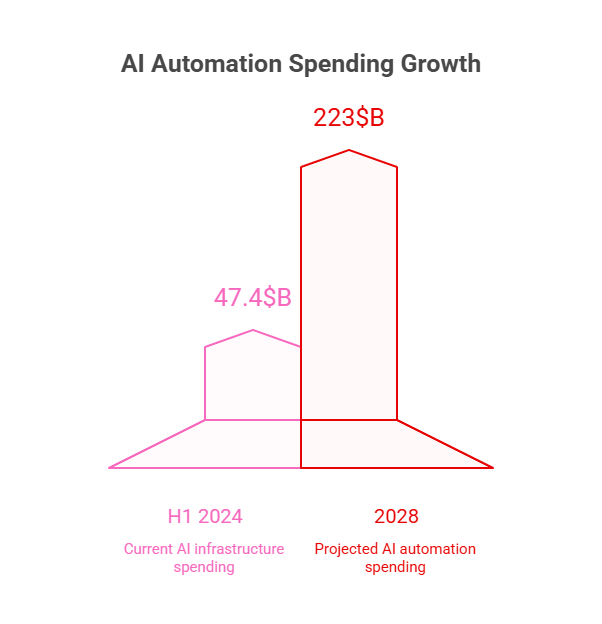
    • $47.4B AI infra spend (H1 2024)
    • +97% YoY growth
    • AI automation market is projected to hit $223B by 2028
    • US: 59% global share, $109.1B private investment

These numbers highlight a critical shift: AI automation is no longer a competitive advantage by itself; execution is.

What Does Generative AI Adoption Say About Enterprise Readiness?

According to McKinsey research, 71% of enterprises use generative AI, but only 31~1/3 have scaled deployment. This shows most organizations are still in pilot-to-production transition, not full execution.

Enterprise readiness is now less about access to AI and more about scaling capability and system integration.

How Widely Are AI Agents Being Adopted in Enterprises?

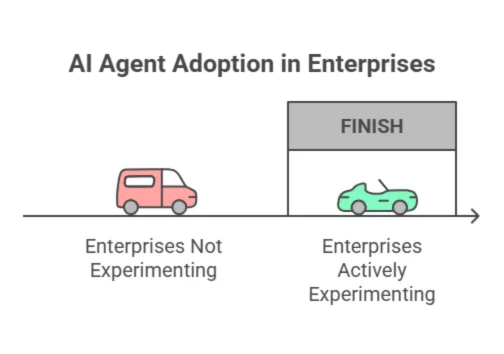
AI agent adoption is already widespread, with 62% of global enterprises reporting active experimentation.

This signals that AI is moving beyond assistance and into workflow execution roles.

How Widely Are AI Agents Being Adopted in Enterprises

How Is AI Automation Impacting Different Industries?

AI automation is driving efficiency, cost reduction, and decision-making improvements across major industries by applying workflow-level intelligence and predictive systems tailored to each sector.

Industry AI Automation Use Case
Healthcare Diagnostics, patient workflow automation
Finance Fraud detection, transaction processing
Retail Personalization, sales automation
Manufacturing Predictive maintenance, supply chain automation

Beyond adoption, the next critical question is whether AI automation is delivering measurable financial returns.

How Much ROI Are Enterprises Seeing from AI Automation?

Measured financial impact remains limited. McKinsey’s 2025 global survey finds that only 39% of organizations report any enterprise-level EBIT impact from AI, and most of those say the contribution is still below 5%.

In the GCC, the bar is even higher: only 11% of organizations qualify as ‘value realizers,’ meaning they have adopted AI, scaled it, and can attribute at least 5% of earnings to it.

Where is AI automation delivering cost savings and revenue growth?

These numbers are solid and trace back through Stanford HAI’s 2025 AI Index to McKinsey survey data:

Function Verified Outcome
Service Operations 49% of respondents using AI in service operations report cost savings; most say savings are <10%
Supply Chain Management 43% report cost savings; most say savings are <10%
Software Engineering 41% report cost savings; most say savings are <10%
Marketing and Sales 71% of respondents using AI in marketing and sales report revenue gains; the most common gain is <5%

That last clause matters because it keeps the story honest: revenue uplift is real, but mostly incremental so far.

Where Is AI Automation Driving Revenue Growth?

On the revenue side, 71% of enterprises using AI in marketing and sales report growth, though most gains remain incremental.

Do Enterprises Achieve Faster Time-to-Value from AI Automation?

Enterprise data shows that AI automation can deliver measurable value within weeks, not months, when deployed effectively. In real-world deployments:

  • AI systems have handled millions of interactions within weeks
  • Up to two-thirds of customer service workflows are automated
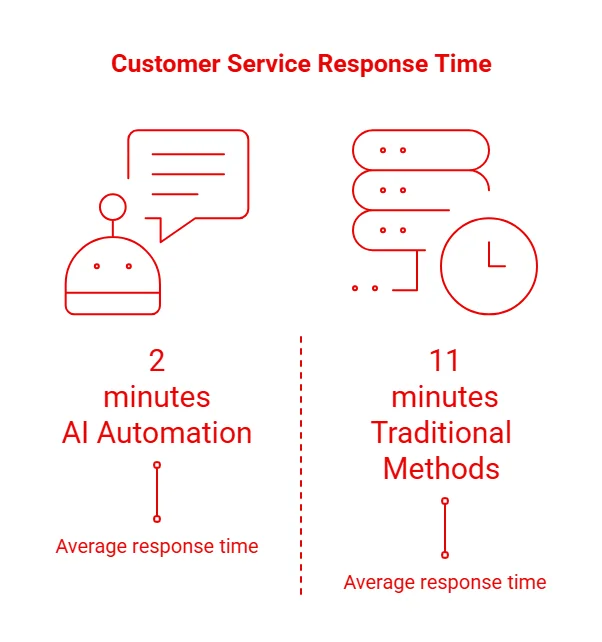
  • Response times drop from ~11 minutes to under 2 minutes
  • Single deployments can generate tens of millions in projected profit improvements

These outcomes indicate that time-to-value is compressed when AI is applied to high-volume, repeatable workflows.

Do Enterprises Achieve Faster Time-to-Value from AI Automation?

Why Do Some Enterprises Achieve Faster Time-to-Value?

Speed of execution depends on how AI is implemented, not just whether it is adopted. Enterprises that achieve faster results typically:

Deploy narrow, high-impact use cases such as customer service and IT operations to achieve faster, measurable results.

Focus on workflow automation rather than standalone tools to ensure AI is embedded into core business processes.

Prioritize high-volume, repeatable processes to maximize efficiency, reduce costs, and accelerate time-to-value.

Key Pattern: Focused AI implementations outperform broad, unfocused strategies in both speed and measurable ROI

How Much of Enterprise Work Is Actually Automated?

There is no universal percentage for total enterprise automation, but function-level data provides a clear picture of progress.

Scope Stronger, Source-Backed Statement
Enterprise-wide task exposure GenAI and related technologies could automate activities that absorb 60–70% of employees’ time; this is task exposure, not full-job automation
Customer service (current case) Klarna said its AI assistant handled two-thirds of customer service chats, reduced resolution time from 11 minutes to under 2 minutes, and was expected to add $40M profit in 2024
Customer service (forward-looking forecast) Gartner predicts agentic AI could autonomously resolve 80% of common customer service issues by 2029, reducing operating costs by 30%
Service operations 49% of organizations report cost savings from AI in service operations
Supply chain 43% of organizations report cost savings from AI in supply chain management
Software engineering 41% of organizations report cost savings from AI in software engineering
Marketing and sales 71% of organizations report revenue gains from AI in marketing and sales, typically under 5%

Sources:

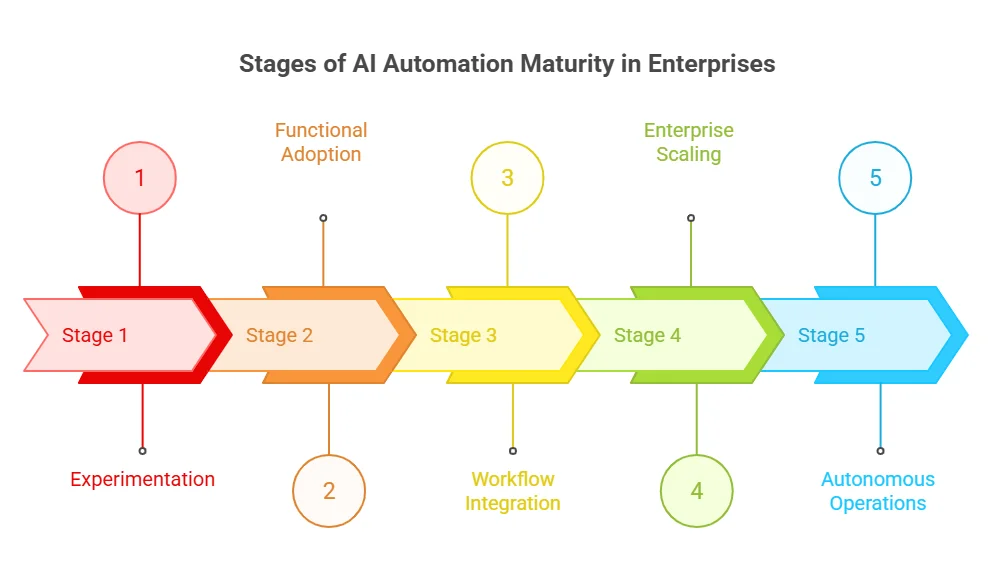
What Are the Stages of AI Automation Maturity in Enterprises?

  • Stage 1: Experimentation (pilot AI tools)
  • Stage 2: Functional adoption (single department use)
  • Stage 3: Workflow integration (cross-functional automation)
  • Stage 4: Enterprise scaling (centralized AI systems)
  • Stage 5: Autonomous operations (AI agents executing workflows)

What Are the Stages of AI Automation Maturity in Enterprises?

While ROI is still emerging, enterprises are simultaneously facing a shift in where AI costs are actually concentrated

How Does AI Automation Reduce Costs and Improve Productivity in Enterprises?

AI automation reduces costs and improves productivity by improving accuracy, reducing processing time, and freeing employees from repetitive work.

Area Impact Metric
Cost Reduction 62% higher fraud detection accuracy
85% better collection accuracy
30–70% faster processing
Productivity 20% less time on routine tasks
~4 hours saved per employee/week
Efficiency Reduced interruptions (every ~2 minutes)
Automation of repetitive tasks


How are AI model costs changing enterprise spending?

Model costs are rapidly declining, shifting budget focus toward systems rather than models. GPT-level inference costs have dropped by 280x in two years

What should enterprises focus on instead of model selection?

Enterprises are now prioritizing system-level AI capabilities over model choice:

Data Pipelines

System Integration

Workflow Orchestration

Organizations with centralized AI models are 2x more likely to move from pilot to production vs decentralized setups

  • Treat AI automation as a business system, not a standalone tool

This shift from implementation to system-level design is the key driver of scalable, enterprise-wide AI automation adoption.

At this stage, execution becomes the real differentiator, and this is where experienced partners like AppVerticals come in. Instead of focusing on isolated AI tools, teams that work with full-stack AI partners are able to design end-to-end systems, from data pipelines to workflow orchestration and deployment. This approach significantly increases the chances of moving from pilot to production, especially for enterprises struggling with integration, scalability, and measurable ROI.

Turn AI into Measurable ROI

Build, scale, and automate workflows with enterprise-grade AI solutions.

What Do Real-World AI Automation Case Studies Show About Enterprise Impact?

Real enterprise deployments show that AI automation delivers measurable gains in cost reduction, productivity, and operational efficiency across customer service, HR, IT, and engineering.

Klarna | How is AI transforming customer service automation?

Klarna’s AI assistant demonstrates large-scale customer service automation impact.

  • Handled 3M conversations in 1 month
  • Automated 2/3 of all customer service chats
  • Replaced work equivalent to 700 full-time agents
  • Reduced repeat inquiries by 25%
  • Cut resolution time from 11 minutes to under 2 minutes
  • Estimated $40M profit improvement (2024)

IBM | How is AI automation scaling across enterprise operations?

IBM shows enterprise-wide AI automation across HR, IT, and customer support functions.

  • Delivered $4.5B in productivity gains (since 2023)
  • Saved 9M employee hours (2024)
  • Automated 94% of HR inquiries via AskHR
  • HR task completion speed improved by 75%
  • Resolved 70% of customer inquiries via digital assistant
  • Reduced support resolution time by 26%
  • Generated $165M in support savings + $600M in IT savings

DTCC | How is AI improving software engineering productivity?

DTCC highlights AI automation in developer workflows and engineering operations.

  • Increased developer throughput by 40%
  • Reduced task time from 10 hours to 6 hours
  • Lowered code defects by 30%
  • Improved security scores by 5%
  • Running 10–15 GenAI use cases in production and pilots

How Fast Is AI Automation Spending Growing Globally?

AI automation investment is accelerating rapidly due to enterprise demand for infrastructure and scaling.

  • AI infrastructure spending reached $47.4B in H1 2024
  • Growth rate stands at +97% year-over-year
  • Projected to reach $223B by 2028

How Fast Is AI Automation Spending Growing Globally?

Which regions are driving AI automation investment the most?

The United States dominates global AI automation spending.

  • The US accounts for 59% of global AI infrastructure spend
  • $109.1B in private AI investment

What are the latest regional benchmarks for enterprise AI adoption?

AI automation growth varies by region: Asia-Pacific leads in investment and execution speed, while North America leads in proven enterprise value. Europe remains cautious due to compliance-heavy approaches, whereas the GCC is rapidly scaling with strong executive backing. Across all regions, workforce adoption is already high, ranging from 65% to 83%.

Region Investment Signal Leadership Signal Adoption / Value Signal
Asia-Pacific 26% invest $400K–$500K in GenAI 33% CEO-led AI strategy 63% GenAI in IT ops; 25% faster time-to-market
North America 19% invest $400K–$500K 18% CEO-led 16% report proven AI value
Europe 17% invest $400K–$500K 8% CEO-led Slower, compliance-driven adoption
Latin America 82% workforce AI usage
GCC 89% plan to increase AI budgets Strong executive alignment High-growth, fast-follow market

Sources:

As deployment scales, governance and risk management are becoming central blockers to enterprise-wide adoption.

What Are the Key Risks and Governance Challenges in AI Automation?

AI adoption is increasing, but risk exposure is also rising across organizations.

  • 51% of organizations report at least one AI-related risk, such as personal privacy, explainability, organizational reputation, and regulatory compliance
  • Enterprises now manage an average of 4 AI risks (up from 2 in 2022)

How do security concerns impact AI automation adoption?

Security remains one of the biggest blockers to scaling AI automation.

  • 51% of leaders say security concerns delay AI initiatives

How mature is AI governance in enterprises today?

Governance frameworks are still not fully implemented across most organizations.

  • Fewer than 25% have fully implemented AI governance frameworks
  • Many organizations still rely on partial or incomplete governance models

What is the biggest challenge in scaling AI automation?

The primary challenge is not model performance, but controlled access to enterprise data. Without strong governance and data control, scaling AI automation across the enterprise becomes significantly more difficult.

How Can Enterprises Successfully Scale AI Automation?

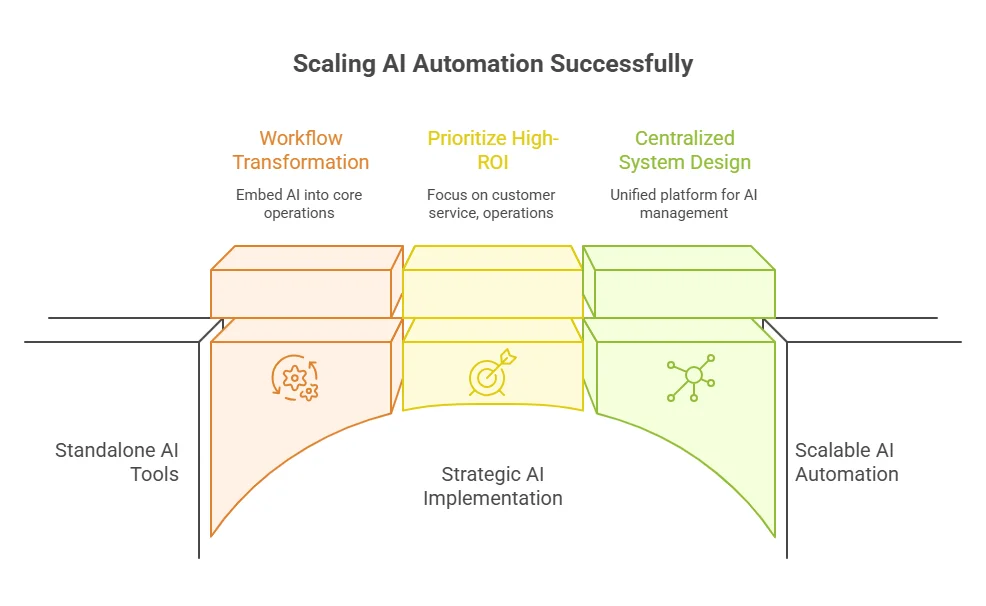
Enterprises scale AI automation successfully by focusing on workflows, ROI-driven use cases, and centralized system design rather than standalone tools.

  • Focus on workflow-level transformation, embedding AI into core business operations
  • Prioritize high-ROI functions like customer service, operations, and engineering

Enterprises moving beyond pilots need structured AI development services, scalable architecture, workflow integration, and data readiness to achieve faster deployment and consistent ROI.

Scaling AI Automation Successfully

Final Insight: Why AI Automation Is Now an Execution Game

AI automation is no longer defined by adoption but by execution maturity.
  • 88% adoption vs only ~33% scaled deployment shows a global execution gap
  • Only 11% of GCC firms generate measurable ROI
  • Most enterprises remain stuck in a pilot-to-production transition

The competitive advantage is now defined by:

  • Workflow integration
  • Centralized AI systems
  • Measurable ROI tracking

Winners are not the ones adopting AI first, but the ones operationalizing it fastest.

More Related Guides:

Posted in AI

Best SaaS Ideas in 2026: 25 Micro SaaS & B2B Opportunities That Actually Make Money

A SaaS idea worth building in 2026 solves a specific, recurring business problem with measurable ROI. It comes from problems teams deal with daily, like managing leads in spreadsheets, chasing invoices manually, or stitching together multiple tools to complete one workflow. 

That is where real demand sits.

Most momentum today is around AI-driven automation and vertical SaaS, where products are built for one job and do it reliably. This is exactly where a SaaS development company focuses, turning validated problems into scalable, workflow-driven products.

According to Gartner’s cloud forecast, global cloud spending is projected to exceed $723 billion, showing continued investment in software that improves operations.

This guide covers validated micro SaaS ideas and B2B opportunities, along with how to test them and examples already working in the market.

SaaS Ideas That Actually Work in 2026 (Quick Outlook)

  • A SaaS idea works when it solves a specific, recurring problem with clear ROI.
  • Micro SaaS succeeds by focusing on one workflow, not building broad platforms.
  • The best SaaS opportunities exist where teams rely on spreadsheets, manual workarounds, or multiple tools.
  • AI SaaS wins when it automates one step inside sales, support, or marketing workflows.
  • B2B SaaS ideas get traction when they reduce costs, increase revenue, or ensure compliance.
  • Low-competition niches are found in vertical SaaS, internal tools, AI workflow wrappers, and localization use cases.
  • A SaaS idea is validated only when users are willing to pay, not just show interest.
  • Getting the first 10 paying users is a stronger signal than traffic or signups.
  • Most successful micro SaaS products win by solving one high-frequency problem extremely well.

What Micro SaaS Ideas Can You Build That Actually Makes Money in 2026?

The best-performing micro SaaS ideas are built around tasks teams deal with daily, such as managing leads, automating follow-ups, handling internal approvals, or fixing gaps between tools. These are problems where users already spend time or money, which makes monetization straightforward.

Micro SaaS works because it removes complexity and delivers value faster than traditional SaaS products.

  • Targets a narrow audience → easier positioning and higher conversion
  • Faster MVP cycles → quicker path to first revenue
  • Lower competition → avoids crowded, generic markets
  • Clear use case → easier onboarding and retention

Most successful products in this category focus on doing one job reliably instead of trying to replace entire systems. That is what makes them easier to build, sell, and scale.

Quick Snapshot: What Makes a Micro SaaS Work

Factor Why It Matters
Niche focus Higher conversion and clearer messaging
Recurring problem Predictable usage and stable MRR
Low dev complexity Faster launch and iteration cycles
Clear ROI Easier to justify pricing and close sales

25 Best SaaS Ideas (Micro + B2B) You Can Build in 2026

The SaaS ideas that gain traction in 2026 are built around specific workflows where teams already lose time or revenue. These are not broad platforms. They are focused tools that solve one clear problem and fit into how businesses already operate.

Below are AI-powered micro SaaS ideas that align with real demand and monetization potential.

A. AI-Powered Micro SaaS Ideas (High Growth)

AI-powered micro SaaS ideas gain traction when they automate one specific step inside a workflow and make an existing process faster, simpler, and more reliable.

1. AI Cold Email Personalization Tool

Sales teams still rely heavily on cold outreach, but generic emails no longer convert. Personalization takes time, and most teams either skip it or do it poorly.

  • Problem it solves: Low reply rates due to generic outreach
  • Target users: Sales teams, founders, outbound agencies
  • Monetization model: Subscription (per user or usage-based)
  • Why it works in 2026: Teams want better results without increasing outreach volume

Example:
Tools like Lavender email assistant already help improve email performance, but a focused micro SaaS can go deeper by automatically generating personalized opening lines using a prospect’s website, LinkedIn, or recent activity.

2. AI Support Ticket Summarizer

Support teams handle long, messy conversations across multiple touchpoints. Agents spend unnecessary time understanding context before responding.

  • Problem it solves: Time wasted reading long ticket histories
  • Target users: Customer support teams, SaaS companies
  • Monetization model: Subscription + API usage
  • Why it works in 2026: Faster responses improve customer satisfaction and reduce workload

Example:
Platforms like Zendesk manage tickets, but a micro SaaS layer that summarizes conversations into key points before an agent replies can significantly reduce handling time.

3. AI Content Repurposing SaaS

Content teams produce long-form content but struggle to distribute it across channels efficiently. Repurposing is repetitive and time-consuming.

  • Problem it solves: Manual effort in adapting content for multiple platforms
  • Target users: Marketing teams, creators, agencies
  • Monetization model: Tiered subscription (based on content volume)
  • Why it works in 2026: Content velocity directly impacts reach and growth

Example:
Tools like Jasper AI assist with content creation, but a focused SaaS that converts one blog into LinkedIn posts, email sequences, and short-form scripts automatically fills a clear workflow gap.

4. AI Proposal Generator for Agencies

Agencies spend hours creating proposals for similar types of projects. This slows down response time and impacts deal flow.

  • Problem it solves: Time-consuming proposal creation
  • Target users: Agencies, freelancers, consultants
  • Monetization model: Subscription or per-document pricing
  • Why it works in 2026: Faster turnaround improves close rates

Example:
While tools like PandaDoc handle document workflows, a micro SaaS that generates proposals from a short project brief, including scope, timeline, and pricing, can directly accelerate sales cycles.

5. AI Meeting Notes → CRM Updater

Sales teams often skip updating CRM systems after meetings, leading to incomplete or outdated pipeline data.

  • Problem it solves: Manual CRM updates after calls
  • Target users: Sales teams, account managers
  • Monetization model: Subscription per seat
  • Why it works in 2026: Accurate CRM data is critical for forecasting and decision-making

Example:
Tools like Fireflies.ai capture meeting notes, but a micro SaaS that converts those notes into structured CRM updates (e.g., deal stage, next steps, objections) solves a direct operational gap.

Why These AI Micro SaaS Ideas Stand Out

AI micro SaaS ideas work best when they automate one high-frequency task inside an existing workflow.

B. B2B SaaS Ideas (High Paying Users)

B2B SaaS ideas work when they are tied directly to cost, compliance, or operational efficiency. Businesses pay faster and retain longer when the product improves something they already measure internally.

6. Vendor Management Dashboard for SMEs

Most SMEs work with multiple vendors but manage everything across spreadsheets, emails, and scattered tools. There is no single place to track performance, contracts, or renewal risks.

  • Problem it solves: Lack of centralized vendor visibility leads to missed renewals, poor tracking, and operational risk.
  • Target users: SMEs, operations teams, procurement managers
  • Monetization model: Subscription based on number of vendors or users
  • Why it works in 2026: Vendor ecosystems are growing, but smaller companies still lack structured systems to manage them

Example:
Enterprise tools like Coupa handle vendor management at scale, but a micro SaaS can focus on SMEs by centralizing vendor data, tracking contract timelines, and sending renewal alerts without enterprise-level complexity.

7. Compliance Tracking SaaS (GDPR, SOC2)

Compliance is no longer optional, but most companies still manage it through documents, checklists, and manual follow-ups.

  • Problem it solves: Compliance processes are fragmented, manual, and difficult to maintain consistently
  • Target users: SaaS startups, fintech, healthtech companies
  • Monetization model: Tiered subscription based on frameworks and company size
  • Why it works in 2026: Increasing regulatory pressure requires structured, trackable compliance systems

Example:
Platforms like Vanta and Drata automate compliance at a broad level, but a focused micro SaaS can specialize in one area like SOC2 readiness, helping teams manage evidence, track tasks, and prepare for audits step by step.

8. Internal Workflow Automation Tool

Internal processes such as approvals, requests, and handoffs still rely heavily on manual coordination, especially across departments.

  • Problem it solves: Manual workflows create delays, miscommunication, and operational bottlenecks
  • Target users: Operations teams, HR, finance departments
  • Monetization model: Subscription per team or workflow volume
  • Why it works in 2026: Businesses are actively replacing manual coordination with structured automation

Example:
Tools like Zapier automate integrations between apps, but a micro SaaS can focus specifically on internal workflows, such as automating approval chains for budgets, hiring requests, or procurement without requiring complex setup.

9. SaaS for Onboarding Remote Employees

Remote teams have increased, but onboarding is still inconsistent and spread across multiple tools and documents.

  • Problem it solves: New hires experience fragmented onboarding, leading to slower productivity
  • Target users: HR teams, remote-first companies, startups
  • Monetization model: Subscription based on number of employees onboarded
  • Why it works in 2026: Structured onboarding directly impacts retention and performance in distributed teams

Example:
Platforms like BambooHR manage HR data, but a micro SaaS can focus on onboarding workflows by guiding new hires through tasks, tracking completion, and integrating with tools like Slack, Notion, and Google Workspace.

10. Procurement Cost Optimization Tool

Companies spend heavily on tools and vendors but often lack visibility into inefficiencies, duplicate spend, or unused subscriptions.

  • Problem it solves: Overspending due to lack of visibility into procurement and vendor usage
  • Target users: Finance teams, procurement managers, scaling startups
  • Monetization model: Subscription or savings-based pricing model
  • Why it works in 2026: Cost optimization is a priority as companies focus on profitability

Example:
Tools like Spendesk track expenses, but a focused SaaS can analyze vendor spend across tools, identify redundancies, flag unused subscriptions, and recommend cost-saving actions based on actual usage patterns.

Why These B2B SaaS Ideas Work

B2B SaaS ideas succeed when they directly impact cost, revenue, or compliance.

Stop Guessing SaaS Ideas. Build What Actually Makes Money.

Most SaaS products fail before launch due to lack of validation. We help you identify real opportunities, validate demand, and build scalable SaaS products faster.

Validate Your SaaS Idea

C. Automation & Workflow SaaS B2B Opportunities

Automation SaaS works best when it targets repeatable internal processes that teams still handle manually. These are not complex systems. They are small, focused layers that remove friction from everyday workflows without forcing teams to change their tools.

11. No-Code Workflow Builder for Small Teams

Small teams rely on multiple tools but lack a simple way to connect workflows without engineering support. Most existing automation tools are either too complex or too generic.

  • Problem it solves: Teams depend on manual coordination between tools, leading to delays and errors
  • Target users: Startups, small operations teams, non-technical founders
  • Monetization model: Subscription based on workflows or usage
  • Why it works in 2026: Non-technical teams want automation without relying on developers

Example:

Platforms like Make (Integromat) allow complex automation, but a focused micro SaaS can offer pre-built workflows for common use cases like lead routing, onboarding checklists, or internal alerts without requiring visual flow setup.

12. Invoice Follow-Up Automation SaaS

Many businesses still chase unpaid invoices manually through emails or reminders, which leads to inconsistent follow-ups and delayed cash flow.

  • Problem it solves: Late payments due to inconsistent or manual follow-ups
  • Target users: Freelancers, agencies, small businesses, finance teams
  • Monetization model: Subscription or percentage-based on recovered payments
  • Why it works in 2026: Cash flow management remains a critical challenge for growing businesses

Example:
Tools like QuickBooks handle invoicing, but a micro SaaS layer can automate follow-ups by sending timed reminders, escalating messages, and tracking responses until the payment is completed.

13. Social Media Approval Workflow Tool

Content teams often rely on scattered communication across Slack, email, or spreadsheets to approve posts before publishing.

  • Problem it solves: Lack of structured approval process for social media content
  • Target users: Marketing teams, agencies, brand managers
  • Monetization model: Subscription per team or number of workflows
  • Why it works in 2026: Content teams need faster approvals without losing control or visibility

Example:
Platforms like Hootsuite support scheduling, but a focused SaaS can manage approval workflows where drafts move through stages (creator → manager → client) with clear feedback and approval tracking.

14. Lead Qualification Automation Tool

Sales teams spend time reviewing leads manually to determine which ones are worth pursuing. This slows down response time and reduces efficiency.

  • Problem it solves: Manual lead qualification delays follow-ups and wastes sales effort
  • Target users: Sales teams, B2B startups, marketing teams
  • Monetization model: Subscription based on number of leads processed
  • Why it works in 2026: Faster lead qualification directly impacts conversion rates and revenue

Example:
Tools like HubSpot provide CRM capabilities, but a micro SaaS can sit on top and automatically score leads based on behavior, firmographics, and intent signals, then route high-quality leads instantly.

15. CRM Cleanup & Enrichment SaaS

CRM systems often become cluttered with duplicate, outdated, or incomplete data, reducing their effectiveness over time.

  • Problem it solves: Poor data quality in CRM systems leads to inaccurate reporting and missed opportunities
  • Target users: Sales teams, RevOps teams, marketing teams
  • Monetization model: Subscription or usage-based pricing
  • Why it works in 2026: Data accuracy is critical for decision-making and pipeline management

Example:
Tools like Clearbit enrich data, but a focused SaaS can continuously clean CRM records, remove duplicates, update missing fields, and maintain data hygiene automatically.

Why These Automation SaaS Ideas Work

Automation SaaS works when it removes one manual step from a recurring workflow.

D. Niche Micro SaaS Ideas (Low Competition)

Niche micro SaaS ideas work because they target specific industries with clear operational gaps. These markets are often overlooked by large SaaS companies, which creates space for focused tools that solve one problem well and gain traction quickly.

16. SaaS for Dentists Appointment Gaps

Dental clinics often deal with last-minute cancellations and unfilled slots, which directly impact revenue.

  • Problem it solves: Empty appointment slots due to cancellations or no-shows
  • Target users: Dental clinics, private practices, clinic managers
  • Monetization model: Subscription per clinic or appointment volume
  • Why it works in 2026: Clinics want to maximize utilization without relying on manual rescheduling

Example:
Platforms like Zocdoc help patients book appointments, but a micro SaaS can focus on filling last-minute gaps by automatically notifying waitlisted patients and optimizing daily schedules.

17. SaaS for Real Estate Lead Tracking

Real estate agents manage leads across multiple channels but often lack a structured way to track follow-ups and conversions.

  • Problem it solves: Missed follow-ups and poor visibility into lead status
  • Target users: Real estate agents, brokers, property agencies
  • Monetization model: Subscription per user or team
  • Why it works in 2026: Lead response speed and tracking directly impact deal closures

Example:
Platforms like Follow Up Boss manage CRM for agents, but a micro SaaS can focus specifically on lead tracking by organizing inquiries from portals, automating follow-ups, and prioritizing high-intent leads.

18. SaaS for Logistics Route Optimization

Logistics teams need to plan delivery routes efficiently, but many still rely on manual planning or basic tools.

  • Problem it solves: Inefficient routing leads to higher fuel costs and delayed deliveries
  • Target users: Logistics companies, delivery services, fleet managers
  • Monetization model: Subscription based on fleet size or route volume
  • Why it works in 2026: Cost optimization and delivery efficiency are critical in logistics operations

Example:
Tools like Route4Me optimize routes, but a micro SaaS can focus on niche segments like last-mile delivery or small fleets, offering simpler, more targeted optimization features.

19. SaaS for Shopify Returns Automation

Ecommerce businesses handle a high volume of returns, but the process is often manual and inconsistent.

  • Problem it solves: Time-consuming return handling and lack of structured workflows
  • Target users: Shopify store owners, ecommerce brands, operations teams
  • Monetization model: Subscription or per-return pricing
  • Why it works in 2026: Returns directly impact margins, and automation reduces operational burden

Example:
Platforms like Returnly manage returns at scale, but a micro SaaS can focus on Shopify stores by automating return approvals, generating labels, and updating inventory without manual intervention.

20. SaaS for HR Interview Scheduling

HR teams spend significant time coordinating interview schedules between candidates and internal stakeholders.

  • Problem it solves: Scheduling conflicts and back-and-forth communication delays hiring
  • Target users: HR teams, recruiters, hiring managers
  • Monetization model: Subscription per recruiter or hiring volume
  • Why it works in 2026: Faster hiring cycles improve candidate experience and reduce drop-offs

Example:
Tools like Calendly handle scheduling, but a micro SaaS can focus on interview workflows by coordinating multiple interviewers, managing availability, and aligning hiring stages automatically.

Why These Niche SaaS Ideas Work

Niche SaaS wins by solving one high-intent problem for a specific industry.

E. Weekend Build Micro SaaS Ideas

Some micro SaaS products don’t require months of development. They are built around simple, well-defined problems with clear inputs and outputs, which makes them ideal for fast MVPs and early validation. These ideas work best when they deliver immediate value and can be launched quickly.

21. Simple Subscription Analytics Dashboard

Many small SaaS businesses track revenue manually or rely on scattered tools to understand key metrics like MRR, churn, and growth.

  • Problem it solves: Lack of clear visibility into subscription metrics
  • Target users: Indie founders, small SaaS teams, solopreneurs
  • Monetization model: Subscription (tiered by data sources or usage)
  • Why it works in 2026: Founders want quick insights without complex analytics setups

Example:
Tools like Baremetrics provide deep analytics, but a micro SaaS can focus on simplicity by connecting Stripe and displaying core metrics like MRR, churn, and revenue trends in a clean dashboard.

22. Job Application Tracker SaaS

Job seekers often manage applications through spreadsheets or notes, which makes it difficult to track progress and follow-ups.

  • Problem it solves: Disorganized tracking of job applications and interview stages
  • Target users: Job seekers, students, career switchers
  • Monetization model: Freemium with paid upgrades for advanced tracking
  • Why it works in 2026: The job market is competitive, and structured tracking improves outcomes

Example:
While tools like Notion can be customized for tracking, a micro SaaS can provide a dedicated system to log applications, track stages, set reminders, and manage follow-ups automatically.

23. Screenshot Feedback Tool

Teams often share screenshots for feedback through email or chat, which leads to scattered comments and unclear instructions.

  • Problem it solves: Unstructured feedback on visuals and UI elements
  • Target users: Designers, product teams, developers
  • Monetization model: Subscription per user or team
  • Why it works in 2026: Faster feedback loops improve product iteration speed

Example:
Tools like Markup.io allow visual feedback, but a micro SaaS can focus on simplicity by letting users upload screenshots, comment directly on elements, and track feedback in one place.

24. Link-in-Bio Analytics SaaS

Creators and small businesses use link-in-bio tools but often lack visibility into which links actually drive engagement.

  • Problem it solves: Limited insights into link performance and user behavior
  • Target users: Creators, influencers, small businesses
  • Monetization model: Freemium with analytics upgrades
  • Why it works in 2026: Data-driven decisions are becoming essential even for small creators

Example:
Platforms like Linktree manage bio links, but a micro SaaS can focus on analytics by showing click patterns, user behavior, and conversion insights for each link.

25. Basic Uptime Monitoring Tool

Website downtime affects user experience and revenue, but many small businesses don’t actively monitor their uptime.

  • Problem it solves: Lack of visibility into website or service downtime
  • Target users: Small businesses, developers, SaaS founders
  • Monetization model: Subscription based on number of monitored endpoints
  • Why it works in 2026: Reliability is critical, and downtime directly impacts trust and revenue

Example:
Tools like UptimeRobot monitor uptime, but a micro SaaS can simplify alerts, reporting, and integrations for smaller teams that need basic monitoring without complexity.

Why These Weekend SaaS Ideas Work

Weekend SaaS ideas work when the problem is simple, frequent, and quick to validate.

Turn Your SaaS Idea Into a Revenue-Ready Product

From idea validation to MVP development, we help you launch faster with the right architecture, tech stack, and execution strategy.

Book a Free SaaS Strategy Call

How to Validate a SaaS Idea Before Building (Step-by-Step Framework)

A SaaS idea is validated when real users recognize the problem, show interest in the solution, and are willing to pay for it. The faster you reach that point, the lower your risk and the higher your chances of building something that actually works.

Most SaaS products fail at the idea stage, not the execution stage. Validation is about confirming real demand and willingness to pay before you invest time in building. The goal is simple: prove that the problem exists, is frequent, and is worth solving.

Step 1: Find Real Problems (Not Ideas)

Start with problems that users already complain about. The strongest signals come from places where people openly share frustrations.

  • Where to look: Reddit (r/SaaS, r/startups), G2 reviews, Capterra, Twitter/X threads
  • What to look for: Repeated complaints, missing features, manual workarounds

According to Founders Forum, 35% of startups fail due to lack of market need. That means the biggest risk is building something no one actually needs.

Example:
On G2, users frequently complain about CRMs being “too complex for small teams.” That pattern signals b2b opportunity for a simplified CRM layer or workflow-focused tool.

Step 2: Check Willingness to Pay

A problem is only worth solving if users are already spending money or actively trying to solve it.

Signals to validate:

  • Users paying for existing tools
  • Users switching between multiple tools
  • Users building manual solutions (spreadsheets, scripts)

SaaS companies with clear value propositions and pricing alignment see significantly higher conversion and retention rates.

Example:
If small businesses are paying for tools like QuickBooks but still manually follow up on invoices, that gap shows both demand and willingness to pay for automation.

Step 3: Build a Landing Page First

Before writing code, test interest with a simple landing page. This helps you validate demand with minimal effort.

What to include:

  • Clear problem statement
  • Simple solution explanation
  • Call-to-action (waitlist, demo, pre-order)

This approach is often called a “fake door MVP”, where users can express interest before the product exists.

Early validation through user interest and feedback is one of the most reliable ways to test startup ideas before building.

Example:
Create a landing page for an “AI invoice follow-up tool” and run targeted traffic. If users sign up or request demos, you have early validation.

Step 4: Validate with 10 Paying Users

Interest is not enough. The strongest validation comes from users who are willing to pay.

  • Goal: Get your first 10 paying users
  • Why it matters: Payment confirms real demand
  • What to test: Pricing, usability, and value delivery

Many early-stage SaaS founders follow the principle that revenue is the strongest validation signal, not traffic or signups.

Example:
Offer early access pricing or a discounted plan. If users are willing to pay before the product is fully built, the idea has strong potential.

SaaS Idea Validation Checklist

Use this checklist before building any SaaS product:

  • The problem is frequent (users face it regularly)
  • The problem is painful (it impacts time, cost, or revenue)
  • Users are already paying for alternatives or workarounds
  • The solution is simple enough to build and deliver quickly

Real Micro SaaS Examples Making Money (With Revenue Insights)

Micro SaaS works when a product solves one specific problem repeatedly and predictably. The strongest examples are not feature-heavy platforms. They are focused tools that generate recurring revenue by improving a single workflow.

According to industry analysis, most micro SaaS businesses target a $5K–$50K monthly recurring revenue (MRR) range, often run by small teams or solo founders . That makes them profitable without needing scale-heavy growth.

1. Appointment Reminder SaaS

Healthcare clinics, salons, and service businesses lose revenue due to missed appointments and no-shows.

What it does: Sends automated SMS/email reminders to reduce no-shows

Estimated revenue / growth: Tools in this category typically reach steady MRR through subscription per location or per booking volume

Why it works: No-shows directly impact revenue, and automation provides immediate ROI

Example:
Products like SimplePractice and similar scheduling tools include reminders, but standalone reminder SaaS tools succeed by focusing only on reducing missed appointments with minimal setup.

2. SEO Audit Tool

Website owners and marketers need regular audits to identify technical issues, but full SEO platforms are often complex and expensive.

What it does: Scans websites and identifies SEO issues such as broken links, missing tags, and performance gaps

Estimated revenue / growth: SEO SaaS platforms generate significant recurring revenue; for example, Semrush reported $376.8M in annual revenue.

Why it works: SEO is a continuous process, and audits are a recurring need

Example:
While Semrush is a full platform, micro SaaS tools like site audit-only products succeed by offering fast, focused audits without the complexity of an all-in-one SEO suite.

3. Email Warmup SaaS

Cold email deliverability is a major issue, especially for outbound teams. Emails often land in spam without proper warmup.

What it does: Gradually increases email sending reputation to improve inbox placement

Estimated revenue / growth: Email warmup tools operate on subscription models and are widely used by outbound teams, with strong demand driven by sales automation trends

Why it works: Deliverability directly impacts revenue from outbound campaigns

Example:
Tools like Warmbox and similar platforms automate inbox warmup, but focused micro SaaS tools succeed by simplifying setup and targeting specific use cases like cold outreach or agency workflows.

4. Screenshot Annotation Tool

Product teams, designers, and developers need clear visual feedback, but communication often happens across scattered channels.

What it does: Allows users to comment directly on screenshots and track feedback

Estimated revenue / growth: These tools monetize through team subscriptions, often targeting agencies and product teams

Why it works: Faster feedback loops improve product development speed

Example:
Tools like Markup.io show how visual collaboration can be simplified. Micro SaaS tools in this space succeed by focusing only on annotation and feedback tracking without broader project management features.

5. Privacy-Focused Analytics SaaS

Businesses are moving away from traditional analytics tools due to privacy concerns and regulatory requirements.

What it does: Tracks website performance without cookies or invasive tracking

Estimated revenue / growth: Plausible Analytics reached $1M ARR as a bootstrapped SaaS

Why it works: Privacy regulations (GDPR, CCPA) are driving demand for compliant analytics solutions

Example:
Plausible replaced complex analytics setups with a simple dashboard focused on essential metrics, showing how a narrow feature set can still generate strong recurring revenue.

Most successful micro SaaS products make money by solving a single, high-frequency problem extremely well and turning that solution into a predictable subscription.

Pattern Behind Profitable Micro SaaS 

  • Solve one clear problem, not multiple
  • Focus on recurring workflows
  • Deliver measurable value (time saved, revenue protected)
  • Use subscription-based pricing for predictable income

Best B2B SaaS Ideas Businesses Will Pay For

B2B SaaS products get traction when they are tied directly to measurable business outcomes. Companies don’t buy tools for features. They invest in software that improves efficiency, reduces cost, or drives revenue.

Across the market, this is consistent. B2B SaaS companies that focus on value creation and measurable outcomes outperform others on growth and retention metrics .

What Businesses Actually Pay For

Businesses consistently invest in SaaS solutions that deliver clear, trackable impact:

  • Saving time → automating repetitive workflows
  • Reducing costs → eliminating waste or inefficiencies
  • Increasing revenue → improving sales or conversion
  • Compliance & risk reduction → avoiding legal or financial exposure

These outcomes directly affect core SaaS metrics like retention, efficiency, and expansion revenue. For example, top-performing SaaS companies generate over 100% net revenue retention (NRR) by expanding value within existing customers .

High-Demand B2B SaaS Categories

These categories consistently attract budget because they map directly to business priorities.

1. Finance & Billing SaaS

Finance tools are among the easiest to monetize because they directly impact revenue, cash flow, and cost control.

  • Automating billing, invoicing, and expense tracking
  • Reducing revenue leakage and payment failures
  • Improving financial visibility

Why demand exists:
SaaS companies track metrics like CAC, revenue, and burn closely because they determine profitability and growth .

Example opportunity:
A SaaS tool that identifies unused subscriptions, duplicate spend, or billing inefficiencies and suggests cost-saving actions.

2. HR & Hiring SaaS

Hiring, onboarding, and employee management are operational bottlenecks in growing companies.

  • Automating onboarding workflows
  • Scheduling interviews and managing candidate pipelines
  • Tracking employee performance and engagement

Why demand exists:
Companies with higher operational efficiency generate significantly more revenue per employee, reaching $200K–$300K ARR per employee at scale .

Example opportunity:
A SaaS tool that automates interview coordination across multiple stakeholders and reduces hiring delays.

3. Operations & Workflow SaaS

Operations tools improve how teams collaborate, approve tasks, and execute internal processes.

  • Automating approvals and internal workflows
  • Reducing manual coordination between teams
  • Improving process visibility

Why demand exists:
Efficient operations directly improve growth efficiency and reduce waste. Companies optimizing internal workflows consistently outperform peers in performance benchmarks .

Example opportunity:
A workflow automation SaaS focused on internal approvals (budget, hiring, procurement) with minimal setup.

4. Sales Enablement SaaS

Sales teams invest heavily in tools that improve pipeline, conversion, and deal velocity.

  • Lead qualification and routing
  • CRM automation and data enrichment
  • Proposal and outreach optimization

Why demand exists:
Sales and marketing efficiency directly impacts revenue. On average, SaaS companies generate ~3x revenue for every $1 spent on sales and marketing .

Example opportunity:
A SaaS tool that automatically scores inbound leads and routes high-intent prospects to the right sales rep in real time.

Why These SaaS Categories Win

B2B SaaS categories win when they directly tie to revenue, cost reduction, or risk management.

  • Direct connection to revenue or cost savings
  • Strong budget ownership (finance, HR, sales)
  • Clear ROI justification
  • High retention and expansion potential

Which Micro SaaS Niches Have the Lowest Competition in 2026?

In 2026, this shift is clear. Businesses are moving away from generic tools toward workflow-specific and industry-specific solutions, which creates new opportunities in overlooked segments.

Low Competition Areas

These niches consistently show lower competition because they require domain understanding, focused execution, or workflow integration.

1. Vertical SaaS (Industry-Specific)

Vertical SaaS targets a single industry and builds around its workflows, compliance needs, and data patterns.

  • Healthcare, logistics, real estate, legal, etc.
  • Deep workflow integration instead of broad features

Why this niche is low competition:
Most large SaaS companies avoid narrow markets due to limited scale, leaving space for focused solutions.

Market signal:
Vertical SaaS is growing rapidly, with projections reaching $369B by 2033 at ~16% CAGR and showing higher growth rates (31%) than horizontal SaaS (28%) .

2. Internal Tools (Not Public-Facing)

Internal tools solve problems inside organizations, not customer-facing workflows.

  • Approval systems
  • Internal dashboards
  • Process automation tools

Why this niche is low competition:
These tools are rarely marketed publicly, so competition is fragmented and often invisible.

Market signal:
As SaaS adoption grows (over 70% of companies already use SaaS) , internal inefficiencies become more visible, creating demand for internal workflow tools.

3. AI Wrappers for Niche Workflows

AI wrappers apply AI to a specific task inside a workflow, instead of building general-purpose AI tools.

  • AI for invoice processing
  • AI for sales qualification
  • AI for compliance checks

Why this niche is low competition:
General AI tools are crowded, but niche applications require domain-specific logic and data.

Market signal:
AI-driven SaaS adoption is accelerating across workflows, with businesses prioritizing tools that integrate directly into operations rather than standalone features .

4. Localization Tools (Region-Specific SaaS)

Localization SaaS focuses on solving problems for specific regions, languages, or regulatory environments.

  • Local tax compliance tools
  • Region-specific payment integrations
  • Language-specific automation tools

Why this niche is low competition:
Global SaaS companies often ignore local complexities, leaving gaps for region-specific solutions.

Market signal:
SaaS growth is expanding globally, with the market expected to reach $389B+ in 2026, increasing demand for localized solutions across regions .

Why These Niches Work

Low-competition SaaS niches exist where problems are specific, technical, or localized.

These niches are not just low competition. They are structurally harder to enter, which protects them from saturation.

  • Harder for big players to enter
  • Smaller but high-intent audience
  • Faster distribution via niche communities

Vertical and niche SaaS products often achieve 35–60% higher retention rates compared to general SaaS because they are deeply embedded in workflows .

Quick Summary 

Niche Area Why Competition is Low
Vertical SaaS Requires industry expertise and deep workflows
Internal tools Not publicly marketed, fragmented demand
AI niche wrappers Requires domain-specific application of AI
Localization tools Global tools ignore local complexity

Biggest Mistakes When Choosing a SaaS Idea

Most SaaS failures are not technical. They come from wrong assumptions at the idea stage. The patterns below show up consistently across failed products and early-stage startups.

1. Building Without Validation

Many founders start with an idea and move straight to development without confirming real demand. The product gets built, but users don’t adopt it because the problem was never validated.

Why it happens:

  • Overconfidence in the idea
  • Lack of direct user feedback
  • Skipping early validation steps

Example:
A founder builds a feature-heavy task management tool without testing demand, only to find users already satisfied with existing solutions.

2. Targeting Broad Markets

Trying to build a product for “everyone” leads to weak positioning and strong competition. The product lacks differentiation and struggles to compete with established players.

SaaS markets are increasingly saturated, with thousands of tools competing in categories like CRM, project management, and marketing automation.

Why it happens:

  • Desire for larger market size
  • Lack of niche focus
  • Misunderstanding of competition

Example:
Launching a generic CRM instead of targeting a niche like real estate agents or dental clinics.

3. Ignoring Monetization Early

Some founders focus on building users first and think about monetization later. Users adopt the product but are not willing to pay, making it difficult to sustain the business.

Why it happens:

  • Over-reliance on freemium models
  • Avoiding pricing conversations
  • Focusing only on growth metrics

Example:
A SaaS tool gains thousands of free users but fails to convert them into paying customers due to unclear value.

4. Overbuilding the MVP

Founders often try to build a complete product before launching, which delays validation and increases risk. Time and resources are spent building features that users may not need. Lean startup principles emphasize rapid iteration and early validation to reduce failure risk.

Why it happens:

  • Perfectionism
  • Fear of launching early
  • Misunderstanding MVP scope

Example:
Spending months building a complex SaaS platform instead of launching a simple version to test core functionality.

5. Copying Competitors Blindly

Building a slightly improved version of an existing product without a clear differentiation rarely works. The product enters a crowded market without a unique value proposition. Competitive SaaS markets reward differentiation, especially in niche or vertical segments where focused solutions outperform generic ones.

Why it happens:

  • Assuming existing demand guarantees success
  • Lack of original positioning
  • Fear of exploring niche opportunities

Example:
Launching another email marketing tool without focusing on a specific audience or workflow.

Build and Validate SaaS Ideas with AppVerticals

At AppVerticals, we work with founders and product teams to turn early-stage SaaS ideas into validated, revenue-ready products. Instead of starting with features, we focus on problem validation, workflow mapping, and MVP-first execution.

From identifying real SaaS opportunities to building scalable architectures, our approach is built around speed, clarity, and measurable outcomes. Whether you’re exploring micro SaaS ideas or launching a B2B platform, our SaaS and custom software development services help you move from idea to paying users without unnecessary complexity.

Wrapping it Up

The best SaaS ideas in 2026 are built on real problems, clear ROI, and fast validation. Micro SaaS and B2B SaaS opportunities reward focus, not scale. The founders who win are the ones who identify repeatable workflows, validate demand early, and ship simple solutions that users are willing to pay for.

Every idea in this guide follows the same principle: solve one problem extremely well. If you prioritize validation over assumptions and execution over perfection, you significantly increase your chances of building a SaaS product that generates consistent revenue and long-term growth.

From SaaS Idea to Paying Users, Without Wasting Months

Most founders overbuild before validation. We help you identify real problems, validate demand fast, and launch lean MVPs that are built to generate revenue.

Start Your SaaS MVP

What is SaaS Integration? How It Works, Platforms, Use Cases, and Costs (2026 Guide)

SaaS integration is the process of connecting multiple cloud-based applications to automate workflows and synchronize data across business systems. It allows tools like CRM, ERP, marketing, and finance platforms to communicate in real time using APIs, middleware, or SaaS integration platforms.

SaaS integration connects cloud apps using APIs to eliminate manual work, ensure real-time data flow, and streamline operations across teams.

In 2026, this has become a core business requirement. Organizations now use an average of 100+ SaaS applications, creating significant data fragmentation challenges. 

At the same time, over 80% of organizations have adopted workflow automation, and integration capabilities are a key factor in software purchasing decisions.

Without SaaS integration, businesses operate in disconnected silos, leading to duplicate data, manual processes, and slower decision-making. With it, companies unify systems, improve data accuracy, and scale operations efficiently.

Common SaaS integration examples include CRM + marketing automation sync (real-time lead and campaign data alignment), eCommerce + inventory systems (automated stock and order updates), and HR + payroll systems (centralized employee data and payroll automation). 

Let’s discuss

SaaS Integration in 2026 (Key Takeaways)

  • SaaS integration connects cloud apps using APIs
    → Enables real-time data synchronization across CRM, ERP, marketing, and finance systems
  • Integration platforms simplify automation without heavy coding
    → No-code and low-code tools allow teams to automate workflows without engineering effort
  • Costs vary from $20/month to enterprise-level investments
    → Pricing scales based on complexity, number of systems, and data volume
  • Use platforms for speed, services for complexity
    → Platforms work best for quick automation, while services handle custom, large-scale integrations
  • Most failures come from poor data mapping—not tools
    → Incorrect data alignment is the leading cause of integration breakdowns in production systems

How SaaS Integration Works in Real Businesses

SaaS integration works by connecting cloud applications through APIs, enabling real-time data exchange, workflow automation, and system coordination across business tools. Instead of operating in silos, integrated systems continuously share and update data to support operations, analytics, and decision-making.

In 2026, this process has become mission-critical. The average enterprise uses hundreds of applications, with up to 71% of them remaining unintegrated, creating data silos and operational inefficiencies.

At the same time, 54% of companies report integration failures due to undetected data sync issues, highlighting the need for proper monitoring and architecture.

Step 1: API-Based Connection

SaaS integration starts by connecting applications through APIs (Application Programming Interfaces). These APIs allow systems like CRM, ERP, and marketing tools to communicate and exchange data securely.

👉 Example: Salesforce sends lead data to HubSpot via API endpoints.

Step 2: Data Mapping & Transformation

Once connected, data is mapped between systems to ensure consistency. This includes transforming formats, aligning fields, and resolving mismatches between applications.

👉 Example: “Lead Name” in Salesforce maps to “Contact Name” in HubSpot.

Step 3: Workflow Automation

After mapping, workflows are automated to trigger actions across systems. This eliminates manual tasks and ensures processes run in real time or on defined schedules.

👉 Example: When a new lead is created → HubSpot triggers an email → Slack notifies the sales team.

Step 4: Monitoring & Error Handling

Modern SaaS integrations include monitoring layers to detect failures, sync issues, or API errors. This ensures reliability and prevents silent data inconsistencies.

Example: Alerts triggered if data fails to sync between systems.

A typical SaaS integration workflow might look like this:

  • Salesforce captures a new lead.
  • HubSpot automatically enrolls the lead into a marketing campaign.
  • Slack sends a notification to the sales team.

👉 Result: No manual data entry, faster response time, and aligned sales + marketing workflows

What is a SaaS Integration Platform?

A SaaS integration platform is a cloud-based solution that connects multiple SaaS applications, enabling automated workflows, real-time data synchronization, and centralized integration management across business systems.

A SaaS integration platform acts as a bridge between tools, so your CRM, ERP, marketing, and finance systems work as one unified system instead of isolated apps.

At the same time, the data integration market is projected to exceed $15.18 billion in 2026, driven by real-time data demands and automation needs.

How SaaS Integration Platforms Work

SaaS integration platforms simplify complex integrations by providing pre-built tools and automation layers that eliminate the need for custom coding.

1. Pre-built Connectors

Platforms offer ready-made integrations for tools like Salesforce, HubSpot, Shopify, and Slack, reducing development time from weeks to days. 71% of organizations report integrations taking 3+ weeks to build manually, making pre-built connectors critical for speed.

2. Workflow Builders (No-Code / Low-Code)

Visual workflow builders allow teams to automate processes without deep engineering effort. Trigger an email campaign when a new lead is added in CRM. By 2026, 70% of new applications rely on low-code/no-code approaches, accelerating integration adoption.

3. API Orchestration

Platforms manage API calls, authentication, and data exchange between systems, ensuring seamless communication across applications. Sync customer data between CRM and billing systems in real time.

Real-Time vs Batch Sync

  • Real-time sync → instant data updates (e.g., live order tracking).
  • Batch sync → scheduled updates (e.g., daily reporting).

Real-time data integration is becoming standard as businesses demand faster decision-making.

Key Features to Look For in SaaS Integration Software

Choosing the right SaaS integration platform depends on scalability, reliability, and control over your data ecosystem.

1. Scalability

The platform should handle increasing data volume and integrations as your business grows. Integration complexity is now a top challenge, and many data leaders are facing stack complexity issues today.

2. Security & Compliance

Look for enterprise-grade security, including encryption, access controls, and compliance (GDPR, HIPAA, SOC 2).

3. Error Handling & Monitoring

Advanced platforms provide real-time alerts, logs, and retry mechanisms to prevent data loss. 84% of integration projects fail or partially fail, often due to poor monitoring and governance.

4. Custom API Support

The ability to build custom integrations ensures flexibility when pre-built connectors are not available. SaaS integration platforms standardize how data flows across your business, turning fragmented systems into a scalable, automated ecosystem.

Best SaaS Integration Platforms for Startups vs Enterprises

Choosing the right SaaS integration platform depends on your business size, technical complexity, and scalability needs. While startups prioritize speed and ease of automation, enterprises require governance, security, and large-scale orchestration.

Startups need fast, no-code automation tools, while enterprises need robust, API-led platforms that handle complex systems and data flows.

In 2026, this decision has become critical as organizations now use 100+ SaaS applications on average, making integration platforms essential for managing data flow across systems.

SaaS Integration Platform Comparison

Platform Best For Key Strength Limitation
Zapier Startups Easy, no-code automation with 7,000+ connectors Limited scalability for complex workflows
Make (Integromat) SMBs Visual workflow builder with flexible logic Becomes complex at scale
Workato Mid-large businesses Enterprise automation with advanced workflows Higher cost and setup effort
MuleSoft Enterprises API-led integration and full ecosystem control Heavy implementation and learning curve

Platform Insights 

  • Zapier enables fast automation with minimal setup, making it ideal for startups and non-technical teams.
  • Make offers more flexibility than Zapier but requires deeper workflow structuring.
  • Workato balances low-code usability with enterprise-grade automation and orchestration.
  • MuleSoft provides full API lifecycle management for large-scale enterprise integrations.

SaaS Integration vs iPaaS: Which One Should You Choose?

SaaS integration and iPaaS (Integration Platform as a Service) both connect applications, but they differ in scope, complexity, and use cases. SaaS integration focuses on connecting specific apps quickly, while iPaaS provides a centralized platform to manage complex, enterprise-wide integrations.

SaaS integration is for fast, app-to-app automation, while iPaaS is designed for large-scale, multi-system orchestration across an organization.

In 2026, this distinction is more important than ever. The global iPaaS market is projected to exceed $11 billion in 2026 and grow rapidly beyond $58 billion by 2033, driven by enterprise demand for scalable integration solutions. 

SaaS Integration vs iPaaS Comparison

Factor SaaS Integration iPaaS
Scope App-to-app integration Enterprise-wide integration
Complexity Low to medium High (multi-system orchestration)
Use Case SMB automation, quick workflows Large-scale systems, hybrid environments
Cost Lower (tools or lightweight setups) Higher (platform + implementation)

Key Differences

  • SaaS integration is ideal for connecting a few tools quickly using APIs or no-code platforms.
  • iPaaS provides centralized control, governance, and scalability across hundreds of applications.
  • SaaS integration is typically task-focused, while iPaaS is architecture-focused.
  • iPaaS supports hybrid and multi-cloud environments, which 90% of organizations are moving toward by 2027.
  • Use SaaS integration → if you need quick automation between a few tools with minimal setup.
  • Use iPaaS → if you need enterprise-grade orchestration, governance, and scalability across systems.

How Much Does SaaS Integration Cost in 2026?

SaaS integration costs range from $20/month for basic automation tools to $150,000+ for enterprise-grade implementations, depending on system complexity, number of applications, and data volume.

Simple integrations are inexpensive and fast, while complex enterprise integrations require custom development, infrastructure, and ongoing maintenance.

SaaS Integration Cost Breakdown

Type Cost Range
No-code tools (Zapier, Make) $20 – $500/month
Mid-level platforms $1,000 – $5,000/month
Enterprise integration (custom / iPaaS) $25,000 – $150,000+

In 2026, pricing is increasingly usage-based. For example, tools like Zapier scale based on tasks, with most businesses paying $29–$103/month for standard automation workflows.

However, costs increase significantly as integrations scale across systems, teams, and data volumes.

What Drives SaaS Integration Costs?

SaaS integration costs are primarily driven by three factors: development complexity, ongoing maintenance, and system scalability.

The more systems you connect, the more data you process, and the more workflows you automate, the higher your integration cost becomes over time.

1. Development Cost

This includes building integrations, configuring APIs, and setting up workflows.

  • Simple integrations → minimal setup using no-code tools
  • Complex systems → require custom development and architecture

2. Maintenance Cost

Ongoing updates, API changes, and monitoring add recurring costs.

  • APIs frequently change, requiring updates to integrations.
  • Monitoring tools and error handling increase operational overhead.

Usage-based pricing models (like task-based billing) can significantly increase costs as automation scales.

3. Scaling Cost

As your business grows, so does integration complexity.

  • More apps → more connections.
  • More data → higher processing costs.
  • More users → higher platform pricing tiers.

SaaS pricing models are becoming increasingly complex, with usage tiers, add-ons, and scaling factors driving total cost.

The biggest hidden cost in SaaS integration is ongoing maintenance, not initial setup.

What Are SaaS Integration Services and Who Provides Them?

SaaS integration services are professional solutions that help businesses connect, automate, and manage data flow between multiple cloud applications. These services go beyond tools by designing, building, and maintaining integrations tailored to business workflows, systems, and compliance requirements.

SaaS integration services are delivered by experts who connect your apps, automate workflows, and ensure your systems work together reliably at scale.

In 2026, demand for these services is accelerating rapidly. Integration services are growing at a 14%+ CAGR as companies increasingly outsource software development and integration operations, rather than managing them in-house. 

At the same time, enterprises now manage hundreds of applications with a large portion still unintegrated, creating a strong need for specialized integration expertise .

1. What Do SaaS Integration Services Include?

SaaS integration services typically cover the full lifecycle of connecting and managing business systems:

  • Custom Integration Services
    Tailored integrations designed for specific business workflows, tools, and data requirements.
  • API Development & Management
    Building and managing APIs to enable secure, scalable communication between systems.
  • Workflow Automation
    Automating business processes across apps (e.g., CRM → marketing → finance).
  • System Modernization
    Integrating legacy systems with modern SaaS platforms to improve efficiency and scalability.

Modern integration is shifting from one-time projects to continuous “integration operations” managed as a service, improving reliability and speed.

2. When You Need a SaaS Integration Company

Not every business needs external help, but in complex environments, SaaS integration services become critical.

You should consider a SaaS integration company when:

  • Complex workflows
    Multiple systems with interdependent processes require advanced orchestration.
  • Legacy systems
    Older systems need to be connected with modern SaaS tools.
  • Compliance-heavy industries
    Industries like healthcare, fintech, and logistics require secure, governed integrations.

3. How SaaS Integration Services Are Delivered (Modern Model)

Modern integration providers like AppVerticals don’t just build integrations, they operate them continuously.

  • Staff Augmentation
    Add experienced integration engineers directly into your team.
  • Dedicated Integration Teams
    End-to-end teams managing architecture, development, and monitoring.
  • Faster Deployment Models
    Pre-built accelerators + expertise reduce implementation time from months to weeks.

Businesses are moving toward managed integration services to reduce operational overhead and accelerate time-to-value. 

Stop Managing Tools. Start Connecting Systems.

Your SaaS stack shouldn’t slow you down. We design and deploy integrations that automate workflows, sync data, and scale with your business.

Get Your Integration Strategy

How to Integrate Salesforce with HubSpot and Slack

Integrating Salesforce, HubSpot, and Slack connects your sales, marketing, and communication systems, enabling real-time data flow, faster lead response, and automated team collaboration.

This integration syncs CRM data (Salesforce), marketing automation (HubSpot), and team communication (Slack) to create a unified workflow across departments.

In 2026, this is critical because most companies still struggle with disconnected systems, only 31% of marketing teams report their tech stack is fully integrated, while 71% of enterprise apps remain unconnected, leading to delays and manual work . 

On the other hand, integrated systems can improve response times by 35–45% and accelerate issue resolution by over 20%, especially when tools like Slack are connected. 

Step-by-Step SaaS Integration Process

SaaS integration follows a structured process where data is connected, mapped, automated, and monitored across multiple applications to ensure accurate and real-time workflows.

SaaS integration works by defining how data moves between systems, connecting apps using APIs or platforms, and automating workflows to eliminate manual work.

1. Define Data Flow

Identify what data needs to move between systems (e.g., leads, contacts, deals).

Example: Sync new leads from HubSpot → Salesforce → notify Slack.

2. Choose Integration Method

Select how you’ll connect systems:

  • Native integrations (HubSpot ↔ Salesforce).
  • Integration platforms (Zapier, Workato).
  • Custom APIs.

Pre-built integrations reduce setup time and complexity significantly.

3. Map Data Fields

Align data fields across platforms to ensure consistency.

Example:

“Lead Name” (Salesforce) → “Contact Name” (HubSpot).

Poor mapping leads to duplicate records and missing data.

4. Automate Workflows

Create automated triggers across systems.

Example workflow:

New lead in HubSpot → added to Salesforce → Slack alert sent to sales team.

Faster lead response and better alignment between teams.

5. Test & Deploy

Validate data accuracy, run test scenarios, and monitor performance before full deployment. Always test edge cases (duplicate data, failed syncs, delays).

  • HubSpot captures a new lead.
  • Salesforce assigns it to a sales rep.
  • Slack sends a real-time notification to the team.

SaaS Integration Use Cases for eCommerce and SaaS Companies

SaaS integration use cases are real-world workflows where multiple applications are connected to automate operations, synchronize data, and eliminate manual processes across business systems.
SaaS integration connects tools like CRM, billing, analytics, and operations systems to automate specific business functions such as order processing, customer tracking, and subscription management.

1. eCommerce Use Cases

eCommerce businesses rely heavily on SaaS integrations to manage orders, inventory, payments, and customer data across multiple systems. Without integration, these processes become manual, error-prone, and difficult to scale.

a. Order-to-Fulfillment Automation

This use case focuses on automating the entire journey from order placement to delivery by connecting storefronts, inventory systems, and shipping tools.

Integration: Shopify + Inventory + Shipping.

Flow:
Order placed → inventory updated → fulfillment triggered → shipping initiated.

Example:
Shopify’s inventory and fulfillment system automatically tracks stock levels and routes orders into fulfillment workflows, ensuring orders are processed without manual intervention.

Outcome:

  • Real-time inventory accuracy
  • Faster order processing
  • Reduced operational errors

b. Payment and Customer Data Sync

This use case ensures that customer transactions and financial data are automatically synchronized with CRM systems for better visibility and decision-making.

Integration: Stripe + Salesforce.

Flow:
Payment completed → billing data synced → CRM updated.

Example:
Stripe’s Salesforce integration syncs billing data, subscriptions, and customer records into Salesforce, enabling unified revenue tracking and customer management.

Outcome:

  • Unified customer and revenue data.
  • Improved financial visibility.
  • Better sales and marketing alignment.

2. SaaS Company Use Cases

SaaS companies use integrations to connect product data, customer behavior, and revenue systems to drive growth and retention.

a. Product Analytics to CRM Sync

This use case connects product analytics with CRM systems to identify high-intent users.

Integration: Mixpanel + Salesforce.

Flow:
User activity tracked → cohort created → data synced to CRM → sales action triggered.

Example:
Mixpanel allows syncing user cohorts into Salesforce Marketing Cloud, enabling teams to target high-intent users based on product behavior.

Outcome:

  • Better lead prioritization.
  • Data-driven sales decisions.
  • Increased conversion rates.

b. Subscription Billing Automation

This use case automates recurring billing and financial workflows.

Integration: Chargebee + QuickBooks.

Flow:
Subscription renews → payment processed → invoice generated → accounting system updated.

Example:
Chargebee integrates with QuickBooks to automatically sync invoices, payments, and customer records, reducing manual accounting work.

Outcome:

  • Automated billing workflows.
  • Accurate financial reporting.
  • Reduced accounting overhead.

3. Additional Industry Use Cases

Beyond eCommerce and SaaS, SaaS integration plays a critical role across industries where real-time data and system coordination are essential.

a. Healthcare

Healthcare integrations focus on connecting clinical, billing, and patient systems to ensure accurate and compliant data flow.

Use Case: Patient Data and Billing Coordination.
Integration: EHR (e.g., Epic) + Billing System + Patient Portal.

Flow:
Patient record updated → billing triggered → patient portal synced.

Example:
Healthcare providers using Epic Systems integrate patient records with billing and portal systems so that updates made by clinicians are automatically reflected in billing workflows and patient-facing dashboards.

Outcome:

  • Real-time patient data access.
  • Faster billing cycles.
  • Improved compliance and reporting.

b. Fintech

Fintech integrations are designed to process transactions securely while ensuring compliance and fraud detection.

Use Case: Real-Time Transaction Monitoring.
Integration: Payment Processor + Fraud Detection + Compliance Tools.

Flow:
Transaction initiated → fraud check → compliance validation → alert generated.

Example:
Fintech platforms integrate Stripe with fraud detection tools like Stripe Radar to automatically evaluate transactions for risk and trigger alerts or blocks in real time.

Outcome:

  • Reduced fraud risk.
  • Instant transaction validation.
  • Automated compliance workflows.

c. Logistics

Logistics integrations connect order, warehouse, and delivery systems for full supply chain visibility.

Use Case: End-to-End Shipment Tracking.
Integration: Order Management + Warehouse System + Delivery Tracking.

Flow:
Order placed → warehouse updated → shipment tracked → delivery status synced.

Example:
Logistics operations integrate platforms like Amazon systems or carrier APIs such as FedEx to sync order data with warehouse processing and real-time delivery tracking updates across systems.

Outcome:

  • Full supply chain visibility.
  • Faster delivery coordination.
  • Reduced operational delays.

Why SaaS Integrations Fail and How to Avoid It

SaaS integrations fail because the underlying architecture, data handling, and monitoring are not designed for real-world complexity.

Most SaaS integration failures come from poor data structure, weak system design, and lack of visibility.

In 2026, this is a growing issue as companies operate across increasingly complex SaaS ecosystems. Poor integration design leads to data inconsistencies, broken workflows, and operational delays, often without immediate visibility.

1. Poor Data Mapping

This is the most common and most overlooked cause of integration failure. When data fields don’t align properly across systems, it results in duplicate records, missing values, or incorrect data syncing.

Example:
“Lead Name” in CRM does not match “Contact Name” in marketing tools, causing incomplete or duplicated records.

How to avoid it:

Define a clear data schema and mapping logic before integration. Standardize fields across systems instead of fixing issues later.

2. API Limitations

APIs control how systems communicate, but limitations such as rate limits, missing endpoints, or version changes can break integrations.

Example:
An API update changes response formats, causing workflows to fail silently.

How to avoid it:

Use version-controlled APIs and implement fallback logic or retries to handle failures gracefully.

3. Lack of Monitoring

Many integrations fail silently because there’s no real-time monitoring or alerting system in place.

Example:
Data stops syncing between systems, but teams only discover it days later.

How to avoid it:

Implement real-time monitoring, logging, and alerts to detect and resolve issues immediately.

4. Security Gaps

Weak authentication, poor access control, or unsecured data transfer can expose systems to breaches and compliance risks.

Example:
Unsecured API keys or improper permissions lead to unauthorized data access.

How to avoid it:

Use secure authentication methods (OAuth, token-based access) and enforce strict access control policies.

Common SaaS Integration Challenges for Enterprises

Enterprise SaaS integrations fail not because of tools, but because of scale, complexity, and lack of coordination across systems and teams.

As enterprises grow, integrations become harder to manage due to fragmented systems, compliance requirements, and increasing data volume.

In 2026, this challenge is widespread. 95% of organizations struggle to integrate data across systems, while only a small portion of applications are fully connected. At the same time, 78% of teams report orchestration complexity as a major challenge, highlighting how difficult integration becomes at scale .

1. Data Silos

Disconnected systems create multiple versions of the same data across departments, leading to inconsistent reporting and poor decision-making.

Impact:
Teams operate on conflicting data, slowing down collaboration and reducing business accuracy. Poor data quality, often caused by silos, costs organizations an average of $12.9 million annually.

How to overcome it:

Centralize data through unified integration architecture and enforce a single source of truth across systems.

2. Compliance Issues

Enterprises must ensure integrations meet strict regulatory standards (GDPR, HIPAA, SOC 2), especially when handling sensitive data across multiple systems.

Impact:

Unsecured integrations increase risk of data breaches, regulatory penalties, and audit failures.

How to overcome it:

Implement secure APIs, role-based access control, and compliance-first integration design from the start.

3. Scaling Complexity

As enterprises add more tools and data sources, integrations become harder to maintain and scale.

Impact:

With companies using hundreds of applications, integration complexity grows exponentially, slowing down innovation and increasing maintenance overhead.

How to overcome it:

Adopt scalable integration platforms (iPaaS) and modular architecture to support growing workloads.

4. Vendor Lock-In

Relying heavily on a single platform or proprietary integrations limits flexibility and makes it difficult to switch systems or scale independently.

Impact:

Businesses become dependent on vendor ecosystems, increasing long-term costs and reducing agility.

How to overcome it:

Use API-first and platform-agnostic integration strategies to maintain flexibility across tools.

What are the Top SaaS Integration Software for Small Businesses

Choosing the right SaaS integration software helps small businesses automate workflows, reduce manual work, and scale operations without hiring large engineering teams.

SaaS integration software connects your apps (CRM, marketing, payments, support) so data flows automatically and processes run without manual effort.

1. Zapier

Zapier connects 8,000+ apps, allowing small teams to build automations in minutes without coding.

Best for: No-code automation for non-technical teams.

Use case: Automatically send new leads from a website form into a CRM and trigger email campaigns.

2. Make (Integromat)

Make provides a visual builder with strong data handling capabilities, making it ideal for slightly more complex automations.

Best for: Visual workflows with advanced logic.

Use case: Build multi-step workflows like syncing eCommerce orders with inventory, CRM, and accounting systems.

3. Tray.io

Tray.io offers low-code flexibility, making it suitable for growing businesses that need more control over integrations.

Best for: Scalable automation with flexibility.

Use case: Connect multiple SaaS tools to automate customer onboarding or internal business processes.

4. Workato

Workato enables complex, business-critical integrations with strong governance and scalability features.

Best for: Advanced automation with enterprise-level capabilities.

Use case: Automate workflows across CRM, ERP, and finance systems for end-to-end business processes.

Final Verdict

SaaS integration is a core operational layer that determines how efficiently businesses scale, automate, and manage data across systems. It connects cloud applications, automates workflows, and ensures data flows seamlessly across business systems.

In 2026, this matters more than ever. Companies now use an average of 100+ SaaS applications, and 81% of organizations have already automated at least one business process using SaaS tools, highlighting the growing need for integration and automation.

Your SaaS Tools Aren’t the Problem. Your Integration Is.

Fix broken workflows, eliminate data silos, and connect your CRM, ERP, and marketing systems without rebuilding everything.

Talk to Integration Experts

How Much Does Shopify Website Cost in 2026?

Shopify website cost depends on design complexity, apps, and development requirements. Shopify plans start at $29 per month, but most businesses spend $500 to $5,000+ to build a professional store. 

According to industry data from Demand Sage, Shopify powers 4+ million websites worldwide and holds roughly 10% of the global eCommerce platform market. 

Shopify is consistently ranked among the top eCommerce platforms globally based on market share and adoption metrics. So, companies that want better performance, integrations, and scalability often go beyond templates and invest in web design and development services

Understanding these cost components early helps businesses budget realistically and build a Shopify store that can scale as their online sales grow. 

Let’s discuss 

Total Shopify Cost in 2026 (Quick Answer)

Business Size Total Cost
Startup Store $100 – $500 setup + $100 – $300/month
Small Business $1,000 – $5,000 setup + $300 – $1,000/month
Growing Business $5,000 – $15,000+ setup + $800 – $3,000/month
Enterprise Store $20,000+ setup + $3,000+/month

How Much Does It Cost to Build a Shopify Website? (Full Breakdown) 

While Shopify plans start at $25 per month, the final cost of building a Shopify store is influenced by the plan you choose, the store design, installed apps, development customization, and ongoing maintenance.

There are about 5.6 million live Shopify stores globally as of 2026, making it one of the most widely used eCommerce platforms globally. 

Because every store requires different features and integrations, the total cost of launching a Shopify website can vary significantly. 

1. What Are Shopify Pricing Plans and How Much Do They Cost?

The Shopify plan forms the foundation of the entire store. It determines the platform’s core infrastructure, transaction fees, reporting tools, and automation capabilities.  

Most businesses start with Basic Shopify, but as order volume and operational complexity increase, upgrading the plan becomes necessary. 

Shopify Pricing Tiers

Plan Monthly Cost Best For Key Features
Basic Shopify $25/month (annual billing) Small businesses Unlimited products, basic reports, online store
Shopify $65/month (annual billing) Growing stores Professional reports, lower transaction fees
Advanced Shopify $399/month High-volume businesses Advanced reporting, calculated shipping
Shopify Plus $2,000+/month Enterprise brands Automation tools, multi-store management

Cost Impact by Business SizeBenefits

Business Type Recommended Plan Monthly Platform Cost
Startup stores Basic Shopify $25–$39
Small businesses Shopify $65–$105
Growing eCommerce brands Advanced Shopify $399
Enterprise retailers Shopify Plus $2,000+
  • Fully hosted platform with 99.9% uptime.
  • Built-in security and SSL.
  • Integrated payment infrastructure.
  • Multichannel selling (Amazon, Instagram, Facebook).

Limitations

  • Additional transaction fees with third-party gateways.
  • Limited checkout customization on standard plans.
  • Scaling costs increase as stores grow.

2. How Much Does Shopify Website Design and Theme Cost?

Design is one of the most visible elements of an online store and plays a major role in customer trust and conversion rates.

Shopify simplifies design by offering ready-to-use themes that allow stores to launch quickly.

Shopify Theme Cost

Theme Type Cost Typical Use Case
Free themes $0 Startup stores
Premium themes $150 – $380 Small and mid-sized brands
Custom theme development $2,000 – $10,000 Unique brand experiences

Impact of Design Investment

Design Level Estimated Cost Business Impact
Free theme setup $0–$200 Fast launch but limited branding
Premium theme customization $300–$1,500 Better UX and conversions
Fully custom design $3,000–$10,000 Unique brand identity and higher engagement

Benefits

  • Quick store launch without heavy development.
  • Mobile-optimized templates.
  • Built-in conversion-focused layouts.

Limitations

  • Limited flexibility for complex layouts.
  • Theme customization may impact performance.
  • Unique branding often requires development work.

3. How Much Do Shopify Apps and Integrations Cost?

Shopify apps and integrations usually cost between $20 and $300+ per month, depending on the number and type of tools used for marketing, analytics, and operations.

Shopify’s ecosystem is one of its biggest advantages. The Shopify App Store includes more than 8,000 apps, allowing merchants to extend functionality without building features from scratch.

These apps support essential business functions such as marketing automation, inventory tracking, and analytics.

Typical Shopify App Costs

App Category Monthly Cost
Email marketing tools $10 – $50
Product review apps $10 – $30
Shipping & logistics apps $20 – $100
Analytics tools $10 – $80
Subscription tools $20 – $200

Total App Cost by Store Size

Store Size Number of Apps Monthly Cost
Small stores 3–5 apps $20 – $80
Growing stores 5–10 apps $80 – $300
Enterprise stores 10–20 apps $300 – $800

Benefits

  • Rapid feature expansion.
  • No need to build custom functionality.
  • Thousands of integrations available.

Limitations

  • Too many apps can slow store performance.
  • Recurring subscription costs accumulate.
  • Dependence on third-party developers.

4. How Much Does Shopify Website Development Cost?

Shopify website development typically costs between $500 and $25,000+ depending on the level of customization, integrations, and performance requirements.

Shopify powers over 4.8 million active websites worldwide. That’s why, businesses that require advanced functionality often invest in custom development beyond basic store setup.

Custom development becomes necessary when stores need advanced integrations, unique user experiences, or high-performance architecture.

Typical Shopify Development Costs

Development Type Estimated Cost
Basic store setup $500 – $2,000
Custom storefront design $3,000 – $10,000
Advanced Shopify development $10,000 – $25,000+

Impact of Custom Development

Development Level Cost Business Impact
Basic setup $500–$2,000 Faster launch
Moderate customization $3,000–$8,000 Improved UX and scalability
Enterprise customization $10,000–$25,000+ Full control and integrations

Benefits

  • Unique storefront experiences.
  • Advanced integrations with ERP or CRM systems.
  • Improved conversion rates through UX optimization.

Limitations

  • Higher upfront development costs.
  • Requires ongoing technical maintenance.
  • Changes may require developer involvement.

5. What Are the Ongoing Costs of Running a Shopify Store?

Operating a Shopify store requires ongoing investment in tools, marketing, and performance improvements.

While Shopify removes the need for server management, businesses still need to maintain their store ecosystem.

Typical Ongoing Shopify Costs

Expense Monthly Cost
Shopify subscription $25 – $399
App subscriptions $50 – $300
Marketing tools $50 – $500
Store optimization $100 – $500

Total Monthly Operating Cost

Store Size Estimated Monthly Cost
Startup store $100 – $300
Small business store $300 – $800
Growing brand $800 – $2,000
Enterprise store $2,000+

Benefits

  • Managed infrastructure and hosting.
  • Regular platform updates.
  • Scalable architecture.

Limitations

  • Recurring costs increase as stores grow.
  • Marketing tools often exceed platform fees.
  • Optimization and performance monitoring required.

Is Shopify Worth It for Your Business?

Shopify is worth it if you want a fast, scalable, and low-maintenance eCommerce setup without managing hosting or infrastructure.

  • It is best for startups, small businesses, and growing brands
  • It is not ideal if you need deep backend control or custom architecture

Shopify trades higher ongoing costs for speed, simplicity, and scalability.

Stop Losing Revenue to a Basic Shopify Setup

Your store should convert, scale, and handle real growth. AppVerticals builds high-performance Shopify stores with custom design, fast load speeds, and seamless integrations.

Build a Shopify Store That Converts

What Are the Hidden Costs of Shopify Most Businesses Miss?

Hidden Shopify costs can add hundreds to thousands of dollars per month, including payment fees, marketing tools, and third-party integrations.

These hidden costs usually appear after the store launches and begins scaling. Payment processing fees, marketing tools, premium apps, and operational software can add hundreds or even thousands of dollars to monthly expenses.

Understanding these hidden costs helps businesses create a more realistic eCommerce budget before launching their Shopify website.

1. What Are Shopify Transaction and Payment Processing Fees?

Every online store processes payments, and these transactions come with processing fees. Shopify offers its own payment gateway called Shopify Payments, but merchants still pay credit card processing fees.

Plan Processing Fee
Basic Shopify 2.9% + 30¢ per transaction
Shopify 2.6% + 30¢ per transaction
Advanced Shopify 2.4% + 30¢ per transaction

These fees apply to every sale processed through the store.

If merchants choose third-party payment providers such as PayPal or Stripe instead of Shopify Payments, Shopify may charge additional transaction fees.

Plan Additional Transaction Fee
Basic Shopify 2%
Shopify 1%
Advanced Shopify 0.5%

Cost Impact Example

Monthly Revenue Estimated Processing Cost
$10,000 ~$290
$50,000 ~$1,450
$100,000 ~$2,900

For growing businesses, payment processing fees quickly become one of the largest operational expenses.

2. How Much Do Domain and Email Services Cost on Shopify?

Although Shopify provides hosting for the online store itself, businesses still need a custom domain and professional email addresses.

Typical Domain Costs

Domain Type Annual Cost
.com domain $10 – $20
Premium domain $50 – $500+

Businesses often purchase domains directly from Shopify or domain providers such as GoDaddy or Namecheap.

Email Hosting Costs

Shopify does not include email hosting by default, so businesses usually rely on services such as Google Workspace or Microsoft 365.

Email Service Monthly Cost
Google Workspace $6 – $18 per user
Microsoft 365 $6 – $20 per user

Impact on Total Budget

Business Size Estimated Annual Cost
Small business $100 – $300
Growing brand $300 – $1,000

While these costs seem small individually, they add to the total operational expenses of running an online store.

3. How Much Do Shopify Marketing and Advertising Tools Cost?

One of the most overlooked Shopify expenses is marketing. Building an online store does not automatically generate traffic. Businesses must invest in marketing tools to attract customers and drive sales.

Common Shopify marketing tools include:

  • email marketing platforms.
  • SMS marketing software.
  • SEO tools.
  • advertising automation software.
  • customer analytics platforms.

Typical Marketing Tool Costs

Tool Type Monthly Cost
Email marketing $20 – $150
SMS marketing $30 – $200
SEO tools $50 – $200
Analytics tools $30 – $150

Advertising Budget

Many Shopify stores also allocate budgets for digital advertising.

Advertising Channel Typical Monthly Spend
Google Ads $500 – $5,000
Facebook / Instagram Ads $300 – $3,000
Influencer marketing $200 – $5,000

Marketing often becomes the largest ongoing cost after development, especially for competitive eCommerce niches.

4. What Do Shopify Apps and Premium Tools Really Cost?

While Shopify offers many free apps, advanced functionality often requires paid tools.

Popular paid app categories include:

  • subscription billing platforms.
  • loyalty programs.
  • advanced analytics tools.
  • customer support automation.
  • upselling and conversion optimization apps.

Typical App Subscription Costs

App Category Monthly Cost
Subscription management $50 – $200
Loyalty and rewards programs $20 – $150
Customer support automation $30 – $150
Conversion optimization tools $30 – $200

App Cost Impact

Store Size Monthly App Cost
Small store $20 – $80
Growing store $80 – $300
Large store $300 – $800

Because Shopify relies heavily on third-party apps, these subscriptions can significantly increase the total Shopify website cost over time.

5. Third-Party Integrations

As businesses grow, Shopify often needs to integrate with other software systems such as:

  • inventory management platforms.
  • CRM systems.
  • ERP software.
  • accounting tools.
  • shipping management software.

These integrations may involve both subscription costs and development work.

Typical Integration Costs

Integration Type Monthly Cost
Accounting software $20 – $80
CRM integration $30 – $150
Inventory systems $50 – $300
Shipping automation $20 – $200

For enterprise businesses, integrations often become one of the most complex and expensive parts of Shopify operations.

Total Hidden Shopify Costs

When hidden costs are combined, the total monthly expenses can increase significantly.

Estimated Operational Cost Breakdown

Expense Category Monthly Cost
Shopify subscription $25 – $399
Apps and tools $50 – $300
Marketing tools $50 – $500
Payment processing fees Variable
Integrations $50 – $300

Total Estimated Monthly Cost

Store Size Monthly Cost
Startup store $100 – $300
Small business $300 – $1,000
Growing brand $1,000 – $3,000
Enterprise store $3,000+

This is why many businesses researching Shopify website cost discover that the platform subscription represents only a portion of the total investment required to run a successful online store.

When Should You Invest More in Shopify?

Invest more when:

  • Revenue is consistent and scaling
  • Conversion rates need improvement
  • You need integrations (CRM, ERP, automation)
  • Performance or UX is limiting growth

Avoid over-investing when:

  • You’re still validating your product
  • Traffic is low
  • Operations are simple

Increase investment when your store becomes a revenue engine, not just a test.

Is Shopify Better than Other eCommerce Platforms?

When businesses research Shopify website cost, they rarely evaluate the platform in isolation. In most cases, Shopify is compared with other eCommerce platforms such as WooCommerce, Magento (Adobe Commerce), and BigCommerce.

Each platform follows a different pricing model. Some offer low upfront costs but require higher maintenance, while others provide an all-in-one infrastructure with predictable monthly pricing.

Understanding these differences helps businesses choose the platform that best aligns with their technical resources, scalability needs, and long-term budget.

1. Shopify vs WooCommerce Cost

WooCommerce is one of Shopify’s biggest competitors because it is built on WordPress and can be installed for free. However, the total cost of running a WooCommerce store depends heavily on hosting, plugins, and maintenance.

Cost Component Shopify WooCommerce
Platform cost $25 – $399/month Free plugin
Hosting Included $10 – $80/month
Themes $0 – $380 $0 – $200
Plugins $20 – $300/month $50 – $500/year
Maintenance Minimal Requires technical management

Cost Impact

Business Type Shopify WooCommerce
Startup store $100 – $500 $150 – $600
Small business $1,000 – $3,000 $1,000 – $4,000
Growing store $5,000+ $3,000 – $8,000

Key Differences

  • Shopify is a fully hosted platform, while WooCommerce offers open-source flexibility.
  • Shopify provides built-in security and updates, whereas WooCommerce offers full control over the backend. 
  • Shopify is easier to set up for non-technical users. However, WooCommerce stores often require developer support and ongoing maintenance, which increases operational complexity.

2. Shopify vs Magento (Adobe Commerce) Cost

Magento is another powerful enterprise eCommerce platform often used by large retailers with complex operations. 

Cost Component Shopify Magento
Platform cost $25 – $399/month Free (Open Source)
Enterprise version $2,000+/month $22,000+/year
Hosting Included $100 – $500/month
Development $3,000 – $20,000 $10,000 – $100,000+

Cost Impact

Business Type Shopify Magento
Startup store $100 – $500 $2,000 – $10,000
Small business $1,000 – $5,000 $5,000 – $20,000
Enterprise store $20,000+ $50,000 – $250,000

Key Differences

  • Shopify benefits in terms of faster deployment, Magento offers deep customization capabilities. 
  • Shopify has lower technical complexity, but Magento offers powerful enterprise features. 
  • Shopify provides you with predictable operational costs. While Magento provides extensive customization capabilities, it requires significant development resources.

3. Shopify vs BigCommerce Cost

BigCommerce is another hosted eCommerce platform similar to Shopify, offering built-in features for growing businesses.

Shopify vs BigCommerce Pricing

Plan Shopify BigCommerce
Basic plan $25/month $39/month
Mid-tier plan $65/month $105/month
Advanced plan $399/month $399/month

Cost Comparison

Cost Factor Shopify BigCommerce
Apps ecosystem 8,000+ apps Smaller ecosystem
Built-in features Moderate More built-in tools
Transaction fees May apply None

Key Differences

  • Shopify offers a larger app ecosystem, while BigCommerce has more built-in features. 
  • Shopify has an easier user interface and a strong developer community, while BigCommerce offers no additional transaction fees. 

Platform Cost Comparison Summary

To simplify the decision process, here is a comparison of the typical total cost across different platforms.

Platform Startup Cost Small Business Cost Enterprise Cost
Shopify $100 – $500 $1,000 – $5,000 $20,000+
WooCommerce $150 – $600 $1,000 – $4,000 $10,000+
BigCommerce $200 – $700 $1,500 – $5,000 $20,000+
Magento $2,000+ $5,000 – $20,000 $50,000+

Why AppVerticals Is the Top Choice for Custom & Shopify Web Development

AppVerticals stands out by building scalable, high-performance digital platforms that handle real business complexity. Their approach focuses on speed, stability, and seamless integrations, ensuring that stores don’t break under traffic or require costly rebuilds later.

A strong example is their work with Al Rostamani Group, where they delivered a scalable digital solution built to support enterprise operations and multi-system workflows. 

The platform was engineered to streamline operations, improve system efficiency, and support business growth through structured architecture and integrations.

Unlike template-driven builds, this approach prioritizes:

  • performance-driven architecture.
  • scalable system design.
  • seamless third-party integrations.
  • long-term cost efficiency.

For businesses evaluating Shopify website cost, working with a team that focuses on performance and scalability early helps reduce hidden costs, improve conversions, and ensure the platform can grow without technical limitations.

Wrapping it Up 

The Shopify website cost depends on your store’s complexity, features, and growth goals. While a basic store can launch for a few hundred dollars, scaling a high-performing eCommerce platform often requires investment in design, apps, and integrations.

From my experience, the focus should be on building a store that performs and scales, not just minimizing upfront cost. Shopify offers a strong balance of affordability, ease of use, and scalability, making it suitable for startups and enterprise brands alike.

When planned correctly, it delivers long-term value, predictable costs, and faster time to market, helping businesses grow efficiently without heavy technical overhead.

Planning Your Shopify Budget? Build It Right the First Time

Avoid costly rebuilds, slow performance, and app overload. Get a Shopify store designed for scalability, efficiency, and long-term ROI from day one.

Get a Scalable Shopify Store

AWS Pricing Overview: Models, Free Tier & Developer Costs Explained

AWS pricing is a usage-based system where you pay for compute, storage, requests, and data transfer. For a small SaaS app, baseline monthly costs often start around $300-$350 in 2026 but can rise quickly if usage scales or architecture isn’t optimized.

Even experienced teams get caught off guard. Flexera’s 2025 report shows 84% of organizations struggle to manage cloud spend, and small projects often exceed expected storage or data transfer costs within six months. Usually, it’s not server costs but compute scaling, bandwidth, logging, and idle resources that drive bills higher than anticipated.

This guide offers a practical AWS pricing overview, including pricing models, Free Tier limits, developer overhead, and cost optimization strategies, giving decision-makers a clear picture of typical baseline spend. It also shows how early expert AWS consulting & guidance can help avoid costly surprises, optimize resources, and make cloud costs more predictable.

AWS Pricing 2026: Quick Overview

Key Insight Why It Matters Example / Approx. Cost*
AWS pricing is usage-based You pay only for compute, storage, requests, and data transfer, which can fluctuate with workload Small SaaS baseline: ~$300–$350/month
Multiple pricing models exist On-Demand, Savings Plans, Reserved, and Spot fit different workloads and commitment levels Spot can be up to 90% cheaper; Savings Plans ~72% off On-Demand
Free Tier has limits Ideal for testing, POCs, and prototypes; production traffic quickly exceeds free allocations Lambda: 1M requests/month free; S3: 5 GB free
Developer & DevOps costs matter Infrastructure alone isn’t the full picture; talent costs can double total spend U.S. DevOps avg: ~$130K/year; Software dev median: ~$133K/year
Cost optimization is actionable Rightsizing, Spot usage, lifecycle policies, and budgeting reduce waste without impacting performance Optimizing idle EC2 volumes or using CloudFront caching can cut hundreds/month

*Illustrative estimates based on US East (N. Virginia) pricing; actual costs vary by region, usage, and architecture.

Identify What’s Driving Your AWS Costs

In most cases, it’s not compute, but bandwidth, logging, and underutilized resources. A clear estimate usually reveals where costs drift.

Get Cost Estimate

How does AWS pricing work?

Amazon Web Services (AWS) pricing is fundamentally a usage-based system where businesses pay for the compute, storage, and networking resources they consume. Pricing is granular, often metered by the second, GB-month, or request count, and discounts are available for predictable workloads.

Core Principles:

  • Pay-as-you-go: Avoid upfront capital expenditure; pay only for what you use. Ideal for pilots or unpredictable workloads.
  • Volume discounts: Services like Amazon S3 and data transfer offer tiered pricing; the more you use, the lower the per-unit cost.
  • Commitment-based discounts: Savings Plans and Reserved Instances reward predictable workloads with up to 72% savings over On-Demand pricing.

Operational Nuances:

  • Compute billing: EC2 instances are billed per second; Lambda is billed per request and execution duration.
  • Storage billing: S3 charges are based on GB-month, storage class, and retrieval patterns.
  • Networking costs: Data transfer into AWS is free, but transfer out to the internet, across regions, or cross-AZ often incurs charges.
  • Monitoring and observability: Services like CloudWatch and logs can grow silently into significant expenses if not tracked.

Decision-Maker Takeaways:

  • Treat AWS pricing as an architecture question rather than a procurement checkbox.
  • Understand that a $1 server cost can multiply with data transfer, idle instances, or logging overhead.
  • Predictable workloads can leverage Savings Plans; volatile workloads benefit from On-Demand flexibility.

What Are AWS Pricing Models, and When Should You Use Them?

AWS offers On-Demand, Savings Plans, Reserved, and Spot pricing models, each suited to different workload predictability, cost goals, and operational needs.
Model Definition Best Use Case Advantages Trade-offs
On-Demand Pay per second or hour with no long-term commitment New applications, pilots, or workloads with unpredictable or spiky traffic Maximum flexibility; no upfront commitment Highest per-unit cost; convenience premium if used long-term
Savings Plans Commit to a consistent hourly spend (1- or 3-year term) for discounted pricing Steady-state production workloads that may evolve Up to 72% savings; applies across regions, instance families, and OS; now includes Database Savings Plans for RDS/Aurora/DynamoDB Requires commitment; tracking usage is critical
Reserved Instances Commit to specific instance type and region for 1-3 years Highly predictable EC2-heavy workloads Up to 72% savings; capacity guaranteed Less flexible than Savings Plans; harder to shift workloads
Spot Instances Use spare EC2 capacity at deep discounts Batch jobs, CI/CD, AI/ML training, fault-tolerant workloads Up to 90% off On-Demand; excellent for transient workloads Can be interrupted with ~2-minute notice; requires automation for resiliency

AWS pricing models

Guidance for Decision-Makers (2026 Perspective)

  • New or uncertain workloads: Use On-Demand to test and pilot without overcommitment.
  • Stable but evolving workloads: Shift to Savings Plans for flexible, predictable cost control; Database Savings Plans now cover RDS, Aurora, and DynamoDB.
  • Highly predictable workloads: Reserved Instances lock in savings when stability outweighs flexibility.
  • Interruptible or non-production tasks: Use Spot Instances to cut compute costs for batch jobs or CI/CD pipelines.
Expert Insight:
I’ve seen teams, some very experienced, get caught by leaving workloads On-Demand long after the pilot stage. By strategically combining Savings Plans with Spot Instances for batch workloads, we unlocked over $1.4 million in annual savings without impacting reliability.” – Marzia Mura & Umberto Mancini, Cloud & Infrastructure Leads, lastminute.com (2025 case study)

What is included in AWS Free Tier, and when is it enough? 

AWS Free Tier provides developers and small teams with a way to experiment without initial spend. The current offering includes up to $200 in credits for new accounts, access to 30+ always-free services, and a 6-month free plan for new accounts.

Practical Limits:

  • AWS Lambda: 1 million requests/month, 400,000 GB-seconds/month
  • Amazon S3: 5 GB free storage for new accounts
  • EC2: New free-tier eligible instance types, varies from older 12-month model

When AWS Free Tier is Sufficient:

  • Proof-of-concept applications
  • Internal demo apps
  • Low-traffic API prototypes
  • Small serverless workflows
  • Learning and testing environments

When AWS Free Tier Isn’t Enough:

  • Production environments with predictable traffic
  • Persistent or growing data requirements
  • Multi-environment deployments
  • Observability, monitoring, and backup needs
Key Takeaway: I’ve seen teams start on Free Tier to validate ideas, only to realize that a few months later, traffic spikes, storage grows, or monitoring needs exceed the limits. Free Tier is great for testing, but planning the transition to full pricing early helps avoid surprises and keeps visibility into compute, storage, and data transfer growth.

How much does AWS cost per month?

AWS costs vary by workload size and usage. Small apps typically run $300-$500/month, mid‑market SaaS development workloads $10k-$50k/month, and enterprise deployments $100k+ monthly. Expenses come from compute, storage, data transfer, managed services, and idle resources.

Scenario Breakdown

Scenario Monthly Cost Estimate Why Costs Fluctuate
Static site / brochure app S3 storage: $2.30 (100 GB), Internet egress: ~$9 (100 GB) → Total ~$11-$20 Traffic spikes, CDN choices, log retention
Serverless MVP Lambda compute often negligible under Free Tier; storage and egress dominate Sudden API usage increases, logging costs
Small production SaaS ALB: $16.43, S3 1TB: $23.55, Internet egress 1TB: $83.16, RDS r5.large: $101.18 → Baseline ~$224+ Compute scaling, managed DB, monitoring, backups
Growth-stage / enterprise app Multiple environments, HA, cross-AZ traffic → $1,000s–$100,000+ Architecture complexity, governance gaps, operational overhead

Key Takeaways for Decision-Makers:

  • Compute is not always the highest cost early on. Storage, bandwidth, and monitoring can surpass it quickly.
  • AWS pricing is metered; usage patterns and architecture choices directly affect monthly bills.
  • Establishing a clear, scenario-based baseline is essential before scaling workloads.

How AWS Costs Vary by Region

Identical AWS services can cost more depending on the region. US East (N. Virginia) is a common baseline, but Europe, Asia Pacific, or South America can be 10-55% higher for compute, managed databases, and data transfer.

Service Usage US East (N. Virginia) Europe (Frankfurt) Asia Pacific (Sydney) Notes
EC2 t3.medium 24/7 $59.90 $69.12 $75.36 ~10-25% higher outside US
RDS db.t3.medium 24/7 $48.24 $55.92 $60.48 Managed DB fees vary by region
S3 Storage 1 TB $23.55 $25.60 $26.00 Tiered storage differs slightly
S3 Data Transfer Out 1 TB $92.16 $101.38 $108.00 Egress-sensitive
CloudFront 1 TB transfer $87.04 $87.04 $87.04 Mostly global pricing

What is the real cost of AWS, including developer costs?

The real cost of AWS often exceeds $130K-$133K/year per engineer, because talent, developers, DevOps, and cloud architects, typically outweighs raw compute and storage expenses. Infrastructure costs are only part of the story.

Decision-Maker Implication: A “cheap$2,000/month AWS bill paired with inefficient cost governance can easily be more expensive than a $4,000/month bill managed by a disciplined team that prevents idle resources, unoptimized instances, and outages.

Cost Comparison Table:

Approach Infrastructure Spend Talent / Management Cost Best Fit
Founder-led startup Low Hidden cost in rework, slow delivery MVPs, experiments
In-house DevOps + engineering Optimizable High fixed payroll; strong long-term capability Product companies scaling internally
Consulting / managed support Variable Lower waste if architecture optimized fast Migrations, audits, short timelines, cost rescue
Hybrid model Balanced Smaller internal team plus targeted experts Mid-market firms balancing flexibility and cost

Executive Insight:

  • Include fully loaded personnel costs in AWS budgeting, not just the invoice.
  • Consulting can reduce operational risk and accelerate optimization, especially for SMBs and enterprises. Flexera reports 48% of SMBs and 62% of enterprises use managed service providers for public cloud management.
  • Even at the early stages, choosing the right 7 Rs AWS migration strategy can prevent unexpected costs as your workload scales beyond the Free Tier.

Plan AWS Costs Before You Scale

Early decisions around architecture and pricing models often define long-term spend efficiency.

Plan My Costs

AWS Hidden Costs and What Drives Your Bills

AWS invoices rarely show the full picture. Beyond compute and storage, “invisible” costs can quietly eat 20-30% of your budget. Even a $1k bill can hide hundreds in unexpected costs if idle resources, logging, or cross-region traffic aren’t managed.

Hidden Cost Example / Impact Mitigation
Compute Always-on EC2 instances, oversized DBs, idle environments Rightsize instances, terminate unused servers, schedule auto-scaling
Storage Hot data in premium tiers, uncontrolled backups, RDS snapshots Use S3 Intelligent-Tiering, lifecycle policies, move old snapshots to Glacier
Bandwidth Cross-AZ or cross-region traffic, microservices across regions Plan network topology, consolidate regions, optimize data transfer
Observability CloudWatch logs, high metric cardinality, excessive tracing Set retention, sampling, and filters; monitor usage growth
Idle Resources Orphaned EBS volumes, stopped instances, forgotten sandboxes Regular audits, automated cleanup scripts, enforce tagging policies

AWS Hidden Costs

How can you estimate AWS costs before deployment?

Before launching a single instance or Lambda function, use the AWS Pricing Calculator to forecast costs transparently. Estimation prevents “bill shock” and allows leadership to plan staffing and architecture with precision.

Step-by-Step Cost Estimation Workflow:

  • List All Services: Include compute, storage, database, networking, observability, and managed services. Don’t just focus on headline services like EC2 or RDS.
  • Add Expected Usage: Specify anticipated compute hours, storage volume, request count, and internet egress.
  • Create Growth Scenarios: Model both initial launch and growth months to anticipate scaling costs.
  • Compare Pricing Models: Evaluate On-Demand, Savings Plans, and Reserved Instances for predictable workloads.
  • Set Budgets & Alerts: Use AWS Budgets to trigger notifications when costs exceed thresholds.
  • Validate & Export: Export estimates to CSV, PDF, or JSON for cross-team review.
Pro Tip: Combining the Pricing Calculator with AWS Cost Explorer enables ongoing forecasting and cost control. This approach turns AWS spend from a reactive problem into a predictable operational metric.

What Are the Best AWS Cost Optimization Strategies?

The best AWS cost optimization strategies start with rightsizing compute, eliminating idle resources, and aligning workloads to Savings Plans, Reserved, or Spot instances, embedding cost control into architecture from day one. 

Reactive fixes after high bills aren’t enough; multi-AZ setups, AI workloads, and growing data can drive 29% waste in IaaS/PaaS, quietly subsidizing competitors’ innovation.

Executive Checklist:

  • Rightsize compute: Terminate or resize idle EC2 and other resources; overprovisioning is the #1 waste driver.
  • Eliminate idle resources: Unattached EBS volumes, test/dev instances, snapshots, and NAT gateways.
  • Commit stable workloads: Savings Plans or Reserved Instances reduce costs; Database Savings Plans can save up to 35% on RDS/Aurora/DynamoDB.
  • Leverage Spot Instances: 70-90% savings for batch, CI/CD, or fault-tolerant tasks.
  • Optimize storage & lifecycle: Use S3 Intelligent-Tiering, Glacier, and auto-archiving.
  • Minimize egress: Plan cross-AZ/cross-region traffic; data transfer can dominate costs.
  • Set budgets & alerts: AI-powered forecasts prevent surprise bills.
  • Tag everything: Enables accountability per project, team, or workload.
  • Control logging & monitoring: Set retention and sampling early to avoid runaway costs.
Expert Insight: We reduced our total cost of ownership by nearly half after optimization… with no additional budget and frozen headcount. – Jake Burns, AWS Executive in Residence and former CTO at Live Nation / Ticketmaster

What do developers say about AWS pricing challenges? 

Developer discussions on Reddit, Stack Overflow, and internal forums consistently highlight three recurring themes:

AWS Hidden Pricing Reddit thread

CloudWatch was eating up 40% of our entire cost.

This is a classic example of how monitoring and logging costs can spiral when debug-level logging or excessive custom metrics are left unchecked.

ALB cross-AZ data transfer charges can spike costs unexpectedly at $0.01/GB.”— AWS practitioner (r/aws community thread: “Sudden AWS cost spike, internal data transfer”, 2025)

This highlights a frequent hidden cost in multi-AZ architectures, especially with load balancers or microservices that don’t optimize for same-AZ traffic.

Practitioner Insight:

Even technically skilled teams can see AWS bills grow unexpectedly without structured oversight. At AppVerticals, we:

  • Audit resource usage across environments, uncovering idle EC2 instances, orphaned EBS volumes, and underused snapshots.
  • Align workloads with the right pricing models, combining Savings Plans for stable workloads and Spot Instances for batch or CI/CD jobs.
  • Set up tagging and governance, giving teams visibility into which projects, apps, or environments drive costs.
  • Optimize monitoring & logging, configuring CloudWatch retention and sampling to prevent runaway charges.
  • Deliver measurable impact in multi-environment and mixed workloads, these steps typically reduce AWS spend by 25-35% within months while improving operational control.

When Should Businesses Consider AWS Consulting Services?

Not every AWS deployment requires external help, but engaging consulting experts can accelerate efficiency, reduce risk, and optimize costs when workloads are critical, complex, or growing rapidly.

When to Engage Experts

  • Migration speed matters: Avoid costly re-architecting or repeated trial-and-error.
  • Rising bills with unclear drivers: Quickly uncover inefficiencies in compute, storage, or data transfer.
  • Internal expertise gaps: Strong product engineers may lack dedicated FinOps or cloud governance experience.
  • High business impact of downtime or compliance risks: Minimize operational and financial exposure.
  • Optimizing Savings Plans or Reserved Instances: Confidently capture discounts without overcommitment.

Build vs Hire vs Consult

Option When It Works Trade-Off
Build in-house Small, controlled workloads; internal expertise available Longer learning curve; slower optimization
Hire full-time Steady-state production with ongoing cloud growth High payroll cost; may underutilize expertise
Consult / MSP Fast migrations, audits, cost optimization, or short-term expertise Variable cost; requires external coordination
Key Insight: When I worked with a mid-sized SaaS client through AppVerticals, we identified underutilized EC2 instances, orphaned volumes, and opportunities to utilize Savings Plans and tagging for governance. Within three months, these changes delivered a 30-40% reduction in AWS spend while improving visibility and operational control. Many of these efficiencies weren’t visible to the client’s internal teams before our engagement.

Final Thoughts: Making AWS Cloud Costs Predictable and Manageable

AWS costs are flexible but can quickly grow without careful workload planning and optimization. Rightsizing, Savings Plans, tagging, and monitoring can cut spend by 30-50% while maintaining performance.

At AppVerticals, I’ve seen how early guidance and structured cost management help organizations save money, improve visibility, and scale confidently. Treating cost optimization as part of every cloud decision turns AWS from a variable expense into a predictable platform for growth.

Make AWS Cost Decisions With More Certainty

From pricing models to architecture, small decisions can have long-term financial impact.

Review My Decisions
Posted in AWS

How to Build an iOS App with Claude Code (What Works, What Breaks & When You Need Developers

If you want to build an iOS app with Claude Code, the appeal is obvious: less blank-page friction, faster prototyping, quicker UI scaffolding, and a much lower cost of experimentation than hiring a full team on day one.

And this is no longer just a fringe workflow. Anthropic says Claude is now generally available in Xcode 26, and Xcode 26.3 adds native support for the Claude Agent SDK, including autonomous task execution, project-wide reasoning, and even visual verification through Xcode Previews.

But there’s a difference between getting code and getting to the App Store.

The better question is whether a Claude Code iOS app development can survive architecture decisions, debugging, purchase flows, privacy disclosures, and App Store review without experienced human oversight.

Let’s explore that thoroughly in this detailed guide.

Key Takeaways:

  • Claude is Ideal for Prototyping: Claude helps speed up the ideation and early stages of iOS app development, offering faster product requirement drafting (PRD), SwiftUI scaffolding, and boilerplate generation, all at a fraction of the cost of hiring a full team. A month of Claude Pro costs around $20, while U.S. developer labor averages $63.20 per hour.
  • Claude’s Strengths in Xcode: With Xcode 26 and the Claude Agent SDK (version 26.3), Claude now offers project-wide reasoning, inline edits, and autonomous task execution. This makes it a serious tool for Apple-platform development compared to previous experimental setups.
  • Human Oversight is Still Crucial: Claude excels in early-stage tasks but still requires human oversight for critical areas such as architecture, debugging, testing, and App Store compliance. 46% of iOS developers report that AI tools often miss edge cases or fail in nuanced parts of the build.
  • AI-generated Code Needs Refinement: While AI-generated SwiftUI can look finished, it often relies on deprecated APIs and inefficient compositions. Studies show 35% of AI-generated code needs refactoring to meet Apple’s App Store standards for accessibility and performance.
  • App Store Challenges: AI-generated apps often face hurdles in App Store submissions—especially around privacy and compliance. Apple’s guidelines require clear disclosures for third-party data sharing, and 25% of AI-driven apps fail due to privacy or design violations in the review process.
  • Claude vs. Full Team: While Claude can help speed up the MVP phase, expert developers are essential for handling complex features like data security and long-term scalability. For instance, a full iOS development team costs around $130,000 annually, compared to a few hundred dollars spent on Claude for early-stage work. However, hiring a team becomes essential for tackling advanced tasks such as payment systems, App Store readiness, and ongoing maintenance.

Why Anthropic Claude in Xcode Changed the Conversation

Anthropic’s official Xcode rollout matters because it moves Claude from helpful Chabot to embedded development workflow. Inside Xcode, Claude can work as a natural-language coding assistant, gather project context, explain highlighted code, generate SwiftUI previews and playgrounds, and make inline changes directly in the editor.

With the newer Agent SDK integration, Claude can also reason across the project, take on longer-running tasks, and use previews for visual verification.

That lines up with what professor Ethan Mollick calls a “sudden capability leap” in AI coding tools: not because one model became magical overnight, but because newer systems can self-correct better and operate through an “agentic harness” of tools. That’s a useful framing for founders, Claude Code is powerful because it can do multi-step work, not because it eliminates engineering judgment.

At the same time, independent developer Simon Willison has been explicit about the other side of the story: coding agents are useful, but trust and guardrails still matter. His recurring concern is that prompt-based protections are not the same as robust sandboxing, which is a reminder that AI-generated output is not the same thing as dependable release engineering.

Take Your Prototype to the Next Stage

Claude can generate the initial code, but refining it into a reliable, scalable app requires a development team. Let us handle the architecture, testing, and App Store preparation.

What Claude Code is actually good at in iOS development?

Claude is strongest when the task is structured, local, and easy to evaluate.

That usually means early-stage work like product scoping, screen mapping, PRD drafting, SwiftUI scaffolding, boilerplate generation, refactors, and explaining compiler errors.

Anthropic positions Claude this way officially, and real builders on Reddit report the same pattern:

Claude is very effective when you break work into smaller chunks, define the feature clearly, and use it as a pair programmer rather than an unsupervised builder.

So yes, Claude can help you build an iOS app. But the highest-value use case is usually this:

  • define the product faster,
  • scaffold the codebase faster,
  • iterate the MVP development faster,
  • surface obvious issues faster,
  • while a human still owns architecture, QA, compliance, and release readiness.

Why Most Claude-Built Apps Don’t Make It to the App Store

The prototype phase is where Claude looks impressive. The App Store phase is where hidden costs show up.

1. AI-generated SwiftUI often looks right before it is actually right

AI-generated Swift and SwiftUI often rely on deprecated APIs, poor accessibility defaults, outdated navigation patterns, excessive GeometryReader, and inefficient view composition. That means a screen can appear “done” while still being technically weak.

2. Native iOS edge cases still punish weak supervision

One Reddit builder who tried creating an iOS app three different ways said Claude kept mixing old and new SwiftUI APIs in native Swift, causing compile failures and runtime issues. After a week of struggling with a half-working native build, they switched to React Native + Expo and moved much faster.

That is a useful reality check: Claude can help with iOS, but it is still far less reliable when the work involves framework nuance, version-specific API behavior, or fragile native setup.

3. App Store submission is not a coding problem

Apple does not review “how much AI you used.” Apple reviews the app against its rules for safety, design, privacy, legality, and minimum functionality.

Apple’s guidelines are explicit that developers must clearly disclose when personal data is shared with third parties, including third-party AI, and obtain explicit permission before doing so. For any AI-enabled app, that alone can become a serious implementation and policy task.

4. Testing revenue, onboarding, and failure states is still manual-heavy

One founder who shipped an AI link-saver app from zero to the App Store in one week with Claude said one of the biggest lessons was forcing Claude to write out every user flow, happy path, trial expiry, payment failure, restore purchase, and more, and then manually testing those flows.

That is exactly the point: Claude can speed up creation, but real iOS release work still depends on disciplined QA.

5. Generic apps still lose, even if the code is fast

The final trap is product quality, not just code quality. If the app feels derivative, thin, or “AI-generated,” review risk and market risk both go up. Apple explicitly pushes back on low-value or spam-like experiences through its minimum functionality standards.

Ensure Your App is Ready for the App Store

Let our team optimize your Claude-generated MVP, handle security, and ensure it meets App Store guidelines before submission.

Claude vs ChatGPT vs GitHub Copilot: A Quick Comparison

When deciding between Claude Code, ChatGPT, and GitHub Copilot for iOS development, it’s important to consider the strengths, weaknesses, and pricing for each tool. Each tool serves different needs depending on the complexity of the app, the workflow, and the team’s specific requirements.

Below is a quick comparison to help you understand which tool is best suited for your iOS development needs:

Tool Best fit Strongest advantage Weakness for iOS teams Entry price
Claude / Claude Code Native Apple teams, SwiftUI builders, founders using Xcode Official Claude in Xcode integration, project context, inline edits, previews, longer autonomous tasks in Xcode Still needs human review for architecture, deprecated APIs, QA, and App Store compliance Claude Pro starts at $20/mo
ChatGPT / Codex Cross-stack builders who want strong code generation, codebase explanation, review, and debugging Codex is positioned as a coding agent that can write code, understand unfamiliar codebases, review code, debug, and automate dev tasks In the sources reviewed here, it is not positioned around a native Xcode workflow the way Claude is ChatGPT Plus starts at $20/mo
GitHub Copilot Repo-centric teams already living in GitHub and IDE workflows Strong split between synchronous IDE agent mode and asynchronous coding agent that can turn issues into PRs Better for GitHub-heavy engineering workflows than for a Claude-style Apple-native positioning Copilot Pro starts at $10/mo

Cost of Building with Claude Vs Hiring Developers

Claude is dramatically cheaper than developer labor for exploration. It is not dramatically cheaper than failure.

Anthropic’s public individual plans show Claude Pro at $20/month, Max 5x at $100/month, and Max 20x at $200/month. Meanwhile, the U.S. Bureau of Labor Statistics lists software developers at a median $63.20 per hour in its quick facts and a median annual wage above $133,000.

Put differently, a month of Claude Pro costs less than one-third of a median U.S. developer hour; even Claude Max 20x is roughly the cost of a few developer hours.

That makes Claude an exceptional tool for idea validation, PRD creation, first-pass wireframes, boilerplate, and MVP iteration. For companies looking to hire iOS developers for mobile app development, Claude offers an affordable solution to rapidly prototype ideas and reduce the iPhone app development cost in the early stages.

However, once the project transitions into more complex tasks such as architecture, backend reliability, data privacy, testing, and App Store readiness, the value of a professional team becomes clearer. A mobile app development company can bring in the necessary expertise to ensure that the app is scalable, secure, and ready for a successful launch.

The real alternative is not Claude or developers. It is usually Claude for acceleration, developers for risk reduction. For the long-term success of your app, hiring iOS developers for advanced stages of development and post-launch support remains essential.

When Claude Code Is Enough, and When an Expert Ios Team Should Step In

Claude is often enough when you are:

  • validating an idea,
  • building an internal tool,
  • testing a narrow consumer concept,
  • creating a disposable prototype,
  • drafting product requirements,
  • or speeding up a native team’s first pass.

That is exactly what the strongest public case studies show: fast progress, strong leverage, and real shipping momentum when the builder keeps tight control over scope.

Software engineer (16 years) built an iOS app in 3 weeks using Claude Code – sharing my experience
by
u/Street-Bullfrog2223 in
ClaudeAI

An expert team should step in when the app has to scale, handle paid subscriptions, connect to sensitive data, survive App Store review, deliver polished native performance, or support long-term maintenance.

That is where product judgment, Swift architecture, QA pipelines, CI/CD, compliance, and release management matter more than raw code generation speed. Apple’s rules make that especially important for apps touching AI, user content, payments, or personal data.

If You Already Have A Claude Code Ios App Prototype, Here’s Where Expert Developers Still Matter

If you already used Claude Code to build an MVP, you do not need to throw it away.

But you probably do need to harden it.

That means reviewing the architecture, replacing outdated or brittle SwiftUI patterns, tightening privacy disclosures, testing real-device flows, validating subscriptions, checking entitlement and build settings, improving performance, and preparing for TestFlight and App Store submission. Those are the exact places where Claude-generated code often starts to wobble, and where experienced iOS teams create business value.

So if your team can already build an iOS app with Claude Code, who turns that Claude Code iOS app into a stable, review-ready product?

If Claude got you to an MVP, we help get you to launch at AppVerticals. We take early AI-built iOS apps and turn them into production-ready products through architecture cleanup, native Swift/SwiftUI refinement, QA, CI/CD, App Store readiness, and secure AI integration.

Final thoughts

So, can Claude build an iOS app?

Yes, and public builder reports make that very clear.

Claude can help founders and lean teams move much faster through ideation, PRD creation, SwiftUI scaffolding, refactoring, debugging, and MVP iteration. With Claude now officially available in Xcode, and with deeper agent capabilities arriving through the Claude Agent SDK, the tooling is getting much more serious for Apple-platform development.

But Claude does not remove the hard parts of shipping. It does not eliminate App Store review risk, privacy obligations, architecture debt, weak testing, or product differentiation problems. And that is why the real divide is not AI versus developers. It is prototype speed versus production confidence.

If your goal is to explore, Claude may be enough.

If your goal is to launch, monetize, and scale, Claude is best understood as leverage, not a replacement for experienced iOS product and engineering judgment.

Have an app idea Claude helped you prototype?

AppVerticals can help turn it into a polished, scalable, App Store-ready iOS product built for real users and real growth.


More Related Guides

  • iOS App Development Guide: A comprehensive resource for developing apps on iOS, covering everything from design to deployment using Apple’s tools and technologies.
  • Mobile App Development Guide: A complete guide to building mobile apps across various platforms, highlighting key steps, tools, and best practices for successful app creation.
  • Enterprise App Development Guide: An in-depth look at developing mobile apps for enterprise environments, focusing on scalability, security, and integration with business systems.

7 Rs of AWS Cloud Migration Strategy You Should Know

AWS Cloud Migration Strategy is the structured approach organizations use to move workloads to AWS while balancing speed, cost, risk, and long-term value. The AWS 7 Rs framework, such as Rehost, Relocate, Replatform, Refactor, Repurchase, Retire, and Retain, provides a practical model to guide these decisions.

Since its introduction, the 7 Rs have evolved from a conceptual taxonomy to an operational framework. Early migrations focused on lift-and-shift, but AWS now emphasizes strategy selection at the workload and component level, incorporating optimization, modernization, and hybrid flexibility.

By 2026, the framework is essential for execution. 84% of organizations cite managing cloud spend as their top cloud challenge, making the right migration approach critical to avoid stalled projects. Many companies rely on AWS consulting services to align these decisions with enterprise strategy and operational realities.

At a Glance: 7 Rs of AWS Cloud Migration Strategy

  • Rehost: Fastest path for data center exit; ideal for low-risk workloads where speed matters more than optimization.
  • Relocate: Shift infrastructure without redesign; best for VMware-heavy environments or complex legacy systems.
  • Replatform: Optimize without full rebuild; improves cost and performance while maintaining momentum.
  • Refactor (Re-architect): Maximize long-term value; redesign applications for scalability, agility, and cloud-native benefits.
  • Repurchase (Drop & Shop): Replace with SaaS solutions; accelerates outcomes but introduces vendor dependency.
  • Retire: Eliminate unused workloads; reduces cost, complexity, and operational overhead.
  • Retain: Keep or hybridize systems; necessary for compliance, dependencies, or low ROI modernization cases.
What is AWS cloud migration?
AWS cloud migration is the process of moving applications, data, and infrastructure from on-premises or legacy environments to Amazon Web Services, with the goal of improving scalability, cost efficiency, performance, and operational agility.

Need Expert AWS Migration Guidance?

Work with our cloud consultants to align workloads with the right 7 Rs strategy and maximize ROI.

Schedule a consultation

Why does the 7 Rs framework matter for AWS cloud migrations in 2026?

The 7 Rs framework provides a workload-specific guide for migrating applications to AWS, balancing speed, cost, risk, and modernization potential. 

It ensures migration decisions align with business priorities, enforces financial governance, and reduces operational risk by matching each workload to the most suitable strategy. The framework also supports scalable, phased migrations across large enterprise estates.

Key Statistics (2026):

  • Cloud budgets exceeded limits by 17% in 2025, showing why Replatform is increasingly replacing Rehost in cost-sensitive migrations, enterprises can achieve operational efficiency without overspending.
  • Workloads migrated as a KPI rose from 36% → 78% (2024–2025), emphasizing the importance of scalable execution and wave planning over theoretical 7 Rs checklists.
  • According to Flexera 2025 State of the Cloud Report, only 21% of workloads have been repatriated, highlighting the growing relevance of Retain and Relocate strategies for compliance-heavy or hybrid workloads.
  • 25% of organizations will face dissatisfaction with cloud adoption by 2028, due to unrealistic expectations, suboptimal implementation, or uncontrolled costs, stressing the need for early FinOps integration and accurate TCO modeling.
  • By 2029, 50% of cloud compute resources are expected to support AI workloads, highlighting the importance of AI-readiness in migration planning, with significant implications for AI cloud cost management.
Expert Insight:In the cloud, what you can’t measure, you can’t manage.” – Nicola Sfondrini, PwC

This reinforces the importance of FinOps maturity in guiding 7 Rs decisions, beyond purely technical considerations.

What are the 7 AWS migration strategies (R’s) and how do they compare?

Before diving into each R, it’s helpful to see a high-level comparison table:

AWS 7 Rs Migration Strategy Comparison

A practical breakdown of each migration strategy, when to use it, and the trade-offs involved.

Strategy What it Means Best-Fit Scenario Practical Trade-Off
Rehost Move workloads as-is to AWS Speed-focused migrations, data center exit Fastest approach, limited optimization
Relocate Move to cloud-based version of same platform VMware-heavy environments, platform shifts Very fast, minimal architectural gains
Replatform Lift and optimize selected components Cost reduction, operational improvements Balanced effort vs. return
Refactor Re-architect for cloud-native design Strategic, high-growth applications High complexity, maximum long-term value
Repurchase Replace with SaaS/commercial solution Faster alternative to rebuilding systems Vendor lock-in, adoption overhead
Retire Decommission unused workloads Legacy, redundant, or idle systems Immediate cost and risk reduction
Retain Keep workloads on-prem or hybrid Compliance, dependencies, recent upgrades Delays modernization, reduces immediate risk

This table serves as a roadmap for CTOs and tech directors, giving a quick operational view of each R, the business rationale, and the expected trade-offs

AWS cloud migration strategies: 7 Rs

Rehost: What it is, when to choose it?

Rehost, commonly known as lift and shift, is the process of moving applications to AWS without modifying the code or underlying architecture. In most large migrations I’ve worked on, this is the fastest way to move workloads when the priority is execution, not optimization.

This approach works best when organizations need to exit data centers quickly or reduce AWS cloud migration complexity. By avoiding architectural changes during migration, teams can maintain predictability and avoid introducing new risks. 

When Rehost makes sense:

  • Workloads are stable but not immediate candidates for modernization
  • Dependencies are well understood and easy to replicate
  • Migration timelines are aggressive, and risk tolerance is low
  • Optimization can be planned for later phases

A common pattern in enterprise migrations is to use Rehost as an initial step rather than a final state

Industry Takeaway: 3M migrated 2200+ applications using AWS Application Migration Service with minimal downtime, then selectively modernized workloads using Amazon RDS and AWS Lambda.
Community (Reddit) Insight: Lift-and-shift is often misunderstood as modernization. Simply moving workloads to EC2 without redesign leads to poor performance and higher costs.” — AWS Engineers

Relocate: How is it different from Rehost?

Relocate moves workloads without changing how they operate, but unlike Rehost, it shifts the underlying platform or environment, such as moving VMware-based systems to a cloud-hosted equivalent. The application architecture remains intact, while the infrastructure layer changes.

The distinction is critical:

  • Rehost moves applications into AWS infrastructure
  • Relocate moves entire environments (e.g., VMware stacks) into a cloud version of the same platform

This makes Relocate particularly effective for platform-level migrations, where speed is required but architectural change is not feasible during the initial phase.

When Relocate makes sense:

  • Large VMware or virtualized estates
  • Tight timelines with limited capacity for redesign
  • Need to preserve existing tooling and operational workflows
  • Migration is part of a phased modernization strategy

Real-world example (Shutterfly):

Shutterfly followed a phased relocation strategy, moving from on-prem VMware to VMware Cloud on AWS before transitioning to native AWS services.

  • Reduced VM footprint from 2,000 → 1,200 systems
  • Migrated ~800 systems and 400 TB of data
  • Shifted 80% of workloads to Amazon ECS
  • Achieved 25% operating cost reduction
  • Reported no high-severity incidents post-migration

Replatform: What optimizations matter most?

Replatform, or “lift, tinker, shift,” moves workloads to the cloud with selective improvements instead of a full redesign. It balances speed and modernization, delivering operational gains without the complexity of a full refactor.

Key considerations:

  • Optimize cost and performance with managed services.
  • Reduce operational overhead via containerization, database modernization, or serverless functions.
  • Focus on components where modest changes provide high efficiency.

Case Study – Sports App:
At AppVerticals, we helped a sports tech client replatform their Highlights App, which generates 40-second game highlights using on-field cameras and a physical trigger button. Key achievements included:

  • Migrated backend to AWS using NodeJS and React Native.
  • Implemented load balancing and auto-scaling to handle variable traffic and optimize video streaming.
  • Optimized infrastructure costs from $800 to $450 per month.
  • Ensured highlights are available to users within 5–10 minutes without disrupting app performance.

Outcome: The project delivered operational efficiency, cost savings, and a faster, more reliable highlight delivery system. 

Refactor (Re-architect): Why it’s complex but valuable?

Refactor means redesigning applications to achieve cloud-native benefits such as scalability, resilience, and operational agility.

Why it’s challenging:

  • Involves deep engineering effort and careful planning.
  • Can take up to 20× longer than Rehost or Replatform.
  • Requires expertise in microservices, serverless, and cloud-native patterns.

Best practices:

  • Target strategic workloads with high technical debt or growth potential.
  • Apply incremental modernization: modernize features gradually, not all at once.
  • Prioritize ROI and long-term business value over speed.
Example: A+E Networks modernized critical workloads with serverless and microservices, improving disaster recovery times and accelerating release cycles.

Repurchase (Drop & Shop): What to consider before swapping?

Repurchase replaces legacy applications with SaaS or commercial solutions, ideal for non-core workloads where maintaining in-house systems adds limited value. It accelerates delivery, reduces maintenance, and can provide AI-ready features.

Decision Checklist (2026 Edition):

  • Business vs. Customization: Use SaaS when off-the-shelf features meet or exceed legacy functionality; avoid if heavy customization is key.
  • Vendor & Compliance: Check stability, SLAs, security certifications, and plan exit strategies to avoid lock-in.
  • Cost Comparison: Consider subscription, implementation, integration, and training versus legacy TCO. Selective repurchase improves ROI over rehosting alone (~40% lower ROI for pure rehost).
  • Integration & Data: Ensure compatibility with the remaining estate; complex systems may take 4-16 weeks to migrate.
  • Change & Adoption: Plan workflows, training, and stakeholder alignment for smooth uptake.
  • Portfolio Fit & AI Readiness: Typically 10% of workloads are repurchased in large migrations, complementing rehost and replatform while strategic apps remain for refactor.
Expert Insight: IBM notes, “Repurchasing makes sense for applications where commercial SaaS provides equivalent or better features.” Future Processing adds, “Repurchase reduces total cost of ownership while providing continuously updated functionality”.

Retire: How to rationalize legacy workloads?

Retire means decommissioning or archiving applications that no longer provide business value. It’s a cost- and risk-driven decision rather than a technical exercise.

Operational Guidance:

  • Cost vs. Risk: Retire idle, redundant, or unsupported applications to cut operational overhead.
  • Compliance Check: Ensure regulatory or contractual obligations are met before removal.
  • Portfolio Prioritization: Focus on workloads that free budget for the modernization of strategic apps.
CTO Insight: Retiring non-strategic workloads enables IT teams to concentrate on high-value migrations, reducing complexity and operational overhead. It ensures that resources are dedicated to initiatives that deliver measurable business impact.

Retain: When should you postpone or hybridize migration?

Retain involves keeping certain workloads on-premises or in a hybrid configuration when immediate AWS cloud migration is impractical or risky.

Decision Flow:

  • Compliance & Regulation: Retain workloads that have strict regulatory or audit requirements.
  • Incomplete Discovery: Hybridize if application dependencies are not fully mapped.
  • Planned Revisit: Schedule migration in the next wave once modernization and risk assessments are complete.
CEO Insight: Retain (revisit) is a deliberate strategy, not inaction. It keeps certain workloads in place due to compliance, dependencies, or business value considerations, enabling teams to optimize efforts on workloads that deliver faster ROI.

7 Rs framework of AWS cloud migration

How do you choose the right R for each workload?

Selecting the optimal AWS cloud migration strategy requires portfolio-level analysis, balancing business value, technical feasibility, and risk.

CTO Decision Matrix:

Evaluate these factors to determine the most suitable migration strategy for each workload.

Factor Weight Key Considerations
Business Criticality High Core applications vs. non-core workloads
Dependencies Medium Upstream and downstream integrations
Compliance High Regulatory, legal, and data governance requirements
Cloud Readiness Medium OS compatibility, technical debt, managed service fit
Migration Speed Medium Timelines, resources, and operational impact

Key Questions:

  • Which workloads deliver immediate value if moved quickly?
  • Which apps are strategically important and justify refactoring?
  • Which workloads carry compliance or operational risk?
  • Can migration be phased to reduce impact and maintain continuity?
Operational Insight: Apply strategies at the component level, not just the application level. For multi-tier apps, the front-end, application layer, and database may each require a different R. Wave planning with small, controlled batches reduces cutover risk and ensures predictable outcomes.

What are the AWS Migration Phases?

These are the sequential phases enterprises follow to apply the 7 Rs effectively across workloads, balancing speed, optimization, and overall AWS cost.

Phase 1: Discovery

  • Inventory all applications, workloads, dependencies, and technical environments.
  • Assess business criticality, compliance, cloud readiness, and technical fit.
  • Outcome: Complete understanding of the portfolio and initial risk mapping.

Phase 2: Assessment & Categorization

  • Map each workload or component to the optimal R (Rehost, Relocate, Replatform, Refactor, Repurchase, Retire, Retain).
  • Prioritize workloads based on value, complexity, and risk.
  • Outcome: Workload classification and prioritization for migration waves.

Phase 3: Planning & Design

  • Group workloads into waves by risk, dependencies, and strategic importance.
  • Assign R strategies at the component level (front-end, app layer, database).
  • Define KPIs: expected spend, ROI, operational metrics, and performance benchmarks.
  • Outcome: Detailed migration plan with timelines, resources, and cost forecasts.

Phase 4: Pilot & Execution

  • Conduct pilot migrations to validate R choices, integrations, and cutover procedures.
  • Use AWS services aligned with each R (e.g., AWS Application Migration Service for Rehost, RDS/Fargate for Replatform).
  • Monitor performance, costs, and operational stability in real-time.
  • Outcome: Confirmed migration approach and low-risk full-scale execution.

Phase 5: Optimize & Continuous Improvement

  • Post-migration, selectively replatform or refactor strategic workloads, especially AI-ready ones.
  • Apply lessons learned to future waves and refine governance/FinOps processes.
  • Outcome: A cost-efficient, scalable, and business-aligned cloud estate.

AWS migration phases

Accelerate Your AWS Migration Safely

Partner with our experts to optimize migration speed while ensuring stability and cost efficiency.

Plan Your Migration

What AWS tools support each R strategy?

AWS provides specialized services to simplify migration execution and monitoring:

AWS Tools for Each Migration Strategy

Key AWS services aligned with each of the 7 Rs to enable effective migration and modernization.

Strategy AWS Tools Key Benefit
Rehost AWS Application Migration Service Rapid lift-and-shift with minimal disruption
Relocate VMware Cloud on AWS, AWS Migration Hub (legacy projects) Fastest path for VMware-heavy estates
Replatform Amazon RDS, ECS, AWS Fargate, Graviton Cost/performance optimization with minimal redesign
Refactor AWS Lambda, ECS, API Gateway, CloudFormation Cloud-native scalability and agility
Repurchase AWS Marketplace SaaS integrations Accelerates vendor swaps and modern applications
Retire AWS Systems Manager, Backup, S3 Glacier Controlled decommissioning and archiving
Retain Hybrid solutions, AWS Outposts Maintain critical workloads in place temporarily

How much will each strategy cost, and what are the typical trade-offs?

Cost varies depending on workload complexity, migration scale, and post-migration optimization.

Estimated Costs and Key Trade-Offs for AWS Migration Strategies

Understand typical investment ranges and the trade-offs of each migration approach.

Strategy Estimated Cost Key Trade-Offs
Rehost / Relocate $5k–$15k Fastest approach, minimal optimization, low cloud-native benefit
Replatform $15k–$40k Moderate operational gains, medium effort
Refactor $50k–$150k High agility and cloud-native benefits, long timeline, high cost
Repurchase $10k–$50k Faster outcomes, lower maintenance, vendor-dependent
Retire <$1k Immediate savings, no migration effort
Retain Varies Deferred cost, potential compliance or technical debt risk

Disclaimer: These figures are illustrative averages. Actual migration costs vary widely by workload complexity, compliance needs, and vendor contracts.

Scenario Examples:

  • 500 apps bulk Rehost → ~$5–10M, 90% done in 6 months.
  • 50 apps Refactor + Replatform → ~$4–6M, 12 months, measurable ROI.
  • 20 apps Repurchase → ~$300k, 6–8 weeks, faster features, lower maintenance.

Calculate Your AWS Migration Costs

Let our experts evaluate your workloads and estimate savings from Replatforming or Repurchasing for maximum efficiency.

Get Cost Estimate

What Most Enterprises Get Wrong About the 7 Rs

Many organizations treat the 7 Rs as a simple checklist instead of a strategic framework, which often leads to delays, overspend, and partial rollbacks. In 2026, cloud budgets are exceeding limits by 17%, over a quarter of migrations run slower than planned, and nearly 70% of projects see partial or full reversals within two years.

Key Pitfalls and How to Avoid Them:

  • Applying one-size-fits-all R or over-refactoring: Blanket Rehost or Refactor can slow migration and increase costs, sometimes raising AWS bills above on-prem levels.

Mitigation: Assess workloads individually, apply Rehost/Relocate for quick wins, reserve Refactor for strategic or AI-critical apps, and retire low-value workloads.

  • Weak dependency discovery and flawed wave planning: Hidden interdependencies cause emergency rollbacks and extend timelines.

Mitigation: Map all upstream/downstream connections, group workloads into logical waves, pilot a few apps first, and keep fallback environments ready.

  • Poor workload-to-strategy fit: Choosing R based on speed alone or delaying FinOps creates waste.

Mitigation: Model TCO for each workload, embed FinOps early, monitor usage continuously, and adjust resources post-migration.

  • Mismanaging Retain or Repurchase: Treating Retain as permanent or rushing SaaS swaps can increase lock-in and integration risk.

Mitigation: Reassess retained workloads regularly, pilot Repurchase applications, and involve stakeholders early.

  • Unclear ownership and misaligned incentives: Lack of accountability or relying solely on external advisors can derail projects.

Mitigation: Assign clear RACI for every wave, maintain internal migration owners, and set measurable success metrics (speed, cost, AI readiness).

Key Insight: The 7 Rs only deliver value when applied as a dynamic, workload-specific decision engine. Combining early discovery, selective application, disciplined wave planning, and embedded FinOps reduces delays, controls costs, and builds an AI-ready cloud estate.

Final Words: Building an AWS Cloud Migration Strategy That Delivers Real Value

From my experience guiding enterprises through cloud transformations, the most successful AWS migrations start with clear, portfolio-level decisions. Here’s how to approach it:

  • Set portfolio goals for speed, cost, risk, and modernization.
  • Assign the right R to each workload or component.
  • Plan in waves to reduce risk and ease execution.
  • Monitor continuously to control costs and performance.
  • Modernize selectively, focusing on high-value workloads.
  • Iterate and adapt as workloads and cloud capabilities evolve.

Applying the 7 Rs this way helps unlock faster value, control spend, and prepare for cloud-native and AI-ready workloads.


Posted in AWS

Web Portal Development 2026: Cost, Process & Features Guide

Web portal development means building a secure, login-based system where users can access data, complete tasks, and interact with your business in one place. 

Most companies don’t plan for it. They need it when operations get messy. Support tickets pile up, teams switch between tools, and customers keep asking for updates.

Many businesses start this process when they begin investing in custom web development services to streamline operations and improve user access.

A portal fixes this by centralizing workflows and reducing manual work. That shift is already happening. 61% of customers prefer self-service for simple issues, which is exactly what portals enable.

This guide breaks down cost, features, process, and platform choices so you can build the right portal without wasting time or budget.

Web Portal Development in 2026 at a Glance (Quick Overview)

  • Web portal development = building secure, login-based platforms with role-based access, integrations, and automated workflows.
  • Core purpose = centralize data, reduce manual processes, and allow users to complete tasks in one system.
  • Web portal vs website = portals are interactive and personalized, websites are mostly informational.
  • Cost (2026) = $10K–$250K+ depending on complexity, integrations, users, and security.
  • Timeline = 6–10 weeks (basic), 3–5 months (mid-level), 6–12+ months (enterprise).
  • Core features = authentication, dashboards, content management, role-based access.
  • Advanced capabilities = API integrations (CRM, ERP), workflow automation, analytics.
  • Key benefits = automation, centralized data, improved user experience, scalability.
  • Tech stack = React/Angular (frontend), Node.js/Python (backend), PostgreSQL/MongoDB (database), AWS/Azure (cloud).
  • Success factor = clearly defined workflows, integrations, and access control before development.

What Is Web Portal Development and How Is It Different From a Website?

Web portal development is about building a secure, login-based system where users can actually complete tasks using personalized data, while a website is designed to present the same information to everyone.

In projects, this distinction matters. If users need to log in, access role-specific data, or interact with systems like CRM or ERP, you are not building a website. You are building a portal.

Websites drive visibility. Portals handle operations. One attracts users. The other reduces workload, automates processes, and keeps users inside your system instead of relying on emails or manual follow-ups.

Web Portal vs Website

Feature Website Web Portal
Access Public, no login required Secure, login-based system
Experience Same for all users Personalized access per user role
Purpose Information sharing Task execution and interaction
Data Handling Static or limited dynamic content Real-time data via integrations
Integrations Minimal or optional Core to functionality (CRM, ERP, APIs)
Examples Company site, blog Customer portal, employee dashboard

What Features Should a Custom Web Portal Include?

A custom web portal should include secure authentication, role-based access, dashboards, system integrations, and workflow automation so users can access data and complete tasks without switching tools.

The exact feature set depends on how your users interact with your business, not on a predefined checklist.

Core Features (Every Portal Needs)

These features make the portal usable and secure from day one.

  • Authentication & user roles ensure controlled, role-based access.
  • Dashboard gives users a single view of tasks, data, and updates.
  • Content management keeps information structured and easy to manage.

Weak access control is one of the biggest risks. Verizon reports that over 80% of breaches involve compromised credentials, which is why authentication and role-based access cannot be optional.

Advanced Features (For Scaling Businesses)

These features matter when your portal becomes part of daily operations.

  • API integrations connect CRM, ERP, and payment systems.
  • Workflow automation removes manual steps and reduces delays.
  • Analytics & reporting help track usage, performance, and bottlenecks.

Disconnected systems break user experience. Salesforce reports that 71% of customers expect consistent interactions across channels, which is only possible when systems are integrated behind the portal.

Industry-Specific Features

Feature requirements change based on compliance, data sensitivity, and use case.

  • Healthcare portals require HIPAA-compliant data handling and secure access.
  • Finance portals focus on transaction security, audit trails, and fraud prevention.
  • Education portals need dashboards for learning progress and content delivery.

In regulated industries, design is driven by compliance. HIPAA standards enforced by HHS define how patient data must be stored, accessed, and secured, which directly impacts portal architecture.

Custom Web Portal vs Ready-Made Platforms: Which Should You Choose?

Choose a custom web portal when your workflows, integrations, or scale requirements are specific to your business. Choose a ready-made platform when speed and simplicity matter more than flexibility. 

The wrong choice usually shows up later as limitations, hidden costs, or poor user experience.

Custom Web Portal vs SaaS / Portal Builders

Factor Custom Web Portal SaaS / Portal Builders
Flexibility High Limited
Time to launch Medium Fast
Cost Higher upfront Subscription-based
Scalability High Restricted by platform limits

When to Choose a Custom Web Portal

Go custom when your business depends on workflows, integrations, or data control.

  • You need deep integrations with CRM, ERP, or internal systems.
  • Your workflows are not standard and require customization.
  • You expect long-term scale and high user volume.
  • You need full control over data, security, and infrastructure.

This is where SaaS platforms usually fall short. Gartner notes that lack of integration and limited customization are among the top reasons enterprises replace SaaS applications over time, especially as complexity grows.

When NOT to Choose a Custom Web Portal

Avoid custom development if your needs are simple or time-sensitive.

  • You need to launch quickly with minimal setup.
  • Your use case fits within standard features.
  • You want predictable monthly costs instead of upfront investment.
  • You do not require complex integrations or workflows.

For many teams, speed is the priority early on. 

How Long Does It Take to Develop an Online Portal?

Most online portals take 6 weeks to 12+ months depending on complexity, integrations, and user roles. The timeline is not defined by development alone. It is driven by how clearly requirements are defined and how many systems the portal needs to connect.

Basic Portal (6–10 Weeks)

A basic portal includes login, user roles, dashboards, and limited integrations.

  • Simple workflows.
  • Minimal integrations.
  • Small user base.

These projects move fast when requirements are clear. Delays usually happen when scope is vague or keeps changing during development.

Mid-Level Portal (3–5 Months)

Mid-level portals introduce multiple user roles, integrations, and workflow automation.

  • CRM or ERP integrations.
  • Role-based dashboards.
  • Moderate data handling.

At this stage, integrations start driving timelines. The more systems involved, the more testing, data mapping, and edge cases you have to handle.

Enterprise Portal (6–12+ Months)

Enterprise portals involve complex workflows, high user volumes, and strict security requirements.

  • Multiple integrations across systems.
  • Advanced permissions and access control.
  • Compliance and data security.

These projects take longer because coordination becomes harder. More stakeholders, more dependencies, and more validation cycles.

What Delays Web Portal Development

  • Unclear or changing requirements
  • Adding integrations late in the process
  • Misalignment between business and technical teams.
  • Underestimating security and compliance needs.

What Speeds Up Delivery

  • Clearly defined scope before development starts.
  • Building an MVP before scaling features.
  • Using APIs and pre-built components.
  • Working with teams experienced in integrations.

In real projects, timelines are predictable when decisions are made early. The biggest delays do not come from coding. They come from unclear scope, changing requirements, and integration complexity.

How Much Does Web Portal Development Cost in 2026?

Web portal development typically costs between $10,000 and $250,000+ depending on complexity, integrations, number of users, and security requirements. 

A basic portal with limited features costs $10K–$30K, while mid-level portals range from $30K–$80K. Enterprise portals with multiple integrations, advanced security, and high user volume typically exceed $80K and can go beyond $250K.

A simple portal with limited features sits at the lower end, while enterprise-grade systems with multiple integrations and compliance needs push costs significantly higher.

Web Portal Development Cost Breakdown

Type Cost Range
Basic $10K – $30K
Mid-level $30K – $80K
Enterprise $80K – $250K+

What Actually Drives Web Portal Development Cost

Integrations, no. of users and roles, and security and compliance are the most common factors that drive web portal costs.

1. Integrations (Biggest Cost Multiplier)

Integrations are where costs increase quickly.

  • Connecting CRM, ERP, payment systems, or third-party APIs.
  • Handling data synchronization and edge cases.
  • Ongoing maintenance for external dependencies.

Most businesses underestimate this. Organizations use hundreds of applications on average, which increases integration complexity and development effort.

More systems = more development time = higher cost

2. Number of Users and Roles

The more users and roles your portal supports, the more complex it becomes.

  • Role-based access control.
  • Permission layers.
  • Performance optimization for concurrent users.

Scaling is not just about adding users. It requires backend optimization and infrastructure planning from the start.

More roles = more logic + testing = higher cost

3. Security and Compliance

Security requirements directly impact both development time and cost.

  • Multi-factor authentication.
  • Data encryption.
  • Compliance (HIPAA, GDPR, financial regulations).

Security is not optional. IBM reports that the average cost of a data breach reached $4.4 million in 2025, which is why businesses invest heavily in secure architectures.

Higher security requirements = higher development cost

Need to build a web portal without delays or hiring bottlenecks?

Work with a team that integrates into your workflow and delivers faster without compromising control.

Talk to Our Portal Experts

What are the types of Web Portals (Based on Use Cases)

The main types of web portals are customer portals, employee portals, vendor portals, and B2B portals. Each type is designed for a specific user group and set of tasks, such as self-service, internal operations, partner management, or business transactions.

1. Customer Portal

Used when users need self-service access without relying on support teams.

  • Track orders, raise tickets, manage subscriptions.

Example: Amazon allows users to track orders, process returns, and manage account details without contacting support.

2. Employee Portal (Intranet)

Used when teams need centralized access to internal tools and workflows.

  • Access HR systems, documents, and internal apps

Example: Microsoft enables employees to manage documents, communication, and internal processes through a unified system.

3. Vendor Portal

Used when external partners need controlled access to your operations.

  • Manage inventory, orders, and payments

Example: Walmart provides suppliers with a portal to track purchase orders, update inventory, and monitor performance.

4. B2B Portal

Used when businesses need structured transactions and account-level control.

  • Bulk ordering, custom pricing, account dashboards.

Example: Alibaba enables businesses to source products, negotiate pricing, and manage large-scale transactions.

The type of portal depends on who uses it and what tasks they need to complete. The best portals are built around user workflows, not predefined categories.

How to Build a Web Portal? (Step-by-Step Web Portal Development)

Web portal development involves five steps: requirement analysis, UX and system architecture, development, testing, and deployment. 

The process is predictable. What changes timelines and outcomes is how clearly workflows, integrations, and user roles are defined before development begins.

1. Requirement Analysis

Defines what users need to do inside the portal and what the system must support.

How it’s done:

  • Map user roles → actions → data access
  • Break workflows into step-by-step tasks users perform daily
  • Identify integrations and define data flow between systems
  • Separate must-have features from future phases

👉 If workflows are unclear, scope expands and timelines slip

2. UX and System Architecture

Defines how users interact with the portal and how systems support it.

How it’s done:

  • Convert workflows into role-based wireframes
  • Design dashboards around actions, not visuals
  • Define API structure, database models, and access control
  • Plan integrations before development starts

👉 Weak architecture leads to rework and slower delivery

3. Development

Builds core features and connects systems.

How it’s done:

  • Develop modules instead of one large system.
  • Integrate APIs in parallel, not at the end.
  • Use staging environments for continuous validation.
  • Prioritize core workflows before edge cases.

👉 Most delays come from unclear scope, not coding complexity

4. Testing

Validates how the portal performs in real-world scenarios.

How it’s done:

  • Test complete user journeys across all roles
  • Validate integrations using real or production-like data
  • Check performance under expected user load
  • Verify access control and permissions thoroughly

👉 Most issues appear in workflows, not isolated features

5. Deployment

Releases the portal and monitors real usage.

How it’s done:

  • Deploy in phases instead of a full release.
  • Monitor usage, errors, and system performance.
  • Fix friction points based on real user behavior.
  • Plan post-launch improvements based on actual usage.

👉 The first version is a baseline, not the final product

The process is simple. Execution depends on clarity. Projects move fast when workflows and integrations are defined early. They slow down when decisions are delayed.

What Are the Benefits of Web Portal Development for Businesses?

Web portal development improves efficiency by automating workflows, centralizing data, enhancing customer experience, and enabling scalable operations. The real benefit is not in features. 

It is in reducing manual work, eliminating system fragmentation, and giving users a single place to complete tasks.

1. Automation

Automation removes repetitive tasks and reduces delays.

  • Automates approvals, requests, and internal workflows.
  • Reduces back-and-forth communication across teams.
  • Speeds up execution without increasing headcount.

Self-service and automation go hand in hand. 

👉 Less manual work = faster operations and lower operational cost

2. Centralized Data

Portals bring multiple systems into one interface.

  • Combine CRM, ERP, and internal tools in a single view.
  • Provide consistent data across teams and users.
  • Reduce dependency on switching between platforms.

Fragmentation slows teams down. 

👉 Centralized data = faster decisions and fewer errors

3. Better Customer Experience

Portals allow users to complete tasks without delays.

  • Self-service access to accounts, orders, and support.
  • Faster resolution without relying on support teams.
  • Consistent experience across touchpoints.

Customer behavior has already shifted. 

👉 Self-service = faster resolution and higher satisfaction

4. Scalability

Web portals are built to grow with your operations.

  • Support increasing users and data without system changes.
  • Add features and integrations over time.
  • Maintain performance as usage expands.

Adoption continues to grow. Around 72% of customers have used self-service portals, which shows that scalable, user-driven systems are becoming the standard.

👉 Scalable systems = long-term growth without rebuilding infrastructure

The real benefit of a portal is control. When workflows, data, and user access are centralized, operations become faster, more predictable, and easier to scale.

What are the Security Requirements in Web Portal Development

Web portal security is built on authentication, role-based access, data encryption, and compliance. If any of these are weak, the portal becomes a risk instead of a system. Security should be designed at the architecture level, not added later.

1. Authentication (MFA)

Authentication ensures only verified users can access the portal.

  • Multi-factor authentication (MFA) for login security.
  • Strong password policies and session management.
  • Identity verification for sensitive actions.

Credential-based attacks are common.

👉 Strong authentication = first layer of defense

2. Role-Based Access (RBAC)

Role-based access control defines who can see and do what inside the portal.

  • Assign permissions based on user roles.
  • Restrict access to sensitive data and actions.
  • Prevent unauthorized changes or data exposure.

Without RBAC, users get access to more than they should, which increases risk.

👉 Access control = limits internal and external threats

3. Data Encryption

Encryption protects data both in transit and at rest.

  • Use HTTPS (TLS) for secure communication
  • Encrypt sensitive data in databases
  • Secure API communication between systems

Data exposure is costly.

👉 Encryption = protects data even if systems are compromised

4. Compliance

Compliance ensures the portal meets legal and industry standards.

  • GDPR for data privacy.
  • HIPAA for healthcare data.
  • PCI DSS for payment systems.

Regulated industries require strict controls. The European Commission enforces GDPR to protect user data and privacy across digital systems, which directly impacts how portals handle data.

👉 Compliance = reduces legal risk and builds user trust

Security is not a feature. It is a system design decision. The earlier authentication, access control, and encryption are defined, the easier it is to build a secure and scalable portal.

What is the Best Tech Stack for Web Portal Development

The best tech stack for web portal development combines a modern frontend (React or Angular), a scalable backend (Node.js or Python), a reliable database (PostgreSQL or MongoDB), and cloud infrastructure (AWS or Azure).

The right choice depends on performance needs, integrations, and how fast you plan to scale.

1. Frontend: React, Angular

The frontend handles user interaction, dashboards, and real-time updates.

  • React for flexible, component-based UI and fast rendering.
  • Angular for structured, enterprise-grade applications.

Both frameworks dominate modern web development. Stack Overflow’s Developer Survey consistently ranks JavaScript and its frameworks among the most widely used technologies, making React and Angular safe, scalable choices. Choose React for flexibility. Choose Angular for structured enterprise apps

2. Backend: Node.js, Python

The backend manages business logic, APIs, and system integrations.

  • Node.js for real-time applications and high concurrency.
  • Python (Django/FastAPI) for data-heavy and scalable systems.

Backend choice depends on use case. Node.js works well for real-time systems, while Python is preferred for data processing and complex logic. Choose based on workload, not trend

Database: PostgreSQL, MongoDB

The database stores and manages structured and unstructured data.

  • PostgreSQL for structured, relational data and consistency.
  • MongoDB for flexible, document-based data models.

Data requirements define the choice. Structured workflows need relational databases, while dynamic data benefits from NoSQL. Choose based on data structure and query complexity

3. Cloud: AWS, Azure

Cloud platforms provide scalability, reliability, and infrastructure management.

  • AWS for flexibility and wide service ecosystem.
  • Azure for enterprise integration, especially with Microsoft systems.

Cloud adoption is standard.

Cloud = scalability without managing infrastructure

The best tech stack is not the most popular one. It is the one that supports your workflows, integrations, and scale without creating bottlenecks later.

How to Choose the Right Web Portal Development Approach

Choose the development approach based on control, speed, and internal capability. In-house teams give long-term control, agencies handle full delivery, and staff augmentation adds skilled engineers to move faster without hiring delays. 

The right choice depends on how quickly you need to build and how much ownership you want to retain.

Web Portal Development Approaches

Approach Best For
In-house Long-term control and internal ownership
Agency End-to-end delivery with minimal internal involvement
Staff Augmentation Speed, flexibility, and scaling teams on demand

1. In-House Development

Best when you want full control over product, team, and long-term roadmap.

  • Dedicated internal team aligned with business goals.
  • Direct control over architecture and security.
  • Strong fit for long-term product ownership.

👉 Hiring takes time and scaling is slow

2. Agency (Full Outsourcing)

Best when you need end-to-end execution without managing a team.

  • Handles design, development, and delivery.
  • Faster project kickoff compared to hiring.
  • Defined scope and predictable delivery.

👉 Less control over execution and long-term flexibility. However, outsourcing web development is beneficial in many cases. 

3. Staff Augmentation (Speed + Flexibility)

Best when you need to scale development quickly without long hiring cycles.

  • Add experienced developers to your existing team.
  • Maintain control while accelerating delivery.
  • Scale up or down based on project needs.

Hiring delays are a real bottleneck. The U.S. Bureau of Labor Statistics tracks hiring timelines and shows that filling roles takes time, which slows down internal team expansion.

👉 Staff augmentation removes hiring delays and gives you immediate access to skilled talent

VisionZE: Custom Healthcare Web Portal Case Study

In VisionZE, the team was dealing with a setup most growing healthcare businesses run into. Patient records, scheduling, billing, and compliance all existed, but in different systems that did not talk to each other. Even simple tasks took longer than they should. Staff moved between tools, entered the same data multiple times, and handled compliance separately, which slowed everything down.

AppVerticals worked with them to understand how their day actually runs, then built a web portal that brings everything into one place.

The platform replaced multiple disconnected systems with a single environment where patient data, scheduling, billing, and compliance run together as part of one workflow. When someone logs in, they see exactly what they need, and everything updates in real time.

The impact showed up quickly. Tasks that previously required switching between tools now happen in one flow, data duplication was eliminated, and compliance checks became part of the process instead of a separate step.

That shift reduced operational friction and made the system easier to use consistently, which is what drives adoption and long-term efficiency.

Wrapping it Up

Web portal development is not about building another system. It is about fixing how your business operates. When workflows are scattered, data is fragmented, and users rely on manual processes, a portal becomes the layer that brings everything together.

The real decision is not whether to build a portal. It is what kind of portal to build, how complex it needs to be, and how you approach development. Cost, timeline, features, and tech stack all depend on how clearly your requirements, integrations, and user roles are defined upfront.

If you get those right, your portal does more than improve efficiency. It becomes a system your users rely on every day.

Still managing workflows across multiple tools?

Build a centralized web portal that connects your systems, reduces manual work, and gives users a single place to get things done.

Start Your Web Portal Project