Top 5 API Integration Mistakes in eCommerce (& How to Fix Them)

In eCommerce, API integrations are the backbone of everything: they link your payment systems, inventory management, and customer data into a cohesive flow. But when these integrations aren’t properly configured, the results are predictable: slow transactions, mismatched inventory, and ultimately, frustrated customers.

It’s not uncommon for businesses to make simple yet costly API integrations mistakes that disrupt this balance. 

The issue? 

A recent 2026 study revealed that 60% of retailers in the UK experienced revenue loss directly due to API integration failures. This includes issues like delayed orders and inventory mismatches, all of which heavily impact the customer experience.

Many eCommerce systems run on APIs that fail to sync properly, leaving gaps that harm sales, degrade the customer experience, and create bottlenecks in business operations. This is where well-structured system integration services become critical to maintaining consistency across platforms.

API Integration Mistakes in eCommerce (Quick Overview)

In this article, we’ll cover the top 5 API integration mistakes that impact eCommerce businesses and, crucially, how to fix them. 

Mistake What Goes Wrong Business Impact Fix That Works
Ignoring Rate Limits APIs get throttled under load; requests fail or slow down Checkout delays, failed payments, lost sales Implement retries (exponential backoff), queue requests, monitor rate limits
Misconfigured Webhooks Events are delayed, duplicated, or missed Orders not fulfilled, inventory not updated, overselling Validate endpoints, handle retries, design for idempotency
Poor Data Synchronization Systems update at different times or fail to sync Stock mismatches, cancellations, customer frustration Use real-time sync for critical data, batch non-critical updates, monitor sync logs
Weak API Security Sensitive data exposed due to poor auth or encryption Data breaches, financial loss, compliance risks Use OAuth/token-based auth, encrypt data, enforce gateway security
No Performance Monitoring Latency, errors, and downtime go unnoticed Slow checkout, high abandonment, conversion drop Track API metrics, set alerts, run continuous health checks

What is API Integration?

API integration is the process of connecting two or more systems so they can exchange data and trigger actions automatically. In eCommerce, this typically means linking your store with payment gateways, inventory systems, CRMs, and fulfillment services.

Instead of manual updates or disconnected workflows, APIs allow systems to communicate in real time or near real time, keeping orders, stock levels, and customer data aligned across platforms.

API integration enables different software systems to share data and execute processes automatically, reducing manual effort and improving operational consistency.

API Integration Examples (eCommerce Context)

API integrations power everyday operations:

  • When a customer completes a purchase, the store sends order data to a payment provider like Stripe for transaction processing.
  • Inventory APIs update stock levels across storefronts and warehouses after each order.
  • Shipping integrations push order details to logistics providers for fulfillment and tracking.

Platforms like Shopify rely heavily on APIs to connect apps, manage inventory, and synchronize order workflows across systems.

Mistake #1: Ignoring Rate Limits and API Throttling

Rate limiting is an API control mechanism that restricts how many requests a system can process within a defined timeframe. It exists to prevent overload and maintain consistent performance across shared infrastructure.

API throttling occurs when that limit is exceeded. Requests are then delayed, rejected, or queued.

In eCommerce, this typically surfaces as:
delayed checkouts, failed payments, and incomplete transactions, especially during peak demand.

API throttling in eCommerce happens when request limits are exceeded, causing transaction delays, payment failures, and lost sales during high-traffic periods.

Consequences

Ignoring rate limits is an API integration mistake. Systems are built assuming availability, not constraint.

Here’s how it shows up in production:

  • Slow response times: APIs take longer to process payments, orders, and validations.
  • Lost sales: delays at checkout directly increase abandonment.
  • System strain: high-traffic events push APIs beyond safe thresholds.

A major eCommerce integration study observed that rate limits consistently become a failure point during peak traffic, leading to request failures, delayed payments, and inventory sync issues, ultimately impacting revenue and customer experience.

Reddit Query

How can I prevent API throttling during high traffic on my eCommerce website?

This usually signals one issue:

Your system isn’t built to handle API constraints under peak load. It is a gap often seen when ecommerce web development services don’t account for real-world traffic behavior during integration design.

Example

During high-demand events like Black Friday, eCommerce systems often hit API rate limits faster than expected. Payment and order-processing APIs begin to throttle requests, leading to delayed transactions and checkout friction.

This results in abandoned carts and measurable revenue loss, not because demand is high, but because the integration cannot handle controlled throughput.

How to Fix

1. Retry Mechanisms (with Exponential Backoff)

Don’t retry instantly. Space retries progressively to avoid amplifying the load. This stabilizes request flow under throttling conditions.

2. Queueing Systems

Introduce a request queue. Prioritize critical operations like payments while deferring non-critical ones such as inventory updates.

3. API Management Tools

Platforms like AWS API Gateway, Apigee, or Kong allow you to:

  • monitor request volume.
  • enforce limits.
  • smooth traffic spikes.

Quick fix:

  • Set rate thresholds before peak events and monitor API usage in real time.
  • If your system assumes unlimited throughput, it will fail under load.
  • If it respects limits, it will scale predictably.

Mistake #2: Misconfigured Webhooks for Order Fulfillment

Webhook issues in eCommerce arise when event delivery fails, arrives late, or is processed incorrectly, leading to fulfillment delays and inventory inconsistencies. They are widely used in eCommerce to connect storefronts with fulfillment systems, ERPs, and inventory services in near real time.

What are webhooks?

Webhooks are event-driven API triggers. Instead of requesting data repeatedly, systems receive updates when something happens, like an order is placed, inventory changes, or a payment is completed.

The mistake is not using webhooks. It’s assuming they always deliver reliably and in order. Even experienced teams, or a custom software development company building integrations at scale, can run into this if event handling is not designed for real-world conditions.

Consequences

Webhook failures don’t break the system immediately. They create state mismatches across systems.

Here’s how it typically shows up:

  • Orders not reaching fulfillment systems → delayed shipping.
  • Inventory not updating after purchase → overselling.
  • Duplicate or out-of-order events → incorrect order states.

This is not theoretical. Platforms like Shopify explicitly document that webhook delivery is not guaranteed, may be retried multiple times, and can arrive out of sequence—requiring systems to handle duplicates and delays safely.

Similarly, Stripe states that webhook events can be delivered more than once or in a different order than expected, reinforcing that webhook handling must be resilient by design.

Reddit Query

How do I fix webhook configuration issues in Shopify to avoid order fulfillment delays?

In most cases, this is not a Shopify issue.
It’s an API integration design issue where event handling is not reliable under real conditions.

Real-World Example

In Magento-based systems, inventory accuracy depends on timely updates across services. A publicly documented case shows inventory being oversold during high traffic, where concurrent order processing led to stock inconsistencies.

While the issue appears at the inventory level, the underlying pattern is consistent:
state changes are not propagated or processed correctly across systems, which is a common failure mode in webhook-based integrations.

How to Fix

1. Validate Webhook Endpoints

Confirm endpoint URLs, authentication, and response handling. If the endpoint fails to return a success response, many platforms will retry or drop events.

2. Inspect and Test Event Delivery

Use tools like RequestBin or platform logs to capture payloads, verify structure, and confirm timing under load.

3. Handle Duplicates and Ordering

Store event identifiers and make processing idempotent. Systems must tolerate:

  • repeated events.
  • delayed delivery.
  • out-of-order execution.

Quick fix:

  • Don’t assume webhook delivery equals successful processing.
  • Track every event, validate payloads, and design your integration to handle retries, duplicates, and delays as standard behavior, not exceptions.

Mistake #3: Failing to Synchronize Data Across Platforms

Data synchronization issues in eCommerce occur when systems update at different times or fail to propagate changes correctly, leading to inconsistent inventory, order states, and customer records.

What happens when data isn’t synchronized?

In eCommerce, systems don’t operate in isolation. Your storefront, payment processor, inventory service, CRM, and fulfillment systems all maintain their own version of state. API integrations are responsible for keeping that state aligned.

The mistake is assuming that data stays consistent automatically. In reality, without proper synchronization design, systems drift. Inventory updates lag, order states diverge, and customer data becomes inconsistent across platforms.

Consequences

This is not a performance issue. It’s a data integrity problem.

Here’s how it shows up:

  • Stock discrepancies: products appear available in one system but are already sold in another.
  • Order inconsistencies: payment confirmed, but order not updated in fulfillment.
  • Customer data mismatch: outdated shipping or billing information.

LLM Query

How can I sync inventory data between Shopify and my payment gateway to prevent overselling?

This question reflects a deeper issue:
systems are updating independently without a coordinated synchronization strategy.

Real-World Example

A common pattern in Shopify-based setups involves POS systems and online inventory APIs falling out of sync. When updates from one channel are delayed or overwritten, stock levels become inconsistent across sales channels.

Inventory adjustments must be tracked and updated across all locations and systems, or discrepancies will occur, especially in multi-channel environments.

In practice, this leads to backorders, cancellations, and customer complaints, not because inventory is wrong, but because systems are not aligned in time.

How to Fix

1. Real-Time Synchronization for Critical Data

Inventory and order states should be updated immediately using event-driven or API-based real-time syncing. Tools like Zapier or Make (Integromat) can help coordinate updates across systems.

2. Batch Processing for Non-Critical Updates

Not all data needs real-time sync. Use scheduled batch updates for reporting, analytics, or secondary data to reduce system load.

3. Monitor Sync Health and Logs

Use observability tools like Datadog to track:

  • sync failures.
  • delayed updates.
  • API response anomalies.

Quick fix:

  • Sync what matters in real time (orders, inventory).
  • Sync everything else in batches.
  • If systems update independently, inconsistencies are inevitable.
  • If they update in coordination, state remains predictable.

Mistake #4: Lack of API Security Measures

API security failures in eCommerce occur when integrations expose sensitive data through weak authentication, poor encryption, or unrestricted access, making systems vulnerable to breaches. The mistake is not thinking about security until after the integration works, a gap that often appears in fast-moving builds typical of ecommerce app development company projects.

Most vulnerabilities come from:

  • weak authentication (static keys, no rotation).
  • unencrypted transmission (data exposed in transit).
  • overexposed endpoints (no access control or rate protection).

In many cases, these issues originate from older systems that were never designed for modern API exposure, which is why organizations often rely on legacy modernization services to replace outdated security models with token-based authentication and encrypted communication standards.

What’s the actual risk?

APIs don’t just move data; they expose it. In eCommerce, APIs handle customer details, payment flows, and account actions. Every integration point becomes a potential attack surface.

Consequences

Security failures erode trust and create liability. Here’s how it typically unfolds:

  • Customer data exposure: personal and payment-related information leaked.
  • Financial impact: fraud, refunds, and incident response costs.
  • Regulatory risk: non-compliance with standards like PCI-DSS or GDPR.

According to OWASP, API vulnerabilities such as broken authentication and excessive data exposure remain among the top risks in modern applications.

Additionally, IBM’s Cost of a Data Breach Report notes that the global average cost of a data breach reached $4.45 million in 2023, highlighting the financial impact of security failures.

Reddit Query

What API security practices should I use to protect customer data on my eCommerce platform?

This question usually signals one thing: the integration works, but security boundaries are unclear or incomplete.

Real-World Example

In 2018, the British Airways breach exposed personal and payment data of over 400,000 customers due to a vulnerability in its web application, which allowed attackers to intercept sensitive data during transactions.

While the attack vector was client-side, the broader lesson applies directly to API integrations:
sensitive data flows without proper protection create exploitable entry points.

Modern API ecosystems amplify this risk because multiple systems exchange data continuously. If even one integration point lacks proper security controls, the entire chain becomes vulnerable.

How to Fix

1. Use Strong Authentication (OAuth 2.0 / Token-Based Access)

Replace static API keys with short-lived tokens. Limit scope and rotate credentials regularly.

2. Encrypt Data in Transit and at Rest

Use HTTPS/TLS for all API communication. Ensure sensitive fields are encrypted when stored.

3. Enforce Gateway-Level Security

Use tools like AWS API Gateway to:

  • control access policies.
  • apply request validation.
  • monitor unusual activity.

Quick fix:

  • Secure the data path first.
  • If your API exposes sensitive data without strong authentication and encryption, the integration is not incomplete—it is vulnerable by design.

Mistake #5: Not Monitoring API Performance

API performance issues in eCommerce occur when latency, errors, or downtime go untracked, leading to slow transactions, failed checkouts, and reduced conversions.

In eCommerce, APIs sit directly in the critical path: checkout, payments, inventory validation, shipping updates. If performance degrades at any point, the system slows down silently.

The mistake is assuming that if APIs respond, they are performing well.

What is API performance monitoring?

API performance monitoring tracks how integrations behave in real time, such as response times, error rates, latency spikes, and availability.

Consequences

Performance issues are rarely binary. They degrade gradually, and that’s what makes them dangerous.

Here’s how they surface:

  • Checkout friction: slow API responses delay payment and order confirmation.
  • Higher abandonment: users drop off when systems feel unresponsive.
  • Hidden failures: intermittent errors go unnoticed without monitoring.

Even a 100ms delay in load time can reduce conversion rates by up to 7%. It is a signal that small performance issues compound quickly in high-volume environments.

Reddit Query

How do I monitor my API performance in eCommerce to avoid slow page loads during sales?

This usually points to one gap:

there is no visibility into how integrations behave under load.

Example

During peak traffic events, retailers often experience latency spikes in third-party APIs (payments, shipping, tax calculation).

According to Stripe, network latency and API response times can vary under load, and systems must be designed to handle timeouts and retries appropriately.

In practice, when latency increases, even without full failure, checkout flows slow down. Customers perceive this as friction and abandon sessions, resulting in conversion loss driven by performance, not demand.

How to Fix

1. Implement Real-Time Monitoring

Use tools like New Relic or Pingdom to track:

  • response times.
  • API error rates.
  • uptime across services.

2. Set Automated Alerts

Define thresholds for latency and error spikes. Alerts ensure issues are addressed before they affect users.

3. Run Continuous Health Checks

Regularly validate API endpoints and dependencies to detect degradation early, not after failures cascade.

Quick fix:

  • If you’re not measuring API latency and errors in real time, you’re already behind.
  • Visibility is what turns performance from a guess into a controlled system.

Why Is AppVerticals Best Fit for API Integrations?

AppVerticals approaches API integrations as part of system design, not just connectivity. Their work typically involves connecting multiple services, like payments, communication layers, cloud infrastructure, and internal workflows, into a single operational flow.

For example, in their VisionZE case study, they built a custom EMR platform that unified patient management, scheduling, billing, and compliance systems into one integrated environment.

The solution relied on APIs and integrations with services like Stripe and Twilio to ensure real-time coordination across critical workflows. The underlying challenge was solving fragmented data and disconnected systems, where information was previously scattered across spreadsheets and tools.

By integrating these systems into a centralized platform, they reduced coordination gaps and enabled consistent data flow across operations.

Conclusion

API integration failures in eCommerce rarely come from one issue. They emerge across the system. Rate limits restrict throughput, webhooks break event flow, unsynced data creates inconsistencies, weak security exposes risk, and lack of monitoring removes visibility. Each requires a different fix, but the principle is consistent: design integrations for real conditions, not ideal ones.

Stop Fixing Symptoms. Fix the Integration Layer.

Identify where your APIs break, like throttling, sync gaps, or failures under real traffic.

Get a System Integration Review

Flutter vs React Native: Which Framework Should You Choose in 2026?

When deciding between Flutter vs React Native, the choice often boils down to what matters most for your product. Choose Flutter if UI consistency, custom motion, and a tightly controlled design system are your top priorities. Choose React Native if your team is already experienced with React and JavaScript/TypeScript, as it enables faster development through shared skills, libraries, and workflows.

By 2026, both frameworks are fully scalable, but the decision depends more on your product vision, your team’s expertise, and the app’s future complexity.

Global mobile app revenue is experiencing rapid growth, with estimates showing that mobile apps generated over $935 billion in 2025, and the industry is projected to exceed $1 trillion by 2026. Revenue is driven by in-app purchases, advertising, and subscriptions, with Asia-Pacific leading in market share.

With such immense financial stakes, choosing the best cross-platform framework is crucial, it impacts time-to-market, long-term maintainability, and your ability to stand out in a competitive market. This guide will help you explore the key differences between Flutter vs React Native, so you can make the best choice for your app’s needs.

Key Takeaways: 

Key Area Flutter React Native
Market Growth Mobile apps generated $935 billion in 2025, projected to exceed $1 trillion by 2026. Same growth trend; decision impacts future market success.
Framework Strengths Ideal for custom UI, motion-rich experiences, and visual consistency across platforms. Best for teams familiar with React/JavaScript, offers faster development and integration with web apps.
Performance Owns rendering pipeline, excels in animation smoothness and UI consistency. New Architecture improves performance, native integration, and reduces overhead.
Team Fit Requires Dart knowledge and different UI model. Slower for teams unfamiliar with it. Faster for teams experienced with React, JavaScript/TypeScript, and web workflows.
Real-World Examples Google Pay, Shopify, and other design-heavy global apps use Flutter. Used by Microsoft, Amazon, Meta for scalable, complex systems.
Decision-Making Best for UI-focused apps, design-heavy, brand-driven projects. Best for workflow-heavy, integration-heavy apps, or leveraging existing React expertise.


What Are The Core Differences Between Flutter And React Native?

At its core, both Flutter and React Native are powerful cross-platform app development frameworks, but they have distinct approaches. Flutter is a UI toolkit that draws its own interface, giving developers full control over the look and feel of the app. It uses a single codebase to generate the user interface, providing a high level of consistency across platforms.

On the other hand, React Native is built on React and renders using native components. In its latest iteration, React Native communicates far more efficiently with the native layers using JSI (JavaScript Interface) and the New Architecture, which allows for smoother performance and better integration with native functionality.

That single architectural difference explains most of the tradeoffs decision-makers actually care about: consistency, performance profile, team fit, and long-term operating cost.

Let’s take a quick look at how the two differentiate:

Decision Area Flutter React Native What It Means for the Business
Rendering Model Draws its own UI with its own widget system Uses React model with native components; New Architecture improves native interfacing Flutter offers stronger cross-platform visual consistency; React Native offers better alignment with React organizations
Primary Language Dart JavaScript / TypeScript React Native usually fits faster into existing web teams
Performance Philosophy Minimize platform abstraction, own the rendering path Reduce JS/native overhead, support concurrent rendering, improve layout timing Flutter often shines in custom UI; React Native closes the gap for many mainstream apps
Ecosystem Fit Strong for product teams willing to standardize on Flutter Strong for teams already invested in React, npm, and TypeScript React Native often reduces onboarding friction
Best First-Fit Use Case Brand-heavy apps, custom interfaces, motion-rich UX MVPs, commerce, content, and operational apps with React org support Team composition often matters more than benchmark debates

Flutter usually wins when the product experience itself is the differentiator; React Native usually wins when speed of execution across an existing JavaScript organization matters more.

Flutter’s Rendering Approach and Dart Workflow

Flutter bypasses system UI widget libraries in favor of its own widget set, then compiles Dart code into native code and renders through its own engine. That is why Flutter apps can feel unusually consistent across devices: the framework controls more of the pipeline itself instead of negotiating the interface through each platform’s native UI layer.

Flutter’s own architectural principle is blunt and useful: simple is fast.

React Native’s React Model and Native Bridge Evolution

React Native approaches the problem from the opposite direction. It gives teams the React mental model, then improves how JavaScript talks to native code. In the New Architecture, the old asynchronous bridge is replaced by JSI, enabling synchronous layout work, concurrent rendering support, and faster native-JavaScript interfacing.

The approach bridges the gap between native and cross-platform, making React Native more competitive for production workloads that require integration with native systems.

How Do Flutter And React Native Compare On Performance, Startup Time, And App Size?

If you are comparing Flutter vs React Native performance, the practical answer is: Flutter has the cleaner story for custom rendering and animation predictability, while React Native’s New Architecture makes it much more competitive for real production workloads than many outdated comparison posts suggest.

Neither framework should be selected from synthetic benchmarks alone. Select from product demands.

Why Flutter’s Rendering Stack Matters

Flutter draws the interface itself, which removes a class of back-and-forth overhead between app code and platform code. Its Impeller renderer precompiles a smaller, simpler shader set at engine-build time instead of compiling shaders at runtime, explicitly targeting more predictable rendering behavior.

If your roadmap includes complex motion, custom transitions, or heavy visual differentiation, that matters.

What React Native’s New Architecture Changes In Practice?

React Native’s New Architecture adds synchronous layout, React concurrent features, automatic batching, lazily loaded native modules, and direct JS/native communication via JSI.

In simple terms, its fewer visual jumps, less serialization overhead, and better conditions for smoother interactions in demanding interfaces. That does not make React Native identical to Flutter, but it does make the gap far narrower for many business apps than older framework lore implies.

Startup Time, Animation Smoothness, and App Footprint

Flutter often has the stronger argument for animation smoothness and cross-device visual consistency because it owns the rendering path. React Native, meanwhile, benefits from a mature native ecosystem and now from lazy-loaded modules and faster interface calls in its newer architecture.

David Co. from Google Pay says, ‘Everyone loved Flutter, you could see the thrill on people’s faces as they talked about how fast it was to build a user interface.
That matters because it came from a team rewriting a high-scale payments product, not from a demo app. In the same case study, Google Pay said Flutter would require roughly 1.2x the work instead of building features twice, and that the rebuilt codebase ended up 35% smaller than the original implementations.

App size and startup performance remain project-specific: your asset load, third-party packages, analytics stack, and native dependencies often matter more than framework choice alone. The right move is to prototype the heaviest real screen in each framework before treating blog-level claims as operational truth.

Marc Rousavt, creator of react-native-mmkv says, ‘The new Native Modules greatly simplified setup, auto linking, and initialization for react-native-mmkv, being able to call Native Module functions synchronously allowed us to replace custom JSI access with the new Native Module API.’

For leaders evaluating React Native in 2026 before hiring a mobile app development company, that is the important signal: the framework is no longer standing still. Its ecosystem is adapting around architecture that is materially different from the old bridge-era assumptions.

Not Sure Which Framework to Choose?

Let us guide you through the decision-making process with a personalized consultation.


Which Framework Gives Teams Better Development Speed And A Smoother Developer Experience?

When leaders ask about flutter vs react native development speed, the real question is usually: which team can ship confidently with less friction over the next 12 to 24 months? That answer depends more on current talent and process than on isolated coding features.

React and Typescript Familiarity Vs Dart Learning Curve

If your company already has React engineers, React Native is usually the faster organizational fit. You reuse mental models, component patterns, testing habits, and often staff itself. Flutter can still move fast, but it asks teams to adopt Dart and a different UI model.

That initial relearning cost is real, even though teams like Google Pay reported strong developer enthusiasm once they were inside the framework.

Tooling, Debugging, and Maintenance Discipline

Flutter’s hot reload, rich widget set, and end-to-end control create a very cohesive experience. React Native benefits from the broader JavaScript ecosystem and easier overlap with web development practices, especially for organizations already standardized on React.

The tradeoff is governance: React Native’s flexibility can be a strength or a mess, depending on how disciplined your package strategy and upgrade process are.

Hiring and onboarding considerations

For most scale-ups and enterprises, React Native has the easier internal staffing story because JavaScript and TypeScript talent is more transferable from existing web teams.

Flutter can absolutely scale, but it usually works best when leadership is ready to make a more intentional platform bet rather than simply extend current front-end capacity.

Which Framework Fits Startups, Growth-Stage Products, And Enterprise Apps Best?

The best react native vs flutter comparison is scenario-based, not abstract.

Criteria React Native Flutter
Best Fit for Startup MVPs Ideal if your team already has React talent. It minimizes team-switching costs and speeds up first release. Better if the MVP’s core value is a differentiated visual experience or highly polished interaction design.
Best Fit for Highly Branded or Design-Heavy Apps Good for apps where the focus is on functionality and integration rather than design. Stronger for design-heavy apps, offering better control over UI rendering, consistency, and visual systems. Perfect for fintech or premium consumer apps.
Best Fit for Operational, Multi-Role, Dashboard-Heavy Products Excellent for apps focused on business logic, role-based workflows, dashboards, notifications, and integrations. Less ideal for this type of app, as its strength lies in custom design rather than operational functions.
Best Fit for Apps Expected to Grow in Complexity and Team Size Ideal if your team is already working in React, as it allows for greater organizational leverage. Better for centralized UI control, especially when consistent design systems are crucial as the app scales.

Need a Tailored Framework Strategy for your App?

Whether you’re launching an MVP or scaling your enterprise app, we can help you pick the best framework for your needs. Let’s discuss your project!


What Do Real Apps, Google Pay, Shopify, And Google Play Signals Reveal?

This is where most comparison posts fall short. They compare APIs, not business reality.

What Google Pay Shows About Flutter at Scale

Google Pay chose Flutter as part of a global product rewrite because it wanted faster, more efficient cross-platform development. Google said Flutter would require about 1.2x the effort instead of building everything twice, and that the resulting codebase became 35% smaller than the original combined implementations.

For a product operating across countries, payment rails, and platform demands that is meaningful evidence that Flutter is not just a “nice UI” framework.

What Shopify, Microsoft, Amazon, and Meta Show about React Native at Scale

React Native’s official showcase includes Shopify, Microsoft Office, Outlook, Teams, Amazon Shopping, Alexa, and major Meta products.

That list matters because it demonstrates something executives often undervalue: React Native is deeply viable for organizations that need cross-platform delivery without abandoning the React ecosystem they already know. 

The Google Play Store stat box decision-makers should care about:

Statistic Value
Consumer Spend on Google Play (2025) $49.2 billion
Total App Downloads (2025) 100 billion+
Total Game Downloads (2025) 36.2 billion
Total App Downloads (2025) 67.7 billion
Apps Listed in Google Play (2025) 1.58 million
Developers with Published Apps (2025) 1 million+

And despite all of that, more than one quarter of apps get fewer than 100 downloads.

The takeaway is simple: your framework will not rescue a weak strategy. In a saturated store, differentiation, retention, and release discipline matter more than checklist-level framework arguments.

Popularity, Adoption, and Future Signals Into 2026

Flutter is still actively evolving, with Impeller documented as the only supported renderer on iOS and enabled by default on many Android devices. React Native’s New Architecture is now the default direction of travel, with the framework emphasizing synchronous layout, concurrent rendering support, and faster JS/native interfacing.

That is why the right 2026 conclusion is not one replaces the other. It is that both frameworks are maturing along different strategic lines.

Why AppVerticals Chose React Native For Spruce App?

AppVerticals’ decision to use React Native for the Spruce app was driven by the platform’s unique needs and complexity. Unlike a simple MVP development, Spruce required serving multiple user roles, including residents, service professionals, managers, and admins, across a wide array of tasks, such as scheduling, pricing, reporting, and coordination.

It’s a highly integrated system designed to keep bookings, operations, and growth in sync.

The scale of the Spruce platform also influenced the decision. With over 685K customers, 6,477 properties, and 7,581 property management companies, it’s clear that Spruce is not just a standalone mobile app but a vital part of a broader operational system.

For this type of project, React Native provides a robust and scalable solution without sacrificing performance.

Another key consideration was cost-efficiency. AppVerticals estimates that React Native saved Spruce 30–40% in development costs compared to building separate native apps, while still delivering 85–95% of native app performance.

This was crucial for Spruce, where workflow coverage, speed, and budget efficiency were more important than ultra-custom UI rendering.

What Decision-Makers Can Learn from Spruce
• Choose a framework that aligns with your product’s operating model.
• Unify user roles across the platform where possible to streamline development.
• Prioritize speed and maintainability over complex custom design, especially when the app is part of a larger service ecosystem.

What Leaders Should Not Overgeneralize

While React Native was the right choice for Spruce, it’s not automatically the best framework for every app. If your product’s key advantage is visual brand expression rather than operational efficiency, Flutter might still be the better fit.

Want to Know More About React Native or Flutter for Your Project?

Learn how these frameworks can drive efficiency, scalability, and performance in your specific use case. Our experts are ready to assist you!


How Do Flutter And React Native Compare With React, Ionic, Swift, And Xamarin In Edge-Case Decisions?

Flutter vs React and Flutter web vs React

If your real question is, ‘Should we build this primarily for the web?’, that is not the same as asking about Flutter vs React Native. React remains the more natural answer for web-first products. Flutter becomes compelling when you want tighter control over cross-platform UI and the mobile experience is primary.

Ionic vs React Native vs Flutter

Ionic is still relevant when a web-stack-first hybrid approach is enough. React Native is typically the better call when you want stronger native ecosystem alignment without leaving React. Flutter is typically the better call when UI control and consistency are the top priority.

Swift vs Flutter vs React Native

Native Swift still wins when you need the deepest possible iOS integration, Apple-first UX precision, or features where platform specialization itself is a competitive advantage. Cross-platform frameworks win when speed, budget efficiency, and unified product delivery matter more than platform-pure engineering.

React Native vs Flutter vs Xamarin

For most new comparisons in 2026, the live innovation signal in the sources reviewed is concentrated around Flutter and React Native. If you are making a fresh cross-platform decision today, those are usually the two frameworks that deserve primary attention.

Will Flutter replace React Native, and which should you choose in 2026?

No, Flutter is not replacing React Native, and React Native is not making Flutter irrelevant. Both are durable because they solve the same business problem from different starting points. Flutter starts from UI control. React Native starts from organizational leverage around React.

There is also no evidence in the official sources reviewed that Flutter is being discontinued. Flutter documentation continues to be updated, Impeller remains a core rendering direction, and official showcase material still points to large production apps such as Google Pay.

Choose Flutter in 2026 if:

  • Your app depends on custom UI, motion, or brand-heavy interaction design
  • Visual consistency across iOS and Android is non-negotiable
  • You want tighter control over rendering and UI behavior
  • You are willing to standardize on Flutter and Dart

Choose React Native in 2026 if:

  • Your team already knows React and TypeScript
  • You want to extend existing web engineering capacity into mobile
  • Your product is workflow-heavy, integration-heavy, or role-based
  • You value ecosystem flexibility and organizational speed

Final recommendation for CTOs and founders: comparing flutter vs react native in 2026 should not end in a generic it depends. It should end in a portfolio decision. If interface differentiation is the product, lean Flutter. If execution leverage is the product advantage, lean React Native.

Ready to pressure-test your framework choice?

If you need a second opinion on architecture, budget, and delivery tradeoffs, our cross-platform app development experts can help.


What Are the Top ERP System Integration Challenges and How to Overcome Them?

ERP integration drives real-time decision-making and operational agility, critical for staying competitive. Get the most value by ensuring seamless data flow across systems and eliminating bottlenecks at scale.

ERP system integration remains one of the top challenges businesses face in optimizing their operations. 

According to a Gartner report, 70% of organizations experience inefficiencies due to poor ERP integration, often resulting in underutilized systems. Integrating new technologies is only part of the solution. 

Businesses must also address the alignment of legacy systems, the integration of third-party applications, and ensuring smooth data flow across departments. 

With the help of software integration services, companies can ensure these integrations are seamless and effective.

In this article, we will explore the top ERP integration challenges, offering expert strategies to overcome them and maximize the business value of your ERP system.

ERP System Integration Challenges and Solutions (Quick Overview)

Challenge Solution Impact
API Compatibility Implement API governance to ensure secure, reliable exchanges. Seamless ERP integration with third-party apps.
Real-Time Data Syncing Use real-time syncing and batch processing for large data sets. Faster decisions with up-to-date, synchronized data.
Legacy System Integration Use middleware and data migration tools. Eliminates data silos and ensures accurate systems.
Data Security & Compliance Focus on security protocols, encryption, and compliance (e.g., PCI DSS). Secure, compliant data handling across platforms.
Operational Efficiency Leverage MuleSoft’s Anypoint for real-time syncing. 25% reduction in manual data entry, improved efficiency.
Scalability Choose modular integrations and cloud solutions. Scales easily with growing business needs and data volumes.

What Is ERP System Integration? 

ERP system integration connects various business functions, such as finance, HR, and inventory, into a single cohesive platform. This integration ensures that data flows seamlessly across departments, improving communication and decision-making. By linking systems, it reduces the risk of errors and manual work, enabling a more streamlined and efficient operation.

Why ERP Integration Is Essential for Business Efficiency

According to a study, companies that have integrated their ERP systems see a 30% reduction in operational costs. When ERP systems are not integrated, businesses face fragmented data and inefficient processes that delay decision-making.

Effective integration provides accurate, real-time data, allowing companies to act quickly and confidently. 

As businesses grow, a well-integrated ERP system ensures scalability, supporting expansion without the need for costly system replacements.

Ready to Unlock the Full Potential of Your ERP System?

Take your business to the next level with our expert ERP integration services. Contact our experts to discuss your custom integration strategy.

Start Your ERP Integration Journey Now

Challenge #1: Third-Party Applications and API Integration

Integrating third-party applications, such as CRM systems, inventory management tools, and eCommerce platforms, with ERP systems can be a challenging task. These difficulties intensify when APIs are not standardized or lack proper security measures.

The result? 

Data duplication, fragmented workflows, and inefficiencies that hinder business agility, delay decision-making, and reduce productivity. Without seamless integration, businesses struggle to ensure that all systems work together smoothly, limiting the effectiveness of real-time data. This becomes even more critical when acquiring legacy software modernization services to ensure compatibility with new systems and tools.

What to Do to Resolve the Challenge

1. Establish API Governance

Set up a framework for API usage that includes security protocols, compatibility checks, and version control. Clear standards ensure a secure, reliable connection between your ERP system and third-party applications.

2. Adopt Real-Time Data Synchronization

Implement real-time and batch synchronization strategies. Real-time synchronization ensures data updates are reflected across all systems immediately, while batch synchronization helps manage larger data sets without disrupting performance.

3. Test and Validate API Integrations

Regular testing of your APIs is essential to identify potential issues before they disrupt business operations. Use automated testing tools and sandbox environments to ensure smooth and secure integration without impacting live systems.

Case Study: Coca-Cola HBC and Salesforce Integration

Coca-Cola HBC faced challenges integrating their legacy SAP ERP system with Salesforce due to mismatched data formats and delays in real-time synchronization. They adopted MuleSoft’s Anypoint Platform to streamline API communication, ensuring secure data transfers and real-time synchronization between the two platforms.

This integration improved operational efficiency, reduced manual data entry by 25%, and provided accurate, updated customer data for faster decision-making.

Challenge #2: Data Synchronization vs. Control 

Balancing real-time data synchronization with control over sensitive data is a major challenge many businesses face during ERP system integration. Without proper management, poor synchronization can cause delays, while excessive control can hinder operational agility.

A Forrester report found that 70% of enterprises struggle to manage this balance, where poor synchronization can cause delays, and excessive control can hinder agility.

In sectors like eCommerce or manufacturing, real-time inventory synchronization is critical, but sensitive data (e.g., customer financial information) requires stringent control to ensure compliance and data security.

What to Do to Resolve the Challenge

1. Define Clear Objectives Before Integration

Identify whether real-time synchronization or data control is more critical based on your business needs. For instance, in eCommerce, syncing inventory data in real-time may be a top priority, whereas financial institutions may need stricter control over transaction data for regulatory compliance.

2. Use Data Synchronization Layers

Implement a layered synchronization approach to handle operational data in real-time and sensitive data in batches. A Gartner survey found that companies using a layered approach saw a 30% improvement in data flow efficiency and 15% reduction in compliance errors.

Real-time sync can be used for operational data (e.g., inventory, product updates), while batch processing, with enhanced controls like encryption, should be applied to sensitive data, such as financial transactions.

3. Isolate Critical Data for Control

Apply strict data control measures (e.g., encryption, multi-factor authentication) for sensitive data while allowing non-sensitive data to sync in real-time. For example, PCI DSS compliance requires payment data to be processed in batches and encrypted to mitigate security risks.

Case Study: Zara’s Integration of SAP and E-commerce

Zara faced challenges when integrating their SAP ERP system with their eCommerce platform to ensure real-time synchronization of inventory while maintaining control over sensitive customer data.

They adopted an API-led integration approach to sync product and inventory data in real-time, while handling customer payment information securely using encryption and batch processing to meet GDPR compliance.

Challenge #3: EDI (Electronic Data Interchange) ERP Integration Pitfalls

When businesses integrate EDI systems with ERP platforms, discrepancies in EDI file formats often lead to processing errors. These mismatches can create delays in order fulfillment, inventory inaccuracies, and disrupt the supply chain.

62% of businesses face errors when mapping EDI files to ERP systems, resulting in delays, inaccuracies, and disruptions in the supply chain, which directly impacts their ability to fulfill orders on time and accurately manage inventory.

What to Do to Resolve the Challenge

1. Test EDI File Mapping Thoroughly

Test EDI file mappings before implementation to ensure smooth integration between ERP systems and third-party vendors. Proper testing can prevent mismatches, improving the accuracy of transactions. Businesses that test EDI mapping before going live experience 40% fewer integration errors post-launch.

2. Automate Error Handling

Automate error handling to quickly address discrepancies in real-time. This reduces the need for manual intervention, speeding up the resolution process. IBM highlights that businesses implementing automated error handling report fewer manual corrections, improving efficiency by 20%.

3. Run Stress Tests for High-Volume Transactions

Simulate high-volume transactions during stress tests to evaluate how the system handles data load during peak times. ERP performance found that companies that perform stress testing experience 15% fewer system outages during busy transaction periods, ensuring continuous data flow during high-demand cycles.

Case Study: Unilever’s EDI Integration with SAP

Unilever faced issues integrating their SAP ERP system with third-party suppliers through EDI due to data mapping mismatches and inventory discrepancies. To resolve this, they implemented an automated EDI solution, ensuring accurate file mapping and real-time error handling. This reduced errors in order processing, improved inventory updates, and streamlined the supply chain, enabling them to meet industry compliance standards efficiently.

ERP implementations are usually complex undertakings that often run into problems and occasionally result in outright failure. There’s typically finger‑pointing between the parties involved in the implementation, like the organization, the ERP vendor and the implementation partner, that can result in costly issues. However, the main culprit in an ERP implementation failure is rarely the technology itself.

Claus Jepsen, Chief Technology Officer at Unit4

Challenge #4: Integrating AI with ERP Systems

Integrating AI with ERP systems can be a complex and costly process. Many companies face challenges in making AI integrations deliver actual business value.

Around 45% of enterprises struggle with scaling AI in their ERP systems due to high upfront costs and lack of expertise. Without a clear implementation strategy, businesses may see inefficiencies, cost overruns, and limited ROI, making it difficult to justify further investments.

What to Do to Resolve the Challenge

1. Focus on High-Impact Areas

Start by focusing on AI use cases that deliver clear value. For instance, predictive analytics can help with demand forecasting, and automated workflows can reduce manual labor. AI in ERP systems shows that companies focusing on predictive maintenance and demand forecasting see 20-30% improvements in operational efficiency and decision-making.

2. Avoid Overengineering

Don’t overcomplicate your AI integration. Begin with simple, cost-effective AI solutions that address your most pressing needs. As you gain more confidence in the technology and see results, you can scale it up.

It is seen that companies that started with small AI projects were able to scale them more successfully, with 80% of businesses achieving higher returns after initially focusing on low-cost AI implementations.

3. Evaluate ROI Before Investing in AI

Ensure that AI investments align with your business goals by conducting a cost-benefit analysis before implementing large-scale AI solutions. Companies that fail to conduct this analysis often face unsustainable costs and low ROI.

AI adoption found that 55% of businesses that didn’t evaluate ROI before investing in AI experienced higher-than-expected costs and lower-than-expected value.

Case Study: Siemens’ AI Integration in ERP Systems

Siemens faced challenges when integrating AI into their SAP ERP system for improving demand forecasting and supply chain operations. They began by implementing predictive analytics and automated workflows to optimize inventory management while keeping the project simple and cost-effective.

The result: a 25% improvement in demand forecasting accuracy and reduced operational costs through automation. Siemens successfully scaled their AI integration after seeing a positive ROI in their initial AI-driven projects.

Challenge #5: eCommerce ERP Integration Challenges

Integrating ERP systems with eCommerce platforms presents challenges, particularly when synchronizing inventory, order management, and customer data in real-time.

Without proper integration, businesses risk overselling, inaccurate stock levels, and poor customer experiences.

What to Do to Resolve the Challenge

1. Adopt a Unified Integration Platform

Use an integration platform to enable smooth communication between your ERP system and eCommerce platform, ensuring seamless data exchange.

2. Automate Inventory Updates

Ensure real-time synchronization of stock levels between the ERP and eCommerce platforms to prevent issues like overselling or understocking.

3. Regularly Monitor and Optimize the Integration

Continuously monitor data flows and optimize the integration points to fix any performance issues and maintain smooth operations.

Case Study: Adidas’ eCommerce ERP Integration

Adidas struggled to synchronize inventory data and order management between its SAP ERP system and eCommerce platform, leading to issues like overselling and inaccurate stock levels. By implementing an integrated platform to sync data in real-time, Adidas successfully automated inventory updates and optimized their integration points. This improved customer satisfaction by reducing order errors and enhanced the accuracy of their inventory management.

Challenge #6: Scalability Issues in ERP System Integration

As businesses grow, their ERP systems must adapt to handle increased data and transactions. Without ensuring scalability during the initial ERP system integration, businesses risk performance issues, delays, and costly system upgrades as demand increases.

What to Do to Resolve the Challenge

1. Use Modular Integration Approaches

Break down the integration into smaller, scalable modules that can grow alongside the business. This approach ensures flexibility and reduces the need for large-scale overhauls.

2. Leverage Cloud ERP Solutions

Cloud-based ERP systems offer enhanced scalability and flexibility compared to on-premise solutions. These systems can easily scale as demand increases without requiring significant upfront investments in infrastructure.

3. Perform Regular Performance Audits

Continuously monitor the system performance to identify potential scalability bottlenecks early. Performing routine audits helps address issues before they impact business operations.

Case Study: Netflix’s Cloud-Based ERP Integration

Netflix faced challenges scaling their ERP system as their user base grew exponentially. They adopted a cloud-based ERP solution to ensure that their system could handle large spikes in data and traffic. By breaking the integration into modular components and leveraging the cloud’s flexibility, Netflix successfully managed increasing data demands while maintaining system performance and minimizing costly upgrades.

What Are the Costs of ERP System Integration?

ERP system integration costs can range from $5,000 to $500,000 for on-premise solutions and $20 to $500 per user/month for cloud-based systems. Implementation fees typically range from $10,000 to $200,000, depending on project scope and complexity.

ERP Integration Service Basic Package Standard Package Premium Package
Software Licenses (On-premise) $5,000 – $50,000 $10,000 – $100,000 $50,000 – $500,000
Software Licenses (Cloud-based) $20 – $150/user/month $50 – $300/user/month $200 – $500/user/month
Implementation Fees $10,000 – $50,000 $50,000 – $100,000 $100,000 – $200,000
Data Migration $5,000 – $15,000 $15,000 – $40,000 $40,000 – $70,000
Third-Party Application Integration $10,000 – $30,000 $30,000 – $80,000 $80,000 – $150,000
Custom Development & Modifications $10,000 – $50,000 $50,000 – $100,000 $100,000 – $200,000
Training & User Support $2,000 – $5,000 $5,000 – $15,000 $15,000 – $30,000
Ongoing Support & Maintenance $5,000/year $10,000/year $20,000/year
System Upgrades & Performance Tuning $5,000 – $15,000 $15,000 – $30,000 $30,000 – $50,000

Why AppVerticals Is the Best Fit for ERP System Integration Services

AppVerticals, a leading custom software development company, specializes in delivering seamless ERP system integration solutions customized to your business needs. With a focus on customization, scalability, and real-time synchronization, AppVerticals ensures that your systems communicate effectively to improve data accuracy, efficiency, and productivity.

Case Study: CPCG Unified Remote Support Platform

CPCG faced challenges managing multiple tools across healthcare teams for remote support. AppVerticals integrated a unified platform, automating kiosk access, scheduling, and real-time monitoring. This integration connected disparate systems, improving operational efficiency and reducing IT overhead.

The solution streamlined workflows, enabling healthcare teams to focus on core tasks, resulting in improved team collaboration and performance.

Conclusion

ERP system integration comes with its challenges, but with the right approach, these obstacles can be turned into opportunities for improving operational efficiency and driving business growth.

By implementing scalable integration solutions, optimizing data synchronization, and addressing common pitfalls, businesses can unlock the full potential of their ERP systems.

Ensure Seamless Integration for Your Business

Avoid costly errors and maximize efficiency. Get in touch with our ERP experts to create a tailored integration plan for your systems.

Book a Free Consultation Today

Native vs Cross Platform App Development: Which Is Right for Your Product in 2026?

In 2026, the decision between native and cross-platform app development isn’t just an engineering choice, it’s a product, budget, and distribution strategy that affects launch speed, costs, and scalability across two major app ecosystems. The choice depends on whether your product should prioritize fast reach and broad distribution (cross-platform) or optimal performance and deep OS-level integration (native). 

That matters because the market is still enormous. In 2025, consumers downloaded 100+ billion apps from Google Play and spent $49.2 billion there. At the same time, market intelligence providers tracked roughly 1.55M to 1.58M live apps on Google Play in 2025, underscoring how competitive Android distribution has become.

So the real question is not whether one model is better in the abstract. It is whether your product should optimize first for speed and reach, or for performance and platform-native depth.

Drawing from AppVerticals’ own examples, including the native apps built for Amaya Industries and cross-platform app development for VIP Medical, the answer depends on where your product actually creates value.

Let’s explore.

Key Takeaways:

Category Native Cross-Platform
Overview Built separately for iOS and Android, offering deeper OS integration and better performance. Uses a shared codebase for faster development and easier maintenance.
Performance Best for apps requiring high performance, complex animations, or deep device-level access. Works well for many commercial apps, but may face limitations in performance, complex animations, etc.
User Experience (UX) Best UX for OS-specific behaviors. Strong, polished interfaces with less effort, thanks to modern cross-platform tools.
Maintenance & Cost Requires separate codebases for each platform, increasing long-term costs. More cost-effective and easier to maintain with a single codebase.
Security & Compliance Offers more control for security and OS-level integration. Can be secure, especially with strong backend systems and compliant architectures.
Best Use Cases Ideal for performance-intensive apps, platform-specific UX, or deep hardware access. Best for MVPs, marketplaces, or apps focused on speed and reach.


What Is the Difference Between Native vs Cross-Platform App Development?

Native app development means building separately for each operating system using platform-specific tools, typically Swift for iOS app development and Kotlin for Android app development. That gives teams a deeper OS integration, finer performance control, and stronger alignment with platform-specific interaction patterns.

Cross-platform development means using a shared codebase, usually with frameworks like React Native or Flutter, to ship to both iOS and Android with much less duplicated engineering. That usually improves release parity, shortens delivery time, and lowers long-term maintenance overhead.

Here’s the practical difference:

Factor Native Cross-Platform
Codebase Separate iOS and Android codebases Shared codebase with selective platform-specific work
Time to market Slower Faster
Initial cost Higher Lower
Maintenance More duplication More centralized updates
Performance Best possible Strong for many commercial apps
Hardware/API access Deepest access Good, but sometimes limited or delayed
UX fidelity Best for OS-specific behavior Strong, but may need extra tuning
Best fit Performance-heavy, hardware-rich, premium UX products MVP development, marketplaces, portals, healthcare access apps, SaaS companions

Not Sure Which Approach Fits Your Product?

Get a recommendation based on your product goals, budget, timeline, and platform requirements.

Why Google Play Scale Changes the Decision

A lot of architecture conversations stay too engineering-centric. Leadership teams should zoom out and ask a more commercial question: where is reach actually coming from?

Google Play is too large to treat as a secondary channel. Business of Apps reports 100+ billion downloads and $49.2 billion in consumer spend in 2025, while AppVerticals tracked about 1.55 million apps on the store in August 2025. AppBrain also noted that in July 2025 alone, roughly 24,000 apps launched and 17,000 were removed, which shows just how dynamic the Android ecosystem is.

That scale changes the native vs cross-platform decision because serious products rarely stay single-platform for long. Research reports that 53% of American mobile apps are available on both iOS and Android, which reinforces a practical truth: most teams eventually need two-store reach, even if they do not fund two full native tracks on day one.

That is exactly why many startups and growth-stage teams lean toward cross-platform early. It is often the fastest way to maintain release parity across iOS and Android without doubling the mobile app development cost before the product has fully earned that complexity.

How Native and Cross-Platform Compare on Performance, UX, Maintenance, and Security

The right approach depends less on trend cycles and more on what your product needs to do exceptionally well. Native and cross-platform each win in different places.

Performance

Performance is still the cleanest argument for native. If your app depends on complex animations, low-latency interactions, advanced camera workflows, intensive background processing, or heavy device-level integrations, native remains the benchmark.

That is where the Amaya Industries’ app sits relevant. AppVerticals built the product using Swift for iOS and Kotlin for Android, and reports outcomes including 55% faster booking time, 99% booking completion, <1.2s API response, and 99% uptime. In products where responsiveness shapes conversion, native control is not just technical polish; it can affect commercial performance directly.

That said, cross-platform performance is no longer the weakness it used to be. For marketplaces, portals, patient access tools, field-service products, and SaaS companions, modern cross-platform stacks are often more than capable enough, especially when the harder problem is workflow orchestration, not graphics or hardware depth.

User Experience (UX)

Many teams still assume cross-platform automatically means mediocre UX. That is outdated. A polished interface is possible with either model. The real question is whether platform-specific behavior itself is part of the product value.

Native becomes more compelling when the interaction model matters as much as the feature set. That is common in products like premium consumer apps, creator tools, device-heavy utilities, and some financial experiences where gestures, responsiveness, and OS-level behavior can shape trust or retention.

Cross-platform works extremely well when the core value is scheduling, onboarding, messaging, search, payments, forms, and dashboard access. In those categories, users care far more that the product works reliably everywhere than whether the same flow was implemented twice in different native stacks.

Maintenance

Maintenance is where cross-platform becomes especially attractive to founders, CTOs, and finance teams. A shared codebase usually means faster release parity, fewer duplicate bug fixes, easier rollouts, and lower long-term support overhead.

That does not mean zero native work. You still need platform-specific QA, UI tuning, and occasional bridge or module work. But if your roadmap changes weekly and the team is still learning what the market wants, reducing duplicate engineering can be a meaningful strategic advantage.

Security and Compliance

Security is more nuanced than native is secure, cross-platform is risky. Native is still stronger when you need deep OS-level control, immediate support for OS changes, or tighter hardware-security integration. But for many products, especially in regulated industries, the real security story lives in the full stack.

AppVerticals’ healthcare practice frames compliant delivery around HIPAA, HITECH, GDPR, PHIPA, FHIR, SOC 2, HL7, SaMD, and GxP, alongside secure APIs and protected backend systems. That makes an important point: in healthcare, strong security often depends more on architecture, auditability, and data handling than on whether the mobile front end is native or cross-platform.

Need Help Evaluating the Tradeoffs?

We’ll help you assess performance needs, UX expectations, maintenance overhead, and security requirements before you commit.

When Is Cross-Platform Mobile App Development the Better Choice?

Cross-platform is usually the better choice when you are building an MVP, an early-traction product, or a workflow-centric app where the bigger risk is getting to market too slowly. If the product thesis still needs validation, funding two full native tracks is often a luxury rather than an advantage.

It is especially effective when the value of the product comes from access, orchestration, and speed rather than hardware-deep interaction. That includes products like healthcare access apps, patient portals, telemedicine tools, marketplaces, field-service platforms, internal enterprise tools, customer portals, and SaaS companion apps.

VIP Medical is also a kind of product where broad reach, secure onboarding, synchronized access, and maintainable multi-device delivery matter more than squeezing every last bit of platform-specific flair out of the UI.

Cross-platform is also often the more investor-friendly path early on because it lowers not just build cost, but change cost. Every onboarding experiment, roadmap shift, compliance tweak, and analytics update is usually cheaper to ship across both stores when the codebase is shared.

When Is Native App Development the Better Choice?

Native becomes the stronger choice when product performance is itself part of the differentiator. That includes apps with real-time interactions, advanced media handling, device-heavy workflows, complex motion, background intensity, or OS-specific experiences where small responsiveness gains materially affect conversion, retention, or monetization.

Amaya Industries is a useful example because it shows native value in business terms, not just technical ones. AppVerticals reports a system tested across 40+ service flows and 5,000+ in-app interactions, while managing 1,200+ providers and maintaining 99% uptime. Those numbers suggest a product where operational reliability and responsiveness are central to the transaction model.

Native also makes more sense when deep platform control is non-negotiable. If your product gets closer to hardware-level behavior, latency-sensitive flows, complex offline states, or trust-sensitive experiences where platform-specific cues influence adoption, native usually justifies the extra investment sooner.

Framework Choice in 2026: React Native, Flutter, or Native?

The smarter question is not React Native or Flutter? first. It is Do we need native at all right now? Architecture should come before framework choice.

If the answer is cross-platform, React Native still makes sense for teams that want hiring flexibility, JavaScript or TypeScript alignment, and faster early-stage iteration. Flutter often has the edge when UI consistency and design precision across platforms matter more. Native remains the better call when neither framework gives you the control your product needs.

That means the best cross-platform mobile app development framework choice is really a second-order decision. First decide whether your product is optimized for delivery efficiency or platform-native control. Then pick the framework or stack that serves that operating model best.

What AppVerticals’ Expertise Reveal about Platform Fit

The Amaya Industries’ lesson is straightforward: native becomes worth the extra investment when responsiveness supports revenue. Faster booking, strong completion rates, low API latency, and high uptime are not vanity metrics in a service marketplace. They point to a product where engineering quality shapes commercial quality.

The VIP Medical app says it differently. As reflected in AppVerticals’ healthcare positioning, most products create value through secure onboarding, access continuity, compliance alignment, and reliable multi-device delivery. In such cases, cross-platform can be the more rational operating model without automatically weakening security.

That is why serious teams should stop treating native vs cross-platform like a philosophy debate. The better question is simpler: does your product win on device depth or on delivery speed?

Native vs Cross-Platform Apps: Which Is Right for Your Product, Budget, and Timeline?

If you need a simple leadership filter, use this:

Choose cross-platform if:

• you need to launch on iOS and Android quickly
• you want to control burn early
• release parity matters
• the product thesis is still being validated
• your core value is workflow, access, convenience, or speed

Choose native if:

• performance is central to the product experience
• the app depends on deep device or OS-level integration
• low latency or complex motion affects conversion
• offline intensity or background-heavy use is critical
• platform-specific UX is part of the product itself

If you are still unsure, that uncertainty often points to starting cross-platform, unless you already know the product will live or die on device performance.

Ready to Choose the Right Build Path?

Whether you need fast cross-platform delivery or native performance depth, we can help you scope the right roadmap.

Final Thoughts

For startup founders, CTOs, CFOs, and investors, the native vs cross-platform decision should be treated like any other capital allocation choice: fund the architecture that best supports the product’s real source of advantage.

If your upside comes from shipping fast across a massive two-store market, cross-platform is often the sharper bet. If your upside depends on flawless responsiveness, richer hardware access, or premium platform-specific behavior, native still wins.

The best teams do not pick the modern option or the traditional option. They pick the one that makes the product more investable.

Turn the Right Architecture Decision Into a Better Product Launch

Let’s map the best mobile approach for your product, reduce wasted spend, and build for the outcomes that matter most.

Microsoft Dynamics 365 vs SAP S/4HANA: Cost, Complexity & Migration in 2026

Microsoft Dynamics 365 is best for faster, lower-risk, modular ERP adoption, while SAP S/4HANA is better suited for large enterprises with deep process standardization, global scale, and strict compliance needs.

SAP ECC support ends on December 31, 2027, creating urgency for companies still on legacy systems. At the same time, Microsoft’s 2026 Wave 1 is accelerating adoption with embedded AI and ecosystem integration. SAP continues to dominate large enterprises, while Dynamics 365 is gaining ground in the mid-market due to faster deployment and lower cost barriers.

From what I’ve seen across implementations, the challenge is not selecting the platform but understanding the true cost, migration effort, and internal readiness required in real execution environments, which is often evaluated through a structured Microsoft Dynamics consulting approach.

TL;DR: Microsoft Dynamics 365 vs SAP S/4HANA

Decision Factor Microsoft Dynamics 365 SAP S/4HANA
Licensing cost (real range) $70–$210/user/month $180–$400+/user/month (negotiated, module-based)
Implementation cost $50K – $2M $200K – $10M+
Implementation speed 4–12 months (mid-market avg) 12–36 months (large enterprise avg)
AI capability (2026) Native Copilot + agentic workflows Joule + BTP extensions
Migration pressure No forced timeline ECC support ends 2027 (SAP confirmed)
Migration risk Low–moderate High (custom code + data model shift)
5-year TCO (500–1,000 users) ~$2M – $8M ~$6M – $20M+

Need Help Choosing Between SAP & Dynamics 365?

Get expert Microsoft Dynamics 365 consulting to evaluate cost, migration, and ERP fit for your business in 2026.

Talk to Experts

What Is Microsoft Dynamics 365? 

Microsoft Dynamics 365 is a cloud-native suite of modular ERP and CRM applications built on Azure and Microsoft Dataverse. It covers finance, supply chain, sales, customer service, field service, and HR, with each module deployable independently or as a unified platform. In 2026, its defining characteristic is native AI integration: Copilot and agentic workflows are built into core processes rather than bolted on.

What Is SAP S/4HANA?

SAP S/4HANA is SAP’s next-generation ERP system, built on the in-memory SAP HANA database. It replaced SAP ECC as the company’s flagship enterprise platform and is available in on-premise, private cloud, and public cloud editions. It standardizes business processes across finance, procurement, supply chain, manufacturing, and HR at enterprise scale.

What does this difference mean in enterprise reality

In real ERP programs, the difference is not about features. It shows up in how the transformation is executed.

  • With Dynamics 365, organizations typically adopt ERP in phases aligned to business readiness.
  • With SAP S/4HANA, transformation is usually structured as a system-wide redesign followed by organizational adaptation.

Neither approach is better by default. They simply assume different levels of change tolerance.

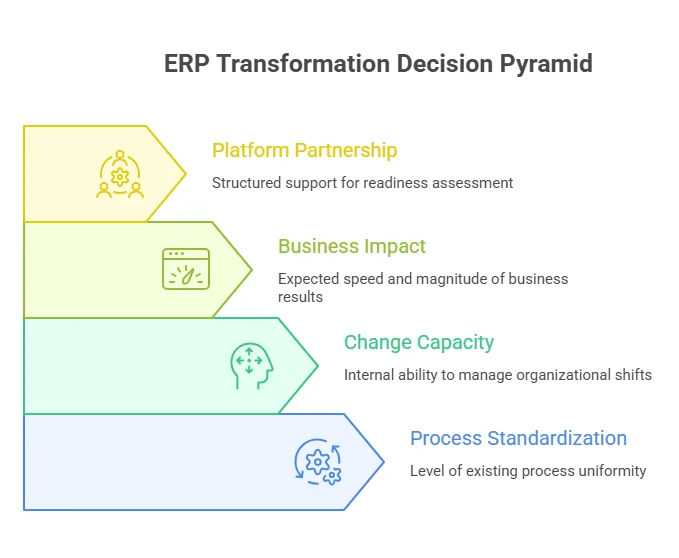
ERP transformation decision pyramid

Expert perspective:
SAP S/4HANA is built for complexity and tightly integrated global processes. Microsoft Dynamics 365 is built for flexibility, modular adoption, and ecosystem alignment. The right choice depends on how much complexity an organization can realistically absorb. Eric Kimberling, an independent ERP transformation advisor

Early decision insight:

Before cost or migration planning begins, decisions are usually shaped by three factors:

  • Level of process standardization already in place
  • Internal capacity to manage change
  • Expected speed of business impact

In practice, this is the stage where organizations align internally and engage structured advisory support through platform partnership frameworks to assess readiness across business, technical, and operational dimensions.

The SAP ECC Deadline: What Your SAP Vendor May Not Have Told You

SAP ECC 6.0 mainstream maintenance ends on December 31, 2027, after which systems stop receiving standard security patches, compliance updates, and bug fixes.

Organizations that remain on ECC typically move into one of three paths:

  • Extended maintenance (until 2030) with higher annual cost increases
  • Customer-specific support, which is reactive and limited in scope
  • Third-party support providers, which reduce cost but disconnect systems from SAP’s innovation roadmap

Each option increases long-term dependency risk, either through cost, capability loss, or limited modernization.

What does Microsoft Dynamics 365 vs SAP S/4HANA cost in 2026?

Microsoft Dynamics 365 typically costs ~$100K–$4M for implementation with 5-year TCO around ~$2M–$15M, while SAP S/4HANA typically costs ~$500K–$15M+ for implementation with 5-year TCO around ~$10M–$35M+.

Real ERP cost structure (2026 benchmark view)

Cost Component Microsoft Dynamics 365 SAP S/4HANA
Implementation $100K – $4M $500K – $15M+
Licensing (annual per user) ~$1K – $2.2K ~$1.8K – $3.6K
5-year TCO $2M – $15M $10M – $35M+
Developer Ecosystem Largest, mature SDKs Strong .NET / Microsoft integration

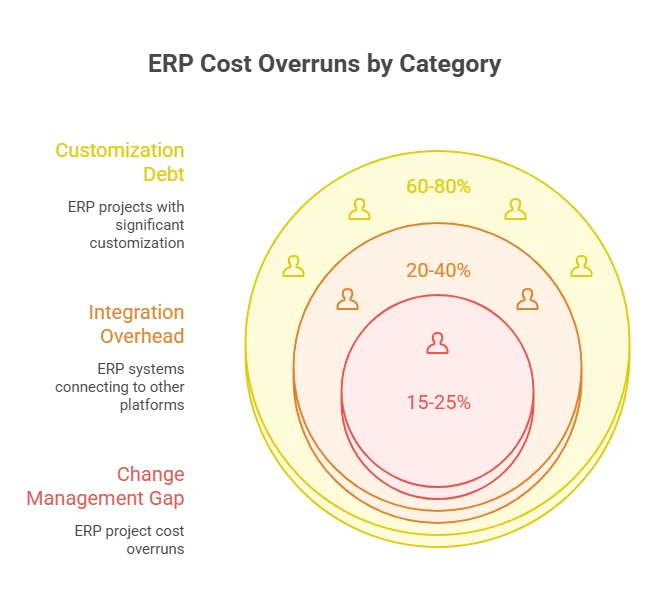
Hidden ERP costs most organizations underestimate

These are the cost drivers that typically push ERP programs over budget:

1. Integration overhead (20%–40% of total cost)

ERP systems rarely operate alone. They connect to CRM, BI, HR, supply chain, and data platforms.

  • SAP: requires middleware-heavy integration via BTP / Integration Suite
  • Dynamics: easier native integration but increases cost when ecosystems fragment

2. Customization debt (60–80% + 30–70% impact)

Customization drives long-term cost more than upfront implementation.

  • 60–80% of ERP projects include significant customization
  • Heavy customization increases upgrade and maintenance effort 
  • Impact can materially raise long-term ERP lifecycle costs in complex environments

3. Change management gap (most common failure driver)

Across enterprise ERP programs, this is consistently underfunded:

  • Training cost underestimated
  • Business process redesign delayed
  • User adoption assumed instead of planned

This alone can account for 15%–25% of total project cost overruns.

ERP cost overrun by category

Key Insight: Why ERP budgets actually overrun?

ERP cost escalation is not random. It follows a predictable pattern:

  • SAP overruns → driven by migration + integration complexity
  • Dynamics overruns → driven by scope expansion + uncontrolled customization

Understand the True Cost of ERP in 2026

Go beyond licensing—evaluate integration, customization, and long-term ownership cost.

View Cost Insights

The 2026 AI Gap: Where Dynamics 365 Has a Structural Advantage Over SAP

In 2026, Microsoft Dynamics 365 leads in agentic AI delivery because AI is natively embedded into ERP workflows via Copilot and Power Platform, while SAP S/4HANA relies on SAP BTP and Joule, which introduces additional integration, licensing, and configuration layers.

 What Dynamics 365 Wave 1 2026 delivers

Microsoft’s Wave 1 release shifts Dynamics 365 from AI-assisted ERP to AI-executed workflows, where agents act across finance, sales, and operations.

  • Finance agents that reconcile accounts, process invoices, and detect anomalies automatically
  • Sales agents combining CRM, email, and Teams data to trigger pipeline actions
  • Supply chain agents that identify demand signals and initiate procurement workflows
  • Business Central agentic ERP enabling natural-language-defined agents via Power Platform and GitHub
  • MCP support enabling cross-system agent orchestration
Agentic AI will redefine productivity; not just by automating tasks, but by empowering people to act with intelligence and autonomy.Satya Nadella, CEO, Microsoft

SAP’s AI model in 2026 

SAP’s AI strategy centers on Joule and Business Technology Platform (BTP), where AI is powerful but not fully native to ERP execution.

  • Joule embedded in S/4HANA Cloud for conversational ERP tasks
  • Strong analytics and supply chain intelligence via SAP BTP
  • Requires configuration for agentic workflows beyond standard ERP use cases
  • Dependent on SAP Business Data Cloud for AI effectiveness
Many companies are realizing that LLM alone does not create enough value. A strong data foundation is essential to maximize AI adoption.Christian Klein, CEO, SAP

SAP also positions measurable productivity gains:

Companies using Joule will see a 30% to 40% increase in productivity. —  Christian Klein, CEO, SAP

Why is SAP considered more complex than Dynamics 365, and when does that matter?

SAP is more complex because it supports deeper enterprise processes, more configuration layers, and requires specialized expertise, which increases both implementation time and operational overhead.

Complexity Comparison

Dimension Dynamics 365 SAP S/4HANA
Learning Curve Moderate Steep
Customization Approach Low-code tools ABAP + advanced config
Implementation Layers Modular Multi-layered
Governance Needs Moderate High

When complexity is justified

SAP complexity makes sense when:

  • You operate across multiple countries with compliance needs
  • You require deep manufacturing or supply chain control
  • You already run SAP (ECC → S/4 continuity)

What are the real migration paths: SAP ECC → S/4HANA vs Legacy ERP → Dynamics 365?

SAP migrations are typically structured but rigid, following predefined conversion models with high technical dependency, while Dynamics 365 migrations are more phased and incremental, especially in Microsoft-aligned environments where adoption can be modular and workload-based.

SAP migration paths (ECC → S/4HANA in real projects)

In most SAP environments, migration is not a single route. It usually follows one of three models, chosen based on cost, timeline, and tolerance for redesign.

1. Brownfield (system conversion)

Preserves existing ECC configuration, data, and custom code. 

  • Fastest path with lowest disruption
  • Retains legacy complexity and technical debt
  • Common when timelines are tight or reengineering is not feasible

2. Greenfield (reimplementation)

A full rebuild of the ERP environment with standardized processes. 

  • Clean architecture and long-term scalability
  • High upfront effort and business redesign requirement
  • Typically used during major transformation programs, not simple upgrades

3. Selective data transition (hybrid)

Migrates only selected data and processes into S/4HANA. 

  • Balances redesign and continuity
  • High governance and planning complexity
  • Often becomes the most difficult model in execution due to scope overlap

Dynamics 365 migration paths (legacy ERP → cloud ERP)

Migration Path Typical Approach Timeline
NAV → Business Central Extension-based rebuild of custom logic 4–9 months
GP → Business Central Phased migration with structured Microsoft tooling 6–12 months
Non-Microsoft ERP Staged rollout (finance → operations → supply chain) 9–18 months
SAP ECC → Dynamics 365 Full system and data transformation (in selective cases) 12–24 months
Real-world implementation insight:
In one mid-market manufacturing migration I was involved in, the organization initially scoped SAP S/4HANA brownfield conversion but later shifted to a phased Dynamics 365 rollout. The key driver was the change in absorption capacity. The SAP approach required compressing too many decisions into a single transformation window, while Dynamics allowed finance and operations to go live in separate phases, reducing operational risk.

Why ERP Implementations Fail or Exceed Budgets (SAP vs Dynamics 365 Insights)

ERP implementations fail when organizations replicate legacy processes instead of simplifying them, and when governance cannot keep pace with transformation complexity. 

Four recurring failure patterns in ERP programs

Across SAP and Dynamics programs I’ve seen or reviewed, cost overruns rarely come from licensing. They come from scope drift, customization debt, and weak decision ownership once execution begins.

1. Quiet scope creep

Small enhancements accumulate over time and gradually reshape the original system design, leading to rework and budget expansion.

2. Over-customization of standard processes

Teams often rebuild legacy workflows instead of adapting to standard ERP logic, increasing long-term maintenance and upgrade cost.

3. Weak governance during execution

When system integrators dominate decision-making, internal ownership weakens and delivery becomes reactive instead of outcome-driven.

4. Unrealistic delivery timelines

ERP programs are frequently approved with compressed schedules that ignore data readiness, training depth, and process redesign effort.

How SAP vs Dynamics failures typically differ

Aspect Dynamics 365 SAP S/4HANA
Nature of failure Gradual inefficiency from fragmented configuration High-impact disruption when core design breaks
Primary driver Over-flexibility and inconsistent adoption Over-complexity and heavy customization
Recovery pattern Iterative correction is usually feasible Often requires expensive re-architecture cycles

Dynamics 365 vs SAP: ERP implementation failures

Real-world ERP failure signals 

These patterns are consistently reflected in independent case studies, litigation records, and consulting analyses.

SAP S/4HANA example: Large-scale transformation programs such as Zimmer Biomet’s ERP rollout highlighted how excessive change orders and scope expansion can escalate costs significantly, ultimately leading to legal disputes with implementation partners.
Microsoft Dynamics 365 examples: Metcash (Australia) reported a major Dynamics 365 transformation overrun, driven by underestimating process harmonization complexity and heavy reliance on external consulting teams.

Is SAP S/4HANA overkill for mid-sized companies compared to Dynamics 365?

In most mid-market cases, SAP S/4HANA is heavier in cost, complexity, and implementation effort than required, while Dynamics 365 better fits faster, modular ERP adoption. 

When SAP feels excessive

  • Single-region or low regulatory complexity
  • Lean or non-SAP IT teams
  • Need for fast ROI and shorter deployment

Result: longer timelines, higher consulting cost, stricter processes.

When SAP is justified

  • Multi-country, high-compliance operations
  • Complex manufacturing or supply chains
  • Existing SAP ecosystem already in place

Decision takeaway

  • If priority is speed, flexibility, and phased rollout → Dynamics 365
  • If priority is global standardization at scale → SAP S/4HANA

Industry Verdicts: Which ERP Fits Best by Sector in 2026?

SAP S/4HANA aligns better with highly regulated, global, and manufacturing-heavy environments, while Microsoft Dynamics 365 fits mid-market, service-led, and fast-scaling businesses needing flexibility and quicker deployment. 

However, ERP fit depends on operational complexity, global scale, and process standardization, not a single winner per industry. 

Industry Better Fit Why It Wins
Manufacturing (global, complex) SAP S/4HANA Strong MRP II, production planning depth, global process standardization
Manufacturing (mid-market, agile) Dynamics 365 Faster rollout, modular supply chain, lower TCO and complexity
Financial services / fintech Depends (often SAP / hybrid) SAP for core banking complexity; Dynamics for mid-tier finance + faster compliance workflows
Logistics & distribution Dynamics 365 Strong warehouse + transport integrations within Microsoft ecosystem
Professional services Dynamics 365 Project-centric ERP (Project Operations + CRM + Teams integration)
Retail & commerce Dynamics 365 Unified commerce + customer data + faster digital rollout
Multi-country enterprise (highly regulated) SAP S/4HANA Strongest fit for global standardization, compliance, and governance

Which ERP integrates better with modern cloud ecosystems, DevOps, and data platforms?

Microsoft Dynamics 365 integrates more easily with modern cloud and DevOps environments, while SAP S/4HANA is better suited for complex, multi-system enterprise integrations. 

Integration strength depends less on raw capability and more on ecosystem alignment. 

Microsoft Dynamics 365 ecosystem (Azure-native approach)

  • Works tightly with Microsoft cloud stack (Azure, Entra ID, Power Platform)
  • Data flows through Dataverse and Power BI with minimal friction
  • Strong alignment with low-code automation via Power Automate
  • Easier integration for teams already using Microsoft 365

In practice, this reduces the “integration tax”, meaning fewer custom middleware layers and faster deployment cycles.

SAP S/4HANA ecosystem (platform-centric integration)

  • Built around SAP Business Technology Platform (BTP)
  • Strong enterprise-grade integration via SAP Integration Suite
  • Designed for hybrid landscapes (SAP + non-SAP + legacy systems)
  • Highly capable in multi-vendor enterprise environments

Where SAP stands out is in large-scale orchestration, not simplicity.

What do developers and ERP consultants actually say about SAP vs Dynamics?

Community sentiment consistently shows SAP as more powerful but heavier to operate, while Dynamics is seen as more flexible but easier to misconfigure if governance is weak.

SAP is not difficult because it lacks tools; it’s difficult because it governs everything. Every decision connects to four others. That depth is its power and its problem. — r/SAP practitioner thread 

Dynamics 365 issues are usually implementation and governance-driven, not platform-driven, with strong value emerging when properly configured. — r/Dynamics365 community thread 

These community signals map to implementation reality: SAP complexity is front-loaded and visible; Dynamics complexity is back-loaded and often invisible until governance fails.

Neither is inherently safer; both require deliberate organizational investment to succeed.

Enterprise ERP Decision Framework: How Companies Actually Choose in 2026

ERP selection in 2026 is driven by four core filters: cost tolerance, operational complexity, internal capability, and time-to-value.

Step 1: Cost & risk appetite

  • Lean, budget-sensitive programs → Dynamics 365
  • High-investment transformation programs → SAP S/4HANA
    (This reflects risk tolerance for long transformation cycles, not just licensing cost.)

Step 2: Operational complexity

  • Standardized finance and supply chain → Dynamics 365 is usually sufficient
  • Multi-country, compliance-heavy operations → SAP fits naturally

Step 3: Internal capability

  • Microsoft-skilled teams (Azure, M365, Power Platform) → Dynamics reduces friction
  • Established SAP teams and governance → SAP continuity is more efficient

Step 4: Time-to-value expectation

  • 6–12 months ROI expectation → Dynamics 365
  • 18–36+ month transformation horizon → SAP S/4HANA

Final Decision Logic

  • SAP fits when scale, compliance, and long transformation cycles are acceptable trade-offs for structural control
  • Dynamics 365 fits when speed, modular adoption, and lower operational friction are the priority.

Final Verdict: Which ERP is better for your business in 2026? 

If you compress the entire SAP vs Dynamics decision into one lens, it comes down to how your organization manages complexity vs speed of change.

SAP S/4HANA fits organizations where complexity is the operating model: multi-country operations, strict compliance environments, and long transformation cycles where deep process standardization is required.

Microsoft Dynamics 365 fits organizations where agility is the operating model; faster rollout expectations, modular adoption, and a need to scale without heavy transformation overhead.

The most common mistake is not choosing the “wrong ERP,” but underestimating internal change capacity; how much disruption teams, processes, and leadership can realistically absorb without slowing execution.

Plan Your ERP Strategy with Confidence

Get expert guidance on SAP vs Dynamics 365 to choose the right path for cost, migration, and long-term scalability.

Talk to Microsoft ERP Experts

Why Can Legacy System Integration with AI Fail & How to Fix It?

Legacy system integration with AI fails at the execution layer where data flow, latency, and system dependencies collide. Most breakdowns appear under real production conditions, not during initial deployment.

Legacy system integration becomes fragile when AI is introduced into environments built on synchronous processing, rigid schemas, and tightly coupled services. Failures rarely stay isolated. They surface as delayed responses, inconsistent outputs, and system instability under load.

According to McKinsey & Company, fewer than 20% of organizations report significant EBIT impact from AI, largely due to integration and scaling challenges. This is where legacy software modernization services play a critical role in restructuring systems to support new workloads.

Legacy System Integration With AI at a GLance

  • Legacy system integration with AI fails mainly at the execution layer, where data flow, latency, and system dependencies collide under real workloads.
  • Most failures are caused by latency amplification, data inconsistency, dependency chain instability, and infrastructure mismatch in legacy environments.
  • These issues typically appear in production as slow transactions, unreliable AI outputs, and increasing system instability.
  • Early warning signs include performance degradation, inconsistent results, growing system complexity, and rising operational overhead.
  • Successful integration depends on controlling data flow, isolating AI workloads, and aligning infrastructure with real-time processing needs.
  • Key fixes include asynchronous processing, data standardization, decoupled architectures, and clear system boundaries.
  • When done correctly, AI integration improves decision-making speed, operational efficiency, and customer experience without replacing legacy systems.
  • Common mistakes include overcomplicating integration, ignoring user adoption, and skipping post-deployment monitoring.
  • Poor integration leads to higher engineering effort, increased costs, system failures, and slower innovation.
  • Legacy system integration ultimately determines whether AI becomes a scalable advantage or a source of operational risk.

What is Legacy System Integration?

Legacy system integration defines how existing systems handle new workloads, data flows, and dependencies introduced by modern technologies like AI.

In most enterprises, these systems still power transactions, compliance workflows, and revenue-critical operations, which makes any integration decision directly tied to operational stability.

When AI enters this environment, integration pressure increases at the data and execution layers. Data that once moved in controlled batches now needs continuous availability. System interactions that were predictable become variable, driven by model outputs.

This shift introduces strain across APIs, databases, and service dependencies that were not designed for such behavior.

Where legacy system integration breaks in AI environments:

  • Batch-based systems interacting with real-time AI workloads.
  • Data inconsistencies across siloed or partially synchronized sources.
  • Latency spikes during model-driven requests and responses.
  • Cascading failures across tightly coupled system dependencies.

These conditions do not appear in isolation. They surface under production load, where multiple systems interact simultaneously. According to Deloitte, 57% of organizations identify legacy systems as a primary barrier to scaling digital initiatives, with integration complexity at the center.

Why Legacy System Integration with AI Can Fail

Legacy system integration with AI fails at the execution layer where data movement, system dependencies, and workload behavior shift under production conditions. These failures compound across systems and surface as operational instability, not isolated technical issues.

This is where working with a custom software development company becomes critical to manage integration complexity at scale.

According to McKinsey & Company, only 1% of companies report fully mature AI deployment, with integration and scaling cited as primary constraints.

This reflects how difficult it is to operationalize AI within legacy environments.

Failure patterns in legacy system integration

1. Latency amplification under AI workloads

AI-driven requests introduce variable processing times across APIs and databases. In tightly coupled systems, this leads to cascading delays that directly affect transaction speed and user-facing operations.

2. Data inconsistency across integrated systems

Legacy systems often operate on partially synchronized data. When AI models consume inconsistent inputs, output reliability drops, affecting downstream systems such as reporting and automation workflows.

3. Dependency chain instability

Integration increases the number of interconnected services. A delay or failure in one component propagates across dependent systems, leading to broader operational disruption.

4. Infrastructure mismatch at scale

AI workloads introduce unpredictable execution patterns and higher concurrency demands. Legacy infrastructure struggles to maintain performance under fluctuating load conditions, especially during peak usage.

5. Uncontrolled integration scope

As integration expands without defined boundaries, systems become tightly interdependent. This increases failure impact, complicates debugging, and slows recovery during incidents.

Production Case Insight

A large enterprise bank attempting to integrate AI-driven risk modeling into its legacy infrastructure faced delays due to tightly coupled systems and lack of API exposure. The integration effort required re-architecting how data was accessed and processed before AI models could be deployed in production.

The issue was not model capability. It was the inability of existing systems to support real-time data exchange and flexible system interaction, which delayed rollout and increased integration effort

Business impact

  • Slower transaction processing during peak demand.
  • Increased risk of system-wide failures due to dependency chains.
  • Reduced reliability of AI-driven outputs.
  • Higher operational costs driven by rework and system instability.

At this stage, legacy system integration directly influences system reliability, operational continuity, and the ability to scale AI without disrupting core business functions.

Cost Impact of Poor Legacy System Integration with AI

Cost Area What Happens in Poor Integration Business Impact
Engineering Cost Continuous debugging, patch fixes, dependency issues Increased developer hours and slower product delivery
Operational Cost Manual workarounds despite AI integration Reduced efficiency and higher process overhead
Performance Cost Latency spikes and slower system response Delayed transactions and poor user experience
Reliability Cost System instability and cascading failures Downtime risk and disrupted business operations
Data Cost Inconsistent or fragmented data across systems Unreliable AI outputs and poor decision-making
Scaling Cost Difficulty adding new AI features or expanding systems Slower innovation and missed market opportunities

When Legacy System Integration with AI Becomes a Business Risk

Legacy system integration becomes a business risk when system performance, output reliability, and operational efficiency start degrading under real production workloads.

Common indicators include:

  • Increasing response latency in production systems.
  • Inconsistent outputs from AI-driven workflows.
  • System slowdowns during peak usage periods.
  • Growing dependency chains across services.
  • Rising operational overhead to maintain system stability.

These signals typically appear before major failures. In most cases, they are treated as isolated performance issues, while the root cause remains at the integration layer.

At this stage, the risk is no longer technical. It starts affecting transaction speed, system reliability, and overall business operations.

Your AI Integration Shouldn’t Break What Already Works

Get a system-level assessment and uncover where your integration will fail before it does.

Get a Legacy System Integration Audit

How to Fix Legacy System Integration Failures with AI

Successful legacy system integration with AI depends on controlling data flow, isolating system dependencies, and aligning infrastructure with AI workload behavior.

The focus stays on stabilizing data flow, controlling dependencies, and aligning system behavior with AI-driven execution patterns.

1. Fix Latency Amplification at the Integration Layer

Latency issues emerge when AI inference is introduced into synchronous, tightly coupled systems. Each additional processing step increases response time across APIs and databases.

According to Google Cloud, high-performing systems reduce latency by shifting to asynchronous and event-driven architectures, especially for workloads with variable execution times.

In production systems, this is addressed by:

  • Moving AI inference outside synchronous transaction paths.
  • Introducing async processing queues between systems.
  • Isolating response-critical workflows from AI workloads.

In large-scale platforms, separating AI processing from user transaction flows has reduced response delays and preserved system responsiveness under peak demand.

2. Fix Data Inconsistency Before Model Interaction

Data inconsistency is one of the most common failure points in legacy system integration. AI systems amplify inconsistencies that already exist across fragmented data sources.

According to IBM, poor data quality costs organizations an average of $12.9 million annually.

Resolution at the integration layer includes:

  • Standardizing schemas across all connected systems.
  • Introducing validation layers before AI model input.
  • Synchronizing critical datasets across systems.

In enterprise deployments such as Airbus, structured data pipelines enabled AI-driven predictive maintenance by ensuring consistent inputs across legacy systems.

3. Contain Dependency Chain Failures

As systems become more interconnected, failures propagate across services. A delay in one system can affect multiple downstream processes.

According to Amazon Web Services, loosely coupled architectures reduce the blast radius of system failures by isolating service dependencies.

In production environments, this is handled by:

  • Decoupling services through event-driven integration
  • Introducing circuit breakers and fallback mechanisms
  • Limiting direct dependencies between critical systems

This approach reduces system-wide impact and allows failures to remain isolated.

4. Align Infrastructure with AI Workload Behavior

AI workloads introduce variability in execution patterns and increase concurrency demand. Legacy infrastructure built for deterministic workloads struggles to maintain stability under these conditions.

According to Gartner, organizations are shifting toward cloud-native and scalable architectures to support modern workloads, including AI-driven systems.

In enterprise environments, this shift includes:

  • Offloading AI workloads to scalable compute layers.
  • Introducing caching mechanisms for repeated model outputs.
  • Monitoring system performance under variable load conditions.

Organizations that align infrastructure with workload behavior maintain performance consistency during scaling.

5. Control Integration Scope and System Boundaries

Integration failures expand when system boundaries are not clearly defined. Direct interaction between AI layers and core transactional systems increases operational risk.

Organizations that define clear data ownership and system boundaries are significantly more successful in scaling AI initiatives.

Execution involves:

  • Separating read-heavy AI workloads from write-critical systems.
  • Defining ownership across data sources and services.
  • Restricting cross-system dependencies.

In financial systems, isolating AI analytics from transaction processing has maintained system stability while enabling advanced insights.

Enterprise Case Insight

During Target’s large-scale system modernization, integration challenges across legacy supply chain and inventory systems led to data inconsistencies and operational breakdowns. These issues affected inventory accuracy and fulfillment processes, highlighting how integration complexity across legacy systems can directly impact business operations.

Business Impact of Getting This Right

  • Stable system performance under AI-driven workloads.
  • Reduced risk of cascading system failures.
  • Reliable AI outputs across business workflows.
  • Lower operational costs from reduced rework and downtime.

At this level, legacy system integration defines whether AI operates as an enhancement layer or introduces instability into core business systems.

The Business Benefits of Successful AI Integration in Legacy Systems

When legacy system integration with AI is executed at the data and system layer correctly, the impact shows up directly in decision speed, operational cost, and customer-facing performance. The value is not theoretical. It is measurable across workflows that already drive the business.

1. Faster Decision-Making and Operational Throughput

AI integrated into legacy systems enables continuous data processing instead of delayed, batch-based insights. This shifts decision-making from reactive to real-time across operations such as pricing, risk analysis, and supply chain planning.

Organizations using AI in operations have reported 20–30% improvements in decision-making speed and efficiency.

In production environments, this translates into:

  • Faster response to demand changes.
  • Reduced processing delays across workflows.
  • Improved coordination across interconnected systems.

2. Reduction in Operational and Infrastructure Costs

Legacy system integration allows organizations to extend existing infrastructure instead of replacing it. AI layers automate high-volume processes, reducing manual effort and system overhead.

AI-driven automation can reduce operational costs by up to 30% in enterprise environments.

This impact is seen in:

  • Lower manual processing costs.
  • Reduced dependency on redundant systems.
  • Avoidance of full system replacement expenses.

Organizations that integrate AI into legacy environments often realize cost savings by optimizing what already exists rather than rebuilding from scratch.

3. Improved Customer Experience Through Real-Time Intelligence

When AI is integrated into legacy systems, customer-facing workflows gain access to real-time insights. This enables more accurate recommendations, faster service responses, and personalized interactions.

Netflix uses AI-driven recommendation systems built on top of its data infrastructure to personalize content delivery, contributing to high user engagement and retention.

In enterprise use cases, this results in:

  • Personalized customer interactions based on behavior data.
  • Faster service resolution through predictive insights.
  • Improved engagement across digital platforms.

The improvement is driven by how well AI integrates with existing data systems, not just the model itself.

4. Competitive Advantage and Long-Term Scalability

Legacy system integration with AI allows organizations to evolve without disrupting core operations. This creates a foundation where new capabilities can be introduced without rebuilding the entire system architecture.

Organizations that successfully operationalize AI gain a measurable competitive advantage through improved agility and faster innovation cycles.

This advantage appears in:

  • Faster rollout of new features and capabilities.
  • Ability to adapt to market changes without system redesign.
  • Stronger alignment between data, systems, and decision-making.

Enterprise Case Insight

Mayo Clinic integrated AI into its clinical systems by connecting legacy data infrastructure with modern analytics platforms. This allowed patient data from multiple systems to be accessed and processed in a unified way.

The integration improved diagnostic workflows by enabling faster analysis of medical data, supporting more timely and accurate clinical decisions.

Business Impact Summary

  • Faster decision cycles across operations.
  • Reduced operational costs through automation and optimization.
  • Enhanced customer experience through real-time insights.
  • Stronger competitive positioning through scalable systems.

At this level, legacy system integration defines how effectively AI contributes to measurable business outcomes without disrupting existing operations.

Common Pitfalls to Avoid in Legacy System Integration with AI

Most failures in legacy system integration with AI are not caused by the model. They emerge from execution gaps that appear after integration begins or shortly after deployment. These issues affect adoption, system stability, and overall business performance.

1. Overcomplicating the Integration Scope

Integration efforts often expand beyond what existing systems can realistically support. Large-scale changes across multiple systems increase dependency complexity and make failure isolation difficult.

Organizations that take a focused, use-case-driven approach to AI are significantly more likely to achieve measurable outcomes compared to those attempting large-scale transformations at once.

In practice, successful implementations are structured around:

  • Limited, high-impact use cases.
  • Controlled system interaction points.
  • Gradual expansion based on system behavior.

In enterprise environments, phased integration has reduced rollout risk and improved system stability during scaling.

2. Ignoring User Training and Operational Readiness

AI integration changes how systems behave and how teams interact with them. When users are not aligned with these changes, system adoption slows and operational errors increase.

According to Deloitte, organizations that invest in workforce readiness and training are more likely to achieve successful outcomes from digital transformation initiatives.

User training impacts:

  • Accuracy of system usage.
  • Speed of adoption across teams.
  • Reduction in operational errors.

In production environments, lack of training often results in underutilized systems and inconsistent outputs, even when the integration itself is technically stable.

3. Skipping Post-Implementation Monitoring

Integration does not end at deployment. Most issues surface under real usage conditions, where system load, concurrency, and data variability expose weaknesses.

According to Google Cloud, continuous monitoring and observability are critical for maintaining system reliability in distributed architectures.

Post-integration monitoring focuses on:

  • Latency tracking across integrated systems.
  • Error rates during AI inference.
  • Data consistency across workflows.

Organizations that actively monitor integrated systems identify issues earlier and reduce the impact of failures on business operations.

Enterprise Case Insight

General Electric faced challenges during early deployment of its industrial AI platform when integration with existing systems did not align with operational workflows. While the platform was technically functional, gaps between system behavior and user workflows slowed adoption across teams.

The issue highlighted how integration success depends on both system alignment and operational readiness, not just technical deployment.

Business Impact of These Pitfalls

  • Slower system adoption across teams.
  • Increased operational errors due to misaligned workflows.
  • Delayed ROI from AI investments.
  • Higher recovery costs due to late detection of issues.

At this level, legacy system integration success depends not only on technical execution but also on how well systems, users, and operational processes align after deployment.

Why is AppVerticals the Best Choice for AI-Based Legacy System Integration?

AppVerticals specializes in integrating modern technologies like AI into legacy environments without disrupting core business operations. Their approach focuses on solving real execution-layer challenges, including data flow optimization, system dependency management, and production-level stability.

AppVerticals partnered with VisionZE to undertake a cloud migration and implement API integrations to modernize their data infrastructure. We also ensured full HIPAA-compliance throughout the process, addressing both security and operational inefficiencies.

Result:

  • 30% cost reduction in system maintenance and operational overhead.
  • Improved patient data access, resulting in faster processing and better user experience.
  • Seamless HIPAA-compliant integration, ensuring that data security and privacy are upheld without disruption.

Conclusion

Legacy system integration with AI does not fail because of the model. It fails where systems are not prepared to handle new data flow, execution patterns, and dependency complexity under real conditions.

Across most enterprises, the breaking point appears at the integration layer. Latency increases, data becomes inconsistent, and system dependencies expand beyond control. These issues surface in production, where even small inefficiencies affect core operations.

Organizations that approach legacy system integration as a system-level design problem maintain stability while introducing AI capabilities. The focus stays on controlling how systems interact, how data moves, and how failures are contained.

At this stage, the objective is to ensure that legacy systems can support new workloads without affecting reliability, performance, or business continuity.

Make AI Work With Your Legacy Systems. Not Against Them

From data flow to system dependencies, we design integration layers that hold under real production conditions.

Talk to Integration Experts

AWS vs Azure: Which Cloud Works Better for Media & IoT Workloads?

When deciding between AWS and Azure for media-heavy, IoT-driven workloads, both platforms are capable, but they reward different operating models. AWS is typically stronger for event-driven, serverless-heavy architectures, while Azure excels in governance, enterprise integration, and Microsoft-aligned environments. 

AWS and Azure dominate the cloud market, with recent industry reports estimating ~30% market share for AWS and ~21% for Azure, and over 90% of Fortune 500 companies using cloud services. The real question isn’t which cloud platform is better; it’s which aligns with your workload patterns, especially for media and IoT at scale, guided by enterprise platform partnerships that influence architecture decisions at enterprise scale.”

In this blog, I’ll break that down using the Highlights App case: an event-driven system that captures ~40-second highlights via smart triggers, creating bursty uploads (~300/min) and IoT-driven workflows. 

By optimizing the architecture, we reduced costs from ~$800/month to ~$450/month, an area where teams often turn to AWS consulting to better manage scaling and cost control.

TL;DR: Choosing Between AWS vs Azure for Media & IoT Workloads

Area What We Observed in the Highlights App AWS Strength Azure Strength Decision Insight
Architecture Type Event-driven highlight capture (not continuous streaming) Strong event-driven ecosystem (Lambda, SQS, Step Functions) Structured architecture with governance controls AWS fits burst-heavy pipelines; Azure fits controlled enterprise environments
Media Handling Short clips (~40s), burst uploads (~300/min) Better for burst scaling + async pipelines Easier integration with enterprise storage workflows Both work; AWS more flexible under spikes
IoT Integration Smart buttons + edge cameras triggering uploads Mature IoT + event integration Centralized IoT Hub with governance Model IoT costs separately on both
Cost Behavior Non-linear due to bursts + messaging Fine-grained cost control, ARM savings Strong cost visibility, budgeting tools Optimization matters more than provider
Scaling Pattern Bursty ingestion, steady playback Serverless scales aggressively Predictable scaling with structured limits Hybrid approach required in both
Optimization Result ~$800 → ~$450/month Rightsizing + async pipelines Budgeting + monitoring + cleanup Cost control is architecture-driven

Cut Your Cloud Costs by Up to 40%

See how we optimized a media + IoT pipeline from $800 to $450/month, and how you can do the same.

Audit My Architecture
What is AWS?
Launched in 2006, AWS (Amazon Web Services) is the market leader in public cloud. It offers compute, storage, networking, databases, serverless functions, IoT, analytics, ML/AI, and media services. AWS is known for flexibility, global reach, and strong event-driven workflows.
What is Microsoft Azure?
Azure is enterprise-focused, providing compute, storage, networking, serverless, IoT Hub, SQL/Cosmos DB, monitoring, and deep Microsoft ecosystem integration. It emphasizes governance, compliance, and ease-of-use for organizations standardized on Microsoft tools.

How Do AWS and Azure Compare in Adoption & Market Share?

Metric AWS Azure
Global Market Share (2025) 30% 21%
Fortune 500 Adoption ~90% ~85%
IoT & Media Usage High for startups & bursty workloads High for enterprise-aligned media platforms
Developer Ecosystem Largest, mature SDKs Strong .NET / Microsoft integration

AWS vs Azure: Market adoption statistics

Expert Insights

Andy Jassy (CEO, Amazon) announced a major strategic partnership with OpenAI

AWS leads in scale and developer flexibility, as Andy Jassy (CEO, Amazon) announced a major strategic partnership with OpenAI (including AWS becoming the exclusive third-party cloud provider for OpenAI Frontier and a $50B investment).

Satya Nadella (CEO, Microsoft) tweet on Azure’s focus on governance

This statement from Satya Nadella (CEO, Microsoft) highlights Azure’s strong focus on governance, compliance, data residency, and sovereign cloud offerings for regulated enterprises and governments.

Architecture & Cloud Organization: When should you choose AWS over Azure for event-driven systems?

AWS should be chosen for event-driven systems when workloads are highly dynamic, burst-heavy, and require fine-grained scaling control through services like Lambda, SQS, and Step Functions. Azure is better suited when governance, compliance, and structured enterprise workflows are the primary concerns.

AWS Multi-Account Setup

  • Isolates production, non-production, security, and shared services
  • Clear cost & usage tracking via Cost Explorer and CUR dashboards
  • Terraform + Control Tower ensures consistent provisioning and reproducibility

Azure Resource Hierarchy

  • Tenant → Management Group → Subscription → Resource Group → Resources
  • Inherited RBAC & policies simplify compliance for multiple projects
  • Resource groups give a single-pane view; policy-enforced tagging reduces errors
  • Dynamic, event-driven workloads require tuning to avoid throttling
Decision Takeaway: At higher event volumes, environment isolation alone isn’t enough; queue buffering, retry strategies, and concurrency controls become the primary factors influencing system stability.

What are the main differences between AWS and Azure for serverless architectures?

Feature AWS Azure Insight
Isolation Multi-account setup Resource groups + subscriptions AWS = stronger isolation; Azure = easier governance
Governance Custom tagging Policy-based inheritance Azure reduces errors; AWS more flexible
CI/CD Terraform + Control Tower Azure DevOps + Bicep/ARM Azure more native for Microsoft stacks
Scaling Lambda + SQS + Step Functions Functions + Event Grid + Queue AWS better for burst scaling; Azure more controlled
Execution Fully event-driven Event-driven + structured workflows AWS suits micro-bursts; Azure suits enterprise flows

Networking & Database: How do AWS and Azure compare for IoT applications?

AWS and Azure both support scalable IoT networking and data storage, but AWS is more optimized for event-driven, low-latency ingestion, while Azure emphasizes enterprise-grade integration and governance.

AWS Approach

  • CDN & Networking: CloudFront + Lambda@Edge for low-latency global delivery
  • Video Storage: S3 for scalable object storage
  • Relational DB: RDS / Aurora for managed relational workloads
  • Metadata/Event Storage: DynamoDB for high-throughput IoT events
  • Edge Handling: Local buffering on devices (cameras/NVRs) with batch uploads to reduce ingestion spikes, similar to patterns used in IoT device development ecosystems where real-time sensor data must be efficiently synchronized with cloud systems.

Azure Approach

  • CDN & Networking: Front Door + Azure CDN with built-in WAF for secure global routing
  • Video Storage: Blob Storage for object storage
  • Relational DB: Azure SQL Database for managed relational workloads
  • Metadata/Event Storage: Cosmos DB for globally distributed IoT data
  • Edge Handling: Native integration with IoT Hub telemetry and device ingestion pipelines

Which cloud is better for media and IoT cost optimization?

For bursty, event-driven workloads like the Highlights App, AWS (especially Lambda-based architectures) delivers better cost efficiency due to fine-grained scaling and pay-per-use execution, while Azure offers more predictable cost governance for enterprise Microsoft-centric environments.

Highlights App Case 

Cost optimization across pipelines reduced monthly spend from ~$800/month → ~$450/month through serverless tuning, storage right-sizing, and automation-driven cleanup.

AWS Cost Optimization Strategy (Burst-Optimized Model)

  • Use Lambda free tier + event-driven execution to eliminate idle compute costs
  • Rightsize storage: EBS gp2 → gp3 for better price-performance efficiency
  • Remove unused resources: idle RDS, EC2, NAT gateways
  • Automate cleanup using CloudWatch + Terraform workflows
  • Prefer serverless pipelines for unpredictable traffic spikes

Azure Cost Optimization Strategy (Governance-Driven Model)

  • Use Functions Consumption Plan for pay-per-execution scaling
  • Leverage App Service containers for steady workloads
  • Enforce cost control via policy-based tagging
  • Use Azure Advisor recommendations for continuous optimization
  • Better suited for predictable enterprise spend management

Cost Comparison Table (Media + IoT Workloads)

Focus Area AWS Azure Insight
Compute Lambda + Fargate Functions + AKS / App Service AWS is cheaper for burst-heavy execution; Azure better for stable workloads
Storage S3 / gp3 Blob Storage / Managed Disks AWS offers slightly better cost efficiency at scale
Automation & Monitoring CloudWatch + Terraform Azure Monitor + Advisor + Policies Azure provides stronger governance; AWS offers more automation flexibility

But since AWS costs aren’t limited to compute or storage alone, a detailed AWS pricing overview is helpful to plan serverless, container, and reserved instance strategies efficiently.

Kazim Qazi (CEO, AppVerticals)

What surprised us wasn’t the difference between cloud providers; it was how quickly costs escalated without architectural discipline. Once we introduced event-driven processing, controlled concurrency, and batched IoT messaging, we reduced costs by nearly 50% without changing platforms.

Deployment & Orchestration: Which cloud works best for scaling media pipelines?

For media-heavy workloads like highlight generation pipelines, AWS demonstrates stronger performance in high-concurrency, event-driven scaling, while Azure provides smoother orchestration and monitoring for enterprise Microsoft-centric workflows.

What are the scaling strategies for AWS vs Azure for media processing?

AWS and Azure both scale media workloads using serverless + container hybrid models, but AWS is optimized for high-concurrency burst scaling, while Azure focuses on controlled, observable enterprise scaling.

AWS Scaling Strategy

  • Lambda handles hundreds of concurrent highlight processing tasks with minimal setup
  • ARM64 Graviton2 delivers ~34% better price-performance for compute-heavy workloads
  • Step Functions orchestrate multi-stage media pipelines (ingestion → processing → delivery)
  • SQS buffering smooths spikes (e.g., 5 → 300 concurrent batches/min)
  • Fargate + ECS used for stable, predictable workloads

Azure Scaling Strategy

  • Azure Functions auto-scale based on demand with built-in Application Insights
  • Durable Functions manage multi-step orchestration workflows
  • AKS / App Service containers support hybrid workloads
  • Queue-triggered scaling manages controlled execution bursts (e.g., 16 → 72 concurrent executions)
  • Pre-warmed deployment slots reduce cold-start delays

How can serverless architectures optimize media-heavy workflows in AWS and Azure?

AWS optimizes media workflows using event-driven serverless pipelines (Lambda + SQS + Step Functions), enabling highly granular scaling and cost-efficient burst handling.

Azure optimizes media workflows using Functions + Durable Functions + queue-based triggers, focusing on structured orchestration and monitoring integration for enterprise reliability.

Quick Insight: Lambda is cost-efficient for workloads <25% of the day; sustained throughput benefits from containers.

Deployment & Orchestration Comparison

Metric AWS Azure Insight
Queue Buffer SQS Azure Queue AWS offers finer control over spike handling; Azure is simpler to manage
Container Runtime Fargate / ECS AKS / App Service Both support scaling; Azure has deeper built-in observability
Orchestration Step Functions Durable Functions AWS is more flexible for dynamic pipelines; Azure aligns with enterprise workflows

Is Your AWS Architecture Built for Spikes?

If your workloads are bursty, your architecture should be too. We identify scaling bottlenecks before they cost you.

Get Expert Review

Media & File Processing Pipelines: Which approach minimizes latency and cost?

For Highlights App, AWS provided finer control and edge-level transformations, while Azure offers simpler integration for Microsoft-aligned workflows.

File Reading & Streaming

  • 40-second highlights uploaded in batches with local buffering at edge devices to prevent cloud spikes.
  • Node.js createReadStream with 64KB chunks supports HTTP Range requests.
  • Edge caching ensures smooth playback and lower storage/transfer costs.

Media Transformation

  • Lightweight tasks (thumbnailing, watermarking, NSFW checks) → AWS Lambda / Azure Functions.
  • Heavy tasks (bulk transcoding, AI/ML pipelines) → AWS Fargate / Azure AKS.
  • Highlights App cost metric: AWS ~$0.0009 per 1,000 requests for a 1TB library.
Community Insight: AWS Lambda@Edge enables on-demand media transformations (e.g., thumbnails, resizing) at Amazon CloudFront edge locations, reducing latency, origin load, and transfer costs. For simpler logic, CloudFront Functions offers a faster, lower-cost alternative.

Media workload handling: AWS vs Azure comparison

Operation AWS Azure Insight
Thumbnail / Watermark Lambda Functions Both serverless; AWS gains via Graviton2 cost/performance
Bulk Transcoding ECS / Fargate AKS / App Service Containers handle predictable heavy workloads
Edge Optimization Lambda@Edge + CloudFront Functions + Front Door AWS offers granular control; Azure simplifies integrated management

What is the best approach for IoT messaging: AWS or Azure?

IoT messaging behaves differently from traditional APIs due to high-frequency device telemetry, cost sensitivity at scale, and streaming constraints. For the Highlights App, AWS provided more flexibility in event-driven processing, while Azure offered structured enterprise integration with predictable governance.

AWS IoT Core:

  • Fully managed MQTT broker, serverless.
  • Integrates natively with Lambda, S3, DynamoDB.
  • Highlights App metric: 100,000 devices → $345/month connectivity, ~$4,320/month at 1 message/min/device.
  • Rules Engine processes messages but high-frequency usage increases costs.

Azure IoT Hub:

  • Unit-based pricing, daily metering, message quotas.
  • 1,000,000 device cap per hub; throttling with HTTP 429 under load.
  • Integrates with Azure Functions, Event Hubs, storage triggers.

Off-Platform / Self-Hosted Brokers

  • Options: EMQX, VerneMQ, NATS.
  • Combine cloud identity + self-hosted broker for security + cost control.
  • Batch small messages to reduce cloud broker costs.
Decision Takeaway: For high-frequency IoT fleets, pricing dominates choice. Managed services are great for prototypes; hybrid/self-hosted brokers reduce costs 10–20× at scale.

IoT Cost & Performance Comparison

Feature AWS IoT Core Azure IoT Hub Self-Hosted (EMQX/NATS)
Device Limit Virtually unlimited 1,000,000 Depends on infra
Cost / 100k devices $4,665/month ~$4,500–$5,000 (rough estimate for Standard tier with sufficient units for moderate messaging) $300–500/month infra
Message Handling Managed rules engine Quota-based throttling Fully controlled

Competitor Analysis: When should you choose AWS over Azure?

The best cloud depends on workload and enterprise alignment. AWS excels at event-driven media and IoT pipelines, while Azure fits Microsoft-centric teams requiring governance, compliance, and smooth developer workflows. 

Service Breadth:

  • AWS: Lambda, Step Functions, RDS/Aurora, DynamoDB, CloudFront, IoT Core
  • Azure: Functions, Durable Functions, SQL/Cosmos DB, Front Door, IoT Hub

Operational Considerations:

  • AWS: Granular tagging, auditing, and multi-account setups → flexible but higher ops effort
  • Azure: Resource groups + policies → simpler, built-in governance for enterprise consistency

Edge Cases & Insights:

  • Managed IoT brokers are costly for high-frequency fleets; hybrid/self-hosted brokers reduce spend.
  • Serverless works best for bursty media ingestion; containers handle predictable pipelines.
Optional Notes: GCP alternatives like Cloud Run, BigQuery, and Spanner may suit highly specialized workloads.

Verdict: AWS vs Azure for Media & IoT

From our Highlights App experience, AWS handles bursty video highlights and high-frequency IoT messaging with more cost-efficient scaling and precise control. Azure delivers smoother governance and integration for enterprise-aligned teams but requires tuning for spiky workloads.

Key Takeaways:

  • Serverless (Lambda) manages 300 concurrent uploads/min with ARM64 Graviton2 efficiency; containers (Fargate/ECS) stabilize steady workloads.
  • Automated tagging, cleanup, and monitoring prevented surprise bills, reducing monthly costs from ~$800 → ~$450.
  • Edge caching and batched IoT messaging ensured low latency without inflating costs.
  • Terraform-managed infrastructure maintained flexibility and migration readiness across services.

AWS vs Azure: Key capabilities for media and IoT workload

Bottom Line

Cloud Consulting provider choice should follow workload realities. AWS is superior for dynamic, event-driven pipelines; Azure works best for enterprises prioritizing governance and integration. Cost and performance efficiency come from experience-driven architecture decisions, not default selection.

Not sure if your AWS or Azure setup is optimized for media + IoT workloads?

Get a free architecture review and identify scaling gaps, latency issues, and hidden cost traps in your current setup.

Review My Decisions
Posted in AWS

2026 Legacy Software Modernization Stats Every CTO Should Know

Legacy software modernization is the process of transforming outdated, high-maintenance systems into scalable, efficient, and business-aligned platforms, typically through rehosting (moving to cloud infrastructure), refactoring (improving existing code), or rebuilding (developing new systems).

Legacy systems are a growing concern for businesses, with real costs that extend far beyond IT budgets. From increased maintenance expenses to slower innovation, outdated infrastructure is holding companies back in ways that aren’t always visible.

In this article, we’ll dive into the key statistics behind legacy systems, showing how they affect revenue, security, productivity, and growth.

Understanding these numbers is crucial for any organization looking to stay competitive and move forward with a modernized and efficient tech stack, often achieved through legacy software modernization services that address these challenges head-on.

Legacy Software Modernizations Stats in 2026 At a Glance

  • Up to 60–80% of enterprise IT budgets are spent maintaining legacy systems.

→ Legacy software modernisation directly unlocks budget for innovation

→ legacy risk is widespread, not isolated

→ clear, measurable ROI window

  • Legacy constraints contribute to 40%+ revenue loss incidents due to downtime and inefficiencies

→ direct business risk, not just IT debt

→ actual costs are significantly higher than reported

→ limits innovation and slows delivery

  • Legacy systems consume the majority of IT resources, leaving only 20–40% budget for innovation

→ legacy modernization is essential for growth.

What Legacy Systems Are Actually Costing You (Beyond IT Budgets)

Legacy systems come with hidden costs that far exceed traditional IT expenses. Beyond the initial budget for maintenance, legacy systems can create significant challenges, including downtime, maintenance costs, security risks, and talent retention issues

These factors cumulatively affect the bottom line and strategic goals of businesses. Here’s how legacy infrastructure is costing businesses in ways that aren’t immediately visible.

1. Downtime Costs

  • One hour of downtime in large enterprises can cost up to $300,000–$1 million.
  • For Example: A financial institution using legacy banking systems frequently can face downtime during peak business hours, resulting in transaction failures. Modernization will help in reducing downtime significantly, saving the company millions annually.
  • Executive Impact: Downtime that is caused by legacy infrastructure can lead to substantial revenue losses and reputational damage. Modernization can help mitigate these risks by improving system reliability and uptime.

2. Maintenance Costs

  • 75% of IT spending in large companies is spent on maintaining legacy systems, with minimal resources allocated to innovation.
  • For Example: A large insurance company relies on outdated claims management systems, which require frequent patching and repairs. After upgrading to a modern platform, IT spending on maintenance can be dropped upto 20%, enabling funds to be used for innovation.
  • Executive Impact: Legacy systems consume a disproportionate share of IT budgets, limiting the ability to invest in new technologies. A custom software development company can provide a more cost-effective solution, freeing up funds for strategic initiatives.

3. Talent Retention and Productivity

  • 46% of developers report that working with legacy systems leads to job dissatisfaction and higher turnover rates
  • For Example: A tech startup struggles with high developer turnover due to frustrations with legacy systems. After modernizing the tech stack, employee retention can be improved, and the company attracts higher-quality talent.
  • Executive Impact: Legacy systems reduce developer satisfaction, leading to increased turnover and lower productivity. Legacy modernization improves retention, productivity, and job satisfaction, making it easier to hire top talent.

4. Security and Compliance Risks

  • 60% of data breaches can be attributed to outdated or unsupported legacy systems.
  • For Example: A healthcare provider using legacy management systems is the target of a data breach due to unpatched vulnerabilities. After modernizing their systems with state-of-the-art security measures, breach incidents can be decreased by 50%.
  • Executive Impact: Legacy systems are a major security risk that expose companies to data breaches and compliance violations. Legacy software modernization reduces these risks and ensures compliance with industry regulations.

5. Innovation and Time-to-Market Delays

  • Companies that invest in modernizing legacy systems report a 30% faster time-to-market for new products.
  • For Example: A major retailer with legacy inventory management systems finds that product launches are delayed due to the limitations of outdated infrastructure. After adopting a modern platform, their time-to-market improved, enabling them to launch new features in half the time.
  • Executive Impact: Legacy systems slow down innovation and time-to-market, putting companies at a competitive disadvantage. System modernization allows businesses to accelerate product launches and better respond to customer demands.

Impact Summary of Legacy Systems

Impact Area Risk/Cost Executive Impact
Downtime Costs $300,000–$1 million per hour Legacy systems lead to significant revenue loss and reputational damage due to downtime.
Maintenance Costs 75% of IT budgets spent on maintenance Legacy systems limit resources for innovation, and modernization can free up budget for strategic initiatives.
Talent Retention & Productivity 46% of developers dissatisfied with legacy systems Legacy systems reduce job satisfaction, leading to higher turnover and lower productivity. Modernization improves retention and efficiency.
Security & Compliance Risks 60% of data breaches linked to legacy systems Legacy systems expose organizations to security vulnerabilities and compliance violations. Modernization enhances security and ensures compliance.
Innovation & Time-to-Market 30% faster time-to-market after modernization Legacy systems slow innovation and product launches. Modernization accelerates time-to-market, enhancing competitiveness.

Transform Your Legacy Systems Today

Unlock the full potential of your business with tailored legacy software modernization services. Reduce downtime, improve performance, and drive innovation.

Get a Free Consultation

Case Study 1: Financial Services Modernization (Capital One Cloud)

Problem: A major financial services firm operated large legacy infrastructure and multiple on‑premises data centers that hindered scalability, agility, and innovation.

Action: Capital One undertook a comprehensive cloud transformation, closing its on‑premises data centers and migrating its core systems and applications to AWS, adopting microservices, DevOps practices, and cloud‑native CI/CD workflows.

Result:

  • 50% reduction in development environment provisioning time (from months to minutes).
  • 70% improvement in disaster recovery time.
  • 50% fewer transaction errors and faster incident resolution.
  • Increased agility through cloud automation and DevSecOps practices.

Insght: “Becoming a cloud‑first technology company unlocked scalability, developer velocity, and rapid service innovation.”

Case Study 2: Microservices Refactoring

Problem: A U.S. financial services company struggled with legacy applications that slowed development and maintenance, limiting the ability to scale or innovate.

Action: The company applied DevOps principles and microservices architecture to refactor their legacy application, decoupling monolithic code and enabling modular services.

Result:

  • 75% reduction in development effort.
  • Increased developer productivity and faster integration cycles.

Insight: “Adopting microservices and DevOps freed engineering teams from monolithic constraints, significantly accelerating development velocity.”

Case Study 3: Enterprise Streaming Platform (Netflix)

Problem: A legacy monolithic or tightly coupled architecture could not reliably handle global streaming loads and real‑time personalization at scale.

Action: Netflix transitioned to a microservices architecture, built on cloud infrastructure (AWS) enabling independent services, distributed deployment, and resilience under massive user load.

Result:

  • Global scalability handling millions of concurrent users.
  • Independent deployable services improved feature velocity.
  • Real‑time personalization and fault‑tolerant user experience.

Insight: “Decoupling our systems into services enabled Netflix to scale seamlessly and innovate rapidly across global markets.”

Case Study 4: Enterprise SaaS / DevOps Accelerated Releases

Problem: Many enterprise SaaS organizations face slow release cycles due to monolithic architectures and manual deployment practices.

Action: A documented industrial example (Bankdata via containerized CI/CD modernization) shows how containerization and automated pipelines were used to modernize legacy mainframe CI/CD workflows.

Result:

  • 82% reduction in runtime for CI/CD pipelines.
  • Simplified repository structure and automated workflows.
  • Reduced maintenance overhead and increased deployment speed.

Insight: “Containerization and modern CI/CD practices are key to unlocking continuous delivery and reducing technical debt tied to outdated pipelines.”

Case Study 5: Custom EMR Modernization (VisionZE)

Problem: VisionZE was operating with a disconnected legacy system that not only presented data access issues but also posed compliance risks due to outdated infrastructure. The company struggled with manual processes, slow data retrieval times, and an inability to scale effectively for future growth.

Action: AppVerticals partnered with VisionZE to undertake a cloud migration and implement API integrations to modernize their data infrastructure. We also ensured full HIPAA-compliance throughout the process, addressing both security and operational inefficiencies.

Result:

  • 30% cost reduction in system maintenance and operational overhead.
  • Improved patient data access, resulting in faster processing and better user experience.
  • Seamless HIPAA-compliant integration, ensuring that data security and privacy are upheld without disruption.

Insight: “AppVerticals not only streamlined our operations but also helped us meet the regulatory requirements effortlessly. The modernization process has positioned VisionZE for growth and scalability, significantly enhancing patient experience and operational efficiency.”

Modernization Approaches Compared

When evaluating which legacy system modernization strategy to pursue, it’s essential to understand the key characteristics of each approach. Below is a comparison of the most common strategies: Rehosting, Refactoring, and Rebuilding.

Each has distinct advantages, costs, and timelines, which can directly influence the decision-making process. Understanding the legacy software modernization cost for each approach is critical to making the right choice for your organization’s needs.

Approach Best For Cost Range Risk Level Time to Value
Rehosting Quick wins Low Low Fast
Refactoring Performance Medium Medium Medium
Rebuilding Innovation High High Long

When Should You Modernize? (Decision Framework)

Modernizing your legacy systems is not just about staying current—it’s about addressing key business challenges that directly impact efficiency, growth, and security. Below is a checklist to help you determine whether it’s time for modernization.

1. Maintenance exceeds 60% of your IT budget

When maintaining outdated systems consumes the majority of your IT budget, it’s a clear signal that modernization will free up resources for innovation.

2. Release cycles are slower than competitors

If your current systems hinder your ability to deliver updates or new products quickly, it’s a sign that modernization is necessary to keep pace with market demands.

3. Integration with modern tools is limited

Legacy systems often struggle to integrate with new technologies. If this is a bottleneck for innovation, it’s time to upgrade to ensure seamless connectivity with current and future tools.

4. Security compliance is at risk

If your legacy systems are no longer supported by vendors or fail to meet current security standards, modernization is critical to avoid compliance issues and security vulnerabilities.

5. Scaling costs are increasing

As your business grows, legacy systems may not scale efficiently, leading to rising costs. If scaling becomes expensive or resource-intensive, it’s time to transition to modern infrastructure.

ROI Timeline of Modernization

The path to successful legacy system modernization involves a clear timeline with distinct phases. Each phase leads to specific outcomes that build on one another, providing measurable improvements in efficiency, cost reduction, and innovation.

Phase Timeline Expected Outcome
0–3 months Assessment Risk visibility and understanding of current system weaknesses. This phase helps identify the specific pain points and areas of improvement, setting a clear direction for modernization.
3–6 months Migration Cost reduction begins as legacy systems are moved to more efficient infrastructure. Early benefits include savings on operational costs and improved system reliability.
6–12 months Optimization Performance gains realized through system tuning, streamlined processes, and increased system speed. This phase typically sees enhanced user experience and operational efficiency.
12+ months Innovation New revenue streams emerge as the business leverages modernized systems for better scalability, faster development, and enhanced customer offerings. Long-term transformation unlocks growth opportunities and competitive advantage.

Key Takeaways:

  • The ROI from modernization begins early, with measurable benefits in cost savings and operational efficiency.
  • Performance gains become evident within 6-12 months, providing improved scalability and user experience.
  • Long-term innovation occurs as the organization evolves its capabilities, leading to new revenue streams and market differentiation.

4 Common Mistakes CTOs Make

These mistakes can hinder progress, lead to wasted resources, or ultimately result in failed initiatives. Here are some of the most common mistakes, and how to avoid them.

1. Treating legacy software modernization as a “lift-and-shift only”

Treating modernization as just a “lift-and-shift” (moving legacy systems to the cloud) without optimizing or re-architecting the systems leads to missed opportunities for scalability and long-term efficiency.

Example: A retail company moves their legacy monolithic application to the cloud without refactoring. As a result, they won’t take full advantage of cloud-native benefits, like auto-scaling or microservices, leading to higher costs and limited performance improvements.

2. Ignoring data layer complexity

Modernizing a system is not only about applications. It’s about data. Ignoring the complexity of legacy data architecture can cause migration delays and operational inefficiencies.

Example: A healthcare provider moves to cloud infrastructure but didn’t fully address the complexity of their data layer. This resulted in prolonged data migration, integration failures, and disruptions in patient data access.

3. Underestimating change management

Modernization requires a significant change in workflows, tools, and processes. Underestimating the importance of change management leads to employee resistance and implementation delays.

Example: A financial institution rushes into their modernization project without a structured change management plan. This will lead to confusion among staff, delays in adopting new systems, and ultimately, a drop in operational efficiency.

4. Not aligning modernization with business KPIs

Modernization efforts should be directly aligned with your organization’s business objectives and key performance indicators (KPIs). Without this alignment, businesses risk modernizing systems that don’t drive real value.

Example: A logistics company upgrades its backend systems but don’t align the project with key business metrics like delivery efficiency or real-time tracking. As a result, the modernization  won’t lead to measurable improvements in customer satisfaction or operational performance.

Conclusion

Legacy systems are a significant business risk, impacting revenue, security, productivity, and innovation. The hidden costs of downtime, maintenance, talent friction, and slow time-to-market hinder competitive advantage.

Modernizing these systems is not just an IT necessity, but a strategic imperative to reduce operational costs, boost performance, and enable faster innovation.

By embracing legacy software modernization, businesses can optimize resources, improve security, and position themselves for long-term growth, ensuring they stay competitive and adaptable in today’s digital landscape.

The time to act is now, and the rewards are clear.

Is Your Legacy Infrastructure Holding You Back?

Stay competitive in today’s digital world. Our expert team helps businesses like yours modernize legacy systems and achieve measurable ROI.

Start Your Modernization Journey

How Much Does Legacy Software Modernization Cost in 2026?

Legacy software modernization in 2026 usually costs between $150,000 and $2 million+, with most mid-sized systems landing in the $150K–$500K range depending on how much needs to change.

If you’re looking at that number and thinking it’s high, it usually means your current system is already costing more than it should. Most teams don’t notice it because the spend sits in maintenance, patching, and workarounds. 

The U.S. Government Accountability Office notes that agencies allocate around 80% of IT budgets to operations and maintenance, much of it tied to legacy systems. 

That’s why companies start exploring legacy software modernization services not as a tech upgrade, but to regain control over cost and flexibility.

Legacy system modernization cost breakdown in 2026 (quick summary)

Most legacy software modernization projects fall between $50,000 and $2M+, depending on size and approach. Smaller systems stay at the lower end, while enterprise systems and full rebuilds push costs higher.

Category Cost Range
Small apps $50K – $150K
Mid-size systems $150K – $500K
Enterprise systems $500K – $2M+
Rehosting Low
Rebuild High
  • The larger and more complex the system, the higher the starting cost.
  • Rehosting keeps costs low. Rebuilding increases cost but gives long-term flexibility.
  • Mid-size systems with partial modernization usually land in the $150K–$500K range.
  • If you’re estimating quickly, start with system size, then adjust based on how much of the system needs to change.

 How much does legacy software modernization cost in 2026?

Legacy software modernization in 2026 typically costs between $50,000 and $2 million+, with most mid-sized systems falling in the $150K–$500K range depending on how much of the system needs to change.

That range is wide for a reason. You’re not paying for modernization itself. You’re paying for how complex your system has become over time.

Cost by project size:

Project Size Cost Range
Small $50K – $150K
Mid-size $150K – $500K
Enterprise $500K – $2M+

What this actually looks like in real scenarios:

In real-world projects, legacy software modernization cost varies based on how much of the system needs to change. Costs increase as systems become more complex, integrated, and difficult to modify.

Legacy software modernization cost 2026

1. Internal system on outdated infrastructure

You’re not changing how the system works. You’re moving it to cloud, improving performance, and removing obvious bottlenecks.

👉 Typical cost: $60K–$120K

This stays lower because you’re not touching core logic.

2. Mid-size product starting to struggle with scale

The system works, but releases are slowing down, bugs take longer to fix, and performance drops under load.

👉 Typical cost: $200K–$400K

Costs increase because teams start refactoring core modules and addressing technical debt.

3. Enterprise system with multiple integrations

You’re dealing with APIs, third-party systems, large datasets, and business-critical workflows. Downtime is not an option.

👉 Typical cost: $800K–$1.5M

The cost comes from coordination, phased rollouts, and ensuring system stability.

4. System that no longer supports the business

Every change takes too long, integrations fail, and the architecture no longer fits your needs.

👉 Typical cost: $1M–$2M+

At this point, you’re replacing the system entirely.

What actually pushes costs higher:

  • Monolithic systems take more effort to modernize than modular ones.
  • The more patches and workarounds in the code, the more time it takes to fix.
  • Moving large datasets and reconnecting systems adds both cost and risk.
  • Regulated industries require additional validation, security, and documentation.

What makes this investment real is how much organizations already spend maintaining systems that no longer scale. 55% of organizations say legacy systems are a major barrier to digital transformation, often driving higher maintenance costs and slower delivery.

Still unsure where your modernization cost will land?

Get a realistic estimate based on your system, not generic ranges. We assess your architecture, technical debt, and integration complexity before recommending the right approach.

Get Your Modernization Cost Breakdown

What factors affect the cost of legacy system modernization?

The cost of legacy system modernization depends on system complexity, code quality, architecture, data volume, compliance requirements, and how much downtime your business can tolerate.

factors that affect the cost of legacy system modernization

The more complex and constrained your system is across these areas, the higher the cost moves. Here’s how these factors actually play out:

1. System complexity

Systems with multiple integrations, dependencies, and workflows take more time to analyze, refactor, and test.

2. Codebase quality (technical debt)

Poorly maintained code slows down development and often forces teams to rewrite parts instead of improving them.

3. Architecture (monolith vs microservices)

Monolithic systems are harder to break and modernize. Modular or microservices-based systems reduce effort.

4. Data migration volume

The more data you move, the more time you spend on validation, transformation, and ensuring nothing breaks.

5. Compliance requirements

Healthcare and fintech systems require additional security, audits, and documentation, which increases both cost and timelines.

6. Downtime tolerance

If your system needs to stay live during modernization, teams must build parallel systems or phased rollouts, which adds complexity.

How each factor impacts cost:

Factor Impact on Cost
System complexity Increases overall development, testing, and integration effort
Codebase quality Poor quality leads to rework and longer timelines
Architecture Monoliths require more effort compared to modular systems
Data migration Larger datasets increase risk, validation, and effort
Compliance Adds security layers, audits, and regulatory checks
Downtime tolerance Zero-downtime setups require additional infrastructure and planning

Most projects don’t become expensive because of one factor alone. Costs increase when two or three of these factors combine, especially in systems that have evolved over years without structured updates.

Legacy software modernization cost breakdown: rehost vs replatform vs refactor vs rebuild

The cost of legacy software modernization depends heavily on the approach you choose. Rehosting costs the least and moves fastest, while rebuilding sits at the high end with longer timelines and higher risk. Most projects fall somewhere in between.

It directly impacts budget, timelines, and how much value you get from the investment.

Cost breakdown by approach:

Approach Cost Time Risk Use Case
Rehosting Low Fast Low Lift & shift
Replatforming Medium Medium Medium Minor upgrades
Refactoring Medium–High Medium Medium Code optimization
Rebuilding High Long High Full transformation

What each approach really means in practice:

  • Rehosting (Lift and Shift)
    You move your system to modern infrastructure without changing much of the code. It’s the fastest and cheapest option, but it doesn’t solve deeper issues like scalability or technical debt.
  • Replatforming
    You make small improvements while moving to a better platform. This gives you some performance gains without the cost of a full rewrite.
  • Refactoring
    You restructure parts of the codebase to improve performance and maintainability. Costs go up here because teams start touching core logic, but you also start seeing real long-term benefits.
  • Rebuilding
    You replace the system entirely. This is the most expensive route, but it gives you full control over architecture, scalability, and future growth.

Most teams don’t choose the most expensive option. They choose the one that fits their current constraints. If your system still works but struggles with performance, refactoring often makes sense. If it’s holding back growth or impossible to maintain, rebuilding becomes a more practical investment.

What is the cost difference between rehosting, refactoring, and rebuilding?

Rehosting usually costs between $50K and $150K, refactoring falls in the $150K to $500K range, and rebuilding can go from $500K to $2M+ depending on scale and complexity.

It reflects how much of the system you’re changing and how far you want to take it.

Cost difference by approach:

  • Rehosting ($50K – $150K)
    Minimal changes. You move the system to modern infrastructure and keep most of the code intact. Lower cost, faster timelines.
  • Refactoring ($150K – $500K)
    You improve the codebase, fix performance issues, and remove technical debt. Costs increase because teams work inside the core system.
  • Rebuilding ($500K – $2M+)
    You replace the system completely. Highest cost, longest timeline, but full flexibility and scalability.

When each approach makes sense:

  • Choose rehosting
    When your system works fine but runs on outdated infrastructure and you need a quick improvement.
  • Choose refactoring
    When performance issues, bugs, or technical debt slow you down, but the core system is still usable.
  • Choose rebuilding
    When the system limits growth, becomes hard to maintain, or can’t support new features or integrations.

How this plays out in real scenarios:

  • Startup
    A small product running on legacy code usually leans toward rehosting or light refactoring. Budget matters, and speed is critical. A full rebuild rarely makes sense unless the product is breaking.
  • Mid-size SaaS
    Growth starts exposing limitations. Teams often choose refactoring, sometimes combined with partial rebuilds, to improve scalability without disrupting the business.
  • Enterprise
    Systems are deeply integrated and business-critical. Many enterprises move toward rebuilding or phased modernization, especially when legacy systems block innovation or create operational risk.

The right choice usually comes down to one question. Are you trying to extend the life of the system or replace it for the future.

Organizations that modernize applications using cloud-based approaches such as rehosting, replatforming, and refactoring can reduce infrastructure and operating costs by up to 30% while improving efficiency and scalability.

What are the hidden costs of legacy software and modernization strategies in 2026?

Hidden costs usually add 20–40% on top of your modernization budget. In complex systems, that overrun can go even higher.

Enterprises report up to $370 million annually in losses due to legacy systems and technical debt, including maintenance inefficiencies and failed modernization efforts.

Most teams don’t plan for this. They budget for development, but the real cost sits in what surrounds it. Here’s what that actually looks like in practice.

Hidden costs of not modernizing:

1. Maintenance overhead

You keep spending every year just to keep the system stable. That money doesn’t move the business forward. It just keeps things from breaking.

2. Downtime and performance issues

Systems slow down, fail more often, and take longer to recover. That cost shows up in lost revenue and operational delays.

3. Security risks

Older systems are harder to patch and monitor. One serious incident can cost more than the modernization you delayed.

4. Lost scalability

This is where most companies feel it. You stop shipping faster. You avoid new features. Growth slows down because the system can’t keep up.

Hidden costs during modernization:

  • Data migration issues
    Data is rarely clean. Fixing and validating it can quietly add $50K–$200K+ depending on size and quality.
  • Retraining teams
    People need time to adjust. Productivity dips before it improves.
  • Integration issues
    Legacy systems don’t disconnect cleanly. Reconnecting everything takes more effort than expected.
  • Temporary productivity loss
    During the transition, teams slow down. This isn’t always visible in the budget, but it impacts delivery.

👉 What this looks like in reality

A platform rebuild and modernization helped a marketplace scale revenue from $100K to $13M, showing how modernization costs often tie directly to growth unlock rather than just system upgrades.

 Is it cheaper to modernize or rebuild legacy software?

Modernization is usually cheaper upfront, costing around $150K–$500K, while rebuilding ranges from $500K to $2M+. But when systems are deeply outdated, rebuilding often becomes more cost-effective over time.

The reason this shifts is cost efficiency over time. According to McKinsey & Company, organizations that modernize effectively can reduce IT costs by up to 30% while improving delivery speed and scalability. That’s where rebuilding starts to make sense. You stop carrying the weight of old architecture.

Quick decision framework:

Scenario Best Option
Stable system Modernize
Outdated architecture Rebuild
High technical debt Rebuild

How to think about it in practice:

  • Choose modernization when the system still delivers value
    If your workflows are stable and you mainly need performance or scalability improvements, modernization keeps costs controlled.
  • Choose rebuilding when the system limits growth
    If every new feature takes too long or integrations keep breaking, rebuilding gives you a clean foundation.
  • Technical debt changes the cost equation
    Once a large portion of the system needs fixing, modernization becomes expensive without solving the root problem.

In most cases, teams don’t choose the cheaper option. They choose the one that avoids paying the same cost again in the next two to three years.

Is AI-assisted legacy modernization cheaper in 2026?

AI-assisted legacy modernization can reduce development costs by 20–30% on average, mainly by speeding up coding, refactoring, and debugging. 

In some teams, productivity gains go as high as 50%, but the actual cost savings depend on how the tools are used.

The shift is already visible. Tools like GitHub Copilot, Cursor, and Claude Code are now part of real modernization workflows, not just experiments.

Where AI actually reduces cost:

  • Faster development cycles
    Teams complete tasks 20–30% faster on average, which directly reduces engineering hours.
  • Automated refactoring and code suggestions
    AI tools help rewrite legacy code, generate boilerplate, and identify issues across large codebases, reducing manual effort.
  • Debugging and issue resolution
    Developers spend less time diagnosing problems. AI can surface fixes quickly based on context.

Where expectations need to stay realistic:

  • Not all productivity gains translate to cost savings
    Some studies show experienced developers can be slower when reviewing AI-generated code, especially in complex systems.
  • AI doesn’t remove complexity
    Legacy systems still require architectural decisions, data migration planning, and integration work.
  • Quality control still matters
    Faster code generation can introduce errors if not properly validated, which can increase rework.

What this means in practice

AI reduces the execution cost, not the decision complexity.

If your modernization effort is heavy on repetitive work, refactoring, and debugging, AI can bring real savings. But if the challenge sits in architecture, integrations, or compliance, AI won’t cut those costs significantly.

In most real projects, AI helps teams move faster and slightly cheaper. It doesn’t turn a $500K modernization into a $100K project. It helps you get more done within the same budget or reduce timelines without compromising delivery.

Case Study: Lulo Freight Modernization with AppVerticals

Lulo Freight’s legacy system struggled with slow performance, limited transparency, and scalability issues, preventing business growth and operational efficiency.

AppVerticals modernized the platform by:

  • Overhauling the backend for scalable architecture.
  • Enabling real-time shipment tracking.
  • Simplifying the UI for a better user experience.
  • Automating workflows to improve efficiency.

Results:

  • Improved scalability to handle more users and data.
  • Real-time tracking led to faster, more transparent operations.
  • Increased customer satisfaction and 25% higher user engagement.
  • 300 man-hours saved/month through automated processes.

Impact

The software modernization from AppVerticals enabled Lulo Freight to scale seamlessly, improve customer satisfaction, and significantly reduce operational overhead.

Conclusion

Legacy software modernization cost in 2026 isn’t a fixed number. It moves based on how much of your system needs to change and how complex that system has become over time. Most projects fall between $150K and $500K, but costs rise quickly when architecture, data, and integrations require deeper changes.

What matters is not just the upfront investment, but the direction of your spending. You either continue putting budget into maintaining a system that slows you down, or you invest in changing it so it supports growth.

In most cases, the decision becomes clear when you look at your system honestly. If it still works and only needs improvement, modernization keeps costs controlled. If it’s limiting your business, rebuilding becomes the more practical choice.

Modernize, refactor, or rebuild. What actually makes sense for your system?

Avoid overpaying or choosing the wrong approach. Get a clear, technical evaluation of your system and a roadmap aligned with your budget and growth plans.

Talk to a Modernization Expert

Apple vs Android: Why We Chose Both For Building The Highlights App

The Apple vs Android debate isn’t just about brand loyalty, it’s about what your app needs to deliver and to whom.

For Highlights, a sports app designed to capture and deliver real-time video moments, the challenge wasn’t just choosing between iOS and Android. It was about how to ensure every player, coach, and fan, no matter their device, could access sports highlights with speed and reliability.

With Android’s 67% global market share and iOS dominating in the U.S., Highlights couldn’t afford to limit its reach. Instead, it had to meet the growing demand for cross-platform access while ensuring performance and user experience remained seamless.

Here’s why supporting both Apple and Android app development was the right call, and how it shaped the app’s development.

Key Takeaways

  • Platform Choice is Product-Driven: Deciding between Apple and Android goes beyond user preference; it’s about balancing reach, reliability, speed, and operational complexity. For Highlights, supporting both platforms was the practical choice to avoid narrowing the product’s potential too early.
  • Global Reach vs. US Focus: Android dominates globally with 67%, while iOS leads in the U.S. (63%). If your target is global, supporting both platforms is crucial for broader access.
  • User Experience over Platform: For apps like Highlights, ensuring consistent, fast, and reliable performance matters more than choosing between ecosystems.
  • Cross-Platform Saves Time & Costs: Using React Native allowed Highlights to streamline development and avoid building separate native apps, though platform-specific testing was still needed.
  • Engineering Challenges: Integrating hardware and managing varied network conditions were key to delivering reliable, fast highlights across both platforms.
  • Monetization & Efficiency: The decision to build for both platforms helped manage growing product complexity and reduced operational costs, ensuring a sustainable development strategy.

Apple Vs Android: What Are You Really Choosing When You Build An App?

When building an app, you are not only choosing between iPhone users and Android users; you are choosing between different trade-offs in reach, consistency, testing, release management, monetization, and long-term maintenance.

For businesses, the platform choice is almost never about consumer preference alone.

It is about who you need to reach, how much device variation you can support, how fast you need to ship, how much duplicate engineering you can afford, and what your product can tolerate in terms of operational complexity.

That is why the right Apple vs Android answer often depends less on theory and more on the shape of the product itself.

For Highlights, the platform decision quickly became a product-distribution decision. The app serves players, teams, clubs, and the wider group around them. In that kind of environment, access matters.

A sports product built around shared moments gets weaker when one part of the network is locked out by device choice. That is why the real choice was never just Apple or Android.

It was whether we would narrow the product too early or support both sides in a way that stayed manageable.

Need clarity on iOS-first, Android-first, or both?

If your product serves mixed audiences, the wrong platform decision creates avoidable cost later.

Apple Vs Android Market Share: Where Are the Users Globally, and What Does That Mean in the US?

Android gives you broader global reach, while iOS remains stronger in the US, so a serious product decision should account for both contexts instead of relying on a single market-share talking point.

The current market split makes the case clearly. Statcounter’s latest mobile OS data shows Android with 67.46% worldwide share and iOS with 32.27% worldwide share. In the United States, the position flips: iOS leads with 63.03%, while Android holds 36.77%.

That split matters because it exposes the weakness of generic advice. If a product is heavily US-centric and aimed at a narrow premium audience, an iOS-first strategy can make sense.

If the product needs wider international reach, Android becomes hard to ignore. But for products like Highlights, the better answer is often broader access, not a forced ideological choice.

Highlights is useful when more people in the sports ecosystem can access the same core experience. Players want clips. Families want to see them. Coaches and clubs benefit from participation and visibility.

Once you view the app as part of a networked sports workflow rather than a single-user utility, supporting both ecosystems becomes easier to defend.

Apple Vs Android Ecosystem Comparison: What Matters More for a Sports Highlights App?

For a sports highlights app, reliability across real-world device and network conditions matters more than abstract debates about which ecosystem is better.

Apple’s tighter device environment usually makes consistency easier. Android’s range of devices, screen sizes, and hardware conditions creates more variability. That difference is real. But in a sports-tech workflow, the bigger question is whether clips arrive quickly, play smoothly, and feel dependable under imperfect conditions.

Highlights depends on an end-to-end chain that begins off-device. The moment starts with on-field capture, not with a user opening the app. That means the app experience has to absorb variability created by hardware, upload conditions, connectivity, processing time, and playback behavior.

In practice, users do not care which platform won the philosophical debate. They care whether the clip is there when they look for it. This is where expert commentary on performance becomes useful.

Addy Osmani, in his article about usability, argues that users value experiences that become usable soon after they appear visually ready, and that usability delays create frustration even when content is technically present. That principle applies directly here: for Highlights, speed is not just technical performance; it is part of the perceived value of the product.

Why didn’t we choose Apple or Android first for Highlights?

Because the product needed broad access and fast iteration, and spending resources on two separate mobile codebases would have pulled attention away from the harder parts of the system.

The one-platform-first route was less attractive because it solved the wrong problem. Highlights did not need a stronger theoretical position on iOS or Android. It needed a practical path to support both user groups while keeping engineering effort focused on the product’s differentiators.

That is why the mobile stack mattered. React Native is explicitly positioned as a way to create native apps for Android and iOS using shared development patterns, and its documentation also makes clear that platform-specific code can still be used where necessary. We paired that with Node.js for back-end development and AWS for deployment and scaling.

This was not trend-following. It was resource discipline.

Ash Furrow, a result-focused software developer, has argued that a large share of mobile apps are essentially software that turns API calls into user interfaces and user interactions back into API calls, which is exactly the kind of problem React is good at solving.

That framing fit our needs: the mobile layer had to stay efficient so more time could go into hardware triggers, video generation, storage, delivery timing, and monetization design.

Shopify engineers have described a similar advantage from another angle.

Michelle Fernandez wrote that React Native made it surprisingly quick to build and still allowed native bridge work when needed, resulting in a solid cross-platform app that could still use the native layer where necessary.

Want to know if cross-platform is the right fit for your product?

A short architecture review can save months of rework if your app depends on shared features but platform-specific edge cases.


How Does Highlights Actually Work Across Apple And Android?

Highlights brings together field capture, physical triggers, processing, and in-app delivery into one seamless workflow, accessible to both iOS and Android users through the same core mobile experience.

Key Steps in the Workflow

  • Field Capture: Cameras continuously record gameplay.
  • Physical Trigger: A physical button marks the moment, triggering the system to capture the previous 1-2 minutes of footage.
  • Processing: The footage is then processed into a highlight.
  • In-App Notification: Users are notified in the app that the highlight has been added to their account.

Delivery Timing & Details

  • Final Highlight Availability: The clip is usually ready within 5–10 minutes.
  • Default Length: 40 seconds (admin can extend to 1 minute if needed).

This workflow shaped every product decision. The challenge wasn’t just about designing screens, it was about coordinating various components to ensure a smooth experience for users:

  • Capture (getting the right footage from the field)
  • Signal Handling (triggering and marking the right moments)
  • Clip Logic (processing footage into highlights)
  • Account Linkage (associating clips with the correct user account)
  • Delivery Timing (ensuring fast and reliable delivery)

Engineering Challenges & Solutions:

The integration of complex hardware and software components presented several unique challenges. Here’s how we tackled them:

  • NVR Cameras: We needed the system to support live footage capture, so we worked with NVR cameras to ensure continuous recording. The challenge was ensuring minimal delay between the live feed and highlight availability.
  • Physical Signal Buttons: These buttons triggered the highlight process, but they needed to work seamlessly with the camera and system. We developed a precise signal handling system to make sure the footage that was captured matched the moment marked by the button.
  • ESP32-based CPUs: These microcontrollers handled the on-site processing of the footage. The challenge was ensuring low-latency performance, so we optimized the CPU to handle multiple tasks simultaneously without impacting performance.
  • Raspberry Pi Bluetooth Modules: We integrated Raspberry Pi-based Bluetooth modules for smaller setups. This allowed us to bypass traditional desktop hardware, making the system more portable while maintaining stable performance. The challenge here was creating a low-cost, efficient setup without sacrificing reliability.

Ultimately, the hardest engineering question wasn’t about choosing between iPhone and Android. It was about making sure that all the hardware, signal triggers, cloud processing, and mobile delivery worked together as a single, cohesive product, regardless of the platform.

Apple App Vs Android App: What Did Cross-Platform Solve, And What Stayed Platform-Specific?

Cross-platform solved speed, shared feature delivery, and code duplication, but it did not remove the need for platform-specific testing, UI tuning, and edge-case handling.

The shared codebase helped us move faster. It simplified early feature parity, reduced duplicate work, and let the team spend more time on the core product problems rather than rebuilding the same experience twice.

That matters more than it sounds, especially in a product that is still evolving. When release cycles are active, a common mobile foundation is operationally valuable.

That logic is supported by the way experienced React Native teams describe the trade-off.

In Shopify’s engineering notes, Ash Furrow wrote that he originally saw React Native’s value as single-codebase development, but later came to appreciate its declarative model as a better way to build user interfaces in many cases. The official React Native docs also explicitly explain that teams should reuse as much code as possible while still splitting code by platform when differences matter.

But cross-platform app development did not remove platform reality. iOS and Android still required device-level testing, UI expectation checks, playback verification, store workflow management, and platform-specific fixes where edge cases appeared. That is the honest version of the trade-off. Cross-platform reduced duplicate mobile work. It did not make Apple and Android identical.

How Did We Keep Highlights Fast Enough For Real-World Sports Moments?

We treated delivery speed as a product requirement and used scalable infrastructure, adaptive video handling, and practical upload/storage decisions to reduce friction for both iOS and Android users.

Speed matters more in a highlights product than in many other app categories because the emotional value of the clip drops as latency grows. The user is not opening the app to browse a static library. They are returning to relive a moment that just happened.

On the infrastructure side, AWS guidance for React Native architectures supports exactly this kind of scalable back end: managed authentication, API handling, and database services that can scale without the app team carrying all the infrastructure overhead manually.

In Highlights, we used load balancing, multiple running instances, temporary local storage before upload handling, and video-quality adjustment based on user internet speed.

The broader principle is well captured by Orta Therox’s phrase developing at the speed of thought. He used it to describe the creative and operational value of shorter feedback cycles in React Native work. That same principle applies at the product level too: faster development cycles are useful, but faster user feedback cycles are what make a sports highlights product feel alive.

Need a realistic budget range before you build?

If your app includes media processing, storage, or multi-platform delivery, rough estimates are often misleading.


Estimate your app development cost

Apple Privacy Vs Android: What Did Highlights Need To Get Right Before Storing User Data?

The key requirement was explicit consent and transparent handling of user data, because trust matters more than platform rhetoric once video content and personal accounts are involved.

Apple’s App Store guidance is clear that developers must disclose data practices and, where tracking applies, ask users for permission through the appropriate framework. Apple also states that the purpose of App Privacy labels is to help users understand what data an app collects and how it is used.

On the Android side, Google’s official documentation emphasizes Android’s security model, built-in security features, and best practices across the ecosystem, making iOS vs Android security a key consideration in app development. Each platform offers different approaches to data protection and user privacy, but both have robust systems in place.

For Highlights, the practical issue was simpler than the broader Apple-vs-Android privacy argument. We needed to ask for permission before storing data and make that behavior explicit in the product experience.

That mattered because sports footage is personal in a way many app assets are not. Users may tolerate friction in setup. They are much less forgiving when consent feels assumed.

So while Apple and Android frame privacy differently at the ecosystem level, the part that actually builds trust in products like Highlights is app-level clarity.

How Did Monetization and Cost Shape the Apple Vs Android Decision?

Evolving monetization and infrastructure costs made operational efficiency more important, which strengthened the case for one shared mobile foundation instead of two separate native builds.

Monetization and Product Complexity

Highlights follows a free-to-premium direction, but the monetization layer added significant complexity to the product model. Key challenges included:

  • Payment-gateway-related client support
  • Managing multiple price points
  • Handling credits and sponsor-linked video logic

This growing complexity made it clear that the cost of maintaining two separate native builds was becoming harder to justify. A unified platform, therefore, presented a more efficient solution, allowing the team to focus on refining the monetization model without being bogged down by duplicate development efforts.

Cost Reduction and Operational Efficiency

In addition to the product’s evolving complexity, infrastructure costs also played a pivotal role in the decision-making process. Through optimization, internal costs were reduced from $800/month to $450/month.

Given that the product involves capture, storage, processing, and delivery, these savings were significant and helped make the cross-platform strategy more sustainable. By reducing the individual spend on iPhone app development cost and android app development cost through a shared mobile foundation, the team could direct resources towards product improvements rather than managing separate codebases for each platform.

Store Key Offering Developer Benefits
Apple App Store A global distribution channel for developers Access to a worldwide audience for app downloads and in-app purchases
Google Play Reach billions of Android devices and users Support for subscriptions and in-app content across various countries and payment methods

Despite the expanded reach through the app stores, the complexity at the product level remained. While the stores provided a distribution channel, they did not remove the challenges of managing intricate product features across platforms.

So, Apple Vs Android: Which Is Better For App Development If You Are Building Something Like Highlights?

If your product depends on broad access, shared workflows, fast iteration, and infrastructure-heavy functionality, building for both can be better than choosing one platform first..

There are still cases where one-platform-first is the right move. If your audience is highly concentrated, your budget is narrow, and your roadmap is simple, starting with one ecosystem can be sensible. But Highlights is a good example of when that logic breaks down.

Its value increases when more participants can access the product. Its hardest problems are not purely visual or platform-native. And the product needs its engineering effort focused on workflow reliability, clip delivery, permissions, playback, and monetization rather than duplicated UI work.

That is why, for Highlights, building for both was not a compromise. It was the more practical product decision.

What’s next for Highlights?

The next priorities are better external sharing, future AI analytics, and a broader product presence beyond the app.

The next version is expected to improve sharing outside the app, which matters because highlight products become more useful when clips can move easily across team, family, and club networks.

Future plans also include AI analytics and a website presence.

That roadmap matters because it shows the Apple vs Android decision was not the end of the strategy discussion. It was the foundation that made later product expansion more realistic. If you’re looking to build an app like Highlights or have a similar vision, AppVerticals can help you transform your idea into a fully functional, cross-platform app that supports growth, scalability, and innovation.

Want a second opinion on your app roadmap?

If your product involves hardware, media, or platform trade-offs, an outside review can clarify what should be built now and what should wait.