 ChatGPT
 Perplexity
 Google AI
Dynamics 365 Copilot is Microsoft’s embedded AI layer across ERP and CRM (Sales, Finance, Supply Chain, Business Central). In 2026, it has evolved from a prompt-based assistant into AI agents that execute multi-step workflows using natural language goals on live ERP data.
Microsoft reports up to 50% faster invoice processing and 25–30% faster period-end close in fully deployed setups, though most organizations still see partial gains due to 40–60% rollout maturity and data readiness gaps.
Organizations evaluating Microsoft Dynamics consulting support often ask the same question: what does Copilot actually change for our team?
The honest answer requires distinguishing between what shipped in 2024 and what is genuinely new in 2026, and between what Copilot does well and what still requires human oversight or third-party tools.
TL;DR — Dynamics 365 Copilot in 2026
- Core shift: Business execution moves from static ERP/CRM workflows → AI agent-driven task execution
- User interaction: Natural language replaces manual navigation across Dynamics 365 modules
- Output type: Copilot moves beyond insights to triggering actions, workflows, and approvals
- Data foundation: Everything depends on Dataverse, Microsoft Graph, and ERP data quality
- Real constraint: Performance is limited more by data maturity and governance than AI capability
- Business impact: Faster execution cycles, not full automation or autonomy
- Key reality: Human approval and oversight remain essential across sales, finance, and operations
Is Your Dynamics 365 Environment Copilot-Ready?
Copilot value depends on data quality, integration depth, and governance. We help enterprises assess gaps and prepare their Dynamics 365 setup for reliable AI execution.
Get Copilot AssessmentWhat Is Dynamics 365 Copilot in 2026, and How Is It Different From Traditional Automation?
Dynamics 365 Copilot in 2026 is a Microsoft enterprise AI system that enables goal-based execution across CRM and ERP workflows using AI agents grounded in Dataverse and Microsoft Graph. Instead of static prompt-response interactions, it supports structured, multi-step workflow execution under enterprise governance controls.
Three-Layer Architecture of Dynamics 365 Copilot
Copilot operates as a three-layer enterprise system combining interface, reasoning, and execution:
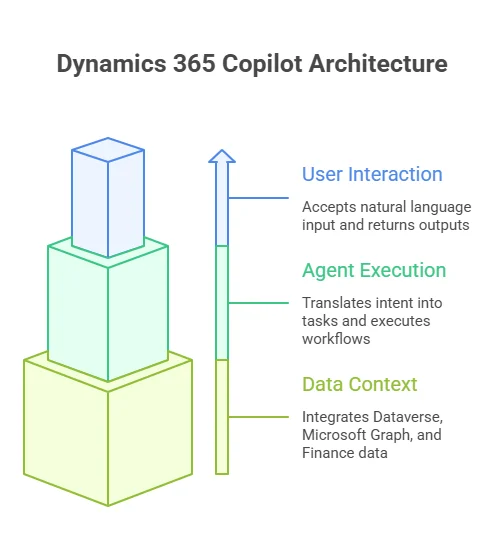
1. User Interaction Layer (Copilot UI)
- Embedded across Dynamics 365, Teams, Outlook, and Power Apps
- Accepts natural language input
- Returns summaries, recommendations, and actionable outputs
2. Agent Execution Layer
- Translates user intent into structured tasks
- Executes workflows (e.g., updates, approvals, record actions)
- Operates within defined business rules and governance boundaries
3. Data Context Layer
- Dataverse (core CRM + ERP data model)
- Microsoft Graph (emails, meetings, collaboration signals)
- Finance & Operations data via APIs or MCP-enabled access
This layered execution model is typically implemented through structured platform partnerships for greater clarity and control.
Key Architectural Shift (Leadership Insight)
Microsoft leadership has positioned this as a structural change, not an incremental upgrade.
Satya Nadella, CEO of Microsoft, describes the direction as a collapse of traditional business applications into agent-driven systems:
Copilot vs Traditional Automation vs AI Agents
The evolution can be understood across three execution models:
| System Type | Logic Model | Flexibility | Business Behavior |
|---|---|---|---|
| Traditional Automation | Rule-based | Low | Executes predefined triggers |
| Copilot (pre-2026) | Prompt-based | Medium | Generates responses and drafts |
| AI Agents (2026) | Goal-based execution | High | Executes multi-step outcomes |
Traditional automation follows fixed logic: “If X occurs, then perform Y.”
Agentic Copilot operates on outcomes:
“Achieve Z, determine and execute required steps within constraints.”
This is why Copilot is increasingly positioned as an operational execution layer, not just a productivity assistant.
What Changed in Microsoft Wave 1 2026
Three structural shifts define the 2026 release cycle:
- Agentic workflow execution: Copilot moves from assistance to autonomous workflow handling via AI agents
- Expanded data grounding: Deeper integration with Dataverse, Microsoft Graph, and Finance/Operations systems
- MCP-enabled execution layer: Natural language queries now translate into live system actions, not just insights
Key Executive Insight:
Charles Lamanna, President of Business Applications & Agents at Microsoft, frames this shift as foundational:
Operational Constraint (Reality Check)
Despite its capabilities, Copilot in 2026 still operates within three core constraints:
- Data readiness: Incomplete or inconsistent ERP/CRM data reduces output quality
- Human governance: Approvals remain mandatory for financial and sales-critical actions
- Deployment maturity: Enterprise Copilot adoption typically stabilizes around ~34% daily active usage within the first 90 days of rollout, reflecting a persistent gap between licensing and operational integration that limits full ROI realization.
From my perspective across similar deployments, the gap between expected and actual value is almost always less about AI capability and more about how structured the underlying data and governance model is.
This is a recurring pattern in enterprise Artificial Intelligence adoption, where execution readiness consistently determines ROI.
How Does Dynamics 365 Copilot Change Sales Workflows in 2026?
Dynamics 365 Copilot in 2026 turns sales workflows into a decision-triggered system by converting CRM and Microsoft 365 signals into prioritized actions. It surfaces stalled deals, engagement drops, and follow-up needs directly in Outlook and Teams, along with suggested next steps.
The core shift is simple: sales teams stop searching for context and start responding to pre-structured triggers.
Before vs After Sales Execution
| Sales Task | Before Copilot | With Copilot (2026) |
|---|---|---|
| Pre-call prep | Manual CRM + email review | Auto-compiled deal + interaction summary |
| Opportunity update | Manual logging | AI-drafted from meetings |
| Pipeline review | Scheduled CRM reporting | Real-time risk & stall triggers |
| Follow-ups | Written manually | AI-generated contextual drafts |
What Changes in Day-to-Day Sales Execution
Copilot impacts sales execution in three practical ways:
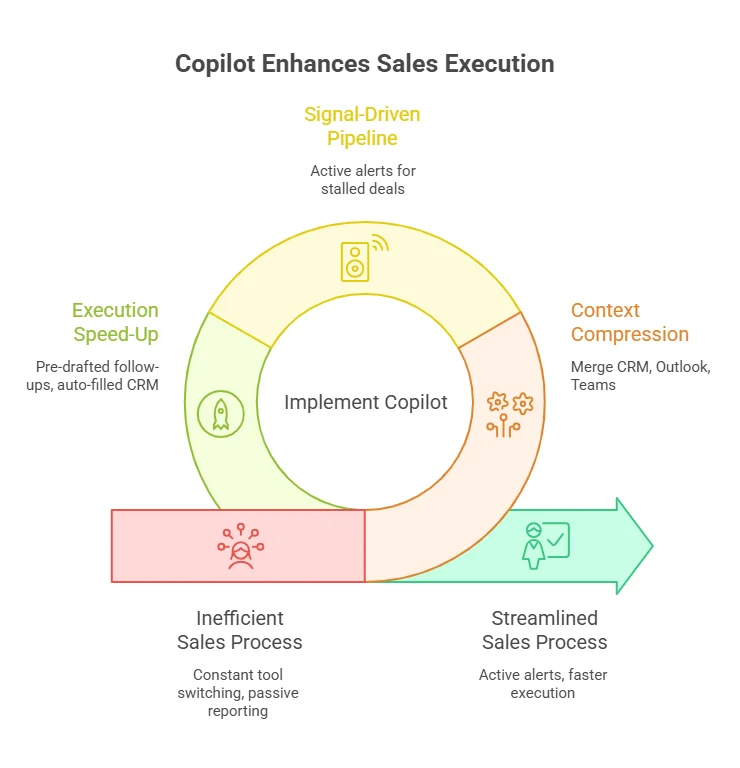
1. Context Compression
CRM, Outlook, and Teams context is merged into one view, covering deal history, communication threads, meeting notes, and pipeline signals. This reduces constant switching between tools.
2. Pipeline Becomes Signal-Driver
Instead of passive reporting, CRM becomes an active alert system highlighting stalled deals, missed follow-ups, competitor mentions, and momentum shifts.
3. Execution Speeds Up
Follow-ups are pre-drafted, CRM updates are auto-filled from meetings, and outreach is suggested based on engagement history. Final approval still stays with the sales rep.
I don’t actively “check” Dynamics 365 anymore.
Instead, Copilot surfaces decision triggers directly in Outlook, like a stalled deal, engagement drop, or competitor mention. These are already structured into next actions.
Follow-ups are pre-drafted based on past conversations, so I’m not rebuilding context across CRM and email.
What previously took 30–45 minutes of manual CRM work now becomes ~10 minutes of review and approval.
Decision Insight: Data-Driven Output Dependency
Copilot output quality is directly tied to CRM hygiene. Weak data leads to generic triggers, poor prioritization, and low trust in outputs. In most deployments, these issues typically surface during mid-stage rollouts, when data and process maturity are still being stabilized.
Microsoft is also consolidating its mobile execution layer by retiring Outlook Lite in 2026 and pushing users toward full Outlook mobile. This reinforces a broader shift: Copilot-driven sales workflows are increasingly centralized inside a single execution surface (Outlook + Dynamics 365), rather than fragmented lightweight apps.
What Does Dynamics 365 Copilot Change in Finance, and Where Does ROI Break Down?
Dynamics 365 Copilot in finance reduces manual effort in reconciliation, invoicing, and close activities, but governance, approvals, and audit accountability remain unchanged.
Finance Workflow Transformation (Before vs After)
| Finance Task | Before Copilot | With Copilot (2026) |
|---|---|---|
| Invoice processing | Manual ERP coding | AI suggests coding from vendor history |
| Reconciliation | Spreadsheet matching | Auto-flagged mismatches + suggested fixes |
| Month-end close | Manual coordination | Auto-surfaced tasks + variances |
| Variance analysis | Analyst-led reporting | AI-generated first-pass explanations |
What Actually Changes in Finance Operations
The shift is not automation of finance, it is exception-driven execution + faster decision cycles.
1. Exception Management Becomes the Default Model
Finance teams stop reviewing everything and start acting only on AI-triggered exceptions.
Copilot surfaces:
- invoice mismatches
- missing or delayed approvals
- GL inconsistencies
- budget variance alerts
2. Month-End Close Becomes Signal-Driven
Close cycles shift from manual tracking to system-driven visibility.
Copilot automatically:
- identifies pending close tasks
- highlights incomplete reconciliations
- groups high-impact adjustments
3. Natural Language Finance Queries (MCP Layer)
Finance users can query live ERP data directly:
- “Show invoices > $50K pending approval”
- “Departments exceeding Q2 budget by 10%+”
Finance Reality Simulation (Month-End Close)
At month-end, instead of navigating multiple ERP dashboards, Copilot surfaces a unified finance workspace with:
- 12 invoices pending GL coding
- 3 intercompany mismatches requiring review
- SG&A variance exceeding forecast thresholds
- Partially reconciled vendor accounts flagged for completion
Most routine entries are already pre-coded. The controller’s focus shifts to validating exceptions and approving adjustments, reducing repeated manual review cycles and compressing the month-end close process.
ROI Reality: Where Gains Hold vs Breakdown
Microsoft benchmarks show:
- up to 50% reduction in invoice processing time
- 25–30% faster period-end close
But these results depend heavily on deployment maturity.
| Deployment Stage | Real Outcome |
|---|---|
| 0–30% | Minimal impact (pilot stage) |
| 40–60% | Partial gains (inconsistent data usage) |
| 80–100% | Full ROI (clean data + governed workflows) |
Where Copilot Still Falls Short
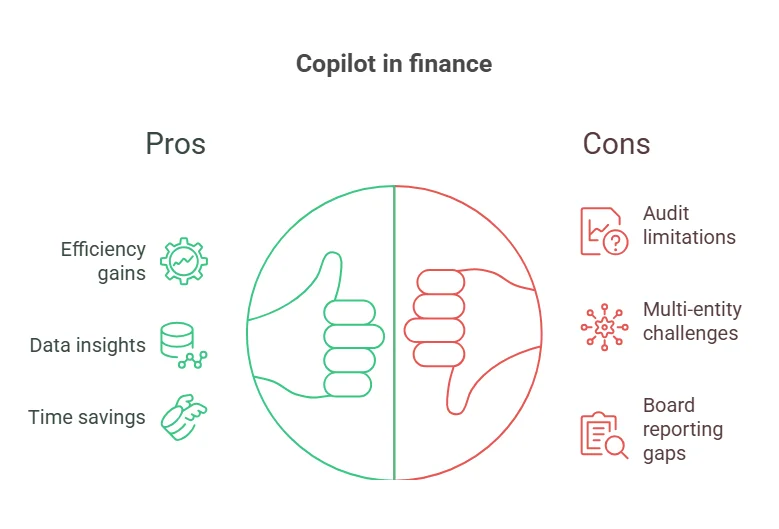
- Audit & compliance: approvals and traceability remain mandatory
- Multi-entity finance: intercompany complexity limits automation consistency, especially in environments where ERP depth varies across platforms like SAP S/4HANA and Microsoft Dynamics 365
- Board reporting: outputs are descriptive, not CFO-level strategic narratives
Decision trigger: If your operating model requires audit-grade autonomy or cross-ERP financial consolidation without human validation, Copilot should be positioned as a decision-support layer, not an execution authority.
AI in Dynamics 365 Only Works With Clean Execution Layers
Without structured data and aligned workflows, Copilot remains limited in impact. We help fix ERP and CRM foundations so Copilot can operate at scale.
Fix Your SetupHow Does Dynamics 365 Copilot Transform Operations and Supply Chain Execution?
1. Operations Shift to Signal-Driven Execution
Instead of relying on dashboards and scheduled reports, Copilot continuously surfaces operational triggers such as:
- delayed supplier responses
- PO timing deviations
- inventory or fulfillment mismatches
- warehouse workload bottlenecks
Teams no longer search for issues; they respond to prioritized operational signals.
2. Procurement Becomes Conversation-Aware
Supplier communication is no longer manually tracked across email and ERP systems.
Copilot now:
- summarizes supplier emails and attachments
- extracts intent (delay, pricing change, delivery update)
- maps updates directly to purchase orders
- drafts responses for approval
Procurement cycles shift from manual coordination to AI-prepared actions.
3. Operational Visibility Becomes Unified
Instead of fragmented system views, Copilot consolidates:
- warehouse task queues
- shipment status
- inventory movement
- workforce allocation
Dynamics 365 Copilot vs AI Stack in 2026
Enterprise confusion often comes from treating all AI tools as equal. In reality, they operate at different execution authority levels.
| Tool | Role | Limitation |
|---|---|---|
| Power Automate | Rule-based execution | Cannot handle dynamic goals |
| Dynamics 365 Copilot | Decision support + recommendations | Requires human approval |
| AI Agents (2026) | Goal-driven execution | Bound by governance rules |
| ChatGPT | General reasoning tool | Not ERP-native |
The real distinction is not capability; it is execution authority inside enterprise workflows:
- Power Automate → executes rules
- Copilot → recommends actions
- AI Agents → execute goals
- ChatGPT → supports reasoning
What Does Dynamics 365 Copilot Cost in 2026?
| Copilot Tier | What is included | Cost |
|---|---|---|
| Microsoft 365 Copilot (Enterprise) | Dynamics 365 Sales, Service, Business Central Copilot + Microsoft 365 app Copilot | $30 / user / month |
| Dynamics 365 Finance & SCM Copilot | Finance agents, MCP gateway, Immersive Home | Included in Dynamics 365 Finance license |
| PAYG Model (Wave 1 2026) | Consumption-based Copilot credit billing with admin-configured usage caps | Variable (credit-based) |
The pay-as-you-go (PAYG) model introduced in Wave 1 2026 is relevant for organizations that want consumption-based billing rather than per-seat commitments. It requires admin configuration in the Power Platform Admin Center to set credit caps and monitor usage.
Note: Microsoft 365 suite pricing increases take effect July 1, 2026. Organizations on annual renewal cycles may want to review timing.
System requirements for Wave 1 2026 agent features:
- Cloud-hosted Dynamics 365 (on-premise deployments cannot access Payflow Agent or MCP gateway)
- D365 Finance version 10.0.x or later
- Microsoft 365 E3 or E5 license for M365 Copilot
- Dataverse for Dynamics 365 CRM application Copilot features
What Do Practitioners Actually Report, and What Are the Real Deployment Risks?
Across enterprise deployments, there is a consistent gap between Copilot availability and sustained daily usage. While Dynamics 365 Copilot is widely enabled, active usage remains closer to ~34% of licensed users in day-to-day workflows.
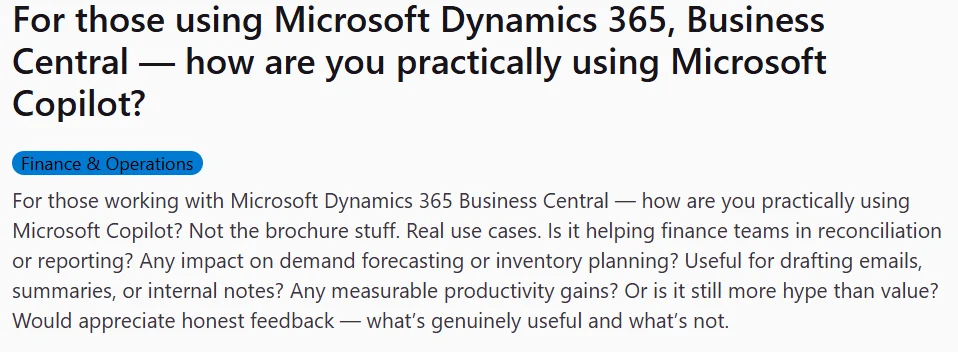
What makes this interesting in 2026 is that practitioner validation no longer comes only from analyst reports; it increasingly shows up in public Reddit threads, Microsoft community forums, and peer discussion spaces, where implementation reality is being documented in real time.
Across these sources, three themes repeat:
- Copilot value is real, but highly dependent on data quality
- Adoption struggles are more about change management than AI capability
- Organizations consistently overestimate readiness at the deployment stage
In practice, most mature environments converge on a simple operating model: Copilot drafts, humans verify. This is not a limitation; it is the governance layer that keeps AI usable in finance, legal, and sales-critical workflows.
From what is repeatedly visible in practitioner discussions (especially Reddit-based threads on Dynamics 365 and Business Central Copilot usage), the sentiment is not rejection of AI; it is frustration with “AI working fine only after cleanup work is done.”
Key Deployment Risks (What Practitioners Keep Running Into)
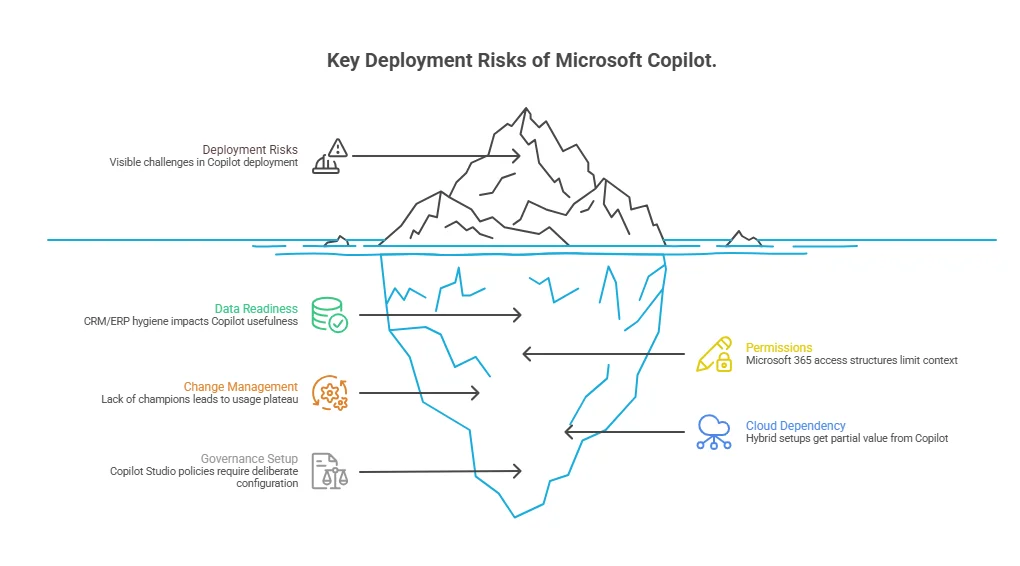
- Data readiness is the real adoption gate
CRM/ERP hygiene directly determines whether Copilot is useful or generic. - Permissions shape AI output more than expected
Microsoft 365 access structures can unintentionally limit or expose context. - Change management is the real failure point
Without internal champions, usage plateaus even in fully licensed environments. - Cloud dependency defines feature access
Wave 1 2026 capabilities are primarily cloud-first; hybrid setups often get partial value. - Governance setup is non-negotiable
Copilot Studio policies and agent controls require deliberate configuration, not default activation.
How Complex Is Dynamics 365 Copilot Integration With ERP, CRM, and SaaS Systems?
Where Integration Works Best
Copilot delivers strongest performance when the stack is aligned:
- Dynamics 365 is the primary CRM/ERP
- Microsoft 365 is the collaboration standard
- Dataverse is the unified data layer
- Power Platform is already used for workflows
Where Complexity Increases
Integration becomes fragmented when:
- Salesforce or non-Microsoft CRM is in use
- ERP data is split across legacy/on-prem systems
- Key functions run on external SaaS tools
- Middleware or custom APIs are required for syncing
Copilot then operates on partial or replicated context, reducing reliability and action precision.
Microsoft Copilot in 2026: What Is Automated vs Still Human-Controlled
Copilot in 2026 does not replace workflows; it executes within them under human governance.
Increasingly automated:
- Lead research and qualification signals
- Invoice coding suggestions and matching
- Reconciliation anomaly detection
- Follow-up drafts and sales communication
- Operational alerts across finance and supply chain
Still human-controlled:
- Pricing and sales negotiations
- Financial approvals and audit responsibility
- Compliance and regulatory reporting
- Strategic forecasting and board narratives
- Cross-functional operational trade-offs
These remain human-led due to risk, accountability, and judgment requirements.
Core Execution Reality
Copilot operates on a hybrid execution model:
- AI handles preparation, structuring, and recommendations
- Humans handle validation, approval, and final decisions
Is Dynamics 365 Copilot the Right Investment?
The answer depends on ecosystem maturity rather than just licensing.
| Situation | Practical Outcome |
|---|---|
| Full Microsoft stack + clean data | High ROI potential (start with Sales + Finance agents) |
| Mixed ecosystem (Salesforce / Google + D365) | Partial value, requires integration strategy |
| On-prem or legacy ERP (AX, etc.) | Limited access to agent features, cloud migration needed |
| Small org (<1,000 users, Business Central) | Low-friction adoption, start with built-in Copilot workflows |
Final Thoughts
Dynamics 365 Copilot in 2026 shifts execution speed, but outcomes depend on how well data, permissions, and workflows are already structured.
Teams with clean inputs and clear ownership see immediate efficiency gains. In fragmented environments, most of the effort shifts to fixing data and process gaps before value shows up.
Move From Copilot Understanding to Implementation Strategy
We help leadership teams translate Dynamics 365 Copilot capabilities into a structured adoption roadmap aligned with business priorities.
Build Adoption Strategy