What Are the Best AI Tools for Real Estate in 2026?

The best AI tools for real estate agents are Follow Up Boss and kvCORE for CRM automation, Salesforce Einstein for enterprise lead scoring, and HouseCanary for investor valuation modeling.

AI adoption in real estate isn’t hype. According to the National Association of REALTORS®, more than 60% of realtors are now using AI tools in their business operations, with ChatGPT, Google’s Gemini, and Microsoft Copilot among the most cited.

After evaluating these tools across brokerages, proptech teams, and investor workflows, one pattern is clear: Integration, data quality, and measurable ROI matters more than features. 

Some tools reduce manual follow-ups. Others collapse under scale once MLS sync and CRM automation become complex.

In this guide, I break down which AI tools actually hold up in production, where free platforms make sense, and when building custom AI becomes the smarter long-term move.

Quick Overview: Best AI Tools for Real Estate (2026)

  • Best overall AI tool for real estate agents: Follow Up Boss
  • Best enterprise AI tool for real estate: Salesforce Einstein
  • Best rental investor AI tool: Mashvisor
  • Best institutional platform for real estate: CoStar
  • Best free productivity AI tool for real estate: ChatGPT
  • ROI from AI typically appears within 3–6 months when automation reduces response time and improves lead prioritization.
  • SaaS AI tools deploy in 2–8 weeks and are ideal for brokerages under 300 agents.
  • Custom AI development (4–8 months, $80k–$400k+) makes sense when proprietary valuation models or portfolio analytics are core to competitive advantage.

What Makes an AI Tool the Best Choice for Real Estate Companies?

An AI tool is “best” only if it integrates with MLS in real time, automates follow-ups without manual triggers, and improves measurable KPIs like response time and cost-per-lead.ng.

Most AI failures in brokerages happen because lead scoring is deployed without automated routing logic. 

The difference comes down to integration depth, data quality, workflow automation, and measurable ROI. 

According to McKinsey, 65% of organizations now use generative AI regularly in at least one business function, but only a fraction report measurable bottom-line impact.

In real estate, that gap shows up when AI generates content but doesn’t sync with MLS, when lead scoring exists but doesn’t trigger CRM workflows, or when valuation models lack localized data. 

The best tools don’t sit on top of operations, they become embedded into them.

In many cases, achieving that level of integration requires structured real estate software development services that align CRM systems, MLS data feeds, automation workflows, and predictive models into a cohesive operational layer.

Evaluation Criteria for CTOs, Brokers & Investors

When evaluating AI tools for real estate, I focus on operational fit, scalability, and financial impact, not feature lists.

Here’s the checklist that consistently separates scalable AI platforms from short-lived experiments:

  • CRM & MLS Integration Depth – Native API access, real-time sync, webhook support
  • Data Accuracy & Model Training Sources – Local market data, transaction history, enrichment pipelines
  • Automation Triggers – Lead scoring tied to follow-ups, alerts, and task routing
  • Scalability Threshold – Performance across 200–1,000+ agents
  • Security & Compliance – GDPR, CCPA, role-based access controls
  • Measurable ROI Metrics – Conversion rate lift, response time reduction, cost-per-lead impact
  • Customization & API Extensibility – Ability to adapt to brokerage workflows
  • Infrastructure Stability – Cloud architecture, uptime guarantees, model retraining cadence
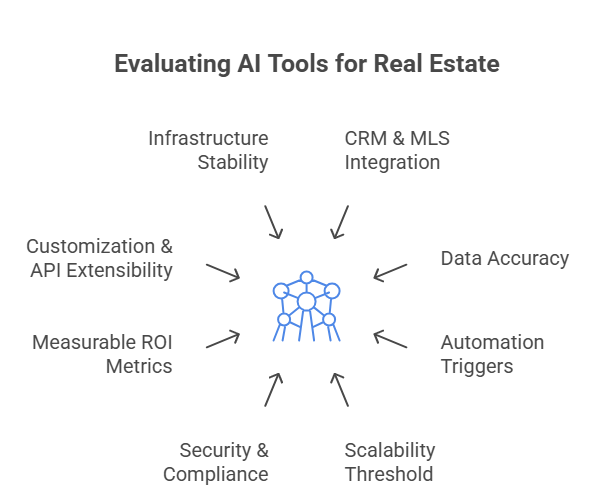
Evaluating AI tools for Real Estate

From what I’ve seen across brokerages and proptech teams, the tools that survive long-term are the ones that reduce inside sales costs, automate valuation workflows, and maintain data integrity at scale, not the ones with the flashiest AI features.

Which AI Tools for Real Estate Improve Lead Conversion Within 6 Months?

The AI tools that consistently improve real estate lead conversion within six months are Salesforce Einstein, HubSpot AI, and Ylopo, because they combine predictive lead scoring, automated outreach, and CRM-triggered workflows into one operational system.

These platforms don’t just “assist.” They automate response logic, prioritize high-intent buyers, route leads instantly, and trigger follow-ups across email, SMS, and calling systems. 

According to Harvard Business Review, companies that respond to leads within an hour are nearly 7 times more likely to qualify them compared to slower responders.

Speed-to-lead is where AI delivers immediate ROI. In brokerages handling hundreds of inquiries daily, automation eliminates response delays and reduces inside sales overhead.

Where I’ve seen real impact is when AI compresses response time from hours to seconds.

1. Salesforce Einstein

Best For: Enterprise brokerages with structured CRM data

In enterprise brokerages where I’ve tested Einstein, its performance depends entirely on CRM discipline. When pipeline stages are standardized and agent activity is logged consistently, the predictive scoring genuinely improves prioritization and forecasting. 

But in messy CRM environments, accuracy drops fast because the model trains on bad data. It’s powerful in structured 200+ agent Salesforce ecosystems.

Limitation: Requires clean historical data and Salesforce ecosystem

2. HubSpot AI

Best For: Growth-stage brokerages and inbound-heavy teams

From my experience, HubSpot AI delivers faster time-to-value for inbound-driven brokerages. Its automation workflows and lead nurturing sequences are easy to operationalize, and you can see engagement improvements quickly. 

However, once MLS-triggered routing or complex brokerage hierarchies enter the picture, customization becomes necessary. It works best for marketing-heavy teams, not deeply MLS-dependent brokerages.

Limitation: Less native MLS depth compared to real estate-specific tools

3. Ylopo

Best For: Teams heavily invested in paid ads

Ylopo performs well when paid traffic volume is strong. I’ve seen its behavioral retargeting increase re-engagement significantly in ad-heavy environments. 

But its scoring accuracy weakens when lead volume or traffic quality drops. It’s an acquisition amplifier, not a foundational CRM. 

Best layered on top of a structured system, not used as the core operational engine. 

Limitation: Performance tied directly to ad budget quality

Comparison of AI Tools for Real Estate Lead Conversion 

Tool Best For Deployment Speed ROI Timeline Core Strength Primary Limitation
Salesforce Einstein Enterprise brokerages (200+ agents) with structured CRM data 6–8 weeks 3–6 months Advanced predictive lead scoring & revenue forecasting Requires clean CRM data and Salesforce ecosystem
HubSpot AI Growth-stage brokerages focused on inbound marketing 2–4 weeks 2–4 months Fast marketing automation & lead nurturing workflows Limited native MLS depth without customization
Ylopo Teams running large paid ad budgets 4–6 weeks 3–5 months Behavioral retargeting & AI-driven digital nurture campaigns ROI highly dependent on traffic quality

Realistic ROI Timeline (0–6 Months)

In real estate deployments, ROI usually unfolds in phases:

0–60 Days: CRM integration, MLS syncing, workflow automation setup

60–120 Days: Measurable reduction in manual lead handling (often 30–50%)

3–6 Months: Increased qualification rates and lower cost per lead

What Are the Best AI Tools for Real Estate Agents with CRM & MLS Integration?

Follow Up Boss is best for workflow speed, kvCORE for behavioral tracking, and Lofty for paid lead environments.

They combine IDX/MLS syncing, automated lead routing, behavioral tracking, and AI-driven follow-up inside one operational workflow.

These platforms are purpose-built for real estate. They don’t just sit on top of your CRM, they connect directly to MLS feeds, trigger automations when listings update, and score leads based on search behavior and engagement history.

From what I’ve seen across mid-sized brokerages, the real performance gains come when AI triggers action automatically, text messages, task assignments, call reminders, without requiring manual intervention. 

1. Follow Up Boss 

In real deployments, Follow Up Boss performs best when a brokerage is juggling multiple lead sources at once. 

I’ve seen it significantly reduce response lag because routing rules are simple, fast, and reliable. Where it really works is in speed-to-lead environments. But it’s workflow automation, not predictive intelligence. 

If you’re looking for deep behavioral modeling or valuation analytics, it won’t give you that layer.

Limitation: It doesn’t provide deep predictive valuation or market forecasting. It’s workflow AI, not property intelligence AI.

2. kvCORE 

kvCORE becomes powerful when IDX behavior is actually used as signal, not just stored data. In brokerages that enforce structured workflows, its property-view tracking and automated alerts create meaningful follow-up precision. 

However, I’ve also seen it become cluttered when teams don’t maintain discipline. It’s strong for multi-team brokerages, but onboarding and governance determine whether it scales cleanly or becomes heavy.

Limitation: Setup requires structured onboarding. Without disciplined team usage, it becomes bloated.

3. Lofty (Chime) 

Lofty works best in aggressive digital acquisition environments. When traffic volume is high, its behavioral scoring starts to differentiate serious buyers from casual browsers. 

I’ve seen it perform well when paired with paid ads and structured landing funnels. But without consistent lead inflow, the AI lacks enough behavioral data to create strong prioritization. 

It’s a growth accelerator, not a low-volume optimization tool.

Limitation: If traffic volume is low, AI scoring doesn’t get enough signal to differentiate serious buyers.

Comparison of Best AI Tools for Real Estate Agents 

Tool Best For MLS / IDX Integration Depth Automation Strength Ideal Brokerage Size Key Limitation
Follow Up Boss Speed-to-lead & portal routing Strong MLS sync + portal lead routing High – automated tasking, SMS, email triggers 50–300 agents Limited predictive valuation & forecasting
kvCORE Behavioral tracking & IDX-driven automation Deep IDX + property search tracking High – behavior-based alerts & nurture flows 100–500 agents Requires structured onboarding & team discipline
Lofty (Chime) Paid lead environments & digital acquisition Strong IDX + landing page integrations Moderate–High – scoring tied to engagement depth Growth-focused brokerages Needs strong ad volume to maximize AI accuracy

Are Free AI Tools Safe and Effective for Real Estate Agents?

Free AI tools are effective for drafting and research but unsafe for transaction-level data or CRM automation.

The best free AI tools that are meaningfully relevant to real estate agents are ChatGPT (free tier), Google Gemini (free), Zillow Zestimate (free valuation model), and Reonomy’s limited search access (trial/free tiers), and even these have operational limits.

Free tools can assist with research, valuation estimation, content drafting, and market analysis. But none of them replace CRM automation, MLS integration, or secure transaction management.

Free AI tools can help real estate agents move faster, but they don’t replace CRM systems, MLS automation, or brokerage infrastructure. 

I’ve seen agents use them effectively for research, listing prep, and early-stage deal analysis, but I’ve also seen teams overestimate what “free” can realistically handle.

1. ChatGPT (Free)

I’ve seen agents use ChatGPT effectively for sharpening listing copy and restructuring follow-ups to sound more persuasive. 

It’s excellent for refining messaging and objection scripts before listing appointments. But it’s not tied to MLS data or transaction systems, so it should never replace pricing logic or CRM workflows. 

It’s a communication enhancer, not an operational engine, and confidential data should never be pasted into it.

Advice: Use it to refine messaging, not to replace pricing analysis or CRM tasks. Never input confidential contract details.

2. Google Gemini (Free)

In practice, Gemini works well for quick neighborhood research and summarizing broader market trends before client meetings. 

It saves time when preparing contextual insights, especially for newer agents building confidence. That said, it doesn’t pull live MLS data or verified transaction-level numbers. 

I treat it as a briefing tool, not a data authority, every client-facing insight still needs MLS validation.

Advice: Treat it as a research assistant. Validate data with MLS reports before presenting it to clients.

3. Zillow Zestimate (Free AVM Access)

Zestimate is useful when opening seller conversations because it anchors expectations quickly. 

I’ve used it as a reference point to guide pricing discussions. But AVMs vary heavily by micro-market accuracy. In competitive or unique property types, it can be significantly off. 

It should always be paired with a proper CMA. It supports positioning, not pricing strategy.

Advice: Use Zestimate as a conversation starter, not a pricing authority. Always pair it with a Comparative Market Analysis (CMA). AVMs vary by market density.

4. Reonomy (Free Trial Access)

For investors, Reonomy’s trial access is helpful for identifying ownership patterns and validating outreach targets. 

I’ve used it to quickly filter portfolios before direct mail or off-market campaigns. But it’s not a full underwriting tool and doesn’t replace deeper financial modeling. 

It’s strong for sourcing direction, not for final investment decisions.

Advice: Use it to validate leads before outreach. Scaling investor research requires paid access.

Free AI tools are safe when used for content and research, not when handling transaction-level data.

Best practice for brokerages:

  • Never upload private contracts or financial data
  • Keep CRM records inside secure systems
  • Define internal AI usage guidelines

For solo agents, free AI improves efficiency immediately.

For brokerages with 200+ agents, structured governance is essential.

Which AI Tools Are Best for Real Estate Investors and Underwriting?

Mashvisor is best for rental investors, DealMachine for off-market acquisition, and CoStar for institutional portfolio analytics.

In investor workflows, AI must answer three questions clearly:

  1. Is this deal viable?
  2. What is the downside risk?
  3. How does it affect portfolio performance?

Tools like HouseCanary, Mashvisor, DealMachine, and CoStar (with analytics layers) are commonly used because they combine property-level data, comparable sales, rent estimates, and ownership intelligence.

From deployments I’ve seen, AI improves investor decision speed significantly, but only when data inputs are reliable. Investor-grade AI depends on data accuracy far more than marketing-grade AI.

1. HouseCanary

In institutional environments where I’ve seen HouseCanary deployed, its strength is forward-looking modeling, not just comps. 

When acquisition strategy depends on projected appreciation and risk-adjusted pricing, it adds real value. But it’s not a quick-flip tool. 

Smaller operators expecting instant deal clarity often find it too heavy. It performs best when paired with disciplined underwriting frameworks and long-horizon capital strategy.

Limitation: Not designed for small flippers looking for quick on-market deals; strongest when paired with institutional-grade decision processes.

2. Mashvisor

Mashvisor works well as a screening layer. I’ve used it to quickly compare cap rates, rental yield scenarios, and short-term vs long-term performance before deeper underwriting. It speeds up deal triage significantly. However, for serious capital deployment, its assumptions need validation through detailed financial modeling. It accelerates filtering, but it doesn’t replace spreadsheet-level diligence.

Limitation: Relies on market-level assumptions; should not replace detailed underwriting spreadsheets for large capital deployments.

3. DealMachine

DealMachine shines when investors are consistently running outbound acquisition campaigns. In active off-market sourcing, its owner lookup and outreach automation streamline prospecting. 

But results depend heavily on acquisition discipline. Without consistent follow-up and pipeline management, the tool doesn’t produce leverage.

It’s built for operators who execute daily, not passive analysts seeking portfolio modeling.

Limitation: Performance depends on acquisition discipline; it doesn’t model deep financial projections.

4. CoStar (Analytics Layer)

In multi-market portfolio environments, CoStar becomes strategic. I’ve seen it used effectively for rent trend analysis, absorption tracking, and macro-level allocation decisions. 

It supports capital strategy, not just property selection. That said, for small investors or single-asset buyers, it’s often excessive and cost-heavy. 

Its value compounds with scale, below that threshold, it’s overpowered.

Limitation: Expensive and often excessive for small investors; overpowered for single-property acquisitions.

Comparison of Best AI Tools for Real Estate Investors & Underwriting

Tool Best For Underwriting Depth Portfolio-Level Forecasting Ideal Investor Type Key Limitation
HouseCanary Predictive valuation & appreciation modeling High – forward-looking AVMs & market forecasts Moderate Institutional buyers & serious residential investors Less practical for quick flips or small operators
Mashvisor Rental ROI & cash-flow screening Moderate – cap rate & rental modeling Low–Moderate Buy-and-hold & STR investors Relies on market-level assumptions
DealMachine Off-market property sourcing Low – sourcing-focused, not deep financial modeling Low Active flippers & acquisition-driven investors Limited portfolio analytics
CoStar (Analytics) Institutional portfolio analytics High – market data & benchmarking Very High Funds & multi-market operators High cost, excessive for small investors

Is Your AI Actually Improving Conversion or Just Reporting It?

If your brokerage is generating leads but struggling with routing, follow-ups, or MLS-triggered automation, it’s time to audit your AI stack.

Get a Real Estate AI Strategy Session

Should You Build Custom AI for Real Estate or Buy SaaS Tools?

If AI improves workflow efficiency, buy SaaS. If AI defines your competitive advantage, build custom.

The real question is control, differentiation, and long-term scalability. Below is a structured comparison based on how these decisions play out in real estate environments.

Decision Matrix: SaaS vs Custom AI for Real Estate

Factor SaaS AI Tools (Follow Up Boss, kvCORE, Lofty) Custom AI Development
Deployment Speed 2–8 weeks 4–8 months
Upfront Cost Low High
Customization Limited to vendor features Fully customizable
MLS Integration Pre-built connectors API-based, fully controlled
Data Ownership Vendor-hosted Fully owned
Predictive Modeling Generic models Proprietary models
Scalability License-based scaling Infrastructure-based scaling
Competitive Advantage Low differentiation High differentiation
Maintenance Vendor-managed Internal / outsourced responsibility

SaaS AI Tools: Cost & Deployment Timeline in 2026

SaaS tools are optimized for speed and operational simplicity.

Tool Type Monthly Cost Range
Real Estate CRM AI (Follow Up Boss, Lofty) $69–$999 per user/month
Enterprise CRM AI (Salesforce Einstein) $150–$300+ per user/month
Lead Gen + AI Platforms (CINC, kvCORE) $499–$3,000+/month depending on structure

Deployment Timeline

Brokerage Size Average Deployment Time
50–150 agents 2–4 weeks
150–300 agents 4–6 weeks
300+ agents 6–8 weeks

Where SaaS Wins:

  • Faster ROI
  • Lower technical complexity
  • Predictable budgeting
  • Vendor maintenance

Where SaaS Breaks:

  • Complex MLS routing logic
  • Multi-market data normalization
  • Proprietary underwriting models
  • Deep investor portfolio analytics

For most brokerages under 200 agents, SaaS is sufficient.

Custom AI Development: Architecture, Timeline & Budget

Custom AI becomes relevant when AI defines your operational edge, not just automates tasks.

Layer Components
Data Layer MLS APIs, CRM data, transaction history
Processing Layer Data pipelines, ETL workflows
AI Layer Custom lead scoring, AVMs, forecasting models
Application Layer Dashboards, automation triggers
Infrastructure AWS / Azure / GCP cloud environment
Layer Components
Data Layer MLS APIs, CRM data, transaction history
Processing Layer Data pipelines, ETL workflows
AI Layer Custom lead scoring, AVMs, forecasting models
Application Layer Dashboards, automation triggers
Infrastructure AWS / Azure / GCP cloud environment

Budget & Timeline

Scope Budget Range Timeline
Brokerage Automation Platform $80k–$200k 4–6 months
Investor Underwriting System $150k–$400k 5–8 months
PropTech SaaS Platform $300k–$1M+ 6–12 months

Where Custom Wins:

  • Proprietary valuation logic
  • Portfolio forecasting engines
  • Cross-MLS normalization
  • Data ownership & compliance control
  • Product differentiation for proptech startups

Where Custom Hurts:

  • Higher upfront investment
  • Ongoing model training & maintenance
  • Infrastructure management responsibility

Strategic Rule of Thumb

If… You Should…
AI improves workflow efficiency Buy SaaS
AI defines your revenue engine Build Custom
You operate under 200 agents Buy SaaS
You manage institutional portfolios or multi-market data Consider Custom
You need differentiation for funding or product positioning Build

What Is the Best AI Strategy for Real Estate Companies by Size?

Company Type Primary AI Need Recommended Approach Why This Works What to Avoid
Solo Agents (1–20 agents) Faster listing prep, basic follow-ups, lead organization SaaS CRM + selective free AI tools Low complexity, quick ROI, minimal technical overhead Building custom AI or overpaying for enterprise platforms
Growing Brokerages (50–300 agents) Lead routing, automation consistency, behavioral tracking Real estate-native AI CRM (Follow Up Boss, kvCORE, Lofty) Standardized workflows, MLS integration, scalable automation Generic AI tools without CRM integration
Large Brokerages (300–1,000+ agents) Multi-team routing, data governance, regional expansion SaaS + custom AI layer Combines operational stability with deeper customization Relying purely on off-the-shelf AI with limited flexibility
Rental Property Investors Cash flow modeling, cap rate analysis, deal screening Mashvisor + underwriting validation Fast deal filtering before deeper financial analysis Using AVMs as final pricing authority
Institutional Investors / Funds Portfolio forecasting, risk modeling, allocation strategy CoStar analytics or custom AI underwriting Portfolio-level visibility and strategic allocation control Single-property tools without portfolio analytics
PropTech Startups Product differentiation, proprietary AI logic Custom AI development Own the data, models, and long-term valuation upside Building product on top of restrictive SaaS tools

Most brokerages under 200 agents do not need custom AI.

What are the Biggest Mistakes Real Estate Teams Make When Adopting AI?

The biggest risk is deploying AI without aligning it to workflows. Lead scoring without automated routing, or valuation models without reliable data inputs, often results in wasted investment and limited measurable impact.

Even strong AI tools fail to deliver impact if implementation missteps aren’t avoided. 
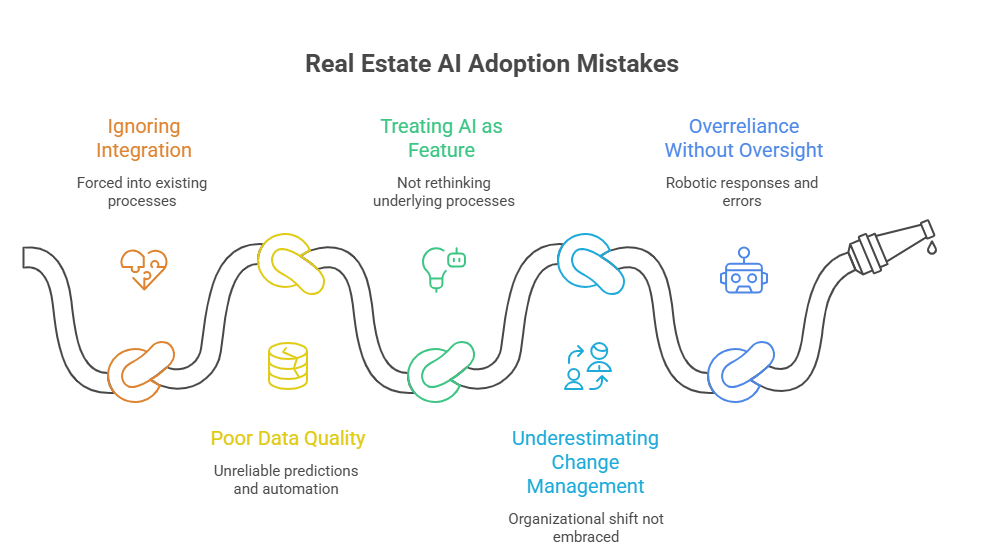
Biggest Mistakes in Adopting AI tools

Across industries, data shows that most AI initiatives stall not because of the models, but because of how they’re deployed.

1. Ignoring Integration with Real Workflows

In real estate, many brokerages adopt AI thinking it’s plug-and-play. But broader research shows 95% of AI pilots fail to produce measurable business value when they’re forced into existing processes without alignment to workflows and KPIs. This is often due to minimal adaptation or governance strategies.

2. Poor Data Quality and Governance

AI amplifies whatever it’s given. If CRM datasets are fragmented, outdated, or duplicated, AI predictions and automation outputs become unreliable, and decisions based on them undermine trust and performance. 

3. Treating AI as a Feature Instead of a Workflow

Companies often deploy AI for lead scoring or content automation without rethinking the underlying process that needs optimization. 

McKinsey finds that while 88% of organizations report regular AI use, only a minority are scaling it into meaningful business functions, largely due to failure to redesign workflows around the technology.

4. Underestimating Change Management

AI is not just a tech upgrade. It’s an organizational shift. A McKinsey report found that although almost all companies invest in AI, only ~1% feel they are mature on AI adoption, meaning they’ve embedded it across processes with measurable outcomes.

5. Overreliance Without Human Oversight

Over-automation with weak governance leads to robotic responses and decision errors that agents and investors later have to clean up, sometimes at a high time cost. 

When Should Real Estate Business Partner with an AI Development Firm?

AppVerticals specializes in real estate software and AI development, helping brokerages, investors, and proptech startups build CRM-integrated automation platforms, underwriting engines, and scalable AI architectures tailored to their workflows.

Real estate companies should consider a custom AI development partner when SaaS tools no longer support their scale, MLS routing becomes complex, or proprietary underwriting and portfolio forecasting become competitive differentiators.

At this stage, integration depth matters more than features. CRM APIs, MLS normalization, automated lead routing logic, predictive valuation models, and cloud-based data pipelines must work as one system, not disconnected tools.

With expertise in MLS integrations, custom lead scoring systems, portfolio analytics, and cloud-native infrastructure, AppVerticals delivers real estate AI systems built for production scale, not experimental deployment.

If AI is central to your growth strategy, partnering with a team experienced in real estate data ecosystems becomes a strategic advantage.

Wrapping it Up 

The best AI tools for real estate agents and investors are those that integrate with CRM and MLS systems, automate high-impact workflows, and produce measurable ROI within months, not just impressive dashboards.

For brokerages under 200 agents, SaaS platforms usually deliver fast results. For institutional investors and proptech companies, proprietary AI can become a competitive advantage. 

The key is matching the tool to your scale, data structure, and long-term strategy.

Ready to Deploy the Right AI Tools for Real Estate?

We’ll help you select, compare, or build the AI tools that align with your operational goals.

Talk to Real Estate AI Specialists

Related Guides

Real Estate website development

AI in edtech 

How Does Zelle Make Money in 2026?

Zelle makes money by charging banks, not users, for transaction processing, licensing, and risk management services. Its revenue comes from embedded fintech infrastructure and strong banking partnerships, keeping the app free for consumers.

Having worked on fintech apps that both failed and scaled, I’ve seen that success comes from strong banking partnerships, trust-first infrastructure, and smart monetization timing, the same approach Zelle follows. At AppVerticals, we’ve helped founders redesign fintech products around these exact principles.

Zelle moves hundreds of billions annually while staying free for users, making it a powerful case study in modern fintech strategy. This guide breaks down how Zelle makes money and the key lessons founders and investors should apply, from institutional monetization and embedded finance to security-driven growth and scalable product design.

Key Takeaways | How Does Zelle Make Money

  • Zelle generates revenue through institutional transaction fees paid by partner banks, not end users.
  • The platform earns from payment infrastructure licensing and secure API integrations embedded into banking apps.
  • Fraud prevention and risk management technology function as monetized infrastructure services for financial institutions.
  • High transaction volume enables scalable, low-cost network economics that drive recurring institutional revenue.
  • Zelle strengthens bank retention and digital engagement, creating indirect monetization value through ecosystem growth.
  • According to AppVerticals’ fintech experience, infrastructure-first monetization models outperform user-fee strategies at scale.

Understanding Zelle’s Business Model | What Makes It Work?

Zelle isn’t simply a standalone fintech app. It’s a bank-backed payment network operated by Early Warning Services, a company owned by major U.S. banks including JPMorgan Chase, Bank of America, and Wells Fargo.

That structure changes everything about monetization. Instead of competing with banks, Zelle strengthens them, embedding payments directly into their apps and ecosystems.

Why Zelle’s Distribution Model Works (Product & Growth Impact)

Zelle’s deep integration with banks lets users pay directly from their accounts, cutting acquisition costs, building trust, and reducing friction.

Zelle Distribution Advantage What It Means in Practice Fintech Problem It Solves
Integrated with thousands of U.S. financial institutions Built into existing banking ecosystems from day one Reduces customer acquisition costs
Embedded directly into banking apps Users access payments without downloading a new app Eliminates trust barriers
Connected to existing bank accounts No need for external wallets or onboarding friction Minimizes payment friction

At AppVerticals, I’ve seen fintech adoption increase dramatically once payment functionality was integrated into existing financial ecosystems instead of relying solely on standalone apps. 

As adoption accelerates, companies increasingly partner with experienced teams offering fintech app development services to build secure, bank-integrated payment ecosystems.

Revenue from Financial Institutions

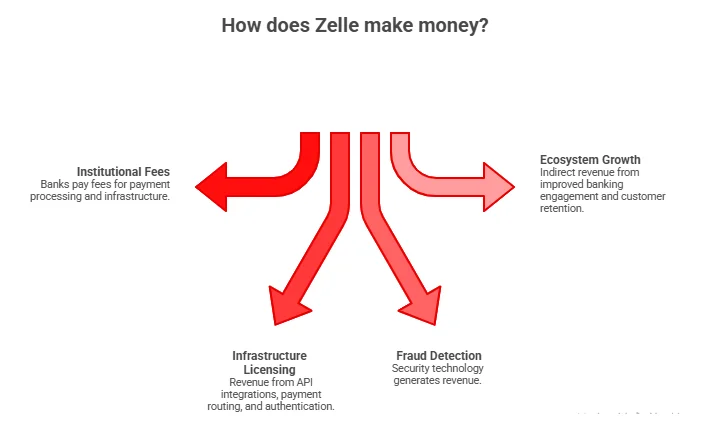
So, how does Zelle make money? Zelle’s primary revenue streams come from:

  • Transaction infrastructure fees paid by banks
  • Payment network licensing
  • Fraud prevention and risk management services
  • Technology and API integration

Early Warning Services earns revenue by charging participating financial institutions small transaction-related fees rather than charging consumers directly. 

Expert Insight:

“It is operated by Early Warning Services, a fintech co-owned by JPMorgan Chase (the nation’s largest bank), Bank of America, Capital One, PNC Bank, Truist, U.S. Bank, and Wells Fargo. Early Warning Services charges its thousands of financial institution partners a small fee for each Zelle transaction.”

Emily Mason, Forbes

This model aligns incentives with banks while keeping the product free for users, a critical growth strategy. With AppVerticals, you can also leverage these proven infrastructure-first strategies to build secure, bank-integrated fintech apps that scale without relying on user fees.

Build Your Own Bank-Integrated Fintech App

Turn your payment ideas into secure, scalable platforms like Zelle. Leverage AppVerticals’ expertise in mobile app development, real-time payment rails, and embedded finance.

Transaction Volume and Cost Efficiency

High transaction volume is the backbone of Zelle’s monetization. Zelle has processed hundreds of billions in annual payment volume, enabling:

  • Low marginal transaction costs
  • Scalable infrastructure economics
  • Stable recurring institutional revenue

Promoting Cross-Selling and Customer Retention

Banks benefit from Zelle through:

  • Increased digital engagement
  • Reduced customer churn
  • Expanded financial product adoption

That value justifies institutional payments to Zelle, reinforcing the network’s revenue model.

How Does Zelle Make Money? Core Revenue Streams Explained

Let’s break down Zelle’s monetization structure in practical terms that founders can apply.

How Does Zelle Make Money

1. Institutional Transaction Fees

Banks pay small fees for payment processing and infrastructure access.

2. Payment Infrastructure Licensing

Revenue comes from:

  • API integrations
  • Payment routing
  • Transaction authentication

3. Fraud Detection & Risk Technology

Security is a revenue driver, not just a compliance requirement.

4. Ecosystem Growth Value

Indirect revenue includes:

  • Banking engagement improvements
  • Digital retention metrics
  • Customer lifecycle expansion

Expert Insight:

“The most successful fintech platforms monetize infrastructure rather than end users.”

Brett King, fintech futurist

How Does Zelle Leverage Security and Trust to Make Money?

Security is the hidden engine driving Zelle’s rapid growth, ensuring users can send and receive money with complete confidence. 

Key trust features include bank-level encryption to protect sensitive data, account verification to confirm identities, behavioral fraud monitoring to detect unusual activity, and real-time risk scoring to prevent threats before they impact transactions. 

Together, these measures create a seamless and secure payment experience that users can rely on every time. As per AppVerticals insights, fintech apps that invest early in fraud detection achieve:

  • Higher investor confidence
  • Faster institutional partnerships
  • Better long-term monetization potential

How Do Zelle Merchant Processing Fees Compare To Venmo or Cash App

Zelle typically has no processing fee for business (merchant) payments, while Venmo and Cash App charge around 2–3% per transaction for business use.

Core Fee Comparison

  • Zelle business/merchant payments: 0% processing fee in most cases; Zelle itself does not charge businesses for receiving payments, though a few banks may add their own charges.
  • Venmo business profiles: About 1.9% + 0.10 dollars per transaction on payments received by a business profile.​
  • Cash App for business: Around a 2.75% flat fee on business‑designated payments, with no extra per‑transaction fixed charge.​

In practical terms, if a customer pays a business 100 dollars:

Zelle

  • Business receives $100 (0% fee)

Venmo Business

  • Business receives ~$98.00 (1.9% + $0.10 fee)

Cash App Business

  • Business receives $97.25 (2.75% fee)

Feature Trade‑Offs Behind Those Fees

Zelle’s 0% fee comes with fewer merchant tools: no card payments, no integrated checkout, limited invoicing, and no formal dispute framework, so it fits best for trusted, relationship‑based payments (e.g., rent, consulting, B2B). 

Venmo and Cash App charge higher merchant fees but provide more consumer‑friendly flows (QR codes, app‑based discovery, basic dispute processes) and better support for casual or retail‑style sales.

Quick Comparison Table

Aspect Zelle (Business Use) Venmo Business Profile Cash App for Business
Typical processing fee 0% (bank may vary) 1.9% + $0.10 per transaction​ 2.75% flat per transaction​
Where money lands Direct to bank account Venmo balance, then transfer to bank Cash App balance, then transfer
Card payments Not supported​ Via app and QR, no 3% card fee to buyer for biz payments​ Via app and QR/$Cashtag​
Disputes/chargebacks Essentially none; payments final Basic in‑app mediation​ Basic refund flow​

What Is the Major Role of Zelle in the Digital Payment Ecosystem?

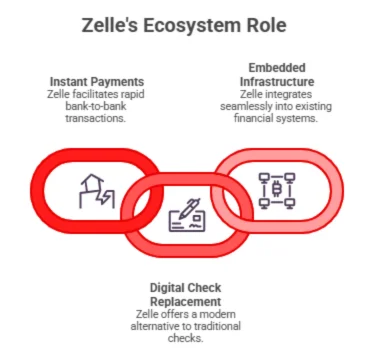
Rather than competing with banks, Zelle strengthens their digital transformation efforts. This strategic positioning is a major reason it scales without massive marketing spend. Zelle’s ecosystem role is distinct:

  • Instant bank-to-bank payments
  • Digital replacement for checks
  • Embedded financial infrastructure

Zelle's Ecosystem Role

What Are the Primary Functions of the Zelle App?

Zelle’s primary function is fast, bank-to-bank digital payments, allowing users to send and receive money directly from their existing bank accounts with built-in security and minimal friction, without needing a separate wallet or balance.

Instant Transfers

Users send funds directly between bank accounts in minutes, a technically complex feature involving real-time payment rails.

Seamless Integration with Banks

Unlike standalone digital wallets, Zelle eliminates extra steps that often slow down adoption. It doesn’t require a separate funding account, comes with built-in identity verification, and significantly reduces onboarding friction, making it easier and faster for users to start sending and receiving money directly from their existing bank accounts.

Security Features

Core features founders must consider:

  • Name verification before transfers
  • Multi-factor authentication
  • Fraud alerts
  • Scam detection algorithms

What Must-Have Fintech App Features Should Founders Learn from Zelle?

Through years of building and scaling fintech products as part of our mobile app development projects at AppVerticals, these have become non-negotiable:

Core Platform Features

  • Real-time payment engine
  • Instant settlement architecture
  • Bank API integrations
  • Contact-based payments
  • Transaction history analytics

Compliance & Security Features

  • KYC identity verification
  • AML monitoring
  • Fraud detection systems
  • Encryption and tokenization
  • Secure authentication

Growth & Retention Features

  • Payment reminders
  • Business payment capabilities
  • Behavioral analytics
  • Automated onboarding

How AppVerticals Helps Founders Build Apps Like Zelle (And Monetize Them Strategically)?

Building a fintech app like Zelle isn’t just about payments; it’s about designing a scalable infrastructure, a sustainable revenue model, and a product that users and financial institutions trust.

At AppVerticals, we help founders turn fintech ideas into secure, revenue-generating platforms by combining strategic consulting, engineering expertise, and real-world fintech execution experience.

Expert Strategy & Consultation

AppVerticals helps founders:

  • Validate fintech product-market fit
  • Avoid over-engineered MVPs
  • Build monetization models aligned with growth

Payment Infrastructure Integration

We implement:

  • Real-time payment rails
  • ACH systems
  • Secure banking APIs

Security & Compliance Engineering

Our fintech platforms include:

  • PCI DSS compliance
  • Fraud analytics engines
  • AML and regulatory workflows

Scalable Architecture

We design:

  • Microservices-based systems
  • Cloud-native infrastructure
  • API-first platforms

Our experience building fintech products, including rebuilding failing apps, gives founders practical, battle-tested insights.

Key Lessons for Founders, CTOs & Investors

Insights from analyzing Zelle and developing fintech apps reveal key strategies for success in digital payments. Successful platforms monetize infrastructure rather than users, embed seamlessly into existing ecosystems, and prioritize building trust before adding features.

Early focus on network effects, substantial investment in fraud prevention, and optimizing for institutional partnerships further strengthen growth and adoption, creating a resilient and scalable financial platform.

Conclusion: The Real Answer to “How Does Zelle Make Money?”

When founders ask how does Zelle make money, they’re really asking how to build a fintech platform that scales without relying on user fees. Zelle’s success comes from:

  • Institutional revenue streams
  • Banking partnerships
  • Scalable infrastructure
  • Security-driven trust
  • Embedded finance architecture

At AppVerticals, we help founders apply these lessons to build fintech products that are technically sound, investor-ready, and designed for long-term growth. Understanding Zelle’s model isn’t just about revenue; it’s about building fintech ecosystems that scale with trust and strategic infrastructure.

Why Most AI Transformations Fail, Featuring Ali & Juliane on AppTalk

Digital transformation has never been more ambitious, or more fragile.

Organizations are investing heavily in AI, new tools, and new operating models. Yet despite budgets, roadmaps, and executive buy-in, adoption stalls. Engagement drops. Teams comply, but don’t commit. The technology works, but the transformation doesn’t.

In a recent AppTalk podcast, Appverticals spoke with Ali and Juliane, co-founders of It’s Not About The Name, a human-centric coaching and transformation company. Before starting their own firm, both spent over a decade inside large corporate environments, working directly on transformation initiatives that looked successful on paper but quietly failed in practice.

As Ali put it early in the conversation:

“Every time we identified something missing in the process, it wasn’t a system flaw, it was the absence of the right human role behind it.” — Ali Cengiz, co-founder of It’s Not About The Name

That absence, they argue, is the single biggest reason why AI adoption and organizational transformation so often fail.

Ali and Juliane


The transformation mistake companies keep repeating

Over the past ten years, Ali and Juliane were involved in multiple large-scale transformation programs: digital, operational, and cultural. Different companies, different industries, same pattern.

Processes were redesigned.
Tools were rolled out.
KPIs were updated.

But the human experience of change was treated as an afterthought.

Juliane described the environment in which many organizations operate today:

juliane neitzke

Layoffs, reorganizations, leadership churn, and constant uncertainty have created workplaces where fear is already high. Yet most transformation programs respond by pushing harder on efficiency and delivery, widening the emotional gap between leadership and teams.

That gap is where disengagement begins.


AI doesn’t fail technically; it fails emotionally!

When the conversation turned to AI adoption, the founders were clear: most organizations are solving the wrong problem.

AI initiatives are typically framed as technical challenges: governance, infrastructure, compliance, and model performance. All of that matters. But resistance rarely starts there.

Juliane explained the real blocker:

“When people fear AI, when they fear losing their jobs, it becomes nearly impossible for them to see AI as an opportunity.”— Juliane Neitzke on AppTalk

Fear shuts down curiosity. And without curiosity, experimentation never happens.

Ali added that companies often skip the most important step entirely:

“But what about the part before? How do we get people AI-mind-ready?”

This reframes AI adoption away from tools and training sessions, and toward emotional readiness, something most enterprise AI roadmaps don’t even attempt to measure.


How Appverticals Sees This Playing Out in Real AI Projects

From Appverticals’ experience building and scaling AI-driven products, this pattern shows up consistently, even when the technology itself is solid.

As Rayaz, Chief Delivery Officer of Appverticals, shared during the discussion:

“We’ve seen teams invest heavily in AI systems that technically work, but struggle to gain real adoption because users were never prepared for how AI would change their roles. If you don’t bring people into the journey early, AI feels like something that’s being done to them, not built for them.”

This mirrors what Ali and Juliane emphasized throughout the conversation: successful AI adoption isn’t just about deployment speed or technical accuracy. It’s about whether people feel safe enough to engage, experiment, and adapt.

From a delivery standpoint, this is why Appverticals increasingly treats AI initiatives as organizational change programs, not just software builds, combining technical execution with enablement, readiness, and long-term adoption planning.


Why leaders move ahead, and teams fall behind

One of the most revealing insights from the podcast was the emotional gap between leadership and employees during transformation.

Executives often process change months, sometimes years, before the rest of the organization. They’ve accepted the future state and are already operating from it.

Ali described it like this:

Ali Cengiz

That resistance isn’t about capability or mindset. It’s about identity, safety, and loss.

And those aren’t problems that can be solved with roadmaps or town halls.


Why It’s Not About The Name is more than a brand

The philosophy behind their work is embedded directly in the company’s name.

As Juliane explained:

“It doesn’t matter where you sit in the hierarchy, what your title is, or where you come from. This isn’t about the name, it’s about you.”

Titles, hierarchy, and seniority don’t change the fact that people share the same fundamental needs to feel seen, safe, and valued.

Ali reinforced this principle:

“If the answer to whatever we do is for people, not for politics, not for systems, not for agendas, then it’s probably the right approach.”

Even the name It’s Not About The Name reflects their belief that transformation doesn’t start with structure or labels, it starts with human behavior.


The personality behind their work

When asked to describe the “personality” of their company, Ali’s answer was telling:

“It’s a kind of human who walks into a room and the people immediately feel, ‘Okay, we can be honest here.’”

Not because the conversation will be easy, but because it will be real.

“They ask questions that land like, sometimes, a gentle punch.”

That balance is intentional: challenging deeply held patterns without stripping people of dignity.

Ali summarized it in four traits:

Ali quote 2


The quiet crisis most organizations underestimate

The moment that pushed Ali and Juliane to start their own company came from a realization they could no longer ignore:

“How many brilliant, deeply capable people are slowly disappearing inside successful companies.”

Not because they lack talent, but because the environment drains them.

Ali shared what he kept hearing from leaders and high performers:

“I’m paid well, but I feel that I’m not really part of this. I stopped a long time ago. I do my job and I leave my soul at the door.” — Ali Cengiz on AppTalk


Change doesn’t happen in workshops; it happens over time

Another core belief the founders emphasized is their rejection of quick fixes.

Juliane explained:

“We believe that change needs time. We need to change behaviors… especially the mindset of the people.”

That’s why their work focuses on:

  • Long-term transformation journeys
  • Leadership and team coaching
  • Individual transition and life coaching

Not one-off workshops or motivational sessions, but sustained behavioral change.


What this means for companies adopting AI today

For organizations investing in AI, the takeaway is uncomfortable, but clear.

AI doesn’t replace human systems.
It amplifies them.

Fear scales.
Mistrust spreads.
Disengagement accelerates.

But so do curiosity, ownership, and innovation, when the environment allows it.

As Ali put it:

“We shouldn’t see this as something being taken away, but as something that helps us focus on higher-value work.”

Successful enterprise AI adoption requires two engines running together:

  • Technical excellence
  • Human readiness

Ignore either, and the initiative stalls, regardless of how advanced the technology is.


Final thought

The most important insight from this conversation wasn’t about AI tools or transformation frameworks.

It was this:

You can’t automate trust.

You can’t systematize courage.

You can’t scale technology faster than people are willing to grow.

That’s why conversations like this, and work like It’s Not About The Name, matter now more than ever.

To hear these insights directly from Ali and Juliane, watch the full AppTalk conversation below:

If this perspective on AI and human-centered transformation resonated, the full conversation goes deeper into the realities leaders and teams are navigating right now.

From AI anxiety and adoption challenges to leadership, trust, and change, the AppTalk episode with Ali and Juliana explores what transformation actually looks like when people are brought into the process, not pushed through it.

Because the future of AI isn’t just being built.

It’s being led.

Connect With the Guests

Follow their work and insights, or explore their company to learn more about their perspective on leadership and transformation.

Posted in AI

How to Build a Scalable Real Estate Website in 2026?

A real estate website only succeeds when it can attract qualified traffic, load fast at scale, integrate with MLS and CRMs cleanly, and keep converting users as the business grows.

97% of homebuyers begin their property search online, and more than half find their future home through the internet first, not traditional mailers or curbside signs.

I’ve spent time building and optimizing real estate website development services, from lean startups to multi-hundred-million-dollar enterprises. 

Real estate websites that are designed with modern architecture, real user behavior logic, and data-driven intent flows outperform legacy sites by orders of magnitude.

This guide will give a practical, roadmap for building a high-performance real estate platform, one that scales with business growth, integrates deeply with MLS/IDX and CRM systems, and sets a foundation for future-proof expansion into AI-enabled search and automated personalization.

Key Takeaways

  • A production-grade real estate website costs $35k–$180k+, depending on MLS/IDX, CRM, and search complexity.
  • Typical timeline: 12–24 weeks, longer for enterprise builds.
  • Major risks: data inconsistency, SEO decay, performance bottlenecks.
  • Regional costs vary 3–5× globally depending on engineering rates.
  • Scalable architecture prevents expensive rebuilds within 24–36 months.
  • Outsourcing often delivers stronger ROI for 4–6 month build cycles.

What Makes Real Estate Website Development Complex at Scale

Real estate website development becomes complex at scale because listings volume, search performance, and third-party integrations grow faster than most architectures are designed to handle.

At low traffic, most platforms appear stable. As inventory crosses thousands of listings and users begin filtering by location, price, availability, and intent, poorly designed data models and search layers start failing under load.

According to Google’s Core Web Vitals benchmarks, pages that exceed 2.5 seconds load time lose up to 32% of engaged users, a threshold many real estate platforms cross once listings and media assets scale without performance planning. 

At scale, real estate websites must synchronize MLS/IDX feeds, CRM systems, analytics, and SEO layers in near-real time. Any delay or inconsistency creates stale listings, broken searches, or inaccurate lead data, issues that directly impact revenue.

Modern real estate platforms require backend architecture, caching strategies, and search indexing designed for growth, not templates optimized for launch speed.

Why Listings, Search, and Integrations Break First

Listings break first because they rely on frequent data updates, large payloads, and strict accuracy requirements across MLS and internal systems.

Search fails next when filtering logic, indexing, or query performance isn’t optimized for scale, causing slow results or incomplete matches as inventory grows.

Integrations follow closely behind. CRMs, marketing automation, and analytics tools introduce latency and data mismatches when APIs aren’t designed for concurrency and volume.

At scale, real estate websites stop being “websites” and start behaving like distributed systems, requiring engineering decisions that anticipate growth, not react to failures.

How to Architect a Scalable Real Estate Website (18–36 Month View)

A scalable real estate website is architected by separating listings, search, integrations, and delivery layers so growth doesn’t force a rebuild within 18–36 months.

Why 18–36 months?

  • Most early builds are MVP-focused and poorly architected for ongoing feature expansion within the first 1.5–3 years.
  • Series A–C companies typically enter this window with expanding traffic, new markets, deeper integrations, and product-market fit pressures.
  • Legacy platforms often hit a technical debt cliff ~24 months after launch, forcing costly rewrites. These patterns are common industry outcomes.

According to the Postman’s State of the API Report, organizations now handle 5× more API calls per user interaction than just a few years ago, making API-first, fault-tolerant architecture a requirement, not an optimization.

In real estate website development, this timeline matters because you’re synchronizing MLS/IDX feeds, search indexing, CRM pipelines, marketing automation, multi-region delivery, and SEO expansions, all within an evolving product roadmap.

The correct architecture for this horizon is not built around “just get it live”; it’s built for incremental growth, modular expansion, and predictable adaptation without rewriting core systems.

Recommended Tech Stack for Real Estate Websites

Here’s a stack that supports feature expansion, new integrations, and scaling use cases without hitting a technical ceiling before the 36-month mark:

Layer Technology Why It Supports 18–36 Month Growth
Frontend Next.js / React Supports SEO + modern UX changes
Backend Node.js / .NET / Go (API-first) Decouples business logic from UI pushes
Search Elasticsearch / OpenSearch Handles increasing inventory & filters
Database PostgreSQL + Horizontal Scaling Reliable consistency through growth
CMS Headless (Strapi, Contentful) Content changes without redeploys
Infrastructure AWS / GCP / Azure Auto-scaling, global regions, observability

This stack avoids early technical debt and enables teams to iterate without refactoring major systems, which is the difference between rework at 12 months and sustainable evolution through 36 months.

How Much Does it Cost to Build a Real Estate Website in 2026

In 2026, a professionally built real estate website typically costs between $35,000 and $180,000+, depending on IDX/MLS integration depth, advanced search requirements, and backend system complexity.

Custom platforms typically range from $30,000–$150,000+ depending on listings volume, search features, and backend systems, not just surface UI costs.

Basic informational sites cost less, but as soon as you add dynamic listing data, advanced search, and backend logic, cost grows rapidly.

Feature depth, architecture decisions, and scalability requirements are stronger predictors of budget than simple page counts. Custom systems built with modern tech stacks designed for performance and future integrations sit at the higher end of these ranges.

One overlooked but real cost is ongoing maintenance and API fees for data feeds, hosting, and security, which can be 15–25% of initial development costs annually if not planned upfront.

Below is a clear table showing cost drivers and typical budget ranges as of 2025:

Cost Component Typical Range What It Includes
Basic Website Setup $5,000–$15,000 Templates, static pages, simple contact forms
Custom Development $30,000–$150,000+ Custom search, backend logic, complex UI/UX
MLS/IDX & API Integration $5,000–$30,000 Live listings, advanced filters, map data
CRM & Automation Integrations $3,000–$15,000 Salesforce, HubSpot, lead flows
Hosting & Maintenance (Annual) $1,000–$10,000 Security, uptime, performance updates
Advanced Features $10,000–$50,000+ AI search, personalization, analytics

How MLS, IDX, and CRM Integrations Change Pricing

MLS/IDX and CRM integrations are among the most expensive cost drivers because they require reliable, real-time data flows rather than static content.

MLS/IDX systems require licensed data access and custom sync pipelines, adding both development and recurring fees compared to static listings.

CRM integrations impact budget because they involve mapping data across systems, handling lead scoring logic, and managing authentication and security layers.

These integrations often increase project timelines by several weeks and can add $5,000–$30,000+ to the total depending on complexity and vendor APIs.

Below is a breakdown of how these integrations shift cost and resource planning:

Integration Type Typical Budget Impact Why It Adds Cost
MLS/IDX Data Sync $5,000–$20,000+ Licensed feeds, real-time sync, data normalization
Advanced Search Filters $3,000–$15,000 Faceted search, map queries, performance optimization
CRM Integration $3,000–$15,000 API connectors, lead workflows, security/auth layers
Analytics & Automation $2,000–$8,000 Tracking, dashboards, automated triggers

Planning a Real Estate Platform That Won’t Break in 24 Months?

Get a technical roadmap covering architecture, integrations, cost drivers, and timeline, customized to your business stage.

Schedule a Technical Consultation

How Long Does It Take to Build a Production-Grade Real Estate Website?

For a production-grade real estate website, a properly scoped and engineered build typically takes 12–24 weeks, longer for enterprise features and integrations.

In my experience, timelines vary with complexity: simple lead capture sites can ship in 6–8 weeks, but platforms with listings, search filters, and backend logic take significantly longer.

Websites with advanced search and data integration features average 16–22 weeks from kickoff to launch.

The reasons are straightforward: integrating MLS/IDX, building fast search and filtering, and ensuring secure backend services all add development and QA cycles.

For enterprise builds that include multi-region deployment, custom APIs, and CRM/automation integrations, expect timelines to stretch toward the 20–24+ week range.

Strong project governance, clear requirements, and iterative delivery shorten risk and help you hit these timeline bands without scope creep or surprise rework.

MVP vs Enterprise Build Timelines

Below is a direct comparison of typical timelines based on complexity and scope:

Build Type Typical Duration What It Includes
Basic MVP 6–10 weeks Static pages, simple forms, basic SEO
Standard Real Estate Platform 12–18 weeks Listings, search, filters, basic integrations
Enterprise-Grade Build 20–24+ weeks MLS/IDX, CRM integrations, automation, analytics

What are the Key Technical Risks in Real Estate Website Development 

The core technical risks in real estate website development are data inconsistency, SEO performance decay, and backend bottlenecks that directly impact conversions and search visibility.

In my experience, the most common failure point is data inconsistency, when MLS/IDX feeds, CRM data, and internal databases fall out of sync, users see stale or contradictory listing information.

When SEO performance decays due to slow pages, poor mobile performance, or unoptimized structured data, rankings slip and organic traffic declines, a risk easily overlooked when launching under timelines.

Backend bottlenecks surface during heavy search/filter use and high traffic periods, where unoptimized queries and lack of caching lead to timeouts and frustrated users.

To mitigate these risks, I always prioritize resilient data pipelines, performance monitoring, automated regression checks, and scalable search infrastructure from day one.

Data Consistency, SEO Decay, and Performance Bottlenecks

Risk Category Impact How I Mitigate
Data Inconsistency Stale or incorrect listings MLS/IDX sync with retries + version control
SEO Decay Lower rankings over time Continuous Core Web Vitals monitoring + structured data
Performance Bottlenecks Slow search & filters Caching layers + scalable search architecture

Is it better to build a real estate website in-house or outsource development?

In 2026, building a production-grade real estate website in-house typically costs $180,000–$350,000+ annually, while outsourcing the same scope usually ranges between $60,000–$180,000 total project cost, depending on complexity.

From what I’ve seen across scaling PropTech and real estate companies, the real difference is fixed overhead versus project-based spend.

Hiring in-house requires:

  • 1 Senior Backend Engineer: $130k–$170k/year
  • 1 Frontend Engineer: $110k–$150k/year
  • 1 QA Engineer: $80k–$110k/year
  • 1 DevOps (part-time or shared): $40k–$70k allocation

That alone pushes annual payroll toward $300k+ before benefits, recruiting fees, and ramp-up time.

Outsourcing compresses this into a defined scope:

  • MVP-level real estate platform: $60k–$90k
  • Mid-tier custom build (IDX + CRM): $90k–$150k
  • Enterprise platform: $150k–$250k+

The financial delta becomes obvious when the project timeline is 4–6 months but in-house payroll commitments run year-round.

Hidden Costs CTOs Usually Miss

Cost Area In-House Impact Why It Matters
Recruitment Fees $15k–$40k per hire Agency fees + hiring time
Ramp-Up Time 2–4 months Salary paid before productivity
Tooling & Licenses $8k–$20k/year Dev tools, CI/CD, monitoring
Turnover Risk High Knowledge loss resets velocity
Idle Capacity Post-Launch Ongoing payroll Team underutilized after build

I’ve seen companies underestimate these by 25–40%, which distorts the true ROI comparison.

When speed, specialization, and cost efficiency matter, outsourcing often delivers stronger short-term ROI, provided architecture and governance are properly scoped.

What Is the Regional Cost Difference for Real Estate Website Development in 2026?

In 2026, building a real estate website can cost 3–5× more in North America than in South Asia, primarily due to hourly engineering rates and operational overhead.

Regional Cost Comparison Table (2026)

Region Avg. Senior Dev Rate (USD/hr) Typical Mid-Tier Project Cost (1,200 hrs) Enterprise Project Cost (2,000 hrs) Relative Cost Index*
United States / Canada $120–$180 $144,000–$216,000 $240,000–$360,000 100% (Baseline)
Western Europe (UK, Germany) $80–$140 $96,000–$168,000 $160,000–$280,000 ~75–85%
GCC (UAE, KSA) $70–$130 $84,000–$156,000 $140,000–$260,000 ~70–80%
Eastern Europe (Poland, Ukraine) $40–$80 $48,000–$96,000 $80,000–$160,000 ~45–55%

How to Build a Real Estate Website the Right Way

Building a real estate website the right way requires defining business objectives first, then engineering scalable architecture, integrations, and search performance before design polish.

I always start with clarity on the revenue model, target geography, and lead flow logic. Without that, architecture decisions become reactive and expensive later.

According to the National Association of REALTORS, 97% of homebuyers use the internet in their home search, making digital experience a primary acquisition channel.

Because traffic is primarily digital, performance, search filtering, and mobile usability cannot be treated as secondary tasks.

Here’s the structured approach I follow:

1. Define Business & Conversion Objectives

Clarify whether the goal is lead generation, brokerage branding, marketplace functionality, or SaaS expansion.

2. Plan Scalable Architecture

Choose API-first backend design and modular services that support MLS/IDX sync, CRM integrations, and growth beyond launch.

3. Implement Listings & Search Infrastructure

Deploy structured data models and scalable search engines (Elastic/OpenSearch) to handle filters, maps, and pagination efficiently.

4. Integrate MLS, IDX, and CRM Systems

Establish secure, real-time data pipelines with retry logic and validation to prevent stale listings.

5. Optimize for SEO & Performance from Day One

Implement structured schema, Core Web Vitals optimization, and server-side rendering to maintain visibility as the site scales.

6. Deploy, Monitor, and Iterate

Use monitoring tools and analytics to track performance regressions, search behavior, and conversion friction.

I’ve seen teams that follow this order avoid costly rewrites within two years, while those that reverse it often rebuild under pressure.

Why Is AppVerticals the Best Real Estate Website Development Company?

AppVerticals stands out because it delivers real, measurable digital outcomes for complex platforms, not just templated websites, with deep technical execution and domain understanding tailored to real estate use cases.

One of the strongest proof points is their work on Spruce, where AppVerticals engineered a full platform overhaul serving 685,000+ customers and 6,400+ properties, transforming user experience, performance, and scalability across listing, search, and backend operations.

Unlike cookie-cutter agencies, AppVerticals builds web solutions that tie into real business KPIs, from search-optimized listing pages to CRM and MLS/IDX data synchronization that drives engagement and lead conversion rather than just visual polish.

This combination of scalable engineering, real business impact, and strategic execution is why AppVerticals is recognized as a top choice for custom website development services.

Wrapping it Up

A high-performing real estate website is engineered around scalable architecture, clean data integrations, fast search performance, and long-term growth planning. 

When cost, timeline, integrations, and technical risks are evaluated early, businesses avoid rewrites, reduce technical debt, and create platforms that convert traffic into measurable revenue.

Ready to Build a Scalable Real Estate Website?

Let’s map your MLS, CRM, search, and performance requirements into a clear cost, timeline, and architecture plan.

Get a Custom Project Estimate

Related Guides

Oursource web development 

Angular vs React 

Ecommerce web development

Low-code vs No-code

Website design Cost

Website redesign cost

Best AI tools for Real Estate

5 Best Corporate Training Apps Compared | Scale Without Limits

The best corporate training apps in 2026 include platforms like Docebo, TalentLMS, Absorb LMS, SAP SuccessFactors Learning, and Cornerstone, each with different strengths in scale, analytics, integrations, and admin control.

When I talk to enterprise teams comparing corporate training apps, the problem is whether the platform can scale without breaking adoption, reporting, or integrations. Slide decks, workshops, and legacy LMS tools fail once headcount grows, teams globalize, or compliance becomes non-negotiable.

The best corporate training apps solve this by combining mobile-first learning, role-based delivery, analytics, and HR/LMS integrations into a single system. That’s why enterprises prioritize them. 

According to LinkedIn’s Workplace Learning insights, 88% of organizations see retention as a critical risk, with learning and development as the top strategy to address it.

This comparison focuses on which corporate training apps actually hold up at scale, and where each one fits best.

Key Takeaways

  • The best corporate training apps for mid-to-large companies are Docebo, SAP SuccessFactors Learning, Cornerstone, Absorb LMS, and TalentLMS, each suited to different scale, compliance, and integration needs.
  • SaaS platforms are faster to launch, but custom training apps scale better long-term when analytics, workflows, and data ownership matter.
  • Key features to prioritize: mobile-first microlearning, role-based learning paths, decision-grade analytics, and enterprise-level security.
  • Costs diverge at scale: SaaS pricing compounds with headcount, while custom builds have higher upfront cost but lower long-term TCO.
  • Most failures come from architecture and integrations, not missing features, like systems that isolate analytics, scale media independently, and integrate cleanly hold up as teams grow.

Best Corporate Training Apps 

The best corporate training apps for mid-to-large companies are Docebo, SAP SuccessFactors, Cornerstone, Absorb LMS, and TalentLMS, because they consistently support scale, integrations, and operational reliability beyond pilot deployments.

When I evaluate corporate training apps for companies with 200 to 5,000+ employees, I don’t look at feature lists first. 

I look at where systems fail after rollout: onboarding spikes that break performance, analytics that can’t answer leadership questions, integrations that require constant workarounds, and learning experiences employees quietly abandon. 

According to the World Economic Forum, 39% of workers’ core skills are expected to change by 2030, forcing organizations to rethink how fast and flexible training systems can evolve. 

Corporate training apps that can’t support rapid updates, role-based learning, and measurable outcomes quickly become blockers instead of enablers.

Below is how the leading platforms actually perform when used at scale.

1. Docebo 

Docebo is often chosen by fast-growing SaaS and technology companies that need learning systems to evolve quickly. Its strength lies in handling complex learning paths, automation, and personalization without becoming operationally heavy.

At scale, Docebo performs well in environments where learning content changes frequently, like product updates, sales enablement, compliance refreshers, and role-based onboarding. 

Its analytics capabilities go beyond completion rates, making it easier for leadership teams to understand engagement and skill coverage.

Where teams struggle is customization depth. When organizations need proprietary workflows, deeply custom dashboards, or non-standard learning logic, they often extend Docebo with custom components.

Best fit: SaaS, tech, and product-led companies with frequent training updates
Watch out for: Advanced customization requires external development

2. SAP SuccessFactors Learning

SAP SuccessFactors Learning is typically selected by large enterprises that already run SAP across HR, finance, or operations. Its biggest advantage is ecosystem alignment, like identity, reporting, compliance, and governance all sit within an enterprise-grade framework.

This platform excels in regulated industries, global organizations, and environments where compliance reporting and auditability matter more than UX polish. It scales reliably across regions and large employee populations.

The downside is flexibility. Teams looking for modern learning experiences or rapid iteration often find SuccessFactors rigid. Many enterprises use it as the system of record for training, while layering modern learning experiences on top using custom development.

Best fit: Enterprises with SAP-centric HR and compliance needs
Watch out for: Slower iteration and limited UX flexibility

3. Cornerstone

Cornerstone is widely used in industries where learning paths, certifications, and compliance requirements are non-negotiable. It handles complex hierarchies, role-based permissions, and audit-ready reporting well.

For organizations running long-term capability programs, leadership development, regulated training, certification tracking, Cornerstone provides stability and depth. It scales well, but implementation and configuration often require careful planning and experienced partners.

The trade-off is speed. Cornerstone is not optimized for rapid experimentation or lightweight onboarding experiences. Teams prioritizing agility often combine it with custom tools built externally.

Best fit: Regulated industries, enterprise L&D programs
Watch out for: Heavier setup and longer time to value

4. Absorb LMS

Absorb LMS is frequently chosen by mid-to-large organizations that want a balance between enterprise features and faster deployment. It supports integrations, analytics, and scalability without the complexity of full enterprise suites.

In practice, Absorb works well for companies modernizing away from legacy LMS tools. It handles onboarding, internal training, and partner education effectively, especially when teams want predictable administration and reporting.

Its limitation appears when organizations need highly differentiated learning experiences or product-like behavior. At that point, custom extensions become necessary.

Best fit: Mid-market to upper-mid enterprises seeking speed and stability
Watch out for: Limited flexibility for highly bespoke learning models

5. TalentLMS 

TalentLMS is often adopted by growing teams that need to move fast without enterprise overhead. It offers solid core LMS functionality, straightforward integrations, and relatively quick implementation.

For SaaS teams scaling from 100 to 500 employees, TalentLMS can be a practical choice. However, as organizations grow beyond that, reporting depth, customization, and multi-tenant complexity can become constraints.

Best fit: Growing companies prioritizing speed and simplicity
Watch out for: May require replacement or extension at larger scale

Feature Comparison: Scalability, Integrations, Analytics

App Scalability for 500–5,000+ employees Integrations (SSO, HRIS, content, APIs) Analytics depth (beyond completions) Best-fit signal
SAP SuccessFactors Learning Strong (enterprise HR ecosystem) Strong inside SAP/HCM stacks Strong for enterprise reporting HR suite standardization
Cornerstone Strong (regulated/enterprise) Strong (often partner-led) Strong (enterprise L&D focus) Compliance-heavy orgs
Docebo Strong (enterprise learning tech) Strong (learning tech ecosystem) Strong (AI + personalization narrative) Scale + modern learning ops
Absorb LMS Strong (corporate training emphasis) Strong (common corporate stack) Strong (admin + reporting focus) Faster rollout + ops efficiency
TalentLMS Good (mid-market to upper mid) Good (practical integrations) Moderate-strong (depends on plan) Lean teams that need speed

If you need custom workflows (role-based training triggers, multi-tenant experiences, proprietary analytics, or deep integration logic), the winning pattern is often platform + extensions, build the differentiators around the LMS with an elearning app development company, instead of forcing the LMS to become your product.

Not sure which corporate training app actually fits your scale?

Get an independent technical review of your training requirements, covering platform fit, integration risks, cost at scale, and whether SaaS or custom makes more sense for your organization.

Get a Fit Assessment

What Key Features Should Enterprises Evaluate When Comparing Corporate Training Apps?

The key features enterprises should look for in corporate training apps are mobile-first delivery, intelligent personalization with analytics, and enterprise-grade security with centralized user management.

After evaluating training platforms in real environments, I’ve learned this: most tools lack features, because they don’t align with how modern teams actually work. 

Enterprise training today is continuous, distributed, and data-driven. If a platform can’t adapt to that reality, adoption drops fast, no matter how strong the content is.

Below are the features that consistently separate platforms that scale from those that stall.

Mobile-First & Microlearning

Enterprise training apps must be designed for how employees consume learning today: on mobile, in short sessions, and between real work.

From experience, platforms that rely on long-form desktop courses see lower completion and engagement rates as teams grow. 

Mobile-first design enables just-in-time learning, such as short modules, quick refreshers, and contextual training tied to real workflows. Microlearning also makes content easier to update, which is critical when products, compliance rules, or processes change frequently.

What to check

  • Native or responsive mobile experience
  • Short, modular content formats
  • Offline or low-bandwidth support for global teams

AI-Driven Learning Paths & Analytics

This shift reflects how AI in edtech is being applied today, not as a novelty, but to make learning paths more relevant, measurable, and responsive to real user behavior.

At scale, manual learning paths don’t work. The strongest corporate training apps use AI to adapt learning based on role, behavior, and progress, while giving leadership visibility into outcomes.

In practice, analytics matter more than automation. Completion rates alone are meaningless. What decision-makers need is insight into skill coverage, learning velocity, and gaps by role or team. 

When platforms fall short here, organizations often supplement them with custom dashboards built through AI app development or external data pipelines.

What to check

  • Role-based or adaptive learning paths
  • Cohort and skill-level analytics
  • Exportable data or API access

Security, Compliance, and User Management

For enterprises, training apps are no longer “tools”—they are systems of record. That makes security and access control non-negotiable.

Based on long-term deployments, the biggest risks appear during growth: inconsistent permissions, weak identity management, and limited audit trails. 

Platforms must support enterprise SSO, role-based access, compliance reporting, and data governance from day one.

What to check

  • SSO, SCIM, and role-based permissions
  • Compliance reporting and audit logs
  • Data isolation for multi-team or multi-region use

If a corporate training app doesn’t meet all three areas, like delivery, intelligence, and governance, it will eventually slow the organization down. This is often the point where enterprises extend platforms with custom components or replace them entirely to regain control at scale.

Should Enterprises Build a Custom Corporate Training App or Buy an Off-the-Shelf Platform?

You should build a custom corporate training app when off-the-shelf platforms start limiting scale, integrations, data ownership, or learning logic, and buy when speed and standardization matter more than differentiation.

After decades of working with enterprise training systems, I’ve seen this decision repeat itself across SaaS, EdTech, and large organizations. Teams usually start by buying. It’s faster, cheaper upfront, and “good enough” early on. The problem appears later, when training becomes tied to performance, compliance, and business outcomes.

The real question isn’t build or buy. It’s when buying stops working.

When Off-the-Shelf Platforms Break

Most corporate training platforms fail quietly, not catastrophically. The cracks show up as workarounds.

Common breakpoints I see:

  • Reporting can’t answer leadership questions beyond completions
  • Integrations with HRIS, product, or analytics become brittle
  • Learning paths don’t adapt to role changes or scale
  • UX friction lowers adoption as teams grow
  • Vendor roadmaps lag behind business needs

At this stage, teams spend more time managing the platform than enabling learning. That’s usually the signal that the tool is no longer aligned with the organization’s operating model.

When Custom Development Makes Sense

Custom development makes sense when training becomes infrastructure, not tooling.

From experience, building a custom corporate training app is justified when:

  • Training logic is tightly coupled with internal workflows
  • Learning data must integrate deeply with business systems
  • You need full control over analytics, permissions, and content models
  • Scale, multi-tenancy, or regional rules exceed SaaS limits
  • Training is a competitive or operational differentiator

Many enterprises take a hybrid path, keeping a core LMS while building custom layers around it. Done right, this delivers speed without sacrificing control.

Expert takeaway:
Buy to validate. Build when training becomes mission-critical. The costliest mistake isn’t building too early—it’s staying locked into platforms that can’t grow with the business.

How Much Does It Cost to Build a Corporate Training App Compared to SaaS Pricing Over Time?

SaaS corporate training platforms are cheaper to start; custom corporate training apps are cheaper to own once scale, integrations, and control matter.

That’s the real comparison enterprises miss.

Below is a practical, apples-to-apples breakdown based on how these systems behave in real organizations, not brochure pricing.

SaaS Corporate Training Apps: Real Pricing vs Real Capabilities

Most enterprises evaluating SaaS options end up shortlisting platforms like Docebo, Cornerstone, SAP SuccessFactors, Absorb LMS, and TalentLMS.

Typical SaaS Pricing (Enterprise Reality)

Platform Public / Market Pricing Range What’s Included What’s Extra or Limited
Docebo ~$6–$10/user/month Core LMS, basic analytics, AI recommendations Advanced reporting, integrations, customization
Cornerstone Custom (often $8–$15/user/month equivalent) Compliance, certifications, reporting UX flexibility, speed, customization
SAP SuccessFactors Enterprise contract (bundled) HR-aligned learning, compliance Agility, modern UX, fast changes
Absorb LMS ~$6–$12/user/month Corporate LMS, reporting Deep customization, proprietary workflows
TalentLMS ~$4–$8/user/month Fast setup, core LMS Scale, advanced analytics, multi-tenant logic

What SaaS Does Well

  • Fast rollout (weeks, not months)
  • Predictable upfront cost
  • Maintenance handled by vendor
  • Works well for standardized training

Where SaaS Breaks at Scale

  • Cost compounds linearly with headcount
  • Limited control over analytics and data models
  • Integrations become brittle or expensive
  • Learning logic must fit vendor constraints
  • Roadmap dictated by vendor, not business

At 3,000 employees, even a modest $7/user/month SaaS plan becomes $252,000 over three years, before add-ons, integrations, or admin overhead.

Custom Corporate Training App: Cost vs Control

A custom corporate training app follows a fixed build cost + predictable operating cost model. This is where education app development cost becomes a strategic discussion, not just a budget line.

Realistic Custom Build Cost by Capability

Capability Custom Build Cost What You Get
Authentication, SSO, roles $10k–$25k Full control, enterprise IAM
Course & content management $20k–$50k Custom learning models
Video & media delivery $15k–$40k Optimized for your usage
Assessments & certifications $15k–$35k Business-specific logic
Advanced analytics & dashboards $20k–$45k Role- and skill-based insights
HRIS / LMS / API integrations $20k–$60k Tight system alignment
Security, audit, compliance $15k–$40k Ownership + governance

Total realistic range:

  • Mid-scale enterprise: $80k–$150k
  • Large enterprise / multi-region: $200k–$400k+

What Custom Does Better

  • No per-user licensing tax
  • Full data ownership
  • Learning logic matches workflows
  • Analytics tied to business KPIs
  • Easier long-term evolution

Where Custom Requires Discipline

  • Higher upfront investment
  • Requires product ownership
  • Needs clear scope and roadmap

Which (SaaS vs Custom) Delivers More ROI

Dimension SaaS Training Platforms Custom Corporate Training App
Upfront cost Low Medium–High
Cost at scale High (recurring) Stable
Custom workflows Limited Full
Analytics depth Vendor-defined Business-defined
Integrations Add-ons / constraints Native & flexible
Data ownership Vendor-controlled Fully owned
Long-term ROI Declines with scale Improves with scale

Choose SaaS if training is standardized, headcount is stable, and speed matters more than control.
Choose custom when training affects performance, compliance, or revenue—and when scale makes per-user pricing inefficient.

The biggest mistake isn’t building too early.  It’s paying SaaS pricing for years while bending your operations to fit someone else’s product.

This is where education app development cost becomes a strategic consideration, especially when long-term scalability, integrations, and data ownership start outweighing short-term licensing convenience.

What Architecture Is Required to Scale a Corporate Training App to Thousands of Users?

The recommended architecture for scalable corporate training apps is a modular, cloud-native system that separates learning delivery, analytics, and integrations, so the platform can scale to thousands of users without performance or reporting failures.

From decades of hands-on work, this is where most training platforms either hold up, or quietly collapse. Features don’t break first. Architecture does. Especially during onboarding spikes, global rollouts, or compliance audits.

Backend, Cloud, and Data Stack

At scale, corporate training apps must handle bursty traffic, media-heavy workloads, and analytics queries without slowing learners down.

A proven backend setup looks like this:

  1. Service-based backend (modular monolith or microservices)

    • User & role management

    • Learning content & progress

    • Assessments & certifications

    • Analytics & reporting

  2. Cloud infrastructure (AWS / Azure / GCP)

    • Auto-scaling compute for onboarding waves

    • Object storage + CDN for video and content

    • Managed databases for reliability

  3. Data layer separation

    • Relational DB for users, permissions, progress

    • Analytics/event store for learning activity

Cloud, Backend, & Stack in Corporate Training Apps

Cost reality:

  • Cloud + backend setup for enterprise scale typically runs $2k–$6k/month in infrastructure at 3k–5k users

  • Analytics-heavy workloads increase this by 20–30% if not isolated properly

The biggest architectural mistake I see is mixing reporting and user traffic in the same data layer. That’s what causes timeouts and “slow LMS” complaints.

Integrations with LMS, HRIS, Analytics

At enterprise level, training apps are never standalone systems.

A scalable architecture must support:

  • Identity & access (SSO, SCIM, role sync)

  • HRIS integration (users, departments, role changes)

  • Existing LMS (for hybrid or phased migration)

  • Analytics / BI tools (leadership reporting)

Integrations with LMS, HRIS, Analytics In Corporate Training Apps

From experience, integrations, not features, drive long-term cost. Fragile or undocumented APIs lead to constant fixes, manual syncs, and reporting disputes.

Integration cost reality:

  • Basic HRIS + SSO integration: $10k–$20k

  • Multi-system sync (HRIS + LMS + BI): $25k–$60k

  • Ongoing maintenance: 10–15% of initial build annually

Teams that underinvest here usually pay more later in workarounds.

Expert Takeaway

Scalable corporate training apps aren’t built around courses. They’re built around systems behavior under growth.

If your architecture:

  • isolates analytics from learning traffic

  • scales media independently

  • treats integrations as first-class components

you avoid the rebuild most enterprises face at 2–3× growth.

This is the difference between a training platform that supports the business, and one that becomes technical debt the moment headcount accelerates.

What Are the Biggest Risks and Failure Points with Corporate Training Apps at Scale?

The biggest risks with corporate training apps are low adoption, brittle integrations, shallow analytics, and escalating long-term costs once the platform hits real scale.

After decades of auditing training systems, failures almost never come from missing features. They come from misalignment between the platform and how the business actually operates. Below are the failure points I see most often, and what they really cost.

1) Adoption Drops After Initial Rollout

Training apps often launch strong and fade fast. Employees disengage when UX is heavy, content isn’t contextual, or mobile usage feels secondary.

Hidden cost:

  • Rebuilding content + re-onboarding efforts: $10k–$30k per cycle

  • Lost productivity during repeated training resets

If adoption isn’t designed in from day one, no feature set fixes it later.

2) Analytics That Don’t Answer Executive Questions

Many platforms report completions, but can’t show skill coverage, role readiness, or learning impact. Leadership asks questions the system can’t answer.

Hidden cost:

  • Custom reporting workarounds: $15k–$40k

  • Ongoing manual analysis by ops teams

This is where teams realize training data isn’t decision-grade.

3) Integrations Break as Systems Evolve

HRIS changes, roles shift, products update. Training apps with weak APIs or rigid schemas start desyncing users, permissions, and progress.

Hidden cost:

  • Emergency integration fixes: $10k–$25k per incident

  • Long-term maintenance overhead: 10–15% of build cost annually

Most replacements happen because integrations rot, not because features are missing.

4) SaaS Costs Outpace Value at Scale

Per-user pricing feels manageable until headcount grows. Add analytics, compliance modules, and integrations, and costs accelerate.

Real-world impact:

  • 3,000 users at $8/user/month = $288k over 3 years

  • Still limited customization and data ownership

This is where SaaS becomes an operational tax.

5) Security and Access Gaps Appear Too Late

Training apps quietly become systems of record. Weak role controls, audit gaps, or region-specific data handling issues surface during audits, not demos.

Hidden cost:

  • Retrofitting security & audit trails: $20k–$50k

  • Compliance delays and risk exposure

Security added late is always more expensive.

Biggest Risks and Failure Points with Corporate Training Apps at Scale

Many of these issues reflect broader challenges in education app development, particularly when platforms are designed for content delivery rather than operational scale.

Most corporate training app failures are predictable. They happen when platforms are selected for speed, not scale, and never re-evaluated as training becomes business-critical.

Why Choose AppVerticals for Building a Corporate Training App?

AppVerticals has real experience building enterprise-grade learning and training platforms that go beyond typical LMS constraints.

A prime example is the Nokia Al-Saudia Training Center platform, where AppVerticals engineered a unified digital learning system that automated course enrollment, certification, scheduling, and hybrid delivery for over 10,000 learners across telecom, AI, and IT training, helping the organization scale training operations far beyond manual tools.

This case shows how custom learning systems, the sort AppVerticals specializes in alongside education app development services, can transform fragmented training workflows into scalable, measurable, and enterprise-ready systems.

Partnering with experts like AppVerticals can make the difference between a training tool that “works for now” and one that becomes the backbone of organizational learning strategy.

Wrapping it Up 

Choosing the right corporate training app is a strategic decision that affects performance, retention, and long-term operational effectiveness. Off-the-shelf SaaS solutions like Docebo, SAP SuccessFactors Learning, Cornerstone, Absorb LMS, and TalentLMS are excellent starting points for many organizations.

But as training becomes mission-critical, scalability, integrations, and analytics drive the need for custom solutions that align with your workflows and data ownership requirements.

The decision isn’t just build or buy. It’s about where your organization will be in 12–36 months, and which system can grow with you without becoming technical debt.

Mastering Enterprise Mobile App Development: Key Factors, Benefits & Costs for 2026

I’ve spent years watching enterprise mobile initiatives succeed, or stall, based on one thing: whether leadership treats the app as a business system (security, integration, governance, lifecycle) rather than just a mobile UI.

In practice, enterprise mobile app development is a capital allocation decision: you’re funding faster operations, better compliance, and higher employee/customer throughput, while accepting measurable delivery and security risk.

In this guide, we’ll explore the key factors that define successful enterprise mobile app development, helping you navigate the complexities of security, integration, and governance while maximizing the value of your mobile investment.

Key Takeaways:

  • Capital Investment: Treating enterprise mobile apps as business systems (security, integration, and governance) maximizes operational efficiency and compliance while managing risks.
  • Types of Apps: The four key types of enterprise apps are Employee Productivity, Customer-Facing Experience, Data Capture & Compliance, and Low-Code Enablement Apps.
  • Operational Benefits: Enterprise mobile apps improve speed and efficiency, Forrester’s study showed a 224% ROI and $81.7M NPV from Microsoft Power Platform.
  • Critical Features: Key features include identity management (SSO, RBAC), offline sync, system integration, and security-by-design to mitigate mobile risks.
  • Cost Breakdown: The average cost of enterprise mobile app development is $90,780, with major cost drivers including discovery, app development, and integrations.
  • Additional Fees: External fees include Google Play Console ($25) and Apple Developer Enterprise Program ($299/year).
  • Emerging Trends: Low-code platforms and automation are reducing development costs, while security is becoming a financial metric, impacting decision-making.
  • Risk Mitigation: A proper discovery phase prevents mis-scoping, saving time and reducing costs by ensuring clear integration and security planning.

What is Enterprise Mobile App Development?

Enterprise mobile app development involves creating business apps for large organizations that must:

  • Work reliably across users, devices, and network conditions

  • Integrate with core systems (ERP/CRM, IAM, data platforms)

  • Meet security and compliance standards

As part of a broader mobile app development guide for enterprises, understanding these complexities is crucial for successful implementation. The process includes not just development but a deep integration with existing business systems and robust security frameworks to ensure scalability and compliance.

This is why enterprise apps are inseparable from mobile device management and governance. NIST describes how mobile devices have become permanent fixtures in enterprises and provides guidance on managing and securing devices throughout the lifecycle, covering areas like centralized management and endpoint protection technologies.

CISA reinforces the same operational reality: enterprise-managed mobile devices face threats from a wide variety of sources, and its checklist is explicitly meant to help organizations mitigate vulnerabilities and provide secure mobile access to enterprise resources.

Types of Enterprise Mobile Applications

When advising investors, I categorize enterprise mobile apps based on where they create value and where risk is concentrated.

Here are the key types:

types of enterprise apps

Employee Productivity & Workflow Apps (Internal Operations)

These apps focus on enhancing internal operations and streamlining workflows for employees. They are designed to improve efficiency, reduce manual errors, and ensure consistent execution of business processes.

They are often integrated with enterprise systems like ERP, CMMS, or HRIS, enabling smooth data flow across the organization. Crucial to their design is the ability to function offline and sync seamlessly once connectivity is restored.

Use Cases/Examples:
• Approvals (e.g., expense approvals, leave requests)
• Field service checklists (for technicians in the field)

• Warehouse picking (inventory management and order fulfillment)
• HR self-service apps (employee access to payroll, benefits, etc.)
• Maintenance rounds (automated equipment inspections)

Customer-Facing Experience Apps (Revenue and Retention)

These apps are designed to engage customers, drive revenue, and improve retention. They play a direct role in enhancing customer satisfaction, providing a seamless experience, and fostering loyalty.

These apps typically require a higher level of polish in terms of user experience (UX) design and must be able to scale effectively as user demand increases.

Use Cases/Examples:
• B2B ordering portals (for managing customer orders and inquiries)
• Logistics visibility (providing real-time shipment tracking)
• Customer onboarding (simplifying the process of bringing new clients on board)
Telemedicine apps for patients(enabling virtual consultations and patient management)

Data Capture & Compliance Apps (Risk Reduction)

These apps are focused on minimizing risk by capturing critical data and ensuring compliance with regulations. Their primary goal is to maintain accurate records, meet industry standards, and protect sensitive information.

Given the regulatory and security considerations, these apps often become high-stakes, and the security posture can become a key concern at the executive level.

Use Cases/Examples:
• Incident reporting (real-time logging of workplace accidents or issues)
• Regulated documentation (for industries like healthcare or finance)
• Audit trails (tracking system changes and user actions for compliance)
• Safety attestations (ensuring employees meet safety requirements)
• Identity verification (for secure access control or online transactions)

Enablement Apps Built via Low-Code Platforms (Rapid Internal Delivery)

Low-code platforms enable the fast creation of apps without deep technical expertise, allowing departments to quickly build and deploy applications for internal workflows. These platforms are particularly valuable in mature enterprises where there’s a need for rapid iteration and agility.

With proper governance in place, low-code platforms can drive operational efficiency. These platforms often complement custom development, providing a faster route to delivering solutions.

Use Cases/Examples:
• Department-specific workflow apps (e.g., marketing, sales, or operations tools)
• Employee training apps (for delivering quick learning modules or updates)
• Data entry apps (for quickly capturing data in the field or office)

Benefits of Enterprise Mobile App Development

Enterprise mobile apps are crucial for improving operational efficiency, reducing security risks, and ensuring better governance. Here’s the list of key benefits these apps bring to businesses.

key benefits of enterprise apps

Operational Speed and Measurable Time Savings

Enterprise mobile apps eliminate latency in approvals, data entry, and coordination, speeding up key processes. Even small time savings in high-frequency tasks can deliver significant operational gains. Instead of massive transformation projects, these apps provide incremental improvements that add up to big results.

For instance, Forrester’s Total Economic Impact (TEI) study of Microsoft Power Platform showed a 224% ROI and $81.7 million in net present value (NPV), with payback in less than six months.

Reduced Security and Compliance Exposure (If Engineered Correctly)

Security breaches don’t just incur IT costs, they cause major operational disruptions. IBM’s 2024 report highlighted an average breach cost of $4.88 million, with costs rising 10% year-over-year.

However, integrating robust security measures during the app development phase can reduce these risks. IBM’s research shows that using AI and automation in prevention workflows led to $2.2 million lower breach costs. Proper security engineering can mitigate potential risks and save costs in the long run.

Secure Your Mobile Future

Don’t leave security to chance. Ensure your enterprise app development is built with robust, proactive security measures from day one.

Less “Shadow IT,” More Governed Delivery

When business teams lack access to approved mobile solutions, they often resort to unauthorized apps, leading to fragmentation, security risks, and higher maintenance costs.

A structured enterprise mobile program, focused on product, platform, and security governance, reduces this “shadow IT” dynamic. CISA’s checklist emphasizes the need for controlled mobile access, ensuring compliance and reducing long-term risks.

Core Features of an Enterprise Mobile App

When scoping mobile enterprise app development solutions for large organizations, these features should be considered essential budget drivers, not just “nice-to-haves.”

Here’s a breakdown of the core features that can make or break your project:

core features of enterprise apps

Identity, Access, and Auditability

This includes Single Sign-On (SSO), Role-Based Access Control (RBAC), Attribute-Based Access Control (ABAC), session management, audit logs, and admin reporting. These features are often underestimated, but they can significantly impact both the development timeline and security posture. Properly managing identity and access ensures both secure and efficient app usage.

Offline Mode + Resilient Sync

For industries like field services, logistics, and healthcare, offline functionality is crucial. Offline design is often complex and costly but directly influences user adoption. When workers need uninterrupted access to critical data without internet connectivity, ensuring seamless offline operation and resilient synchronization when back online is essential.

Enterprise App Integration

Integrating your enterprise mobile app with core systems such as ERP, CRM, ticketing systems, analytics, document management, payments, and messaging platforms is crucial. These integrations drive both the overall project cost and the associated risks. Ensuring smooth data flow across these systems is vital for operational efficiency and reduces the chances of data silos.

Security-by-Design Aligned to Real Mobile Risk Classes

Mobile security is non-negotiable. Referencing frameworks like OWASP’s Mobile Risk Project helps identify the common vulnerabilities that arise in mobile app audits and penetration tests—credential handling, authentication, communication, misconfiguration, etc. Designing for security upfront ensures your app withstands the evolving landscape of mobile risks.

Device and Distribution Strategy (MDM/UEM + App Distribution)

For apps distributed internally, managing devices via Mobile Device Management (MDM) or Unified Endpoint Management (UEM) is essential. If you’re distributing on iOS at scale, note that Apple’s Enterprise Program has eligibility constraints and an annual fee of $299 USD.

Alternatively, distributing via Apple Business Manager requires app review but is suitable for private distribution within your organization. These considerations play a crucial role in the operational management and cost of enterprise app deployment.

Observability and Operations

To keep long-term lifecycle costs predictable, you need robust monitoring and observability features. This includes crash reporting, performance monitoring, feature flags, release channels, and incident response playbooks. These tools help ensure the app remains performant, secure, and easy to manage, reducing costly downtime and improving the overall user experience.

Maximize Your App's Potential

Ready to scale your enterprise app development? Let’s design a solution that maximizes efficiency, security, and user satisfaction.

Enterprise App Development Process: A Step-by-Step Guide

To keep the enterprise app development process clear and efficient, I ensure it aligns with business goals and is easily communicated to key stakeholders.

Below is a breakdown of the essential stages:

enterprise app development process

Discovery (Business Case + Constraints)

The enterprise app development process begins with defining the business case. Focus on measurable outcomes such as “minutes saved per user per week,” “cycle time reduction,” “error rate reduction,” or “faster revenue realization.” These outcomes become your KPIs and guide the project, ensuring the development aligns with strategic business goals.

Architecture & Security Design

The next stage in the enterprise app development process is the architecture and security design. This involves mapping user identity management, data classification, integration boundaries, and the mobile threat model. Referencing NIST’s mobile security guidelines provides a strong foundation for ensuring the app’s security across its lifecycle and management.

UX + Workflow Design (Enterprise Reality, Not Consumer Fantasy)

Design for real-world conditions in enterprise environments. The enterprise app development process must account for interruptions, workers using gloves, poor connectivity, and strict permissioning. The UX should be intuitive but robust enough to meet the operational challenges faced by enterprise users, not just optimized for consumer-grade experiences.

“One big problem with traditional development platforms is that they lack collaborative features, which is detrimental to the success of any product output. There’s little or no access to crucial data or communication from and with teams handling customer support, administrative, and front-desk duties. That’s a deficit the low-code, no-code technology is fixing. Today, members from R&D, engineering, marketing, sales, and customer support can all work on the same project using a visual drag-and-drop feature. This enables teams to collaborate more effectively and gain valuable insights into customer behavior.”- Gary Hemming, Owner & Finance Director at ABC Finance 

Build (Native or Cross-Platform Enterprise Apps) + Integration

The enterprise app development process moves into the actual build phase, whether it’s native or cross-platform development. While cross-platform development can reduce UI duplication, integration, security, and QA remain high priorities. Ensuring seamless integration with existing enterprise systems is crucial for delivering an app that functions smoothly within the business ecosystem.

Test (Functional, Security, Compliance, Device Matrix)

Testing is a critical stage of the enterprise app development process, ensuring functionality, security, and compliance across various devices. Special attention is needed for Android distribution, as Google’s Play Console now requires new personal accounts (created after November 13, 2023) to undergo a closed test with 12 testers for 14 consecutive days before applying for production access.

Deploy & Operate (Release Governance)

The enterprise app development process concludes with deployment and ongoing operation. This stage includes a structured rollout strategy, monitoring, training, and support. For a secure and efficient deployment, CISA’s checklist provides operational hardening guidance, ensuring your app is both secure and well-managed after release.

Understanding the Enterprise Mobile App Development Cost

The cost of enterprise mobile app development is shaped less by the number of screens and more by factors like integration, security, and operational maturity. Mobile app development cost can vary significantly depending on the complexity of the systems being integrated, the level of security required, and the scalability demands of the app.

Here’s a breakdown of the key cost drivers:

Baseline Market Signals (Useful for Executive Calibration)

Clutch reports the following for enterprise app development projects:

  • Most projects reviewed: $10,000–$49,999
  • Average project cost: $90,780.11
  • Typical timeline: ~11 months
  • Hourly rates: $25–$49/hr (rates vary by region; Clutch provides location-based breakdowns).

Here’s a detailed cost breakdown:

Cost Component What it Includes Why It Matters to CFO/CTO
Discovery & Architecture Requirements gathering, threat modeling, solution design Prevents rework and sets clear integration scope
UI/UX Design Workflows, prototypes, usability tests Drives user adoption, reduces training costs
App Development iOS/Android or cross-platform build Core feature delivery engine
Backend & Integrations APIs, middleware, data sync, audit logs Often the largest risk driver for enterprise apps
Security & Compliance SSO/RBAC, encryption, testing, hardening Reduces breach probability and exposure to compliance risks
QA & Device Matrix Automation, regression, performance testing Prevents production instability and ensures app reliability
Deployment & Distribution MDM/UEM, app store/private distribution Adds time and tooling costs for rollout
Ongoing Ops Monitoring, incident response, updates Transforms a “project” into a long-lasting, durable product

Hard External Fees to Remember (Often Forgotten in Budgeting)

  • Google Play Console Registration: $25 (one-time fee).
  • Apple Developer Enterprise Program: $299/year (eligibility requirements apply).

If you’re looking for a more detailed Total Cost of Ownership (TCO) model over three years (covering build, run, and change), I can provide one. I’d just need assumptions about your user count, systems to integrate, offline needs, and security/compliance profile.

The Future of Enterprise Applications

In recent discussions, three key trends have consistently emerged as shaping the future of enterprise applications:

Automation and Platform Leverage Over Bespoke Everything

The shift toward automation and platform-based solutions, like low-code platforms, is transforming the economics of enterprise app development. The TEI study for Power Platform shows how organizations are using low-code tools at scale, saving time and avoiding costs. Mobile app development market statistics confirm that low-code and no-code platforms are becoming a cost-effective innovation in the app development industry.

Low-code platforms don’t replace engineering but redefine how backlogs are managed, enabling cost-effective handling of routine tasks.

Security Becomes a Financial Metric, Not an IT Checkbox

Security is no longer just an IT concern; it’s a financial metric. IBM’s breach cost analysis highlights how “security posture” influences investment decisions, especially when mobile apps extend access to sensitive systems. Mobile app download statistics show that security breaches can directly impact user trust, affecting app downloads and long-term usage.

The financial impact of breaches is driving executives to prioritize security in their strategic planning.

Stronger Governance around Mobile Distribution and Testing

As mobile app distribution becomes more regulated, stronger governance is being enforced. Google’s updated testing requirements and Apple’s distribution options, like Apple Business Manager Custom Apps, are shaping release planning in regulated industries.

These changes are ensuring that apps meet compliance standards before distribution, leading to more secure release cycles.

Cut Costs, Boost Efficiency

Learn how low-code platforms and automation can drive your enterprise mobile app’s success without the hefty price tag.

Conclusion

Mastering enterprise mobile app development requires a careful balance of security, integration, and governance to maximize operational efficiency and reduce risks. By focusing on the right app types, essential features, and cost drivers, organizations can ensure their mobile initiatives deliver lasting value.

As trends shift towards automation and low-code solutions, adopting the right development approach becomes even more critical. For companies navigating these complexities, partnering with a trusted mobile app development provider like AppVerticals can offer the expertise needed to turn these challenges into successful, scalable solutions.

Unlock the Full Potential of Enterprise Mobile Apps

Let AppVerticals help you navigate complex development challenges and create scalable, secure mobile solutions tailored to your business.

AI Chatbot Adoption Statistics in 2026: What Is Driving Adoption, ROI, and Enterprise Impact?

The AI chatbot market has moved beyond experimentation, growing at a 23.3% CAGR from $7.76B in 2024 to $27.29B by 2030. Demand is rising for chatbots embedded in apps and digital platforms that deliver instant, intelligent interactions.

In 2026, chatbots go beyond FAQs, enabling task execution, workflow automation, and system-level actions. For executives, the focus is no longer adoption, but rapid deployment to boost revenue, cut costs, and ensure compliant scale.

Key Takeaways: AI Chatbot Adoption Statistics in 2026

  • Banking, e-commerce, SaaS, telecom, and travel lead AI adoption due to 24/7 demand and clear, measurable ROI.
  • AppVerticals identifies healthcare, insurance, education, government, and manufacturing as the fastest-accelerating adopters.
  • Over 40% of enterprise applications will embed task-specific AI agents by 2026, prioritizing outcomes over engagement metrics.
  • AppVerticals’ analysis confirms 148–200% ROI within 12 months, with up to $4.13 saved per automated interaction.
  • AI chat qualifiers convert at 28–40%, compared to 2–3% for traditional forms, materially reducing CAC.
  • Agentic chatbots deliver 3× higher conversion rates, 35% higher AOV, and up to 67% sales uplift.
  • AppVerticals finds ChatGPT leads in traffic and engagement, while Meta AI leads in reported users, and Gemini/Copilot is rapidly gaining share.
  • AppVerticals forecasts the coexistence of enterprise task-oriented agents and consumer engagement-focused chatbots, not a single dominant interface.
  • Data residency mandates are pushing enterprises toward on-prem LLMs, TEEs, ZKPs, and confidential computing as trust differentiators.

Why Is AI Chatbot Technology Growing So Fast in 2026?

AI chatbot growth is being fueled by three converging forces: market demand for instant service, enterprise pressure to show measurable ROI, and rapid advances in LLM-powered automation.

How Big Is the Global AI Chatbot Market and Why Should Enterprises Care?

A projected 23.3% CAGR through 2030 places AI chatbots among the fastest-growing enterprise technologies. Unlike traditional SaaS tools, chatbot deployments touch multiple high-impact business areas simultaneously: customer support, sales, lead generation, compliance, and internal operations.

The scale of impact is what makes this market impossible to ignore: AI chatbots directly influence conversion rates, cost-per-call, customer wait times, and compliance risk, all of which sit squarely on executive dashboards.

What Industries Lead AI Chatbots Integration Today (2026)?

As per the research led by AppVerticals, Banking is the most mature AI chatbot market today, with adoption exceeding 90% in some institutions, setting the benchmark for other industries.

Top Industries With High AI Chatbot Adoption

Industry Primary Use Cases & Benefits Adoption Level / Stats
Banking & Financial Services Account inquiries, fraud alerts, and digital support ~83–92% adoption in many banks; handling large inquiry volumes and lowering support load
E-Commerce & Retail Product recommendations, order tracking, and customer service ~79% adoption; major driver of purchase flows
Telecommunications Billing, technical support, service queries ~76% adoption, fast real-time issue handling
Travel & Hospitality Booking support, itinerary management ~71% adoption; peak-period efficiency
Healthcare Appointment scheduling, patient support ~64–66% adoption; admin task automation
Insurance Claims queries, policy Q&A ~68% adoption; improves customer experience
Software / SaaS / Tech Support Onboarding help, tech support, and FAQ automation ~81% adoption in tech/SaaS companies

Why Are Companies Replacing Legacy Chatbots With AI Chatbots in Their Apps?

Legacy rule-based chatbots in apps often underperform. Less than 12% of conversations ever lead to successful outcomes, and most interactions require human hand-offs.

AI chatbots powered by LLMs overcome these limits by understanding user intent and executing multi-step workflows autonomously, from rebooking tickets to processing refunds and updating app databases, while reducing average handle time by 30%.

AI chatbots streamline workflows

This evolution from scripted responses to intelligent AI chatbots is driving adoption in mobile and web apps, improving user engagement, satisfaction, and operational efficiency. At AppVerticals, we help businesses modernize legacy chatbot systems into intelligent, LLM-powered solutions, ensuring smoother workflows, higher engagement, and measurable ROI

Expert Opinion
“I see massive growth ahead in AI chatbot adoption within apps, very similar to how eCommerce exploded in the 2010s. Back then, platforms like Shopify made it easy for anyone to launch an online store. Today, AI is doing the same for intelligent, conversational experiences. AI chatbots are becoming plug-and-play components inside apps, lowering the barrier for non-technical and creative teams to prototype ideas quickly.”
Simon Espinola Marin, Co-Founder

How Fast Is AI Chatbot Adoption Across Mobile Apps and SaaS Platforms?

AppVerticals’ data highlights that 51% of consumers prefer bots over humans, 73% of mobile users expect in-app chat, and 82% expect zero-wait response 

In response, product-led growth (PLG) SaaS companies are embedding chatbots directly into onboarding and activation flows, reducing trial-to-paid churn by 18%.

How Are Companies Moving From Chatbot MVPs to AI-at-Scale Deployments?

AppVerticals’ research and industry insights show that worker access to AI tools increased by 50% in 2025, while the share of AI projects operating in production environments at 40% or higher is expected to double within six months.

As a result, boards and leadership teams are no longer funding experiments. Capital is being allocated to AI chatbot platforms that can scale from MVP to audited, compliant production environments without requiring re-architecture, accelerating enterprise-wide adoption in apps and digital platforms.

AI Chatbot ROI in 2026: How Do Chatbots Reduce Costs and Increase Revenue?

AppVerticals’ insights: In 2026, AI chatbots reduce customer support costs by up to 30–40% and deliver 148–340% ROI, while increasing conversions by 10–30% through real-time, intent-driven app interactions.

This is why forward-thinking business owners and founders are increasingly opting for AI development, turning chatbots and automation into tangible revenue and efficiency gains

Impact of AI chatbots

How Do AI Chatbots Improve Ecommerce Conversion Rates and Sales Uplift?

A $50M GMV ecommerce business can generate $14.5M in additional annual revenue, with chatbot deployment costs typically paid back in under 8 months. AI chatbots are delivering measurable revenue gains in ecommerce:

Agentic AI Chatbot Performance Metrics

Metric Before Bot With Agentic Bot
Average conversion rate 2.1% 6.3%
Average order value $68 $92 (+35%)
Sales uplift +67%
Cart recovery 8% 31%

How Are Banks and Financial Institutions Using AI Chatbots to Cut Costs and Stay Compliant?

In financial services:

  • 80% of routine KYC and fraud queries are resolved without human involvement
  • $7.3B in annual cost savings is projected across retail banking by 2026
  • Chatbot + RPA workflows reduce KYC cycles from 48 hours to 11 minutes

KYC and fraud queries

Expert Opinion
“I think it depends on how good they are at not puncturing the extremely thin veil of human-like behavior. AI chat is the way people increasingly expect to engage with content and interfaces. So, they are a step in the right direction. If they stay “on brand” and don’t hallucinate, then the veil remains in place. One small, stupid language or short-term memory flub and the veil is pierced. Perhaps forever in the user’s mind. Like the time my Spotify DJ referred to Sade as a band.”
Tom Conlon, Founder + Coauthor

How Do AI Chatbots Improve Lead Generation and Funnel Economics?

Insights compiled by AppVerticals show that static web forms convert at 2–3%, whereas AI chat qualifiers drive 28–40% conversion by dynamically qualifying intent and automating next steps.

This reduces the cost per sales-qualified lead from $84 to $31, a 63% efficiency gain that directly impacts CAC and revenue velocity.

Which AI Chatbot Platforms Are Leading App Adoption in 2025–2026?

AppVerticals’ research indicates that Meta AI leads in reported active users, but ChatGPT outperforms in traffic depth and engagement, suggesting stronger cross-platform usage across consumer, enterprise, and API environments. Rapid growth from challengers like Gemini is further fragmenting the AI chatbot ecosystem.

Top AI Chatbot Platforms (2025–2026)

Platform Usage / Share Indicator Strength
ChatGPT (OpenAI) Dominant web traffic leading with ~80%+ share of AI chat usage in some measures Best general conversation, broad tasking, enterprise API use
ChatGPT (usage stats) ~2.5 billion messages/day (Oct 2025) Massive global engagement
Meta AI Ranked #1 by some user counts with ~500 million active users (2025) Deep integrative reach across WhatsApp/IG/Facebook
Google Gemini Growing rapidly, with significant usage; estimates range from mid-hundreds of millions of monthly visits and a growing share Integration with the Google ecosystem
Microsoft Copilot ~3.58–4.05% global AI chatbot market share (2025) Strong enterprise and Bing integration
Grok Fast-growing emerging chatbot with notable YoY growth Fast-growing rival, tied to the X platform ecosystem and niche user engagement
Perplexity Significant second-tier platform with ~10–11% share in market share estimates and growing usage. Research-centric chatbot with strong answer accuracy and niche audiences
Claude Smaller share (usually ~1% or slightly above), but rising research/workflow adoption. Focus on reasoning depth, enterprise contexts, and niche knowledge tasks

Where Is AI Chatbot Technology Headed Next?

AppVerticals’ market insights indicate that AI chatbots are evolving from simple conversational tools into embedded intelligence layers inside apps and enterprise platforms. In 2026, the focus is no longer on how well chatbots respond, but on how effectively they retain context, personalize interactions, and integrate with core systems like CRMs and analytics tools.

The next phase centers on deeper automation, multimodal interaction, and governance at scale. AI chatbots are increasingly expected to connect across workflows, support voice and visual inputs, and operate within compliance-ready frameworks, turning conversations into measurable business actions and insights rather than isolated support events.

AI Chatbot Market Trends, Growth, and Industry Adoption in 2026

AppVerticals’ market insights show that AI chatbots are no longer experimental; they are a fast-growing, strategic technology across industries, driven by businesses seeking cost savings, enhanced user engagement, and operational efficiency through embedded AI within mobile apps, web platforms, and enterprise systems.

Adoption is particularly strong in sectors where real-time customer interaction and automation drive measurable ROI:

  • E-commerce & Retail: AI chatbots enhance sales conversions, provide 24/7 support, and automate order tracking and returns.
  • Banking & Financial Services: Chatbots streamline customer onboarding, fraud alerts, and transaction support while meeting strict compliance requirements.
  • Healthcare & Telemedicine: Chatbots triage patient inquiries, schedule appointments, and provide personalized care guidance, reducing administrative workload.
  • Travel & Hospitality: AI chatbots handle bookings, cancellations, itinerary updates, and customer queries, improving operational efficiency.
  • Enterprise SaaS & Tech Platforms: Chatbots integrate into CRMs, ERPs, and analytics tools to automate workflows and deliver actionable insights across teams.

AI chatbot market trends

Despite widespread adoption, businesses in 2026 still struggle with “Hallucination Risk” (incorrect info) and Data Silos. Integration complexity remains the #1 hurdle for smaller apps trying to link their AI to legacy internal databases.

Key market trends shaping adoption in 2026 include:

  • Embedded AI in apps and platforms for task execution and personalization.
  • Multimodal interactions combining text, voice, and visual inputs.
  • Compliance-ready deployments, including sovereign AI and secure frameworks like TEEs and zero-knowledge proofs.
  • ROI-focused strategies, as companies measure tangible benefits in cost reduction, engagement, and revenue growth.

According to AppVerticals, businesses that adopt AI chatbots strategically, integrating them deeply into apps and workflows while ensuring compliance, are positioned to outperform competitors, turning conversational AI into a core driver of revenue, efficiency, and user satisfaction.

Unlock Generative AI for Your App

Leverage our generative AI expertise to build intelligent chatbots, automate workflows, and enhance user engagement—fully integrated and compliant.

How Will AI Chatbots Integrate With IoT and Physical-World Systems?

By 2027, 58% of companies will merge chatbots with physical AI systems such as robotics, drones, and industrial sensors.

Expert Opinion “In 2026, about 40% of enterprise applications are forecasted to embed these task-specific agents. This trend is driven by the shift from “answering” to “acting” in business ecosystems.”
Luca Collina, Senior Advisor in Strategy, Transformation, and AI Governance

Expected Future Shifts in Platform Leadership

Based on current adoption and growth trends:

  • Meta AI could rise further due to mass mobile/social reach, especially after consolidation in messaging platforms like WhatsApp.
  • Google Gemini is growing quickly and may take a larger share with search integration.
  • ChatGPT is still the traffic and engagement leader, with unmatched global use and integration breadth.

Predicted future scenario: Based on market analysis and ongoing enterprise research, AppVerticals identifies a clear shift toward AI market fragmentation by 2027. Multiple AI agents will coexist, some purpose-built for enterprise task execution and workflow automation, while others will focus on consumer engagement, conversational experiences, and content interaction. Rather than a single dominant AI interface, businesses will deploy specialized agents optimized for distinct use cases across operations, customer experience, and digital products.

Conclusion: What Should Enterprises Focus on When Deploying AI Chatbots in 2026?

The data is unambiguous:

23.3%

Market CAGR

148–200%

First-Year ROI

80%

FAQ Deflection

67%

Sales Uplift 

Yet boards don’t fund technology; they fund outcomes. AI chatbots succeed only when deployed against measurable friction points: conversion loss, churn, cost-per-call, or compliance exposure. Solve those problems, and budgets unlock quickly.

Solve them at scale, and organizations position themselves ahead of the next enterprise AI S-curve.

More Related Guides:

Empathy Meets Algorithms: How Chatbots Shape Human-Centric Organizations

They are one of the most visible forms of artificial intelligence in modern organizations. In contrast to previous AIs, which sat silently in the background, sorting options, predicting demand, and automating tasks, chatbots speak directly to workers, customers, pupils, and patients.

As conversational systems increasingly form the core of modern AI development projects, their role changes from simply being technically implemented into organization design.

They do not process data–they maintain conversations.

This move is significant. When artificial intelligence shifts from ‘background’ optimization to ‘front-line’ conversation, it involves concepts such as trust, judgment, or authority. People always talk now to something which not only responds but also probes, denies membership in groups they believe should have it, or guides.

Most discussion on chatbots is about how they maximize efficiency or automate processes more completely. Much less public effort goes into asking how they change human judgment and attendant emotions; what is transformative about chatbot culture? And yet chatbots are anything but neutral instruments. They are tools functioning within an organizational structure that can shape where authority lies, who bears responsibilities for what, and how people live with visibility–all are affected by this impact. 

In that sense, they are not just technical systems. They are part of organisational theory in practice.

How Chatbots Shape Human-Centric Organazations

From Invisible System to Conversational Presence

For years, AI influenced organisations from behind the scenes. Candidate screening, sales forecasts, and abnormal situations could be found by using algorithms. The humans who actually made decisions were offstage.

It is this arrangement that chatbots challenge. They answer questions about rules, payback warranties, approvals to promote staff, time off… Every year, they handle tens of thousands, one might say millions or billions, of interactions on a large scale.

What was once invisible optimisation becomes visible dialogue. 

If a chatbot can say “no”, it’s hard to argue with the authority behind that response. If a chatbot says nothing at all and something still happens, it is likely that this silence implies approval — even if purely automatic responses are turned around into short words which carry a certain emotion, thus breaching what we would normally call “good English”.

Trust no longer depends merely on whether something is right. It springs from whether the user knows what can be done with a system and what cannot, as well as who is ultimately responsible for its operations.

Conversational AI doesn’t simply automate decisions. It changes the nature of decision-making.

Automation Is Simple. Augmentation Requires Care.

An increasing number of institutions make use of chatbots to decrease layoffs and speed up routine exchanges. It is well-suited to simple questions.

But the difficulty comes when vague inputs give way to inaccurate policies. Exceptions rise, and contexts are important.

This is merely an automatic system.

The more secure method is to augment. The chatbot gives structure, detail, and clear-cut information to its humanoids; they still must exercise both judgement and discretion. By making this division, nervous tension is lessened, and appreciation grows.

The purpose changes. It’s no longer about eliminating positions. It’s about removing confusion and letting people make responsible judgement calls for themselves.

Wherever the demarcation is evident, people have confidence; where it merges into uncertainty, they inevitably are confused. 

The Illusion of Artificial Warmth

When users feel uncertain or full of frustration, there is a temptation to design chatbots that seem to care and are expressed in vivid language, or are depicted as very friendly and warm.

But embracing artifice can sound unconvincing.

Emotional discipline is often more effective than artificial friendliness. Clear language, explicit boundaries, and a step-by-step resolution process that’s visible to users all contribute to this direction.

Users develop trust in the system when they come to understand what it can do. But trust is endangered by confident language disguising uncertainty.

In the near term, apparent certainty may ramp up interaction. Yet make no mistake: In the long run, it means a greater amount of risk.

Authority shouldn’t play at being authority. It should be transparently situated and solidly established.

Leadership Framing Shapes Change

How leaders introduce chatbots influences how they are perceived.

If framed primarily as cost-saving or monitoring tools, employees are likely to view them with suspicion. If positioned as support systems within clearly defined limits, they are more readily accepted.

This becomes particularly visible during organisational change.

When systems are replaced, teams are reorganised, or new policies are introduced, employees ask repeated questions, often with anxiety:

What changes?
Who approves this now?
What happens if I make a mistake?

Traditional communication channels provide information but not continuous reassurance. Chatbots increasingly fill this space. They explain procedures, clarify steps, and guide users to decision makers.

In doing so, they shape what change feels like.

At customer interfaces, the same dynamic applies. Chatbots may efficiently handle routine questions. Yet if speed becomes the only priority, interactions may feel transactional rather than supportive.

Leaders must make deliberate trade-offs. Speed and closure can improve short-term metrics. Allowing space for comfort and judgment strengthens long-term trust.

Chatbots do not merely support change. They influence how change is experienced. 

Governance and Boundaries

With chatbots deployed more broadly in HR, finance, compliance, operations, and customer service, that freedom expands. So does risk. 

Clear governance starts with simple questions: 

  • Who has the final say?
  • When does a human have to step in?
  • What if the chatbot gets it wrong?
A human-centric chatbot preserves human authority and visibility of responsibility.

There’s ambiguity in authority without limits. Answers can sound official but lack accountable oversight. Confusion replaces clarity. 

Transparency anchors flexibility. 

The Quiet Risk of Avoidance

Not all resistance is visible. 

Some workers shun chatbots because they fear the errors will be documented or misconstrued. 

The Achilles’ heel of others is too great a reliance on confident answers without using independent reasoning. 

Both behaviours are two sides of the same coin: a lack of boundaries.

So, training should also involve understanding, not just usage. People need to know what the chatbot can and cannot do — and who is responsible.

It decreases avoidance as well as over-reliance.

The Quiet Risk of Avoidance

The Parabola of Chatbots

Chatbots tend to follow a familiar trajectory:

  1.     Efficiency: Answer to simple yet redundant questions
  2.     Support Layer: knowledge structuring, process guidance, and learning aids
  3.     Infrastructure: workflows, policy implementation, and operational sovereignty.

As they develop, they advance toward the centre of organisational decision-making.

Governance becomes crucial at this point. Chatbots clarify organisations with transparency and defined accountability. Without them, they shake up lines of authority and generate subtle instability.

What This Means for Technology Leaders

Human-driven AI is not a top layer. It is an architectural decision. 

For CTOs, product leaders, and digital transformation stakeholders, conversational AI is no longer a shiny new thing. It is becoming infrastructure.

That requires deliberate design choices:

  • Set governance before you deploy, not after.
  • Decouple conversational clarity from decision authority.
  • Include visible escalation pathways in the system architecture
  • Consider trust, transparency, and accountability in addition to response speed and efficiency.

Where They Truly Matter

Chatbots have become mainstream technologies. They are social participants in organisational life.

The long-term impact of those constructs has less to do with linguistic sophistication than with leadership framing, governance, and human-centred design. 

They can build up transparency, clarify who has authority, and decrease uncertainty. Or they can mask responsibility behind assertive language.

It isn’t all about the technology. Leadership does.

Disclaimer: This article is part of AppVerticals’ Industry Expert Insights series, where leaders and practitioners share their perspectives on emerging technologies, software development, and digital transformation.

Ecommerce Website Development: Cost, Architecture, and ROI

Ecommerce website development stops being simple the moment your business stops being simple. More products, more regions, more systems, more edge cases.

That’s where architectural, cost, and integration decisions start colliding. 

Not because the technology is unclear, but because trade-offs are. Cost versus flexibility. Speed versus control. Platform convenience versus long-term constraints.

If you’re considering custom ecommerce website development, you’re probably already dealing with ERP sync issues, brittle integrations, or performance workarounds that don’t scale. 

These are usually the same issues teams surface when they start evaluating a website development company that can handle systems, not just screens. And rebuilding in 12–18 months is the outcome you’re trying to avoid.

This guide focuses on those decisions. Cost structures, architecture choices, and execution paths that still hold up as traffic grows, and the business moves past version one.

Key Takeaways 

  • Ecommerce website development becomes complex when business logic, integrations, and performance start driving cost and risk.
  • Custom ecommerce is an architecture decision, not a design upgrade. Control over data flow and system behavior determines long-term ROI.
  • In 2026, ecommerce development costs range from $40k to $300k+, driven by integration depth, scalability needs, and change frequency.
  • Platforms work for simple, stable rules. Custom architecture wins when complexity is core to the business.
  • The highest ROI comes from checkout performance, integrations, and architectural clarity, not cosmetic features.
  • Poor architectural decisions create long-term cost through rework, technical debt, and stalled releases.
  • Custom ecommerce is the right move when ecommerce runs both revenue and operations and platform constraints start compounding costs.

Ecommerce Website vs Ecommerce Platform

Dimension Ecommerce Website (Custom-Built) Ecommerce Platform (Shopify, Magento, etc.)
Business logic control Full control over pricing, checkout, promotions, workflows Limited to platform rules and extensions
Architecture ownership Owned and designed around your systems Defined by platform constraints
Integrations (ERP, CRM, OMS) Built as core system components Added via plugins or middleware
Scalability model Scales based on infrastructure and system design Scales within platform and pricing limits
Performance optimization Direct control over caching and performance Constrained by platform performance layers
Custom workflows Native to the architecture Implemented through workarounds
Long-term flexibility High, changes stay architectural Decreases as customizations grow
Upfront effort Higher planning and engineering effort Faster initial setup
Long-term cost Predictable if architecture is sound Often increases with plugins and rebuilds
Best fit Complex, growing, multi-system businesses Simple to moderately complex stores

An ecommerce platform is something you configure.

Global ecommerce sales will surpass $6.86 trillion by the end of 2026. A custom ecommerce website is something you design around how your business actually operates. 

How much does custom ecommerce website development cost in 2026, and what actually drives ROI?

Custom ecommerce website development in 2026 typically costs $40k–$250k+, depending on how much business logic, integration depth, and scalability your system needs. 

Website design cost is often overestimated, while integration, performance, and backend logic quietly drive most ecommerce development budgets.

Adobe cites a global ecommerce conversion rate of ~2.58% (typical range 1–4%). Costs rise when ecommerce handles complex pricing rules, real-time inventory, multi-region fulfillment, and tight ERP or OMS integrations. Performance and reliability also matter more than most teams expect. 

The global average online shopping cart abandonment rate is ~70–75%, meaning roughly 7 out of every 10 carts never convert. This highlights how even minor friction in checkout or performance can erase revenue.

Cost Range Table

Project Complexity Typical Cost Range What This Covers
Low complexity $40k – $80k Small catalog, limited integrations, single region, standard checkout
Mid complexity $80k – $150k Custom pricing logic, ERP/OMS integration, performance optimization
High complexity $150k – $300k+ Multi-region ecommerce, complex fulfillment, deep ERP/WMS integrations, scalability and security hardening

How does ecommerce website development cost differ by complexity and region?

Regional pricing reflects labor markets and delivery models, not capability alone. Long-term cost depends more on architecture ownership and integration discipline than hourly rates.

Region Typical Cost Range Why Costs Differ
United States & Canada $120k – $300k+ Senior engineering, product ownership, compliance, accountability
Western Europe (UK, Germany, Nordics) $90k – $220k Strong engineering standards, balanced cost-quality ratio
Eastern Europe (Poland, Romania, Ukraine) $60k – $150k Solid technical talent, cost efficiency with tighter oversight
GCC (UAE, Saudi Arabia) $70k – $180k Hybrid delivery models, localization, enterprise focus
South Asia (India, Pakistan) $40k – $120k Cost-efficient development, quality depends on architecture leadership

Typical Cost Drivers (High-Level)

Cost Driver Why It Impacts ROI
Business logic complexity Pricing, promotions, and workflows drive ongoing dev effort
Integrations (ERP, OMS, WMS) Sync reliability affects orders, inventory, and support costs
Scalability & performance Poor performance directly impacts conversion and revenue
Change frequency Systems that change often need flexible architecture
Data consistency Errors create refunds, support load, and trust issues

Which ecommerce features actually deliver ROI versus which ones waste budget?

Not all features carry equal ROI. Some are revenue multipliers. Others are cosmetic.Teams overspend when features are scoped without mapping them to measurable business impact. 

Baymard Institute reports that the average cart abandonment rate is 70.22%, largely driven by checkout friction and performance issues, not missing features.

That means backend logic and performance optimization often deliver higher ROI than surface-level enhancements.

ROI Matrix: What Pays Back vs What Doesn’t

Feature Type Development Cost Business Impact ROI Profile
Checkout performance optimization Medium High (conversion lift) High ROI
Inventory & pricing logic Medium–High High (order accuracy) High ROI
ERP / OMS integration High High (ops efficiency) High ROI
Custom animations Low–Medium Low Low ROI
Theme-level UI polish Low Low–Medium Moderate ROI
One-off marketing features Medium Short-lived Low ROI

If a feature does not reduce friction, errors, or manual work, it rarely justifies custom development cost.

Where do ecommerce development budgets usually get wasted?

Ecommerce budgets usually get wasted in predictable places. McKinsey reports CIOs estimate tech debt equals 20–40% of the value of their technology estate.

Many teams end up funding a website redesign not because branding changed, but because the original architecture couldn’t support new business requirements.

The first is over-customizing platforms instead of addressing architectural limits. Plugin stacks grow, logic fragments, and performance tuning becomes reactive. 

The second is building features before stabilizing integrations, which leads to sync failures and rework. 

The third is optimizing for launch speed instead of change velocity, forcing expensive rewrites when the business evolves.

I’ve seen teams spend more fixing these issues post-launch than they would have spent designing the architecture properly upfront. That’s not a development failure. It’s a planning failure.

Still estimating ecommerce website costs in isolation?

Get a clear view of architecture, integrations, and long-term operating cost before committing a budget.

Get a Custom Quote

How should a CTO decide between custom ecommerce development, Shopify, or headless platforms?

Platforms like Shopify and headless setups work when business rules are predictable and change is limited. Custom ecommerce development makes sense when pricing, inventory, integrations, and fulfillment logic are already complex or expected to become complex soon.

This is not a tooling preference. It’s a decision about control versus constraint. Platforms optimize for speed and standardization. 

This is where discussions around low-code vs no-code in website development usually surface, often as a speed shortcut when architectural complexity is underestimated.

Custom architecture optimizes for flexibility and long-term operating efficiency. The wrong choice doesn’t fail immediately. It shows up later as workarounds, rising change cost, and fragile systems.

The question to answer honestly is simple: Can our future rules fit inside someone else’s constraints, or do they need to live in our architecture?

When do ecommerce platforms start breaking down at scale?

Platforms start to strain when teams keep adding logic they were never designed to own.

  • Pricing, promotions, or catalog rules spill into plugins and scripts
  • ERP, inventory, and fulfillment syncs rely on retries and manual fixes
  • Performance tuning becomes reactive instead of structural
  • Simple changes touch multiple apps, themes, and middleware layers

At that point, teams aren’t extending the platform. They’re compensating for its limits. Development slows, risk increases, and cost shifts from building value to maintaining workarounds.

When does custom ecommerce architecture clearly outperform platforms?

Custom ecommerce architecture wins when business logic is the product, not an edge case.

  • Pricing, inventory, and fulfillment rules are core, not add-ons
  • Integrations are designed as part of the system, not patched in
  • Performance and scalability are architectural concerns from day one
  • Change velocity matters more than launch speed

In these cases, owning the architecture reduces friction over time. The system stays easier to reason about, cheaper to modify, and more resilient as the business evolves

How to Evaluate a Custom Ecommerce Development Partner Without Overpaying

Overpaying usually happens because scope, architecture, and responsibility are unclear. The right ecommerce development partner reduces long-term operating cost, not just initial build effort. 

PMI reports the global average wasted investment due to poor project performance is ~5.2%

The first thing to evaluate is how they think about architecture, not how many platforms they’ve worked with. A strong partner will ask uncomfortable questions early: system count, data ownership, change frequency, failure scenarios. 

If the conversation stays at features and timelines, cost risk is already rising.

Second, pay attention to how scope is framed. Partners who quote aggressively low numbers often defer complexity into “later phases.” That cost doesn’t disappear. It just shows up as change requests, rework, and timeline drift.

A good partner helps you make fewer corrective decisions after launch. That’s where real savings come from.

What architecture red flags should you catch early in ecommerce projects?

  • Architecture decisions pushed to “later”
  • Heavy reliance on plugins or third-party tools for core logic
  • No clear ownership of data flow and integrations
  • Performance discussed as optimization, not system design
  • Vague answers about scalability or failure handling

These aren’t delivery risks. They’re cost multipliers.

What proof signals actually matter when choosing an ecommerce development partner?

  • Clear explanation of past architecture decisions and trade-offs
  • Examples of systems that scaled without rewrites
  • Ability to explain failures as clearly as successes
  • Documentation quality and clarity of system boundaries
  • Willingness to say “this shouldn’t be custom-built”

Strong partners don’t sell certainty. They show judgment.

What timeline and team structure are realistic for custom ecommerce website development?

In most real projects, a production-ready build takes 3–6 months, depending on how many systems are involved and how stable the requirements are.

Timelines stretch when business logic is unclear, integrations are loosely defined, or architectural decisions are deferred.

The biggest mistake is treating ecommerce like a linear build. It’s not. Discovery, architecture, integration design, and delivery overlap. 

When those phases are forced into a rigid sequence, timelines slip quietly and repeatedly.

Team Composition by Project Size and Complexity

The team structure should reflect decision load, not just workload.

Ecommerce website development timeline

Understaffing architecture and integration roles is the fastest way to extend timelines later.

What delivery risks quietly kill ecommerce timelines after projects start?

  • Architecture decisions postponed until mid-build
  • Integrations scoped loosely or treated as secondary work
  • Changing business rules without revisiting system design
  • QA introduced too late to catch data and flow issues
  • No clear ownership for performance and reliability

Timelines fail slowly, not suddenly. Most delays come from unresolved decisions, not slow execution.

What hidden performance, security, and scalability risks show up after ecommerce launch?

The biggest risks in ecommerce website development don’t show up at launch. They surface after real traffic, real data volume, and real change hit the system. Performance, security, and scalability issues usually come from early architectural shortcuts, not bad execution.

Verizon DBIR notes ~88% of Basic Web Application Attack breaches involve stolen credentials

Most teams underestimate how tightly these risks are connected. Performance problems often trace back to integration design. Security gaps come from unclear data ownership. 

According to Bigcommerce, ERP integration eliminates data silos and manual entry by syncing backend operations directly with ecommerce systems. Scalability breaks when systems weren’t designed to change safely. 

These risks don’t fail loudly. They degrade the system over time and quietly increase operating cost.

If ecommerce is a revenue system, these risks are business risks, not technical edge cases.

Security and Compliance Blind Spots

Security issues usually come from assumptions, not negligence.

  • Sensitive data moving through multiple systems without clear ownership
  • Permissions and access rules scattered across services
  • Third-party integrations treated as trusted by default
  • Compliance considered a checklist instead of an architectural constraint

When security is layered on late, teams end up patching exposure instead of controlling it. Clear data boundaries and responsibility lines matter more than tools.

Performance Debt That Appears After Launch

Performance debt builds when speed is optimized locally instead of system-wide.

  • Caching added without understanding data freshness
  • APIs tuned individually but not as part of a flow
  • Checkout slowed by synchronous dependencies
  • Load testing skipped until traffic exposes weaknesses

Performance issues are rarely isolated. They’re signals that system interactions were never designed to operate under sustained load.

When Custom Ecommerce Website Development Is the Right Move

Custom ecommerce website development is the right move when your business logic no longer fits cleanly inside platform constraints and the cost of workarounds starts compounding. This usually happens when ecommerce becomes tightly coupled with operations, not just sales.

According to Google Business, as load time goes 1s → 3s, bounce probability increases 32%. You should seriously consider custom ecommerce development if most of the following are true:

  • Pricing, promotions, or catalogs follow complex or changing rules
  • Ecommerce is deeply integrated with ERP, OMS, inventory, or fulfillment systems
  • Performance issues show up during growth, not just peak traffic
  • New features routinely require touching multiple systems
  • Teams hesitate to change core logic because of downstream risk
  • The cost of “small fixes” keeps increasing over time

Custom ecommerce is not about building everything from scratch. It’s about deciding which parts of the system need long-term control and which can stay standardized.

If ecommerce is a core revenue engine and an operational system at the same time, owning the architecture usually costs less than continuously adapting around someone else’s limits.

Why Choose AppVerticals for Ecommerce Website Development

AppVerticals stands out by starting with system boundaries and long-term flexibility rather than just screens and features.

A concrete example is the Al Rostamani Group engagement, where AppVerticals delivered custom website development for one of the UAE’s largest conglomerates, unifying six distinct divisions into a modern, responsive digital presence. 

This project involved creating a centralized content platform, cohesive design, accessibility improvements, and scalable performance to support diverse audiences across automotive, real estate, travel, and services.

AppVerticals’ approach helped:

  • unify multiple brand identities into a consistent system
  • improve traffic and engagement with accessible, responsive pages
  • deliver a centralized backend that simplifies content management
  • support future growth without platform constraints

If ecommerce logic and performance are central to your business success, AppVerticals brings the architecture discipline and execution rigor needed to avoid common pitfalls many teams face.

Wrapping it Up 

Ecommerce website development decisions compound over time. What looks like a reasonable shortcut early often becomes an expensive constraint later. 

The difference between a system that scales and one that constantly needs fixing comes down to architecture, integration discipline, and how deliberately trade-offs are made.

If ecommerce is central to revenue and operations, it deserves to be treated as a long-term system, not a one-off build. 

It’s to choose an approach that stays stable as complexity grows, changes remain manageable, and cost stays predictable as the business evolves.

Is your ecommerce setup feel harder to change every quarter?

It’s an architecture decision waiting to be revisited. 


Discuss your project

Related Guides

Real Estate website development

Outsource web development

Angular vs React

Best corporate training apps