I’ve led enough ERP implementations to know that most organizations don’t fail on software. They fail on data, process, and change management and the industry data supports that reality. According to research from ERP analysts, 55 %–75 % of ERP projects fail to meet their objectives due to poor execution rather than technology limitations.
Odoo is no different.
Odoo’s modular design across accounting, inventory, CRM, manufacturing, and HR offers real flexibility, but without disciplined implementation, that flexibility becomes a liability. Success rarely depends on features. It depends on how the system is implemented.
This guide explains how Odoo implementations actually unfold in manufacturing, distribution, and service businesses, where projects break down, and what must be controlled before go-live, beyond the sales pitch.
TL;DR: Odoo Implementation Process
A successful Odoo ERP implementation is not a linear setup. It is a controlled business transformation that follows this core flow:
Define → Design → Build → Migrate → Test → Train → Go-Live → Optimize
- Set success metrics first (order-to-cash, inventory accuracy, cost control).
- Map AS-IS and TO-BE processes before any configuration starts.
- Deploy core modules first (Sales, Inventory, Accounting), then expand.
- Migrate and validate data in multiple cycles to avoid corrupt go-lives.
- Run UAT with real transactions and enforce a 90%+ pass rate.
- Go live in phases, not all at once.
- Stabilize and optimize for 60–90 days after launch.
Odoo projects fail when organizations skip discovery, rush data migration, or over-customize.
They succeed when process discipline, clean data, and user adoption are treated as first-class deliverables.
Too Many Systems? Odoo Brings It All Together
Unify operations, automate workflows, and run your business from one ERP platform.
Explore Odoo Solutions
What is Odoo Implementation?
Odoo implementation is the structured process of deploying Odoo ERP to manage your business operations, transforming how data flows through finance, supply chain, sales, manufacturing, and HR functions.
It’s not software installation. It’s business process reengineering enabled by technology.
The implementation encompasses six technical workstreams:
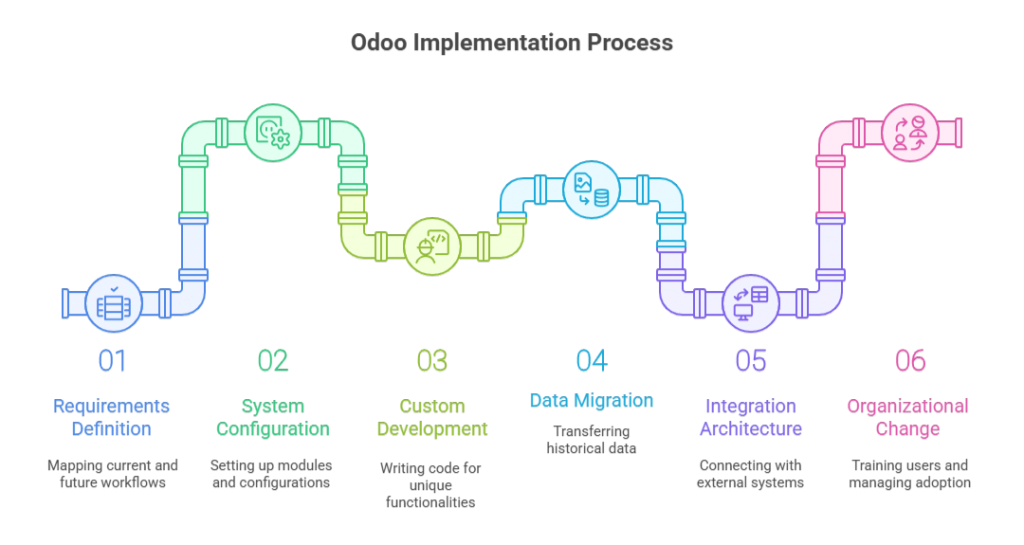
- Requirements definition: Mapping current-state workflows (AS-IS) and designing future-state processes (TO-BE) that leverage Odoo’s native capabilities
- System configuration: Setting up Odoo’s 30+ modules, chart of accounts, inventory locations, user permissions, workflow automation, reporting structures, using point-and-click administration tools
- Custom development: Writing Python code to extend Odoo functionality when standard features don’t address industry-specific requirements or unique business logic
- Data migration: Extracting, cleansing, and loading historical data from legacy systems, customer records, product catalogs, open orders, financial transactions, inventory balances
- Integration architecture: Connecting Odoo with payment gateways, EDI networks, shipping carriers, eCommerce platforms, and third-party applications via APIs or middleware
- Organizational change: Training users, managing resistance, establishing support structures, and driving adoption across departments
Most organizations underestimate items 1, 4, and 6. They budget for technical configuration but neglect the organizational readiness work that determines whether users actually adopt the new system.
For enterprises requiring enterprise-grade consulting support, implementation becomes a strategic transformation initiative rather than an IT project. The distinction matters: IT projects focus on technology deployment, transformation initiatives focus on business outcomes.
If your organization lacks internal ERP expertise, consider an ERP implementation partner that provides both technical execution and strategic consulting. The best partners challenge your requirements and push back on unnecessary customization.
Note: Think of Odoo implementation as constructing a building. The software is your raw material, steel, concrete, and glass. Implementation is the architectural design, foundation work, and construction management that transforms materials into a functional structure. You can have premium materials and still produce an unusable building if the construction methodology fails.
Get Your Implementation Workstreams Mapped
Receive a scoped checklist for requirements, migration, integrations, and UAT based on your modules and user count.
Talk to an Odoo Consultant
Why ERP Implementation Methodology Matters More Than the Platform
I’ve watched CTOs select ERP systems based on feature matrices and Odoo pricing comparisons, then act surprised when implementations fail. The platform isn’t usually the problem; the execution methodology is.
According to Panorama Consulting’s 2023 ERP Report, 55% of organizations experienced budget overruns during ERP implementation, and 28% reported that their system failed to deliver expected business benefits within the first year. These failures stem from poor requirements definition, inadequate change management, and unrealistic timeline expectations, not software deficiencies.
The Real Cost of Poor Planning
When an Odoo implementation fails, it’s rarely a clean failure. What I see instead:
- Shadow IT proliferation: Teams revert to Excel, Google Sheets, and departmental databases because the ERP doesn’t match their workflow
- Data integrity collapse: Without proper validation rules, your accounting team spends hours reconciling transactions that should auto-match
- User abandonment: Adoption rates below 60% within six months signal that the system was configured for theoretical workflows, not actual business operations
- Scope creep litigation: I’ve reviewed contracts where implementation partners billed 3x the original estimate because requirements weren’t locked down during discovery
The antidote to these failures is structured implementation discipline. That’s what the rest of this guide covers.
Pre-Implementation Readiness: What to Lock Down Before You Start
Before any Odoo partner logs into your demo environment, you need internal clarity on three questions:
1. What business processes are you standardizing?
This isn’t about documenting what you do today. It’s about defining what you will do after go-live. If your sales team closes deals using five different quote approval paths, you must rationalize those into one or two standard workflows before configuration begins.
I recommend AS-IS/TO-BE process mapping for every department touching the ERP:
- AS-IS mapping: Document current workflows, system touchpoints, data flows, and pain points (1-2 weeks)
- TO-BE mapping: Define future-state processes aligned with Odoo’s native functionality (2-3 weeks)
The gap between AS-IS and TO-BE reveals where you need training, where you need customization, and where you need organizational change management.
2. Community or Enterprise, based on operational requirements, not budget
Odoo pricing structures create an illusion that Community edition is “free” and Enterprise is a premium upsell. That’s not how you should evaluate the decision.
Choose Community edition if:
- You have internal Python/PostgreSQL development resources
- You’re deploying fewer than 5 core modules
- You don’t need multi-company consolidation or advanced studio customization
- Your business operates during standard hours with tolerance for delayed support responses
Choose Enterprise edition if:
- You require SLA-backed support with response time guarantees
- You need Odoo Studio for no-code workflow customization
- You’re running 24/7 operations where downtime has direct revenue impact
- You need features like IoT box integration, advanced MRP, or automated marketing
Budget isn’t the constraint—operational risk tolerance is. I’ve seen companies select Community to save $15/user/month, then spend $100K on custom development to replicate features included in Enterprise.
3. Implementation partner selection criteria
Your implementation partner becomes your de facto ERP Program Manager for 4-6 months. Vet them like you’re hiring a VP of Operations.
Evaluation criteria I use:
| Criterion |
What to Validate |
Red Flags |
| Industry Experience |
Implementations in your sector with similar process complexity |
Generic “we work with all industries” positioning |
| Odoo Certification Status |
Gold or Silver Odoo partner with certified developers |
No visible certification or partner listing on Odoo.com |
| Post-Go-Live Support Model |
Dedicated support team, SLAs, and escalation paths |
“We’ll train your team to self-support” |
| Methodology Transparency |
Documented phases, deliverables, and sign-off gates |
Vague “agile approach” without a work breakdown structure |
| Reference Checks |
3+ client references from projects delivered in the past 12 months |
Only testimonial quotes, no live client references |
I also request code review access if they’ve built custom modules for previous clients. Code quality tells you whether you’re hiring engineers or scripters.
The Complete Odoo Implementation Process: 11 Essential Steps
Most Odoo partners present implementation as a linear sequence: requirements → configuration → training → go-live. That’s a simplified sales narrative.
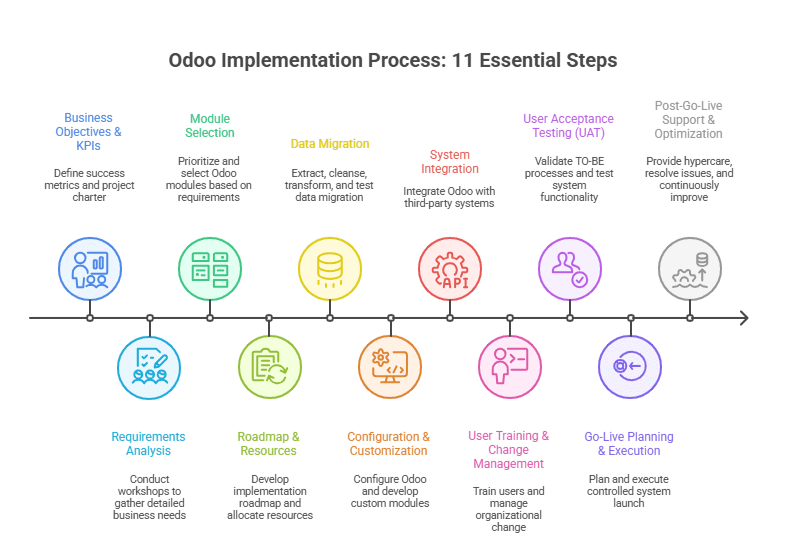
Real implementations are iterative, with feedback loops between phases. Here’s how I structure Odoo ERP implementation projects:
Step 1: Define Clear Business Objectives and KPIs
Duration: 1 week
Owner: Executive sponsor + ERP Program Manager
Every implementation starts with a question: What does success look like 12 months after go-live?
I document this in a project charter with measurable KPIs:
- Operational efficiency: Order-to-cash cycle time reduction (target: 20-30%)
- Data visibility: Real-time inventory accuracy (target: 95%+)
- Cost reduction: Eliminated redundant software licenses (quantify current spend)
- Process standardization: Reduced quote approval paths from 5 to 2
These KPIs become your implementation guardrails. When stakeholders request custom features, you evaluate them against these success metrics. If a request doesn’t advance a defined KPI, it’s scope creep.
Step 2: Conduct Comprehensive Requirements Analysis
Duration: 3-4 weeks
Owner: Implementation partner + department heads
This is where 80% of implementation failures are prevented—or locked in.
I conduct structured requirements workshops with each department:
Finance/Accounting:
- Chart of accounts structure and GL mapping
- Revenue recognition rules (especially for subscription or project-based businesses)
- Multi-currency requirements and FX revaluation policies
- Bank reconciliation workflows and payment processing integrations
Inventory/Supply Chain:
- Warehouse topology and stock location hierarchy
- Replenishment rules (reorder points, make-to-stock vs. make-to-order)
- Lot/serial number tracking requirements
- Landed cost allocation methods
Sales/CRM:
- Lead qualification and opportunity management workflows
- Quote-to-order conversion process and approval hierarchies
- Pricing rules (volume discounts, customer-specific pricing, contracts)
- Sales commission calculation logic
Manufacturing (if applicable):
- Bill of materials (BOM) structure and routing definitions
- Work order scheduling and capacity planning requirements
- Quality control checkpoints and non-conformance handling
- Subcontracting and outsourced operation workflows
Each workshop produces a requirements traceability matrix linking business requirements to Odoo configuration decisions. This document becomes your scope boundary and change control reference.
Step 3: Select Odoo Modules Based on Business Needs
Duration: 1 week
Owner: Solution architect + IT lead
Odoo’s modular architecture means you don’t deploy everything at once. I prioritize modules based on dependency chains and business criticality.
Core foundation modules (Phase 1 deployment):
- Sales / CRM
- Inventory / Warehouse Management
- Accounting / Invoicing
- Purchase Management
Secondary modules (Phase 2 deployment, 2-3 months post-go-live):
- Manufacturing (MRP)
- Project Management
- HR / Payroll
- Quality Management
Tertiary modules (Phase 3 deployment, 6+ months post-go-live):
- eCommerce / Website
- Marketing Automation
- Maintenance
- Field Service
This phased approach prevents overwhelming users and allows you to stabilize core operations before adding complexity.
Module selector guide:
Business Process → Odoo Module → Dependencies
Quote-to-Cash → Sales + Invoicing → Requires: CRM (lead source), Inventory (availability check)
Procure-to-Pay → Purchase + Inventory → Requires: Accounting (AP posting)
Make-to-Order → Manufacturing + Inventory → Requires: Sales (demand signal), Purchase (component procurement)
Project Delivery → Project + Timesheet → Requires: Sales (contract), Invoicing (billing milestones)
Step 4: Implementation Roadmap and Resource Allocation
Duration: 1 week
Owner: ERP Program Manager
I build implementation roadmaps using a work breakdown structure (WBS) with defined deliverables, owners, and dependencies.
Sample roadmap for a mid-size distribution company (4-6 month timeline):
| Week |
Phase |
Key Deliverables |
Go / No-Go Gate |
| 1–4 |
Discovery & Requirements |
Signed requirements document, TO-BE process maps |
Executive sign-off on scope |
| 5–8 |
Data Migration Preparation |
Data extraction, cleansing rules, validation scripts |
Data quality audit passed |
| 9–14 |
Configuration & Development |
Configured Odoo environment, custom module development |
UAT environment ready |
| 15–18 |
User Training & UAT |
Training materials, UAT test cases executed |
>90% test case pass rate |
| 19–20 |
Go-Live Preparation |
Cutover plan, rollback procedures, support rota |
Go-live readiness checklist |
| 21–22 |
Go-Live & Stabilization |
Production launch, hypercare support |
Day-7 system health check |
| 23–26 |
Post-Go-Live Optimization |
Issue resolution, process refinement |
Month-1 KPI review |
Resource allocation includes both internal FTEs and partner consultants. I typically see 20-30% FTE commitment from department heads during requirements and UAT phases. This isn’t a “set it and forget it” project.
Step 5: Data Migration Strategy and Execution
Duration: 4-6 weeks (parallel with configuration)
Owner: Data migration lead + IT team
Data migration is your highest technical risk in any Odoo ERP implementation.
I follow a four-stage migration process:
Stage 1: Data extraction and profiling
- Extract data from legacy systems (ERP, CRM, spreadsheets, Access databases)
- Profile data quality: completeness, consistency, duplicates, referential integrity
- Document data ownership and authoritative sources for each entity type
Stage 2: Data cleansing and transformation
- Deduplicate customer and vendor records
- Standardize product codes, UOMs, and categorization
- Map legacy chart of accounts to the new Odoo GL structure
- Transform data formats to match Odoo import templates
Stage 3: Migration testing (3 cycles minimum)
- Cycle 1: Migrate customers, vendors, products → validate referential integrity
- Cycle 2: Migrate transactional history (last 12-24 months) → validate balances
- Cycle 3: Full migration rehearsal with production data snapshot → validate go-live readiness
Stage 4: Cutover and validation
- Final data freeze in the legacy system
- Production migration execution (typically during the weekend or off-hours)
- Post-migration validation: balance reconciliation, transaction integrity checks
I allocate 30-40% of the total implementation effort to data migration. Underestimate this, and you’ll go live with corrupt data that destroys user trust in the new system.
Case Study: A $40M industrial equipment distributor I worked with discovered during migration that 35% of their product master data had incomplete cost records. They’d been running on institutional knowledge and Excel lookups for years. We spent an extra 3 weeks cleansing cost data before migration, but that investment prevented thousands of hours of post-go-live data corrections.
Avoid a “Dirty Data” Go-Live
Get a migration plan that includes validation cycles, reconciliation checks, and cutover controls.
Request a Data Migration Plan
Step 6: System Configuration and Customization
Duration: 5-7 weeks
Owner: Odoo implementation partner + internal IT
Configuration means setting up Odoo using native features. Customization means writing Python code to extend functionality.
The 80/20 rule applies: aim for 80% configuration, 20% customization. Every custom module you build creates technical debt—ongoing maintenance, upgrade complexity, and documentation burden.
Configuration priorities:
- Company setup: Multi-company structure, fiscal year, base currency, tax configuration
- User roles and permissions: Access control lists (ACLs) by role, department, data visibility rules
- Workflow automation: Approval routing, automated actions, scheduled tasks
- Reporting and dashboards: KPI views, management reports, operational metrics
When to customize (sparingly):
- Industry-specific compliance requirements not covered by standard modules
- Complex pricing algorithms that can’t be configured through standard price lists
- Integration with proprietary systems (legacy WMS, custom-built tools)
- Unique business logic that differentiates your competitive position
For customization work, I require full-stack product engineering teams that follow Odoo’s development guidelines and use version-controlled repositories. Custom code without proper documentation becomes a liability during upgrades.
Config vs. custom decision tree:
Need new functionality?
├─ Is it available in standard Odoo module?
│  └─ YES → Use standard module (configure, don't customize)
├─ Is it available in Odoo App Store?
│  └─ YES → Evaluate third-party app (test before committing)
├─ Can workflow process change accommodate standard features?
│  └─ YES → Revise business process (most cost-effective option)
├─ Is it a regulatory/compliance requirement?
│  └─ YES → Approve customization (document compliance mapping)
└─ Is it a competitive differentiator worth ongoing maintenance cost?
   └─ YES → Approve customization (with TCO analysis)
   └─ NO → Reject or defer to Phase 2
Step 7: Third-Party System Integration
Duration: 3-4 weeks (parallel with configuration)
Owner: Integration architect + IT team
Most organizations don’t run pure Odoo, they integrate with payment gateways, EDI networks, shipping carriers, eCommerce platforms, and industry-specific applications.
Integration patterns I use:
| Integration Type |
Method |
Use Case |
| Real-Time API |
REST / JSON or XML-RPC |
Payment processing, CRM synchronization, eCommerce order imports |
| Scheduled Batch |
SFTP file exchange or API polling |
EDI transactions, bank statement imports, data warehouse exports |
| Direct Database |
PostgreSQL replication or database views |
Business intelligence tools and reporting platforms |
| Middleware / iPaaS |
Zapier, Make, Celigo |
Low-code integrations for non-critical or auxiliary workflows |
For companies with legacy system modernization needs, I sometimes run Odoo in parallel with the existing ERP for 30-60 days before full cutover. This dual-run period validates data sync accuracy and gives teams confidence before decommissioning legacy systems.
Step 8: User Training and Change Management
Duration: 3-4 weeks
Owner: Change management lead + department heads
Training isn’t about showing people where buttons are. It’s about helping them understand why their daily work changes and how to execute new processes.
I structure training in three tiers:
Tier 1: Executive briefing (2 hours)
- System overview and strategic benefits
- Dashboard and reporting access
- Escalation paths for issues
Tier 2: Power user training (2-3 days)
- Deep functional training by module
- Admin capabilities, workflow configuration, and troubleshooting
- These users become internal support resources post-go-live
Tier 3: End user training (4-8 hours)
- Role-specific workflows and daily tasks
- Hands-on exercises using test data that mirrors real scenarios
- Quick reference guides and video tutorials
Training should happen 2-3 weeks before go-live, close enough that knowledge is retained, far enough that there’s time for practice in the UAT environment.
Change management runs parallel to training. I send weekly email updates from the executive sponsor explaining project progress, upcoming changes, and why the new system matters. People resist change when they don’t understand the “why.”
Step 9: User Acceptance Testing (UAT)
Duration: 2-3 weeks
Owner: Business process owners + QA lead
UAT validates that Odoo executes your defined TO-BE processes correctly. This isn’t software testing—it’s business process validation.
I create test scenarios based on real transaction patterns:
Sales order to invoice workflow:
- Create a quote with volume discount pricing
- Send a quote for customer approval
- Convert quote to sales order
- Reserve inventory and generate a delivery order
- Confirm shipment and generate invoice
- Process payment and reconcile in accounting
Each scenario includes expected results and acceptance criteria. For example: “Invoice should reflect volume discount, payment terms should match customer master data, accounting entries should post to correct GL accounts.”
UAT pass rate should exceed 90% before proceeding to go-live. Any critical or high-priority defects must be resolved—no exceptions. I’ve delayed go-live decisions three times in my career when UAT revealed data integrity or configuration issues. Every time that delay prevented a catastrophic production failure.
Step 10: Go-Live Planning and Execution
Duration: 1-2 weeks
Owner: ERP Program Manager + IT operations
Go-live isn’t a single event, it’s a controlled deployment with defined phases, rollback triggers, and support coverage.
Go-live checklist (non-exhaustive):
- Final data migration completed and validated
- User accounts provisioned with correct permissions
- Integration endpoints tested in the production environment
- Backup and rollback procedures documented and tested
- Hypercare support schedule published (24/7 coverage for first 48-72 hours)
- Executive sponsor sign-off on go-live decision
I prefer phased go-lives when possible:
- Option 1: By business unit: Launch Odoo in one warehouse/region, stabilize for 30 days, then expand
- Option 2: By module: Launch sales + inventory first, add manufacturing 60 days later
- Option 3: Parallel run: Operate legacy and Odoo systems simultaneously for 2-4 weeks
Full big-bang cutover is the highest risk and should only happen when business operations are simple enough to validate quickly (typically sub-50 users with limited module scope).
Case Study: A $120M food distributor I advised wanted to launch Odoo across 4 warehouses simultaneously. I recommended a phased go-live starting with their smallest site. Good decision, we discovered a critical issue with lot number traceability during the first week. We fixed it before rolling out to the other three sites, preventing a compliance failure that could have triggered FDA scrutiny.
Step 11: Post-Go-Live Support and Continuous Improvement
Duration: Ongoing (3-6 months intensive support)
Owner: Internal support team + implementation partner
The first 30 days post-go-live are hypercare—intensive monitoring and rapid issue resolution.
I establish a tiered support model:
- Tier 1 (Internal help desk): Password resets, navigation questions, basic troubleshooting
- Tier 2 (Power users): Workflow questions, report generation, configuration adjustments
- Tier 3 (Implementation partner): System defects, integration failures, performance issues
During hypercare, I run daily standups (15 minutes) to review open issues, user feedback, and system performance metrics. These standup meetings replace formal status reports and enable rapid decision-making.
After stabilization (30-60 days), shift to continuous improvement:
- Monthly KPI reviews: Compare actual performance against success metrics defined in Phase 1
- Process optimization: Identify workflow bottlenecks and refine configurations
- Training refreshers: Address knowledge gaps revealed during production use
- Feature rollout: Enable additional Odoo modules as organization readiness improves
The implementation partner relationship doesn’t end at go-live. I typically maintain a retainer for the first 6-12 months to support optimization, minor enhancements, and periodic health checks.
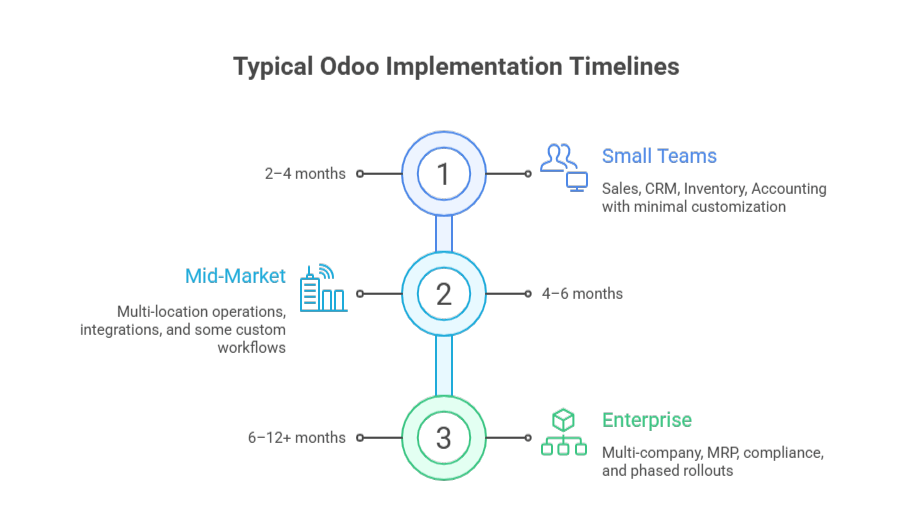
How long does an Odoo implementation take?
Odoo timelines depend on scope complexity, data quality, and organizational readiness, not company size.
Typical ranges
-
Small teams (10–50 users): 2–4 months
Sales, CRM, Inventory, Accounting, with minimal customization
-
Mid-market (50–250 users): 4–6 months
Multi-location operations, integrations, and some custom workflows
-
Enterprise (250+ users): 6–12+ months
Multi-company, MRP, compliance, and phased rollouts
Projects often extend to 12–18 months when data is fragmented, customization is high, or stakeholders are not fully dedicated.
See the full timeline by business size and complexity: Odoo Implementation Timeline →
Odoo Implementation Cost: Beyond License Fees
Odoo license pricing is straightforward (Community is free to self-host; Enterprise starts around $24.90/user/month), but licenses are usually ~20–30% of total year-one cost. The bigger drivers are implementation services, migration, integrations, and training.
Typical mid-market budget mix
- Implementation services: 40–50% (discovery, configuration, custom development, PM)
- Licenses: 15–25% (Enterprise subscription)
- Data migration: 10–15% (extract, cleanse, validate)
- Integrations: 10–15% (APIs, middleware, connectors)
- Training: 5–10% (materials + sessions)
- Infrastructure: 5–10% (cloud/on-prem)
- Contingency: 10–15% (scope changes, extended UAT, stabilization)
Ballpark ranges
- ~$150K–$300K year-one for a ~100-user mid-market rollout
- $500K–$2M+ for multi-entity / complex manufacturing / heavy integration programs
Hidden costs buyers miss
- Internal time (department heads + SMEs can easily hit 500–1,000 hours)
- Parallel run/cutover overhead (legacy + Odoo running together)
- Post-go-live optimization (reserve ~15–20% of budget for the first-year refinements)
See the full breakdown: Odoo Implementation Cost →
Common Implementation Failures and How to Prevent Them
Most Odoo ERP failures are caused by execution mistakes, not by the platform itself.
- Unclear requirements lead to systems that technically work but do not match real finance, inventory, or sales workflows. This is prevented by defining measurable acceptance criteria, TO-BE process maps, and stakeholder sign-off before configuration begins.
- Poor data quality is the fastest way to destroy ERP credibility. Migrating years of inconsistent, duplicate, or incomplete records leads to broken reporting and accounting errors. Successful projects audit, clean, and validate data in multiple cycles before going live.
- Low user adoption causes teams to abandon Odoo for spreadsheets and email. This happens when users are not involved early or trained on real workflows. High-adoption projects combine role-based training, executive sponsorship, and hands-on UAT.
- Excessive customization creates technical debt, upgrade risk, and long-term instability. Strong Odoo implementations favor configuration over custom code, approve customization only when it delivers business or compliance value, and control scope through formal change management.
These controls turn Odoo from a risky software rollout into a stable, scalable ERP system.
Odoo Implementation Best Practices from Expert Partners
Based on 50+ implementations across manufacturing, distribution, professional services, and eCommerce, here are the practices that separate successful projects from troubled ones:
Practice 1: Lock scope before configuration starts
No configuration work until requirements document is signed by all department heads. Changes after configuration begins go through formal change control with impact assessment, re-baselining, and executive approval. This single practice prevents 60% of budget overruns.
Practice 2: Migrate data early and often
Don’t wait until go-live week for your first migration attempt. I run 3-4 migration rehearsals starting 8-10 weeks before go-live. Each cycle reveals data quality issues, giving you time to remediate rather than panic-fixing during cutover weekend.
Practice 3: Configure for 80% of transactions, train for the other 20%
Don’t over-engineer Odoo to handle every edge case and exception scenario. Configure for your high-volume, standard transactions. Train users on manual workarounds for the 20% of exceptions. This prevents configuration bloat and maintains system simplicity.
Practice 4: Deploy support infrastructure before go-live, not after
Establish your tiered support model, help desk ticketing system, and escalation procedures 2-3 weeks before go-live. Have support team shadow during UAT so they’re trained on common issues. The worst time to figure out support escalation is during a production incident on Monday morning.
Practice 5: Measure KPIs weekly for first 90 days
Track the success metrics you defined in Step 1, weekly, not monthly. If order processing time is increasing or inventory accuracy declining, you need to know immediately so you can intervene before users lose confidence. Weekly KPI reviews create accountability and enable rapid course correction.
Practice 6: Resist customization unless it’s a genuine differentiator
Every custom Python module you build creates technical debt, including ongoing maintenance, upgrade testing, and documentation burden. Challenge every customization request: “Can we achieve this through configuration and process change?” Reserve custom development for regulatory requirements or competitive advantages worth the 5-year TCO.
Practice 7: Maintain implementation partner relationship post-go-live
Don’t treat go-live as the end of partner engagement. I maintain support retainers for 6-12 months post-launch. This gives you access to experts who understand your configuration when optimization needs arise. Trying to bring in new consultants 6 months later costs more—they have to reverse-engineer your system.
Practice 8: Document configuration decisions and business rules
Create a “configuration guide” that explains why settings were chosen, what business rules they enforce, and what happens if they’re changed. When your ERP Program Manager leaves 18 months later, this documentation prevents institutional knowledge loss. Include: approval hierarchies, pricing logic, reorder calculations, and GL account mappings.
Organizations seeking guidance on these practices should partner with proven ERP implementation specialists who can provide both technical execution and strategic advisory throughout the project lifecycle.
Your Odoo Implementation Checklist
Use this as a readiness assessment before starting your project:
Strategic Readiness
- Executive sponsor identified and actively engaged
- Success metrics defined with measurable KPIs
- Implementation budget approved (including contingency)
- Project timeline validated against business calendar (avoid year-end, peak season)
Organizational Readiness
- ERP Program Manager assigned (dedicated role, not part-time addition)
- Department heads committed to 20-30% FTE participation
- Change management plan developed
- User resistance risks identified and mitigation strategies defined
Technical Readiness
- Current infrastructure assessed (network bandwidth, server capacity, database performance)
- Integration requirements documented for all third-party systems
- Data quality audit completed with cleansing plan
- Backup and disaster recovery procedures defined
Partner Readiness
- Implementation partner selected based on technical criteria, not just price
- Statement of work (SOW) reviewed by legal with clear scope boundaries
- Partner team assigned (not just proposed) with resumes and availability confirmed
- Post-go-live support model and SLA documented in contract
Make Odoo Run Your Business, Not Your Team
If your implementation plan isn’t locked on requirements, data, and UAT gates, you’re taking avoidable risk.
Get Expert Help
Conclusion: Odoo Implementation Discipline Determines Outcome
I’ve led successful Odoo implementations for $10M companies and failed ones for $500M enterprises. The difference wasn’t budget or technical complexity—it was execution discipline.
The organizations that succeed treat Odoo implementation as business process reengineering enabled by software, not as a software installation project. They invest in requirements rigor, data quality, change management, and user adoption. They challenge customization requests and embrace standard processes.
The organizations that fail treat it as an IT initiative, underestimate data migration complexity, skip change management, and customize recklessly.
If you’re evaluating Odoo or fixing a troubled implementation, focus less on feature comparisons and more on your organizational readiness. The best ERP system poorly implemented delivers worse outcomes than a mediocre system well implemented.
Before you start: define your success metrics, secure executive sponsorship, and commit to process discipline. Then find an implementation partner who will challenge your assumptions and hold you accountable to best practices, not just execute whatever you request.
Odoo can absolutely run your business. But only if you run the implementation correctly.
More Related Guides