14 Must-Have Telemedicine App Features for 2026: Creating a Secure and Scalable Healthcare Solution

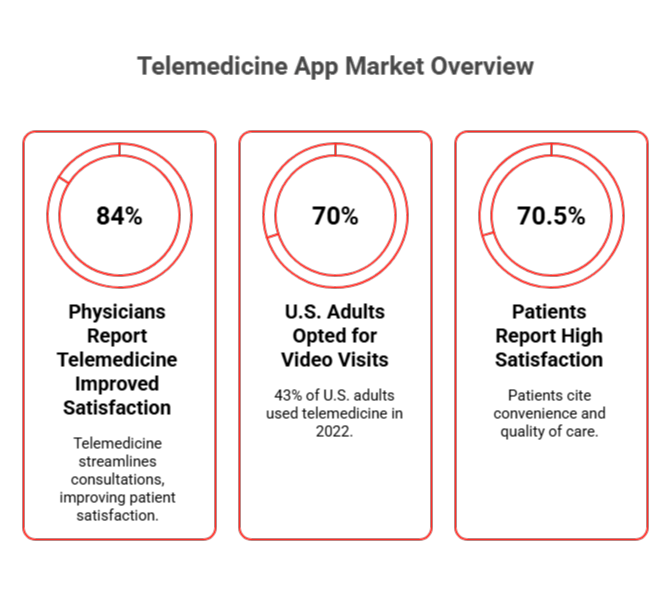
Telemedicine is transforming healthcare, and the demand for feature-rich telemedicine apps is skyrocketing. With the market set to grow from $124 billion in 2026 to $532 billion by 2034, understanding the must-have features is critical for anyone involved in healthcare app development or investing in telehealth solutions.

As telemedicine accounts for 25-30% of U.S. medical visits by 2026, your app must be scalable, secure, and user-friendly. In this post, we’ll break down the essential telemedicine app features and explore advanced tech like AI and machine learning to scale your platform.

Key Takeaways for Building a Feature-Rich Telemedicine App

Core Patient Features:

  • Seamless Registration & Profiles: Quick, secure sign-up with multi-factor authentication for easy access to data.
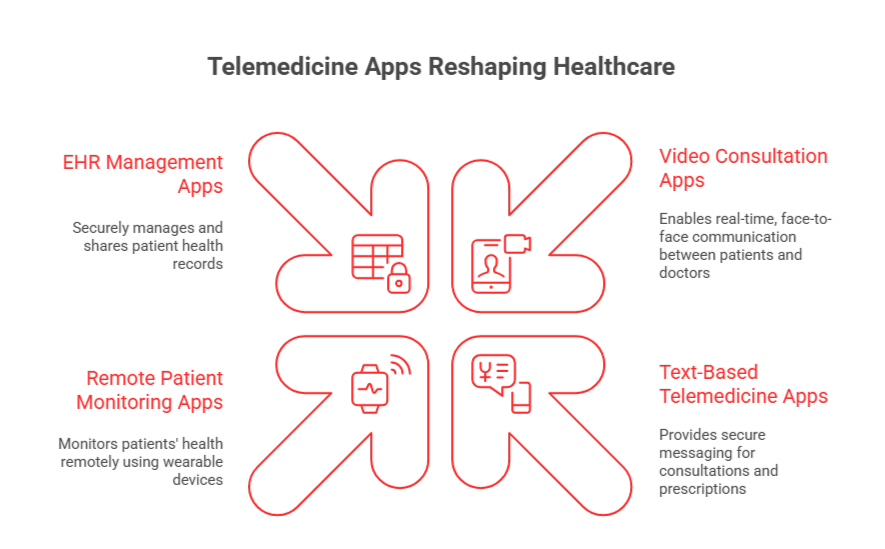
  • Video & Audio Consultations: HD, real-time calls across devices for instant provider access.
  • Patient Portal & Records Access: Patients can view and manage their medical info directly.

Core Provider Features:

  • AI-Powered Appointment Scheduling: AI optimizes appointment times and reduces no-shows.
  • EHR/EMR Integration: Real-time access to patient records for better decision-making.
  • Secure Messaging: HIPAA-compliant encrypted messaging for confidential communication.

Advanced Tech Integration:

  • Remote Patient Monitoring & IoMT: Wearables monitor health continuously for proactive care.
  • AI Chatbots & Symptom Checkers: 24/7 symptom assessment and triage for faster care.

Get Started with Your Telemedicine App Today

Ready to tap into the growing telemedicine market? Start developing your feature-rich app with the essential features that drive success and scalability.

What Are the Core Features for a Telemedicine App?

When building a telemedicine app, certain features are non-negotiable. These essential elements form the backbone of a successful platform that meets both regulatory standards and user expectations. As healthcare software development trends evolve, the need for innovative solutions and new technologies becomes increasingly important in ensuring a seamless user experience and operational efficiency.

Here’s a breakdown of the must-have features and how they drive both user satisfaction and operational success:
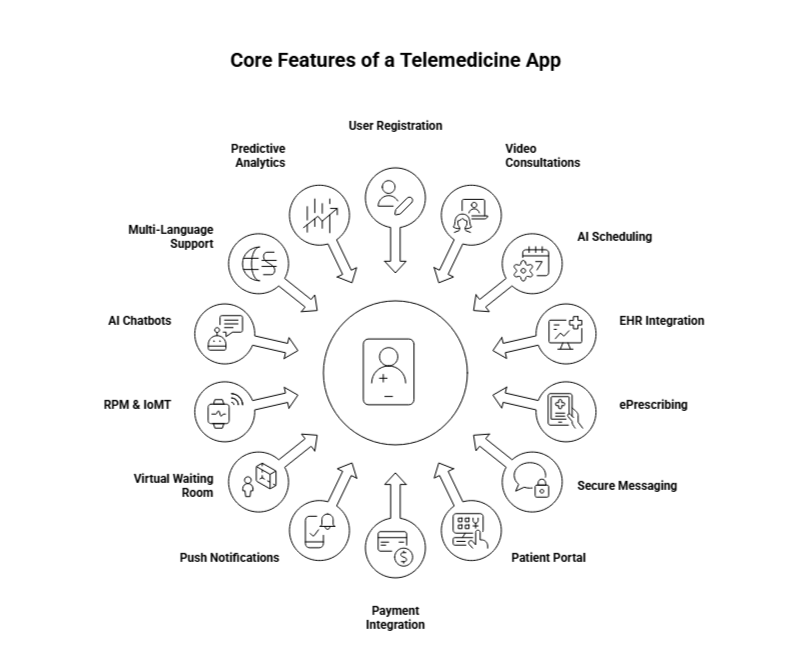
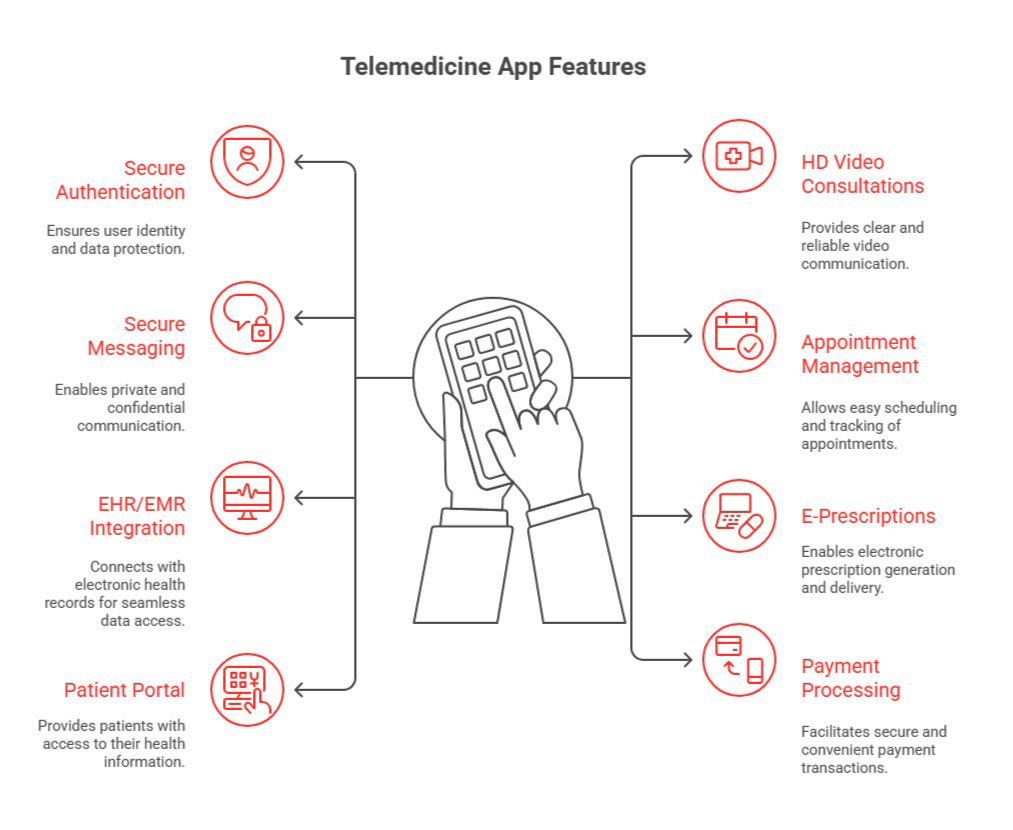
core features of a telemedicine app

1. User Registration & Profile Management

A seamless user registration experience is crucial. HIPAA-compliant authentication with multi-factor options ensures security from day one. The registration process must be quick yet thorough, providing both patients and providers easy access to key health data.
  • Secure Authentication: Multi-factor authentication ensures both patient and provider data is protected from unauthorized access.
  • Profile Management: A comprehensive dashboard gives users immediate access to their health information and appointment history, streamlining the user experience.

For example, the Bradley County & Cleveland City Schools telemedicine program demonstrated how robust profile management and secure registration can dramatically improve healthcare access. By implementing school-based telemedicine across 27 schools, the districts saw a 1,365% increase in virtual visits, helping students receive care within minutes and eliminating transportation barriers.

‘A tech platform has to begin with a clear understanding of the problem that needs to be solved, and that means understanding what virtual care means to the patient. The technology has to be easy and intuitive for patients, allowing them to access care and services from their homes. If a provider needs to spend a long time explaining to patients how the technology works, chances of adoption are low.’ – Stephen Hunter, VP of Digital Strategy and Innovation, Allegheny Health Network

2. Video & Audio Consultations

The core of telemedicine is the ability to conduct real-time consultations via video and audio. A high-quality, HD video conferencing feature ensures that patients feel connected, and issues are addressed without delay.
  • Multi-Device Support: Seamless experience across desktops, tablets, and mobile devices ensures accessibility.
  • EHR Integration: Syncs with Electronic Health Records (EHR) to enable easy scheduling and real-time consultation management, improving care coordination.

Telemedicine apps like Atrium Health’s Hospital-at-Home Program demonstrate how combining video consultations with in-person care and remote monitoring can improve patient outcomes and lower hospital costs, while still providing high-quality care outside traditional settings.

3. AI-Powered Appointment Scheduling

AI-driven scheduling transforms telemedicine by optimizing provider availability, reducing no-shows, and improving patient satisfaction.
  • Smart Scheduling: AI adjusts based on real-time calendar data, ensuring optimal appointment times for both patients and providers.
  • Impact on No-Shows: AI scheduling helped reduce no-show rates by 54%, while Prospyr saw appointment completion rates increase from 11% to 36% for high-risk patients.
  • New Patient Acquisition: Relatient’s 2024 results show a 47% higher new patient acquisition rate for organizations using intelligent scheduling, with 65% of self-scheduled appointments coming from new patients.

By reducing administrative tasks and improving scheduling flexibility, AI-powered systems can significantly enhance operational efficiency and patient experience, driving long-term value for telemedicine providers.

4. EHR/EMR Integration

A telemedicine app without EHR/EMR integration is like a doctor without their stethoscope. Real-time access to medical records is a must for providing personalized care and avoiding costly errors.
  • Seamless Data Exchange: Secure integration with EHR systems ensures real-time access to patient histories, lab results, and previous treatments.
  • Impact on Patient Care: Studies show that integrating telehealth with EHR systems enhances patient outcomes and reduces overall medical costs.

By integrating EHR, telemedicine apps ensure providers can make informed decisions quickly, ultimately improving care continuity and patient satisfaction. Ochsner Health’s Connected MOM Program, for example, leverages EHR integration for remote monitoring of pregnant patients, improving maternal health outcomes and providing easier access to care for underserved populations.

5. Electronic Prescriptions (ePrescribing)

ePrescribing streamlines the prescription process, reducing errors and ensuring that medications are delivered quickly and accurately to patients.
  • Real-Time Checks: Integrates drug databases to automatically check for drug interactions or allergies.
  • Automated Verification & Claims Processing: Automates the prescription and claims process, increasing efficiency and minimizing human error.

By simplifying prescription management, telemedicine platforms help reduce bottlenecks in patient care, leading to faster recovery times and fewer administrative errors.

6. Secure Messaging

HIPAA-compliant messaging is crucial for maintaining patient confidentiality while ensuring constant communication between patients and providers.
  • Encrypted Communication: End-to-end encryption ensures patient confidentiality and compliance with privacy regulations.
  • Non-Urgent Follow-ups: Asynchronous messaging for follow-up questions helps doctors manage multiple cases more efficiently.

An encrypted messaging system allows for improved access to healthcare information without patients needing to visit the clinic, especially useful for non-urgent follow-ups and routine consultations.

7. Patient Portal & Medical Records Access

A patient portal is one of the most powerful tools in a telemedicine app. It empowers patients to actively engage with their health by giving them access to essential data like medical records, prescriptions, and lab results.
  • Self-Service Access: Patients can view and manage their health information without needing to contact the provider directly.
  • Document Sharing: Secure upload and sharing of medical documents between patients and healthcare providers.

By providing easy access to medical records, patients become more involved in their healthcare, improving outcomes and patient satisfaction. The Mayo Clinic’s virtual care system is a great example of this, offering patients 24/7 access to their health data.

8. Payment & Billing Integration

Simplifying the payment process with integrated billing systems improves patient satisfaction and ensures financial transactions are smooth and transparent.
  • Insurance Claims Processing: Automated insurance verification and claims submission save time and reduce human error.
  • Transparent Pricing: Clear, upfront pricing models before consultations ensure patients understand costs, reducing surprises.

This feature also helps healthcare providers ensure they are compensated for their services efficiently, making the overall system more financially sustainable.

9. Push Notifications & Appointment Reminders

Automated appointment reminders via SMS, email, and push notifications help reduce no-shows and keep patients engaged in their care.
  • Automated Reminders: Remind patients of upcoming appointments, lab results, or medication schedules.
  • Personalized Alerts: Custom notifications based on patient preferences enhance engagement and care adherence.

The implementation of such reminders has shown to improve appointment attendance by over 30%, boosting both patient care and clinic revenues.

10. Virtual Waiting Room

A virtual waiting room reduces patient anxiety and enhances the overall experience by mimicking the in-person visit. It allows for smoother transitions and a better organized patient flow.
  • Triage Workflows: Automates the process of prioritizing patients, improving wait times and overall satisfaction.
  • Reduced Wait Times: Enables real-time updates on wait times, giving patients a more controlled and less stressful experience.

Virtual waiting rooms have been shown to increase patient satisfaction by up to 23%, providing a seamless bridge between remote consultations and physical healthcare visits.

11.  Remote Patient Monitoring (RPM) & IoMT Integration

Remote Patient Monitoring (RPM) and the Internet of Medical Things (IoMT) are revolutionizing chronic disease management. By integrating wearable devices and remote sensors, telemedicine apps can continuously monitor patients’ vital signs, such as heart rate, blood pressure, and glucose levels. This allows healthcare providers to intervene immediately if there are any concerning changes.
  • Real-Time Data: Wearable sensors and connected devices send continuous data, allowing healthcare providers to receive real-time insights and act swiftly if necessary.
  • Chronic Disease Management: RPM is especially beneficial for managing chronic conditions like diabetes, hypertension, and heart disease. The ability to remotely track patient health leads to better management and fewer emergency interventions.

For instance, Atrium Health’s Hospital-at-Home Program integrates RPM kits to remotely monitor patients, improving patient outcomes and reducing the need for hospital admissions. Additionally, remote patient monitoring is a growing trend: 49% of healthcare professionals cite improved patient outcomes as the top benefit of RPM.

12. AI Chatbots & Symptom Checkers

AI-powered chatbots and symptom checkers are key to improving operational efficiency and patient care in telemedicine. These tools provide quick symptom assessments, triage, and direct patients to the appropriate care path.
  • 24/7 Availability: AI chatbots offer round-the-clock symptom assessment, improving access and satisfaction. Accenture reports 80% of users prefer using AI for initial assessments.
  • Symptom Triage: AI tools reduce wait times by 20%, helping patients quickly understand next steps in care.
  • Accuracy & Efficiency: AI chatbots can diagnose with 76% accuracy, comparable to healthcare professionals in non-urgent cases.
  • Increased Engagement: 63% of patients prefer AI chatbots for initial assessments, citing their convenience.

By integrating AI chatbots and symptom checkers, telemedicine platforms enhance patient engagement, reduce wait times, and streamline care delivery.

13. Multi-Language Support & Accessibility

Telemedicine is increasingly seen as an opportunity to improve healthcare accessibility, but language barriers remain a significant challenge. By offering multi-language support, you can ensure that patients from diverse cultural and linguistic backgrounds can access care in a language they are comfortable with.
  • Health Equity: Offering multi-language services ensures that non-English-speaking patients receive culturally relevant and accessible healthcare. This is particularly crucial in diverse populations where language can be a significant barrier to care.
  • Expanding Patient Base: Telemedicine apps with language support can cater to underserved populations, making healthcare more inclusive and equitable.

A study found that only 11% of patient portals are accessible in multiple languages, yet offering this feature could drastically improve patient engagement and outcomes. As the telemedicine industry grows, language support is becoming a key differentiator in reaching broader and more diverse patient populations.

14. Predictive Analytics & Population Health Management

Predictive analytics in telemedicine apps can help healthcare providers move from a reactive to a proactive care model. By analyzing large sets of health data, predictive tools can anticipate potential health issues, allowing for early intervention and better resource optimization.
  • Proactive Care: Predictive analytics can identify early signs of chronic conditions or disease exacerbation, allowing healthcare teams to intervene before issues escalate.
  • Optimizing Resources: With predictive models, healthcare providers can allocate resources more efficiently, focusing on high-risk patients and ensuring they receive timely care.

For example, HealthSnap utilizes predictive analytics to assist in chronic disease management, helping healthcare providers predict exacerbations and optimize patient.

Similarly, by anticipating health trends, predictive analytics can help healthcare providers manage population health more effectively, reducing hospitalizations and overall healthcare costs.

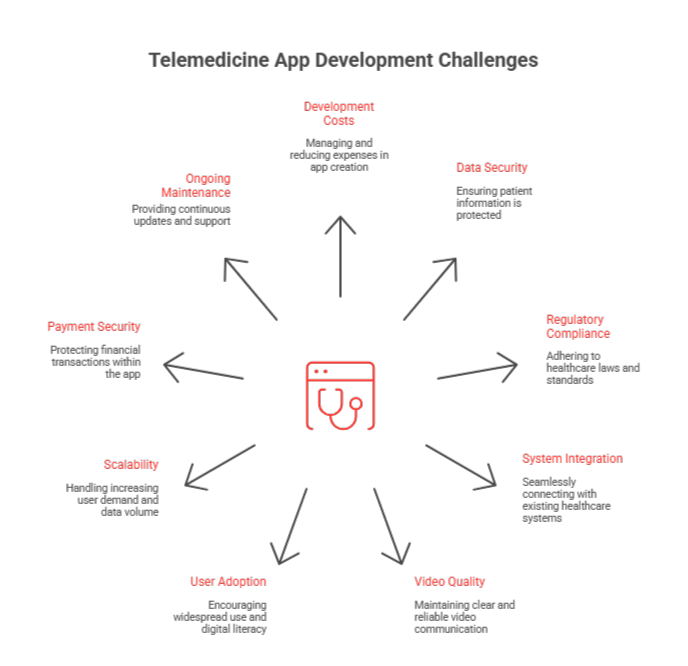
Integrating these essential features into your telemedicine app enhances both user experience and operational efficiency. While the telemedicine app development cost may rise with advanced tech like AI, the improved ROI makes it a worthwhile investment. For more insights on building a successful telemedicine platform, refer to our telemedicine app development guide.

How Can AI and Machine Learning Improve Telemedicine Apps?

AI and Machine Learning (ML) are revolutionizing the way telemedicine apps operate, enhancing diagnostic capabilities, optimizing workflows, and improving patient outcomes. Here’s how integrating AI and ML can elevate your telemedicine app:
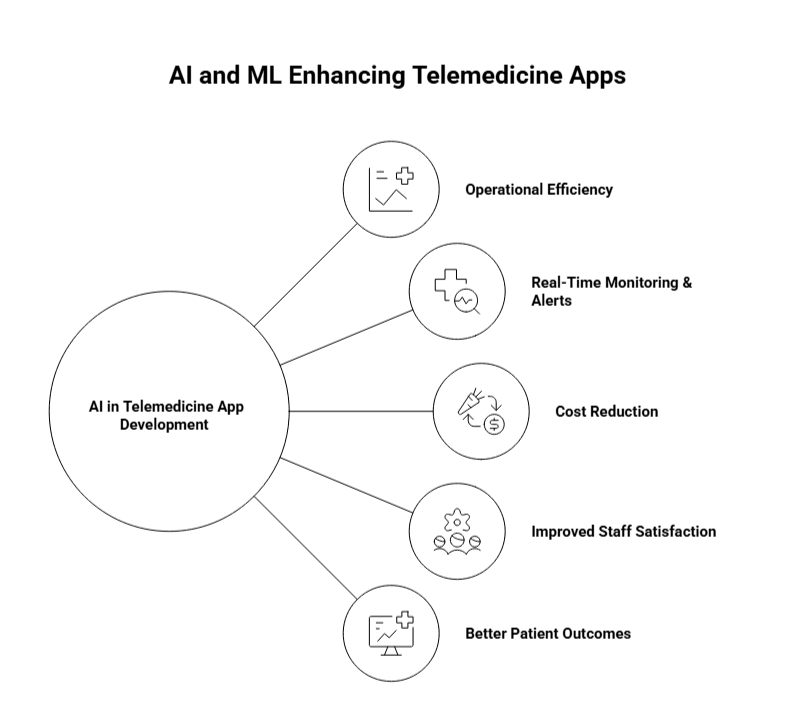
AI and ML in telemedicine app development

1. Enhanced Diagnostic Accuracy

AI’s ability to analyze large datasets and identify patterns far exceeds human capabilities, making it a game-changer in diagnostics. By integrating AI, telemedicine apps can improve the diagnostic accuracy of healthcare providers, helping them detect conditions that may otherwise go unnoticed.

  • Precision in Diagnostics: AI-powered systems analyze medical images, lab results, and patient histories with exceptional accuracy, aiding in early detection of conditions like cancer, heart disease, and neurological disorders. In a recent study, AI algorithms were shown to be better than human doctors in detecting early-stage breast cancer, with a diagnostic accuracy rate of over 94%.

AI’s ability to enhance diagnostic accuracy not only improves patient outcomes but also reduces costly medical errors, making healthcare both more affordable and reliable. It is transforming telemedicine by offering more accurate diagnoses and quicker interventions, ultimately improving patient survival rates and the quality of care.

2. Clinical Decision Support

AI’s role in Clinical Decision Support (CDS) is crucial for real-time, data-driven decision-making. By utilizing AI-powered tools, healthcare providers can make informed decisions based on comprehensive patient data and evidence-based guidelines, all at their fingertips.

  • Real-Time Decision-Making: AI analyzes patient histories, vital signs, and clinical data in real time, offering personalized treatment options and alerts when conditions change. For example, AI tools like IBM’s Watson for Oncology provide oncologists with evidence-based treatment suggestions by analyzing large volumes of medical literature and patient data.

By aiding in clinical decisions, AI helps healthcare providers stay up-to-date with the latest medical research, reducing diagnostic errors and improving treatment accuracy. For telemedicine apps, AI-driven decision support ensures that healthcare providers have the right information to deliver the best possible care, even from a distance.

3. Workflow Optimization

AI and Machine Learning aren’t just for patient care, they also optimize the administrative aspects of healthcare. These technologies automate mundane tasks, from appointment scheduling to medical billing, freeing up staff to focus on what truly matters: patient care.

  • Automation of Administrative Tasks: Tasks like medical coding, patient scheduling, and claims processing can be automated using AI, leading to time savings and fewer human errors.
  • Operational Efficiency: AI-driven systems can predict patient load, optimize provider schedules, and automate routine documentation, increasing operational efficiency across the board.

AI and ML integration have led to a 50% reduction in administrative costs in some hospitals. This not only boosts the bottom line but also improves staff satisfaction and reduces burnout.

By enhancing workflow automation, AI in telemedicine apps increases efficiency, reduces costs, and minimizes administrative errors, leading to a smoother, more streamlined healthcare delivery.

4. Real-Time Monitoring & Alerts

AI’s capability to provide real-time monitoring and alerts is a major benefit in telemedicine. Using AI-powered sensors, telemedicine apps can continuously track a patient’s health data and instantly alert healthcare providers if any critical signs are detected.

  • Instant Alerts for Critical Findings: AI systems continuously monitor patient data, from vital signs to lab results, and trigger immediate alerts for anything abnormal, such as abnormal heart rhythms, elevated blood sugar, or signs of infection.
  • Proactive Care: By providing real-time insights, AI allows healthcare providers to intervene before a condition worsens, leading to quicker response times and better patient outcomes.

In remote patient monitoring (RPM), AI-driven real-time monitoring has been linked to fewer hospitalizations, shorter hospital stays, and reduced mortality rates. AI in telemedicine apps ensures critical findings are flagged immediately, allowing healthcare teams to take swift action, which is key to improving patient survival and long-term health.

However, integrating AI and ML into telemedicine apps can impact the healthcare app development cost, particularly due to the advanced technologies and expertise required. While the initial investment in building AI-powered features may be higher, the long-term return on investment (ROI) can be substantial. AI and ML not only improve patient care and streamline operations, but they also reduce costs by preventing medical errors, improving diagnostic accuracy, and optimizing workflows.

Integrate AI for Better Patient Care

 Enhance your telemedicine platform with AI-powered features like predictive analytics, real-time monitoring, and personalized decision support.

How Do Telemedicine Apps Ensure HIPAA Compliance?

HIPAA compliance is a critical aspect of telemedicine, as apps handle sensitive patient data that must be protected to maintain trust and meet legal requirements. With data breaches in healthcare costing an average of $6.45 million per incident, robust security measures are essential for protecting patient privacy. However, the healthcare app development cost often includes the need to incorporate advanced security features like encryption and role-based access control to meet HIPAA standards.

Here’s how top telemedicine apps ensure compliance:

  • End-to-End Encryption
    Telemedicine apps use AES-256 encryption to protect patient data during transmission and storage, ensuring it’s scrambled and unreadable if intercepted. A study shows 88% of healthcare organizations rely on encryption to meet HIPAA standards (HIPAA Journal), underscoring its importance in maintaining confidentiality.
  • Role-Based Access Control (RBAC)
    RBAC ensures only authorized personnel can access patient health information, reducing the risk of unauthorized data exposure. Telemedicine apps with RBAC report 30% fewer breaches compared to those that don’t implement it. Real-time audit trails also track all interactions with sensitive data, enhancing accountability.
  • Continuous Monitoring & Audit Trails
    To detect unauthorized access and identify security risks, telemedicine apps implement real-time monitoring and audit trails. These measures help mitigate potential vulnerabilities and safeguard data, as healthcare breaches are a major financial and reputational threat. Regular monitoring is crucial, as breaches cost healthcare organizations millions annually.
  • Staff Training & Incident Response Plans
    Regular HIPAA training for staff ensures they understand the risks and protocols for handling protected health information (PHI). Well-trained staff can reduce the likelihood of breaches by up to 40%. In case of a breach, clear incident response plans help mitigate damage quickly.
  • Secure Data Storage & Backup
    Telemedicine apps store patient data in encrypted databases, ensuring compliance with HIPAA’s data retention and disposal policies. This secure data storage and backup protect sensitive information from unauthorized access or loss. Telemedicine apps that adhere to these security guidelines face fewer legal challenges and retain patient trust.

In a digital-first healthcare world, HIPAA compliance is not just a legal obligation, it’s a key factor in protecting patient privacy and ensuring data security. By leveraging encryption, RBAC, audit trails, and real-time monitoring, telemedicine platforms can safeguard patient information and minimize the risk of breaches.

Ensure HIPAA Compliance with Expert Guidance

Protect patient data and maintain trust by ensuring HIPAA compliance. AppVerticals offers secure, compliant telemedicine solutions tailored to your needs.

Build Your Feature-Rich Telemedicine App with AppVerticals

Telemedicine is reshaping healthcare, and now is the perfect time to develop a powerful app that meets the demand for seamless, secure, and patient-centric services.

Whether you’re looking to integrate AI, enhance patient engagement, or ensure HIPAA compliance, AppVerticals has the expertise to turn your vision into reality. We offer custom-built telemedicine solutions with cutting-edge features that scale with your needs. Partner with us to build an app that’s both innovative and future-ready.

Build Your Scalable Telemedicine App with AppVerticals

Don’t miss out on the opportunity to create an innovative telemedicine platform. From EHR integration to secure video consultations, we can help you build a scalable solution.

The Mobile App Development Guide for 2026: Essential Steps, Strategies and Tips

The mobile app market is expected to reach $585 billion in 2025, with over 181 billion global app downloads in 2026. As businesses shift to mobile-first strategies, apps have become crucial for engagement and revenue growth.

Consumers spend an average of 4.8 hours per day in apps, interacting with 9 apps daily. This presents a huge opportunity for businesses to tap into mobile-driven success, but it also comes with challenges like high churn rates and retention struggles.

Discover essential steps, strategies and best practices in this comprehensive mobile app development guide to build user-friendly, secure, and scalable apps in 2026.

Key Takeaways:

  • Mobile app market growth: Expected to reach $585 billion by 2026, highlighting the importance of mobile-first strategies for business success.
  • App types matter: Choose between native, hybrids, or PWAs based on your business goals, budget, and target audience.
  • Focus on user engagement: Prioritize UX/UI design and fast, seamless performance to boost retention and user satisfaction.
  • Cost-effective strategies: Consider cross-platform development and MVP approaches to save costs without compromising on quality.
  • Post-launch support is essential: Regular updates, performance monitoring, and user feedback are key to maintaining app success.

What Is Mobile App Development?

Mobile app development refers to the process of creating software applications specifically designed for mobile devices like smartphones and tablets. This includes stages such as planning, designing, coding, testing, and launching the app.

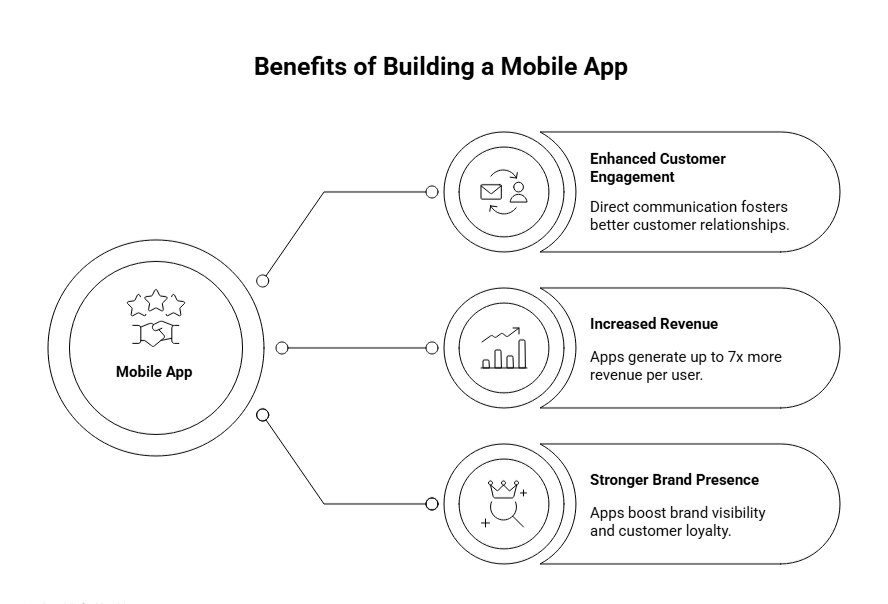
Building a successful app can benefit businesses in many ways, they include:

benefits of building a mobile app

  • Enhanced customer engagement: Apps provide direct communication channels for businesses, fostering better relationships with users.
  • Increased revenue: Apps can generate up to 7x more revenue per user, especially for e-commerce businesses.
  • Stronger brand presence: Mobile apps significantly boost brand visibility and customer loyalty.

Types of Mobile Apps: Native vs. Hybrid vs. PWA

Choosing the right type of mobile app is crucial for aligning with your business goals and target audience. Below, we break down the key app types to help you make an informed decision based on performance, cost, and functionality.

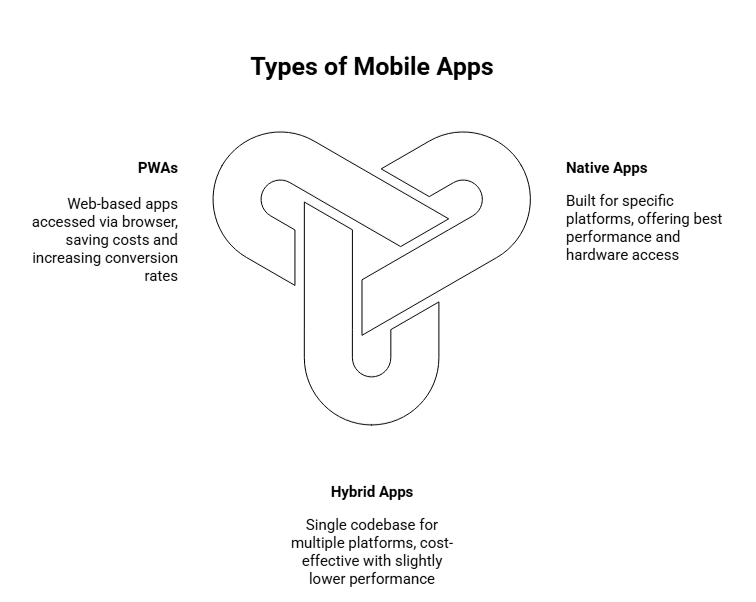
types of mobile apps

Native Apps

Native apps are built specifically for one platform (iOS or Android), offering the best performance and access to device hardware.

While development costs are higher due to platform-specific code, the high performance, speed, and ability to leverage device features (like cameras, sensors, etc.) make it ideal for complex apps that need to deliver a seamless user experience.

Hybrid Apps

Hybrid apps use a single codebase to work across multiple platforms (iOS and Android), with 85-95% code sharing between platforms.

Hybrid apps offer a cost-effective solution, making them a great choice for businesses looking to quickly reach both iOS and Android users without duplicating development efforts. However, the trade-off is slightly lower performance compared to native apps.

Progressive Web Apps (PWAs)

PWAs are web-based apps that function like native apps but can be accessed through a browser, without needing to be downloaded.

They can save 30-70% in development costs and offer faster time-to-market. They can lead to up to 76% higher mobile conversion rates and are a good budget-friendly option for businesses with limited resources or those targeting markets with lower smartphone penetration.

How to Build A Mobile App: A Step-By-Step Guide

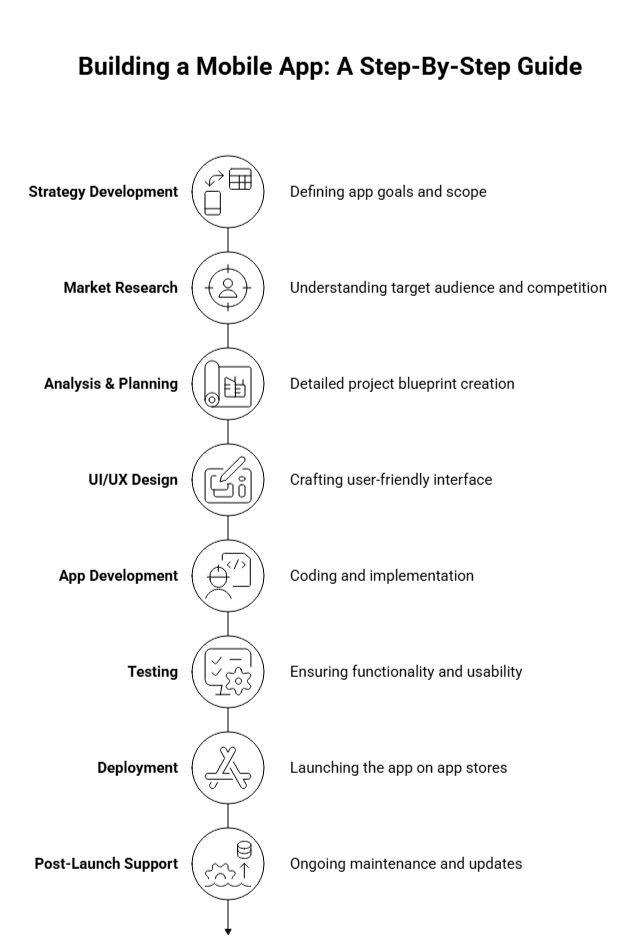
Building a successful mobile app involves a structured approach from strategy development to post-launch support. By focusing on key stages including, strategy, market research, design, development, and testing, you ensure your app is user-friendly, scalable, and future-proof.

Whether you’re developing for a startup or enterprise, understanding each phase is essential. Below is an actionable roadmap designed for founders and investors to understand each key phase in mobile app development, helping you make informed decisions about the process.

mobile app development: step-by-step guide

Stage 1: Strategy Development

The first and most crucial step is to define the strategy behind the app. This includes identifying the problem your app will solve, its target audience, and clear objectives. Answer the following questions to lay the groundwork:

  • What problem will the app solve?
  • Who is the target audience?
  • What are the app’s key business goals?

Additionally, research competitors in the space to see where you can differentiate. Consider how your app stands out and its monetization strategy, whether through in-app purchases, subscriptions, or ads.

Platform Selection: Decide whether to develop a native app for iOS or Android, a cross-platform app, or a hybrid solution, based on your goals and budget. For enterprise mobile app development, ensuring scalability and integration with existing enterprise systems is crucial.

Stage 2: Market Research

Before jumping into development, it’s essential to validate the market for your app idea. Research competitors and identify your unique selling proposition (USP).

  • Who are your competitors?
  • What are their strengths and weaknesses?
  • What differentiates your app from theirs?

Research the needs of your target audience, and assess the best platform for launching your app: iOS, Android, or both.

Stage 3: Analysis & Planning

At this stage, define the functional and non-functional requirements for your app. Understand the core features your app needs to include to meet business objectives.

  • Functional requirements: What essential tasks should the app perform (e.g., payments, data processing)?
  • Non-functional requirements: How should the app perform in terms of speed, scalability, and reliability?

Product Roadmap: Outline the MVP (Minimum Viable Product) with prioritized features. The MVP focuses on delivering just enough value to users, allowing you to test your core assumptions without a full-scale launch.

Technology Stack: Identify the right technologies for your project, whether you’re building on native, hybrid, or cross-platform frameworks. This decision will determine your development approach.

Project Estimation: Accurately estimate the cost and time required for development. Setting a realistic budget and timeline prevents scope creep and ensures your app stays on track.

Stage 4: UI/UX Design

The design phase is critical to user retention. A seamless user experience (UX) ensures users will return to your app.

  • Wireframes: Create digital sketches to visualize your app’s structure and layout.
  • Prototypes: Develop an interactive prototype to simulate the user experience and gather feedback before development begins.
  • UI Design: Focus on visual appeal, simplicity, and intuitive navigation to enhance usability.

Mobile App Design: UX vs. UI

Understanding the difference between UX and UI design is key to creating an engaging mobile experience.

  • UX focuses on the overall user journey, ensuring the app is intuitive and easy to navigate.
  • UI focuses on the look and feel, ensuring the design is visually appealing and user-friendly.

Best Practices for Designing an Engaging User Experience

  • Keep interfaces clean and simple to avoid overwhelming users.
  • Prioritize mobile-first design, ensuring that your app is optimized for smaller screens.

Stage 5: App Development

This is the core phase where front-end (what users interact with) and back-end (server-side) development take place.

  • Front-End: Whether building a native or hybrid app, the front-end needs to be responsive and user-friendly. It should operate seamlessly across different devices and screen sizes.
  • Back-End: Set up your database, servers, and APIs that support the app’s data flow and user interactions. The back-end architecture needs to be scalable to accommodate future growth.

Development Method: Depending on your platform decision, choose the right development method. Native apps are platform-specific, while cross-platform and hybrid approaches offer more flexibility and cost-effectiveness.

Stage 6: Testing

Testing is a critical part of the development process to ensure your app is bug-free, secure, and performs well.

  • Functional Testing: Ensure that all features and functionalities work as expected.
  • Performance Testing: Test your app’s speed and performance under high load conditions.
  • Security Testing: Make sure user data is secure and the app meets privacy regulations.
  • User Testing: Conduct user testing with a beta group to gather feedback on the app’s usability and interface.

Stage 7: Deployment

Once tested, it’s time to deploy your app on the App Store (iOS) or Google Play (Android). The deployment stage involves:

  • App Store Submission: Submit the app for approval by following platform guidelines to avoid rejection.
  • App Visibility: Optimize for App Store Optimization (ASO) to ensure your app ranks well and attracts users.

A successful launch requires a solid marketing plan. You’ll need a strategy for user acquisition, including digital ads, influencer marketing, and leveraging early adopters.

Stage 8: Post-Launch Support

Once your app is live, post-launch monitoring ensures it continues to meet user needs and business goals.

  • Bug Fixes & Updates: Continuously improve the app with updates based on user feedback.
  • Performance Monitoring: Track key performance indicators (KPIs) such as downloads, user engagement, and retention.
  • Customer Support: Ensure prompt response to user issues to maintain high satisfaction.
  • Localization: If expanding globally, plan for app localization to accommodate various languages, currencies, and regional preferences.

Understanding these stages in detail can help you make informed decisions, whether it’s about resource allocation, team selection, or long-term strategy.

Build Scalable Apps That Grow With You

Whether you’re launching your first app or scaling globally, we’ve got the tools and expertise to ensure your success.

How AppVerticals Helped Coca-Cola Build a Successful Mobile App

AppVerticals partnered with Coca-Cola Dubai to create a mobile-first platform capable of supporting over 2 million users with 99.98% uptime and lightning-fast performance. We focused on redesigning their user journeys to be 45% faster, while ensuring compliance with global accessibility standards (AA).

Here’s how we executed:

  • Research & Strategy: We identified pain points and set clear goals for speed, stability, and accessibility.
  • Design & Prototyping: We built and tested 150+ prototypes to optimize user journeys and ensure a seamless experience.
  • Development & AI Integration: Leveraging advanced tech stacks, we built a scalable, high-performance app.
  • Deployment & Monitoring: We ensured a flawless launch with zero critical bugs and ongoing performance tracking.

We’re able to deliver:

  • 2M+ Peak Users: Successfully managed millions of concurrent users with flawless performance.
  • 98% Uptime: Ensured platform stability for seamless, uninterrupted user experiences.
  • 45% Faster User Journeys: Significantly improved navigation speed and reduced drop-offs.
  • 2s Median Page Load Speed: Optimized for ultra-fast digital journeys.
  • AA Accessibility Compliance: Fully inclusive, meeting global accessibility standards.

Ready To Build Your Dream Mobile App?


Talk to our app development experts and discuss your goals.

Choosing the Right Technology for Your Mobile App

Selecting the right technology stack for your mobile app is one of the most crucial decisions in the development process. A well-chosen stack ensures performance, scalability, and the ability to adapt as your app grows.

Here’s an overview of the main technologies you’ll need to consider for both the front-end and back-end, as well as cloud infrastructure and databases.

Frontend Technologies: What Users See and Interact With

The front-end refers to everything users interact with on the app: the interface, buttons, graphics, and how it functions on their devices.
frontend technologies

React Native: Allows you to develop for both iOS and Android using a single codebase. It’s fast, efficient, and has a huge developer community. With 42% market share, it’s one of the most popular choices for businesses looking to save time and resources on development.

  • Best for: cross-platform apps.

Flutter: Known for its beautiful designs and seamless cross-platform capabilities. It allows developers to create a smooth, responsive experience across devices. Great for businesses aiming for a unique, engaging user interface while still supporting both iOS and Android platforms with a single codebase.

  • Best for: stunning UI

Swift (for iOS): When you need to build an app specifically for iPhone or iPad users. Swift offers high performance and native integration with the iOS ecosystem. If your app will be exclusively for iOS users, Swift is the go-to language to ensure an optimal user experience and performance.

  • Best for: native iOS apps

Kotlin (for Android): Kotlin is the preferred language for building apps that need to run exclusively on Android. It offers more concise code than Java while maintaining Android’s performance standards. For apps targeting Android users, Kotlin ensures a reliable and scalable experience, and is supported by Google for Android development.

  • Best for: native Android apps

Backend Technologies: The Power behind the App

The back-end is the server-side part of your app: it handles everything that happens behind the scenes, like storing data, user authentication, and processing requests.

backend technologies

Node.js: Great for building fast, scalable back-ends. It’s built on JavaScript, making it ideal for apps that need real-time capabilities like chats, live updates, or notifications. Popular for its speed and scalability, making it a top choice for apps requiring fast data processing, such as social media or e-commerce apps.

  • Best for: real-time apps

Ruby on Rails: Known for getting apps up and running quickly, Ruby on Rails is a full-stack framework that can handle everything from the back-end to the front-end. If you are considering a quick MVP development with solid foundation, Ruby on Rails offers a fast development cycle while ensuring robust features.

  • Best for: rapid development

Django (Python): If your app relies heavily on data or scientific computations, Django offers a clean and efficient way to manage the back-end with Python. Django is ideal for apps with complex data structures or requirements for security, like financial apps or apps with large datasets.

  • Best for: Python-based apps

Cloud Infrastructure & Database Technologies: Scalability & Data Management

As your app grows, you’ll need cloud infrastructure to ensure it remains scalable and available. The right database is crucial to store user data efficiently.

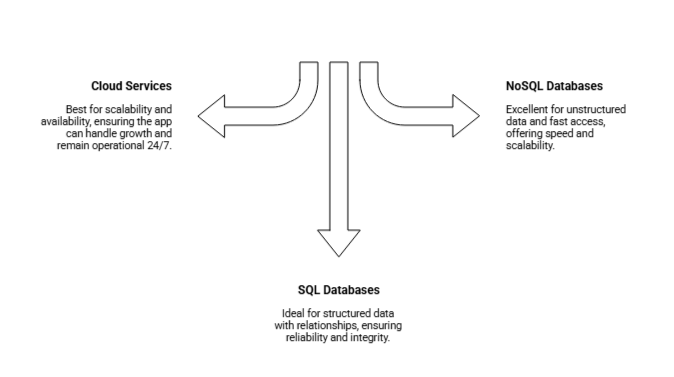
Cloud Infrastructure & Database Technologies

Cloud Services (AWS, Google Cloud): Cloud providers like AWS and Google Cloud ensure that your app can scale as it grows, providing storage, computing power, and tools to manage users. Cloud services offer reliability and high availability, ensuring that your app can handle traffic spikes, keep data secure, and remain operational 24/7.

  • Best for: scalability

SQL Databases (MySQL, PostgreSQL): SQL databases are ideal for applications that require relational data models (e.g., customers, orders, or transactions). If your app needs to manage structured data with relationships between entities, SQL is the best choice for reliability and integrity.

  • Best for:
  • structured data

NoSQL Databases (MongoDB, Firebase): NoSQL databases are excellent for apps that require fast access to data without complex relationships, such as social media posts or sensor data. If your app will handle high volumes of data and requires flexibility in storing and retrieving that data, NoSQL databases offer speed and scalability.

  • Best for: unstructured data

Ultimately, selecting the right technology stack for your mobile app is a key factor in ensuring long-term success. Each choice should align with your app’s goals, target users, and growth potential.

How to Submit Your Mobile App to the App Stores

Submitting your mobile app to the Apple App Store and Google Play Store is essential for distributing your app to users. Additionally, Progressive Web Apps (PWAs) offer a unique approach to reach your audience directly via web browsers.

Here’s a detailed guide to help you navigate the submission process for each platform.

Submitting to the Apple Store

  1. Meet Apple’s App Store Guidelines: Ensure your app adheres to Apple’s App Store Review Guidelines, focusing on privacy, security, functionality, and content.
  2. Create an Apple Developer Account: Register for an Apple Developer Program ($99/year) to access app submission tools and manage your app’s metadata.
  3. Prepare App Assets: Prepare app icons, screenshots, and an app preview video. Apple requires specific dimensions for each asset, so refer to their design guidelines for proper formatting.
  4. Build and Test Your App: Make sure your app is fully functional and compatible with the latest iOS versions. Test for bugs, crashes, and ensure it works on different device models.
  5. Submit via App Store Connect: Upload your app through App Store Connect. Provide app details (name, description, keywords, privacy policy), and set up your pricing model.
  6. App Review Process: Apple reviews apps for quality, security, and compliance with guidelines. This process can take 1-7 days.
  7. Launch and Monitor: Once approved, your app will go live. Track performance using Apple’s analytics and respond to user reviews.

Submitting to Google Play Store

  1. Meet Google Play Store Guidelines: Ensure your app follows Google Play’s policies, including privacy, security, and usability. This includes providing a privacy policy if your app handles sensitive data.
  2. Create a Google Play Console Account: Sign up for a Google Play Console account ($25 one-time fee) to manage your app’s listing, upload your app, and track performance.
  3. Prepare App Assets: Upload high-resolution screenshots, app icons, and a feature image. Google Play also allows you to add a promotional video.
  4. Build and Test Your App: Test your app for bugs and ensure compatibility with a variety of Android devices, operating systems, and screen sizes.
  5. Upload via Google Play Console: Submit your app using the Play Console. Fill in the app’s metadata, including a description, category, and content rating. Choose your pricing model and region availability.
  6. App Review Process: Google generally has a faster review process compared to Apple, usually taking 1-3 days.
  7. Launch and Optimize: Once your app is live, monitor its performance using Google’s Play Console analytics. Respond to reviews and update your app regularly based on user feedback.

Publishing Progressive Web Apps (PWAs)

Unlike native apps, PWAs do not require submission to app stores. Instead, they are hosted on the web and accessed through a URL. Here’s how to get started:

  1. Develop and Test the PWA: Ensure your app is responsive, works offline, and offers a seamless user experience. Use service workers to enable offline functionality and make sure the app loads quickly.
  2. Host the PWA: Host your PWA on a secure HTTPS server to ensure proper functionality and security.
  3. Add a Web App Manifest: A web app manifest is a JSON file that provides information about your PWA, like its name, icon, theme color, and display type. This helps your app behave like a native app when added to the home screen.
  4. Implement Service Workers: Service workers allow your PWA to function offline and provide features like push notifications.
  5. Enable ‘Add to Home Screen’: Allow users to add your PWA to their home screen by ensuring proper configuration in the manifest file.
  6. Promote Your PWA: Since PWAs don’t require an app store, promote them via your website, social media, and other channels. PWAs are indexed by search engines, so they also benefit from SEO.

App Store Submission & ASO Best Practices

The rejection rate for app submissions has risen, with 15% of apps being rejected, often due to stricter Apple guidelines. Nearly 40% of iOS submissions face delays or rejections due to common, avoidable errors.

  • Guideline 4.3 (Spam): 28% of rejections.
  • Guideline 2.1 (App Completeness): 22% of rejections.
  • Privacy Violations: Remain a leading cause of rejections.

ASO Best Practices

Target Long-Tail Keywords: Focus on longer, specific phrases to reduce competition and drive more targeted traffic.

Optimize Key Metadata: This includes:

  • App Store: Title, Subtitle, and Hidden Keywords.
  • Google Play: Title, Short Description, Full Description.
  • ASO Goal: Improve organic search visibility and increase conversion rates.

How Much Does It Cost To Build A Mobile App In 2026?

App development costs can vary based on app complexity and the development team’s expertise.

Factors Affecting Development Costs

Factor Estimated Range
App Complexity Simple apps: $5,000 – $50,000; Complex apps: $100,000+
Technology Stack Native apps: Higher costs; Hybrid apps: More cost-effective
Platform iOS-only apps: Costlier than cross-platform solutions
Design Requirements Basic design: Lower cost; High-end design: Higher cost

How to Estimate Costs Based on App Complexity

App Complexity Estimated Cost Development Time
Simple App $5,000 – $50,000 1-3 months
Medium Complexity $50,000 – $120,000 4-7 months
Complex App $100,000+ 8+ months

 Cost-Saving Strategies without Sacrificing Quality

  • Cross-Platform Development: Use best cross-platform frameworks like React Native or Flutter to reduce costs while ensuring scalability across platforms.
  • Outsourcing: Hire offshore developers or agencies to save on labor costs without compromising quality.
  • MVP Approach: Focus on developing a Minimum Viable Product first, allowing you to test the app’s core features before scaling up.
  • Leverage Open Source: Utilize open-source libraries and frameworks to speed up development and reduce licensing costs.

What Are the Best Practices for Mobile App Development In 2026?

To excel in 2026, your app must have the best user experience, performance, security, and scalability. Focus on intuitive design, lightning-fast performance, and airtight security to build an app that scales and delights users.

Here are the most essential practices to keep in mind during the development process:

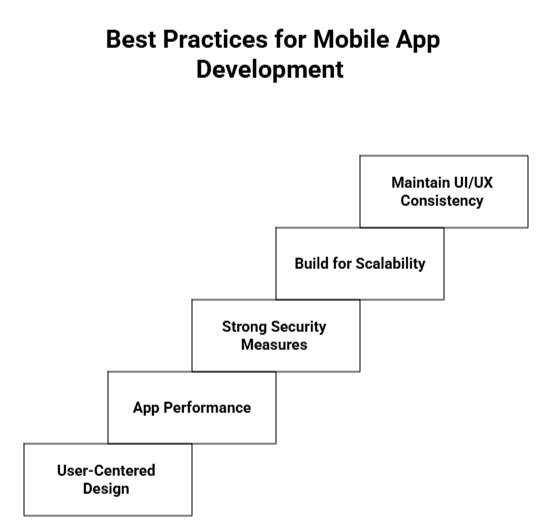
mobile app development best practices

1. Prioritize User-Centered Design

  • Conduct Regular User Testing: Involve real users throughout the design and development process. Conduct usability tests and iterate based on feedback to ensure the app is intuitive and easy to navigate.
  • Design with Accessibility in Mind: Ensure your app is accessible to all users, including those with disabilities, by following WCAG (Web Content Accessibility Guidelines) and using large fonts, contrast ratios, and voiceover support.

2. Focus on App Performance

  • Optimize Speed: A fast app leads to better user retention. Minimize load times by reducing image sizes, compressing data, and optimizing app code.
  • Handle Network Failures Gracefully: Ensure the app can handle network issues and allow users to perform actions offline when possible.

3. Implement Strong Security Measures

  • Use Secure Data Storage: Store sensitive data like passwords and personal information securely, using strong encryption both in transit and at rest.
  • Follow Privacy Regulations: Ensure your app complies with data protection regulations such as GDPR, CCPA, or HIPAA to protect user privacy and avoid legal issues.

4. Build for Scalability

  • Use a Flexible Architecture: Plan for growth by building your app with scalable technology stacks and cloud solutions. This ensures that as your user base expands, your app can handle increased traffic and data.
  • Modular Code: Keep the app’s architecture modular, so individual components can be updated or replaced without affecting the entire system.

5. Maintain Consistency in UI/UX Design

  • Follow Platform Guidelines: Adhere to design guidelines set by iOS (Human Interface Guidelines) and Android (Material Design) to maintain consistency with platform norms.
  • Keep Navigation Simple: Ensure that users can easily navigate through your app. A clean, intuitive design reduces user frustration and increases engagement.

By focusing on these best practices, you’ll be well on your way to developing an app that not only meets user expectations but also scales effectively as your business grows.

Unlock Your App’s Full Potential

Leverage our proven mobile app development strategies to boost user engagement, revenue, and scalability.

Mobile App Development Trends in 2026

As we step into 2026, mobile app development continues to be shaped by emerging technologies like AI, 5G, Blockchain, and IoT.

Here’s a snapshot of the key trends:

1. AI and Machine Learning Integration

In 2026, disruption is accelerating and AI is no longer optional.’, highlights Gartner. They’ve identified that technology trends are no longer just emerging innovations, they’re essential tools for CIOs and IT leaders to build resilient foundations, orchestrate intelligent systems and protect enterprise value.
  • Personalized Experiences: AI will drive advanced personalization in apps, offering tailored content and real-time recommendations based on user behavior.
  • Conversational AI: Voice interfaces and chatbots will become more intuitive, providing seamless, natural user interactions.
  • AI-First Architecture: AI is shifting from an add-on feature to a foundational element, integrated deeply into app design for smarter functionalities.

2. 5G and Enhanced App Performance

  • Faster Speeds & Low Latency: 5G will revolutionize mobile experiences, especially for data-heavy apps like AR/VR, real-time video streaming, and IoT connectivity.
  • Faster Development Cycles: 5G speeds up app testing, real-time iterations, and debugging, accelerating development processes.

3. Blockchain and IoT in Mobile Apps

  • Security and Privacy: Blockchain’s role in securing mobile apps and IoT networks will grow, improving data privacy and transaction security.
  • Edge Computing: IoT apps will leverage edge computing to reduce latency and optimize real-time data processing, making IoT interactions smoother and faster.

Top Mobile App Monetization Strategies in 2026

The mobile app market continues to thrive, with consumer spending expected to hit $150 billion by 2025. In 2024, the U.S. market alone generated $52.3 billion, marking a 16.4% increase from 2023. On average, U.S. consumers spend $184 annually on apps, highlighting the vast potential for revenue generation.

Mobile app monetization statistics reveal that developers are increasingly adopting diverse strategies to tap into this potential. To capitalize on this, app developers are increasingly adopting diverse monetization strategies:

1. Hybrid Monetization

Over 60% of top-grossing apps combine in-app advertising, purchases, and subscriptions to maximize revenue. This hybrid model ensures a steady income stream across multiple channels.

2. In-App Purchases (IAPs)

The most effective monetization method, contributing to 48.2% of total app revenue. IAPs are particularly successful in gaming and lifestyle apps.

3. Subscriptions

Subscriptions remain a strong revenue driver, especially for content-driven or service-based apps. With ongoing content updates, users are more likely to pay for regular access.

How to Choose the Right Mobile App Development Company

Selecting the right development partner is critical to the success of your app. It’s essential to carefully evaluate potential partners based on experience, expertise, and trustworthiness.

Here are some key factors to help you choose the right mobile app development company for your needs:

Evaluating Experience and Portfolio

  • Industry Expertise: Look for a company with proven experience in your industry, ensuring they understand the unique challenges and requirements.
  • Portfolio: Review their portfolio of successful apps that demonstrate their ability to deliver high-quality products aligned with your vision.

Key Questions to Ask Before Hiring

  • Development Process: Understand their approach, ask about project management methodologies, timelines, and milestones.
  • Post-Launch Support: Inquire about their support and maintenance services after the app goes live, including updates, bug fixes, and scaling support.

Red Flags to Watch Out for

  • Unrealistically Low Estimates: If the pricing seems too good to be true, it usually is. Be cautious of companies offering prices significantly lower than the market average.
  • Lack of Proven Track Record: Avoid companies without a solid portfolio or client testimonials, as this indicates a lack of experience and reliability.

Conclusion

There’s a lot to consider when it comes to mobile app development, but at the core of it all is the user experience. Whether you’re developing a native app or  considering a cross-platform app development solution, ensuring that your app is intuitive, functional, and responsive should be your primary focus.

Choosing the right development path, whether it’s hybrid, native, or PWA, depends on your unique goals, budget, and timeline. While there are numerous options available, the expertise of a trusted app development partner like AppVerticals can guide you to the best solution for your needs.

Take the First Step Towards Your Perfect Mobile App Today


Partner with AppVerticals and enroute towards building the best app.

Read More Guides:

Odoo Implementation Process: Complete Step-by-Step Guide (2026)

I’ve led enough ERP implementations to know that most organizations don’t fail on software. They fail on data, process, and change management and the industry data supports that reality. According to research from ERP analysts, 55 %–75 % of ERP projects fail to meet their objectives due to poor execution rather than technology limitations.

Odoo is no different.

Odoo’s modular design across accounting, inventory, CRM, manufacturing, and HR offers real flexibility, but without disciplined implementation, that flexibility becomes a liability. Success rarely depends on features. It depends on how the system is implemented.

This guide explains how Odoo implementations actually unfold in manufacturing, distribution, and service businesses, where projects break down, and what must be controlled before go-live, beyond the sales pitch.


TL;DR: Odoo Implementation Process

A successful Odoo ERP implementation is not a linear setup. It is a controlled business transformation that follows this core flow:

Define → Design → Build → Migrate → Test → Train → Go-Live → Optimize

  1. Set success metrics first (order-to-cash, inventory accuracy, cost control).
  2. Map AS-IS and TO-BE processes before any configuration starts.
  3. Deploy core modules first (Sales, Inventory, Accounting), then expand.
  4. Migrate and validate data in multiple cycles to avoid corrupt go-lives.
  5. Run UAT with real transactions and enforce a 90%+ pass rate.
  6. Go live in phases, not all at once.
  7. Stabilize and optimize for 60–90 days after launch.

Odoo projects fail when organizations skip discovery, rush data migration, or over-customize.
They succeed when process discipline, clean data, and user adoption are treated as first-class deliverables.

Too Many Systems? Odoo Brings It All Together

Unify operations, automate workflows, and run your business from one ERP platform.

Explore Odoo Solutions

What is Odoo Implementation?

Odoo implementation is the structured process of deploying Odoo ERP to manage your business operations, transforming how data flows through finance, supply chain, sales, manufacturing, and HR functions.

It’s not software installation. It’s business process reengineering enabled by technology.

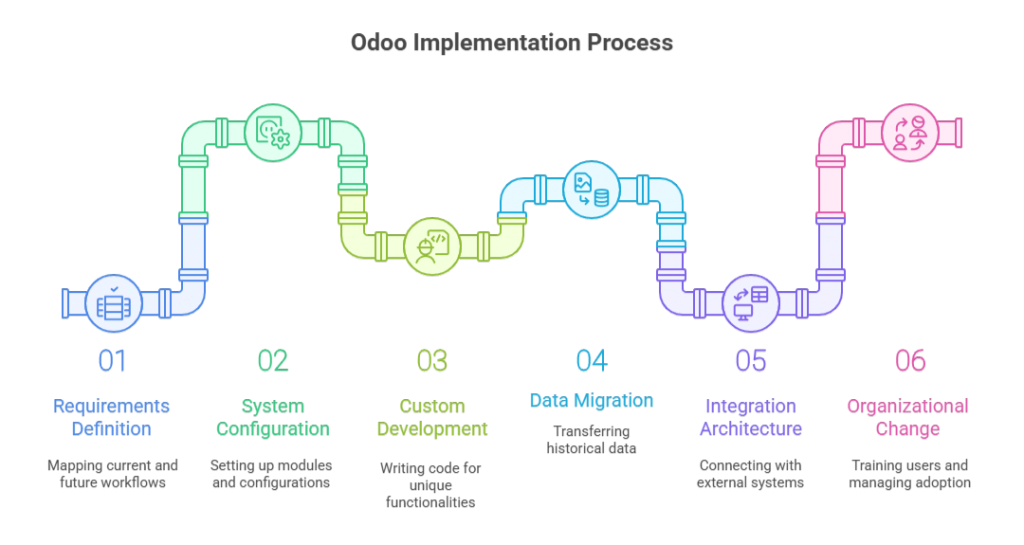
The implementation encompasses six technical workstreams:

Odoo Implementation Process

  1. Requirements definition: Mapping current-state workflows (AS-IS) and designing future-state processes (TO-BE) that leverage Odoo’s native capabilities
  2. System configuration: Setting up Odoo’s 30+ modules, chart of accounts, inventory locations, user permissions, workflow automation, reporting structures, using point-and-click administration tools
  3. Custom development: Writing Python code to extend Odoo functionality when standard features don’t address industry-specific requirements or unique business logic
  4. Data migration: Extracting, cleansing, and loading historical data from legacy systems, customer records, product catalogs, open orders, financial transactions, inventory balances
  5. Integration architecture: Connecting Odoo with payment gateways, EDI networks, shipping carriers, eCommerce platforms, and third-party applications via APIs or middleware
  6. Organizational change: Training users, managing resistance, establishing support structures, and driving adoption across departments

Most organizations underestimate items 1, 4, and 6. They budget for technical configuration but neglect the organizational readiness work that determines whether users actually adopt the new system.

For enterprises requiring enterprise-grade consulting support, implementation becomes a strategic transformation initiative rather than an IT project. The distinction matters: IT projects focus on technology deployment, transformation initiatives focus on business outcomes.

If your organization lacks internal ERP expertise, consider an ERP implementation partner that provides both technical execution and strategic consulting. The best partners challenge your requirements and push back on unnecessary customization.

Note: Think of Odoo implementation as constructing a building. The software is your raw material, steel, concrete, and glass. Implementation is the architectural design, foundation work, and construction management that transforms materials into a functional structure. You can have premium materials and still produce an unusable building if the construction methodology fails.

Get Your Implementation Workstreams Mapped

Receive a scoped checklist for requirements, migration, integrations, and UAT based on your modules and user count.

Talk to an Odoo Consultant

Why ERP Implementation Methodology Matters More Than the Platform

I’ve watched CTOs select ERP systems based on feature matrices and Odoo pricing comparisons, then act surprised when implementations fail. The platform isn’t usually the problem; the execution methodology is.

According to Panorama Consulting’s 2023 ERP Report, 55% of organizations experienced budget overruns during ERP implementation, and 28% reported that their system failed to deliver expected business benefits within the first year. These failures stem from poor requirements definition, inadequate change management, and unrealistic timeline expectations, not software deficiencies.

The Real Cost of Poor Planning

When an Odoo implementation fails, it’s rarely a clean failure. What I see instead:

  • Shadow IT proliferation: Teams revert to Excel, Google Sheets, and departmental databases because the ERP doesn’t match their workflow
  • Data integrity collapse: Without proper validation rules, your accounting team spends hours reconciling transactions that should auto-match
  • User abandonment: Adoption rates below 60% within six months signal that the system was configured for theoretical workflows, not actual business operations
  • Scope creep litigation: I’ve reviewed contracts where implementation partners billed 3x the original estimate because requirements weren’t locked down during discovery

The antidote to these failures is structured implementation discipline. That’s what the rest of this guide covers.


Pre-Implementation Readiness: What to Lock Down Before You Start

Before any Odoo partner logs into your demo environment, you need internal clarity on three questions:

1. What business processes are you standardizing?

This isn’t about documenting what you do today. It’s about defining what you will do after go-live. If your sales team closes deals using five different quote approval paths, you must rationalize those into one or two standard workflows before configuration begins.

I recommend AS-IS/TO-BE process mapping for every department touching the ERP:

  • AS-IS mapping: Document current workflows, system touchpoints, data flows, and pain points (1-2 weeks)
  • TO-BE mapping: Define future-state processes aligned with Odoo’s native functionality (2-3 weeks)

The gap between AS-IS and TO-BE reveals where you need training, where you need customization, and where you need organizational change management.

2. Community or Enterprise, based on operational requirements, not budget

Odoo pricing structures create an illusion that Community edition is “free” and Enterprise is a premium upsell. That’s not how you should evaluate the decision.

Choose Community edition if:

  • You have internal Python/PostgreSQL development resources
  • You’re deploying fewer than 5 core modules
  • You don’t need multi-company consolidation or advanced studio customization
  • Your business operates during standard hours with tolerance for delayed support responses

Choose Enterprise edition if:

  • You require SLA-backed support with response time guarantees
  • You need Odoo Studio for no-code workflow customization
  • You’re running 24/7 operations where downtime has direct revenue impact
  • You need features like IoT box integration, advanced MRP, or automated marketing

Budget isn’t the constraint—operational risk tolerance is. I’ve seen companies select Community to save $15/user/month, then spend $100K on custom development to replicate features included in Enterprise.

3. Implementation partner selection criteria

Your implementation partner becomes your de facto ERP Program Manager for 4-6 months. Vet them like you’re hiring a VP of Operations.

Evaluation criteria I use:

Criterion What to Validate Red Flags
Industry Experience Implementations in your sector with similar process complexity Generic “we work with all industries” positioning
Odoo Certification Status Gold or Silver Odoo partner with certified developers No visible certification or partner listing on Odoo.com
Post-Go-Live Support Model Dedicated support team, SLAs, and escalation paths “We’ll train your team to self-support”
Methodology Transparency Documented phases, deliverables, and sign-off gates Vague “agile approach” without a work breakdown structure
Reference Checks 3+ client references from projects delivered in the past 12 months Only testimonial quotes, no live client references

I also request code review access if they’ve built custom modules for previous clients. Code quality tells you whether you’re hiring engineers or scripters.


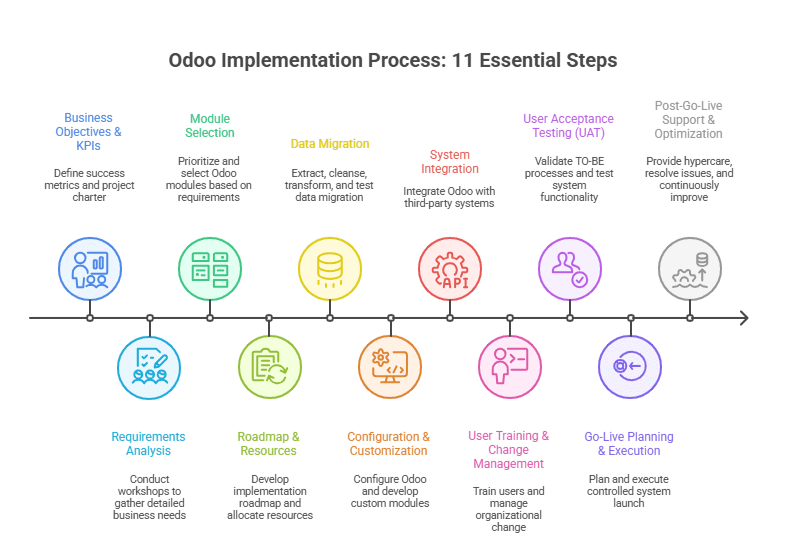
The Complete Odoo Implementation Process: 11 Essential Steps

Most Odoo partners present implementation as a linear sequence: requirements → configuration → training → go-live. That’s a simplified sales narrative.

Odoo Implementation Process: 11 Essential Steps

Real implementations are iterative, with feedback loops between phases. Here’s how I structure Odoo ERP implementation projects:

Step 1: Define Clear Business Objectives and KPIs

Duration: 1 week
Owner: Executive sponsor + ERP Program Manager

Every implementation starts with a question: What does success look like 12 months after go-live?

I document this in a project charter with measurable KPIs:

  • Operational efficiency: Order-to-cash cycle time reduction (target: 20-30%)
  • Data visibility: Real-time inventory accuracy (target: 95%+)
  • Cost reduction: Eliminated redundant software licenses (quantify current spend)
  • Process standardization: Reduced quote approval paths from 5 to 2

These KPIs become your implementation guardrails. When stakeholders request custom features, you evaluate them against these success metrics. If a request doesn’t advance a defined KPI, it’s scope creep.

Step 2: Conduct Comprehensive Requirements Analysis

Duration: 3-4 weeks
Owner: Implementation partner + department heads

This is where 80% of implementation failures are prevented—or locked in.

I conduct structured requirements workshops with each department:

Finance/Accounting:

  • Chart of accounts structure and GL mapping
  • Revenue recognition rules (especially for subscription or project-based businesses)
  • Multi-currency requirements and FX revaluation policies
  • Bank reconciliation workflows and payment processing integrations

Inventory/Supply Chain:

  • Warehouse topology and stock location hierarchy
  • Replenishment rules (reorder points, make-to-stock vs. make-to-order)
  • Lot/serial number tracking requirements
  • Landed cost allocation methods

Sales/CRM:

  • Lead qualification and opportunity management workflows
  • Quote-to-order conversion process and approval hierarchies
  • Pricing rules (volume discounts, customer-specific pricing, contracts)
  • Sales commission calculation logic

Manufacturing (if applicable):

  • Bill of materials (BOM) structure and routing definitions
  • Work order scheduling and capacity planning requirements
  • Quality control checkpoints and non-conformance handling
  • Subcontracting and outsourced operation workflows

Each workshop produces a requirements traceability matrix linking business requirements to Odoo configuration decisions. This document becomes your scope boundary and change control reference.

Step 3: Select Odoo Modules Based on Business Needs

Duration: 1 week
Owner: Solution architect + IT lead

Odoo’s modular architecture means you don’t deploy everything at once. I prioritize modules based on dependency chains and business criticality.

Core foundation modules (Phase 1 deployment):

  • Sales / CRM
  • Inventory / Warehouse Management
  • Accounting / Invoicing
  • Purchase Management

Secondary modules (Phase 2 deployment, 2-3 months post-go-live):

  • Manufacturing (MRP)
  • Project Management
  • HR / Payroll
  • Quality Management

Tertiary modules (Phase 3 deployment, 6+ months post-go-live):

  • eCommerce / Website
  • Marketing Automation
  • Maintenance
  • Field Service

This phased approach prevents overwhelming users and allows you to stabilize core operations before adding complexity.

Module selector guide:

Business Process → Odoo Module → Dependencies
Quote-to-Cash → Sales + Invoicing → Requires: CRM (lead source), Inventory (availability check)
Procure-to-Pay → Purchase + Inventory → Requires: Accounting (AP posting)
Make-to-Order → Manufacturing + Inventory → Requires: Sales (demand signal), Purchase (component procurement)
Project Delivery → Project + Timesheet → Requires: Sales (contract), Invoicing (billing milestones)

Step 4: Implementation Roadmap and Resource Allocation

Duration: 1 week
Owner: ERP Program Manager

I build implementation roadmaps using a work breakdown structure (WBS) with defined deliverables, owners, and dependencies.

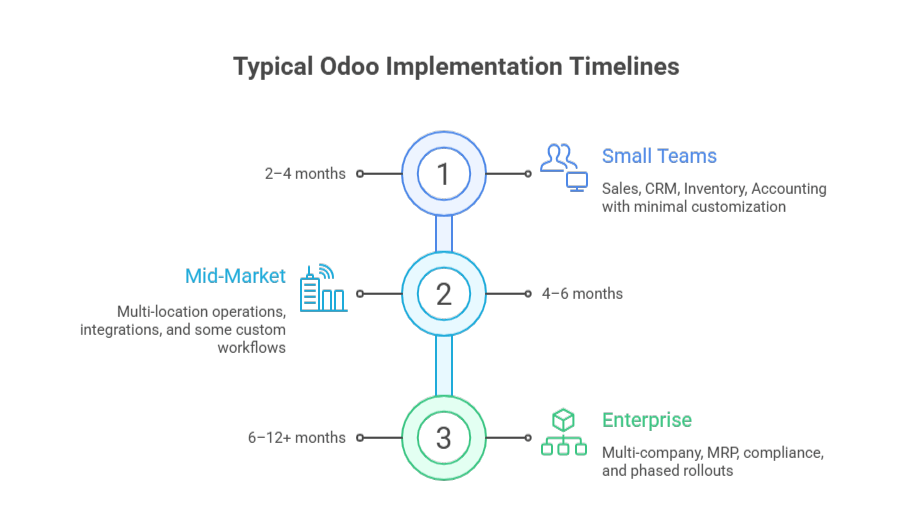
Sample roadmap for a mid-size distribution company (4-6 month timeline):

Week Phase Key Deliverables Go / No-Go Gate
1–4 Discovery & Requirements Signed requirements document, TO-BE process maps Executive sign-off on scope
5–8 Data Migration Preparation Data extraction, cleansing rules, validation scripts Data quality audit passed
9–14 Configuration & Development Configured Odoo environment, custom module development UAT environment ready
15–18 User Training & UAT Training materials, UAT test cases executed >90% test case pass rate
19–20 Go-Live Preparation Cutover plan, rollback procedures, support rota Go-live readiness checklist
21–22 Go-Live & Stabilization Production launch, hypercare support Day-7 system health check
23–26 Post-Go-Live Optimization Issue resolution, process refinement Month-1 KPI review

Resource allocation includes both internal FTEs and partner consultants. I typically see 20-30% FTE commitment from department heads during requirements and UAT phases. This isn’t a “set it and forget it” project.

Step 5: Data Migration Strategy and Execution

Duration: 4-6 weeks (parallel with configuration)
Owner: Data migration lead + IT team

Data migration is your highest technical risk in any Odoo ERP implementation.

I follow a four-stage migration process:

Stage 1: Data extraction and profiling

  • Extract data from legacy systems (ERP, CRM, spreadsheets, Access databases)
  • Profile data quality: completeness, consistency, duplicates, referential integrity
  • Document data ownership and authoritative sources for each entity type

Stage 2: Data cleansing and transformation

  • Deduplicate customer and vendor records
  • Standardize product codes, UOMs, and categorization
  • Map legacy chart of accounts to the new Odoo GL structure
  • Transform data formats to match Odoo import templates

Stage 3: Migration testing (3 cycles minimum)

  • Cycle 1: Migrate customers, vendors, products → validate referential integrity
  • Cycle 2: Migrate transactional history (last 12-24 months) → validate balances
  • Cycle 3: Full migration rehearsal with production data snapshot → validate go-live readiness

Stage 4: Cutover and validation

  • Final data freeze in the legacy system
  • Production migration execution (typically during the weekend or off-hours)
  • Post-migration validation: balance reconciliation, transaction integrity checks

I allocate 30-40% of the total implementation effort to data migration. Underestimate this, and you’ll go live with corrupt data that destroys user trust in the new system.

Case Study: A $40M industrial equipment distributor I worked with discovered during migration that 35% of their product master data had incomplete cost records. They’d been running on institutional knowledge and Excel lookups for years. We spent an extra 3 weeks cleansing cost data before migration, but that investment prevented thousands of hours of post-go-live data corrections.

Avoid a “Dirty Data” Go-Live

Get a migration plan that includes validation cycles, reconciliation checks, and cutover controls.

Request a Data Migration Plan

Step 6: System Configuration and Customization

Duration: 5-7 weeks
Owner: Odoo implementation partner + internal IT

Configuration means setting up Odoo using native features. Customization means writing Python code to extend functionality.

The 80/20 rule applies: aim for 80% configuration, 20% customization. Every custom module you build creates technical debt—ongoing maintenance, upgrade complexity, and documentation burden.

Configuration priorities:

  • Company setup: Multi-company structure, fiscal year, base currency, tax configuration
  • User roles and permissions: Access control lists (ACLs) by role, department, data visibility rules
  • Workflow automation: Approval routing, automated actions, scheduled tasks
  • Reporting and dashboards: KPI views, management reports, operational metrics

When to customize (sparingly):

  • Industry-specific compliance requirements not covered by standard modules
  • Complex pricing algorithms that can’t be configured through standard price lists
  • Integration with proprietary systems (legacy WMS, custom-built tools)
  • Unique business logic that differentiates your competitive position

For customization work, I require full-stack product engineering teams that follow Odoo’s development guidelines and use version-controlled repositories. Custom code without proper documentation becomes a liability during upgrades.

Config vs. custom decision tree:

Need new functionality?
├─ Is it available in standard Odoo module?
│  └─ YES → Use standard module (configure, don't customize)
├─ Is it available in Odoo App Store?
│  └─ YES → Evaluate third-party app (test before committing)
├─ Can workflow process change accommodate standard features?
│  └─ YES → Revise business process (most cost-effective option)
├─ Is it a regulatory/compliance requirement?
│  └─ YES → Approve customization (document compliance mapping)
└─ Is it a competitive differentiator worth ongoing maintenance cost?
   └─ YES → Approve customization (with TCO analysis)
   └─ NO → Reject or defer to Phase 2

Step 7: Third-Party System Integration

Duration: 3-4 weeks (parallel with configuration)
Owner: Integration architect + IT team

Most organizations don’t run pure Odoo, they integrate with payment gateways, EDI networks, shipping carriers, eCommerce platforms, and industry-specific applications.

Integration patterns I use:

Integration Type Method Use Case
Real-Time API REST / JSON or XML-RPC Payment processing, CRM synchronization, eCommerce order imports
Scheduled Batch SFTP file exchange or API polling EDI transactions, bank statement imports, data warehouse exports
Direct Database PostgreSQL replication or database views Business intelligence tools and reporting platforms
Middleware / iPaaS Zapier, Make, Celigo Low-code integrations for non-critical or auxiliary workflows

For companies with legacy system modernization needs, I sometimes run Odoo in parallel with the existing ERP for 30-60 days before full cutover. This dual-run period validates data sync accuracy and gives teams confidence before decommissioning legacy systems.

Step 8: User Training and Change Management

Duration: 3-4 weeks
Owner: Change management lead + department heads

Training isn’t about showing people where buttons are. It’s about helping them understand why their daily work changes and how to execute new processes.

I structure training in three tiers:

Tier 1: Executive briefing (2 hours)

  • System overview and strategic benefits
  • Dashboard and reporting access
  • Escalation paths for issues

Tier 2: Power user training (2-3 days)

  • Deep functional training by module
  • Admin capabilities, workflow configuration, and troubleshooting
  • These users become internal support resources post-go-live

Tier 3: End user training (4-8 hours)

  • Role-specific workflows and daily tasks
  • Hands-on exercises using test data that mirrors real scenarios
  • Quick reference guides and video tutorials

Training should happen 2-3 weeks before go-live, close enough that knowledge is retained, far enough that there’s time for practice in the UAT environment.

Change management runs parallel to training. I send weekly email updates from the executive sponsor explaining project progress, upcoming changes, and why the new system matters. People resist change when they don’t understand the “why.”

Step 9: User Acceptance Testing (UAT)

Duration: 2-3 weeks
Owner: Business process owners + QA lead

UAT validates that Odoo executes your defined TO-BE processes correctly. This isn’t software testing—it’s business process validation.

I create test scenarios based on real transaction patterns:

Sales order to invoice workflow:

  1. Create a quote with volume discount pricing
  2. Send a quote for customer approval
  3. Convert quote to sales order
  4. Reserve inventory and generate a delivery order
  5. Confirm shipment and generate invoice
  6. Process payment and reconcile in accounting

Each scenario includes expected results and acceptance criteria. For example: “Invoice should reflect volume discount, payment terms should match customer master data, accounting entries should post to correct GL accounts.”

UAT pass rate should exceed 90% before proceeding to go-live. Any critical or high-priority defects must be resolved—no exceptions. I’ve delayed go-live decisions three times in my career when UAT revealed data integrity or configuration issues. Every time that delay prevented a catastrophic production failure.

Step 10: Go-Live Planning and Execution

Duration: 1-2 weeks
Owner: ERP Program Manager + IT operations

Go-live isn’t a single event, it’s a controlled deployment with defined phases, rollback triggers, and support coverage.

Go-live checklist (non-exhaustive):

  • Final data migration completed and validated
  • User accounts provisioned with correct permissions
  • Integration endpoints tested in the production environment
  • Backup and rollback procedures documented and tested
  • Hypercare support schedule published (24/7 coverage for first 48-72 hours)
  • Executive sponsor sign-off on go-live decision

I prefer phased go-lives when possible:

  • Option 1: By business unit: Launch Odoo in one warehouse/region, stabilize for 30 days, then expand
  • Option 2: By module: Launch sales + inventory first, add manufacturing 60 days later
  • Option 3: Parallel run: Operate legacy and Odoo systems simultaneously for 2-4 weeks

Full big-bang cutover is the highest risk and should only happen when business operations are simple enough to validate quickly (typically sub-50 users with limited module scope).

Case Study: A $120M food distributor I advised wanted to launch Odoo across 4 warehouses simultaneously. I recommended a phased go-live starting with their smallest site. Good decision, we discovered a critical issue with lot number traceability during the first week. We fixed it before rolling out to the other three sites, preventing a compliance failure that could have triggered FDA scrutiny.

Step 11: Post-Go-Live Support and Continuous Improvement

Duration: Ongoing (3-6 months intensive support)
Owner: Internal support team + implementation partner

The first 30 days post-go-live are hypercare—intensive monitoring and rapid issue resolution.

I establish a tiered support model:

  • Tier 1 (Internal help desk): Password resets, navigation questions, basic troubleshooting
  • Tier 2 (Power users): Workflow questions, report generation, configuration adjustments
  • Tier 3 (Implementation partner): System defects, integration failures, performance issues

During hypercare, I run daily standups (15 minutes) to review open issues, user feedback, and system performance metrics. These standup meetings replace formal status reports and enable rapid decision-making.

After stabilization (30-60 days), shift to continuous improvement:

  • Monthly KPI reviews: Compare actual performance against success metrics defined in Phase 1
  • Process optimization: Identify workflow bottlenecks and refine configurations
  • Training refreshers: Address knowledge gaps revealed during production use
  • Feature rollout: Enable additional Odoo modules as organization readiness improves

The implementation partner relationship doesn’t end at go-live. I typically maintain a retainer for the first 6-12 months to support optimization, minor enhancements, and periodic health checks.


How long does an Odoo implementation take?

Odoo timelines depend on scope complexity, data quality, and organizational readiness, not company size.

Typical Odoo Implementation Timelines

Typical ranges

  • Small teams (10–50 users): 2–4 months
    Sales, CRM, Inventory, Accounting, with minimal customization

  • Mid-market (50–250 users): 4–6 months
    Multi-location operations, integrations, and some custom workflows

  • Enterprise (250+ users): 6–12+ months
    Multi-company, MRP, compliance, and phased rollouts

Projects often extend to 12–18 months when data is fragmented, customization is high, or stakeholders are not fully dedicated.

See the full timeline by business size and complexity: Odoo Implementation Timeline


Odoo Implementation Cost: Beyond License Fees

Odoo license pricing is straightforward (Community is free to self-host; Enterprise starts around $24.90/user/month), but licenses are usually ~20–30% of total year-one cost. The bigger drivers are implementation services, migration, integrations, and training.

Typical mid-market budget mix

  • Implementation services: 40–50% (discovery, configuration, custom development, PM)
  • Licenses: 15–25% (Enterprise subscription)
  • Data migration: 10–15% (extract, cleanse, validate)
  • Integrations: 10–15% (APIs, middleware, connectors)
  • Training: 5–10% (materials + sessions)
  • Infrastructure: 5–10% (cloud/on-prem)
  • Contingency: 10–15% (scope changes, extended UAT, stabilization)

Ballpark ranges

  • ~$150K–$300K year-one for a ~100-user mid-market rollout
  • $500K–$2M+ for multi-entity / complex manufacturing / heavy integration programs

Hidden costs buyers miss

  1. Internal time (department heads + SMEs can easily hit 500–1,000 hours)
  2. Parallel run/cutover overhead (legacy + Odoo running together)
  3. Post-go-live optimization (reserve ~15–20% of budget for the first-year refinements)

See the full breakdown: Odoo Implementation Cost


Common Implementation Failures and How to Prevent Them

Most Odoo ERP failures are caused by execution mistakes, not by the platform itself.

  • Unclear requirements lead to systems that technically work but do not match real finance, inventory, or sales workflows. This is prevented by defining measurable acceptance criteria, TO-BE process maps, and stakeholder sign-off before configuration begins.
  • Poor data quality is the fastest way to destroy ERP credibility. Migrating years of inconsistent, duplicate, or incomplete records leads to broken reporting and accounting errors. Successful projects audit, clean, and validate data in multiple cycles before going live.
  • Low user adoption causes teams to abandon Odoo for spreadsheets and email. This happens when users are not involved early or trained on real workflows. High-adoption projects combine role-based training, executive sponsorship, and hands-on UAT.
  • Excessive customization creates technical debt, upgrade risk, and long-term instability. Strong Odoo implementations favor configuration over custom code, approve customization only when it delivers business or compliance value, and control scope through formal change management.

These controls turn Odoo from a risky software rollout into a stable, scalable ERP system.


Odoo Implementation Best Practices from Expert Partners

Based on 50+ implementations across manufacturing, distribution, professional services, and eCommerce, here are the practices that separate successful projects from troubled ones:

Practice 1: Lock scope before configuration starts

No configuration work until requirements document is signed by all department heads. Changes after configuration begins go through formal change control with impact assessment, re-baselining, and executive approval. This single practice prevents 60% of budget overruns.

Practice 2: Migrate data early and often

Don’t wait until go-live week for your first migration attempt. I run 3-4 migration rehearsals starting 8-10 weeks before go-live. Each cycle reveals data quality issues, giving you time to remediate rather than panic-fixing during cutover weekend.

Practice 3: Configure for 80% of transactions, train for the other 20%

Don’t over-engineer Odoo to handle every edge case and exception scenario. Configure for your high-volume, standard transactions. Train users on manual workarounds for the 20% of exceptions. This prevents configuration bloat and maintains system simplicity.

Practice 4: Deploy support infrastructure before go-live, not after

Establish your tiered support model, help desk ticketing system, and escalation procedures 2-3 weeks before go-live. Have support team shadow during UAT so they’re trained on common issues. The worst time to figure out support escalation is during a production incident on Monday morning.

Practice 5: Measure KPIs weekly for first 90 days

Track the success metrics you defined in Step 1, weekly, not monthly. If order processing time is increasing or inventory accuracy declining, you need to know immediately so you can intervene before users lose confidence. Weekly KPI reviews create accountability and enable rapid course correction.

Practice 6: Resist customization unless it’s a genuine differentiator

Every custom Python module you build creates technical debt, including ongoing maintenance, upgrade testing, and documentation burden. Challenge every customization request: “Can we achieve this through configuration and process change?” Reserve custom development for regulatory requirements or competitive advantages worth the 5-year TCO.

Practice 7: Maintain implementation partner relationship post-go-live

Don’t treat go-live as the end of partner engagement. I maintain support retainers for 6-12 months post-launch. This gives you access to experts who understand your configuration when optimization needs arise. Trying to bring in new consultants 6 months later costs more—they have to reverse-engineer your system.

Practice 8: Document configuration decisions and business rules

Create a “configuration guide” that explains why settings were chosen, what business rules they enforce, and what happens if they’re changed. When your ERP Program Manager leaves 18 months later, this documentation prevents institutional knowledge loss. Include: approval hierarchies, pricing logic, reorder calculations, and GL account mappings.

Organizations seeking guidance on these practices should partner with proven ERP implementation specialists who can provide both technical execution and strategic advisory throughout the project lifecycle.


Your Odoo Implementation Checklist

Use this as a readiness assessment before starting your project:

Strategic Readiness

  • Executive sponsor identified and actively engaged
  • Success metrics defined with measurable KPIs
  • Implementation budget approved (including contingency)
  • Project timeline validated against business calendar (avoid year-end, peak season)

Organizational Readiness

  • ERP Program Manager assigned (dedicated role, not part-time addition)
  • Department heads committed to 20-30% FTE participation
  • Change management plan developed
  • User resistance risks identified and mitigation strategies defined

Technical Readiness

  • Current infrastructure assessed (network bandwidth, server capacity, database performance)
  • Integration requirements documented for all third-party systems
  • Data quality audit completed with cleansing plan
  • Backup and disaster recovery procedures defined

Partner Readiness

  • Implementation partner selected based on technical criteria, not just price
  • Statement of work (SOW) reviewed by legal with clear scope boundaries
  • Partner team assigned (not just proposed) with resumes and availability confirmed
  • Post-go-live support model and SLA documented in contract

Make Odoo Run Your Business, Not Your Team

If your implementation plan isn’t locked on requirements, data, and UAT gates, you’re taking avoidable risk.

Get Expert Help

Conclusion: Odoo Implementation Discipline Determines Outcome

I’ve led successful Odoo implementations for $10M companies and failed ones for $500M enterprises. The difference wasn’t budget or technical complexity—it was execution discipline.

The organizations that succeed treat Odoo implementation as business process reengineering enabled by software, not as a software installation project. They invest in requirements rigor, data quality, change management, and user adoption. They challenge customization requests and embrace standard processes.

The organizations that fail treat it as an IT initiative, underestimate data migration complexity, skip change management, and customize recklessly.

If you’re evaluating Odoo or fixing a troubled implementation, focus less on feature comparisons and more on your organizational readiness. The best ERP system poorly implemented delivers worse outcomes than a mediocre system well implemented.

Before you start: define your success metrics, secure executive sponsorship, and commit to process discipline. Then find an implementation partner who will challenge your assumptions and hold you accountable to best practices, not just execute whatever you request.

Odoo can absolutely run your business. But only if you run the implementation correctly.

More Related Guides

Top Challenges in Education App Development in 2026

By 2027, most education apps are turning into AI-powered SaaS products with real-time data pipelines, video, personalization engines, and regulatory obligations.

What I’m seeing across the market:

  • AI is now built into over 70% of new EdTech platforms
  • Mobile traffic dominates, especially in K-12, test prep, and emerging markets
  • Cloud and AI inference costs are now one of the biggest operational risks
  • Enterprise buyers and school systems are demanding serious security, uptime, and compliance

That’s why teams start hitting the same wall: slow releases, unstable exam days, exploding cloud spend, security red flags, and engineering teams that can’t keep up.

When six-figure or seven-figure budgets are on the table, the real questions aren’t:
“Can we build this?”

They’re:

  • Will this architecture still work when usage triples?
  • Can we pass procurement and compliance reviews?
  • How long will this take and what happens if it slips?

Those are the real education app development challenges in 2026, and they’re the difference between a platform that scales and one that quietly falls behind.

In this article, I’ll walk through the actual challenges EdTech teams face when building or modernizing education apps in 2026.

Education App Development Challenges at a Glance

Education app development in 2026 is shaped by five forces: user engagement, accessibility, assessment integrity, AI workloads, and enterprise data compliance. Platforms fail when any of these are treated as afterthoughts. Teams that design for personalization, low-bandwidth access, secure assessments, modular cloud architecture, and predictable cost from the start can scale without rewrites, outages, or blocked enterprise deals.

What Are the Biggest Technical and Business Challenges in Scaling an Education App in 2026?

The hardest part of scaling an education app in 2026 is keeping cost, performance, and compliance stable while usage, AI workloads, and data volume explode at the same time. Global EdTech expected to surpass USD 572.08 billion by 2034. 

Once a learning platform passes early traction, every design shortcut becomes expensive. I see this constantly when EdTech teams go from tens of thousands of learners to hundreds of thousands or more.

These are the challenges that actually determine whether the platform survives.

The real scaling challenges in 2026

  • Traffic does not grow smoothly. Exams, onboarding weeks, and live classes create spikes that are often five to ten times normal usage.
  • AI never sleeps. Personalization, recommendations, and automated grading run inference and data processing even when users are idle.
  • Cloud bills scale faster than revenue. Storage, logs, embeddings, and video traffic keep growing even when engagement drops.
  • Integrations become single points of failure. SIS, LMS, SSO, video, and proctoring systems all have to work in real time.
  • Compliance slows everything down. GDPR, FERPA, and regional rules require audit trails, access control, and data locality.
  • Engineering velocity collapses. When services are tightly coupled, every change risks breaking something critical.

That is what a learning platform really looks like once it scales.

Why Education Platforms Break at Scale in 2026

Most teams think they have a performance problem. What they really have is a design problem. By 2026, AI workloads in education software are growing at more than thirty percent per year, and global EdTech usage keeps climbing. 

That means platforms are hit with both burst traffic and constant background compute. If those workloads run on the same services that handle exams, logins, and progress tracking, the system becomes unpredictable.

What I see when that happens:

  • Exam days cause cascading timeouts
  • Databases become the choke point
  • Quick fixes turn into permanent overprovisioning
  • Cloud spend grows faster than users
  • Teams spend more time firefighting than shipping

This is why platforms that worked fine in their first growth phase suddenly start missing SLAs, losing enterprise deals, and burning cash.

How Teams Reduce Risk While Scaling Learning Platforms

The teams that scale cleanly do not chase optimization. They change the shape of the system.

What I implement before the next growth wave

  • Separate AI from core learning flows so inference spikes never slow down exams or sessions
  • Use event driven pipelines for analytics, recommendations, and notifications
  • Design the data layer for compliance with isolation, encryption, and auditability
  • Add cost visibility per feature and per tenant instead of just a total cloud bill
  • Treat integrations as products with retries, monitoring, and contracts
  • Load test real scenarios like exam days and mass onboarding

When those pieces are in place, scaling stops being a gamble. The platform becomes predictable, costs become manageable, and teams can grow without betting the business on every release.

How User Engagement, Accessibility, and Assessment Integrity Challenges Impact the Success of Education Apps in 2026?

In 2026, the biggest “learning” challenges in education apps are also the biggest product and platform risks. The most common failure modes are straightforward: learners do not stay engaged, large segments cannot reliably access the product, and assessments lose credibility when integrity is weak. How User Engagement, Accessibility, and Assessment Integrity Challenges Impact the Success of Education Apps in 2026?

If you build for features without solving these three, growth stalls even if the engineering is strong.

Below is how these challenges show up in real education products, and what experienced EdTech teams design for.

User Engagement and Retention

  • Engagement drops after the first sessions when learning paths feel generic, progress feels unclear, or content is not responsive to skill level
  • Basic gamification stops working once the novelty fades, especially for adult learning and workforce upskilling
  • Personalization is now expected, but it must be tied to measurable outcomes, not just recommendations
  • Information overload is real: too many features, too many options, and too little guidance kills completion rates
  • Implication: low engagement wastes cloud, video, and AI spend because your cost base keeps running while learners churn

Accessibility and the Digital Divide

  • Device and network reality is uneven: many learners use older phones, unstable Wi-Fi, or limited data plans
  • Offline and low bandwidth support is a retention feature, not a nice to have, especially for K-12 and emerging markets
  • Accessibility requirements are non negotiable for many buyers: screen reader support, captions, keyboard navigation, and readable UI patterns
  • Cross platform consistency is hard: “works on my phone” is not enterprise grade readiness
  • Implication: supporting accessibility and low connectivity expands your mobile sync, storage, QA, and observability workload

Assessment and Academic Integrity

  • Online assessments are easy to game without identity checks, proctoring, or integrity signals
  • The credibility of credentials depends on trust: if results are questioned, the product loses adoption in schools and enterprise training
  • Secure assessment introduces real infrastructure: session control, audit trails, anomaly detection, and sometimes video streams
  • AI makes integrity harder: plagiarism and answer generation require stronger question design and monitoring
  • Implication: integrity requirements affect architecture, data retention, security posture, and operating costs

My practical takeaway from EdTech work

When these three are treated as “product concerns,” teams ship features and still struggle to grow. When they are treated as first class platform requirements, retention improves, enterprise trust increases, and scaling becomes predictable. 

In 2026, engagement, accessibility, and integrity are not side problems. They are the foundation that determines whether an education app becomes a durable learning platform.

How Do AI, Data Privacy, and Cloud Infrastructure Impact Education App Costs and Timelines?

Institutions using adaptive AI technology report up to 34% improvement in student retention and 28% higher course completion, underscoring the importance of engagement design. In 2026, the fastest way to blow an EdTech budget or miss a launch date is to underestimate how tightly AI, data privacy, and cloud infrastructure are now linked.

Education apps no longer run on simple request and response patterns. They operate continuous data and inference pipelines that process learner behavior, content, and assessments in real time. Every one of those layers adds cost, latency, and delivery risk.

The teams that struggle are the ones that treat AI features, compliance, and infrastructure as separate work streams. In practice, they behave like a single system.

How these three forces drive cost and timelines

Driver What it adds to the platform How it affects cost and delivery
AI personalization Model hosting, inference, embeddings, real time scoring Increases compute, storage, and operational complexity
Student data privacy Encryption, access control, audit logs, data locality Adds engineering work and slows releases if not designed early
Cloud infrastructure Auto scaling, observability, backups, failover Determines whether usage spikes become outages or just higher bills

When these are designed together, platforms scale predictably. When they are bolted on, teams end up rebuilding parts of the system just to keep it running.

AI Personalization and Its Impact on Cloud Spend

AI has moved from a differentiator to a baseline expectation. Recommendation engines, adaptive quizzes, tutoring bots, and automated grading all rely on constant inference and data processing. What most teams discover too late is that these systems run even when learners are idle.

From what I see in production platforms, every active learner generates:

  • Inference requests for recommendations and feedback
  • Embedding and vector searches for personalization
  • Logs and analytics events for monitoring and improvement

Multiply that by thousands of concurrent users and the cloud bill no longer scales linearly. It accelerates. Without workload separation, AI traffic competes with core learning flows, creating both cost spikes and latency.

Data Compliance and Its Effect on Delivery Speed

Education apps carry some of the most sensitive data in software. Student identities, performance records, behavioral data, and in many cases minors’ information must be handled under GDPR, FERPA, and regional privacy laws. In 2026, enterprise and institutional buyers run these checks before they sign.

What slows teams down is not regulation itself. It is discovering that the data model cannot support it.

Requirement What It Demands Where Teams Lose Time
GDPR Right to delete, audit trails, data locality Data scattered across services and backups
FERPA Role-based access and logging Weak identity and authorization models
Enterprise security Encryption, incident response, traceability Retrofitting controls into live systems

When compliance is designed into the architecture, features ship faster. When it is added later, every release becomes a legal and engineering negotiation. 

That is why privacy and infrastructure decisions are now some of the biggest drivers of both cost and time to market in education app development.

What Risks to Expect When Modernizing Legacy Education Platforms in 2026?

The biggest risk in modernizing a legacy education platform in 2026 is not choosing the wrong framework. It is carrying yesterday’s assumptions into a system that now has to support AI, mobile scale, real time learning, and strict data regulation

Most legacy EdTech systems were built for content delivery and basic tracking. They were not designed for continuous personalization, enterprise security reviews, or millions of concurrent users.

In my experience, modernization projects fail when teams underestimate how deeply business logic, data models, and integrations are intertwined. 

The result is budget overruns, timeline slippage, and platforms that still cannot scale after months of work.

Risk Area What It Looks Like in EdTech Why It Hurts
Tightly coupled code LMS, payments, and reporting share logic and data Small changes break core flows
Legacy data models Student and progress data hard to migrate Long cutovers and data loss risk
Outdated integrations SIS, SSO, and content systems lack clean APIs Features stall and support costs rise
Hidden business rules Years of one-off workflows Regression bugs and rework
Weak test coverage No safety net for changes Releases become risky

These risks compound when AI, analytics, and mobile features are added on top of a brittle core.

When Refactoring Fails and Rebuilding Wins

Refactoring feels safer because it promises gradual change. In reality, it only works when the system is already modular. When everything depends on the same database and service layer, refactoring just moves complexity around.

When Refactoring Fails and Rebuilding Wins

From what I have seen, rebuilding wins when the existing platform cannot be cleanly split into independent parts. It lets teams design for AI workloads, compliance, and scale instead of dragging legacy constraints forward.

How Technical Debt Increases Total Cost of Ownership

Technical debt in education platforms does not just slow engineers down. It directly raises operating cost and business risk.

Area Low Debt Platform High Debt Platform
Feature delivery Predictable, incremental Slow and risky
Cloud spend Scales with usage Grows faster than users
Compliance Designed into the system Requires constant retrofits
Support load Low and stable High and unpredictable

How Do High-Traffic Education Platforms Maintain Performance, Compliance, and AI-Driven Personalization?

A majority of educators (about 60%) now use AI-based tools regularly, showing that scalable, performance-aware AI integration is a baseline requirement. High-traffic education platforms in 2026 stay reliable by separating real-time learning, AI workloads, and regulated data into distinct layers.

When everything runs on the same services and databases, performance drops during exams, compliance becomes fragile, and personalization gets expensive. 

Modern LMS implementation is no longer just about delivering content. It is about running a distributed system that can handle burst traffic, continuous AI processing, and strict data governance at the same time.

The platforms that survive heavy growth do three things consistently: isolate workloads, control data access, and monitor cost and performance in real time. 

That is what allows millions of learners to use the system without outages, audit failures, or unpredictable cloud bills.

How High-Traffic Learning Apps Stay Fast and Secure

Real-time education platforms must handle logins, classes, exams, chat, and video simultaneously. Speed and security come from how requests flow through the system.

How High-Traffic Learning Apps Stay Fast and Secure

This pattern keeps critical learning paths fast while pushing heavy processing out of the user request. Security is enforced at the gateway and service layer so every call is authenticated, encrypted, and monitored, even when traffic spikes.

How Data and AI Are Isolated for Compliance

Compliance fails when sensitive student data and experimental AI systems live together. In 2026, platforms must support GDPR, FERPA, and enterprise security reviews while still using data to power personalization.

Stack map

  • Secure data zone for student identities, grades, and records
  • Processing zone for analytics and reporting
  • AI zone for models, embeddings, and personalization
  • Controlled data pipelines with logging and access control between zones

This separation allows AI to improve learning without exposing regulated data. It also keeps audits, institutional sales, and enterprise deployments moving instead of getting blocked by security concerns.

What Is the Best Architecture and Cloud Strategy for Education Apps in 2026?

The best architecture for education apps in 2026 is one that lets you scale learning, AI, and compliance independently while keeping education app development cost under control

After working on multiple EdTech platforms, I have seen that the winners are always built on cloud-native, modular systems where no single workload can take down or financially dominate the rest of the platform.

Education apps now run three very different workloads at once: real-time learning, continuous AI inference, and regulated student data. 

If those are not isolated and auto-scaled separately, performance degrades and costs spiral. A strong cloud strategy is what keeps growth from turning into technical debt.

Architecture and cloud strategy overview

Layer What it handles Why it matters
API gateway Identity, rate limits, routing Protects performance and security
Core services Classes, exams, progress Keeps learning reliable
Event and queue layer AI, analytics, notifications Prevents heavy jobs from blocking users
Data layer Encrypted student records Supports compliance
Compute layer Auto-scaling workloads Controls cloud spend

This structure allows platforms to absorb spikes, run AI continuously, and still pass audits without rewriting the system.

Microservices vs Monoliths for Learning Platforms

In early products, monoliths feel fast. At scale, they become the bottleneck.

Area Monolith Microservices
Scaling All features scale together Each workload scales independently
AI integration Competes with core traffic Runs in its own services
Reliability One failure affects all Failures are contained
Deployment Large, risky releases Smaller, safer changes

Every high-growth education platform I have worked on eventually moved to microservices because it is the only way to scale video, personalization, and assessments without breaking the core experience.

How to Control AI and Infrastructure Costs

AI changes the cost curve of EdTech. Inference, embeddings, and analytics run constantly, not just when users click.

User growth:

  • AI requests grow
  • Compute and storage grow
  • Without controls, cloud spend grows faster than revenue

What actually keeps budgets in line:

  • Tracking cost by feature and workload
  • Isolating AI services from core learning flows
  • Using queues and batching to reduce waste
  • Scaling infrastructure only when demand requires it

This is the difference between an education app that scales profitably and one that becomes too expensive to operate, no matter how many users it has.

Planning to Scale or Modernize an Education App in 2026?

Get a technical reality check from a team that has built AI-driven EdTech platforms at scale.


Talk to an EdTech Architect

What Drives Cost Overruns and Delivery Risk in Enterprise EdTech Projects?

In enterprise EdTech, cost overruns and missed deadlines almost never come from building too many features. They come from uncertainty in architecture, compliance, and integrations

When large school systems, universities, or corporate training departments buy software, they bring security reviews, data rules, and legacy systems with them. 

From my experience working as an edtech app development company on enterprise platforms, this is where projects either stay predictable or start to drift.

What actually drives budget and timeline risk is how much unknown work is hiding behind those requirements.

ROI drivers in enterprise EdTech

Driver What It Affects Why It Moves Cost and Timelines
Architecture maturity Development speed Fragile systems slow every change
Security and compliance Sales cycle Reviews block deployment
Integration scope Engineering effort SIS, SSO, and data sync add hidden work
Data volume Infrastructure cost Grows with users and analytics
Team capacity Delivery reliability Bottlenecks create delays

Enterprise buyers reward platforms that feel stable and audit ready. Platforms that feel risky pay for it in both cost and time.

What Slows Down Education App Projects

Delays almost always appear in the same places:

  • Security and compliance review
  • Architecture and integration work
  • Development and testing
  • User acceptance and rollout

Most slip happens in the middle. Data models need changes to satisfy privacy rules. Integrations take longer than expected. Real-world testing exposes edge cases that were invisible in planning. 

The more tightly coupled the system, the more each of these ripples through the entire schedule.

What Reduces Engineering Burn and Delivery Risk

The teams that deliver on time build resilience into both their architecture and their staffing.

Execution framework

  • Break large programs into independent work streams
  • Use modular services so teams can move without blocking each other
  • Add experienced engineers when complexity spikes
  • Keep clear ownership of critical systems

This is what keeps enterprise EdTech projects predictable. When complexity rises, structure and the right people prevent cost and timelines from getting out of control.

How Do Growing EdTech Startups Overcome Scaling Challenges After Product-Market Fit?

After product-market fit, most EdTech startups discover that demand grows faster than their platform. The challenge is no longer proving that people want the product. It is keeping performance, cost, and delivery stable while usage, data, and AI workloads explode

From working with startups at this stage, the ones that survive treat scaling as a system redesign, not just a hiring problem.

They invest early in modular architecture, cost visibility, and data boundaries so growth does not turn into technical debt. That is what allows them to onboard more schools, add AI features, and close enterprise deals without constantly stopping to fix the platform.

Why Most Education Apps Stall After PMF

Why Most Education Apps Stall After PMF

This is the point where many startups stall. The product is validated, but every new feature makes the system more fragile. Without structural changes, growth becomes a liability instead of an advantage.

How Lean Teams Ship AI Without Blowing Budgets

The teams that keep momentum do not try to do everything with AI. They focus on what moves learning outcomes and revenue.

Lean AI playbook

  • Run AI in separate services so it never slows core learning
  • Use event driven pipelines instead of real time inference everywhere
  • Track AI cost per user and per feature
  • Scale models only when usage proves the value

From experience, this is how small EdTech teams deliver advanced personalization and analytics without losing control of cost or stability.

Cloud spend and compliance now decide whether an EdTech platform scales. If you do not design for both upfront, you pay for it later.

– Kazim Qazi, CEO of AppVerticals


Budget University: An Education App Case Study Snap Shot

When we started working on Budget University, the challenge was not building another learning portal. 

It was building a financial education platform that could support thousands of concurrent learners, protect sensitive personal and financial data, and introduce AI-driven personalization without blowing up infrastructure costs.

The platform was designed around:

  • Modular learning services for courses, assessments, and progress tracking
  • Isolated data layers to keep student records and financial information compliant and auditable
  • Event-driven pipelines to feed analytics and AI without slowing down live learning
  • Cloud-native auto-scaling to absorb spikes during enrollment and exam periods

That architecture meant the platform could grow without rewrites, pass security reviews from institutions, and support AI-powered learning features as they were introduced. 

It is exactly the kind of system you need in 2026 when education apps are expected to behave like enterprise SaaS platforms.

This is the kind of work AppVerticals specializes in: building education platforms that keep working when real users, real data, and real growth hit.

Wrapping it Up

The real challenge in education app development in 2026 is handling everything that arrives once real learners, real data, and real institutions are involved. Engagement drops when learning feels generic. Accessibility becomes critical when users are on weak networks and old devices. Assessment integrity matters when credentials have real value.

At the same time, AI, cloud infrastructure, and data compliance quietly drive cost, risk, and delivery timelines.

Teams that treat these as connected problems, not separate ones, are the ones that build platforms that actually scale.

We Build the Best Education App With Zero Challenges

Get a clear picture of architecture, cost, timelines, and risk from engineers who have delivered real learning platforms.


Start an EdTech Strategy Session

Related Guides

Best corporate training apps

AI in edtech

Telemedicine App Development: The Ultimate Guide

Telemedicine apps are redefining healthcare by improving accessibility and efficiency, allowing patients to connect with providers remotely from home.

As healthcare shifts towards digital solutions, it’s crucial for businesses to understand the key features and development process of telemedicine apps.

This guide covers the essential features, the seven-step development process, and the strategic advantages of investing in telemedicine.

Key Takeaways:

  • Telemedicine Market Growth: The telemedicine app market is set to reach $124 billion by 2026, presenting significant business opportunities.
  • Essential Features for Success: Key features like secure authentication, HD video, encrypted messaging, and EHR integration ensure a seamless and secure app experience.
  • Regulatory Compliance: Adhering to regulations like HIPAA and GDPR is crucial for security, privacy, and trust in telemedicine apps.
  • Future Trends: AI diagnostics, remote patient monitoring, and IoT integration will drive the next phase of telemedicine evolution.
  • Building Your Telemedicine App: Follow a structured process including research, feature definition, design, and testing to create a secure, scalable app.
  • Strategic Investment Considerations: Evaluate your organization’s needs, regulatory requirements, and ROI to ensure alignment with business goals before investing.

What Is a Telemedicine App?

Telemedicine apps facilitate remote healthcare by enabling video consultations, secure messaging, and electronic health record management. These apps allow patients to connect with healthcare providers without needing to visit in person. 

Telehealth connects patients and providers when in-person care isn’t feasible, emphasizes the American Telemedicine Association.

Types of Telemedicine Apps

Telemedicine apps are transforming the way healthcare is delivered by enabling remote access to medical services. From video consultations to continuous monitoring, these apps provide convenient, efficient, and secure solutions for both patients and healthcare providers. Below are the key types of telemedicine apps that are reshaping the healthcare landscape:

types of telemedicine app

Video Consultation Apps
Video consultation apps enable real-time, face-to-face communication between patients and doctors. They offer virtual consultations and diagnoses, breaking down geographical barriers to access healthcare. This type of app is particularly useful for a wide range of healthcare needs, from general check-ups to specialized care.

Text-Based Telemedicine Apps
Text-based telemedicine apps provide secure messaging for consultations, prescriptions, and follow-up care. Patients can ask questions and receive advice from healthcare providers without the need for video calls. These apps are perfect for managing chronic conditions and providing routine medical advice.

Remote Patient Monitoring (RPM) Apps
RPM apps allow healthcare providers to monitor patients’ health remotely using wearable devices and home-based equipment. They track vital signs such as heart rate, blood pressure, and glucose levels in real-time. These apps help manage chronic conditions and reduce the need for frequent in-person visits.

EHR Management Apps
EHR management apps enable healthcare providers to securely access, update, and share patient health records. They improve care coordination by ensuring providers have up-to-date information, leading to more informed decision-making. These apps are vital for streamlining medical data sharing and maintaining regulatory compliance.

What’s happening in the Telemedicine App Market Right Now?

The telemedicine app market is experiencing explosive growth and is projected to reach $124.01 billion by 2026. With a 20% CAGR from 2026 to 2034, the market value is expected to soar to $532.08 billion by 2034.
“Telemedicine has revolutionized how we think about patient care. What was once considered supplementary is now at the forefront of modern healthcare.”, emphasizes Dr. Kate Sowerwine – Chief Medical Officer, Recuro Health

Here’s what is happening in the telemedicine app market right now: 

telemedicine app market overview

AI-Powered Diagnostics & Triage

AI systems are becoming essential in analyzing vast amounts of clinical data quickly and accurately, making diagnoses more efficient. For instance, AI can analyze thousands of X-rays and lab results in seconds, significantly accelerating diagnostic processes.

84% of physicians report that telemedicine has improved patient satisfaction by streamlining consultations.

Remote Patient Monitoring (RPM) Integration

The fusion of telemedicine with Remote Patient Monitoring (RPM) is revolutionizing healthcare. Devices like continuous glucose monitors, cardiac monitors, and wearables are driving real-time health tracking, allowing providers to monitor patient health remotely and in real-time. 

Hybrid Care Models

Hybrid care, a combination of in-person and virtual care, is rapidly becoming the standard. This model offers flexibility for both patients and providers, and it’s expected to experience strong growth, driven by evolving economic policies and increased demand for more flexible healthcare solutions.

Healthcare IT Market Expansion

The global healthcare IT market is projected to grow from $94.5 billion in 2021 to $172.3 billion by 2026. This expansion is a key driver for telemedicine apps, as more healthcare providers adopt digital technologies to streamline operations and improve patient care. 

Adoption Statistics

  • 43% of U.S. adults used telemedicine in 2022, with 70% opting for video visits and 30% using audio-only consultations
  • 70.5% of patients report high satisfaction with telemedicine systems, citing convenience and quality of care as key benefits. 

With the ongoing expansion of the healthcare IT market, the need for cutting-edge solutions like telemedicine apps has never been greater. Investing in healthcare app development will position your organization at the forefront of this digital healthcare revolution.

How Do You Build a Telemedicine App in 7 Simple Steps?

Building a telemedicine app requires a structured process, starting with research and planning, followed by defining key telemedicine app features, design, development, and rigorous testing. The process culminates in a successful launch and continuous maintenance. Each step ensures a secure, user-friendly, and compliant app.

Here’s a step-by-step breakdown to guide you through the development process:

telemedicine app development process

Step 1: Research & Planning

  • Market Analysis: Start by identifying your target demographics, performing competitor analysis, and recognizing market gaps. This will help you understand the existing landscape and spot opportunities.
  • Regulatory Research: Ensure you are familiar with key regulations like HIPAA, GDPR, and HITECH to guarantee compliance.
  • Stakeholder Identification: Define the main user personas, including patients, doctors, and administrators, to align the app’s functionality with their needs.
  • Feature Prioritization: Create a Minimum Viable Product (MVP) feature list to focus on essential functionalities for the initial release.

Step 2: Defining Features & Requirements

  • Functional Specifications: Draft detailed functional specs that outline how the app will operate across platforms.
  • Technical Requirements: Define the technical aspects, such as the platforms (iOS/Android), integrations, and security protocols.
  • User Flows & Journey Maps: Establish user flows to visualize how users will interact with the app, ensuring a seamless experience.
  • Performance Benchmarks: Set key performance metrics, including video quality, latency, and uptime, to ensure a smooth user experience.

Step 3: Designing for Usability (UI/UX)

  • User-Centric Design: Focus on intuitive navigation, especially for users across diverse age groups.
  • Accessibility Compliance: Ensure that the design adheres to WCAG 2.1 guidelines for inclusive design.
  • Visual Hierarchy: Maintain a clear structure with readable fonts, consistent color schemes, and prominent call-to-action buttons to improve usability.
  • Prototyping: Develop wireframes and interactive prototypes for user testing, ensuring the design aligns with user expectations.

Step 4: Building & Integrating

  • Backend Development: Focus on API development, database architecture, and server setup for robust backend infrastructure.
  • Frontend Development: Choose between native apps (iOS/Android) or cross-platform solutions (React Native, Flutter) based on your needs.
  • Third-Party Integrations: Integrate essential third-party services, including: Video conferencing SDKs (Twilio, Agora, WebRTC), Payment gateways (Stripe, PayPal), EHR systems (Epic, Cerner, Allscripts).

Step 5: Testing & Quality Assurance

  • Functional Testing: Validate each feature and test user workflows to ensure everything functions as expected.
  • Security Testing: Perform penetration testing and vulnerability assessments to secure user data and ensure HIPAA compliance.
  • Performance Testing: Conduct load testing, stress testing, and latency measurements to verify scalability and responsiveness.
  • Compliance Testing: Ensure the app complies with HIPAA and GDPR standards.
  • Usability Testing: Collect real user feedback through beta testing to refine the user experience.

Step 6: Launching & Deploying

  • App Store Submission: Prepare your app for submission to the iOS App Store and Google Play Store, optimizing for app store visibility.
  • Marketing Preparation: Develop landing pages, promotional materials, and other marketing collateral for the app launch.
  • Staff Training: Onboard healthcare providers and customer support teams to ensure a smooth transition and usage of the app.
  • Soft Launch: Conduct a beta test with a limited user group to iron out any final issues before the full launch.

Step 7: Maintaining & Updating

  • Regular Updates: Continuously release bug fixes, security patches, and OS compatibility updates.
  • Feature Enhancements: Gather user feedback and analytics to drive feature improvements and update the app accordingly.
  • Performance Monitoring: Keep track of uptime, error logging, and user behavior analysis to maintain optimal app performance.
  • Compliance Updates: Stay up-to-date with evolving healthcare regulations and ensure your app remains compliant.

Key Considerations before Investing in a Telemedicine App

Before moving forward with telemedicine app development, decision-makers should evaluate these key factors:

  • Assess Your Organization’s Needs: Understand your target patient demographics and the specific healthcare services you provide. Tailor the app’s features to enhance service delivery and patient engagement.
  • Compliance and Regulations: Ensure the app meets necessary regulations like HIPAA and GDPR. Partner with a development firm specializing in healthcare app development to navigate these complex requirements.
  • Technology Integration and Scalability: Evaluate the app’s ability to integrate with existing systems like EHR and scale as your business grows. Choose a platform that can evolve with your needs.
  • Choosing the Right Development Partner: Select a development firm with experience in healthcare apps, ensuring they can meet regulatory standards and provide long-term support.
  • Cost vs. ROI: Consider the upfront investment in light of long-term savings and revenue opportunities, such as reduced administrative costs and new patient services.

By focusing on these factors, you’ll ensure that your telemedicine app is strategically aligned with your organization’s goals and patient needs.

Unlock Your Telemedicine App’s Full Potential

Ready to turn your telemedicine idea into a successful app? Let’s discuss how we can create a custom solution tailored to your business goals.

What Are the Must-Have Features in a Telemedicine App?

The key features of a telemedicine app include secure user authentication, HD video consultations, encrypted messaging, appointment scheduling, and EHR integration. These core functionalities, combined with advanced capabilities like e-prescriptions, payment processing, and future technologies such as AI and remote patient monitoring, ensure a seamless, secure, and efficient healthcare experience.

In line with healthcare software development trends, these must-have features are continuously evolving to meet both the technological demands and regulatory requirements of the healthcare sector. The adoption of cutting-edge technologies and the integration of new capabilities are key drivers of this evolution.

Below are the core essential features that any telemedicine app should include:

telemedicine app features

Secure User Authentication

  • Multi-factor authentication (MFA) ensures that only authorized users can access the app.
  • Biometric login (fingerprint, face ID) enhances security and simplifies the login process.
  • Role-based access control (RBAC) restricts access based on user roles, ensuring that only relevant healthcare professionals can view sensitive data.

HD Video Consultations

  • Real-time video with backup audio channels ensures that consultations are smooth, even with low internet speeds.
  • Low-latency, high-quality streaming is essential for effective communication.
  • Screen sharing capabilities allow providers to share test results, charts, and other visual materials with patients.

Secure Messaging & Chat

  • End-to-end encrypted messaging keeps patient-provider communication private and secure.
  • HIPAA-compliant text, image, and file sharing ensures compliance with healthcare regulations.
  • Asynchronous communication allows for follow-up messages and consultations at convenient times for both patients and providers.

Appointment Scheduling & Management

  • Integration with calendar systems allows for easy scheduling and time management.
  • Automated reminders via SMS, email, or push notifications help reduce missed appointments.
  • Patients can also reschedule or cancel appointments easily within the app.

EHR/EMR Integration

  • Seamless integration with Electronic Health Records (EHR) ensures that patient data is readily available for healthcare providers.
  • HL7/FHIR standards compliance ensures the app can communicate efficiently with various healthcare systems.
  • Unified patient record access gives providers a holistic view of the patient’s medical history.

E-Prescriptions

  • Digital prescription generation allows doctors to prescribe medications directly through the app.
  • Direct pharmacy integration enables prescriptions to be sent to pharmacies automatically for fulfillment.
  • Medication history tracking ensures patients can easily access their prescription records.

Patient Portal & Dashboard

  • Medical history access allows patients to view their past treatments, diagnoses, and test results.
  • Test results viewing enables patients to access lab reports and other relevant data.
  • Treatment plan tracking helps both patients and providers stay on top of ongoing treatment.

Payment Processing

  • Multiple payment gateways (credit card, insurance, digital wallets) make payments convenient and secure for patients.
  • Automated billing and invoicing streamline financial transactions.
  • Insurance claim management helps both patients and providers manage the reimbursement process seamlessly.

Future Features to Watch In 2026

As the telemedicine landscape evolves, new technologies are being integrated to further enhance the patient and provider experience. Here are some features to watch out for in 2026:

AI-Powered Features

  • Symptom checkers: AI-driven systems will provide preliminary assessments before consultations, helping prioritize care.
  • Predictive analytics: AI will enable risk stratification and early intervention recommendations, allowing healthcare providers to act faster.
  • Virtual health assistants: 24/7 chatbots will address common queries and guide patients through the app’s features.

Remote Patient Monitoring (RPM)

  • Wearable device integration (smartwatches, glucose monitors, and blood pressure cuffs) will enable constant monitoring of patient vitals.
  • Real-time vital sign tracking will provide up-to-the-minute data on the patient’s health.
  • Automated alerts for abnormal readings will allow healthcare providers to intervene quickly if a patient’s condition deteriorates.

IoT & Wearables Integration

  • Continuous collection of health data from connected devices will provide real-time insights into a patient’s well-being.
  • Integration with platforms like Apple Health and Google Fit will centralize patient health data for easier tracking.
  • Personalized health insights based on aggregated data from wearables will allow healthcare providers to tailor treatments more precisely.

Optimize Your Telemedicine App Strategy

Make informed decisions with a tailored strategy for your telemedicine app. Our experts will help you align development with your business goals and patient needs.

How to Stay Compliant with Healthcare Regulations

When developing a telemedicine app, ensuring HIPAA compliance is crucial for safeguarding patient data. HIPAA mandates proper storage, transmission, and access control of Protected Health Information (PHI), ensuring patient privacy and security.

Why HIPAA Matters:

HIPAA helps prevent data breaches and ensures strict guidelines for handling patient information, making it essential for telemedicine apps. Non-compliance can lead to significant fines and loss of patient trust.

Other Key Compliance Standards:

  • GDPR: For apps operating in the EU or processing EU citizens’ data, GDPR ensures data protection and privacy.
  • ISO 27001: Demonstrates that the app follows international information security standards, ensuring data is managed securely.
  • SOC 2: Focuses on data security, confidentiality, and privacy, reassuring users that the app meets high security standards.
  • FDA Approval: Required for apps involving medical devices or software, ensuring the technology is safe for medical use.

Incorporating these certifications ensures that your app remains secure, compliant, and trustworthy, while fostering patient confidence in your telemedicine platform.

How Can Telemedicine Apps Benefit Healthcare Providers?

Telemedicine apps offer a wide array of benefits, significantly improving efficiency, reducing costs, and expanding the reach of healthcare services.

These advantages apply not only to individual providers but also to large healthcare organizations like hospitals and clinics.

For Doctors & Individual Providers

Enhanced Efficiency & Productivity

  • Time Savings: Telemedicine eliminates the need for commutes, enabling healthcare providers to conduct back-to-back virtual consultations. According to the American Telemedicine Association, physicians report a 30-40% increase in daily patient capacity.
  • Flexible Scheduling: Doctors can work from anywhere and extend their practice hours, accommodating a wider range of patients.

Reduced Administrative Burden

  • Automated Documentation: AI-powered note-taking and automated documentation help streamline administrative tasks, saving time for patient care.
  • Digital Forms & E-Signatures: Telemedicine apps enable seamless intake with digital forms and e-signatures, reducing manual paperwork.
  • Integrated Billing & Claims Processing: Integrated billing systems automate claims processing, improving overall operational efficiency.

Expanded Patient Reach

  • Geographic Flexibility: Doctors can serve patients across geographic boundaries, provided licensing requirements are met, enhancing access to care.
  • Access to Niche Populations: Telemedicine platforms enable healthcare providers to serve specialized or underserved patient populations.
  • Reduced No-Show Rates: Virtual appointments reduce no-show rates by 50%, as patients are more likely to keep remote appointments.

Better Work-Life Balance

  • Home-Based Consultations: Offering consultations from home reduces burnout by offering better control over work hours and the patient load.
  • Reduced Exposure to Infectious Diseases: Providers face less risk of exposure to infectious diseases compared to in-person visits, especially during flu seasons or pandemics.

For Healthcare Organizations (Hospitals & Clinics)

Operational Cost Reduction

  • Real Estate Savings: Virtual consultations reduce the need for physical office space, saving on real estate and facility costs.
  • Staffing Efficiency: Healthcare organizations can optimize provider utilization across multiple locations, maximizing staffing resources. According to the American Hospital Association, telehealth adoption results in a 20-30% reduction in operational costs.

Improved Patient Outcomes

  • Hospital Readmissions: Remote monitoring and follow-up consultations can reduce hospital readmissions by up to 25%, as shown in an NIH study.
  • Chronic Disease Management: Telemedicine allows for better management of chronic conditions, with improved medication adherence and earlier intervention.
  • Patient Satisfaction: 84% of physicians report higher patient satisfaction with telehealth services, according to the Doximity Report.

Revenue Expansion

  • New Service Lines: Virtual urgent care and specialty consultations can expand your service offerings, reaching a broader patient base.
  • Medicare/Medicaid Reimbursement: With temporary flexibilities in place through January 2026, healthcare providers can tap into reimbursements for telehealth services.
  • Direct-to-Consumer Telehealth: Offering subscription-based telehealth services can generate a steady stream of income.

Competitive Differentiation

  • Attracting Tech-Savvy Patients: Telemedicine platforms appeal to modern patients who seek convenience and technological advancements in their healthcare.
  • Enhanced Reputation: By adopting telehealth, healthcare providers position themselves as innovative and forward-thinking, gaining a competitive edge in the market.
  • Better Patient Retention: Offering the convenience of telemedicine increases patient retention, as patients appreciate the flexibility of virtual care.

Data-Driven Insights

  • Population Health Analytics: Telemedicine apps provide valuable data that can be used to track patient outcomes and identify trends in population health.
  • Predictive Modeling: Data from telemedicine interactions can assist in forecasting resource allocation needs and optimizing staffing levels.
  • Quality Improvement: By analyzing outcomes data, healthcare organizations can continuously improve their services and patient care standards.

These benefits make telemedicine an essential tool for modern healthcare delivery, enhancing patient satisfaction while providing valuable insights for continuous improvement.

What Are the Biggest Challenges in Telemedicine App Development?

Developing a telemedicine app comes with its unique set of challenges, from cost and technical issues to compliance and user adoption. Here’s a brief overview of the key challenges you might face and how to address them:

telemedicine app development challenges

Telemedicine App Development Costs

Building a telemedicine app can be expensive. Telemedicine app development cost for a basic MVP can range from $40,000 to $100,000, while more feature-rich platforms with AI capabilities can cost upwards of $200,000. For many healthcare providers, especially smaller practices, this initial investment can be a significant barrier. Healthcare app development costs often fluctuate depending on factors like app complexity, desired features, and integration with existing healthcare systems.

Solution: Start with a Minimum Viable Product (MVP) focusing on essential features to reduce costs. Consider cloud infrastructure to cut down on expenses and ensure scalability for future growth. As your user base expands, you can add more advanced features gradually.

Data Security & Privacy

Protecting sensitive patient data is critical. The healthcare sector is one of the most targeted by cybercriminals, and data breaches can lead to significant financial and legal consequences.

Solution: Implement strong encryption (AES-256 for data, TLS 1.2+ for transit) and multi-factor authentication. Regular security audits and compliance with regulations like HIPAA and GDPR are also essential.

Compliance with Regulations

Telemedicine apps must adhere to complex and changing regulations, including HIPAA, GDPR, and local healthcare standards. Navigating this maze can be challenging.

Solution: Collaborate with legal experts throughout the development process to ensure compliance. Incorporate automatic updates to keep up with regulatory changes.

System Integration

Telemedicine apps often need to integrate with existing healthcare systems like EHRs, lab systems, and pharmacies. Integration with legacy systems can be technically challenging.

Solution: Adopt industry standards like FHIR and HL7 for interoperability and ensure smooth API integrations to connect seamlessly with various healthcare platforms.

Video & Audio Quality

Poor video and audio quality can lead to frustration and abandonment, especially in critical consultations. Ensuring a seamless experience is vital.

Solution: Use WebRTC technology for low-latency, high-quality video calls. Implement adaptive streaming to maintain quality under varying network conditions and offer audio-only modes as backups.

User Adoption & Digital Literacy

Elderly or low-income users may struggle with technology, affecting their ability to use telemedicine apps effectively.

Solution: Design a user-friendly interface with easy navigation. Offer 24/7 support and video tutorials, and provide audio-only options for users who find video consultations difficult.

Scalability & Performance

As the app scales, handling increased user demand without sacrificing performance becomes a challenge.

Solution: Invest in cloud-based infrastructure for scalability and optimize app performance. Conduct load and stress tests to ensure the app can handle high traffic.

Payment Processing Security

For apps that handle billing, ensuring secure payment processing is a top priority. Vulnerabilities could lead to financial and legal risks.

Solution: Comply with PCI DSS standards, use trusted third-party payment processors, and avoid storing sensitive financial information within the app.

Ongoing Maintenance

To keep a telemedicine app running smoothly, continuous updates and technical support are crucial.

Solution: Build a support system with multiple channels and ensure regular updates, security patches, and performance improvements.

Telemedicine app development presents numerous challenges, but with the right strategies, focused on cost management, security, compliance, and user experience, these hurdles can be overcome. Proper planning and expert support can help ensure your app’s success.

Why Should You Consider Custom Telemedicine App Development?

Custom telemedicine app development offers tailored solutions that cater specifically to your organization’s needs, providing distinct advantages over generic, off-the-shelf platforms. Here’s why choosing a custom-built telemedicine app might be the best option for your healthcare business.

Tailored Solutions for Specific Needs

Custom development allows your telemedicine app to align perfectly with your organization’s unique requirements and clinical workflows.

Workflow Alignment
Unlike off-the-shelf solutions that may require significant workflow changes, custom apps adapt to your existing processes. This includes seamless integration with the EHR systems you currently use and custom scheduling to match provider availability patterns.

Specialized Features
Custom apps can offer specialized features based on the type of care you provide, such as:

  • Mental Health Platforms: Integration of mood tracking and crisis intervention protocols.
  • Chronic Disease Management: Specific monitoring parameters and medication adherence tracking.
  • Pediatric Care: Parent portals, growth tracking, and immunization schedules, tailored to pediatric care needs.

According to global mobile app download statistics, apps related to mental health, fitness, and telemedicine will see substantial growth, driven by increasing health awareness and tech integration. This trend underscores the importance of having a custom telemedicine app that can evolve as these areas grow.

Brand Identity
Custom telemedicine apps allow for personalized branding and white-labeling, offering a consistent patient experience across all touchpoints. This creates a unique user experience and can help differentiate your services from competitors, making your telemedicine platform more recognizable.

Flexibility & Scalability Advantages

A key advantage of custom telemedicine app development is its scalability and ability to grow with your business. This flexibility ensures long-term sustainability.

Future-Proof Architecture
Custom apps are built on modular designs, allowing you to add new features without having to rebuild the app from scratch. This ensures that as your needs evolve, your app can evolve too. API-first architecture enables seamless third-party integrations, while microservices allow independent scaling of different app components.

Data Ownership & Control
With custom development, you have full control over patient data. You can choose your own cloud providers and data centers, ensuring compliance with privacy regulations. Additionally, custom analytics and reporting capabilities allow you to tailor the app’s data insights to suit your specific needs.

Cost Efficiency in the Long Run
While the initial cost of custom development may be higher (typically ranging from $100,000 to $300,000+), the long-term benefits outweigh these upfront costs. Unlike off-the-shelf solutions that come with per-user licensing fees, custom apps offer lower total ownership costs over 5-10 years and the potential to monetize through custom business models.

Custom vs. Off-the-Shelf Telemedicine App

The decision between custom and off-the-shelf telemedicine app solutions comes down to several factors:

Aspect Custom Development Off-the-Shelf
Initial Cost Higher ($100K – $300K+) Lower ($10K – $50K)
Time to Market 6-12 months 1-3 months
Customization Unlimited Limited templates
Scalability Highly scalable Platform-dependent
Integration Seamless with existing systems Limited integrations
Competitive Advantage High differentiation Commodity solution

Choosing custom telemedicine app development offers long-term benefits such as complete control over your app’s features, scalability, and data. While it may require a higher initial investment, the flexibility, cost-efficiency, and ability to create a competitive advantage make it a worthwhile investment for healthcare providers looking for a unique and sustainable telemedicine solution.

What’s Next for Telemedicine App Development: Future Trends & Opportunities

The future of telemedicine app development will focus on leveraging advanced technologies to enhance accessibility, personalization, and efficiency in healthcare. Key trends shaping the industry include:

  • AI-Powered Diagnostics & Automation: AI will improve clinical documentation, diagnostics, and predictive healthcare models, enabling faster, more accurate decision-making.

  • Accessibility Focus: Telemedicine apps will expand accessibility with low-bandwidth solutions, multi-language support, and features for users with disabilities.

  • Wearables & IoT Integration: Integration of wearables and IoT devices will provide real-time monitoring, improving chronic disease management and remote patient care.

  • Hybrid Care Models: The combination of in-person and virtual care will optimize patient care, with hospital-at-home programs providing cost-effective and convenient healthcare.

As telemedicine evolves, emerging business models like subscription-based virtual care and marketplace platforms will drive new opportunities, making healthcare more adaptable to diverse patient needs.

Future-Proof Your Telemedicine Solution

The telemedicine landscape is rapidly evolving. Let’s create a scalable and secure platform that grows with your business.

Conclusion

Telemedicine apps are not only changing the way healthcare is delivered but also improving patient outcomes and expanding access to care. With rapid advancements in AI, remote monitoring, and hybrid care models, the potential for telemedicine is limitless. 

For businesses looking to tap into this booming market, partnering with a reliable development team is key. AppVerticals specializes in creating cutting-edge telemedicine apps tailored to your needs, empowering healthcare providers to offer superior patient care while staying compliant with regulatory standards. Let us help you build the future of healthcare, today.