 ChatGPT
 Perplexity
 Google AI
ERP benchmarks show licensing typically accounts for only 15–25% of total first-year Dynamics 365 cost, while most spend goes into implementation services, integrations, and data migration.
Across real deployments, 30–50% of projects face delays or budget overruns, mainly due to poor data quality, unclear ownership, and underestimated integration complexity.
For organizations evaluating Microsoft Dynamics for their operations, the key is not features, but understanding real implementation cost, timelines, and where execution risk is most likely to emerge.
TL;DR (At a Glance)
- Implementation cost: Typically ranges from $75K to $2M+, depending on scope, modules, integrations, and data complexity. Most spend sits in services, migration, and integration rather than licensing.
- Timeline: Most Dynamics 365 programs take 3 to 14+ months, with delays driven mainly by data readiness, integration scope, and internal decision cycles.
- Key risk drivers: The most common causes of overruns are weak data quality, underestimated integration complexity, and unclear ownership across business units.
- What drives success: Outcomes depend on partner capability, internal ownership, and execution discipline across data, testing, and adoption, not just system configuration.
- Decision focus: The real evaluation lens is total cost of ownership and operational readiness, not license pricing or initial implementation estimates.
Assess Your Dynamics 365 Implementation Plan
We review your scope, data structure, and integrations to identify execution gaps early.
Review PlanWhat does a Dynamics 365 implementation involve?
Enterprise reality vs expected view
In vendor discussions, implementation is often described as a structured sequence:
Configure ➝ migrate ➝ test ➝ go live
In real environments, it is iterative.
What typically happens instead:
- Data issues surface during testing and force redesign
- Integration gaps appear only after end-to-end scenarios are validated
- Reporting requirements evolve after users see real system outputs
- Finance and operations teams request changes after UAT begins
This is why Microsoft itself discourages large waterfall-style ERP deployments and promotes iterative value delivery through its Success by Design framework.
Cloud vs On-Premises Considerations:
Dynamics 365 implementation varies by deployment model. Cloud deployments are typically faster and easier to scale with automatic updates, while on-premises setups require more infrastructure planning, manual maintenance, and higher internal effort.
Real-world scenario insight
In one mid-market Finance and Operations rollout pattern I have seen repeatedly, the project plan looks stable until data migration begins. At that stage:
- Master data inconsistencies appear across systems
- Legacy fields do not map cleanly to Dynamics structures
- Integration dependencies delay testing cycles
- Reporting models require redesign after initial load validation
What looked like a configuration project becomes a data and process correction exercise.
What are the phases of a Dynamics 365 implementation?
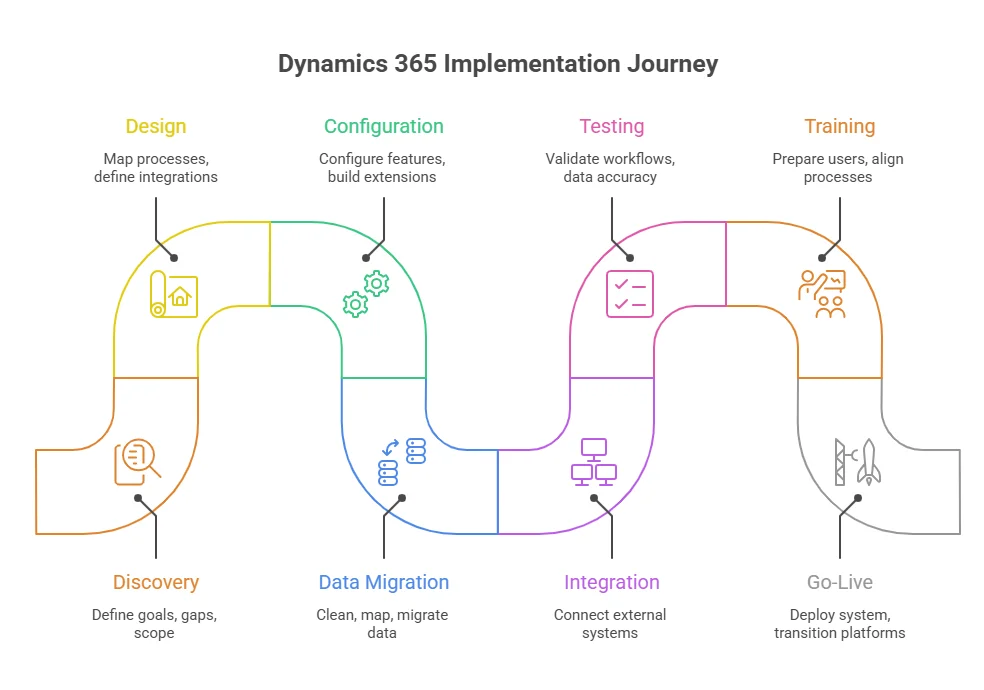
To understand how implementation actually progresses in real environments, it helps to break it down into clear, sequential phases, even though execution is rarely strictly linear.
 1. Discovery and assessment
Define business goals, system gaps, and implementation scope. Most cost and timeline assumptions are set at this stage.
2. Solution design and architecture
Map business processes to Microsoft Dynamics 365 modules, define integrations, and design the data model.
3. Configuration and customization
Configure standard features and build extensions where required. Scope expansion typically starts here if not controlled.
4. Data migration
Clean, map, and migrate legacy data. This is often the most time-consuming and error-prone phase.
5. Integration development
Connect external systems such as payroll, banking, logistics, and CRM platforms. Complexity often increases during testing.
6. Testing (UAT and system validation)
Validate workflows, integrations, and data accuracy. Most design gaps are identified at this stage.
7. Training and change management
Prepare users and align processes. Adoption success is largely determined here.
8. Go-live and cutover
Deploy the system and transition from legacy platforms. Execution quality impacts early stability
9. Post-go-live support (hypercare)
Stabilize operations, resolve issues, and optimize performance during the first 30–90 days.
How long does Dynamics 365 implementation realistically take?
Expected vs realistic timeline
Industry benchmarks show a consistent gap between planned and actual delivery timelines. Smaller projects often appear fast in planning but expand during execution.
| Organization Type | Expected Timeline | Realistic Timeline | Key Delay Drivers |
|---|---|---|---|
| SMB / Business Central | 8–12 weeks | 3–6 months | Data cleanup, reporting gaps, training |
| Mid-market multi-module | 3–4 months | 4–9 months | Integration design, UAT rework |
| Enterprise Finance + Supply Chain | 6–9 months | 9–14+ months | Multi-entity complexity, governance delays |
Why timelines slip in real implementations?
In most delayed programs I have observed, the issue is rarely configuration effort. The primary causes are:
- Data migration complexity discovered late in testing cycles
- Integration dependencies with legacy systems or third-party tools
- Slow decision-making from business stakeholders
- Underestimated effort for user acceptance testing
- Reporting and compliance requirements emerging after design freeze
Migration-specific timeline impact (GP and NAV)
Migration from legacy Microsoft systems, such as Dynamics GP or NAV introduces additional complexity that is often underestimated.
From practical rollout patterns:
- Migration is rarely a simple upgrade
- Customizations often need redesign rather than transfer
- Data mapping requires multiple validation cycles
- Legacy integrations frequently break during transition
Microsoft’s own migration guidance emphasizes readiness assessment, environment preparation, replication, and validation steps, all of which extend timelines beyond initial expectations.
Executive decision insight
If I compress everything I’ve seen across Dynamics 365 programs into a single decision lens, it is this:
(from too many disconnected systems trying to synchronize in real time).
(delayed approvals on scope, finance mapping, and reporting definitions).
What is the real cost of Dynamics 365 implementation beyond licensing?
Licensing Reference (Current Pricing)
| Module | User Price / Month |
|---|---|
| Business Central Essentials | $80 |
| Business Central Premium | $110 |
| Dynamics 365 Finance | $210 |
| Dynamics 365 Supply Chain Management | $210 |
| Dynamics 365 Sales Professional | $65 |
| Dynamics 365 Sales Enterprise | $105 |
| Dynamics 365 Sales Premium | $150 |
Implementation Services Cost by Company Size
| Company Size | Directional Implementation Range (Services Only) | Typical Dynamics Pattern |
|---|---|---|
| Small business | $25K–$75K | Business Central, limited integrations |
| Mid-market | $75K–$250K | BC Premium or phased Finance / Sales |
| Large enterprise | $250K–$750K+ | Multi-entity Finance + Supply Chain + CRM |
Where Hidden Costs in Dynamics 365 Implementations Come From
Hidden costs mainly come from data migration, integrations, partner effort, and user adoption rather than licensing.
The breakdown below shows where budgets typically expand beyond initial estimates:
| Cost Layer | What It Includes | Reality Check |
|---|---|---|
| Software licensing | User subscriptions, base/attach licenses | Visible; often anchors the budget discussion |
| Partner consulting | Discovery, design, configuration, PM, testing | Usually the largest cost bucket |
| Data & migration | Cleansing, mapping, ETL, mock loads, validation | Common source of overruns |
| Integrations | APIs, middleware, connectors, monitoring | Consistently underestimated in early scoping |
| Adoption | Training, change management, hypercare | Often underfunded; paid for later through poor utilization |
| Ongoing extras | Support plans, Power Platform, ISV apps, Copilot credits | Can materially increase TCO in year 2–3 |
Platform Cost Structure Comparison (Why Implementation Models Differ)
Different ERP platforms distribute cost differently across licensing and implementation effort. This is why total cost of ownership (TCO) varies significantly even when per-user pricing looks similar on paper.
| Platform | License Signal | Implementation Signal | Cost Shape |
|---|---|---|---|
| Dynamics 365 | BC $80–$110; Finance/SCM $210; Sales $65–$150/user/mo | $30K–$2M | Modular; grows with apps and integrations |
| Oracle NetSuite | Market estimate from ~$99/user/mo + platform fee | $25K–$750K | More packaged for mid-market; modules add up quickly |
| SAP S/4HANA Cloud | Market estimate ~$180/user/mo (public cloud) | $75K–$500K (public cloud) | Standardized public edition; private edition adds flexibility and cost |
Break Down Your Dynamics 365 Implementation Cost Drivers
Map the hidden and visible cost drivers in your Dynamics 365 rollout to reduce overruns during execution.
Check Cost RealityWhy do Dynamics 365 implementations fail in real projects?
Core failure patterns observed in Dynamics 365 projects
Across implementations I have reviewed or observed, failure usually follows five repeatable patterns:
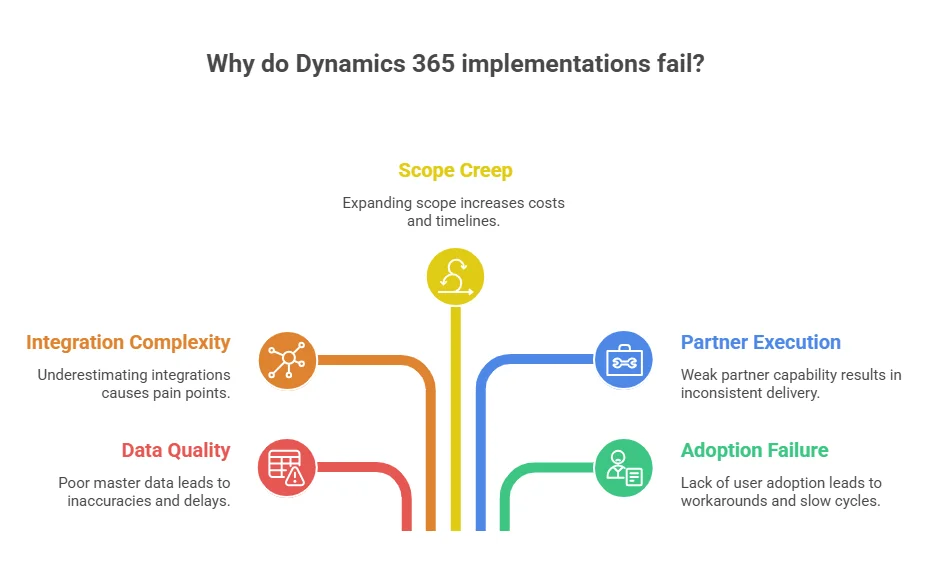
1. Data quality breakdown
Poor master data is the most consistent failure trigger. Duplicate records, inconsistent structures, and missing ownership lead to:
- reporting inaccuracies
- migration delays
- reconciliation issues post go-live
2. Integration underestimation
Most organizations underestimate how many systems actually connect to ERP and CRM.
Typical integration pain points include:
- payroll systems
- banking and finance platforms
- logistics and shipping systems
- CRM and marketing tools
3. Scope creep during execution
ERP projects often expand beyond original scope during testing and validation phases. This leads to:
- extended timelines
- additional cost approval cycles
- redesign of already built processes
In fact, In most cases, scope expansion is one of the most common causes of ERP overruns.
4. Partner execution gaps
Partner capability is often the most underestimated success factor. Weak execution typically shows up as:
- inconsistent delivery methodology
- insufficient industry experience
- over-reliance on junior resources
- lack of structured governance
5. Adoption failure after go-live
Even technically successful deployments fail when users do not adopt the system.
Common symptoms:
- Excel shadow systems reappear
- manual workarounds increase
- reporting confidence drops
- finance cycles slow down
Microsoft explicitly emphasizes continuous training and adoption as part of post-go-live success, but this is often underfunded.
What happens after go-live in Dynamics 365 implementations?
1. Support ticket surge
Immediately after go-live, support requests spike due to:
- Posting errors
- Access issues
- Data mismatches
- Workflow confusion
- Integration delays
Even well-tested systems experience this because real-world usage exposes edge cases that testing cannot fully simulate.
2. Finance and operations stabilization challenges
The first month-end close is often the most critical stress test.
Common issues include:
- Reconciliation delays
- Posting inconsistencies
- Report mismatches
- Dimension or ledger mapping issues
Many finance teams report that the first 1–2 closing cycles take significantly longer than pre-implementation benchmarks.
3. User behavior regression
A pattern I repeatedly observe is partial regression:
- Excel starts reappearing in reporting workflows
- Teams bypass system approvals for speed
- Parallel tracking systems emerge temporarily
This is not resistance alone. It is often a coping mechanism for unfamiliar workflows.
4. System optimization begins
Once stability improves, organizations start identifying:
- Workflow inefficiencies
- Automation opportunities
- Reporting gaps
- Integration refinements
This is where Dynamics 365 starts delivering measurable ROI, but only if adoption has stabilized.
What should a go-live checklist include?
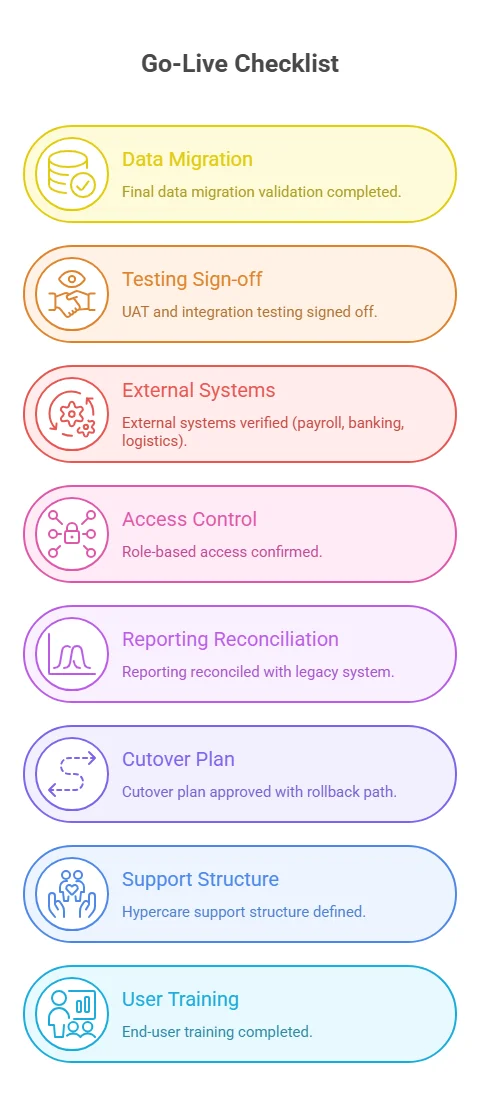
A go-live checklist ensures that Dynamics 365 transitions from project state to operational state without breaking critical business processes.
Core checklist
- Final data migration validation completed
- UAT and integration testing signed off
- External systems verified (payroll, banking, logistics)
- Role-based access confirmed
- Reporting reconciled with legacy system
- Cutover plan approved with rollback path
- Hypercare support structure defined
- End-user training completed
How do you choose the right Dynamics 365 implementation partner?
What a strong implementation partner actually does
A capable partner does more than configuration. They:
- Translate business processes into system design
- Define integration architecture early
- Enforce data governance discipline
- Structure testing and validation cycles
- Guide adoption and change management
- Reduce ambiguity in scope decisions
Weak partners tend to focus only on configuration tasks, which leads to downstream instability.
Partner evaluation checklist
Before selecting a partner, I recommend validating:
- Have they delivered similar industry implementations?
- Do they provide named senior resources or generic teams?
- How do they handle scope boundaries and change requests?
- What is included in testing, UAT, and hypercare?
- How do they approach data migration governance?
- What integration patterns do they use repeatedly?
- What does their post-go-live support model look like?
- How do they handle risk escalation during delivery?
Cost vs capability Insight
A recurring misconception is that lower-cost partners reduce total cost.
In practice:
- Lower upfront cost often increases rework cost
- Weak discovery leads to scope expansion later
- Poor integration design increases post-go-live instability
So, the total cost of ownership is more dependent on partner quality than initial pricing.
Is Dynamics 365 worth the investment for your business?
Where Dynamics 365 delivers strong ROI
- Finance automation and reporting accuracy
- Unified customer and sales visibility
- Supply chain and inventory optimization
- Reduction of siloed systems
- Faster reporting cycles
ERP benchmarks suggest typical 106% ROI within 12–24 months when implementations are properly scoped and adoption is strong.
When it does NOT deliver expected value
- Poor master data discipline
- Fragmented implementation approach
- Weak adoption planning
- Over-customization early in the project
- Lack of executive ownership
In these cases, the system becomes underutilized despite full deployment.
How does Dynamics 365 compare with SAP and NetSuite implementation complexity?
Dynamics 365 sits in a middle position between SAP S/4HANA and Oracle NetSuite in terms of implementation complexity, flexibility, and time-to-value.
The differences are not just technical, but architectural and operational.
Comparison overview
| Platform | Implementation Complexity | Time to Value | Key Tradeoff |
|---|---|---|---|
| Dynamics 365 | Medium–High | 6–14 months | Flexible but integration-heavy |
| SAP S/4HANA | High (enterprise) | 9–18 months | Structured but rigid |
| Oracle NetSuite | Medium | 4–9 months | Faster but less flexible |
Key decision guidance
- Choose Dynamics 365 if your organization is already in the Microsoft ecosystem (Office 365, Azure, Teams), needs both ERP and CRM under one platform, and can support a 6–12 month implementation with internal ownership.
- Choose SAP S/4HANA if you are a large enterprise with deeply complex, multi-national processes that require industry-standard configurations at scale. Be prepared for a longer, more expensive deployment with less flexibility.
- Choose NetSuite if you are a mid-market company (under 200 employees) that needs faster time-to-value, does not require heavy customization, and wants a more preconfigured out-of-the-box experience.
What does the Dynamics 365 community actually say about real implementations?
Across Reddit discussions on Dynamics 365 rollouts, NAV to Business Central migrations, and CRM implementations, the same themes repeat: cost shock, migration complexity, and post-go-live friction.
Cost expectations vs reality
“Received $400K+ quotes for Microsoft CRM — is this normal?”
Most discussions highlight a gap between expected licensing cost and actual implementation spend, especially when integration and partner services are included.
Migrations feel like rebuilds, not upgrades
“It’s closer to a re-implementation than a migration once you factor in customizations.”
NAV and GP to Business Central transitions are repeatedly described as redesign-heavy due to legacy customizations and data structure changes.
Data migration is the biggest pain point
“Data migration is where most projects go wrong.”
Practitioners consistently report that data issues only surface during testing, often forcing redesign of reporting and workflows.
Adoption is weaker than expected after go-live
“Even when everything works, users go back to Excel.”
A recurring pattern is partial adoption, where teams continue parallel processes due to trust and familiarity gaps.
Key community takeaway:
Across threads, the consistent signal is simple: Dynamics 365 challenges are rarely about the product. They are about data readiness, integration depth, and user adoption after go-live.
Final takeaway
A Dynamics 365 implementation succeeds or fails before go-live, based on how well data, processes, ownership, and partner execution are aligned.
Across real-world rollouts, the same pattern appears: budgets strain when decisions rely on licensing alone, timelines slip due to data and integration dependencies, and adoption gaps limit value even when the system works as intended.
Organizations that realize measurable returns from Microsoft Dynamics 365 approach it as an operational shift rather than a software rollout. They phase delivery, prioritize data and integrations early, invest in post-go-live stabilization, and select partners based on execution capability.
Move From Planning to Controlled Execution
Align your Dynamics 365 rollout approach with real implementation constraints across cost, timeline, and adoption.
Start Assessment