 ChatGPT
 Perplexity
 Google AI
Even experienced teams get caught off guard. Flexera’s 2025 report shows 84% of organizations struggle to manage cloud spend, and small projects often exceed expected storage or data transfer costs within six months. Usually, it’s not server costs but compute scaling, bandwidth, logging, and idle resources that drive bills higher than anticipated.
This guide offers a practical AWS pricing overview, including pricing models, Free Tier limits, developer overhead, and cost optimization strategies, giving decision-makers a clear picture of typical baseline spend. It also shows how early expert AWS consulting & guidance can help avoid costly surprises, optimize resources, and make cloud costs more predictable.
AWS Pricing 2026: Quick Overview
| Key Insight | Why It Matters | Example / Approx. Cost* |
|---|---|---|
| AWS pricing is usage-based | You pay only for compute, storage, requests, and data transfer, which can fluctuate with workload | Small SaaS baseline: ~$300–$350/month |
| Multiple pricing models exist | On-Demand, Savings Plans, Reserved, and Spot fit different workloads and commitment levels | Spot can be up to 90% cheaper; Savings Plans ~72% off On-Demand |
| Free Tier has limits | Ideal for testing, POCs, and prototypes; production traffic quickly exceeds free allocations | Lambda: 1M requests/month free; S3: 5 GB free |
| Developer & DevOps costs matter | Infrastructure alone isn’t the full picture; talent costs can double total spend | U.S. DevOps avg: ~$130K/year; Software dev median: ~$133K/year |
| Cost optimization is actionable | Rightsizing, Spot usage, lifecycle policies, and budgeting reduce waste without impacting performance | Optimizing idle EC2 volumes or using CloudFront caching can cut hundreds/month |
*Illustrative estimates based on US East (N. Virginia) pricing; actual costs vary by region, usage, and architecture.
Identify What’s Driving Your AWS Costs
In most cases, it’s not compute, but bandwidth, logging, and underutilized resources. A clear estimate usually reveals where costs drift.
Get Cost EstimateHow does AWS pricing work?
Core Principles:
- Pay-as-you-go: Avoid upfront capital expenditure; pay only for what you use. Ideal for pilots or unpredictable workloads.
- Volume discounts: Services like Amazon S3 and data transfer offer tiered pricing; the more you use, the lower the per-unit cost.
- Commitment-based discounts: Savings Plans and Reserved Instances reward predictable workloads with up to 72% savings over On-Demand pricing.
Operational Nuances:
- Compute billing: EC2 instances are billed per second; Lambda is billed per request and execution duration.
- Storage billing: S3 charges are based on GB-month, storage class, and retrieval patterns.
- Networking costs: Data transfer into AWS is free, but transfer out to the internet, across regions, or cross-AZ often incurs charges.
- Monitoring and observability: Services like CloudWatch and logs can grow silently into significant expenses if not tracked.
Decision-Maker Takeaways:
- Treat AWS pricing as an architecture question rather than a procurement checkbox.
- Understand that a $1 server cost can multiply with data transfer, idle instances, or logging overhead.
- Predictable workloads can leverage Savings Plans; volatile workloads benefit from On-Demand flexibility.
What Are AWS Pricing Models, and When Should You Use Them?
| Model | Definition | Best Use Case | Advantages | Trade-offs |
|---|---|---|---|---|
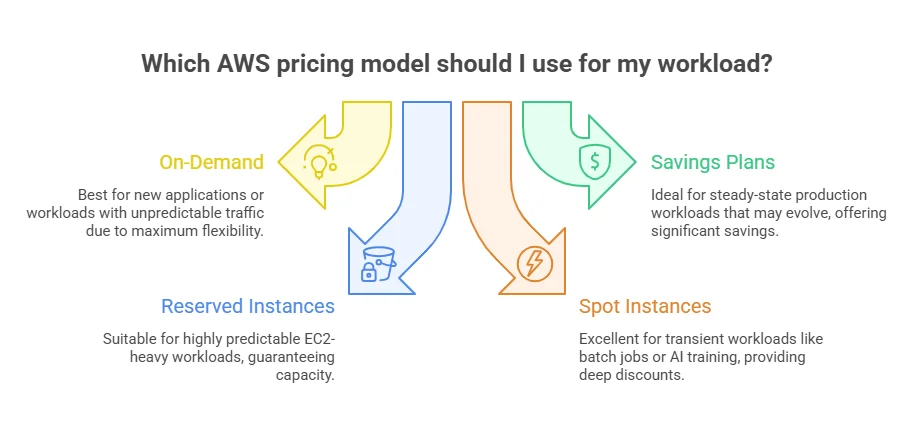
| On-Demand | Pay per second or hour with no long-term commitment | New applications, pilots, or workloads with unpredictable or spiky traffic | Maximum flexibility; no upfront commitment | Highest per-unit cost; convenience premium if used long-term |
| Savings Plans | Commit to a consistent hourly spend (1- or 3-year term) for discounted pricing | Steady-state production workloads that may evolve | Up to 72% savings; applies across regions, instance families, and OS; now includes Database Savings Plans for RDS/Aurora/DynamoDB | Requires commitment; tracking usage is critical |
| Reserved Instances | Commit to specific instance type and region for 1-3 years | Highly predictable EC2-heavy workloads | Up to 72% savings; capacity guaranteed | Less flexible than Savings Plans; harder to shift workloads |
| Spot Instances | Use spare EC2 capacity at deep discounts | Batch jobs, CI/CD, AI/ML training, fault-tolerant workloads | Up to 90% off On-Demand; excellent for transient workloads | Can be interrupted with ~2-minute notice; requires automation for resiliency |
Guidance for Decision-Makers (2026 Perspective)
- New or uncertain workloads: Use On-Demand to test and pilot without overcommitment.
- Stable but evolving workloads: Shift to Savings Plans for flexible, predictable cost control; Database Savings Plans now cover RDS, Aurora, and DynamoDB.
- Highly predictable workloads: Reserved Instances lock in savings when stability outweighs flexibility.
- Interruptible or non-production tasks: Use Spot Instances to cut compute costs for batch jobs or CI/CD pipelines.
“I’ve seen teams, some very experienced, get caught by leaving workloads On-Demand long after the pilot stage. By strategically combining Savings Plans with Spot Instances for batch workloads, we unlocked over $1.4 million in annual savings without impacting reliability.” – Marzia Mura & Umberto Mancini, Cloud & Infrastructure Leads, lastminute.com (2025 case study)
What is included in AWS Free Tier, and when is it enough?
Practical Limits:
- AWS Lambda: 1 million requests/month, 400,000 GB-seconds/month
- Amazon S3: 5 GB free storage for new accounts
- EC2: New free-tier eligible instance types, varies from older 12-month model
When AWS Free Tier is Sufficient:
- Proof-of-concept applications
- Internal demo apps
- Low-traffic API prototypes
- Small serverless workflows
- Learning and testing environments
When AWS Free Tier Isn’t Enough:
- Production environments with predictable traffic
- Persistent or growing data requirements
- Multi-environment deployments
- Observability, monitoring, and backup needs
How much does AWS cost per month?
AWS costs vary by workload size and usage. Small apps typically run $300-$500/month, mid‑market SaaS development workloads $10k-$50k/month, and enterprise deployments $100k+ monthly. Expenses come from compute, storage, data transfer, managed services, and idle resources.
Scenario Breakdown
| Scenario | Monthly Cost Estimate | Why Costs Fluctuate |
|---|---|---|
| Static site / brochure app | S3 storage: $2.30 (100 GB), Internet egress: ~$9 (100 GB) → Total ~$11-$20 | Traffic spikes, CDN choices, log retention |
| Serverless MVP | Lambda compute often negligible under Free Tier; storage and egress dominate | Sudden API usage increases, logging costs |
| Small production SaaS | ALB: $16.43, S3 1TB: $23.55, Internet egress 1TB: $83.16, RDS r5.large: $101.18 → Baseline ~$224+ | Compute scaling, managed DB, monitoring, backups |
| Growth-stage / enterprise app | Multiple environments, HA, cross-AZ traffic → $1,000s–$100,000+ | Architecture complexity, governance gaps, operational overhead |
Key Takeaways for Decision-Makers:
- Compute is not always the highest cost early on. Storage, bandwidth, and monitoring can surpass it quickly.
- AWS pricing is metered; usage patterns and architecture choices directly affect monthly bills.
- Establishing a clear, scenario-based baseline is essential before scaling workloads.
How AWS Costs Vary by Region
Identical AWS services can cost more depending on the region. US East (N. Virginia) is a common baseline, but Europe, Asia Pacific, or South America can be 10-55% higher for compute, managed databases, and data transfer.
| Service | Usage | US East (N. Virginia) | Europe (Frankfurt) | Asia Pacific (Sydney) | Notes |
|---|---|---|---|---|---|
| EC2 t3.medium | 24/7 | $59.90 | $69.12 | $75.36 | ~10-25% higher outside US |
| RDS db.t3.medium | 24/7 | $48.24 | $55.92 | $60.48 | Managed DB fees vary by region |
| S3 Storage | 1 TB | $23.55 | $25.60 | $26.00 | Tiered storage differs slightly |
| S3 Data Transfer Out | 1 TB | $92.16 | $101.38 | $108.00 | Egress-sensitive |
| CloudFront | 1 TB transfer | $87.04 | $87.04 | $87.04 | Mostly global pricing |
What is the real cost of AWS, including developer costs?
The real cost of AWS often exceeds $130K-$133K/year per engineer, because talent, developers, DevOps, and cloud architects, typically outweighs raw compute and storage expenses. Infrastructure costs are only part of the story.
Cost Comparison Table:
| Approach | Infrastructure Spend | Talent / Management Cost | Best Fit |
|---|---|---|---|
| Founder-led startup | Low | Hidden cost in rework, slow delivery | MVPs, experiments |
| In-house DevOps + engineering | Optimizable | High fixed payroll; strong long-term capability | Product companies scaling internally |
| Consulting / managed support | Variable | Lower waste if architecture optimized fast | Migrations, audits, short timelines, cost rescue |
| Hybrid model | Balanced | Smaller internal team plus targeted experts | Mid-market firms balancing flexibility and cost |
Executive Insight:
- Include fully loaded personnel costs in AWS budgeting, not just the invoice.
- Consulting can reduce operational risk and accelerate optimization, especially for SMBs and enterprises. Flexera reports 48% of SMBs and 62% of enterprises use managed service providers for public cloud management.
- Even at the early stages, choosing the right 7 Rs AWS migration strategy can prevent unexpected costs as your workload scales beyond the Free Tier.
Plan AWS Costs Before You Scale
Early decisions around architecture and pricing models often define long-term spend efficiency.
Plan My CostsAWS Hidden Costs and What Drives Your Bills
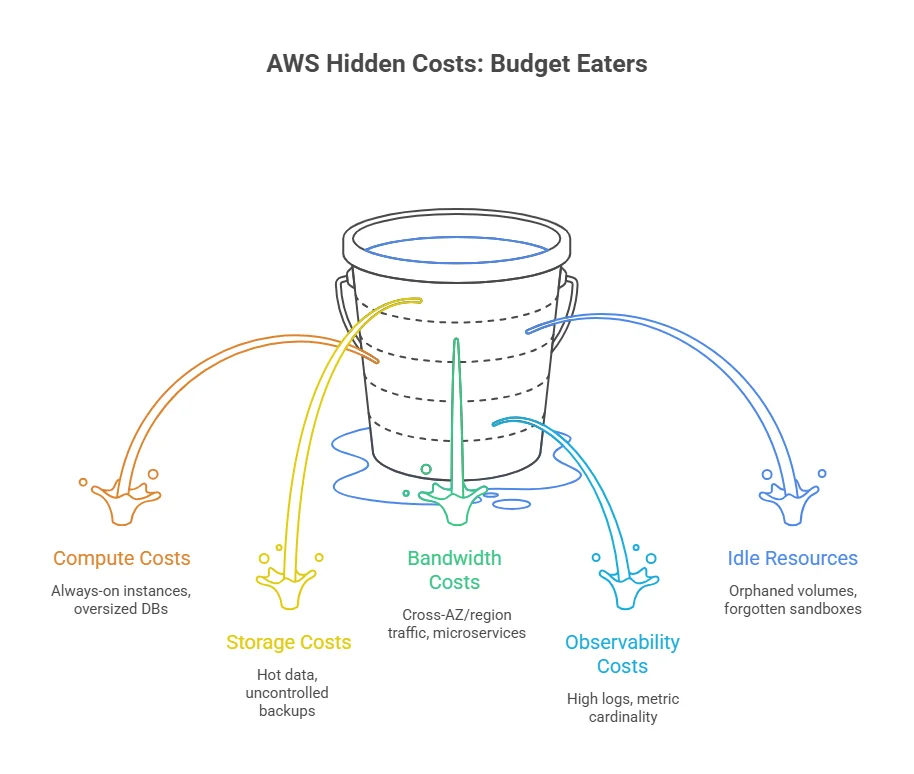
AWS invoices rarely show the full picture. Beyond compute and storage, “invisible” costs can quietly eat 20-30% of your budget. Even a $1k bill can hide hundreds in unexpected costs if idle resources, logging, or cross-region traffic aren’t managed.
| Hidden Cost | Example / Impact | Mitigation |
|---|---|---|
| Compute | Always-on EC2 instances, oversized DBs, idle environments | Rightsize instances, terminate unused servers, schedule auto-scaling |
| Storage | Hot data in premium tiers, uncontrolled backups, RDS snapshots | Use S3 Intelligent-Tiering, lifecycle policies, move old snapshots to Glacier |
| Bandwidth | Cross-AZ or cross-region traffic, microservices across regions | Plan network topology, consolidate regions, optimize data transfer |
| Observability | CloudWatch logs, high metric cardinality, excessive tracing | Set retention, sampling, and filters; monitor usage growth |
| Idle Resources | Orphaned EBS volumes, stopped instances, forgotten sandboxes | Regular audits, automated cleanup scripts, enforce tagging policies |
How can you estimate AWS costs before deployment?
Before launching a single instance or Lambda function, use the AWS Pricing Calculator to forecast costs transparently. Estimation prevents “bill shock” and allows leadership to plan staffing and architecture with precision.
Step-by-Step Cost Estimation Workflow:
- List All Services: Include compute, storage, database, networking, observability, and managed services. Don’t just focus on headline services like EC2 or RDS.
- Add Expected Usage: Specify anticipated compute hours, storage volume, request count, and internet egress.
- Create Growth Scenarios: Model both initial launch and growth months to anticipate scaling costs.
- Compare Pricing Models: Evaluate On-Demand, Savings Plans, and Reserved Instances for predictable workloads.
- Set Budgets & Alerts: Use AWS Budgets to trigger notifications when costs exceed thresholds.
- Validate & Export: Export estimates to CSV, PDF, or JSON for cross-team review.
What Are the Best AWS Cost Optimization Strategies?
The best AWS cost optimization strategies start with rightsizing compute, eliminating idle resources, and aligning workloads to Savings Plans, Reserved, or Spot instances, embedding cost control into architecture from day one.
Reactive fixes after high bills aren’t enough; multi-AZ setups, AI workloads, and growing data can drive 29% waste in IaaS/PaaS, quietly subsidizing competitors’ innovation.
Executive Checklist:
- Rightsize compute: Terminate or resize idle EC2 and other resources; overprovisioning is the #1 waste driver.
- Eliminate idle resources: Unattached EBS volumes, test/dev instances, snapshots, and NAT gateways.
- Commit stable workloads: Savings Plans or Reserved Instances reduce costs; Database Savings Plans can save up to 35% on RDS/Aurora/DynamoDB.
- Leverage Spot Instances: 70-90% savings for batch, CI/CD, or fault-tolerant tasks.
- Optimize storage & lifecycle: Use S3 Intelligent-Tiering, Glacier, and auto-archiving.
- Minimize egress: Plan cross-AZ/cross-region traffic; data transfer can dominate costs.
- Set budgets & alerts: AI-powered forecasts prevent surprise bills.
- Tag everything: Enables accountability per project, team, or workload.
- Control logging & monitoring: Set retention and sampling early to avoid runaway costs.
What do developers say about AWS pricing challenges?
Developer discussions on Reddit, Stack Overflow, and internal forums consistently highlight three recurring themes:
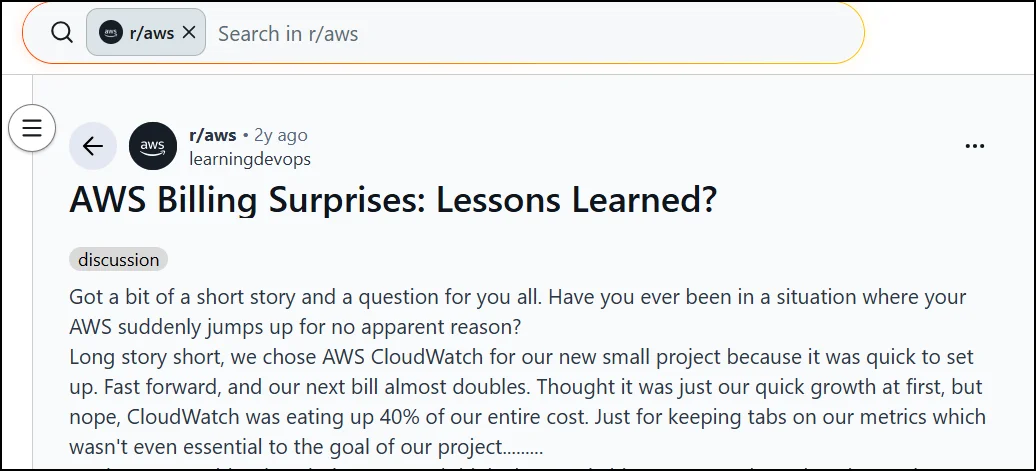
“CloudWatch was eating up 40% of our entire cost.”
This is a classic example of how monitoring and logging costs can spiral when debug-level logging or excessive custom metrics are left unchecked.
This highlights a frequent hidden cost in multi-AZ architectures, especially with load balancers or microservices that don’t optimize for same-AZ traffic.
Practitioner Insight:
Even technically skilled teams can see AWS bills grow unexpectedly without structured oversight. At AppVerticals, we:
- Audit resource usage across environments, uncovering idle EC2 instances, orphaned EBS volumes, and underused snapshots.
- Align workloads with the right pricing models, combining Savings Plans for stable workloads and Spot Instances for batch or CI/CD jobs.
- Set up tagging and governance, giving teams visibility into which projects, apps, or environments drive costs.
- Optimize monitoring & logging, configuring CloudWatch retention and sampling to prevent runaway charges.
- Deliver measurable impact in multi-environment and mixed workloads, these steps typically reduce AWS spend by 25-35% within months while improving operational control.
When Should Businesses Consider AWS Consulting Services?
Not every AWS deployment requires external help, but engaging consulting experts can accelerate efficiency, reduce risk, and optimize costs when workloads are critical, complex, or growing rapidly.
When to Engage Experts
- Migration speed matters: Avoid costly re-architecting or repeated trial-and-error.
- Rising bills with unclear drivers: Quickly uncover inefficiencies in compute, storage, or data transfer.
- Internal expertise gaps: Strong product engineers may lack dedicated FinOps or cloud governance experience.
- High business impact of downtime or compliance risks: Minimize operational and financial exposure.
- Optimizing Savings Plans or Reserved Instances: Confidently capture discounts without overcommitment.
Build vs Hire vs Consult
| Option | When It Works | Trade-Off |
|---|---|---|
| Build in-house | Small, controlled workloads; internal expertise available | Longer learning curve; slower optimization |
| Hire full-time | Steady-state production with ongoing cloud growth | High payroll cost; may underutilize expertise |
| Consult / MSP | Fast migrations, audits, cost optimization, or short-term expertise | Variable cost; requires external coordination |
Final Thoughts: Making AWS Cloud Costs Predictable and Manageable
AWS costs are flexible but can quickly grow without careful workload planning and optimization. Rightsizing, Savings Plans, tagging, and monitoring can cut spend by 30-50% while maintaining performance.
At AppVerticals, I’ve seen how early guidance and structured cost management help organizations save money, improve visibility, and scale confidently. Treating cost optimization as part of every cloud decision turns AWS from a variable expense into a predictable platform for growth.
Make AWS Cost Decisions With More Certainty
From pricing models to architecture, small decisions can have long-term financial impact.
Review My Decisions